low beam MERCEDES-BENZ S-CLASS COUPE 2017 Owners Manual
[x] Cancel search | Manufacturer: MERCEDES-BENZ, Model Year: 2017, Model line: S-CLASS COUPE, Model: MERCEDES-BENZ S-CLASS COUPE 2017Pages: 533, PDF Size: 10.75 MB
Page 12 of 533
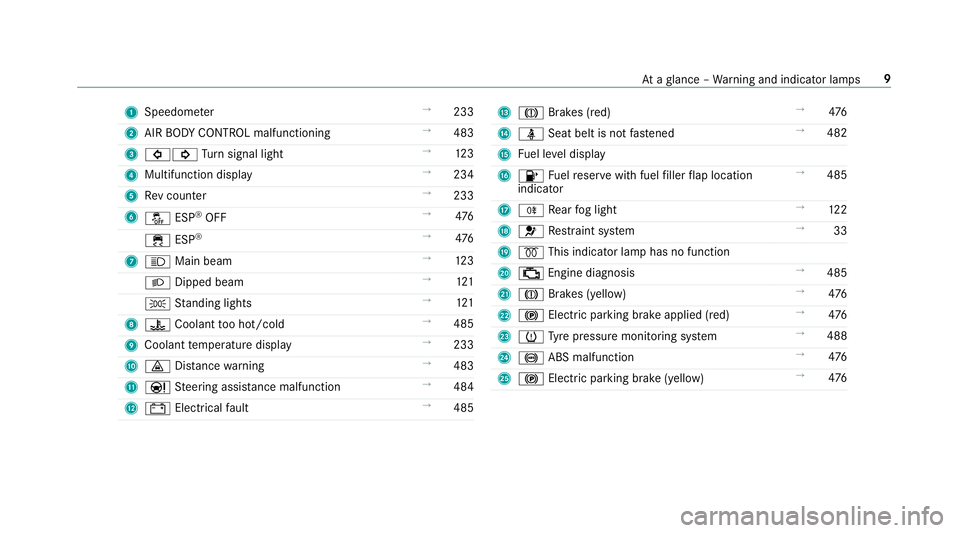
1
Speedom eter →
233
2 AIR BODY CONTROL malfunctioning →
483
3 #! Turn signal light →
12 3
4 Multifunction display →
234
5 Revc ounter →
233
6 å ESP®
OFF →
476
÷ ESP®
→
476
7 K Main beam →
12 3
L Dippe dbeam →
121
T Standing lights →
121
8 ? Coolan ttoo hot/cold →
485
9 Coolant temp eratur edisplay →
233
A · Distance warning →
483
B Ð Steering assis tance malfunction →
484
C # Electrica lfault →
485 D
J Brakes (red) →
476
E ü Seatbelti sn otfastened →
482
F Fuel le veld isplay
G 8 Fuelreser vewit hfuel filler flap location
indicator →
485
H R Rear fogl ight →
12 2
I 6 Restra int sy stem →
33
J % This indicator lam phas no function
K ; Engine diagnosis →
485
L J Brakes (yellow) →
476
M ! Electric pa rking brak eapplied (red) →
476
N h Tyre pressur emonitoring sy stem →
488
O ! ABS malfunction →
476
P ! Electric pa rking brak e(yellow) →
476 At
ag lanc e–W arning and indicator lamps 9
Page 125 of 533
Ac
tivating/deactivatin gthe hazardw arning
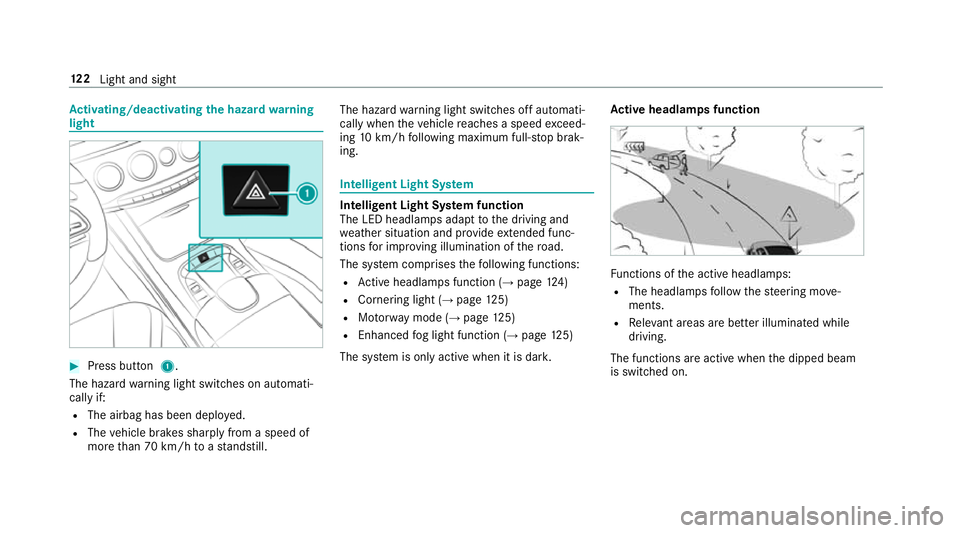
light #
Press but ton1.
The hazar dwarning light switches on automati‐
call yif:
R The airbag has been deplo yed.
R The vehicle brakes sharply from aspeed of
mor ethan 70 km/h toas tandstill. The hazar
dwarning light switches of fautomati‐
call ywhen thev ehicle reaches aspee dexceed‐
ing 10km/h following maximum full-s topb rak‐
ing. Intelligent Light Sy
stem Intelligent Light Sy
stem function
The LE Dheadlamps adap ttothe driving and
we ather situatio nand pr ovide extende dfunc‐
tions fori mp roving illumination of ther oad.
The sy stem comprises thef ollowing functions:
R Activeh eadlamps function (→ page 124)
R Cor nering light (→ page 125)
R Motorw ay mode (→ page125)
R Enhanced fogl ight function (→ page125)
The sy stem is onl yactiv ewhen it is dar k. Ac
tiv eh eadlamps function Fu
nctions of thea ctiv eheadlamps:
R The headlamps follo wt he steering mo ve‐
ments.
R Releva nt area sarebetter illumina tedw hile
driving.
The function sareactiv ewhen thed ipped beam
is switched on. 12 2
Light and sight
Page 127 of 533
Multimedia sy
stem:
, Vehicle .
÷ Light settings .
Intell.
Light System #
Activate Oor deacti vate ª thef unction. Ad
aptiv eHighbeam Assis tPlus Ad
aptiv eHighbeam Assis tPlus function &
WARNING Risk of accident despi te
Ad aptiv eHighbeam Assis tPlus
Ad aptiv eHighbeam Assis tPlus does no trec‐
ognise thef ollowing road users:
R Road user swithout lights, e.g .pedes‐
trians
R Road user swithp oor lighting ,e.g.
cyclists
R Road user swhos elighting is obstructed,
e.g .bya barrier
On very rare occasions, Adaptiv eHighbeam
Assis tPlus ma yfail torecognise other road
user sthat ha velights, or ma yrecognise
th em tool ate. In
this, or in similar situations ,the automatic
main beam will no tbedeactivated or will be
activated despit ethe presence of other road
users. #
Alw ayso bser vethet raffic carefull yand
switc hoffthem ain beam in good time. Sy
stem limitations
Ad aptiv eHighbeam Assis tPlus canno ttak ei nto
account road, weather or traf ficc onditions.
De tection ma yberestricted if:
R Visibility is impaired, fore xamp le in fog,
heavy rain or sno w.
R Ther eisd irtont he sensor sorthe sensors
ar eo bscured.
Ad aptiv eHighbeam Assis tPlus is on lyan aid.
Yo ua re re sponsible fora dju sting thev ehicle's
lighting tothep reva ilin glight ,visibilit yand traf‐
fi cc onditions. Ad
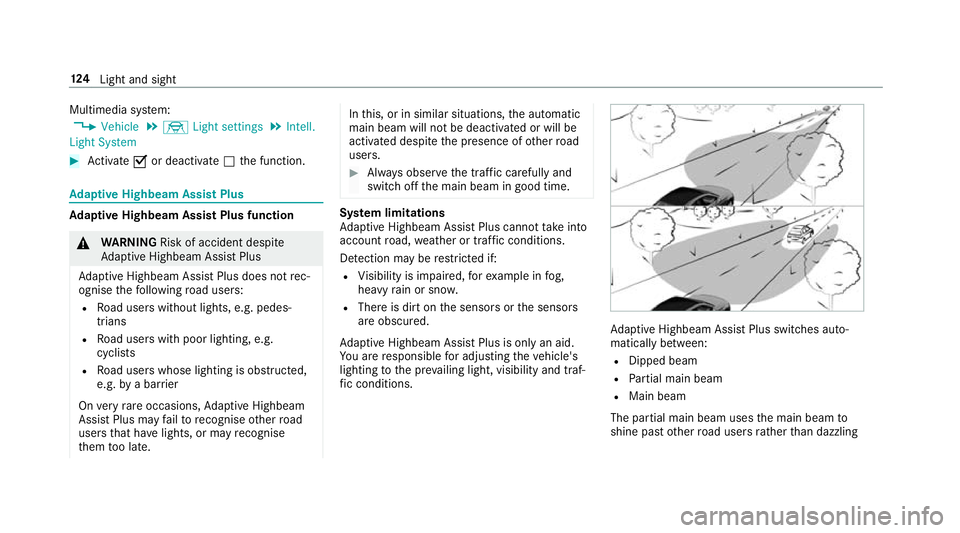
aptiv eHighbeam Assis tPlus swit ches auto‐
maticall ybetwe en:
R Dipped beam
R Partial main beam
R Main beam
The partial main beam uses them ain beam to
shine pas tother road user srather than dazzling 124
Light and sight
Page 499 of 533
Dashboa
rdlighting
see Instrument lighting
Data acquisition Vehicle ................................................... 27
Data import/export Function/no tes. .................................. 269
Importing/exporting ........................... 269
Date Settingt he time and dat eautomati‐
call y..................................................... 263
Deactivating the alar m(ATA ) .................... 85
Declaration of conformity Electromagn etic compatibilit y............... 22
Jac k. ...................................................... 22
TIREFIT kit ............................................. 23
Wi reless vehicle components. ...............22
Designs Men u(on-boar dcompu ter) .................. 239
Destination .............................................. 290
Editing intermediat edestinations ........ 281
Editing thel astd estinations ................2 91
External ............................................... 291
Savin g(current vehicle position) ......... 290 Saving as
global favo urit e................... .291
St oring amap position ........................ 290
Using intelligent destination sugges‐
tions ....................................................2 91
Destination ent ry............................ 277,279
Enter geo-coordinates .........................2 82
Entering aPOI or add ress .................... 277
Entering an intermedia tedestination .. 280
Selecting acontact .............................. 281
Selecting aPOI .................................... 279
Selecting from them ap ....................... 282
Selecting pr evious destination s........... 279
De tectin ginat tentiveness
see ATTENTION ASSIST
Diagnostics connection ............................25
Digita lCar Keys ticker
St artin gthe vehicle ............................. 14 8
Digita lOwner's Manual ............................ .18
Digita lspe edome ter............................... 234
Digita lTV
see TV
Dipped beam Activating/deactivating ........................ 11 9Setting .................................................
12 5
Setting fora broad ................................ 11 9
DIRECT SELECT le ver............................... 15 6
Engaging driv eposit ion. ...................... 15 8
Engaging pa rkposition automaticall y..1 57
Engaging reve rseg ear ........................ .157
Fu nctio n.............................................. 15 6
Selecting pa rkposition ........................ 157
Shifting toneutral ................................ 157
Display Care..................................................... 371
Displa y(mu ltimedi asystem)
No tes. .................................................. 254
Settings ............................................... 262
Displa y(on-board computer)
Displa ysinthem ultifunction displa y... 232
Displa ymessage .....................................4 28
Calling up (on-boa rdcompu ter) .......... .428
No tes. ................................................. 428
Displa ymessages
C ................................................... 468
M ................................................... 468
N ................................................... 469 496
Index