sat nav MERCEDES-BENZ S-CLASS COUPE 2017 Owners Manual
[x] Cancel search | Manufacturer: MERCEDES-BENZ, Model Year: 2017, Model line: S-CLASS COUPE, Model: MERCEDES-BENZ S-CLASS COUPE 2017Pages: 533, PDF Size: 10.75 MB
Page 31 of 533
eral acceleration
,displa yoft hefast ened seat
belts)
R malfunctions or defectsini mportant sy stem
components (e.g. lights, brakes)
R information on vehicle damag eevents
R system reaction sinspecial drivin gsituations
(e.g. airbag deployment, inter ventio nofs ta‐
bilit ycontrol sy stems)
R ambient conditions (e.g. temp erature, rain
sensor)
In addition toprov iding thea ctual control unit
function ,this dat aassists them anufacturer in
de tecting and rectifying faults and optimising
ve hicle functions. The majority of this dat ais
te mp orar yand is onl yprocessed in thev ehicle
itself. Onl yasmall portion of thed ataiss tored
in thee vent or fault memor y.
When your vehicle is serviced, tech nica ldata
from thev ehicle can be read out byservice net‐
wo rkemplo yees or thirdp arties .Services
include repair services, maintenanc eprocesses,
wa rrant yevents and qualit yassurance meas‐
ures, fore xamp le. The read out is per form ed via
th el egall yprescribed por tfor OBD ("on-board diagnostics"
)inthevehicle. The respective
service networ klocations or thirdp arties col‐
lect ,proces sand use thed ata. The ydocument
te ch nica lstatuses of thev ehicle, assis tinfind‐
in gf aults and impr oving qualit yand ar etrans‐
mit tedtot he manufacturer ,ifnecessar y.Fu r‐
th ermore, them anufacturer is subject toprod‐
uct liability .For this, them anufacturer requ ires
te ch nica ldataf romv ehicles.
Fa ult memories in thev ehicle can be rese tbya
service outle taspartofr epair or maintenance
wo rk.
The ycan enter dat aintot he vehicle's con veni‐
ence and inf otainment function sthemselves as
par toft he selected equipment.
This includes, fore xamp le:
R multimedia dat asuchasm usic,films or pho‐
to sf or playbac kinanintegrated multimedia
sy stem
R address book dat afor use in connection with
an integrated hands-free sy stem or an inte‐
grated navigation sy stem
R entered navigation destinations
R dataabout theu se of Interne tservices This dat
acan be stored locally in thev ehicle or
is located on adevice whic hyou ha veconnected
to thev ehicle. If this dat aisstore dint hevehi‐
cle, youc an dele teit at an ytime. This dat acan
onl ybet ransmit tedtot hirdp arties upon your
re qu estw ithp articular rega rd tothes cope of
use of online services according to your selected
settings.
Yo uc an stor eorc hangeconvenience settings/
individualisations in thev ehicle at an ytime.
Depending on thee quipment, this includes, for
ex ample:
R seat and steering wheel position settings
R suspension and climat econtrol settings
R individualisations suc hasinterior lighting
If yo ur vehicle is accordingly equipped,y ou can
connect your smartphon eoranother mobile end
device tothev ehicle. Youc an cont rolthem via
th ec ontrol element sintegrated in your vehicle.
Images and audiof romt he smartphone can be
output via them ultimedia sy stem. Cer tain infor‐
matio nissimultaneousl ytransmit tedtoy our
smartphone. 28
General no tes
Page 243 of 533
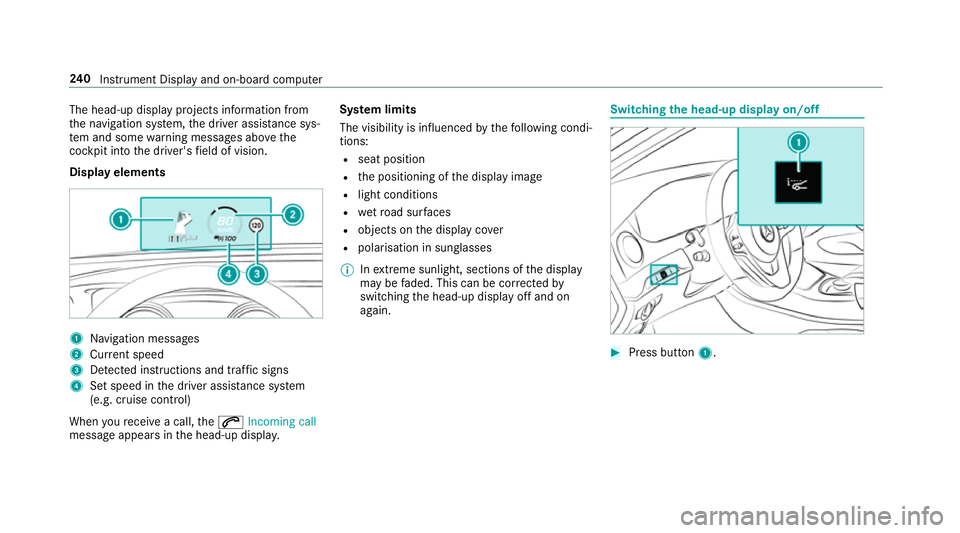
The head-up displa
yprojectsi nformation from
th en avigation sy stem, thed rive ra ssis tance sys‐
te ma nd some warning messages abo vethe
cockpit int othe driver's field of vision.
Displa yelements 1
Navigation messa ges
2 Current speed
3 Detected instructions and traf fics igns
4 Setspeed in thed rive ra ssis tance sy stem
(e.g. cruise control)
When your eceiv eacall,the 6 Incoming call
messag eappear sinthe head-up displa y.Sy
stem limits
The visibility is influenced bythef ollowing condi‐
tions:
R seat position
R thep ositioning of thed ispla yimage
R light conditions
R wetroad sur faces
R objects on thed ispla ycover
R polarisation in sunglasses
% Inextreme sunlight, sections of thed isplay
ma ybef aded. This can be cor rected by
switching theh ead-up displa yoffand on
again. Switching
theh ead-up displa yon/off #
Press button 1. 240
Instrument Displa yand on-boar dcomputer
Page 274 of 533
R
settings in theTVt uner's channel list
R Navigation and traf fici nformation
The settings di ffer depending on thev ehicle
equipment.
Importing/exporting user profiles
Requ irements:
R Ther eisanI nternetconnection .
R AM ercedes me account exists at http://
www.me rcedes.me.
R The Personalisation service is active.
Multimedia sy stem:
, System .
g Personalisation .
Man-
ual export/import
This function is no tavailable in all countries.
On lyindividual profiles can be impor tedor
ex por ted.
The individual profiles ar ealway sc ollectively
impor tedore xported. #
Impor t:select Import profiles from the
server.
The The profile import overwrites the exist-
ing profiles. Do you want to continue? mes‐
sag eappears. #
Select Yes.
Use rprofile sa reimpor ted. #
Expor t:select Export profiles to the server.
User profiles ar eexpo rted.
% Certain settings ,suc hasa ddress book
ent ries or pr evious destination sfromt he
navigation sy stem, ar enot ex ported.
Setting user profile options
Multimedia sy stem:
, System .
g Personalisation #
Highlight aprofile. #
Select ¥options.
The following option sareavailable:
R Rename
R Delete
R Reset %
The gues tprofile canno tbedeletedor
re named. So
ftwa reupdate Information on softwar
eupdates
The multimedi asystemp rovide sam essage
when an updat eisavailable.
Dependin gonthe source, youc an per form vari‐
ous updates:
Softwar eupdate Source of
the
update Up
dat etype
Interne tN avigation map, sys‐
te mu pdates, Digital
Owner's Manual
External storage
medium, e.g. USB
fl ash drive Na
vigation maps Softwar
eupdates ensur eyour vehicle's tech nol‐
ogy is al ways up-to-date. Multimedia sy
stem 271
Page 299 of 533
•Tof
ilterthed ispla yofP OIs in thev icinity
according toPOI category
5 Switches thed ispla yofp ersonal POI sym‐
bols on them ap on or off
6 Switches one of thef ollowing displa yson or
of fd epending on thee quipment:
•W eather information
•S atellit emap
•T raffic incidents
7 Switche sthe tra ffic map displa yonoro ff
The map and satellit eimages ar eshown in globe
projection. This allo wsforar ealistic map display
in all map scales. The map uses ele vatio nm odel‐
ling.
Depending on them ap data, impor tant buildings
in ma nycities ar edepicted realisticall yonthe
map in small map scales (20m,50m ). Other
buildings ar eshown as models.
% Youc an se tthe unit of measurement of the
map scale (→ page268).
If online information is available, fuel price sand
th ea vailabilit yofparkingspaces in multi-s torey
car pa rksa redispla yed, fore xamp le. %
Requirements:
R Youh ave aMercedes me account.
R The servic ehas been activated at a
Mercedes-Ben zServic eCentre.
Fu rther information can be found at :http://
www.mercedes.me
If Display in COMAND is activated inTraf ficS ign
Assi st (→pag e222) ,speed limits and overtak‐
ing restrictions ar edispl ay ed on them ap.
% Compan ylogos displa yedont he map are
trademar ksofther espectiv ecompanies and
used solely fort he purpose of indicating the
locations of these companies. The use of
suc hlogos on them ap does no tindicate
appr oval of, suppo rtof or advertising by
th ese companies fort he navigation sy stem
itself.
Setting them apscale
Re quirements:
R The map is shown. Multimedia sy
stem:
, Navigation #
Tozoo min:swipe down on theT ouc hCon‐
trol.
or #
Turn thec ontroller anti-clockwise.
or #
Movetwof inger saparton thet ouchpad. #
Tozoo mo ut:swipe up on theT ouc hControl.
or #
Turn thec ontroller clockwise.
or #
Movetwof inger stogether on thet ouchpad.
% Youc an se tthe unit of measurement of the
map scale (→ page268). 296
Multimedi asystem
Page 300 of 533

Moving
them ap
Multimedia sy stem:
, Navigation .
Z Options .
Map
menu #
Alternatively: if them ap is displa yedinf ull
screen mode, press theT ouc hControl, the
controller or thet ouchpad.
The map menu appears. #
Select "mo vemap" in map menu 2
(→ pag e295). #
Swipe in an ydirection on theT ouc hControl
or touchpad.
or #
Slid ethe controller in an ydirection.
The map mo vesint he cor responding direc‐
tion under thec rosshair .The fur ther you
mo veyour finger away from thes tarti ngposi‐
tio nont hetouchpad, thef astert he map
mo ves. Selecting
them aporientation
Multimedia sy stem:
, Navigation .
Z Options .
Map
menu #
Alternatively: if them ap is displa yedinf ull
screen mode, press theT ouc hControl or the
to uchpad.
The map men uappears. #
In map menu 3,select N,2D or
3D( →pag e295).
R N:t he 2D map vie wisdisplayedsot hat
nor this alw aysatt hetop.
R 2D:t he 2D map vie wisaligned tothe
direction of tra vel.
R 3D:t he 3D map vie wisaligned tothe
direction of tra vel.
Selecting POI symbols
Multimedia sy stem:
, Navigation .
Z Options .
Map con-
tent
POIs include filling stations and ho tels whic hcan
be displa yedass ymbols on them ap,fore xam‐
ple. Notall POI sareavailable everywhere. #
Select POI symbols .
The #do tindicates thec urrent setting.
Standard displayss ymbols of predefined cat‐
egories on them ap.
User defined allowsyoutop ersonall yselect
th es ymbols fort he available categories.
None switches thed ispla yoff. #
Select asetting. #
User defined:s elect categories.
The POI symbols of thes elected categories
ar ed ispla yedOor no tdispla yedª.
Selecting text information
Multimedia sy stem:
, Navigation .
Z Options .
Text
information #
Select text information.
Current street showsthes tree tyou ar ecur‐
re ntly driving on at theb otto moft he displa y.
When them ap is mo ved, thef ollowing infor‐
mation appear sunder thec rosshair:
R stre et name
R POI name Multimedia sy
stem 297
Page 301 of 533
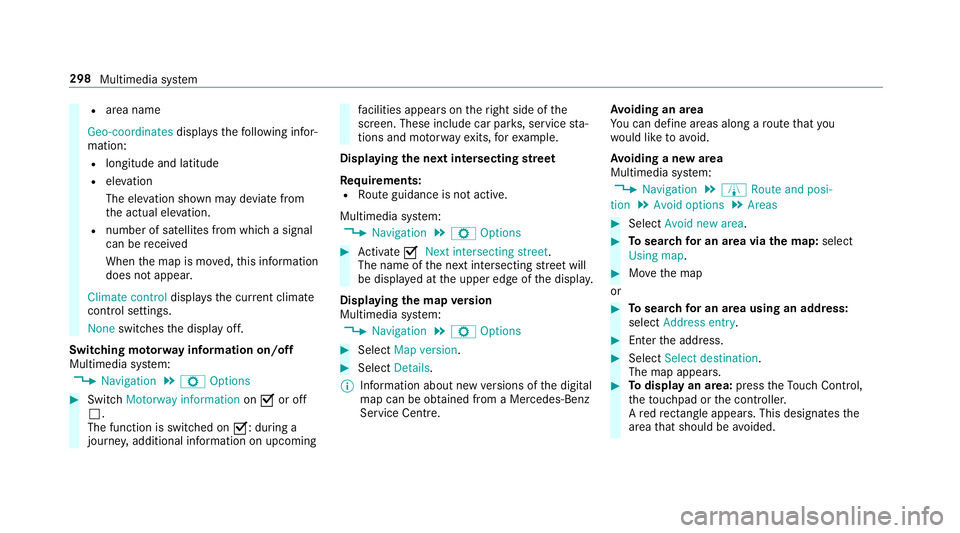
R
area name
Geo-coordinates displays thefollowing infor‐
mation:
R longitude and latitude
R elevation
The el evatio nshown ma ydeviat ef rom
th ea ctual ele vation.
R numbe rofsatellitesf romw hichas ignal
can be recei ved
When them ap is mo ved, this information
does no tappear.
Climate control displays thecurrent climate
control settings.
None switches thed ispla yoff.
Switching mo torw ay information on/off
Multimedia sy stem:
, Navigation .
Z Options #
Switch Motorway information onO or off
ª.
The function is switched on O:during a
journe y,additional information on upcoming fa
cilities appea rson ther ight side of the
screen. These include car par ks,s ervice sta‐
tions and mo torw ay ex its,fore xamp le.
Displ aying then extintersectin gstreet
Re quirements:
R Routeg uidance is no tactive.
Multimedia sy stem:
, Navigation .
Z Options #
Activate ONext intersecting street .
The nam eofthe next intersecting stre et will
be displa yedatt he upper edg eofthe displa y.
Displaying them apversion
Multimedia sy stem:
, Navigation .
Z Options #
Select Map version . #
Select Details.
% Information about ne wversions of thed igital
map can be obtained from aMercedes-Benz
Service Centre. Av
oiding an area
Yo uc an define areas alon garoutethat you
wo uld lik etoavoid.
Av oiding anew area
Multimedia sy stem:
, Navigation .
À Route and posi-
tion .
Avoid options .
Areas #
Select Avoid new area. #
Tosear chforana reav iathe map: select
Using map. #
Movethem ap
or #
Tosear chforana reau sing an address:
select Addres sentry . #
Enter thea ddress. #
Select Select destination.
The map appears. #
Todispl ayan area: presstheT ouc hControl,
th et ouchpad or thec ontroller.
Ar ed rectangle appea rs.T hisd esignates the
area that shoul dbeavoided. 298
Multimedia sy stem
Page 303 of 533
Online map update
%
The online map updat eservice is no tavaila‐
ble in all countries.
The online map updat eservic efromM ercedes
me connec tcan be used toupdat emap data.
The following updates ar eavailable:
R thea utomatic map updat eupdates map data
fo ro ne region.
R them anual map updat eupdates map data
fo rs everal or all regions.
The service mus tbeactivated at aMercedes-
Benz Service Centr einorder touse automatic
updates.
Fu rther information on theo nline map update
http://www.mercedes.me.
Fu rther information on updates: http://
manuals.daimle r.com/baix/cars/connectme/
de_DE/index.html.
In fo rm ation on map data
Yo ur vehicle is supplied wit hmap dat aatthefac‐
to ry.D epending on thec ount ry,m ap dat afor
yo ur region is either pre-ins talled or them ap dat
aiss upplied on adatas torage medium. Yo u
do no trequir eana ctivation code fort he map
dat aw hichisp rovide dwithy our vehicle.
If th em ap dat aonyourvehicle has been ins tal‐
led at thef actor yand youw ish toreins tall it, you
do no tneed toenter thea ctivation code.
An activation code is requ ired forp urchased
map data.
Obser vethef ollowing no tes:
R The activation code can be used foro ne vehi‐
cle
R The activation code is no ttransferable
R The activation code has six digits
In thee vent of thef ollowing problems, please
contact aMercedes-Benz Service Centre:
R The multimedi asystemd oes no taccep tthe
activation code
R Youh ave lostthe activation code Displaying
thec ompass
Multimedia sy stem:
, Navigation .
À Route and position #
Select Compass.
The compass displa yshows thef ollowing
information:
R thec urrent di rection of tr avelwithb ear‐
ing (360 deg reef ormat) and compass
direction
R longitude and latitudec oordinates in
degrees, minutes and seconds
R height (rounded)
R number of GPS satellites from whic ha
signal can be recei ved
Displaying Qibla
Requ irements:
R theQ ibla displa yisavailable in your count ry. 300
Multimedia sy stem
Page 304 of 533
Multimedia sy
stem:
, Navigation .
À Route and position #
Select Qibla.
The ar rowonthec ompass sho wsthed irec‐
tion of pr ayer toMecca in relation tothec ur‐
re nt di rection of tr avel.
The number of satellites recei vediss hown.
Setting them apscale automatically
Multimedia sy stem:
, Navigation .
Z Options
The map scale is se tautomaticall ydepending on
yo ur drivin gspeed.
Fo rjourne ysin cities wit hdetailed cit ymodels ,a
map vie wfromt he driver's perspectiv eisused. #
Switch Auto zoom onO or off ª.
% The automaticall yselected map scale can be
ch anged manuall yfor as hor ttime. The set‐
ting is rese ta utomatically af teraf ewsec‐
onds. Displaying
thes atellit emap
Multimedia sy stem:
, Navigation .
Z Options .
Map con-
tent #
Switch Satellitemapon O or off ª.
or #
If satellit emap display 6isavailable in the
map menu, switc hitonOor off ª
(→ pag e295).
Switched on O:satellit emaps ar edispla yed
in map scales of 2km.
Swit ched off ª:satellit emaps ar enotdis‐
pla yedinm ap scales from 2kmto10k m.
% Satelli temaps fort hese map scales ar enot
av ailable in all countries.
Displ aying weather information
Multimedi asystem:
, Navigation .
Z Options .
Map con-
tent #
Activate OWeather information.
or #
Ifwe ather information display 6isavailable
in them ap menu, activate O(→page295)
it.
Cur rent we ather information is displa yedon
th en avigation map, e.g. temp eratur eor
cloud co ver.
% Requirements:
R Youh ave aMercedes me account.
R The servic ehas been activated at a
Mercedes-Ben zServic eCentre.
Fu rther information can be found at :http://
www.mercedes.me
% Weather information is no tavailable in all
countries. Calling up
theD igital Owner' sManual (navi‐
ga tion) Calling up in
form ation on navigation
Multimedi asystem:
, Navigation .
Z Options .
Informa-
tion on navigation #
Select thet opic. Multimedia sy
stem 301
Page 316 of 533
Dictating
text #
Select Press to dictate.
The App fort he dictation function is loaded.
If th er ew as no prior Interne tconnection, a
connection is no westablished. #
Tostar tt he dictation function: pressthe
controller or touchpad. #
Saythe message.
The dictation ends automaticall yafter you
ha ve finished speaking.
Af tert he voice messag ehas been processed,
it is shown as text.
Editin gtext #
Select thew ord. #
Tocall up thec orrection menu: pressthe
controller or touchpad.
The following option sareavailable:
R adjustin gthe capitalisation of words( if
suppor tedbyt hecharacter set)
R expanding thec hoice of words
R deletin gthe selection R
recording anew dictation #
Tolea vethem enu: select Done.
Sending text messages #
Select Send text message .
Re plyin gtoat extm essage
Multimedia sy stem:
, Telephone .
i Text message #
Select thet extm essa ge. #
Select ¥. #
Select Reply.
Calling atextm essag esender
Multimedia sy stem:
, Telephone .
i Text message #
Select thet extm essa ge. #
Select ¥. #
Select Call sender. Deleting
text messages
Multimedia sy stem:
, Telephone .
i Text message #
Select ¥. #
Todel eteat extm essage: selectDelete. #
Tochang efolders: selectSwitch folder . #
Outbox
or #
Select Drafts. In Car Of
fice "In Car Of
fice" functions
Usin g"In Car Of fice" ,you can connect your
onlin eservices wit hthe multimedia sy stem.
The following function sareavailable:
R Displa yofupcomin gmeetings in thec alen‐
dar
R Selection of ameeting as adestination in the
navigation
R Displa yofupcoming telephon econfere nces Multimedia sy
stem 313
Page 433 of 533
Displa
ymessages
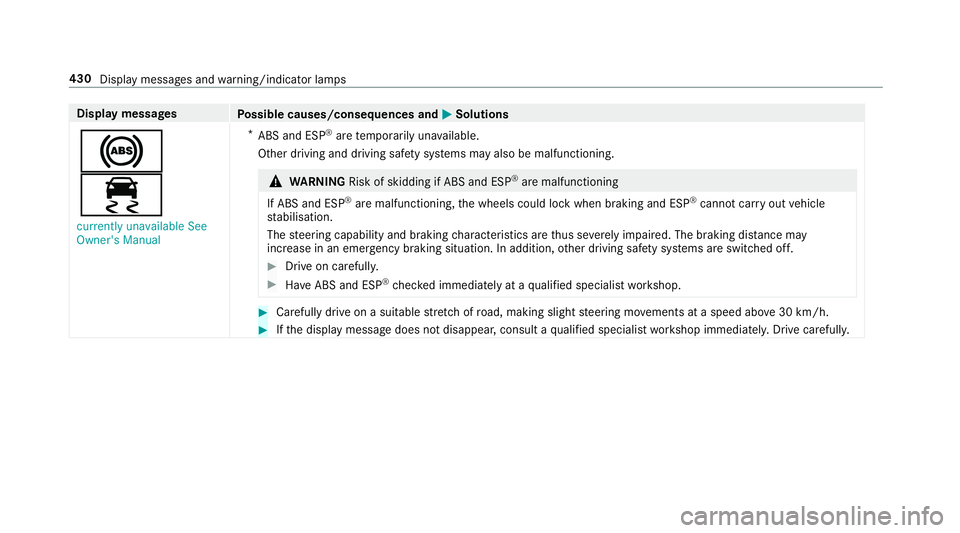
Possible causes/consequences and M
MSolutions
!
÷ currently unavailable See
Owner's Manual *
ABS and ESP ®
aret emporaril yunavailable.
Other drivin gand drivin gsafet ys ystems ma yalso be malfunctioning. &
WARNING Risk of skidding if ABS and ESP ®
arem alfunctioning
If ABS and ESP ®
arem alfunctioning ,the wheels could loc kwhen braking and ESP ®
cann otcar ryout vehicle
st abilisation.
The steering capability and braking characteristic sarethus se verely impaired .The brakin gdista nce may
increase in an emergency braking situation. In addition, other driving saf etys ystems ar eswitched off. #
Driv eonc arefull y. #
Have ABS and ESP ®
ch eckedi mmediately at aqualified specialis tworks hop. #
Carefully driv eonasuitablestre tchofr oad, making slight steering mo vements at aspeed abo ve30 km/h. #
Ifth ed ispla ymessag edoes no tdisappear ,consult aqualified specialis tworks hop immediately .Drive carefully. 430
Displa ymessages and warning/indicator lamps