sensor MERCEDES-BENZ S-CLASS COUPE 2018 User Guide
[x] Cancel search | Manufacturer: MERCEDES-BENZ, Model Year: 2018, Model line: S-CLASS COUPE, Model: MERCEDES-BENZ S-CLASS COUPE 2018Pages: 502, PDF Size: 6.29 MB
Page 133 of 502
RThe panic alarm is not activated.
RThe hazardwarning lights are switched off.
RThe hood is closed.
RThe doors are closed and loc ked.
RThe windo wsand soft top are closed.
#St art theve hicle using the smartphone:RAf tereve ryvehicle start, the engine runs for
te n minu tes.
RYo u can car ryout a maximum of two consec‐
utive starting attem pts. The vehicle must be
st ar ted once with the SmartK eybefore trying
to start theve hicle again with the smart‐
phone.
RYo u can stop theve hicle again at any time.
RFu rther information can be found inthe
smartphone app.
Securing the engine against starting before
car rying out maintenance or repair work:
#Switch on the hazard warning lights.
or
#Un lock the doors. or
#Open a side window or
the soft top.
Breaking-in no tes
Mercedes-AMG vehicles: observeth e no tes in
th e Supplement. Otherwise, you may failto rec‐
ognize dangers.
To preser vethe engine during thefirs t
1, 000 miles (1,500 km):
Rdrive at varying road speeds and engine
speeds.
Rdrive theve hicle in drive program A
or ;.
Rchange gear before theta ch ome ter needle is
Ô ofthewa yto there d area of theta ch ome‐
te r.
Rdo not shift down a gear manually in order to
brake.
Ravo idoverstra ining theve hicle, e.g. driving at
full thro ttle.
Rdo not depress the accelera tor pedal past
th e pressure point (kickdown).
Ronly increase the engine speed gradually and
accelerate theve hicle tofull speed af ter
1, 000 miles (1,500 km).
This also applies when the engine or parts of the
driv etra in ha vebeen replaced.
Please also obser vethefo llowing breaking-in
no tes:
Rin cer tain driving and driving saf etysy stems,
th e sensor sy stem adjusts automatically
while a cer tain dis tance is driven af terth e
ve hicle has been delivered or af terre pairs.
Fu ll sy stem ef fectiveness is not achie ved
unt ilth e end of this teach-in process.
Rbrakepads, brake discs and tires that are
either new or ha vebeen replaced only ach‐
ie ve opt
imum braking ef fect and grip af ter
se veral hundred kilom eters of driving. Com‐
pensate forth ere duced braking ef fect by
applying greater forc eto the brake pedal.
Driving and parking 13
1
Page 153 of 502
RtheBattery Charge Insufficient for Standby
Mode message appears in the multimedia
sy stem displa y.
% Standby mode is automatically deactivated
when the ignition is switched on.
Ac tivating or deactivating standby mode
Multimedia sy stem:
,Vehicle.î Vehicle Set-
tings.Standby Mode
#Ac tivate Oor deacti vate ª the function.
When you act ivate the function, a prom pt
appears.
#Select Yes.
St andby mode is activated.
Driving and driving saf ety sy stems
Driving sy stems and your responsibility
Yo ur vehicle is equipped with driving sy stems
which assist youin drivin g, parking and maneu‐
ve ring theve hicle. The driving sy stems are tools
and do not relie ve you of your responsibility. Pay
attention tothe tra ffic conditions at all times and inter
vene when necessary . Beaware of the
limitations rega rding the safe use of these sys‐
te ms.
Fu nction of thera dar senso rs
Some driving and driving safe ty systems use
ra dar sensors tomonitor the area in front of,
behind or next totheve hicle (depending on the
ve hicle's equipment).
Depending on theve hicle's equipment, thera dar
sensors are integrated behind the bumpers
and/or behind thera diator grille. Keep these
parts free of dirt, ice and slush (
→page 336).
The sensors must not be co vered, forex ample
by bicycle rack s, ove rhanging loads or radar-
re flecting sticke rs.Fo llowing an impact and in
th eeve nt of associated damage , which may not
be visible, tothe bumpers or radiator grille, ha ve
th e function of thera dar sensors checked at a
qu alified specialist workshop. The driver assis‐
ta nce sy stem may no longer workproperly.
Overview of driving sy stems and driving
saf ety sy stems
In this section, youwill find information about
th efo llowing driving sy stems and driving saf ety
sy stems:
R360° Camera (→page 183)
RABS ( Anti-lo ckBra king Sys tem)
(→page 152)
RAc tive Dis tance Assist DISTRONIC
(→pa ge 162)
RAIR BODY CONTROL (→page 175)
RAc tive Brake Assi st(→page 155)
RAc tive Lane Keeping Assist (→page 201)
RATTENTION ASSIST (→page 191)
RBA S (Brak eAssist System) (→page 152)
REBD ( Electronic Brakeforc eDistribution)
(→page 155)
RESP®(E lectronic Sta bility Program)
(→page 152)
RHill Start Assist (→page 173)
RHOLD fu nction (→page 174)
Driving and pa rking 15
1
Page 161 of 502
&WARNING Risk of an accident despite
Evasive Steering Assist
Evasive Steering Assist cannot always clearly
identify objects and complex traf fic situa‐
tions.
In addition, thesteering support of Evasive
St eering Assist is general lynot suff icientto
avo id a collision.
In such cases Evasive Steering Assist can:
Rgive an unnecessary warning or pr ovide
assis tance
Rnot give awa rning or not pr ovide assis‐
ta nce
#Alw ays pay careful attention tothe traf‐
fi c situation; do not rely on Ev asive
St eering Assist alone.
#Be ready tobrake and take evasive
action if necessar y.
#Preve ntthe assis tance byactively steer‐
ing in non-critical driving situations.
#Drive at an appropriate speed if pedes‐
trians are close tothe path of your vehi‐
cle.
Also obser vethe sy stem limitations of Evasive
St eering Assist.
Sy stem limitations
The sy stem may be impaired or may not function
in thefo llowing situations:
RIn sno w,rain, fog, heavy spr ay, if there is
gl are, in direct sunlight or in greatlyvarying
ambient light.
RIf th e sensors are dirty, fogged up, damaged
or co vered.
RIfth e sensors malfunction due to otherradar
source inter fere nce, forex ample strongradar
re flections in parking garage s.
RIf a loss of tire pressure or a defective tire
has been de tected and displ ayed.
The sy stem may not react cor rectly:
RIn complex traffic situations whe reobjects
cannot always be clearly identified.
RTo pedestrians or vehicles if they mo ve
qu ickly into the sensor de tection range.
RTo pedestrians who are hidden by other
objects.
RIf th e typical outline of a pedestrian cannot
be distinguished from the bac kground.
RIf a pedestrian isnot recognized as such , e.g.
due tospecial clo thing or other objects.
ROn bends with a tight radius.
Setting Active Brake Assi st
Multimedia system:
,Vehicle.k Assistance.Active
Brake Assist
Ve hicles without Driving Assistance Pack‐
age: The settings can be made af terst arting the
ve hicle.
Ve hicles with Driving Assistance Package:
The settings can be made when the ignition is
switched on.
% It is recommended that you alw ays lea ve
Ac tive Brake Assi stactivated.
Driving and parking 15
9
Page 165 of 502
Active Dis tance Assist DISTRONIC is only an aid.
The driver is responsible forke eping a safe dis‐
ta nce totheve hicle in front, forve hicle speed
and for braking in good time.
Sy stem limitations
The sy stem may be impaired or may not function
in thefo llowing ins tances, forex ample:
RIn snow ,ra in, fog, heavy spr ay, if there is
gl are, in direct sunlight or in greatly varying
ambient light.
RThe windshield in the area of the camera is
dirty, fogged up, damaged or co vered.
RIfth era dar sensors are dirty or co vered.
ROn slippery roads, braking or accelerating
can cause the drive wheels tolose traction
and theve hicle could then skid.
RIn parking garage s or on roads with steep
uphill or downhill gradients.
Do not use Active Dis tance Assist DISTRONIC in
th ese situations.
&
WARNING Risk of accident from acceler‐
ation or braking byActive Dis tance
Assist DISTRONIC
Ac tive Dis tance Assist DISTRONIC may accel‐
erate or brake in thefo llowing cases, for
ex ample:
RIfth eve hicle pulls away using Active Dis‐
ta nce Assist DISTRONIC.
RIfth estored speed is called up and is
considerably faster or slo werth an the
cur rently driven speed.
RIfAc tive Dis tance Assist DISTRONIC no
longer de tects a vehicle in front or does
not react toreleva nt objects.
#Alw ays carefully obser vethe traf fic con‐
ditions and be ready tobrake at all
times.
#Ta ke into account the tra ffic situation
before calling up thestored speed.
&
WARNING Risk of accident due toinsuf‐
fi cient decele ration byActive Dis tance
Assist DISTRONIC
Ac tive Dis tance Assist DISTRONIC brakes
yo ur vehicle with up to50 % of the maximum
possible deceleration. If this decele ration is
not suff icient,Active Dis tance Assist
DISTRONIC alerts you with a visual and
acoustic warning.
#In these cases, adjust your speed and
ke ep a suf ficient dist ance.
#Braketheve hicle yourself and/or take
ev asive action.
&
WARNING Risk of accident if de tection
function of Active Dis tance Assist
DISTRONIC is impaire d
Ac tive Dis tance Assist DISTRONIC does not
re act or only pa rtially reacts:
RWhen driving on a dif fere nt line tothe
ve hicle ahead or changing lane.
Driving and parking 16
3
Page 166 of 502
RTopedestrians, animals, bicycles or
mo tor bikes, stationary vehicles or unex‐
pected obs tacles.
RTo complex traffic situations.
RTo oncoming vehicles and crossing traf‐
fi c.
Ac tive Dis tance Assist DISTRONIC can nei‐
th er give warnings nor inter vene in such sit‐
uations.
#Alw ays obser vethe tra ffic conditions
carefully and react accordingl y.
OperatingActive Di stance Assist DI STRO NIC
Re quirements:
RThe vehicle has been star ted.
RThe elect ric park ing brake is released.
RESP®is activated and is not inter vening.
RThe transmission is in position h.
RAllthe doors are closed.
RCheck of thera dar sensor sy stem success‐
fully comple ted (vehicle tra veling fasterthan
12 mp h (20 km/h)).
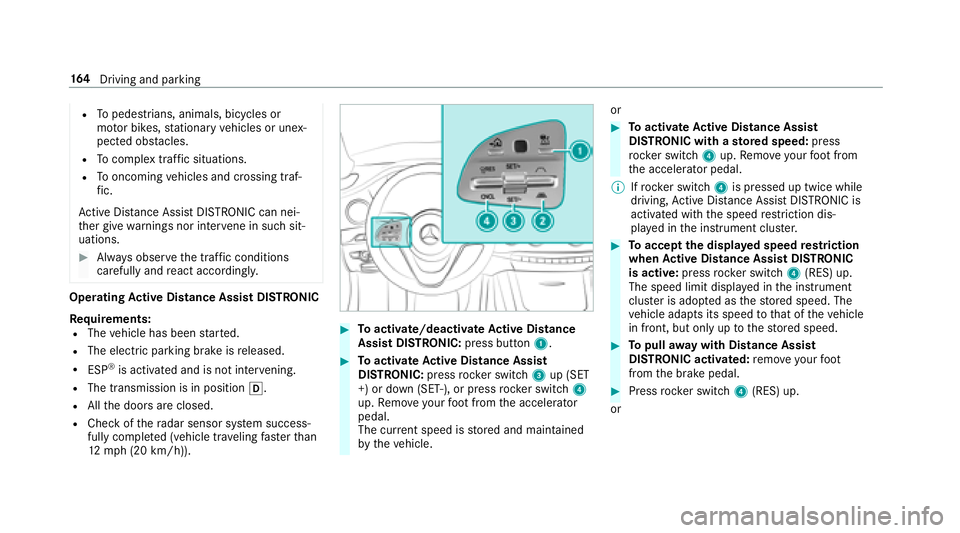
#Toactivate/deacti vate Active Di stance
Assist DI STRO NIC: press button 1.
#Toactivate Active Di stance Assist
DI STRO NIC:press rock er switch 3up (SET
+) or down (SET-), or press rocker switch 4
up. Remo veyour foot from the accelerator
pedal.
The cur rent speed is stored and maintained
by theve hicle. or
#To
activate Active Di stance Assist
DI STRO NIC with a stored speed: press
rock er switch 4up. Remo veyour foot from
th e accelerator pedal.
% Ifrock er switch 4is pressed up twice while
driving, Active Dis tance Assist DISTRONIC is
acti vated with the speed restriction dis‐
play ed in the instrument clus ter.
#To accept the displa yed speed restriction
when Active Di stance Assist DI STRONIC
is active: pressrocker switch 4(RES) up.
The speed limit displa yed in the instrument
clus ter is ado pted as thestored speed. The
ve hicle adapts its speed tothat of theve hicle
in front, but only up tothestored speed.
#To pull away wit hDistance Assis t
DISTRONIC activated: remo veyour foot
from the brake pedal.
#Press rocker switch 4(RES) up.
or
16 4
Driving and pa rking
Page 180 of 502
Parking Assist PARKTRONIC
Function of Parking Assist PARKTRONIC
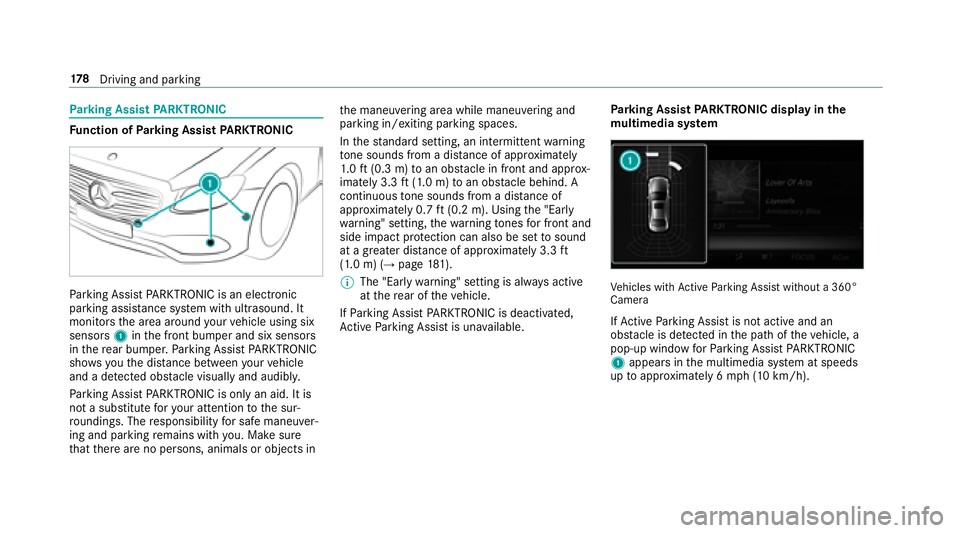
Parking Assist PARKTRONI Cis an electronic
parkin gassi stance sy stem with ultrasound. It
monitors the area around your vehicle using six
sensors 1inthe front bumper and six sensors
in there ar bumper. Parking Assist PARKTRONI C
sho wsyouth e dis tance between your vehicle
and a de tected obs tacle visually and audibly.
Pa rking Assist PARKTRONI Cis on lyan aid. It is
not a substitute foryo ur attention tothe sur‐
ro undings. The responsibility for safe maneu ver‐
ing and parking remains with you. Make sure
th at there are no persons, animals or objects in th
e maneuvering area while maneuvering and
parking in/exiting parking spaces.
In thest andard setting, an intermitte ntwa rning
to ne sounds from a di stance of appr oximately
1. 0 ft (0.3 m) toan obs tacle in front and appr ox‐
imately 3.3 ft(1.0 m) toan obs tacle behind. A
continuous tone sounds from a di stance of
appr oximately 0.7 ft(0.2 m). Using the "Ear ly
wa rning" setting, thewa rning tones for front and
side impact pr otection can also be set tosound
at a greater dis tance of appr oximately 3.3 ft
(1.0 m) (
→page 181).
% The"Ear lywa rning" setting is alw ays active
at there ar of the
ve hicle.
If Pa rkin
g Assist PARKTRONI Cis deacti vated,
Ac tive Parking Assist is una vailable. Pa
rking Assist PARKTRONIC displ ayinthe
mu ltimedia sy stemVe hicles with Active Parking Assist without a 360°
Camera
If Ac tive Parking Assist is not active and an
obs tacle is de tected in the path of theve hicle, a
pop-up window forPa rking Assist PARKTRONI C
1 appear sin the multimedia sy stem at speeds
up toappr oximately 6 mph (10 km/h).
178
Driving and pa rking
Page 181 of 502
System limitations
Pa rking Assist PARKTRONI Cdoes no tnecessa‐
ri ly take into account thefo llowing obs tacles:
RObs tacles bel ow the detection range, e.g.
pe rsons, animals or objects.
RObs tacles ab oveth e de tection range, e.g.
ove rhanging loads, overhangs or loading
ra mp s of truc k.
The sensors must be free of dirt, ice and slush.
Otherwise, they may not function cor rectly.
Clean the sensors regularly, taking care not to
scratch or damage them.
Fu nction of the passive side impact pr otec‐
tion
Pa ssive side impact pr otection is an additional
Pa rking Assist PARKTRONI Cfunction whic h
wa rnsth e driver about obs tacles at the side of
th eve hicle. A warning is issued when obs tacles
are de tected between the front and rear de tec‐
tion range. In order for an object tobe de tected,
th e sensors in the front and rear bumper must
de tect the object while you are driving past it. During
the parking procedure or maneuvering,
objects are de tected as theve hicle drives past.
If yo usteer in the direction of a de tected obs ta‐
cle and there is a risk of a lateral collision, a
wa rning is issued. The lateral segments light up
orange or red, depending on the dis tance tothe
obs tacl
e.
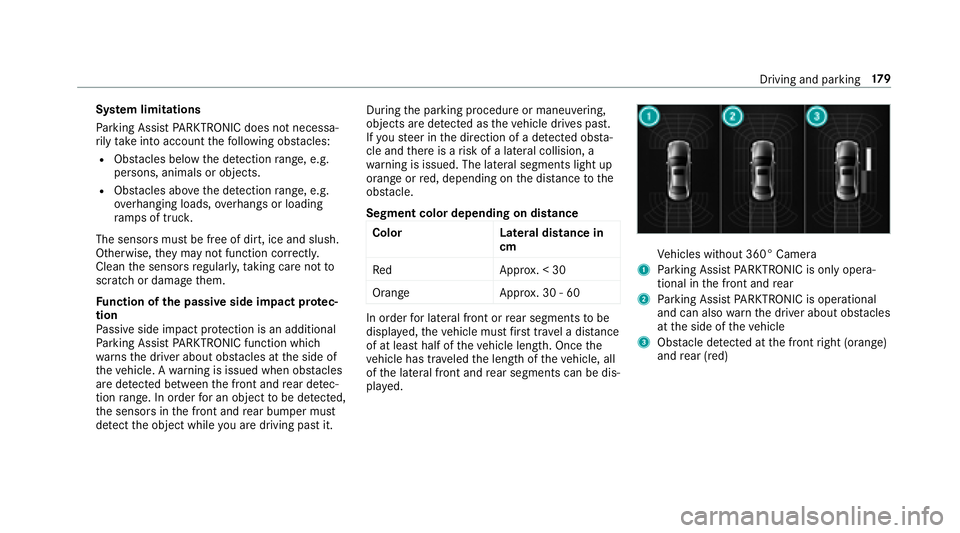
Segment color depending on distance Color Lateral distance in
cm
Re dA pprox. < 30
Orang eA pprox. 30 - 60
In order for lateral front or rear segments tobe
displa yed, theve hicle must firs t tr ave l a dis tance
of at least half of theve hicle length. Once the
ve hicle has tr aveled the length of theve hicle, all
of the lateral front and rear segments can be dis‐
pla yed.
Ve hicles without 360° Camera
1Parking Assist PARKTRONI Cis on ly oper a‐
tional in the front and rear
2Pa rking Assist PARKTRONI Cis operational
and can also warnthe driver about obs tacles
at the side of theve hicle
3Obs tacle de tected at the front right (orange)
and rear (red)
Driving and parking 17
9
Page 182 of 502
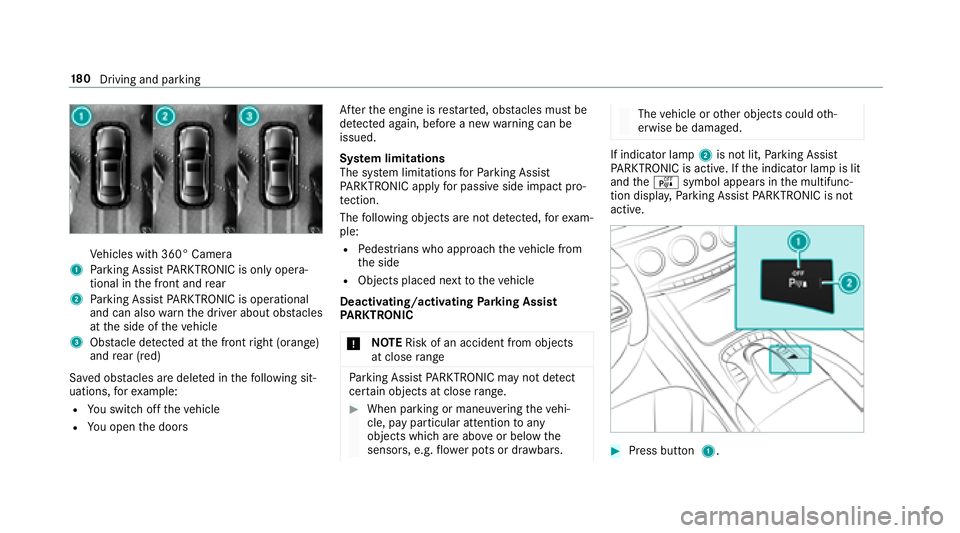
Vehicles with 360° Camera
1Parking Assist PARKTRONI Cis on ly oper a‐
tional in the front and rear
2Pa rking Assist PARKTRONI Cis operational
and can also warnthe driver about obs tacles
at the side of theve hicle
3Obs tacle de tected at the front right (orange)
and rear (red)
Sa ved obs tacles are del eted in thefo llowing sit‐
uations, forex ample:
RYo uswit choff theve hicle
RYo u open the doors Af
terth e engine is restar ted, obs tacles must be
de tected again, before a new warning can be
issued.
Sy stem limitations
The sy stem limitations forPa rking Assist
PA RKTRONI Cappl yfo r passive side impact pro‐
te ction.
The following objects are not de tected, forex am‐
ple:
RPe destrians who approach theve hicle from
th e side
RObjects placed next totheve hicle
Deactivating/activating Parking Assist
PA RKTRONIC
* NO
TERisk of an accident from objects
at close range
Pa rking Assist PARKTRONI Cma yno tde tect
cer tain objects at close range.
#When pa rking or maneuvering theve hi‐
cle, pay particular attention toany
objects which are abo veor below the
sensors, e.g. flowe r pots or dr awbars.
The vehicle or other objects could oth‐
erwise be damaged.
If indicator lamp 2is not lit, Parking Assist
PA RKTRONI Cis active. If the indicator lamp is lit
and theé symbol appears in the multifunc‐
tion displa y,Pa rking Assist PARKTRONI Cis no t
active.
#Press but ton 1.
18 0
Driving and pa rking
Page 193 of 502
Theresponsibility for safe maneu vering and
pa rking remains with you. Make sure that no
persons, animals or objects etc. are in the
maneu vering range.
A risk of a collision may arise in thefo llowing sit‐
uations, forex ample:
RIfth e driver mixes up the accelera tor and
brake pedals.
RIf th e wrong gear is selecte d.
The Drive AwayAssist function is active under
th efo llowing conditions:
RIf Pa rking Assist PARKTRONI Cis activated.
REver ytime thege ar is changed tok orh
when theve hicle is at a standstill.
RIf th e de tected obs tacle is less than appr ox.
3.3 ft(1.0 m) away.
RIfth e maneuvering assis tance function is
acti vated in the multimedia sy stem.
Sy stem limitations
Drive AwayAssist is notavailable on inclines. Fu
nction of Cross Traf fic Alert
% Also read the instructions on Blind Spot
Assist (
→page 198) (→pag e19 9)
(→page 198).
Ve hicles with Blind Spot Assis t:Dr ivers can
also be warned of any crossing tra ffic when
backing up out of a parking space. If a critical
situation is de tected, a symbol appea rsinthe
multimedia sy stem displa y.Ifth e driver does not
re spond tothewa rning, theve hicle's brakes can
be applied automatically. Todo this,
the fun
ction
uses thera dar sensors in the bumper. The area
adjacent totheve hicle is continually monitored.
If th era dar sensors are obstructed byvehicles
or other objects, de tection is not possible.
The Cross Traf fic Alert function is acti veunder
th efo llowing conditions:
RIf Blind Spot Assist is activated.
RIf th eve hicle is backing up at walking pace.
RIfth e maneuvering assis tance function is
acti vated in the multimedia sy stem. Sy
stem limitations
The Cross Traf fic Alert function is not available
on inclines.
Deactivating/activating the maneuvering
assistant
Multimedia sy stem:
,Vehicle.k Assistance.Camera
& Parking.Maneuvering Assist.
#Switch the function on Oor off ª.
ATTENTION ASSIST
Fu nction of ATTENTION ASSIST
AT TENTION ASSIST assists you on long, mon oto‐
nous journe ys, e.g. on highw ays and trunk roads.
If AT TENTION ASSIST de tects indicators of fati‐
gue or increasing lapses in concentration on the
part of the driver, it suggests taking a brea k.
AT TENTION ASSIST is only an aid. It cann ot
alw ays de tect fatigue or lapses in concentration
in time. The sy stem is not a substitute for a well-
re sted and attentive driver. On long journe ys,
ta ke regular breaks in good time that allow for
adequate recuperation.
Driving and park ing19
1
Page 200 of 502
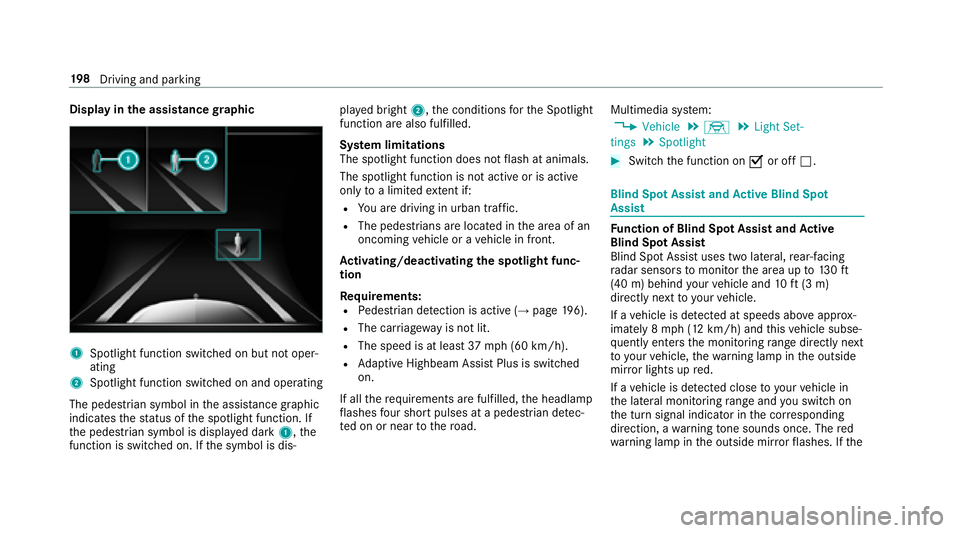
Displayin the assistance graphic
1Spotlight function switched on but not oper‐
ating
2Spotlight function switched on and operating
The pedestrian symbol in the assis tance graphic
indica testh est atus of the spotlight function. If
th e pedestrian symbol is displa yed dark 1,the
function is switched on. If the symbol is dis‐ pla
yed bright 2,the conditions forth e Spotlight
function are also fulfilled.
Sy stem limitations
The spotlight function does not flash at animals.
The spotlight function is not active or is active
only toa limited extent if:
RYo u are driving in urban traf fic.
RThe pedestrians are loca ted in the area of an
oncoming vehicle or a vehicle in front.
Ac tivating/deactivating the spotlight func‐
tion
Re quirements:
RPedestrian de tection is acti ve(→page 196).
RThe car riag ewa yis no tlit .
RThe speed is at leas t37 mph(6 0 km/h).
RAd aptive Highbeam Assist Plus is switch ed
on.
If all therequ irements are fulfilled, the headlamp
fl ashes four short pulses at a pedestrian de tec‐
te d on or near tothero ad. Multimedia sy
stem:
,Vehicle.÷.Light Set-
tings.Spotlight
#Switch the function on Oor off ª.
Blind Spot Assist and Active Blind Spot
Assi st
Function of Blind Spot Assist and Active
Blind Spot Assi st
Blind Spot Assist uses two lateral,rear-facing
ra dar sensors tomonitor the area up to130ft
(40 m) behind your vehicle and 10ft(3 m)
directly next to yourvehicle.
If a vehicle is de tected at speeds ab ove appr ox‐
imately 8 mph (12 km/h) and this vehicle subse‐
qu ent lyenters the monitoring range di rectly next
to yo urvehicle, thewa rning lamp in the outside
mir ror lights up red.
If a vehicle is de tected close to yourvehicle in
th e lateral monitoring range and youswit chon
th e turn signal indicator in the cor responding
direction, a warning tone sounds once. The red
wa rning lamp in the outside mir rorflashes. If the
19 8
Driving and pa rking