display MERCEDES-BENZ S-CLASS COUPE 2018 Owner's Manual
[x] Cancel search | Manufacturer: MERCEDES-BENZ, Model Year: 2018, Model line: S-CLASS COUPE, Model: MERCEDES-BENZ S-CLASS COUPE 2018Pages: 502, PDF Size: 6.29 MB
Page 2 of 502
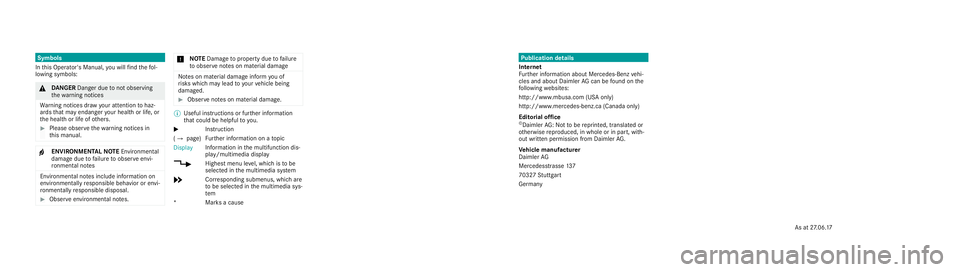
Publication details
Internet
Fu rther information about Mercedes-Benzv ehi‐
cles and about Daimler AGcan be found on the
fo llowing websites:
http://www.mbusa.com (US Aonly)
http://www.mercedes-benz.ca (Canada only)
Editorial of fice
©Daimler AG:Notto be reprinted, translated or
ot herwise reproduced, in whole or in part, with‐
out written permission from Daimler AG.
Ve hicl em anufacturer
Daimler AG
Mercedesstrasse 137
7032 7Stuttgart
Ge rmany
Symbols
In this Operator's Manual, youw illfind thef ol‐
lowing symbols:
& DANG ER Dan gerd ue tonoto bserving
th ew arning notices
Wa rning notices dr awyour attentio ntohaz‐
ards that ma yendanger your healt horlife, or
th eh ealt horl ifeofo thers.
#Please obser vethew arning notices in
th is manual.
+ENVIRONMENTAL NOTEEnvironmental
damage duetofailur etoo bserveenvi‐
ro nmental no tes
Environmental no tesi nclude information on
environmentally responsible behavior or envi‐
ro nmentally responsible disposal.
#Obser veenvironmen taln otes.
* NO
TEDama getoproperty due tofailure
to obser venotesonm aterial damage
Notesonm aterial damag einfor myou of
ri sk sw hichm aylead to yo urvehicle being
damaged.
#Obser venotesonm aterial damage.
%
Useful instructions or fur ther information
th at coul dbehelpfulto you.
X In
stru ction
( Q page )Fu
rther information on atopic
Display Information in
them ultifunction dis‐
play/multimedia display
+ Highestmenu le vel, whic histob e
selected in them ultimedia sy stem
* Corresponding submenus, whic hare
to be selected in them ultimedia sys‐
te m
*M arks ac ause
As at27.06. 17
Page 5 of 502
Operatingthe climate control sy stem ......... 121
Drivin gand pa rking ................................. 128
Driving ........................................................ 128
DY NA MIC SELECT switch ............................1 36
Au tomatic transmission .............................. 137
Re fueling .................................................... 140
Pa rking ...................................................... .142
Driving and driving saf etysy stems .............. 151
Instrument Display and on-board
compu ter.................................................. 204
Instrument Displ ayove rview ...................... 204
Overview of the buttons on thesteering
wheel ......................................................... .205
Operating the on-board computer .............. 205
Overview of displa ysinthe multifunction
display ........................................................ 207
Ad justing the instrument lighting ............... .207
Menus and submenus ................................ 208
Head-up Display .......................................... 214
Vo ice Control Sy stem ............................... 216
No tes on operating saf ety.......................... .216
Operation ....................................................2 16
Using theVo ice Cont rol Sy stem ef fec‐
tively ........................................................... 218
Essential voice commands .......................... 219
Multimedia sy stem .................................. 229
Overview and operation .............................. 229
Sy stem settings .......................................... 238
ENE RGIZING comfort .................................. 250
Na vigation .................................................. 252
Te lephone .................................................. .276
Online and Internet functions ..................... 293
Media ......................................................... 300
Ra dio .......................................................... .312
Sound ......................................................... 320
Main tenance and care ............................. 323
ASS YST PLUS service inter val display ........ 323
Engine compartment .................................. 324
Cleaning and care ...................................... .330
Breakdown assist ance............................. 341
Emergency ..................................................3 41
Flat tire ....................................................... 341
Battery (vehicle) ......................................... 347
To w starting or towing away ....................... 352
Electrical fuses ........................................... 357
Wheels and tires ...................................... 361
No tes on noise or unusual handling char‐
acteristics .................................................. .361
Re gular checking of wheels and tires ......... .361
No tes on snow chains ................................ 362
Ti re pressure .............................................. 363
Loading theve hicle .................................... 369
Ti re labeling ................................................ 373
Definition of term sfo r tires and loading ..... 378
Changing a wheel ...................................... .381
Tech nical data .......................................... 391
No tes on tech nical da ta.............................. 391
Ve hicle electronics .....................................3 91
Ve hicle identification plate, VIN and
engine number overview ............................ 393
Operating fluids .. ........................................ 395
Contents 3
Page 6 of 502
Vehicle data ................................................ 401
Display messages and warning/indi‐
cator lamps .............................................. 403
Display messages ...................................... .403
Wa rning and indicator lamps ...................... 447
Index ......................................................... 464
4
Conte nts
Page 9 of 502
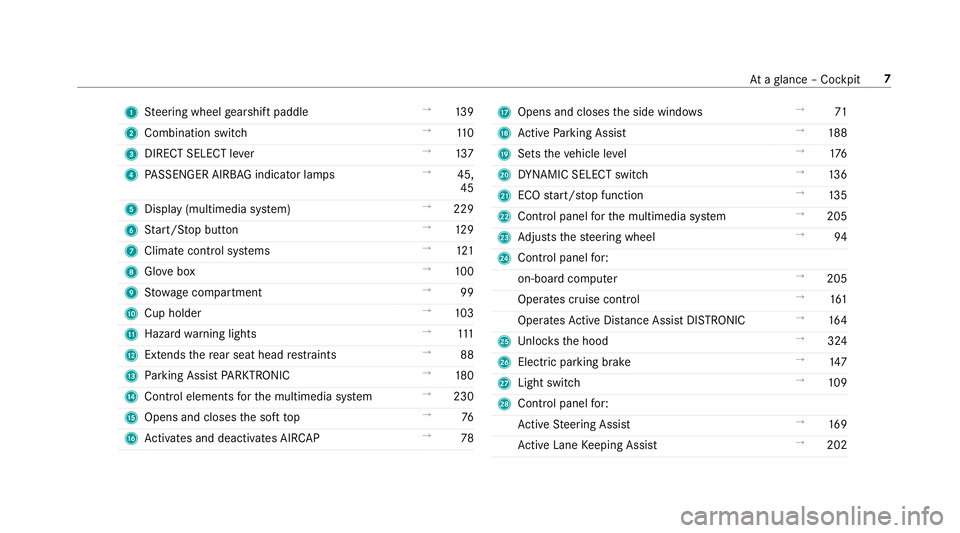
1Steering wheel gearshift paddle →
139
2 Combination switch →
110
3 DIRECT SELECT le ver →
137
4 PASSENGER AIRB AGindicator lamps →
45,
45
5 Display (multimedia sy stem) →
229
6 Start/ Stop button →
129
7 Climat e control sy stems →
121
8 Glovebox →
100
9 Stow age compartment →
99
A Cup holder →
103
B Hazard warning lights →
111
C Extends there ar seat head restra ints →
88
D Parking Assist PARKTRONI C →
180
E Control elements forth e multimedia sy stem →
230
F Opens and closes the soft top →
76
G Activates and deacti vates AIR CAP →
78HOpens and closes the side windo ws →
71
I Active Parking Assist →
188
J Sets theve hicle le vel →
176
K DYNA MIC SELECT switch →
136
L ECO start/ stop function →
135
M Control panel forth e multimedia sy stem →
205
N Adjusts thesteering wheel →
94
O Control panel for:
on-board computer →
205
Operates cruise contro l →
161
Operates Active Dis tance Assist DISTRONIC →
164
P Unloc ksthe hood →
324
Q Elect ric park ing brake →
147
R Light switch →
109
S Control panel for:
Ac tive Steering Assist →
169
Ac tive Lane Keeping Assist →
202
Ataglance – Cockpit 7
Page 10 of 502
NightView Assist →
197
Head-up Display →
214,
21 4
Seat belt extender →
38
8Ataglance – Cockpit
Page 12 of 502
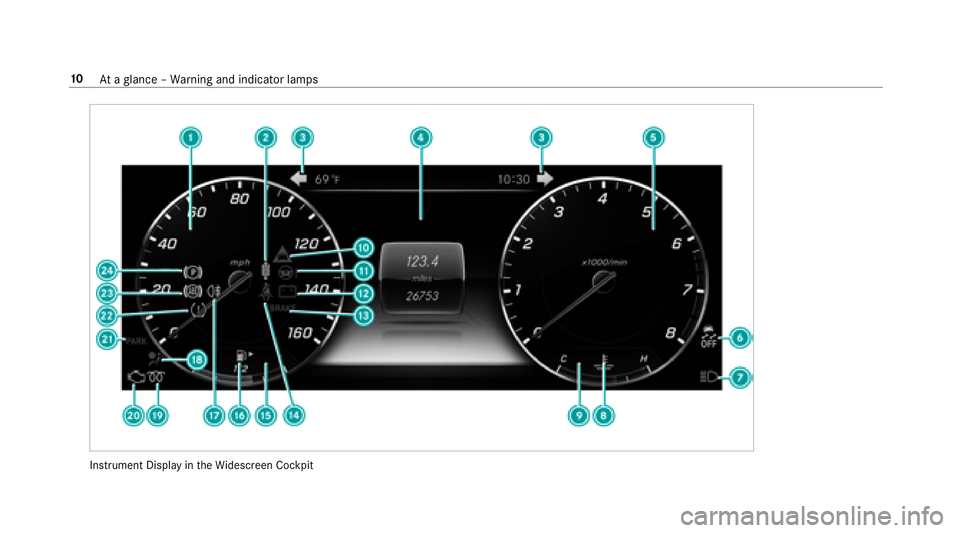
Instrument Display intheWi descreen Cockpit
10
Ataglance – Warning and indicator lamps
Page 13 of 502
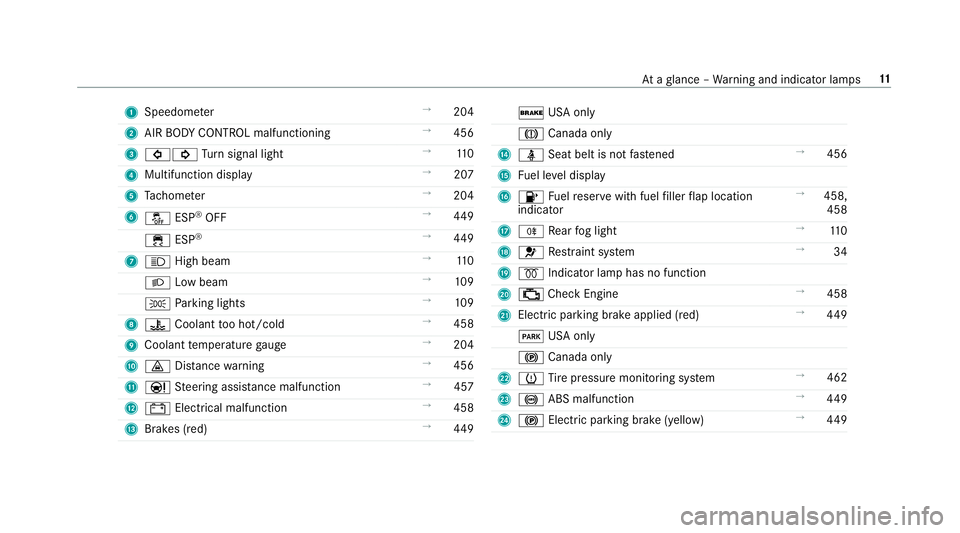
1Speedom eter →
204
2 AIR BODY CONTROL malfunctioning →
456
3 #! Turn signal light →
110
4 Multifunction display →
207
5 Tach ome ter →
204
6 å ESP
®OFF →
449
÷ ESP
®→
449
7 K High beam →
110
L Low beam →
109
T Parking lights →
109
8 ? Coolant too hot/cold →
458
9 Coolant temp erature gauge →
204
A · Distance warning →
456
B Ð Steering assis tance malfunction →
457
C # Electrical malfunction →
458
D Brakes (red) →
449
$ USA only
J Canada only
E ü Seat belt is not fastened →
456
F Fuel le vel display
G 8 Fuelreser vewith fuel filler flap location
indicator →
458,
458
H R Rear fog light →
110
I 6 Restra int sy stem →
34
J % Indicator lamp has no function
K ; Check Engine →
458
L Elect ric park ing brake applied (red) →
449
F USA only
! Canada only
M h Tire pressure monitoring sy stem →
462
N ! ABS malfunction →
449
O ! Electric pa rking brake (yellow) →
449
At aglance – Warning and indicator lamps 11
Page 31 of 502
Ingeneral, this information documents thest ate
of a component part, a module, a sy stem or the
sur roundings such as:
Roperating statuses of sy stem components
(e.g. fluid leve ls, battery status, tire pressure)
Rstatus messages concerning theve hicle and
its individual components (e.g. number of
wheel revo lutions/speed, decele ration, lat‐
eral acceleration, display of thefast ened seat
belts)
Rmalfunctions or defects in impor tant sy stem
components (e.g. lights, brakes)
Rinformation on vehicle damage events
Rsystem reactions in special driving situations
(e.g. airbag deployment, inter vention of sta‐
bility control sy stems)
Rambient conditions (e.g. temp erature, rain
sensor)
In addition toprov iding the actual control unit
function, this data assists the manufacturer in
de tecting and rectifying malfunctions and opti‐
mizing vehicle functions. The majority of this
data is temp orary and is only processed in the ve
hicle itself. Only a small portion of the data is
st ored in theev ent or malfunction memor y.
When service workis done on your vehicle, the
te ch nical da tafrom theve hicle can be read out
by service network staff (e.g. workshops, manu‐
fa cturer) or third parties (e.g. breakdown serv‐
ices). Services include repair services, mainte‐
nance processes, warranty events a
nd
quality
assurance measures, forex ample. The read out
is per form ed via the legally prescribed port for
th e diagnostics connection in theve hicle. The
re spective service network locations or third
parties collect, process and use the data. They
document tech nical statuses of theve hicle,
assist in finding malfunctions and impr oving
qu ality and are transmitted tothe manufacturer,
if necessar y.Fu rthermore, the manufacturer is
subject toproduct liability. Forth is, the manu‐
fa cturer requirestech nical da tafrom vehicles.
Malfunction memories in theve hicle can be
re set bya service outlet as part of repair or
maintenance work.
They can enter data into theve hicle's comfort
and inf otainment functions themselves as part
of the selected equipment. These include:
Rmultimedia data such as music,
films or pho‐
to sfo r playba ckin an integrated multimedia
sy stem
Raddress book data for use in connection with
an integrated hands-free sy stem or an inte‐
grated navigation sy stem
Rentered navigation destinations
Rdata about the use of Internet services
This data can be sa ved locally in theve hicle or it
is located on a device which you ha veconnected
to theve hicle (e.g. smartphone, USB flash drive
or MP3 pla yer). If this data is stored in theve hi‐
cle, you c
an dele
teit at any time. This data can
only be transmitte dto third parties upon your
re qu est with particular rega rd tothe scope of
use of online services according toyour selected
settings.
Yo u can store or change con venience settings/
individualization in theve hicle at any time.
Depending on the equipment, this includes, for
ex ample:
Rseat and steering wheel position settings
General no tes 29
Page 42 of 502
*NO
TEDeployment of the Emer gency
Te nsioning Device when the front
passenger seat is unoccupied
If th e seat belt tongue is engaged in the seat
belt buckle of the unoccupied front
passenger seat, the Emer gency Tensioning
Device may also depl oyintheev ent of an
accident along with other sy stems.
#Only one person should use each seat
belt at any one time.
Re leasing seat belts
#Press there lease button in the seat belt
buckle and guide the seat belt back with the
seat belt tongue.
Ac tivating or deactivating seat belt adjust‐
ment via the multimedia sy stem
Multimedia sy stem:
,Vehicle.î Vehicle Settings.Belt
Adjustment
#Ac tivate Oor deacti vate ª the function.
Seat belt warning function for the driver and
front passen ger
The ü seat belt warning lamp in the Instru‐
ment Display is a reminder that all vehicle occu‐
pants must weartheir seat belts cor rectly.
The ü seat belt warning lamp lights up for six
seconds af tereve ryengine start.
In addition, an acoustic warning tone may sound.
When the driver's and front passenger doors are
closed and the driver and front passenger ha ve
fast ened their seat belts, the seat belt warning
goes out. During a journe
y,the seat belt warning lights up
if:
RThe vehicle speed exceeds 15mp h
(25 km/h) and the driver's or front
passenger seat belt is not fastened.
RThe driver or front passenger unfas tens their
seat belt while theve hicle is in motion.
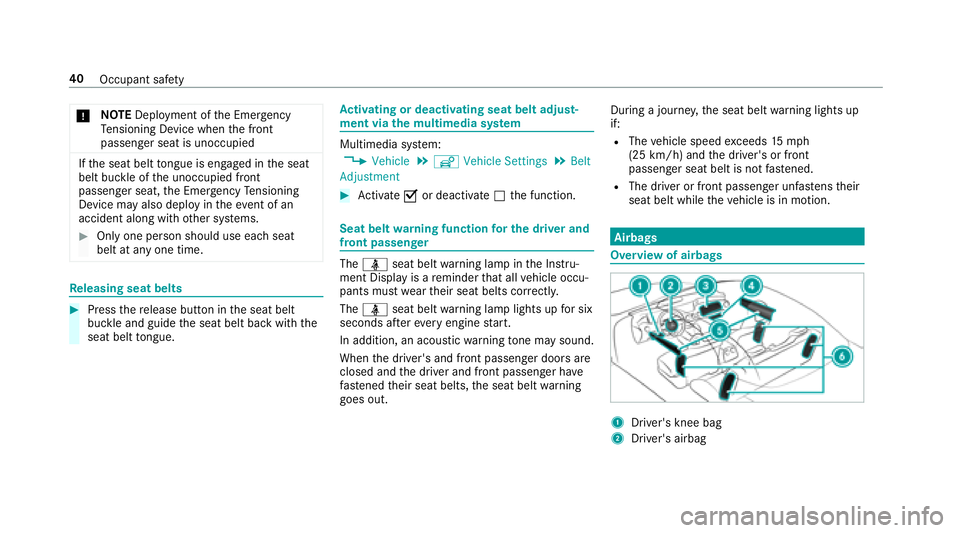
Airbags
Overview of airbags
1Driver's knee bag
2Driver's airbag
40
Occupant saf ety
Page 48 of 502
Status display
If th e front passenger seat is occupied, ensure,
bo th before and during the journe y,that thest a‐
tus of the front passenger front airbag is cor rect
fo rth e cur rent situation.
Af ter in stalling a rear wa rd-facing child
re stra int sy stem on the front passenger
seat: PASSENGER AIR BAG OFF must be lit con‐
tinuousl y.
&
WARNING Risk of injury or death from
using a rear wa rd-facing child restra int
sy stem when the front passenger air bag
is enabled
If yo u secure a child in a rear wa rd-facing
ch ild restra int sy stem on the front passenger
seat and thePA SSENGER AIR BAG OFF indi‐
cator lamp is off, the front passenger air bag
can deploy in theev ent of an accident.
The child could be stru ck bythe air bag.
Alw ays ensure that the front passenger air
bag is disabled. The PASSENGER AIR BAG
OFF indicator lamp must be lit.
NEVER use a rear wa rdfacing child restra int
on a seat pr otected byan ACTIVE FRONT AIR
BA G in front of it; DE ATH or SERIOUS INJU RY
to thech ild can occur.
When ins talling a child restra int sy stem on the
front passenger seat, alw ays obser vetheve hi‐
cle-specific information in this Operator's Man‐
ual (
→page 55), (→page 55).
Depending on thech ild restra int sy stem and the
st ature of thech ild, thePA SSENGER AIR BAG
OFF indicator lamp may be off. In this case, do
not ins tallth ere ar wa rd-facing child restra int
sy stem on the front passenger seat.
Ins tead, ins tallth ere ar wa rd-facing child
re stra int sy stem on a suitable rear seat.
Af ter in stalling a forw ard-facing child
re stra int sy stem on the front passenger
seat: depending on thech ild restra int sy stem
and thest ature of thech ild, PASSENGER AIR
BA G OFF may be lit continuously or be off.
Alw ays obser vethefo llowing information.
&
WARNING Risk of injury or death dueto
incor rect positioning of thefo rw ard-
fa cing child restra int sy stem
If yo u secure a child in a forw ard-facing child
re stra int sy stem on the front passenger seat
and you position the front passenger seat too
close tothe dashboard, in theev ent of an
accident, thech ild could:
Rcome into con tact wi thparts of theve hi‐
cle interior if thePA SSENGER AIR BAG
OFF indicator lamp is lit, forex ample
Rbe stru ck bythe airbag if thePA SSENGER
AIR BAG OFF indicator lamp is off
#Alw ays mo vethe front passenger seat
as far back as possible and fully retract
th e seat cushion length adjustment.
Alw ays make sure that the shoulder belt
st ra p is cor rectly routed from the seat
belt outlet on theve hicle tothe shoul‐
der belt guide on thech ild restra int sys‐
te m. The shoulder belt stra p must be
ro uted forw ards and down wards from
46
Occupant saf ety