display MERCEDES-BENZ S-CLASS COUPE 2018 Owner's Guide
[x] Cancel search | Manufacturer: MERCEDES-BENZ, Model Year: 2018, Model line: S-CLASS COUPE, Model: MERCEDES-BENZ S-CLASS COUPE 2018Pages: 502, PDF Size: 6.29 MB
Page 136 of 502
Non-combusted fuel may get into the cata‐
lytic con verter.
#Only depress the accelera tor pedal
slightl y.
#Have the cause rectified immediately at
a qu alified specialist workshop.
Limited braking ef fect on salt-treate dro ads:
Rdue tosalt build-up on the brake discs and
brakepads, the braking dis tance can increase
conside rably or result in braking only on one
side.
Rmaintain a much greater safe dis tance tothe
ve hicle in front.
To preve nt salt build-up:
Rbrake occasionally while paying attention to
th e tra ffic conditions.
Rcarefully depress the brake pedal at the end
of the journey and when starting the next
journe y.
ECOstart/s top function
Opera tion of the ECO start/s top function
Mercedes -AMG vehicles: observeth e no tes in
th e Supplement. Otherwise, you may not recog‐
nize dangers.
The engine is au tomatical lyswitched off if the
fo llowing conditions are me t:
Rifyo ubr ake theve hicle toast andstill in
transmission position hori.
Rif all vehicle conditions for an au tomatic
engine stop are met.
The è symbol appears in the multifunction
display when theve hicle is stationar y.
The engine is restar ted automatically if:
Ryo ure lease the brake pedal in transmission
position hwhen the HOLD function is not
active.
Ryo u shift from transmission position j.
Ryou enga getransmission position hork.
Ryou depress the accelerator pedal.
Ryo uch ange theve hicle le vel.
Ryo u open or close the soft top.
Ran automatic engine start is necessar y.
If th e engine was switched off bythe ECO start/
st op function and you lea vetheve hicle, a warn‐
ing tone sounds. The Vehicle Operational Switch
the Ignition Off Before Exiting displaymessage
also appears in the multifunction displa y.Ifyo u
do not switch off the ignition, the ignition is
automatically switched off af ter one minute.
13 4
Driving and pa rking
Page 137 of 502
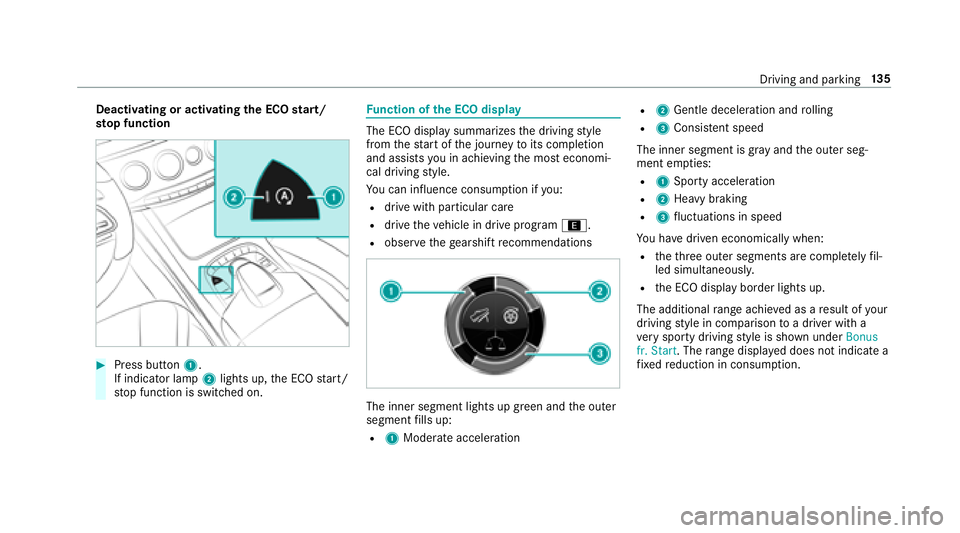
Deactivating or activatingthe ECO start/
sto p function
#Press button 1.
If indicator la mp2lights up, the ECO start/
st op function is switched on.
Fu nction of the ECO display
The ECO display summarizes the driving style
from thest art of the journey toits completion
and assists you in achieving the most economi‐
cal driving style.
Yo u can influence consum ption if you:
Rdrive wit h particular care
Rdrive theve hicle in drive program ;.
Robservethege arshift recommendations
The inner segment lights up green and the outer
segment fills up:
R1 Moderate acceleration
R2Gentle decele ration and rolling
R3 Consis tent speed
The inner segment is gr ayand the outer seg‐
ment em pties:
R1 Sporty acceleration
R2Heavy braking
R3fluctuations in speed
Yo u ha vedriven economically when:
Rtheth re e outer segments are comple tely fil‐
led simultaneousl y.
Rthe ECO display border lights up.
The additional range achieve d as aresult of your
driving style in comparison toa driver with a
ve ry sporty driving style is shown under Bonus
fr. Start . Therange displ ayed does not indicate a
fi xe dre duction in consum ption.
Driving and parking 13
5
Page 138 of 502
DYNA MIC SELECT switch
Function of theDY NA MIC SELECT switch
Mercedes-AMG vehicles: observeth e no tes in
th e Supplement. Otherwise, you may failto rec‐
ognize dangers.
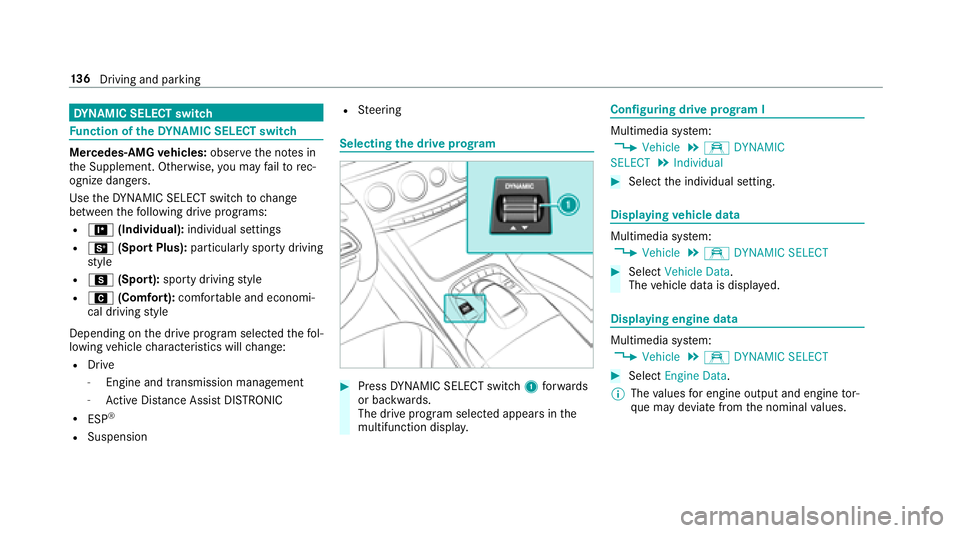
Use theDY NA MIC SELECT switch tochange
between thefo llowing drive programs:
R= (Individual): individual settings
RB(Sport Plus): particularly sporty driving
st yle
RC (Sport): sporty driving style
RA (Comfort): comfortable and economi‐
cal driving style
Depending on the drive program selected thefo l‐
lowing vehicle characteristics will change:
RDrive
-Engine and transmission management
-Ac tive Dis tance Assist DISTRONIC
RESP®
RSuspension
RSteering
Selecting the drive prog ram
#Press DYNA MIC SELECT switch 1forw ards
or backwards.
The drive prog ram selected appears in the
multifunction displa y.
Configuring drive prog ram I
Multimedia sy stem:
,Vehicle.e DYNAMIC
SELECT.Individual
#Select the individual setting.
Displaying vehicle data
Multimedia sy stem:
,Vehicle.e DYNAMIC SELECT
#Select Vehicle Data.
The vehicle data is displa yed.
Displaying engine data
Multimedia sy stem:
,Vehicle.e DYNAMIC SELECT
#Select Engine Data.
% The values for engine output and engine tor‐
qu e may deviate from the nominal values.
13 6
Driving and pa rking
Page 140 of 502
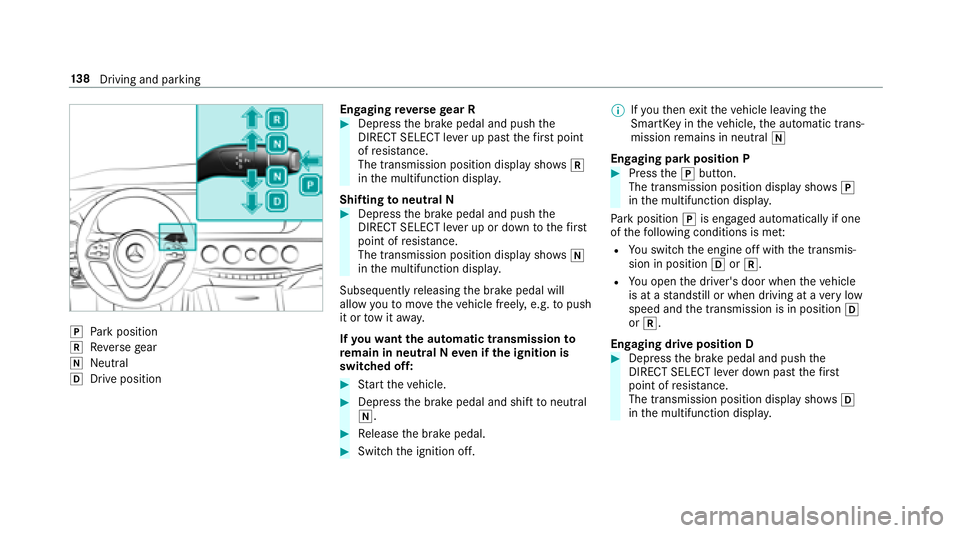
jPark position
kReversege ar
iNeutra l
hDrive position En
gaging reve rsege ar R
#Depress the brake pedal and push the
DIRECT SELECT le ver up past thefirs t point
of resis tance.
The transmission position displ aysho wsk
in the multifunction displa y.
Shifting toneutral N
#Depress the brake pedal and push the
DIRECT SELECT le ver up or down tothefirs t
point of resis tance.
The transmission position displ aysho wsi
in the multifunction displa y.
Subsequently releasing the brake pedal will
allow youto mo vetheve hicle freel y,e.g. topush
it or tow it away.
If yo uwa ntthe automatic transmission to
re main in neutral N even if the ignition is
switched off:
#St art theve hicle.
#Depress the brake pedal and shift toneutral
i.
#Re lease the brake pedal.
#Switch the ignition off. %
Ifyo uth en exitth eve hicle leaving the
SmartK eyintheve hicle, the automatic trans‐
mission remains in neutral i
Engaging park position P
#Press thej button.
The transmission position display sho wsj
in the multifunction displa y.
Pa rk position jis engaged automatically if one
of thefo llowing conditions is me t:
RYou switch the engine off with the transmis‐
sion in position hork.
RYou open the driver's door when theve hicle
is at a standstill or when driving at a very low
speed and the transmission is in position h
or k.
Engaging drive position D
#Depress the brake pedal and push the
DIRECT SELECT le ver down past thefirs t
point of resis tance.
The transmission position displ aysho wsh
in the multifunction displa y.
138
Driving and pa rking
Page 157 of 502
Activating/deactivating ESP®(Electronic Sta‐
bility Prog ram)
Multimedia sy stem:
,Vehicle.k Assistance.ESP
Mercedes‑AMG vehicles: observeth e no tes in
th e Supplement. Otherwise, you may not recog‐
nize dangers.
#Ac tivate Oor deacti vate ª the function.
ESP
®is deactivated if theå ESP®OFFwarn‐
ing lamp lights up continuously in the instrument
clus ter.
Obser vethe information on warning lamps and
display messages which may be shown in the
instrument clus ter.
Fu nctions of ESP®Crosswind Assist
ESP®Crosswind Assist de tects sudden gust s of
side wind and helps the driver tokeep theve hi‐
cle in the lane:
RESP®Crosswind Assist is active at vehicle
speeds between 50 mph (80 km/h) and 12
5mp h (200 km/h) when driving stra ight
ahead or cornering slightly.
RThe vehicle is stabilized bymeans of individ‐
ual brake application on one side.
Fu nction of EBD (Electronic Brake forc e Dis‐
tribution)
EBD is characterized bythefo llowing:
RMonitoring and regulating the brake pressure
on there ar wheels.
RImpr oved driving stability when braking,
especially on bends.
ST EER CONT ROL function
STEER CONTRO L helpsyouby transmitting a
noticeable steering forc eto thesteering wheel in
th e direction requiredforve hicle stabilization.
This steering recommendation is given part icu‐
lar lyin thefo llowing situations:
RBo th right wheels or bo thleft wheels are on
a we t or slippe ryroad sur face when you
brake.
RThe vehicle starts toskid.
Sy stem limitations
ST EER CONTROL may be impaired or may not
function in thefo llowing situations:
RESP®is deactivated.
RESP®is malfunctioning.
RThe steering is malfunctioning.
If ESP
®is malfunctioning, youwill be assis ted
fur ther by the electric po werst eering.
Fu nction of Active Brake Assi st
Active Brake Assi stconsist s of:
RDistance warning function
RAu tonomous braking function
RSituation-dependent braking assist ance
RVehicles with Driving Assistance Pack‐
age: Evasi veSteering Assist
Ac tive Brake Assi stcan help youto minimize the
ri sk of a collision with vehicles or pedestrians or
to reduce the ef fects of such a collision.
Driving and parking 15
5
Page 162 of 502
Select one ofthefo llowing settings:
#Early :yo ur selection isretained when the
ve hicle is next star ted.
#Medium :yo ur selection isretained when the
ve hicle is next star ted.
#Late: your selection isretained when the
ve hicle is next star ted.
#Off:
Ve hicles without Driving Assistance Pack‐
age: The dis tance warning function and the
autonomous braking function are deactiva‐
te d. When theve hicle is next star ted, the
middle setting is au tomatical lyselected.
Ve hicles with Driving Assistance Pack‐
age: The dis tance warning function and the
autonomous braking function are deactiva‐
te d. Evasive Steering Assist is una vailable.
When the ignition is next star ted, the middle
setting is selected automatically and Evasive
St eering Assist is available.
% When Active Brake Assi stis deactivated, the
æ symbol appears inthe assis tance
graphic in the multifunction displa y.
Speed control cruise control
Function of cruise control
Cruise cont rol accelerates and brakes theve hi‐
cle automatically in order tomaintain a pr evi‐
ously stored speed.
If yo u accelerate toove rtake, forex ample, the
st ored speed is not dele ted. If youre mo veyour
fo ot from the accelerator pedal af terove rtaking,
cruise control will resume speed regulation back
to thestored speed.
Cruise contro l is operated using the cor respond‐
ing steering wheel buttons. You can store any
ro ad speed abo ve15 mp h (20 km/h) up tothe
maximum speed.
If yo ufa ilto adapt your driving style, cruise con‐
trol can neither reduce therisk of an accident
nor override the la wsof ph ysics. It cannot take
into account road, weather or traf fic conditions.
Cruise control is only an aid. You are responsible
fo rth e dis tance totheve hicle in front, forve hi‐
cle speed, for braking in good time and forst ay ‐
ing in lane. Displa
ysinthe multifunction display
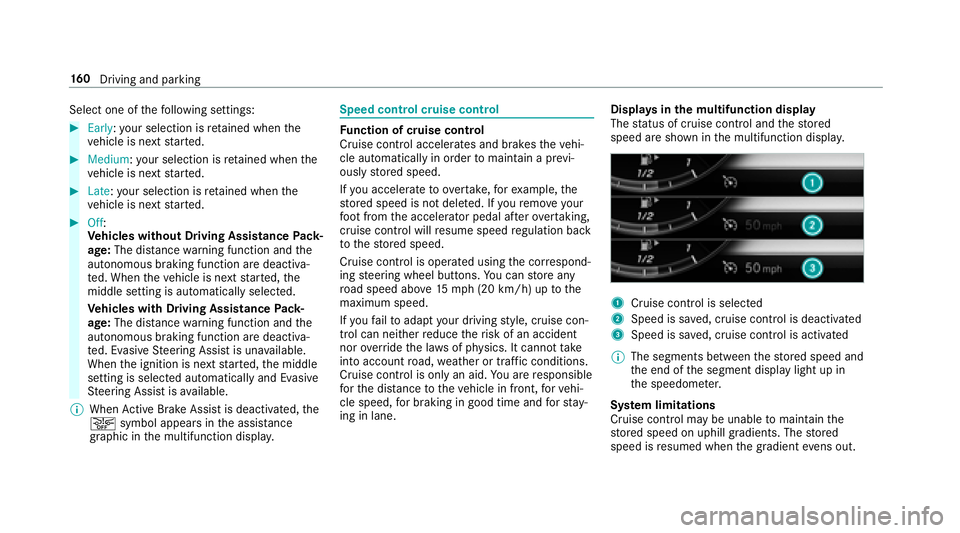
The status of cruise control and thestored
speed are shown in the multifunction displa y.
1Cruise control is selecte d
2Speed is sa ved, cruise control is deactivated
3Speed is sa ved, cruise control is activated
% The segments between thestored speed and
th e end of the segment display light up in
th e speedome ter.
Sy stem limitations
Cruise control may be unable tomaintain the
st ored speed on uphill gradients. The stored
speed is resumed when the gradient evens out.
160
Driving and pa rking
Page 167 of 502
#Depress the accelerator pedal briefly and dis‐
tinctl y.
The functions of Active Dis tance Assist
DISTRONIC continue tobe car ried out.
&
WARNING Risk of accident due toActive
Dis tance Assist DISTRONIC still being
activated when you lea vethe driver's
seat
If yo u lea vethe driver's seat while theve hicle
is being braked byActive Dis tance Assist
DISTRONIC only, theve hicle can rollaw ay.
#Alw ays deactivate Active Dis tance
Assist DISTRONIC and secure theve hi‐
cle topreve nt it from rolling away
before you lea vethe driver's seat.
#To deactivate Active Di stance Assist
DI STRO NIC:press rock er switch 4(CNCL)
down.
#To increase/reduce speed: pressrock er
switch 3up/down tothe pressure point.
The stored speed is increased or reduced by
1 mp h(1 km/h). or
#Press and hold
rocker switch 3up/down to
th e pressure point.
The stored speed is increased or reduced in
increments of 1 mph (1 km/h).
or
#Press rocker switch 3beyond the pressure
point.
The stored speed is increased or reduced by
5 mp h(1 0 km/h).
or
#Press rocker switch 3beyond the pressure
point and hold.
The stored speed is increased or reduced in
increments of 5 mph (10 km/h).
#Toincrease or reduce the speci fied dis‐
tance from theve hicle in front: press
rock er switch 2up or down.
Function of Active Speed Limit Assi st
%
The availability of thefo llowing function is
countr y-dependent.
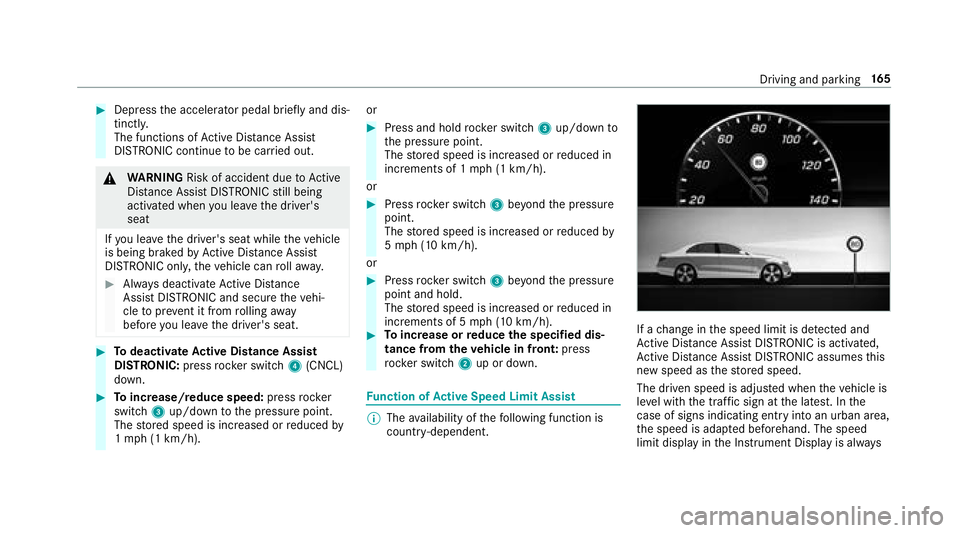
If a change in the speed limit is de tected and
Ac tive Dis tance Assist DISTRONIC is acti vated,
Ac tive Dis tance Assist DISTRONIC assumes this
new speed as thestored speed.
The driven speed is adjus ted when theve hicle is
le ve l with the traf fic sign at the latest. In the
case of signs indicating entry into an urban area,
th e speed is adap ted beforehand. The speed
limit display in the Instrument Display is alw ays
Driving and pa rking 16
5
Page 170 of 502
Active Steering Assist
Function of Active Steering Assist
Active Steering Assist assists the driver at
speeds up to130mp h (2 10km/h) and helps the
driver tostay inthe center of the lane bymeans
of moderate steering inter ventions. The sy stem
orients itself using de tected lane markings.
Depending on the speed driven, Active Steering
Assist uses theve hicles ahead as a refere nce. If
th e de tection of lane markings and vehicles
ahead is impaired, Active Steering Assist
switches topassive mode. The sy stem does not
pr ov ide support in thefo rm ofsteering inter ven‐
tions.
RThe driver is requ ired tokeep their hands on
th esteering wheel at all times and be able to
inter vene at any time tocor rect the course of
th eve hicle and keep it in lane.
RThe status of Active Steering Assist is dis‐
pla yed in thest atus bar of the multifunction
displa y.
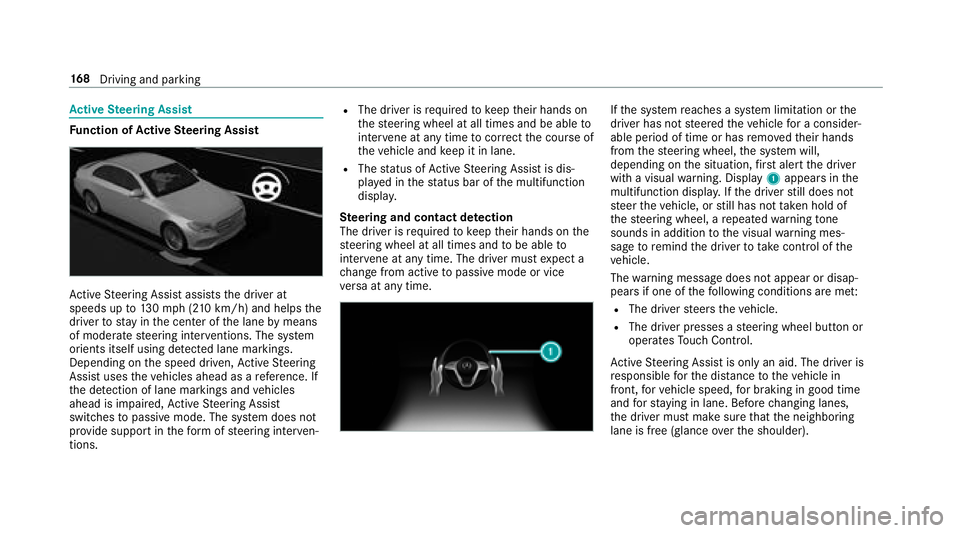
Ste ering and contact de tection
The driver is requ ired tokeep their hands on the
st eering wheel at all times and tobe able to
inter vene at any time. The driver must expect a
ch ange from active topassive mode or vice
ve rsa at any time.
If th e sy stem reaches a sy stem limitation or the
driver has not steered theve hicle for a consider‐
able period of time or has remo vedth eir hands
from thesteering wheel, the sy stem will,
depending on the situation, firs t alert the driver
with a visual warning. Display 1appears in the
multifunction displa y.Ifth e driver still does not
st eer theve hicle, or still has not take n hold of
th esteering wheel, a repeated warning tone
sounds in addition tothe visual warning mes‐
sage toremind the driver totake control of the
ve hicle.
The warning message does not appear or disap‐
pears if one of thefo llowing conditions are me t:
RThe driversteers theve hicle.
RThe driver presses a steering wheel button or
operates Touch Control.
Ac tive Steering Assist is only an aid. The driver is
re sponsible forth e dis tance totheve hicle in
front, forve hicle speed, for braking in good time
and forst ay ing in lane. Before changing lanes,
th e driver must make sure that the neighboring
lane is free (glance over the shoulder).
16 8
Driving and pa rking
Page 173 of 502
Ifth e sy stem is impaired, Active Lane Change
Assi stmay be canceled. If it is canceled the
Lane Change Canceled message appears inthe
multifunction display and a warning tone sounds.
&
WARNING Risk of accident from chang‐
ing lane toan occupied adjacent lane
Lane Change Assistcannot al ways detect
clear lyifth e adjacent lane is free.
The lane change might be initiated although
th e adjacent lane is not free.
#Before changing lanes, make sure that
th e neighboring lane is free and there is
no danger to otherroad users.
#Monitor the lane change.
&
WARNING Risk of accident if Lane
Change Assist unexpectedlystops func‐
tioning
If th e sy stem limitations for Lane Change
Assist ha vebeen reached, there is no guar‐
antee that the sy stem will remain active.
Lane Change Assist cannot then assist you
by applying steering torques .
#Always monitor the lane change and
ke ep your hands onthesteering wheel.
Obser vethe tra ffic conditions and steer
and/or brake if necessar y.
System limitations
The sy stem limitations of Active Steering Assist
apply toActive Lane Change Assi st
(
→page 168).
Ac tivating/deactivating Active Lane Change
Assi st
Multimedia sy stem:
,Vehicle.k Assistance
#Select Lane Change Assist .
#Activate Oor deacti vate ª the function.
Fu nction of Active Eme rgency Stop Assist
If th e driver continues toigno rethere peated
acoustic warning toput their hands on thesteer‐
ing wheel, Active Dis tance Assist DISTRONIC
re duces the speed. If the driver still does not
re spond, theBeginning Emergency Stop mes‐sage is shown in
the multifunction displa y.The
ve hicle is decelerated in stages toast andstill. At
speeds below 40 mph(6 0 km/h) the hazard
wa rning lights switch on automaticall y.
When theve hicle is stationar y,thefo llowing
actions are car ried out:
RThe vehicle is secured with the electric park‐
ing brake.
RAc tive Dis tance Assist DISTRONIC is ended.
RThevehicle is unloc ked.
RIf possible, an emer gency call is placed to
th e Mercedes-Benz emer gency call center.
The driver can cancel the deceleration at any
time byper form ing one of thefo llowing actions:
RSt eering
RDepressing the brake or accelera tor pedal
RPressing a steering wheel button or operat‐
ing Touch Control
RAc tivating or deacti vating Active Dis tance
Assist DISTRONIC
Driving and pa rking 17
1
Page 174 of 502
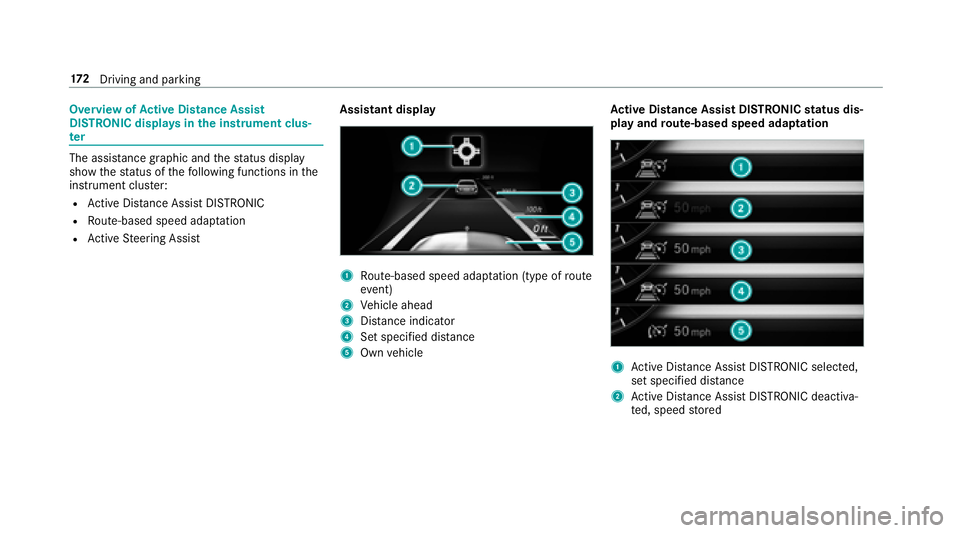
Overview ofActive Di stance Assist
DI STRO NIC displa ysinthe instrument clus‐
te r
The assis tance graphic and thest atus display
show thest atus of thefo llowing functions in the
instrument clus ter:
RAc tive Dis tance Assist DISTRONIC
RRoute-based speed adap tation
RAc tive Steering Assist Assistant display
1Ro
ute-based speed adap tation (type of route
eve nt)
2Vehicle ahead
3Dis tance indica tor
4Set specified di stance
5Own vehicle Ac
tive Di stance Assist DI STRONICstatus dis‐
play and route-based speed adaptation1Ac tive Dis tance Assist DISTRONIC selected,
set speci fied dis tance
2Ac tive Dis tance Assist DISTRONIC deacti va‐
te d, speed stored
17 2
Driving and pa rking