light MERCEDES-BENZ S-CLASS COUPE 2018 Owner's Manual
[x] Cancel search | Manufacturer: MERCEDES-BENZ, Model Year: 2018, Model line: S-CLASS COUPE, Model: MERCEDES-BENZ S-CLASS COUPE 2018Pages: 502, PDF Size: 6.29 MB
Page 1 of 502
Digita
l–int hevehicl eV ehicle document walletD igital–ont he Interne tD igital–asanA pp
Fa miliarize yourself wit hthe con‐
te nts of theO perator's Manual
directly via thev ehicle's multi‐
media sy stem (menu item "Vehi‐
cle"). Startw itht he quickg uide,
disco very our vehicle's highlights
or broaden your kn owledg ewith
useful tips. Her
eyou can find comprehen‐
si ve informatio nabout operating
yo ur vehicle and about services
and warranties in printed form. Yo
uc an find theO perator's Man‐
ual on theM ercedes-Benz home‐
page. The Mercedes-Benz Guides App
is
available free-of- charge in
fa miliar App stores. ÉA2175840305XËÍ
A2175840305 Apple
®
iOS AndroidTM Order no. P2
170158 13
Editio nB2018 Pa
rtno. A2 175840305 S-ClassC
oupe Operator's Manual
Mercedes-BenzMercedes-Benz
S-Class Coupe
Page 4 of 502
Atagl ance .................................................... 6
Cockpit ........................................................... 6
Wa rning and indicator lamps ........................ 10
Overhead contro l panel ................................ 12
Door control panel and seat adjustment ....... 14
Control settings inthere ar compartment .... .16
Emergencies and breakdowns ...................... 18
DigitalOperator' sManua l........................ .20
Callin gup the Digital Operator's Manual ...... 20
General no tes............................................. 21
Pr otecting the environment .......................... 21
Mercedes-Benz GenuineParts ....................... 21
Operator's Manual ........................................2 2
Service and vehicle operation ......................2 3
Operating saf ety.......................................... .24
Declaration of conformity for wireless
ve hicle components .....................................2 5
Diagnost ics connection ................................ 26
Qualified specialist workshop ....................... 27
Cor rect use of theve hicle ............................. 27
Problems with your vehicle ........................... 27
Re porting saf etydefects .............................. .27 Limited
Warranty .......................................... 28
QR codes forth ere scue card ....................... 28
Data storage .................................................2 8
Copyright .. .................................................... 32
Occupant safety......................................... 33
Re stra int sy stem .......................................... .33
Seat belts ..................................................... 35
Airbags ......................................................... 40
Ro ll bar ........................................................ .48
PRE-SAFE
®sy stem ....................................... 48
Children in theve hicle ..................................5 0
No tes on pets in theve hicle .........................5 6
Opening and closing.................................. 57
SmartK ey...................................................... 57
Doors ............................................................ 61
Tr unk ............................................................ 65
Sid ewind ows................................................ 71
Soft top .........................................................7 6
Anti-theft pr otection .................................... .82
Seats and stowing .................................... .84
No tes on the cor rect driver's seat posi‐
tion ............................................................... 84
Seats ............................................................ 85
St eering wheel ..............................................9 4
Using the memory function .......................... 96
St ow age areas .............................................. 98
Cup holder .................................................. 103
Ashtr ayand cigar ette lighter ...................... .104
Soc kets ....................................................... 105
Wi reless charging of the mobile phone
and connection with theex terior antenna .. 106
Ins talling or removing thefloor mats ..........1 08
Light and visibility ................................... 109
Exterior lighting .......................................... 109
Interior lighting ............................................ 114
Wi ndshield wiper and windshield washer
sy stem ........................................................ 115
Mir rors ........................................................ 117
Operating the sun visors ............................. 120
Climate control ......................................... 121
Overview of climate cont rol sy stems ......... .121
2
Conte nts
Page 5 of 502
Operatingthe climate control sy stem ......... 121
Drivin gand pa rking ................................. 128
Driving ........................................................ 128
DY NA MIC SELECT switch ............................1 36
Au tomatic transmission .............................. 137
Re fueling .................................................... 140
Pa rking ...................................................... .142
Driving and driving saf etysy stems .............. 151
Instrument Display and on-board
compu ter.................................................. 204
Instrument Displ ayove rview ...................... 204
Overview of the buttons on thesteering
wheel ......................................................... .205
Operating the on-board computer .............. 205
Overview of displa ysinthe multifunction
display ........................................................ 207
Ad justing the instrument lighting ............... .207
Menus and submenus ................................ 208
Head-up Display .......................................... 214
Vo ice Control Sy stem ............................... 216
No tes on operating saf ety.......................... .216
Operation ....................................................2 16
Using theVo ice Cont rol Sy stem ef fec‐
tively ........................................................... 218
Essential voice commands .......................... 219
Multimedia sy stem .................................. 229
Overview and operation .............................. 229
Sy stem settings .......................................... 238
ENE RGIZING comfort .................................. 250
Na vigation .................................................. 252
Te lephone .................................................. .276
Online and Internet functions ..................... 293
Media ......................................................... 300
Ra dio .......................................................... .312
Sound ......................................................... 320
Main tenance and care ............................. 323
ASS YST PLUS service inter val display ........ 323
Engine compartment .................................. 324
Cleaning and care ...................................... .330
Breakdown assist ance............................. 341
Emergency ..................................................3 41
Flat tire ....................................................... 341
Battery (vehicle) ......................................... 347
To w starting or towing away ....................... 352
Electrical fuses ........................................... 357
Wheels and tires ...................................... 361
No tes on noise or unusual handling char‐
acteristics .................................................. .361
Re gular checking of wheels and tires ......... .361
No tes on snow chains ................................ 362
Ti re pressure .............................................. 363
Loading theve hicle .................................... 369
Ti re labeling ................................................ 373
Definition of term sfo r tires and loading ..... 378
Changing a wheel ...................................... .381
Tech nical data .......................................... 391
No tes on tech nical da ta.............................. 391
Ve hicle electronics .....................................3 91
Ve hicle identification plate, VIN and
engine number overview ............................ 393
Operating fluids .. ........................................ 395
Contents 3
Page 9 of 502
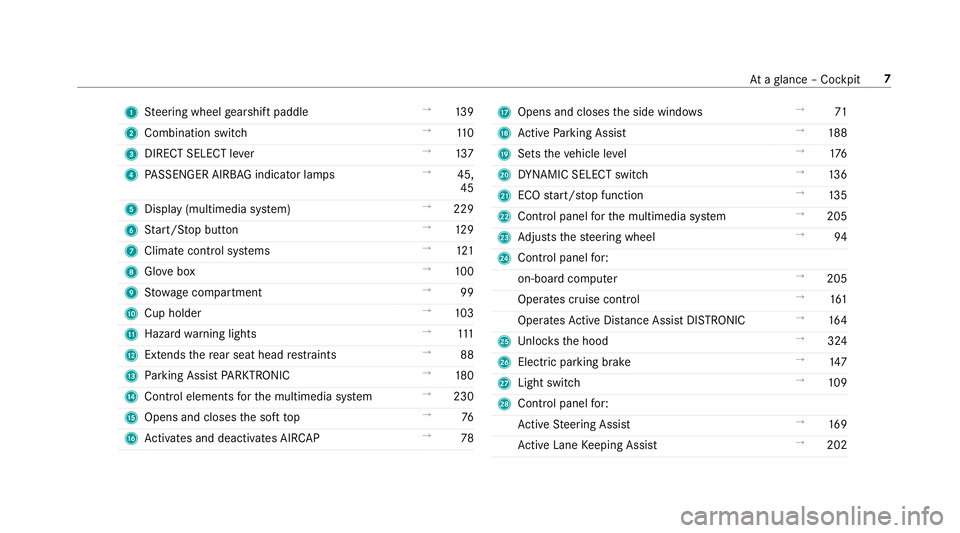
1Steering wheel gearshift paddle →
139
2 Combination switch →
110
3 DIRECT SELECT le ver →
137
4 PASSENGER AIRB AGindicator lamps →
45,
45
5 Display (multimedia sy stem) →
229
6 Start/ Stop button →
129
7 Climat e control sy stems →
121
8 Glovebox →
100
9 Stow age compartment →
99
A Cup holder →
103
B Hazard warning lights →
111
C Extends there ar seat head restra ints →
88
D Parking Assist PARKTRONI C →
180
E Control elements forth e multimedia sy stem →
230
F Opens and closes the soft top →
76
G Activates and deacti vates AIR CAP →
78HOpens and closes the side windo ws →
71
I Active Parking Assist →
188
J Sets theve hicle le vel →
176
K DYNA MIC SELECT switch →
136
L ECO start/ stop function →
135
M Control panel forth e multimedia sy stem →
205
N Adjusts thesteering wheel →
94
O Control panel for:
on-board computer →
205
Operates cruise contro l →
161
Operates Active Dis tance Assist DISTRONIC →
164
P Unloc ksthe hood →
324
Q Elect ric park ing brake →
147
R Light switch →
109
S Control panel for:
Ac tive Steering Assist →
169
Ac tive Lane Keeping Assist →
202
Ataglance – Cockpit 7
Page 13 of 502
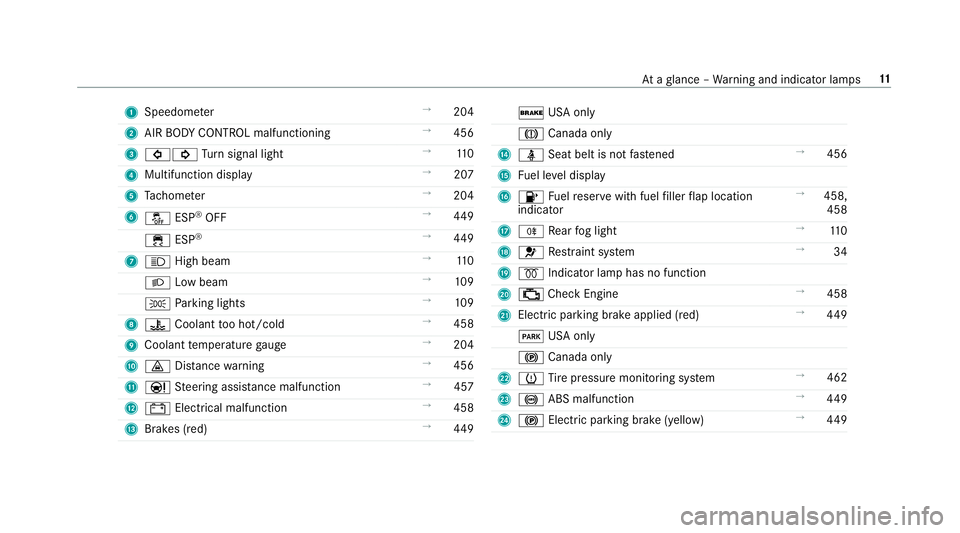
1Speedom eter →
204
2 AIR BODY CONTROL malfunctioning →
456
3 #! Turn signal light →
110
4 Multifunction display →
207
5 Tach ome ter →
204
6 å ESP
®OFF →
449
÷ ESP
®→
449
7 K High beam →
110
L Low beam →
109
T Parking lights →
109
8 ? Coolant too hot/cold →
458
9 Coolant temp erature gauge →
204
A · Distance warning →
456
B Ð Steering assis tance malfunction →
457
C # Electrical malfunction →
458
D Brakes (red) →
449
$ USA only
J Canada only
E ü Seat belt is not fastened →
456
F Fuel le vel display
G 8 Fuelreser vewith fuel filler flap location
indicator →
458,
458
H R Rear fog light →
110
I 6 Restra int sy stem →
34
J % Indicator lamp has no function
K ; Check Engine →
458
L Elect ric park ing brake applied (red) →
449
F USA only
! Canada only
M h Tire pressure monitoring sy stem →
462
N ! ABS malfunction →
449
O ! Electric pa rking brake (yellow) →
449
At aglance – Warning and indicator lamps 11
Page 15 of 502
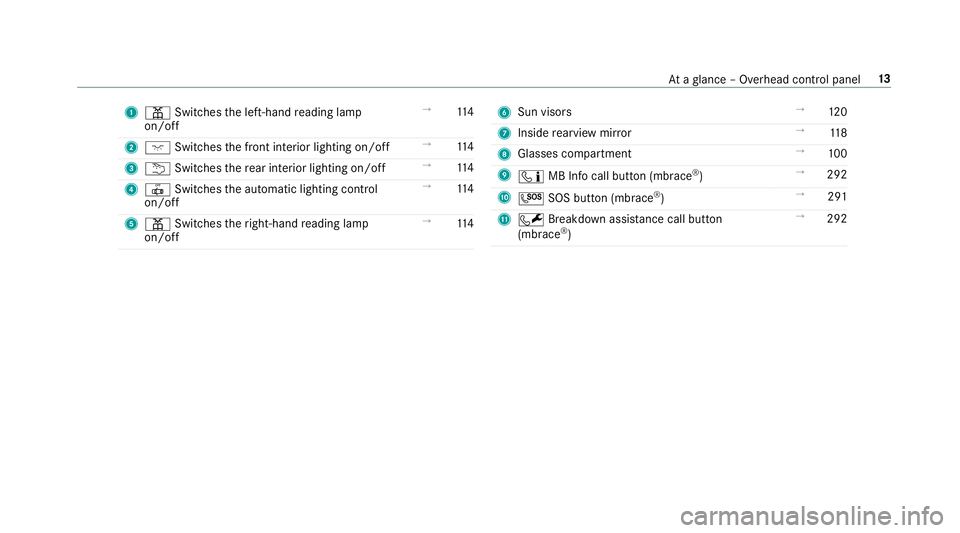
1p Switches the left-hand reading lamp
on/off →
114
2 c Switches the front interior lighting on/off →
114
3 u Switches there ar interior lighting on/off →
114
4 | Switches the automatic lighting control
on/off →
114
5 p Switches theright-hand reading lamp
on/off →
1146
Sun visors →
120
7 Inside rearview mir ror →
118
8 Glasses compartment →
100
9 ï MB Info call button (mbrace
®) →
292
A G SOS button (mbrace
®) →
291
B F Breakdown assis tance call button
(mb race
®) →
292
Ataglance – Overhead control panel 13
Page 21 of 502
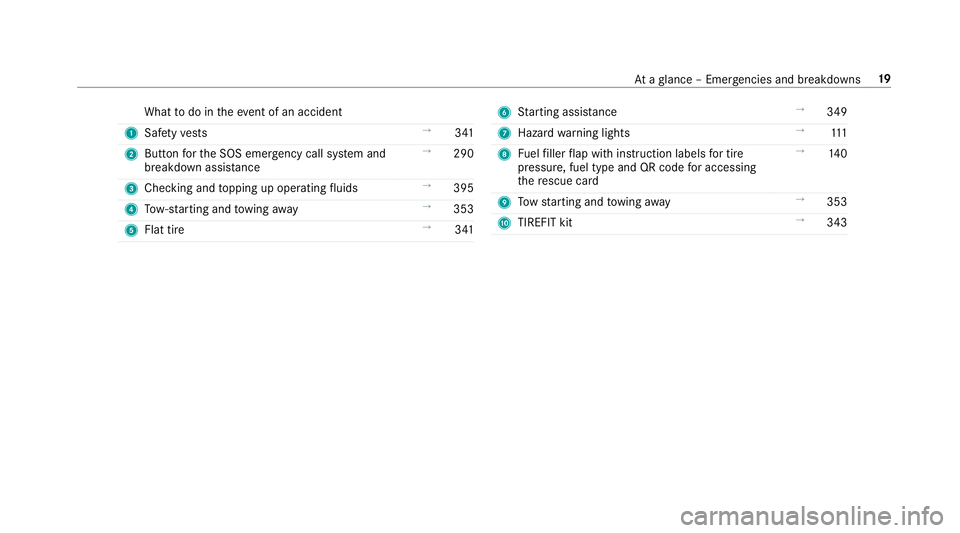
Whattodo in theeve nt of an accident
1 Safetyve sts →
341
2 Button forth e SOS emer gency call sy stem and
breakdown assis tance →
290
3 Checking and topping up operating fluids →
395
4 Tow- starting and towing away →
353
5 Flat tire →
3416Starting assis tance →
349
7 Haza rdwa rning lights →
111
8 Fuelfiller flap with instruction labels for tire
pressure , fuel type and QR code for accessing
th ere scue card →
140
9 Tow starting and towing away →
353
A TIREFIT kit →
343
Ataglance – Emer gencies and breakdowns 19
Page 22 of 502
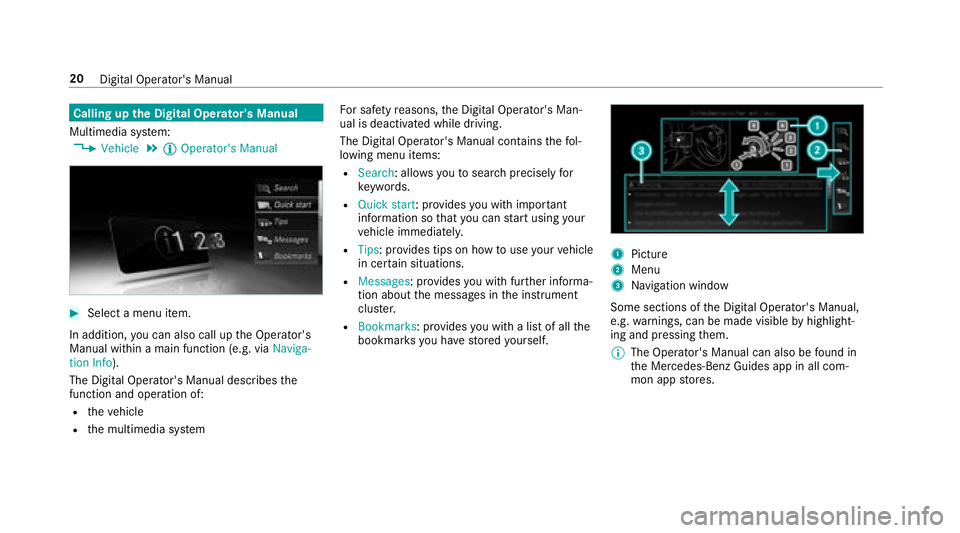
Calling upthe Digital Operator's Manual
Multimedia sy stem:
,Vehicle.Õ Operator's Manual
#Select a menu item.
In addition, you can also call up the Operator's
Manual within a main function (e.g. via Naviga-
tion Info).
The Digital Operator's Manual describes the
function and operation of:
Rth eve hicle
Rthe multimedia sy stem Fo
r saf etyre asons, the Digital Operator's Man‐
ual is deactivated while driving.
The Digital Operator's Manual conta insthefo l‐
lowing menu items:
RSearch: allo wsyouto sear chprecisely for
ke ywords.
RQuic kstart: prov ides youwit him por tant
information so that you can start using your
ve hicle immediately.
RTips: pr ovides tips on how touse your vehicle
in cer tain situations.
RMessages : provides youwit h fur ther informa‐
tion about the messages in the instrument
clus ter.
RBookmarks : provides you with a list of all the
bookmar ksyou ha vestored yourself.
1Picture
2Menu
3Na vigation window
Some sections of the Digital Operator's Manual,
e.g. warnings, can be made visible byhighlight‐
ing and pressing them.
% The Operator's Manual can also be found in
th e Mercedes-Benz Guides app in all com‐
mon app stores.
20
Digital Operator's Manual
Page 31 of 502
Ingeneral, this information documents thest ate
of a component part, a module, a sy stem or the
sur roundings such as:
Roperating statuses of sy stem components
(e.g. fluid leve ls, battery status, tire pressure)
Rstatus messages concerning theve hicle and
its individual components (e.g. number of
wheel revo lutions/speed, decele ration, lat‐
eral acceleration, display of thefast ened seat
belts)
Rmalfunctions or defects in impor tant sy stem
components (e.g. lights, brakes)
Rinformation on vehicle damage events
Rsystem reactions in special driving situations
(e.g. airbag deployment, inter vention of sta‐
bility control sy stems)
Rambient conditions (e.g. temp erature, rain
sensor)
In addition toprov iding the actual control unit
function, this data assists the manufacturer in
de tecting and rectifying malfunctions and opti‐
mizing vehicle functions. The majority of this
data is temp orary and is only processed in the ve
hicle itself. Only a small portion of the data is
st ored in theev ent or malfunction memor y.
When service workis done on your vehicle, the
te ch nical da tafrom theve hicle can be read out
by service network staff (e.g. workshops, manu‐
fa cturer) or third parties (e.g. breakdown serv‐
ices). Services include repair services, mainte‐
nance processes, warranty events a
nd
quality
assurance measures, forex ample. The read out
is per form ed via the legally prescribed port for
th e diagnostics connection in theve hicle. The
re spective service network locations or third
parties collect, process and use the data. They
document tech nical statuses of theve hicle,
assist in finding malfunctions and impr oving
qu ality and are transmitted tothe manufacturer,
if necessar y.Fu rthermore, the manufacturer is
subject toproduct liability. Forth is, the manu‐
fa cturer requirestech nical da tafrom vehicles.
Malfunction memories in theve hicle can be
re set bya service outlet as part of repair or
maintenance work.
They can enter data into theve hicle's comfort
and inf otainment functions themselves as part
of the selected equipment. These include:
Rmultimedia data such as music,
films or pho‐
to sfo r playba ckin an integrated multimedia
sy stem
Raddress book data for use in connection with
an integrated hands-free sy stem or an inte‐
grated navigation sy stem
Rentered navigation destinations
Rdata about the use of Internet services
This data can be sa ved locally in theve hicle or it
is located on a device which you ha veconnected
to theve hicle (e.g. smartphone, USB flash drive
or MP3 pla yer). If this data is stored in theve hi‐
cle, you c
an dele
teit at any time. This data can
only be transmitte dto third parties upon your
re qu est with particular rega rd tothe scope of
use of online services according toyour selected
settings.
Yo u can store or change con venience settings/
individualization in theve hicle at any time.
Depending on the equipment, this includes, for
ex ample:
Rseat and steering wheel position settings
General no tes 29
Page 32 of 502
Rsuspension and climate control settings
Rindividualization such as interior lighting
If yo ur vehicle is accordingly equipped, you can
connect your smartphone or ano ther mobile end
device totheve hicle. You can cont rolth em via
th e control elements integrated in your vehicle.
Images and audio from the smartphone can be
output via the multimedia sy stem. Cer tain infor‐
mation is simultaneously transfer redto yo ur
smartphone.
Dependin g onthere spective integration type,
th is includes, forex ample:
Rge neral vehicle data
Rposition data
This enables the use of selected smartphone
apps, e.g. navigation or music playbac k.There is
no fur ther interaction between the smartphone
and theve hicle; in particular, vehicle data is not
directly accessible. Which type of fur ther data
processing occurs is de term ined bythe pr ovider
of the specific app used. Which settings you can
make, ifan y,depends on the specific app and
th e operating sy stem of your smartphone.
Online services
Wire less network connection
If yo ur vehicle has a wireless network connec‐
tion, it enables data tobe exc hanged between
yo ur vehicle and additional sy stems. The wire‐
less network connection is enabled via theve hi‐
cle's transmitter and receive r unit or via connec‐
te d mobile end devices (e.g. smartphones).
Online functions can be used via the wireless
network connection. This includes online serv‐
ices and applications/apps pr ovided bythe man‐
ufacturer or other pr oviders.
Manufa cturer's se rvices
Re garding online services of the manufacturer,
th e individual functions are described bythe
manufacturer in a sui table place (e.g. Operator's
Manual, website of the manufacturer) along with
th ere leva nt da taprotection information. Per‐
sonal data may be used forth e pr ovision of
online services. Data is exch anged via a secure
connection, e.g. the manufacturer's designated
IT sy stems. Personal data is collected, pro‐
cessed and used via the pr ovision of services exc
lusively on the basis of legal permissions or
with prior consent.
The services and functions (sometimes subject
to afe e) can usually be activated or deactivated.
In some cases, this also applies tothe entire
ve hicle's data connection. This excludes, in par‐
ticular, legally prescribed functions and services.
Third pa rty services
If it is possible touse online services from other
pr ov iders, th
ese services are subj
ecttothe data
pr otection and term s of use of there sponsible
pr ov ider. The manufacturer has no influence on
th e conte ntexc hanged.
Please inquire, therefore, about the type, scope
and purpose of the collection and use of per‐
sonal data as part of third party services from
th eir respective pr ovider.
COMAND/mbrace
Ifth eve hicle is equipped with COMAND or
mbrace, additional data about theve hicle's oper‐
ation, the use of theve hicle in cer tain situations,
30
General no tes