reset MERCEDES-BENZ S-CLASS COUPE 2018 Owner's Manual
[x] Cancel search | Manufacturer: MERCEDES-BENZ, Model Year: 2018, Model line: S-CLASS COUPE, Model: MERCEDES-BENZ S-CLASS COUPE 2018Pages: 502, PDF Size: 6.29 MB
Page 28 of 502
must accept any interfere nce, including inter fer‐
ence that may cause undesired operation of the
device."
USA: "Wireless charging sy stem for mobile devi‐
ces (Model: D-WMI20 15A): this device complies
with Part18 ofthe FCC Rules."
The name and address of there sponsible party
is:
Continental Automotive Sy stems US Inc.
24 00 Executive Hills Drive
Au burn Hills, MI 48326-2980
Uni tedSt ates of America
Diagnostics connection
The diagnostics connection is only in tended for
th e connection of diagnostic devices at a quali‐
fi ed specialist workshop.
&
WARNING Risk of accident due tocon‐
necting devices tothe diagnostics con‐
nection
If yo u connect equipment toa diagnostics
connection in theve hicle, it may af fect the
operation of vehicle sy stems.
As a result, the operating saf etyof theve hi‐
cle could be af fected.
#Only connect equipment toa diagnos‐
tics connection in theve hicle which is
appr ovedfo ryo ur vehicle byMercedes-
Benz.
& WARNING Risk of accident due to
objects in the driver's foot we ll
Objects in the driver's foot we ll may impede
pedal tr avel or block a depressed pedal.
This jeopardizes the operating and road
saf etyof theve hicle.
#Stow all objects in theve hicle securely
so that they cannot getinto the driver's
fo ot we ll.
#Alw ays ins tallth efloor mats securely
and as prescribed in order toensure
th at there is alw ays suf ficient room for
th e pedals.
#Do not use loose floor mats and do not
place floor mats on top of one ano ther.
* NO
TEBattery discharging from using
devices connected tothe diagnostics
connection
Using devices at the diagnostics connection
drains the batter y.
#Checkthech arge leve l of the batter y.
#Ifth ech arge leve l is lo w,charge the
batter y,e.g. bydriving a considerable
dis tance.
Connecting equipment tothe diagnostics con‐
nection can lead toemissions monitoring infor‐
mation being reset, forex ample. This may lead
to theve hicle failing tomeet therequ irements of
th e next emissions inspection during the main
inspection.
26 General no tes
Page 75 of 502
&WARNING Risk of becoming trapped
despite there being reve rsing pr otection
on the side window
The reve rsing function does not react:
Rto soft, light and thin objects, e.g. small
fi ngers
Rdu ring resetting
This means that there ve rse function cannot
pr eve nt someone from becoming trapped in
th ese situations.
#When closing, make sure that no body
parts are in the closing area.
#If someone becomes trapped, press the
W button toopen the side window
again.
Con venience opening (ventilating theve hicle
before starting a journey)
&
WARNING Risk of entrapment when
opening a side window
When opening a side windo w,parts of the
body could be dr awn in or become trapped
between the side window and window frame.
#When opening, make sure that nobody
is touching the side windo w.
#Release the button immediately if
somebody becomes trapped.
& WARNING Risk of becoming trapped
when opening/closing the soft top .
When opening or closing the soft top, there
is a risk that parts of the body could become
trapped bymoving parts such as thero of
mechanism, the trunk lid, or the side win‐
do ws .
#When opening or closing, make sure
that no body parts are in the vicinity of
moving components.
#Re lease the button if somebody
becomes trapped.
#Press and hold the% button on the
SmartK ey.
The following functions are per form ed:
RThe vehicle is unloc ked.
RThe side windo wsare opened when the
trunk pa rtition is open.
RThe soft top is opened when the trunk
partition is closed.
RThe seat ventilation of the driver's seat is
switched on.
#To inter rupt convenience opening: release
th e% button.
Opening and closing 73
Page 77 of 502
ProblemPossible causes/consequences and MSolutions
& WARNING Risk of becoming trapped or fata lly injured if reve rsing pr otection is not activated
If yo u close a side windowagain immediately af ter it has been bloc ked or reset, the side window closes
with increased or maximum forc e. The reve rsing feature is then not active.
Pa rts of the body could become trapped in the closing area in the process.
#Make sure that no parts of the body are in the closing area.
#To stop the closing process, release the button or press the button again toreopen the side win‐
do w.
#Close the soft top.
If a side window is obstructed during closing and reopens again slightly:
#Immediately af terth e window bloc ks, pull the cor responding button again until the side window has
closed, and hold the button for an additional second.
The side window is closed with increased forc e.
If a side window is obstructed again during closing and reopens again slightly:
#Re peat the pr evious step.
The side window is closed without the automatic reve rsing function.
The side windo wscannot be opened or
closed using the con venience opening
fe ature. The SmartK
eybattery is dischar ged or nearly dischar ged.
#Check the battery using the battery check lamp and replace if necessary .
Opening and closing 75
Page 92 of 502
Resetting the seat and massage settings
Multimedia sy stem:
,Vehicle.a Seats.Reset
#Select YesorNo.
% Only the cur rently selected seat is reset.
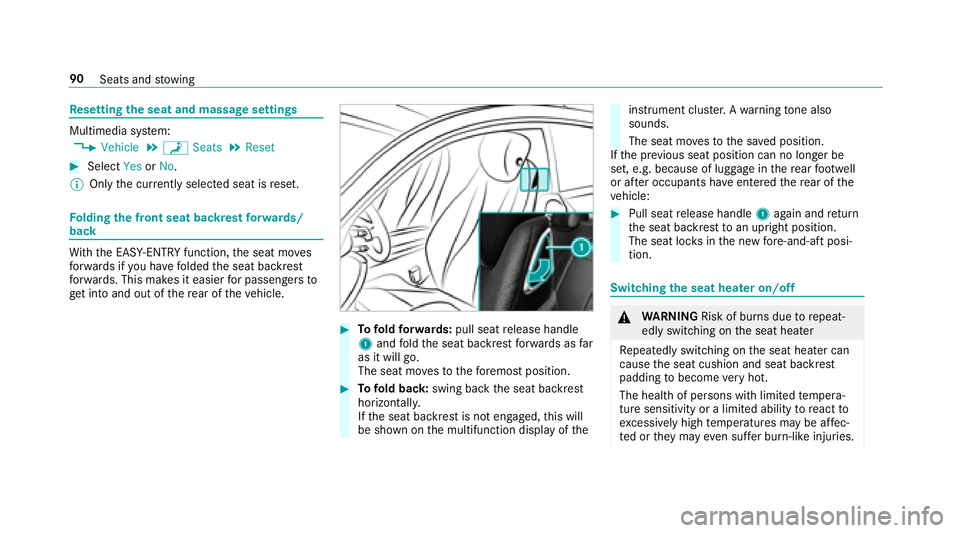
Fo lding the front seat backrest forw ards/
back
Wi th th e EASY-ENTRY function, the seat mo ves
fo rw ards if you ha vefolded the seat backrest
fo rw ards. This makes it easier for passengers to
ge t into and out of there ar of theve hicle.
#To fold forw ards: pull seat release handle
1 and fold the seat backrest forw ards as far
as it will go.
The seat mo vesto thefo re most position.
#To fold back: swing back the seat backrest
horizon tally.
If th e seat backrest is not engaged, this will
be shown on the multifunction display of the
instrument clus ter.A wa rning tone also
sounds.
The seat mo vesto the sa ved position.
If th e pr evious seat position can no longer be
set, e.g. because of luggage in there ar foot we ll
or af ter occupants ha veentered there ar of the
ve hicle:
#Pull seat release handle 1again and return
th e seat backrest toan upright position.
The seat loc ksinthe new fore -and-aft posi‐
tion.
Switching the seat hea ter on/o ff
&
WARNING Risk of burn s duetorepeat‐
edly switching on the seat heater
Re peatedly switching on the seat heater can
cause the seat cushion and seat backrest
padding tobecome very hot.
The health of persons with limited temp era‐
ture sensitivity or a limited ability toreact to
exc essively high temp eratures may be af fec‐
te d or they may even suf fer burn-like injuries.
90
Seats and stowing
Page 99 of 502
#If somebody becomes trapped, immedi‐
atelyrelease the memory function posi‐
tion button.
The adjustment process is stopped.
&
WARNING Risk of entrapment if the
memory function is activated bychildren
Children could become trapped if they acti‐
va te the memory function, particularly when
unattended.
#Ne ver lea vechildren unatte nded inthe
ve hicle.
#When leaving theve hicle, alw aysta ke
th eke ywit hyo u and lock theve hicle.
The memory function can be used when the igni‐
tion is switched off.
St oring
The memory function is only available in vehicles
with the memory pac kage .
Seat adjustments for up tothre e people can be
st ored and called up using the memory function. The
following settings can be stored forth e front
seats:
RSeat, backrest, head restra int position and
con tour of the seat backrest in the lumbar
re gion
RAc tive multicontour seat: side bols ters of the
seat backrest, shoulder of the seat backrest,
conto ur ofthe seat backrest, dynamic func‐
tion le vel
RSeat heate r:distribution of the heated sec‐
tions of the seat cushion and seat backrest
RDriver's side: steering wheel position and
position of the outside mir rors on the driver's
and front passenger sides
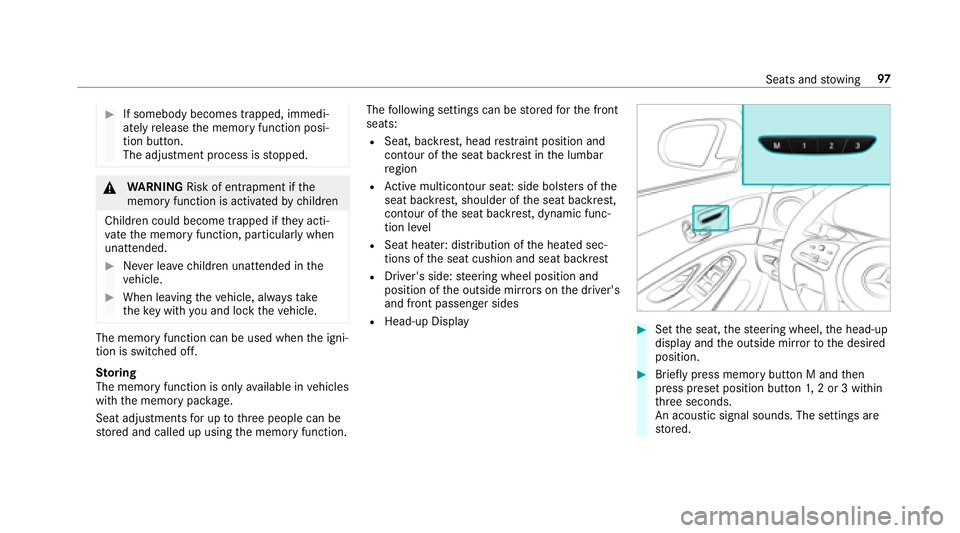
RHead-up Display#Set the seat, thesteering wheel, the head-up
display and the outside mir rorto the desired
position.
#Brief lypress memory button M and then
press preset position button 1,2 or 3 within
th re e seconds.
An acoustic signal sounds. The settings are
st ored.
Seats and stowing 97
Page 100 of 502
#Tocall up: press and hold there leva nt pre‐
set position button 1,2 or 3 until the front
seat, thesteering wheel, head-up display and
outside mir ror are in thestored position.
% Ifyo ure lease the preset position button, the
seat, steering wheel and mir ror setting func‐
tions stop immediatel y.
Ve hicles with an Active Multicon tour
Seat Package: The setting of the active mul‐
ticon tour seat or the 4-w aylumbar support
is still car ried out.
Ve hicles without theAc tive Multicon tour
Seat Package: Adjustment of the 4-w ay
lumbar support is still car ried out.
St ow age areas
Note s on loading theve hicle
&
WARNING Risk ofexhaust gas poisoning
Combustion engines emit poisonous exhaust
ga ses such as carbon monoxide. Exhaust
ga ses can enter theve hicle interior if the
trunk lid is open when the engine is running,
especially if theve hicle is in motion.
#Alw ays switch off the engine before
opening the trunk lid.
#Ne ver drive with the trunk lid open.
&
WARNING Risk of injury from unsecured
items in theve hicle
If objects, luggage or loads are not secured
or not secured suf ficientl y,they could slip,
tip ove r or be throw n around and thereby hit
ve hicle occupants.
There is a risk of injur y,particularly in the
ev ent of sudden braking or a sudden change
in direction.
#Alw aysstow objects in such a wayth at
th ey cannot be thro wn around.
#Before the journe y,secure objects, lug‐
ga ge or loads against slipping or tipping
ove r.
&
WARNING Risk of injury from incorrectly
stowe d objects
If objects in theve hicle interior are stowed
incor rectly, they can slide or be throw n
around and hit vehicle occupants. In addi‐
tion, cup holders, open stowage spaces and
mobile phone brac kets cann otalw aysre tain
all objects they contain.
There is arisk of injur y,particularly in the
ev ent of sudden braking or a sudden change
in direction.
#Alw aysstow objects so that they can‐
not be throw n around in such situa‐
tions.
#Alw ays make sure that objects do not
pr otru de from stowage spaces, luggage
nets or stowage nets.
#Close the loc kable stow age spaces
before starting a journe y.
#Alwaysstow and secure heavy, hard,
pointe d, sharp-edged, fragile or bulky
objects in the trunk.
98
Seats and stowing
Page 116 of 502
vehicle is unloc ked. When youstart theve hicle,
th e sur round lighting is switched off and auto‐
matic driving lights are activated.
Interior lighting
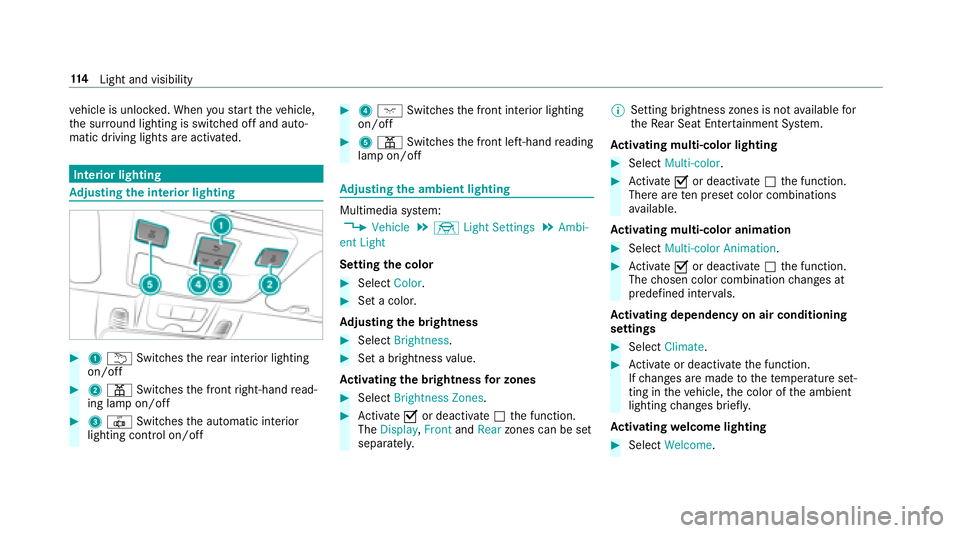
Ad justing the in terior lighting
#1 u Switches there ar interior lighting
on/off
#2 p Switches the front right-hand read‐
ing lamp on/off
#3 | Switches the automatic interior
lighting control on/off
#4 c Switches the front interior lighting
on/off
#5 p Switches the front left-hand reading
lamp on/off
Ad justing the ambient lighting
Multimedia sy stem:
,Vehicle.÷ Light Settings.Ambi-
ent Light
Setting the color
#Select Color.
#Set a colo r.
Ad justing the brightness
#Select Brightness .
#Set a brightness value.
Ac tivating the brightness for zones
#Select Brightness Zones .
#Activate Oor deacti vate ª the function.
The Display ,Front andRear zones can be set
separately. %
Setting brightness zones is not available for
th eRe ar Seat En tertainment Sy stem.
Ac tivating multi-color lighting
#Select Multi-color.
#Activate Oor deacti vate ª the function.
There are ten preset color combinations
av ailable.
Ac tivating multi-color animation
#Select Multi-color Animation.
#Activate Oor deacti vate ª the function.
The chosen color combination changes at
predefined inter vals.
Ac tivating dependency on air conditioning
settings
#Select Climate .
#Activate or deacti vate the function.
If ch anges are made tothete mp erature set‐
ting in theve hicle, the color of the ambient
lighting changes brief ly.
Ac tivating welcome lighting
#Select Welcome.
114
Light and visibility
Page 120 of 502
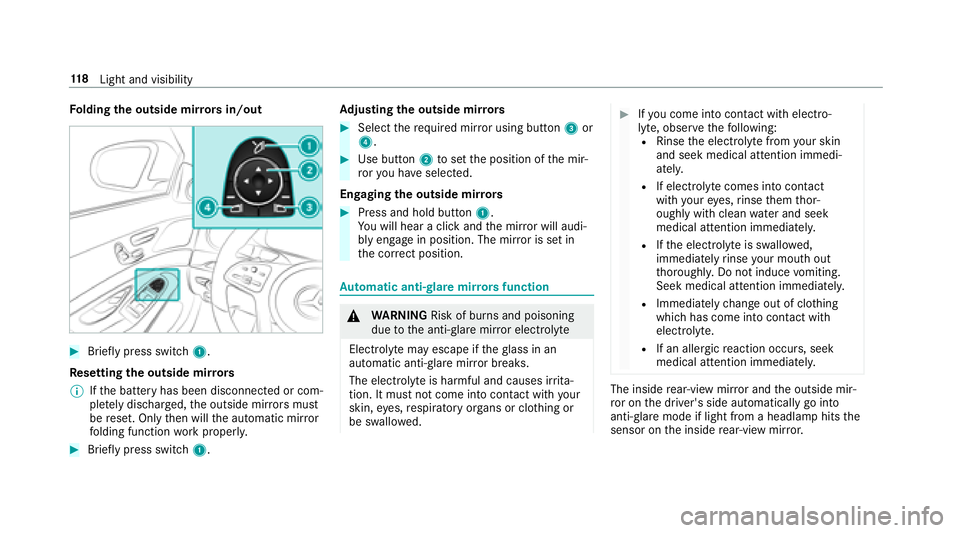
Folding the outside mir rors in/out
#Brief lypress switch 1.
Re setting the outside mir rors
% Ifth e battery has been disconnected or com‐
ple tely discharged ,th e outside mir rors must
be reset. Only then will the automatic mir ror
fo lding function workproperly.
#Brief lypress switch 1. Ad
justing the outside mir rors
#Select there qu ired mir ror using button 3or
4.
#Use button 2toset the position of the mir‐
ro ryo u ha veselected.
Engaging the outside mir rors
#Press and hold button 1.
Yo uwill hear a click and the mir ror will audi‐
bly engage in position. The mir ror is set in
th e cor rect position.
Au tomatic anti-glare mir rorsfunction
&
WARNING Risk of burn s and poisoning
due tothe anti- glare mir ror electrolyte
Electrolyte may escape if theglass in an
automatic anti-glare mir ror breaks.
The electrolyte is harmful and causes ir rita ‐
tion. It must not come into contact wi thyour
skin, eyes,respiratory organs or clo thing or
be swallo wed.
#Ifyo u come into contact with electro‐
ly te , obser vethefo llowing:
RRinse the electrolyte from your skin
and seek medical attention immedi‐
atel y.
RIf electrolyte comes into contact
with your eyes, rinse them thor‐
oughly with clean water and seek
medical attention immediately.
RIf th e electrolyte is swallo wed,
immediately rinse your mouth out
th oroughly. Do not induce vomiting.
Seek medical attention immediately.
RImmediate lych ange out of clo thing
which has come into con tact wi th
electrolyte.
RIf an allergic reaction occurs, seek
medical attention immediatel y.
The insiderear-view mir ror and the outside mir‐
ro r on the driver's side automatically go into
anti- glare mode if light from a headlamp hits the
sensor on the inside rear-view mir ror.
11 8
Light and visibility
Page 211 of 502
RGray radar waves next tovehicle: Blind Spot
Assist activated
RGreen radar waves next tovehicle: Blind Spot
Assist active
RAc tive Dis tance Assist DISTRONIC displa ys
(→page 162).
Calling up displays in theTr ip menu
On-board computer:
,Trip
% When you ha vethest yle set toProgressive,
yo u can view information on the journey in
th e left-hand area of the Instrument Displa y.
#Toselect a displa y:swipe upwards or down‐
wa rds on the left-hand Touch Control.
Dis playsintheTrip menu:
Rstandard display
Rra nge and cur rent fuel consump tion
A recuperation displ ayis also available for
cer tain engines. If there is only a small
amount of fuel left in the fuel tank, the dis‐ play sho
wsave hicle being refueled ins tead
of thera nge.
RECO displ ay(→page 135)
Rtrip computer From StartandFrom Reset
Rdigital speedome ter
% The digital speedome ter only appears in the
Classic andSport styles.
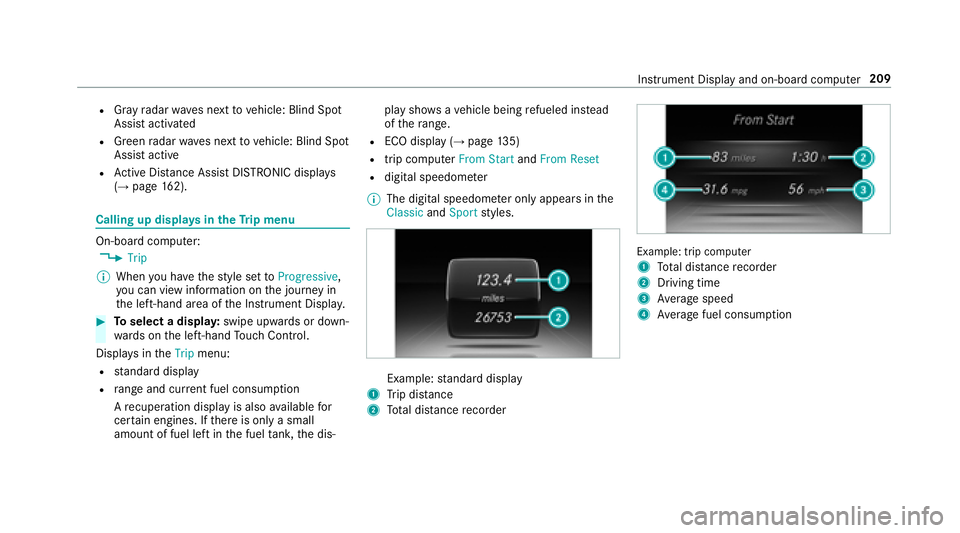
Example: standard display
1Trip dis tance
2To tal dis tance recorder
Example: trip compute r
1
To tal dis tance recorder
2Driving time
3Av erage speed
4Average fuel consum ption
Instrument Display and on-board computer 209
Page 212 of 502
Resetting values in theTr ip menu of the on-
board compu ter
On-board computer:
,Trip
% The spelling may dif fer in the main menu dis‐
pla yed. Therefore, obser vethe menu over‐
view forth e Instrument Display
(
→page 205).
Yo u can reset theva lues of thefo llowing func‐
tions:
RTr ip dis tance
RTrip computer "F rom start" and "F rom reset"
RECO display
#To select the function tobe rese t:swipe
upwards or down wards on the left-hand
To uch Control.
#Press the left-hand Touch Control.
#Select Yes.
#Pressthe left-hand Touch Control.
If yo upr ess and hold the left-hand Touch Con‐
trol, the function will be reset immediately.
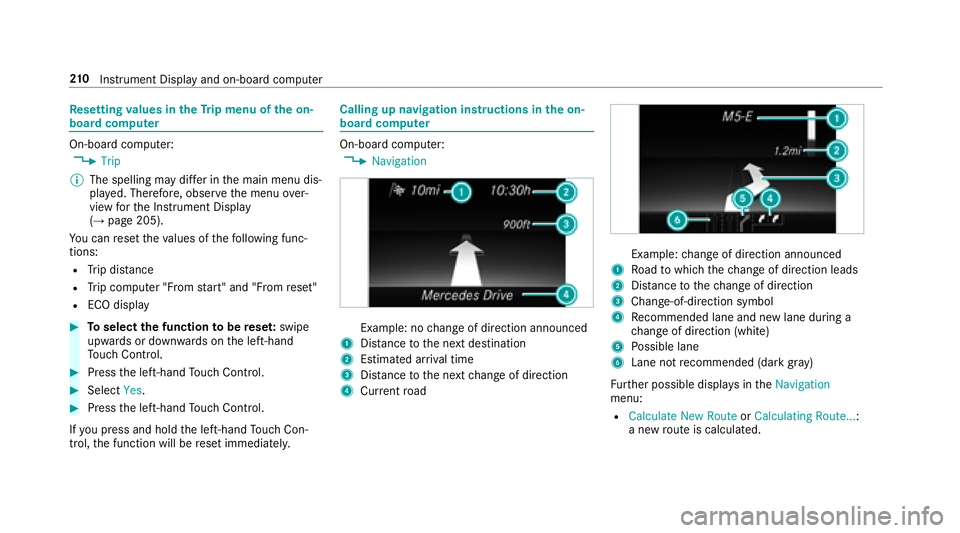
Calling up navigation instructions in the on-
board compu ter
On-board computer:
,Navigation
Example: no change of direction announced
1Dis tance tothe next destination
2Estimated ar riva l time
3Dis tance tothe next change of direction
4Cur rent road
Example: change of direction announced
1Ro ad towhich thech ange of direction leads
2Dis tance tothech ange of direction
3Change -of-direction symbol
4Recommended lane and new lane duri ng a
ch ange of direction (white)
5Po ssible lane
6Lane not recommended (da rkgray )
Fu rther possible displa ysintheNavigation
menu:
RCalculate New Route orCalculating Route... :
a new route iscalculated.
21 0
Instrument Display and on-board computer