reset MERCEDES-BENZ S-Class MAYBACH 2017 W222 Comand Manual
[x] Cancel search | Manufacturer: MERCEDES-BENZ, Model Year: 2017, Model line: S-Class MAYBACH, Model: MERCEDES-BENZ S-Class MAYBACH 2017 W222Pages: 230, PDF Size: 8.27 MB
Page 130 of 230
XSearch for the desired entry (Ypage 136).
XPress the controller when you have finished
searching.
The telephone number has been saved.
A maximum of five telephone numbers can be
saved for one contact.
If five numbers are already stored for the con-
tact you are searching for, a prompt will appear
asking whether you wish to overwrite one of the
existing numbers.
If you wish to overwrite one of the phone num-
bers:
XTo select Yes: turn and press the controller.
A list of the existing five phone numbers is
displayed.
XTo select the phone number to be overwritten
from the list: turn the controller and press to
confirm.
The entry is overwritten with the new tele-
phone number.
If you do not wish to overwrite any of the phone
numbers:
XTo select No: turn and press the controller.
The process is canceled.
Deleting call lists
Call lists which are generated and managed by
the multimedia system can be deleted in the
multimedia system.
You cannot delete call lists from the multimedia
system which are displayed on a mobile phone
that supports the PBAP Bluetooth
®.
XTo call up the telephone menu: press the
% button.
XTo switch to the menu bar: slide 6the con-
troller.
XTo select Call Lists: turn and press the
controller.
XSelect Delete Call Lists.
A prompt appears asking whether you wish to
delete all call lists.
XTo select Yes: turn and press the controller.
The call lists are deleted.
iIf you delete call lists from the mobile phone
(see the manufacturer's operating instruc-
tions), the multimedia system updates the
call list display the next time it connects.
Speed dial lists
Setting up speed dial
XTo call up the telephone menu: press the
% button.
XTo call up the menu bar: slide 6the con-
troller.
XTo select Call Lists: turn and press the
controller.
XSelect Speed Dial Preset List.
The speed dial list is displayed.
XTo highlight a memory position for the speed
dial: turn the controller.
If you highlight an entry that already exists in the speed dial list, this is overwritten with the
new entry.
XTo select G: slide 9the controller.
XSelect Assign Speed Dial Preset.
The phone book is displayed.
XSearch for a contact (Ypage 124).
XTo select a contact: turn and press the con-
troller.
The phone number has been saved as a speed
dial.
Deleting a speed dial number
Deleting a speed dial preset
XTo call up the telephone menu: press the
% button.
XTo call up the menu bar: slide 6the con-
troller.
XTo select Call Lists: turn and press the
controller.
XSelect Speed Dial Preset List.
The speed dial list is displayed.
XTo highlight the memory position you want to
delete: turn the controller.
XTo select G: slide 9the controller.
XTo select DeleteSpeedDialPreset: turn
and press the controller.
XTo select Yes: turn and press the controller.
The speed dial preset has been deleted.
128Speed dial lists
Telephone
Page 131 of 230
Deleting all speed dial presets
XTo call up the telephonemenu: press the
% button.
XTo call up the menu bar: slide 6thecon-
troller.
XTo select CallLists:turn and press th e
controller.
XSelect Speed Dia lPreset Lis t.
The speed dial list is displayed.
XTo highlight the desired memory position:
turn th econtroller.
XTo select G: slide 9thecontroller.
XTo select Delete All Speed Dia lPre ‐sets:turn and press th econtroller.
XTo select Yes:turn and press th econtroller.
Al l speed dials are deleted.
Messages (text messages and e-
mails)
Requirements
To use the message functions, theconnecte d
mobile phone must support theMA P Bluetooth®
profile. When connecting the mobile phone, you
may have to accept the prompt forth eMA P
Bluetooth
®profile.
With somemobile phones, some settings still
have to be made after connecting to th e multi-
media system (see the manufacturer's operat-
ing instructions). The messages are then dis-
played thenext time you connect to the multi-
media system.
An e-mail account must be set up on the mobile
phone fo rth e e-mail function (see the manufac-
turer’s operating instructions).
To read and write e-mails in the multimedia sys-
tem, th e e-mail account first needs to be con-
figure d(
Ypage 130).
Some mobile phones with theMA P Bluetooth®
profile:
Ronly sho wne wtext messages
Rdo not support the deleting or editing of text
messages
Rdo not support thedraft s folder for text mes-
sages
Rdo not support the sending of text messages
Rdo not support the e-mail function
Rdo not send messages when in a locked sta-
tu s
Not all mobile phones avai lable o
n themarke t
are equally suitable. Further information about
setting sand supporte dfunction s of Bluetooth
®-
capable mobile phones can be found on the
Internet at
http://www.mercedes-benz.com/connect.
You can also obtain more information by calling.
In th e USA, you can get in touch with the
Mercedes-Benz Customer Assistanc e Centeron
1-800-FOR-MERCedes (1-800-367-6372).
In Canada, you can get in touch with the Cus-
tomer Relations Center on 1-800-387-0100.
Function restrictions
Text messages cannot be written while the vehi-
cle is in motion.
General notes
New messages are identified by the /sym-
bol in the display of the multimedia system and
an audible signal. Once you have read all the
messages, the symbol is no longer displayed.
The multimedia system displays the 100 newest
text messages and e-mails.
The ú symbol is displayed when the mobile
phone's message memory is full. The symbol is
no longer displayed if you delete messages.
Settings
Calling up the settings menu for mes-
sages
XTo call up the telephone menu: press the
% button.
XTo switch to the menu bar: slide 6the con-
troller.
XTo select 1: turn and press the controller.
The message menu is displayed.
Messages (text messages and e-mails)129
Telephone
Z
Page 138 of 230
If a mobile phone is connected to the multimedia
system and automatic calling up is activated
(
Ypage 140), the mobile phone's contacts are
displayed in the address book. If you disconnect
the mobile phone from the multimedia system,
these contacts are no longer displayed in the
address book.
When you import, save, edit or add contacts,
they will be saved in the multimedia system.
These contacts will remain available even when
you connect the multimedia system to a differ-
ent mobile phone. You can view these contacts
even without a mobile phone.
iThe address book can store a total of 5000
contacts.
R2000 entries are reserved for permanently
saved contacts.
R3000 entries are reserved for contacts that
you can load from the mobile phone.
iBefore selling your vehicle, delete the con-
tacts saved in the multimedia system using
the reset function (
Ypage 50).
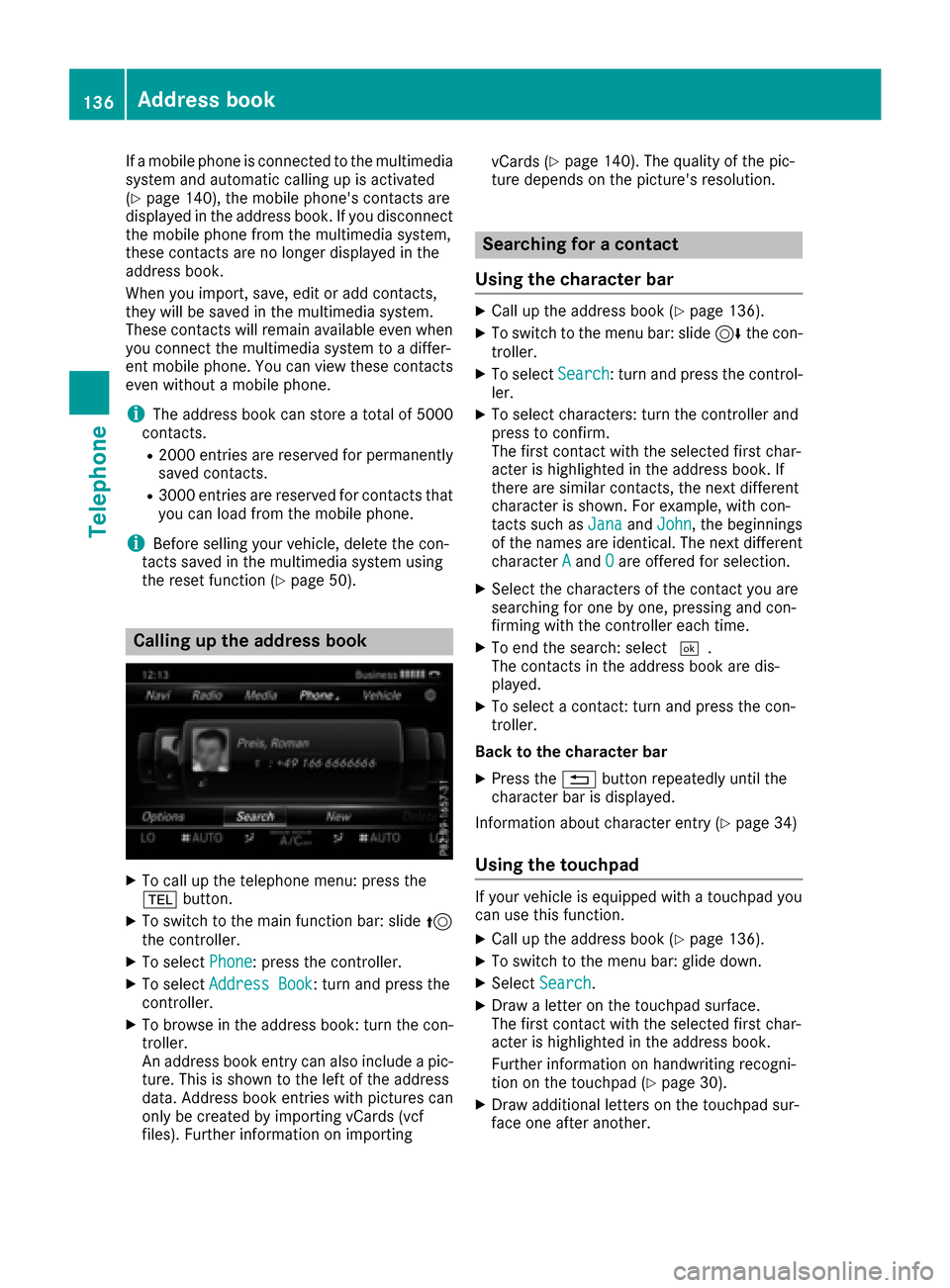
Calling up the address book
XTo call up the telephone menu: press the
% button.
XTo switch to the main function bar: slide 5
the controller.
XTo select Phone: press the controller.
XTo selectAddress Book: turn and press the
controller.
XTo browse in the address book: turn the con- troller.
An address book entry can also include a pic-
ture. This is shown to the left of the address
data. Address book entries with pictures can
only be created by importing vCards (vcf
files). Further information on importing vCards (
Ypage 140). The quality of the pic-
ture depends on the picture's resolution.
Searching for a contact
Using the character bar
XCall up the address book (Ypage 136).
XTo switch to the menu bar: slide 6the con-
troller.
XTo select Search: turn and press the control-
ler.
XTo select characters: turn the controller and
press to confirm.
The first contact with the selected first char-
acter is highlighted in the address book. If
there are similar contacts, the next different
character is shown. For example, with con-
tacts such as Jana
andJohn, the beginnings
of the names are identical. The next different
character A
andOare offered for selection.
XSelect the characters of the contact you are
searching for one by one, pressing and con-
firming with the controller each time.
XTo end the search: select ¬.
The contacts in the address book are dis-
played.
XTo select a contact: turn and press the con-
troller.
Back to the character bar
XPress the %button repeatedly until the
character bar is displayed.
Information about character entry (
Ypage 34)
Using the touchpad
If your vehicle is equipped with a touchpad you
can use this function.
XCall up the address book (Ypage 136).
XTo switch to the menu bar: glide down.
XSelect Search.
XDraw a letter on the touchpad surface.
The first contact with the selected first char-
acter is highlighted in the address book.
Further information on handwriting recogni-
tion on the touchpad (
Ypage 30).
XDraw additional letters on the touchpad sur-
face one after another.
136Address book
Telephone
Page 141 of 230
XTo highlight the desired entry: turn the con-
troller.
XTo selectG: slide 9the controller.
XTo select Change Category: turn and press
the controller.
XTo select a category: turn the controller and
press to confirm.
Storing the phone number as a speed
dial number
XCall up the address book (Ypage 136).
XSelect an entry: turn and press the controller.
The details for the contact are displayed.
XTo highlight the desired telephone number:
turn the controller.
XTo select G: slide 9the controller.
XTo select Speed Dial: turn and press the
controller.
XTo select AssignSpeedDialPreset: turn
and press the controller.
XTo select a memory position for the speed
dial: turn and press the controller.
The phone number has been saved as a speed
dial.
Voice tags
Introduction
You can enter voice tags via the Voice Control
System (see the separate operating instruc-
tions). Once you have assigned a voice tag to an
address book entry, you can call up this entry
with a voice command and dial a phone number,
for example. You can add one voice tag per
address book entry.
Adding or changing a voice tag
XCall up the address book (Ypage 136).
XSearch for an address book entry with or with-
out a voice tag ¦(Ypage 136).
XTo select G: slide 9the controller.
XTo select VoiceTag: turn and press the con-
troller.
XTo select Add: turn and press the controller.
Subsequent operation is voice-controlled.
The Voice Control System guides you through
the dialogs.
Deleting a voice tag
XCall up the address book (Ypage 136).
XSearch for an address book entry with a voice
tag (Ypage 136).
XTo select G: slide 9the controller.
XTo select VoiceTag: turn and press the con-
troller.
XTo select Delete: turn and press the control-
ler.
XTo select Yes: turn and press the controller.
The voice tag is deleted.
Listening to a voice tag
XSearch for an address book entry with a voice
tag (Ypage 136).
XTo select G: slide 9the controller.
XTo select VoiceTag: turn and press the con-
troller.
XTo select Listen: turn and press the control-
ler.
You hear the voice tag.
Changing the display and sorting cri-
teria for contacts
XCall up the address book (Ypage 136).
XTo show the menu bar: slide 6the control-
ler.
XTo select Options: turn and press the con-
troller.
XTo select Display and Sorting: turn and
press the controller.
You have the following options:
RLast Name, First Name(default setting)
The contacts are sorted by surname and dis-
played with a comma.
RLast Name First Name
The contacts are sorted by surname and dis-
played without a comma.
RFirst Name Last Name
The contacts are sorted by first name and dis-
played without a comma.
XTo select the required option: turn and press
the controller.
The contacts are sorted and displayed
according to the selection.
Address book139
Telephone
Z
Page 148 of 230
Canceling Internet access permission
for a mobile phone
XCall up the device list (Ypage 145).
XTo highlight the desired mobile phone in the
device list: turn the controller.
XTo selectG: slide 9the controller.
XTo select Delete Configuration: turn and
press the controller.
A prompt appears asking whether you wish to
delete the Internet configuration.
XTo select Yes: turn and press the controller.
The Internet access permission for the mobile
phone is now canceled. The mobile phone can
now no longer be used by the system for
Internet functions.
Setting automatic disconnection of
the Internet connection
If a preset time has elapsed during which the
Internet functions have not been used, the Inter-
net automatically disconnects.
XCall up the device list (Ypage 145).
XTo highlight the desired mobile phone in the
device list: turn the controller.
XTo select G: slide 9the controller.
XTo select Disconnect AutomaticallyWhen Inactive: turn and press the control-
ler.
XTo select 5 Minutes,10 Minutesor 20Minutes: turn and press the controller.
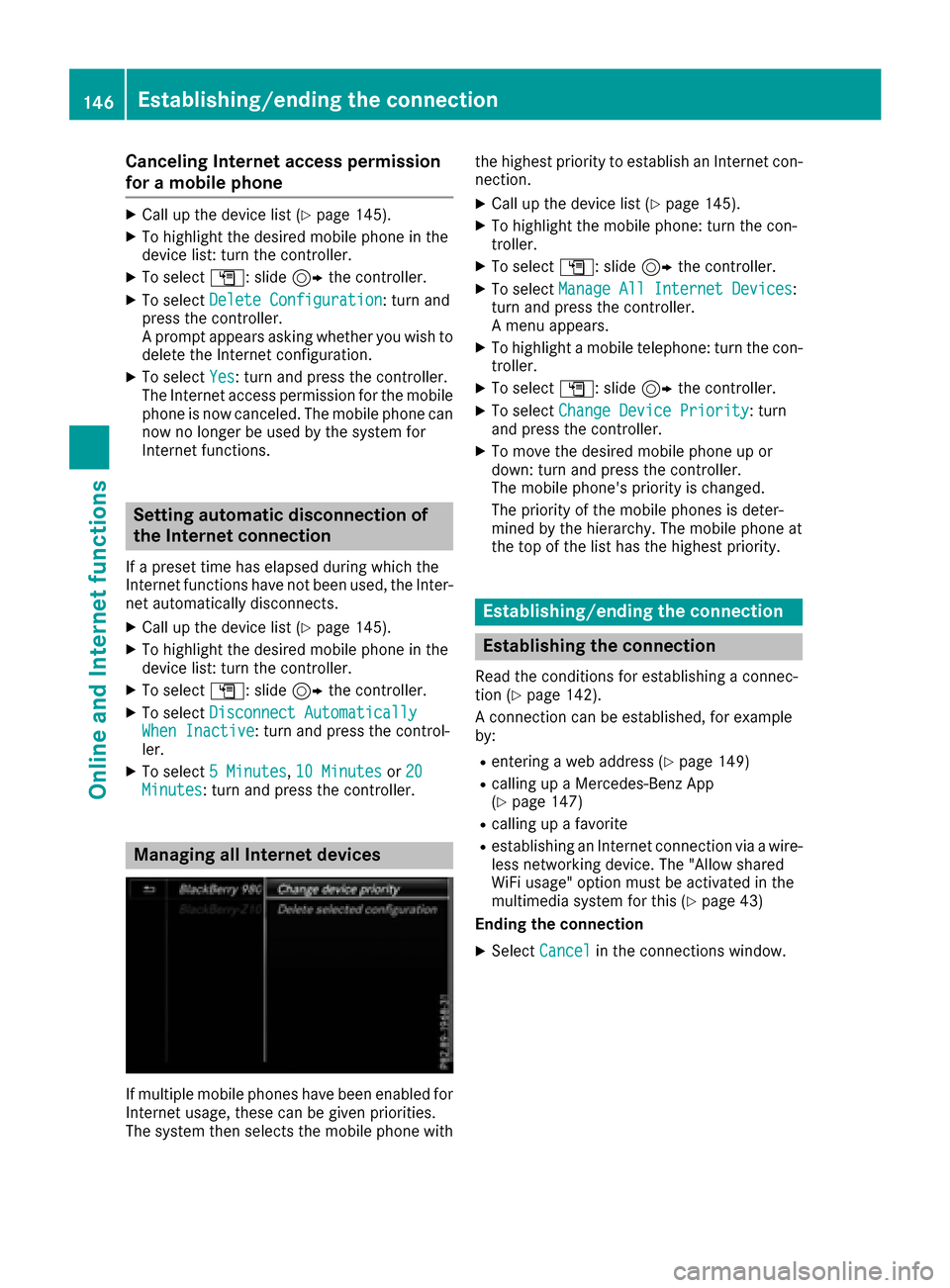
Managing all Internet devices
If multiple mobile phones have been enabled for
Internet usage, these can be given priorities.
The system then selects the mobile phone with the highest priority to establish an Internet con-
nection.
XCall up the device list (Ypage 145).
XTo highlight the mobile phone: turn the con-
troller.
XTo select
G: slide 9the controller.
XTo select Manage All Internet Devices:
turn and press the controller.
A menu appears.
XTo highlight a mobile telephone: turn the con-
troller.
XTo select G: slide 9the controller.
XTo select Change Device Priority: turn
and press the controller.
XTo move the desired mobile phone up or
down: turn and press the controller.
The mobile phone's priority is changed.
The priority of the mobile phones is deter-
mined by the hierarchy. The mobile phone at
the top of the list has the highest priority.
Establishing/ending the connection
Establishing the connection
Read the conditions for establishing a connec-
tion (Ypage 142).
A connection can be established, for example
by:
Rentering a web address (Ypage 149)
Rcalling up a Mercedes-Benz App
(Ypage 147)
Rcalling up a favorite
Restablishing an Internet connection via a wire-
less networking device. The "Allow shared
WiFi usage" option must be activated in the
multimedia system for this (
Ypage 43)
Ending the connection
XSelect Cancelin the connections window.
146Establishing/ending the connection
Online and Internet functions
Page 155 of 230
iIf you reset the multimedia system to the
factory settings (reset function), this data and
the settings are deleted (
Ypage 49).
Favorites
Introduction
Favorites are frequently visited websites.
Creating favorites
Adding a favorite in the menu
XTo display the main function bar: slide 5the
controller.
XTo select ®: turn and press the controller.
The menu with the Internet functions is dis-
played.
XSelect www.
XEnter the web address (URL) and name using
the character bar and press ¬.
Adding to favorites
XTo call up the menu: press the %button.
XTo select 3: turn and press the controller.
XSelectAdd to Bookmarks(Ypage 151).
Selecting favorites
XTo display the main function bar: slide 5the
controller.
XTo select ®: turn and press the controller.
The menu with the Internet functions is dis-
played.
XTo select the Internet Favoritesmenu:
turn and press the controller.
The Favorites menu appears.
XSelect the desired bookmark.
The favorite is opened in a new window.
Editing favorites
XTo display the main function bar: slide 5the
controller.
XTo select ®: turn and press the controller.
The menu with the Internet functions is dis-
played.
XTo select the Internet Favoritesmenu:
turn and press the controller.
The Favorites menu appears.
XTo bring the desired favorites to the front.
XTo select Edit: slide6and press the con-
troller.
An input menu appears.
XEnter a web address (URL).
XPress the touchpad or controller.
XSelect p.
XPress the touchpad or controller.
XSlide6the controller.
XEnter a name.
Deleting favorites
XTo display the main function bar: slide 5the
controller.
XTo select ®: turn and press the controller.
The menu with the Internet functions is dis-
played.
XTo select the Internet Favoritesmenu:
turn and press the controller.
The Favorites menu appears.
XSelect the desired favorites.
XSelect Delete.
A prompt appears.
XSelect Yes.
The favorite is deleted.
Closing the browser
XSelect %in the browser menu
(Ypage 150)
or
XPress the %button for longer than two
seconds.
A prompt appears, asking whether you want
to close the Internet browser.
XSelect Yes.
The application is closed.
Web browser153
Online and Internet functions
Z
Page 156 of 230
Your multimediasystem equipment
These operating instructions describe all the
standard and optional equipment of your multi-
media system, as available at the time of going
to press. Country-specifi cdifferences are pos-
sible. Bear in mind that your vehicle may not
feature all functions described here. This also
applies to safety-relevant systems andfunc-
tions.
Read the information on qualified specialist
workshop s in the vehicle Operator's Manual.
Switching on the radio
XPress the $button.
The Radio menu appears. You will hear the
last station played on the last waveband
selected.
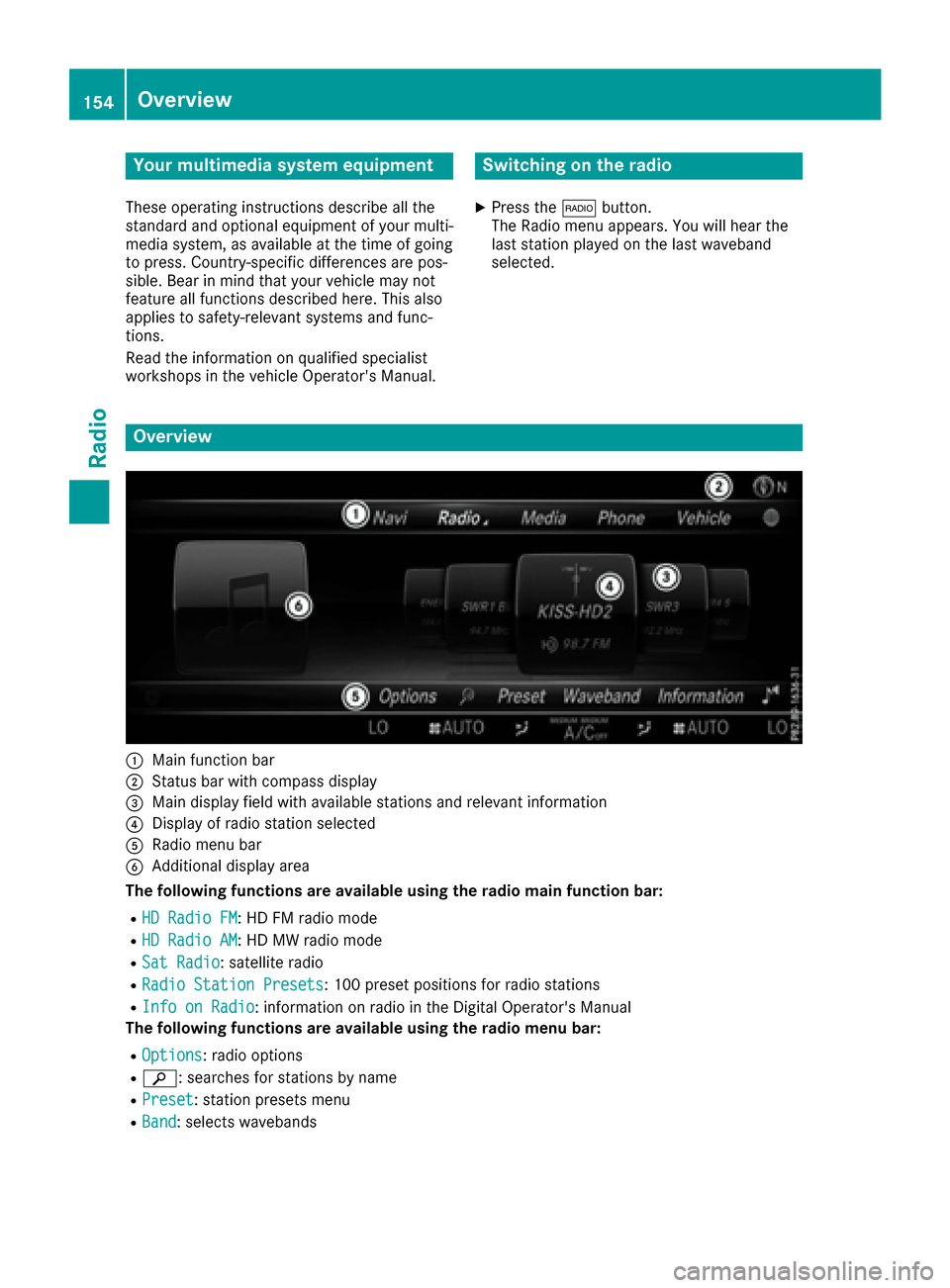
Overview
:Main function bar
;Status bar with compass display
=Main display field with available stations and relevant information
?Display of radio station selected
ARadio menu bar
BAdditional display area
Th e following functions are available using theradio main function bar:
RHD Radio FM:HD FM radio mode
RHD Radio AM:HD MW radio mode
RSat Radio: satellite radio
RRadio Statio nPreset s:10 0 preset positions for radio stations
RInf oon Radio: information on radio in the Digital Operator's Manual
Th e following functions are available using theradio menu bar:
ROption s: radio options
Rè: searches for stations by name
RPreset: station presets menu
RBand: selects wavebands
154Overview
Radio
Page 157 of 230
RInfo: displays additional information about the current station (radio text)
Rà: sound settings, Burmester®sound
Switching HD Radio on/off
XIn radio mode: slide the controller6.
XTo selectOptions: turn and press the con-
troller.
XBy selecting Oorª in front of HD Radio,
you determine whether HD radio is switched
on or off.
If HD radio is switched off, the system does not
switch to digital radio and it is not possible to
select any sub-channels.
iHD Radio™ and the HD, HD Radio, and “Arc”
logos are proprietary trademarks of iBiquity
Digital Corp.
Setting the waveband
Button activation
XPress the $button.
A menu appears with a selection of HD
Radio FM,HD Radio AM,Sat Radio,Infoon Radioand Radio Station Presets.
XTo select the required waveband: turn and
press the controller.
Using the main function bar
XIn radio mode: slide 5the controller.
The radio main function bar and menu bar
appear. Radio
is active.
XPress the controller.
A menu appears with a selection of HD
RadioFM,HDRadioAM,SatRadio, RadioStation Presetsand Info on Radio.
XTo select the required waveband: turn and
press the controller.
Using the menu bar
XIn radio mode: slide 6the controller.
XTo select Band: turn and press the controller.
A menu appears with a selection of HD
Radio FM,HD Radio AMand Sat Radio.
XTo select the required waveband: turn and
press the controller.
Station
Selecting a station
Using the main display field
All currently available stations are displayed.
XIn radio mode: turn the controller until the
desired station is in the center.
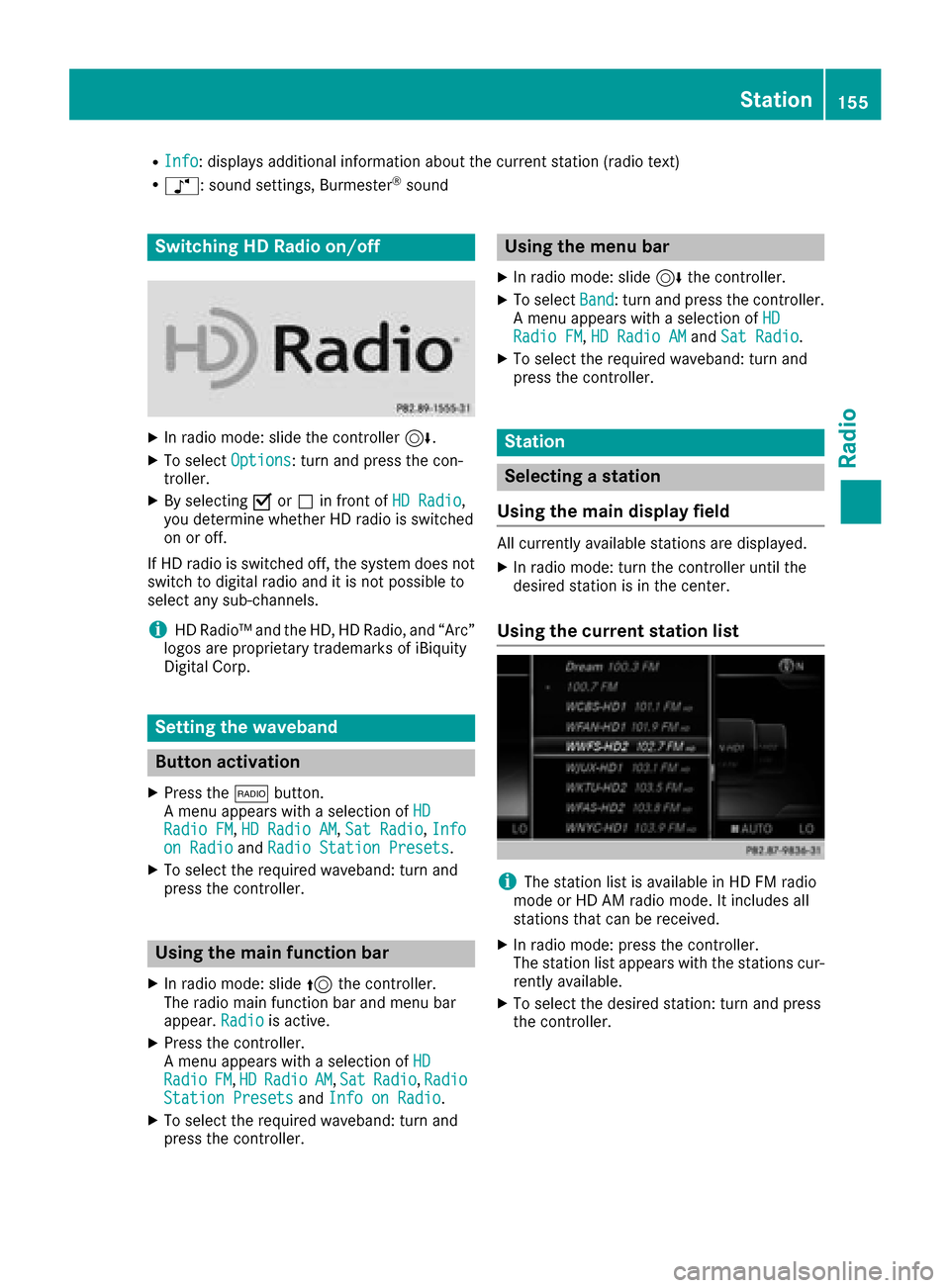
Using the current station list
iThe station list is available in HD FM radio
mode or HD AM radio mode. It includes all
stations that can be received.
XIn radio mode: press the controller.
The station list appears with the stations cur- rently available.
XTo select the desired station: turn and press
the controller.
Station155
Radio
Page 158 of 230
Using frequency entry
XIn radio mode: slide6the controller.
XTo select Options: turn and press the con-
troller.
XSelect Enter Frequency.
An additional menu appears.
HD FM radio mode:
XTo select the HDFM Frequencyoption: turn
and press the controller.
XEnter the frequency of the desired station in
the entry field.
HD MW radio mode:
XTo select the HDAM Frequencyoption: turn
and press the controller.
XEnter the frequency of the desired station in
the entry field.
Satellite radio mode:
XSelect the SatRadio Channeloption.
XEnter the number of the desired channel in
the entry field.
Station presets:
XSelect the Radio Station Presetsoption.
XEnter the station preset of the desired station.
Using the search function
XIn radio mode: slide 6the controller.
XSelect èand enter the first letters of the
required station using the controller.
XPress OKto confirm.
The multimedia system displays a list of avail-
able stations.
XTo select stations from the list: turn the con-
troller and press to confirm.
Using station presets
XQuick setting:
Briefly press a number key, e.g. l.
The station stored in second place is set.
Using the preset position
XIn radio mode: slide 6the controller.
XTo select Preset: turn and press the control-
ler.
XTo select Enter Preset: turn and press the
controller.
XEnter the station preset of the desired station.
Station list
XIn radio mode: press the controller.
The station list appears with the stations cur-
rently available.
Saving/deleting a station
Frequencies have already been stored in the
multimedia system. There are 100 preset posi-
tions available.
Quick save
XPress and hold a number key, e.g. l, until
a tone sounds. The station is saved to second
place in the radio station presets.
Storing current stations
XIn radio mode: slide 6the controller.
The radio menu bar appears.
XTo select Preset: turn and press the control-
ler.
XTo select the SaveCurrentStation/Chan‐neloption: turn and press the controller.
XTo select the position of the required preset
entry: turn and press the controller.
or
XSelect the Edit Station Presetoption.
XSelect the position of the required preset:
turn the controller.
This can also be a preset position that is
already occupied, which is then overwritten
by the current station.
XSlide9the controller.
An additional menu appears.
156Station
Radio
Page 159 of 230
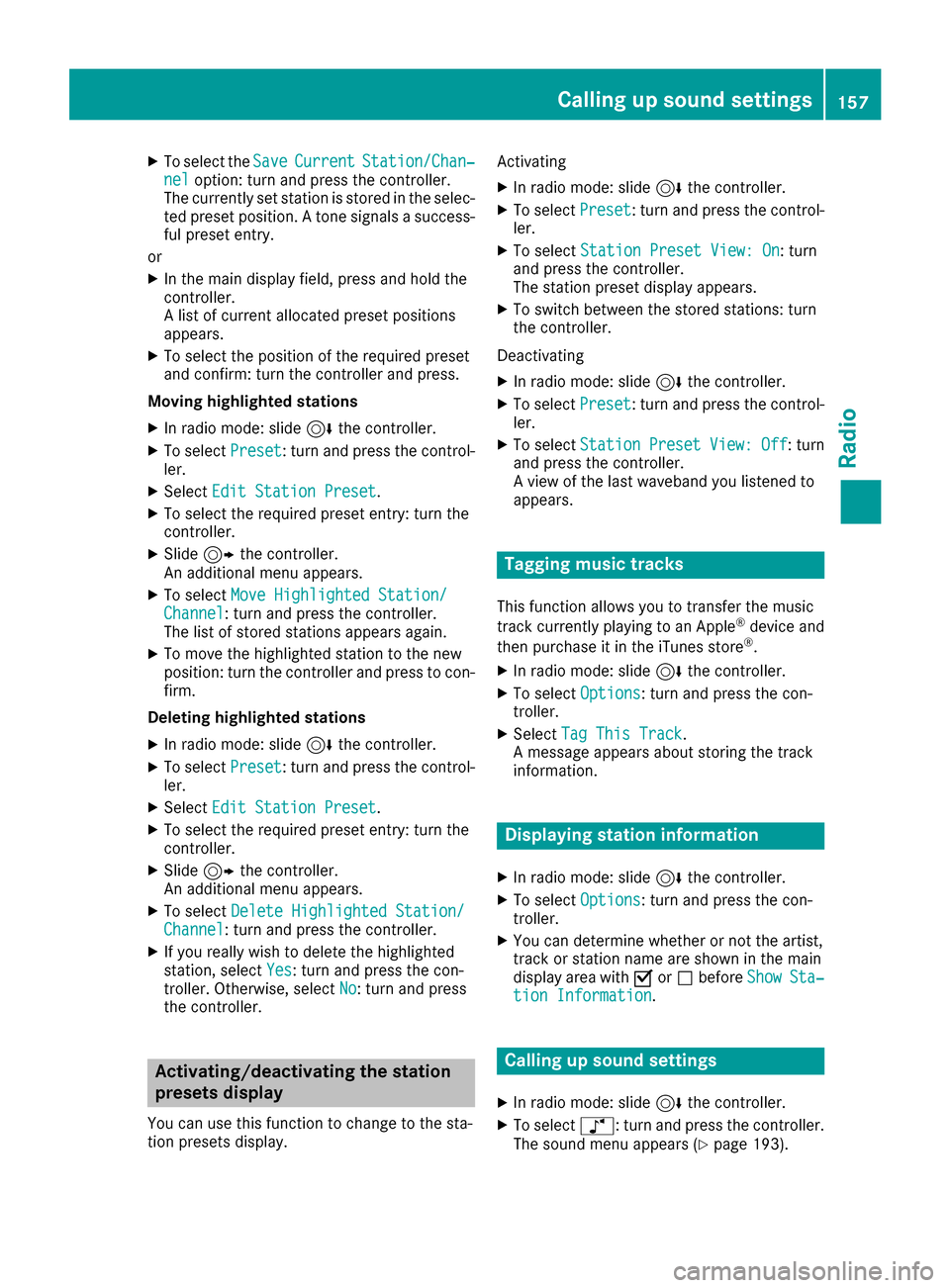
XTo select theSaveCurrentStation/Chan‐neloption: turn and press the controller.
The currently set station is stored in the selec-
ted preset position. A tone signals a success-
ful preset entry.
or
XIn the main display field, press and hold the
controller.
A list of current allocated preset positions
appears.
XTo select the position of the required preset
and confirm: turn the controller and press.
Moving highlighted stations
XIn radio mode: slide 6the controller.
XTo select Preset: turn and press the control-
ler.
XSelect Edit Station Preset.
XTo select the required preset entry: turn the
controller.
XSlide9the controller.
An additional menu appears.
XTo select Move Highlighted Station/Channel: turn and press the controller.
The list of stored stations appears again.
XTo move the highlighted station to the new
position: turn the controller and press to con-
firm.
Deleting highlighted stations
XIn radio mode: slide 6the controller.
XTo select Preset: turn and press the control-
ler.
XSelect Edit Station Preset.
XTo select the required preset entry: turn the
controller.
XSlide9the controller.
An additional menu appears.
XTo select Delete Highlighted Station/Channel: turn and press the controller.
XIf you really wish to delete the highlighted
station, select Yes: turn and press the con-
troller. Otherwise, select No: turn and press
the controller.
Activating/deactivating the station
presets display
You can use this function to change to the sta-
tion presets display. Activating
XIn radio mode: slide
6the controller.
XTo select Preset: turn and press the control-
ler.
XTo select Station Preset View: On: turn
and press the controller.
The station preset display appears.
XTo switch between the stored stations: turn
the controller.
Deactivating
XIn radio mode: slide 6the controller.
XTo select Preset: turn and press the control-
ler.
XTo select StationPresetView:Off: turn
and press the controller.
A view of the last waveband you listened to
appears.
Tagging music tracks
This function allows you to transfer the music
track currently playing to an Apple®device and
then purchase it in the iTunes store®.
XIn radio mode: slide 6the controller.
XTo select Options: turn and press the con-
troller.
XSelect Tag This Track.
A message appears about storing the track
information.
Displaying station information
XIn radio mode: slide 6the controller.
XTo select Options: turn and press the con-
troller.
XYou can determine whether or not the artist,
track or station name are shown in the main
display area with Oorª before Show
Sta‐tion Information.
Calling up sound settings
XIn radio mode: slide 6the controller.
XTo select à: turn and press the controller.
The sound menu appears (Ypage 193).
Calling up sound settings157
Radio