air condition MERCEDES-BENZ S-Class MAYBACH 2017 W222 Owner's Guide
[x] Cancel search | Manufacturer: MERCEDES-BENZ, Model Year: 2017, Model line: S-Class MAYBACH, Model: MERCEDES-BENZ S-Class MAYBACH 2017 W222Pages: 382, PDF Size: 9.92 MB
Page 182 of 382
The electric parking brake secures the vehicle
automatically if the HOLD function is activated
when the vehicle is stationary and:
Ra system malfunction occurs.
Rthe power supply is not sufficient.
If a malfunction in the electric parking brake
occurs, then the transmission may also be shif-
ted into position Pautomatically.
MAGIC BODY CONTROL
General notes
MAGIC BODY CONTROL consists of Active Body
Control (ABC), ROAD SURFACE SCAN as well as
automatic vehicle stabilization in the event of a
crosswind.
Your vehicle automatically adjusts its ride height
to improve driving safety and reduce fuel con-
sumption. The suspension mode is adjusted
according to your selection (sports or comfort),
the road surface conditions and the vehicle load. A multifunction camera detects bumps in the
road surface before the vehicle drives over
them. This reduces chassis movements.
Important safety notes
GWARNING
When the vehicle is being lowered, people
could become trapped if their limbs are
between the vehicle body and the wheels or
underneath the vehicle. There is a risk of
injury.
Make sure no one is underneath the vehicle or
in the immediate vicinity of the wheel arches
when the vehicle is being lowered.
!The vehicle is lowered when the engine is
switched off. When parking, position your
vehicle so that it does not make contact with
the curb as the vehicle is lowered. Your vehi-
cle could otherwise be damaged.
Crosswind Assist
The crosswind stabilization operates by chang-
ing wheel loads through adjusting the ABC
spring struts. It reduces impairments in handling
when driving in a straight line and assists during
countersteering. Crosswind Assist is active in the speed range
between 50 mph (80 km/h)
and
130 mph (210 km/h) when driving straight
ahead or cornering gently.
Active Body Control ABC
Vehicle level
Mercedes-AMG vehicles: depending on the
vehicle level that has been selected, the vehicle
automatically adjusts its height dependent on
the current speed. The vehicle is lowered by up
to 0.4 in (10 mm) below the normal level as the
speed increases. As the speed is reduced, the
vehicle is raised up to the set vehicle height.
All other models: depending on the vehicle
level that has been set, the vehicle automatically
adjusts its height dependent on the current
speed. The vehicle is lowered by up to 0.6 in
(15 mm) as the speed increases. As the speed is
reduced, the vehicle is raised up to the set vehi-
cle height.
Select the "Normal" setting for normal road con-
ditions and "Raised" for driving with snow chains
or in particularly poor road conditions.
Setting the vehicle level
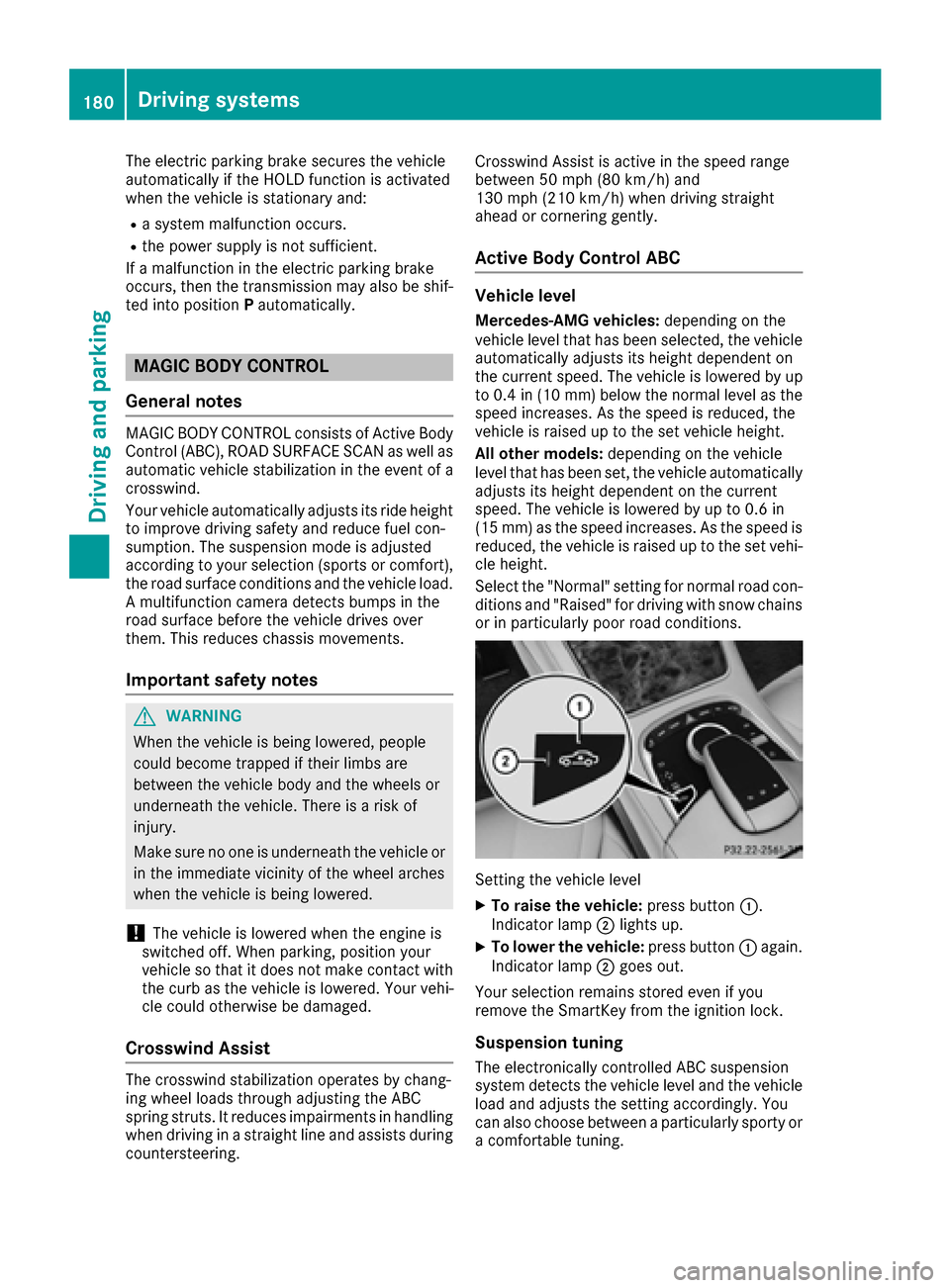
XTo raise the vehicle: press button:.
Indicator lamp ;lights up.
XTo lower the vehicle: press button:again.
Indicator lamp ;goes out.
Your selection remains stored even if you
remove the SmartKey from the ignition lock.
Suspension tuning
The electronically controlled ABC suspension
system detects the vehicle level and the vehicle
load and adjusts the setting accordingly. You
can also choose between a particularly sporty or
a comfortable tuning.
180Driving systems
Driving and parking
Page 183 of 382
The ABC suspension system is tuned individu-
ally to each wheel and depends on:
Ryour driving style, e.g. sporty
Rthe road surface condition, e.g. bumps
Ryour individual selection, i.e. sports or com-
fort
Rthe vehicle load
Rthe force of the side wind
Your selection remains stored even if you
remove the SmartKey from the ignition lock.
The firmer setting of the suspension tuning in
SPORT mode ensures even better contact with
the road. The steering response behavior is
sporty. Select this mode when employing a
sporty driving style on flat roads, e.g. on high-
ways.
Selecting the sports suspension setting
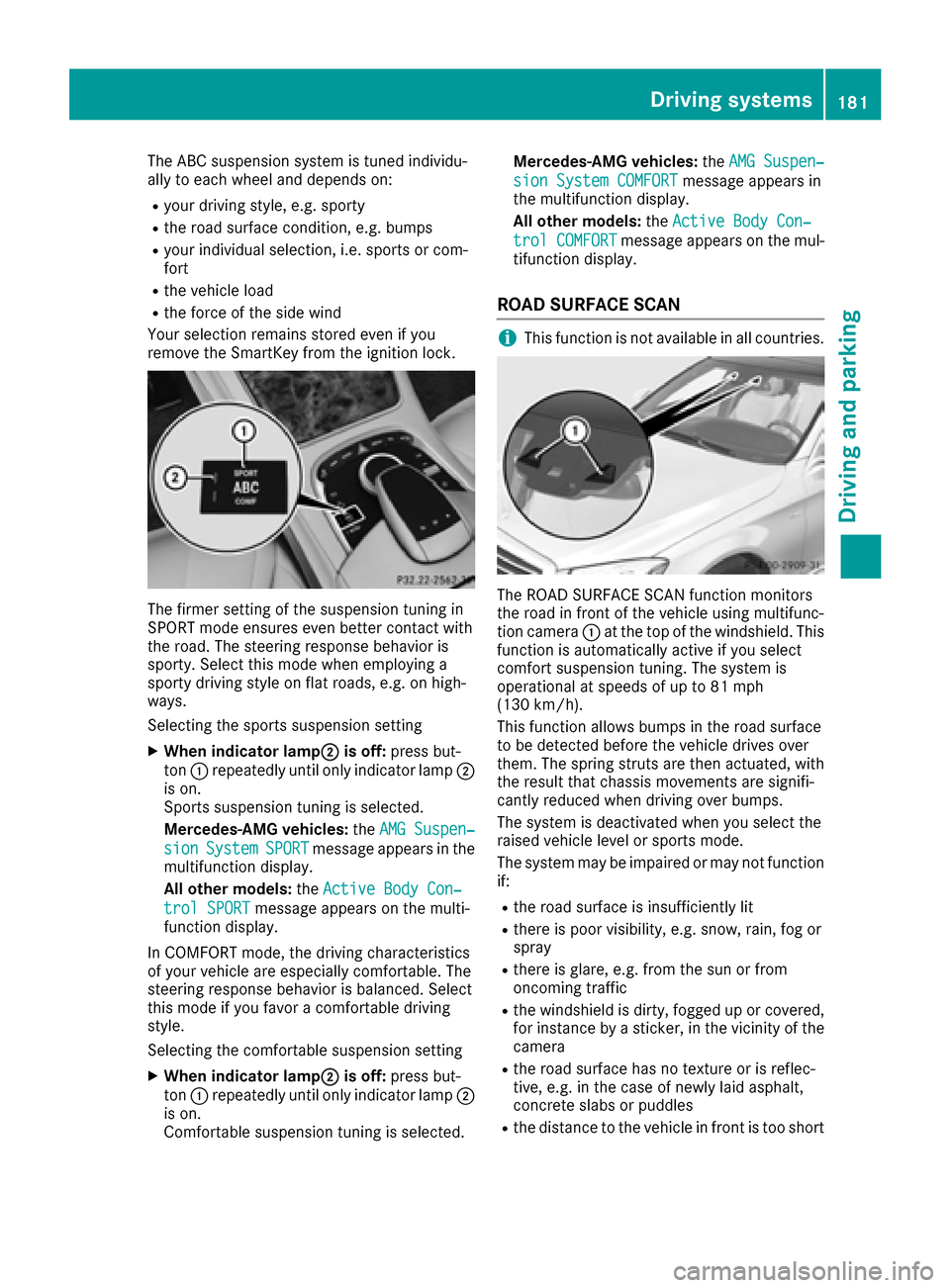
XWhen indicator lamp;is off: press but-
ton :repeatedly until only indicator lamp ;
is on.
Sports suspension tuning is selected.
Mercedes-AMG vehicles: theAMG Suspen‐
sionSystemSPORTmessage appears in the
multifunction display.
All other models: theActive Body Con‐
trol SPORTmessage appears on the multi-
function display.
In COMFORT mode, the driving characteristics
of your vehicle are especially comfortable. The
steering response behavior is balanced. Select
this mode if you favor a comfortable driving
style.
Selecting the comfortable suspension setting
XWhen indicator lamp;is off: press but-
ton :repeatedly until only indicator lamp ;
is on.
Comfortable suspension tuning is selected. Mercedes-AMG vehicles:
theAMG Suspen‐
sion System COMFORTmessage appears in
the multifunction display.
All other models: theActive Body Con‐
trol COMFORTmessage appears on the mul-
tifunction display.
ROAD SURFACE SCAN
iThis function is not available in all countries.
The ROAD SURFACE SCAN function monitors
the road in front of the vehicle using multifunc-
tion camera :at the top of the windshield. This
function is automatically active if you select
comfort suspension tuning. The system is
operational at speeds of up to 81 mph
(130 km/h).
This function allows bumps in the road surface
to be detected before the vehicle drives over
them. The spring struts are then actuated, with
the result that chassis movements are signifi-
cantly reduced when driving over bumps.
The system is deactivated when you select the
raised vehicle level or sports mode.
The system may be impaired or may not function
if:
Rthe road surface is insufficiently lit
Rthere is poor visibility, e.g. snow, rain, fog or
spray
Rthere is glare, e.g. from the sun or from
oncoming traffic
Rthe windshield is dirty, fogged up or covered,
for instance by a sticker, in the vicinity of the
camera
Rthe road surface has no texture or is reflec-
tive, e.g. in the case of newly laid asphalt,
concrete slabs or puddles
Rthe distance to the vehicle in front is too short
Driving systems181
Driving and parking
Z
Page 184 of 382
Rsections of the route have a very small radius
of curvature
Rif you accelerate hard or brake sharply
AIRMATIC
General notes
AIRMATIC is an air suspension with variable
damping for improved driving comfort. All-round
level control ensures the best possible suspen-
sion and constant ground clearance, even with a
laden vehicle. When you drive fast, the vehicle is
lowered automatically to improve driving safety
and to reduce fuel consumption. There is also
the option to manually adjust the vehicle level.
AIRMATIC consists of level setting, level control
and the Adaptive Damping System ADS PLUS.
Important safety notes
GWARNING
When the vehicle is being lowered, people
could become trapped if their limbs are
between the vehicle body and the wheels or
underneath the vehicle. There is a risk of
injury.
Make sure no one is underneath the vehicle or
in the immediate vicinity of the wheel arches
when the vehicle is being lowered.
Vehicle level
Setting the raised vehicle level
It is possible to choose between the "Normal"
and "Raised" vehicle levels. Select the "Normal"
setting for normal road surfaces and "Raised"
for driving with snow chains or on particularly poor road surfaces. Your selection remains
stored even if you remove the SmartKey from
the ignition lock.
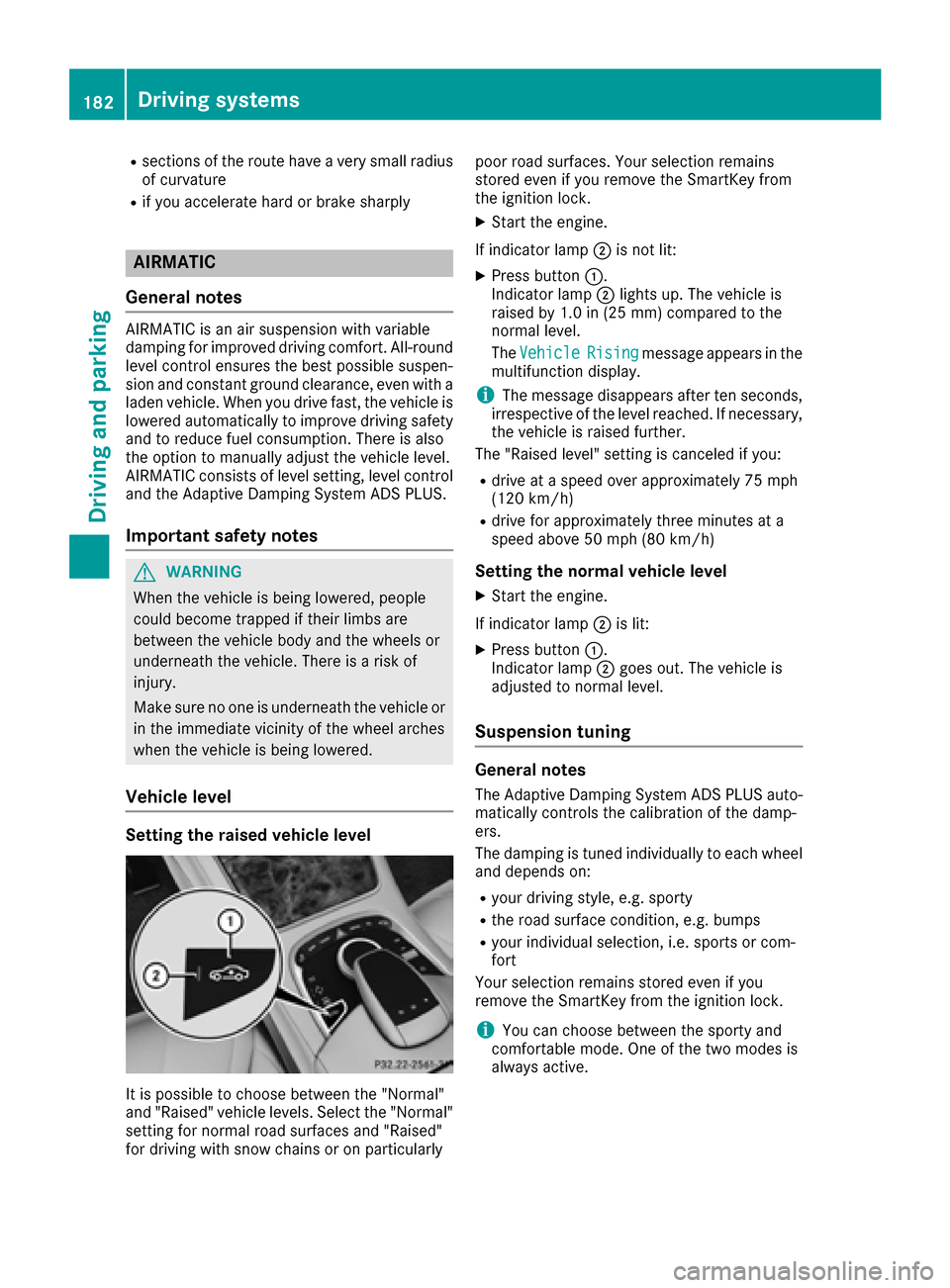
XStart the engine.
If indicator lamp ;is not lit:
XPress button :.
Indicator lamp ;lights up. The vehicle is
raised by 1.0 in (25 mm) compared to the
normal level.
The Vehicle
Risingmessage appears in the
multifunction display.
iThe message disappears after ten seconds,
irrespective of the level reached. If necessary,
the vehicle is raised further.
The "Raised level" setting is canceled if you:
Rdrive at a speed over approximately 75 mph
(120 km/h)
Rdrive for approximately three minutes at a
speed above 50 mph (80 km/h)
Setting the normal vehicle level
XStart the engine.
If indicator lamp ;is lit:
XPress button :.
Indicator lamp ;goes out. The vehicle is
adjusted to normal level.
Suspension tuning
General notes
The Adaptive Damping System ADS PLUS auto-
matically controls the calibration of the damp-
ers.
The damping is tuned individually to each wheel
and depends on:
Ryour driving style, e.g. sporty
Rthe road surface condition, e.g. bumps
Ryour individual selection, i.e. sports or com-
fort
Your selection remains stored even if you
remove the SmartKey from the ignition lock.
iYou can choose between the sporty and
comfortable mode. One of the two modes is
always active.
182Driving systems
Driving and parking
Page 185 of 382
Sports tuning
The firmer setting of the suspension tuning in
SPORT mode ensures the best possible contact
with the road. Select this mode when employinga sporty driving style, e.g. on winding country
roads.
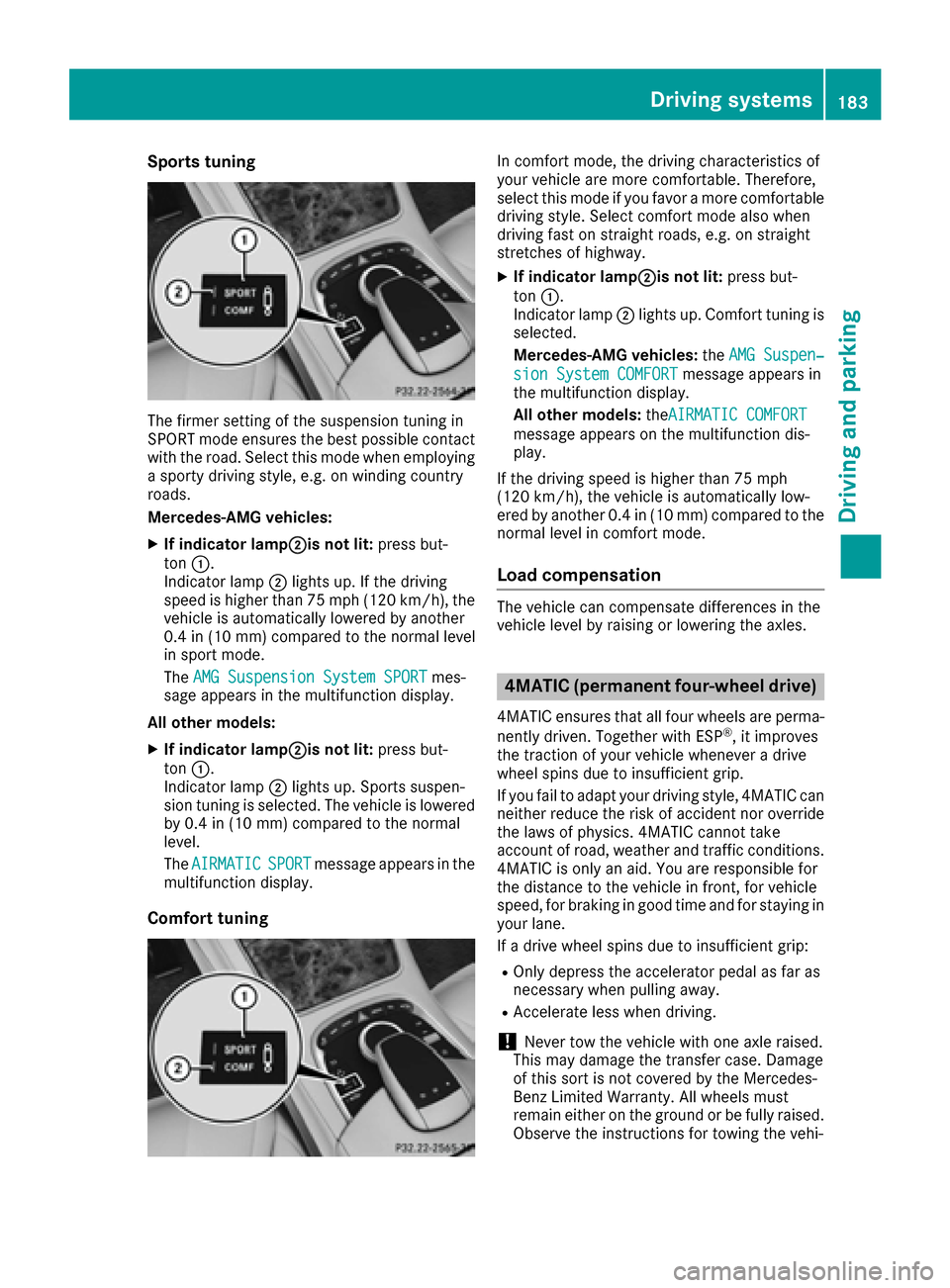
Mercedes-AMG vehicles:
XIf indicator lamp;is not lit: press but-
ton :.
Indicator lamp ;lights up. If the driving
speed is higher than 75 mph (120 km/h), the
vehicle is automatically lowered by another
0.4 in (10 mm) compared to the normal level
in sport mode.
The AMG Suspension System SPORT
mes-
sage appears in the multifunction display.
All other models:
XIf indicator lamp;is not lit: press but-
ton :.
Indicator lamp ;lights up. Sports suspen-
sion tuning is selected. The vehicle is lowered by 0.4 in (10 mm) compared to the normal
level.
The AIRMATIC
SPORTmessage appears in the
multifunction display.
Comfort tuning
In comfort mode, the driving characteristics of
your vehicle are more comfortable. Therefore,
select this mode if you favor a more comfortable
driving style. Select comfort mode also when
driving fast on straight roads, e.g. on straight
stretches of highway.
XIf indicator lamp;is not lit: press but-
ton :.
Indicator lamp ;lights up. Comfort tuning is
selected.
Mercedes-AMG vehicles: theAMG Suspen‐
sion System COMFORTmessage appears in
the multifunction display.
All other models: theAIRMATIC COMFORT
message appears on the multifunction dis-
play.
If the driving speed is higher than 75 mph
(120 km/h), the vehicle is automatically low-
ered by another 0.4 in (10 mm) compared to the
normal level in comfort mode.
Load compensation
The vehicle can compensate differences in the
vehicle level by raising or lowering the axles.
4MATIC (permanent four-wheel drive)
4MATIC ensures that all four wheels are perma-
nently driven. Together with ESP®, it improves
the traction of your vehicle whenever a drive
wheel spins due to insufficient grip.
If you fail to adapt your driving style, 4MATIC can
neither reduce the risk of accident nor override
the laws of physics. 4MATIC cannot take
account of road, weather and traffic conditions. 4MATIC is only an aid. You are responsible for
the distance to the vehicle in front, for vehicle
speed, for braking in good time and for staying in
your lane.
If a drive wheel spins due to insufficient grip:
ROnly depress the accelerator pedal as far as
necessary when pulling away.
RAccelerate less when driving.
!Never tow the vehicle with one axle raised.
This may damage the transfer case. Damage
of this sort is not covered by the Mercedes-
Benz Limited Warranty. All wheels must
remain either on the ground or be fully raised.
Observe the instructions for towing the vehi-
Driving systems183
Driving and parking
Z
Page 186 of 382
cle with all wheels in full contact with the
ground.
In wintry driving conditions, the maximum effect
of 4MATIC can only be achieved if you use winter
tires (M+S tires), with snow chains if necessary.
PARKTRONIC
Important safety notes
PARKTRONIC is an electronic parking aid with
ultrasonic sensors. It monitors the area around
your vehicle using six sensors in the front
bumper and six sensors in the rear bumper.
PARKTRONIC indicates visually and audibly the
distance between your vehicle and an object.
PARKTRONIC is only an aid. It is not a replace-
ment for your attention to your immediate sur-
roundings. You are always responsible for safe
maneuvering, parking and exiting a parking
space. When maneuvering, parking or pulling
out of a parking space, make sure that there are
no persons, animals or objects in the area in
which you are maneuvering.
!When parking, pay particular attention to
objects above or below the sensors, such as
flower pots or trailer drawbars. PARKTRONIC
does not detect such objects when they are in
the immediate vicinity of the vehicle. You
could damage the vehicle or the objects.
The sensors may not detect snow and other
objects that absorb ultrasonic waves.
Ultrasonic sources such as an automatic car
wash, the compressed-air brakes on a truck
or a pneumatic drill could cause PARKTRONIC
to malfunction.
PARKTRONIC may not function correctly on
uneven terrain.
PARKTRONIC is activated automatically when
you:
Rswitch on the ignition
Rshift the transmission to position D,R or N
PARKTRONIC is deactivated at speeds above
11 mph (18 km/h). It i
s reactivated at lower
speeds.
Range of the sensors
PARKTRONIC does not take objects into con-
sideration that are:
Rbelow the detection range, e.g. people, ani-
mals or objects.
Rabove the detection range, e.g. overhanging
loads, truck overhangs or loading ramps.
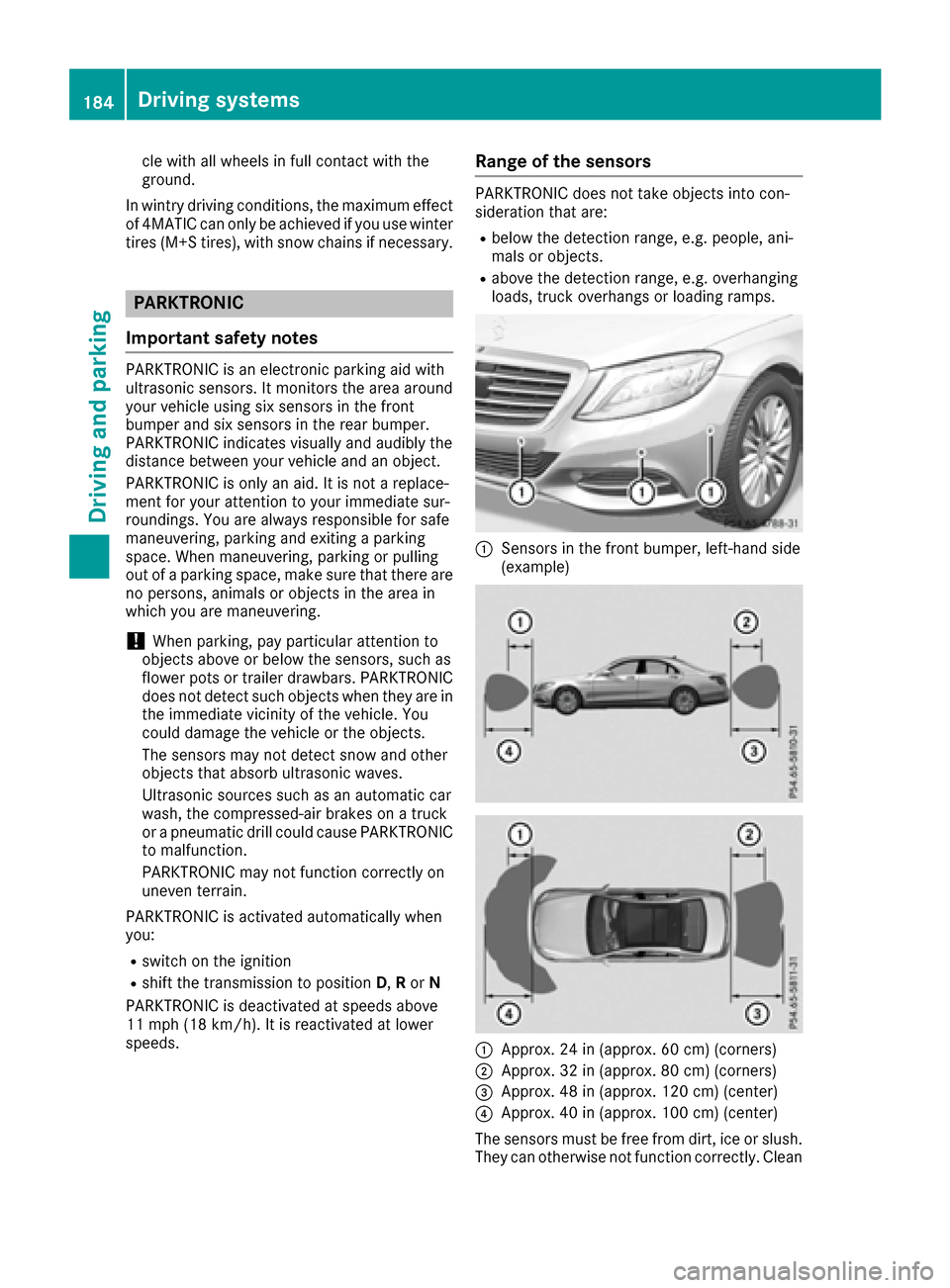
:Sensors in the front bumper, left-hand side
(example)
:Approx. 24 in (approx. 60 cm) (corners)
;Approx. 32 in (approx. 80 cm) (corners)
=Approx. 48 in (approx. 120 cm) (center)
?Approx. 40 in (approx. 100 cm) (center)
The sensors must be free from dirt, ice or slush.
They can otherwise not function correctly. Clean
184Driving systems
Driving and parking
Page 203 of 382
and any obstacles in good time. When pedes-
trian recognition is active, pedestrians recog-
nized by the system are visually highlighted in
color in the Night View Assist Plus display with
small frame corners.
In addition, an infrared camera is integrated into
radiator trim:. The camera helps detect
pedestrians and animals. Observe the notes on
cleaning the infrared camera (
Ypage 324).
iInfrared light is not visible to the human eye
and therefore does not glare. Night View
Assist Plus can therefore remain switched on
even if there is oncoming traffic.
Important safety notes
Night View Assist Plus is only an aid and is not a
substitute for attentive driving. Do not rely on
the Night View Assist Plus display. You are
responsible for the distance to the vehicle in
front, for vehicle speed and for braking in good
time. Drive carefully and always adapt your driv-
ing style to suit the prevailing road and traffic
conditions.
The system may be impaired or may not function
if:
Rthere is poor visibility, e.g. due to snow, rain,
fog or spray
Rthe windshield is dirty, fogged up or covered,
for instance by a sticker, in the vicinity of the
camera
Rthe infrared camera in the radiator trim is
dirty, fogged up or obscured
Ron bends, hilltops or downhill gradients
Rat high outside temperatures
Night View Assist Plus cannot display objects
directly in front of or beside the vehicle.
It is possible that, in addition to people and ani-
mals, other objects are also marked or highligh-
ted .
Pedestrian and animal recognition
General notes
Pedestrian or animal recognition may be
impaired or inoperative if:
Rpedestrians or animals are partially or entirely
obscured by other objects, e.g. parked vehi-
cles
Rthe silhouette of the pedestrian or of the ani-
mal in the Night View Assist Plus display is incomplete or interrupted, e.g. by powerful
light reflections
Rpedestrians or animals do not contrast with
the surroundings
Rthe camera system no longer recognizes
pedestrians as persons due to special cloth-
ing or other objects
Rpedestrians are not in an upright position, e.g.
sitting, squatting or lying
Ranimals are not recognized by the system,
e.g. because of their size or shape
Pedestrian and animal recognition is deactiva-
ted at temperatures above 90 ‡ (32 †). The
spotlight function and automatic delayed
switch-off are then no longer active.
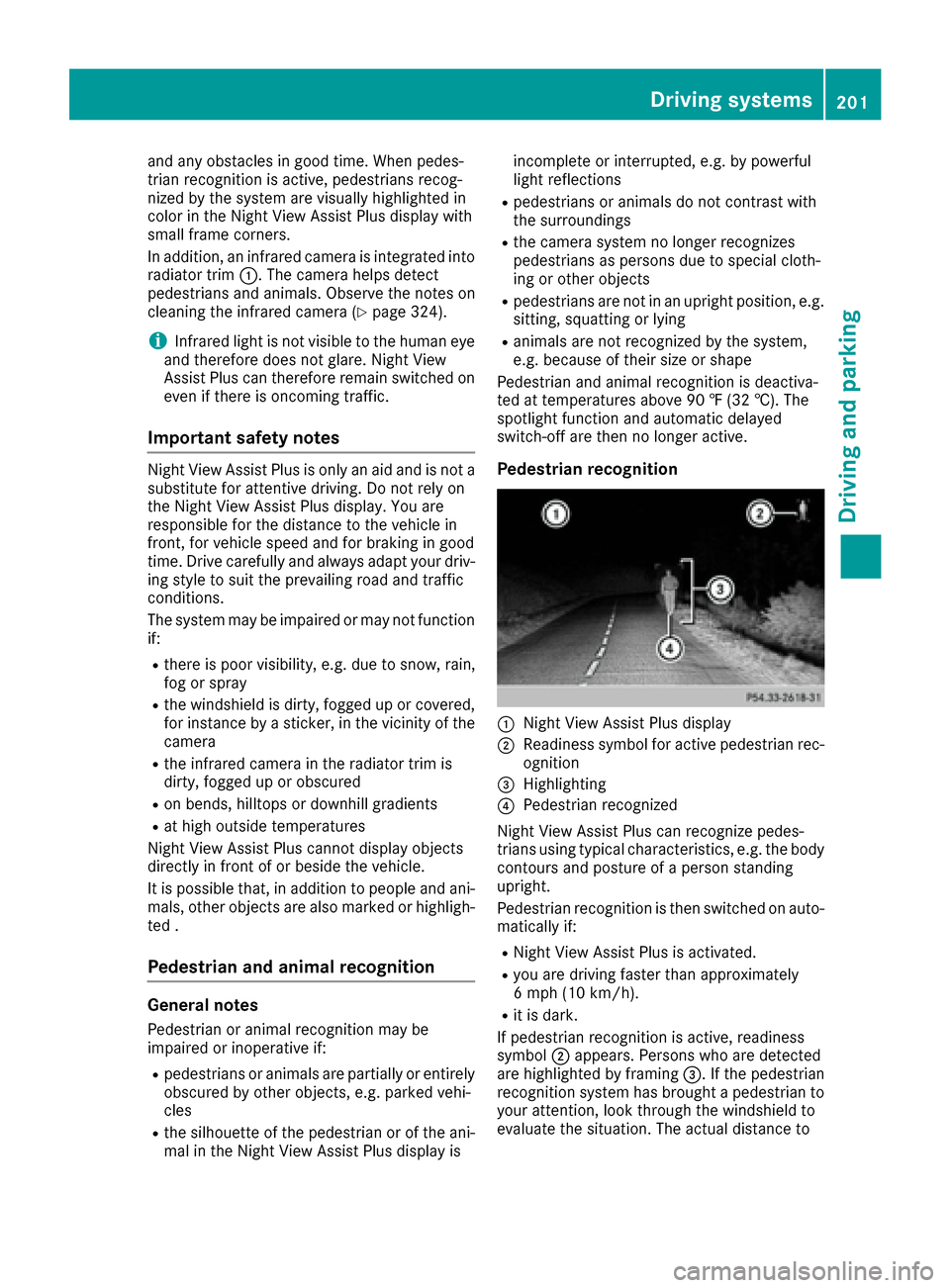
Pedestrian recognition
:Night View Assist Plus display
;Readiness symbol for active pedestrian rec- ognition
=Highlighting
?Pedestrian recognized
Night View Assist Plus can recognize pedes-
trians using typical characteristics, e.g. the body
contours and posture of a person standing
upright.
Pedestrian recognition is then switched on auto- matically if:
RNight View Assist Plus is activated.
Ryou are driving faster than approximately
6 mph (10 km/h).
Rit is dark.
If pedestrian recognition is active, readiness
symbol ;appears. Persons who are detected
are highlighted by framing =. If the pedestrian
recognition system has brought a pedestrian to
your attention, look through the windshield to
evaluate the situation. The actual distance to
Driving systems201
Driving and parking
Z
Page 209 of 382
Active Lane Keeping Assist cannot continuously
keep your vehicle in its lane.
GWARNING
Active Lane Keeping Assist cannot always
clearly detect lane markings.
In such cases, Active Lane Keeping Assist
can:
Rgive an unnecessary warning and then
make a course-correcting brake application
to the vehicle
Rnot give a warning or intervene
There is a risk of an accident.
Always pay particular attention to the traffic
situation and keep within the lane, especially
if Active Lane Keeping Assist alerts you. Ter-
minate the intervention in a non-critical driv-
ing situation.
The system may be impaired or may not function
if:
Rthere is poor visibility, e.g. due to insufficient
illumination of the road, or due to snow, rain,
fog or spray
Rthere is glare, e.g. from oncoming traffic, the
sun or reflection from other vehicles (e.g. if
the road surface is wet)
Rthe windshield is dirty, fogged up, damaged or
covered, for instance by a sticker, in the vicin-
ity of the camera
Rthe radar sensors in the front or rear bumpers
or the radiator trim are dirty, e.g. obscured by
snow
Rthere are no, several or unclear lane markings
for a lane, e.g. in areas with road construction
work
Rthe lane markings are worn away, dark or cov-
ered up, e.g. by dirt or snow
Rthe distance to the ve hicle in front is too small
and the lane markings thus cannot be detec-
ted
Rthe lane markings change quickly, e.g. lanes
branch off, cross one another or merge
Rthe road is narrow and winding
Rthere are strong shadows cast on the road
If no vehicle is detected in the adjacent lane and
broken lane markings are detected, no lane-cor-
recting brake application is made.
Warning vibration in the steering wheel
A warning may be given if a front wheel passes
over a lane marking. It will warn you by means of
intermittent vibration in the steering wheel for
up to 1.5 seconds.
In orde r that you are warned only when neces-
sary and in good time if you cross the lane mark-
ing, the system recognizes certain conditions
and warns you accordingly.
The warning vibration occurs earlier if:
Ryou approach the outer lane marking on a
bend.
Rthe road has very wide lanes, e.g. a highway.
Rthe system recognizes solid lane markings.
The warning vibration occurs later if:
Rthe road has narrow lanes.
Ryou cut the corner on a bend.
Lane-correcting brake application
If you leave your lane, under certain circumstan-
ces the vehicle will brake briefly on one side.
This is meant to assist you in bringing the vehicle
back to the original lane.
GWARNING
A lane-correcting brake application cannot
always bring the vehicle back into the original lane. There is a risk of an accident.
Always steer, brake or accelerate yourself,
especially if Active Lane Keeping Assist warns
you or makes a lane-correcting brake appli-
cation.
GWARNING
Active Lane Keeping Assist does not detect
traffic conditions or road users. In very rare
cases, the system may make an inappropriate brake application, e.g. after intentionally driv-
ing over a solid lane marking. There is a risk of
an accident.
An inappropriate brake application may be
interrupted at any time if you steer slightly in
the opposite direction. Always make sure that
there is sufficient distance on the side for
other traffic or obstacles.
Driving systems207
Driving and parking
Z
Page 212 of 382
Important safety notes
GWARNING
If you operate information systems and com-
munication equipmen tintegrate din th evehi-
cle while driving ,you will be distracte dfrom
traffic conditions. You could also lose control
of th evehicle. Ther eis aris kof an accident.
Only operate th eequipmen twhen th etraffic
situation permits. If you are no tsur ethat this
is possible ,park th evehicl epayin gattention
to traffic condition sand operate th eequip-
men twhen th evehicl eis stationary.
You must observ eth elegal requirements for th e
country in whic hyou are currentl ydriving when
operating th eon-board computer.
GWARNIN G
If th einstrumen tcluste rhas faile dor mal-
functioned, you may no trecognize function
restriction sin systems relevan tto safety. The
operating safet yof your vehicl emay be
impaired .Ther eis aris kof an accident.
Drive on carefully. Hav eth evehicl echecke d
at aqualified specialist workshop immedi-
ately.
If th eoperating safet yof your vehicl eis
impaired ,pull ove ras soo nas it is saf eto do so.
Contac t aqualified specialist workshop.
The on-board computer only shows message sor
warning sfrom certain systems in th emultifunc-
tion display. You should therefor emak esur e
your vehicl eis operating safely at all times .
Fo ran overview, see th einstrumen tpanel illus-
tration (
Ypage 35).
Hybrid vehicles: makesur ethat you read th e
separat eOperator's Manual. Otherwise, you
may no trecognize dangers.
Displays and operation
Instrument cluster lighting
The ligh tsensor in th einstrumen tcluste rauto -
matically control sth ebrightness of th emulti-
function display. In daylight, th edisplays in th einstrumen
tcluste rare illuminated. Adimming
function is no tpossible in daylight.
The lighting in th einstrumen tcluster, in th edis-
plays and th econtrol sin th evehicl einterior can
be adjusted usin gth ebrightness control knob.
The brightness control is locate dbetween th e
instrumen tcluste rand th emultimedia system
display (
Ypage 36).
XTurn thebrightness control knob clockwise or
counter-clockwise.
If you tur nth eligh tswitch (
Ypage 124) to th e
T, ÃorL position ,th ebrightness
will depend upon th ebrightness of th eambi -
en tlight.
Speedometer segments
The segments in th espeedometer indicat e
whic hspee drange is available.
RCruis econtrol activated (Ypage 169):
The segments ligh tup from th estore dspee d
to th een dof th escale.
RDISTRONI CPLU Sactivated (Ypage 171):
On eor two segments in th eset spee drange
ligh tup.
RDISTRONI CPLU Sdetects avehicl ein fron t
moving mor eslowly than th estore dspeed:
The segments between th espee dof th evehi-
cle in fron tand th estore dspee dligh tup.
Tachometer
!
Do no tdriv ein th eoverrevving range, as this
could damag eth eengine.
The red ban din th etachometer indicates th e
engine's overrevving range.
The fuel suppl yis interrupted to protect th e
engin ewhen th ered ban dis reached.
Outside temperature display
You should pay special attention to road condi-
tion swhen temperatures are aroun dfreezing
point.
Bea rin min dthat th eoutside temperature dis-
play indicates th etemperature measured and
does no trecord th eroad temperature.
The outside temperature display is in th emulti-
function display (
Ypage 212).
210Displays and operation
On-board computer and displays
Page 215 of 382
driver to see all of the information without hav-
ing to take their eyes off the road.
A requirement for the display of the contents is
that the following functions are available in the
vehicle and are switched on:
RCruise control
RDISTRONIC PLUS
RTraffic Sign Assist
RNavigation
Important safety notes
The Head-up Display is only an aid and is not a
substitute for attentive driving.
Speed limits and overtaking restrictions are not
always correctly displayed. Traffic signs always
have priority over the Traffic Sign Assist display.
The visibility of the Head-up Display is influ-
enced by the following conditions:
Rthe driver's seat position
Rthe positioning of the display image
Rthe general ambient light
Rsunglasses with polarization filters
Rwet roads
Rblocking of sunlight by objects on the display
cover
In the event of extreme sunlight, sections of the
display may fade. This can be reversed by
switching the Head-up Display off and on again.
iVehicles with the head-up display are equip-
ped with a special windshield. Should repairs
be necessary, have the windshield replaced at
a qualified specialist workshop.
Displays and operation
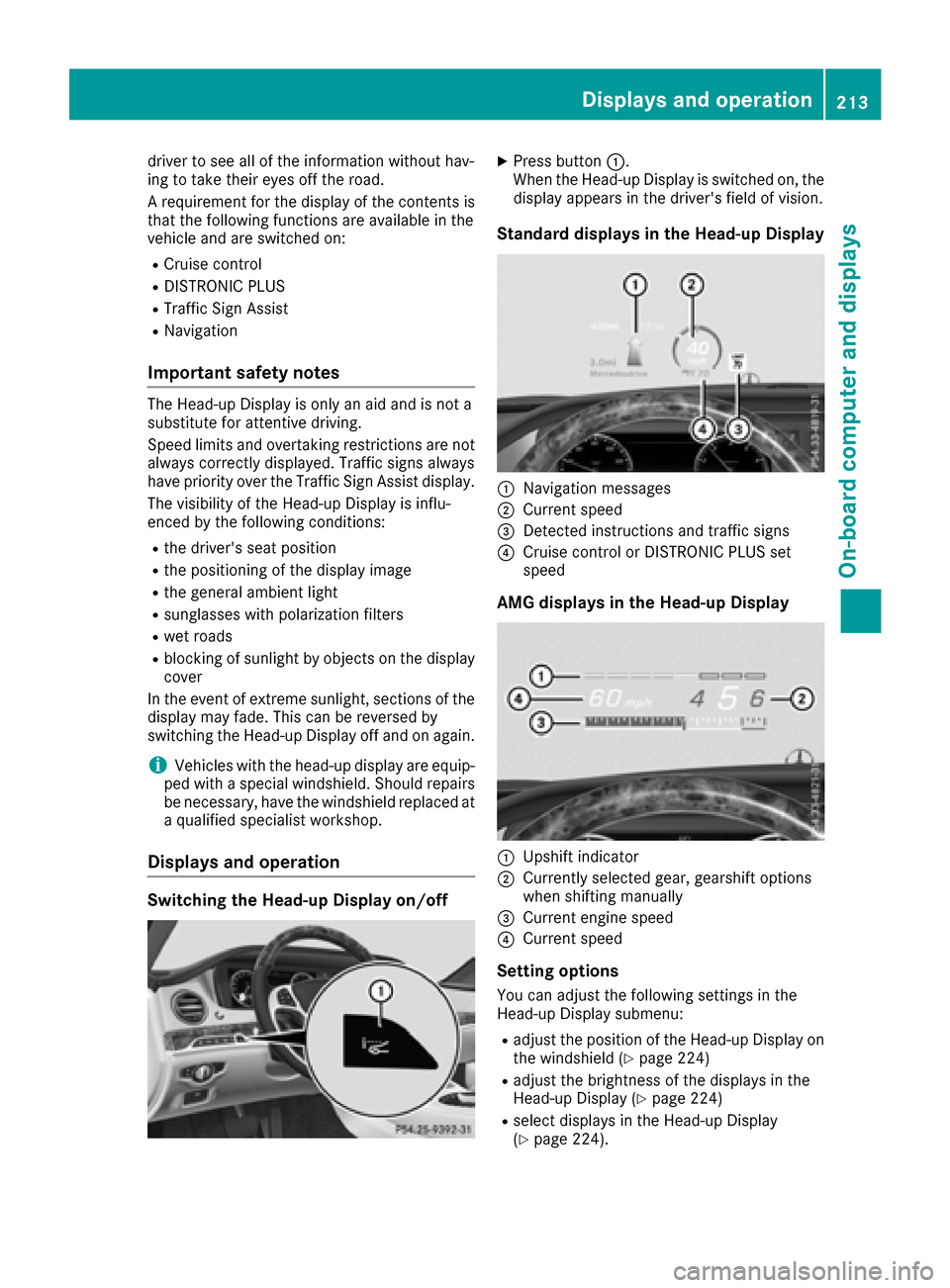
Switching the Head-up Display on/off
XPress button :.
When the Head-up Display is switched on, the display appears in the driver's field of vision.
Standard displays in the Head-up Display
:Navigation messages
;Current speed
=Detected instructions and traffic signs
?Cruise control or DISTRONIC PLUS set
speed
AMG displays in the Head-up Display
:Upshift indicator
;Currently selected gear, gearshift options
when shifting manually
=Current engine speed
?Current speed
Setting options
You can adjust the following settings in the
Head-up Display submenu:
Radjust the position of the Head-up Display on
the windshield (Ypage 224)
Radjust the brightness of the displays in the
Head-up Display (Ypage 224)
Rselect displays in the Head-up Display
(Ypage 224).
Displays and operation213
On-board computer and displays
Z
Page 235 of 382
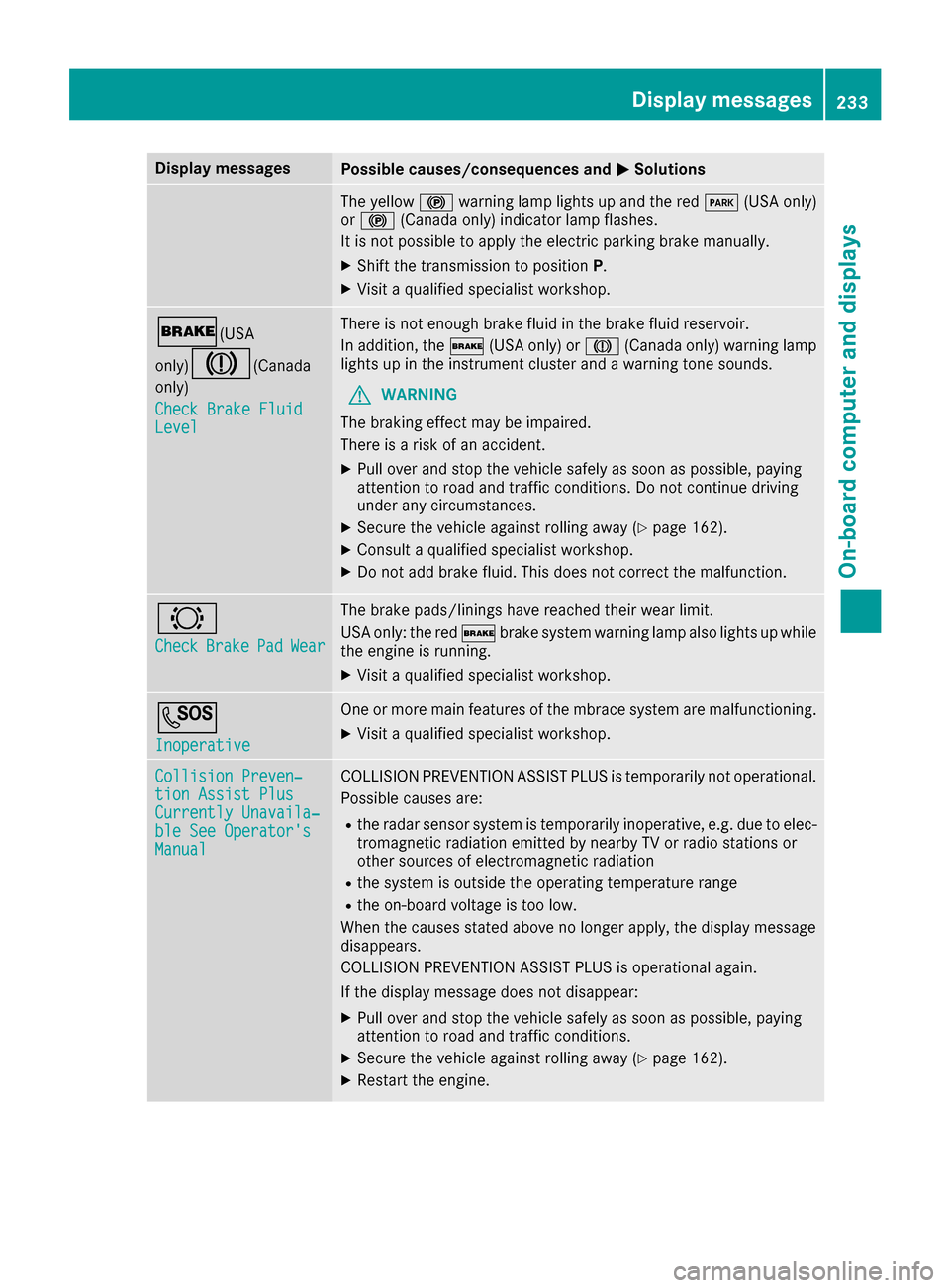
Display messagesPossible causes/consequences andMSolutions
The yellow!warning lamp lights up and th ered F (USAonly)
or ! (Canada only) indicator lamp flashes .
It is no tpossibl eto apply th eelectric parking brak emanually.
XShift th etransmission to position P.
XVisitaqualified specialist workshop .
$(USA
only)
J( Canada
only)
Check Brake Fluid
Level
There is no tenough brak eflui din th ebrak efluid reservoir .
In addition ,th e$ (USAonly) or J(Canada only) warning lamp
lights up in th einstrumen tcluste rand awarning tone sounds.
GWARNIN G
The braking effec tmay be impaired.
There is aris kof an accident.
XPull ove rand stop th evehicl esafely as soo nas possible, payin g
attention to roa dand traffic conditions. Do no tcontinu edrivin g
under any circumstances.
XSecur eth evehicl eagainst rollin gaway (Ypage 162).
XConsult aqualified specialist workshop .
XDo notadd brak efluid .This does no tcorrec tth emalfunction .
#
CheckBrakePadWear
The brak epads/linings hav ereached their wear limit.
US Aonly: th ered $ brakesystem warning lamp also lights up while
th eengin eis running.
XVisit aqualified specialist workshop .
G
Inoperative
Oneor mor emain features of th embrace system are malfunctioning .
XVisitaqualified specialist workshop .
Collision Preven‐tionAssist Plu sCurrently Unavaila‐ble See Operator' sManual
COLLISION PREVENTION ASSIST PLU Sis temporarily no toperational.
Possibl ecauses are:
Rth eradar sensor system is temporarily inoperative, e.g. due to elec -
tromagneti cradiation emitted by nearby TV or radi ostation sor
other source sof electromagneti cradiation
Rth esystem is outside th eoperating temperature range
Rth eon-boar dvoltag eis to olow.
Whe nth ecauses state dabov eno longer apply, th edisplay message
disappears.
COLLISION PREVENTION ASSIST PLU Sis operational again .
If th edisplay message does no tdisappear :
XPull overand stop th evehicl esafely as soo nas possible, payin g
attention to roa dand traffic conditions.
XSecur eth evehicl eagainst rollin gaway (Ypage 162).
XRestart th eengine.
Display messages23 3
On-board computer and displays
Z