sensor MERCEDES-BENZ S-CLASS SALOON LONG 2020 Owner's Manual
[x] Cancel search | Manufacturer: MERCEDES-BENZ, Model Year: 2020, Model line: S-CLASS SALOON LONG, Model: MERCEDES-BENZ S-CLASS SALOON LONG 2020Pages: 609, PDF Size: 10.5 MB
Page 235 of 609
R
topedestrians, animals, bicycles or sta‐
tionary vehicles, or unexpected obs tacles
R tocompl extraf fic conditions
R tooncoming vehicles and crossing traf fic
As a result, Active Dis tance Assi st
DISTRONIC may nei ther give warnings nor
inter vene in su chsituations. #
Alw ays obser vethe tra ffic conditions
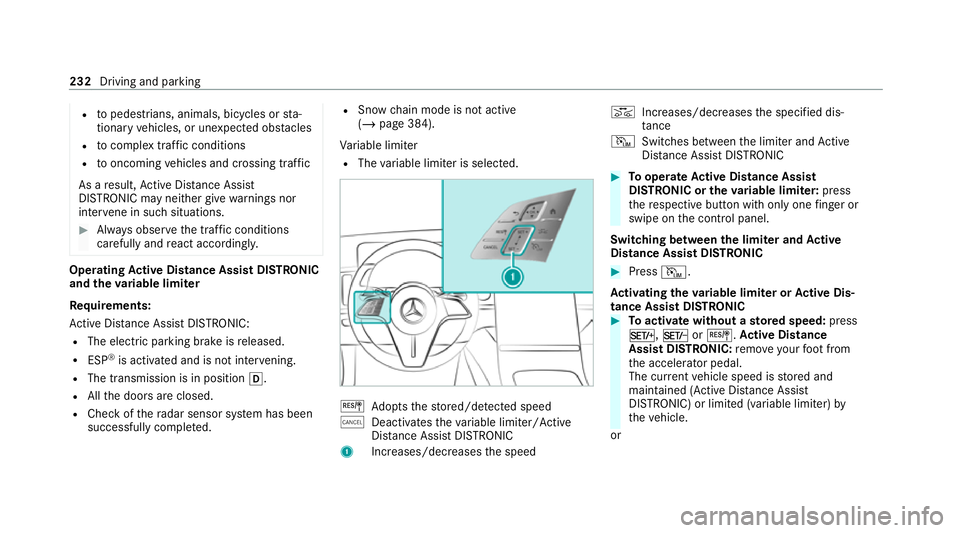
carefully and react accordin gly. Operating
Active Di stance Assist DIST RONIC
and the variable limi ter
Re quirements:
Ac tive Dis tance Assi stDISTRONIC:
R The electric pa rking brake is released.
R ESP ®
is activated and is not inter vening.
R The transmission is in position h.
R Allthe doors are closed.
R Check of thera dar sensor sy stem has been
successfully comple ted. R
Snow ch ain mode is not active
(/ page 384).
Va riable limiter
R The variable limiter is selec ted. J
Adopts thestored/de tected speed
± Deacti vatesth eva riable limiter/ Active
Dis tance Assi stDISTRONIC
1 Increases/decreases the speed K
Increases/dec reases the specified dis‐
tan ce
I Switches between the limiter and Active
Dis tance Assi stDISTRONIC #
Tooperate Active Di stance Assist
DISTRO NIC or the variable limi ter: press
th ere spective button with only one finger or
swipe on the control panel.
Switching between the limi ter and Active
Di stance Assist DISTRO NIC #
Press I.
Ac tivating the variable limi ter or Active Dis‐
tance Assi stDISTRONIC #
Toactivate with out astored speed: press
M, NorJ. Active Di stance
Assist DIST RONIC: remo veyour foot from
th e accelerator pedal.
The cur rent vehicle speed is stored and
maintained (Active Dis tance Assi st
DISTRONIC) or limited (variable limiter) by
th eve hicle.
or 232
Driving and parking
Page 244 of 609
Fo
rth is, thefo llowing conditions must be fulfil‐
led:
R You are on a mo torw ay or high-speed major
ro ad.
R The vehicle speed is between appr oximately
80 km/h and 180 km/h.
R The neighbou ring lane is separated bya bro‐
ke n lane ma rking.
R Novehicle or obs tacle is de tected in the
adjacent lane.
R Since the last time theve hicle wasst ar ted,
th e sensors ha vedetected a vehicle at a suit‐
able dis tance behind your vehicle.
R Active Lane Change Assi stis selec ted in the
multimedia sy stem.
R Active Dis tance Assi stDISTRONIC and Active
St eering Assist are activated on mo torw ays.
The sy stem is not available and must be reacti‐
va ted in thefo llowing situations:
R Active Dis tance Assi stDISTRONIC and Active
St eering Assist werealready activated before
entering the mo torw ay. R
The sy stem briefly does not de tect thero ad
yo u are on as a mo torw ay or a mo torw ay-like
ro ad, e.g. on a mo torw ay junction.
As soon as Active Lane Change Assi stdetects a
suitable road, you can reactivate it with J,
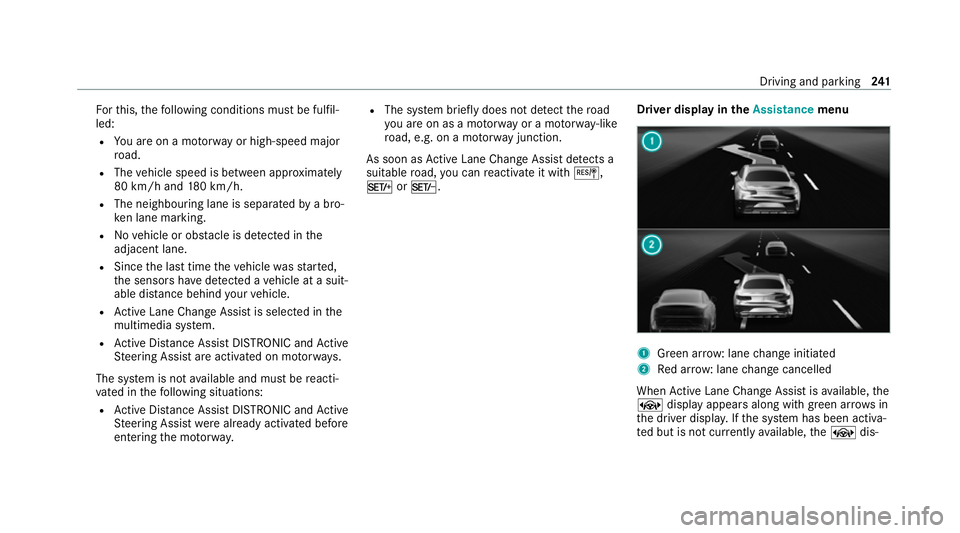
M orN. Driver display in
theAssistance menu 1
Green ar row: lane change initiated
2 Red ar row: lane change cancelled
When Active Lane Change Assi stisavailable, the
± display appears along with green ar rows in
th e driver displa y.Ifth e sy stem has been activa‐
te d but is not cur rently available, the± dis‐ Driving and parking
241
Page 245 of 609
play appears along with gr
eyarrow s in the driver
displa y.
If no vehicle or obs tacle is de tected in the adja‐
cent lane and a lane change is permit ted, the
lane change begins af terth e driver has indicated
brief ly. The lane change is shown tothe driver
with a flashing greenarro w next tothe±
st eering wheel symbol. Green ar row 1 is dis‐
pla yed in the appropriate adjacent lane in the
Assistance menu inthe driver displa y.The Lane
change to the left message,forex ample, also
appears.
Ac tive Lange Change Assi stcan be cancelled in
va rious situations, including thefo llowing:
R Change in the sur rounding conditions (e.g.
de tected obs tacle).
R The driver remo vesth eir hands from the
st eering wheel.
R The driver steers with too much forc e or in
th e opposite direction.
R The driver mo vesth e turn signal indicator in
th e opposite direction. R
Active Dis tance Assi stDISTRONIC or Active
St eering Assist is deactivated.
R The vehicle cannot make the lane change as
planned.
Cancellation of Active Lane Change Assi stis dis‐
pla yed as follo ws:
R The ar row in the selected direction of tr avel
turns red.
R A cor responding message appears onthe
driver displa y.
R In cer tain circums tances a warning tone
sounds. &
WARNING Risk of accident when chang‐
ing lane toan occupied adjacent lane
Lane Chan geAssi stcannot al ways clear ly
de tect if the adjacent lane is free.
The lane change might be initiated although
th e adjacent lane is not free. #
Before changing lanes, make sure that
th e neighbouring lane is free and there
is no danger to otherroad users. #
Monitor the lane change. &
WARNING Risk of accident if Lane
Change Assi stunexpectedly stops func‐
tioning
If th e sy stem limitations for Lane Change
Assist ha vebeen reached, there is no guar‐
antee that the sy stem will remain active.
Lane Change Assist cannot then assist you
by applying steering torque. #
Alw ays monitor the lane change and
ke ep your hands on thesteering wheel.
Obser vethe tra ffic conditions and steer
and/or brake if necessar y. Sy
stem limits
The sy stem limitations of Active Steering Assist
apply toActive Lane Change Assi st
( / page 237).
The sy stem may also be impaired or may not
function in thefo llowing situations:
R The sensors are damaged, co vered or dirty
(/ page 220). 242
Driving and pa rking
Page 246 of 609
R
The exterior lighting sho wsa defect.
R The sy stem does not de tect a suitable road,
fo rex ample, in tight bends or shortly af ter a
slip road.
R The vehicle is on a construction site.
% The Active Lane Change Assi stsensors
adjust automatically while a cer tain dis tance
is being driven af terth eve hicle has been
delivered. Active Lane Change Assi stis
una vailable or only partially available during
th is teach-in process, and no ar rows are dis‐
pla yed next totheØ Active Steering
Assist symbol.
Obser vethe no tes on driving sy stems and your
re sponsibility; you may otherwise failto recog‐
nise dangers (/ page 219).
Selecting Active Lane Change Assi st
Multimedia sy stem:
4 © 5
Settings 5
Assistance
5 Driving #
Select the function. Ac
tive Brake Assi st Fu
nction of Active Brake Assi st
Ac tive Brake Assi stconsi sts of thefo llowing
functions:
R Distance warning function
R Autonomous braking function
R Situation-dependent braking assi stance
R Evasive Steering Assist (count ry-specific)
Ac tive Brake Assi stcan help youto minimise the
ri sk of a collision with vehicles, cyclists or
pedestrians or toreduce the ef fects of su ch a
collision.
If Ac tive Brake Assi sthas de tected a risk of colli‐
sion, a warning tone sounds and theL dis‐
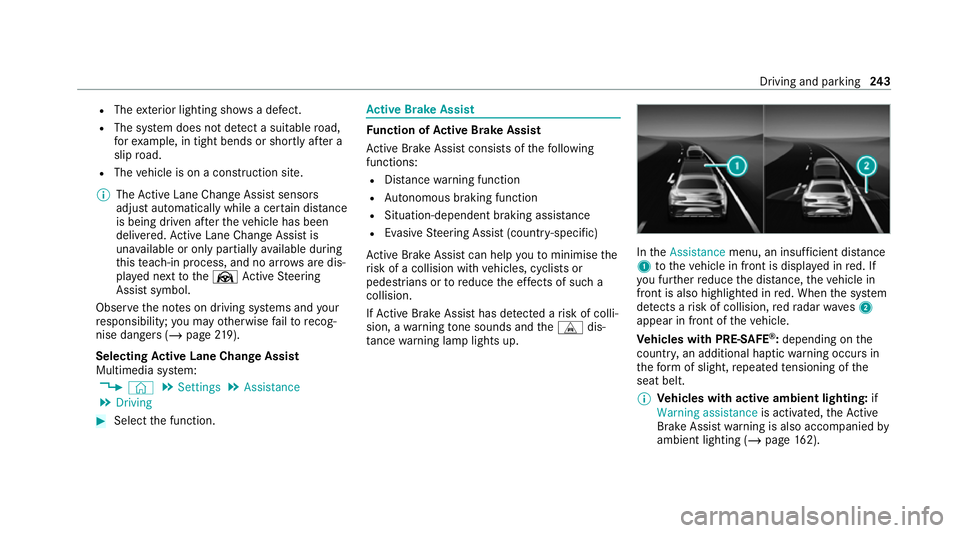
ta nce warning lamp lights up. In
theAssistance menu, an insuf ficient di stance
1 totheve hicle in front is displa yed in red. If
yo u fur ther reduce the dis tance, theve hicle in
front is also highlighted in red. When the sy stem
de tects a risk of collision, redra dar waves2
appear in front of theve hicle.
Ve hicles with PRE-SAFE ®
:depending on the
countr y,an additional haptic warning occurs in
th efo rm of slight, repeated tensioning of the
seat belt.
% Vehicles with active ambient lighting: if
Warning assistance is activated,theAc tive
Brake Assi stwa rning is also accompanied by
ambient lighting (/ page162). Driving and pa
rking 243
Page 249 of 609
R
An ob stacle is no lon ger de tected in front of
yo ur vehicle.
Re action tooncoming road users
Ac tive Brake Assi stcan also react todetected
oncoming road users:
R Reaction up tospeeds of appr oximately
10 0 km/h
R Warning for oncoming road users thro ugh
acoustic warning and warning lamp
R Autonomous braking application in order to
re duce the se verity of an accident
Evasi veSte ering Assist &
WARNING Risk of accident despi teEva‐
si ve Steering Assist
Evasive Steering Assist cann otalw aysre cog‐
nise objects or compl extraf fic situations
clear ly.
Moreo ver,th esteering support pr ovided by
Evasive Steering Assist is not suf ficient to
avo id a collision. #
Alw ays pay careful attention tothe traf‐
fi c situation; do not rely on Ev asive
St eering Assist alone. #
Be prepared tobrake or swer veif nec‐
essar y. #
End the support byactively steering in
non-critical situations. #
Drive at an appropriate speed if there
are pedestrians close tothe path of
yo ur vehicle. Evasive
Steering Assist has thefo llowing charac‐
te rist ics:
R Detection of pedestrians, cycli sts and vehi‐
cles.
R Assis tance thro ugh po wer-assis tedsteering if
it de tects a swerving manoeuvre.
R Activation byan abrupt steering mo vement
during a swerving manoeuvre.
R Assis tance du ring swerving and stra ightening
of theve hicle. R
Reaction from a speed of appr oximately
20 km/h up toa speed of appr oximately
11 0 km/h.
The steering support of Evasive Steering Assist
can be cancelled at any time bycounter steer‐
ing.
Sy stem limits
Fu ll sy stem per form ance is not available for a
fe w seconds af ter switching on the ignition or
af te r driving off.
If th e sy stem is una vailable or the functions are
re stricted, theÄ warning lamp appears in the
driver's displa y.
The sy stem may be impaired or may not func‐
tion, particular lyin thefo llowing situations:
R In sno w,rain, fog, heavy spr ay, if there is
gl are, in direct sunlight or in greatlyvarying
light conditions.
R Ifth e sensors are dirty, mis ted up, damaged
or co vered. (/ page 220)
R Ifth e sensors are impaired due tointer fer‐
ence from other radar sources, e.g. strong
ra dar reflections in multi-s torey car par ks. 246
Driving and pa rking
Page 250 of 609
R
If a loss of tyre pressure or a defective tyre
has been de tected and displ ayed.
R In complex traf fic situations whe reobjects
cannot always be clearly identified.
R If pedestrians, cyclists or vehicles mo ve
qu ickly into the sensor de tection range.
R Ifro ad users are hidden by other objects or
are located close to other objects.
R Ifth e typical outline of a pedestrian or cyclist
cann otbe distinguished from the back‐
ground.
R If a pedestrian or cyclist is not de tected as
su ch , e.g. due tospecial clo thing or other
objects.
R Ifth e driver's seat belt is not fastened.
R On bends with a tight radius.
% The Active Brake Assi stsensors adjust auto‐
matically while a cer tain dis tance is being
driven af terth eve hicle has been delivered.
Ac tive Brake Assi stis una vailable or only
partially available during thete ach-in proc‐
ess. Setting
Active Brake Assi st
Re quirements:
R The ignition is switched on.
Multimedia sy stem:
4 © 5
Settings 5
Assistance
5 Avoid collision 5
Active Brake Assist #
Select the desired setting.
The setting is retained when the engine is
next star ted.
Deactivating Active Brake Assi st
% It is recommended that you alw ays lea ve
Ac tive Brake Assi stactivated. #
Select Off.
The dis tance warning function, the autono‐
mous braking function and the Evasive Steer‐
ing Assist are deactivated.
When the engine is next star ted, the medium
setting is automatically selected.
% IfAc tive Brake Assi stis deactivated, the
æ symbol appears inthest atus bar of the
multifunction displa y. Tr
af fic Sign Assist Fu
nction of Traf fic Sign Assist
Tr af fic Sign Assi stdetects traf fic signs wi th the
multifunction camera and compares this with
information in the digital navigation map. It
assists youby displaying de tected speed limits
and overtaking restrictions in the driver display
and in the head-up displa y.The sy stem can issue
a wa rning when youexc eed the maximum per‐
missible speed.
In some count ries, the sy stem can pr ovide you
with fur ther functions and can warnyou when
yo u are approaching pedestrian crossings or
when you are about todrive past stop signs or
re d lights unintentionall y.
The camera also de tects and ana lyses traf fic
signs with a restriction indicated byan additional
sign (e.g. when wet).
Tr af fic Sign Assi stonly visualises selected signs
in the driver displa y.Ac tual traf fic signs and
speed limits ha vepriority over traf fic signs and
speed limits shown in the driver displa y. Driving and pa
rking 247
Page 252 of 609
Tr
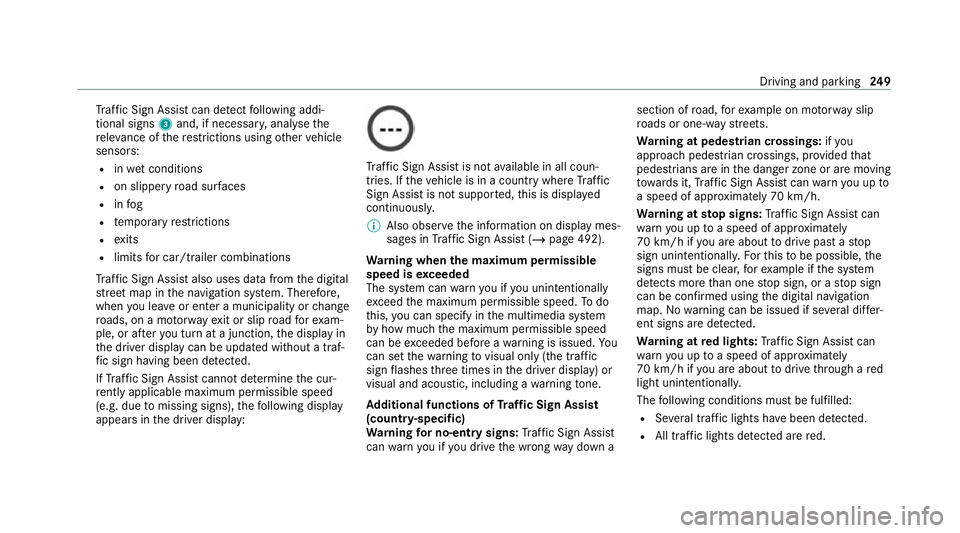
af fic Sign Assi stcan de tect following addi‐
tional signs 3and, if necessar y,anal ysethe
re leva nce of there strictions using other vehicle
sensors:
R inwe t conditions
R on slippe ryroad sur faces
R infog
R temp orary restrictions
R exits
R limits for car/trailer combinations
Tr af fic Sign Assi stalso uses data from the digital
st re et map in the navigation sy stem. Therefore,
when you lea veor enter a municipality or change
ro ads, on a mo torw ay ex it or slip road forex am‐
ple, or af teryo u turn at a junction, the display in
th e driver display can be updated without a traf‐
fi c sign having been de tected.
If Traf fic Sign Assi stcannot de term ine the cur‐
re ntly applicable maximum pe rmissible speed
(e.g. due tomissing signs), thefo llowing display
appears in the driver display: Tr
af fic Sign Assi stis not available in all coun‐
tries. If theve hicle is in a country where Traf fic
Sign Assi stis not suppor ted, this is displa yed
continuously.
% Also obser vethe information on display mes‐
sages in Traf fic Sign Assi st (/ page 492).
Wa rning when the maximum permissible
speed is exceeded
The sy stem can warnyou if you unin tentionally
exc eed the maximum permissible speed. Todo
th is, you can specify in the multimedia sy stem
by how much the maximum permissible speed
can be exceeded before a warning is issued. Yo u
can set thewa rning tovisual only (the traf fic
sign flashes thre e times in the driver display) or
visual and acoustic, including a warning tone.
Ad ditional functions of Traf fic Sign Assist
(count ry-specific)
Wa rning for no-entry signs: Traf fic Sign Assi st
can warnyou if you drive the wrong way down a section of
road, forex ample on mo torw ay slip
ro ads or one-w aystre ets.
Wa rning at pedestrian crossings: ifyou
approach pedestrian crossings, pr ovided that
pedestrians are in the danger zone or are moving
to wa rds it, Traf fic Sign Assi stcan warnyou up to
a speed of appr oximately 70 km/h.
Wa rning at stop signs: Traf fic Sign Assi stcan
wa rnyou up toa speed of appr oximately
70 km/h if you are about todrive past a stop
sign unintentionall y.Fo rth is to be possible, the
signs must be clear, forex ample if the sy stem
de tects more than one stop sign, or a stop sign
can be confirmed using the digital navigation
map. Nowarning can be issued if se veral dif fer‐
ent signs are de tected.
Wa rning at red lights: Traf fic Sign Assi stcan
wa rnyou up toa speed of appr oximately
70 km/h if you are about todrive thro ugh a red
light unin tentional ly.
The following conditions must be fulfilled:
R Several traf fic lights ha vebeen de tected.
R All traf fic lights de tected are red. Driving and parking
249
Page 254 of 609
Setting
thewa rning threshold
This value de term ines the speed at which a
wa rning is issued when exceeded. #
Set the desired speed under Warning thresh-
old.
Ac tivating or deactivating further functions
of Traf fic Sign Assist #
Activate or deacti vate Further warnings .
The available functions are activated or deac‐
tivated.
Setting the type of warning for further func‐
tions #
Select ´nexttoFurther warnings . #
Select Visual & audible orVisual. Tr
af fic light view Information on
the traf fic light view
The traf fic light view suppo rts th e driver when
wa iting in front of a red light bydisplaying the
came raimage on the cent ral displa y.The cam‐
era image is displa yed when the driver is thefirst ve
hicle in front of there d light and faded out
when theve hicle drives off.
Displaying traf fic light view
Re quirements:
R The Traffic light view option is switched on.
R A traf fic light view is available.
Multimedia sy stem:
4 © 5
Settings 5
Assistance
5 Assistance 5
Traffic light view
% This function is not available in all countries.
If th eve hicle is in firs t position at a traf fic light,
th e camera image with traf fic light view is shown
in the cent ral displa y.
When theve hicle pulls away,th e camera image
is faded out. #
Activate Dor deacti vate E Traffic
light view.
Using other available functions #
Select ´. #
Select On request orAutomatic.
If On request is set and a traf fic light view is
av ailable, thePlease tap here for traffic light
view. message is displa yed. The camera
image is shown af ter confirmation of the
messa ge.
If Automatic is set,the camera image is auto‐
matically displa yed when the traf fic light view
is available. Ac
tive Blind Spot Assi stwith exitwa rning Fu
nction of Active Blind Spot Assi stwith exit
wa rning
Ac tive Blind Spot Assi stuses radar sensors to
monitor the area up to40 m behind and 3 m
next toyour vehicle.
The sy stem can de tect vehicles tr avelling from
speeds of appr oximately 12km/h and issue a
wa rning if they mo veinto the monitoring range.
St atus display in the driver's display
¸ Grey:th e sy stem is activated but inopera‐
tive. Driving and parking
251
Page 256 of 609
and make sure
there is suf ficient clear‐
ance. If a
vehicle is de tected in the monitoring range,
th ere dwa rning lamp lights up in the cor re‐
sponding outside mir ror.
If a vehicle occupant pulls the door handle on
th e side of thewa rning, a warning tone sounds
twice and the ambient lighting in there spective
door and thewa rning lamps in the cor respond‐
ing outside mir rorflash red.
Ve hicles with MBUX Interior Assistant: the
visual warning begins as soon as the hand of a
ve hicle occupant mo ves in tothe area of the
door.
% Ve
hicles with ambient lighting or active
ambient lighting: theWarning assistance of
th e ambient lighting can be activated and
deactivated (/ page162).
% The warning assis tance can di ffer depending
on the equipment and may vary according to
th e setting.
The exitwa rning is only available when Active
Blind Spot Assi stis activated and up toa maxi‐ mum of
thre e minutes af terth e ignition has
been switched off. The exitwa rning is no longer
av ailable once thewa rning lamp in the outside
mir rorflashes thre e times.
The exitwa rning is only an aid and not a substi‐
tute forth e attention of vehicle occupants. The
re sponsibility for opening and closing the doors
and for leaving theve hicle remains with theve hi‐
cle occupants.
Sy stem limits
Ac tive Blind Spot Assi stmay be limi ted in thefo l‐
lowing situations, in particular:
R ifth ere is dirt on the sensors or the sensors
are obscured
R in poor visibility, e.g. due tofog, heavy rain or
snow
R ifth ere are nar rowvehicles, e.g. bicycles or
mo torbikes
R ifth ero ad has very wide or nar row lanes
R ifve hicles are not driving in the middle of
th eir lane Wa
rnings may be issued in er ror when driving
close tocrash ba rriers or similar continuous lane
borders. Alw ays make sure that there is suf fi‐
cient di stance tothe side forot her traf fic or
obs tacles.
Wa rnings may be inter rupte d when driving along‐
side long vehicles, forex ample lor ries, for a pro‐
longed time.
Ac tive Blind Spot Assi stis not operational when
re ve rsege ar is engaged.
Ac tive Blind Spot Assi stis not operational if
transpo rtequipment, forex ample a trailer or
bicycle rack , is attached tothe trailer hitch and
th e electrical connection has been cor rectly
es tablished.
Ad ditionall y,theex itwa rning may be limited in
th efo llowing situations:
R when the sensors are co veredby adjacent
ve hicles in nar rowparking spaces
R when people approach theve hicle
R intheeve nt of stationary or slowly moving
objects Driving and parking
253
Page 270 of 609
Selecting a view
for the 360° Camera
(r eve rsege ar)
Re quirements:
R The Rear camera image or3D view setting is
activated in the multimedia sy stem
(/ page 267). #
Shift toreve rsege ar. #
Select the desired view in the multimedia
sy stem (/ page 262).
Setting there ve rsing camera or 360° Cam‐
era
The reve rsing camera is only an aid. It is not a
substitute foryo ur attention tothe sur roundings.
The responsibility for safe manoeuvring and
parking remains with you. Make sure that no
persons, animals or objects etc. are in the
manoeuvring range. Pay attention to your sur‐
ro undings and be ready tobrake at all times.
Multimedia sy stem:
4 © 5
Settings 5
Assistance
5 Camera #
Select Rear camera image orSystem off. 360° Camera with GPS - managing activation
positions
Multimedia sy stem:
4 © 5
Settings 5
Assistance
5 Camera
Re naming an activation position
% You can de term ine activation positions in the
Camera views menu. (/page 262) #
Select an activation position. #
Select ´. #
Enter a name and confirm.
The activation position is sa ved under the
new name.
Deleting an acti vation position #
Select Manage activation positions. #
Select an acti vation position. #
Select E. #
Confirm the prom pt.
The activation position is dele ted. Opening
the camera co ver of the reve rsing
camera
Multimedia sy stem:
4 © 5
Settings 5
Assistance
5 Camera #
Select Open camera cover.
% The camera co ver closes auto maticallyafter
some time or af ter an ignition cycle. Pa
rking Assist PARKTRONIC Fu
nction of Parking Assist PARKTRONIC
Pa rking Assist PARKTRONIC is an electronic
parking assi stance sy stem which monitors the
area sur rounding your vehicle and sho wsyouthe
dis tance between theve hicle and a de tected
obs tacle visually and audibly.
The passi veside impact pr otection also warns
yo u of obs tacles tothe side. These must be
de tected beforehand bythe sensors in the front
or rear bumper while driving bythem. If you
st eer in the direction of a de tected obs tacle and
th ere is a risk of a lateral collision, a warning is
issued. The passive side impact pr otection can Driving and parking
267