interior lights MERCEDES-BENZ S-CLASS SEDAN 2012 Owners Manual
[x] Cancel search | Manufacturer: MERCEDES-BENZ, Model Year: 2012, Model line: S-CLASS SEDAN, Model: MERCEDES-BENZ S-CLASS SEDAN 2012Pages: 536, PDF Size: 39.39 MB
Page 9 of 536
CareCarpets .......................................... 472
Car wash ........................................ 466
Display ........................................... 470
Exterior lights ................................ 469
Gear or selector lever ....................472
Interior ........................................... 470
Matte finish ................................... 468
Night View Assist Plus ...................471
Notes ............................................. 466
Paint .............................................. 468
Plastic trim .................................... 471
Power washer ................................ 467
Rear view camera .......................... 470
Roof lining ...................................... 472
Seat belt ........................................ 472
Seat cover ..................................... 472
Sensors ......................................... 470
Steering wheel ............................... 472
Tail pipes ....................................... 470
Trim pieces .................................... 472
Washing by hand ........................... 467
Wheels ........................................... 468
Windows ........................................ 469
Wiper blades .................................. 469
Wooden trim .................................. 472
Cargo tie down rings ......................... 437
Car pool lanes .................................... 173
Car wash (care) ................................. 466
Category Satellite radio ................................ 222
CD
Copy protection ............................. 234
Fast forward/fast rewind ...............230
General information .......................234
Inserting ........................................ 225
Inserting/loading (Rear Seat
Entertainment System) ..................255
Mode, switching to ........................226
Multisession .................................. 233
Notes on discs ............................... 234
Operating the player/changer
(on-board computer) ......................381
Pause function ............................... 227
Playback options ........................... 232
Player/changer operation
(COMAND) ..................................... 225Removing/ejecting (Rear Seat
Entertainment System) ..................256
Safety notes .................................. 225
Selecting a media type ..................228
Selecting a track ............................ 229
Sound settings (balance, bass,
fader, treble) .................................. 139
Center console ..................................... 41
Central locking Automatic locking feature
(COMAND) ..................................... 269
Locking/unlocking (SmartKey) ........82
Changing batteries (remote
control, headphones) ........................ 251
Changing bulbs High-beam headlamps (vehicles
with halogen daytime running
lamps) ............................................ 288
High-beam headlamps (vehicles
with LED daylight lamps) ...............288
Important safety notes ..................286
Overview of bulb types ..................287
Changing direction
Announcement phase ....................171
Change of direction phase .............171
Preparation phase .........................171
Character bar ..................................... 133
Characters Entering ......................................... 134
Entering (address book, phone
book) ............................................. 136
Entering (navigation) ......................133
Child-proof locks
Important safety notes ....................70
Rear doors ....................................... 71
Children
In the vehicle ................................... 66
Restraint systems ............................ 66
Child seat
LATCH-type (ISOFIX) child seat
anchors ............................................ 68
Special seat belt retractor ...............68
Top Tether ....................................... 69
Cigarette lighter ................................ 442
Cleaning Mirror turn signal ........................... 470Index7
Page 11 of 536

Cup holderCenter console .............................. 439
Important safety notes ..................439
Rear compartment .........................439
Customer Assistance Center (CAC) ... 32
Customer Relations Department ....... 32
D
Dashboard see Cockpit
Data
see Technical data
Data medium
Audio DVD ..................................... 233
CD/DVD ........................................ 234
MP3 ............................................... 233
MUSIC REGISTER ........................... 234
Date format, setting .......................... 148
Day design, setting ........................... 147
Daytime running lamps Display message ............................ 405
Switching on/off (on-board
computer) ...................................... 387
Switching on/off (switch) ..............281
Dealership
see Qualified specialist workshop
DEF
Adding ........................................... 325
Display message ............................ 409
Delayed switch-off
Exterior lighting (COMAND) ...........267
Interior lighting (COMAND) ............267
Destination (navigation)
Displaying information ...................176
Entering a destination by address .. 157
Entering a destination using the
map ............................................... 164
Entering an intermediate stop .......165
Entering a point of interest ............166
Saving ............................................ 183
Selecting from the destination
memory ......................................... 163
Selecting from the list of last
destinations ................................... 163
Destination memory (navigation)
Deleting an entry ........................... 185
Entering/saving your home
address .......................................... 160
Previous destinations ....................185
Diagnostics connection ...................... 31
Dialing a number (telephone) ........... 204
Diesel .................................................. 526
Digital speedometer ......................... 378
DIRECT SELECT lever see Automatic transmission
Display
Selecting the design ......................147
Settings ......................................... 147
Display (cleaning instructions) ........ 470
Displaying the arrival time ............... 176
Displaying the distance to the
destination ......................................... 176
Display messages Calling up (on-board computer) .....390
Driving systems ............................. 410
Engine ............................................ 406
General notes ................................ 390
Hiding (on-board computer) ...........390
Lights ............................................. 403
Safety systems .............................. 391
Service interval display ..................465
SmartKey ....................................... 421
Tires ............................................... 417
Vehicle ........................................... 419
Distance
see Navigation, route overview
Distance display (on-board
computer) .......................................... 385
Distance recorder ............................. 378
see Odometer
see Trip odometer
Distance warning (warning lamp) .... 430
DISTRONIC PLUS Deactivating ................................... 343
Display message ............................ 415
Displays in the multifunction
display ........................................... 343
Driving tips .................................... 344
Function/notes ............................. 336
Important safety notes ..................336Index9
Page 16 of 536
Manual control ............................... 286
Overview ........................................ 285
Reading lamp ................................. 285
Intermediate stop
Deleting ......................................... 166
Entering ......................................... 165
iPod ®
Alphabetical track selection ..........242
Connecting to the Media
Interface ........................................ 238
Selecting a category/playlist .........241
Supported variants ........................238
J
Jack Storage location ............................ 474
Using ............................................. 476
Jump starting (engine) ...................... 483
K
Key see SmartKey
KEYLESS-GO
Convenience closing feature ............97
Locking ............................................ 83
Start/Stop button .......................... 307
Starting the engine ........................309
Unlocking ......................................... 83
Key positions
KEYLESS-GO .................................. 307
SmartKey ....................................... 307
Kickdown
Driving tips .................................... 317
Manual drive program ....................320
L
Lamps see Warning and indicator lamps
Lane-change assistant
see Blind Spot Assist
Lane detection (automatic)
see Lane Keeping Assist
Lane Keeping Assist
Activating/deactivating .................387
Display message ............................ 413
Function/information ....................365
Lap time (RACETIMER) ...................... 382
LATCH-type (ISOFIX) child seat
anchors ................................................ 68
Letter bar see Character bar
License plate lamp (display
message) ............................................ 404
Light function, active Display message ............................ 405
Lighting
see Lights
Lights
Automatic headlamp mode ............281
Cornering light function .................284
Display message ............................ 403
Driving abroad ............................... 280
Fog lamps ...................................... 282
Hazard warning lamps ...................283
High beam flasher .......................... 283
High-beam headlamps ...................283
Light switch ................................... 280
Low-beam headlamps ....................281
Rear fog lamp ................................ 282
Standing lamps .............................. 280
Switching Adaptive Highbeam
Assist on/off ................................. 388
Switching the daytime running
lamps on/off (on-board
computer) ...................................... 387
Switching the daytime running
lamps on/off (switch) ....................281
Turn signals ................................... 283
see Changing bulbs
see Interior lighting
Light sensor (display message) ....... 405
Loading guidelines ............................ 434
Locator lighting setting (COMAND) . 268
Locking see Central locking
Locking (doors)
Automatic ........................................ 89
Emergency locking ........................... 91
From inside (central locking
button) ............................................. 89
Locking centrally
see Central locking
Locking verification signal (on-
board computer) ............................... 38814Index
Page 50 of 536
Useful information
i This Operator's Manual describes all
models and all standard and optional
equipment of your vehicle available at the
time of publication of the Operator's
Manual. Country-specific differences are
possible. Please note that your vehicle may
not be equipped with all features
described. This also applies to safety-
related systems and functions.
i Please read the information on qualified
specialist workshops ( Y page 31).
Occupant safety
Overview of occupant safety
In this section, you will learn the most
important facts about the restraint system
components of the vehicle.
The restraint system consists of:
R seat belts
R child restraint systems
R LATCH-type (ISOFIX) child seat anchors
Additional protection is provided by:
R SRS (Supplemental Restraint System)
R NECK-PRO head restraints/NECK-PRO
luxury head restraints
R PRE-SAFE ®
R Air bag system components with:
- PASSENGER AIR BAG OFF indicator lamp
- front-passenger seat with Occupant
Classification System (OCS)
The different air bag systems work
independently of each other. The protective
functions of the system work in conjunction
with each other. Not all air bags are deployed
in an accident.
GWARNING
Modifications to or work improperly
conducted on restraint system components
or their wiring, as well as tampering with
interconnected electronic systems, can lead
to the restraint systems no longer functioning
as intended.
Air bags or Emergency Tensioning Devices
(ETDs), for example, could deploy
inadvertently or fail to deploy in accidents
although the deceleration threshold for air
bag deployment is exceeded. Therefore,
never modify the restraint systems. Do not
tamper with electronic components or their
software.
i See "Children in the vehicle"
( Y page 66) for more information on
infants and children traveling with you in
the vehicle and restraints for infants and
children.
SRS (Supplemental Restraint System)
Introduction
SRS consists of:
R the 6 SRS warning lamp
R air bags
R air bag control unit (with crash sensors)
R Emergency Tensioning Devices
R belt force limiters
SRS reduces the risk of occupants coming
into contact with the vehicle's interior in the
event of an accident. It can also reduce the
effect of the forces to which occupants are
subjected during an accident.
SRS warning lamp
SRS functions are checked regularly when
you switch on the ignition and when the
engine is running. Therefore, malfunctions
can be detected in good time.
The 6 SRS warning lamp in the instrument
cluster lights up when the ignition is switched
on. It goes out no later than a few seconds
after the engine is started.
48Occupant safetySafety
Page 116 of 536
Problems with the seat ventilation
The seat ventilation has switched off
prematurely. The vehicle's electrical system
voltage is too low because too many electrical
consumers are switched on.
XSwitch off electrical consumers which you
do not need, such as the rear window
defroster or interior lighting.
Steering wheel
Important safety notes
GWARNING
Do not adjust the steering wheel while driving.
Adjusting the steering wheel while driving
could cause the driver to lose control of the
vehicle.
The electrical steering wheel adjustment
feature can be operated at any time.
Therefore, do not leave children unattended
in the vehicle, or with access to an unlocked
vehicle. A child's unsupervised access to a
vehicle could result in an accident and/or
serious personal injury.
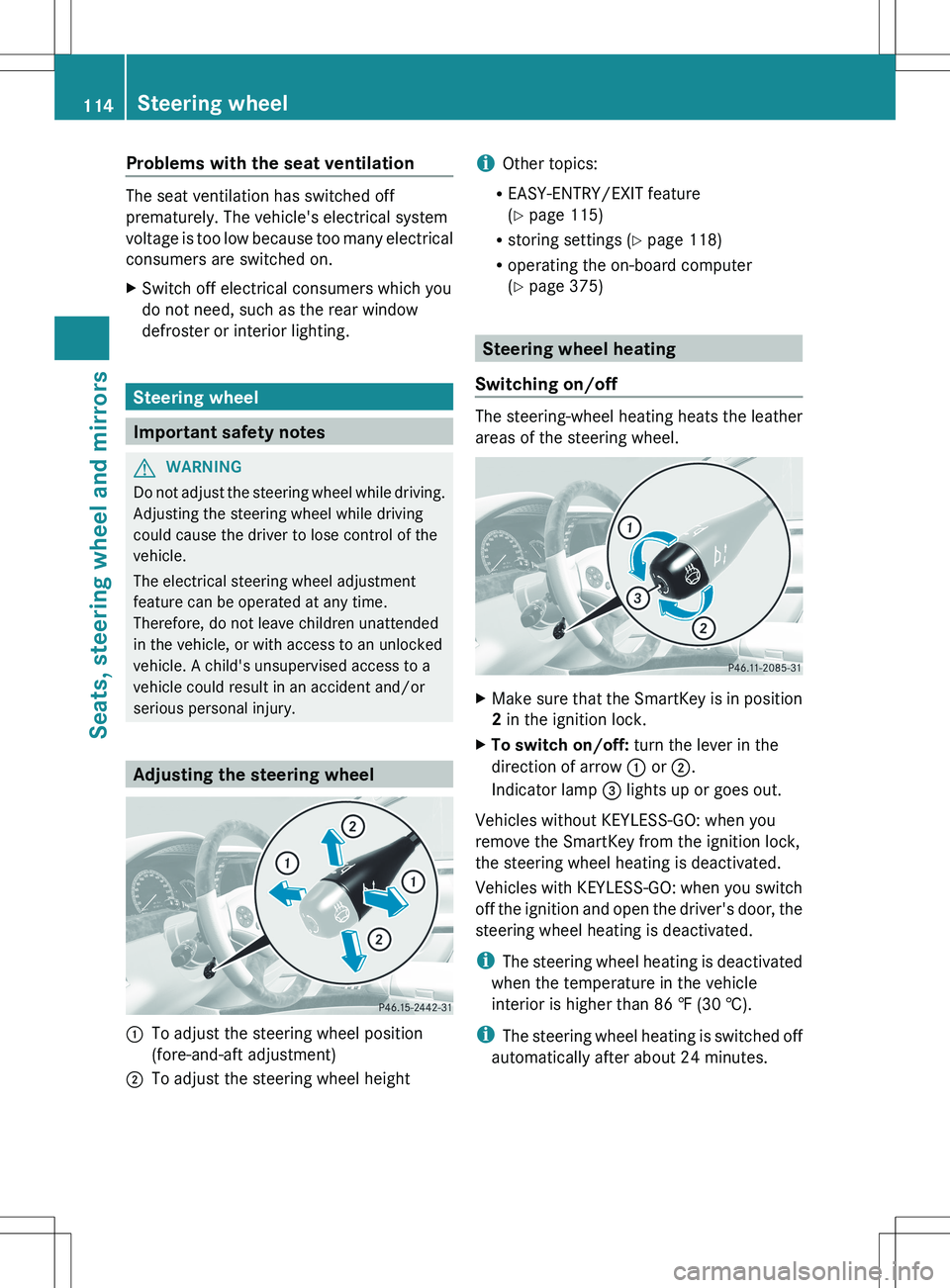
Adjusting the steering wheel
:To adjust the steering wheel position
(fore-and-aft adjustment);To adjust the steering wheel heighti Other topics:
R EASY-ENTRY/EXIT feature
( Y page 115)
R storing settings ( Y page 118)
R operating the on-board computer
( Y page 375)
Steering wheel heating
Switching on/off
The steering-wheel heating heats the leather
areas of the steering wheel.
XMake sure that the SmartKey is in position
2 in the ignition lock.XTo switch on/off: turn the lever in the
direction of arrow : or ;.
Indicator lamp = lights up or goes out.
Vehicles without KEYLESS-GO: when you
remove the SmartKey from the ignition lock,
the steering wheel heating is deactivated.
Vehicles with KEYLESS-GO: when you switch
off the ignition and open the driver's door, the
steering wheel heating is deactivated.
i The steering wheel heating is deactivated
when the temperature in the vehicle
interior is higher than 86 ‡ (30 †).
i The steering wheel heating is switched off
automatically after about 24 minutes.
114Steering wheelSeats, steering wheel and mirrors
Page 118 of 536
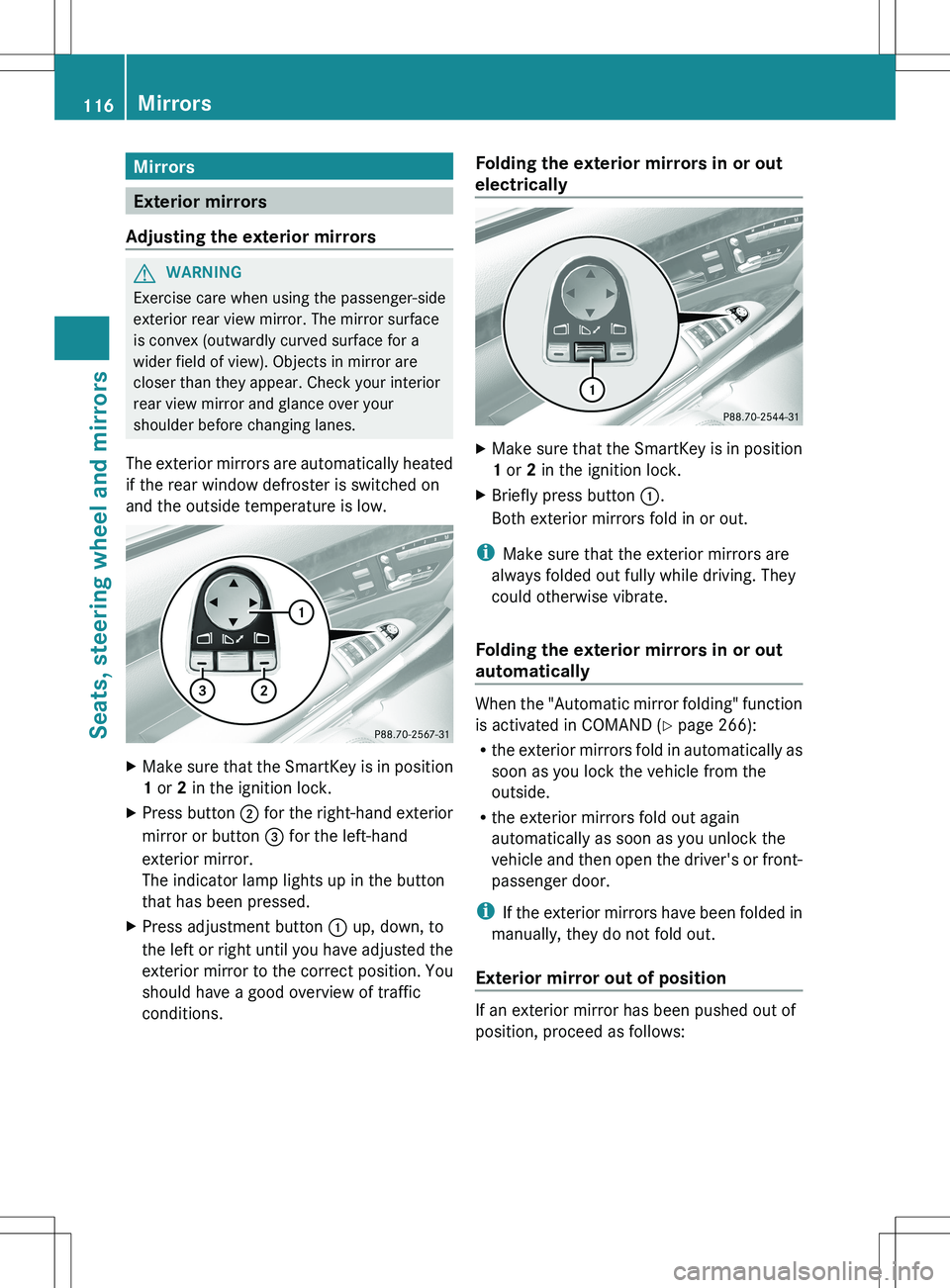
Mirrors
Exterior mirrors
Adjusting the exterior mirrors
GWARNING
Exercise care when using the passenger-side
exterior rear view mirror. The mirror surface
is convex (outwardly curved surface for a
wider field of view). Objects in mirror are
closer than they appear. Check your interior
rear view mirror and glance over your
shoulder before changing lanes.
The exterior mirrors are automatically heated
if the rear window defroster is switched on
and the outside temperature is low.
XMake sure that the SmartKey is in position
1 or 2 in the ignition lock.XPress button ; for the right-hand exterior
mirror or button = for the left-hand
exterior mirror.
The indicator lamp lights up in the button
that has been pressed.XPress adjustment button : up, down, to
the left or right until you have adjusted the
exterior mirror to the correct position. You
should have a good overview of traffic
conditions.Folding the exterior mirrors in or out
electricallyXMake sure that the SmartKey is in position
1 or 2 in the ignition lock.XBriefly press button :.
Both exterior mirrors fold in or out.
i Make sure that the exterior mirrors are
always folded out fully while driving. They
could otherwise vibrate.
Folding the exterior mirrors in or out
automatically
When the "Automatic mirror folding" function
is activated in COMAND ( Y page 266):
R the exterior mirrors fold in automatically as
soon as you lock the vehicle from the
outside.
R the exterior mirrors fold out again
automatically as soon as you unlock the
vehicle and then open the driver's or front-
passenger door.
i If the exterior mirrors have been folded in
manually, they do not fold out.
Exterior mirror out of position
If an exterior mirror has been pushed out of
position, proceed as follows:
116MirrorsSeats, steering wheel and mirrors
Page 269 of 536
lever or press the position button of the
memory function.
If there is a risk of entrapment by the seat, you
can also cancel the adjustment procedure by
moving the switch for seat adjustment. The
steering column and driver's seat stop moving
immediately.
Never leave children unsupervised in the
vehicle. They could open the driver's door and
thereby unintentionally activate the EASY-
ENTRY/EXIT feature and become trapped.
You can make a setting in COMAND so that
the steering wheel swings upwards and/or
the driver's seat moves backwards before you
get into the vehicle. You can make the
following settings:
R Off : the function is switched off.
R Steering Column : the steering wheel
swings upwards.
R Steering Column and Seat : the steering
wheel swings upwards and the driver’s seat
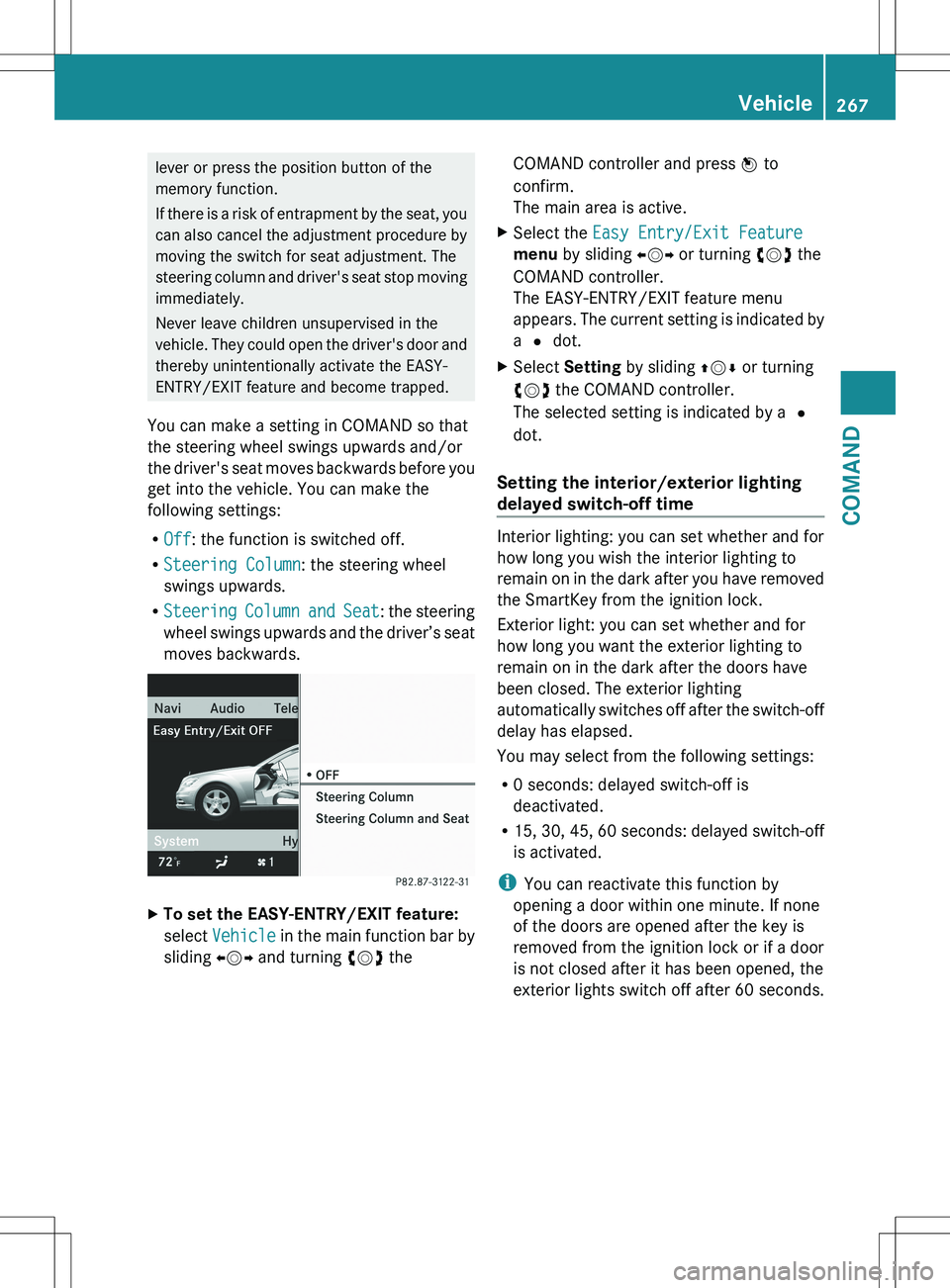
moves backwards.XTo set the EASY-ENTRY/EXIT feature:
select Vehicle in the main function bar by
sliding XVY and turning cVd theCOMAND controller and press W to
confirm.
The main area is active.XSelect the Easy Entry/Exit Feature
menu by sliding XVY or turning cVd the
COMAND controller.
The EASY-ENTRY/EXIT feature menu
appears. The current setting is indicated by
a # dot.XSelect Setting by sliding ZVÆ or turning
cVd the COMAND controller.
The selected setting is indicated by a #
dot.
Setting the interior/exterior lighting
delayed switch-off time
Interior lighting: you can set whether and for
how long you wish the interior lighting to
remain on in the dark after you have removed
the SmartKey from the ignition lock.
Exterior light: you can set whether and for
how long you want the exterior lighting to
remain on in the dark after the doors have
been closed. The exterior lighting
automatically switches off after the switch-off
delay has elapsed.
You may select from the following settings:
R 0 seconds: delayed switch-off is
deactivated.
R 15, 30, 45, 60 seconds: delayed switch-off
is activated.
i You can reactivate this function by
opening a door within one minute. If none
of the doors are opened after the key is
removed from the ignition lock or if a door
is not closed after it has been opened, the
exterior lights switch off after 60 seconds.
Vehicle267COMANDZ
Page 281 of 536
Useful information ............................280
Exterior lighting ................................ 280
Interior lighting ................................. 285
Replacing bulbs ................................. 286
Windshield wipers ............................289279Lights and windshield wipers
Page 287 of 536
the high-beam headlamps are switched on
automatically. The K indicator lamp in
the instrument cluster also lights up.
If you drive at speeds below approximately
30 mph (45 km/h) or if other road users
are identified or if the roads are sufficiently
illuminated:
the high-beam headlamps are switched off
automatically. The K indicator lamp in
the instrument cluster goes out. The _
indicator lamp in the instrument cluster
stays on.XTo deactivate: move the combination
switch back to its normal position.
The _ indicator lamp in the instrument
cluster goes out.GWARNING
The Adaptive Highbeam Assist is only an aid
intended to support you while driving. The
driver is and remains responsible for proper
vehicle lighting in accordance with the
prevailing light, sight and traffic conditions.
The system may be impaired or unavailable
when
R visibility is poor, e.g. due to snow, rain, fog,
or heavy spray
R the optical sensor area of the windshield is
dirty, fogged up, or covered by a sticker for
example
The system cannot recognize the following
road users:
R Road users without a lighting system of
their own, e.g. pedestrians
R Road users with dim lighting of their own,
e.g. cyclists
R Road users whose lighting is obstructed,
e.g. road users behind a guardrail
R In some seldom cases, even road users with
a lighting system of their own may be
recognized too late or not at all.
The automatic high-beam headlamps will then
not be deactivated or it will be activated in
spite of preceding or oncoming road users.
This could endanger you and/or others and
cause an accident. Always pay close attention
to the traffic situation and switch off the high
beam manually if necessary.
Headlamps fogged up on the inside
The headlamps may fog up on the inside if
there is high atmospheric humidity.
XDrive with the headlamps switched on.
The level of moisture diminishes,
depending on the length of the journey and
the weather conditions (humidity and
temperature).
If the level of moisture does not diminish:
XHave the headlamps checked at a qualified
specialist workshop.
Interior lighting
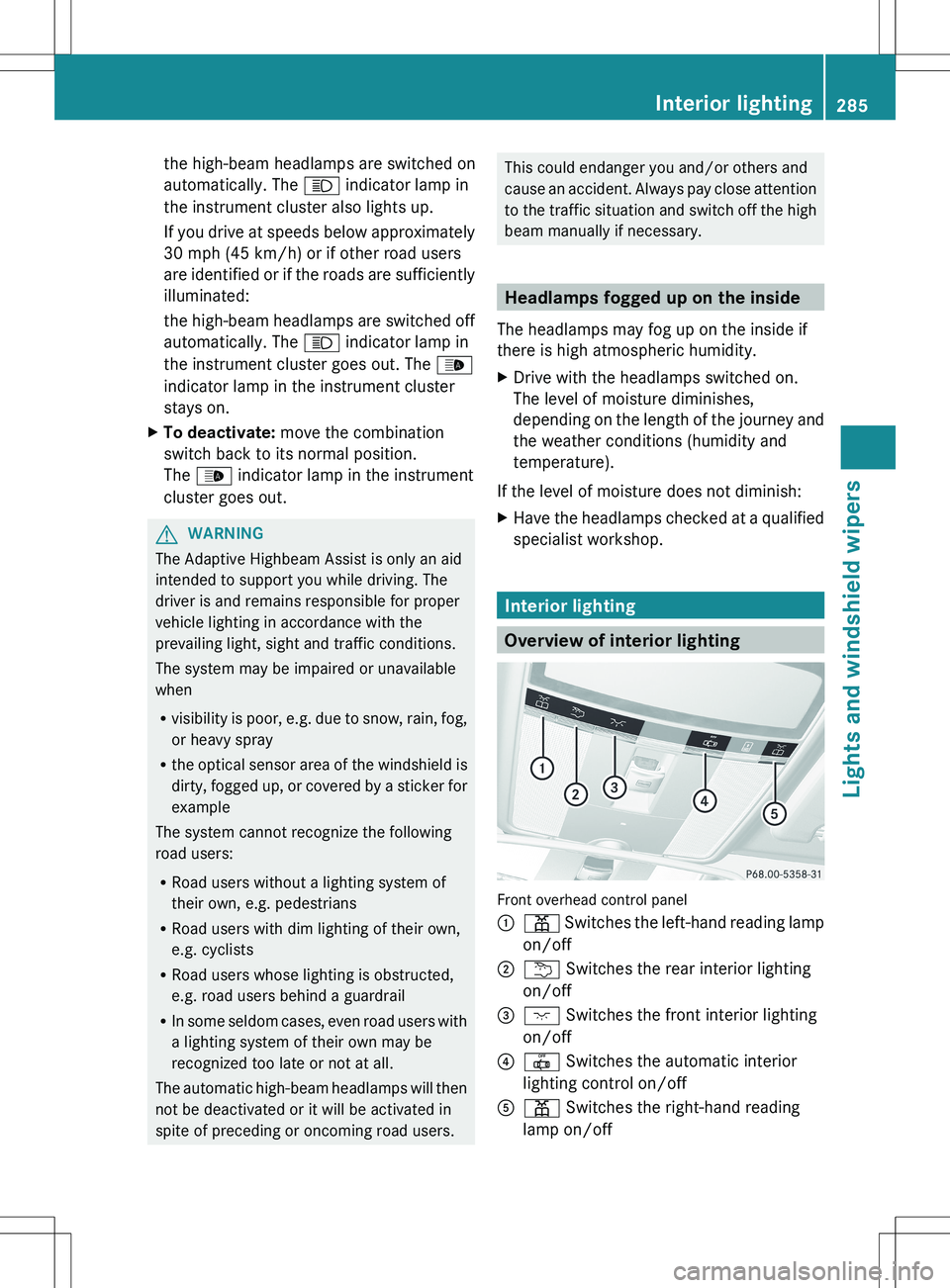
Overview of interior lighting
Front overhead control panel
:p Switches the left-hand reading lamp
on/off;u Switches the rear interior lighting
on/off=c Switches the front interior lighting
on/off?| Switches the automatic interior
lighting control on/offAp Switches the right-hand reading
lamp on/offInterior lighting285Lights and windshield wipersZ
Page 288 of 536
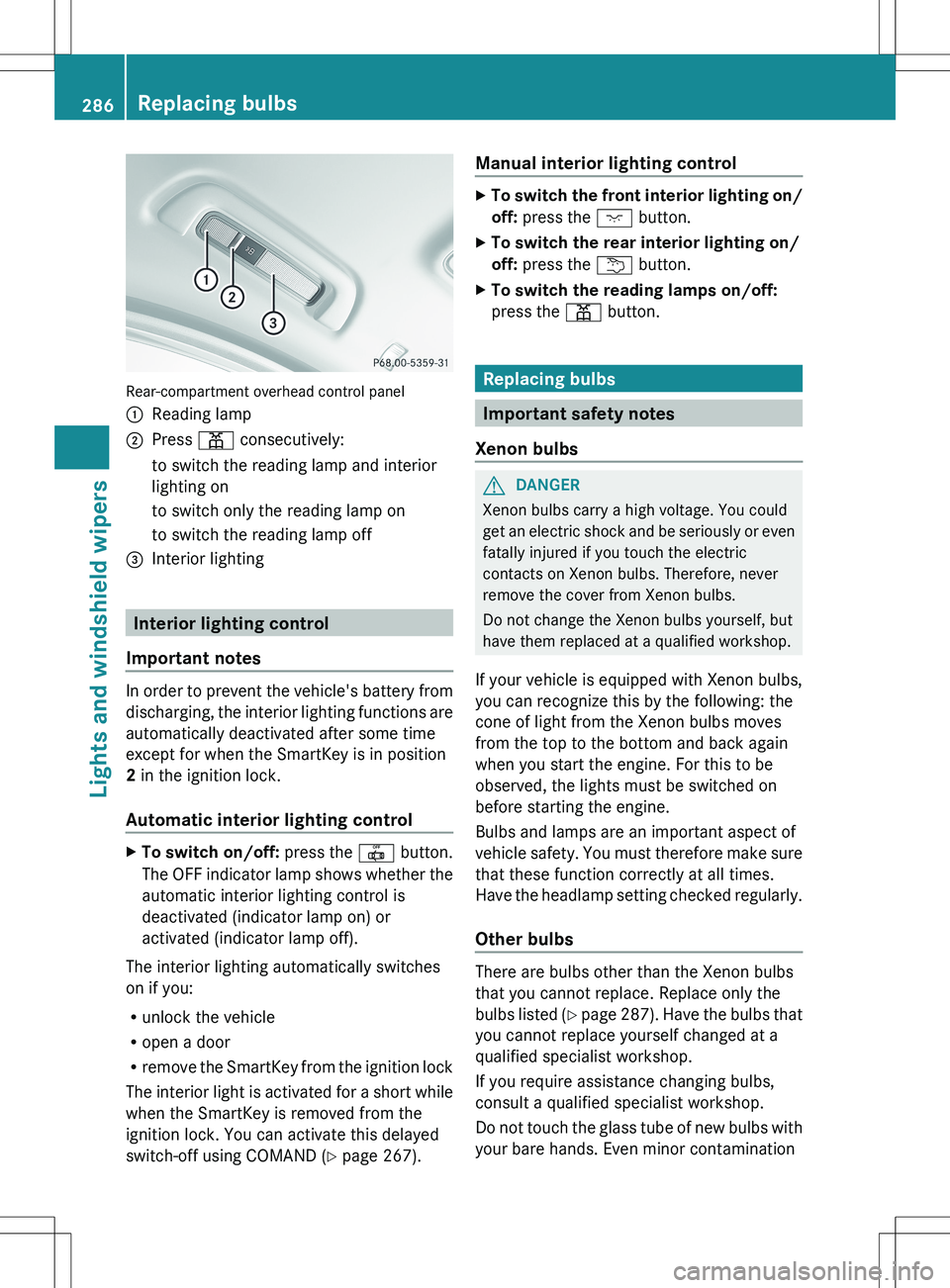
Rear-compartment overhead control panel
:Reading lamp;Press p consecutively:to switch the reading lamp and interior
lighting onto switch only the reading lamp onto switch the reading lamp off=Interior lighting
Interior lighting control
Important notes
In order to prevent the vehicle's battery from
discharging, the interior lighting functions are
automatically deactivated after some time
except for when the SmartKey is in position
2 in the ignition lock.
Automatic interior lighting control
XTo switch on/off: press the | button.
The OFF indicator lamp shows whether the
automatic interior lighting control is
deactivated (indicator lamp on) or
activated (indicator lamp off).
The interior lighting automatically switches
on if you:
R unlock the vehicle
R open a door
R remove the SmartKey from the ignition lock
The interior light is activated for a short while
when the SmartKey is removed from the
ignition lock. You can activate this delayed
switch-off using COMAND ( Y page 267).
Manual interior lighting controlXTo switch the front interior lighting on/
off: press the c button.XTo switch the rear interior lighting on/
off: press the u button.XTo switch the reading lamps on/off:
press the p button.
Replacing bulbs
Important safety notes
Xenon bulbs
GDANGER
Xenon bulbs carry a high voltage. You could
get an electric shock and be seriously or even
fatally injured if you touch the electric
contacts on Xenon bulbs. Therefore, never
remove the cover from Xenon bulbs.
Do not change the Xenon bulbs yourself, but
have them replaced at a qualified workshop.
If your vehicle is equipped with Xenon bulbs,
you can recognize this by the following: the
cone of light from the Xenon bulbs moves
from the top to the bottom and back again
when you start the engine. For this to be
observed, the lights must be switched on
before starting the engine.
Bulbs and lamps are an important aspect of
vehicle safety. You must therefore make sure
that these function correctly at all times.
Have the headlamp setting checked regularly.
Other bulbs
There are bulbs other than the Xenon bulbs
that you cannot replace. Replace only the
bulbs listed (Y page 287). Have the bulbs that
you cannot replace yourself changed at a
qualified specialist workshop.
If you require assistance changing bulbs,
consult a qualified specialist workshop.
Do not touch the glass tube of new bulbs with
your bare hands. Even minor contamination
286Replacing bulbsLights and windshield wipers