low beam MERCEDES-BENZ S-CLASS SEDAN 2012 Owners Manual
[x] Cancel search | Manufacturer: MERCEDES-BENZ, Model Year: 2012, Model line: S-CLASS SEDAN, Model: MERCEDES-BENZ S-CLASS SEDAN 2012Pages: 536, PDF Size: 39.39 MB
Page 6 of 536
1, 2, 3 ...
115 V socket ...................................... 444
12 V socket see Sockets
4ETS
see ETS/4ETS (Electronic
Traction System)
4MATIC (permanent four-wheel
drive) .................................................. 350
4MATIC off-road system ................... 350
A
ABC see Active Body Control (ABC)
ABS (Anti-lock Braking System)
Display message ............................ 391
Function/notes ................................ 73
Important safety notes ....................73
Warning lamp ................................. 425
Activating/deactivating cooling
with air dehumidification ................. 297
Active Blind Spot Assist Activating/deactivating (on-
board computer) ............................ 387
Function/information ....................367
Active Body Control (ABC)
Display message ............................ 412
Function/notes ............................. 348
Active Driving Assistance package . 366
Active Lane Keeping Assist Activating/deactivating (on-
board computer) ............................ 387
Display message ............................ 413
Function/information ....................369
Active multicontour seat .......... 112, 276
Active service system PLUS see ASSYST PLUS service interval
display
ADAPTIVE BRAKE ................................. 77
Adaptive Damping System (ADS) ..... 348
Adaptive Highbeam Assist Display message ............................ 406
Function/notes ............................. 284
Switching on/off (on-board
computer) ...................................... 388
Additional speedometer ................... 388
Additives (engine oil) ........................ 529
Address Entering (example) .........................157
see Address book
Address book
Calling up ....................................... 209
Connecting a call ........................... 212
Creating an entry ........................... 210
Deleting an entry ........................... 211
Entering characters .......................136
Entry as a home address ...............182
Importing contacts ........................208
Introduction ................................... 207
Starting route guidance .................212
Voice tag ....................................... 213
Air bags
Display message ............................ 401
Front air bag (driver, front
passenger) ....................................... 52
Important safety notes ....................50
PASSENGER AIR BAG OFF
indicator lamp .................................. 54
Safety guidelines ............................. 49
Side impact air bag ..........................52
Window curtain air bag ....................53
Air-conditioning system
see Climate control
Air distribution
Setting ........................................... 299
Setting (COMAND) .........................270
Air filter (display message) .............. 409
Airflow Setting ........................................... 299
Setting (COMAND) .........................271
AIRMATIC
Display message ............................ 411
Function/notes ............................. 347
Air pressure
see Tire pressure
Air vents
Glove box ....................................... 303
Important safety notes ..................302
Rear ............................................... 303
Setting ........................................... 302
Setting the center air vents ...........302
Setting the side air vents ...............303
Alarm system
see ATA (Anti-Theft Alarm system) 4Index
Page 12 of 536
Setting the specified minimum
distance ......................................... 342
Warning lamp ................................. 430
Dolby ®
Digital .................................... 140
Doors Automatic locking (switch) ............... 89
Central locking/unlocking
(SmartKey) ....................................... 82
Control panel ................................... 43
Display message ............................ 420
Emergency locking ........................... 91
Emergency unlocking .......................90
Important safety notes ....................88
Opening (from inside) ......................89
Power closing feature ......................90
Drinking and driving ......................... 330
Drinks holder see Cup holder
Drive program
Automatic ...................................... 318
Manual ........................................... 319
Driver's door
see Doors
Driver's seat
see Seats
Driving abroad
Mercedes-Benz Service .................466
Symmetrical low beam ..................280
Driving Assistance package ............. 363
Driving lamps see Daytime running lamps
Driving safety systems
ABS (Anti-lock Braking System) .......73
ADAPTIVE BRAKE ............................. 77
BAS (Brake Assist System) ..............74
BAS PLUS (Brake Assist System
PLUS) ............................................... 74
Electronic brake force distribution ...77
ESP ®
(Electronic Stability
Program) .......................................... 75
ETS/4ETS (Electronic Traction
System) ........................................... 76
Important safety information ...........73
Overview .......................................... 72
PRE-SAFE ®
Brake ............................. 77Driving systems
Active Blind Spot Assist .................367
Active Body Control .......................348
Active Driving Assistance
package ......................................... 366
Active Lane Keeping Assist ............369
AIRMATIC ...................................... 347
ATTENTION ASSIST ........................359
Blind Spot Assist ............................ 363
Cruise control ................................ 334
Display message ............................ 410
DISTRONIC PLUS ........................... 336
Driving Assistance package ...........363
HOLD function ............................... 346
Lane Keeping Assist ......................365
Night View Assist Plus ...................360
Parking Guidance ........................... 353
PARKTRONIC ................................. 350
Rear view camera .......................... 357
Driving tips
Automatic transmission .................317
Brakes ........................................... 331
Break-in period .............................. 306
DISTRONIC PLUS ........................... 344
Downhill gradient ........................... 331
Drinking and driving .......................330
Driving abroad ............................... 280
Driving in winter ............................. 333
Driving on flooded roads ................333
Driving on wet roads ......................333
Exhaust check ............................... 331
Fuel ................................................ 330
General .......................................... 330
Hydroplaning ................................. 333
Icy road surfaces ........................... 334
Limited braking efficiency on
salted roads ................................... 332
Pedals ............................................ 330
Snow chains .................................. 495
Symmetrical low beam ..................280
Wet road surface ........................... 331
DVD
Changer ......................................... 225
Copy protection ............................. 234
Fast forward/fast rewind ...............230
Handling ........................................ 193
Inserting ........................................ 22510Index
Page 16 of 536
Manual control ............................... 286
Overview ........................................ 285
Reading lamp ................................. 285
Intermediate stop
Deleting ......................................... 166
Entering ......................................... 165
iPod ®
Alphabetical track selection ..........242
Connecting to the Media
Interface ........................................ 238
Selecting a category/playlist .........241
Supported variants ........................238
J
Jack Storage location ............................ 474
Using ............................................. 476
Jump starting (engine) ...................... 483
K
Key see SmartKey
KEYLESS-GO
Convenience closing feature ............97
Locking ............................................ 83
Start/Stop button .......................... 307
Starting the engine ........................309
Unlocking ......................................... 83
Key positions
KEYLESS-GO .................................. 307
SmartKey ....................................... 307
Kickdown
Driving tips .................................... 317
Manual drive program ....................320
L
Lamps see Warning and indicator lamps
Lane-change assistant
see Blind Spot Assist
Lane detection (automatic)
see Lane Keeping Assist
Lane Keeping Assist
Activating/deactivating .................387
Display message ............................ 413
Function/information ....................365
Lap time (RACETIMER) ...................... 382
LATCH-type (ISOFIX) child seat
anchors ................................................ 68
Letter bar see Character bar
License plate lamp (display
message) ............................................ 404
Light function, active Display message ............................ 405
Lighting
see Lights
Lights
Automatic headlamp mode ............281
Cornering light function .................284
Display message ............................ 403
Driving abroad ............................... 280
Fog lamps ...................................... 282
Hazard warning lamps ...................283
High beam flasher .......................... 283
High-beam headlamps ...................283
Light switch ................................... 280
Low-beam headlamps ....................281
Rear fog lamp ................................ 282
Standing lamps .............................. 280
Switching Adaptive Highbeam
Assist on/off ................................. 388
Switching the daytime running
lamps on/off (on-board
computer) ...................................... 387
Switching the daytime running
lamps on/off (switch) ....................281
Turn signals ................................... 283
see Changing bulbs
see Interior lighting
Light sensor (display message) ....... 405
Loading guidelines ............................ 434
Locator lighting setting (COMAND) . 268
Locking see Central locking
Locking (doors)
Automatic ........................................ 89
Emergency locking ........................... 91
From inside (central locking
button) ............................................. 89
Locking centrally
see Central locking
Locking verification signal (on-
board computer) ............................... 38814Index
Page 17 of 536
Logic 7®
(Harman Kardon ®
surround sound system) see 3D sound (Harman Kardon ®
surround sound system)
Low-beam headlamps
Display message ............................ 403
Setting for driving abroad
(symmetrical) ................................. 280
Switching on/off ........................... 281
Lubricant additives
see Additives
Lumbar support
Adjusting ....................................... 112
Lumbar support (COMAND) .............. 274
M
M+S tires ............................................ 494
Maintenance see ASSYST PLUS service interval
display
Malfunction message
see Display messages
Map (navigation)
Adjusting the scale ........................186
Arrival time/distance to the
destination ..................................... 189
City model ..................................... 190
Display ........................................... 188
Geo-coordinate display ..................190
Heading ......................................... 188
Information in the display ..............189
Moving ........................................... 187
North orientation ........................... 188
Notes ............................................. 186
Point of interest symbols ...............188
Road display .................................. 189
Saving the crosshair position .........187
Setting to the vehicle destination ..187
Topographical map ........................190
Map display (also see navigation)
Traffic reports ................................ 179
Massage function (PULSE) ............... 277
Matte finish (cleaning
instructions) ...................................... 468
mbrace
Automatic retrieval of vehicle data
(service due date) ..........................451
Call priority .................................... 449
Display message ............................ 398
Downloading destinations
(COMAND) ..................................... 449
Emergency call .............................. 446
Important safety notes ..................445
Locating a stolen vehicle ...............452
MB info call button ........................448
Remote vehicle locking ..................451
Roadside Assistance button ..........447
Search & Send ............................... 450
Self-test ......................................... 446
System .......................................... 445
Vehicle remote unlocking ..............451
Mechanical key
Function/notes ................................ 84
Unlocking the driver's door ..............90
Media Interface
Active partition .............................. 242
Alphabetical track selection ..........242
Connecting an external audio
source ............................................ 238
Connection options .......................238
iPod ®
............................................. 238
Mode ............................................. 238
Notes on USB devices ...................243
Playback options ........................... 242
Selecting categories ......................241
Selecting folders ............................ 241
Selecting music files ......................240
Selecting playlists ..........................241
Switching to ................................... 238
USB mass storage device ..............238
Media list
Audio mode (CD, DVD, MP3) .........228
Video DVD ..................................... 247
Memory card (audio) ......................... 381
Memory function ............................... 118
Menu item Selecting ........................................ 130
Message memory (on-board
computer) .......................................... 390
Messages
see Display messages Index15
Page 40 of 536
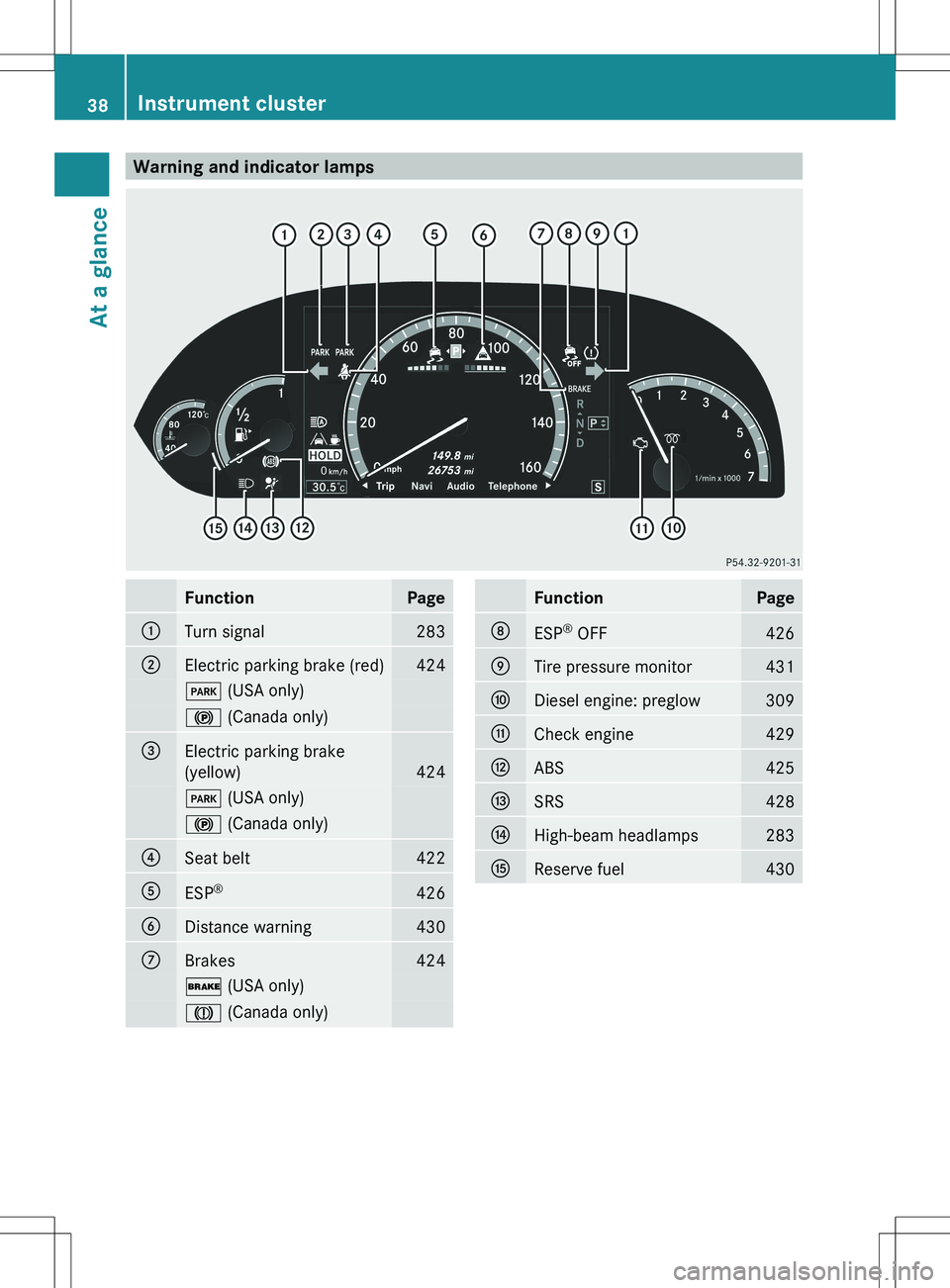
Warning and indicator lampsFunctionPage:Turn signal283;Electric parking brake (red)424F (USA only)! (Canada only)=Electric parking brake
(yellow)
424
F (USA only)! (Canada only)?Seat belt422AESP®426BDistance warning430CBrakes424$
(USA only)J (Canada only)FunctionPageDESP®
OFF426ETire pressure monitor431FDiesel engine: preglow309GCheck engine429HABS425ISRS428JHigh-beam headlamps283KReserve fuel43038Instrument clusterAt a glance
Page 282 of 536
Useful information
i This Operator's Manual describes all
models and all standard and optional
equipment of your vehicle available at the
time of publication of the Operator's
Manual. Country-specific differences are
possible. Please note that your vehicle may
not be equipped with all features
described. This also applies to safety-
related systems and functions.
i Please read the information on qualified
specialist workshops ( Y page 31).
Exterior lighting
Important safety notes
For reasons of safety, Mercedes-Benz
recommends that you drive with the lights
switched on even during the daytime. In some
countries, operation of the headlamps varies
due to legal requirements and self-imposed
obligations.
Information about driving abroad
To convert to symmetrical low beam
when driving abroad: switch the headlamps
to symmetrical low beam in countries in
which traffic drives on the opposite side of the
road from the country where the vehicle is
registered. This prevents glare to oncoming
traffic. Symmetrical lights do not illuminate
as large an area of the edge of the road.
Have the headlamps converted at a qualified
specialist workshop as close to the border as
possible before driving in these countries.
To convert to asymmetrical low beam
after returning: have the headlamps
converted back to asymmetrical low beam at
a qualified specialist workshop as soon as
possible after crossing the border and
returning to the original country.
Light switch
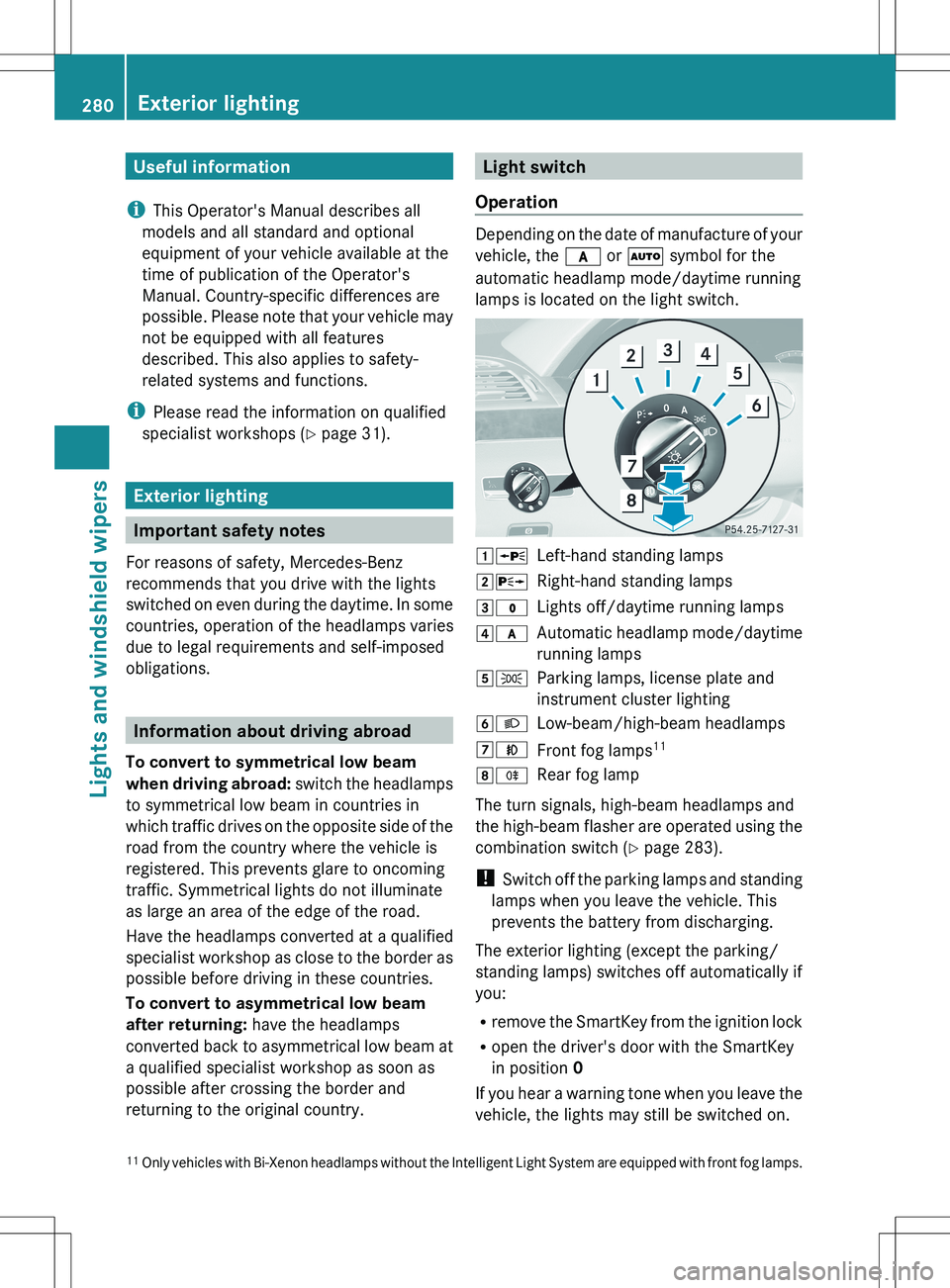
Operation
Depending on the date of manufacture of your
vehicle, the c or à symbol for the
automatic headlamp mode/daytime running
lamps is located on the light switch.
1 WLeft-hand standing lamps2XRight-hand standing lamps3$Lights off/daytime running lamps4cAutomatic headlamp mode/daytime
running lamps5 TParking lamps, license plate and
instrument cluster lighting6 LLow-beam/high-beam headlamps7NFront fog lamps 118
RRear fog lamp
The turn signals, high-beam headlamps and
the high-beam flasher are operated using the
combination switch ( Y page 283).
! Switch off the parking lamps and standing
lamps when you leave the vehicle. This
prevents the battery from discharging.
The exterior lighting (except the parking/
standing lamps) switches off automatically if
you:
R remove the SmartKey from the ignition lock
R open the driver's door with the SmartKey
in position 0
If you hear a warning tone when you leave the
vehicle, the lights may still be switched on.
11 Only vehicles with Bi-Xenon headlamps without the Intelligent Light System are equipped with front fog lamps.280Exterior lightingLights and windshield wipers
Page 283 of 536
XTurn the light switch to $ or c .
or
XIf the rear fog lamp is switched on: press
the light switch in to the stop.
Low-beam headlamps
XTo switch on the low-beam headlamps:
turn the SmartKey in the ignition lock to
position 2 or start the engine.XTurn the light switch to L.
The T indicator lamp on the light switch
lights up.XTo switch off the low-beam
headlamps: turn the light switch to $.
Daytime running lamps
Daytime running lamps in Canada
The daytime running lamps function is
required by law in Canada. It cannot therefore
be deactivated.
XTurn the light switch to $ or c .
With the engine running: depending on the
ambient light, the daytime running lamps or
the low-beam headlamps are switched on.
When the low-beam headlamps are
activated, the T indicator lamp on the
light switch lights up.
When the engine is running and the vehicle is
stationary or if the electronic parking brake is
applied: if you move the selector lever from a
drive position to P, the daytime running
lamps/low-beam headlamps go out after
three minutes.
When the engine is running, the vehicle is
stationary and in high ambient light
brightness: if you turn the light switch
to T , the daytime running lamps and the
parking lamps are switched on.
If the engine is running and you turn the light
switch to L, the manual settings take
precedence over the daytime running lamps.
Daytime running lamps in the USA
In the USA, the daytime running lamps are
deactivated upon delivery from the factory.XTo activate the daytime running
lamps: activate the daytime running lamps
function in the on-board computer
( Y page 387).XTurn the light switch to $ or c .
With the engine running: depending on the
ambient light, the daytime running lamps or
the low-beam headlamps are switched on.
When the low-beam headlamps are
activated, the T indicator lamp on the
light switch lights up.
If the engine is running and you turn the light
switch to T or L , the manual settings
take precedence over the daytime running
lamps.
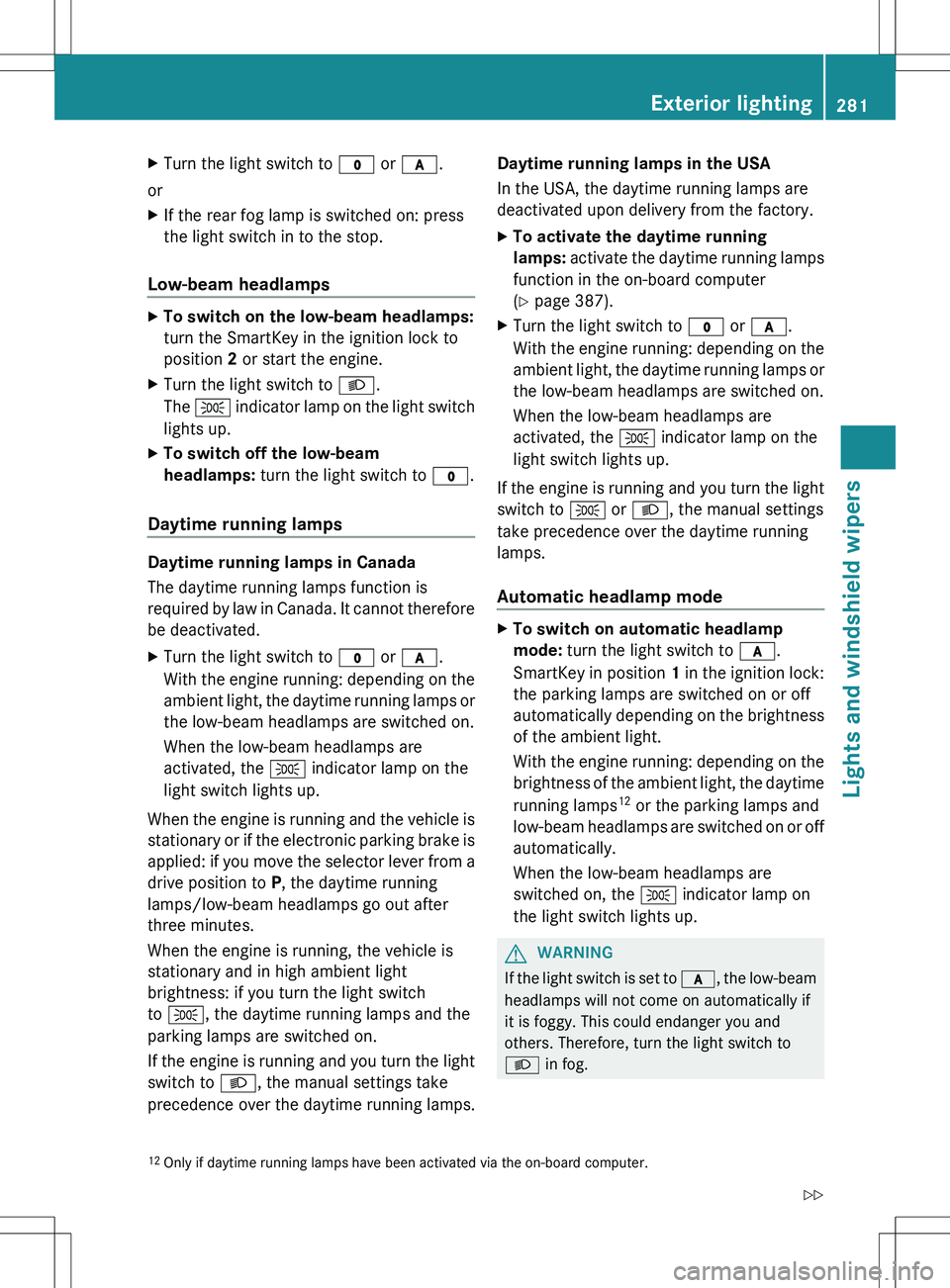
Automatic headlamp mode
XTo switch on automatic headlamp
mode: turn the light switch to c.
SmartKey in position 1 in the ignition lock:
the parking lamps are switched on or off
automatically depending on the brightness
of the ambient light.
With the engine running: depending on the
brightness of the ambient light, the daytime
running lamps 12
or the parking lamps and
low-beam headlamps are switched on or off
automatically.
When the low-beam headlamps are
switched on, the T indicator lamp on
the light switch lights up.GWARNING
If the light switch is set to c, the low-beam
headlamps will not come on automatically if
it is foggy. This could endanger you and
others. Therefore, turn the light switch to
L in fog.
12
Only if daytime running lamps have been activated via the on-board computer.Exterior lighting281Lights and windshield wipersZ
Page 285 of 536
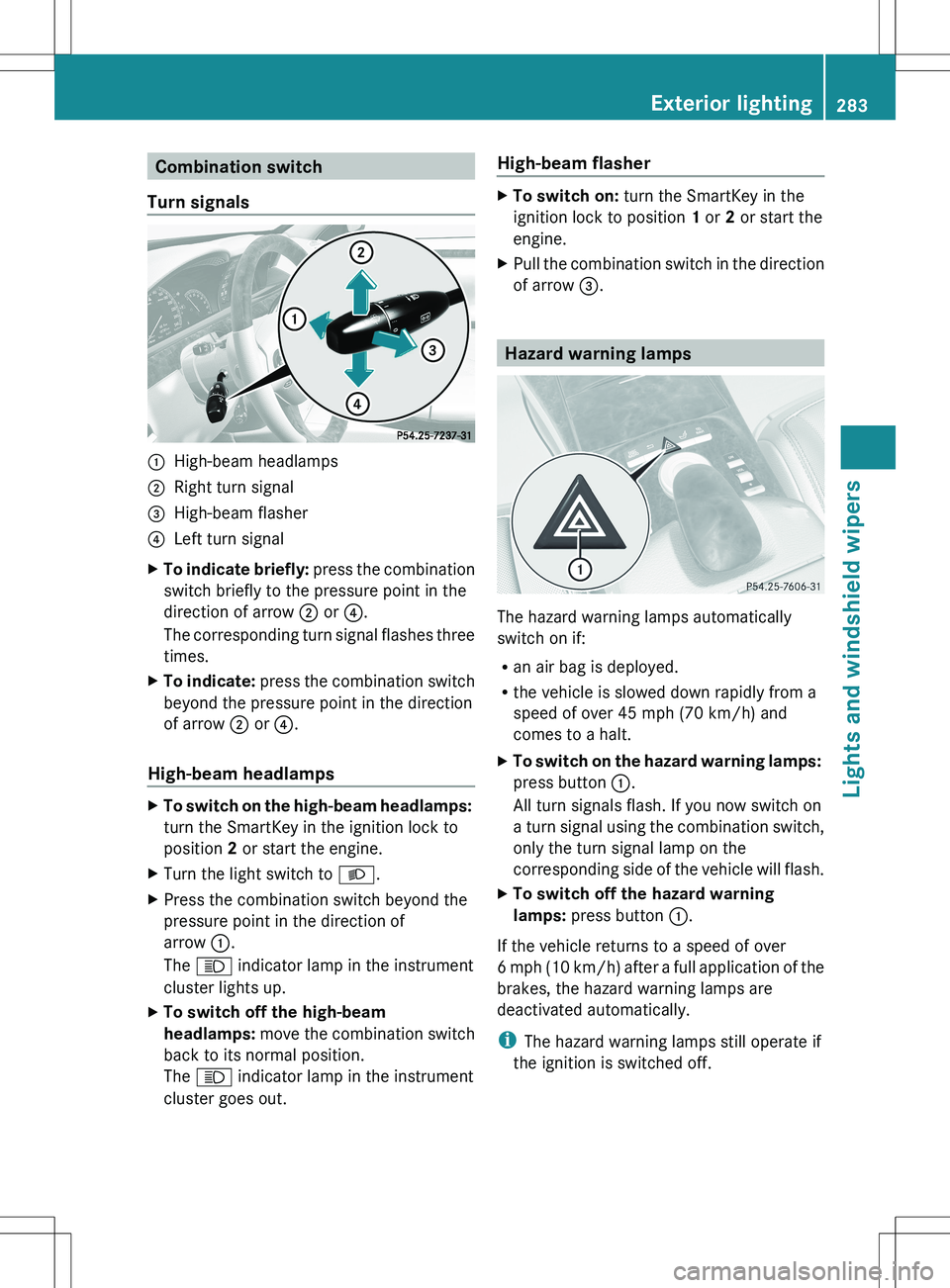
Combination switch
Turn signals:High-beam headlamps;Right turn signal=High-beam flasher?Left turn signalXTo indicate briefly: press the combination
switch briefly to the pressure point in the
direction of arrow ; or ?.
The corresponding turn signal flashes three
times.XTo indicate: press the combination switch
beyond the pressure point in the direction
of arrow ; or ?.
High-beam headlamps
XTo switch on the high-beam headlamps:
turn the SmartKey in the ignition lock to
position 2 or start the engine.XTurn the light switch to L.XPress the combination switch beyond the
pressure point in the direction of
arrow :.
The K indicator lamp in the instrument
cluster lights up.XTo switch off the high-beam
headlamps: move the combination switch
back to its normal position.
The K indicator lamp in the instrument
cluster goes out.High-beam flasherXTo switch on: turn the SmartKey in the
ignition lock to position 1 or 2 or start the
engine.XPull the combination switch in the direction
of arrow =.
Hazard warning lamps
The hazard warning lamps automatically
switch on if:
R an air bag is deployed.
R the vehicle is slowed down rapidly from a
speed of over 45 mph (70 km/h) and
comes to a halt.
XTo switch on the hazard warning lamps:
press button :.
All turn signals flash. If you now switch on
a turn signal using the combination switch,
only the turn signal lamp on the
corresponding side of the vehicle will flash.XTo switch off the hazard warning
lamps: press button :.
If the vehicle returns to a speed of over
6 mph (10 km/h) after a full application of the
brakes, the hazard warning lamps are
deactivated automatically.
i The hazard warning lamps still operate if
the ignition is switched off.
Exterior lighting283Lights and windshield wipersZ
Page 286 of 536
Cornering light function
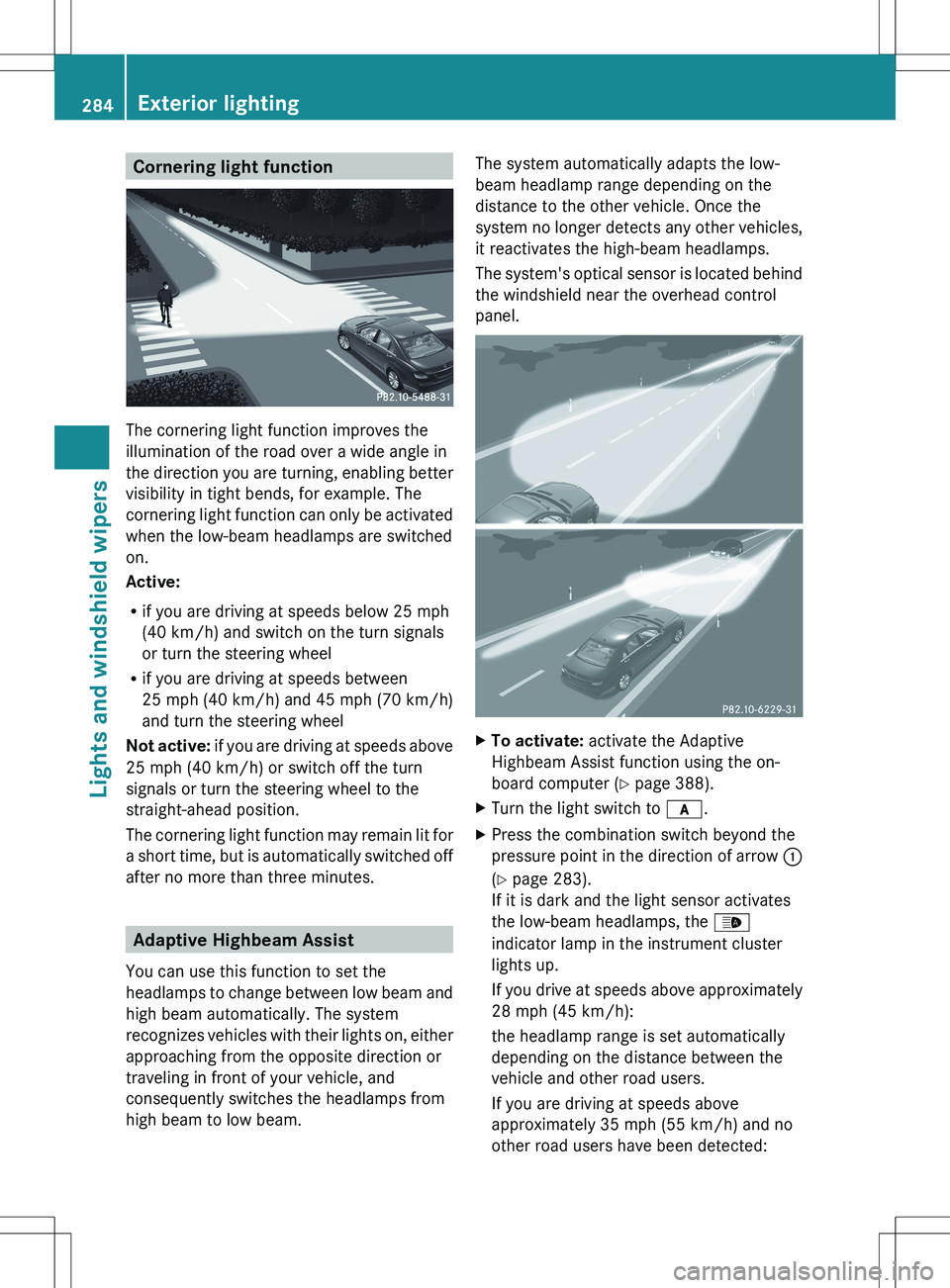
The cornering light function improves the
illumination of the road over a wide angle in
the direction you are turning, enabling better
visibility in tight bends, for example. The
cornering light function can only be activated
when the low-beam headlamps are switched
on.
Active:
R if you are driving at speeds below 25 mph
(40 km/h) and switch on the turn signals
or turn the steering wheel
R if you are driving at speeds between
25 mph (40 km/h) and 45 mph (70 km/h)
and turn the steering wheel
Not active: if you are driving at speeds above
25 mph (40 km/h) or switch off the turn
signals or turn the steering wheel to the
straight-ahead position.
The cornering light function may remain lit for
a short time, but is automatically switched off
after no more than three minutes.
Adaptive Highbeam Assist
You can use this function to set the
headlamps to change between low beam and
high beam automatically. The system
recognizes vehicles with their lights on, either
approaching from the opposite direction or
traveling in front of your vehicle, and
consequently switches the headlamps from
high beam to low beam.
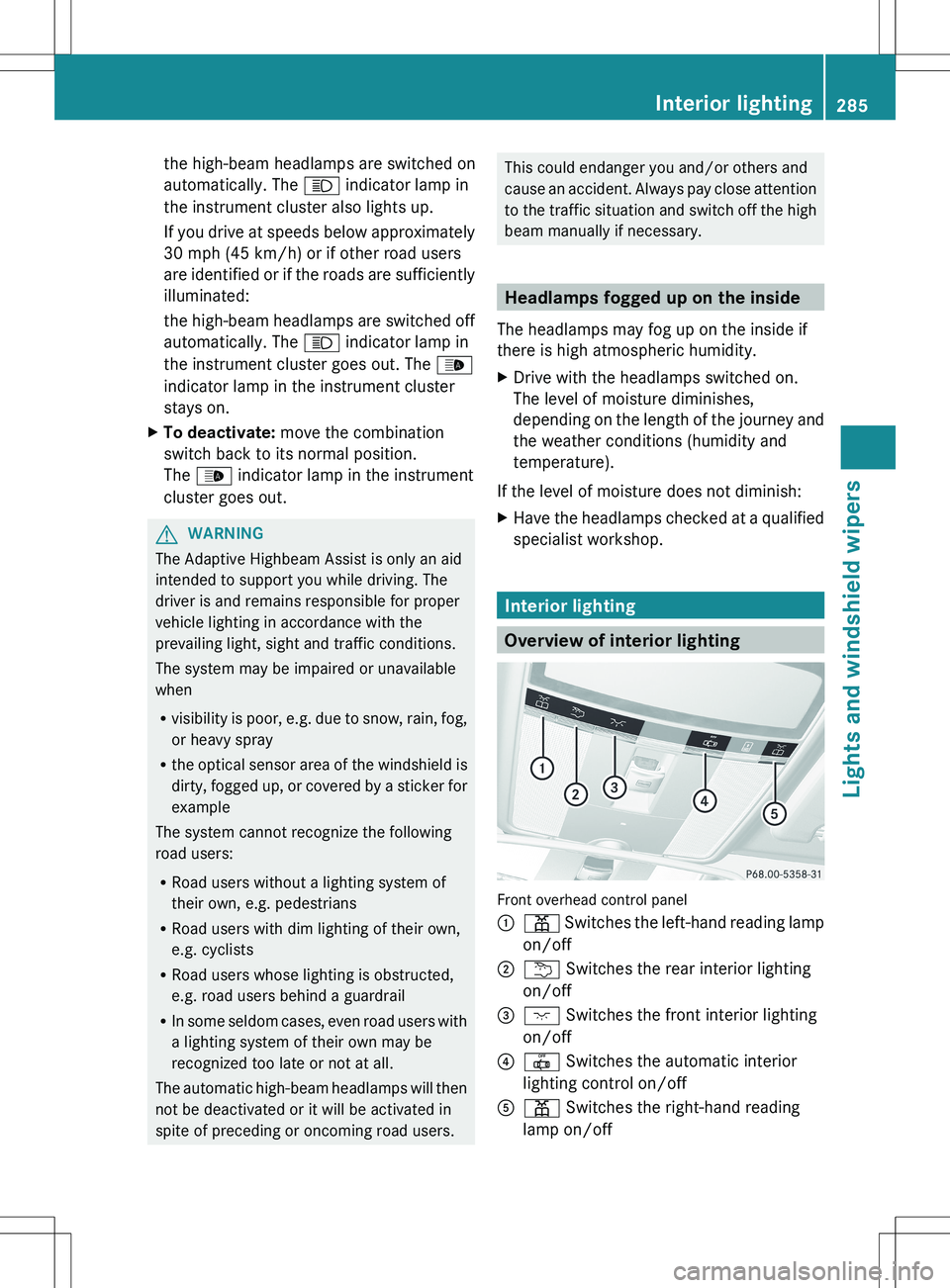
The system automatically adapts the low-
beam headlamp range depending on the
distance to the other vehicle. Once the
system no longer detects any other vehicles,
it reactivates the high-beam headlamps.
The system's optical sensor is located behind
the windshield near the overhead control
panel.XTo activate: activate the Adaptive
Highbeam Assist function using the on-
board computer ( Y page 388).XTurn the light switch to c.XPress the combination switch beyond the
pressure point in the direction of arrow :
( Y page 283).
If it is dark and the light sensor activates
the low-beam headlamps, the _
indicator lamp in the instrument cluster
lights up.
If you drive at speeds above approximately
28 mph (45 km/h):
the headlamp range is set automatically
depending on the distance between the
vehicle and other road users.
If you are driving at speeds above
approximately 35 mph (55 km/h) and no
other road users have been detected:284Exterior lightingLights and windshield wipers
Page 287 of 536
the high-beam headlamps are switched on
automatically. The K indicator lamp in
the instrument cluster also lights up.
If you drive at speeds below approximately
30 mph (45 km/h) or if other road users
are identified or if the roads are sufficiently
illuminated:
the high-beam headlamps are switched off
automatically. The K indicator lamp in
the instrument cluster goes out. The _
indicator lamp in the instrument cluster
stays on.XTo deactivate: move the combination
switch back to its normal position.
The _ indicator lamp in the instrument
cluster goes out.GWARNING
The Adaptive Highbeam Assist is only an aid
intended to support you while driving. The
driver is and remains responsible for proper
vehicle lighting in accordance with the
prevailing light, sight and traffic conditions.
The system may be impaired or unavailable
when
R visibility is poor, e.g. due to snow, rain, fog,
or heavy spray
R the optical sensor area of the windshield is
dirty, fogged up, or covered by a sticker for
example
The system cannot recognize the following
road users:
R Road users without a lighting system of
their own, e.g. pedestrians
R Road users with dim lighting of their own,
e.g. cyclists
R Road users whose lighting is obstructed,
e.g. road users behind a guardrail
R In some seldom cases, even road users with
a lighting system of their own may be
recognized too late or not at all.
The automatic high-beam headlamps will then
not be deactivated or it will be activated in
spite of preceding or oncoming road users.
This could endanger you and/or others and
cause an accident. Always pay close attention
to the traffic situation and switch off the high
beam manually if necessary.
Headlamps fogged up on the inside
The headlamps may fog up on the inside if
there is high atmospheric humidity.
XDrive with the headlamps switched on.
The level of moisture diminishes,
depending on the length of the journey and
the weather conditions (humidity and
temperature).
If the level of moisture does not diminish:
XHave the headlamps checked at a qualified
specialist workshop.
Interior lighting
Overview of interior lighting
Front overhead control panel
:p Switches the left-hand reading lamp
on/off;u Switches the rear interior lighting
on/off=c Switches the front interior lighting
on/off?| Switches the automatic interior
lighting control on/offAp Switches the right-hand reading
lamp on/offInterior lighting285Lights and windshield wipersZ