service interval MERCEDES-BENZ S-CLASS SEDAN 2012 Owners Manual
[x] Cancel search | Manufacturer: MERCEDES-BENZ, Model Year: 2012, Model line: S-CLASS SEDAN, Model: MERCEDES-BENZ S-CLASS SEDAN 2012Pages: 536, PDF Size: 39.39 MB
Page 6 of 536
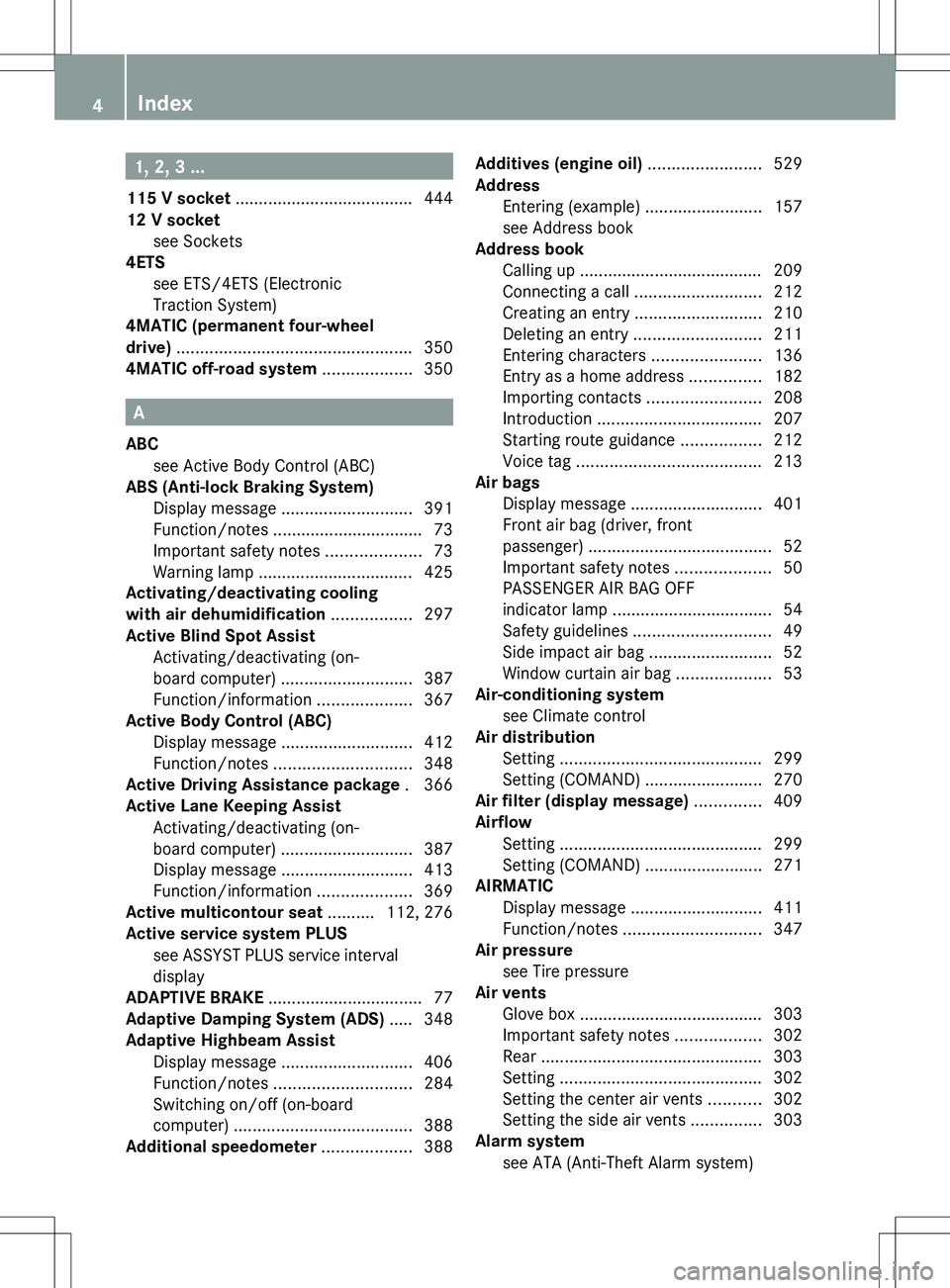
1, 2, 3 ...
115 V socket ...................................... 444
12 V socket see Sockets
4ETS
see ETS/4ETS (Electronic
Traction System)
4MATIC (permanent four-wheel
drive) .................................................. 350
4MATIC off-road system ................... 350
A
ABC see Active Body Control (ABC)
ABS (Anti-lock Braking System)
Display message ............................ 391
Function/notes ................................ 73
Important safety notes ....................73
Warning lamp ................................. 425
Activating/deactivating cooling
with air dehumidification ................. 297
Active Blind Spot Assist Activating/deactivating (on-
board computer) ............................ 387
Function/information ....................367
Active Body Control (ABC)
Display message ............................ 412
Function/notes ............................. 348
Active Driving Assistance package . 366
Active Lane Keeping Assist Activating/deactivating (on-
board computer) ............................ 387
Display message ............................ 413
Function/information ....................369
Active multicontour seat .......... 112, 276
Active service system PLUS see ASSYST PLUS service interval
display
ADAPTIVE BRAKE ................................. 77
Adaptive Damping System (ADS) ..... 348
Adaptive Highbeam Assist Display message ............................ 406
Function/notes ............................. 284
Switching on/off (on-board
computer) ...................................... 388
Additional speedometer ................... 388
Additives (engine oil) ........................ 529
Address Entering (example) .........................157
see Address book
Address book
Calling up ....................................... 209
Connecting a call ........................... 212
Creating an entry ........................... 210
Deleting an entry ........................... 211
Entering characters .......................136
Entry as a home address ...............182
Importing contacts ........................208
Introduction ................................... 207
Starting route guidance .................212
Voice tag ....................................... 213
Air bags
Display message ............................ 401
Front air bag (driver, front
passenger) ....................................... 52
Important safety notes ....................50
PASSENGER AIR BAG OFF
indicator lamp .................................. 54
Safety guidelines ............................. 49
Side impact air bag ..........................52
Window curtain air bag ....................53
Air-conditioning system
see Climate control
Air distribution
Setting ........................................... 299
Setting (COMAND) .........................270
Air filter (display message) .............. 409
Airflow Setting ........................................... 299
Setting (COMAND) .........................271
AIRMATIC
Display message ............................ 411
Function/notes ............................. 347
Air pressure
see Tire pressure
Air vents
Glove box ....................................... 303
Important safety notes ..................302
Rear ............................................... 303
Setting ........................................... 302
Setting the center air vents ...........302
Setting the side air vents ...............303
Alarm system
see ATA (Anti-Theft Alarm system) 4Index
Page 11 of 536

Cup holderCenter console .............................. 439
Important safety notes ..................439
Rear compartment .........................439
Customer Assistance Center (CAC) ... 32
Customer Relations Department ....... 32
D
Dashboard see Cockpit
Data
see Technical data
Data medium
Audio DVD ..................................... 233
CD/DVD ........................................ 234
MP3 ............................................... 233
MUSIC REGISTER ........................... 234
Date format, setting .......................... 148
Day design, setting ........................... 147
Daytime running lamps Display message ............................ 405
Switching on/off (on-board
computer) ...................................... 387
Switching on/off (switch) ..............281
Dealership
see Qualified specialist workshop
DEF
Adding ........................................... 325
Display message ............................ 409
Delayed switch-off
Exterior lighting (COMAND) ...........267
Interior lighting (COMAND) ............267
Destination (navigation)
Displaying information ...................176
Entering a destination by address .. 157
Entering a destination using the
map ............................................... 164
Entering an intermediate stop .......165
Entering a point of interest ............166
Saving ............................................ 183
Selecting from the destination
memory ......................................... 163
Selecting from the list of last
destinations ................................... 163
Destination memory (navigation)
Deleting an entry ........................... 185
Entering/saving your home
address .......................................... 160
Previous destinations ....................185
Diagnostics connection ...................... 31
Dialing a number (telephone) ........... 204
Diesel .................................................. 526
Digital speedometer ......................... 378
DIRECT SELECT lever see Automatic transmission
Display
Selecting the design ......................147
Settings ......................................... 147
Display (cleaning instructions) ........ 470
Displaying the arrival time ............... 176
Displaying the distance to the
destination ......................................... 176
Display messages Calling up (on-board computer) .....390
Driving systems ............................. 410
Engine ............................................ 406
General notes ................................ 390
Hiding (on-board computer) ...........390
Lights ............................................. 403
Safety systems .............................. 391
Service interval display ..................465
SmartKey ....................................... 421
Tires ............................................... 417
Vehicle ........................................... 419
Distance
see Navigation, route overview
Distance display (on-board
computer) .......................................... 385
Distance recorder ............................. 378
see Odometer
see Trip odometer
Distance warning (warning lamp) .... 430
DISTRONIC PLUS Deactivating ................................... 343
Display message ............................ 415
Displays in the multifunction
display ........................................... 343
Driving tips .................................... 344
Function/notes ............................. 336
Important safety notes ..................336Index9
Page 17 of 536
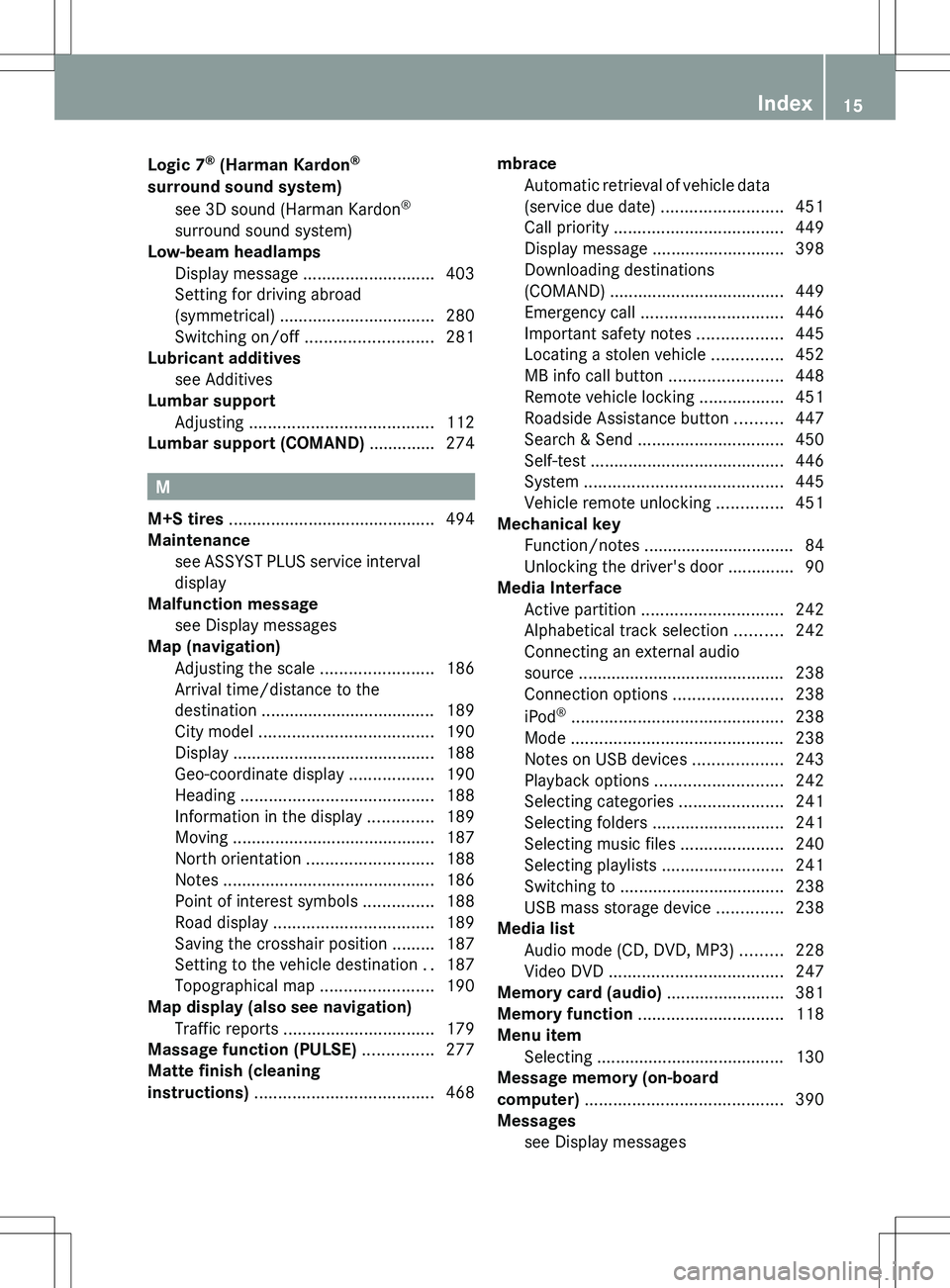
Logic 7®
(Harman Kardon ®
surround sound system) see 3D sound (Harman Kardon ®
surround sound system)
Low-beam headlamps
Display message ............................ 403
Setting for driving abroad
(symmetrical) ................................. 280
Switching on/off ........................... 281
Lubricant additives
see Additives
Lumbar support
Adjusting ....................................... 112
Lumbar support (COMAND) .............. 274
M
M+S tires ............................................ 494
Maintenance see ASSYST PLUS service interval
display
Malfunction message
see Display messages
Map (navigation)
Adjusting the scale ........................186
Arrival time/distance to the
destination ..................................... 189
City model ..................................... 190
Display ........................................... 188
Geo-coordinate display ..................190
Heading ......................................... 188
Information in the display ..............189
Moving ........................................... 187
North orientation ........................... 188
Notes ............................................. 186
Point of interest symbols ...............188
Road display .................................. 189
Saving the crosshair position .........187
Setting to the vehicle destination ..187
Topographical map ........................190
Map display (also see navigation)
Traffic reports ................................ 179
Massage function (PULSE) ............... 277
Matte finish (cleaning
instructions) ...................................... 468
mbrace
Automatic retrieval of vehicle data
(service due date) ..........................451
Call priority .................................... 449
Display message ............................ 398
Downloading destinations
(COMAND) ..................................... 449
Emergency call .............................. 446
Important safety notes ..................445
Locating a stolen vehicle ...............452
MB info call button ........................448
Remote vehicle locking ..................451
Roadside Assistance button ..........447
Search & Send ............................... 450
Self-test ......................................... 446
System .......................................... 445
Vehicle remote unlocking ..............451
Mechanical key
Function/notes ................................ 84
Unlocking the driver's door ..............90
Media Interface
Active partition .............................. 242
Alphabetical track selection ..........242
Connecting an external audio
source ............................................ 238
Connection options .......................238
iPod ®
............................................. 238
Mode ............................................. 238
Notes on USB devices ...................243
Playback options ........................... 242
Selecting categories ......................241
Selecting folders ............................ 241
Selecting music files ......................240
Selecting playlists ..........................241
Switching to ................................... 238
USB mass storage device ..............238
Media list
Audio mode (CD, DVD, MP3) .........228
Video DVD ..................................... 247
Memory card (audio) ......................... 381
Memory function ............................... 118
Menu item Selecting ........................................ 130
Message memory (on-board
computer) .......................................... 390
Messages
see Display messages Index15
Page 23 of 536
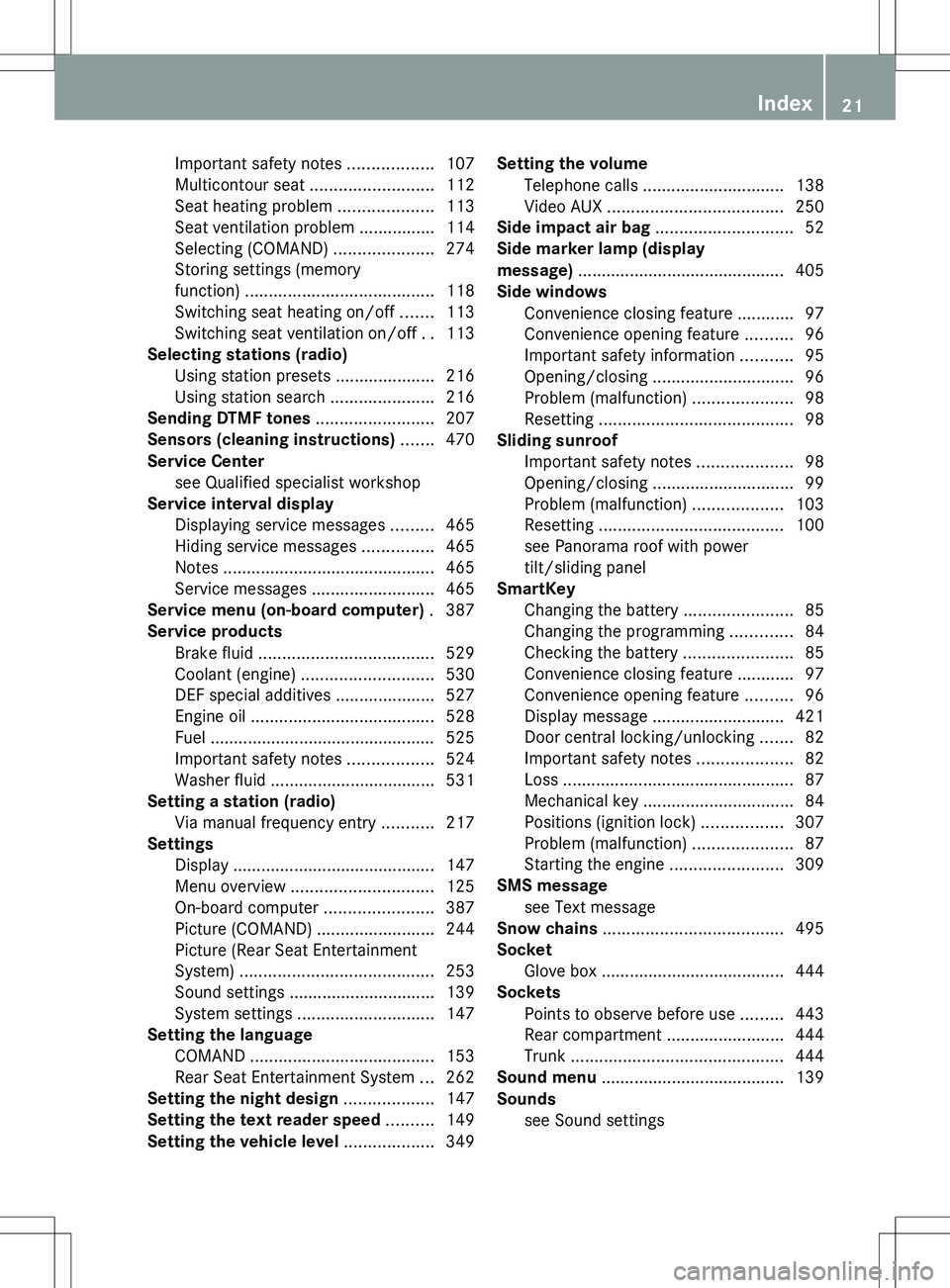
Important safety notes ..................107
Multicontour seat .......................... 112
Seat heating problem ....................113
Seat ventilation problem ................114
Selecting (COMAND) .....................274
Storing settings (memory
function) ........................................ 118
Switching seat heating on/off .......113
Switching seat ventilation on/off ..113
Selecting stations (radio)
Using station presets .....................216
Using station search ......................216
Sending DTMF tones ......................... 207
Sensors (cleaning instructions) ....... 470
Service Center see Qualified specialist workshop
Service interval display
Displaying service messages .........465
Hiding service messages ...............465
Notes ............................................. 465
Service messages ..........................465
Service menu (on-board computer) . 387
Service products Brake fluid ..................................... 529
Coolant (engine) ............................ 530
DEF special additives .....................527
Engine oil ....................................... 528
Fuel ................................................ 525
Important safety notes ..................524
Washer fluid ................................... 531
Setting a station (radio)
Via manual frequency entry ...........217
Settings
Display ........................................... 147
Menu overview .............................. 125
On-board computer .......................387
Picture (COMAND) .........................244
Picture (Rear Seat Entertainment
System) ......................................... 253
Sound settings ............................... 139
System settings ............................. 147
Setting the language
COMAND ....................................... 153
Rear Seat Entertainment System ...262
Setting the night design ................... 147
Setting the text reader speed .......... 149
Setting the vehicle level ................... 349Setting the volume
Telephone calls .............................. 138
Video AUX ..................................... 250
Side impact air bag ............................. 52
Side marker lamp (display
message) ............................................ 405
Side windows Convenience closing feature ............97
Convenience opening feature ..........96
Important safety information ...........95
Opening/closing .............................. 96
Problem (malfunction) .....................98
Resetting ......................................... 98
Sliding sunroof
Important safety notes ....................98
Opening/closing .............................. 99
Problem (malfunction) ...................103
Resetting ....................................... 100
see Panorama roof with power
tilt/sliding panel
SmartKey
Changing the battery .......................85
Changing the programming .............84
Checking the battery .......................85
Convenience closing feature ............97
Convenience opening feature ..........96
Display message ............................ 421
Door central locking/unlocking .......82
Important safety notes ....................82
Loss ................................................. 87
Mechanical key ................................ 84
Positions (ignition lock) .................307
Problem (malfunction) .....................87
Starting the engine ........................309
SMS message
see Text message
Snow chains ...................................... 495
Socket Glove box ....................................... 444
Sockets
Points to observe before use .........443
Rear compartment .........................444
Trunk ............................................. 444
Sound menu ....................................... 139
Sounds see Sound settings Index21
Page 31 of 536
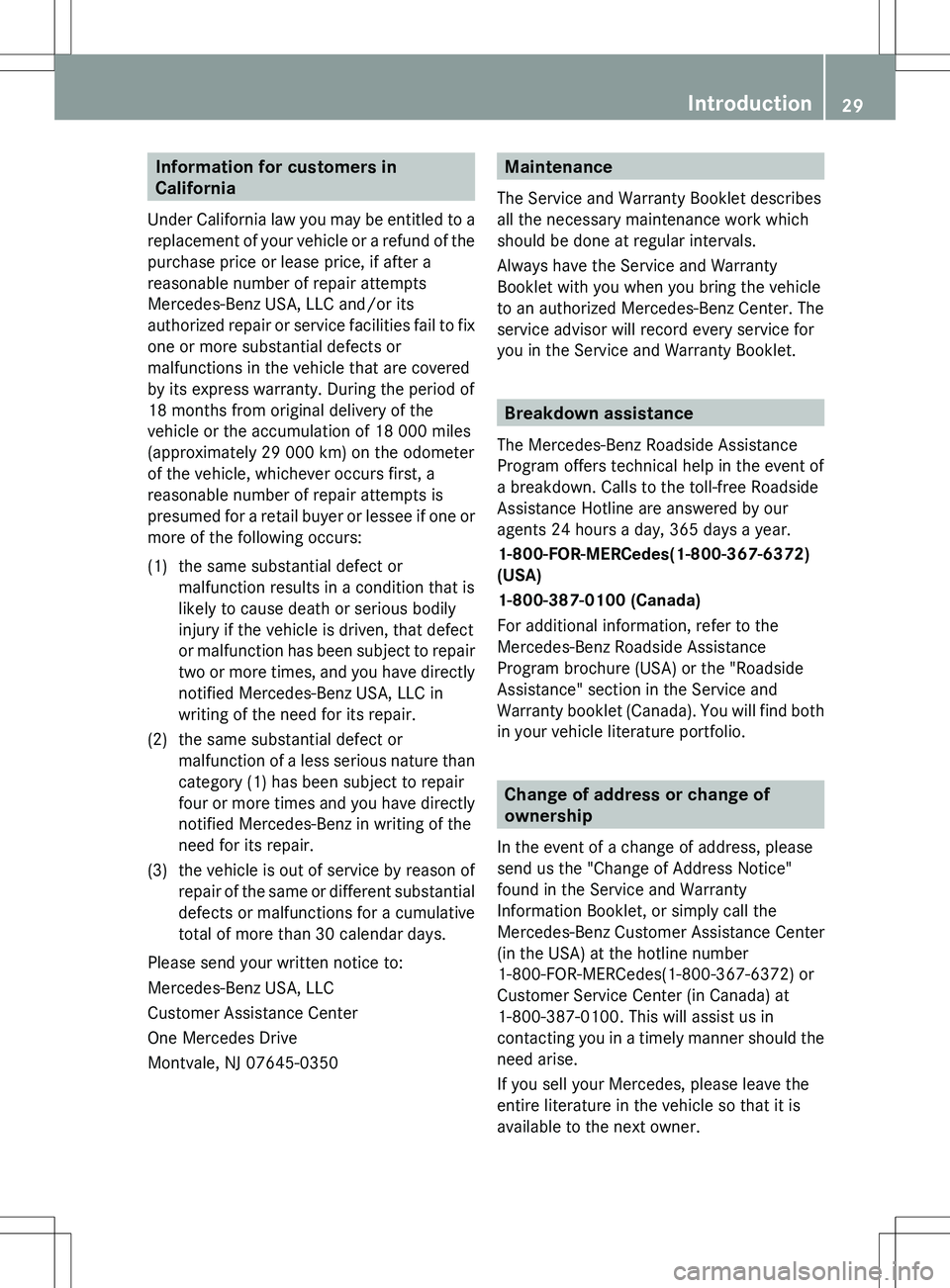
Information for customers in
California
Under California law you may be entitled to a
replacement of your vehicle or a refund of the
purchase price or lease price, if after a
reasonable number of repair attempts
Mercedes-Benz USA, LLC and/or its
authorized repair or service facilities fail to fix
one or more substantial defects or
malfunctions in the vehicle that are covered
by its express warranty. During the period of
18 months from original delivery of the
vehicle or the accumulation of 18 000 miles
(approximately 29 000 km) on the odometer
of the vehicle, whichever occurs first, a
reasonable number of repair attempts is
presumed for a retail buyer or lessee if one or
more of the following occurs:(1)the same substantial defect or
malfunction results in a condition that is
likely to cause death or serious bodily
injury if the vehicle is driven, that defect
or malfunction has been subject to repair
two or more times, and you have directly
notified Mercedes-Benz USA, LLC in
writing of the need for its repair.(2)the same substantial defect or
malfunction of a less serious nature than
category (1) has been subject to repair
four or more times and you have directly
notified Mercedes-Benz in writing of the
need for its repair.(3)the vehicle is out of service by reason of
repair of the same or different substantial
defects or malfunctions for a cumulative
total of more than 30 calendar days.
Please send your written notice to:
Mercedes-Benz USA, LLC
Customer Assistance Center
One Mercedes Drive
Montvale, NJ 07645-0350
Maintenance
The Service and Warranty Booklet describes
all the necessary maintenance work which
should be done at regular intervals.
Always have the Service and Warranty
Booklet with you when you bring the vehicle
to an authorized Mercedes-Benz Center. The
service advisor will record every service for
you in the Service and Warranty Booklet.
Breakdown assistance
The Mercedes-Benz Roadside Assistance
Program offers technical help in the event of
a breakdown. Calls to the toll-free Roadside
Assistance Hotline are answered by our
agents 24 hours a day, 365 days a year.
1-800-FOR-MERCedes(1-800-367-6372)
(USA)
1-800-387-0100 (Canada)
For additional information, refer to the
Mercedes-Benz Roadside Assistance
Program brochure (USA) or the "Roadside
Assistance" section in the Service and
Warranty booklet (Canada). You will find both
in your vehicle literature portfolio.
Change of address or change of
ownership
In the event of a change of address, please
send us the "Change of Address Notice"
found in the Service and Warranty
Information Booklet, or simply call the
Mercedes-Benz Customer Assistance Center
(in the USA) at the hotline number
1-800-FOR-MERCedes(1-800-367-6372) or
Customer Service Center (in Canada) at
1-800-387-0100. This will assist us in
contacting you in a timely manner should the
need arise.
If you sell your Mercedes, please leave the
entire literature in the vehicle so that it is
available to the next owner.
Introduction29
Page 327 of 536
DEF (BlueTEC vehicles only)
Important notes on use
To function properly, BlueTEC exhaust gas
aftertreatment must be operated with the
reducing agent DEF. Adding DEF is one of the
tasks performed during maintenance. Under
normal operating conditions, a tank of DEF
lasts until the next service due date.
When the DEF level is too low, the Check
Additive See Operator's Manual
message is shown in the multifunction
display.
When the DEF supply sinks to a minimum
level, the Remaining Starts: 16 message
is shown in the multifunction display.
When the Remaining Starts: 16 message
is shown in the multifunction display, you can
start the engine 16 more times. If DEF is not
added, it will then not be possible to restart
the engine. Fill the DEF tank with about 1 gal
(3.8l) of DEF or have the DEF tank refilled at
a qualified specialist workshop.
Use the special DEF refill bottle when filling
between maintenance intervals. Contact an
authorized Mercedes-Benz Center with any
questions or, if necessary, contact Roadside
Assistance ( Y page 29).
If the outside temperature is lower than 12 ‡
( Ò 11†) , damage may occur when adding DEF.
If DEF is frozen and there is an active warning
indicator, adding may not be possible. Park
the vehicle in a warmer place, e.g. in a garage,
until DEF has become fluid again. It will then
be possible to add DEF again. Alternatively,
have the DEF tank refilled at a qualified
specialist workshop.
Further information about BlueTEC exhaust
gas aftertreatment and DEF is available at any
authorized Mercedes-Benz Center.
Adding DEFGWARNING
Make sure
R DEF does not come into contact with skin,
eyes, or clothing
R to keep DEF out of the reach of children
If you and/or others have come into contact
with DEF:
R If DEF has gotten into contact with eyes,
flush with plenty of water immediately and
seek medical help.
R Clean affected skin immediately with plenty
of water.
R If DEF was swallowed, rinse mouth
immediately with plenty of water and drink
plenty of water. Consult a physician.
GWARNING
If you open the DEF tank cap, small amounts
of ammonia vapor may be released. This
depends in particular upon the age of the DEF.
Ammonia vapors have a pungent odor and are
particularly irritating to:
R skin
R mucous membranes
R eyes
You may experience a burning sensation in
your eyes, nose and throat, as well as
coughing and watering of the eyes.
Do not inhale any ammonia vapors that may
be released. Fill the DEF tank only in well-
ventilated areas.
! Only use DEF in accordance with
ISO 22241. Do not mix any additives with
DEF, and do not dilute DEF with water. This
may destroy the BlueTEC exhaust gas
aftertreatment system.
! Rinse surfaces that have come into
contact with DEF immediately with water or
remove DEF using a damp cloth and cold
water. If the DEF has already crystallized,
use a sponge and cold water to clean it. DEF
Refueling325Driving and parkingZ
Page 328 of 536
residues crystallize after time and
contaminate the affected surfaces.
! DEF is not a fuel additive and must not be
added to the fuel tank. If DEF is added to
the fuel tank, this can lead to engine
damage.
! Only screw on the DEF refill bottle hand-
tight. It could otherwise be damaged.
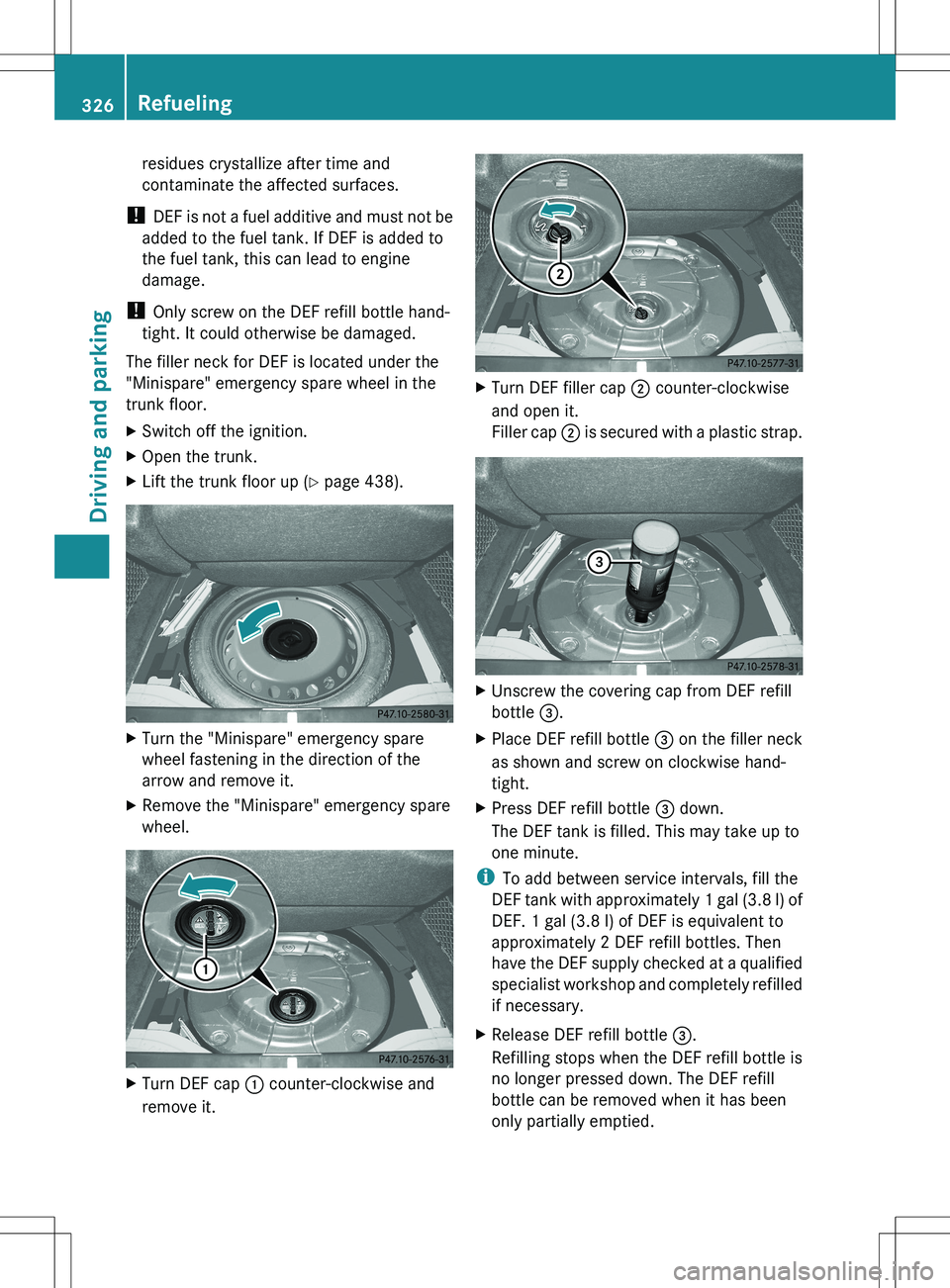
The filler neck for DEF is located under the
"Minispare" emergency spare wheel in the
trunk floor.XSwitch off the ignition.XOpen the trunk.XLift the trunk floor up ( Y page 438).XTurn the "Minispare" emergency spare
wheel fastening in the direction of the
arrow and remove it.XRemove the "Minispare" emergency spare
wheel.XTurn DEF cap : counter-clockwise and
remove it.XTurn DEF filler cap ; counter-clockwise
and open it.
Filler cap ; is secured with a plastic strap.XUnscrew the covering cap from DEF refill
bottle =.XPlace DEF refill bottle = on the filler neck
as shown and screw on clockwise hand-
tight.XPress DEF refill bottle = down.
The DEF tank is filled. This may take up to
one minute.
i To add between service intervals, fill the
DEF tank with approximately 1 gal (3.8 l) of
DEF. 1 gal (3.8 l) of DEF is equivalent to
approximately 2 DEF refill bottles. Then
have the DEF supply checked at a qualified
specialist workshop and completely refilled
if necessary.
XRelease DEF refill bottle =.
Refilling stops when the DEF refill bottle is
no longer pressed down. The DEF refill
bottle can be removed when it has been
only partially emptied.326RefuelingDriving and parking
Page 332 of 536
Driving tips
General driving tips
Important safety notes
GWARNING
Always remember that you must concentrate
primarily on driving the vehicle. The driver's
concentration must always be directed
primarily at road traffic. For your own safety
and that of others, we recommend that you
stop the vehicle at a safe place and in
accordance with the traffic conditions before
making or accepting a phone call.
Comply with all legal requirements if you use
the telephone while driving. Use the hands-
free system and only use the telephone when
road, weather and traffic conditions permit. In
some jurisdictions, it is forbidden for drivers
to use mobile phones while driving.
Only operate COMAND (Cockpit Management
and Data System) in compliance with all legal
requirements and when the road, weather and
traffic conditions permit. You may otherwise
not be able to observe the traffic conditions,
endangering yourself and others.
Remember that your vehicle covers a distance
of 44 ft (approximately 14 m) a second when
it is traveling at only 30 mph (approximately
50 km/h).
Drive sensibly – save fuel
Observe the following tips to save fuel:
XThe tires should always be inflated to the
recommended tire pressure.XRemove unnecessary loads.XRemove roof racks when they are not
needed.XWarm up the engine at low engine speeds.XAvoid frequent acceleration or braking.XHave all maintenance work carried out as
indicated by the service intervals in the
Maintenance Booklet or by the service
interval display.Fuel consumption also increases when
driving in cold weather, in stop-and-go traffic
and in mountainous terrain.
Drinking and drivingGWARNING
Drinking and driving and/or taking drugs and
driving are very dangerous combinations.
Even a small amount of alcohol or drugs can
affect your reflexes, perceptions and
judgment.
The possibility of a serious or even fatal
accident are greatly increased when you drink
or take drugs and drive.
Do not drink or take drugs and drive or allow
anyone to drive who has been drinking or
taking drugs.
Pedals
GWARNING
Make sure absolutely no objects are
obstructing the pedals' range of movement.
Keep the driver's footwell clear of all
obstacles. If there are any floormats or
carpets in the footwell, make sure that the
pedals still have sufficient clearance.
During sudden driving or braking maneuvers,
the objects could get caught between the
pedals. You could then no longer brake or
accelerate. This could lead to accidents and
injury.
Rolling with the engine switched off
GWARNING
There is no power assistance for the steering
and the brake when the engine is not running.
Steering and braking requires significantly
more effort and you could lose control of the
vehicle and cause an accident as a result.
Do not turn off the engine while the vehicle is
in motion.
330Driving tipsDriving and parking
Page 333 of 536
Exhaust checkGWARNING
Inhalation of exhaust gas is hazardous to your
health. All exhaust gas contains carbon
monoxide (CO), and inhaling it can cause
unconsciousness and possible death.
Do not run the engine in confined areas (such
as a garage) which are not properly ventilated.
If you think that exhaust gas fumes are
entering the vehicle while driving, have the
cause determined and corrected
immediately. If you must drive under these
conditions, drive only with at least one
window fully open at all times.
Certain engine systems are designed to keep
the level of poisonous components in exhaust
fumes within legal limits.
These systems only work at peak efficiency if
they are serviced exactly in accordance with
the manufacturer's specifications. For this
reason, all work on the engine should only be
carried out by qualified and authorized
Mercedes-Benz technicians.
The engine settings must not be changed
under any circumstances. Furthermore, all
specific service work must be carried out at
regular intervals and in accordance with the
Mercedes-Benz service requirements. Details
can be found in the Maintenance Booklet.
Brakes
Important safety notes
GWARNING
On slippery road surfaces, never downshift in
order to obtain braking action. This could
result in drive wheel slip and reduced vehicle
control. Your vehicle's ABS will not prevent
this type of loss of control.
GWARNING
Make sure that you do not endanger other
road users when you apply the brakes.
Downhill gradients
! On long and steep gradients, you must
reduce the load on the brakes by shifting
early to a lower gear. This allows you to take
advantage of the engine braking effect and
helps avoid overheating and excessive
wear of the brakes.
When you take advantage of the engine
braking effect, a drive wheel may not turn
for some time, e.g. on a slippery road
surface. This could cause damage to the
drive train. This type of damage is not
covered by the Mercedes-Benz warranty.
Heavy and light loads
GWARNING
Depressing the brake pedal constantly results
in excessive and premature wear to the brake
pads.
It may also cause the brakes to overheat,
seriously impairing their effectiveness. It may
then not be possible to stop the vehicle in
sufficient time to avoid an accident.
If the brakes have been subjected to a heavy
load, do not stop the vehicle immediately, but
drive on for a short while. This allows the
airflow to cool the brakes more quickly.
Wet roads
GWARNING
After driving in heavy rain for some time
without applying the brakes or through water
deep enough to wet brake components, the
first braking action may be somewhat
reduced. You have to depress the brake pedal
more firmly. Maintain a safe distance from
vehicles in front.
After driving on a wet road or having the
vehicle washed, brake firmly while paying
attention to the traffic conditions. This will
warm up the brake discs, thereby drying them
more quickly and protecting them against
corrosion.
Driving tips331Driving and parkingZ
Page 390 of 536
XPress the = or ; button on the
steering wheel to select the Settings
menu.XPress the 9 or : button to select
daytime running lamps .XPress the a button to confirm.XTo activate/deactivate: press a
again.
Switching Adaptive Highbeam Assist
on/off
XPress the = or ; button on the
steering wheel to select the Settings
menu.XPress the : or 9 button to select
Adapt. High-beam Asst. .XPress the a button to confirm.XTo activate/deactivate: press a
again.
Switching the additional speedometer
on or off
An additional digital speedometer can be
shown in the multifunction display.
Vehicles with a kilometer speedometer: the
digital speedometer has mph units.
Vehicles with a miles speedometer: the digital
speedometer has km/h units.
XPress the = or ; button on the
steering wheel to select the Settings
menu.XPress 9 or : to select Add.
Speedometer .XPress the a button to confirm.XPress the a button to save the setting.
Selecting the unit of measurement for
distance
The Display Unit Speed-/Odometer:
function allows you to choose whether
certain displays appear in kilometers or miles.
The selected unit of measurement for
distance applies to:
R analog speedometers
R digital speedometers in the Trip menu
R odometer and the trip odometer
R Trip computer
R navigation instructions in the Navi menu
R DISTRONIC PLUS
R ASSYST PLUS service interval display
The digital speedometer shows alternative
speed units ( Y page 388).XPress the = or ; button on the
steering wheel to select the Settings
menu.XPress 9 or : to select Units.XPress the a button to confirm.XPress the a button to save the setting.
The unit switches km/h and mph.
Switching the belt adjustment on/off
For further information on belt adjustment
( Y page 64).
XPress the = or ; button on the
steering wheel to select the Settings
menu.XPress the 9 or : button to select
Belt Adjustment .XPress the a button to confirm.XTo activate/deactivate: press a
again.
Activating/deactivating the acoustic
locking verification signal
If you activate the Acoustic Lock Feedb.
function, an audible signal sounds depending
on the vehicle's date of manufacture:
R when locking
or
R once when unlocking and three times when
locking
388Menus and submenusOn-board computer and displays