trunk MERCEDES-BENZ S-CLASS SEDAN 2012 Owners Manual
[x] Cancel search | Manufacturer: MERCEDES-BENZ, Model Year: 2012, Model line: S-CLASS SEDAN, Model: MERCEDES-BENZ S-CLASS SEDAN 2012Pages: 536, PDF Size: 39.39 MB
Page 13 of 536
Inserting/loading (Rear Seat
Entertainment System) ..................255
Notes on discs ............................... 234
Removing/ejecting (Rear Seat
Entertainment System) ..................256
Selecting a media type ..................228
Selecting a track ............................ 229
Sound settings (balance, bass,
fader, treble) .................................. 139
DVD audio
Operating (on-board computer) .....381
DVD video
Operating (on-board computer) .....381
E
EASY-ENTRY feature Activating (COMAND) ....................266
Function/notes ............................. 115
EASY-EXIT feature
Activating (COMAND) ....................266
Crash-responsive ........................... 115
Function/notes ............................. 115
EBD (electronic brake force
distribution) Display message ............................ 394
Function/notes ................................ 77
ECO function ...................................... 265
ECO start/stop function Deactivating/activating .................311
General information .......................310
Electrical fuses
see Fuses
Electronic brake force distribution
see EBD (electronic brake force
distribution)
Electronic Stability Program
see ESP ®
(Electronic Stability Program)
Electronic Traction System
see ETS/4ETS (Electronic
Traction System)
Emergency release
Driver's door .................................... 90
Trunk ......................................... 94, 95
Vehicle ............................................. 90
Emergency spare wheel
Storage location ............................ 474
Emergency Tensioning Devices
Function ........................................... 65
Safety guidelines ............................. 49
Emissions control
Service and warranty information ....28
Engine
Check Engine warning lamp ........... 429
Display message ............................ 406
ECO start/stop function ................310
Engine number ............................... 524
Irregular running ............................ 313
Jump-starting ................................. 483
Starting problems ..........................313
Starting the engine with the key ....309
Starting with KEYLESS-GO .............309
Switching off .................................. 327
Tow-starting (vehicle) ..................... 487
Engine electronics
Problem (malfunction) ...................313
Engine emergency stop .................... 490
Engine oil Adding ........................................... 462
Additives ........................................ 529
Checking the oil level ..................... 459
Checking the oil level using the
dipstick .......................................... 460
Checking the oil level using the
on-board computer ........................460
Display message ............................ 408
Filling capacity ............................... 529
Notes about oil grades ................... 528
Notes on oil level/consumption ....459
Temperature (on-board computer) . 381
Viscosity ........................................ 529
Entering the frequency ..................... 217
Entry Deleting ......................................... 135
Saving ............................................ 137
ESP ®
(Electronic Stability
Program) Deactivating/activating .................386
Deactivating/activating (notes) .......76
Display message ............................ 391
ETS/4ETS ........................................ 76
Function/notes ................................ 75
Important safety information ...........75
Warning lamp ................................. 426Index11
Page 19 of 536
Selecting a destination from the
destination memory .......................163
Selecting a destination from the
list of last destinations ................... 163
Selecting your home address ........163
Setting route options (avoiding:
highways, toll roads, tunnels,
ferries) ........................................... 156
Setting the route type (short
route, fast route, dynamic route or
economic route) ............................ 156
Showing/hiding the menu .............156
Starting route calculation ..............160
Switching announcements on/off . 174
Switching to ................................... 155
Traffic report .................................. 178
Troubleshooting ............................. 196
NECK-PRO head restraints
Operation ......................................... 59
Resetting after being triggered ........60
NECK-PRO luxury head restraints
Operation ......................................... 59
Resetting after being triggered ........60
New aluminum style carrier bars
see Separate installation instructions
Night View Assist Plus
Activating/deactivating .................360
Cleaning ......................................... 471
Display message ............................ 410
Function/notes ............................. 360
Problem (malfunction) ...................363
North orientation (navigation) ......... 188
Notes on breaking-in a new
vehicle ................................................ 306
Number keypad ................................. 133
O
Occupant Classification System
(OCS) Faults ............................................... 58
Operation ......................................... 54
System self-test ............................... 57
Occupant safety
Children in the vehicle .....................66
System overview .............................. 48
OCS
Faults ............................................... 58
Operation ......................................... 54
System self-test ............................... 57
Odometer ........................................... 378
see Trip odometer
Off-road .............................................. 177
Oil see Engine oil
On-board computer
AMG menu ..................................... 381
Assistance menu ........................... 385
Audio menu ................................... 380
Displaying a service message ........465
Display messages ..........................390
DISTRONIC PLUS ........................... 343
Important safety notes ..................374
Menu overview .............................. 377
Message memory .......................... 390
Navigation menu ............................ 379
Operation ....................................... 375
RACETIMER ................................... 382
Service menu ................................. 387
Settings menu ............................... 387
Standard display ............................ 378
Telephone menu ............................ 384
Trip menu ...................................... 378
Video DVD operation .....................381
Opening height restriction for
trunk lid .............................................. 269
Operating safety Diagnostics connection ...................31
Operating system
see On-board computer
Outside lighting
Delayed switch-off (COMAND) .......267
Outside temperature display ........... 375
Overhead control panel ...................... 42
Override feature Rear side windows ...........................71
Own address (navigation)
see Home address
P
Paint code number ............................ 523
Paintwork (cleaning instructions) ... 468
Panic alarm .......................................... 72
Index17
Page 23 of 536
Important safety notes ..................107
Multicontour seat .......................... 112
Seat heating problem ....................113
Seat ventilation problem ................114
Selecting (COMAND) .....................274
Storing settings (memory
function) ........................................ 118
Switching seat heating on/off .......113
Switching seat ventilation on/off ..113
Selecting stations (radio)
Using station presets .....................216
Using station search ......................216
Sending DTMF tones ......................... 207
Sensors (cleaning instructions) ....... 470
Service Center see Qualified specialist workshop
Service interval display
Displaying service messages .........465
Hiding service messages ...............465
Notes ............................................. 465
Service messages ..........................465
Service menu (on-board computer) . 387
Service products Brake fluid ..................................... 529
Coolant (engine) ............................ 530
DEF special additives .....................527
Engine oil ....................................... 528
Fuel ................................................ 525
Important safety notes ..................524
Washer fluid ................................... 531
Setting a station (radio)
Via manual frequency entry ...........217
Settings
Display ........................................... 147
Menu overview .............................. 125
On-board computer .......................387
Picture (COMAND) .........................244
Picture (Rear Seat Entertainment
System) ......................................... 253
Sound settings ............................... 139
System settings ............................. 147
Setting the language
COMAND ....................................... 153
Rear Seat Entertainment System ...262
Setting the night design ................... 147
Setting the text reader speed .......... 149
Setting the vehicle level ................... 349Setting the volume
Telephone calls .............................. 138
Video AUX ..................................... 250
Side impact air bag ............................. 52
Side marker lamp (display
message) ............................................ 405
Side windows Convenience closing feature ............97
Convenience opening feature ..........96
Important safety information ...........95
Opening/closing .............................. 96
Problem (malfunction) .....................98
Resetting ......................................... 98
Sliding sunroof
Important safety notes ....................98
Opening/closing .............................. 99
Problem (malfunction) ...................103
Resetting ....................................... 100
see Panorama roof with power
tilt/sliding panel
SmartKey
Changing the battery .......................85
Changing the programming .............84
Checking the battery .......................85
Convenience closing feature ............97
Convenience opening feature ..........96
Display message ............................ 421
Door central locking/unlocking .......82
Important safety notes ....................82
Loss ................................................. 87
Mechanical key ................................ 84
Positions (ignition lock) .................307
Problem (malfunction) .....................87
Starting the engine ........................309
SMS message
see Text message
Snow chains ...................................... 495
Socket Glove box ....................................... 444
Sockets
Points to observe before use .........443
Rear compartment .........................444
Trunk ............................................. 444
Sound menu ....................................... 139
Sounds see Sound settings Index21
Page 24 of 536
Sound settingsBalance and fader ..........................139
Calling up the sound menu ............139
Rear Seat Entertainment System ...253
Surround sound ............................. 140
Treble and bass ............................. 139
Spare wheel
Notes/data .................................... 518
Storage location ............................ 474
see Emergency spare wheel
Specialist workshop ............................ 31
Speech control see Voice Control System
Speed, controlling
see Cruise control
Speedometer
Activating/deactivating the
additional speedometer .................388
Digital ............................................ 378
In the Instrument cluster .................37
Selecting the unit of
measurement ................................ 388
see Instrument cluster
SPLITVIEW ......................................... 126
SRS (Supplemental Restraint
System) Display message ............................ 399
Introduction ..................................... 48
Warning lamp ................................. 428
Warning lamp (function) ................... 48
Standing lamps
Display message ............................ 404
Switching on/off ........................... 280
Starting (engine) ................................ 308
Station memory ................................. 217
Steering (display message) .............. 420
Steering wheel Adjusting (electrically) ...................114
Button overview ............................... 39
Buttons (on-board
computer) ...................................... 375
Cleaning ......................................... 472
Important safety notes ..................114
Paddle shifters ............................... 318
Steering wheel heating ..................114
Storing settings (memory
function) ........................................ 118Steering wheel heating
Switching on/off ........................... 114
Steering wheel paddle shifters ........ 318
Stop function Audio DVD ..................................... 228
Rear Seat Entertainment System ...260
Video DVD ..................................... 247
Stopwatch (RACETIMER) ................... 382
Storing stations Manually ........................................ 217
Storing stations (radio)
Automatically ................................. 217
Stowage areas ................................... 434
Stowage compartments Armrest (under) ............................. 435
Cup holders ................................... 439
Door ............................................... 435
Eyeglasses compartment ...............435
Glove box ....................................... 434
Important safety information .........434
Parcel net ...................................... 437
Rear ............................................... 436
Rear seat backrest ......................... 436
Rear seats (between) .....................436
Stowage well ..................................... 438
Stowage well beneath the trunk
floor .................................................... 438
Summer opening see Convenience opening feature
Summer tires ..................................... 494
Sun visor ............................................ 440
Supplemental Restraint System see SRS (Supplemental Restraint
System)
Surround sound
see 3D sound (Harman Kardon ®
surround sound system)
Surround sound (harman/
kardon ®
surround sound system)
Notes ............................................. 140
Switching on/off ........................... 140
Suspension tuning
Active Body Control .......................349
AIRMATIC ...................................... 348
Switching air-recirculation mode
on/off ................................................. 30122Index
Page 27 of 536
Uniform Tire Quality Grading
Standards (definition) ....................512
Unladen weight (definition) ............513
Wear indicator (definition) .............514
Wheel rim (definition) ....................512
see Flat tire
Tonal properties
see Sound settings
Top Tether ............................................ 69
Towing Important safety guidelines ...........485
Installing the towing eye ................485
Removing the towing eye ...............486
With the rear axle raised ................486
Towing away
With both axles on the ground .......486
Tow-starting
Emergency engine starting ............487
Important safety notes ..................485
Track
Selecting (CD, DVD, MP3) .............. 229
Traffic Announcements (TA)
Switching off .................................. 138
Traffic jam function ........................... 175
Traffic jam message see Dynamic route guidance/TMC
Traffic reports
Real-time traffic report ..................181
Switching on/off ........................... 178
Transfer case ..................................... 321
Transmission see Automatic transmission
Transporting the vehicle .................. 487
Treble, adjusting (sound) .................. 139
Trim pieces (cleaning instructions) . 472
Trip computer (on-board
computer) .......................................... 378
Trip meter see Trip odometer
Trip odometer
Calling up ....................................... 378
Resetting (on-board computer) ......379
Trunk
Emergency release ....................94, 95
Important safety notes ....................91
Limiting the opening angle ............. 269
Locking separately ...........................94Opening/closing (automatically
from inside) ...................................... 93
Opening/closing (automatically
from outside) ................................... 93
Trunk lid
Display message ............................ 420
Opening/closing .............................. 91
Power closing feature ......................90
Trunk lid opening height
restriction .......................................... 269
Turn signals Display message ............................ 403
Switching on/off ........................... 283
TV
Automatic picture shutoff ..............244
Picture settings .............................. 244
Type identification plate
see Vehicle identification plate
U
Unlocking Emergency unlocking .......................90
From inside the vehicle (central
unlocking button) ............................. 89
USB
see Media Interface
V
Vanity mirror (in the sun visor) ........ 440
Vehicle Correct use ...................................... 31
Data acquisition ............................... 32
Display message ............................ 419
Emergency unlocking ................. 90, 91
Equipment ....................................... 28
Individual settings ..........................387
Limited Warranty ............................. 32
Loading .......................................... 502
Locking (in an emergency) ...............91
Locking (SmartKey) .......................... 82
Lowering ........................................ 479
Maintenance .................................... 29
Parking for a long period ................ 329
Pulling away ................................... 309
Raising ........................................... 476
Reporting problems .........................32
Index25
Page 45 of 536
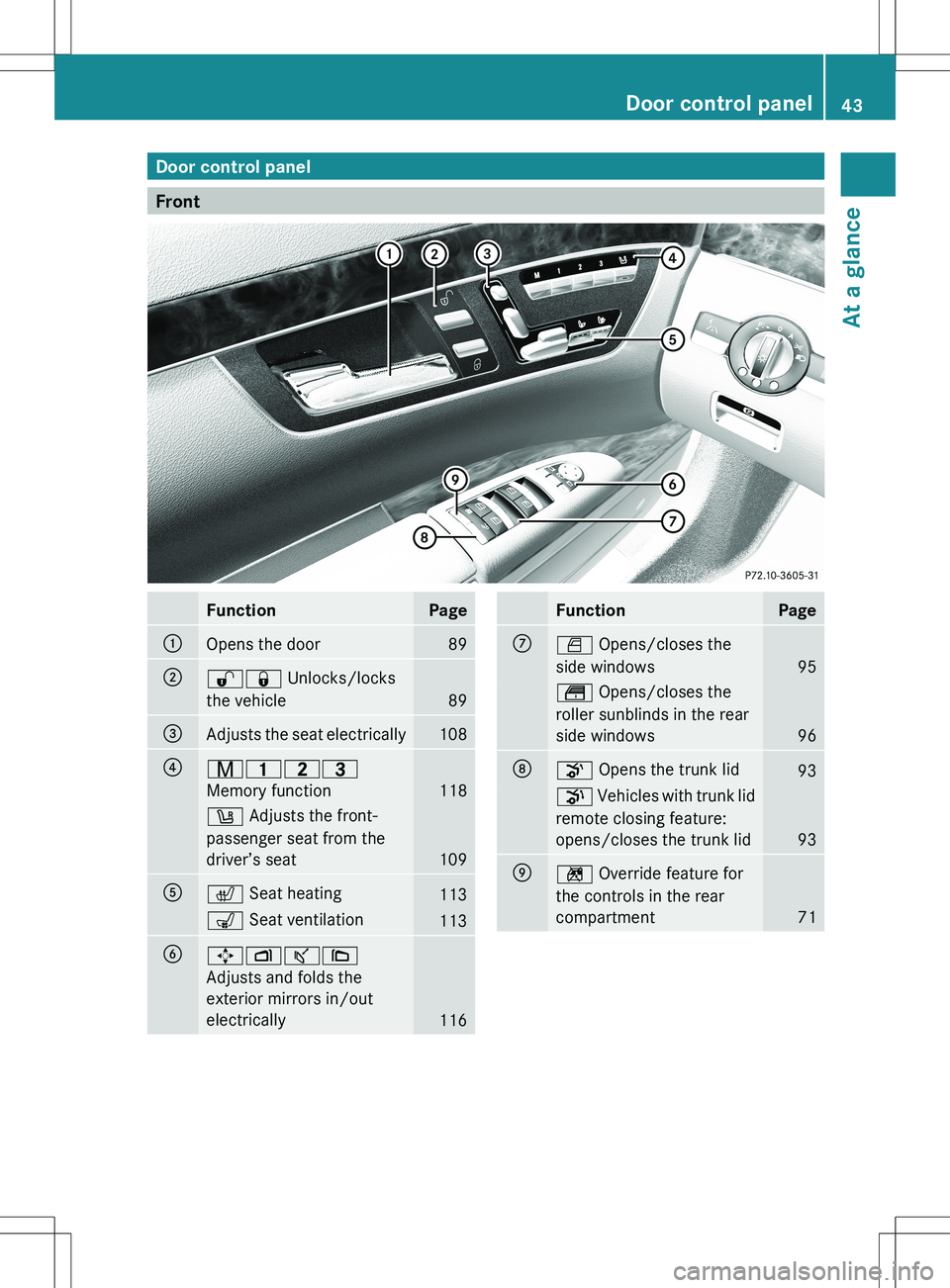
Door control panel
Front
FunctionPage:Opens the door89;%& Unlocks/locks
the vehicle
89
=Adjusts the seat electrically108?r 45=
Memory function
118
w Adjusts the front-
passenger seat from the
driver’s seat
109
Ac Seat heating113s Seat ventilation113B7Zª\
Adjusts and folds the
exterior mirrors in/out
electrically
116
FunctionPageCW Opens/closes the
side windows
95
t Opens/closes the
roller sunblinds in the rear
side windows
96
Do Opens the trunk lid93p Vehicles with trunk lid
remote closing feature:
opens/closes the trunk lid
93
En Override feature for
the controls in the rear
compartment
71
Door control panel43At a glance
Page 63 of 536
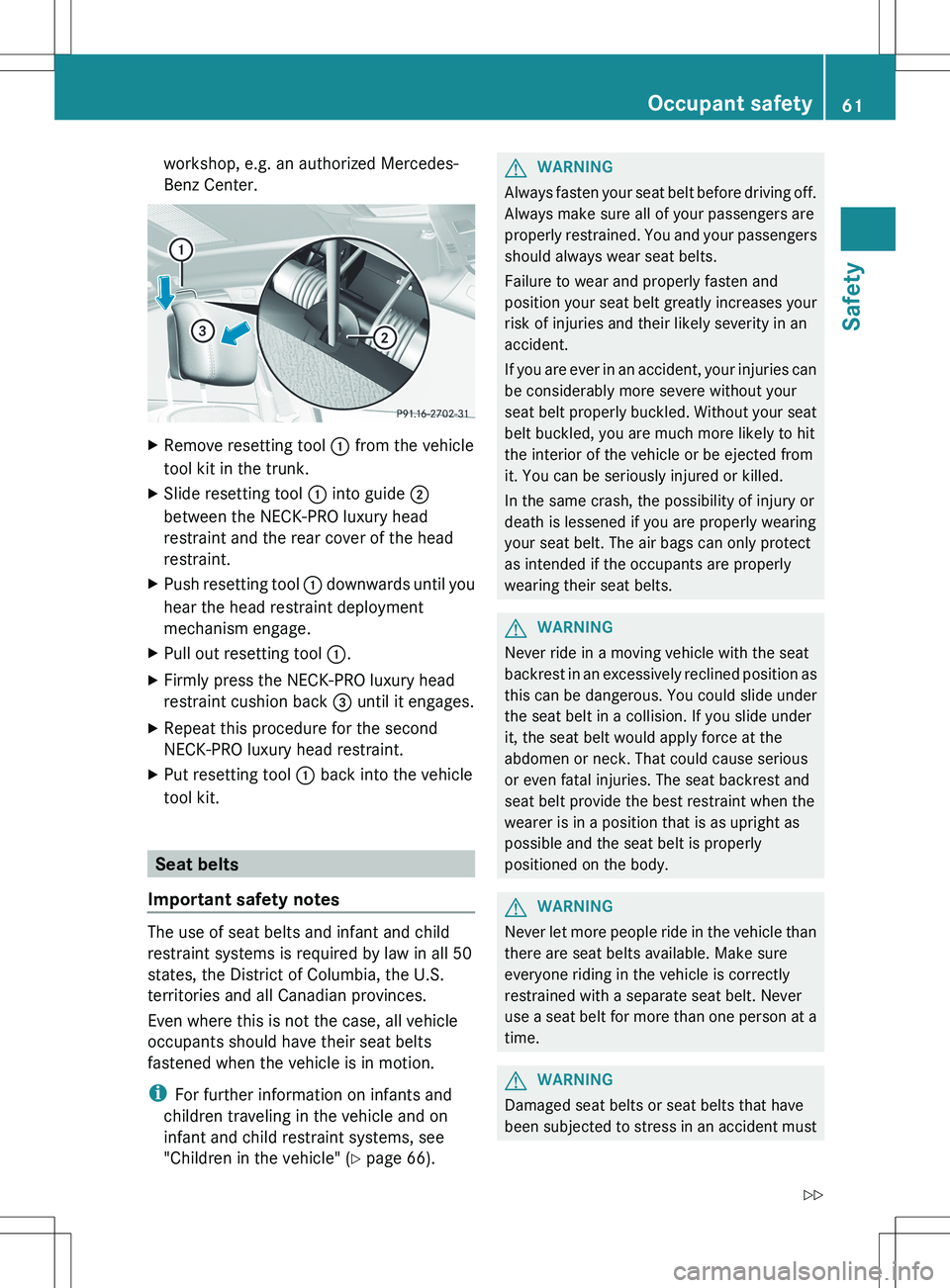
workshop, e.g. an authorized Mercedes-
Benz Center.XRemove resetting tool : from the vehicle
tool kit in the trunk.XSlide resetting tool : into guide ;
between the NECK-PRO luxury head
restraint and the rear cover of the head
restraint.XPush resetting tool : downwards until you
hear the head restraint deployment
mechanism engage.XPull out resetting tool :.XFirmly press the NECK-PRO luxury head
restraint cushion back = until it engages.XRepeat this procedure for the second
NECK-PRO luxury head restraint.XPut resetting tool : back into the vehicle
tool kit.
Seat belts
Important safety notes
The use of seat belts and infant and child
restraint systems is required by law in all 50
states, the District of Columbia, the U.S.
territories and all Canadian provinces.
Even where this is not the case, all vehicle
occupants should have their seat belts
fastened when the vehicle is in motion.
i For further information on infants and
children traveling in the vehicle and on
infant and child restraint systems, see
"Children in the vehicle" ( Y page 66).
GWARNING
Always fasten your seat belt before driving off.
Always make sure all of your passengers are
properly restrained. You and your passengers
should always wear seat belts.
Failure to wear and properly fasten and
position your seat belt greatly increases your
risk of injuries and their likely severity in an
accident.
If you are ever in an accident, your injuries can
be considerably more severe without your
seat belt properly buckled. Without your seat
belt buckled, you are much more likely to hit
the interior of the vehicle or be ejected from
it. You can be seriously injured or killed.
In the same crash, the possibility of injury or
death is lessened if you are properly wearing
your seat belt. The air bags can only protect
as intended if the occupants are properly
wearing their seat belts.
GWARNING
Never ride in a moving vehicle with the seat
backrest in an excessively reclined position as
this can be dangerous. You could slide under
the seat belt in a collision. If you slide under
it, the seat belt would apply force at the
abdomen or neck. That could cause serious
or even fatal injuries. The seat backrest and
seat belt provide the best restraint when the
wearer is in a position that is as upright as
possible and the seat belt is properly
positioned on the body.
GWARNING
Never let more people ride in the vehicle than
there are seat belts available. Make sure
everyone riding in the vehicle is correctly
restrained with a separate seat belt. Never
use a seat belt for more than one person at a
time.
GWARNING
Damaged seat belts or seat belts that have
been subjected to stress in an accident must
Occupant safety61SafetyZ
Page 70 of 536
GWARNING
When leaving the vehicle, always remove the
SmartKey from the ignition lock. Always take
the SmartKey with you and lock the vehicle.
Do not leave children unattended in the
vehicle, even if they are secured in a child
restraint system, or with access to an
unlocked vehicle. A child's unsupervised
access to a vehicle could result in an accident
and/or serious personal injury. The children
could:
R injure themselves on parts of the vehicle
R be seriously or fatally injured through
excessive exposure to extreme heat or cold
R injure themselves or cause an accident with
vehicle equipment that can be operated
even if the SmartKey is removed from the
ignition lock or removed from the vehicle,
such as seat adjustment, steering wheel
adjustment, or the memory function
If children open a door, they could injure other
persons or get out of the vehicle and injure
themselves or be injured by following traffic.
Do not expose the child restraint system to
direct sunlight. The child restraint system's
metal parts, for example, could become very
hot, and the child could be burned on these
parts.
GWARNING
Do not carry heavy or hard objects in the
passenger compartment or trunk unless they
are firmly secured in place.
Unsecured or improperly positioned cargo
increases a child's risk of injury in the event
of
R strong braking maneuvers
R sudden changes of direction
R an accident
Special seat belt retractor
All seat belts except the driver's seat belt are
equipped with a special seat belt retractor.
When activated, the special seat belt
retractor ensures the seat belt will not
slacken once the child restraint system has
been secured.
Installing a child restraint system:XAlways comply with the manufacturer's
installation instructions.XPull the seat belt smoothly from the inertia
reel.XEngage the seat belt tongue in the belt
buckle.
Activating the special seat belt retractor:
XPull the seat belt out fully and let the inertia
reel retract it again.
While the seat belt is retracting, you should
hear a ratcheting sound. The special seat
belt retractor is enabled.XPush down on the child restraint system to
take up any slack.
Removing a child restraint system/
deactivating the special seat belt retractor:
XAlways comply with the manufacturer's
installation instructions.XPress the seat belt release button and
guide the belt tongue to the belt outlet.
The special seat belt retractor is
deactivated.GWARNING
Never release the seat belt buckle while the
vehicle is in motion, since the special seat belt
retractor will be deactivated.
LATCH-type (ISOFIX) child seat anchors
in the rear
GWARNING
Children that are too large for a child restraint
must travel in seats using normal seat belts.
Position shoulder belt across the chest and
shoulder, not face or neck.
A booster seat may be necessary to achieve
proper seat belt positioning for children over
41 lb (18 kg) until they reach a height where
68Children in the vehicleSafety
Page 81 of 536
In these cases, PRE-SAFE(R) Brake may:
R give an unnecessary warning and then
brake the vehicle
R neither give a warning nor intervene
There is a risk of an accident. Always pay
particular attention to the traffic situation and
be ready to brake, especially if PRE-SAFE(R)
Brake warns you. Terminate the intervention
in a non-critical driving situation.
In particular, the detection of obstacles can
be impaired if there is:
R dirt on the sensors or anything else
covering the sensors
R snow or heavy rain
R interference by other radar sources
R the possibility of strong radar reflections,
for example in parking garages
R a narrow vehicle traveling in front, e.g. a
motorbike
R a vehicle traveling in front on a different lineGWARNING
PRE-SAFE ®
Brake does not react:
R to people or animals
R to oncoming vehicles
R to crossing traffic
R in curves
As a result, PRE-SAFE ®
Brake cannot
intervene in critical situations. There is a risk
of an accident. Always pay careful attention
to the traffic situation and be ready to brake.
In order to maintain the appropriate distance
to the vehicle in front and thus prevent a
collision, you must apply the brakes yourself.
XTo activate/deactivate: activate or
deactivate PRE-SAFE ®
Brake in the on-
board computer ( Y page 386).
After activation, the Ä symbol is
displayed on the left in the instrument
cluster.
For PRE-SAFE ®
Brake to assist you when
driving, the radar sensor system must be
switched on ( Y page 389) and be
operational.
Following damage to the front end of the
vehicle, have the configuration and operation
of the radar sensors checked at a qualified
specialist workshop. This also applies to
collisions at low speeds where there is no
visible damage to the front of the vehicle.
Theft deterrent locking system
Immobilizer
The immobilizer prevents your vehicle from
being started without the correct SmartKey.
When leaving the vehicle, always take the
SmartKey with you and lock the vehicle. The
engine can be started by anyone with a valid
SmartKey that is left inside the vehicle.
XTo activate with the SmartKey: remove
the SmartKey from the ignition lock.XTo activate with KEYLESS-GO: switch the
ignition off and open the driver's door.XTo deactivate: switch on the ignition.
i
The immobilizer is always deactivated
when you start the engine.
ATA (anti-theft alarm system)
A visual and audible alarm is triggered if the
alarm system is armed and you open:
R a door
R the vehicle with the mechanical key
R the trunk lid
R the hood
The alarm is not switched off, even if you
close the open door that has triggered it, for
example.
Theft deterrent locking system79SafetyZ
Page 83 of 536
Useful information ..............................82
SmartKey ............................................. 82
Doors .................................................... 88
Trunk .................................................... 91
Side windows ...................................... 95
Sliding sunroof .................................... 9881Opening/closing