wiper blades MERCEDES-BENZ S-CLASS SEDAN 2012 Owners Manual
[x] Cancel search | Manufacturer: MERCEDES-BENZ, Model Year: 2012, Model line: S-CLASS SEDAN, Model: MERCEDES-BENZ S-CLASS SEDAN 2012Pages: 536, PDF Size: 39.39 MB
Page 9 of 536
CareCarpets .......................................... 472
Car wash ........................................ 466
Display ........................................... 470
Exterior lights ................................ 469
Gear or selector lever ....................472
Interior ........................................... 470
Matte finish ................................... 468
Night View Assist Plus ...................471
Notes ............................................. 466
Paint .............................................. 468
Plastic trim .................................... 471
Power washer ................................ 467
Rear view camera .......................... 470
Roof lining ...................................... 472
Seat belt ........................................ 472
Seat cover ..................................... 472
Sensors ......................................... 470
Steering wheel ............................... 472
Tail pipes ....................................... 470
Trim pieces .................................... 472
Washing by hand ........................... 467
Wheels ........................................... 468
Windows ........................................ 469
Wiper blades .................................. 469
Wooden trim .................................. 472
Cargo tie down rings ......................... 437
Car pool lanes .................................... 173
Car wash (care) ................................. 466
Category Satellite radio ................................ 222
CD
Copy protection ............................. 234
Fast forward/fast rewind ...............230
General information .......................234
Inserting ........................................ 225
Inserting/loading (Rear Seat
Entertainment System) ..................255
Mode, switching to ........................226
Multisession .................................. 233
Notes on discs ............................... 234
Operating the player/changer
(on-board computer) ......................381
Pause function ............................... 227
Playback options ........................... 232
Player/changer operation
(COMAND) ..................................... 225Removing/ejecting (Rear Seat
Entertainment System) ..................256
Safety notes .................................. 225
Selecting a media type ..................228
Selecting a track ............................ 229
Sound settings (balance, bass,
fader, treble) .................................. 139
Center console ..................................... 41
Central locking Automatic locking feature
(COMAND) ..................................... 269
Locking/unlocking (SmartKey) ........82
Changing batteries (remote
control, headphones) ........................ 251
Changing bulbs High-beam headlamps (vehicles
with halogen daytime running
lamps) ............................................ 288
High-beam headlamps (vehicles
with LED daylight lamps) ...............288
Important safety notes ..................286
Overview of bulb types ..................287
Changing direction
Announcement phase ....................171
Change of direction phase .............171
Preparation phase .........................171
Character bar ..................................... 133
Characters Entering ......................................... 134
Entering (address book, phone
book) ............................................. 136
Entering (navigation) ......................133
Child-proof locks
Important safety notes ....................70
Rear doors ....................................... 71
Children
In the vehicle ................................... 66
Restraint systems ............................ 66
Child seat
LATCH-type (ISOFIX) child seat
anchors ............................................ 68
Special seat belt retractor ...............68
Top Tether ....................................... 69
Cigarette lighter ................................ 442
Cleaning Mirror turn signal ........................... 470Index7
Page 29 of 536
Window curtain air bagDisplay message ............................ 400
Operation ......................................... 53
Windows
Cleaning ......................................... 469
see Side windows
Windshield
Defrosting ...................................... 300
Infrared reflective .......................... 456
Windshield washer fluid
see Windshield washer system
Windshield washer system .............. 464
Notes ............................................. 531
Windshield wipers
Problem (malfunction) ...................290
Replacing the wiper blades ............289
Switching on/off ........................... 289
Winter driving
Important safety notes ..................494
Slippery road surfaces ...................334
Snow chains .................................. 495
Winter operation
Radiator cover ............................... 459
Winter tires
M+S tires ....................................... 494
Wiper blades
Cleaning ......................................... 469
Important safety notes ..................289
Wooden trim (cleaning
instructions) ...................................... 472
Workshop see Qualified specialist workshop Index27
Page 291 of 536
Windshield wipers
Switching the windshield wipers on/
off
GWARNING
Wiper blades are components that are subject
to wear and tear. Replace the wiper blades
twice a year, preferably in the spring and fall.
Otherwise the windshield will not be wiped
properly. As a result, you may not be able to
observe surrounding traffic conditions and
could cause an accident.
! Do not operate the windshield wipers
when the windshield is dry, as this could
damage the wiper blades. Moreover, dust
that has collected on the windshield can
scratch the glass if wiping takes place when
the windshield is dry.
! If the windshield wipers leave smears on
the windshield after the vehicle has been
washed in an automatic car wash, wax or
other residues may be the reason for this.
Clean the windshield using washer fluid
after washing the vehicle in an automatic
car wash.
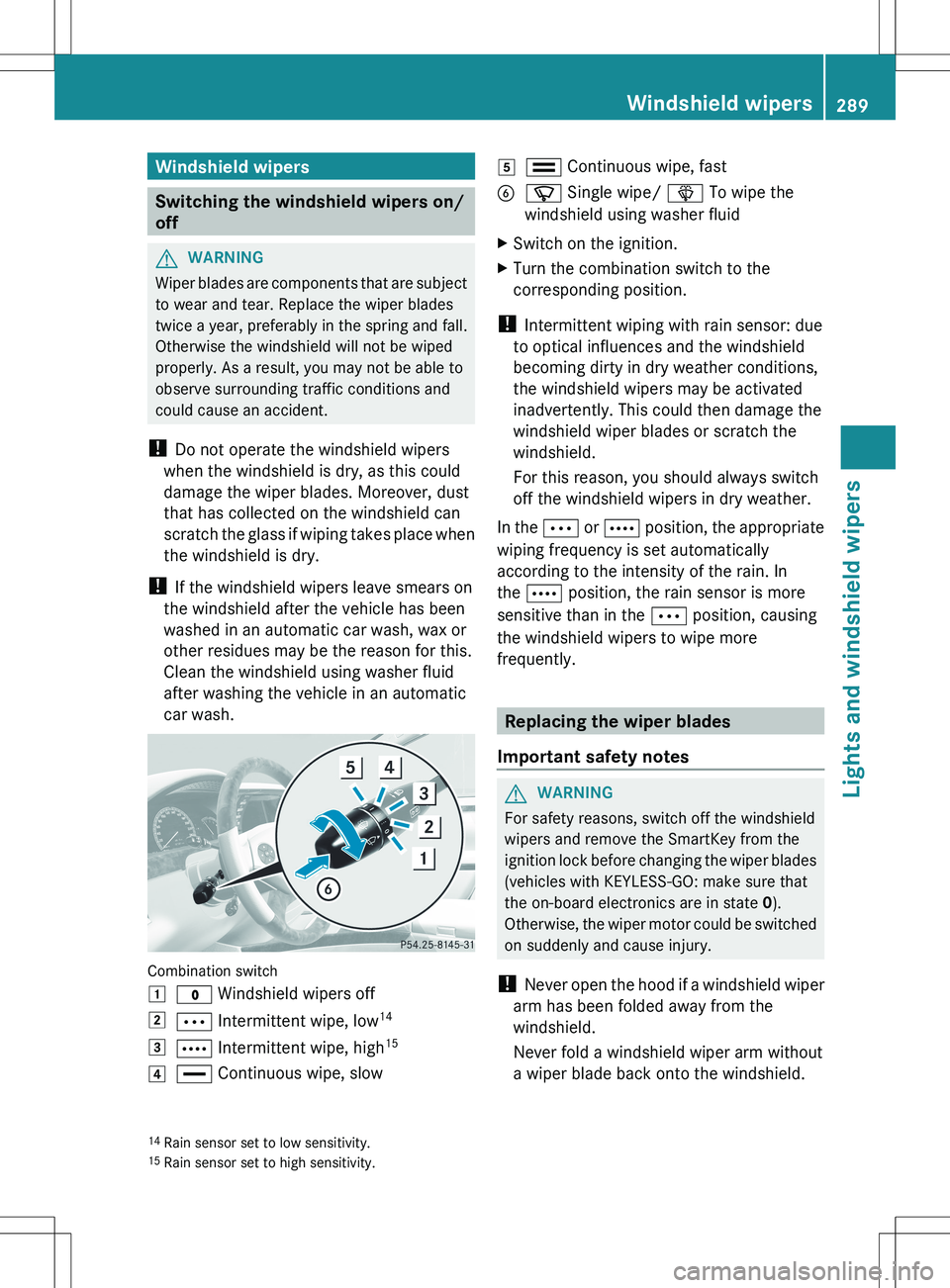
Combination switch
1$ Windshield wipers off2Ä Intermittent wipe, low 143Å
Intermittent wipe, high 154°
Continuous wipe, slow5¯ Continuous wipe, fastBí Single wipe/ î To wipe the
windshield using washer fluidXSwitch on the ignition.XTurn the combination switch to the
corresponding position.
! Intermittent wiping with rain sensor: due
to optical influences and the windshield
becoming dirty in dry weather conditions,
the windshield wipers may be activated
inadvertently. This could then damage the
windshield wiper blades or scratch the
windshield.
For this reason, you should always switch
off the windshield wipers in dry weather.
In the Ä or Å position, the appropriate
wiping frequency is set automatically
according to the intensity of the rain. In
the Å position, the rain sensor is more
sensitive than in the Ä position, causing
the windshield wipers to wipe more
frequently.
Replacing the wiper blades
Important safety notes
GWARNING
For safety reasons, switch off the windshield
wipers and remove the SmartKey from the
ignition lock before changing the wiper blades
(vehicles with KEYLESS-GO: make sure that
the on-board electronics are in state 0).
Otherwise, the wiper motor could be switched
on suddenly and cause injury.
! Never open the hood if a windshield wiper
arm has been folded away from the
windshield.
Never fold a windshield wiper arm without
a wiper blade back onto the windshield.
14 Rain sensor set to low sensitivity.
15 Rain sensor set to high sensitivity.Windshield wipers289Lights and windshield wipersZ
Page 292 of 536
Hold the windshield wiper arm firmly when
you change the wiper blade. If you release
the windshield wiper arm without a wiper
blade and it falls onto the windshield, the
windshield may be damaged by the force of
the impact.
Mercedes-Benz recommends that you have
the wiper blades replaced by a qualified
specialist workshop, e.g. at an authorized
Mercedes-Benz Center.
! Always position the windshield wiper
arms vertically before folding them away
from the windshield. By doing so, you will
avoid damage to the hood.
! To avoid damaging the wiper blades,
make sure that you touch only the wiper
arm of the wiper.
Changing the windshield wiper blades
Moving the wiper blades to a vertical
position
Vehicles without KEYLESS-GO
XTurn the SmartKey to position 1 or 2 in the
ignition lock.XSet the windshield wipers to
position °.XWhen the wiper arms have reached a
vertical position, turn the SmartKey to
position 0 and remove it from the ignition
lock.
Vehicles with KEYLESS-GO
XSwitch off the engine.XRemove your foot from the brake pedal.XSet the windshield wipers to
position °.XPress the Start/Stop button repeatedly
until the windshield wipers start.XWhen the wiper arms have reached a
vertical position, press the Start/Stop
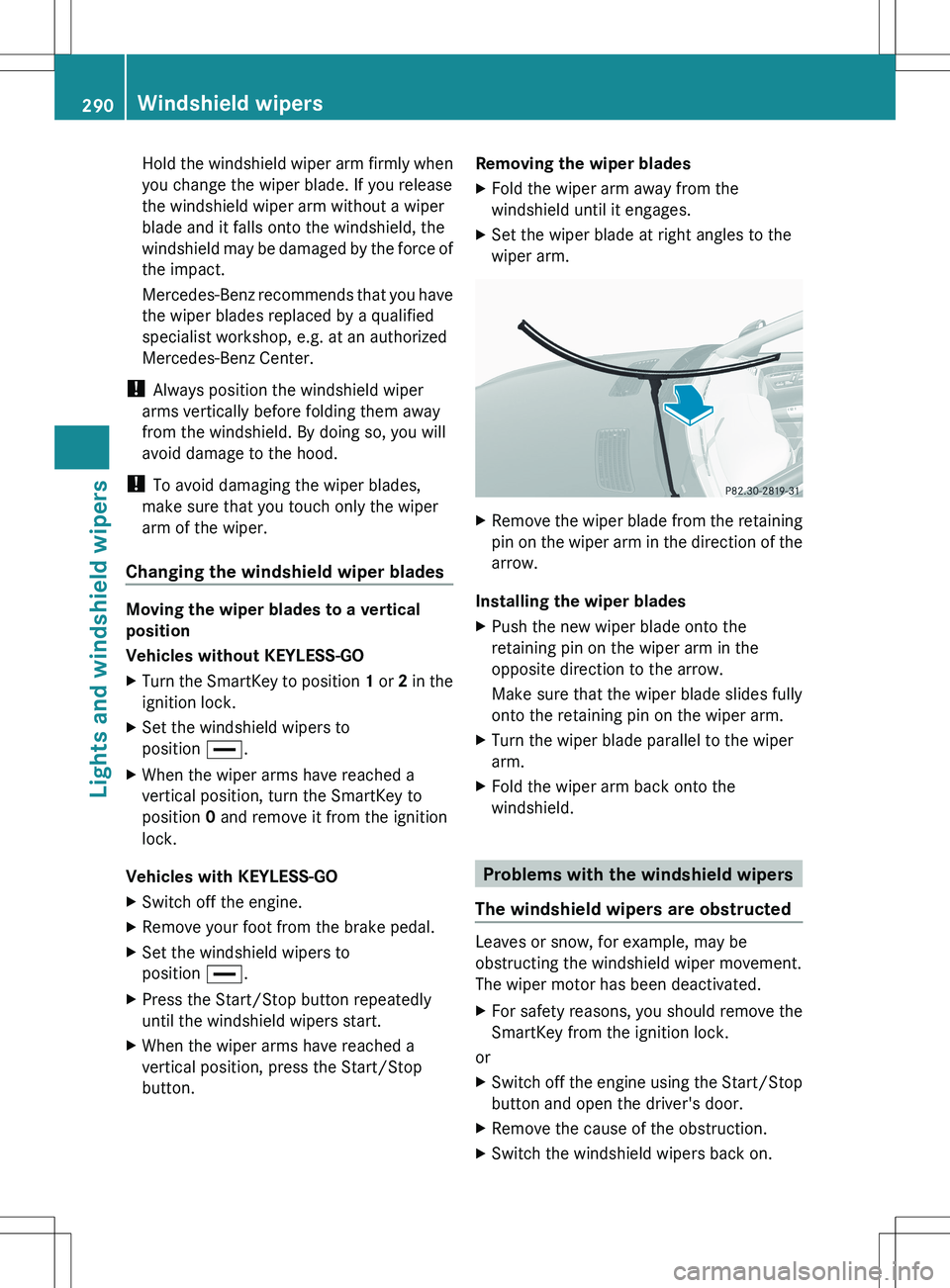
button.Removing the wiper bladesXFold the wiper arm away from the
windshield until it engages.XSet the wiper blade at right angles to the
wiper arm.XRemove the wiper blade from the retaining
pin on the wiper arm in the direction of the
arrow.
Installing the wiper blades
XPush the new wiper blade onto the
retaining pin on the wiper arm in the
opposite direction to the arrow.
Make sure that the wiper blade slides fully
onto the retaining pin on the wiper arm.XTurn the wiper blade parallel to the wiper
arm.XFold the wiper arm back onto the
windshield.
Problems with the windshield wipers
The windshield wipers are obstructed
Leaves or snow, for example, may be
obstructing the windshield wiper movement.
The wiper motor has been deactivated.
XFor safety reasons, you should remove the
SmartKey from the ignition lock.
or
XSwitch off the engine using the Start/Stop
button and open the driver's door.XRemove the cause of the obstruction.XSwitch the windshield wipers back on.290Windshield wipersLights and windshield wipers
Page 365 of 536
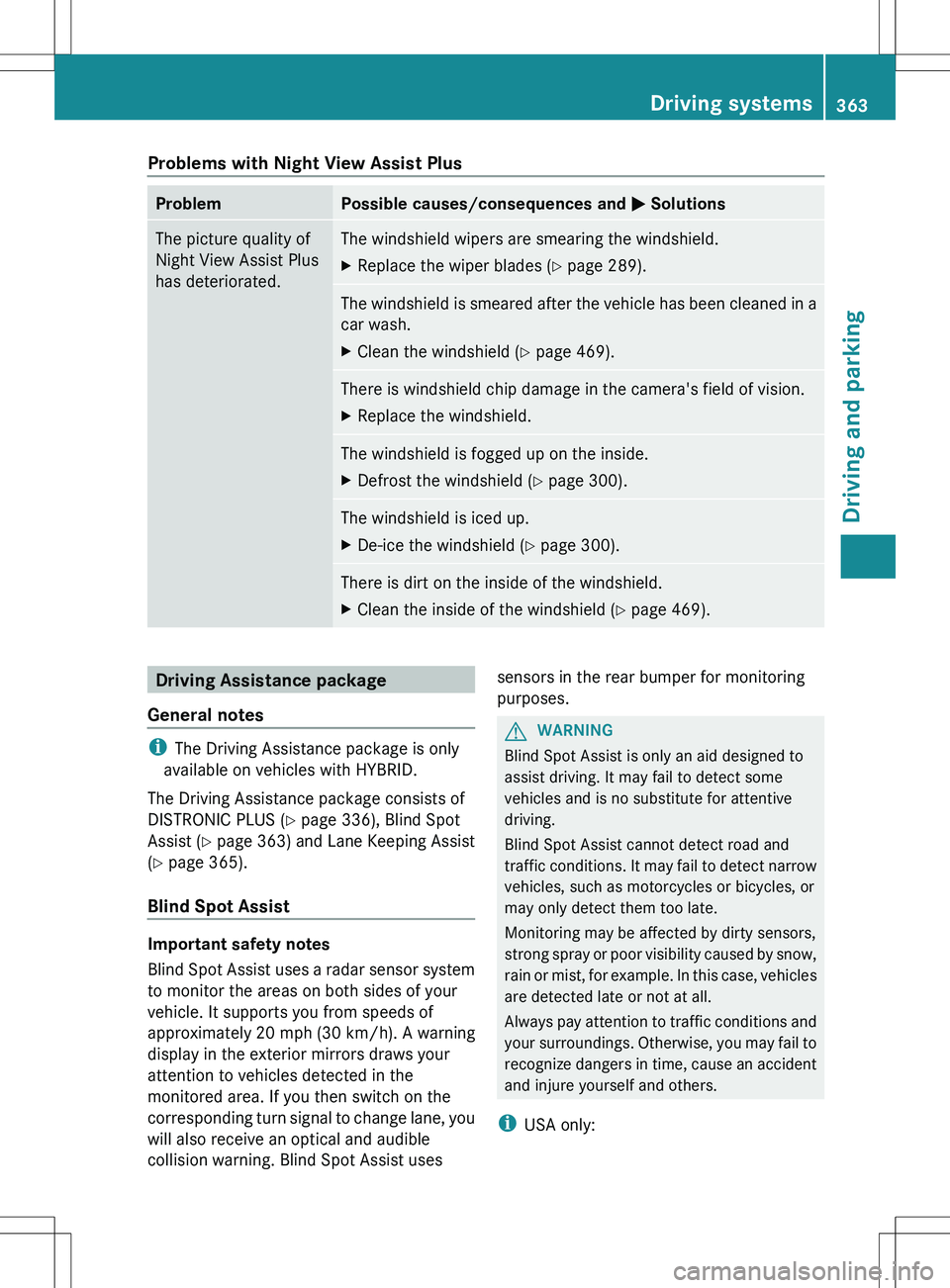
Problems with Night View Assist PlusProblemPossible causes/consequences and M SolutionsThe picture quality of
Night View Assist Plus
has deteriorated.The windshield wipers are smearing the windshield.XReplace the wiper blades ( Y page 289).The windshield is smeared after the vehicle has been cleaned in a
car wash.XClean the windshield ( Y page 469).There is windshield chip damage in the camera's field of vision.XReplace the windshield.The windshield is fogged up on the inside.XDefrost the windshield ( Y page 300).The windshield is iced up.XDe-ice the windshield ( Y page 300).There is dirt on the inside of the windshield.XClean the inside of the windshield ( Y page 469).Driving Assistance package
General notes
i The Driving Assistance package is only
available on vehicles with HYBRID.
The Driving Assistance package consists of
DISTRONIC PLUS ( Y page 336), Blind Spot
Assist ( Y page 363) and Lane Keeping Assist
( Y page 365).
Blind Spot Assist
Important safety notes
Blind Spot Assist uses a radar sensor system
to monitor the areas on both sides of your
vehicle. It supports you from speeds of
approximately 20 mph (30 km/h). A warning
display in the exterior mirrors draws your
attention to vehicles detected in the
monitored area. If you then switch on the
corresponding turn signal to change lane, you
will also receive an optical and audible
collision warning. Blind Spot Assist uses
sensors in the rear bumper for monitoring
purposes.GWARNING
Blind Spot Assist is only an aid designed to
assist driving. It may fail to detect some
vehicles and is no substitute for attentive
driving.
Blind Spot Assist cannot detect road and
traffic conditions. It may fail to detect narrow
vehicles, such as motorcycles or bicycles, or
may only detect them too late.
Monitoring may be affected by dirty sensors,
strong spray or poor visibility caused by snow,
rain or mist, for example. In this case, vehicles
are detected late or not at all.
Always pay attention to traffic conditions and
your surroundings. Otherwise, you may fail to
recognize dangers in time, cause an accident
and injure yourself and others.
i USA only:
Driving systems363Driving and parkingZ
Page 469 of 536
position P automatically and locks the
wheels. You can prevent this by shifting
the automatic transmission to N
beforehand.
R Vehicles with KEYLESS-GO:
Do not open the driver's door or front-
passenger door when the engine is
switched off. Otherwise, the automatic
transmission selects park position P
automatically and locks the wheels.
Observe the following to make sure that the
automatic transmission stays in position N:XMake sure the vehicle is stationary and the
ignition is switched off.XTurn the key to position 2(Y page 307) in
the ignition lock.
Use the SmartKey instead of the Start/
Stop button on vehicles with KEYLESS-GO.XDepress and hold the brake pedal.XShift the automatic transmission to
position N.XRelease the brake pedal.XRelease the electric parking brake.XSwitch off the ignition and leave the
SmartKey in the ignition lock.
! Make sure that:
R the side windows and the sliding sunroof
are fully closed.
R the ventilation/heating is switched off
(the OFF button has been pressed).
R the windshield wiper switch is in position
0 .
Otherwise, the vehicle might be damaged.
After using an automatic car wash, wipe off
wax from the windshield and the wiper
blades. This will prevent smears and reduce
wiping noises caused by residue on the
windshield.
Washing by hand
In some countries, washing by hand is only
allowed at specially equipped washing bays.
Observe the legal requirements in all
countries concerned.XDo not use hot water and do not wash the
vehicle in direct sunlight.XUse a soft sponge to clean.XUse a mild cleaning agent, such as a car
shampoo approved by Mercedes-Benz.XThoroughly hose down the vehicle with a
gentle jet of water.XDo not point the water jet directly towards
the air inlet.XUse plenty of water and rinse out the
sponge frequently.XRinse the vehicle with clean water and dry
thoroughly with a chamois.XDo not let the cleaning agent dry on the
paintwork.
When using the vehicle in winter, remove all
traces of road salt deposits carefully and as
soon as possible.
Power washers
GWARNING
Do not use power washers with circular-jet
nozzles (dirt grinders) to clean your vehicle, in
particular the tires. You could otherwise
damage the tires and cause an accident.
! Always maintain a distance of at least
11.8 in (30 cm) between the vehicle and the
power washer nozzle. Information about
the correct distance is available from the
equipment manufacturer.
Move the power washer nozzle around
when cleaning your vehicle.
Do not aim directly at any of the following:
R tires
R door gaps, roof gaps, joints, etc.
R electrical components
R battery
R connectors
R lights
R seals
Care467Maintenance and careZ
Page 471 of 536
Always have paintwork repairs carried out
at a qualified specialist workshop.
! Do not use wash programs with a hot wax
treatment under any circumstances.
i The vehicle should preferably be washed
by hand using a soft sponge, car shampoo
and plenty of water.
i Use only insect remover and car shampoo
from the range of recommended and
approved Mercedes-Benz care products.
Cleaning the windowsGWARNING
Before cleaning the windshield or wiper
blades, switch off the windshield wipers and
remove the SmartKey from the ignition lock.
On vehicles with KEYLESS-GO, press the
Start/Stop button repeatedly until all
indicator lamps in the instrument cluster have
gone out. The windshield wipers could
otherwise move and injure you.
! Only fold the windshield wipers away from
the windshield when vertical. Otherwise,
you will damage the hood.
XClean the inside and outside of the
windows with a damp cloth and a cleaning
agent that is recommended and approved
by Mercedes-Benz.
! Do not use dry cloths, abrasive products,
solvents or cleaning agents containing
solvents to clean the inside of the windows.
Do not touch the insides of the windows
with hard objects, e.g. an ice scraper or
ring. There is otherwise a risk of damaging
the windows.
! Clean the water drainage channels of the
windshield and the rear window at regular
intervals. Deposits such as leaves, petals
and pollen may under certain
circumstances prevent water from draining
away. This can lead to corrosion damage
and damage to electronic components.
Cleaning the wiper bladesGWARNING
Before cleaning the windshield or wiper
blades, switch off the windshield wipers and
remove the SmartKey from the ignition lock.
On vehicles with KEYLESS-GO, press the
Start/Stop button repeatedly until all
indicator lamps in the instrument cluster have
gone out. The windshield wipers could
otherwise move and injure you.
! Only fold the windshield wipers away from
the windshield when vertical. Otherwise,
you will damage the hood.
! Do not pull the wiper blade. Otherwise,
the wiper blade could be damaged.
! Do not clean wiper blades too often and
do not rub them too hard. Otherwise, the
graphite coating could be damaged. This
could cause wiper noise.
XFold the wiper arms away from the
windshield.XCarefully clean the wiper blades with a
damp cloth.XFold the windshield wipers back again
before switching on the ignition.
! Hold the wiper arm securely when folding
back. The windshield could be damaged if
the wiper arm smacks against it suddenly.
Cleaning the exterior lighting
! Only use cleaning agents or cleaning
cloths which are suitable for plastic light
lenses. Unsuitable cleaning agents or
cleaning cloths could scratch or damage
the plastic light lenses.
XClean the plastic lenses of the exterior
lighting using a wet sponge and a mild
cleaning agent, e.g. Mercedes-Benz car
shampoo. Or clean the exterior lighting
with cleaning cloths.Care469Maintenance and careZ