audio MERCEDES-BENZ S-CLASS SEDAN 2013 Owner's Manual
[x] Cancel search | Manufacturer: MERCEDES-BENZ, Model Year: 2013, Model line: S-CLASS SEDAN, Model: MERCEDES-BENZ S-CLASS SEDAN 2013Pages: 536, PDF Size: 24.14 MB
Page 130 of 536
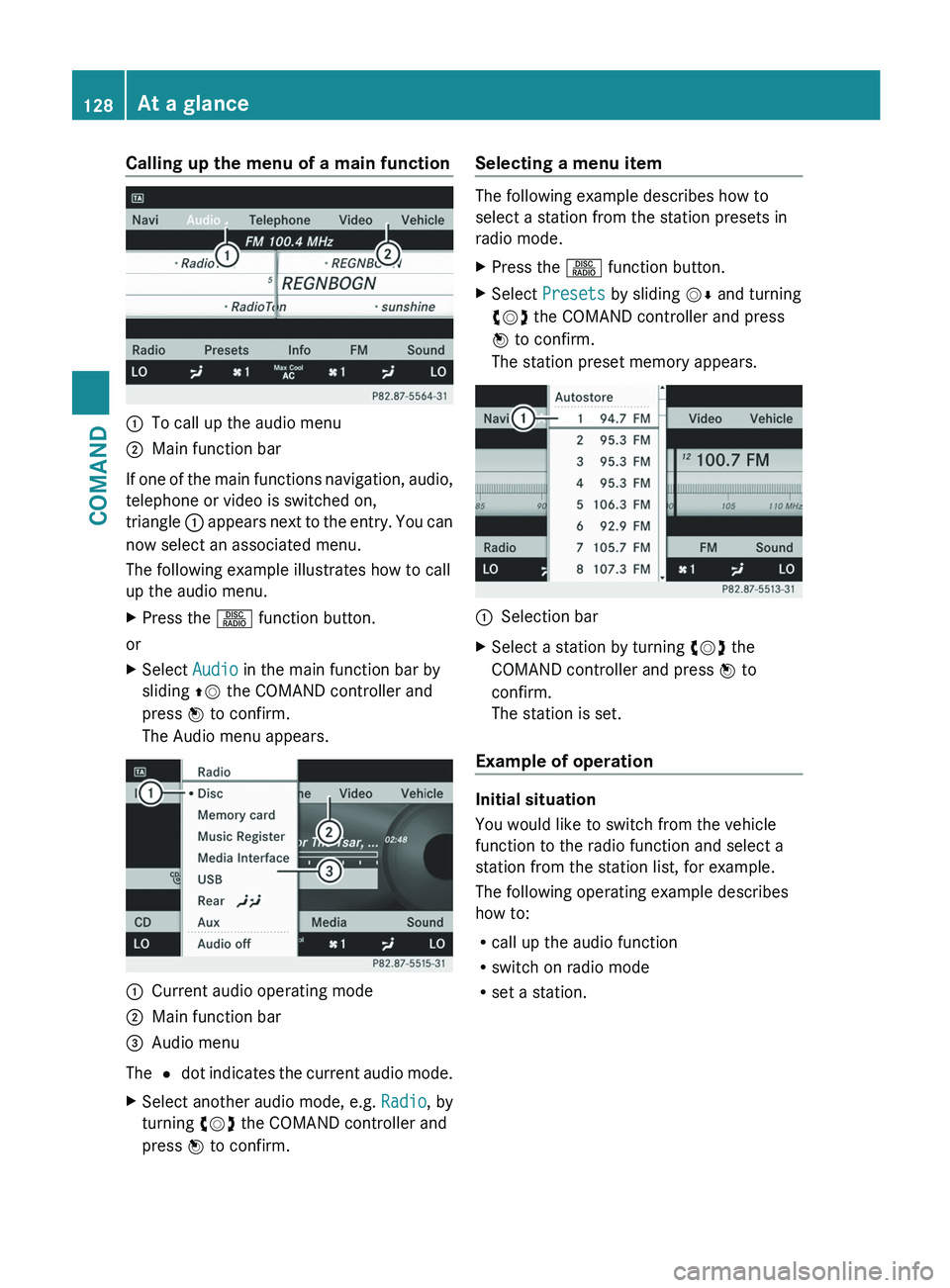
Calling up the menu of a main function
:
To call up the audio menu
; Main function bar
If one of the main functions navigation, audio,
telephone or video is switched on,
triangle :
appears next to the entry. You can
now select an associated menu.
The following example illustrates how to call
up the audio menu.
X Press the R function button.
or
X Select Audio in the main function bar by
sliding ZV the COMAND controller and
press W to confirm.
The Audio menu appears. :
Current audio operating mode
; Main function bar
= Audio menu
The #
dot indicates the current audio mode.
X
Select another audio mode, e.g. Radio, by
turning cVd the COMAND controller and
press W to confirm. Selecting a menu item The following example describes how to
select a station from the station presets in
radio mode.
X
Press the R function button.
X Select Presets by sliding VÆ and turning
cVd the COMAND controller and press
W to confirm.
The station preset memory appears. :
Selection bar
X Select a station by turning cVd the
COMAND controller and press W to
confirm.
The station is set.
Example of operation Initial situation
You would like to switch from the vehicle
function to the radio function and select a
station from the station list, for example.
The following operating example describes
how to:
R
call up the audio function
R switch on radio mode
R set a station.128
At a glance
COMAND
Page 131 of 536
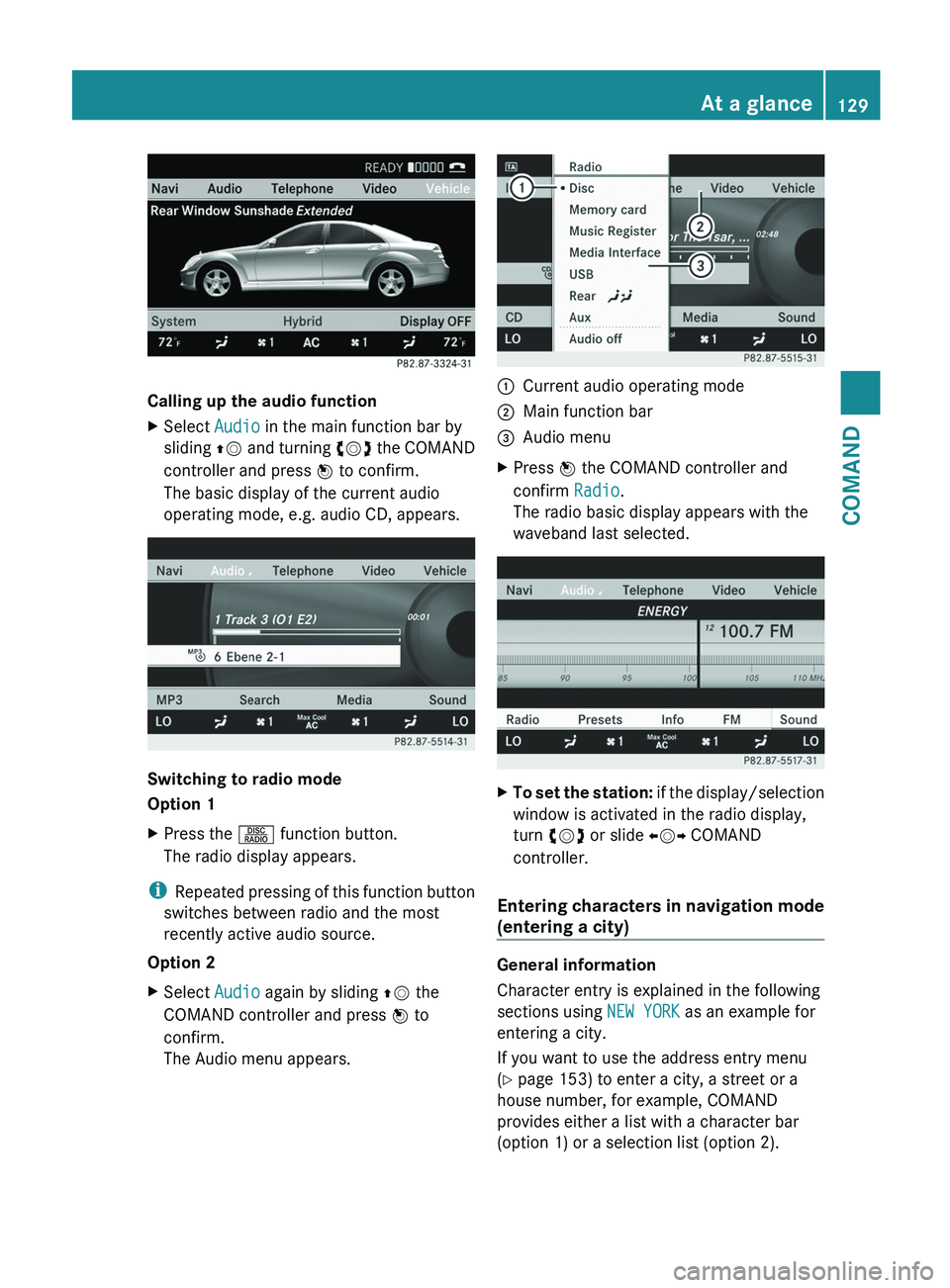
Calling up the audio function
X
Select Audio in the main function bar by
sliding ZV
and turning cVd the COMAND
controller and press W to confirm.
The basic display of the current audio
operating mode, e.g. audio CD, appears. Switching to radio mode
Option 1
X
Press the R function button.
The radio display appears.
i Repeated
pressing of this function button
switches between radio and the most
recently active audio source.
Option 2
X Select Audio again by sliding ZV the
COMAND controller and press W to
confirm.
The Audio menu appears. :
Current audio operating mode
; Main function bar
= Audio menu
X Press W the COMAND controller and
confirm Radio.
The radio basic display appears with the
waveband last selected. X
To set the station:
if the display/selection
window is activated in the radio display,
turn cVd or slide XVY COMAND
controller.
Entering characters in navigation mode
(entering a city) General information
Character entry is explained in the following
sections using NEW YORK as an example for
entering a city.
If you want to use the address entry menu
(Y page 153) to enter a city, a street or a
house number, for example, COMAND
provides either a list with a character bar
(option 1) or a selection list (option 2). At a glance
129
COMAND Z
Page 135 of 536
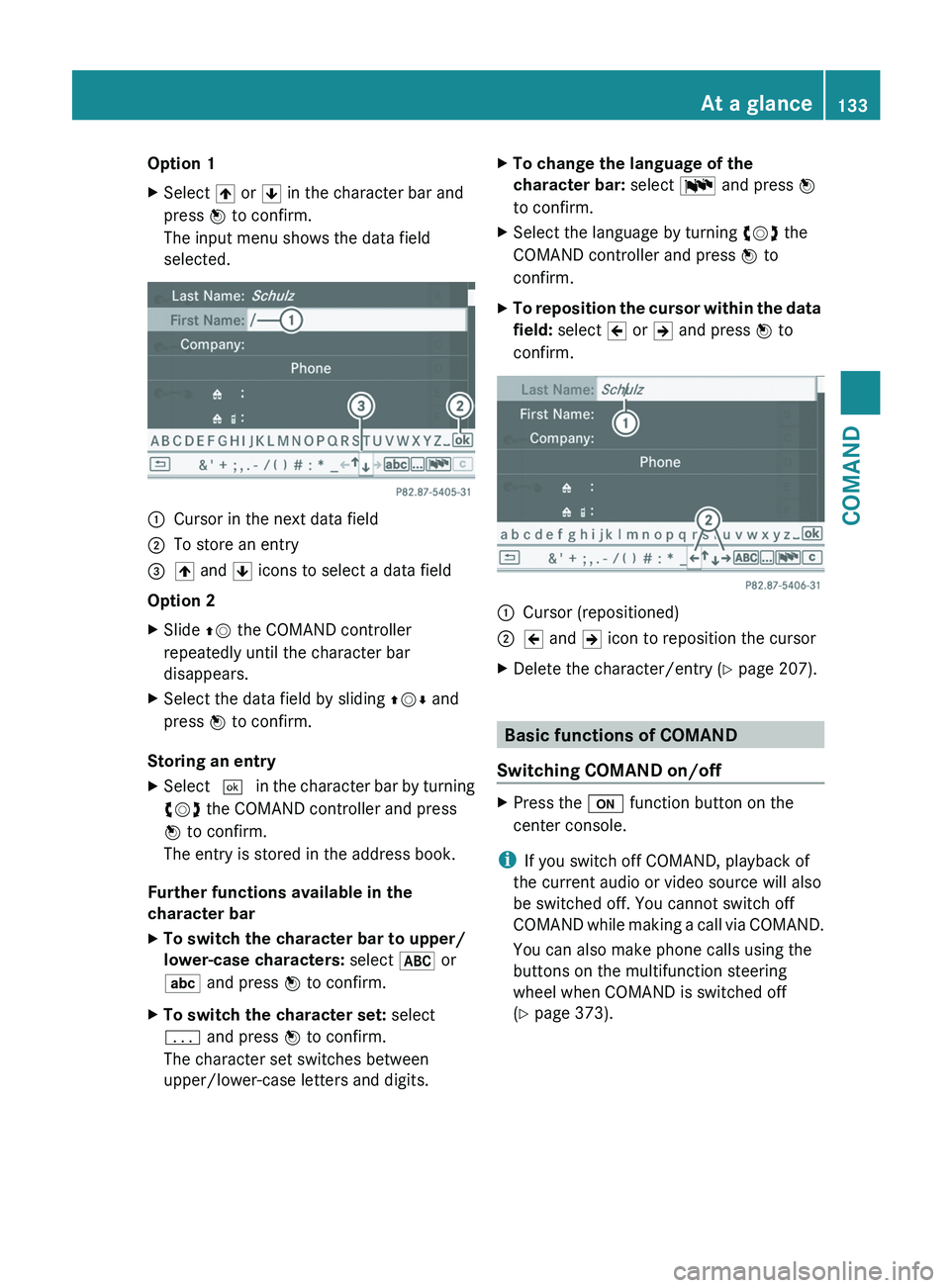
Option 1
X
Select 4 or 5 in the character bar and
press W to confirm.
The input menu shows the data field
selected. :
Cursor in the next data field
; To store an entry
= 4 and 5 icons to select a data field
Option 2
X Slide ZV the COMAND controller
repeatedly until the character bar
disappears.
X Select the data field by sliding ZVÆ and
press W to confirm.
Storing an entry
X Select ¬ in the character bar by turning
cVd the COMAND controller and press
W to confirm.
The entry is stored in the address book.
Further functions available in the
character bar
X To switch the character bar to upper/
lower-case characters: select * or
E and press W to confirm.
X To switch the character set: select
p and press W to confirm.
The character set switches between
upper/lower-case letters and digits. X
To change the language of the
character bar: select B and press W
to confirm.
X Select the language by turning cVd the
COMAND controller and press W to
confirm.
X To reposition the cursor within the data
field: select 2 or 3 and press W to
confirm. :
Cursor (repositioned)
; 2 and 3 icon to reposition the cursor
X Delete the character/entry (Y page 207). Basic functions of COMAND
Switching COMAND on/off X
Press the u function button on the
center console.
i If you switch off COMAND, playback of
the current audio or video source will also
be switched off. You cannot switch off
COMAND
while making a call via COMAND.
You can also make phone calls using the
buttons on the multifunction steering
wheel when COMAND is switched off
(Y page 373). At a glance
133
COMAND Z
Page 136 of 536
Mute
Switching audio and video sources on/off
X
Press the 8 button on the multifunction
steering wheel.
The sound from the respective audio or
video source is switched on or muted.
i When the sound is off, the system
displays the , symbol in the status line.
When you change the audio or video
source, or adjust the volume, sound
automatically switches on again.
i Even
if the sound is switched off, you will
still hear traffic and navigation system
announcements.
Switching off Traffic program and
navigation announcements completely
X Traffic program: press the 8 button
until
the . message disappears from the
status bar of the display.
A confirmation tone sounds.
X Navigation announcements: during an
announcement, press the 8 button on
the multifunction steering wheel.
Switching Traffic program and navigation
announcements on again
X Traffic program:
press and hold down the
8 button until the . display appears
in the status bar.
A confirmation tone sounds.
X Navigation messages: select the y
symbol in the navigation menu bar and
press W to confirm.
i The navigation announcements are
activated again if you switch COMAND off
and
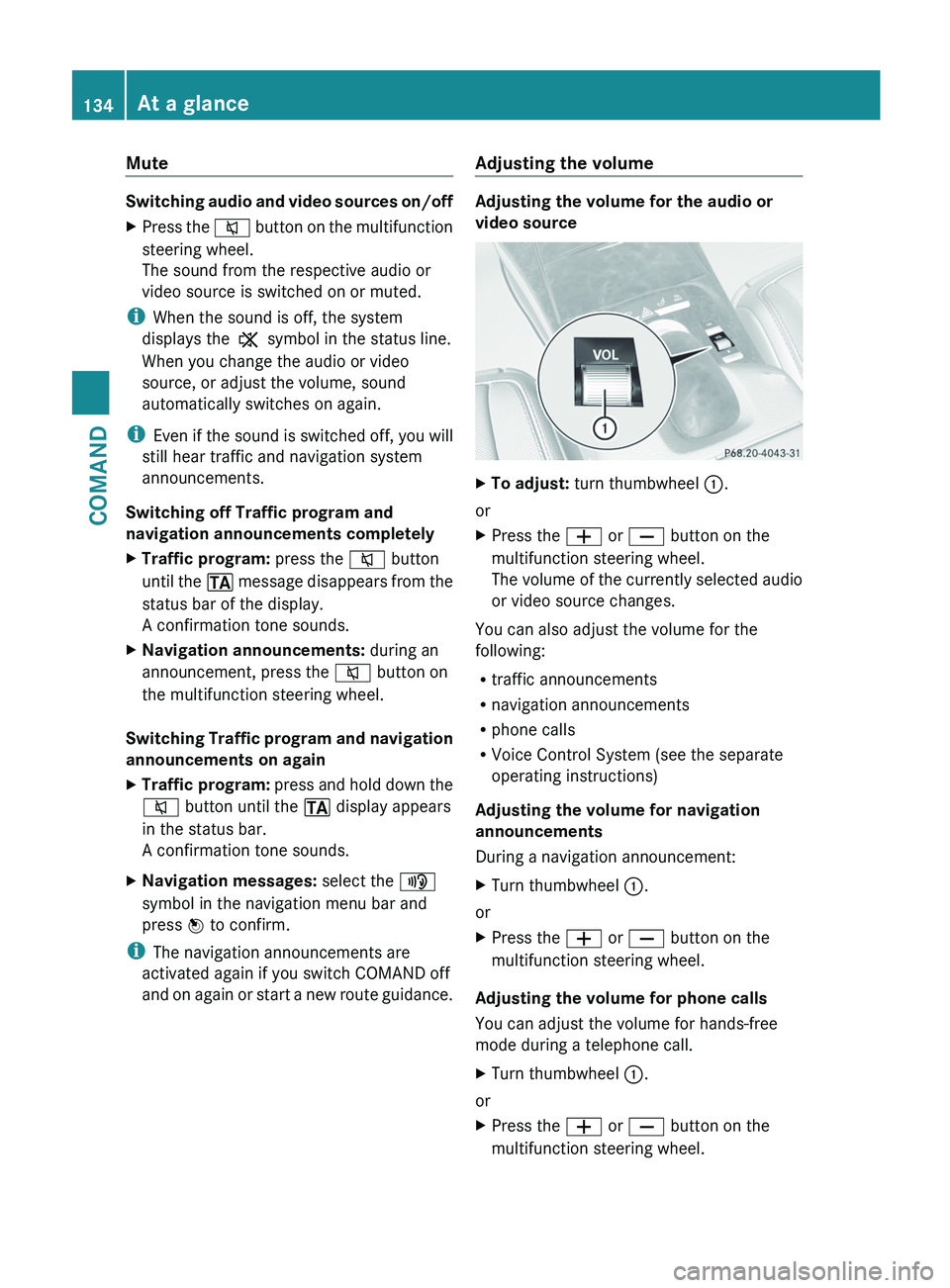
on again or start a new route guidance. Adjusting the volume Adjusting the volume for the audio or
video source
X
To adjust: turn thumbwheel :.
or
X Press the W or X button on the
multifunction steering wheel.
The
volume of the currently selected audio
or video source changes.
You can also adjust the volume for the
following:
R traffic announcements
R navigation announcements
R phone calls
R Voice Control System (see the separate
operating instructions)
Adjusting the volume for navigation
announcements
During a navigation announcement:
X Turn thumbwheel :.
or
X Press the W or X button on the
multifunction steering wheel.
Adjusting the volume for phone calls
You can adjust the volume for hands-free
mode during a telephone call.
X Turn thumbwheel :.
or
X Press the W or X button on the
multifunction steering wheel. 134
At a glanceCOMAND
Page 137 of 536
Adjusting the sound settings
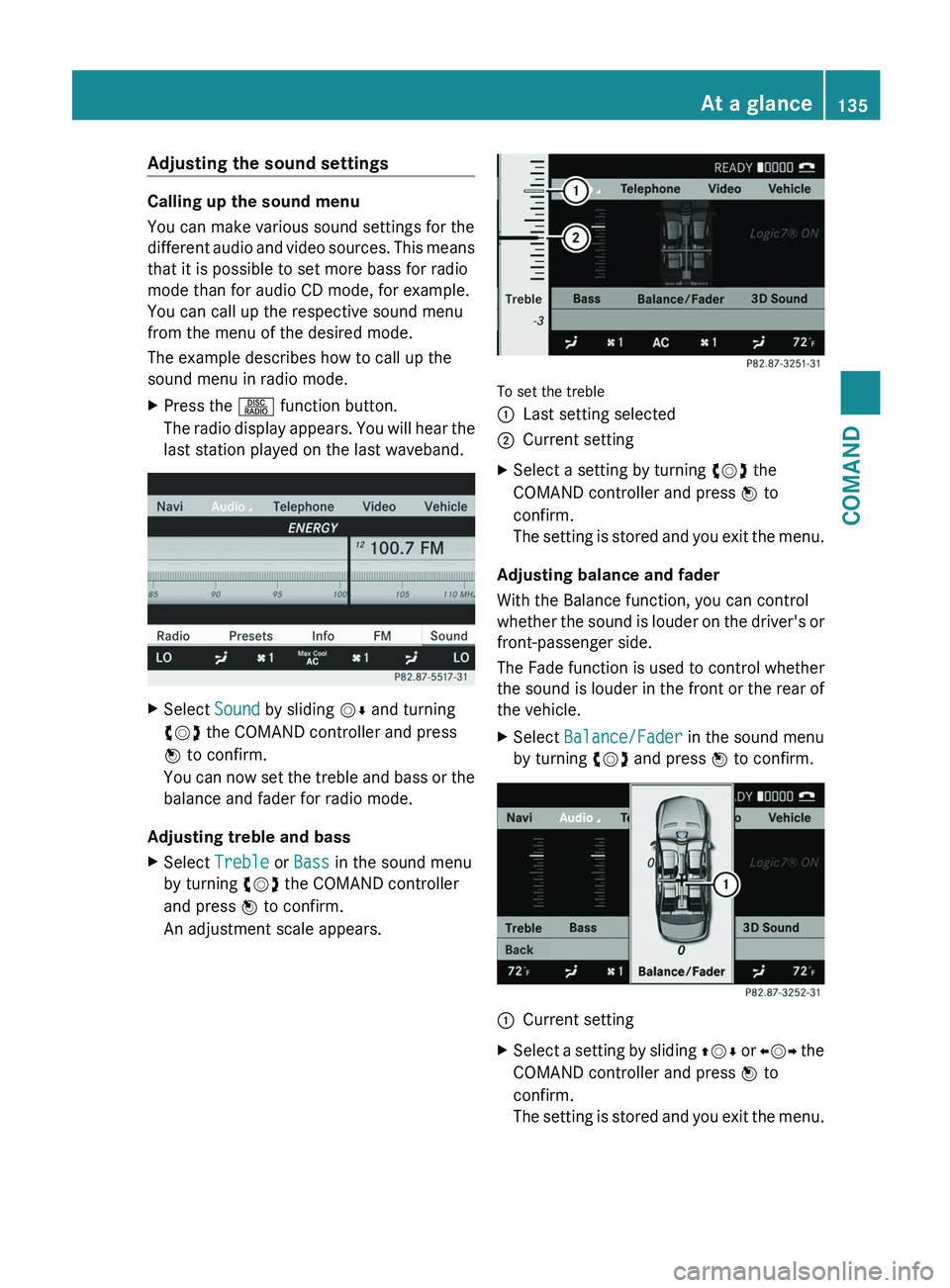
Calling up the sound menu
You can make various sound settings for the
different
audio and video sources. This means
that it is possible to set more bass for radio
mode than for audio CD mode, for example.
You can call up the respective sound menu
from the menu of the desired mode.
The example describes how to call up the
sound menu in radio mode.
X Press the R function button.
The
radio display appears. You will hear the
last station played on the last waveband. X
Select Sound by sliding VÆ and turning
cVd the COMAND controller and press
W to confirm.
You
can now set the treble and bass or the
balance and fader for radio mode.
Adjusting treble and bass
X Select Treble or Bass in the sound menu
by turning cVd the COMAND controller
and press W to confirm.
An adjustment scale appears. To set the treble
:
Last setting selected
; Current setting
X Select a setting by turning cVd the
COMAND controller and press W to
confirm.
The
setting is stored and you exit the menu.
Adjusting balance and fader
With the Balance function, you can control
whether
the sound is louder on the driver's or
front-passenger side.
The Fade function is used to control whether
the sound is louder in the front or the rear of
the vehicle.
X Select Balance/Fader in the sound menu
by turning cVd and press W to confirm. :
Current setting
X Select a setting by sliding ZVÆ
or XVY the
COMAND controller and press W to
confirm.
The setting is stored and you exit the menu. At a glance
135
COMAND Z
Page 138 of 536
Surround sound
General information
If your vehicle is equipped with the harman/
kardon
®
Logic 7 ®
surround sound system,
you can set the optimum surround sound for
every passenger.
The harman/kardon ®
Logic 7 ®
surround
sound system is available for the following
operating modes:
R radio (FM only)
R satellite radio
R audio CD
R audio DVD (MLP, dts, PCM and Dolby
Digital audio formats)
R MP3 (including SD memory card)
R Media Interface
R video DVD (PCM, dts and Dolby Digital
audio formats)
R AUX
Because
some DVDs contain both stereo and
multichannel audio formats, it may be
necessary to set the audio format
(Y page 227).
i The Logic7 ®
ON function enables
playback of, e.g. stereo recordings with a
surround sound experience for every
passenger. It enables optimum playback of
music and films on CD, audio DVD or video
DVD with multichannel audio formats, such
as MLP, dts or Dolby Digital. This results in
sound characteristics like those intended
by the sound engineer when the original
was recorded.
i If you select LOGIC7®
OFF, the sound
system plays the tracks as stored on the
medium. Due to the design of the
passenger compartment, an optimum
audio experience cannot be guaranteed for
all passengers.
i Discs which support the audio formats
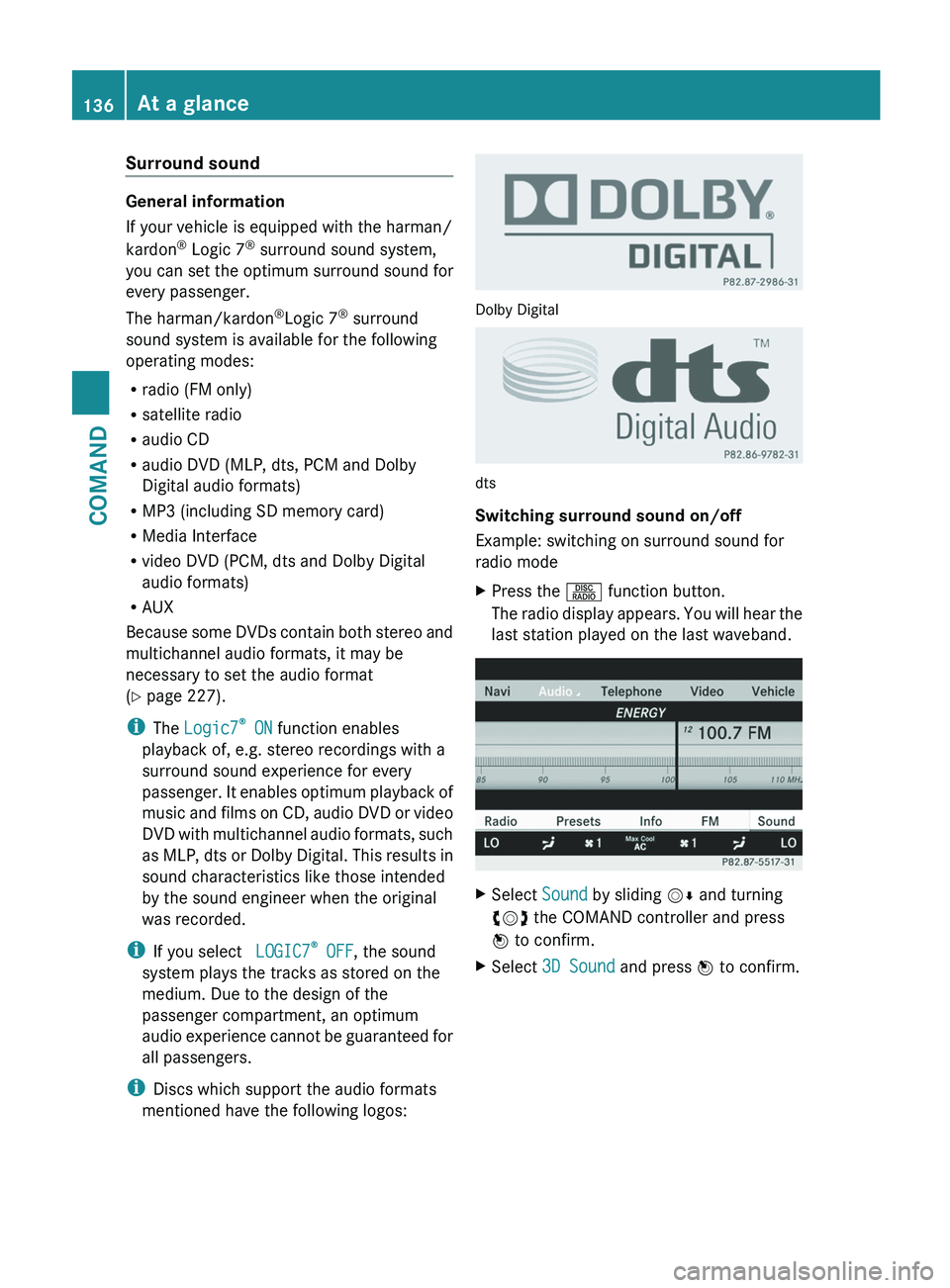
mentioned have the following logos: Dolby Digital
dts
Switching surround sound on/off
Example: switching on surround sound for
radio mode
X
Press the R function button.
The
radio display appears. You will hear the
last station played on the last waveband. X
Select Sound by sliding VÆ and turning
cVd the COMAND controller and press
W to confirm.
X Select 3D Sound and press W to confirm.136
At a glance
COMAND
Page 139 of 536
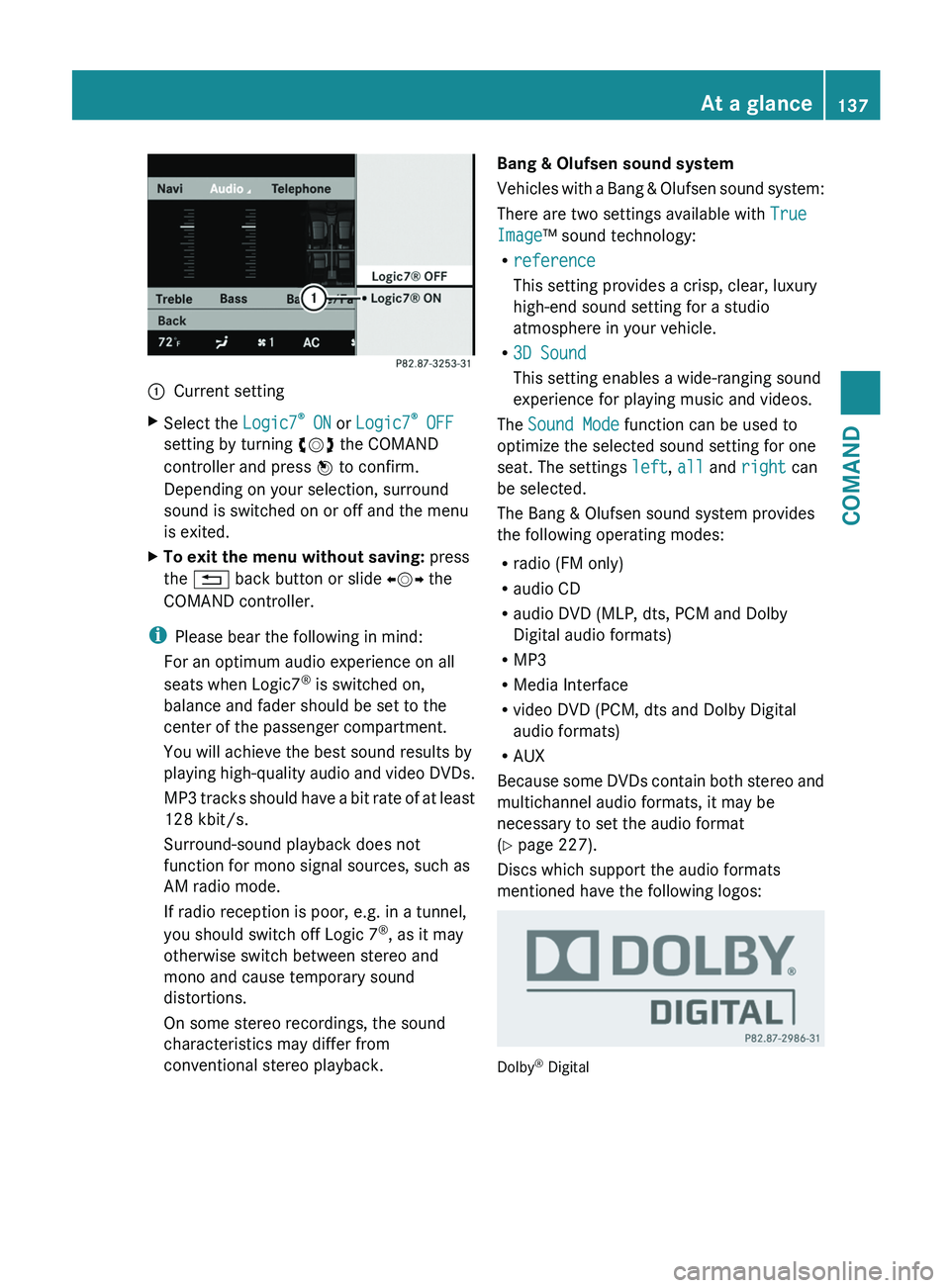
:
Current setting
X Select the Logic7®
ON or Logic7 ®
OFF
setting by turning cVd the COMAND
controller and press W to confirm.
Depending on your selection, surround
sound is switched on or off and the menu
is exited.
X To exit the menu without saving: press
the % back button or slide XVY the
COMAND controller.
i Please bear the following in mind:
For an optimum audio experience on all
seats when Logic7 ®
is switched on,
balance and fader should be set to the
center of the passenger compartment.
You will achieve the best sound results by
playing
high-quality audio and video DVDs.
MP3 tracks should have a bit rate of at least
128 kbit/s.
Surround-sound playback does not
function for mono signal sources, such as
AM radio mode.
If radio reception is poor, e.g. in a tunnel,
you should switch off Logic 7 ®
, as it may
otherwise switch between stereo and
mono and cause temporary sound
distortions.
On some stereo recordings, the sound
characteristics may differ from
conventional stereo playback. Bang & Olufsen sound system
Vehicles
with a Bang & Olufsen sound system:
There are two settings available with True
Image™ sound technology:
R reference
This setting provides a crisp, clear, luxury
high-end sound setting for a studio
atmosphere in your vehicle.
R 3D Sound
This setting enables a wide-ranging sound
experience for playing music and videos.
The Sound Mode function can be used to
optimize the selected sound setting for one
seat. The settings left, all and right can
be selected.
The Bang & Olufsen sound system provides
the following operating modes:
R radio (FM only)
R audio CD
R audio DVD (MLP, dts, PCM and Dolby
Digital audio formats)
R MP3
R Media Interface
R video DVD (PCM, dts and Dolby Digital
audio formats)
R AUX
Because some DVDs contain both stereo and
multichannel audio formats, it may be
necessary to set the audio format
(Y page 227).
Discs which support the audio formats
mentioned have the following logos: Dolby
®
Digital At a glance
137
COMAND Z
Page 140 of 536
dts™
MLP™
Selecting settings for the Bang & Olufsen
sound system
Calling up the selection menu
X
Select Sound.
X Highlight Bang & Olufsen.
X Press W.
A selection menu appears.
A # dot in front of an entry indicates the
current setting.
Selecting the setting for True Image™
X Turn cVd or slide ZVÆ and highlight
reference or 3D Sound.
X Press W.
Selecting sound mode
X Select Sound Mode in the selection menu.
X Turn cVd or slide ZVÆ and highlight left,
all or right.
X Press W.
X To exit the menu: press the % back
button beside the COMAND controller.
or
X Slide XVY.
i Please bear the following in mind: You will achieve the best sound results on
your Bang & Olufsen sound system by
playing high-quality audio DVDs and CDs.
MP3
tracks should have a bit rate of at least
224 kbit/s.
When playing using an iPod ®
, the bit rate
should also be at least 224 kbit/s.
For optimum playback quality:
XDeactivate the EQ setting on the
iPod ®
.
Surround-sound playback does not
function for mono signal sources, such as
the medium wave range (MW) in radio
mode.
On some stereo recordings, the sound
characteristics may differ from
conventional stereo playback. Rear Seat Entertainment System
Components Overview
The Rear Seat Entertainment System
comprises:
R
two screens for the rear behind the front-
seat head restraints
R two remote controls
R a CD/DVD drive
R AUX jacks on both screens (display AUX)
and on the CD/DVD drive (drive AUX)
R two sets of cordless headphones138
At a glance
COMAND
Page 141 of 536
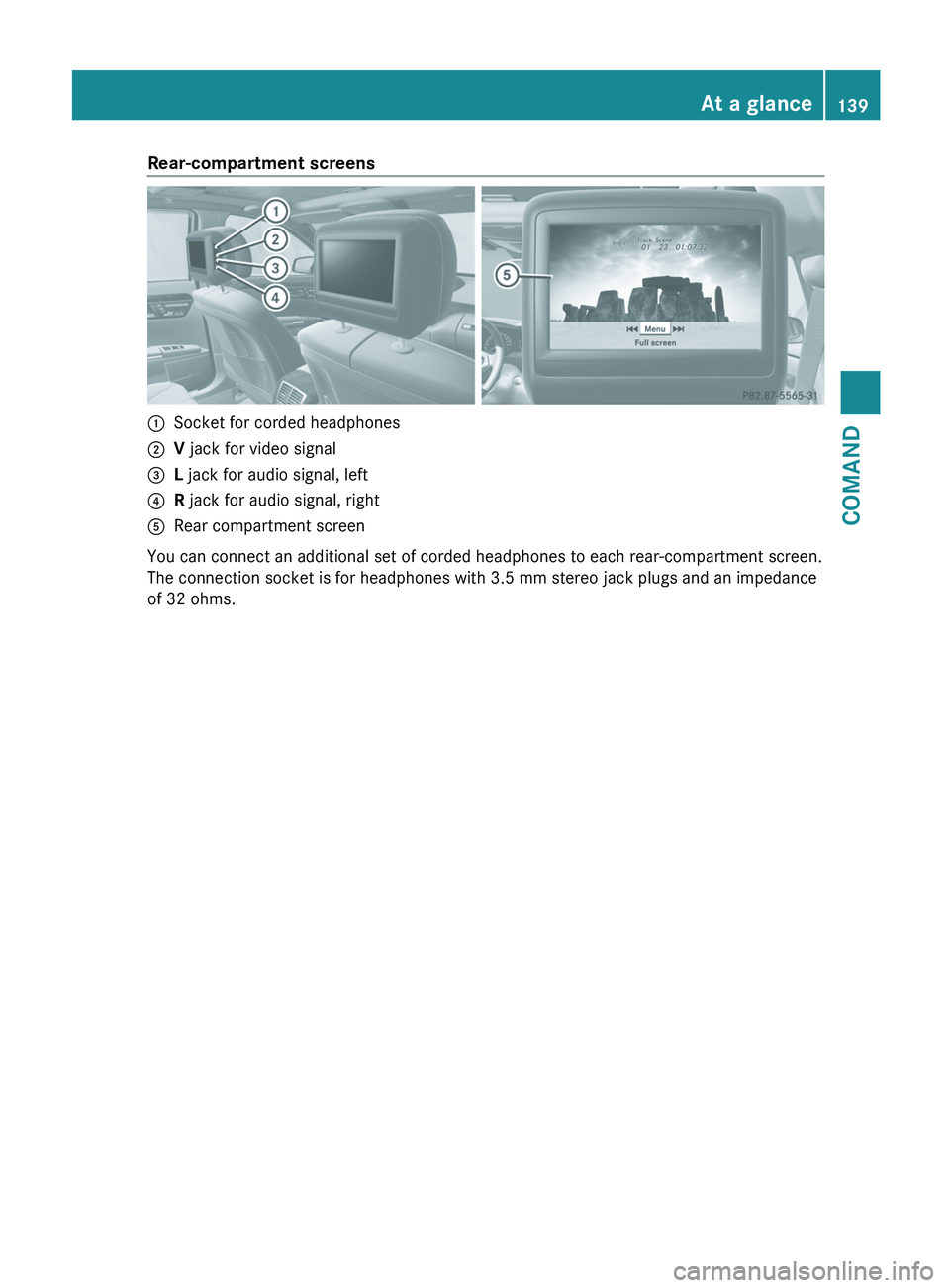
Rear-compartment screens
:
Socket for corded headphones
; V jack for video signal
= L jack for audio signal, left
? R jack for audio signal, right
A Rear compartment screen
You can connect an additional set of corded headphones to each rear-compartment screen.
The connection socket is for headphones with 3.5 mm stereo jack plugs and an impedance
of 32 ohms. At a glance
139
COMAND Z
Page 143 of 536
Selecting a menu/menu item and
confirming your selection
X
Press the =;9: buttons to
select the menu/menu item and press the
9 button to confirm.
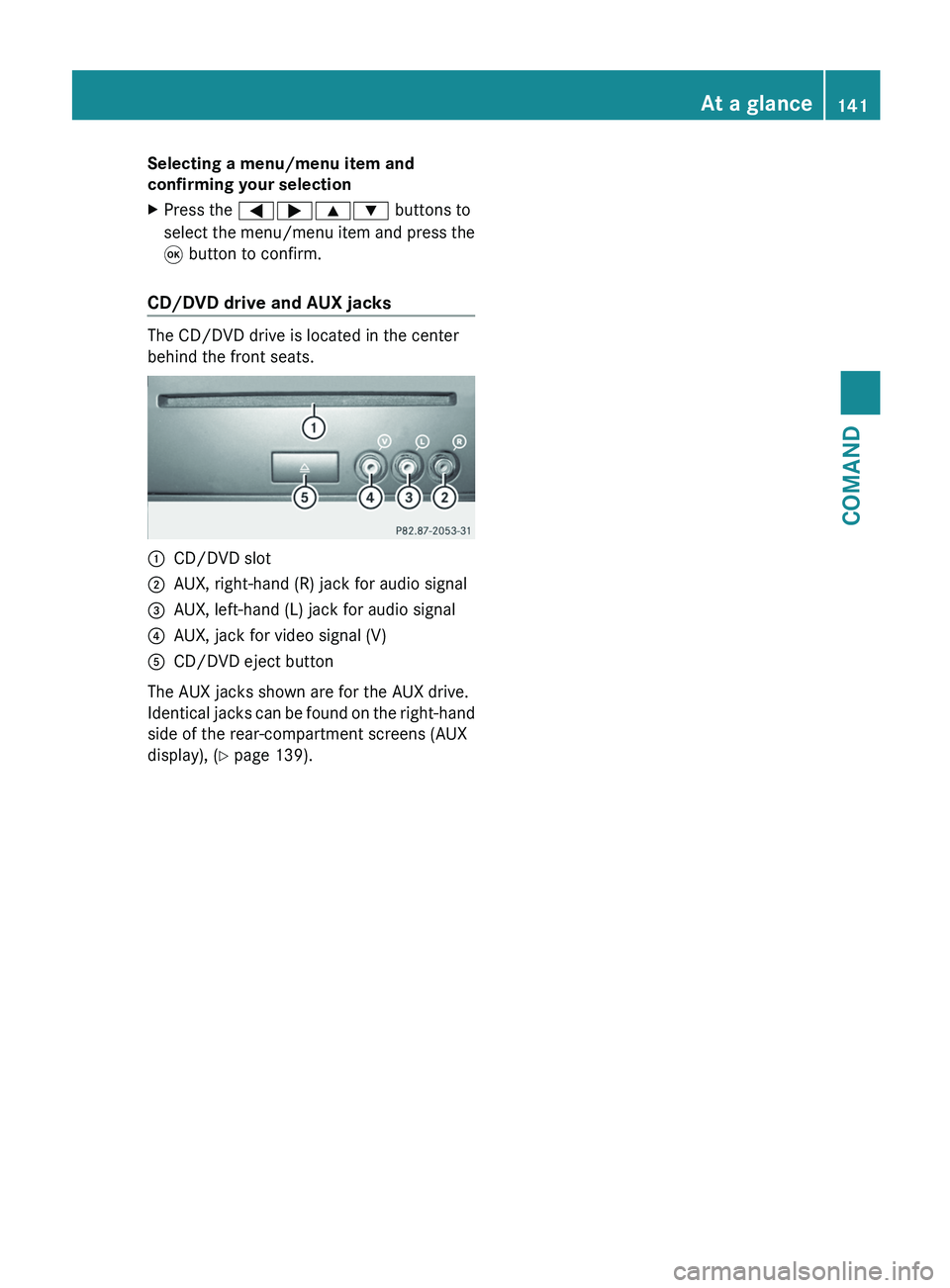
CD/DVD drive and AUX jacks The CD/DVD drive is located in the center
behind the front seats.
:
CD/DVD slot
; AUX, right-hand (R) jack for audio signal
= AUX, left-hand (L) jack for audio signal
? AUX, jack for video signal (V)
A CD/DVD eject button
The AUX jacks shown are for the AUX drive.
Identical
jacks can be found on the right-hand
side of the rear-compartment screens (AUX
display), ( Y page 139). At a glance
141
COMAND Z