display MERCEDES-BENZ S-CLASS SEDAN 2013 Workshop Manual
[x] Cancel search | Manufacturer: MERCEDES-BENZ, Model Year: 2013, Model line: S-CLASS SEDAN, Model: MERCEDES-BENZ S-CLASS SEDAN 2013Pages: 536, PDF Size: 24.14 MB
Page 137 of 536
Adjusting the sound settings
Calling up the sound menu
You can make various sound settings for the
different
audio and video sources. This means
that it is possible to set more bass for radio
mode than for audio CD mode, for example.
You can call up the respective sound menu
from the menu of the desired mode.
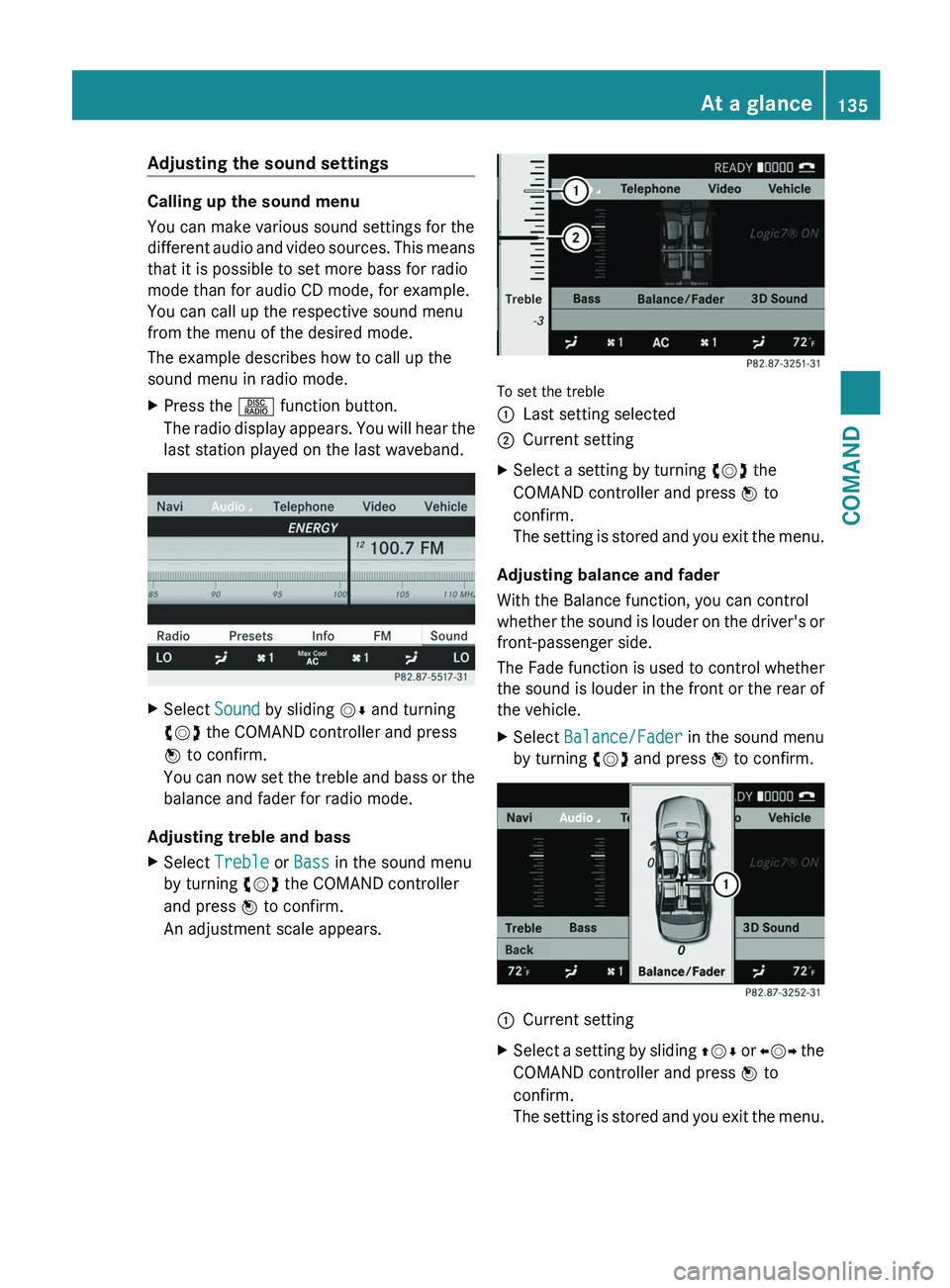
The example describes how to call up the
sound menu in radio mode.
X Press the R function button.
The
radio display appears. You will hear the
last station played on the last waveband. X
Select Sound by sliding VÆ and turning
cVd the COMAND controller and press
W to confirm.
You
can now set the treble and bass or the
balance and fader for radio mode.
Adjusting treble and bass
X Select Treble or Bass in the sound menu
by turning cVd the COMAND controller
and press W to confirm.
An adjustment scale appears. To set the treble
:
Last setting selected
; Current setting
X Select a setting by turning cVd the
COMAND controller and press W to
confirm.
The
setting is stored and you exit the menu.
Adjusting balance and fader
With the Balance function, you can control
whether
the sound is louder on the driver's or
front-passenger side.
The Fade function is used to control whether
the sound is louder in the front or the rear of
the vehicle.
X Select Balance/Fader in the sound menu
by turning cVd and press W to confirm. :
Current setting
X Select a setting by sliding ZVÆ
or XVY the
COMAND controller and press W to
confirm.
The setting is stored and you exit the menu. At a glance
135
COMAND Z
Page 138 of 536
Surround sound
General information
If your vehicle is equipped with the harman/
kardon
®
Logic 7 ®
surround sound system,
you can set the optimum surround sound for
every passenger.
The harman/kardon ®
Logic 7 ®
surround
sound system is available for the following
operating modes:
R radio (FM only)
R satellite radio
R audio CD
R audio DVD (MLP, dts, PCM and Dolby
Digital audio formats)
R MP3 (including SD memory card)
R Media Interface
R video DVD (PCM, dts and Dolby Digital
audio formats)
R AUX
Because
some DVDs contain both stereo and
multichannel audio formats, it may be
necessary to set the audio format
(Y page 227).
i The Logic7 ®
ON function enables
playback of, e.g. stereo recordings with a
surround sound experience for every
passenger. It enables optimum playback of
music and films on CD, audio DVD or video
DVD with multichannel audio formats, such
as MLP, dts or Dolby Digital. This results in
sound characteristics like those intended
by the sound engineer when the original
was recorded.
i If you select LOGIC7®
OFF, the sound
system plays the tracks as stored on the
medium. Due to the design of the
passenger compartment, an optimum
audio experience cannot be guaranteed for
all passengers.
i Discs which support the audio formats
mentioned have the following logos: Dolby Digital
dts
Switching surround sound on/off
Example: switching on surround sound for
radio mode
X
Press the R function button.
The
radio display appears. You will hear the
last station played on the last waveband. X
Select Sound by sliding VÆ and turning
cVd the COMAND controller and press
W to confirm.
X Select 3D Sound and press W to confirm.136
At a glance
COMAND
Page 140 of 536
dts™
MLP™
Selecting settings for the Bang & Olufsen
sound system
Calling up the selection menu
X
Select Sound.
X Highlight Bang & Olufsen.
X Press W.
A selection menu appears.
A # dot in front of an entry indicates the
current setting.
Selecting the setting for True Image™
X Turn cVd or slide ZVÆ and highlight
reference or 3D Sound.
X Press W.
Selecting sound mode
X Select Sound Mode in the selection menu.
X Turn cVd or slide ZVÆ and highlight left,
all or right.
X Press W.
X To exit the menu: press the % back
button beside the COMAND controller.
or
X Slide XVY.
i Please bear the following in mind: You will achieve the best sound results on
your Bang & Olufsen sound system by
playing high-quality audio DVDs and CDs.
MP3
tracks should have a bit rate of at least
224 kbit/s.
When playing using an iPod ®
, the bit rate
should also be at least 224 kbit/s.
For optimum playback quality:
XDeactivate the EQ setting on the
iPod ®
.
Surround-sound playback does not
function for mono signal sources, such as
the medium wave range (MW) in radio
mode.
On some stereo recordings, the sound
characteristics may differ from
conventional stereo playback. Rear Seat Entertainment System
Components Overview
The Rear Seat Entertainment System
comprises:
R
two screens for the rear behind the front-
seat head restraints
R two remote controls
R a CD/DVD drive
R AUX jacks on both screens (display AUX)
and on the CD/DVD drive (drive AUX)
R two sets of cordless headphones138
At a glance
COMAND
Page 143 of 536
Selecting a menu/menu item and
confirming your selection
X
Press the =;9: buttons to
select the menu/menu item and press the
9 button to confirm.
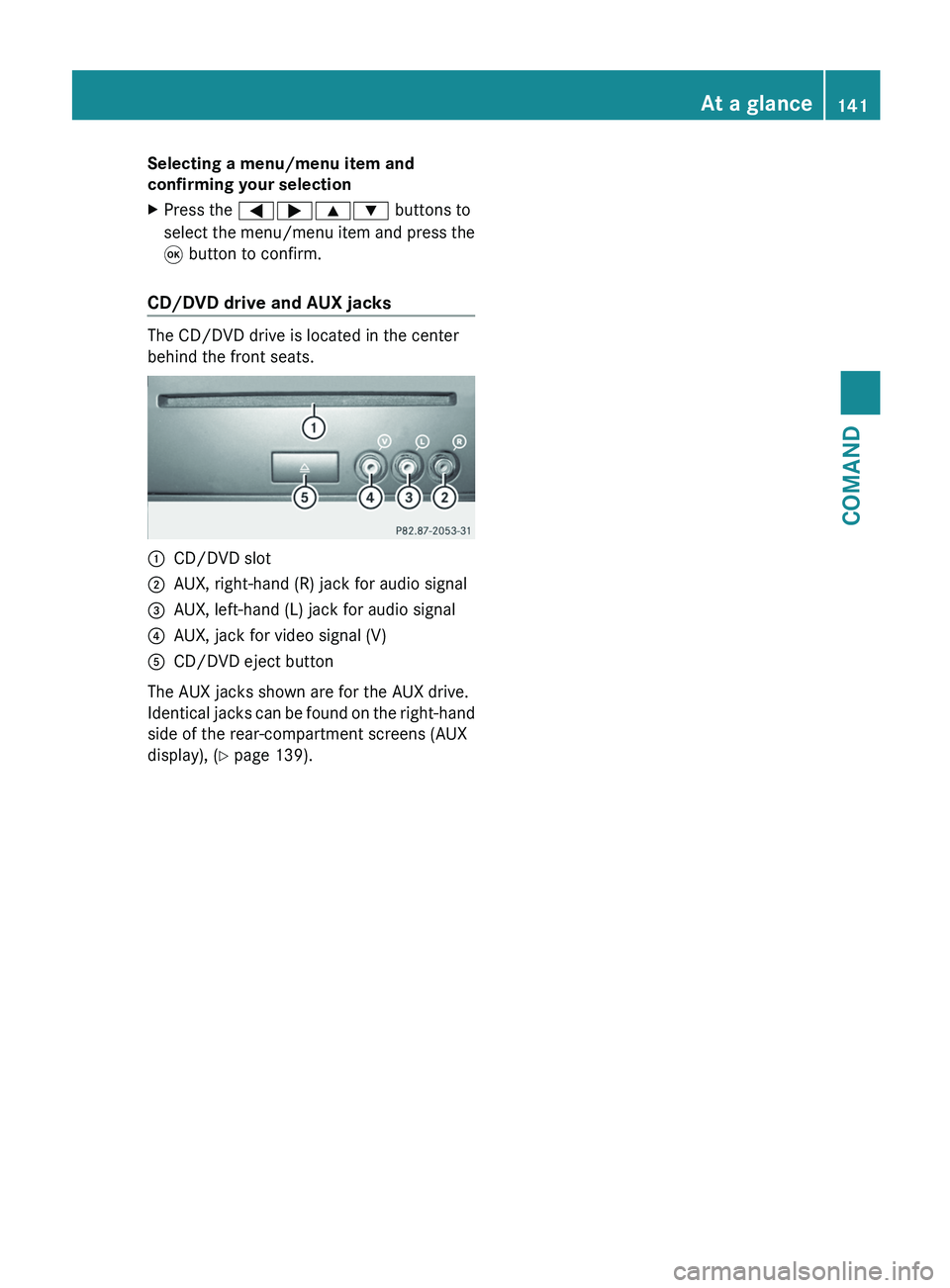
CD/DVD drive and AUX jacks The CD/DVD drive is located in the center
behind the front seats.
:
CD/DVD slot
; AUX, right-hand (R) jack for audio signal
= AUX, left-hand (L) jack for audio signal
? AUX, jack for video signal (V)
A CD/DVD eject button
The AUX jacks shown are for the AUX drive.
Identical
jacks can be found on the right-hand
side of the rear-compartment screens (AUX
display), ( Y page 139). At a glance
141
COMAND Z
Page 144 of 536
Cordless headphones
Overview
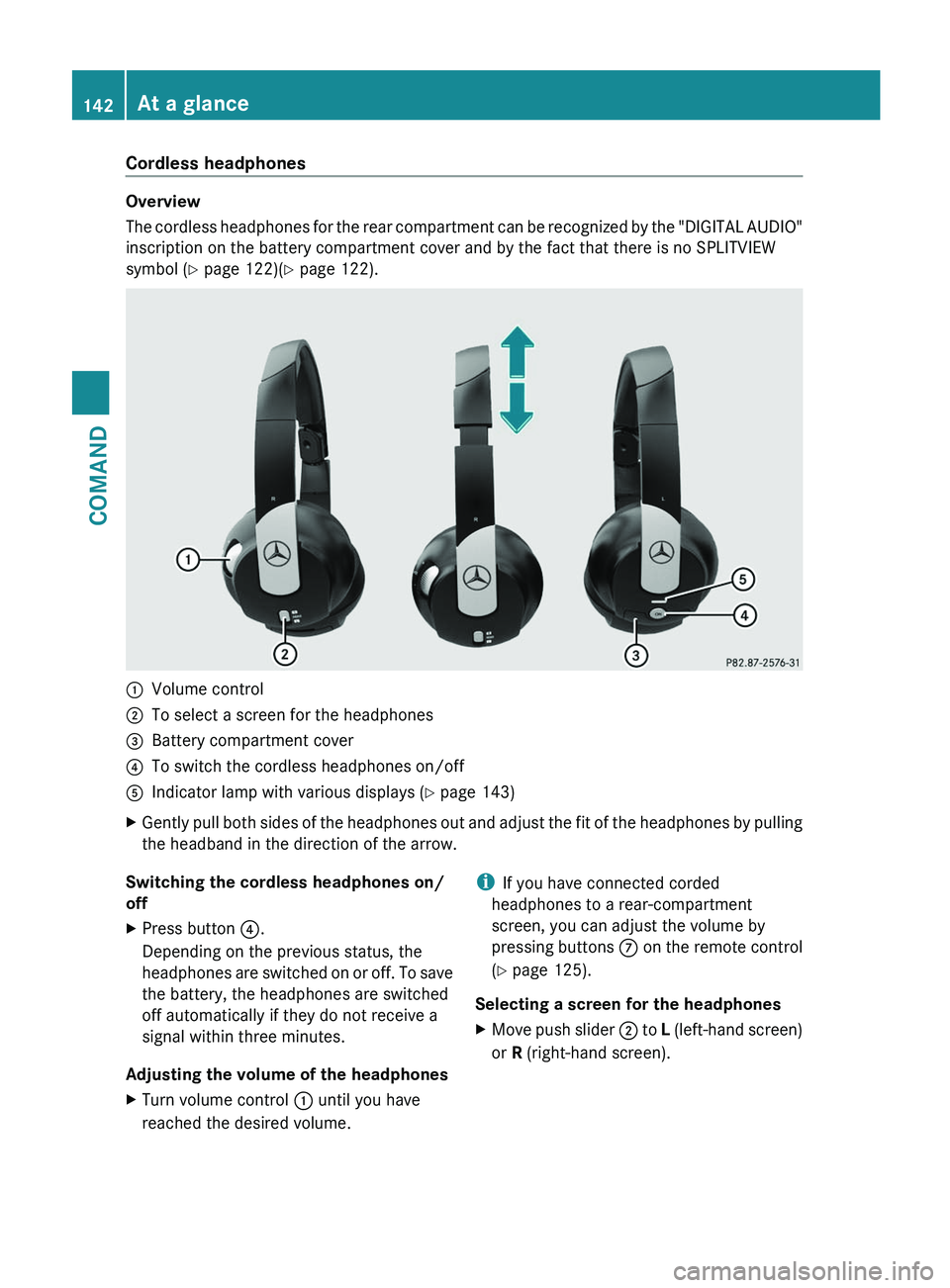
The
cordless headphones for the rear compartment can be recognized by the "DIGITAL AUDIO"
inscription on the battery compartment cover and by the fact that there is no SPLITVIEW
symbol ( Y page 122)( Y page 122).:
Volume control
; To select a screen for the headphones
= Battery compartment cover
? To switch the cordless headphones on/off
A Indicator lamp with various displays ( Y page 143)
X Gently pull both sides of the headphones out and adjust the fit of the headphones by pulling
the headband in the direction of the arrow.
Switching the cordless headphones on/
off
X Press button ?.
Depending on the previous status, the
headphones
are switched on or off. To save
the battery, the headphones are switched
off automatically if they do not receive a
signal within three minutes.
Adjusting the volume of the headphones
X Turn volume control : until you have
reached the desired volume. i
If you have connected corded
headphones to a rear-compartment
screen, you can adjust the volume by
pressing
buttons C on the remote control
(Y page 125).
Selecting a screen for the headphones
X Move push slider ;
to L (left-hand screen)
or R (right-hand screen). 142
At a glance
COMAND
Page 145 of 536
Indicator lamp displays
The indicator lamp displays the following
possible stati for the batteries and
headphones:
Display Status
Green The batteries are fine.
Red The batteries are almost
discharged.
Continuou
sly lit
either
green or
red The headphones are switched
on
and connected to a screen. Flashes
either
green or
red The headphones are
searching for the connection
to a screen.
No display
(dark) The headphones are switched
off or the batteries are
discharged.
Connecting additional headphones
You can connect an additional set of corded
headphones to each rear-compartment
screen (Y page 139).
Changing batteries
Batteries are required for the remote control
and
for the two sets of cordless headphones.
Changing batteries ( Y page 247)System settings
Display settings
Switching the display on/off X
Select Vehicle by turning cVd the
COMAND controller and press W to
confirm.
X Select Display OFF by turning cVd the
COMAND controller and press W to
confirm. X
To switch on the display: press W or
cVd turn the COMAND controller.
Display design Your COMAND display features optimized
designs for operation during daytime and
night-time hours. You can customize the
design to suit your personal preferences by
manually
selecting day or night design or opt
for an automatic setting.
X Select Vehicle by turning cVd the
COMAND controller and press W to
confirm.
X Select System by turning cVd the
COMAND controller and press W to
confirm.
X Select Display and press W to confirm.
X Select Day Mode, Night Mode or
Automatic by turning cVd the COMAND
controller and press W to confirm.
The # icon indicates the current setting. Design Explanation
Day Mode The display is set
permanently to day
design.
Night Mode The display is set
permanently to night
design.
Automatic The display design
changes depending on
the brightness around
the vehicle.
i
In the Automatic setting, COMAND
evaluates the readings from the automatic
vehicle light sensor and switches between
the display designs automatically. System settings
143
COMAND Z
Page 148 of 536
guides you through the training with spoken
instructions.
X
Select Vehicle in the main function bar by
turning cVd the COMAND controller and
press W to confirm.
X Select System by turning cVd the
COMAND controller and press W to
confirm.
X Select Voice Control and press W to
confirm.
X Select Start New Individualization
and press W to confirm.
You
see and hear a prompt asking whether
you would like further information.
X Select Yes or No and press W to confirm.
If you select No, the first part of
individualization begins. You will be asked
whether you would like to train digits or
voice commands.
If you select Yes, you will see and hear
information on the individualization
process. The first part of individualization
then begins automatically.
X To close the display: press W the
COMAND controller.
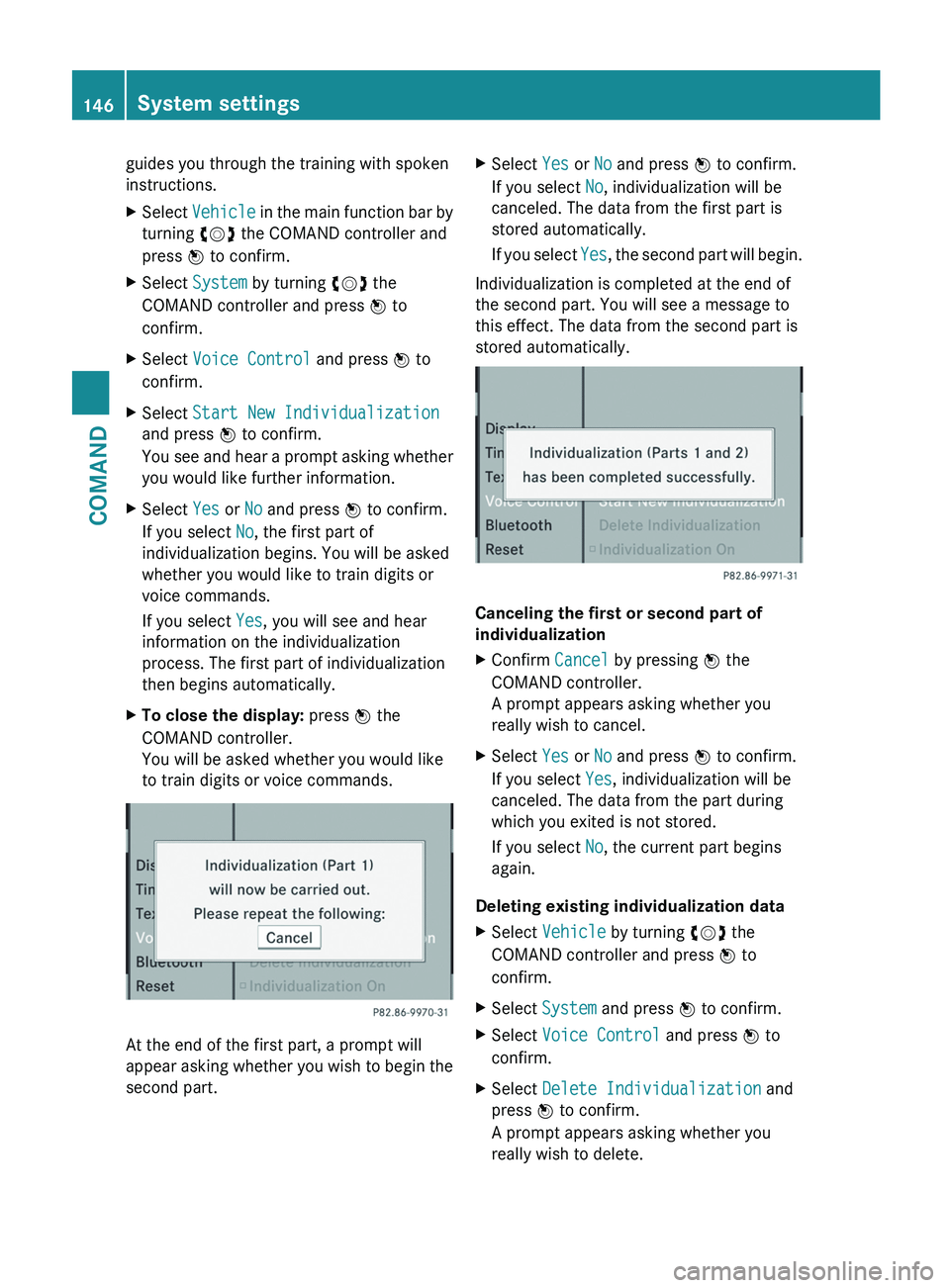
You will be asked whether you would like
to train digits or voice commands. At the end of the first part, a prompt will
appear
asking whether you wish to begin the
second part. X
Select Yes or No and press W to confirm.
If you select No, individualization will be
canceled. The data from the first part is
stored automatically.
If
you select Yes, the second part will begin.
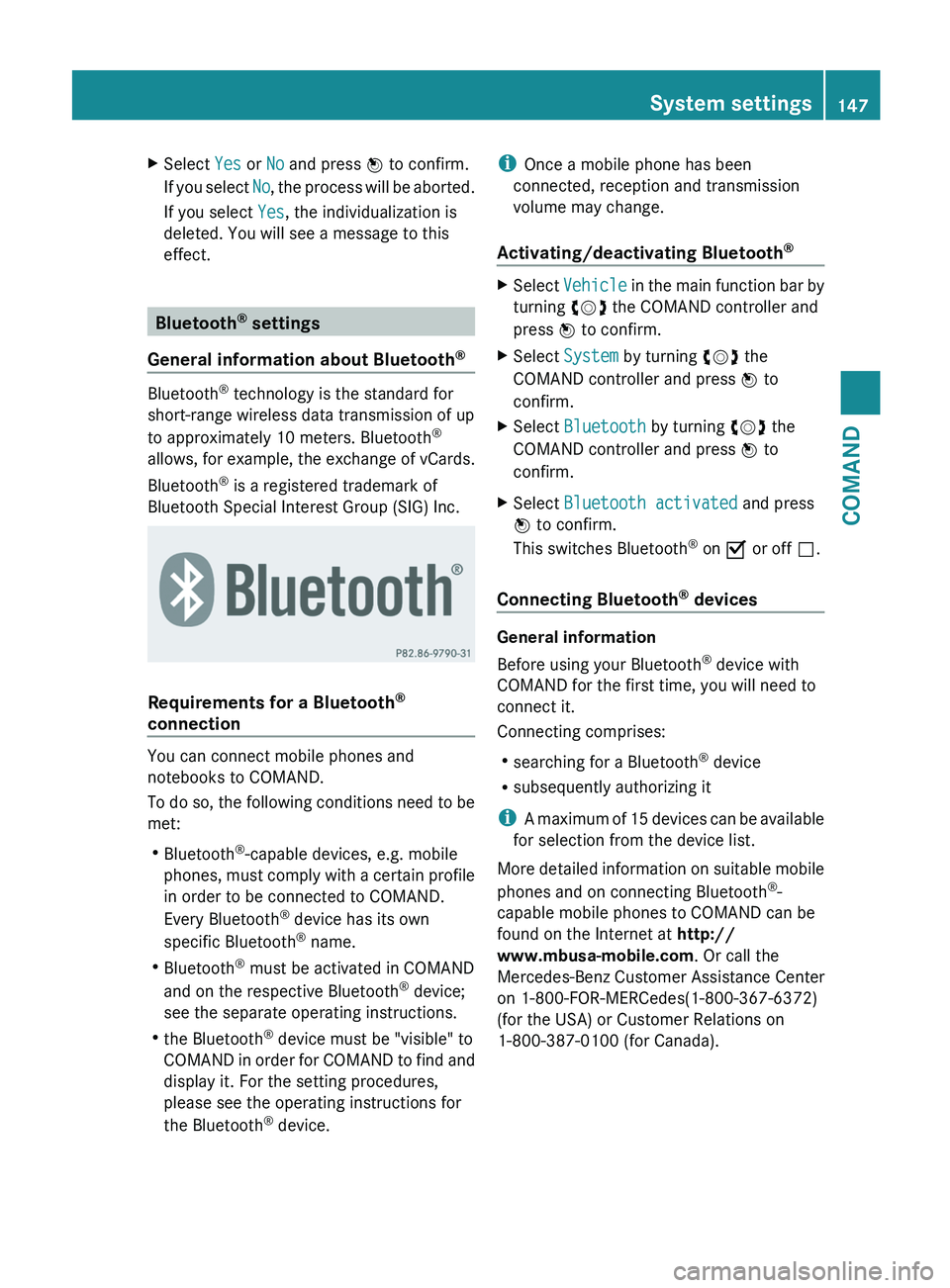
Individualization is completed at the end of
the second part. You will see a message to
this effect. The data from the second part is
stored automatically. Canceling the first or second part of
individualization
X
Confirm Cancel by pressing W the
COMAND controller.
A prompt appears asking whether you
really wish to cancel.
X Select Yes or No and press W to confirm.
If you select Yes, individualization will be
canceled. The data from the part during
which you exited is not stored.
If you select No, the current part begins
again.
Deleting existing individualization data
X Select Vehicle by turning cVd the
COMAND controller and press W to
confirm.
X Select System and press W to confirm.
X Select Voice Control and press W to
confirm.
X Select Delete Individualization and
press W to confirm.
A prompt appears asking whether you
really wish to delete. 146
System settings
COMAND
Page 149 of 536
X
Select Yes or No and press W to confirm.
If you select No, the process will be aborted.
If you select Yes, the individualization is
deleted. You will see a message to this
effect. Bluetooth
®
settings
General information about Bluetooth ®Bluetooth
®
technology is the standard for
short-range wireless data transmission of up
to approximately 10 meters. Bluetooth ®
allows,
for example, the exchange of vCards.
Bluetooth ®
is a registered trademark of
Bluetooth Special Interest Group (SIG) Inc. Requirements for a Bluetooth
®
connection You can connect mobile phones and
notebooks to COMAND.
To
do so, the following conditions need to be
met:
R Bluetooth ®
-capable devices, e.g. mobile
phones, must comply with a certain profile
in order to be connected to COMAND.
Every Bluetooth ®
device has its own
specific Bluetooth ®
name.
R Bluetooth ®
must be activated in COMAND
and on the respective Bluetooth ®
device;
see the separate operating instructions.
R the Bluetooth ®
device must be "visible" to
COMAND in order for COMAND to find and
display it. For the setting procedures,
please see the operating instructions for
the Bluetooth ®
device. i
Once a mobile phone has been
connected, reception and transmission
volume may change.
Activating/deactivating Bluetooth ® X
Select Vehicle
in the main function bar by
turning cVd the COMAND controller and
press W to confirm.
X Select System by turning cVd the
COMAND controller and press W to
confirm.
X Select Bluetooth by turning cVd the
COMAND controller and press W to
confirm.
X Select Bluetooth activated and press
W to confirm.
This switches Bluetooth ®
on O or off ª.
Connecting Bluetooth ®
devices General information
Before using your Bluetooth
®
device with
COMAND for the first time, you will need to
connect it.
Connecting comprises:
R searching for a Bluetooth ®
device
R subsequently authorizing it
i A
maximum of 15 devices can be available
for selection from the device list.
More detailed information on suitable mobile
phones and on connecting Bluetooth ®
-
capable mobile phones to COMAND can be
found on the Internet at http://
www.mbusa-mobile.com . Or call the
Mercedes-Benz Customer Assistance Center
on 1-800-FOR-MERCedes(1-800-367-6372)
(for the USA) or Customer Relations on
1-800-387-0100 (for Canada). System settings
147
COMAND Z
Page 150 of 536
Searching for Bluetooth
®
devices
X Activate Bluetooth ®
(Y page 147).
X Select Vehicle in the main function bar by
turning cVd the COMAND controller and
press W to confirm.
X Select System by turning cVd the
COMAND controller and press W to
confirm.
X Select Bluetooth by turning cVd the
COMAND controller and press W to
confirm.
X Select Search for Bluetooth Devices
and press W to confirm.
X Select Update and press W to confirm.
COMAND
searches for Bluetooth ®
devices
within range. After a short while, the
Bluetooth ®
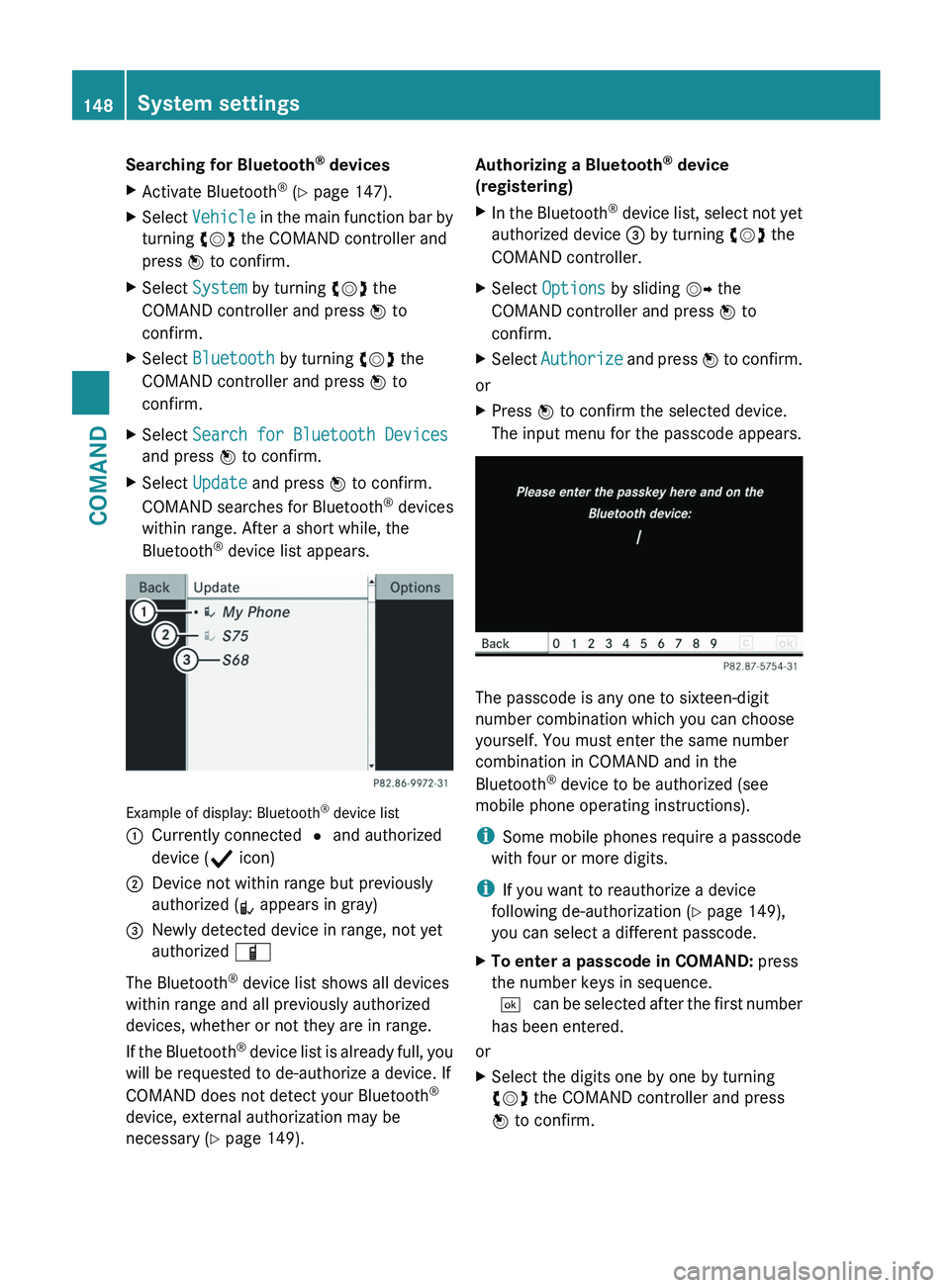
device list appears. Example of display: Bluetooth
®
device list
: Currently connected # and authorized
device ( Y icon)
; Device not within range but previously
authorized ( L appears in gray)
= Newly detected device in range, not yet
authorized Ï
The Bluetooth ®
device list shows all devices
within range and all previously authorized
devices, whether or not they are in range.
If
the Bluetooth ®
device list is already full, you
will be requested to de-authorize a device. If
COMAND does not detect your Bluetooth ®
device, external authorization may be
necessary ( Y page 149). Authorizing a Bluetooth
®
device
(registering)
X In the Bluetooth ®
device list, select not yet
authorized device = by turning cVd the
COMAND controller.
X Select Options by sliding VY the
COMAND controller and press W to
confirm.
X Select Authorize
and press W to confirm.
or
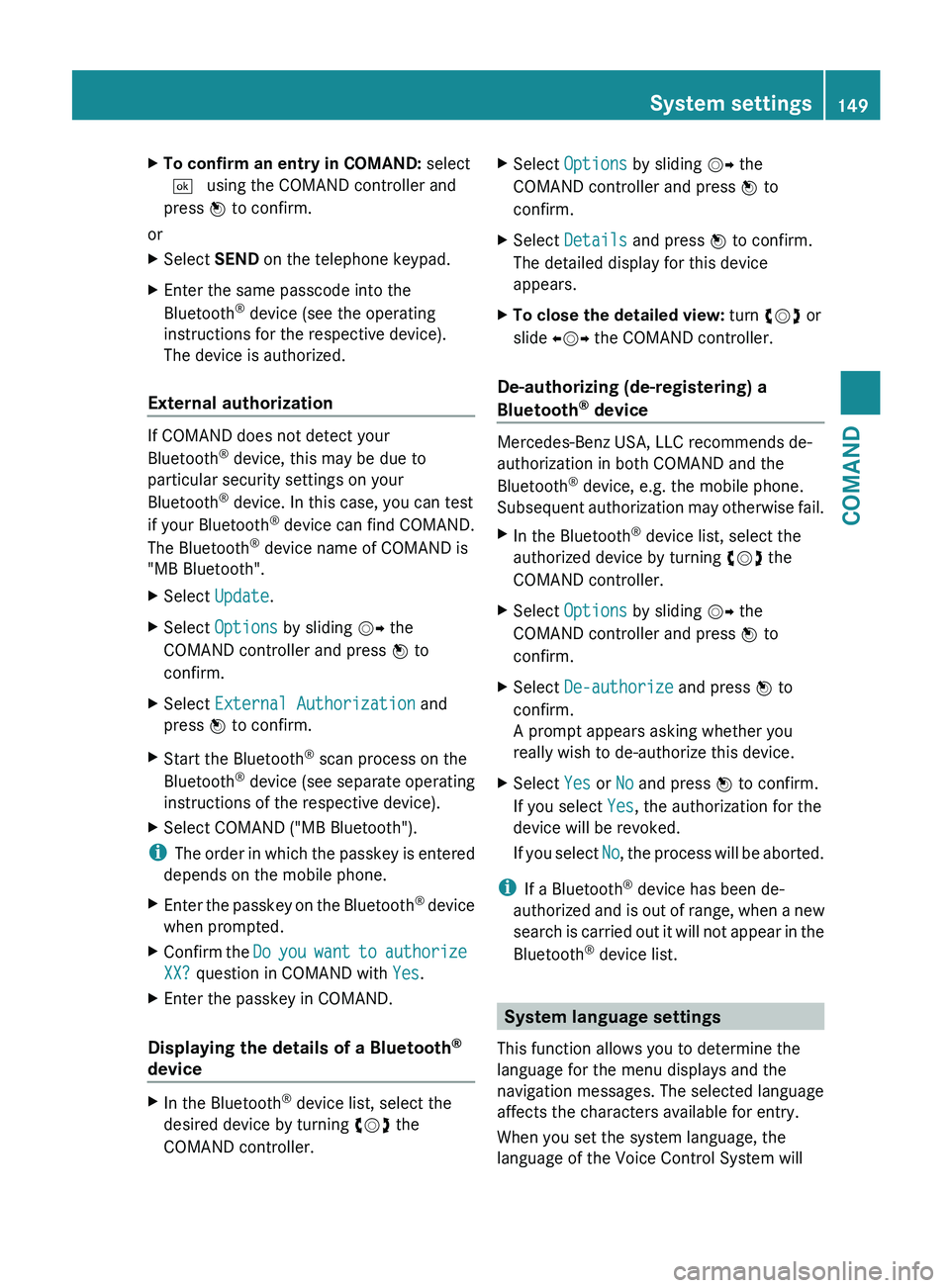
X Press W to confirm the selected device.
The input menu for the passcode appears. The passcode is any one to sixteen-digit
number combination which you can choose
yourself. You must enter the same number
combination in COMAND and in the
Bluetooth
®
device to be authorized (see
mobile phone operating instructions).
i Some mobile phones require a passcode
with four or more digits.
i If you want to reauthorize a device
following de-authorization ( Y page 149),
you can select a different passcode.
X To enter a passcode in COMAND: press
the number keys in sequence.
¬
can be selected after the first number
has been entered.
or
X Select the digits one by one by turning
cVd the COMAND controller and press
W to confirm.148
System settings
COMAND
Page 151 of 536
X
To confirm an entry in COMAND: select
¬ using the COMAND controller and
press W to confirm.
or
X Select SEND on the telephone keypad.
X Enter the same passcode into the
Bluetooth ®
device (see the operating
instructions for the respective device).
The device is authorized.
External authorization If COMAND does not detect your
Bluetooth
®
device, this may be due to
particular security settings on your
Bluetooth ®
device. In this case, you can test
if your Bluetooth ®
device can find COMAND.
The Bluetooth ®
device name of COMAND is
"MB Bluetooth".
X Select Update.
X Select Options by sliding VY the
COMAND controller and press W to
confirm.
X Select External Authorization and
press W to confirm.
X Start the Bluetooth ®
scan process on the
Bluetooth ®
device (see separate operating
instructions of the respective device).
X Select COMAND ("MB Bluetooth").
i The
order in which the passkey is entered
depends on the mobile phone.
X Enter the passkey on the Bluetooth ®
device
when prompted.
X Confirm the Do
you want to authorize
XX? question in COMAND with Yes.
X Enter the passkey in COMAND.
Displaying the details of a Bluetooth ®
device X
In the Bluetooth ®
device list, select the
desired device by turning cVd the
COMAND controller. X
Select Options by sliding VY the
COMAND controller and press W to
confirm.
X Select Details and press W to confirm.
The detailed display for this device
appears.
X To close the detailed view: turn cVd or
slide XVY the COMAND controller.
De-authorizing (de-registering) a
Bluetooth ®
device Mercedes-Benz USA, LLC recommends de-
authorization in both COMAND and the
Bluetooth
®
device, e.g. the mobile phone.
Subsequent
authorization may otherwise fail.
X In the Bluetooth ®
device list, select the
authorized device by turning cVd the
COMAND controller.
X Select Options by sliding VY the
COMAND controller and press W to
confirm.
X Select De-authorize and press W to
confirm.
A prompt appears asking whether you
really wish to de-authorize this device.
X Select Yes or No and press W to confirm.
If you select Yes, the authorization for the
device will be revoked.
If
you select No, the process will be aborted.
i If a Bluetooth ®
device has been de-
authorized
and is out of range, when a new
search is carried out it will not appear in the
Bluetooth ®
device list. System language settings
This function allows you to determine the
language for the menu displays and the
navigation messages. The selected language
affects the characters available for entry.
When you set the system language, the
language of the Voice Control System will System settings
149
COMAND Z