display MERCEDES-BENZ S-COUPE 2015 Manual Online
[x] Cancel search | Manufacturer: MERCEDES-BENZ, Model Year: 2015, Model line: S-COUPE, Model: MERCEDES-BENZ S-COUPE 2015Pages: 286, PDF Size: 29.85 MB
Page 179 of 286
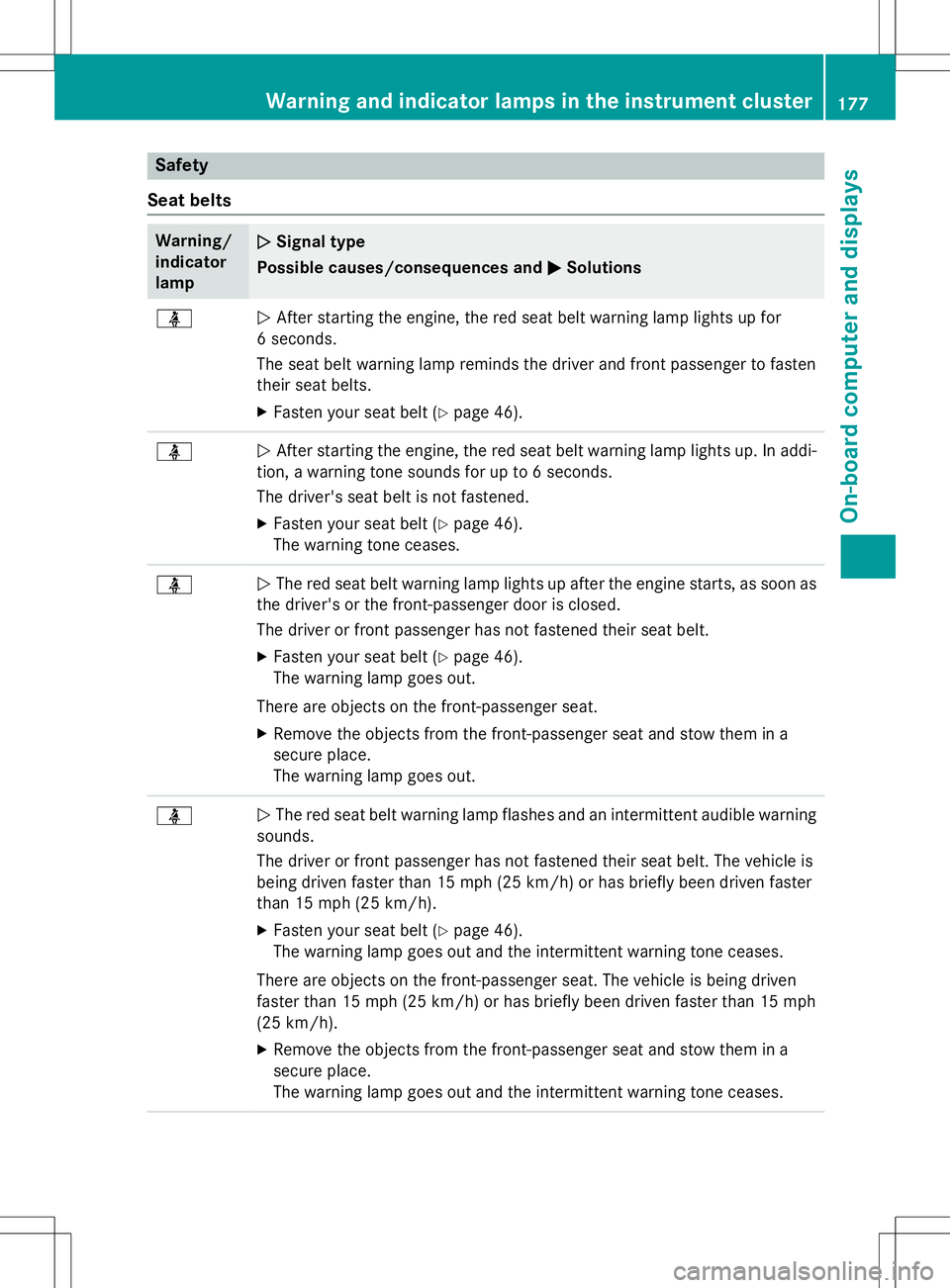
Safety
Seat belts
Warning/ indicatorlampNSignal type
Possible causes/consequences and M
Solutions
üNAfter starting the engine, the red seat belt warning lamp lights up for
6 seconds.
The seat belt warning lamp reminds the driver and front passenger to fasten
their seat belts. X Fasten your seat belt ( Ypage 46).
üN After starting the engine, the red seat belt warning lamp lights up. In addi-
tion, a warning tone sounds for up to 6 seconds.
The driver's seat belt is not fastened.
X Fasten your seat belt ( Ypage 46).
The warning tone ceases.
üN The red seat belt warning lamp lights up after the engine starts, as soon as
the driver's or the front-passenger door is closed.
The driver or front passenger has not fastened their seat belt.
X Fasten your seat belt ( Ypage 46).
The warning lamp goes out.
There are objects on the front-passenger seat. X Remove the objects from the front-passenger seat and stow them in a
secure place.
The warning lamp goes out.
üN The red seat belt warning lamp flashes and an intermittent audible warning
sounds.
The driver or front passenger has not fastened their seat belt. The vehicle is
being driven faster than 15 mph (25 km/h) or has briefly been driven faster
than 15 mph (25 km/ h).
X Fasten your seat belt ( Ypage 46).
The warning lamp goes out and the intermittent warning tone ceases.
There are objects on the front-passenger seat. The vehicle is being driven
faster than 15 mph (25 km/h) or has briefly been driven faster than 15 mph
(25 km/h). X Remove the objects from the front-passenger seat and stow them in a
secure place.
The warning lamp goes out and the intermittent warning tone ceases.
Warning and indicator lamps in the instrument cluster177
On-board computer and displays
Z
Page 180 of 286
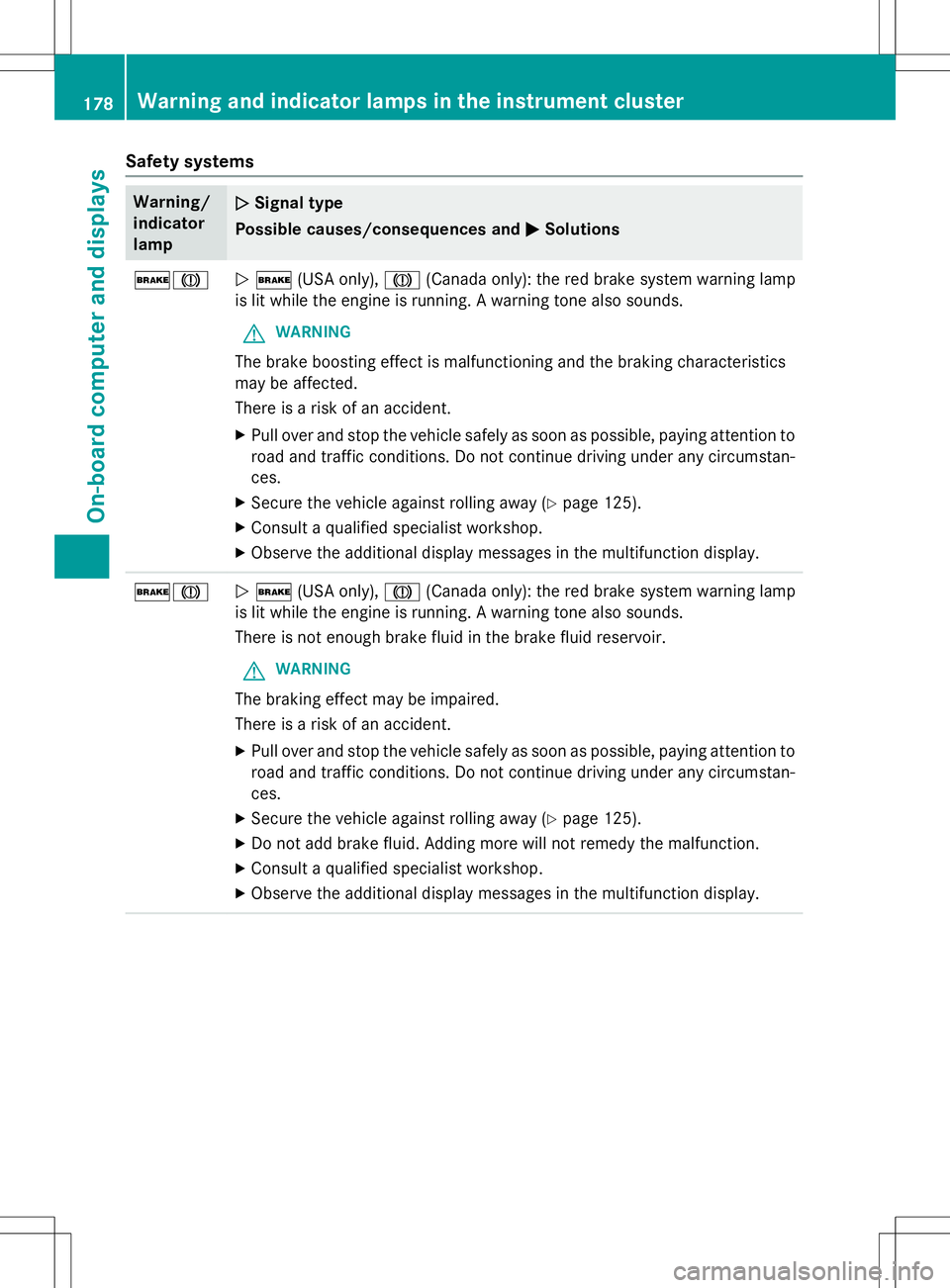
Safety systems
Warning/ indicatorlampNSignal type
Possible causes/consequences and M
Solutions
$JN$ (USA only), J(Canada only): the red brake system warning lamp
is lit while the engine is running. A warning tone also sounds.
GWARNING
The brake boosting effect is malfunctioning and the braking characteristics
may be affected.
There is a risk of an accident.
X Pull over and stop the vehicle safely as soon as possible, paying attention to
road and traffic conditions. Do not continue driving under any circumstan- ces.
X Secure the vehicle against rolling away ( Ypage 125).
X Consult a qualified specialist workshop.
X Observe the additional display messages in the multifunction display.
$JN $ (USA only), J(Canada only): the red brake system warning lamp
is lit while the engine is running. A warning tone also sounds.
There is not enough brake fluid in the brake fluid reservoir.
GWARNING
The braking effect may be impaired.
There is a risk of an accident.
X Pull over and stop the vehicle safely as soon as possible, paying attention to
road and traffic conditions. Do not continue driving under any circumstan- ces.
X Secure the vehicle against rolling away ( Ypage 125).
X Do not add brake fluid. Adding more will not remedy the malfunction.
X Consult a qualified specialist workshop.
X Observe the additional display messages in the multifunction display.
178Warning and indicator lamps in the instrument cluster
On-board computer and displays
Page 184 of 286
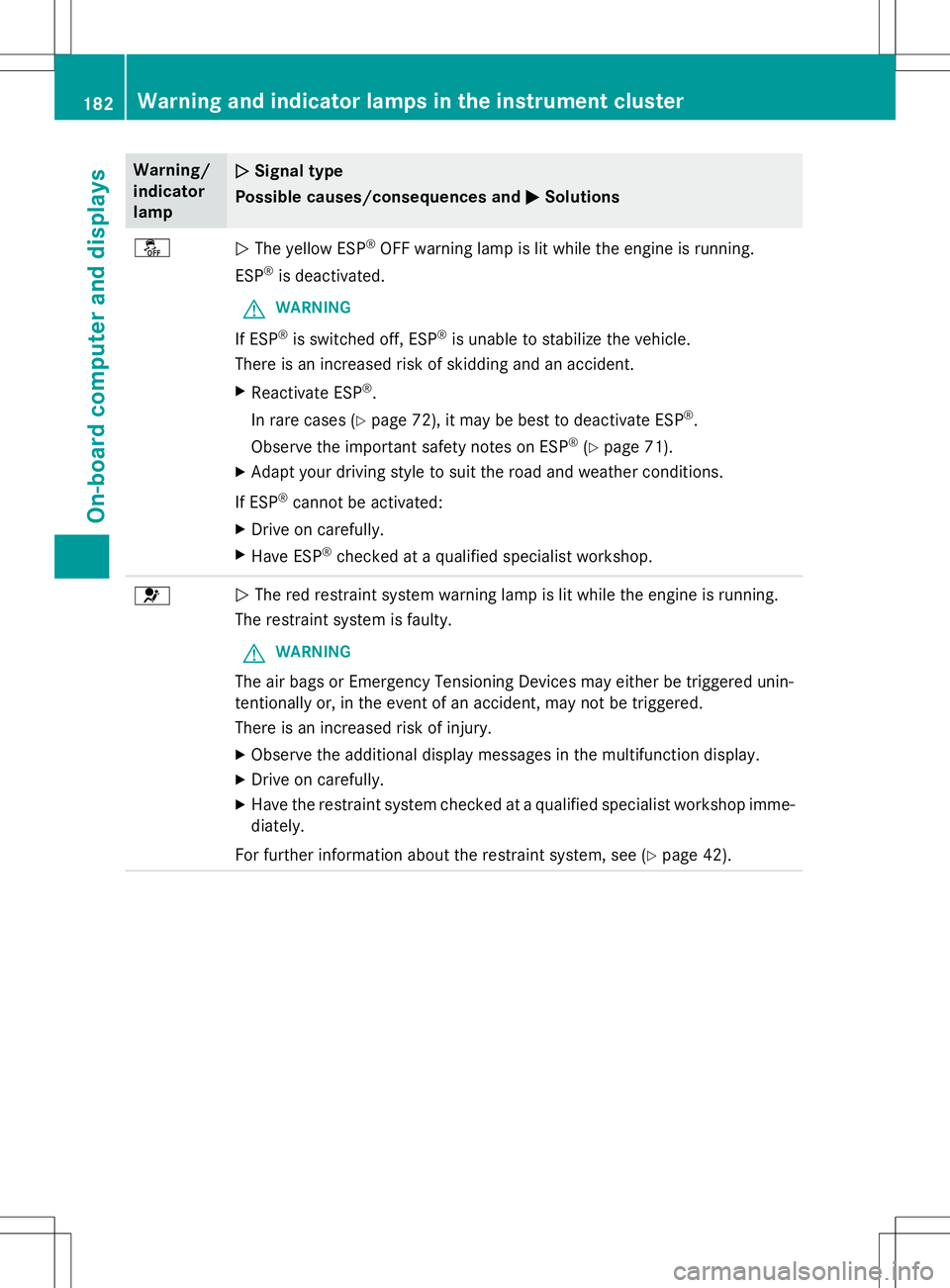
Warning/
indicatorlampNSignal type
Possible causes/consequences and M
Solutions
åNThe yellow ESP ®
OFF warning lamp is lit while the engine is running.
ESP ®
is deactivated.
GWARNING
If ESP ®
is switched off, ESP ®
is unable to stabilize the vehicle.
There is an increased risk of skidding and an accident.
X Reactivate ESP ®
.
In rare cases ( Ypage 72), it may be best to deactivate ESP ®
.
Observe the important safety notes on ESP ®
(Y page 71).
X Adapt your driving style to suit the road and weather conditions.
If ESP ®
cannot be activated:
X Drive on carefully.
X Have ESP ®
checked at a qualified specialist workshop.
6N The red restraint system warning lamp is lit while the engine is running.
The restraint system is faulty.
GWARNING
The air bags or Emergency Tensioning Devices may either be triggered unin-
tentionally or, in the event of an accident, may not be triggered.
There is an increased risk of injury.
X Observe the additional display messages in the multifunction display.
X Drive on carefully.
X Have the restraint system checked at a qualified specialist workshop imme-
diately.
For further information about the restraint system, see ( Ypage 42).
182Warning and indicator lamps in the instrument cluster
On-board computer and displays
Page 185 of 286
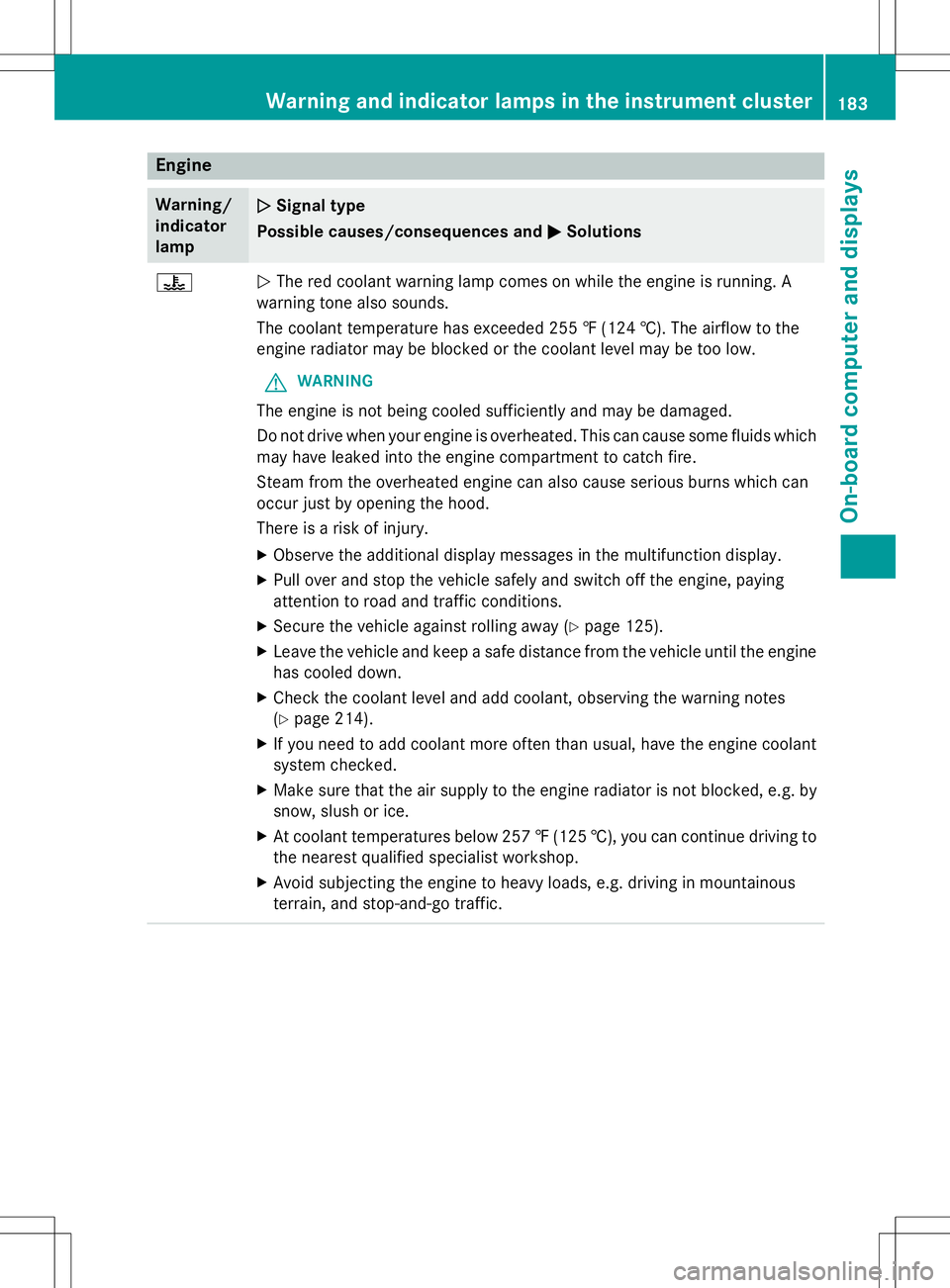
Engine
Warning/
indicator
lampNSignal type
Possible causes/consequences and M
Solutions
?NThe red coolant warning lamp comes on while the engine is running. A
warning tone also sounds.
The coolant temperature has exceeded 255 ‡ (124 †). The airflow to the
engine radiator may be blocked or the coolant level may be too low.
GWARNING
The engine is not being cooled sufficiently and may be damaged.
Do not drive when your engine is overheated. This can cause some fluids which may have leaked into the engine compartment to catch fire.
Steam from the overheated engine can also cause serious burns which can
occur just by opening the hood.
There is a risk of injury.
X Observe the additional display messages in the multifunction display.
X Pull over and stop the vehicle safely and switch off the engine, paying
attention to road and traffic conditions.
X Secure the vehicle against rolling away ( Ypage 125).
X Leave the vehicle and keep a safe distance from the vehicle until the engine
has cooled down.
X Check the coolant level and add coolant, observing the warning notes(Y page 214).
X If you need to add coolant more often than usual, have the engine coolant
system checked.
X Make sure that the air supply to the engine radiator is not blocked, e.g. by
snow, slush or ice.
X At coolant temperatures below 257 ‡(125 †), you can continue driving to
the nearest qualified specialist workshop.
X Avoid subjecting the engine to heavy loads, e.g. driving in mountainous
terrain, and stop-and-go traffic.
Warning and indicator lamps in the instrument cluster183
On-board computer and displays
Z
Page 187 of 286
Tires
Warning/
indicatorlampNSignal type
Possible causes/consequences and M
Solutions
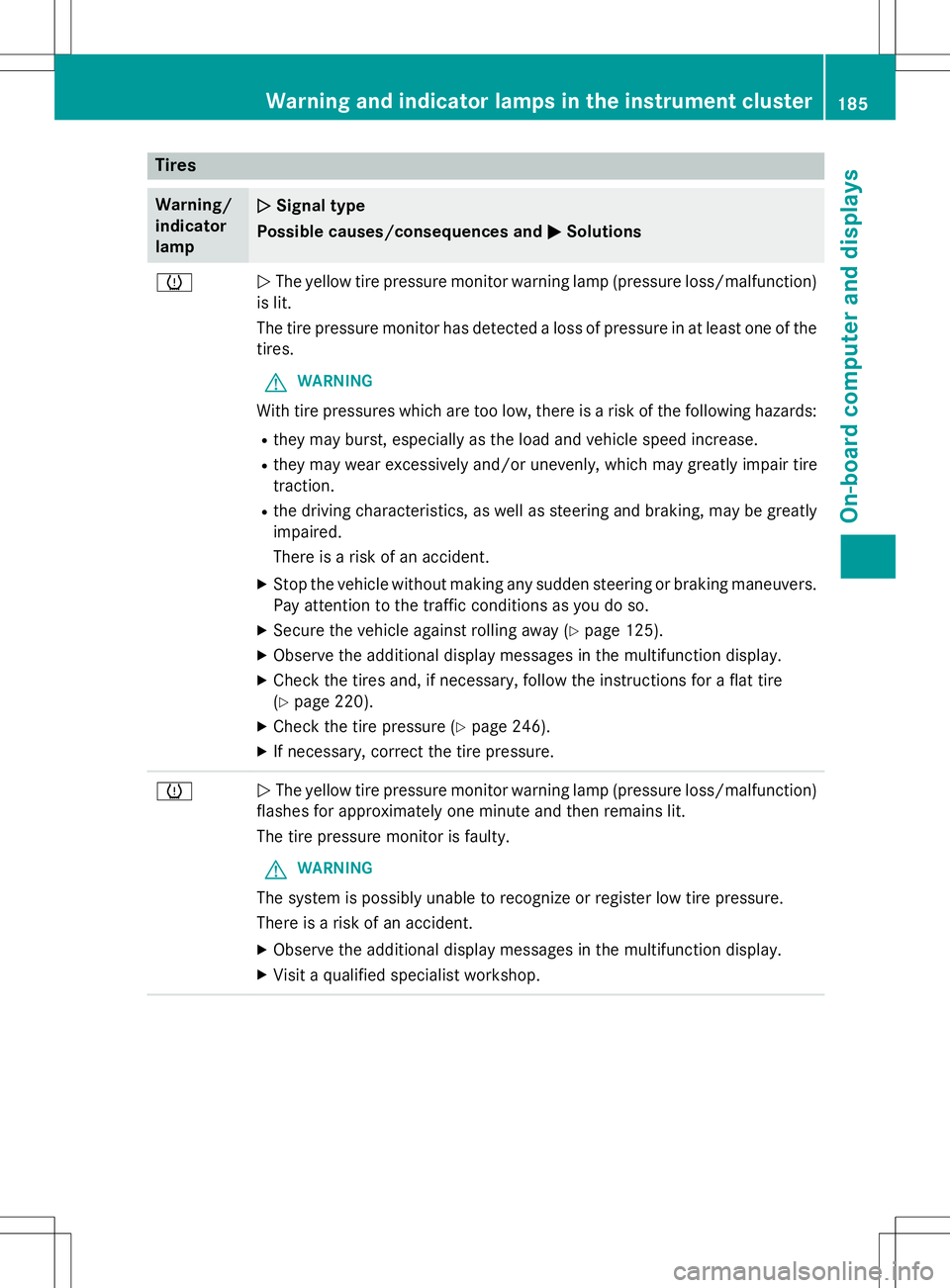
hNThe yellow tire pressure monitor warning lamp (pressure loss/malfunction)
is lit.
The tire pressure monitor has detected a loss of pressure in at least one of the
tires.
GWARNING
With tire pressures which are too low, there is a risk of the following hazards:
R they may burst, especially as the load and vehicle speed increase.
R they may wear excessively and/or unevenly, which may greatly impair tire
traction.
R the driving characteristics, as well as steering and braking, may be greatly
impaired.
There is a risk of an accident.
X Stop the vehicle without making any sudden steering or braking maneuvers.
Pay attention to the traffic conditions as you do so.
X Secure the vehicle against rolling away ( Ypage 125).
X Observe the additional display messages in the multifunction display.
X Check the tires and, if necessary, follow the instructions for a flat tire (Y page 220).
X Check the tire pressure ( Ypage 246).
X If necessary, correct the tire pressure.
hN The yellow tire pressure monitor warning lamp (pressure loss/malfunction)
flashes for approximately one minute and then remains lit.
The tire pressure monitor is faulty.
GWARNING
The system is possibly unable to recognize or register low tire pressure.
There is a risk of an accident.
X Observe the additional display messages in the multifunction display.
X Visit a qualified specialist workshop.
Warning and indicator lamps in the instrument cluster185
On-board computer and displays
Z
Page 188 of 286
Vehicle
Warning/
indicatorlampNSignal type
Possible causes/consequences and M
Solutions
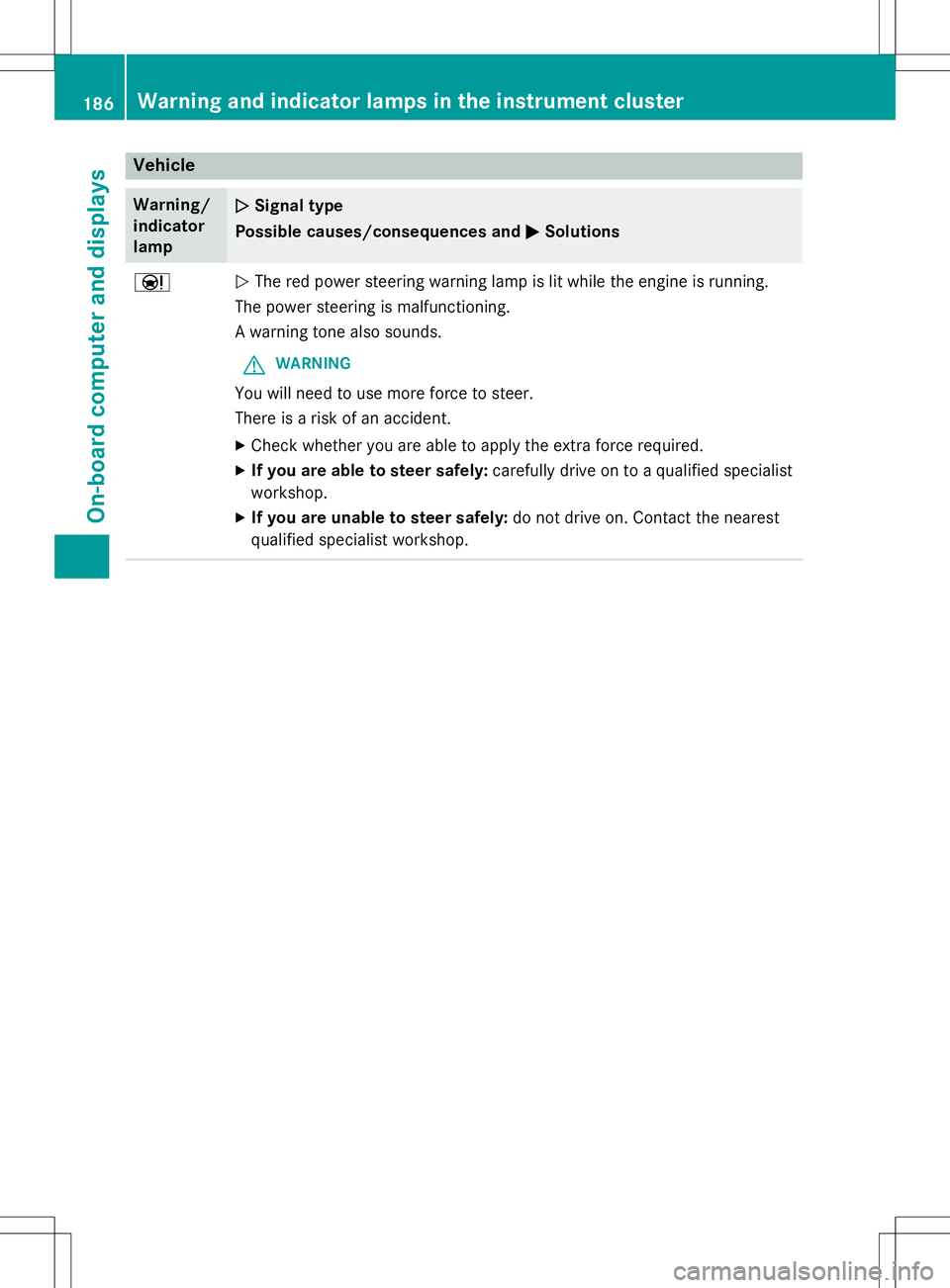
ÐNThe red power steering warning lamp is lit while the engine is running.
The power steering is malfunctioning.
A warning tone also sounds.
GWARNING
You will need to use more force to steer.
There is a risk of an accident.
X Check whether you are able to apply the extra force required.
X If you are able to steer safely: carefully drive on to a qualified specialist
workshop.
X If you are unable to steer safely: do not drive on. Contact the nearest
qualified specialist workshop.
186Warning and indicator lamps in the instrument cluster
On-board computer and displays
Page 191 of 286
Navigation announcements are intended to
direct you while driving without diverting your
attention from the road and driving.
Please always use this feature instead of con-
sulting the map display for directions. Look-
ing at the icons or map display can distract
you from traffic conditions and driving, and
increase the risk of an accident.
Bear in mind that at a speed of only 30 mph
(approximately 50 km/h) your vehicle covers
a distance of 44 feet (approximately 14 m)
per second.
This equipment complies with FCC radiation
exposure limits set forth for uncontrolled
equipment and meets the FCC radio fre-
quency (RF) Exposure Guidelines in Supple-
ment C to OET65.
This equipment has very low levels of RF
energy that is deemed to comply without
maximum permissive exposure evaluation
(MPE). But it is desirable that it should be
installed and operated with at least 8inches
(20 cm) and more between the radiator and a
person's body (excluding extremities: hands,
wrists, feet and legs.)
Declarations of conformity
Vehicle components which receive
and/or transmit radio waves
USA only: The wireless devices of this vehicle
comply with Part 15 of the FCC Rules. Oper-
ation is subject to the following two condi-
tions:
1) These devices may not cause interference, and
2) These devices must accept any interfer-
ence, including interference that may cause
undesired operation of the device.
Changes or modifications not expressly
approved by the party responsible for com-
pliance could void the user's authority to
operate the equipment.
Canada only: The wireless devices of this
vehicle comply with Industry Canada license- exempt RSS standard(s). Operation is subject
to the following two conditions:
1) These devices may not cause interference,
and
2) These devices must accept any interfer-
ence, including interference that may cause
undesired operation of the device.
Information on copyright
General information
Information on licenses for free and Open
Source software used in your vehicle and in
the electronic components can be found on
this website: http://www.mercedes-
benz.com/opensource .
Function restrictions
For safety reasons, some functions are
restricted or unavailable while the vehicle is in
motion. You will notice this, for example,
because either you will not be able to select
certain menu items or a message will appear
to this effect.
Function restrictions189
COMAND
Z
Page 192 of 286
COMAND operating system
Overview
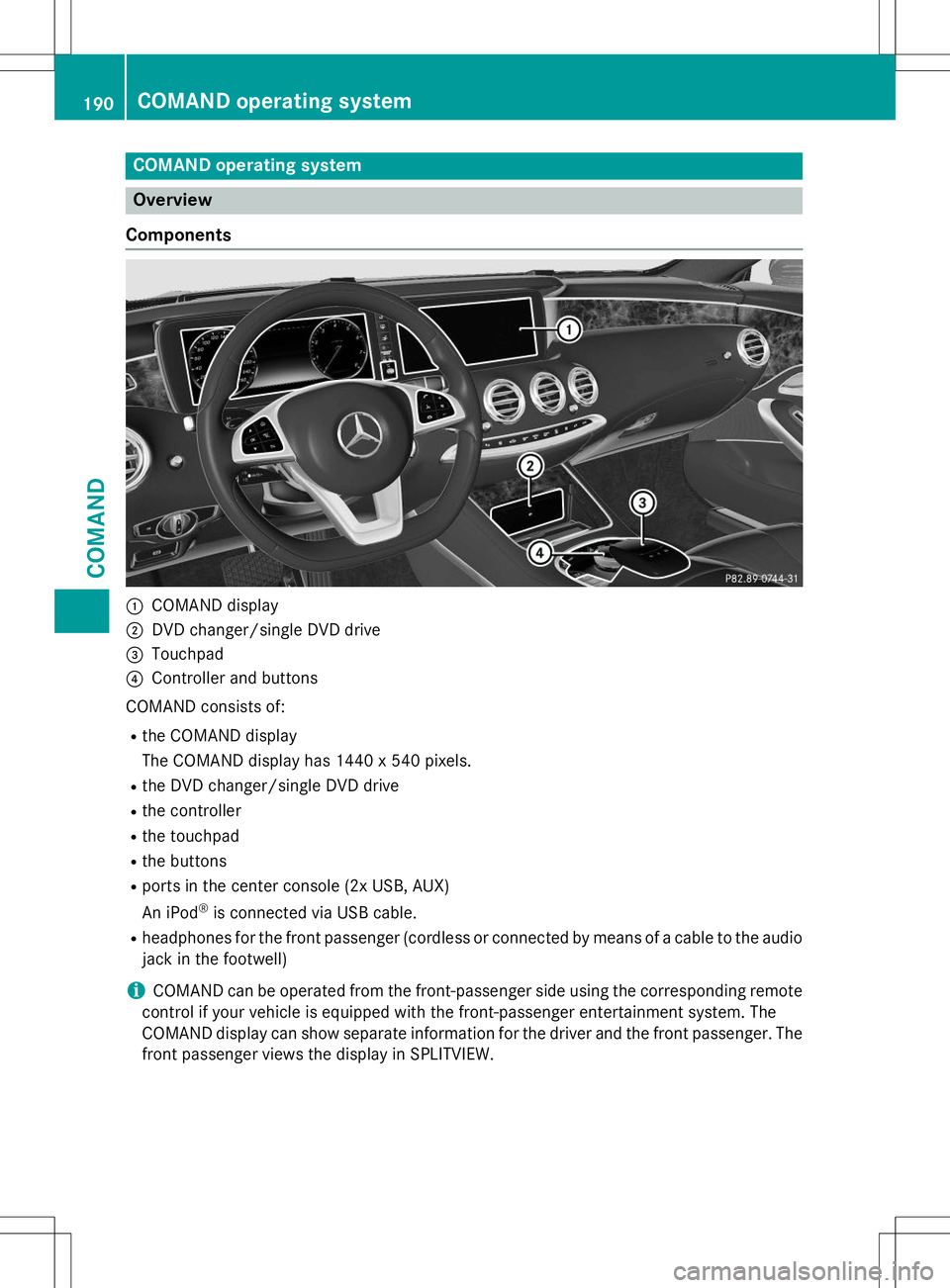
Components
:COMAND display
;DVD changer/single DVD drive
=Touchpad
?Controller and buttons
COMAND consists of:
R the COMAND display
The COMAND display has 1440 x 540 pixels.
R the DVD changer/single DVD drive
R the controller
R the touchpad
R the buttons
R ports in the center console (2x USB, AUX)
An iPod ®
is connected via USB cable.
R headphones for the front passenger (cordless or connected by means of a cable to the audio
jack in the footwell)
iCOMAND can be operated from the front-passenger side using the corresponding remote
control if your vehicle is equipped with the front-passenger entertainment system. The
COMAND display can show separate information for the driver and the front passenger. The
front passenger views the display in SPLITVIEW.
190COMAND operating system
COMAND
Page 194 of 286
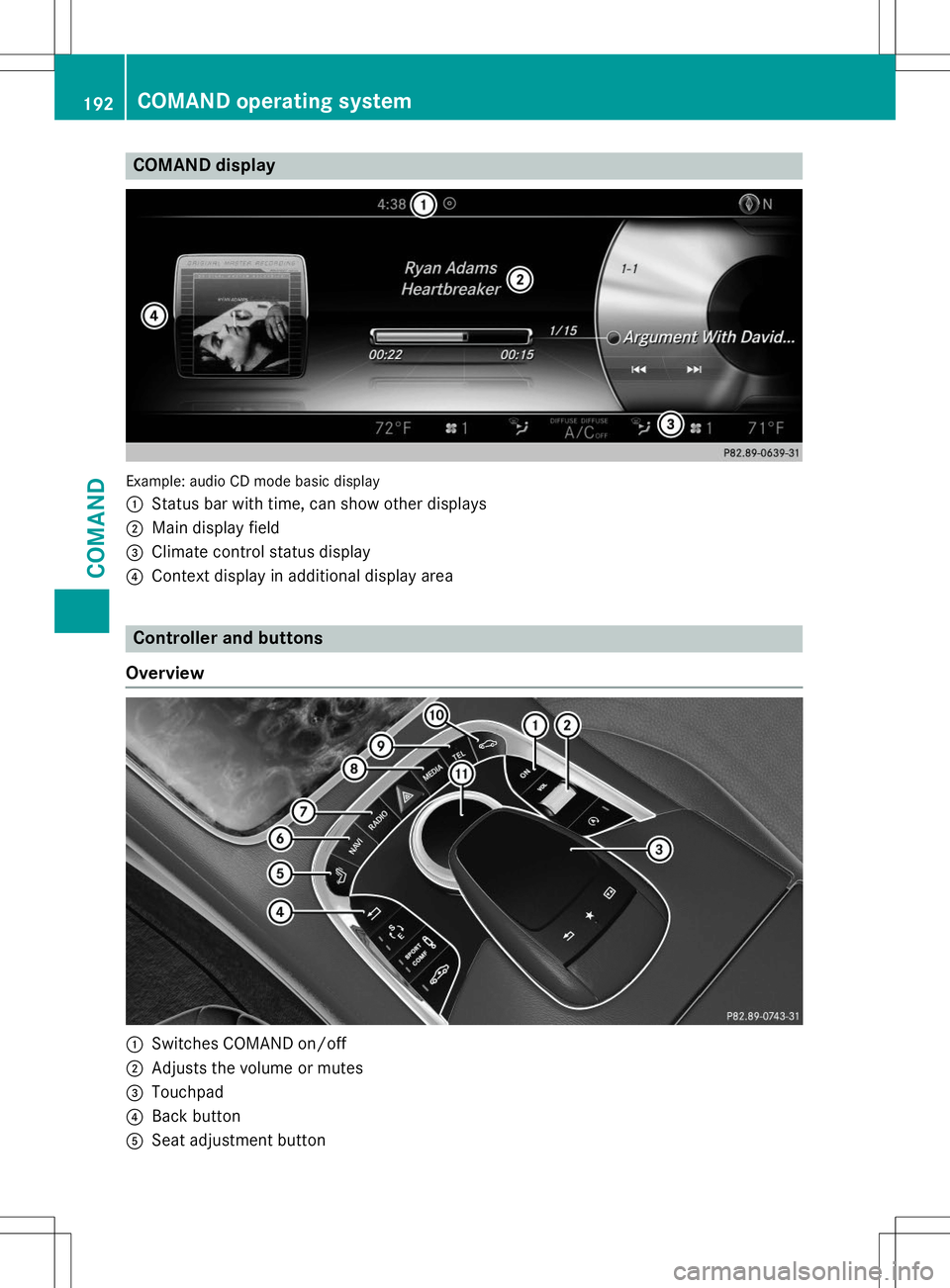
COMAND display
Example: audio CD mode basic display :
Status bar with time, can show other displays
;Main display field
=Climate control status display
?Context display in additional display area
Controller and buttons
Overview
:Switches COMAND on/off
;Adjusts the volume or mutes
=Touchpad
?Back button
ASeat adjustment button
192COMAND operating system
COMAND
Page 195 of 286
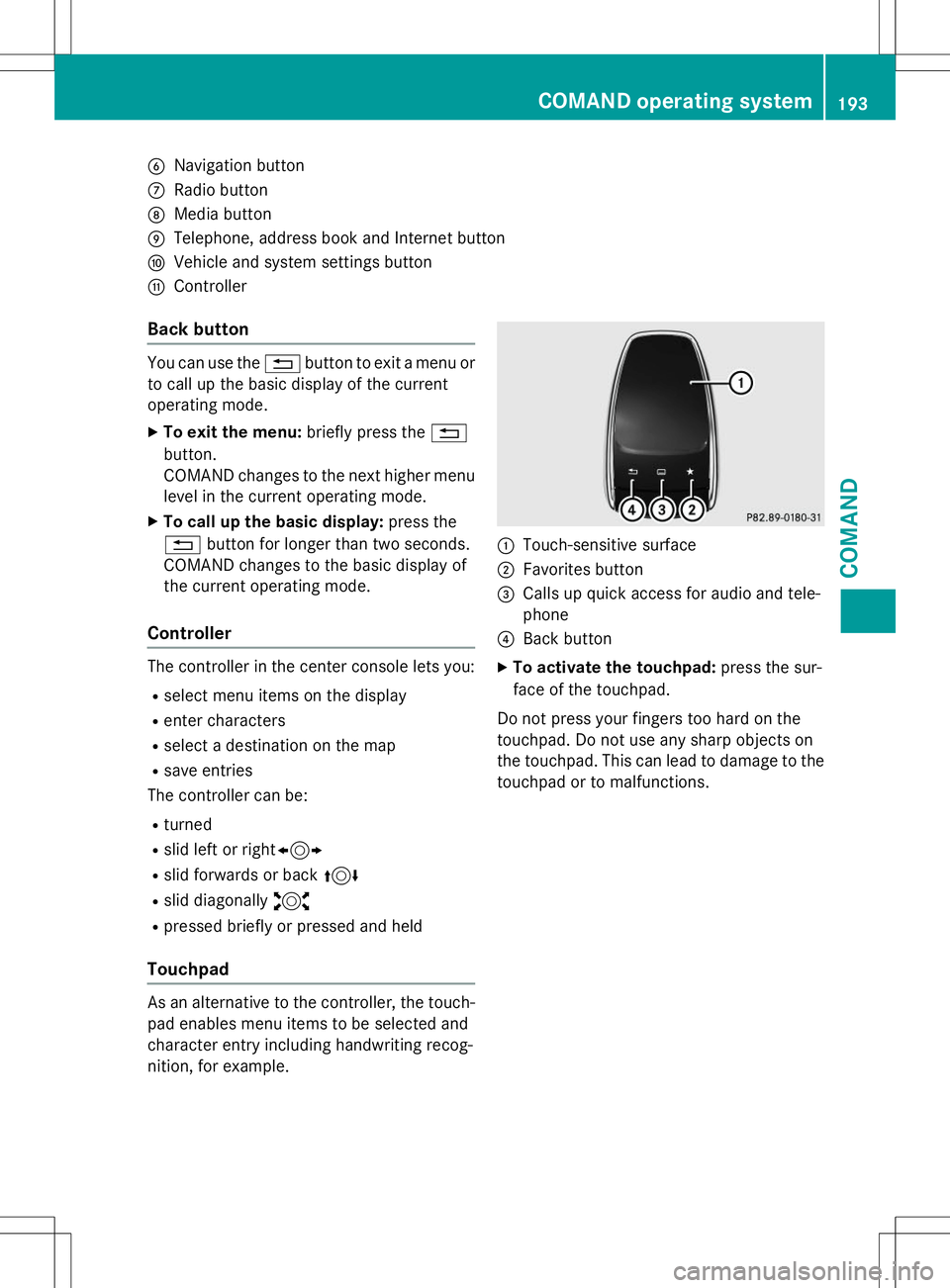
BNavigation button
CRadio button
DMedia button
ETelephone, address book and Internet button
FVehicle and system settings button
GController
Back button
You can use the%button to exit a menu or
to call up the basic display of the current
operating mode.
X To exit the menu: briefly press the%
button.
COMAND changes to the next higher menu
level in the current operating mode.
X To call up the basic display: press the
% button for longer than two seconds.
COMAND changes to the basic display of
the current operating mode.
Controller
The controller in the center console lets you:
R select menu items on the display
R enter characters
R select a destination on the map
R save entries
The controller can be:
R turned
R slid left or right 1
R slid forwards or back 4
R slid diagonally 2
R pressed briefly or pressed and held
Touchpad
As an alternative to the controller, the touch-
pad enables menu items to be selected and
character entry including handwriting recog-
nition, for example.
:Touch-sensitive surface
;Favorites button
=Calls up quick access for audio and tele- phone
?Back button
X To activate the touchpad: press the sur-
face of the touchpad.
Do not press your fingers too hard on the
touchpad. Do not use any sharp objects on
the touchpad. This can lead to damage to the touchpad or to malfunctions.
COMAND operating system193
COMAND
Z