fog light MERCEDES-BENZ S-COUPE 2015 Owners Manual
[x] Cancel search | Manufacturer: MERCEDES-BENZ, Model Year: 2015, Model line: S-COUPE, Model: MERCEDES-BENZ S-COUPE 2015Pages: 286, PDF Size: 29.85 MB
Page 13 of 286
Head-up displayAdjusting the brightness ............... .164
Function/notes ............................ .162
Important safety notes .................. 162
Setting the position ....................... 164
Storing settings (memory func-
tion) ................................................. 99
Switching on or off ......................... 162
Switching the display on/off ......... 164
Headlamps
Fogging up ..................................... 102
see Automatic headlamp mode
Heating
see Climate control
High-beam headlamps
Adaptive Highbeam Assist PLUS .... 104
Display message ............................ 165
Switching on/off ........................... 103
Hill start assist .................................. 118
HOLD function
Activating ....................................... 139
Deactivating ................................... 139
Function/notes ............................ .138
Home address
see also Digital Operator's Man-
ual ................................................. .188
Hood
Closing .......................................... .211
Display message ............................ 176
Important safety notes .................. 210
Opening ......................................... 210
Horn ...................................................... 32
Hydroplaning ..................................... 128
I
Ignition lock
see Key positions
Immobilizer .......................................... 75
Indicator and warning lamps
COLLISION PREVENTION ASSIST
PLUS .............................................. 184
Indicator lamps
see Warning and indicator lamps
Indicators
see Turn signals
Instrument cluster
Overview .......................................... 33 Warning and indicator lamps ........... 34
Instrument cluster lighting ................ 35
Intelligent Light System
Display message ............................ 165
Interior lighting
Automatic control .......................... 105
Emergency lighting ........................ 105
Manual control ............................... 105
Overview ........................................ 105
Reading lamp ................................. 105
iPod ®
see also Digital Operator's Man-
ual ................................................. .188
J
Jack
Using ............................................. 263
Jump starting (engine) ......................229
K
Key positions
SmartKey ....................................... 115
Start/Stop button .......................... 115
KEYLESS-GO
Deactivation ..................................... 79
Display message ............................ 165
Locking ............................................ 79
Unlocking ......................................... 79
Kickdown
Driving tips ................................... .121
Manual drive program .................... 122
Knee bag .............................................. 50
L
Lamps
see Warning and indicator lamps
Lane Keeping Assist
see Active Lane Keeping Assist
LATCH-type (ISOFIX) child seat
anchors ................................................ 63
License plate lamp (display mes-
sage) ................................................... 165
Light function, active
Display message ............................ 165
Light sensor (display message) ....... 165
Index11
Page 17 of 286
General notes ................................ 118
Hill start assist ...............................118
Q
QR code
Rescue card ..................................... 29
Qualified specialist workshop ........... 27
R
Radio
Selecting a station ......................... 164
see separate operating instructions
Radio mode
see also Digital Operator's Man-
ual ................................................. .188
Radio-wave reception/transmis-
sion in the vehicle
Declaration of conformity ................ 27
Reading lamp ..................................... 105
Rear compartment
Stowage compartment .................. 197
Rear fog lamp
Display message ............................ 165
Rear lamps
see Lights
Rear seats
Overview .......................................... 40
Rear view camera
Cleaning instructions ..................... 217
Function/notes ............................ .144
Switching on/off ........................... 145
Rear window blind ............................ 198
Rear window defroster
Problem (malfunction) ................... 111
Switching on/off ........................... 111
Rear-view mirror
Anti-glare (manual) .......................... 99
Dipping (automatic) ......................... 99
Refrigerant (air-conditioning sys-tem)
Important safety notes .................. 280
Refueling
Fuel gauge ....................................... 33
Important safety notes .................. 122
Refueling process .......................... 123
see Fuel Remote control
Garage door opener ....................... 203
Programming (garage door
opener) .......................................... 204
Replacing bulbs
General notes ................................ 105
Reporting safety defects .................... 28
Rescue card ......................................... 29
Reserve (fuel tank)
see Fuel
Reserve fuel
Display message ............................ 165
Warning lamp ................................. 176
Residual heat (climate control) ........111
Restraint system
Display message ............................ 170
Introduction ..................................... 42
Warning lamp ................................. 182
Warning lamp (function) ................... 43
Reversing feature
Roller sunblind ................................. 91
Side windows ................................... 90
Trunk lid .......................................... .84
Reversing lamps (display mes-
sage) ................................................... 165
ROAD SURFACE SCAN ....................... 140
Roadside Assistance (breakdown) .... 25
Roller sunblind
Panorama roof ................................. 91
Rear window .................................. 198
Roller sunblind for the panorama
roof
Opening and closing ........................ 92
Operating ......................................... 91
Resetting ......................................... 92
Roof
Display message ............................ 165
Roof lining and carpets (cleaning
guidelines) ......................................... 218
Roof load (maximum) ........................ 281
Route (navigation)
see Route guidance (navigation)
Route guidance
see also Digital Operator's Man-
ual .................................................. 188
Route guidance (navigation) ............ 164
Index15
Page 104 of 286
Useful information
iThis Operator's Manual describes all
models and all standard and optional equip- ment of your vehicle available at the time of
publication of the Operator's Manual.
Country-specific differences are possible.
Please note that your vehicle may not be
equipped with all features described. This
also applies to safety-related systems and
functions.
iRead the information on qualified special-
ist workshops ( Ypage 27).
Exterior lighting
General notes
For reasons of safety, Mercedes-Benz recom-
mends that you drive with the lights switchedon even during the daytime. In some coun-
tries, operation of the headlamps varies due
to legal requirements and self-imposed obli-
gations.
Driving abroad
Symmetrical low-beam headlamps
Switch the headlamps to symmetrical low
beam in countries in which traffic drives on
the opposite side of the road from the country where the vehicle is registered. This prevents
glare to oncoming traffic. When using sym-
metrical lights, the edge of the road is not lit
as widely and as far ahead as normal.
Have the headlamps converted at a qualified
specialist workshop as close to the border as
possible before driving in these countries.
Asymmetrical low beam
Have the headlamps converted back to asym- metrical low-beam headlamps at a qualified
specialist workshop as soon as possible after
crossing the border again.
Information in the Digital Operator's
Manual
In the Digital Operator's Manual you will find
information on the following topics: R Hazard warning lamps
R Headlamps fogged up on the inside
Setting the exterior lighting
Setting options
Exterior lighting can be set using:
R the light switch
R the combination switch ( Ypage 103)
Light switch
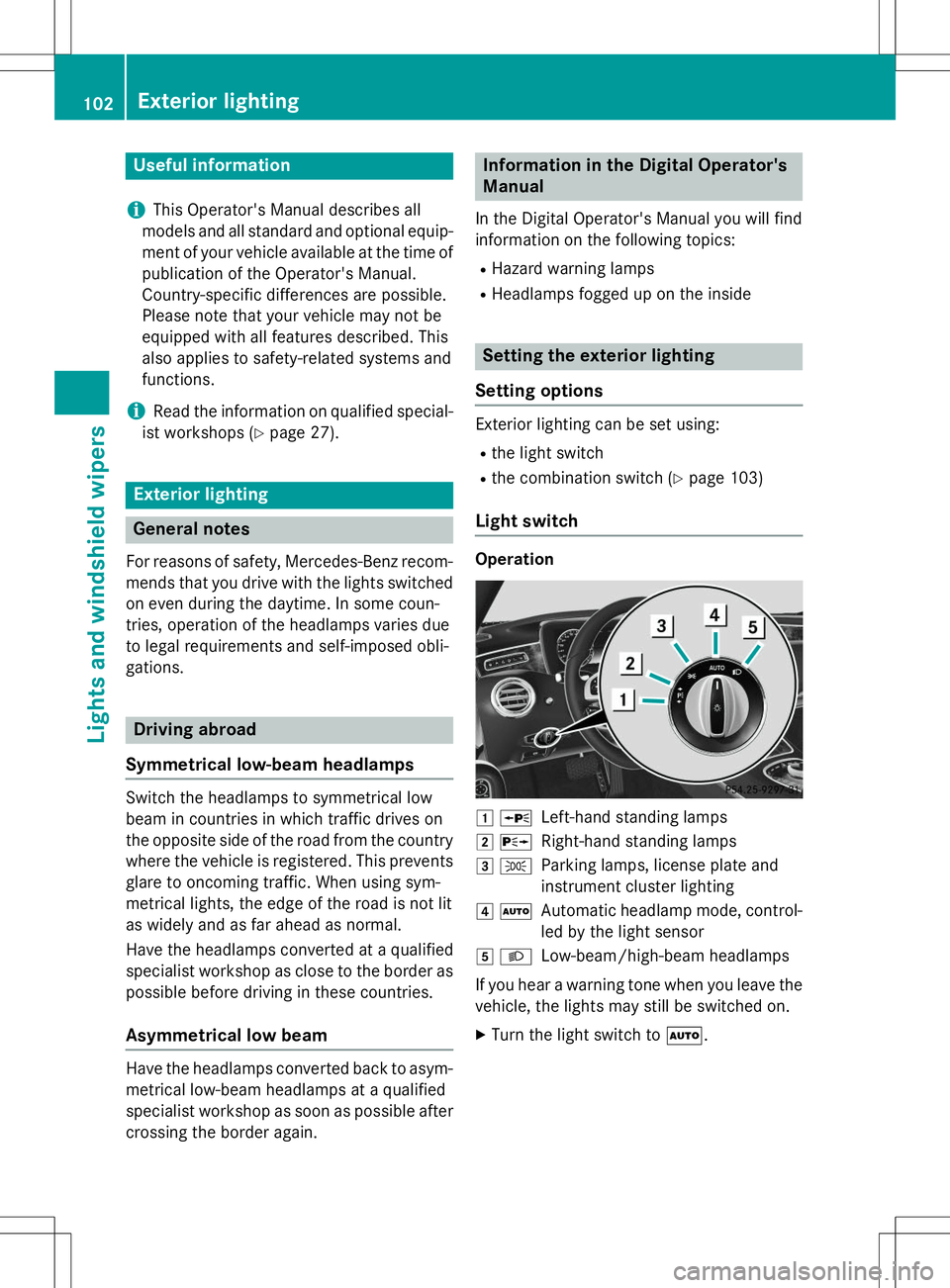
Operation
1 WLeft-hand standing lamps
2XRight-hand standing lamps
3 TParking lamps, license plate and
instrument cluster lighting
4ÃAutomatic headlamp mode, control-
led by the light sensor
5 LLow-beam/high-beam headlamps
If you hear a warning tone when you leave the
vehicle, the lights may still be switched on. X Turn the light switch to Ã.
102Exterior lighting
Lights and windshield wipers
Page 106 of 286
Adaptive Highbeam Assist Plus
General notes
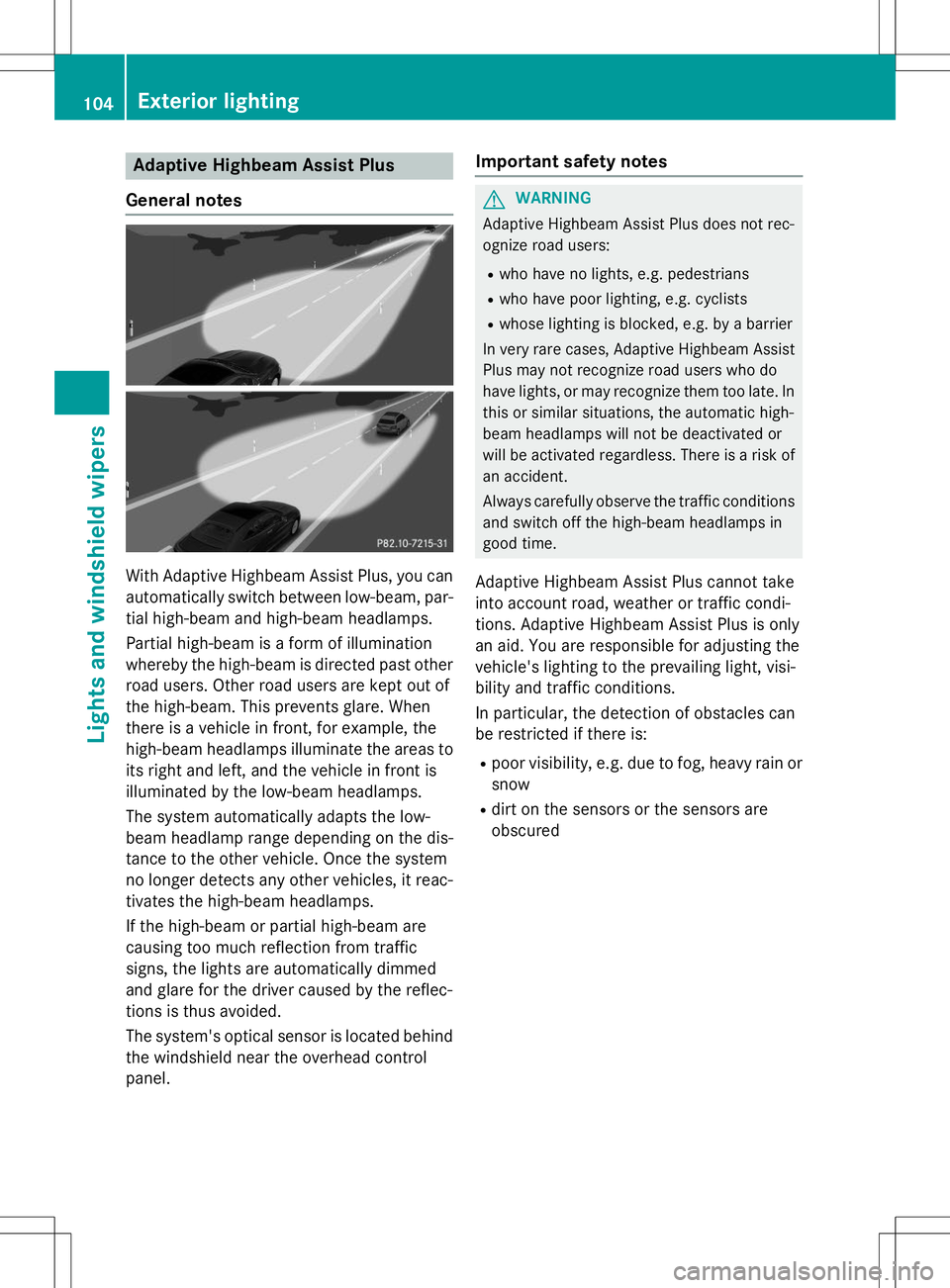
With Adaptive Highbeam Assist Plus, you can automatically switch between low-beam, par-
tial high-beam and high-beam headlamps.
Partial high-beam is a form of illumination
whereby the high-beam is directed past other
road users. Other road users are kept out of
the high-beam. This prevents glare. When
there is a vehicle in front, for example, the
high-beam headlamps illuminate the areas to
its right and left, and the vehicle in front is
illuminated by the low-beam headlamps.
The system automatically adapts the low-
beam headlamp range depending on the dis-
tance to the other vehicle. Once the system
no longer detects any other vehicles, it reac-
tivates the high-beam headlamps.
If the high-beam or partial high-beam are
causing too much reflection from traffic
signs, the lights are automatically dimmed
and glare for the driver caused by the reflec-
tions is thus avoided.
The system's optical sensor is located behind the windshield near the overhead control
panel.
Important safety notes
GWARNING
Adaptive Highbeam Assist Plus does not rec-
ognize road users:
R who have no lights, e.g. pedestrians
R who have poor lighting, e.g. cyclists
R whose lighting is blocked, e.g. by a barrier
In very rare cases, Adaptive Highbeam Assist
Plus may not recognize road users who do
have lights, or may recognize them too late. In
this or similar situations, the automatic high-
beam headlamps will not be deactivated or
will be activated regardless. There is a risk of
an accident.
Always carefully observe the traffic conditions and switch off the high-beam headlamps in
good time.
Adaptive Highbeam Assist Plus cannot take
into account road, weather or traffic condi-
tions. Adaptive Highbeam Assist Plus is only
an aid. You are responsible for adjusting the
vehicle's lighting to the prevailing light, visi-
bility and traffic conditions.
In particular, the detection of obstacles can
be restricted if there is: R poor visibility, e.g. due to fog, heavy rain or
snow
R dirt on the sensors or the sensors are
obscured
104Exterior lighting
Lights and windshield wipers
Page 139 of 286
markings (left and right), and only on the vehi-cle in front if lane markings are missing.
Steering Assist and Stop&Go Pilot do not pro-vide any support if these conditions do not exist.
DISTRONIC PLUS must be active in order for
the function to be available.
Important safety notes
If you fail to adapt your driving style,
DISTRONIC PLUS with Steering Assist and
Stop&Go Pilot can neither reduce the risk of
an accident nor override the laws of physics.
It cannot take account of road, weather and
traffic conditions. DISTRONIC PLUS with
Steering Assist and Stop&Go Pilot is only an
aid. You are responsible for the distance to
the vehicle in front, for vehicle speed, for
braking in good time and for staying in yourlane.
DISTRONIC PLUS with Steering Assist and
Stop&Go Pilot does not detect road and traf-
fic conditions. If you are following a vehicle
which is driving towards the edge of the road,
your vehicle could come into contact with the
curb or other road boundaries. Be particularly
aware of other road users, e.g. cyclists, that
are directly next to your vehicle.
Obstacles such as building site huts on the
lane or projecting out into the lane are notdetected.
An inappropriate steering intervention, e.g.
after intentionally driving over a lane marking, can be corrected at any time if you steer
slightly in the opposite direction.
DISTRONIC PLUS with Steering Assist and
Stop&Go Pilot cannot continuously keep your
vehicle in lane. In some cases, the steering
intervention is not sufficient to bring the vehi-
cle back to the lane. In such cases, you must steer the vehicle yourself to ensure that it
does not leave the lane. The support provided by the system can be
impaired if: R
there is poor visibility, e.g. due to insuffi-
cient illumination of the road, or due to
snow, rain, fog or spray
R there is glare, e.g. from oncoming traffic,
the sun or reflections (e.g. when the road
surface is wet)
R the windshield is dirty, fogged up, damaged
or covered, for instance by a sticker, in the
vicinity of the camera
R there are no, several or unclear lane mark-
ings for a lane, e.g. in areas with road con- struction work
R the lane markings are worn away, dark or
covered up, e.g. by dirt or snow
R the distance to the vehicle in front is too
small and the lane markings thus cannot bedetected
R the lane markings change quickly, e.g.
lanes branch off, cross one another ormerge
R the road is narrow and winding
R there are strong shadows cast on the road
The system is switched to passive and no lon-
ger assists you by performing steering inter-
ventions if:
R you actively change lane
R you switch on the turn signal
R take your hands off the steering wheel or do
not steer for a prolonged period of time
iSteering Assist and Stop&Go Pilot are
activated again automatically after a lane
change is completed.
Steering Assist and Stop&Go Pilot do not pro- vide any support:
R on very sharp corners
R when a loss of tire pressure or a defective
tire has been detected and displayed
Pay attention also to the important safety
notes for DISTRONIC PLUS ( Ypage 131).
The steering interventions are carried out
with a limited steering moment. The system
Driving systems137
Driving and parking
Z
Page 147 of 286
are no persons, animals or objects in the area
in which you are maneuvering.
Under the following circumstances, the rear
view camera will not function, or will function
in a limited manner:
R if the trunk lid is open
R in heavy rain, snow or fog
R at night or in very dark places
R if the camera is exposed to very bright light
R if the area is lit by fluorescent bulbs or LED
lighting (the display may flicker)
R if the camera lens fogs up, e.g. when driving
into a heated garage in winter, causing a
rapid change in temperature
R if the camera lens is dirty or obstructed.
Observe the notes on cleaning(Y page 217)
R if the rear of your vehicle is damaged. In this
event, have the camera position and setting checked at a qualified specialist workshop
The field of vision and other functions of the
rear view camera may be restricted due to
additional accessories on the rear of the vehi-
cle (e.g. license plate holder, bicycle rack).
The guide lines in the COMAND display show
the distances to your vehicle. The distances
only apply to road level.
iThe rear view camera is protected from
raindrops and dust by means of a flap.
When the rear view camera is activated,
this flap opens.
The flap closes again when:
R you have finished the maneuvering proc- ess
R you switch off the engine
R you open the trunk
Observe the notes on cleaning( Y page 217).
For technical reasons, the flap may remain
open briefly after the rear view camera has
been deactivated.
!Objects not at ground level may appear to
be further away than they actually are, e.g.:
R the bumper of a parked vehicle
R the drawbar of a trailer
R the ball coupling of a trailer tow hitch
R the rear section of an HGV
R a slanted post
Use the guidelines only for orientation.
Approach objects no further than the bot-
tom-most guideline.
The rear view camera may show a distorted
view of obstacles, show them incorrectly or
not at all. The rear view camera does not show objects in the following positions:
R very close to the rear bumper
R under the rear bumper
R in the area immediately above the tailgate
handle
Activating/deactivating the rear view
camera
X To activate: make sure that the SmartKey
is in position 2in the ignition lock.
X Make sure that the
Activation by R
gearfunction is selected in COMAND (see
Digital Operator's Manual).
X Engage reverse gear.
The rear view camera flap opens. The area
behind the vehicle is shown in the
COMAND display with guide lines.
The image from the rear view camera is
available throughout the maneuvering
process.
To deactivate: the rear view camera deacti-
vates if you shift the transmission to Por after
driving forwards a short distance.
Driving systems145
Driving and parking
Z
Page 148 of 286
Information in the Digital Operator's
Manual
In the Digital Operator's Manual you will find
information on the following topics: RDisplays in the COMAND display
R "Reverse parking" function
R Wide-angle function
R Object detection
360° camera (surround view)
General notes
The 360° camera is a system consisting of
four cameras.
The system analyzes images from the follow-
ing cameras:
R Rear view camera
R Front camera
R Two side cameras in the exterior mirrors
The cameras capture the immediate sur-
roundings of the vehicle. The 360° camera
assists you, for instance when parking or at
exits with reduced visibility.
The 360° camera images can be shown in full screen mode or in six different split-screen
views on the COMAND display. A split-screen
view also includes a top view of the vehicle.
This view is calculated from the data supplied
by the installed cameras (virtual camera).
The six split-screen views are:
R top view and picture from the rear view
camera (130° viewing angle)
R top view and image from the front camera
(130° viewing angle without displaying the
maximum steering wheel angle)
R top view and enlarged rear view
R top view and enlarged front view
R top view and images from the rear-facing
side cameras (rear wheel view)
R top view and images from the forward-
facing side cameras (front wheel view) When the function is active and you shift the
transmission from
Dor Rto N, the guide lines
in the COMAND display are hidden.
When you change between transmission
positions Dand R, you see the previously
selected front or rear view.
Important safety notes
The 360°camera is only an aid and may show a distorted view of obstacles, show them
incorrectly or not at all. The 360°camera is
not a substitute for attentive driving.
You are always responsible for safe maneu-
vering and parking. When maneuvering or
parking, make sure that there are no persons,animals or objects in the area in which you are
maneuvering.
You are always responsible for safety, and
must always pay attention to your surround-
ings when parking and maneuvering. This
applies to the areas behind, in front of and
beside the vehicle. You could otherwise
endanger yourself and others.
The 360° camera will not function or will
function in a limited manner:
R if the doors are open
R if the exterior mirrors are folded in
R if the trunk lid is open
R in heavy rain, snow or fog
R at night or in very dark places
R if the cameras are exposed to very bright
light
R if the area is lit by fluorescent bulbs or LED
lighting (the display may flicker)
R if the camera lenses fog up, e.g. when driv-
ing into a heated garage in winter, causing
a rapid change in temperature
R if the camera lenses are dirty or covered.
Observe the notes on cleaning(Y page 217)
R if the vehicle components in which the
cameras are installed are damaged. In this
event, have the camera position and setting
checked at a qualified specialist workshop.
146Driving systems
Driving and pa rking
Page 152 of 286
Night View Assist Plus
General notes
In addition to the illumination provided by the
normal headlamps, Night View Assist Plus
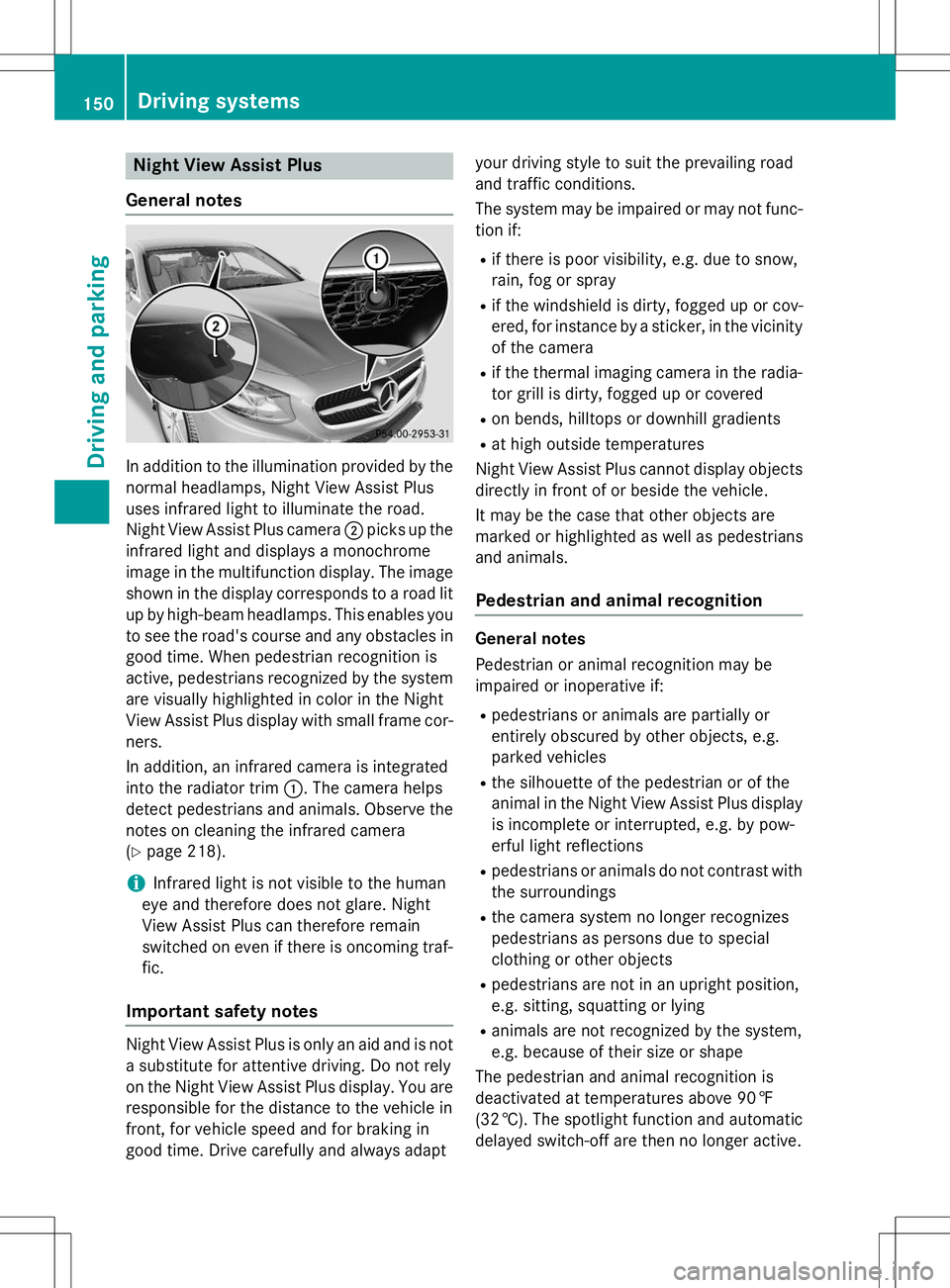
uses infrared light to illuminate the road.
Night View Assist Plus camera ;picks up the
infrared light and displays a monochrome
image in the multifunction display. The image
shown in the display corresponds to a road lit
up by high-beam headlamps. This enables you to see the road's course and any obstacles in
good time. When pedestrian recognition is
active, pedestrians recognized by the system are visually highlighted in color in the Night
View Assist Plus display with small frame cor-
ners.
In addition, an infrared camera is integrated
into the radiator trim :. The camera helps
detect pedestrians and animals. Observe the notes on cleaning the infrared camera( Y page 218).
iInfrared light is not visible to the human
eye and therefore does not glare. Night
View Assist Plus can therefore remain
switched on even if there is oncoming traf- fic.
Important safety notes
Night View Assist Plus is only an aid and is not
a substitute for attentive driving. Do not rely
on the Night View Assist Plus display. You are responsible for the distance to the vehicle in
front, for vehicle speed and for braking in
good time. Drive carefully and always adapt your driving style to suit the prevailing road
and traffic conditions.
The system may be impaired or may not func-
tion if: R if there is poor visibility, e.g. due to snow,
rain, fog or spray
R if the windshield is dirty, fogged up or cov-
ered, for instance by a sticker, in the vicinity
of the camera
R if the thermal imaging camera in the radia-
tor grill is dirty, fogged up or covered
R on bends, hilltops or downhill gradients
R at high outside temperatures
Night View Assist Plus cannot display objects
directly in front of or beside the vehicle.
It may be the case that other objects are
marked or highlighted as well as pedestrians
and animals.
Pedestrian and animal recognition
General notes
Pedestrian or animal recognition may be
impaired or inoperative if: R pedestrians or animals are partially or
entirely obscured by other objects, e.g.
parked vehicles
R the silhouette of the pedestrian or of the
animal in the Night View Assist Plus display
is incomplete or interrupted, e.g. by pow-
erful light reflections
R pedestrians or animals do not contrast with
the surroundings
R the camera system no longer recognizes
pedestrians as persons due to special
clothing or other objects
R pedestrians are not in an upright position,
e.g. sitting, squatting or lying
R animals are not recognized by the system,
e.g. because of their size or shape
The pedestrian and animal recognition is
deactivated at temperatures above 90 ‡ (32 †). The spotlight function and automatic
delayed switch-off are then no longer active.
150Driving systems
Driving an d parking