navigation system MERCEDES-BENZ S-COUPE 2015 Owners Manual
[x] Cancel search | Manufacturer: MERCEDES-BENZ, Model Year: 2015, Model line: S-COUPE, Model: MERCEDES-BENZ S-COUPE 2015Pages: 286, PDF Size: 29.85 MB
Page 15 of 286
DISTRONIC PLUS with Steering
Assist and Stop&Go Pilot ............... 136 ESP®
(Electronic Stability Pro-
gram) ............................................... 71
General notes ................................ 129
MAGIC BODY CONTROL ................ 140
Night View Assist Plus ................... 150
PARKTRONIC ................................. 142
PRE-SAFE ®
(anticipatory occu-
pant protection) ............................... 59
PRE-SAFE ®
Brake ............................. 73
PRE-SAFE ®
PLUS (anticipatory
occupant protection PLUS) .............. 59
Rear view camera .......................... 144
ROAD SURFACE SCAN .................. 140
Message memory (on-board com-
puter) .................................................. 165
Messages
see Display messages
see Warning and indicator lamps
Mirrors
see Exterior mirrors
see Rear-view mirror
see Vanity mirror (in the sun visor)
Modifying the programming
(SmartKey) ........................................... 80
MOExtended tires .............................. 221
Mounting wheels
Lowering the vehicle ...................... 266
Mounting a new wheel ................... 265
Preparing the vehicle ..................... 262
Raising the vehicle ........................ .263
Removing a wheel .......................... 265
Securing the vehicle against roll-
ing away ........................................ 262
MP3
Operation ....................................... 164
see also Digital Operator's Man-
ual ................................................. .188
see separate operating instructions
Multifunction display
Function/notes ............................ .160
Permanent display ......................... 164
Multifunction steering wheel
Operating the on-board computer .. 161
Overview .......................................... 35 Music files
see also Digital Operator's Man-
ual ................................................. .188
N
Navigation
Menu (on-board computer) ............ 164
see also Digital Operator's Man-
ual ................................................. .188
see separate operating instructions
Night View Assist Plus
Activating/deactivating ................. 151
Cleaning ......................................... 218
Function/notes ............................ .150
Problem (malfunction) ................... 152
Switching automatic activation
on/off ............................................ 164
Notes on breaking-in a new vehi-
cle ....................................................... 114
O
Occupant Classification System
(OCS)
Conditions ....................................... 51
Faults ............................................... 56
Operation ......................................... 52
System self-test ............................... 54
Occupant safety
Automatic measures after an acci-
dent ................................................. 60
Children in the vehicle ..................... 60
Important safety notes .................... 43
Pets in the vehicle ........................... 65 PRE-SAFE ®
(anticipatory occu-
pant protection) ............................... 59
OCS
Conditions ....................................... 51
Faults ............................................... 56
Operation ......................................... 52
System self-test ............................... 54
Odometer .......................................... .164
Oil
see Engine oil
On-board computer
Assistance graphic menu .............. .164
Display messages .......................... 165
Index13
Page 16 of 286
Displaying a service message ........ 216
DISTRONIC PLUS ........................... 134
Factory settings submenu .............164
Head-up displa y............................. 162
Important safety notes .................. 160
Lighting submenu .......................... 164
Media menu ................................... 164
Menu overview .............................. 164
Message memory .......................... 165
Navigation menu ............................ 164
Operation ....................................... 161
Radio menu ................................... 164
Service menu ................................. 164
Standard display ............................ 164
Video DVD operation ..................... 164
Operating safety
Declaration of conformity ................ 27
Important safety notes .................... 26
Operating system
see On-board computer
Operation
Digital Operator's Manua l................ 21
Operator's Manual
Overview .......................................... 24
Vehicle equipment ........................... 24
Outside temperature display ........... 160
Overhead control panel ...................... 38
P
Paint code number............................ 274
Paintwork (cleaning instructions) ... 217
Panic alarm .......................................... 42
Panorama roof ..................................... 91
Parcel net hooks ............................... 197
Parking
Important safety notes .................. 125
Parking brake ................................ 126
Position of exterior mirror, front-
passenger side ................................. 99
Rear view camera .......................... 144
see PARKTRONIC
Parking aid
Active Parking Assist ..................... 143
see Exterior mirrors
see PARKTRONIC
Parking assistance
see PARKTRONIC Parking brake
Display message ............................ 165
Electric parking brake .................... 126
Parking lamps
Switching on/of f........................... 103
PARKTRONIC
Deactivating/activating ................. 143
Driving system ............................... 142
Function/note s............................. 142
Important safety notes .................. 142
Problem (malfunction) ................... 143
Range of the sensors ..................... 142
Warning display ............................. 143
PASSENGER AIR BAG
Indicator lamps ................................ 43
PASSENGER AIR BAG indicatorlamp
Problem (malfunction) ................... 172
Pets in the vehicle ............................... 65
Phone book
see also Digital Operator's Man-
ual .................................................. 188
Plastic trim (cleaning instruc-
tions) .................................................. 218
Power locks ......................................... 82
Power washers .................................. 217
Power windows
see Side windows
PRE-SAFE ®
(anticipatory occupant
protection)
Operation ......................................... 59
PRE-SAFE ®
Brake
Activating/deactivating ................. 164
Function/note s................................ 73
Important safety notes .................... 73
Warning lamp ................................. 184
PRE-SAFE ®
PLUS (anticipatory
occupant protection PLUS)
Operation ......................................... 59
Program selector button .................. 121
Protection against theft
ATA (Anti-Theft Alarm system )......... 76
Immobilizer ...................................... 75
Protection of the environment
General notes .................................. 23
Pulling away
Automatic transmission ................. 118
14Index
Page 17 of 286
General notes ................................ 118
Hill start assist ...............................118
Q
QR code
Rescue card ..................................... 29
Qualified specialist workshop ........... 27
R
Radio
Selecting a station ......................... 164
see separate operating instructions
Radio mode
see also Digital Operator's Man-
ual ................................................. .188
Radio-wave reception/transmis-
sion in the vehicle
Declaration of conformity ................ 27
Reading lamp ..................................... 105
Rear compartment
Stowage compartment .................. 197
Rear fog lamp
Display message ............................ 165
Rear lamps
see Lights
Rear seats
Overview .......................................... 40
Rear view camera
Cleaning instructions ..................... 217
Function/notes ............................ .144
Switching on/off ........................... 145
Rear window blind ............................ 198
Rear window defroster
Problem (malfunction) ................... 111
Switching on/off ........................... 111
Rear-view mirror
Anti-glare (manual) .......................... 99
Dipping (automatic) ......................... 99
Refrigerant (air-conditioning sys-tem)
Important safety notes .................. 280
Refueling
Fuel gauge ....................................... 33
Important safety notes .................. 122
Refueling process .......................... 123
see Fuel Remote control
Garage door opener ....................... 203
Programming (garage door
opener) .......................................... 204
Replacing bulbs
General notes ................................ 105
Reporting safety defects .................... 28
Rescue card ......................................... 29
Reserve (fuel tank)
see Fuel
Reserve fuel
Display message ............................ 165
Warning lamp ................................. 176
Residual heat (climate control) ........111
Restraint system
Display message ............................ 170
Introduction ..................................... 42
Warning lamp ................................. 182
Warning lamp (function) ................... 43
Reversing feature
Roller sunblind ................................. 91
Side windows ................................... 90
Trunk lid .......................................... .84
Reversing lamps (display mes-
sage) ................................................... 165
ROAD SURFACE SCAN ....................... 140
Roadside Assistance (breakdown) .... 25
Roller sunblind
Panorama roof ................................. 91
Rear window .................................. 198
Roller sunblind for the panorama
roof
Opening and closing ........................ 92
Operating ......................................... 91
Resetting ......................................... 92
Roof
Display message ............................ 165
Roof lining and carpets (cleaning
guidelines) ......................................... 218
Roof load (maximum) ........................ 281
Route (navigation)
see Route guidance (navigation)
Route guidance
see also Digital Operator's Man-
ual .................................................. 188
Route guidance (navigation) ............ 164
Index15
Page 39 of 286
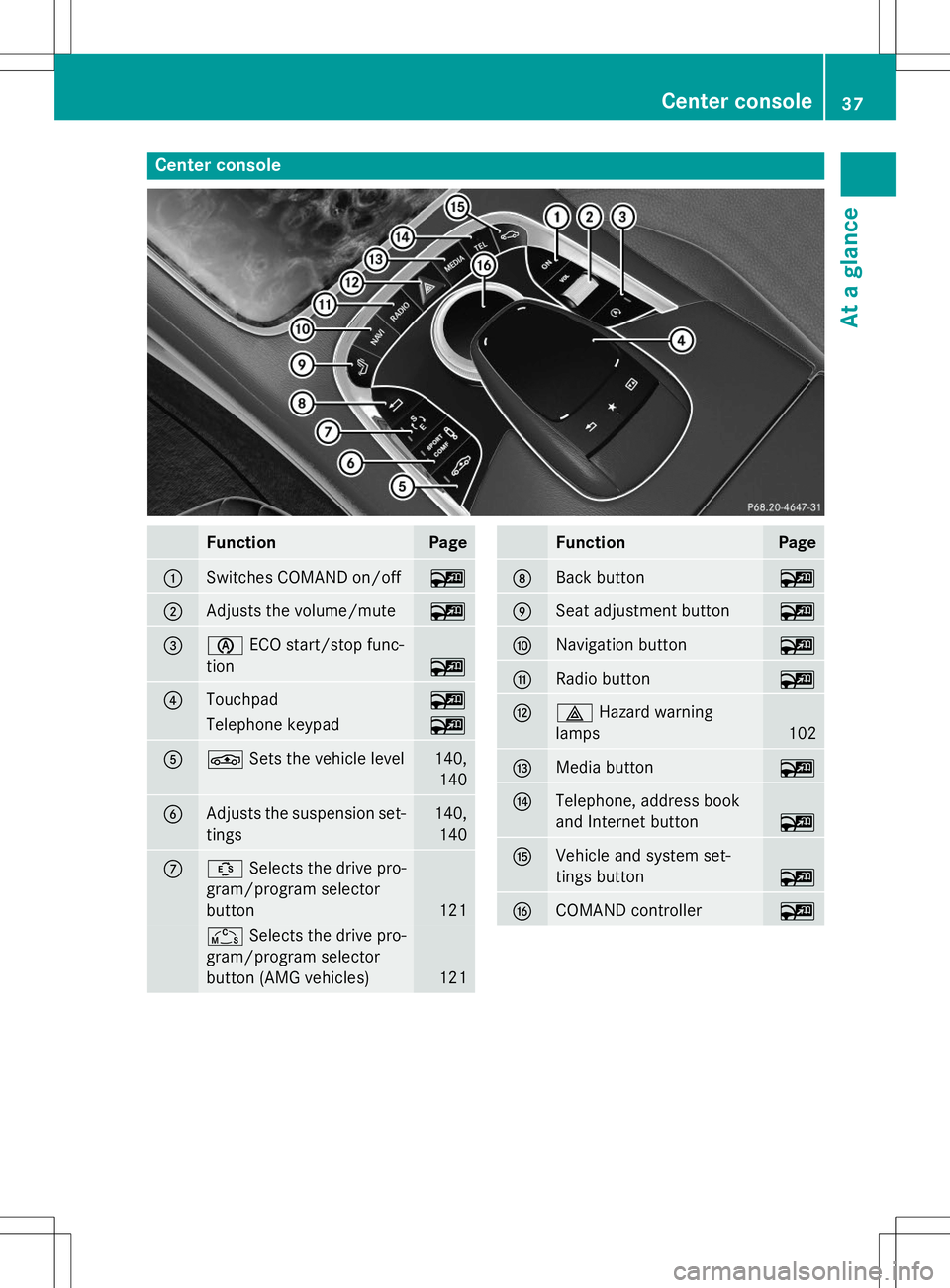
Center console
FunctionPage
:Switches COMAND on/off~
;Adjusts the volume/mute~
=èECO start/stop func-
tion
~
?Touchpad~
Telephone keypad~
AÉ Sets the vehicle level140,
140
BAdjusts the suspension set-tings140, 140
CÛ Selects the drive pro-
gram/program selector
button
121
Ñ Selects the drive pro-
gram/program selector
button (AMG vehicles)
121
FunctionPage
DBack button~
ESeat adjustment button~
FNavigation button~
GRadio button~
H£ Hazard warning
lamps
102
IMedia button~
JTelephone, address book
and Internet button
~
KVehicle and system set-
tings button
~
LCOMAND controller~
Center console37
At a glance
Page 151 of 286
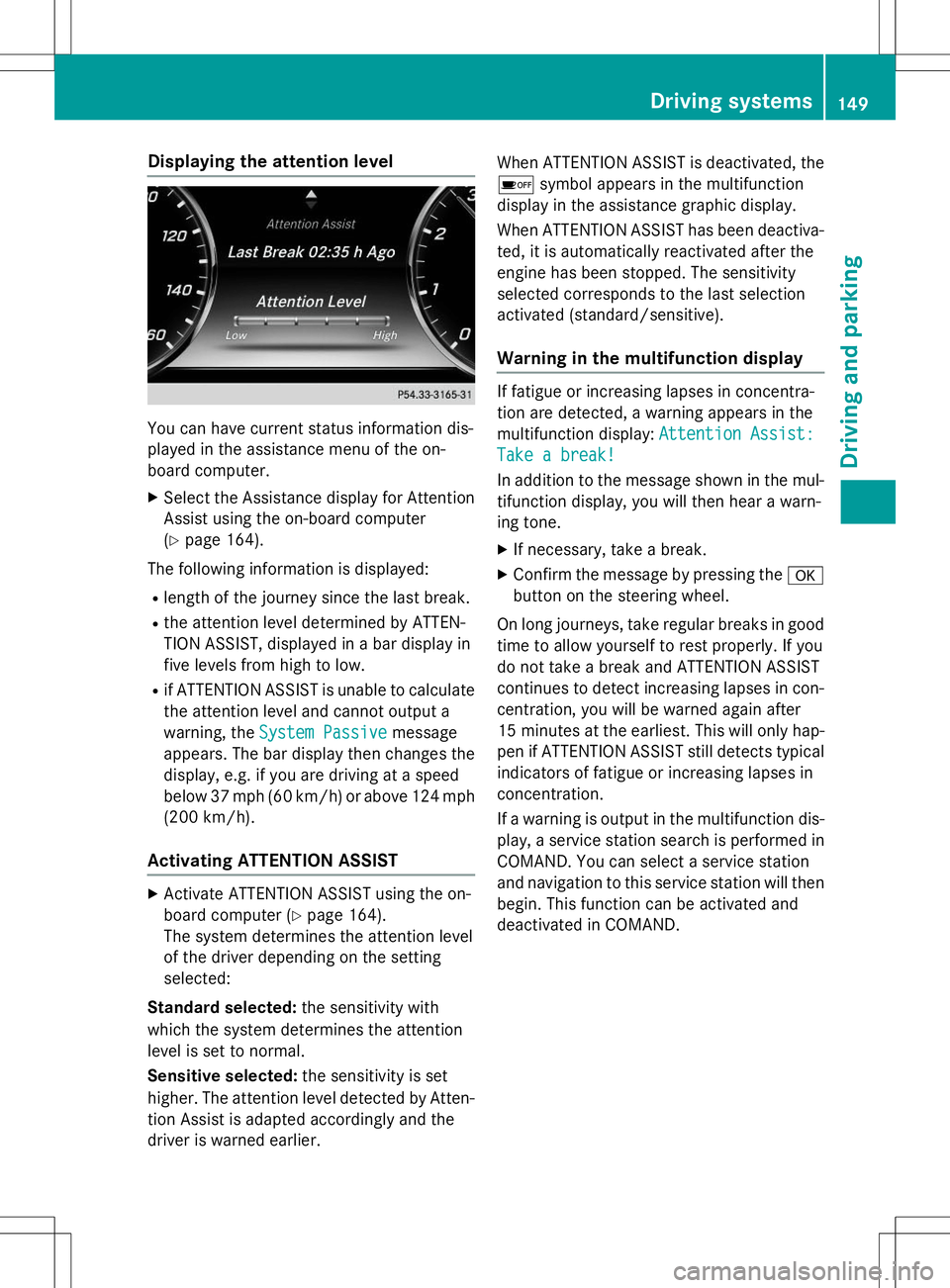
Displaying the attention level
You can have current status information dis-
played in the assistance menu of the on-
board computer.
X Select the Assistance display for Attention
Assist using the on-board computer( Y page 164).
The following information is displayed: R length of the journey since the last break.
R the attention level determined by ATTEN-
TION ASSIST, displayed in a bar display in
five levels from high to low.
R if ATTENTION ASSIST is unable to calculate
the attention level and cannot output a
warning, the
System Passivemessage
appears. The bar display then changes the
display, e.g. if you are driving at a speed
below 37 mph (60 km/h) or above 124 mph
(200 km/ h).
Activating ATTENTION ASSIST
X
Activate ATTENTION ASSIST using the on-
board computer ( Ypage 164).
The system determines the attention level
of the driver depending on the setting
selected:
Standard selected: the sensitivity with
which the system determines the attention
level is set to normal.
Sensitive selected: the sensitivity is set
higher. The attention level detected by Atten-
tion Assist is adapted accordingly and the
driver is warned earlier. When ATTENTION ASSIST is deactivated, the
é symbol appears in the multifunction
display in the assistance graphic display.
When ATTENTION ASSIST has been deactiva- ted, it is automatically reactivated after the
engine has been stopped. The sensitivity
selected corresponds to the last selection
activated (standard/sensitive).
Warning in the multifunction display
If fatigue or increasing lapses in concentra-
tion are detected, a warning appears in the
multifunction display:
Attention Assist:
Take a break!
In addition to the message shown in the mul-
tifunction display, you will then hear a warn-
ing tone.
X If necessary, take a break.
X Confirm the message by pressing the a
button on the steering wheel.
On long journeys, take regular breaks in good time to allow yourself to rest properly. If you
do not take a break and ATTENTION ASSIST
continues to detect increasing lapses in con-centration, you will be warned again after
15 minute sat the earliest. This will only hap-
pen if ATTENTION ASSIST still detects typical indicators of fatigue or increasing lapses in
concentration.
If a warning is output in the multifunction dis-
play, a service station search is performed in
COMAND. You can select a service station
and navigation to this service station will then
begin. This function can be activated and
deactivated in COMAND.
Driving systems149
Driving an d parking
Z
Page 164 of 286
W XRAdjusts the volume
8RMute
óSwitches on the Voice Control Sys-
tem; see the separate operating
instructions
Head-up display
General notes
The head-up display projects information
from the navigation system and the driver
assistance system above the dashboard into
the driver's field of vision.
A requirement for the display of the contents
is that the following functions are available in the vehicle and are switched on: R Cruise control
R DISTRONIC PLUS
R Navigation
The head-up display allows the driver to see
all of the information without having to take
his eyes off the road.
Important safety notes
The head-up display is only an aid and is not a
substitute for attentive driving.
The visibility of the head-up display is influ-
enced by the following conditions:
R the driver's seat position
R the positioning of the display image
R the general ambient light
R sunglasses with polarization filters
R Wet roads
R blocking of sunlight by objects on the dis-
play cover
In the event of extreme sunlight, sections of
the display may fade. This can be reversed by
switching the head-up display off and on
again.
iVehicles with the head-up display are
equipped with a special windshield. Should repairs be necessary, have the windshield
replaced at a qualified specialist workshop.
Displays and operation
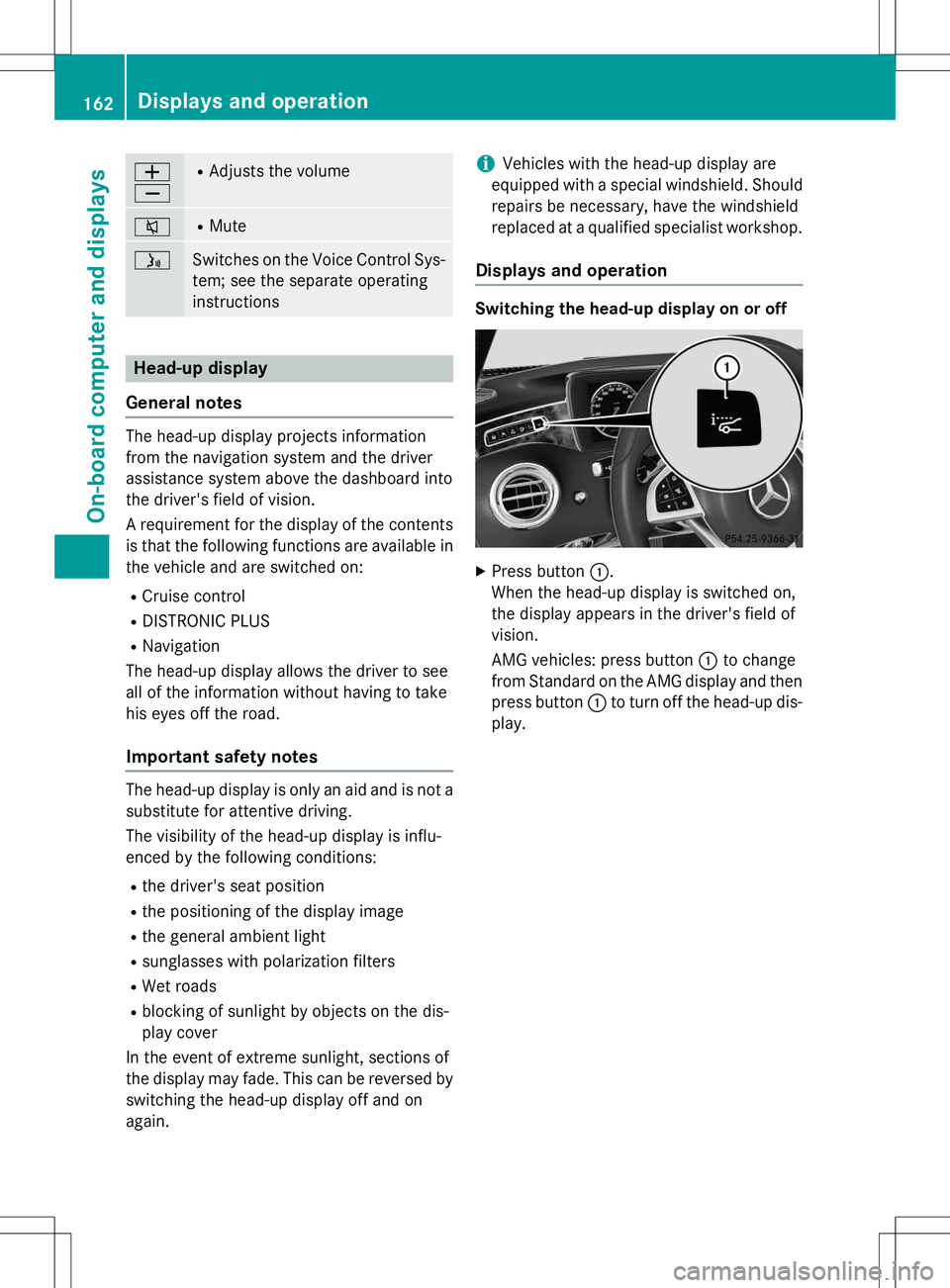
Switching the head-up display on or off
X Press button :.
When the head-up display is switched on,
the display appears in the driver's field of
vision.
AMG vehicles: press button :to change
from Standard on the AMG display and then press button :to turn off the head-up dis-
play.
162Displays and operation
On-board computer and displays
Page 165 of 286
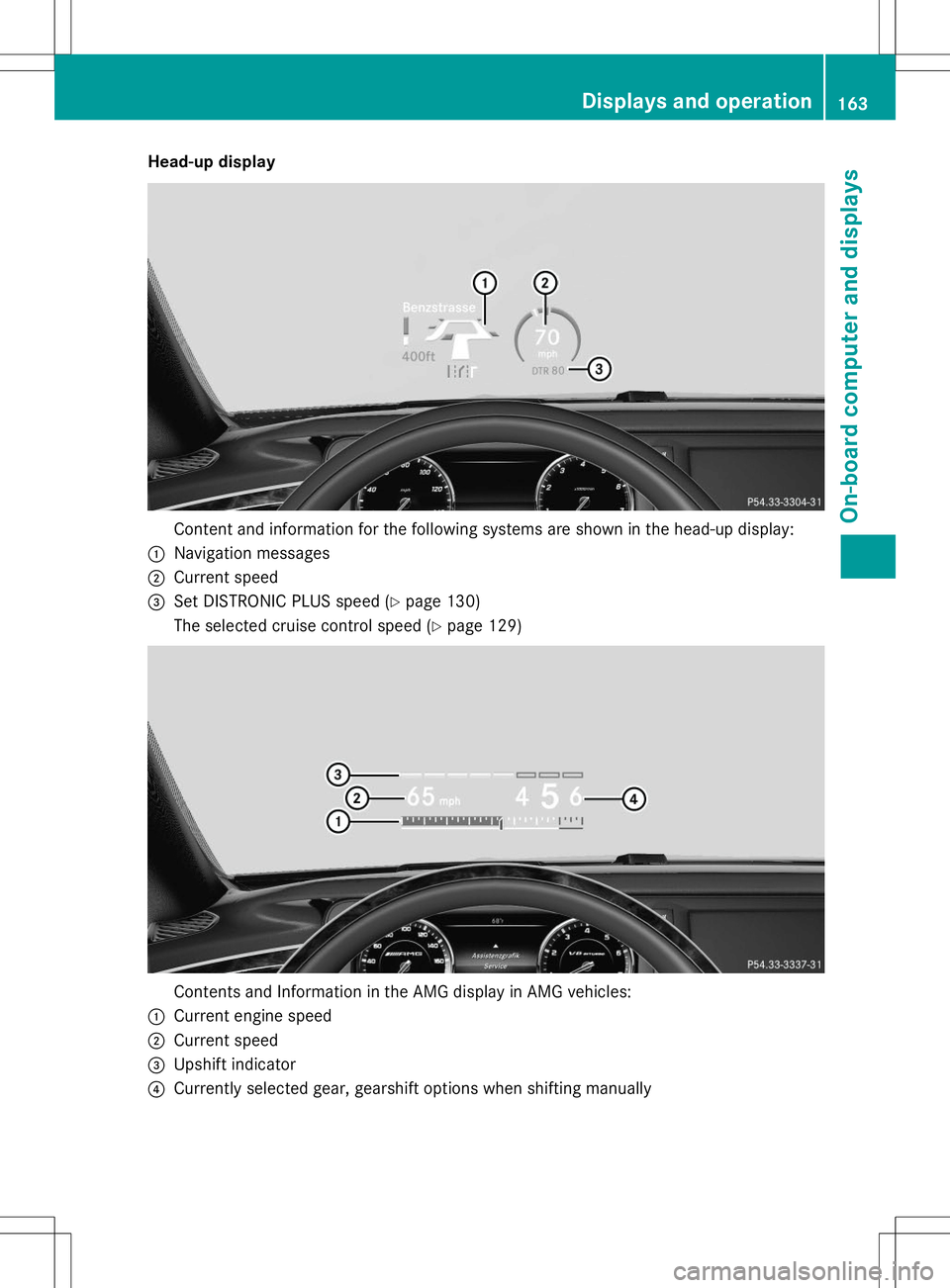
Head-up display
Content and information for the following systems are shown in the head-up display:
:Navigation messages
;Current speed
=Set DISTRONIC PLUS speed (Ypage 130)
The selected cruise control speed ( Ypage 129)
Contents and Information in the AMG display in AMG vehicles:
:Current engine speed
;Current speed
=Upshift indicator
?Currently selected gear, gearshift options when shifting manually
Displays and operation163
On-board computer and displays
Z
Page 190 of 286
Useful information
These Operating Instructions describe all thestandard and optional equipment of your
COMAND system, as available at the time of
going to print. Country-specific differences
are possible. Please note that your COMAND
system may not be equipped with all the fea- tures described. This also applies to safety-
relevant systems and functions.
These Operating Instructions describe all the
standard and optional equipment for Audio
20, as available at the time of going to press. Country-specific differences are possible.
Please note that your Audio 20 system may
not be equipped with all the features descri-
bed. This also applies to safety-relevant sys-
tems and functions.
Please read the information on qualified spe-
cialist workshops: ( Ypage 27).
General notes
The COMAND section in these operating
instructions describes the basic principles for
operating your COMAND. More information
can be found in the Digital Operator's Manual.
Important safety notes
GWARNING
Modifications to electronic components, their software as well as wiring can impair their
function and/or the function of other net-
worked components. In particular, systems
relevant to safety could also be affected. As a
result, these may no longer function as inten-
ded and/or jeopardize the operating safety of
the vehicle. There is an increased risk of an
accident and injury.
Never tamper with the wiring as well as elec-
tronic components or their software. You
should have all work to electrical and elec-
tronic equipment carried out at a qualified
specialist workshop.
If you make any changes to the vehicle elec-
tronics, the general operating permit is ren-
dered invalid.
GWARNING
If you operate information systems and com-
munication equipment integrated in the vehi- cle while driving, you will be distracted from
traffic conditions. You could also lose controlof the vehicle. There is a risk of an accident.
Only operate the equipment when the traffic
situation permits. If you are not sure that this
is possible, park the vehicle paying attention
to traffic conditions and operate the equip-
ment when the vehicle is stationary.
You must observe the legal requirements for
the country in which you are currently driving when operating COMAND.
COMAND calculates the route to the destina-
tion without taking account of the following,
for example:
R traffic lights
R stop and yield signs
R merging lanes
R parking or stopping in a no parking/no
stopping zone
R other road and traffic rules and regulations
R narrow bridges
COMAND can give incorrect navigation com-
mands if the actual street/traffic situation
does not correspond with the digital map's
data. Digital maps do not cover all areas nor
all routes in an area. For example, a route may have been diverted or the direction of a one-
way street may have changed.
For this reason, you must always observe
road and traffic rules and regulations during
your journey. Road and traffic rules and reg-
ulations always have priority over the sys-
tem's driving recommendations.
188Important safety notes
COMAND
Page 193 of 286
Functions
RHD FM radio/HD AM radio/satellite
radio
Internet radio (called up via communica-
tions functions)
R Media
Media support: audio CD, MP3 CD, DVD
video, 2 x USB, SD card, iPod ®
, Bluetooth ®
audio, 10 GB Media Register on the hard
drive
Music search using all media
R Sound systems
You can select from three sound systems:
Standard sound system
Burmester ®
surround sound system
Burmester high-end 3D surround sound
system for ultimate listening pleasure
R Navigation system
Destination entry using keyword search
Realistic 3D map with textured city models
Navigation functions such as Drive Infor-
mation and Google Maps™
Dynamic route guidance via SIRIUS satel-
lite radio
R Communication
Messaging functions (text messages,
email)
Address book
Internet browser
Mercedes-Benz Apps with Google™ Local
Search, Destination Download, Weather,
Facebook, Google Street View™, Internet
radio, stock prices, news and much more
WiFi interface for the connection of a
smartphone to COMAND Online and the
option of remote control for the front
passenger (SPLITVIEW)
Mercedes-Benz Mobile Website
WiFi hotspot functionality to connect a tab-
let PC or laptop in order to enable access to
the Internet using the customer's mobile
phone
R SIRIUS Weather Weather data as an information chart (cur-
rent forecast, 5-day preview, detailed infor-
mation)
Weather data on the weather map, e.g. rain
radar data, storm characteristics and the
track of tropical cyclones (hurricanes,
typhoons)
R Vehicle functions
Setting the multicontour seat with new
massage program
Climate control functions
Controlling ambient lighting: several color
and brightness level options
360° camera
Rear view camera
R Favorites functions
Fast access to favorites functions using the
favorites button on the touchpad
COMAND operating system191
COMAND
Z
Page 195 of 286
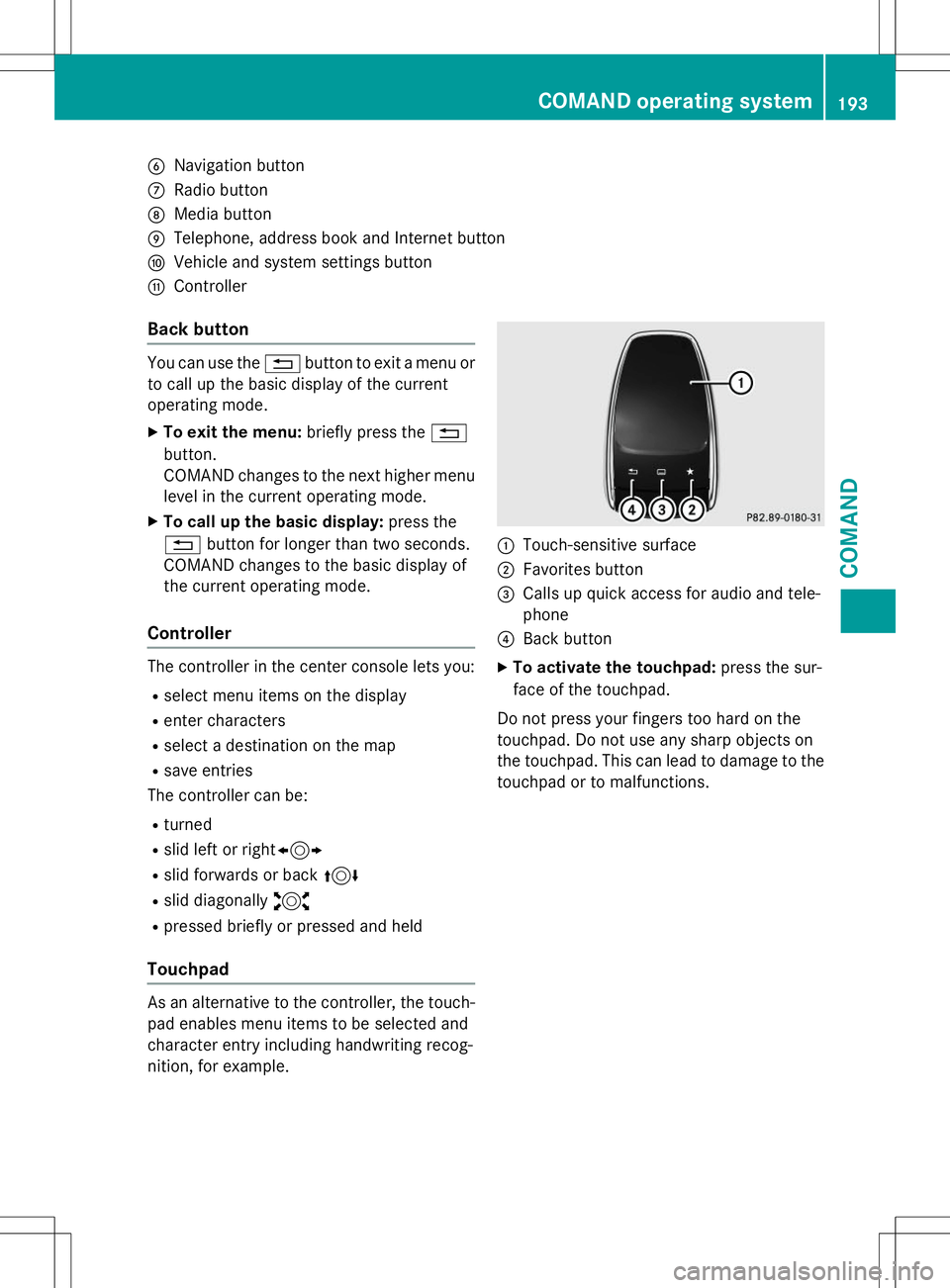
BNavigation button
CRadio button
DMedia button
ETelephone, address book and Internet button
FVehicle and system settings button
GController
Back button
You can use the%button to exit a menu or
to call up the basic display of the current
operating mode.
X To exit the menu: briefly press the%
button.
COMAND changes to the next higher menu
level in the current operating mode.
X To call up the basic display: press the
% button for longer than two seconds.
COMAND changes to the basic display of
the current operating mode.
Controller
The controller in the center console lets you:
R select menu items on the display
R enter characters
R select a destination on the map
R save entries
The controller can be:
R turned
R slid left or right 1
R slid forwards or back 4
R slid diagonally 2
R pressed briefly or pressed and held
Touchpad
As an alternative to the controller, the touch-
pad enables menu items to be selected and
character entry including handwriting recog-
nition, for example.
:Touch-sensitive surface
;Favorites button
=Calls up quick access for audio and tele- phone
?Back button
X To activate the touchpad: press the sur-
face of the touchpad.
Do not press your fingers too hard on the
touchpad. Do not use any sharp objects on
the touchpad. This can lead to damage to the touchpad or to malfunctions.
COMAND operating system193
COMAND
Z