phone MERCEDES-BENZ S-COUPE 2015 Owners Manual
[x] Cancel search | Manufacturer: MERCEDES-BENZ, Model Year: 2015, Model line: S-COUPE, Model: MERCEDES-BENZ S-COUPE 2015Pages: 286, PDF Size: 29.85 MB
Page 16 of 286
Displaying a service message ........ 216
DISTRONIC PLUS ........................... 134
Factory settings submenu .............164
Head-up displa y............................. 162
Important safety notes .................. 160
Lighting submenu .......................... 164
Media menu ................................... 164
Menu overview .............................. 164
Message memory .......................... 165
Navigation menu ............................ 164
Operation ....................................... 161
Radio menu ................................... 164
Service menu ................................. 164
Standard display ............................ 164
Video DVD operation ..................... 164
Operating safety
Declaration of conformity ................ 27
Important safety notes .................... 26
Operating system
see On-board computer
Operation
Digital Operator's Manua l................ 21
Operator's Manual
Overview .......................................... 24
Vehicle equipment ........................... 24
Outside temperature display ........... 160
Overhead control panel ...................... 38
P
Paint code number............................ 274
Paintwork (cleaning instructions) ... 217
Panic alarm .......................................... 42
Panorama roof ..................................... 91
Parcel net hooks ............................... 197
Parking
Important safety notes .................. 125
Parking brake ................................ 126
Position of exterior mirror, front-
passenger side ................................. 99
Rear view camera .......................... 144
see PARKTRONIC
Parking aid
Active Parking Assist ..................... 143
see Exterior mirrors
see PARKTRONIC
Parking assistance
see PARKTRONIC Parking brake
Display message ............................ 165
Electric parking brake .................... 126
Parking lamps
Switching on/of f........................... 103
PARKTRONIC
Deactivating/activating ................. 143
Driving system ............................... 142
Function/note s............................. 142
Important safety notes .................. 142
Problem (malfunction) ................... 143
Range of the sensors ..................... 142
Warning display ............................. 143
PASSENGER AIR BAG
Indicator lamps ................................ 43
PASSENGER AIR BAG indicatorlamp
Problem (malfunction) ................... 172
Pets in the vehicle ............................... 65
Phone book
see also Digital Operator's Man-
ual .................................................. 188
Plastic trim (cleaning instruc-
tions) .................................................. 218
Power locks ......................................... 82
Power washers .................................. 217
Power windows
see Side windows
PRE-SAFE ®
(anticipatory occupant
protection)
Operation ......................................... 59
PRE-SAFE ®
Brake
Activating/deactivating ................. 164
Function/note s................................ 73
Important safety notes .................... 73
Warning lamp ................................. 184
PRE-SAFE ®
PLUS (anticipatory
occupant protection PLUS)
Operation ......................................... 59
Program selector button .................. 121
Protection against theft
ATA (Anti-Theft Alarm system )......... 76
Immobilizer ...................................... 75
Protection of the environment
General notes .................................. 23
Pulling away
Automatic transmission ................. 118
14Index
Page 20 of 286
Tires/wheels ................................. 266
Vehicle data ................................... 281
Telephone
Accepting a call (multifunction
steering wheel) .............................. 164
Number from the phone book ........ 164
Redialing ....................................... .164
Rejecting/ending a call ................. 164
see also Digital Operator's Man-
ual ................................................. .188
Temperature
Setting (climate control) ................ 111
Tire pressure
Calling up (on-board computer) ..... 246
Checking manually ........................ 246
Display message ............................ 175
Important safety notes .................. 246
Maximum ....................................... 245
Not reached (TIREFIT) .................... 223
Notes ............................................. 244
Reached (TIREFIT) .......................... 224
Recommended ............................... 243
Tire pressure monitor
Checking the tire pressure elec-
tronically ........................................ 248
Function/notes ............................ .246
General notes ................................ 246
Important safety notes .................. 246
Radio type approval for the tire
pressure monitor ........................... 249
Restarting ...................................... 248
Warning lamp ................................. 185
Warning message .......................... 248
TIREFIT kit .......................................... 222
Tires
Aspect ratio (definition) ................. 260
Average weight of the vehicle
occupants (definition) .................... 259
Bar (definition) ............................... 259
Changing a wheel .......................... 261
Characteristics .............................. 259
Checking ........................................ 241
Curb weight (definition) ................. 260
Definition of terms ......................... 259
Direction of rotatio n...................... 262
Display message ............................ 175
Distribution of the vehicle occu-
pants (definition) ............................ 261 DOT (Department of Transporta-
tion) (definition) ............................. 259
DOT, Tire Identification Number
(TIN) ............................................... 258
GAWR (Gross Axle Weight Rating)
(definition) ..................................... 259
GVW (Gross Vehicle Weight) (def-
inition) ........................................... 260
GVWR (Gross Vehicle Weight Rat-
ing) (definition) .............................. 260
Important safety notes .................. 240
Increased vehicle weight due to
optional equipment (definition) ...... 259
Kilopascal (kPa) (definition) ........... 260
Labeling (overview) ........................ 255
Load bearing index (definition) ...... 261
Load index ..................................... 258
Load index (definition) ................... 260
Maximum load on a tire (defini-
tion) ............................................... 260
Maximum loaded vehicle weight
(definition) ..................................... 260
Maximum permissible tire pres-
sure (definition) ............................. 260
Maximum tire load ......................... 258
Maximum tire load (definition) ....... 260
MOExtended tire s.......................... 242
Optional equipment weight (defi-
nition) ............................................ 261
PSI (pounds per square inch) (def-
inition) ........................................... 260
Replacing ....................................... 261
Service life ..................................... 242
Sidewall (definition) ....................... 261
Speed rating (definition) ................ 260
Storing ........................................... 262
Structure and characteristics
(definition) ..................................... 259
Summer tires in winter .................. 242
Temperature .................................. 255
TIN (Tire Identification Number)
(definition) ..................................... 261
Tire bead (definition) ...................... 261
Tire pressure (definition) ................ 260
Tire pressures (recommended) ...... 259
Tire size (data) ............................... 266
Tire size designation, load-bearing capacity, speed rating .................... 255
18Index
Page 37 of 286
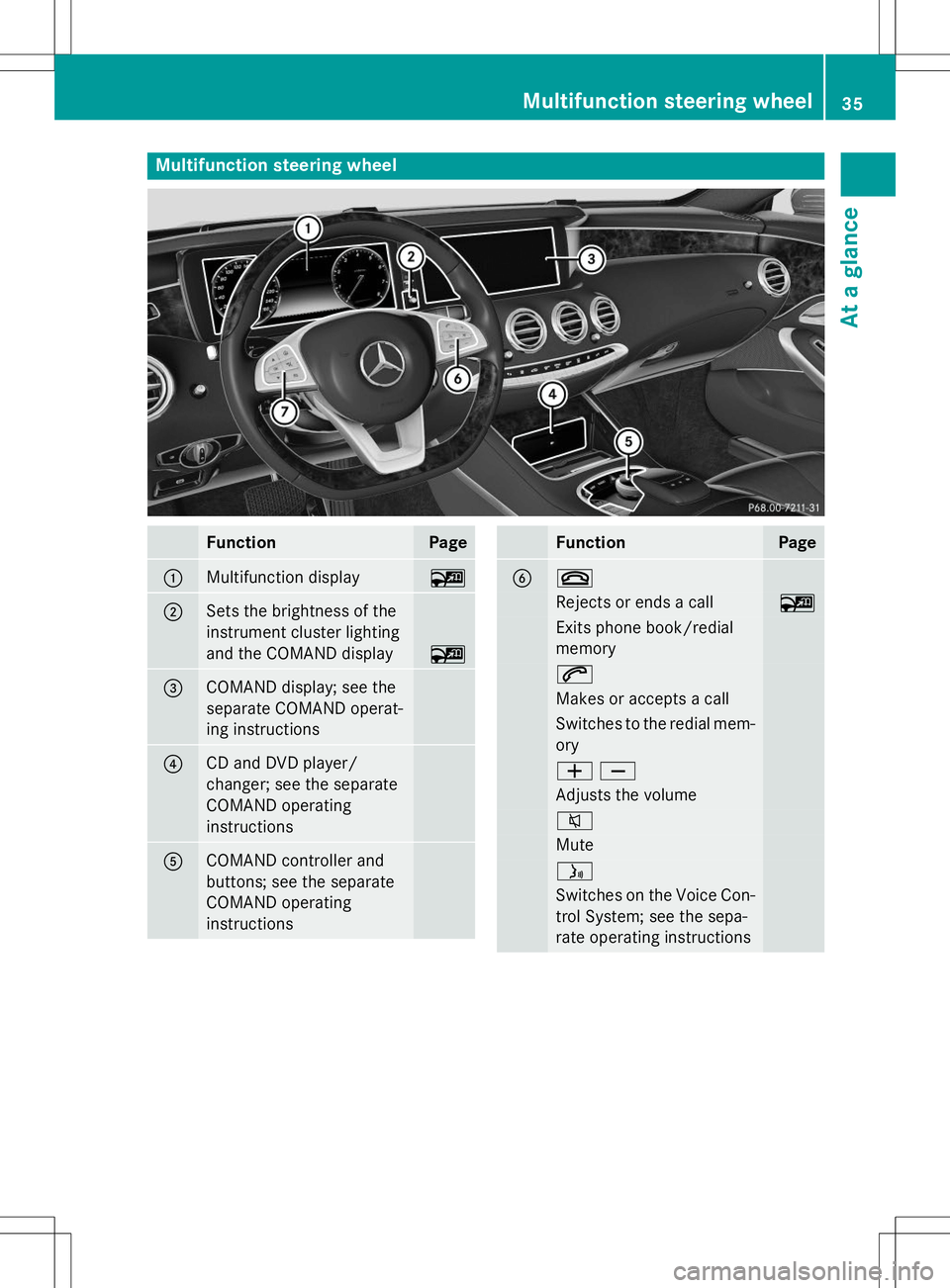
Multifunction steering wheel
FunctionPage
:Multifunction display~
;Sets the brightness of the
instrument cluster lighting
and the COMAND display
~
=COMAND display; see the
separate COMAND operat-
ing instructions
?CD and DVD player/
changer; see the separate
COMAND operatinginstructions
ACOMAND controller and
buttons; see the separate
COMAND operatinginstructions
FunctionPage
B~
Rejects or ends a call~
Exits phone book/redial memory
6
Makes or accepts a call
Switches to the redial mem-ory
WX
Adjusts the volume
8
Mute
ó
Switches on the Voice Con-
trol System; see the sepa-
rate operating instructions
Multifunction steering wheel35
At a glance
Page 39 of 286
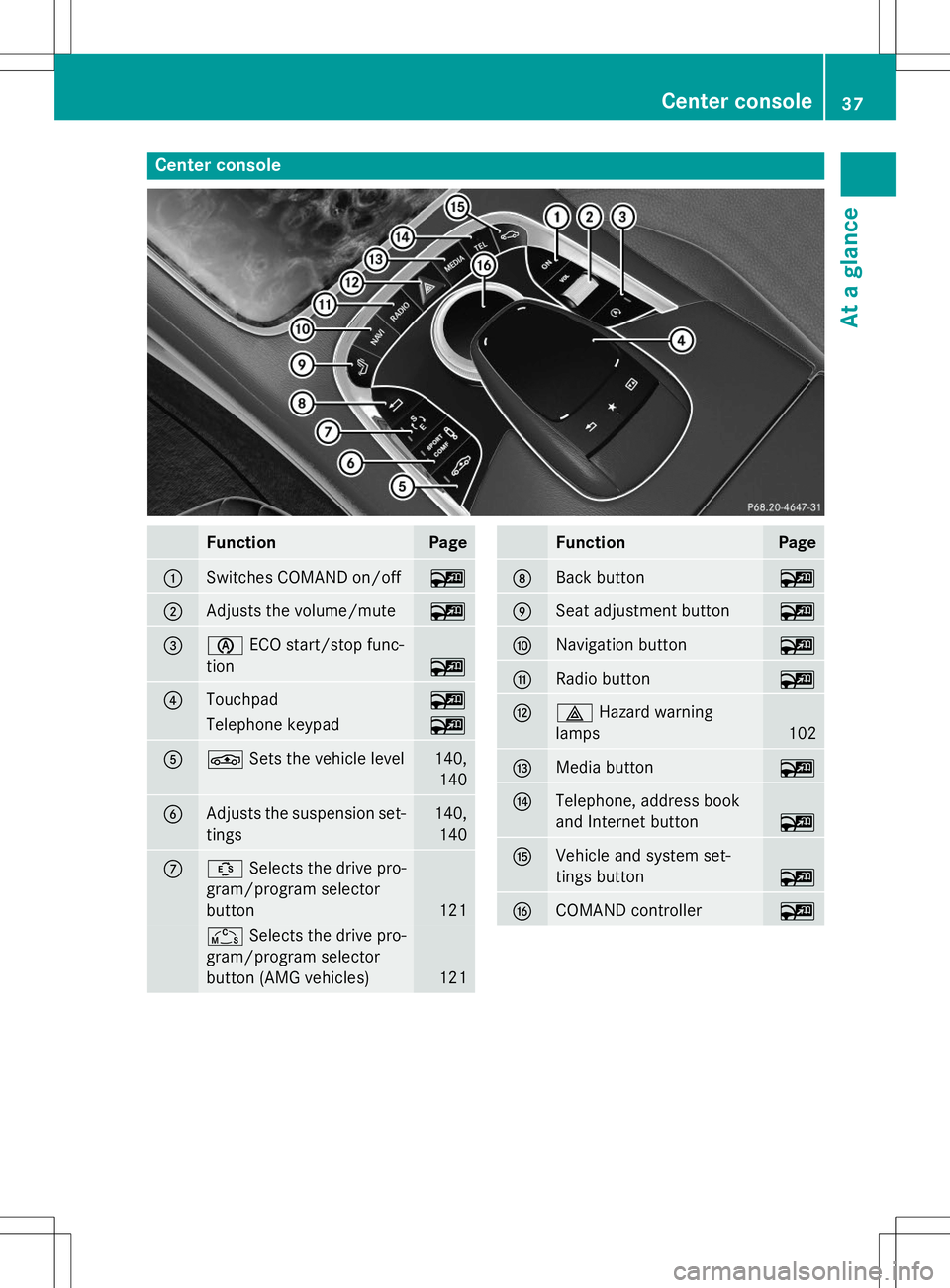
Center console
FunctionPage
:Switches COMAND on/off~
;Adjusts the volume/mute~
=èECO start/stop func-
tion
~
?Touchpad~
Telephone keypad~
AÉ Sets the vehicle level140,
140
BAdjusts the suspension set-tings140, 140
CÛ Selects the drive pro-
gram/program selector
button
121
Ñ Selects the drive pro-
gram/program selector
button (AMG vehicles)
121
FunctionPage
DBack button~
ESeat adjustment button~
FNavigation button~
GRadio button~
H£ Hazard warning
lamps
102
IMedia button~
JTelephone, address book
and Internet button
~
KVehicle and system set-
tings button
~
LCOMAND controller~
Center console37
At a glance
Page 40 of 286
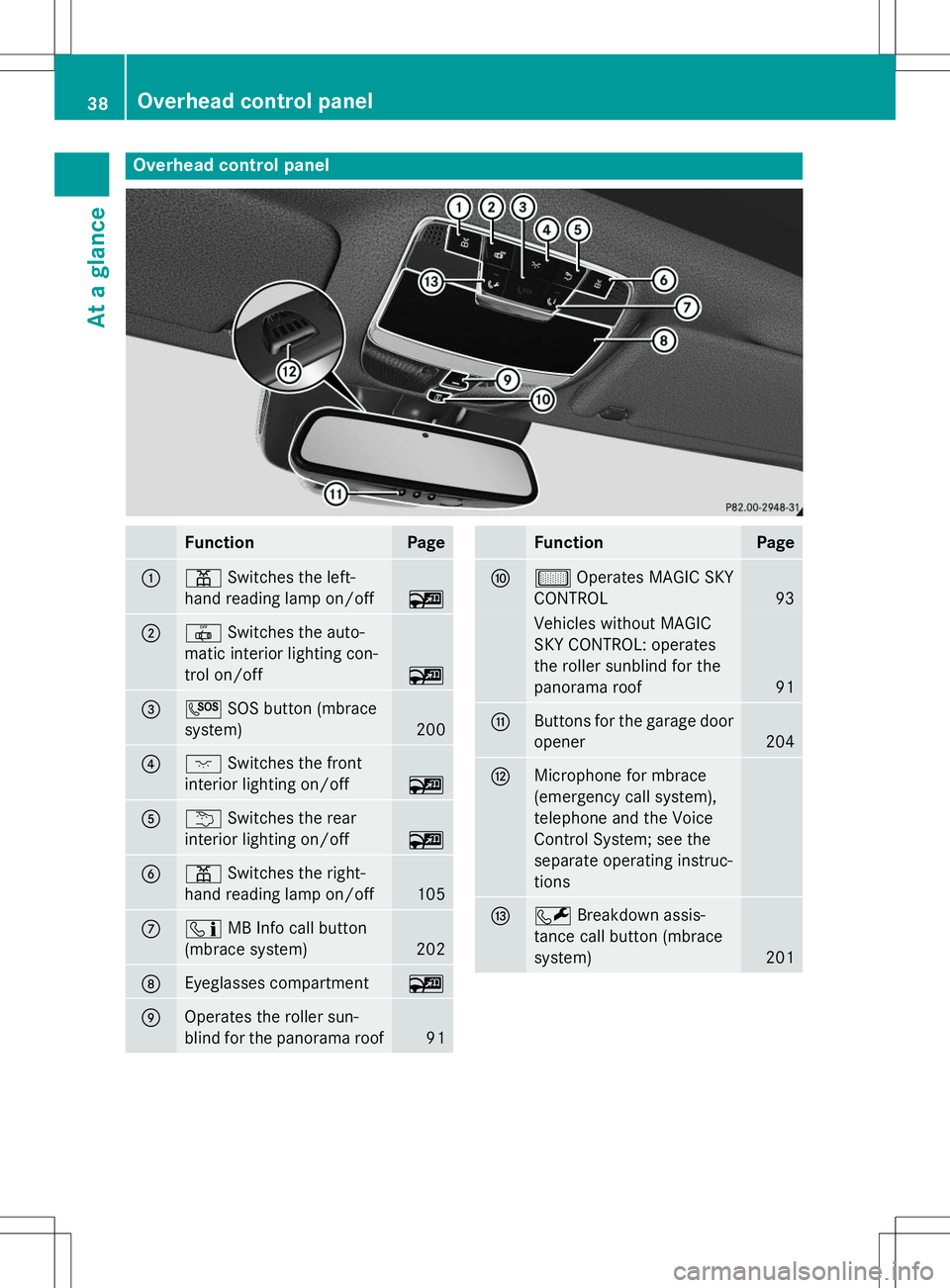
Overhead control panel
FunctionPage
:pSwitches the left-
hand reading lamp on/off
~
;| Switches the auto-
matic interior lighting con-
trol on/off
~
=G SOS button (mbrace
system)
200
?c Switches the front
interior lighting on/off
~
Au Switches the rear
interior lighting on/off
~
Bp Switches the right-
hand reading lamp on/off
105
Cï MB Info call button
(mbrace system)
202
DEyeglasses compartment~
EOperates the roller sun-
blind for the panorama roof
91
FunctionPage
Fµ Operates MAGIC SKY
CONTROL
93
Vehicles without MAGIC
SKY CONTROL: operates
the roller sunblind for the
panorama roof
91
GButtons for the garage door opener
204
HMicrophone for mbrace
(emergency call system),
telephone and the Voice
Control System; see the
separate operating instruc-
tions
IF Breakdown assis-
tance call button (mbrace system)
201
38Overhead control panel
At a glance
Page 78 of 286
When leaving the vehicle, always take the
SmartKey with you and lock the vehicle. Any-
one can start the engine if a valid SmartKey
has been left inside the vehicle.
iThe immobilizer is always deactivated
when you start the engine.
In the event that the engine cannot be star- ted (yet the vehicle's battery is charged),
the system is not operational. Contact an
authorized Mercedes-Benz Center or call
1-800-FOR-MERCedes (in the USA) or
1-800-387-0100 (in Canada).
ATA (anti-theft alarm system)
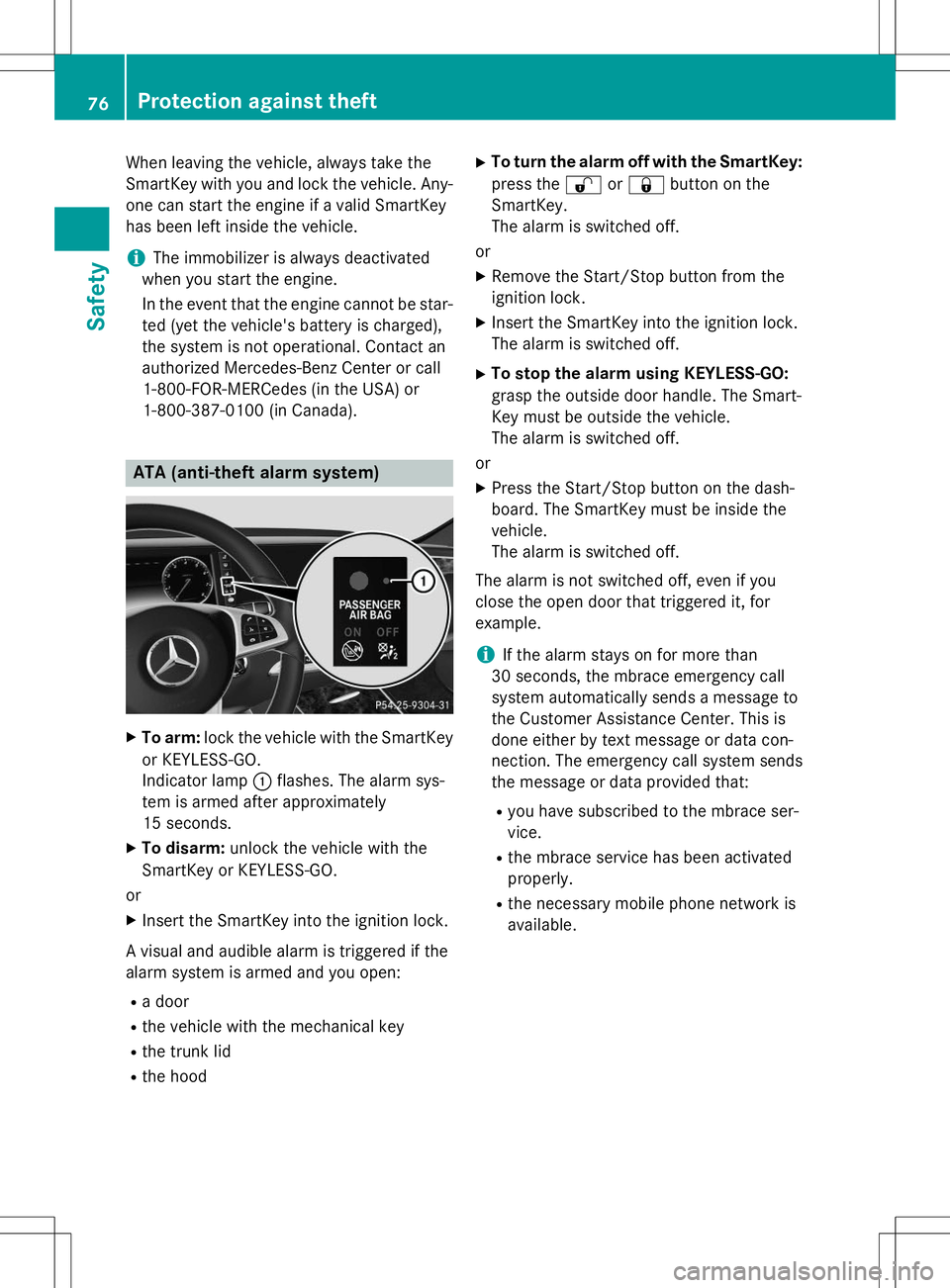
X To arm: lock the vehicle with the SmartKey
or KEYLESS-GO.
Indicator lamp :flashes. The alarm sys-
tem is armed after approximately
15 seconds.
X To disarm: unlock the vehicle with the
SmartKey or KEYLESS-GO.
or X Insert the SmartKey into the ignition lock.
A visual and audible alarm is triggered if the
alarm system is armed and you open: R a door
R the vehicle with the mechanical key
R the trunk lid
R the hood X
To turn the alarm off with the SmartKey:
press the %or& button on the
SmartKey.
The alarm is switched off.
or
X Remove the Start/Stop button from the
ignition lock.
X Insert the SmartKey into the ignition lock.
The alarm is switched off.
X To stop the alarm using KEYLESS-GO:
grasp the outside door handle. The Smart-
Key must be outside the vehicle.
The alarm is switched off.
or
X Press the Start/Stop button on the dash-
board. The SmartKey must be inside thevehicle.
The alarm is switched off.
The alarm is not switched off, even if you
close the open door that triggered it, forexample.
iIf the alarm stays on for more than
30 seconds, the mbrace emergency call
system automatically sends a message to
the Customer Assistance Center. This is
done either by text message or data con-
nection. The emergency call system sends
the message or data provided that:
R you have subscribed to the mbrace ser-vice.
R the mbrace service has been activatedproperly.
R the necessary mobile phone network isavailable.
76Protection against theft
Safety
Page 80 of 286
Useful information
iThis Operator's Manual describes all
models and all standard and optional equip- ment of your vehicle available at the time of
publication of the Operator's Manual.
Country-specific differences are possible.
Please note that your vehicle may not be
equipped with all features described. This
also applies to safety-related systems and
functions.
iRead the information on qualified special-
ist workshops ( Ypage 27).
SmartKey
Important safety notes
GWARNING
If children are left unsupervised in the vehicle,
they could:
R open the doors, thus endangering other
people or road users.
R get out and disrupt traffic.
R operate the vehicle's equipment.
Additionally, children could set the vehicle in
motion if, for example, they:
R release the parking brake.
R shifting the automatic transmission out of
park position P
R Start the engine.
There is a risk of an accident and injury.
When leaving the vehicle, always take the
SmartKey with you and lock the vehicle. Never
leave children or animals unattended in the
vehicle. Always keep the SmartKey out of
reach of children.
GWARNING
If you attach heavy or large objects to the
SmartKey, the SmartKey could be uninten-
tionally turned in the ignition lock. This could
cause the engine to be switched off. There is a risk of an accident.
Do not attach any heavy or large objects to the SmartKey. Remove any bulky key rings before
inserting the SmartKey into the ignition lock.
!Keep the SmartKey away from strong
magnetic fields. Otherwise, the remote
control function could be affected.
Strong magnetic fields can occur in the
vicinity of powerful electrical installations.
Do not keep the SmartKey: R with electronic devices, e.g. a mobile
phone or another SmartKey
R with metallic objects, e.g. coins or metalfoil
R inside metallic objects, e.g. a metal case
This can affect the functionality of the
SmartKey.
Vehicles with KEYLESS-GO start function: do not keep the SmartKey on the parcel shelf or in the trunk. Otherwise, the SmartKey maynot be detected, e.g. when starting the engine
using the Start/Stop button.
A check which periodically establishes a radio
connection between the vehicle and the
SmartKey determines whether a valid Smart- Key is in the vehicle. This occurs, for example:
R when starting the engine
R whilst driving
R when using HANDS-FREE ACCESS
R when the external door handles are
touched
R during convenience closing
78SmartKey
Opening and closing
Page 118 of 286
the case if you are not depressing the brake
pedal.
If you depress the brake pedal and press the
Start/Stop button, the engine starts immedi-
ately.
A check which periodically establishes a radio
connection between the vehicle and the
SmartKey determines whether a valid Smart- Key is in the vehicle. This occurs, for example, when starting the engine.
To start the vehicle without actively using the
SmartKey:
R the Start/Stop button must be inserted in
the ignition lock.
R the SmartKey must be in the vehicle.
R the vehicle must not be locked with the
SmartKey or KEYLESS-GO ( Ypage 79).
Do not keep the SmartKey:
R with electronic devices, e.g. a mobile
phone or another SmartKey
R with metallic objects, e.g. coins or metal
foil
R inside metallic objects, e.g. a metal case
This can affect the functionality of the Smart- Key.
If you lock the vehicle with the SmartKey's
remote control or with KEYLESS-GO, after a
short time:
R you will not be able to switch on the ignition
with the Start/Stop button.
R you will not be able to start the engine with
the Start/Stop button until the vehicle is
unlocked again.
If you lock the vehicle centrally using the but-
ton on the front door ( Ypage 82), you can
continue to start the engine with the Start/
Stop button.
The engine can be turned off while the vehicle
is in motion by pressing and holding the
Start/Stop button for approximately three
seconds. This function operates independ-
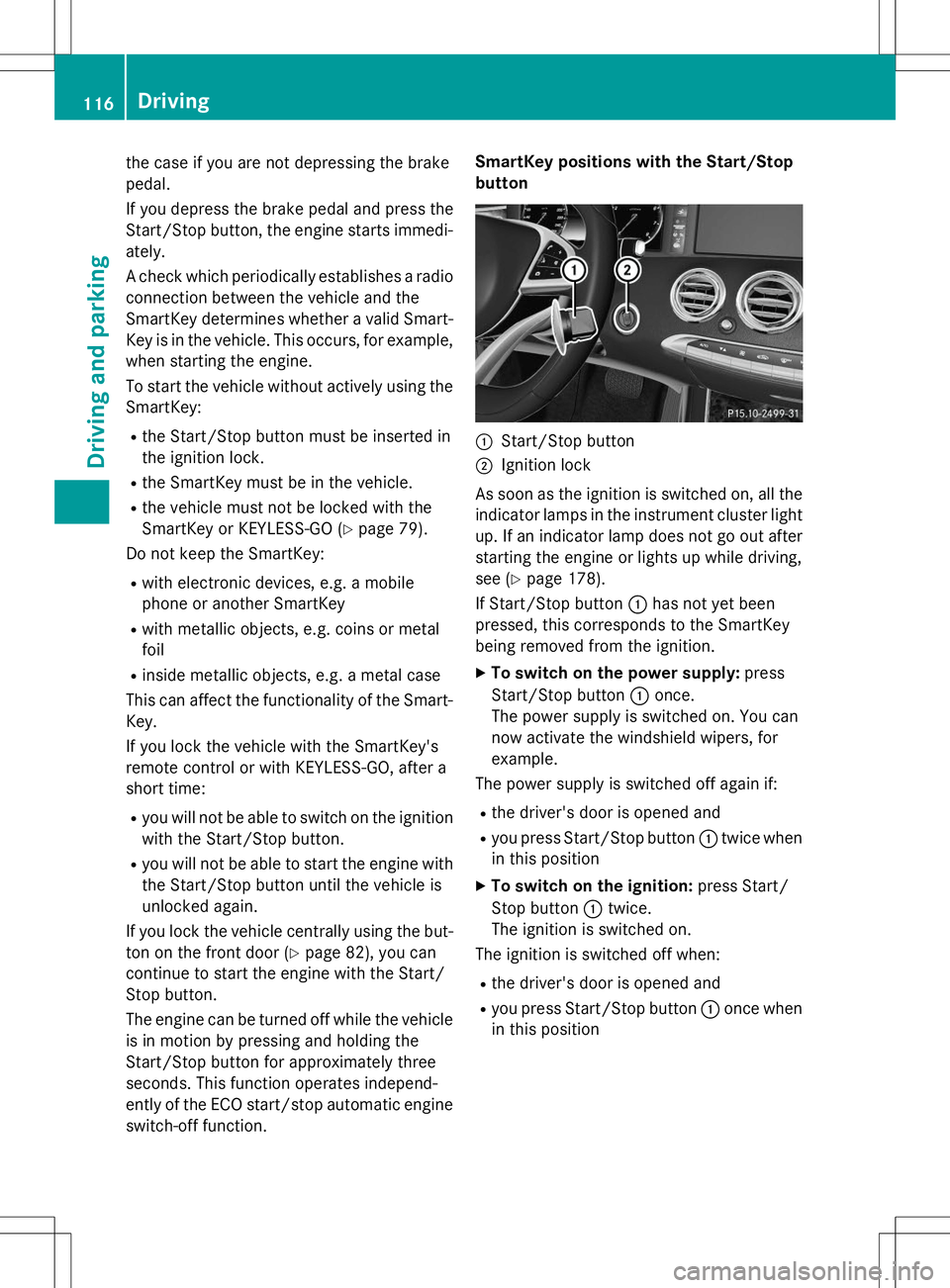
ently of the ECO start/stop automatic engine switch-off function. SmartKey positions with the Start/Stop
button
:Start/Stop button
;Ignition lock
As soon as the ignition is switched on, all the
indicator lamps in the instrument cluster light up. If an indicator lamp does not go out afterstarting the engine or lights up while driving,
see ( Ypage 178).
If Start/Stop button :has not yet been
pressed, this corresponds to the SmartKey
being removed from the ignition.
X To switch on the power supply: press
Start/Stop button :once.
The power supply is switched on. You can
now activate the windshield wipers, for
example.
The power supply is switched off again if:
R the driver's door is opened and
R you press Start/Stop button :twice when
in this position
X To switch on the ignition: press Start/
Stop button :twice.
The ignition is switched on.
The ignition is switched off when:
R the driver's door is opened and
R you press Start/Stop button :once when
in this position
116Driving
Driving an d parking
Page 129 of 286
Driving tips
General driving tips
Important safety notes
GWARNING
If you switch off the ignition while driving,
safety-relevant functions are only available
with limitations, or not at all. This could affect, for example, the power steering and the brake
boosting effect. You will require considerably
more effort to steer and brake. There is a risk
of an accident.
Do not switch off the ignition while driving.
GWARNING
If you operate mobile communication equip-
ment while driving, you will be distracted from traffic conditions. You could also lose controlof the vehicle. There is a risk of an accident.
Only operate this equipment when the vehicle is stationary.
Observe the legal requirements for the coun- try in which you are driving. Some jurisdic-
tions prohibit the driver from using a mobile
phone while driving a vehicle.
If you make a call while driving, always use
hands-free mode. Only operate the telephone
when the traffic situation permits. If you are
unsure, pull over to a safe location and stop
before operating the telephone.
Bear in mind that at a speed of only 30 mph
(approximately 50 km/h), the vehicle covers
a distance of 44 ft (approximately 14 m) per
second.
Drive sensibly – save fuel
Observe the following tips to save fuel:
X The tires should always be inflated to the
recommended tire pressure.
X Remove unnecessary loads.
X Remove roof racks when they are not nee-ded.
X Warm up the engine at low engine speeds. X
Avoid frequent acceleration or braking.
X Have all maintenance work carried out as
indicated by the service intervals in the
Maintenance Booklet or by the service
interval display.
Fuel consumption also increases when driv-
ing in cold weather, in stop-start traffic and in
hilly terrain.
Drinking and driving
GWARNING
Drinking and driving and/or taking drugs and driving are very dangerous combinations.
Even a small amount of alcohol or drugs can
affect your reflexes, perceptions and judg-
ment.
The possibility of a serious or even fatal acci-
dent is greatly increased when you drink or
take drugs and drive.
Do not drink or take drugs and drive or allow
anyone to drive who has been drinking or tak-
ing drugs.
Emission control
GWARNING
Combustion engines emit poisonous exhaust
gases such as carbon monoxide. Inhaling
these exhaust gases leads to poisoning. There is a risk of fatal injury. Therefore never leave
the engine running in enclosed spaces with-
out sufficient ventilation.
Certain engine systems are designed to keep
the level of poisonous components in exhaust fumes within legal limits.
These systems only work at peak efficiency if they are serviced exactly in accordance with
the manufacturer's specifications. For this
reason, all work on the engine must be carried
out by qualified and authorized Mercedes-
Benz technicians.
The engine settings must not be changed
under any circumstances. Furthermore, all
specific service work must be carried out at
Driving tips127
Driving and pa rking
Z
Page 163 of 286
Operating the on-board computer
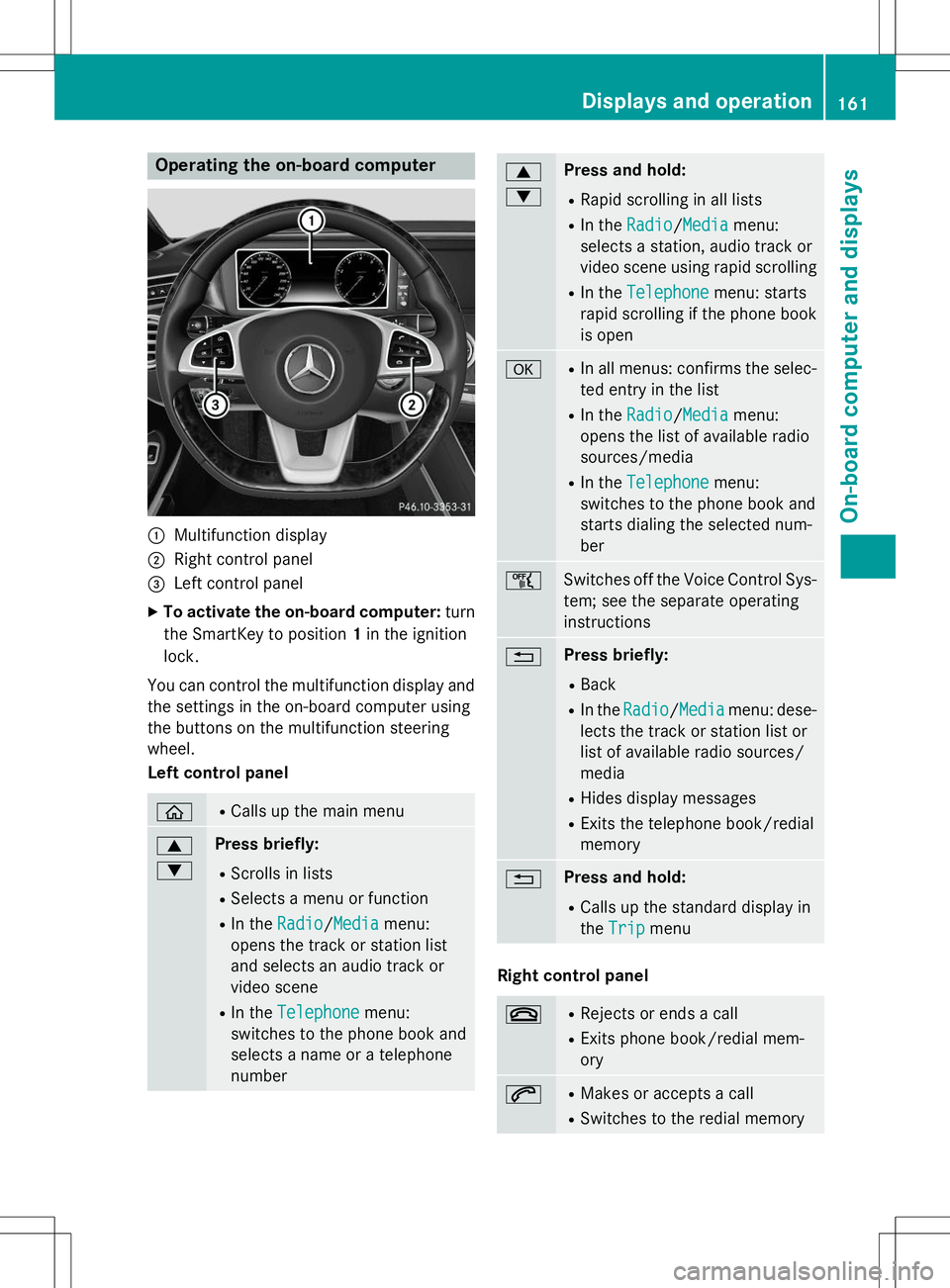
:Multifunction display
;Right control panel
=Left control panel
X To activate the on-board computer: turn
the SmartKey to position 1in the ignition
lock.
You can control the multifunction display and
the settings in the on-board computer using
the buttons on the multifunction steeringwheel.
Left control panel
òR Calls up the main menu
9 :Press briefly:
R Scrolls in lists
R Selects a menu or function
R In the
Radio/Mediamenu:
opens the track or station list
and selects an audio track or
video scene
R In the
Telephonemenu:
switches to the phone book and
selects a name or a telephonenumber
9 :Press and hold:
R Rapid scrolling in all lists
R In the
Radio/Mediamenu:
selects a station, audio track or
video scene using rapid scrolling
R In the
Telephonemenu: starts
rapid scrolling if the phone book is open
aR In all menus: confirms the selec-
ted entry in the list
R In the
Radio/Mediamenu:
opens the list of available radio
sources/media
R In the
Telephonemenu:
switches to the phone book and
starts dialing the selected num-ber
ñSwitches off the Voice Control Sys-
tem; see the separate operating
instructions
%Press briefly:
R Back
R In the
Radio/Mediamenu: dese-
lects the track or station list or
list of available radio sources/media
R Hides display messages
R Exits the telephone book/redialmemory
%Press and hold:
R Calls up the standard display in the
Tripmenu
Right control panel
~RRejects or ends a call
R Exits phone book/redial mem- ory
6RMakes or accepts a call
R Switches to the redial memory
Displays and operation161
On-board computer and displays
Z