remote control MERCEDES-BENZ S-COUPE 2015 Owners Manual
[x] Cancel search | Manufacturer: MERCEDES-BENZ, Model Year: 2015, Model line: S-COUPE, Model: MERCEDES-BENZ S-COUPE 2015Pages: 286, PDF Size: 29.85 MB
Page 14 of 286
LightsAdaptive Highbeam Assist PLUS .... 104
Automatic headlamp mode ............ 103
Cornering light function ................ .103
Driving abroad ............................... 102
Hazard warning lamps ................... 102
High beam flasher .......................... 103
High-beam headlamps ................... 103
Light switch ................................... 102
Low-beam headlamps .................... 103
Parking lamps ................................ 103
Setting exterior lighting ................. 102
Standing lamps .............................. 103
Switching the daytime running
lamps on/off (on-board com-
puter) ............................................. 164
Switching the spotlight on/off ....... 164
Turn signals ................................... 103
see Replacing bulbs
Loading guidelines ............................ 196
Locking
see Central locking
Locking (doors)
Automatic ........................................ 82
Emergency locking ........................... 83
From inside (central locking but-
ton) ................................................. .82
Locking centrally
see Central locking
Low-beam headlamps
Display message ............................ 165
Setting for driving abroad (sym-
metrical) ........................................ 102
Switching on/off .......................... .103
Lumbar support
Adjusting the 4-way lumbar sup-
port ................................................. .98
M
M+S tires............................................ 242
Magic Body Control ........................... 140
MAGIC SKY CONTROL ......................... 93
Malfunction message
see Display messages
Matte finish (cleaning instruc-
tions) .................................................. 217 MBC
see Magic Body Control
mbrace
Call priority ................................... .203
Display message ............................ 165
Downloading destinations
(COMAND) ..................................... 199
Downloading routes ....................... 199
Emergency call .............................. 200
General notes ................................ 199
Geo fencing ................................... 199
Locating a stolen vehicle .............. .199
MB info call button ........................ 202
Remote vehicle locking .................. 199
Roadside Assistance button .......... 201
Search & Send ............................... 199
Self-test ......................................... 199
Speed alert ................................... .199
System .......................................... 199
Triggering the vehicle alarm ........... 199
Vehicle remote malfunction diag-
nosis .............................................. 199
Vehicle remote unlocking .............. 199
Mechanical key
Function/notes ................................ 80
Inserting .......................................... 80
Locking vehicle ................................ 83
Removing ......................................... 80
Unlocking the driver's door .............. 83
Memory card (audio) ......................... 164
Memory function ................................. 99
Mercedes-Benz Intelligent Drive
360°camera .................................. 146
ABS (Anti-lock Brake System) .......... 66
Active Blind Spot Assist ................. 153
Active Lane Keeping Assist ............ 155
Active Parking Assist ..................... 143
ATTENTION ASSIST ........................ 148
BAS (Brake Assist) ........................... 66
BAS PLUS (Brake Assist PLUS)
with Cross-Traffic Assist .................. 67
Crosswind Assist (vehicles with
MAGIC BODY CONTROL) .............. .140
Crosswind Assist (vehicles with-
out MAGIC BODY CONTROL) ........... 72
Cruise control ................................ 129
DISTRONIC PLUS ........................... 130
12Index
Page 17 of 286
General notes ................................ 118
Hill start assist ...............................118
Q
QR code
Rescue card ..................................... 29
Qualified specialist workshop ........... 27
R
Radio
Selecting a station ......................... 164
see separate operating instructions
Radio mode
see also Digital Operator's Man-
ual ................................................. .188
Radio-wave reception/transmis-
sion in the vehicle
Declaration of conformity ................ 27
Reading lamp ..................................... 105
Rear compartment
Stowage compartment .................. 197
Rear fog lamp
Display message ............................ 165
Rear lamps
see Lights
Rear seats
Overview .......................................... 40
Rear view camera
Cleaning instructions ..................... 217
Function/notes ............................ .144
Switching on/off ........................... 145
Rear window blind ............................ 198
Rear window defroster
Problem (malfunction) ................... 111
Switching on/off ........................... 111
Rear-view mirror
Anti-glare (manual) .......................... 99
Dipping (automatic) ......................... 99
Refrigerant (air-conditioning sys-tem)
Important safety notes .................. 280
Refueling
Fuel gauge ....................................... 33
Important safety notes .................. 122
Refueling process .......................... 123
see Fuel Remote control
Garage door opener ....................... 203
Programming (garage door
opener) .......................................... 204
Replacing bulbs
General notes ................................ 105
Reporting safety defects .................... 28
Rescue card ......................................... 29
Reserve (fuel tank)
see Fuel
Reserve fuel
Display message ............................ 165
Warning lamp ................................. 176
Residual heat (climate control) ........111
Restraint system
Display message ............................ 170
Introduction ..................................... 42
Warning lamp ................................. 182
Warning lamp (function) ................... 43
Reversing feature
Roller sunblind ................................. 91
Side windows ................................... 90
Trunk lid .......................................... .84
Reversing lamps (display mes-
sage) ................................................... 165
ROAD SURFACE SCAN ....................... 140
Roadside Assistance (breakdown) .... 25
Roller sunblind
Panorama roof ................................. 91
Rear window .................................. 198
Roller sunblind for the panorama
roof
Opening and closing ........................ 92
Operating ......................................... 91
Resetting ......................................... 92
Roof
Display message ............................ 165
Roof lining and carpets (cleaning
guidelines) ......................................... 218
Roof load (maximum) ........................ 281
Route (navigation)
see Route guidance (navigation)
Route guidance
see also Digital Operator's Man-
ual .................................................. 188
Route guidance (navigation) ............ 164
Index15
Page 80 of 286
Useful information
iThis Operator's Manual describes all
models and all standard and optional equip- ment of your vehicle available at the time of
publication of the Operator's Manual.
Country-specific differences are possible.
Please note that your vehicle may not be
equipped with all features described. This
also applies to safety-related systems and
functions.
iRead the information on qualified special-
ist workshops ( Ypage 27).
SmartKey
Important safety notes
GWARNING
If children are left unsupervised in the vehicle,
they could:
R open the doors, thus endangering other
people or road users.
R get out and disrupt traffic.
R operate the vehicle's equipment.
Additionally, children could set the vehicle in
motion if, for example, they:
R release the parking brake.
R shifting the automatic transmission out of
park position P
R Start the engine.
There is a risk of an accident and injury.
When leaving the vehicle, always take the
SmartKey with you and lock the vehicle. Never
leave children or animals unattended in the
vehicle. Always keep the SmartKey out of
reach of children.
GWARNING
If you attach heavy or large objects to the
SmartKey, the SmartKey could be uninten-
tionally turned in the ignition lock. This could
cause the engine to be switched off. There is a risk of an accident.
Do not attach any heavy or large objects to the SmartKey. Remove any bulky key rings before
inserting the SmartKey into the ignition lock.
!Keep the SmartKey away from strong
magnetic fields. Otherwise, the remote
control function could be affected.
Strong magnetic fields can occur in the
vicinity of powerful electrical installations.
Do not keep the SmartKey: R with electronic devices, e.g. a mobile
phone or another SmartKey
R with metallic objects, e.g. coins or metalfoil
R inside metallic objects, e.g. a metal case
This can affect the functionality of the
SmartKey.
Vehicles with KEYLESS-GO start function: do not keep the SmartKey on the parcel shelf or in the trunk. Otherwise, the SmartKey maynot be detected, e.g. when starting the engine
using the Start/Stop button.
A check which periodically establishes a radio
connection between the vehicle and the
SmartKey determines whether a valid Smart- Key is in the vehicle. This occurs, for example:
R when starting the engine
R whilst driving
R when using HANDS-FREE ACCESS
R when the external door handles are
touched
R during convenience closing
78SmartKey
Opening and closing
Page 81 of 286
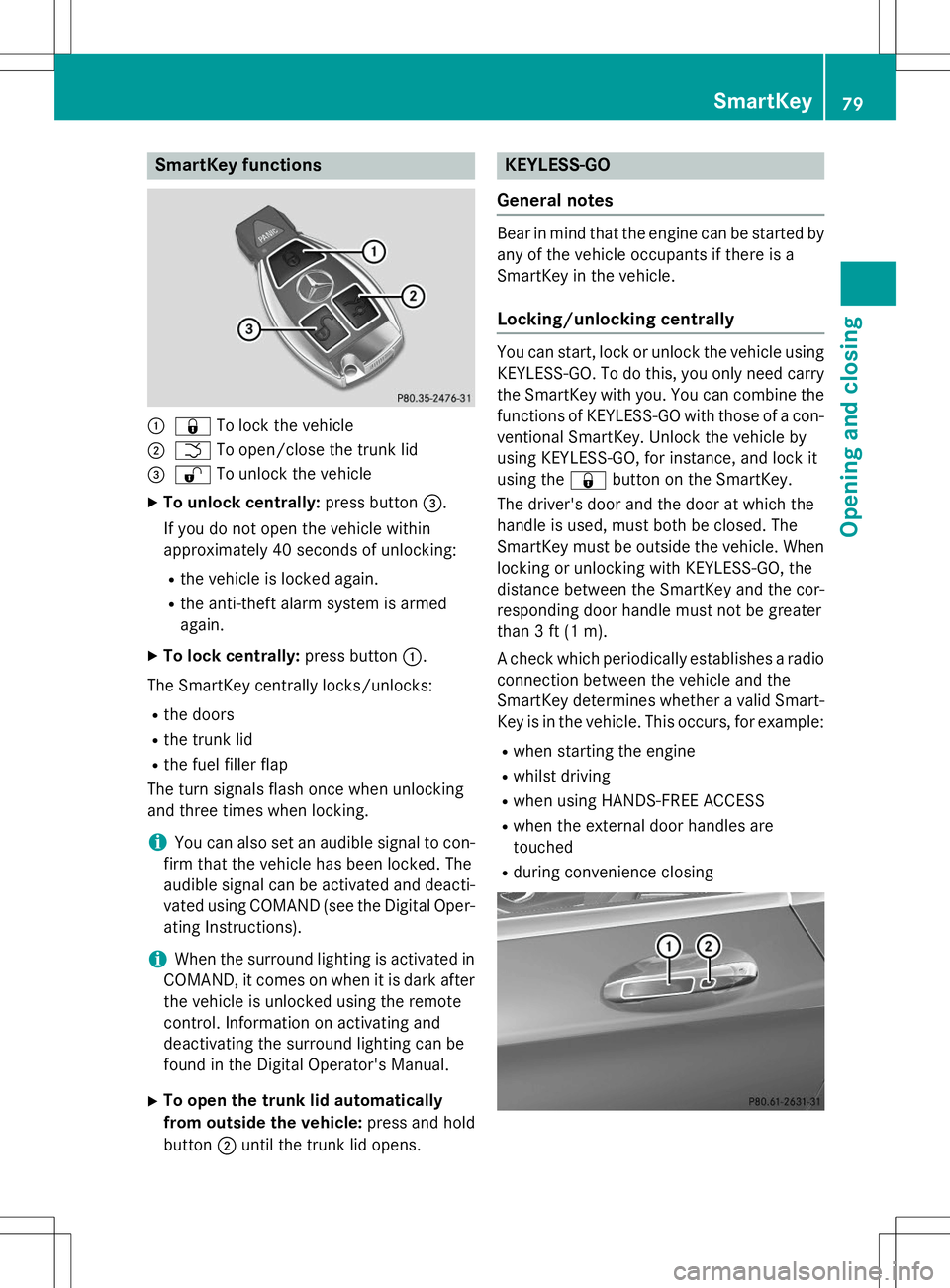
SmartKey functions
:&To lock the vehicle
;FTo open/close the trunk lid
=%To unlock the vehicle
X To unlock centrally: press button=.
If you do not open the vehicle within
approximately 40 seconds of unlocking:
R the vehicle is locked again.
R the anti-theft alarm system is armedagain.
X To lock centrally: press button:.
The SmartKey centrally locks/unlocks:
R the doors
R the trunk lid
R the fuel filler flap
The turn signals flash once when unlocking
and three times when locking.
iYou can also set an audible signal to con-
firm that the vehicle has been locked. The
audible signal can be activated and deacti-
vated using COMAND (see the Digital Oper- ating Instructions).
iWhen the surround lighting is activated in
COMAND, it comes on when it is dark after
the vehicle is unlocked using the remote
control. Information on activating and
deactivating the surround lighting can be
found in the Digital Operator's Manual.
X To open the trunk lid automatically
from outside the vehicle: press and hold
button ;until the trunk lid opens.
KEYLESS-GO
General notes
Bear in mind that the engine can be started by any of the vehicle occupants if there is a
SmartKey in the vehicle.
Locking/unlocking centrally
You can start, lock or unlock the vehicle using KEYLESS-GO. To do this, you only need carry
the SmartKey with you. You can combine the
functions of KEYLESS-GO with those of a con- ventional SmartKey. Unlock the vehicle by
using KEYLESS-GO, for instance, and lock it
using the &button on the SmartKey.
The driver's door and the door at which the
handle is used, must both be closed. The
SmartKey must be outside the vehicle. When
locking or unlocking with KEYLESS-GO, the
distance between the SmartKey and the cor-
responding door handle must not be greater
than 3 ft (1 m).
A check which periodically establishes a radio
connection between the vehicle and the
SmartKey determines whether a valid Smart- Key is in the vehicle. This occurs, for example:
R when starting the engine
R whilst driving
R when using HANDS-FREE ACCESS
R when the external door handles aretouched
R during convenience closing
SmartKey79
Opening and closing
Z
Page 90 of 286
iThe opening dimensions of the trunk lid
can be found in the "Vehicle data" section ( Y page 281).
Opening and closing
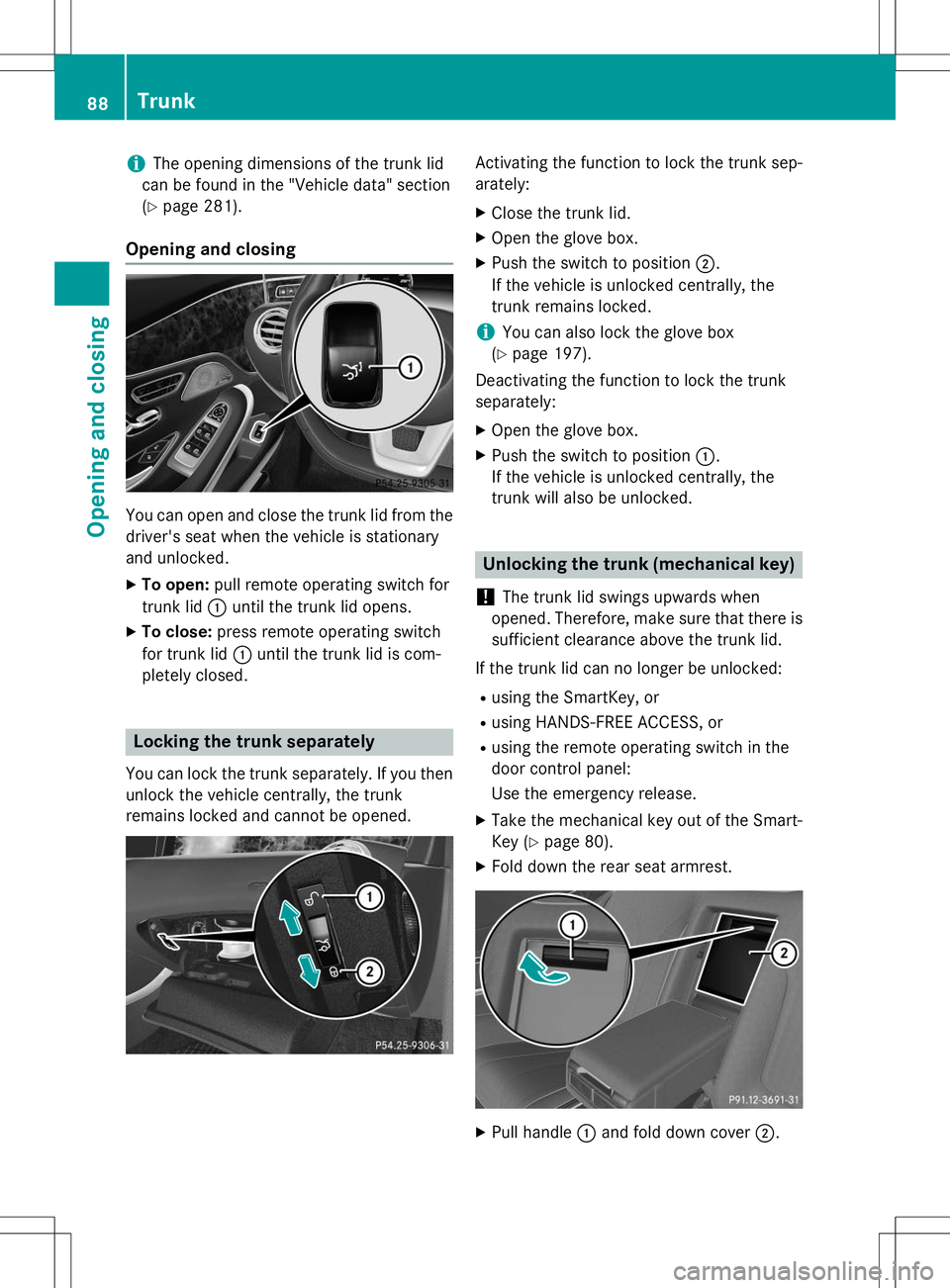
You can open and close the trunk lid from the
driver's seat when the vehicle is stationary
and unlocked.
X To open: pull remote operating switch for
trunk lid :until the trunk lid opens.
X To close: press remote operating switch
for trunk lid :until the trunk lid is com-
pletely closed.
Locking the trunk separately
You can lock the trunk separately. If you then
unlock the vehicle centrally, the trunk
remains locked and cannot be opened.
Activating the function to lock the trunk sep- arately:
X Close the trunk lid.
X Open the glove box.
X Push the switch to position ;.
If the vehicle is unlocked centrally, the
trunk remains locked.
iYou can also lock the glove box
( Y page 197).
Deactivating the function to lock the trunk separately:
X Open the glove box.
X Push the switch to position :.
If the vehicle is unlocked centrally, the
trunk will also be unlocked.
Unlocking the trunk (mechanical key)
!
The trunk lid swings upwards when
opened. Therefore, make sure that there is sufficient clearance above the trunk lid.
If the trunk lid can no longer be unlocked: R using the SmartKey, or
R using HANDS-FREE ACCESS, or
R using the remote operating switch in the
door control panel:
Use the emergency release.
X Take the mechanical key out of the Smart-
Key ( Ypage 80).
X Fold down the rear seat armrest.
XPull handle :and fold down cover ;.
88Trunk
Opening and closing
Page 118 of 286
the case if you are not depressing the brake
pedal.
If you depress the brake pedal and press the
Start/Stop button, the engine starts immedi-
ately.
A check which periodically establishes a radio
connection between the vehicle and the
SmartKey determines whether a valid Smart- Key is in the vehicle. This occurs, for example, when starting the engine.
To start the vehicle without actively using the
SmartKey:
R the Start/Stop button must be inserted in
the ignition lock.
R the SmartKey must be in the vehicle.
R the vehicle must not be locked with the
SmartKey or KEYLESS-GO ( Ypage 79).
Do not keep the SmartKey:
R with electronic devices, e.g. a mobile
phone or another SmartKey
R with metallic objects, e.g. coins or metal
foil
R inside metallic objects, e.g. a metal case
This can affect the functionality of the Smart- Key.
If you lock the vehicle with the SmartKey's
remote control or with KEYLESS-GO, after a
short time:
R you will not be able to switch on the ignition
with the Start/Stop button.
R you will not be able to start the engine with
the Start/Stop button until the vehicle is
unlocked again.
If you lock the vehicle centrally using the but-
ton on the front door ( Ypage 82), you can
continue to start the engine with the Start/
Stop button.
The engine can be turned off while the vehicle
is in motion by pressing and holding the
Start/Stop button for approximately three
seconds. This function operates independ-
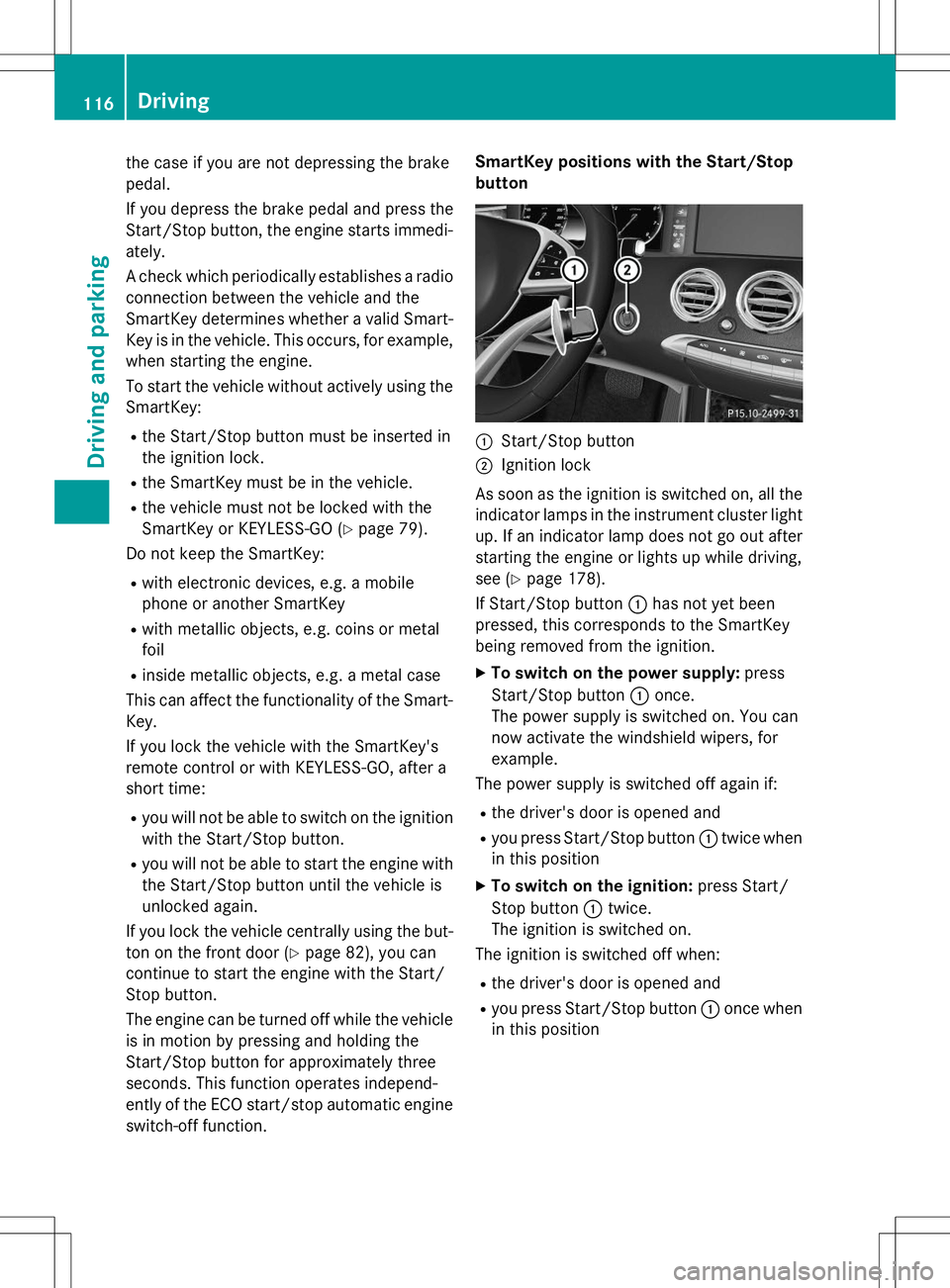
ently of the ECO start/stop automatic engine switch-off function. SmartKey positions with the Start/Stop
button
:Start/Stop button
;Ignition lock
As soon as the ignition is switched on, all the
indicator lamps in the instrument cluster light up. If an indicator lamp does not go out afterstarting the engine or lights up while driving,
see ( Ypage 178).
If Start/Stop button :has not yet been
pressed, this corresponds to the SmartKey
being removed from the ignition.
X To switch on the power supply: press
Start/Stop button :once.
The power supply is switched on. You can
now activate the windshield wipers, for
example.
The power supply is switched off again if:
R the driver's door is opened and
R you press Start/Stop button :twice when
in this position
X To switch on the ignition: press Start/
Stop button :twice.
The ignition is switched on.
The ignition is switched off when:
R the driver's door is opened and
R you press Start/Stop button :once when
in this position
116Driving
Driving an d parking
Page 192 of 286
COMAND operating system
Overview
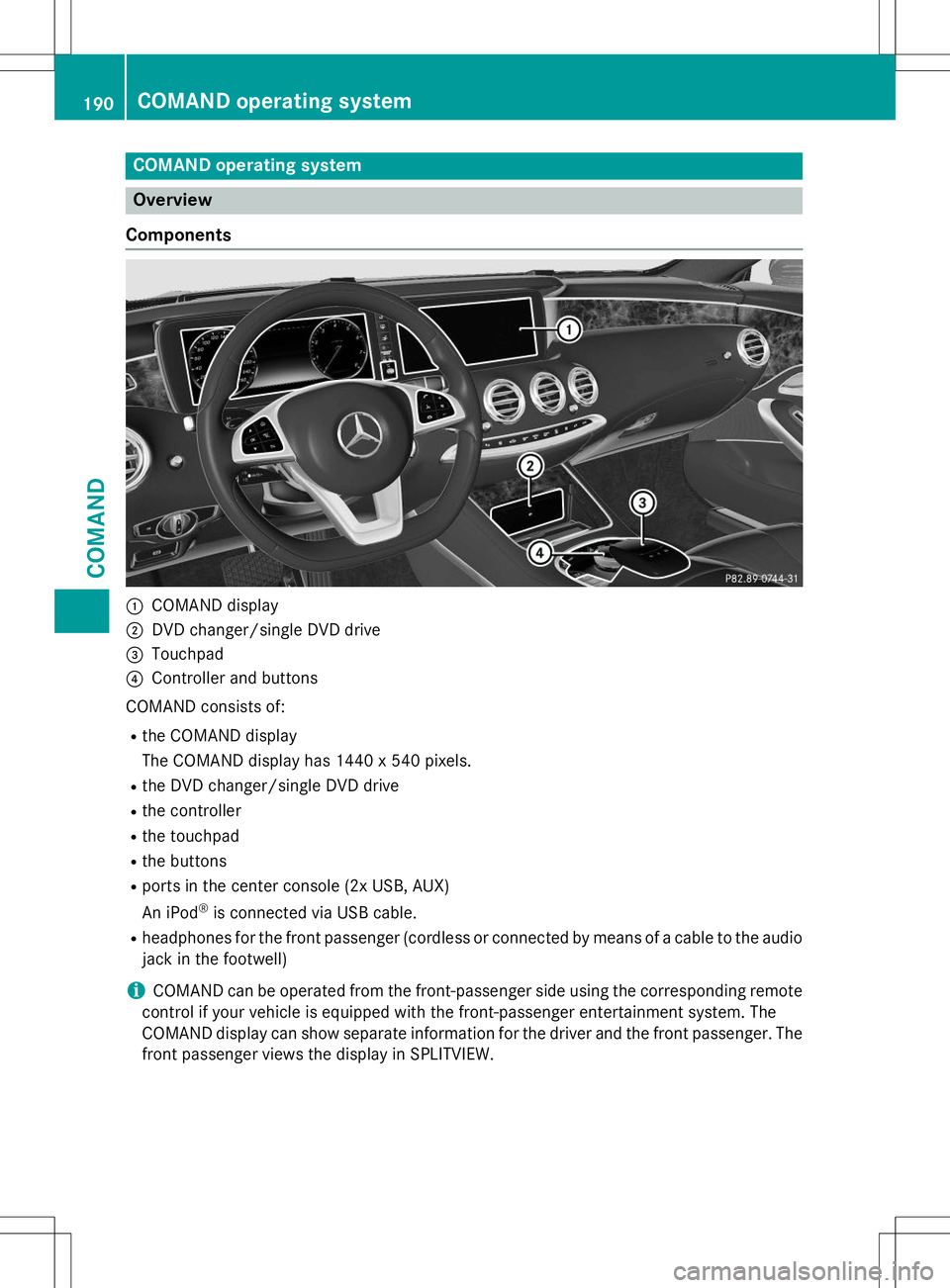
Components
:COMAND display
;DVD changer/single DVD drive
=Touchpad
?Controller and buttons
COMAND consists of:
R the COMAND display
The COMAND display has 1440 x 540 pixels.
R the DVD changer/single DVD drive
R the controller
R the touchpad
R the buttons
R ports in the center console (2x USB, AUX)
An iPod ®
is connected via USB cable.
R headphones for the front passenger (cordless or connected by means of a cable to the audio
jack in the footwell)
iCOMAND can be operated from the front-passenger side using the corresponding remote
control if your vehicle is equipped with the front-passenger entertainment system. The
COMAND display can show separate information for the driver and the front passenger. The
front passenger views the display in SPLITVIEW.
190COMAND operating system
COMAND
Page 193 of 286
Functions
RHD FM radio/HD AM radio/satellite
radio
Internet radio (called up via communica-
tions functions)
R Media
Media support: audio CD, MP3 CD, DVD
video, 2 x USB, SD card, iPod ®
, Bluetooth ®
audio, 10 GB Media Register on the hard
drive
Music search using all media
R Sound systems
You can select from three sound systems:
Standard sound system
Burmester ®
surround sound system
Burmester high-end 3D surround sound
system for ultimate listening pleasure
R Navigation system
Destination entry using keyword search
Realistic 3D map with textured city models
Navigation functions such as Drive Infor-
mation and Google Maps™
Dynamic route guidance via SIRIUS satel-
lite radio
R Communication
Messaging functions (text messages,
email)
Address book
Internet browser
Mercedes-Benz Apps with Google™ Local
Search, Destination Download, Weather,
Facebook, Google Street View™, Internet
radio, stock prices, news and much more
WiFi interface for the connection of a
smartphone to COMAND Online and the
option of remote control for the front
passenger (SPLITVIEW)
Mercedes-Benz Mobile Website
WiFi hotspot functionality to connect a tab-
let PC or laptop in order to enable access to
the Internet using the customer's mobile
phone
R SIRIUS Weather Weather data as an information chart (cur-
rent forecast, 5-day preview, detailed infor-
mation)
Weather data on the weather map, e.g. rain
radar data, storm characteristics and the
track of tropical cyclones (hurricanes,
typhoons)
R Vehicle functions
Setting the multicontour seat with new
massage program
Climate control functions
Controlling ambient lighting: several color
and brightness level options
360° camera
Rear view camera
R Favorites functions
Fast access to favorites functions using the
favorites button on the touchpad
COMAND operating system191
COMAND
Z
Page 201 of 286
Information in the Digital Operator's
Manual
In the Digital Operator's Manual you will find
information on the following topics: RVanity mirror in the sun visor
R Glare from the side
mbrace
Information in the Digital Operator's
Manual
In the Digital Operator's Manual you will find
information on the following topics: R Downloading destinations in COMAND
R Search & Send
R Vehicle remote opening
R Vehicle remote closing
R Stolen vehicle recovery service
R Vehicle remote malfunction diagnosis
R Downloading routes
R Speed alert
R Geo fencing
R Triggering the vehicle alarm
iThe mbrace system is only available in the
USA.
General notes
The mbrace system is only available in the
USA.
You must have a license agreement to acti-
vate the mbrace service. Make sure that your system is activated and operational. To log in,
press the ïMB Info call button. If any of
the steps mentioned are not carried out, the
system may not be activated.
If you have questions about the activation,
contact one of the following telephone hot-
lines:
Mercedes-Benz Customer Assistance Center
at 1-800-FOR-MERCedes (1-800-367-6372)
or 1-866-990-9007 Shortly after successfully registering with the
mbrace service, a user ID and password will
be sent to you by mail. You can use this pass-
word to log onto the mbrace area under "Own-
ers Online" at http://www.mbusa.com .
The system is available if:
R it has been activated and is operational
R the corresponding mobile phone network is
available for transmitting data to the Cus-
tomer Center
R a service subscription is available
R the starter battery is sufficiently charged
Determining the location of the vehicle on a
map is only possible if:
R GPS reception is available.
R the vehicle position can be forwarded to
the Customer Assistance Center.
The mbrace system
To adjust the volume during a call, proceed as
follows:
X Press the WorX button on the mul-
tifunction steering wheel.
or
X Use the COMAND volume control.
The system offers various services, e.g.:
R Automatic and manual emergency call
R Roadside Assistance call
R MB Info call
You can find information and a description of all available features under "Owners Online"
at http://www.mbusa.com.
System self-test
After you have switched on the ignition, the
system carries out a self-diagnosis.
Features199
Stowage and featu res
Z
Page 205 of 286
You receive information about operating yourvehicle, about the nearest authorized
Mercedes-Benz Center and about other prod-
ucts and services from Mercedes-Benz.
You can find further information on the
mbrace system under "Owners Online" at
http://www.mbusa.com.
The system has not been able to initiate an
MB Info call, if:
R the indicator lamp in MB Info call buttonï is flashing continuously.
R no voice connection to the Mercedes-Benz
Customer Assistance Center was estab-lished.
This can occur if the relevant mobile phone
network is not available, for example. The
Call Failedmessage appears in the
multifunction display.
X To end a call: press the~button on the
multifunction steering wheel.
or X Press the corresponding COMAND button
for ending a phone call.
Call priority
When service calls are active, e.g. Roadside
Assistance or MB Info calls, an emergency
call can still be initiated. In this case, an emer-
gency call will take priority and override all
other active calls.
The indicator lamp of the respective button
flashes until the call is ended.
An emergency call can only be terminated by the Mercedes-Benz Customer Assistance
Center.
All other calls can be ended by pressing:
R the ~ button on the multifunction steer-
ing wheel
R the corresponding button in COMAND to
end the voice call
When a call is initiated, the audio system is
muted. The mobile phone is no longer connected to
COMAND.
However, if you want to use your mobile
phone, do so only when the vehicle is station-
ary and in a safe location.
Garage door opener
General notes
The HomeLink ®
garage door opener integra-
ted in the rear-view mirror allows you to oper-
ate up to three different door and gate sys-
tems.
Use the integrated garage door opener only
on garage doors that:
R have safety stop and reverse features and
R meet current U.S. federal safety standards
Once programed, the integrated garage door opener in the rear-view mirror will assume the
function of the garage door system's remote
control. Please also read the operating
instructions for the garage door system.
When programming a garage door opener,
park the vehicle outside the garage. Do not
run the engine while programming.
Certain garage door drives are incompatible
with the integrated garage door opener. If you
have difficulty programing the integrated
garage door opener, contact an authorized
Mercedes-Benz Center.
Alternatively, you can call the following tele-
phone assistance services:
R USA: Mercedes-Benz Customer Assistance
Center at 1-800-FOR-MERCedes
R Canada: Customer Service at
1-800-387-0100
R HomeLink ®
hotline 1-800-355-3515 (free
of charge)
More information on HomeLink ®
and/or
compatible products is also available online
at http://www.homelink.com.
Notes on the declaration of conformity ( Y page 27).
Features203
Stowage and features
Z