towing MERCEDES-BENZ S-COUPE 2015 Owners Manual
[x] Cancel search | Manufacturer: MERCEDES-BENZ, Model Year: 2015, Model line: S-COUPE, Model: MERCEDES-BENZ S-COUPE 2015Pages: 286, PDF Size: 29.85 MB
Page 8 of 286
HOLD function............................... 138
Important safety notes .................. 128
Maintenance .................................. 128
Parking brake ................................ 126
Riding tips ...................................... 128
Warning lamp ................................. 178
Breakdown
see Flat tire
see Towing away
Brightness control (instrument
cluster lighting) ................................... 35
Buttons and controller ...................... 192
Buttons on the steering wheel ......... 161
C
California
Important notice for retail cus-
tomers and lessees .......................... 25
Calling up a malfunction
see Display messages
Car
see Vehicle
Car key
see SmartKey
Care
360° camera ................................. 217
Car wash ........................................ 216
Carpets .......................................... 218
Display ........................................... 218
Exhaust pipe .................................. 217
Exterior lights ................................ 217
Gear or selector lever .................... 218
Interior ........................................... 218
Matte finish ................................... 217
Night View Assist Plus ................... 218Note s............................................. 216
Paint .............................................. 217
Plastic trim .................................... 218
Power washer ................................ 217
Rear view camera .......................... 217
Roof lining ...................................... 218
Seat belt ........................................ 218
Seat cove r..................................... 218
Sensors ......................................... 217
Trim pieces .................................... 218
Washing by hand ........................... 217
Wheels ........................................... 217 Windows ........................................ 217
Wiper blades .................................. 217
Wooden trim .................................. 218
CD
see also Digital Operator's Man-
ual .................................................. 188
CD player/CD changer (on-board
computer) .......................................... 164
Center console
Overview .......................................... 37
Center console in the rear com-
partment
Stowage compartment .................. 197
Central locking
Locking/unlocking (SmartKey )........ 79
Child
Restraint system .............................. 62
Child seat
Forward-facing restraint system ...... 65
LATCH-type (ISOFIX) child seat
anchors ............................................ 63
On the front-passenger sea t............ 64
Rearward-facing restraint system .... 64
Top Tether ....................................... 63
Children
In the vehicl e................................... 60
Special seat belt retractor ............... 61
Cigarette lighter ................................ 198
Cleaning
Mirror turn signal ........................... 217
Climate control
Automatic climate control ............. 111
Controlling automaticall y............... 111
Cooling with air dehumidification .. 111
Defrosting the window s................. 111
Defrosting the windshield .............. 111
General notes ................................ 110
Indicator lamp ................................ 111
Ionization ....................................... 111
Overview of systems ...................... 110
Perfume atomizer .......................... 111
Problem with the rear window
defroster ........................................ 111
Problems with cooling with air
dehumidification ............................ 111
Refrigerant ..................................... 280
Refrigerant filling capacity ............. 280
Setting the air distribution ............. 111
6Index
Page 21 of 286
Tire tread ....................................... 241
Tire tread (definition) ..................... 261
Total load limit (definition)............. 261
Traction ......................................... 254
Traction (definition) ....................... 261
Tread wear ..................................... 254
Uniform Tire Quality Grading
Standards ...................................... 254
Uniform Tire Quality Grading
Standards (definition) .................... 259
Wear indicator (definition) ............. 261
Wheel and tire combination ........... 268
Wheel rim (definition) .................... 259
see Flat tire
Top Tether ............................................ 63
Tow-starting
Emergency engine starting ............ 234
Important safety notes .................. 232
Towing away
Important safety guidelines ........... 232
Installing the towing eye ................ 233
Notes for 4MATIC vehicles ............ 234
Removing the towing eye ............... 233
With both axles on the ground ....... 233
With the rear axle raised ................ 234
Towing eye ......................................... 220
Traffic reports
see also Digital Operator's Man-
ual .................................................. 188
Traffic Sign Assist
Activating/deactivating the warn-ing function .................................... 164
Display message ............................ 165
Transfer case ..................................... 122
Transmission
see Automatic transmission
Transporting the vehicle .................. 234
Trim pieces (cleaning instruc-
tions) .................................................. 218
Trip computer (on-board com-puter) .................................................. 164
Trip odometer
Calling up ....................................... 164
Trunk
Emergency release .......................... 88
Important safety notes .................... 84
Locking separately ........................... 88 Opening/closing (automatically
from inside) ...................................... 87
Opening/closing (automatically
from outside) ................................... 85
Opening/closing (from outside,
HANDS-FREE ACCESS) .................... 86
Power closing .................................. 82
Trunk lid
Display message ............................ 165
Obstacle recognition ........................ 84
Opening dimensions ...................... 281
Opening/closing .............................. 84
Trunk load (maximum) ...................... 281
Turn signals
Display message ............................ 165
Switching on/of f........................... 103
TV
see Separate operating instructions
Two-way radio
Windshield (infrared reflective) ...... 198
Type identification plate
see Vehicle identification plate
U
Unlocking Emergency unlocking ....................... 83
From inside the vehicle (central
unlocking button) ............................. 82
V
Vanity mirror (in the sun visor) ........ 199
Vehicle
Correct use ...................................... 28
Data acquisition ............................... 29
Display message ............................ 176
Equipment ....................................... 24
Limited Warranty ............................. 28
Loading .......................................... 249
Locking (in an emergency) ............... 83
Locking (SmartKey) .......................... 79
Lowering ........................................ 266
Maintenance .................................... 25
Operating safety .............................. 26
Parking for a long period ................ 126
Pulling away ................................... 118
Raising ........................................... 263
Reporting problems ......................... 28
Index19
Page 22 of 286
Securing from rolling away ............ 262
Towing away .................................. 232
Transporting .................................. 234
Unlocking (in an emergency) ........... 83
Unlocking (SmartKey) ...................... 79
Vehicle data ................................... 281
Vehicle dimensions ........................... 281
Vehicle emergency locking ................ 83
Vehicle identification number
see VIN
Vehicle identification plate .............. 274
Vehicle level
Active Body Control ABC ............... 140
Vehicle maintenance
see ASSYST PLUS
Vehicle tool kit .................................. 220
Video
see also Digital Operator's Man-
ual .................................................. 188
Video (DVD) ........................................ 164
VIN ...................................................... 274
Voice Control System
see Separate operating instructions
W
Warning and indicator lampsABS ................................................ 179
Brakes ........................................... 178
Check Engine ................................. 176
Coolant .......................................... 183
Distance warning ........................... 184 ESP ®
.............................................. 181
ESP ®
OFF ....................................... 182
General notes ................................ 176
Overview .......................................... 34
PASSENGER AIR BAG ...................... 43
Reserve fue l................................... 176
Restraint system ............................ 182
Seat belt ........................................ 177
Steering ......................................... 186
Tire pressure monitor .................... 185
Warranty .............................................. 24
Washer fluid
Display message ............................ 165
Wheel and tire combination
see Tires
Wheel bolt tightening torque ........... 266Wheel chock
...................................... 262
Wheels
Changing a whee l.......................... 261
Checking ........................................ 241
Cleaning ......................................... 217
Important safety notes .................. 240
Interchanging/changing ................ 261
Mounting a new whee l................... 265
Mounting a whee l.......................... 262
Removing a whee l.......................... 265
Storing ........................................... 262
Tightening torque ........................... 266
Wheel size/tire size ....................... 266
Window curtain air bag
Operation ......................................... 51
Windows
see Side windows
Windshield
Defrosting ...................................... 111
Infrared reflective .......................... 198
Windshield washer fluid
see Windshield washer system
Windshield washer system
Adding washer fluid ....................... 215
Notes ............................................. 280
Windshield wipers
Problem (malfunction) ................... 107
Replacing the wiper blades ............ 106
Switching on/of f........................... 106
Winter driving
Important safety notes .................. 242
Slippery road surfaces ................... 128
Snow chains .................................. 242
Winter operation
Summer tires ................................. 242
Winter tires
M+S tires ....................................... 242
Wiper blades
Cleaning ......................................... 217
Important safety notes .................. 106
Replacing ....................................... 106
Wooden trim (cleaning instruc-
tions) .................................................. 218
Workshop
see Qualified specialist workshop
20Index
Page 64 of 286
Removing a child restraint system/deactivat-
ing the special seat belt retractor:
X Always comply with the child restraint sys-
tem manufacturer's installation instruc-
tions.
X Press the release button on the belt buckle,
hold the belt tongue firmly and guide it to
the seat-belt extender in the front or to the
belt outlet in the rear.
The special seat belt retractor is deactiva-
ted.
Child restraint system
The use of seat belts and child restraint sys-
tems is required by law in:
R all 50 states
R the U.S. territories
R the District of Columbia
R all Canadian provinces
You can obtain further information about the correct child restraint system from any
authorized Mercedes-Benz Center.
GWARNING
If the child restraint system is installed incor- rectly on a suitable seat, it cannot protect as
intended. The child cannot then be restrained in the event of an accident, heavy braking or
sudden changes of direction. There is an
increased risk of injury, possibly even fatal.
Make sure that you observe the child restraint
system manufacturer's installation instruc-
tions and the notes on use. Please ensure,
that the base of the child restraint system is
always resting completely on the seat cush-
ion. Never place objects, e.g. cushions, under or behind the child restraint system. Only use
child restraint systems with the original cover
designed for them. Only replace damaged
covers with genuine covers.
GWARNING
If the child restraint system is installed incor- rectly or is not secured, it can come loose in
the event of an accident, heavy braking or a
sudden change in direction. The child
restraint system could be thrown about, strik- ing vehicle occupants. There is an increased
risk of injury, possibly even fatal.
Always install child restraint systems prop-
erly, even if they are not being used. Make
sure that you observe the child restraint sys-
tem manufacturer's installation instructions.
You will find further information on stowing
objects, luggage or loads under "Loading
guidelines" ( Ypage 196).
GWARNING
Child restraint systems or their securing sys-
tems which have been damaged or subjected
to a load in an accident can no longer protect
as intended. The child cannot then be
restrained in the event of an accident, heavy
braking or sudden changes of direction. There is an increased risk of injury, possibly even
fatal.
Replace child restraint systems which have
been damaged or subjected to a load in an
accident as soon as possible. Have the secur-
ing systems on the child restraint system
checked at a qualified specialist workshop,
before you install a child restraint system
again.
The securing systems of child restraint sys-
tems are: R the seat belt system
R the LATCH-type (ISOFIX) securing rings
R the Top Tether anchorages
If it is absolutely necessary to carry a child on the front-passenger seat, be sure to observe
the information on the "Occupant Classifica-
tion System (OCS)" ( Ypage 51). There you
will also find information on deactivating the
front-passenger front air bag.
62Child ren in the vehi cle
Safety
Page 73 of 286
The brakes will work normally again if:
R you release the brake pedal.
R there is no longer any danger of a collision.
R no obstacle is detected in front of your vehicle.
Adaptive Brake Assist is then deactivated.
If adaptive Brake Assist demands particularly
high braking force, preventative passenger
protection measures (PRE-SAFE ®
) are activa-
ted simultaneously.
Up to a speed of approximately 155 mph
(250 km/ h), adaptive Brake Assist is capable
of reacting to moving objects that have
already been detected as such at least once
over the period of observation.
Up to a speed of approximately 44 mph
(70 km/h), adaptive Brake Assist reacts to
stationary obstacles.
ESP®(Electronic Stability Program)
General notes
iObserve the "Important safety notes" sec-
tion ( Ypage 65).
ESP ®
monitors driving stability and traction,
i.e. power transmission between the tires and
the road surface.
If ESP ®
detects that the vehicle is deviating
from the direction desired by the driver, one
or more wheels are braked to stabilize the
vehicle. The engine output is also modified to keep the vehicle on the desired course within
physical limits. ESP ®
assists the driver when
pulling away on wet or slippery roads. ESP ®
can also stabilize the vehicle during braking.
ETS/4ETS (Electronic Traction System)
iObserve the "Important safety notes" sec-
tion ( Ypage 65).
ETS traction control is part of ESP ®
. On vehi-
cles with 4MATIC, 4ETS is part of ESP ®
.
Traction control brakes the drive wheels indi-
vidually if they spin. This enables you to pull away and accelerate on slippery surfaces, for
example if the road surface is slippery on one side. In addition, more drive torque is trans-
ferred to the wheel or wheels with traction.
Traction control remains active, even if you
deactivate ESP ®
.
Important safety notes
GWARNING
If ESP ®
is malfunctioning, ESP ®
is unable to
stabilize the vehicle. Additionally, further driv- ing safety systems are deactivated. This
increases the risk of skidding and an accident.
Drive on carefully. Have ESP ®
checked at a
qualified specialist workshop.
Vehicles without 4MATIC: observe the notes
on ESP ®
(Y page 234) when towing the vehi-
cle with a raised rear axle.
ESP ®
is only deactivated if the åwarning
lamp is lit continuously.
If the ÷ warning lamp lights up continu-
ously, ESP ®
is not available due to a malfunc-
tion.
Observe the information on warning lamps ( Y page 181) and display messages which
may be shown in the instrument cluster( Y page 166).
Only use wheels with the recommended tire
sizes. Only then will ESP ®
function properly.
Characteristics of ESP®
General information
If the ÷ ESP warning lamp goes out before
beginning the journey, ESP ®
is automatically
active.
If ESP ®
intervenes, the ÷ESP®
warning
lamp flashes in the instrument cluster.
Driving safety systems71
Safety
Z
Page 123 of 286
If the engine has been switched off, the auto-
matic transmission automatically shifts to N.
If the automatic transmission is to remain in neutral N, e.g. for washing the vehicle in car
washes with a towing device, please observe the following instructions:
Using the SmartKey:
R Make sure that the ignition is switched on.
R When the vehicle is stationary, depress the
brake pedal and keep it depressed.
R Shift to neutral N.
R Release the brake pedal.
R If the electric parking brake is engaged,
release it.
R Switch off the ignition and leave the Smart-
Key in the ignition lock.
With the Start/Stop button:
R Make sure that the ignition is switched on.
R When the vehicle is stationary, depress the
brake pedal and keep it depressed.
R Engage park position P.
R Release the brake pedal.
R Pull the Start/Stop button out of the igni-tion.
R Insert the SmartKey into the ignition lock.
R Switch on the ignition.
R Depress the brake pedal and keep it
depressed.
R Shift to neutral N.
R Release the brake pedal.
R If the electric parking brake is engaged,
release it.
R Switch off the ignition and leave the Smart-
Key in the ignition lock.
Information in the Digital Operator's Manual
In the Digital Operator's Manual you will find
information on the following topics:
R Transmission position display
R Transmission positions R
Driving tips
R Program selector button
R Steering wheel paddle shifters
R Automatic drive program
R Problems with the transmission
Manual drive program (AMG vehicles)
General information
In this drive program, you can permanently
change gear yourself by using the steering
wheel paddle shifters. The transmission must be in position D.
Manual drive program Mis different from
drive program Swith regard to spontaneity,
responsiveness and smoothness of gearchanges.
In addition to permanent drive program M,
you can also activate temporary drive pro- gram M; see the Digital Operator's Manual.
Switching on the manual drive program
In manual drive program M, you can change
gear using the steering wheel paddle shifters
if the transmission is in position D. You can
see the currently selected drive program and
which gear is engaged in the multifunction
display.
X Press the program selector button until M
appears in the multifunction display; see
the Digital Operator's Manual.
Upshifting
!In manual drive program M, the automatic
transmission does not shift up automati-
cally even when the engine limiting speed
for the current gear is reached. When the
engine limiting speed is reached, the fuel
supply is cut to prevent the engine from
overrevving. Always make sure that the
engine speed does not reach the red area of
the tachometer. There is otherwise a risk of
engine damage.
Automatic transmission121
Driving and parking
Z
Page 133 of 286
permitted. Do not tamper with, alter, or usein any non-approved way.
Any unauthorized modification to this
device could void the user's authority to
operate the equipment.
Important safety notes
GWARNING
DISTRONIC PLUS does not react to:
R people or animals
R stationary obstacles on the road, e.g. stop-
ped or parked vehicles
R oncoming and crossing traffic
As a result, DISTRONIC PLUS may neither give
warnings nor intervene in such situations.
There is a risk of an accident.
Always pay careful attention to the traffic sit- uation and be ready to brake.
GWARNING
DISTRONIC PLUS cannot always clearly iden-tify other road users and complex traffic sit- uations.
In such cases, DISTRONIC PLUS may:
R give an unnecessary warning and then
brake the vehicle
R neither give a warning nor intervene
R accelerate or brake unexpectedly
There is a risk of an accident.
Continue to drive carefully and be ready to
brake, in particular when warned to do so by
DISTRONIC PLUS.
GWARNING
DISTRONIC PLUS brakes your vehicle with up to 50% of the maximum possible deceleration.
If this braking force is insufficient, DISTRONIC
PLUS warns you visually and audibly. There is a risk of an accident.
In such cases, apply the brakes yourself and
try to take evasive action.
!If DISTRONIC PLUS or the HOLD function
is activated, the vehicle brakes automati-
cally in certain situations. To prevent dam-
age to the vehicle, deactivate DISTRONIC
PLUS and the HOLD function in the follow- ing or other similar situations:
R when towing the vehicle
R in the car wash
If you fail to adapt your driving style,
DISTRONIC PLUS can neither reduce the risk
of accident nor override the laws of physics.
DISTRONIC PLUS cannot take into account
the road, traffic and weather conditions.
DISTRONIC PLUS is only an aid. You are
responsible for the distance to the vehicle in
front, for vehicle speed, for braking in good
time and for staying in your lane.
Do not use DISTRONIC PLUS:
R in road and traffic conditions which do not
allow you to maintain a constant speed e.g.
in heavy traffic or on winding roads
R on slippery road surfaces. Braking or accel-
erating could cause the drive wheels to lose traction and the vehicle could then skid
R when there is poor visibility, e.g. due to fog,
heavy rain or snow
DISTRONIC PLUS may not detect narrow
vehicles driving in front, e.g. motorcycles, or
vehicles driving on a different line.
In particular, the detection of obstacles can
be impaired if:
R there is dirt on the sensors or anything else
covering the sensors
R there is snow or heavy rain
R there is interference by other radar sources
R there are strong radar reflections, for
example, in parking garages
If DISTRONIC PLUS no longer detects a vehi- cle in front, DISTRONIC PLUS may unexpect-
edly accelerate the vehicle to the storedspeed.
Driving systems131
Driving and parking
Z
Page 141 of 286
Important safety notes
GWARNING
When leaving the vehicle, it can still roll awaydespite being braked by the HOLD function if:
R there is a malfunction in the system or in
the voltage supply.
R the HOLD function has been deactivated by
pressing the accelerator pedal or the brake
pedal, e.g. by a vehicle occupant.
R the electrical system in the engine com-
partment, the battery or the fuses have
been tampered with.
R the battery is disconnected
There is a risk of an accident.
If you wish to exit the vehicle, always turn off the HOLD function and secure the vehicle
against rolling away.
Further information on deactivating the HOLD
function ( Ypage 139).
!If DISTRONIC PLUS or the HOLD function
is activated, the vehicle brakes automati-
cally in certain situations. To prevent dam-
age to the vehicle, deactivate DISTRONIC
PLUS and the HOLD function in the follow-
ing or other similar situations:
R when towing the vehicle
R in the car wash
Activation conditions
You can activate the HOLD function if all of
the following conditions are fulfilled: R the vehicle is stationary.
R the engine is running or if it has been auto-
matically switched off by the ECO start/
stop function.
R the driver's door is closed or your seat belt
is fastened.
R the electric parking brake is released.
R the transmission is in position D,R or N.
R DISTRONIC PLUS is deactivated.
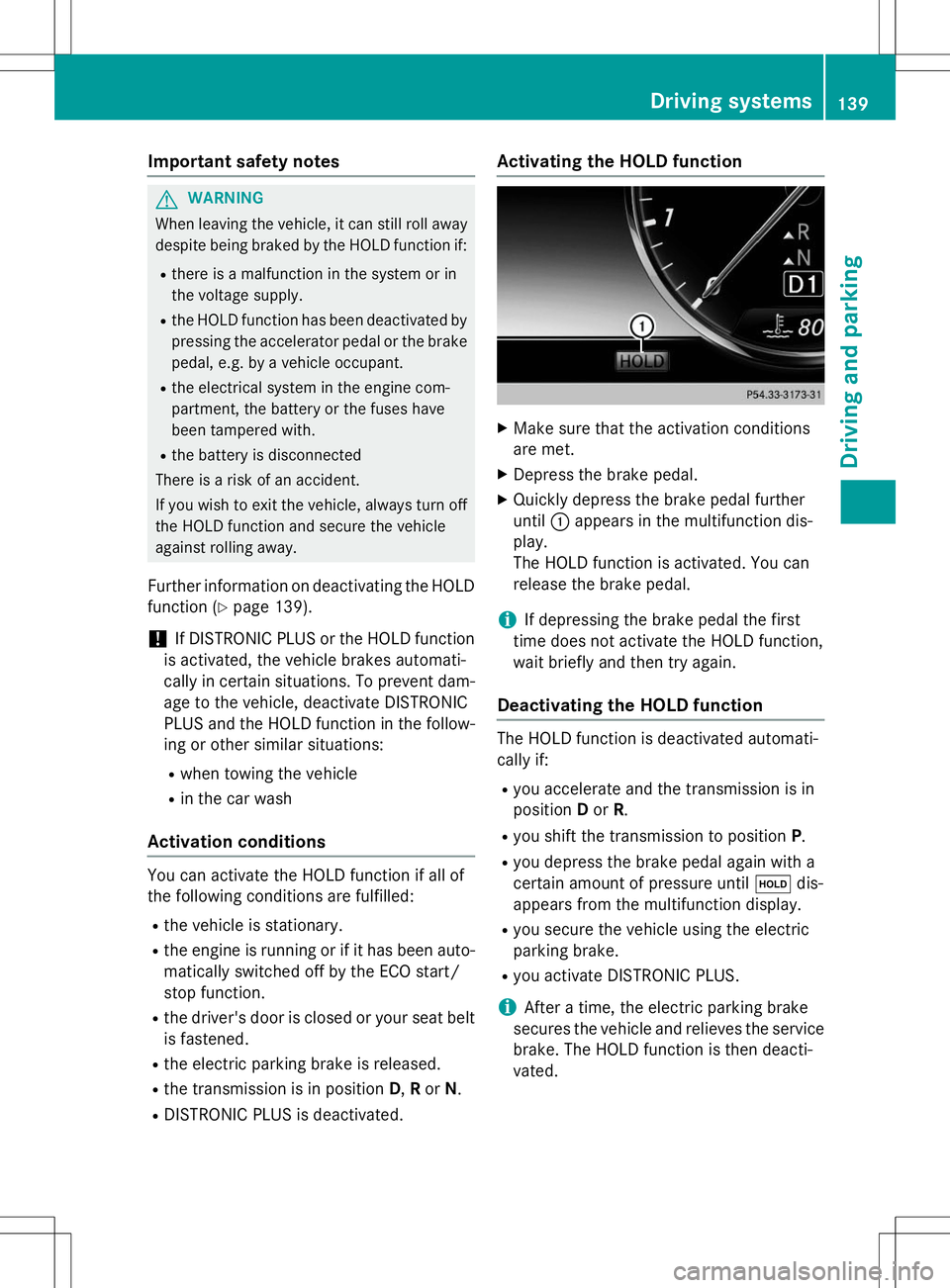
Activating the HOLD function
XMake sure that the activation conditions
are met.
X Depress the brake pedal.
X Quickly depress the brake pedal further
until :appears in the multifunction dis-
play.
The HOLD function is activated. You can
release the brake pedal.
iIf depressing the brake pedal the first
time does not activate the HOLD function,
wait briefly and then try again.
Deactivating the HOLD function
The HOLD function is deactivated automati-
cally if: R you accelerate and the transmission is in
position Dor R.
R you shift the transmission to position P.
R you depress the brake pedal again with a
certain amount of pressure until ëdis-
appears from the multifunction display.
R you secure the vehicle using the electric
parking brake.
R you activate DISTRONIC PLUS.
iAfter a time, the electric parking brake
secures the vehicle and relieves the service
brake. The HOLD function is then deacti-
vated.
Driving systems139
Driving and pa rking
Z
Page 143 of 286
Vehicle level
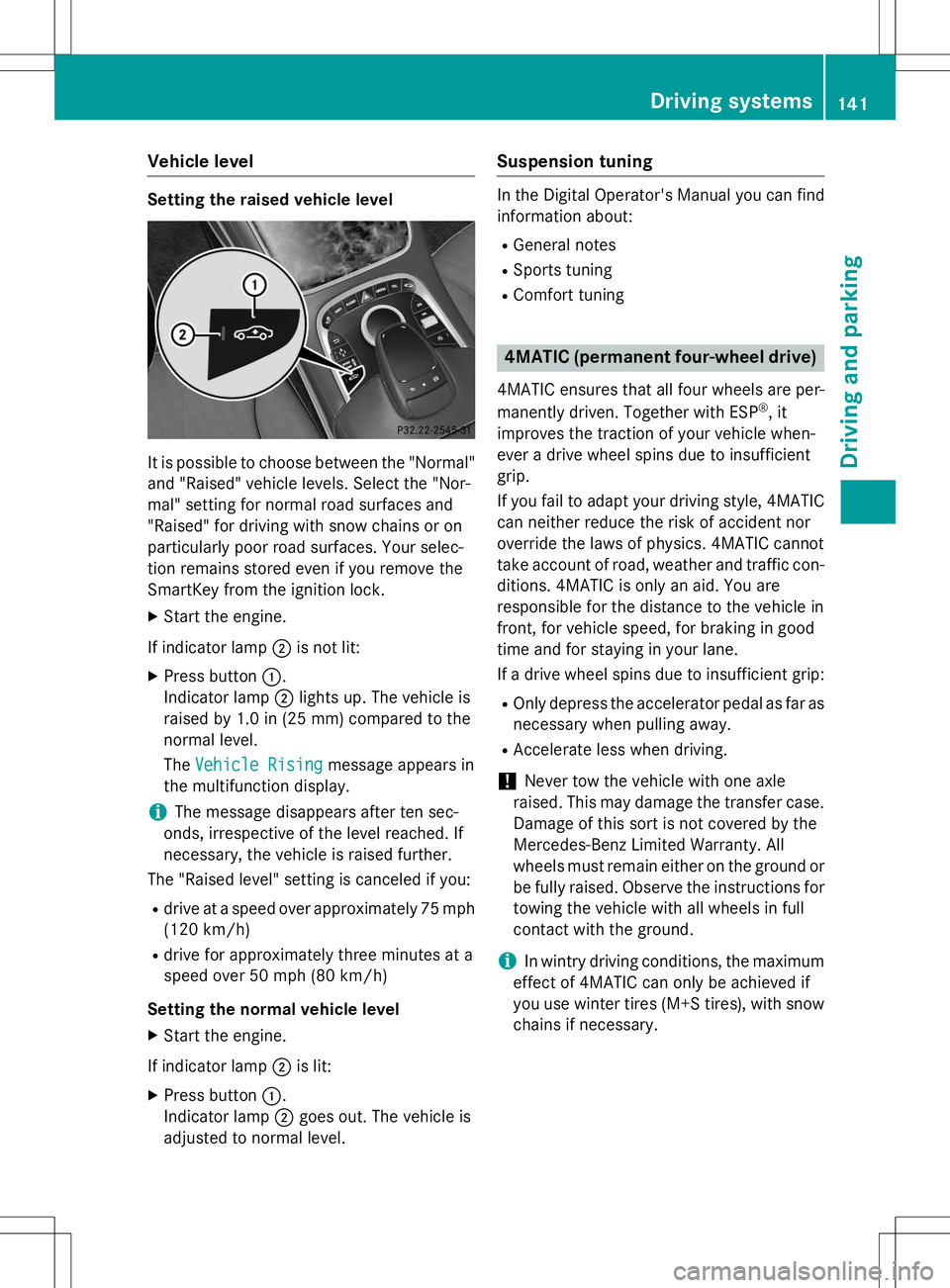
Setting the raised vehicle level
It is possible to choose between the "Normal"
and "Raised" vehicle levels. Select the "Nor-
mal" setting for normal road surfaces and
"Raised" for driving with snow chains or on
particularly poor road surfaces. Your selec-
tion remains stored even if you remove the
SmartKey from the ignition lock.
X Start the engine.
If indicator lamp ;is not lit:
X Press button :.
Indicator lamp ;lights up. The vehicle is
raised by 1.0 in (25 mm) compared to the
normal level. The
Vehicle Risingmessage appears in
the multifunction display.
iThe message disappears after ten sec-
onds, irrespective of the level reached. If
necessary, the vehicle is raised further.
The "Raised level" setting is canceled if you:
R drive at a speed over approximately 75 mph
(120 km/h)
R drive for approximately three minutes at a
speed over 50 mph (80 km/h)
Setting the normal vehicle level X Start the engine.
If indicator lamp ;is lit:
X Press button :.
Indicator lamp ;goes out. The vehicle is
adjusted to normal level.
Suspension tuning
In the Digital Operator's Manual you can find
information about:
R General notes
R Sports tuning
R Comfort tuning
4MATIC (permanent four-wheel drive)
4MATIC ensures that all four wheels are per-
manently driven. Together with ESP ®
, it
improves the traction of your vehicle when-
ever a drive wheel spins due to insufficient
grip.
If you fail to adapt your driving style, 4MATIC
can neither reduce the risk of accident nor
override the laws of physics. 4MATIC cannot
take account of road, weather and traffic con- ditions. 4MATIC is only an aid. You are
responsible for the distance to the vehicle in
front, for vehicle speed, for braking in good
time and for staying in your lane.
If a drive wheel spins due to insufficient grip:
R Only depress the accelerator pedal as far as
necessary when pulling away.
R Accelerate less when driving.
!Never tow the vehicle with one axle
raised. This may damage the transfer case.
Damage of this sort is not covered by the
Mercedes-Benz Limited Warranty. All
wheels must remain either on the ground or be fully raised. Observe the instructions for
towing the vehicle with all wheels in full
contact with the ground.
iIn wintry driving conditions, the maximum
effect of 4MATIC can only be achieved if
you use winter tires (M+S tires), with snow
chains if necessary.
Driving systems141
Driving and parking
Z
Page 204 of 286
If a mobile phone network and GPS receptionare available, the system transfers data to the
Mercedes-Benz Customer Assistance Center, for example:
R current location of the vehicle
R vehicle identification number
The COMAND display indicates that a call is
active. During the call, you can change to the
navigation menu by pressing the NAVI button
on COMAND, for example.
Voice output is not available in this case.
A voice connection is established between
the Mercedes-Benz Customer Assistance
Center and the vehicle occupants.
From the remote malfunction diagnosis, the
Mercedes-Benz Customer Assistance Center
can ascertain the nature of the problem. In
the Digital Operator's Manual, you will find
information on remote malfunction diagno-sis.
The Mercedes-Benz Customer Assistance
Center either sends a qualified Mercedes-
Benz technician or makes arrangements for
your vehicle to be transported to the nearest authorized Mercedes-Benz Center.
You may be charged for services such as
repair work and/or towing.
You can find more information in the separatembrace manual.
The system has not been able to initiate a
Roadside Assistance call, if:
R the indicator lamp for Roadside Assistance
call button Fis flashing continuously.
R no voice connection to the Mercedes-Benz
Customer Assistance Center was estab-
lished.
This can occur if the relevant mobile phone
network is not available, for example. The
Call Failedmessage appears in the
multifunction display. X
To end a call: press the~button on the
multifunction steering wheel.
or
X Press the corresponding COMAND button
for ending a phone call.
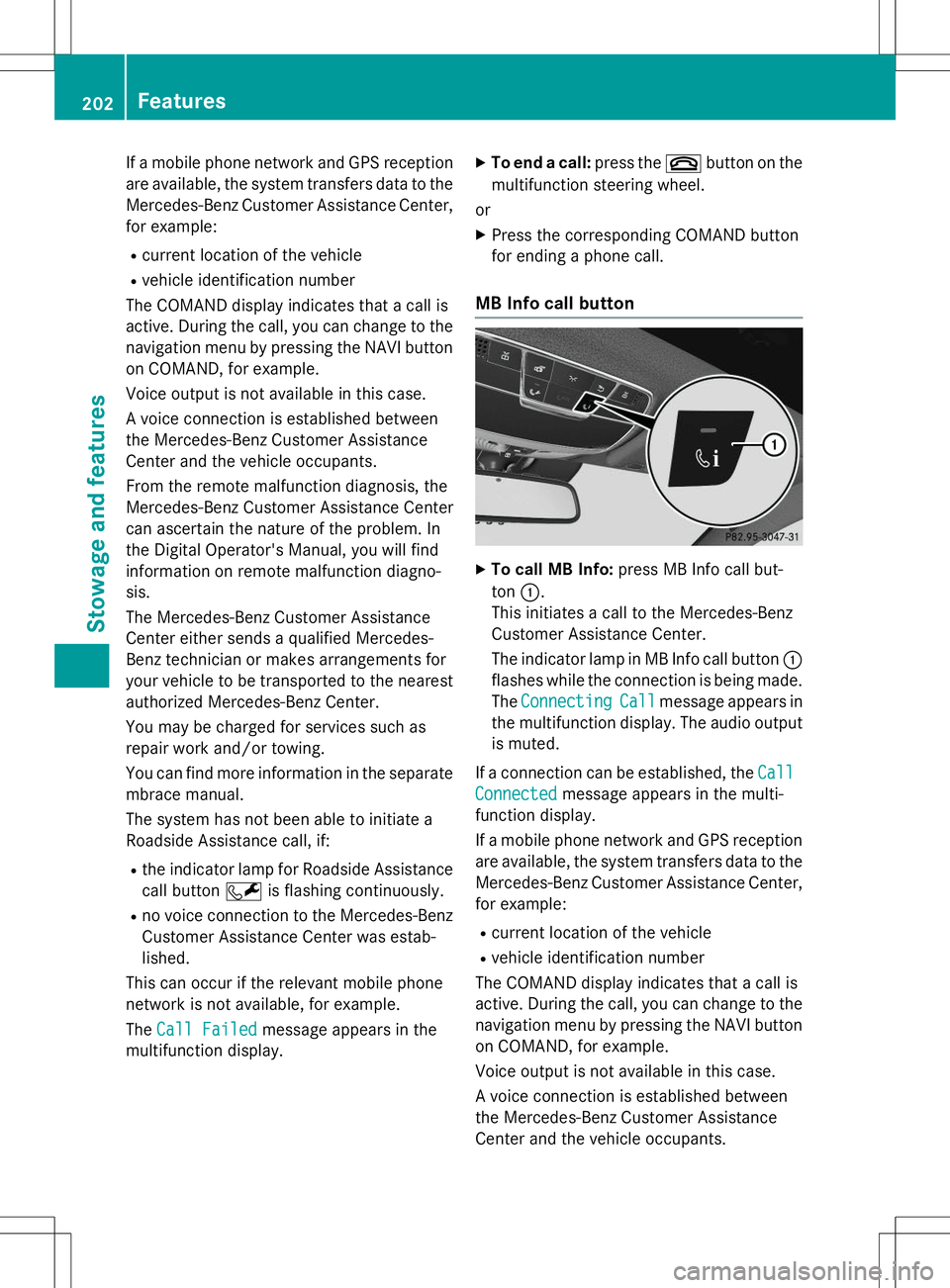
MB Info call button
XTo call MB Info: press MB Info call but-
ton :.
This initiates a call to the Mercedes-Benz
Customer Assistance Center.
The indicator lamp in MB Info call button :
flashes while the connection is being made.
The
ConnectingCallmessage appears in
the multifunction display. The audio output
is muted.
If a connection can be established, the
Call
Connectedmessage appears in the multi-
function display.
If a mobile phone network and GPS reception are available, the system transfers data to the
Mercedes-Benz Customer Assistance Center, for example:
R current location of the vehicle
R vehicle identification number
The COMAND display indicates that a call is
active. During the call, you can change to the
navigation menu by pressing the NAVI button on COMAND, for example.
Voice output is not available in this case.
A voice connection is established between
the Mercedes-Benz Customer Assistance
Center and the vehicle occupants.
202Features
Stowage and features