check engine MERCEDES-BENZ S-COUPE 2016 User Guide
[x] Cancel search | Manufacturer: MERCEDES-BENZ, Model Year: 2016, Model line: S-COUPE, Model: MERCEDES-BENZ S-COUPE 2016Pages: 410, PDF Size: 8.62 MB
Page 36 of 410
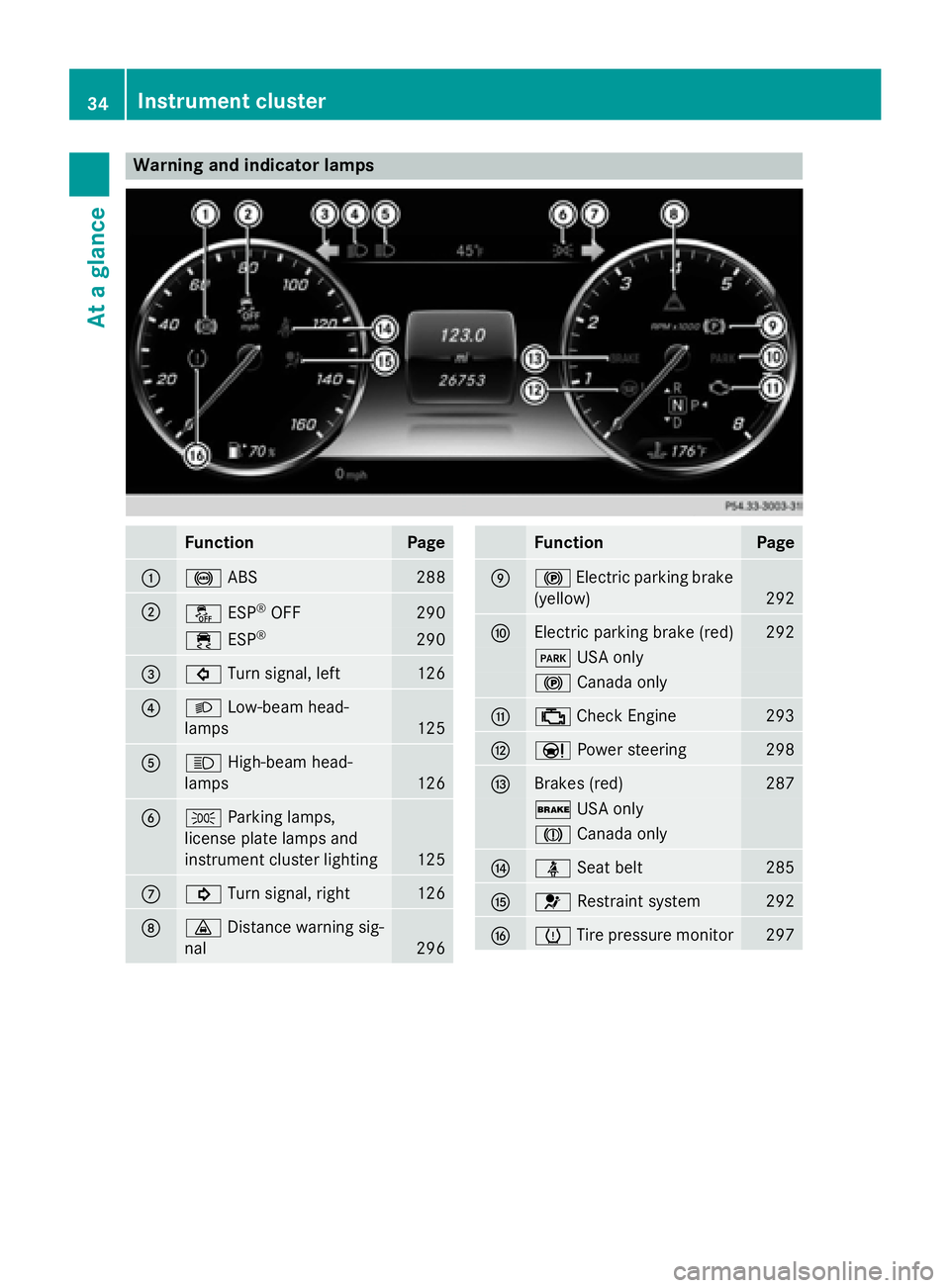
Warning and indicator lamps
FunctionPage
:!ABS288
;åESP®OFF290
÷ESP®290
=#Turn signal, left126
?LLow-beam head-
lamps
125
AK High-beam head-
lamps
126
BT Parking lamps,
license plate lamps and
instrument cluster lighting
125
C! Turn signal, right126
D·Distance warning sig-
nal
296
FunctionPage
E! Electric parking brake
(yellow)
292
FElectric parking brake (red)292
F USA only
!Canada only
G;Check Engine293
HÐ Power steering298
IBrakes (red)287
$USA only
JCanada only
JüSeat belt285
K6Restraint system292
LhTire pressure monitor297
34Instrument cluster
At a glance
Page 47 of 410
Important safety notes
GWARNING
Modification sto th erestrain tsystem may
caus eit to no longer wor kas intended. The
restrain tsystem may then no tperfor mits
intended protective function and may fail in an
acciden tor trigge runexpectedly, for example.
This poses an increased ris kof injury or eve n
fatal injury.
Never modify part sof th erestrain tsystem.
Never tamper wit hth ewiring, th eelectronic
component sor their software.
If it is necessar yto modify an air bag system to
accommodat e aperson wit hdisabilities, con-
tac tan authorize dMercedes-Ben zCente rfor
details. US Aonly: for further information con-
tac tour Custome rAssistanc eCente rat
1-800-FOR-MERCedes (1 ‑80 0‑3 67‑6372).
Restraint system warning lamp
The functions of the restraint system are
checked after the ignition isswitched on and
at regular intervals while the engine is run-
ning. Therefore, malfunctions can bedetec-
ted ingood time.
The 6 restraint system warning lamp in
the instrument cluster lights up when the igni-
tion is swit ched on. Itgoes out no later than a
few seconds after the vehicle is started. The
components of the restraint system are in
operational readiness.
A malfunction has occurred if the 6
restraint system warning lamp:
Rdoes not light up after the ignition is
swit ched on
Rdoes not go out after a few seconds with
the engine running
Rligh ts up again while the engine is running
GWARNIN G
If restrain tsystem is malfunctioning ,restrain t
system component smay be triggered unin -
tentionally or might no tbe triggered at all in
th eevent of an acciden twit h a high rat eof
vehicl edeceleration .This can affec tth eEmer-
gency Tensioning Devic eor air bag, for exam-
ple. This poses an increased ris kof injury or
eve nfatal injury.
Hav eth erestrain tsystem checke dand
repaire din aqualified specialist workshop as
soo nas possible .
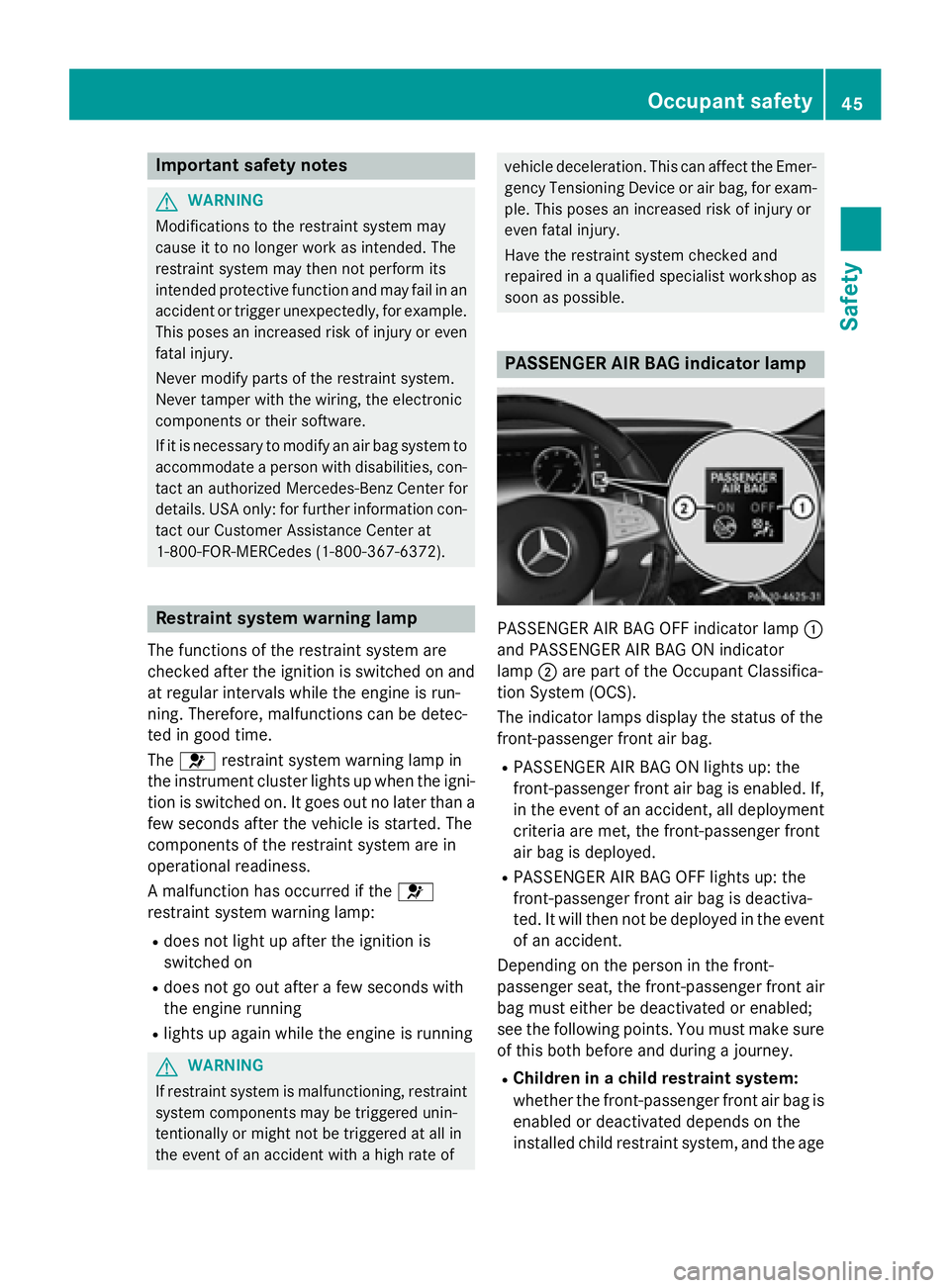
PASSENGER AIR BAG indicator lamp
PASSENGER AIR BAG OFF indicator lamp :
and PASS ENGER AIR BAG ON indicator
lamp ;are part of the Occupant Classific a-
tion System (OCS).
The indicator lamps display the status of the
front-passenger front air bag.
RPASS ENGER AIR BAG ON lights up: the
front-passenger front air bag isenabled. If,
in the event of an acc ident, all deplo yment
cr iteria are met, the front-passenger front
air bag is deplo yed.
RPASSENGER AIR BAG OFF lights up: the
front-passenger front air bag isdeactiva-
te d. It will then not be deployedinthe event
of an accident.
Depending on the person inthe front-
passenger seat, the front-passenger front air
bag must either bedeactivated or enabled;
see the following points. You must make sure
of th isboth before and during a journey.
RChildren in a child res traint system:
whether the front-passenger front air bag is
enabled or deactivated depends on the
installed ch ildrestraint system, and the age
Occupant safety45
Safety
Z
Page 70 of 410
The driving safety systems described only
work as effectively as possible when there is
adequate contact between the tires and the
road surface. Please pay special attention to
the notes on tires, recommended minimum
tire tread depths, etc. (
Ypage 362).
In wintry driving conditions, always use winter
tires (M+S tires) and if necessary, snow
chains. Only in this way will the driving safety systems described in this section work as
effectively as possible.
ABS (Anti-lock Braking System)
General information
ABS regulates brake pressure in such a way
that the wheels do not lock when you brake.
This allows you to continue steering the vehi-
cle when braking.
The ! ABS warning lamp in the instrument
cluster lights up when the ignition is switched
on. It goes out when the engine is running.
ABS works from a speed of about 5 mph
(8 km/h), regardless of road-surface condi-
tions. ABS works on slippery surfaces, even
when you only brake gently.
Important safety notes
iObserve the "Important safety notes" sec-
tion (
Ypage 67).
GWARNING
If ABS is faulty, the wheels could lock when
braking. The steerability and braking charac-
teristics may be severely impaired. Addition-
ally, further driving safety systems are deac-
tivated. There is an increased danger of skid-
ding and accidents.
Drive on carefully. Have ABS checked imme-
diately at a qualified specialist workshop.
When ABS is malfunctioning, other systems,
including driving safety systems, will also
become inoperative. Observe the information on the ABS warning lamp (
Ypage 288) and display messages which may be shown in the
instrument cluster (
Ypage 252).
Braking
XIf ABS intervenes:
continue to depress the
brake pedal vigorously until the braking sit-
uation is over.
XTo make a full brake application:
depress the brake pedal with full force.
If ABS intervenes when braking, you will feel a
pulsing in the brake pedal.
The pulsating brake pedal can be an indica-
tion of hazardous road conditions, and func-
tions as a reminder to take extra care while
driving.
BAS (Brake Assist System)
General information
BAS operates in emergency braking situa-
tions. If you depress the brake pedal quickly,
BAS automatically boosts the braking force,
thus shortening the stopping distance.
Important safety notes
iObserve the "Important safety notes" sec-
tion (
Ypage 67).
GWARNING
If BAS is malfunctioning, the braking distance
in an emergency braking situation is
increased. There is a risk of an accident.
In an emergency braking situation, depress
the brake pedal with full force. ABS prevents
the wheels from locking.
Braking
XKeep the brake pedal firmly depressed until
the emergency braking situation is over.
ABS prevents the wheels from locking.
The brakes will function as usual once you
release the brake pedal. BAS is deactivated.
68Driving safety systems
Safety
Page 75 of 410
XKeep the brake pedal depressed until the
emergency braking situation is over.
ABS prevents the wheels from locking.
The brakes will work normally again if:
Ryou release the brake pedal.
Rthere is no longer any danger of a collision.
Rno obstacle is detected in front of your
vehicle.
Adaptive Brake Assist is then deactivated.
If adaptive Brake Assist demands particularly
high braking force, preventative passenger
protection measures (PRE-SAFE
®) are activa-
ted simultaneously.
Up to a speed of approximately 155 mph
(250 km/h), adaptive Brake Assist is capable
of reacting to moving objects that have
already been detected as such at least once
over the period of observation.
Up to a speed of approximately 44 mph
(70 km/h), adaptive Brake Assist reacts to
stationary obstacles.
ESP®(Electronic Stability Program)
General notes
iObserve the "Important safety notes" sec-
tion (
Ypage 67).
ESP
®monitors driving stability and traction,
i.e. power transmission between the tires and
the road surface.
If ESP
®detects that the vehicle is deviating
from the direction desired by the driver, one
or more wheels are braked to stabilize the
vehicle. The engine output is also modified to
keep the vehicle on the desired course within
physical limits. ESP
®assists the driver when
pulling away on wet or slippery roads. ESP®
can also stabilize the vehicle during braking.
ETS/4ETS (Electronic Traction System)
iObserve the "Important safety notes" sec-
tion (
Ypage 67). ETS traction control is part of ESP
®. On vehi-
cles with 4MATIC, 4ETS is part of ESP®.
Traction control brakes the drive wheels indi-
vidually if they spin. This enables you to pull
away and accelerate on slippery surfaces, for
example if the road surface is slippery on one
side. In addition, more drive torque is trans-
ferred to the wheel or wheels with traction.
Traction control remains active, even if you
deactivate ESP
®.
Important safety notes
GWARNING
If ESP
®is malfunctioning, ESP®is unable to
stabilize the vehicle. Additionally, further driv-
ing safety systems are deactivated. This
increases the risk of skidding and an accident.
Drive on carefully. Have ESP
®checked at a
qualified specialist workshop.
Vehicles without 4MATIC: observe the notes
on ESP®(Ypage 356) when towing the vehi-
cle with a raised rear axle.
ESP
®is only deactivated if the åwarning
lamp is lit continuously.
If the ÷ warning lamp lights up continu-
ously, ESP
®is not available due to a malfunc-
tion.
Observe the information on warning lamps
(
Ypage 290) and display messages which
may be shown in the instrument cluster
(
Ypage 252).
Only use wheels with the recommended tire
sizes. Only then will ESP
®function properly.
Characteristics of ESP®
General information
If the ÷ ESP warning lamp goes out before
beginning the journey, ESP
®is automatically
active.
If ESP
®intervenes, the ÷ESP®warning
lamp flashes in the instrument cluster.
Driving safety systems73
Safety
Z
Page 84 of 410
Useful information
i
This Operator's Manual describes all
models and all standard and optional equip-
ment of your vehicle available at the time of
publication of the Operator's Manual.
Country-specific differences are possible.
Please note that your vehicle may not be
equipped with all features described. This
also applies to safety-related systems and
functions.
iRead the information on qualified special-
ist workshops (
Ypage 26).
SmartKey
Important safety notes
GWARNING
If children are left unsupervised in the vehicle,
they could:
Ropen the doors, thus endangering other
people or road users.
Rget out and disrupt traffic.
Roperate the vehicle's equipment.
Additionally, children could set the vehicle in
motion if, for example, they:
Rrelease the parking brake.
Rshifting the automatic transmission out of
park position P
RStart the engine.
There is a risk of an accident and injury.
When leaving the vehicle, always take the
SmartKey with you and lock the vehicle. Never
leave children or animals unattended in the
vehicle. Always keep the SmartKey out of
reach of children.
GWARNING
If you attach heavy or large objects to the
SmartKey, the SmartKey could be uninten-
tionally turned in the ignition lock. This could
cause the engine to be switched off. There is a risk of an accident.
Do not attach any heavy or large objects to theSmartKey. Remove any bulky key rings before
inserting the SmartKey into the ignition lock.
!Keep the SmartKey away from strong
magnetic fields. Otherwise, the remote
control function could be affected.
Strong magnetic fields can occur in the
vicinity of powerful electrical installations.
Do not keep the SmartKey:
Rwith electronic devices, e.g. a mobile
phone or another SmartKey.
Rwith metallic objects, e.g. coins or metal
foil.
Rinside metallic objects, e.g. a metal case.
This can affect the functionality of the
SmartKey.
Vehicles with KEYLESS-GO start function:
do not keep the SmartKey on the parcel shelf
or in the trunk. Otherwise, the SmartKey may
not be detected, e.g. when starting the engine
using the Start/Stop button.
A check which periodically establishes a radio
connection between the vehicle and the
SmartKey determines whether a valid Smart-
Key is in the vehicle. This occurs, for example:
Rwhen starting the engine
Rwhilst driving
Rwhen using HANDS-FREE ACCESS
Rwhen the external door handles are
touched
Rduring convenience closing
82SmartKey
Opening and closing
Page 85 of 410
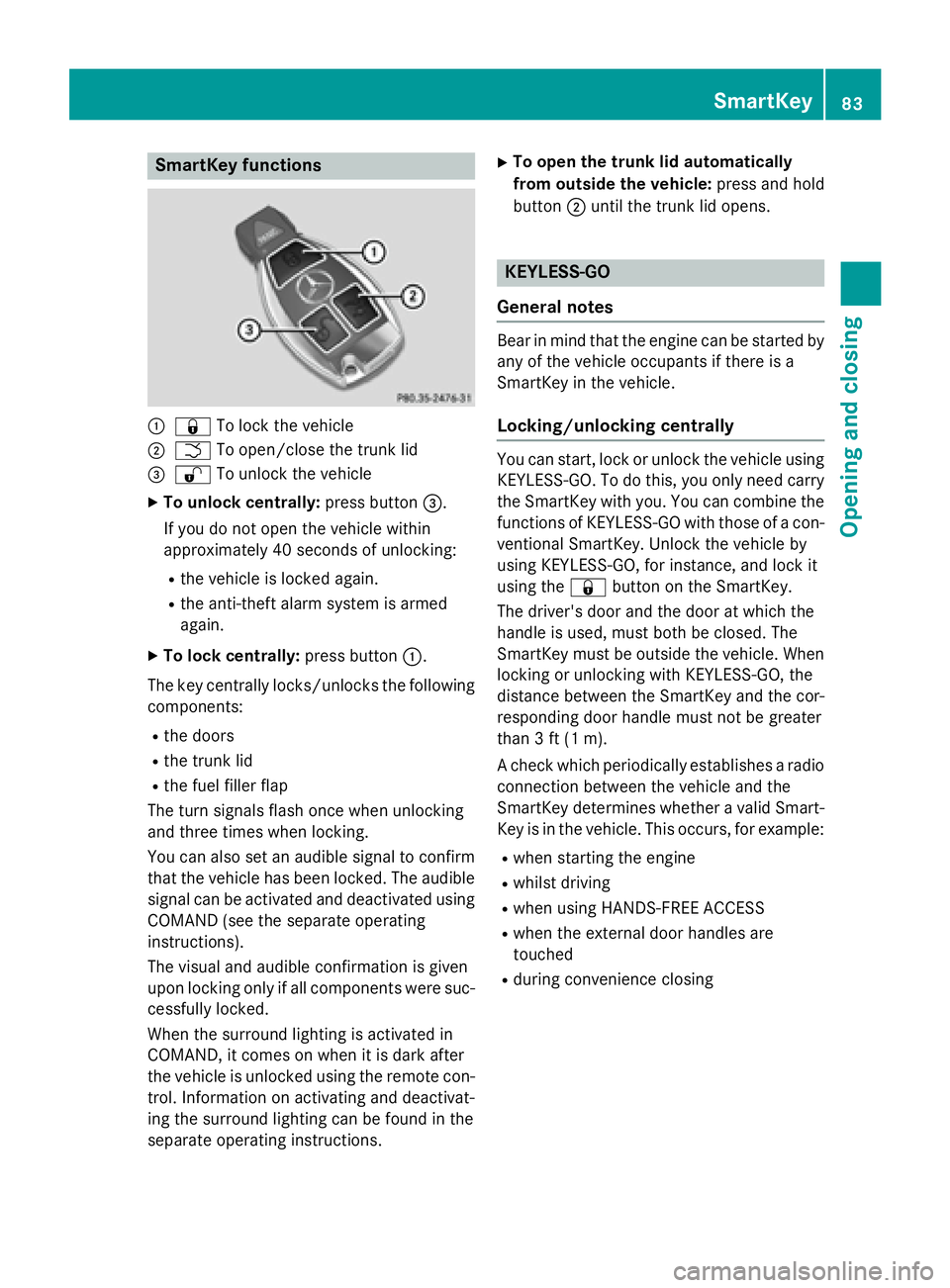
SmartKey functions
:&To lock the vehicle
;FTo open/close the trunk lid
=%To unlock the vehicle
XTo unlock centrally: press button=.
If you do not open the vehicle within
approximately 40 seconds of unlocking:
Rthe vehicle is locked again.
Rthe anti-theft alarm system is armed
again.
XTo lock centrally: press button:.
The key centrally locks/unlocks the following
components:
Rthe doors
Rthe trunk lid
Rthe fuel filler flap
The turn signals flash once when unlocking
and three times when locking.
You can also set an audible signal to confirm
that the vehicle has been locked. The audible
signal can be activated and deactivated using COMAND (see the separate operating
instructions).
The visual and audible confirmation is given
upon locking only if all components were suc-
cessfully locked.
When the surround lighting is activated in
COMAND, it comes on when it is dark after
the vehicle is unlocked using the remote con-
trol. Information on activating and deactivat-
ing the surround lighting can be found in the
separate operating instructions.
XTo open the trunk lid automatically
from outside the vehicle: press and hold
button ;until the trunk lid opens.
KEYLESS-GO
General notes
Bear in mind that the engine can be started by
any of the vehicle occupants if there is a
SmartKey in the vehicle.
Locking/unlocking centrally
You can start, lock or unlock the vehicle using KEYLESS-GO. To do this, you only need carry
the SmartKey with you. You can combine the
functions of KEYLESS-GO with those of a con-ventional SmartKey. Unlock the vehicle by
using KEYLESS-GO, for instance, and lock it
using the &button on the SmartKey.
The driver's door and the door at which the
handle is used, must both be closed. The
SmartKey must be outside the vehicle. When
locking or unlocking with KEYLESS-GO, the
distance between the SmartKey and the cor-
responding door handle must not be greater
than 3 ft (1 m).
A check which periodically establishes a radio
connection between the vehicle and the
SmartKey determines whether a valid Smart-
Key is in the vehicle. This occurs, for example:
Rwhen starting the engine
Rwhilst driving
Rwhen using HANDS-FREE ACCESS
Rwhen the external door handles are
touched
Rduring convenience closing
SmartKey83
Opening and closing
Z
Page 86 of 410
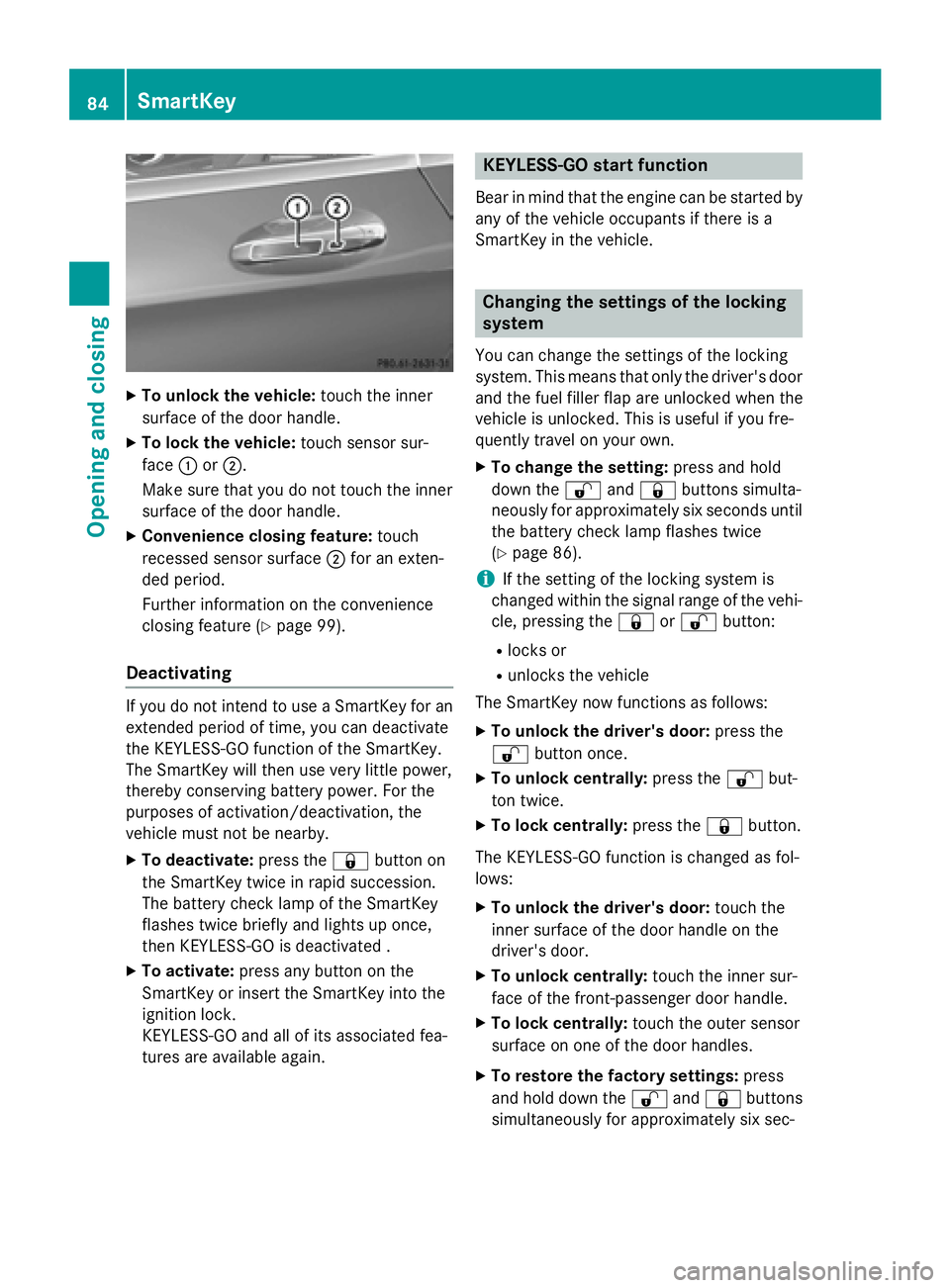
XTo unlock the vehicle:touch the inner
surface of the door handle.
XTo lock the vehicle: touch sensor sur-
face :or;.
Make sure that you do not touch the inner
surface of the door handle.
XConvenience closing feature: touch
recessed sensor surface ;for an exten-
ded period.
Further information on the convenience
closing feature (
Ypage 99).
Deactivating
If you do not intend to use a SmartKey for an
extended period of time, you can deactivate
the KEYLESS-GO function of the SmartKey.
The SmartKey will then use very little power,
thereby conserving battery power. For the
purposes of activation/deactivation, the
vehicle must not be nearby.
XTo deactivate: press the&button on
the SmartKey twice in rapid succession.
The battery check lamp of the SmartKey
flashes twice briefly and lights up once,
then KEYLESS-GO is deactivated .
XTo activate: press any button on the
SmartKey or insert the SmartKey into the
ignition lock.
KEYLESS-GO and all of its associated fea-
tures are available again.
KEYLESS-GO start function
Bear in mind that the engine can be started by
any of the vehicle occupants if there is a
SmartKey in the vehicle.
Changing the settings of the locking
system
You can change the settings of the locking
system. This means that only the driver's door
and the fuel filler flap are unlocked when the
vehicle is unlocked. This is useful if you fre-
quently travel on your own.
XTo change the setting: press and hold
down the %and& buttons simulta-
neously for approximately six seconds until
the battery check lamp flashes twice
(
Ypage 86).
iIf the setting of the locking system is
changed within the signal range of the vehi-
cle, pressing the &or% button:
Rlocks or
Runlocks the vehicle
The SmartKey now functions as follows:
XTo unlock the driver's door: press the
% button once.
XTo unlock centrally: press the%but-
ton twice.
XTo lock centrally: press the&button.
The KEYLESS-GO function is changed as fol-
lows:
XTo unlock the driver's door: touch the
inner surface of the door handle on the
driver's door.
XTo unlock centrally: touch the inner sur-
face of the front-passenger door handle.
XTo lock centrally: touch the outer sensor
surface on one of the door handles.
XTo restore the factory settings: press
and hold down the %and& buttons
simultaneously for app
roximately six sec-
84SmartKey
Opening and closing
Page 90 of 410
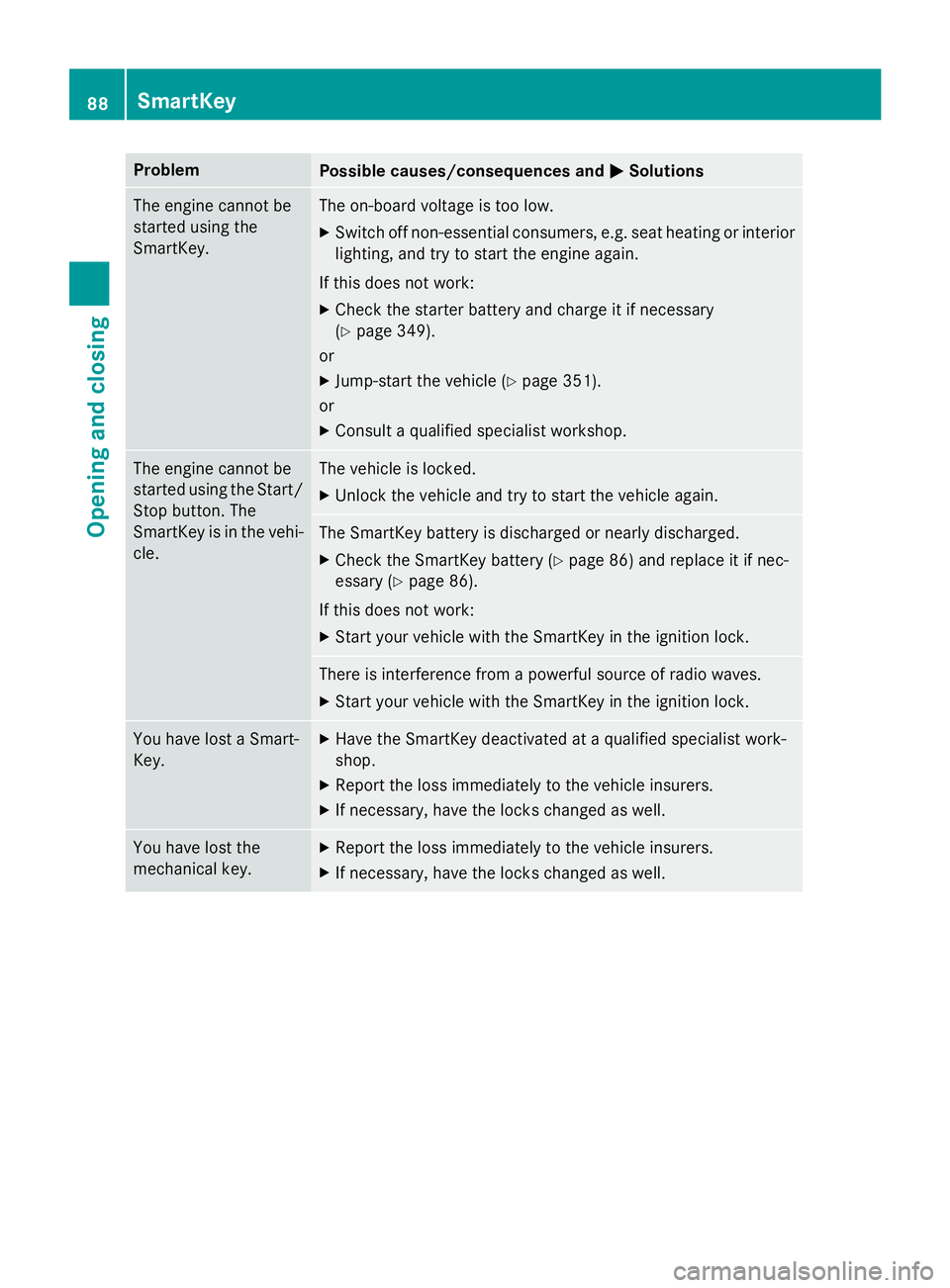
ProblemPossible causes/consequences andMSolutions
The engine cannot be
started using the
SmartKey.The on-board voltage is too low.
XSwitch off non-essential consumers, e.g. seat heating or interior
lighting, and try to start the engine again.
If this does not work:
XCheck the starter battery and charge it if necessary
(
Ypage 349).
or
XJump-start the vehicle (Ypage 351).
or
XConsult a qualified specialist workshop.
The engine cannot be
started using the Start/
Stop button. The
SmartKey is in the vehi-
cle.The vehicle is locked.
XUnlock the vehicle and try to start the vehicle again.
The SmartKey battery is discharged or nearly discharged.
XCheck the SmartKey battery (Ypage 86) and replace it if nec-
essary (
Ypage 86).
If this does not work:
XStart your vehicle with the SmartKey in the ignition lock.
There is interference from a powerful source of radio waves.
XStart your vehicle with the SmartKey in the ignition lock.
You have lost a Smart-
Key.XHave the SmartKey deactivated at a qualified specialist work-
shop.
XReport the loss immediately to the vehicle insurers.
XIf necessary, have the locks changed as well.
You have lost the
mechanical key.XReport the loss immediately to the vehicle insurers.
XIf necessary, have the locks changed as well.
88SmartKey
Opening and closing
Page 101 of 410
iBefore opening or closing the side win-
dows, a check is carried out to see whether
a valid SmartKey is in the vehicle, if:
Ra side window switch is pressed or pulled
and
Rthe Start/Stop button is used instead of
the SmartKey in the ignition lock
and
Rthe engine is not running
This is carried out by means of a brief radio
connection between the vehicle and the
SmartKey.
Convenience opening
General notes
You can ventilate the vehicle before you start
driving.
If the SmartKey is in close proximity to the
vehicle, the convenience opening function is
available.
The "convenience opening" feature is also
available on unlocked vehicles.
To do this, the SmartKey is used to carry out
the following functions simultaneously:
Runlock the vehicle
Ropen the side windows
Rswitch on the seat ventilation for the driv-
er's seat
Convenience opening
XKeep the %button pressed until the
side windows are in the desired position.
XTo interrupt convenience opening:
release the %button.
Convenience closing feature
Important safety notes
GWARNING
When using the convenience closing feature,
parts of the body could be trapped in the clos-
ing area when a side window is being closed.
There is a risk of injury.
Observe the complete closing procedure
when the convenience closing feature is oper-
ating. Make sure that no body parts are in
close proximity during the closing procedure.
When you lock the vehicle, you can close the
windows at the same time.
You can then close the roller sunblinds.
iNotes on the automatic reversing feature
for:
Rthe side window (Ypage 98)
Rthe roller sunblind (Ypage 101)
Using the SmartKey
XPress and hold the &button until the
side windows are fully closed.
XMake sure that all the side windows are
closed.
XPress and hold the &button again until
the roller sunblinds of the panorama roof
close.
XTo interrupt convenience closing:
release the &button.
Using KEYLESS-GO
The SmartKey must be outside the vehicle. All
the doors must be closed.
Side windows99
Opening and closing
Z
Page 108 of 410
Useful information
i
This Operator's Manual describes all
models and all standard and optional equip-
ment of your vehicle available at the time of
publication of the Operator's Manual.
Country-specific differences are possible.
Please note that your vehicle may not be
equipped with all features described. This
also applies to safety-related systems and
functions.
iRead the information on qualified special-
ist workshops (
Ypage 26).
Correct driver's seat position
GWARNING
You could lose control of your vehicle if you do the following while driving:
Radjust the driver's seat, head restraint,
steering wheel or mirrors
Rfasten the seat belt
There is a risk of an accident.
Adjust the driver's seat, head restraint, steer-
ing wheel and mirror and fasten your seat belt before starting the engine.
XObserve the safety guidelines on seat
adjustment (
Ypage 107).
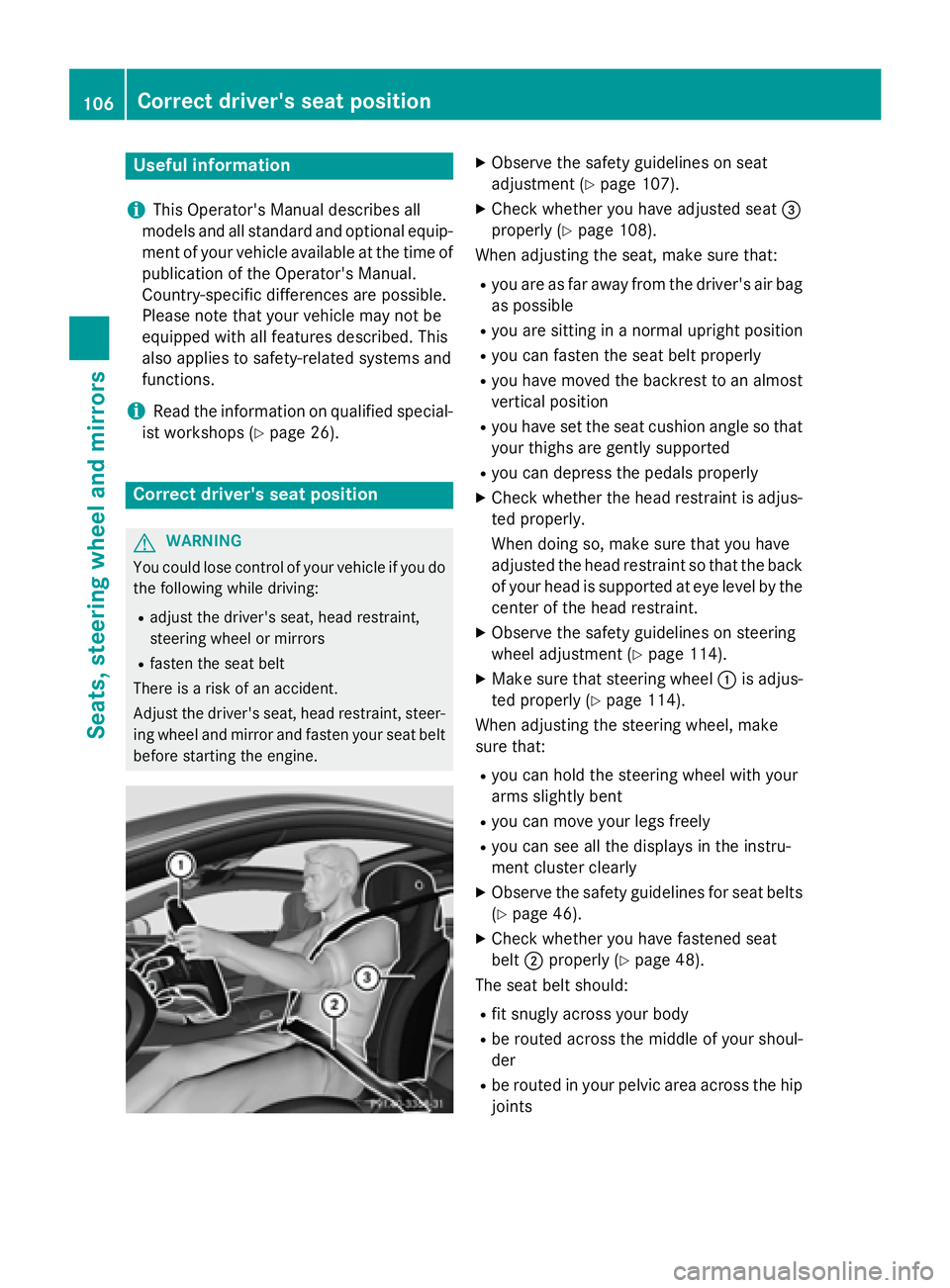
XCheck whether you have adjusted seat =
properly (
Ypage 108).
When adjusting the seat, make sure that:
Ryou are as far away from the driver's air bag
as possible
Ryou are sitting in a normal upright position
Ryou can fasten the seat belt properly
Ryou have moved the backrest to an almost
vertical position
Ryou have set the seat cushion angle so that
your thighs are gently supported
Ryou can depress the pedals properly
XCheck whether the head restraint is adjus-
ted properly.
When doing so, make sure that you have
adjusted the head restraint so that the back
of your head is supported at eye level by the
center of the head restraint.
XObserve the safety guidelines on steering
wheel adjustment (
Ypage 114).
XMake sure that steering wheel :is adjus-
ted properly (
Ypage 114).
When adjusting the steering wheel, make
sure that:
Ryou can hold the steering wheel with your
arms slightly bent
Ryou can move your legs freely
Ryou can see all the displays in the instru-
ment cluster clearly
XObserve the safety guidelines for seat belts
(
Ypage 46).
XCheck whether you have fastened seat
belt ;properly (
Ypage 48).
The seat belt should:
Rfit snugly across your body
Rbe routed across the middle of your shoul-
der
Rbe routed in your pelvic area across the hip
joints
106Correct driver's seat position
Seats, steering wheel and mirrors