reset MERCEDES-BENZ S-COUPE 2016 User Guide
[x] Cancel search | Manufacturer: MERCEDES-BENZ, Model Year: 2016, Model line: S-COUPE, Model: MERCEDES-BENZ S-COUPE 2016Pages: 410, PDF Size: 8.62 MB
Page 122 of 410
XTurn the SmartKey to position2in the igni-
tion lock (
Ypage 151).
XPress button =for the exterior mirror on
the front-passenger side.
XEngage reverse gear.
The exterior mirror on the front-passenger
side moves to the preset parking position.
XUse adjustment button ;to adjust the
exterior mirror to a position that allows you
to see the rear wheel and the curb.
The parking position is stored.
iIf you shift the transmission to another
position, the exterior mirror on the front-
passenger side returns to the driving posi-
tion after approximately ten seconds.
Using the memory button
You can position the front-passenger side
exterior mirror in such a way that you can see
the rear wheel on that side as soon as you
engage reverse gear. This setting can be
stored using memory button M:.
XTurn the SmartKey to position 2in the igni-
tion lock (
Ypage 151).
XPress button =for the exterior mirror on
the front-passenger side.
XUse adjustment button ;to adjust the
exterior mirror to a position that allows you
to see the rear wheel and the curb.
XPress memory button M: and one of the
arrows on adjustment button ;within
three seconds.
The parking position is stored if the exterior
mirror does not move.
XIf the mirror moves out of position, repeat
the steps.
Calling up a stored parking position set-
ting
XTurn the SmartKey to position 2in the igni-
tion lock (
Ypage 151).
XAdjust the exterior mirror on the front-
passenger side using button =.
XEngage reverse gear.
The exterior mirror on the front-passenger
side moves to the stored parking position.
The exterior mirror on the front-passenger
side moves back to its original position:
Ras soon as you exceed a speed of 9 mph
(15 km/h)
Rabout ten seconds after you have disen-
gaged reverse gear
Rif you press button ?for the exterior mir-
ror on the driver's side
Memory function
Important safety notes
GWARNING
If you use the memory function on the driver's side while driving, you could lose control of
the vehicle as a result of the adjustments
being made. There is a risk of an accident.
Only use the memory function on the driver's
side when the vehicle is stationary.
GWARNING
When the memory function adjusts the seat or steering wheel, you and other vehicle occu-
pants – particularly children – could become
trapped. There is a risk of injury.
While the memory function is making adjust-
ments, make sure that no one has any body
parts in the sweep of the seat or steering
wheel. If somebody becomes trapped, imme-
diately release the memory function position
button. The adjustment process is stopped.
120Memory function
Seats, steering wheel and mirrors
Page 123 of 410
GWARNING
Children could become trapped if they acti-
vate the memory function, particularly when
unattended. There is a risk of injury.
When leaving the vehicle, always take the
SmartKey with you and lock the vehicle. Never
leave children unsupervised in the vehicle.
The memory function can be used at any time,
e.g. even when the SmartKey isn't in the igni-
tion lock.
Storing settings
With the memory function, you can store up
to three different settings, e.g. for three dif-
ferent people.
The following settings are stored as a single
memory preset:
Rseat, backrest, head restraint position and
contour of the backrest in the lumbar
region
Ractive multicontour seat: side bolsters of
the backrest, shoulder of the backrest, con-
tour of the backrest, dynamic function level
Rseat heating: distribution of the heated sec- tions of the seat cushion and backrest
Rdriver's side: position of the exterior mir-
rors on the driver's and front-passenger
sides
Rposition of the head-up display
XAdjust the seat accordingly (Ypage 108).
XOn the driver's side, adjust the steering
wheel (
Ypage 114) and the exterior mirrors
(
Ypage 118).
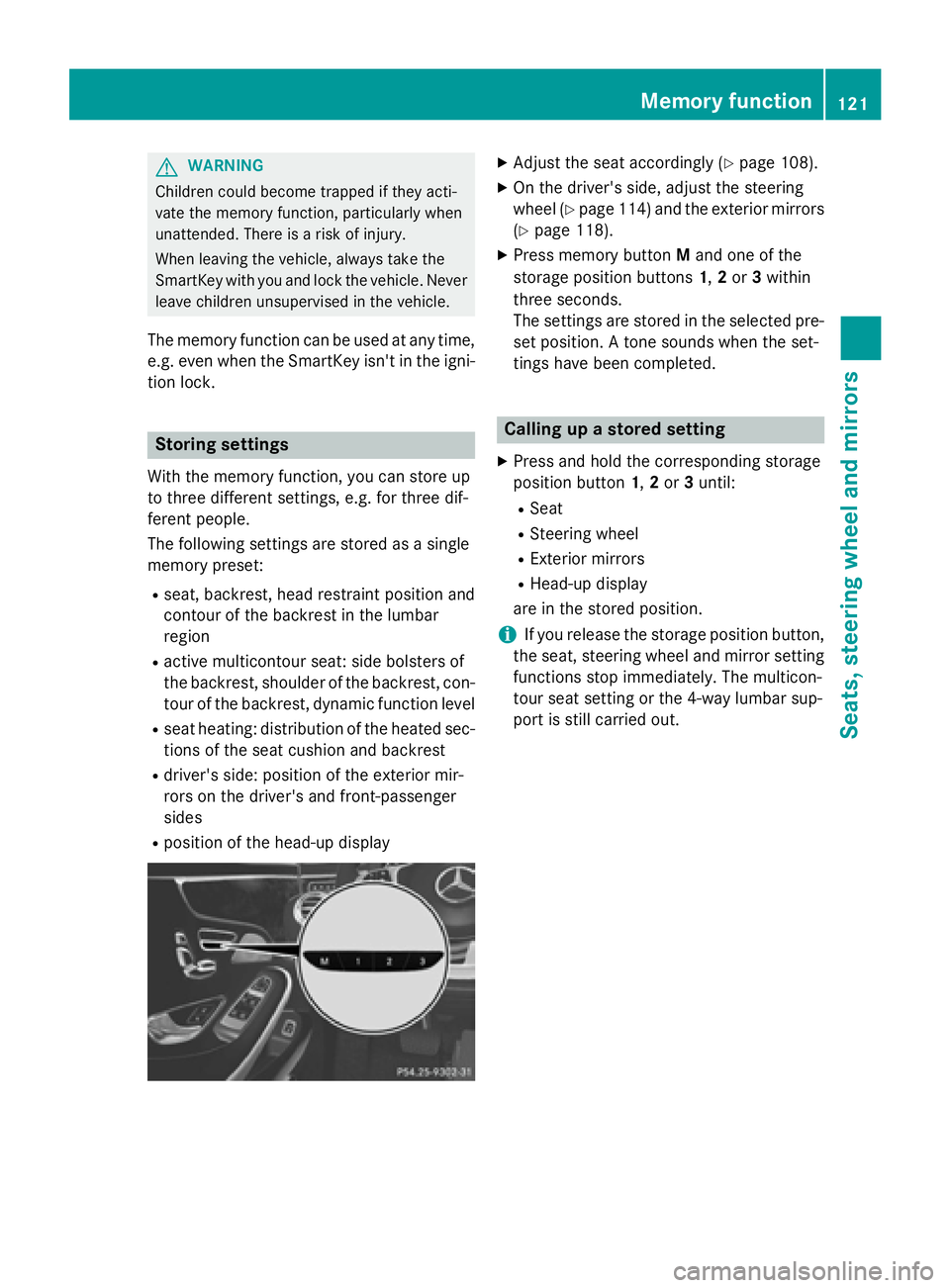
XPress memory button Mand one of the
storage position buttons 1,2or 3within
three seconds.
The settings are stored in the selected pre-
set position. A tone sounds when the set-
tings have been completed.
Calling up a stored setting
XPress and hold the corresponding storage
position button 1,2or 3until:
RSeat
RSteering wheel
RExterior mirrors
RHead-up display
are in the stored position.
iIf you release the storage position button,
the seat, steering wheel and mirror setting
functions stop immediately. The multicon-
tour seat setting or the 4-way lumbar sup-
port is still carried out.
Memory function121
Seats, steering wheel and mirrors
Z
Page 178 of 410
For more dynamic changes, carry out a man-
ual reset.
For further information on the ECO display,
see (
Ypage 236).
Braking
Important safety notes
GWARNING
If you shift down on a slippery road surface in an attempt to increase the engine's braking
effect, the drive wheels could lose their grip.
There is an increased danger of skidding and
accidents.
Do not shift down for additional engine brak-
ing on a slippery road surface.
Downhill gradients
!On long and steep gradients, you must
reduce the load on the brakes by shifting
early to a lower gear. This allows you to take
advantage of the engine braking effect and
helps avoid overheating and excessive
wear of the brakes.
When you take advantage of the engine
braking effect, a drive wheel may not turn
for some time, e.g. on a slippery road sur-
face. This could cause damage to the drive
train. This type of damage is not covered by
the Mercedes-Benz warranty.
Heavy and light loads
GWARNING
If you rest your foot on the brake pedal while
driving, the braking system can overheat. This increases the stopping distance and can even
cause the braking system to fail. There is a
risk of an accident.
Never use the brake pedal as a footrest. Never
depress the brake pedal and the accelerator
pedal at the same time.
!Depressing the brake pedal constantly
results in excessive and premature wear to
the brake pads.
If the brakes have been subjected to a heavy
load, do not stop the vehicle immediately.
Drive on for a short while. This allows the air-
flow to cool the brakes more quickly.
Wet roads
If you have driven for a long time in heavy rain
without braking, there may be a delayed reac-
tion from the brakes when braking for the first
time. This may also occur after the vehicle has
been washed or driven through deep water.
You have to depress the brake pedal more
firmly. Maintain a greater distance from the
vehicle in front.
After driving on a wet road or having the vehi-
cle washed, brake firmly while paying atten-
tion to the traffic conditions. This will warm up
the brake discs, thereby drying them more
quickly and protecting them against corro-
sion.
Limited braking performance on salt-
treated roads
If you drive on salted roads, a layer of salt
residue may form on the brake discs and
brake pads. This can result in a significantly
longer braking distance.
RIn order to prevent any salt build-up, apply
the brakes occasionally while paying atten-
tion to the traffic conditions.
RCarefully depress the brake pedal and the
beginning and end of a journey.
RMaintain a greater distance to the vehicle
ahead.
Servicing the brakes
!If the red brake warning lamp lights up in
the instrument cluster and you hear a warn-
ing tone while the engine is running, the
brake fluid level may be too low. Observe
176Driving tips
Driving and parking
Page 238 of 410
XConfirmbypressing aon the steering
wheel.
XPress the :or9 button to select the
disp laywithappr oximate range :and cur-
rent fuel consumption ;.
Approximate range :that can be covered is
calculated according to your current driving
style and the amount of fuel inthe tank. If
there isonly a small amount of fuel left inthe
fuel tank, a veh iclebeing refueled C
appears instead of approximate range :.
Recuperation display=shows youifenergy
has been recuperated from the kinetic energy
in overrun mode and saved in the battery.
Recuperation display=depends on the
engine installed and istherefore not availab le
in all veh icles.
ECO display
The ECO display is not availab le inMercedes-
AMG veh icles.
XPress the òbutton on the steering
wheel to open the menu list.
XPress :or9 on the steering wheel
to select the Trip
menu.
XConfirmbypressing aon the steering
wheel.
XPress the :or9 button to select
ECO Display
.
If the ignit ion remains switched off for longer
than four hours, the ECO display willbe auto-
matical lyreset.
For more information on the ECO display, see
(
Ypage 175).
Trip computer "From Start" or "From
Reset"
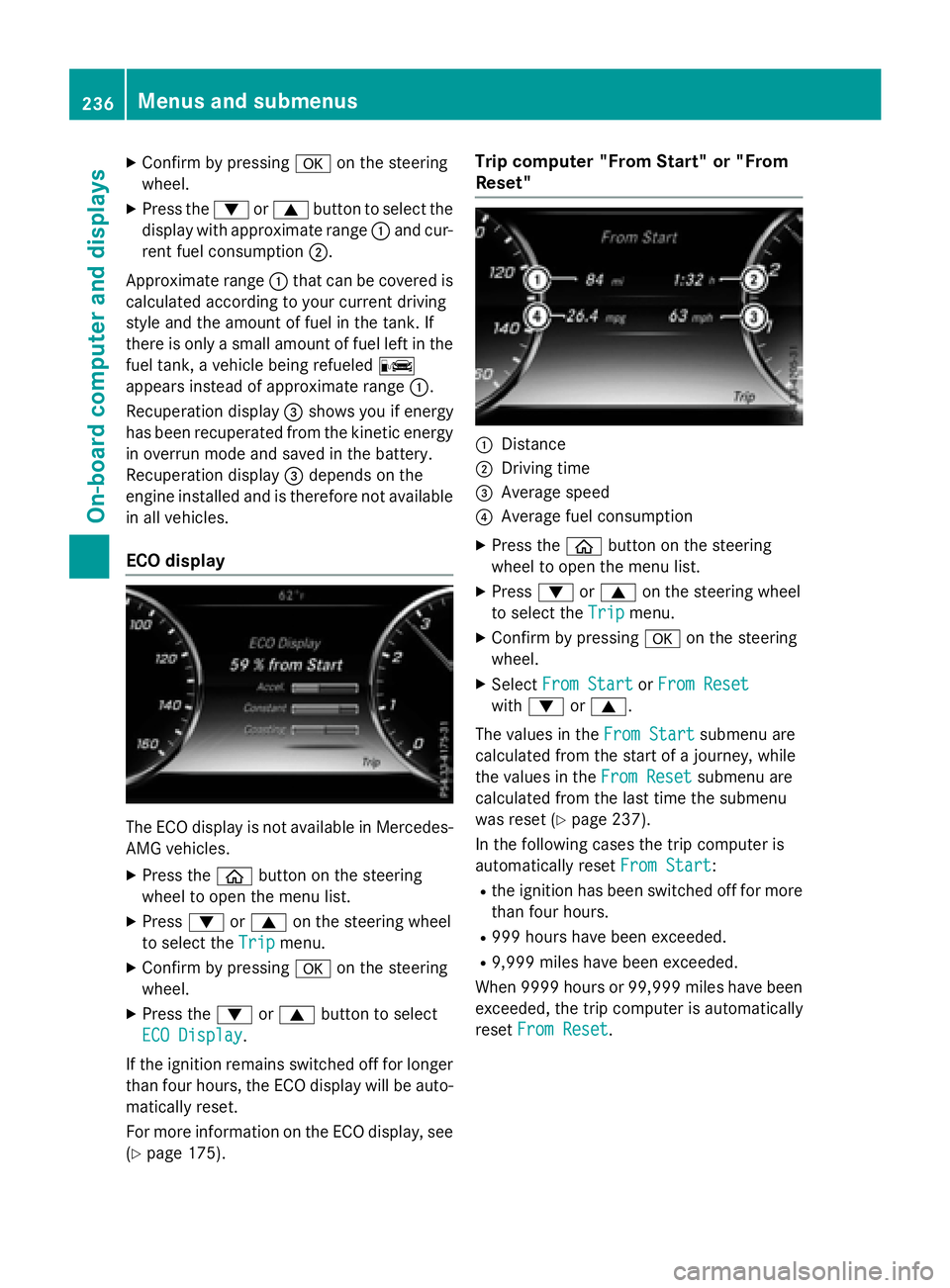
:Distance
;Dr ivin g time
=Average speed
?Average fuel consumption
XPress the òbutton on the steering
wheel to open the menu list.
XPress :or9 on the steering wheel
to select the Trip
menu.
XConfirmbypressing aon the steering
wheel.
XSe lect From StartorFrom Reset
wit h: or9.
The values inthe From Start
submenu are
calculated from the start of a journey, while
the values inthe From Reset
submenu are
calculated from the last time the submenu
was reset (
Ypage 237).
In the following cases the tr ipcomputer is
automatical lyreset From Start
:
Rthe ignit ion has been switched off for more
than four hours.
R999 hours have been excee ded.
R9,999 miles have been excee ded.
When 9999 hourso r 99,999 miles have been
exceeded, the trip computer is automatically
reset From Reset
.
236Menus and submenus
On-board computer and displays
Page 239 of 410
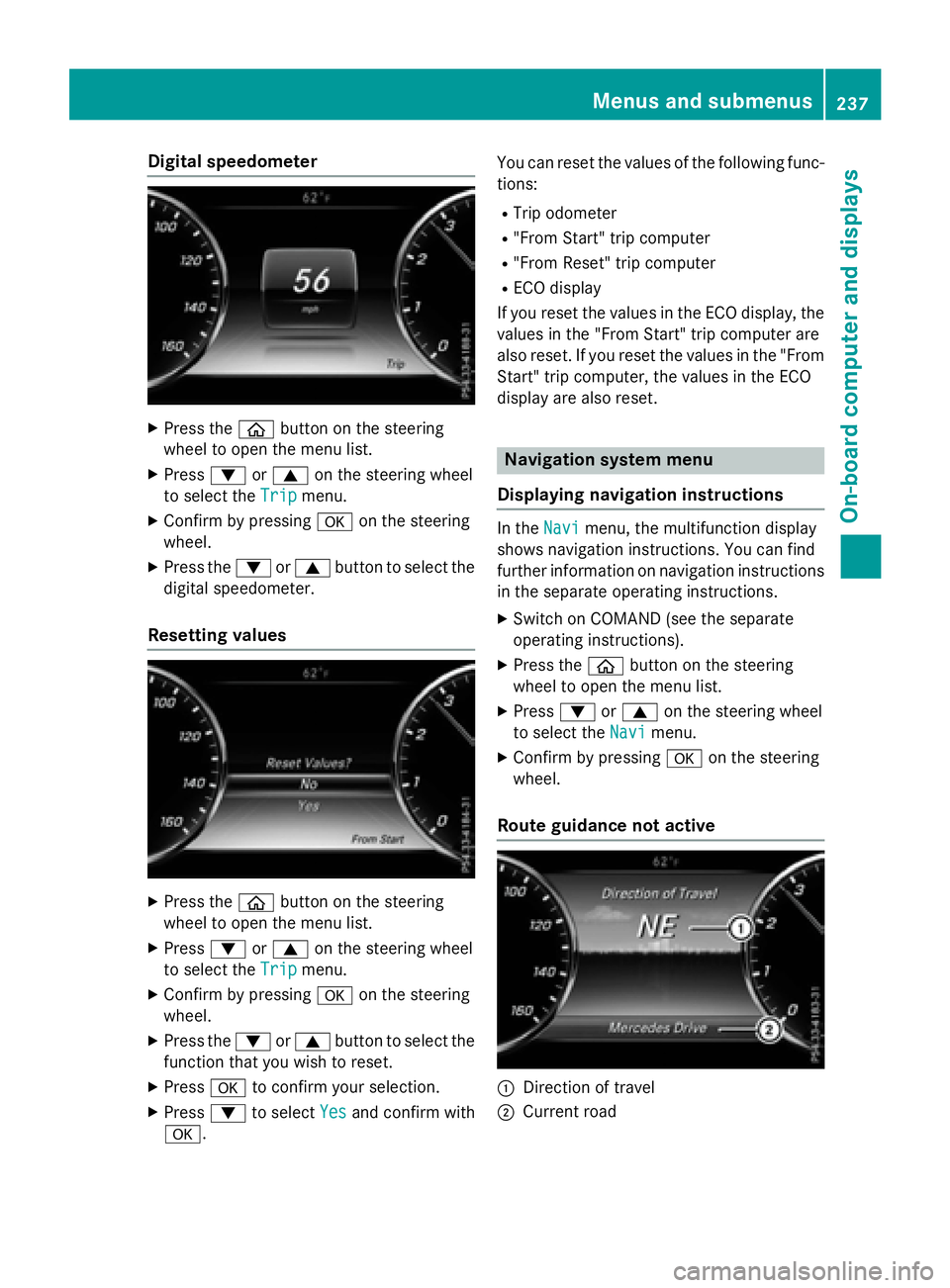
Digital speedometer
XPress theò buttonon th esteerin g
whee lto ope nth emen ulist .
XPress :or9 on thesteerin gwhee l
to selec tth eTri p
menu.
XConfir mby pressing aon thesteerin g
wheel.
XPress th e: or9 buttonto selec tth e
digita lspeedometer.
Resetting value s
XPress theò buttonon th esteerin g
whee lto ope nth emen ulist .
XPress :or9 on thesteerin gwhee l
to selec tth eTri p
menu.
XConfir mby pressing aon thesteerin g
wheel.
XPress th e: or9 buttonto selec tth e
function that you wish to reset .
XPressato confirm your selection .
XPress:to selec tYesand confirm wit h
a. You can reset th
evalues of th efollowing func-
tions:
RTrip odometer
R"From Start "trip compute r
R"From Reset" trip compute r
RECOdisplay
If you reset th evalues in th eEC Odisplay, th e
values in th e"From Start "trip compute rare
also reset .If you reset th evalues in th e"From
Start "trip computer, th evalues in th eEC O
display are also reset .
Navigation systemmenu
Displaying navigation instructions
In th eNav imenu, th emultifunction display
shows navigation instructions. You can fin d
further information on navigation instruction s
in th eseparat eoperatin ginstructions.
XSwitc hon COMAN D(se eth eseparat e
operatin ginstructions).
XPress th eò buttonon th esteerin g
whee lto ope nth emen ulist .
XPress :or9 on thesteerin gwhee l
to selec tth eNav i
menu.
XConfir mby pressing aon thesteerin g
wheel.
Route guidance not active
:Direction of trave l
;Currentroad
Menus and submenus237
On-board computer and displays
Z
Page 241 of 410
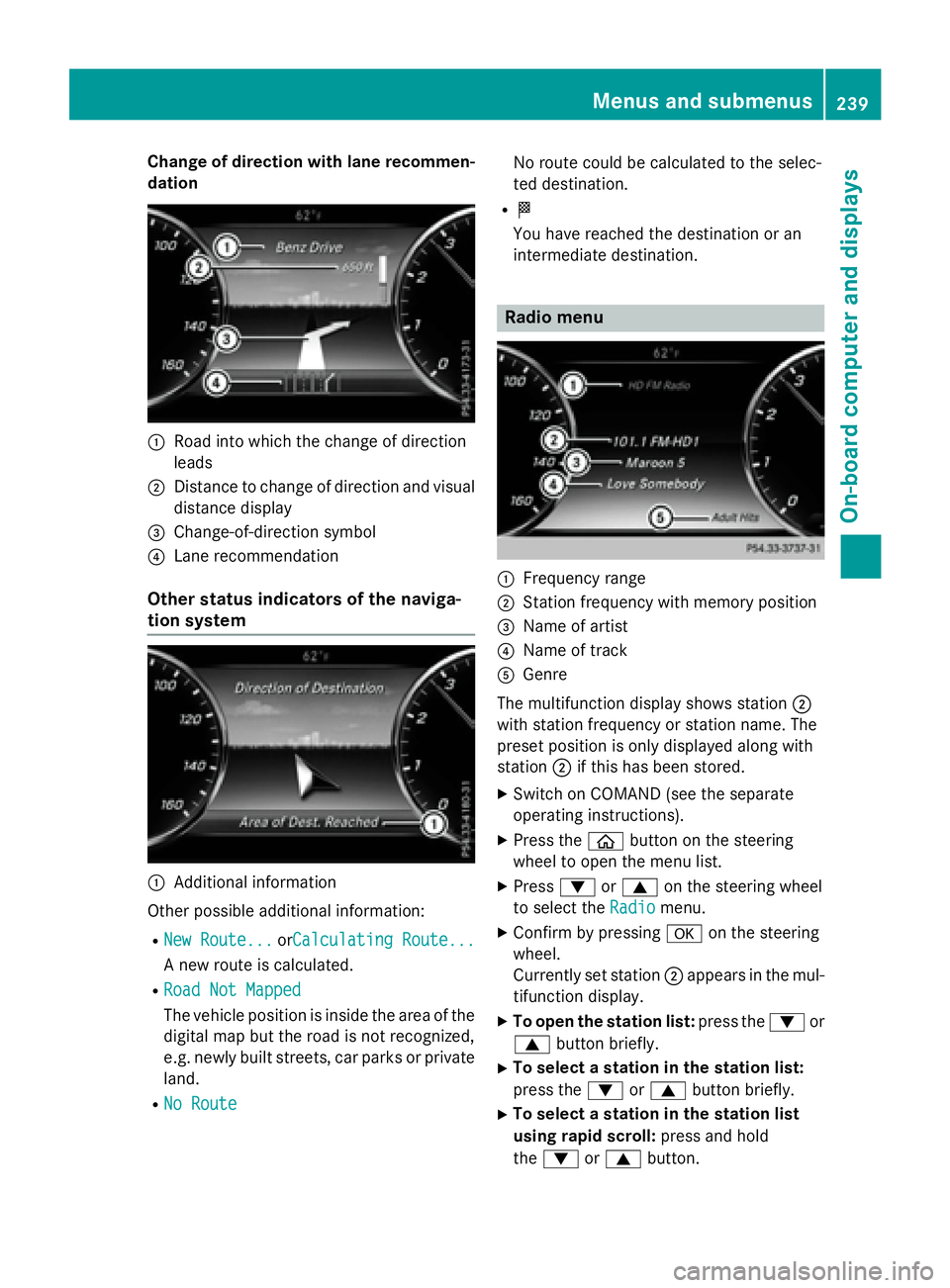
Change of direction with lane recommen-
dation
:Road into which the change of direction
leads
;Distance to change of direction and visual
distance display
=Change-of-direction symbol
?Lane recommendation
Other status indicators of the naviga-
tion system
:Additional information
Other possible additional information:
RNew Route...orCalculating Route...
A new route is calculated.
RRoad Not Mapped
The vehicle position is inside the area of the
digital map but the road is not recognized,
e.g. newly built streets, car parks or private
land.
RNo Route
No route could be calculated to the selec-
ted destination.
RO
You have reached the destination or an
intermediate destination.
Radio menu
:Frequency range
;Station frequency with memory position
=Name of artist
?Name of track
AGenre
The multifunction display shows station ;
with station frequency or station name. The
preset position is only displayed along with
station ;if this has been stored.
XSwitch on COMAND (see the separate
operating instructions).
XPress the òbutton on the steering
wheel to open the menu list.
XPress :or9 on the steering wheel
to select the Radio
menu.
XConfirm by pressing aon the steering
wheel.
Currently set station ;appears in the mul-
tifunction display.
XTo open the station list: press the:or
9 button briefly.
XTo select a station in the station list:
press the :or9 button briefly.
XTo select a station in the station list
using rapid scroll: press and hold
the : or9 button.
Menus and submenus239
On-board computer and displays
Z
Page 249 of 410
selected contents then appear in the head-up
display.
In Mercedes-AMG vehicles, you can also
choose between two AMG displays. If you
select an AMG display, the head-up display
shows AMG-specific contents.
XPress the òbutton on the steering
wheel to open the menu list.
XPress :or9 on the steering wheel
to select the Settings
menu.
XConfirm by pressing aon the steering
wheel.
XPress :or9 to select the Head-up
Displaysubmenu.
XPressato confirm.
XPress :or9 to select Display
Content.
XPressato confirm.
A graphic selection list appears.
XPress :or9 to select the desired
display.
XPress the abutton to confirm the selec-
tion.
Further information on navigation can be
found on COMAND (see the separate operat-
ing instructions).
For further information about Traffic Sign
Assist, see (
Ypage 217).
Setting the position
You can adjust the position of the head-up
display on the windshield. You can compen-
sate for height differences if the seat posi-
tions are changed, for example.
XSwitch on the head-up display
(
Ypage 233).
XPress the òbutton on the steering
wheel to open the menu list.
XPress the :or9 button on the steer-
ing wheel to select the Settings
menu.
XConfirm by pressingaon the steering
wheel.
XPress :or9 to select the Head-up
Displaysubmenu.
XPressato confirm.
XPress the :or9 button to select the
Position
function.
XPress the abutton to save the setting.
XPress :or9 to adjust the position
to a level from Level +5
toLevel -5.
XPress the aor% button to save the
setting.
Using the Memory function, you can save and
call up the set position of the head-up display
as a single memory preset (
Ypage 120).
Setting the brightness
The brightness of the head-up display is auto-
matically adjusted to the surrounding ambi-
ent light. You can also individually adjust the
brightness of the head-up display.
XSwitch on the head-up display
(
Ypage 233).
XPress òon the steering wheel to open
the menu list.
XPress the :or9 button on the steer-
ing wheel to select the Settings
menu.
XConfirm by pressingaon the steering
wheel.
XUse : or9 to select the Head-up
Displaysubmenu.
XPressato confirm.
XPress the :or9 button to select the
Brightness
function.
XPress the abutton to save the setting.
XPress :or9 to adjust the bright-
ness to a level from Level +5
(bright) to
Level -5
(dark).
XPress the aor% button to save the
setting.
Light submenu
Switching the spotlight function on/off
XPress òon the steering wheel to open
the menu list.
XPress :or9 on the steering wheel
to select the Settings
menu.
Menus and submenus247
On-board computer and displays
Z
Page 251 of 410
XPressòon the steering wheel to open
the menu list.
XPress :or9 on the steering wheel
to select the Settings
menu.
XConfirm by pressing aon the steering
wheel.
XPress :or9 to select the Instru‐
ment Clustersubmenu.
XPressato confirm your selection.
XPress :or9 to select the Addi‐
tional Speedometer [km/h]function.
The current selection appears.
XTo activate/deactivate: pressa
again.
Restoring the factory settings
XPress òon the steering wheel to open
the menu list.
XPress :or9 on the steering wheel
to select the Settings
menu.
XConfirm by pressing aon the steering
wheel.
XPress :or9 to select the Factory
Settingssubmenu.
XPressato confirm.
The Reset All Settings?
function
appears.
XPress the :or9 button to select No
orYes.
XPress the abutton to confirm the selec-
tion.
If you have selected Yes
, the multifunction
display shows a confirmation message.
For safety reasons, the Daytime Running
Lightsfunction in theLightssubmenu is
only reset when the vehicle is stationary.
AMG menu (Mercedes-AMG vehicles)
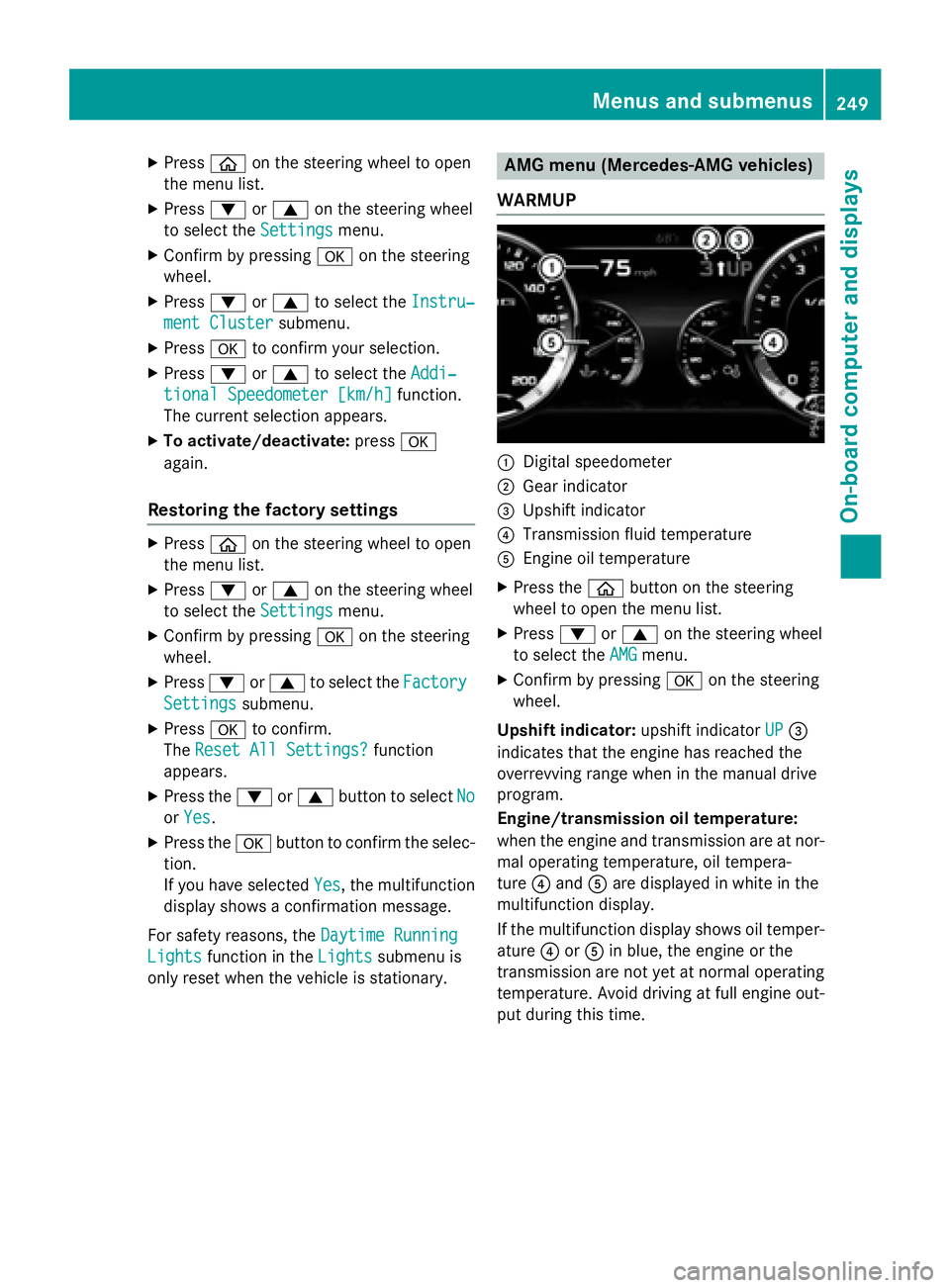
WARMUP
:Digital speedometer
;Gear indicator
=Upshift indicator
?Transmission fluid temperature
AEngine oil temperature
XPress the òbutton on the steering
wheel to open the menu list.
XPress :or9 on the steering wheel
to select the AMG
menu.
XConfirm by pressing aon the steering
wheel.
Upshift indicator: upshift indicatorUP
=
indicates that the engine has reached the
overrevving range when in the manual drive
program.
Engine/transmission oil temperature:
when the engine and transmission are at nor-
mal operating temperature, oil tempera-
ture ?and Aare displayed in white in the
multifunction display.
If the multifunction display shows oil temper-
ature ?orA in blue, the engine or the
transmission are not yet at normal operating
temperature. Avoid driving at full engine out-
put during this time.
Menus and submenus249
On-board computer and displays
Z
Page 332 of 410
XAdd the premixed washer fluid.
XTo close:press cap :onto the filler neck
until it engages.
If the washer fluid level drops below the rec-
ommended minimum of 1 liter, a message
appears in the multifunction display prompt-
ing you to add washer fluid (
Ypage 283).
Further information on windshield washer
fluid/antifreeze (
Ypage 405).
ASSYST PLUS
Service message
The ASSYST PLUS service interval display
informs you of the next service due date.
Information on the type of service and service
intervals (see the separate Maintenance
Booklet).
You can obtain further information from an
authorized Mercedes-Benz Center or at
http://www.mbusa.com (USA only).
iThe ASSYST PLUS service interval display
does not show any information on the
engine oil level. Observe the notes on the
engine oil level (
Ypage 325).
The multifunction display shows a service
message for several seconds, e.g.:
RService A in .. Days
RService A Due
RService A Exceeded by .. Days
Depending on the operating conditions of the
vehicle, the remaining time or distance until
the next service due date is displayed.
The letter A
orB, possibly in connection with a
number or another letter, indicates the type
of service. A
stands for a minor service and B
for a major service.
You can obtain further information from an
authorized Mercedes-Benz Center.
The ASSYST PLUS service interval display
does not take into account any periods of
time during which the battery is disconnec-
ted. Maintaining the time-dependent service
schedule:
XNote down the service due date displayed
in the multifunction display before discon-
necting the battery.
or
XAfter reconnecting the battery, subtract
the battery disconnection periods from the service date shown on the display.
Hiding a service message
XPress the aor% button on the steer-
ing wheel.
Displaying service messages
XSwitch the ignition on.
XUse ò on the steering wheel to call up
the list of menus.
XPress the 9or: button on the steer-
ing wheel to select the Service
menu and
press ato confirm.
XPress the 9or: button on the steer-
ing wheel to select the ASSYST PLUS
sub-
menu and press ato confirm.
The service due date appears in the multi-
function display.
Information about Service
Resetting the ASSYST PLUS service
interval display
!If the ASSYST PLUS service interval dis-
play has been inadvertently reset, this set-
ting can be corrected at a qualified special-
ist workshop.
Have service work carried out as described in the Maintenance Booklet. This may oth-
erwise lead to increased wear and damage
to the major assemblies or the vehicle.
A qualified specialist workshop, e.g. an
authorized Mercedes-Benz Center, will reset
330ASSYST PLUS
Maintenance and care
Page 357 of 410

If the automatic transmission cannot be shif-
ted to positionN, have the vehicle transpor-
ted on a transporter or trailer.
The battery must be connected and charged.
Otherwise, you:
Rcannot turn the SmartKey to position 2in
the ignition lock
Rcannot release the electric parking brake
Rcannot shift the automatic transmission to position N
iDeactivate the automatic locking feature
(
Ypage 90). You could otherwise be locked
out when pushing or towing the vehicle.
Installing/removing the towing eye
Installing the towing eye
The brackets for the screw-in towing eyes are
located in the bumpers. They are at the front
and at the rear under covers :.
XRemove the towing eye from the vehicle
tool kit/stowage tray (
Ypage 342).
XPress the mark on cover:inwards in the
direction of the arrow.
XRemove cover :from the opening.
XScrew in the towing eye clockwise as far as
it will go and tighten it.
Removing the towing eye
XUnscrew and remove the towing eye.
XAttach cover :to the bumper and press
until it engages.
XPlace the towing eye in the vehicle tool kit/
stowage tray.
Towing a vehicle with both axles on
the ground
It is important that you observe the safety
instructions when towing away your vehicle
(
Ypage 354).
The automatic transmission automatically
shifts to position Pwhen you open the driver's
or front-passenger door or when you remove
the SmartKey from the ignition lock.
In order to ensure that the automatic trans-
mission stays in position Nwhen towing the
vehicle, you must observe the following
points:
XYou must use the SmartKey instead of the
Start/Stop button (
Ypage 151).
XMake sure that the vehicle is stationary and
the SmartKey in the ignition lock is in posi-
tion 0.
XTurn the SmartKey to position 2in the igni-
tion lock.
XDepress and hold the brake pedal.
XShift the automatic transmission to posi-
tion N.
XRelease the brake pedal.
XRelease the electric parking brake.
XLeave the SmartKey in position 2in the
ignition lock.
XSwitch on the hazard warning lamps
(
Ypage 126).
iIn order to signal a change of direction
when towing the vehicle with the hazard
warning lamps switched on, use the com-
bination switch as usual. In this case, only
the indicator lamps for the direction of
travel flash. After resetting the combina-
Towing and tow-starting355
Breakdown assistance
Z