phone MERCEDES-BENZ S-COUPE 2016 Owner's Manual
[x] Cancel search | Manufacturer: MERCEDES-BENZ, Model Year: 2016, Model line: S-COUPE, Model: MERCEDES-BENZ S-COUPE 2016Pages: 410, PDF Size: 8.62 MB
Page 245 of 410
Redialing
The on-board computer saves the last namesor numbers dialed in the redial memory.
XPress the òbutton on the steering
wheel to open the menu list.
XPress :or9 on the steering wheel
to select the Telephone
menu.
XConfirm by pressing aon the steering
wheel.
XPress the 6button to switch to the
redial memory.
XPress the :or9 button to select the
desired name or number.
XPress the 6ora button to start dial-
ing.
or
XTo exit the redial memory: press the
~ or% button.
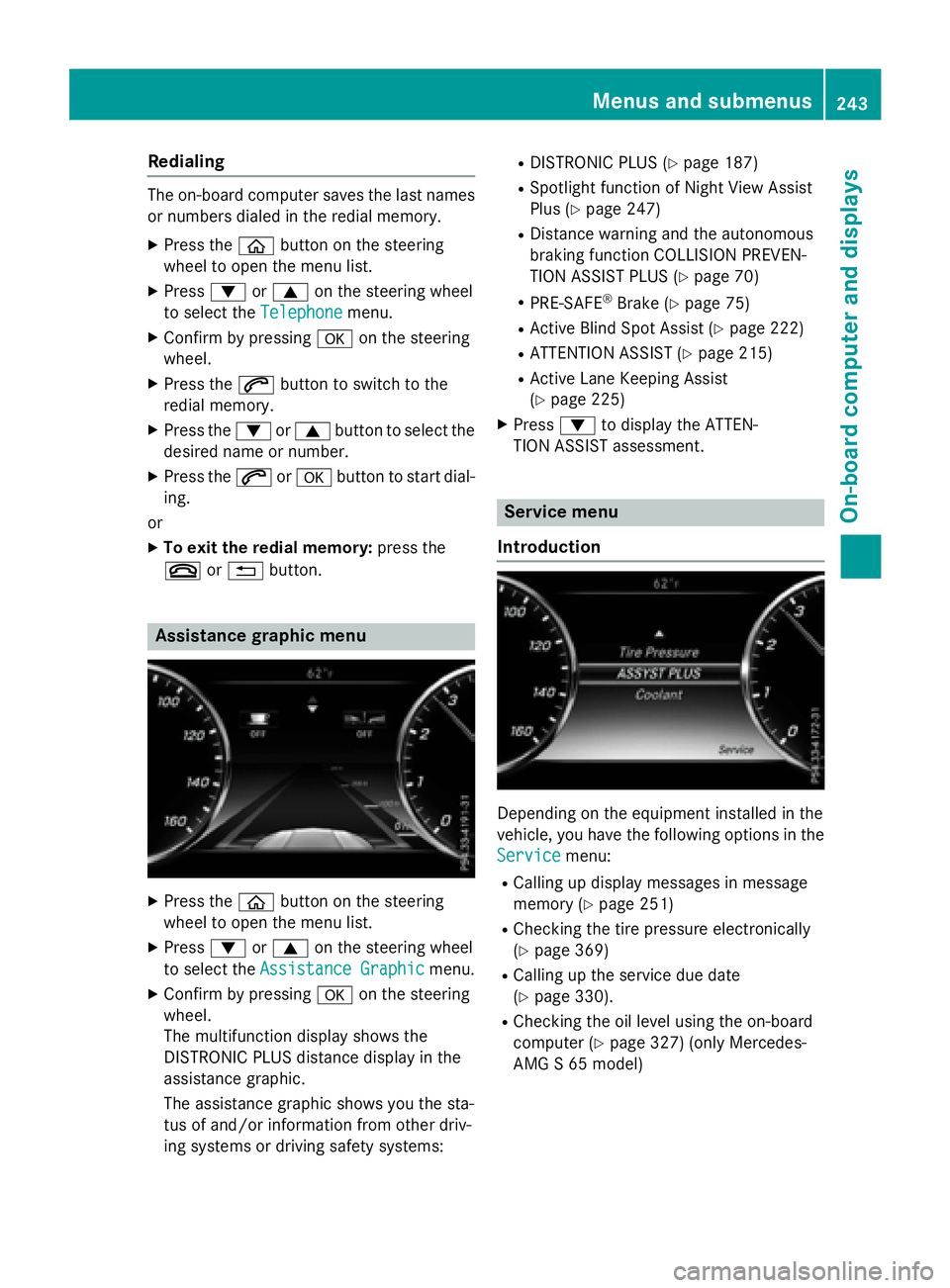
Assistance graphic menu
XPress the òbutton on the steering
wheel to open the menu list.
XPress :or9 on the steering wheel
to select the Assistance Graphic
menu.
XConfirm by pressing aon the steering
wheel.
The multifunction display shows the
DISTRONIC PLUS distance display in the
assistance graphic.
The assistance graphic shows you the sta-
tus of and/or information from other driv-
ing systems or driving safety systems:
RDISTRONIC PLUS (Ypage 187)
RSpotlight function of Night View Assist
Plus (
Ypage 247)
RDistance warning and the autonomous
braking function COLLISION PREVEN-
TION ASSIST PLUS (
Ypage 70)
RPRE-SAFE®Brake (Ypage 75)
RActive Blind Spot Assist (Ypage 222)
RATTENTION ASSIST (Ypage 215)
RActive Lane Keeping Assist
(
Ypage 225)
XPress :to display the ATTEN-
TION ASSIST assessment.
Service menu
Introduction
Depending on the equipment installed in the
vehicle, you have the following options in the
Service
menu:
RCalling up display messages in message
memory (
Ypage 251)
RChecking the tire pressure electronically
(
Ypage 369)
RCalling up the service due date
(
Ypage 330).
RChecking the oil level using the on-board
computer (
Ypage 327) (only Mercedes-
AMG S 65 model)
Menus and submenus243
On-board computer and displays
Z
Page 285 of 410
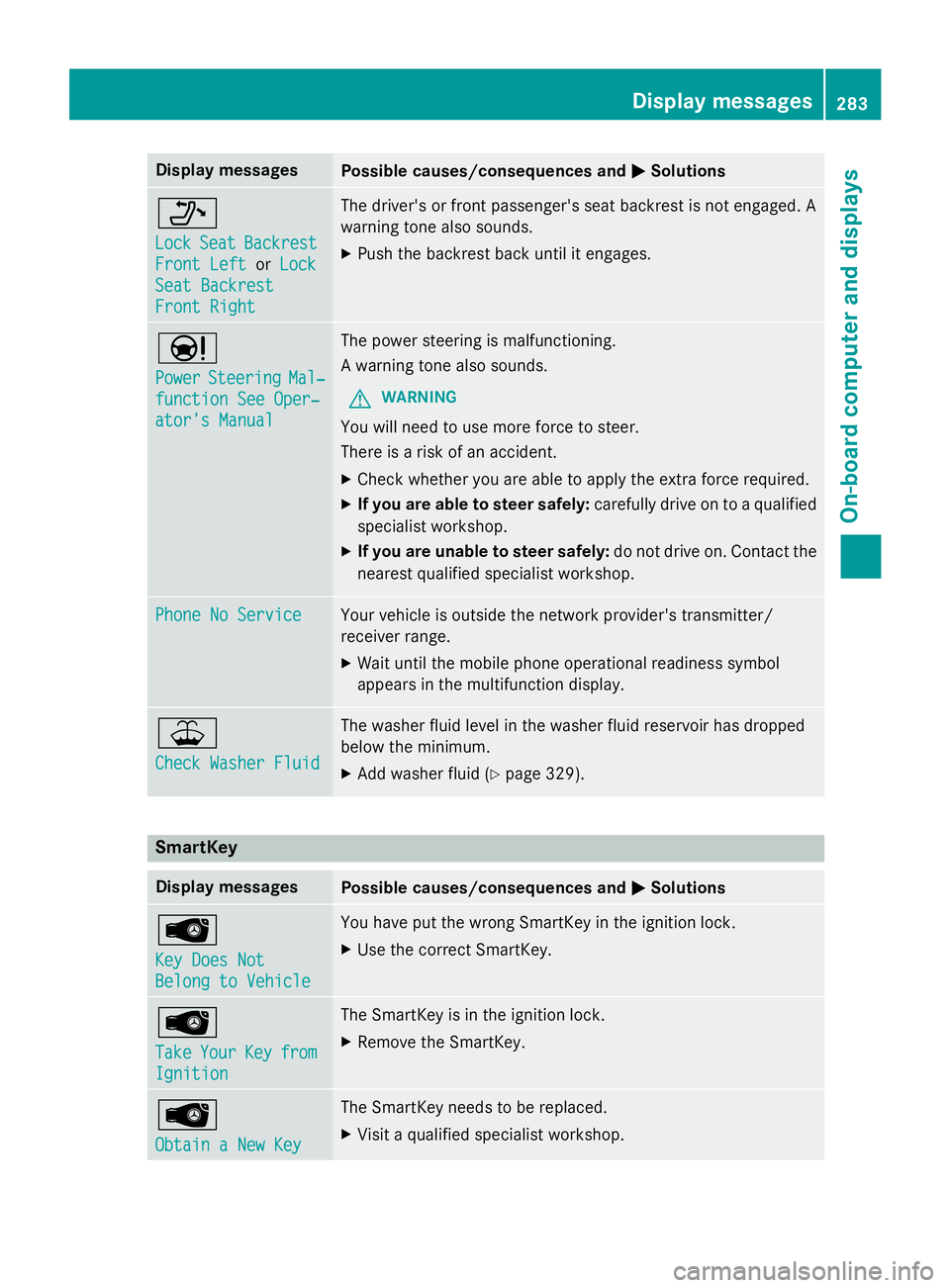
Display messagesPossible causes/consequences andMSolutions
_
LockSeatBackrest
Front Lef torLoc k
SeatBackrest
Front Right
The driver's or fron tpassenger's seat backrest is no tengaged. A
warnin gtone also sounds.
XPush th ebackrest bac kuntil it engages.
Ð
PowerSteeringMal ‐
function See Oper‐
ator's Manual
The powe rsteerin gis malfunctioning.
A warnin gtone also sounds.
GWARNIN G
You will need to use mor eforc eto steer .
There is aris kof an accident.
XChec kwhether you are able to apply th eextr aforc erequired.
XIf you ar eabl eto steer safely: carefully drive on to aqualified
specialist workshop .
XIf you areunable to steer safely :do no tdrive on .Contac tth e
neares tqualified specialist workshop .
Phone No ServiceYour vehicleis outside th enetwork provider' stransmitter/
receiver range.
XWait until th emobile phone operational readiness symbol
appears in th emultifunction display.
¥
Check Washer Fluid
The washer flui dlevel in th ewasher flui dreservoir has dropped
belo wtheminimum .
XAddwasher flui d (Ypage 329).
SmartKey
Display messagesPossible causes/consequences and MSolutions
Â
Key DoesNot
Belong to Vehicl e
You haveput th ewrong SmartKey in th eignition lock.
XUse th ecorrec tSmartKey.
Â
Tak eYourKeyfrom
Ignition
The SmartKey is in th eignition lock.
XRemove th eSmartKey.
Â
Obtain aNew Key
The SmartKey needs to be replaced.
XVisit aqualified specialist workshop .
Display messages283
On-board computer and displays
Z
Page 304 of 410
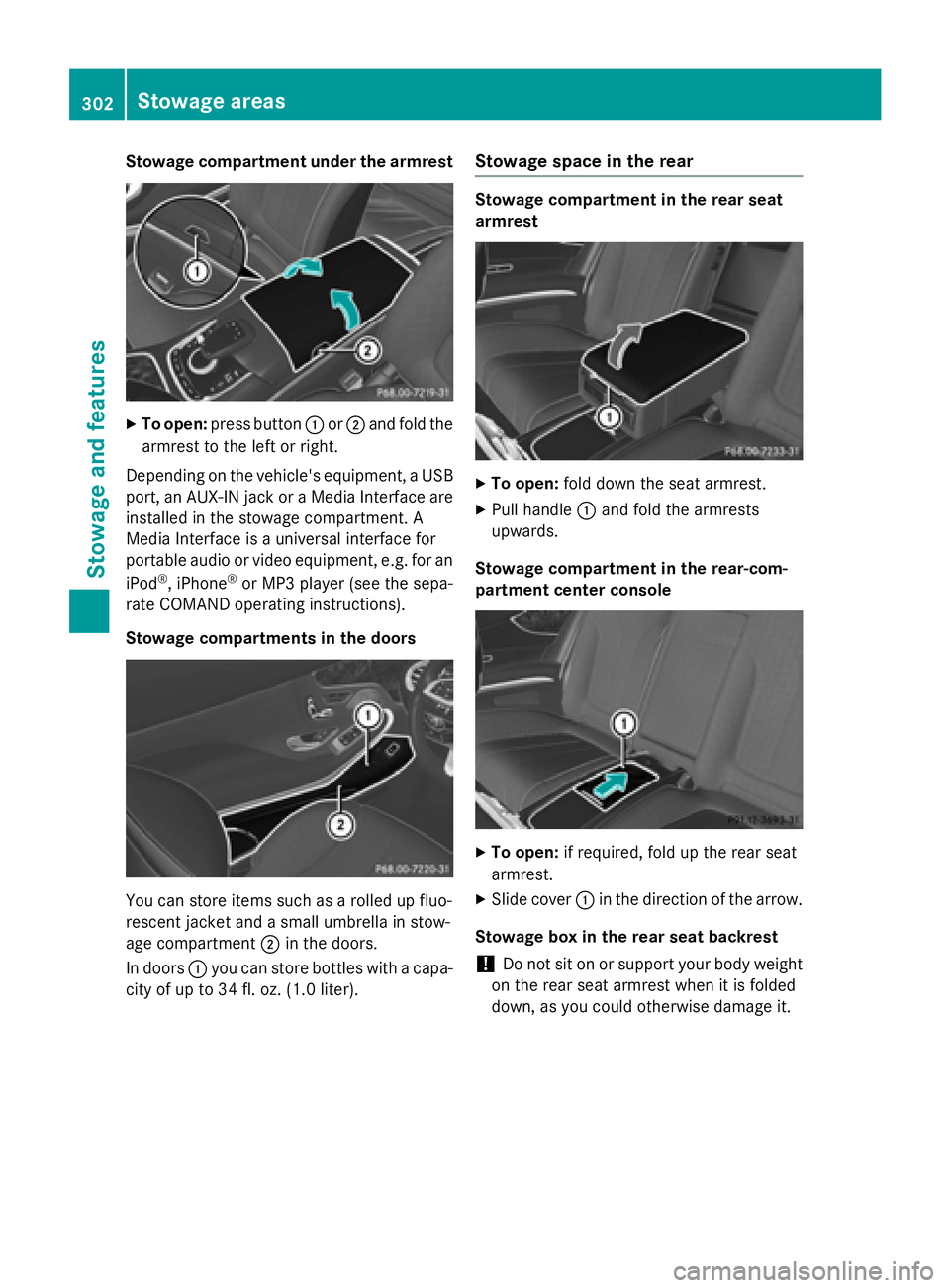
Stowage compartment under the armrest
XTo open:press button :or; and fold the
armrest to the left or right.
Depending on the vehicle's equipment, a USB
port, an AUX-IN jack or a Media Interface are
installed in the stowage compartment. A
Media Interface is a universal interface for
portable audio or video equipment, e.g. for an
iPod
®, iPhone®or MP3 player (see the sepa-
rate COMAND operating instructions).
Stowage compartments in the doors
You can store items such as a rolled up fluo-
rescent jacket and a small umbrella in stow-
age compartment ;in the doors.
In doors :you can store bottles with a capa-
city of up to 34 fl. oz. (1.0 liter).
Stowage space in the rear
Stowage compartment in the rear seat
armrest
XTo open: fold down the seat armrest.
XPull handle :and fold the armrests
upwards.
Stowage compartment in the rear-com-
partment center console
XTo open: if required, fold up the rear seat
armrest.
XSlide cover :in the direction of the arrow.
Stowage box in the rear seat backrest
!Do not sit on or support your body weight
on the rear seat armrest when it is folded
down, as you could otherwise damage it.
302Stowage areas
Stowage and features
Page 309 of 410
In addition, flammable materials can ignite if:
Rthe hot cigarette lighter falls
Ra child holds the hot cigarette lighter to
objects, for example
There is a risk of fire and injury.
Always hold the cigarette lighter by the knob.
Always make sure that the cigarette lighter is
out of reach of children. Never leave children
unsupervised in the vehicle.
Your attention must always be focused on the
traffic conditions. Only use the cigarette
lighter when road and traffic conditions per-
mit.
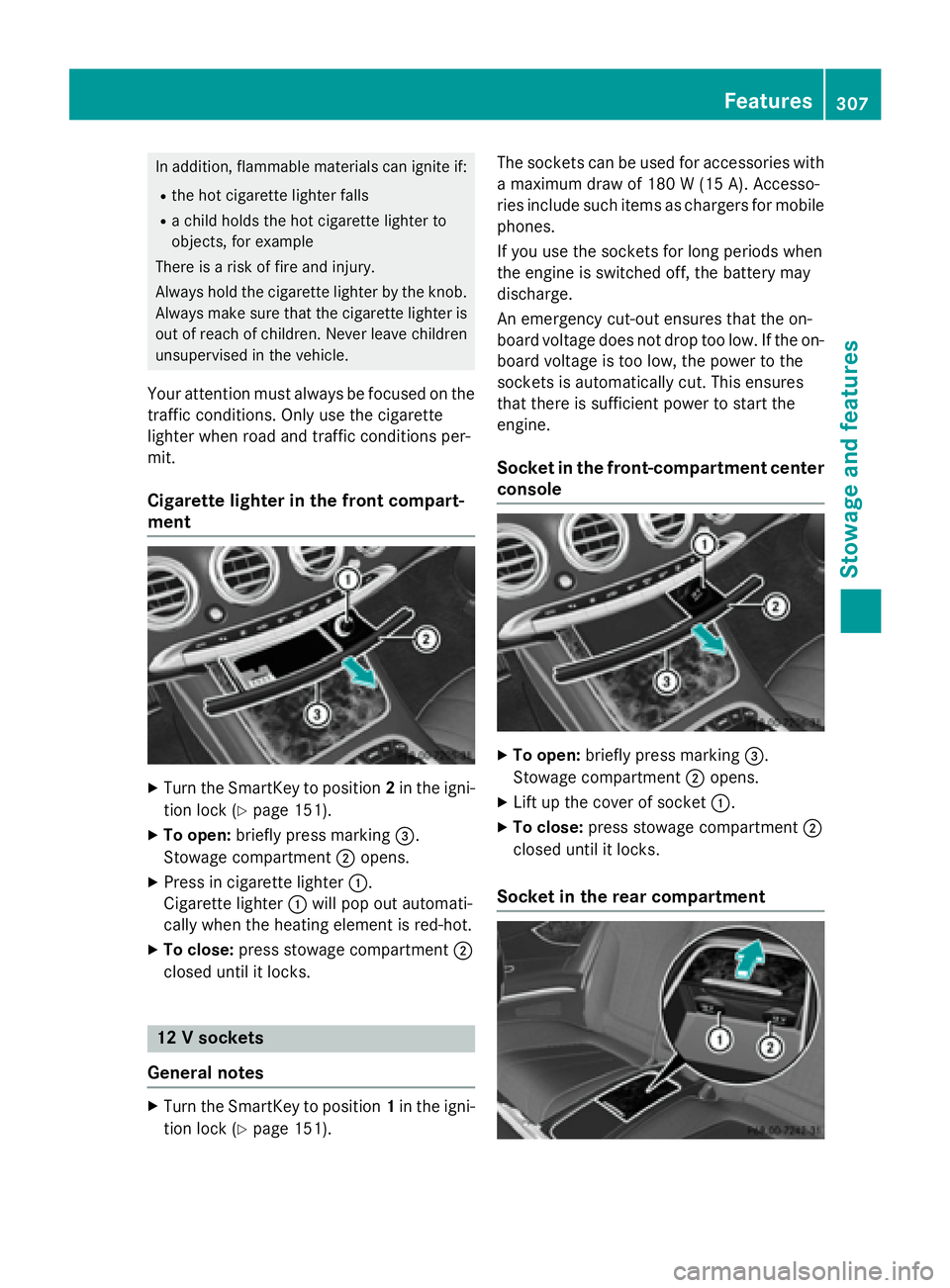
Cigarette lighter in the front compart-
ment
XTurn the SmartKey to position 2in the igni-
tion lock (
Ypage 151).
XTo open: briefly press marking =.
Stowage compartment ;opens.
XPress in cigarette lighter :.
Cigarette lighter :will pop out automati-
cally when the heating element is red-hot.
XTo close: press stowage compartment ;
closed until it locks.
12 V sockets
General notes
XTurn the SmartKey to position 1in the igni-
tion lock (
Ypage 151). The sockets can be used for accessories with
a maximum draw of 180 W (15A). Accesso-
rie sinclude suc hitem sas charger sfo rmobile
phones.
If you use th esockets fo rlon gperiod swhe n
th eengin eis switched off, th ebattery may
discharge.
An emergency cut-out ensures that th eon -
boar dvoltage doe sno tdrop to olow. If th eon -
boar dvoltage is to olow, th epower to th e
sockets is automatically cut .Thi sensures
that ther eis sufficien tpower to start th e
engine.
Socket in th efront-co mpartment center
console
XTo open: briefly press marking =.
Stowage compartment ;opens.
XLift up the cover of socket :.
XTo close:press stowage compartment ;
closed until it locks.
Socket in the rear compartment
Features307
Stowag ean d features
Z
Page 311 of 410
This is indicated by the flashing indicator
lamps in the button. The cooling function will
automatically switch back on as soon as there
is sufficient voltage.
Caring for the coolbox
If you do not need to use the coolbox for an
extended period you should switch it off,
defrost it and clean it. After doing so, leave
the lid open for a time.
Removing and installing the coolbox
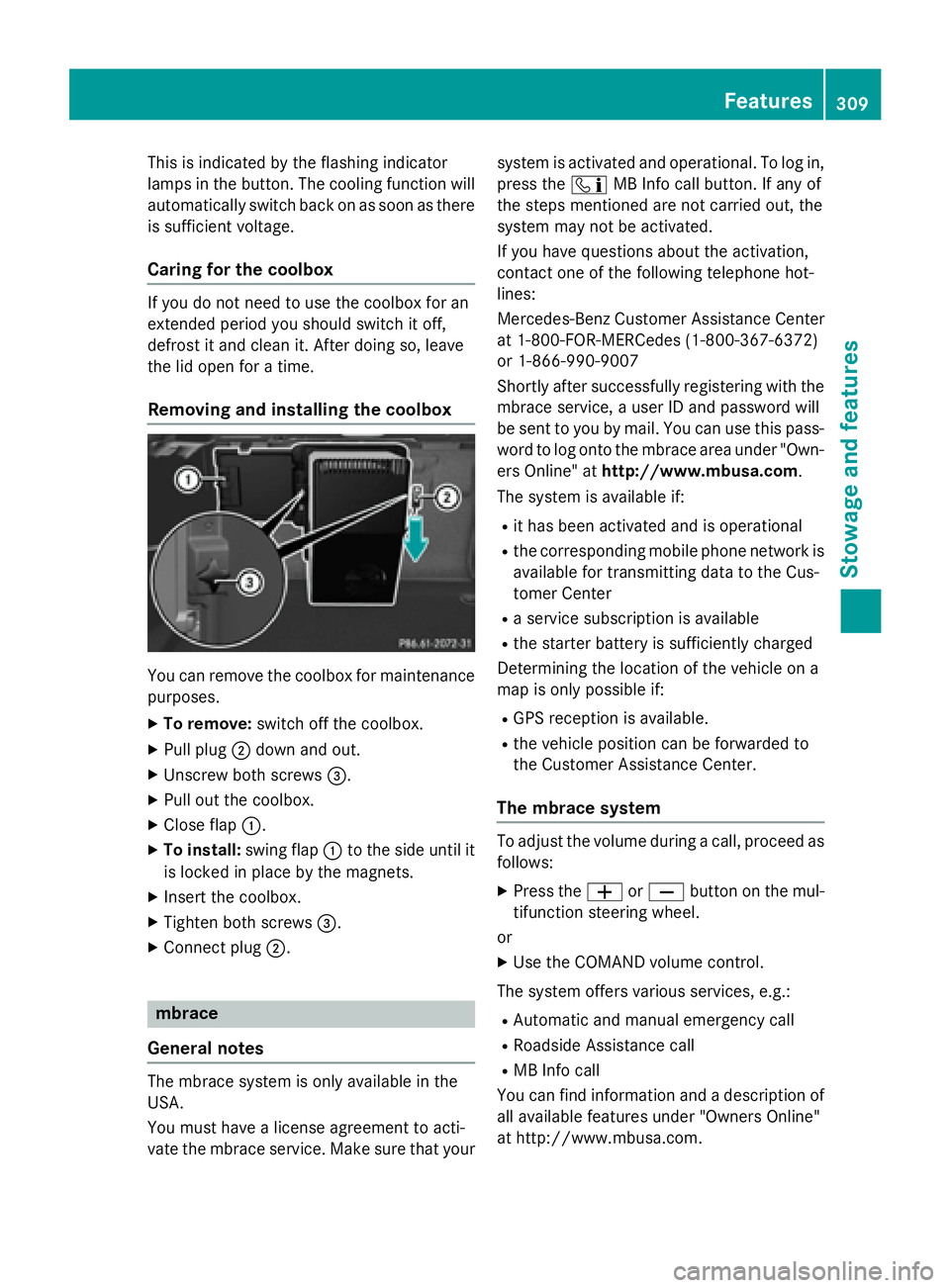
You can remove the coolbox for maintenance
purposes.
XTo remove: switch off the coolbox.
XPull plug;down and out.
XUnscrew both screws =.
XPull out the coolbox.
XClose flap:.
XTo install: swing flap:to the side until it
is locked in place by the magnets.
XInsert the coolbox.
XTighten both screws =.
XConnect plug;.
mbrace
General notes
The mbrace system is only available in the
USA.
You must have a license agreement to acti-
vate the mbrace service. Make sure that your system is activated and operational. To log in,
press the
ïMB Info call button. If any of
the steps mentioned are not carried out, the
system may not be activated.
If you have questions about the activation,
contact one of the following telephone hot-
lines:
Mercedes-Benz Customer Assistance Center
at 1-800-FOR-MERCedes (1-800-367-6372)
or 1-866-990-9007
Shortly after successfully registering with the
mbrace service, a user ID and password will
be sent to you by mail. You can use this pass-
word to log onto the mbrace area under "Own-
ers Online" at http://www.mbusa.com.
The system is available if:
Rit has been activated and is operational
Rthe corresponding mobile phone network is
available for transmitting data to the Cus-
tomer Center
Ra service subscription is available
Rthe starter battery is sufficiently charged
Determining the location of the vehicle on a
map is only possible if:
RGPS reception is available.
Rthe vehicle position can be forwarded to
the Customer Assistance Center.
The mbrace system
To adjust the volume during a call, proceed as
follows:
XPress the WorX button on the mul-
tifunction steering wheel.
or
XUse the COMAND volume control.
The system offers various services, e.g.:
RAutomatic and manual emergency call
RRoadside Assistance call
RMB Info call
You can find information and a description of
all available features under "Owners Online"
at http://www.mbusa.com.
Features309
Stowage and features
Z
Page 313 of 410
All important information on the emergency is
transmitted, for example:
Rcurrent location of the vehicle (as deter-
mined by the GPS system)
Rvehicle identification number
Rinformation on the severity of the accident
Shortly after the emergency call has been ini- tiated, a voice connection is automatically
established between the Customer Assis-
tance Center and the vehicle occupants.
RIf the vehicle occupants respond, the
Mercedes-Benz Customer Assistance Cen-
ter attempts to get more information on the
emergency.
RIf there is no response from the vehicle
occupants, an ambulance is immediately
sent to the vehicle.
If no voice connection can be established to
the Mercedes-Benz Customer Assistance
Center, the system has been unable to initiate
an emergency call.
This can occur, for example, if the relevant
mobile phone network is not available. The
indicator lamp in the SOS button flashes con- tinuously.
The Call Failed
message appears in the
multifunction display and must be confirmed.
In this case, summon assistance by other
means.
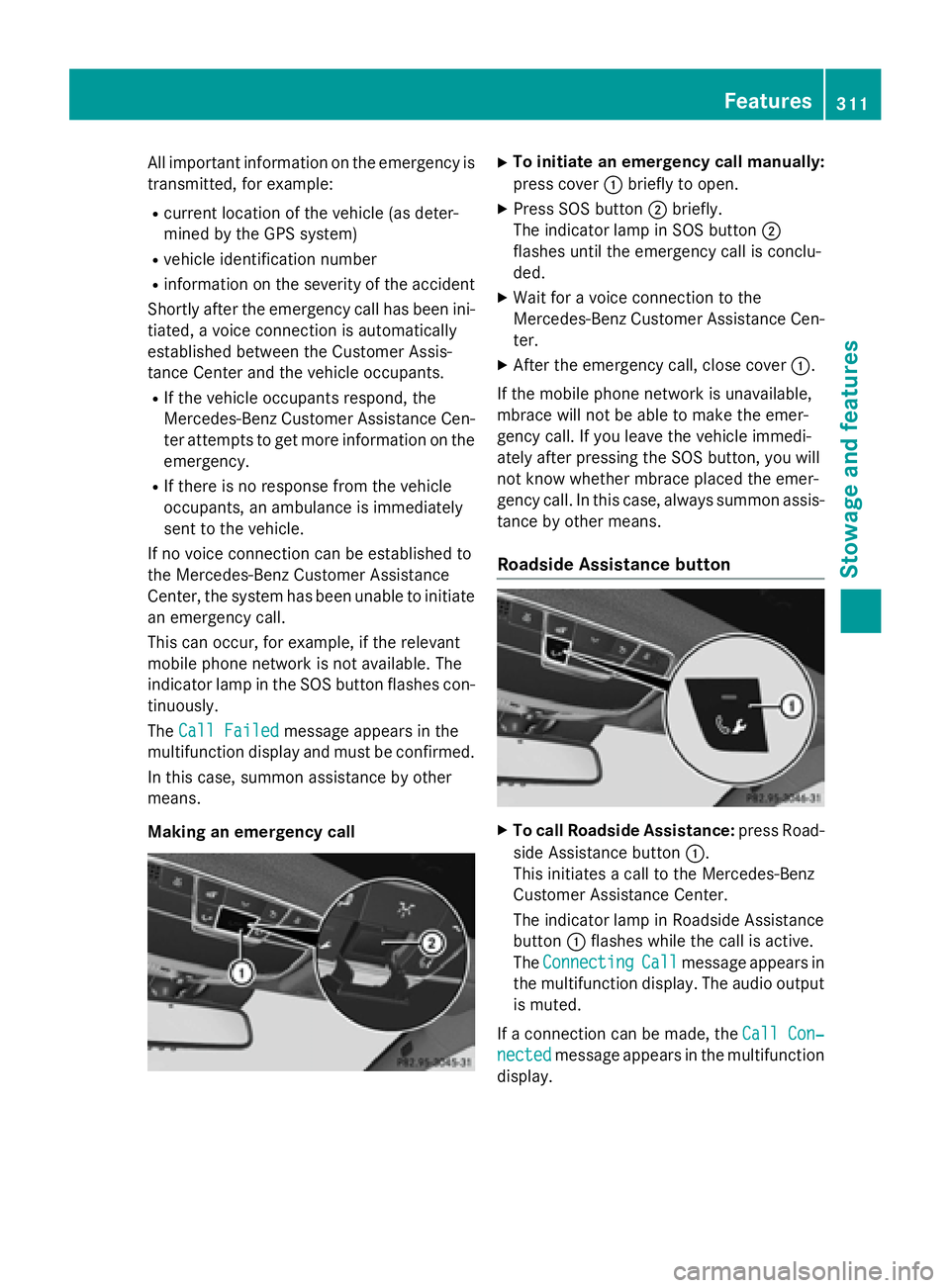
Making an emergency call
XTo initiate an emergency call manually:
press cover :briefly to open.
XPress SOS button ;briefly.
The indicator lamp in SOS button ;
flashes until the emergency call is conclu-
ded.
XWait for a voice connection to the
Mercedes-Benz Customer Assistance Cen-
ter.
XAfter the emergency call, close cover :.
If the mobile phone network is unavailable,
mbrace will not be able to make the emer-
gency call. If you leave the vehicle immedi-
ately after pressing the SOS button, you will
not know whether mbrace placed the emer-
gency call. In this case, always summon assis-
tance by other means.
Roadside Assistance button
XTo call Roadside Assistance: press Road-
side Assistance button :.
This initiates a call to the Mercedes-Benz
Customer Assistance Center.
The indicator lamp in Roadside Assistance
button :flashes while the call is active.
The Connecting
Callmessage appears in
the multifunction display. The audio output is muted.
If a connection can be made, the Call Con‐
nectedmessage appears in the multifunction
display.
Features311
Stowag ean d features
Z
Page 314 of 410
If a mobile phone network and GPS reception
are available, the system transfers data to the
Mercedes-Benz Customer Assistance Center,
for example:
Rcurrent location of the vehicle
Rvehicle identification number
The COMAND display indicates that a call is
active. During the call, you can change to the
navigation menu by pressing the NAVI button
on COMAND, for example.
Voice output is not available in this case.
A voice connection is established between
the Mercedes-Benz Customer Assistance
Center and the vehicle occupants.
From the remote malfunction diagnosis, the
Mercedes-Benz Customer Assistance Center
can ascertain the nature of the problem
(
Ypage 315).
The Mercedes-Benz Customer Assistance
Center either sends a qualified Mercedes-
Benz technician or makes arrangements for
your vehicle to be transported to the nearest
authorized Mercedes-Benz Center.
You may be charged for services such as
repair work and/or towing.
You can find more information in the separate
mbrace manual.
The system has not been able to initiate a
Roadside Assistance call, if:
Rthe indicator lamp for Roadside Assistance
call button Fis flashing continuously.
Rno voice connection to the Mercedes-Benz
Customer Assistance Center was estab-
lished.
This can occur if the relevant mobile phone
network is not available, for example.
The Call Failed
message appears in the
multifunction display.
XTo end a call: press the~button on the
multifunction steering wheel.
or
XPress the corresponding COMAND button
for ending a phone call.
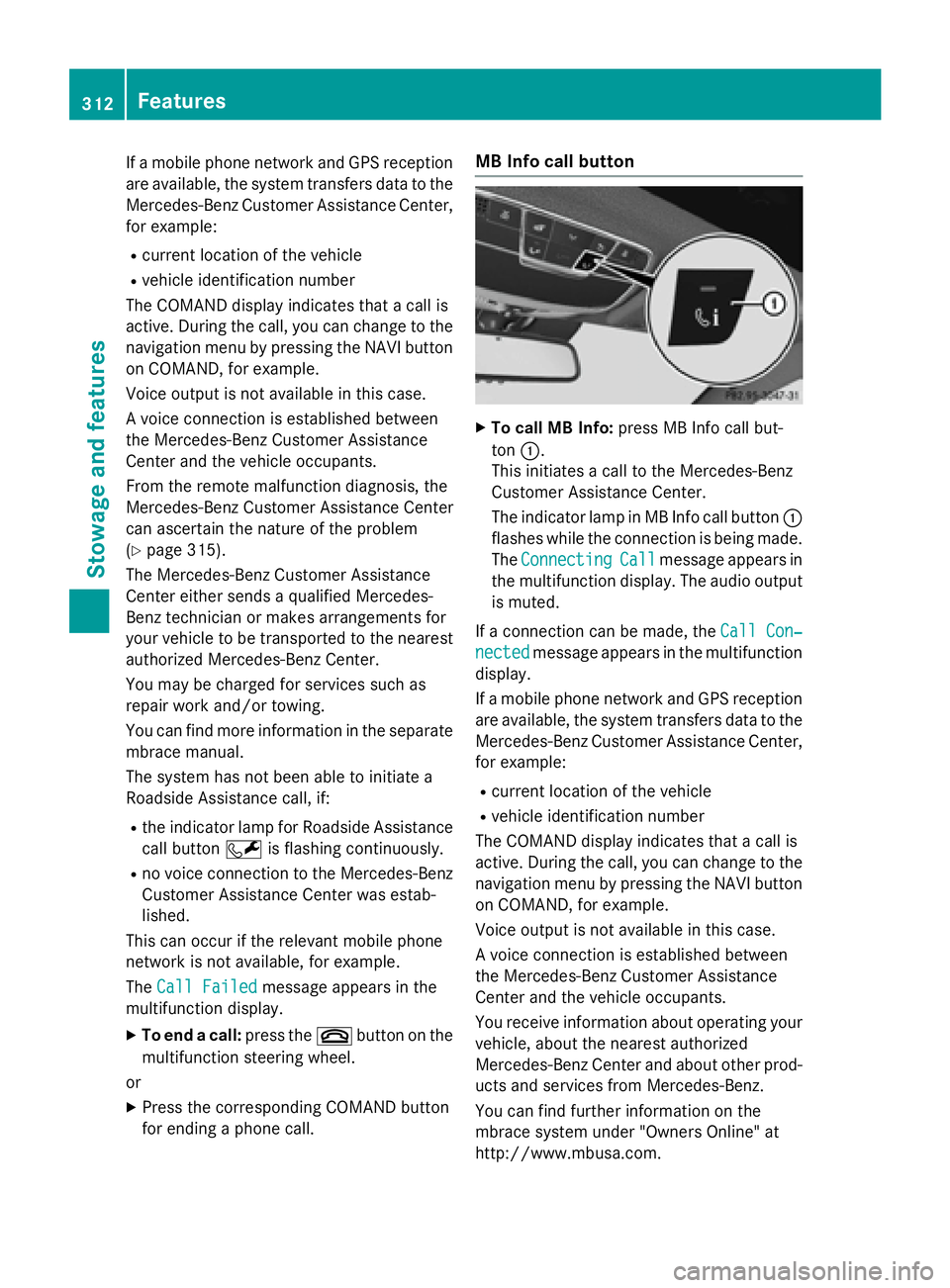
MB Info call button
XTo call MB Info: press MB Info call but-
ton :.
This initiates a call to the Mercedes-Benz
Customer Assistance Center.
The indicator lamp in MB Info call button :
flashes while the connection is being made.
The Connecting
Callmessage appears in
the multifunction display. The audio output
is muted.
If a connection can be made, the Call Con‐
nectedmessage appears in the multifunction
display.
If a mobile phone network and GPS reception
are available, the system transfers data to the
Mercedes-Benz Customer Assistance Center,
for example:
Rcurrent location of the vehicle
Rvehicle identification number
The COMAND display indicates that a call is
active. During the call, you can change to the
navigation menu by pressing the NAVI button
on COMAND, for example.
Voice output is not available in this case.
A voice connection is established between
the Mercedes-Benz Customer Assistance
Center and the vehicle occupants.
You receive information about operating your
vehicle, about the nearest authorized
Mercedes-Benz Center and about other prod-
ucts and services from Mercedes-Benz.
You can find further information on the
mbrace system under "Owners Online" at
http://www.mbusa.com.
312Features
Stowage and features
Page 315 of 410
The system has not been able to initiate an
MB Info call, if:
Rthe indicator lamp in MB Info call button
ïis flashing continuously.
Rno voice connection to the Mercedes-Benz
Customer Assistance Center was estab-
lished.
This can occur if the relevant mobile phone
network is not available, for example.
The Call Failed
message appears in the
multifunction display.
XTo end a call: press the~button on the
multifunction steering wheel.
or
XPress the corresponding COMAND button
for ending a phone call.
Call priority
When service calls are active, e.g. Roadside
Assistance or MB Info calls, an emergency
call can still be initiated. In this case, an emer-
gency call will take priority and override all
other active calls.
The indicator lamp of the respective button
flashes until the call is ended.
An emergency call can only be terminated by the Mercedes-Benz Customer Assistance
Center.
All other calls can be ended by pressing:
Rthe ~ button on the multifunction steer-
ing wheel
Rthe corresponding button in COMAND to
end the voice call
When a call is initiated, the audio system is
muted.
The mobile phone is no longer connected to
COMAND.
However, if you want to use your mobile
phone, do so only when the vehicle is station-
ary and in a safe location.
Downloading destinations
Downloading destinations
Downloading destinations gives you access
to a database with over 15 million points of
interest (POIs). These can be downloaded on
the navigation system in your vehicle. If you
know the destination, the address can be
downloaded. Alternatively, you can obtain the
location of Points of Interest (POIs)/impor-
tant destinations in the vicinity.
Furthermore, you can download routes with
up to four way points.
You are prompted to confirm route guidance
to the address entered.
XSelect Yesby turning 3or sliding 1
the controller and confirm with 7.
The system calculates the route and sub-
sequently starts the route guidance with
the address entered.
If you select No
the address can be stored in
the address book.
The destination download function is availa-
ble if:
Rthe vehicle is equipped with a navigation
system.
Rthe relevant mobile phone network is avail- able and data transfer is possible.
Route Assistance
This service is part of the mbrace PLUS Pack-
age and cannot be purchased separately.
You can use the route assistance function
even if the vehicle is not equipped with a nav-
igation system.
Within the framework of this service, you
receive a professional and reliable form of
navigation support without having to leave
your vehicle.
The customer service representative finds a
suitable route depending on your vehicle's
current position and the desired destination.
You will then be guided live through the cur-
rent route section.
Features313
Stowage and features
Z
Page 316 of 410
Search & Send
General notes
To use "Search & Send", your vehicle must be
equipped with mbrace and a navigation sys-
tem. Additionally, an mbrace service sub-
scription must be completed.
"Search & Send" is a destination entry ser-
vice. A destination address which is found on
Google Maps
®can be transferred via mbrace
directly to your vehicle's navigation system.
Specifying and sending the destination
address
XGo to the website http://
maps.google.com and enter a destination
address into the entry field.
XTo send the destination address to the
e-mail address of your mbrace account:
click on the corresponding button on the
website.
Example:
If you select 'Send to vehicle' and then
'Mercedes-Benz', the destination address
will be sent to your vehicle.
XWhen the "Send" dialog window appears:
Enter the e-mail address you specified
when setting up your mbrace account into
the corresponding field.
XClick "Send".
Information on specific commands such as
"Address entry" or "Send" can be found on the
website.
Calling up a transmitted destination
address
XTurn the SmartKey to position 2in the igni-
tion lock (
Ypage 151).
The transmitted destination address is loa-
ded into the vehicle's navigation system. A display message appears, asking
whether navigation should be started.
XSelectYesby turning
3or sliding 1
the controller and confirm with 7.
The system calculates the route and sub-
sequently starts the route guidance with
the address entered.
If you select No
the address can be stored in
the address book.
If you have sent more than one destination
address, each individual destination must
be confirmed separately.
Destination addresses are loaded in the same
order as the order in which they were sent.
If you own multiple Mercedes-Benz vehicles
with mbrace and activated mbrace accounts:
If multiple vehicles are registered under the
same e-mail address, the destination will be
sent to all the vehicles.
Vehicle remote opening
You can use the vehicle remote opening if you
have unintentionally locked your vehicle and
a replacement SmartKey is not available.
The vehicle can be opened by the Mercedes-
Benz Customer Assistance Center.
The vehicle can be immediately opened
remotely within four days of the ignition being turned off. After this time, the remote unlock-
ing may be delayed by 15 to 60 minutes. After
30 days, the vehicle can no longer be opened
remotely.
The vehicle remote unlocking feature is avail-
able if the relevant mobile phone network is
available and a data connection is possible.
XContact the following service hotlines:
Mercedes-Benz Customer Assistance Cen-
ter at 1-800-FOR-MERCedes
(1-800-367-6372) or 1-866-990-9007
You will be asked for your password.
XReturn to your vehicle at the time agreed
upon with the Mercedes-Benz Customer
Assistance Center.
314Features
Stowage and features
Page 317 of 410
Alternatively, the vehicle can be opened via:
Rthe Internet, under the "Owners Online"
section
Rthe telephone application (e.g. for iPhone®,
Android)
To do this, you will need your identification
number and password.
Vehicle remote closing
The vehicle remote-closing feature can be
used when you have forgotten to lock the
vehicle and you are no longer nearby.
The vehicle can then be locked by the
Mercedes-Benz Customer Assistance Center.
The vehicle can be immediately remotely
locked within four days of the ignition being
turned off. After this time, remote closing may
be delayed by 15 to 60 minutes. After 30 days
the vehicle can no longer be locked remotely.
The vehicle remote closing feature is availa-
ble if the relevant mobile phone network is
available and a data connection is possible.
XContact the following service hotlines:
Mercedes-Benz Customer Assistance Cen-
ter at 1-800-FOR-MERCedes
(1-800-367-6372) or 1-866-990-9007
You will be asked for your password.
The next time you are inside the vehicle and
you switch on the ignition, the Doors
Locked Remotelymessage appears in the
multifunction display.
Alternatively, the vehicle can be locked via:
Rthe Internet, under the "Owners Online"
section
Rthe telephone application (e .g. for iPhone®,
Android)
To do this, you will need your identification
number and password.
Stolen vehicle recovery service
If your vehicle has been stolen:
XNotify the police.
The police will issue a numbered incident
report.
XThis number will be forwarded to the
Mercedes-Benz Customer Assistance Cen-
ter together with your PIN.
The Mercedes-Benz Customer Assistance
Center then tries to locate the system. The
Mercedes-Benz Customer Assistance Cen-
ter contacts you and the local law enforce-
ment agency if the vehicle is located.
However, only the law enforcement agency
is informed of the location of the vehicle.
If the anti-theft alarm system is activated for
longer than 30 seconds, the Mercedes-Benz
Customer Assistance Center is automatically
notified.
Vehicle Health Check
With the Vehicle Health Check, the Customer
Assistance Center can provide improved sup-
port for problems with your vehicle. During an
existing call, vehicle data is transferred to the
Customer Assistance Center.
The customer service representative can use
the received data to decide what kind of
assistance is required. You are then, for
example, guided to the nearest authorized
Mercedes-Benz Center or a recovery vehicle
is called.
If vehicle data needs to be transferred during an MB Info call or a Roadside Assistance call,
this is initiated by the Customer Assistance
Center.
The Roadside Assistance Connected
message appears in the display. If the Vehicle
Health Check can be started, the Request
for Vehicle Diagnostics Received
Start vehicle diagnostics?message
appears in the display.
Features315
Stowage and features
Z