warning MERCEDES-BENZ S-COUPE 2016 Workshop Manual
[x] Cancel search | Manufacturer: MERCEDES-BENZ, Model Year: 2016, Model line: S-COUPE, Model: MERCEDES-BENZ S-COUPE 2016Pages: 410, PDF Size: 8.62 MB
Page 87 of 410
onds until the battery check lamp flashes
twice (
Ypage 86).
Mechanical key
General notes
If the vehicle can no longer be locked or
unlocked with the SmartKey or KEYLESS-GO,
use the mechanical key.
If you use the mechanical key to unlock and
open the driver's door, the anti-theft alarm
system will be triggered. Switch off the alarm
(
Ypage 78).
If you unlock the vehicle using the mechanical
key, the fuel filler flap will not be unlocked
automatically.
XTo unlock the fuel filler flap: insert the
SmartKey into the ignition lock.
Removing the mechanical key
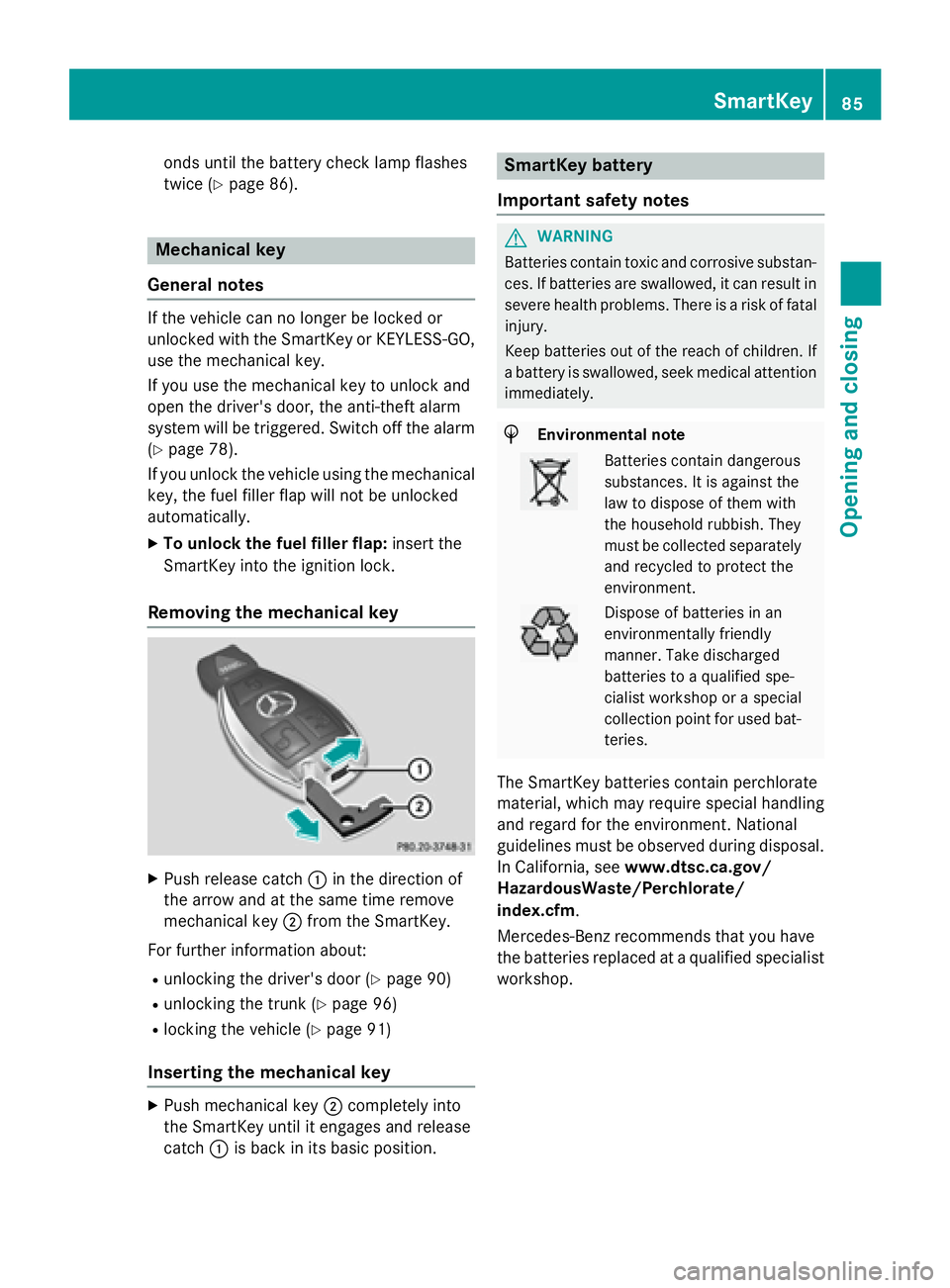
XPush release catch :in the direction of
the arrow and at the same time remove
mechanical key ;from the SmartKey.
For further information about:
Runlocking the driver's door (Ypage 90)
Runlocking the trunk (Ypage 96)
Rlocking the vehicle (Ypage 91)
Inserting the mechanical key
XPush mechanical key ;completely into
the SmartKey until it engages and release
catch :is back in its basic position.
SmartKey battery
Important safety notes
GWARNING
Batteries contain toxic and corrosive substan- ces. If batteries are swallowed, it can result in
severe health problems. There is a risk of fatalinjury.
Keep batteries out of the reach of children. If
a battery is swallowed, seek medical attention
immediately.
HEnvironmental note
Batteries contain dangerous
substances. It is against the
law to dispose of them with
the household rubbish. They
must be collected separately and recycled to protect the
environment.
Dispose of batteries in an
environmentally friendly
manner. Take discharged
batteries to a qualified spe-
cialist workshop or a special
collection point for used bat-
teries.
The SmartKey batteries contain perchlorate
material, which may require special handling
and regard for the environment. National
guidelines must be observed during disposal.
In California, see www.dtsc.ca.gov/
HazardousWaste/Perchlorate/
index.cfm.
Mercedes-Benz recommends that you have
the batteries replaced at a qualified specialist
workshop.
SmartKey85
Opening and closing
Z
Page 91 of 410
Doors
Important safet ynotes
GWARNING
If children are lef tunsupervised in th evehicle,
they could:
Rope nth edoors ,thus endangerin gother
people or road users.
Rget out and disrup ttraffic .
Roperat eth evehicle' sequipment.
Additionally, children could set th evehicle in
motion if, fo rexample, they:
Rrelease th eparking brake .
Rshiftingth eautomatic transmissio nout of
par kposition P
RStart theengine.
There is aris kof an acciden tand injury.
Whe nleavin gth evehicle, always take th e
SmartKey wit hyou and loc kth evehicle. Never
leav echildren or animals unattended in th e
vehicle. Always keep th eSmartKey out of
reach of children .
You should preferably plac eluggage or load s
in th etrunk .Observ eth eloadin gguidelines
(
Ypage 300).
Unlockin gan dopening doors from
th einside
i
Whe n adoo ris opened, th esid ewindow
on that sid eopens slightly. Whe nth edoo r
is closed, th esid ewindow close sagain .
!The sid ewindows will no topen/close if
th ebattery is discharged or if th esid ewin -
dows hav eiced up. It will then no tbe pos -
sible to close th edoor. Do no tattempt to
forc eth edoo rclosed. You could otherwise
damage th edoo ror th esid ewindow.
You can ope n adoo rfrom insid eth evehicle
eve nif it has been locked. If th evehicle has
been locke dwit hth eSmartKey or wit hKEY-
LESS-GO ,opening adoo rfrom th einsid ewill trigger th
eanti-thef talar msystem. Switc hof f
th ealar m (
Ypage 78).
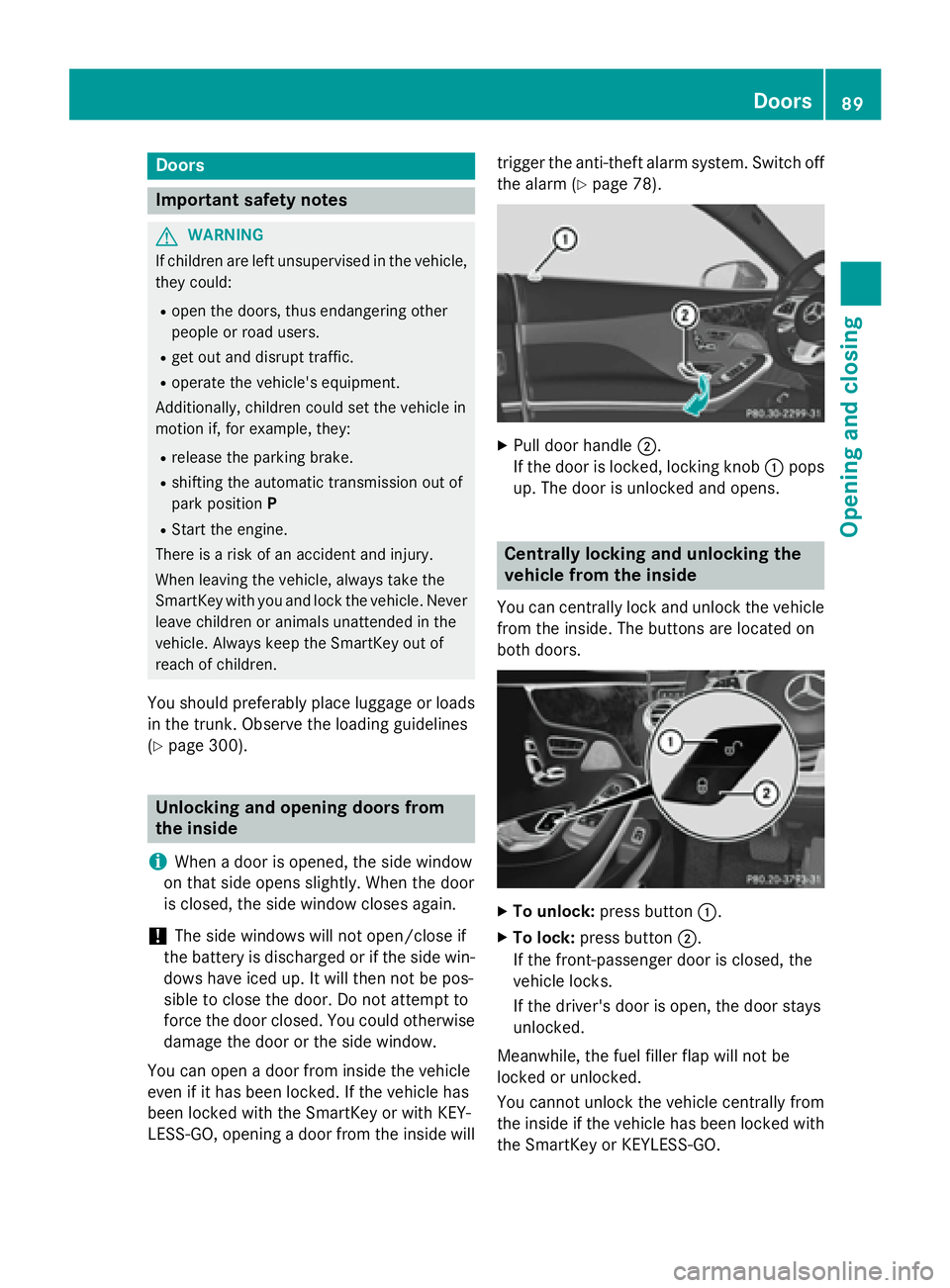
XPull doo rhandle ;.
If th edoo ris locked, locking knob :pop s
up. The doo ris unlocke dand opens .
Centrally locking an dunlocking th e
vehicle from th einside
You can centrall yloc kand unloc kth evehicle
from th einside. The buttons are located on
bot hdoors .
XTo unlock :press butto n:.
XTo lock :press butto n;.
If th efront-passenger doo ris closed, th e
vehicle locks .
If th edriver's doo ris open, th edoo rstays
unlocked.
Meanwhile, th efue lfiller flap will no tbe
locke dor unlocked.
You canno tunloc kth evehicle centrall yfrom
th einsid eif th evehicle has been locke dwit h
th eSmartKey or KEYLESS-GO .
Doors89
Opening and closing
Z
Page 94 of 410
XInsert the mechanical key into the Smart-
Key (
Ypage 85).
XCarefully press the protective cap onto thelock cylinder until it engages and is seated
firmly. Do not pull the door handle when
doing so.
iIf you lock the vehicle as described above,
the fuel filler flap is not locked. The anti-
theft alarm system is not armed.
Trunk
Important safety notes
GWARNING
If objects, luggage or loads are not secured or
not secured sufficiently, they could slip, tip
over or be flung around and thereby hit vehicle
occupants. There is a risk of injury, particu-
larly in the event of sudden braking or a sud-
den change in direction.
Always store objects so that they cannot be
flung around. Secure objects, luggage or
loads against slipping or tipping before the
journey.
!The trunk lid swings upwards when
opened. Therefore, make sure that there is
sufficient clearance above the trunk lid.
iYou can limit the opening angle of the
trunk lid in COMAND; see the separate
operating instructions.
iThe opening dimensions of the trunk lid
can be found in the "Vehicle data" section
(
Ypage 406).
Do not leave the SmartKey in the trunk. You
could otherwise lock yourself out.
You should preferably place luggage or loads
in the trunk. Observe the loading guidelines
(
Ypage 300).
Obstacle recognition with trunk lid
reversing feature
On vehicles with trunk lid remote closing fea- ture, the trunk lid is equipped with automatic
obstacle recognition with reversing feature. If
a solid object blocks or restricts the trunk lid
when automatically opening or closing, this
procedure is stopped. If the trunk lid is stop-
ped during the closing procedure, it will open again automatically. The automatic obstacle
recognition with reversing feature is only an
aid. It is not a substitute for your attentive-
ness when opening and closing the trunk lid.
GWARNING
The reversing feature does not react:
Rto soft, light and thin objects, e.g. small fin-
gers
Rover the last 1/3 in (8 mm) of the closing
movement
This means that the reversing feature cannot
prevent someone being trapped in these sit-
uations. There is a risk of injury.
Make sure that no body parts are in close
proximity during the closing procedure.
If somebody becomes trapped:
Rpress the Fbutton on the SmartKey, or
Rpull or press the remote operating switch
on the driver's door or
Rpress the closing or locking button on the
trunk lid
Opening/closing automatically from
outside
Important safety notes
GWARNING
Parts of the body could become trapped dur-
ing automatic closing of the trunk lid. More-
over, people, e.g. children, may be standing in the closing area or may enter the closing area
during the closing process. There is a risk of
injury.
92Trunk
Opening and closing
Page 95 of 410
Make sure that nobody is in the vicinity of the
closing area during the closing process.
Use one of the following options to stop the
closing process:
Rpress theFbutton on the SmartKey.
Rpull or press the remote operating switch
on the driver's door.
Rpress the closing or locking button on the
trunk lid.
GWARNING
Combustion engines emit poisonous exhaust
gases such as carbon monoxide. Exhaust
gases can enter the vehicle interior if the
trunk lid is open when the engine is running,
especially if the vehicle is in motion. There is a
risk of poisoning.
Always switch off the engine before opening
the trunk lid. Never drive with the trunk lid
open.
!The trunk lid swings upwards when
opened. Therefore, make sure that there is
sufficient clearance above the trunk lid.
iThe opening dimensions of the trunk lid
can be found in the "Vehicle data" section
(
Ypage 406).
Opening
You can open the trunk lid automatically
using the SmartKey.
XPress and hold the Fbutton on the
SmartKey until the trunk lid opens.
Closing
You can close the trunk lid automatically
using the SmartKey or the closing button in
the trunk lid.
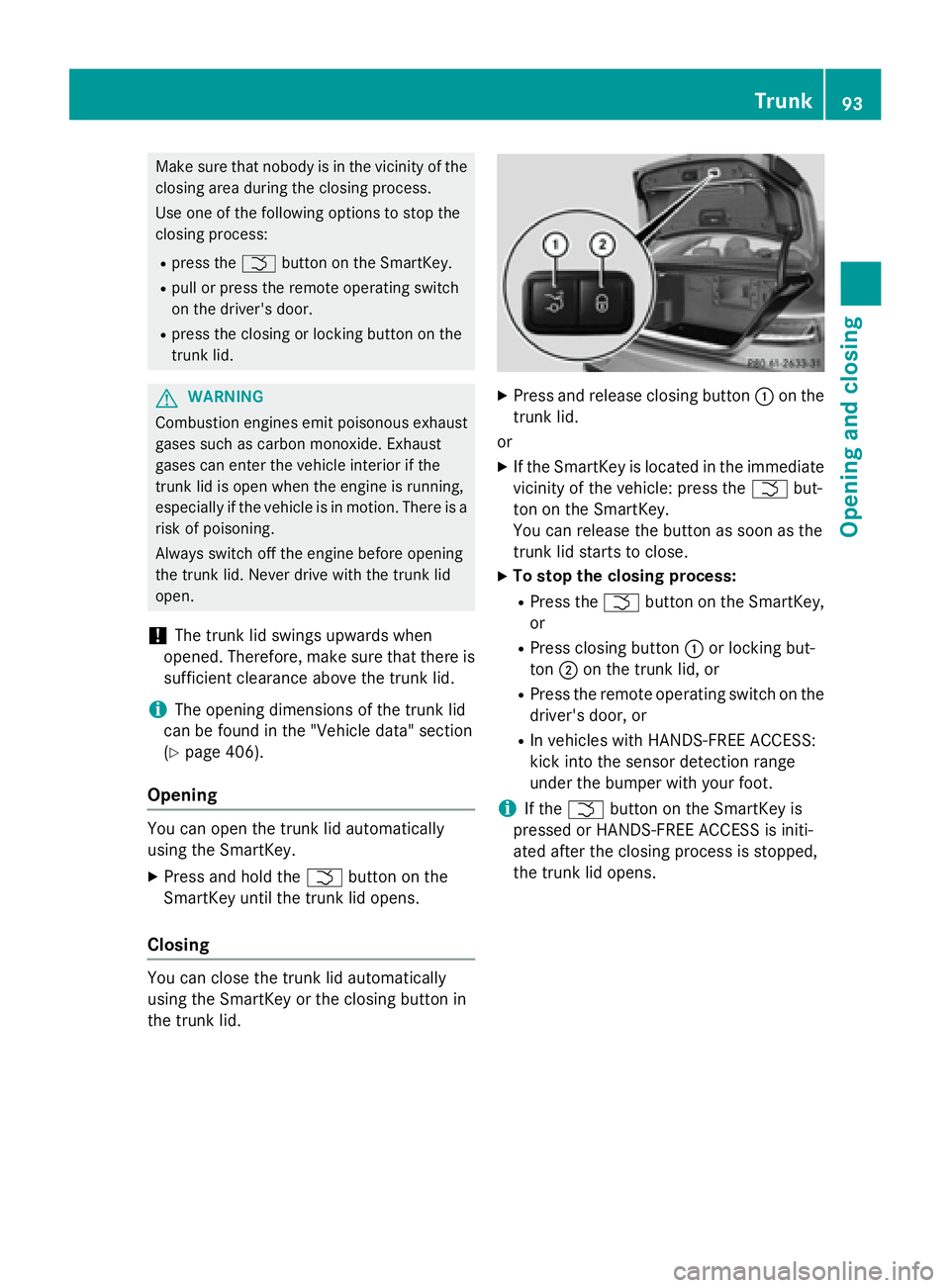
XPress and release closing button :on the
trunk lid.
or
XIf the SmartKey is located in the immediate
vicinity of the vehicle: press the Fbut-
ton on the SmartKey.
You can release the button as soon as the
trunk lid starts to close.
XTo stop the closing process:
RPress the Fbutton on the SmartKey,
or
RPress closing button :or locking but-
ton ;on the trunk lid, or
RPress the remote operating switch on the
driver's door, or
RIn vehicles with HANDS-FREE ACCESS:
kick into the sensor detection range
under the bumper with your foot.
iIf the F button on the SmartKey is
pressed or HANDS-FREE ACCESS is initi-
ated after the closing process is stopped,
the trunk lid opens.
Trunk93
Opening and closing
Z
Page 96 of 410
Vehicles with trunk lid remote closing
feature and KEYLESS-GO:when all the
doors are closed, you can simultaneously
close the trunk lid and lock the vehicle. The
SmartKey must be located to the rear of the
vehicle.
XPress and release locking button ;on the
trunk lid.
If a KEYLESS-GO key is detected outside
the vehicle, the trunk lid closes and the
vehicle locks.
iIf KEYLESS-GO detects a SmartKey in the
trunk, the trunk lid opens again after it is
closed.
If KEYLESS-GO detects a second SmartKey
outside the vehicle, the trunk lid remains
closed.
HANDS-FREE ACCESS
Important safety notes
GWARNING
The vehicle's exhaust system may be very hot. You could burn yourself by touching the
exhaust system if you use HANDS-FREE
ACCESS. There is a risk of injury. Always
ensure that you only make the kicking move-
ment within the detection range of sensors.
!If the SmartKey is within the rear detec-
tion range of KEYLESS-GO, the following
situations, for example, could lead to the
unintentional opening of the trunk:
Rusing a car wash
Rusing a power washer
Make sure that the SmartKey is at least
10 ft (3 m) awayfrom the vehicle.
General notes
With KEYLESS-GO and HANDS-FREE
ACCESS, you can open or close the trunk lid
or stop the procedure without using your
hands. This is useful if you have your hands full. To do this, make a kicking movement
under the bumper with your foot.
Observe the following points:
RCarry your KEYLESS-GO key about your
person. The KEYLESS-GO key must be in
the rear detection range of the vehicle.
RWhen making the kicking movement, make
sure that you are standing firmly on the
ground and that there is sufficient clear-
ance to the rear of the vehicle. You could
otherwise lose your balance, e.g. on ice.
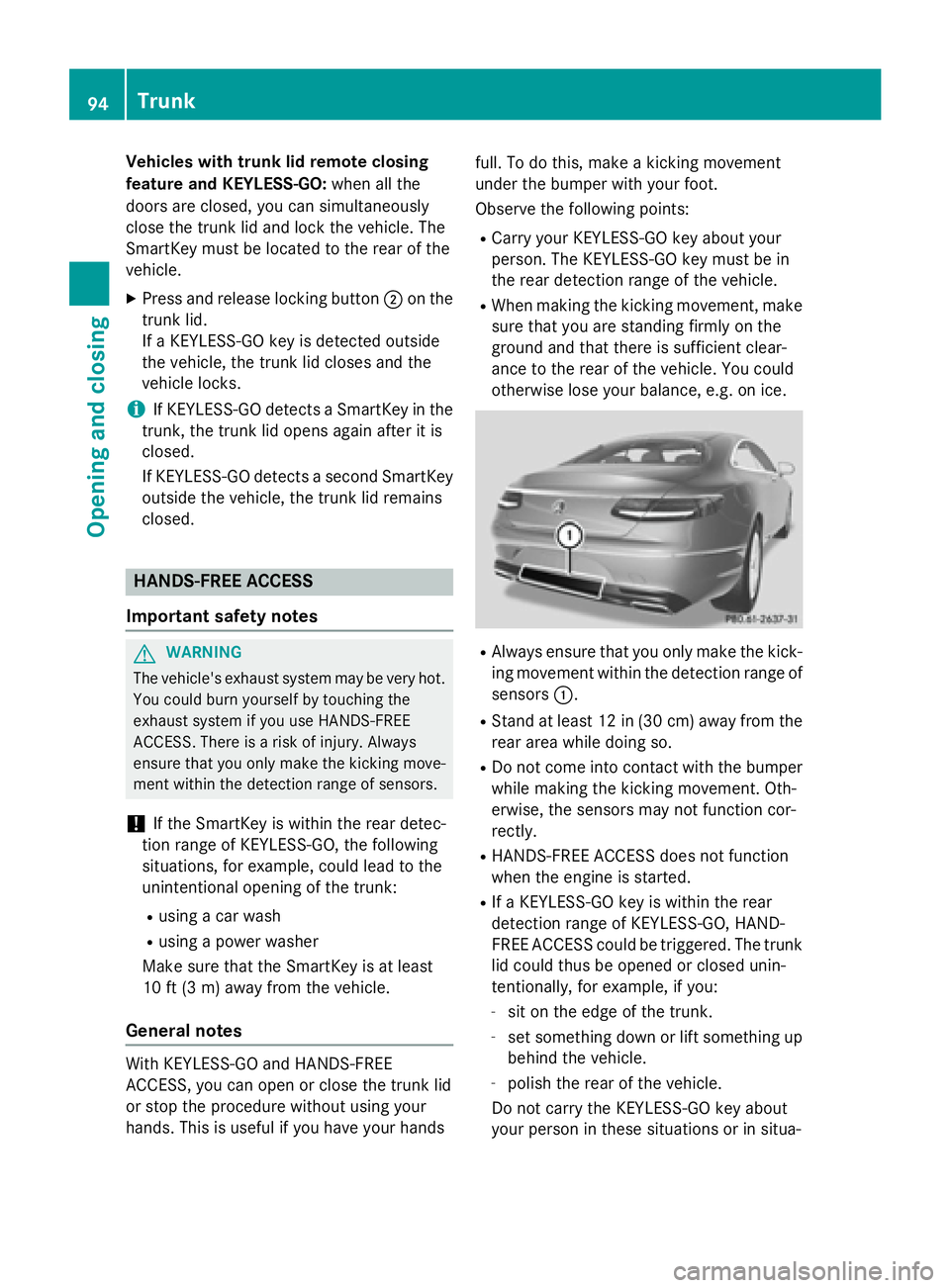
RAlways ensure that you only make the kick-
ing movement within the detection range of
sensors :.
RStand at least 12 in (30 cm) away from the
rear area while doing so.
RDo not come into contact with the bumper
while making the kicking movement. Oth-
erwise, the sensors may not function cor-
rectly.
RHANDS-FREE ACCESS does not function
when the engine is started.
RIf a KEYLESS-GO key is within the rear
detection range of KEYLESS-GO, HAND-
FREE ACCESS could be triggered. The trunk
lid could thus be opened or closed unin-
tentionally, for example, if you:
-sit on the edge of the trunk.
-set something down or lift something up
behind the vehicle.
-polish the rear of the vehicle.
Do not carry the KEYLESS-GO key about
your person in these situations or in situa-
94Trunk
Opening and closing
Page 97 of 410
tions similar to these. This will prevent the
unintentional opening/closing of the trunk.
RDirt caused by road salt around sensors:
may restrict functionality.
RUsing the HANDS-FREE ACCESS with a
prosthetic leg may restrict functionality.
Operation
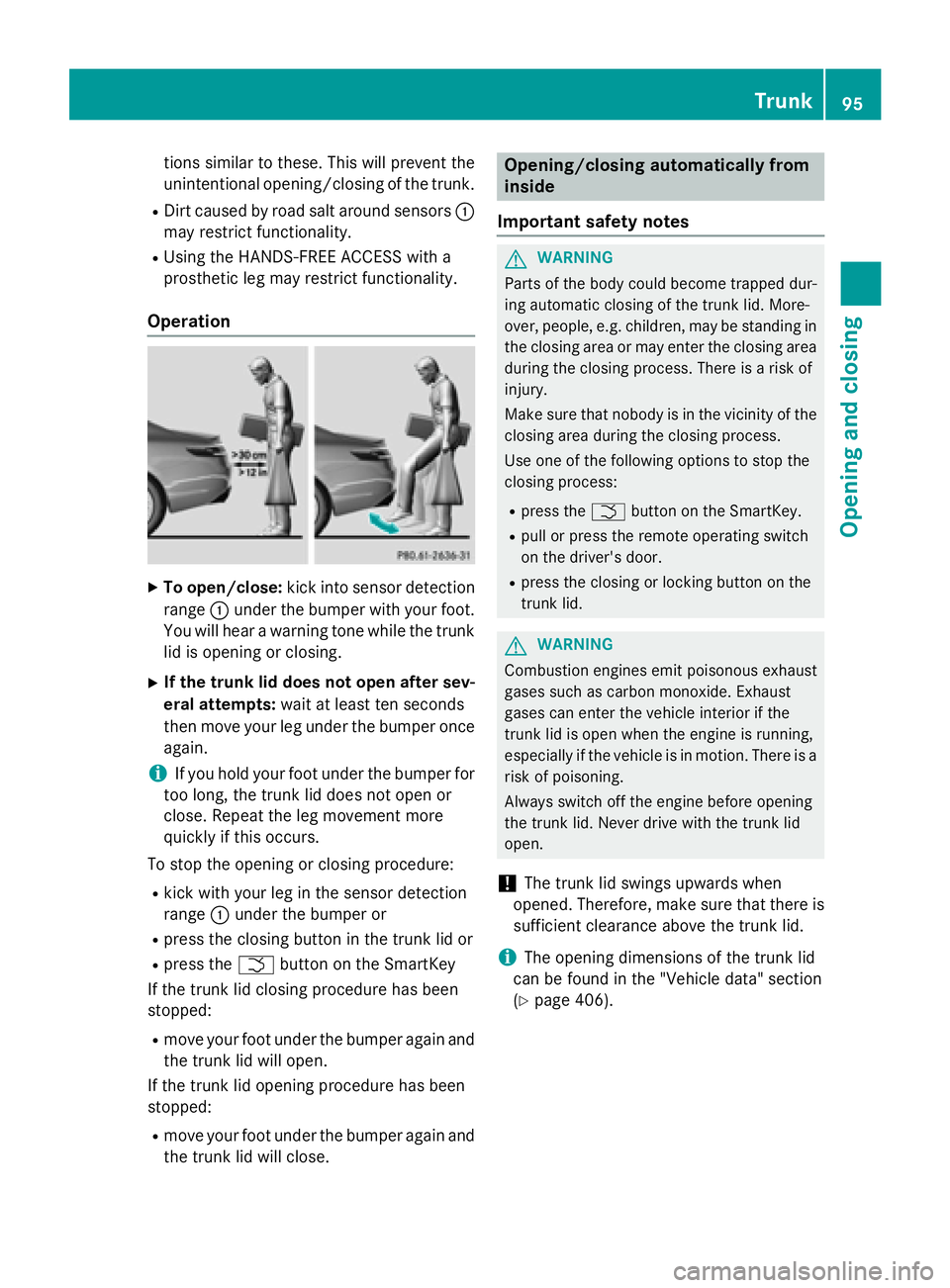
XTo open/close: kick into sensor detection
range :under the bumper with your foot.
You will hear a warning tone while the trunk
lid is opening or closing.
XIf the trunk lid does not open after sev-
eral attempts: wait at least ten seconds
then move your leg under the bumper once
again.
iIf you hold your foot under the bumper for
too long, the trunk lid does not open or
close. Repeat the leg movement more
quickly if this occurs.
To stop the opening or closing procedure:
Rkick with your leg in the sensor detection
range :under the bumper or
Rpress the closing button in the trunk lid or
Rpress the Fbutton on the SmartKey
If the trunk lid closing procedure has been
stopped:
Rmove your foot under the bumper again and
the trunk lid will open.
If the trunk lid opening procedure has been
stopped:
Rmove your foot under the bumper again and
the trunk lid will close.
Opening/closing automatically from
inside
Important safety notes
GWARNING
Parts of the body could become trapped dur-
ing automatic closing of the trunk lid. More-
over, people, e.g. children, may be standing in the closing area or may enter the closing area
during the closing process. There is a risk of
injury.
Make sure that nobody is in the vicinity of the
closing area during the closing process.
Use one of the following options to stop the
closing process:
Rpress the Fbutton on the SmartKey.
Rpull or press the remote operating switch
on the driver's door.
Rpress the closing or locking button on the
trunk lid.
GWARNING
Combustion engines emit poisonous exhaust
gases such as carbon monoxide. Exhaust
gases can enter the vehicle interior if the
trunk lid is open when the engine is running,
especially if the vehicle is in motion. There is a
risk of poisoning.
Always switch off the engine before opening
the trunk lid. Never drive with the trunk lid
open.
!The trunk lid swings upwards when
opened. Therefore, make sure that there is
sufficient clearance above the trunk lid.
iThe opening dimensions of the trunk lid
can be found in the "Vehicle data" section
(
Ypage 406).
Trunk95
Opening and closing
Z
Page 99 of 410
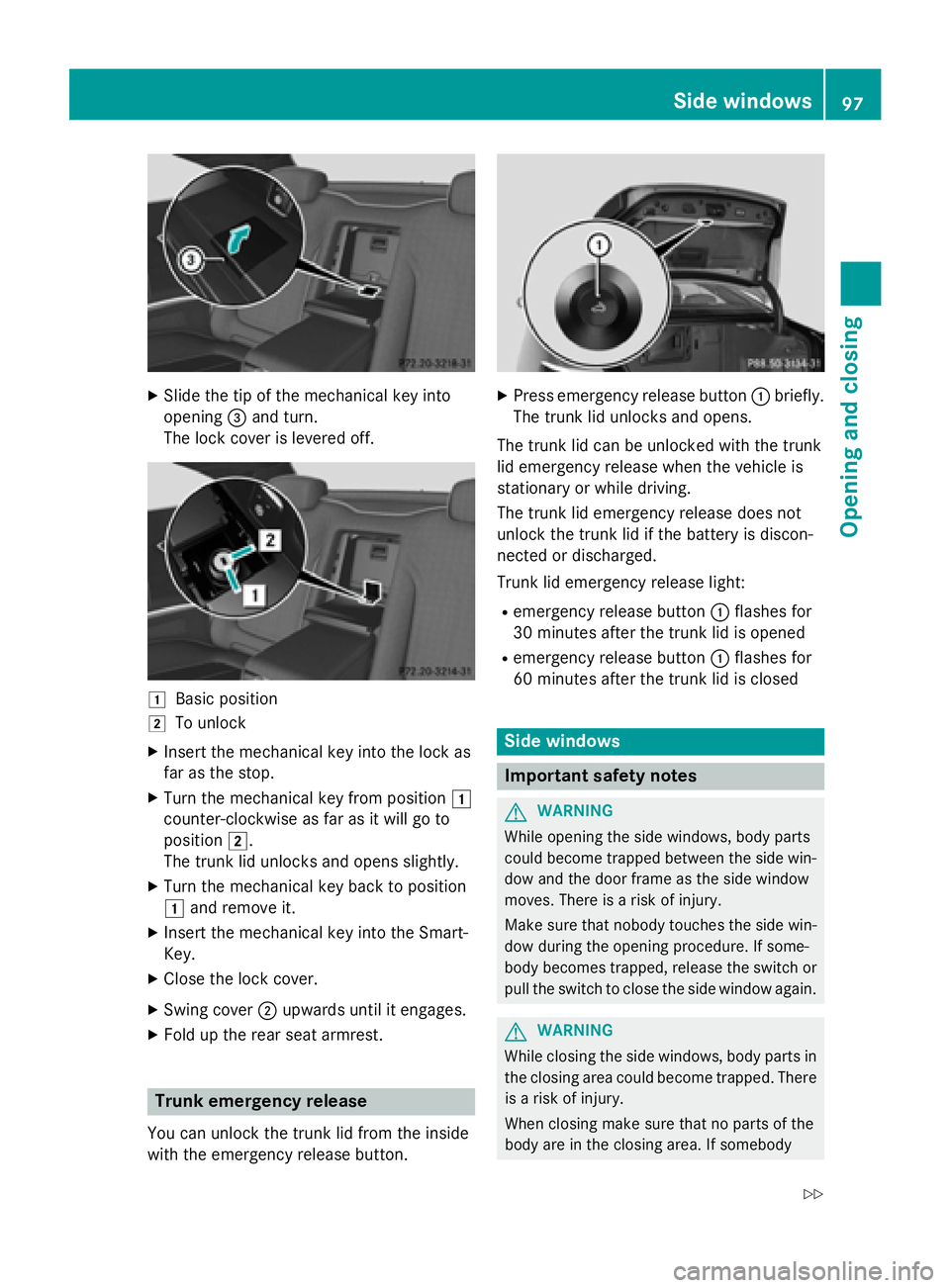
XSlide the tip of the mechanical key into
opening=and turn.
The lock cover is levered off.
1Basic position
2To unlock
XInsert the mechanical key into the lock as
far as the stop.
XTurn the mechanical key from position 1
counter-clockwise as far as it will go to
position 2.
The trunk lid unlocks and opens slightly.
XTurn the mechanical key back to position
1 and remove it.
XInsert the mechanical key into the Smart-
Key.
XClose the lock cover.
XSwing cover ;upwards until it engages.
XFold up the rear seat armrest.
Trunk emergency release
You can unlock the trunk lid from the inside
with the emergency release button.
XPress emergency release button :briefly.
The trunk lid unlocks and opens.
The trunk lid can be unlocked with the trunk
lid emergency release when the vehicle is
stationary or while driving.
The trunk lid emergency release does not
unlock the trunk lid if the battery is discon-
nected or discharged.
Trunk lid emergency release light:
Remergency release button :flashes for
30 minutes after the trunk lid is opened
Remergency release button :flashes for
60 minutes after the trunk lid is closed
Side windows
Important safety notes
GWARNING
While opening the side windows, body parts
could become trapped between the side win-
dow and the door frame as the side window
moves. There is a risk of injury.
Make sure that nobody touches the side win-
dow during the opening procedure. If some-
body becomes trapped, release the switch or
pull the switch to close the side window again.
GWARNING
While closing the side windows, body parts in
the closing area could become trapped. There is a risk of injury.
When closing make sure that no parts of the
body are in the closing area. If somebody
Side windows97
Opening and closing
Z
Page 100 of 410
becomes trapped, release the switch or press
the switch to open the side window again.
GWARNING
If children operate the side windows they
could become trapped, particularly if they are left unsupervised. There is a risk of injury.
Activate the override feature for the rear side
windows. When leaving the vehicle, always
take the SmartKey with you and lock the vehi-
cle. Never leave children unsupervised in the
vehicle.
Side window reversing feature
The front side windows are equipped with an
automatic reversing feature. If a solid object
blocks or restricts one of the front side win-
dows from traveling upwards during the auto-
matic closing process, the side window opens
again automatically. During the manual clos-
ing process, the side window only opens
again automatically after the corresponding
switch is released. However, the automatic
reversing feature is only an aid and does not
relieve you of the responsibility of paying
attention when closing a side window.
GWARNING
The reversing feature does not react:
Rto soft, light and thin objects, e.g. small fin-
gers
Rwhile resetting
This means that the reversing feature cannot
prevent someone being trapped in these sit-
uations. There is a risk of injury.
Make sure that no body parts are in close
proximity during the closing procedure. If
someone becomes trapped, press the switch
to open the side window again.
Opening and closing the side win-
dows
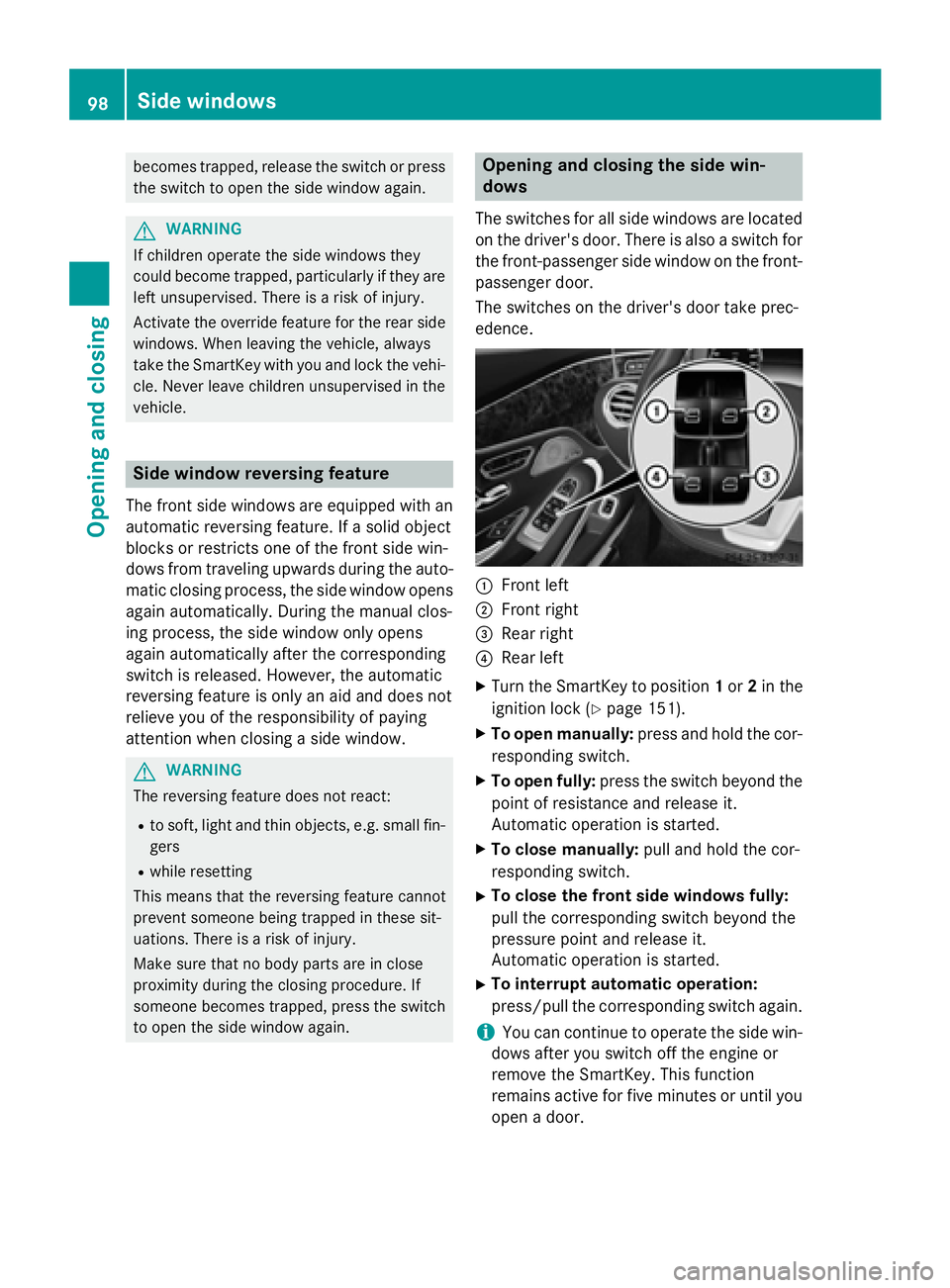
The switches for all side windows are located
on the driver's door. There is also a switch for
the front-passenger side window on the front-
passenger door.
The switches on the driver's door take prec-
edence.
:Front left
;Front right
=Rear right
?Rear left
XTurn the SmartKey to position 1or 2in the
ignition lock (
Ypage 151).
XTo open manually: press and hold the cor-
responding switch.
XTo open fully: press the switch beyond the
point of resistance and release it.
Automatic operation is started.
XTo close manually: pull and hold the cor-
responding switch.
XTo close the front side windows fully:
pull the corresponding switch beyond the
pressure point and release it.
Automatic operation is started.
XTo interrupt automatic operation:
press/pull the corresponding switch again.
iYou can continue to operate the side win-
dows after you switch off the engine or
remove the SmartKey. This function
remains active for five minutes or until you
open a door.
98Side windows
Opening and closing
Page 101 of 410
iBefore opening or closing the side win-
dows, a check is carried out to see whether
a valid SmartKey is in the vehicle, if:
Ra side window switch is pressed or pulled
and
Rthe Start/Stop button is used instead of
the SmartKey in the ignition lock
and
Rthe engine is not running
This is carried out by means of a brief radio
connection between the vehicle and the
SmartKey.
Convenience opening
General notes
You can ventilate the vehicle before you start
driving.
If the SmartKey is in close proximity to the
vehicle, the convenience opening function is
available.
The "convenience opening" feature is also
available on unlocked vehicles.
To do this, the SmartKey is used to carry out
the following functions simultaneously:
Runlock the vehicle
Ropen the side windows
Rswitch on the seat ventilation for the driv-
er's seat
Convenience opening
XKeep the %button pressed until the
side windows are in the desired position.
XTo interrupt convenience opening:
release the %button.
Convenience closing feature
Important safety notes
GWARNING
When using the convenience closing feature,
parts of the body could be trapped in the clos-
ing area when a side window is being closed.
There is a risk of injury.
Observe the complete closing procedure
when the convenience closing feature is oper-
ating. Make sure that no body parts are in
close proximity during the closing procedure.
When you lock the vehicle, you can close the
windows at the same time.
You can then close the roller sunblinds.
iNotes on the automatic reversing feature
for:
Rthe side window (Ypage 98)
Rthe roller sunblind (Ypage 101)
Using the SmartKey
XPress and hold the &button until the
side windows are fully closed.
XMake sure that all the side windows are
closed.
XPress and hold the &button again until
the roller sunblinds of the panorama roof
close.
XTo interrupt convenience closing:
release the &button.
Using KEYLESS-GO
The SmartKey must be outside the vehicle. All
the doors must be closed.
Side windows99
Opening and closing
Z
Page 103 of 410
Problems with the side windows
GWARNING
If you close a side window again immediately after it has been blocked or reset, the side window
closes with increased or maximum force. The reversing feature is then not active. Parts of the
body could be trapped in the closing area in the process. This poses an increased risk of injury or
even fatal injury.
Make sure that no parts of the body are in the closing area. To stop the closing process, release
the switch or push the switch again to reopen the side window.
ProblemPossible causes/consequences and MSolutions
A side window cannot
be closed because it is
blocked by objects, e.g.
leaves in the window
guide.XRemove the objects.
XClose the side window.
A side window cannot
be closed and you can-
not see the cause.If a side window is obstructed during closing and reopens again
slightly:
XImmediately after the window blocks, pull the corresponding
switch again until the side window has closed.
The side window is closed with increased force.
If a side window is obstructed again during closing and reopens
again slightly:
XImmediately after the window blocks, pull the corresponding
switch again until the side window has closed.
The side window is closed without the anti-entrapment feature.
Panorama roof
Operating the roller sunblind for the
panorama roof
Important safety notes
GWARNING
When opening or closing the roller sunblind,
parts of the body could be trapped between
the roller sunblind and the frame. There is a
risk of injury.
When opening or closing make sure that no
parts of the body are in the sweep of the roller
sunblind.
If somebody becomes trapped:
Rrelease the switch immediately, or
Rduring automatic operation, push the
switch briefly in any direction
The opening or closing procedure will be stop-
ped.
The roller sunblind shields the vehicle interior
from sunlight.
Roller sunblind reversing feature
The roller sunblind is equipped with an auto-
matic reversing feature. If an object blocks or
restricts the roller sunblind during the closing
process, the roller sunblind automatically
Panorama roof101
Opening and closing
Z