fuse MERCEDES-BENZ S-COUPE 2016 Owners Manual
[x] Cancel search | Manufacturer: MERCEDES-BENZ, Model Year: 2016, Model line: S-COUPE, Model: MERCEDES-BENZ S-COUPE 2016Pages: 410, PDF Size: 8.62 MB
Page 12 of 410
Checking the oil level using the
dipstick .......................................... 325
Checking the oil level using the
on-board computer ........................ 327
Dis play message ............................ 270
Fill ing capacity .............................. .403
Notes about oil grades ................... 403
Notes on oil level/consumption .... 325
Temperature (on-board computer,
Mercedes-AMG vehicles) ...............2 49
Viscosity ........................................ 403
ESP
®(Electronic Stability Pro-
gram)
AMG menu (on-board computer) ... 250
Characteristics ................................. 73
Deactivating/activating ................... 74
Display message ............................ 252
Function/notes ................................ 73
General notes .................................. 73
Important safety information ........... 73
Warning lamp ................................. 290
ETS/4ETS (Electronic Traction Sys-
tem) ...................................................... 73
Exhaust
see Exhaust pipe
Exhaust check ................................... 174
Exhaust pipe
Cleaning ......................................... 337
Exterior lighting
Cleaning ......................................... 335
see Lights
Exterior mirrors
Adjusting ....................................... 118
Dipping (automatic) ....................... 119
Folding in/out (automatically) ....... 118
Folding in/out (electrically) ........... 118
Out of position (troubleshooting) ... 119
Setting ........................................... 118
Storing settings (memory func-
tion) ............................................... 121
Storing the parking position .......... 119
Eyeglasses compartment ................. 301
F
Features............................................. 304
Filler cap
see Refueling Filling capacities (Technical data)
... 400
Flat tire
Changing a wheel/mounting the
spare wheel ................................... 383
MOExtended tires .......................... 343
Preparing the vehicle ..................... 342
TIREFIT kit ...................................... 344
Floormats ........................................... 320
Frequencies
Mobile phone ................................. 398
Two-way radio ................................ 398
Front-passenger seat
Adjusting from the driver's seat ..... 108
Fuel
Additives ........................................ 402
Consumption statistics .................. 236
Displaying the current consump-
tion ................................................ 235
Displaying the range ...................... 235
Driving tips .................................... 174
Fuel gauge ....................................... 33
Grade (gasoline) ............................ 401
Important safety notes .................. 401
Notes for Mercedes‑AMG vehi-
cles ................................................ 402
Problem (malfunction) ................... 170
Refueling ........................................ 167
Tank content/reserve fuel ............. 401
Fuel level
Calling up the range (on-board
computer) ...................................... 235
Fuel tank
Capacity ........................................ 401
Problem (malfunction) ................... 170
Fuses
Allocation chart ............................. 358
Before changing ............................. 357
Dashboard fuse box ....................... 357
Engine emergency stop ................. 359
Fuse box in the engine compart-
ment .............................................. 358
Fuse box in the front-passenger
footwell .......................................... 357
Fuse box in the trunk ..................... 358
Important safety notes .................. 356
10Index
Page 79 of 410
system checked at a qualified specialist work-
shop.
Function
XTo activate/deactivate:activate or deac-
tivate PRE-SAFE®Brake in the on-board
computer (
Ypage 245).
If the PRE-SAFE®Brake is not activated, the
æ symbol appears in the multifunction
display.
Starting at a speed of around 4 mph (7 km/h),
this function warns you if you rapidly
approach a vehicle in front. An intermittent
warning tone will then sound and the ·
distance warning lamp will light up in the
instrument cluster.
XBrake immediately to defuse the situation.
or
XTake evasive action provided it is safe to do so.
PRE-SAFE
®Brake can also brake the vehicle
automatically under the following conditions:
Rthe driver and front-passenger have their
seat belts fastened
and
Rthe vehicle speed is between approx-
imately 4 mph (7 km/h) and 124 mph
(200 km/h)
At speeds of up to approximately 44 mph
(70 km/h) PRE-SAFE
®Brake can also detect:
Rstationary objects in the path of your vehi-
cle, e.g. stopped or parked vehicles
Rpedestrians in the path of your vehicle
iIf there is an increased risk of collision,
preventive passenger protection measures
(PRE-SAFE
®) are activated.
If the risk of collision with the vehicle in front
remains and you do not brake, take evasive
action or accelerate significantly, the vehicle
may perform automatic emergency braking,
up to the point of full brake application. Auto-
matic emergency braking is not performed until immediately prior to an imminent acci-
dent.
You can prevent the intervention of the PRE-
SAFE
®Brake at any time by:
Rdepressing the accelerator pedal further.
Ractivating kickdown.
Rreleasing the brake pedal.
The braking action of PRE-SAFE
®Brake is
ended automatically if:
Ryou maneuver to avoid the obstacle.
Rthere is no longer a risk of collision.
Rthere is no longer an obstacle detected in
front of your vehicle.
STEER CONTROL
General information
STEER CONTROL helps you by transmitting a noticeable steering force to the steering
wheel in the direction required for vehicle
stabilization.
This steering assistance is provided in partic-
ular if:
Rboth right wheels or both left wheels are on
a wet or slippery road surface when you
brake.
Rthe vehicle starts to skid.
Important safety notes
iObserve the "Important safety notes" sec-
tion (
Ypage 67).
No steering support is provided from STEER
CONTROL, if:
RESP®is malfunctioning.
Rthe lighting is faulty.
Power steering will, however, continue to
function.
Driving safety systems77
Safety
Z
Page 142 of 410

switches back to automatic mode, the indi-
cator lamp on theÃrocker switch lights
up again.
Adjusting the climate mode settings
In automatic mode you can select the follow-
ing airflow settings for the driver's and front- passenger areas:
FOCUS high airflow, slightly cooler setting
MEDIUM medium airflow, standard setting
DIFFUSE low airflow, slightly warmer and draught-free setting
XTo set:set the climate mode using
COMAND (see the separate operating
instructions).
Setting the temperature
General notes
You can set the temperature separately for
the following areas:
Rfront footwells, left and right
Rdriver and front passenger area
Setting the temperature
XTurn the SmartKey to position 2in the igni-
tion lock (
Ypage 151).
XTo increase or reduce: press thew
rocker switch up or down.
or
XSet the temperature using COMAND (see
the separate operating instructions).
Only change the temperature setting in
small increments. Start at 72 ‡ (22 †).
Setting the footwell temperature
The footwell temperature for the driver and
front passenger can be set separately using
COMAND (see the separate operating
instructions).
Setting the air distribution
Air distribution settings
¯ Directs air through the defroster vents
P Directs air through the center and side
air vents
O Directs air through the footwell air
vents
S Directs air through the center, side and
footwell vents
a Directs air through the defroster and
footwell vents
W Sets the air distribution to automatic
Setting the air distribution using
COMAND
The air distribution for the left and right sides
of the driver and front passenger area can be
adjusted using COMAND (see the separate
operating instructions).
140Operating the climate control systems
Climate control
Page 188 of 410
If these conditions are fulfilled, your vehicle is
accelerated. Acceleration will be interrupted
if changing lanes takes too long or if the dis-
tance between your vehicle and the vehicle in
front becomes too small.
iWhen you change lanes, DISTRONIC
PLUS monitors the left lane on left-hand-
drive vehicles or the right lane on right-
hand-drive vehicles.
Stopping
GWARNING
When leaving the vehicle, even if it is braked
only by DISTRONIC PLUS, it could roll away if:
Rthere is a malfunction in the system or in
the voltage supply.
RDISTRONIC PLUS has been deactivated
with the cruise control lever, e.g. by a vehi-
cle occupant or from outside the vehicle.
Rthe electrical system in the engine com-
partment, the battery or the fuses have
been tampered with.
Rthe battery is disconnected.
Rthe accelerator pedal has been depressed, e.g. by a vehicle occupant.
There is a risk of an accident.
If you wish to exit the vehicle, always turn off
DISTRONIC PLUS and secure the vehicle
against rolling away.
For further information on deactivating
DISTRONIC PLUS (
Ypage 188).
If DISTRONIC PLUS detects that the vehicle in
front is stopping, it brakes your vehicle until it is stationary.
Once your vehicle is stationary, it remains
stationary and you do not need to depress the
brake.
After a time, the electric parking brake
secures the vehicle and relieves the service
brake.
Depending on the specified minimum dis-
tance, your vehicle will come to a standstill at
a sufficient distance behind the vehicle in front. The specified minimum distance is set
using the control on the cruise control lever.
When DISTRONIC PLUS is activated, the
transmission is shifted automatically to posi-
tion
Pif:
Rthe driver's seat belt is not fastened and the
driver's door is open.
Rthe engine is switched off, unless it is auto-
matically switched off by the ECO start/
stop function.
The electric parking brake secures the vehicle automatically if DISTRONIC PLUS is activated
when the vehicle is stationary and:
Ra system malfunction occurs.
Rthe power supply is not sufficient.
If a malfunction in the electric parking brake
occurs, then the transmission may also be
shifted into position Pautomatically.
Setting a speed
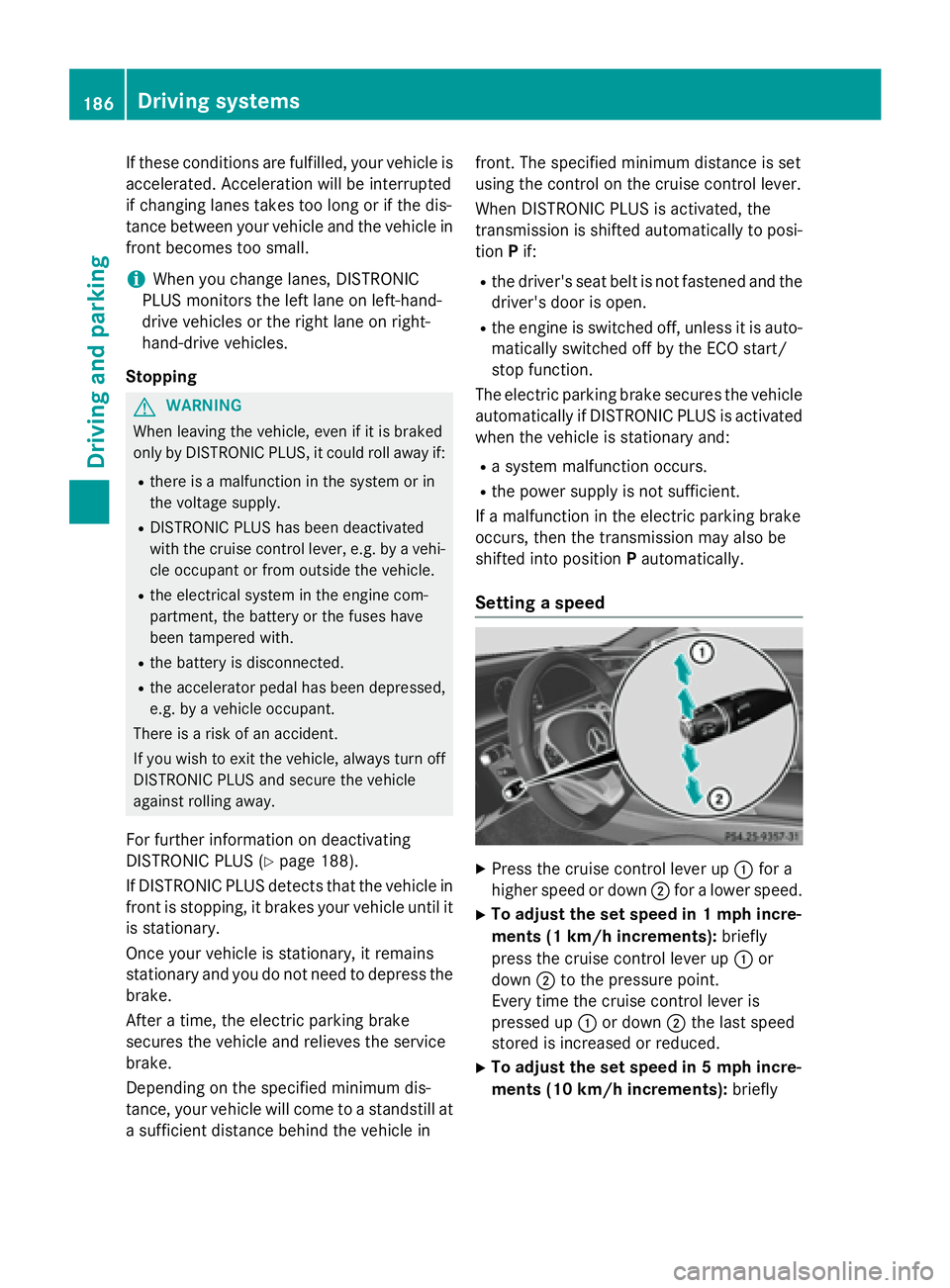
XPress the cruise control lever up :for a
higher speed or down ;for a lower speed.
XTo adjust the set speed in 1 mph incre-
ments (1 km/h increments): briefly
press the cruise control lever up :or
down ;to the pressure point.
Every time the cruise control lever is
pressed up :or down ;the last speed
stored is increased or reduced.
XTo adjust the set speed in 5 mph incre-
ments (10 km/h increments): briefly
186Driving systems
Driving and parking
Page 194 of 410
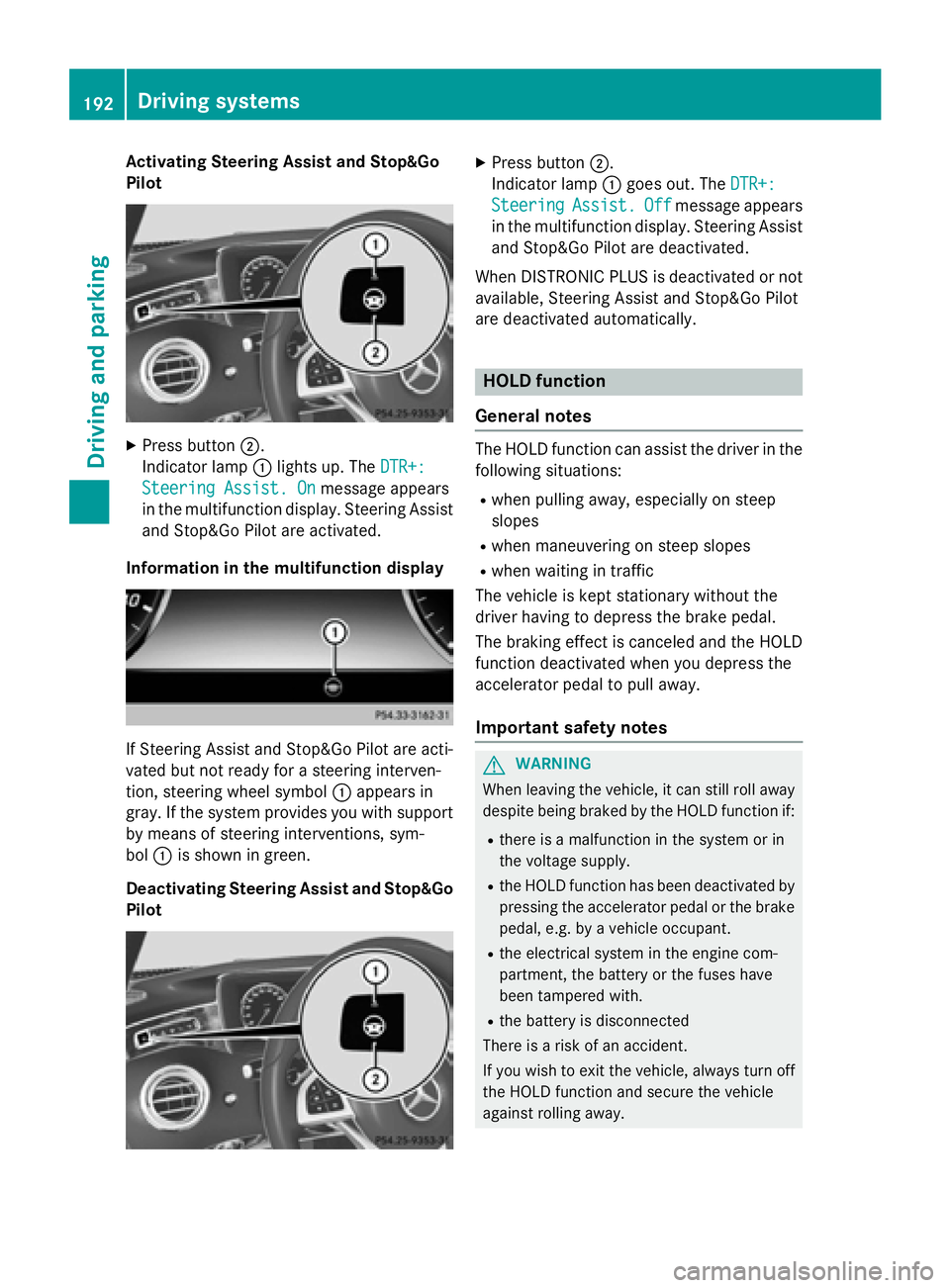
Activating Steering Assist and Stop&Go
Pilot
XPress button ;.
Indic ator lamp :lights up. The DTR+:
Steering Assist. Onmessage appears
in the multifunction display. Steering Assist
and Stop&Go Pilot are activated.
Infor mation in the multifunction display
If St eering Assist and Stop&Go Pilot are act i-
vated but not ready for a steering interven-
tion, steering wheel symbol :appears in
gray. Ifthe system provides you with support
by means of steering interventions, sym-
bol :isshown in green.
Deactivating Steering Assist and Stop& Go
Pilot
XPress button ;.
In dicator lamp :goes out. The DTR+:
SteeringAssist.Offmessage appears
in the multifunction display. Steering Assist
and Stop&Go Pilot are deactivate d.
When DI STRONIC PLUS isdeactivated or not
available, Steering Assist and Stop&Go Pilot
are deactivated automatically.
HOLD function
General notes
The HOLD function can assist the driverinthe
fol lowin g situations:
Rwhen pulling away, especial lyon steep
slopes
Rwhen maneuvering on steep slopes
Rwhen waitingintraff ic
The vehicle iske pt stationary without the
driver having to depress the brake pedal.
The braking effect iscanceled and the HOLD
function deactivated when you depress the
accelerator pedal to pullaway.
Important safety notes
GWARNIN G
When leaving th evehicle, it can still rol laway
despite bein gbraked by th eHOLD function if:
Rthere is amalfunctio nin th esystem or in
th evoltag esupply.
Rth eHOLD function has been deactivate dby
pressin gth eaccelerato rpedal or th ebrak e
pedal, e.g. by avehicl eoccupant .
Rtheelectrical system in th eengin ecom-
partment, th ebattery or th efuse shave
been tampered with.
Rth ebattery is disconnected
Ther eis aris kof an accident.
If you wish to exit th evehicle, always tur noff
th eHOLD function and secure th evehicl e
against rollin gaway.
192Driving systems
Driving and parking
Page 206 of 410
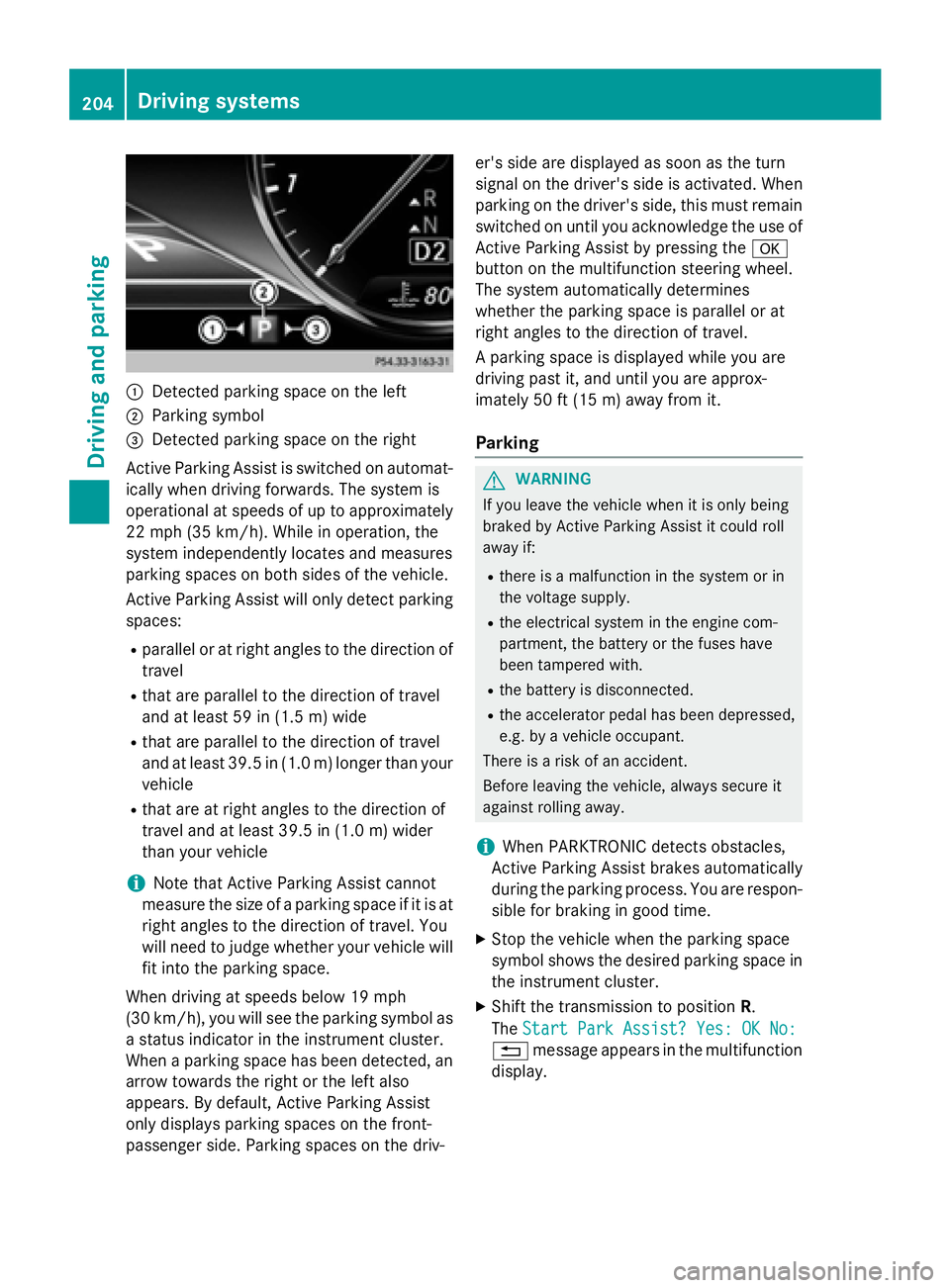
:Detected parking space on the left
;Parking symbol
=Detected parking space on the right
Active Parking Assist is switched on automat-
ically when driving forwards. The system is
operational at speeds of up to approximately
22 mph (35 km/h). While in operation, the
system independently locates and measures
parking spaces on both sides of the vehicle.
Active Parking Assist will only detect parking
spaces:
Rparallel or at right angles to the direction of
travel
Rthat are parallel to the direction of travel
and at least 59 in (1.5 m) wide
Rthat are parallel to the direction of travel
and at least 39.5 in (1.0 m) longer than your
vehicle
Rthat are at right angles to the direction of
travel and at least 39.5 in (1.0 m) wider
than your vehicle
iNote that Active Parking Assist cannot
measure the size of a parking space if it is at
right angles to the direction of travel. You
will need to judge whether your vehicle will
fit into the parking space.
When driving at speeds below 19 mph
(30 km/h), you will see the parking symbol as
a status indicator in the instrument cluster.
When a parking space h
as been detected, an
arrow towards the right or the left also
appears. By default, Active Parking Assist
only displays parking spaces on the front-
passenger side. Parking spaces on the driv- er's side are displayed as soon as the turn
signal on the driver's side is activated. When
parking on the driver's side, this must remain
switched on until you acknowledge the use of
Active Parking Assist by pressing the
a
button on the multifunction steering wheel.
The system automatically determines
whether the parking space is parallel or at
right angles to the direction of travel.
A parking space is displayed while you are
driving past it, and until you are approx-
imately 50 ft (15 m) awayfrom it .
Parking
GWARNING
If you leave the vehicle when it is only being
braked by Active Parking Assist it could roll
away if:
Rthere is a malfunction in the system or in
the voltage supply.
Rthe electrical system in the engine com-
partment, the battery or the fuses have
been tampered with.
Rthe battery is disconnected.
Rthe accelerator pedal has been depressed,
e.g. by a vehicle occupant.
There is a risk of an accident.
Before leaving the vehicle, always secure it
against rolling away.
iWhen PARKTRONIC detects obstacles,
Active Parking Assist brakes automatically
during the parking process. You are respon-
sible for braking in good time.
XStop the vehicle when the parking space
symbol shows the desired parking space in
the instrument cluster.
XShift the transmission to position R.
The Start Park Assist? Yes: OK No:
% message appears in the multifunction
display.
204Driving system s
Driving an d parking
Page 343 of 410
Useful information............................342
Where will I find...? ...........................342
Flat tire .............................................. 342
Battery (vehicle) ................................ 347
Jump-starting .................................... 351
Towing and tow-starting ..................354
Fuses .................................................. 356
341
Breakdown assistance
Page 358 of 410

tion switch, the hazard warning lamp starts
flashing again.
Towing the vehicle with the rear axle
raised
Only vehicles without 4MATIC can be
towed with the rear axle raised.
!The ignition must be switched off if you
are towing the vehicle with the rear axle
raised. Intervention by ESP
®could other-
wise damage the brake system.
!Vehicles with 4MATIC must not be towed
with either the front or the rear axle raised,
as doing so will damage the transmission.
!Vehicles with automatic transmission
must not be towed with the rear axle raised.
The vehicle/trailer combination may oth-
erwise swerve or even roll over.
Transporting the vehicle
!
You may only secure the vehicle by the
wheels, not by parts of the vehicle such as axle or steering components. Otherwise,
the vehicle could be damaged.
The towing eye can be used to pull the vehicle
onto a trailer or transporter for transporting
purposes.
XTurn the SmartKey to position 2in the igni-
tion lock.
XShift the automatic transmission to posi-
tion N.
As soon as the vehicle has been loaded:
XPrevent the vehicle from rolling away by
applying the electric parking brake.
XShift the automatic transmission to posi-
tion P.
XTurn the SmartKey to position 0in the igni-
tion lock and remove it.
XSecure the vehicle.
Notes on 4MATIC vehicles
!
Vehicles with 4MATIC must not be towed
with either the front or the rear axle raised,
as doing so will damage the transmission.
Vehicles with 4MATIC may either be towed
away with both axles on the ground or be loa- ded up and transported.
If the vehicle's transmission, front, or rear
axle is damaged, have the vehicle transported
on a truck or trailer.
In the event of damage to the electrical
system: if the battery is defective, the auto-
matic transmission will be locked in position
P . To shift the automatic transmission to posi-
tion N, you must provide power to the vehi-
cle's electrical system in the same way as
when jump-starting (
Ypage 351).
Have the vehicle transported on a transporter
or trailer.
Tow-starting (emergency engine
starting)
!
Vehicles with automatic transmission
must not be tow-started. You could other-
wise damage the automatic transmission.
iInformation on "Jump-starting"
(
Ypage 351).
Fuses
Important safety notes
GWARNING
If you manipulate or bridge a faulty fuse or if
you replace it with a fuse with a higher amper- age, the electric cables could be overloaded.
This could result in a fire. There is a risk of an
accident and injury.
Always replace faulty fuses with the specified
new fuses having the correct amperage.
Blown fuses must be replaced with fuses of
the same rating, which you can recognize by
356Fuses
Breakdown assistance
Page 359 of 410
the color and value. The fuse ratings are listed
in the fuse allocation chart.
The fuse allocation chart is on the fuse box in
the trunk (
Ypage 358).
If a newly inserted fuse also blows, have the
cause traced and rectified at a qualified spe-
cialist workshop, e.g. an authorized
Mercedes-Benz Center.
!Only use fuses that have been approved
for Mercedes-Benz vehicles and which
have the correct fuse rating for the system
concerned. Otherwise, components or sys-
tems could be damaged.
The fuses in your vehicle serve to close down
faulty circuits. If a fuse blows, all the compo-
nents on the circuit and their functions stop
operating.
Before changing a fuse
XSecure the vehicle against rolling away
(
Ypage 170).
XSwitch off all electrical consumers.
XMake sure that the ignition is switched off
(
Ypage 151).
or
XWhen using the SmartKey, turn the Smart-
Key to position 0in the ignition lock and
remove it (
Ypage 151).
All indicator lamps in the instrument cluster
must be off.
The fuses are located in various fuse boxes:
RFuse box on the driver's side of the dash-
board
RFuse box in the front-passenger footwell
RFuse box in the engine compartment on the left-hand side of the vehicle, when viewed
in the direction of travel
RFuse box in the trunk on the right-hand side
of the vehicle, when viewed in the direction
of travel
Dashboard fuse box
!
Do not use a pointed object such as a
screwdriver to open the cover in the dash-
board. You could damage the dashboard or
the cover.
!Make sure that no moisture can enter the
fuse box when the cover is open.
!When closing the cover, make sure that it
is lying correctly on the fuse box. Moisture
seeping in or dirt could otherwise impair
the operation of the fuses.
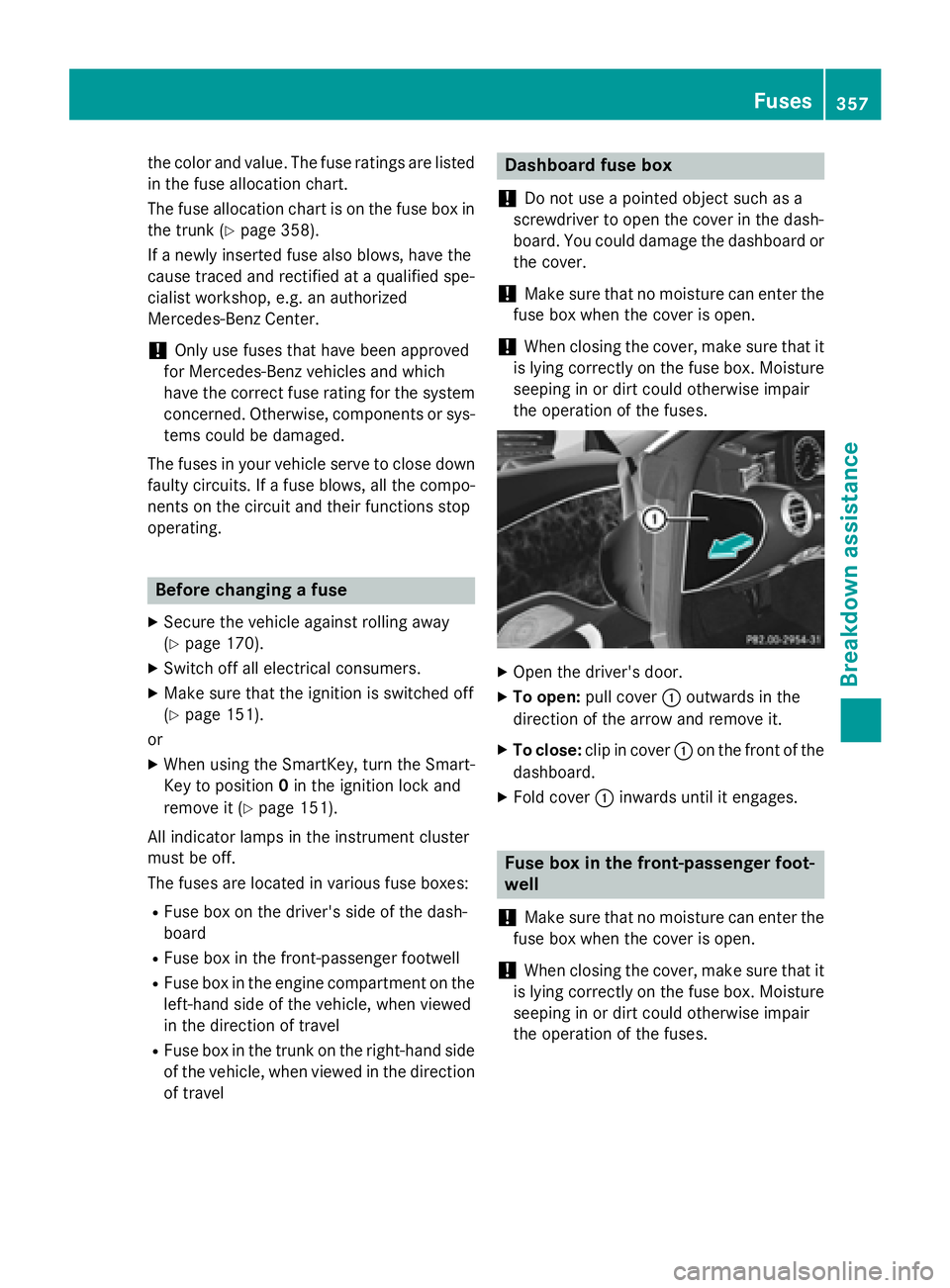
XOpen the driver's door.
XTo open: pull cover :outwards in the
direction of the arrow and remove it.
XTo close: clip in cover :on the front of the
dashboard.
XFold cover :inwards until it engages.
Fuse box in the front-passenger foot-
well
!
Make sure that no moisture can enter the
fuse box when the cover is open.
!When closing the cover, make sure that it
is lying correctly on the fuse box. Moisture
seeping in or dirt could otherwise impair
the operation of the fuses.
Fuses357
Breakdown assistance
Z
Page 360 of 410

XOpen the front-passenger door.
XFold cover:down and remove it.
Fuse box in the engine compartment
GWARNING
When the hood is open and the windshield
wipers are set in motion, you can be injured by
the wiper linkage. There is a risk of injury.
Always switch off the windshield wipers and
the ignition before opening the hood.
!Make sure that no moisture can enter the
fuse box when the cover is open.
!When closing the cover, make sure that it
is lying correctly on the fuse box. Moisture
seeping in or dirt could otherwise impair
the operation of the fuses.
XOpen the hood.
XTo open: release retaining clamps :and
remove cover ;.
XUse a dry cloth to remove any moisture
from the fuse box.
XUndo screws=on the fuse box.
XRemove fuse box cover ?forwards.
XTo close: check whether the seal is lying
correctly in cover ?.
XInsert cover?at the rear of the fuse box
into the retainer.
XFold down cover ?of the fuse box and
tighten screws =.
Fuse box in the trunk
!
Make sure that no moisture can enter the
fuse box when the cover is open.
!When closing the cover, make sure that it
is lying correctly on the fuse box. Moisture
seeping in or dirt could otherwise impair
the operation of the fuses.
358Fuses
Breakdown assistance