steering wheel MERCEDES-BENZ S430 2002 W220 Owner's Guide
[x] Cancel search | Manufacturer: MERCEDES-BENZ, Model Year: 2002, Model line: S430, Model: MERCEDES-BENZ S430 2002 W220Pages: 430, PDF Size: 20.81 MB
Page 123 of 430
120 Multifunction steering wheel, multifunction display
Te ch n i c a l
data Instruments
and controlsOperationDrivingInstrument
cluster displayPractical hints Car care Index
Note:
The displays in the multifunction display can be set to
German, English, French, Italian or Spanish language.
See “SETTINGS” – “INST. CLUSTER” – “TEXT” on
page 140 for instructions on changing the language
setting.
The displays for the audio systems (radio, CD player,
cassette player) will appear in English, regardless of the
language selected.
Wa r n i n g !
A driver’s attention to the road must always be his /
her primary focus when driving. For your safety and the safety of others, selecting
features through the multifunction steering wheel
should only be done by the driver when traffic and
road conditions permit it to be done safely. Bear in mind that at a speed of just 30 mph
(approximately 50 km/h), your vehicle is covering
a distance of approximately 50 feet (approximately
14 m) every second.
Page 124 of 430
121 Multifunction steering wheel, multifunction display
Te ch n i c a l
data Instruments
and controlsOperationDrivingInstrument
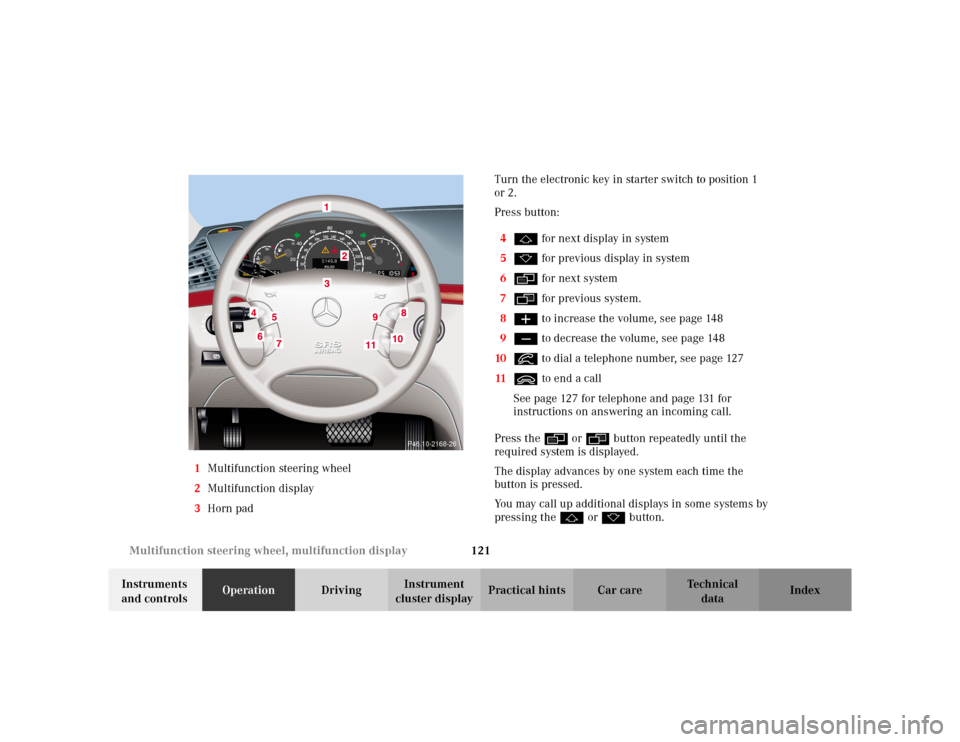
cluster displayPractical hints Car care Index 1Multifunction steering wheel
2Multifunction display
3Horn padTurn the electronic key in starter switch to position 1
or 2.
Press button:
4j for next display in system
5k for previous display in system
6è for next system
7ÿ for previous system.
8æ to increase the volume, see page 148
9ç to decrease the volume, see page 148
10í to dial a telephone number, see page 127
11ì to end a call
See page 127 for telephone and page 131 for
instructions on answering an incoming call.
Press the è or ÿ button repeatedly until the
required system is displayed.
The display advances by one system each time the
button is pressed.
You may call up additional displays in some systems by
pressing the j or k button.
P46.10-2168-26
Page 125 of 430
122 Multifunction steering wheel, multifunction display
Te ch n i c a l
data Instruments
and controlsOperationDrivingInstrument
cluster displayPractical hints Car care Index
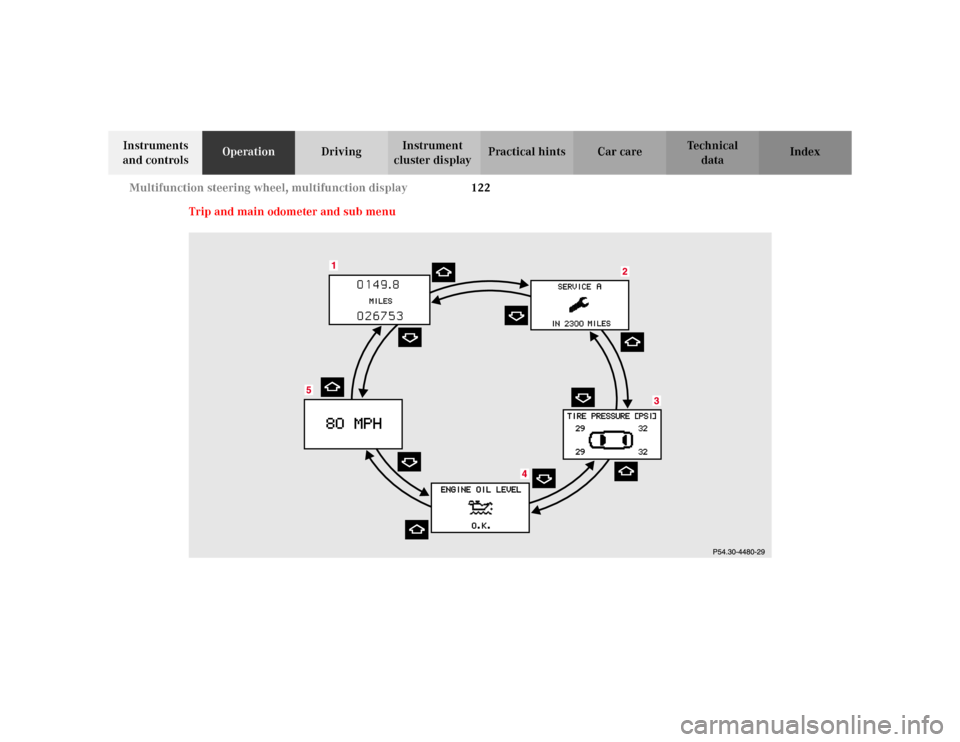
Trip and main odometer and sub menu
Page 126 of 430
123 Multifunction steering wheel, multifunction display
Te ch n i c a l
data Instruments
and controlsOperationDrivingInstrument
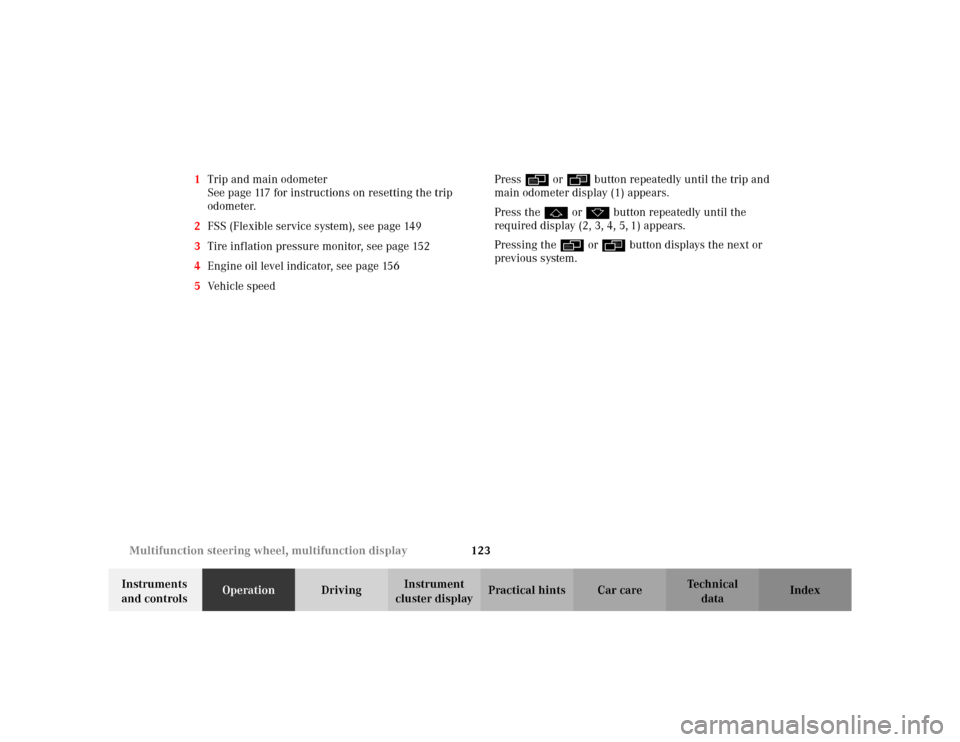
cluster displayPractical hints Car care Index 1Trip and main odometer
See page 117 for instructions on resetting the trip
odometer.
2FSS (Flexible service system), see page 149
3Tire inflation pressure monitor, see page 152
4Engine oil level indicator, see page 156
5Ve h i c l e s p e e dPress è or ÿ button repeatedly until the trip and
main odometer display (1) appears.
Press the j or k button repeatedly until the
required display (2, 3, 4, 5, 1) appears.
Pressing the è or ÿ button displays the next or
previous system.
Page 127 of 430
124 Multifunction steering wheel, multifunction display
Te ch n i c a l
data Instruments
and controlsOperationDrivingInstrument
cluster displayPractical hints Car care Index
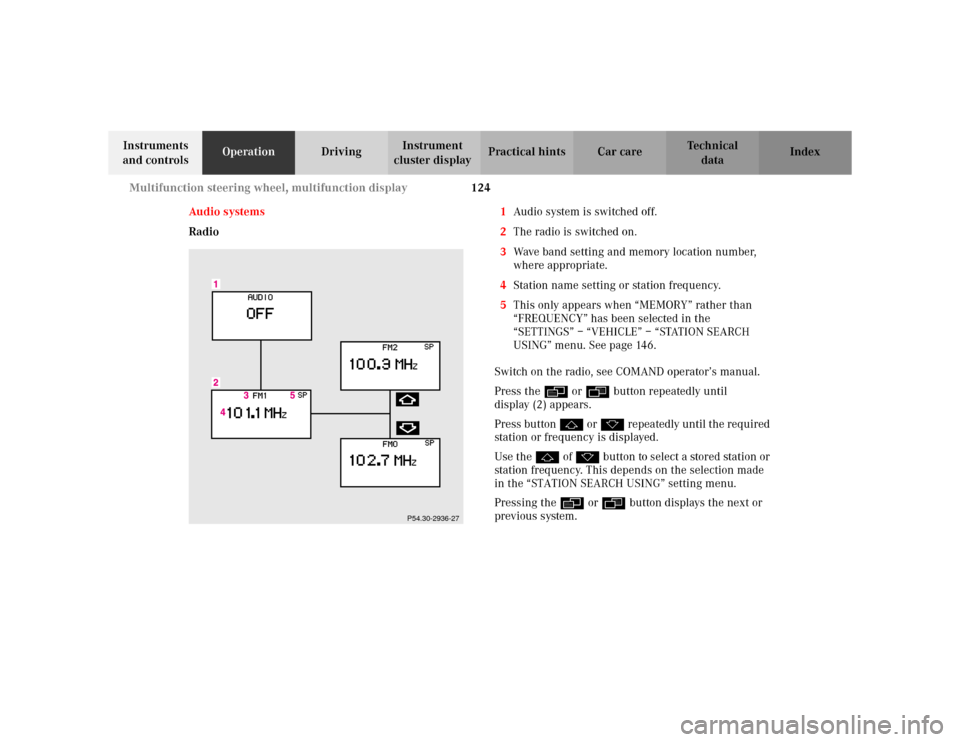
Audio systems
Radio1Audio system is switched off.
2The radio is switched on.
3Wave band setting and memory location number,
where appropriate.
4Station name setting or station frequency.
5This only appears when “MEMORY” rather than
“FREQUENCY” has been selected in the
“SETTINGS” – “VEHICLE” – “STATION SEARCH
USING” menu. See page 146.
Switch on the radio, see COMAND operator’s manual.
Press the è or ÿ button repeatedly until
display (2) appears.
Press button j or k repeatedly until the required
station or frequency is displayed.
Use the j of k button to select a stored station or
station frequency. This depends on the selection made
in the “STATION SEARCH USING” setting menu.
Pressing the è or ÿ button displays the next or
previous system.
P54.30-2936-27
Page 128 of 430
125 Multifunction steering wheel, multifunction display
Te ch n i c a l
data Instruments
and controlsOperationDrivingInstrument
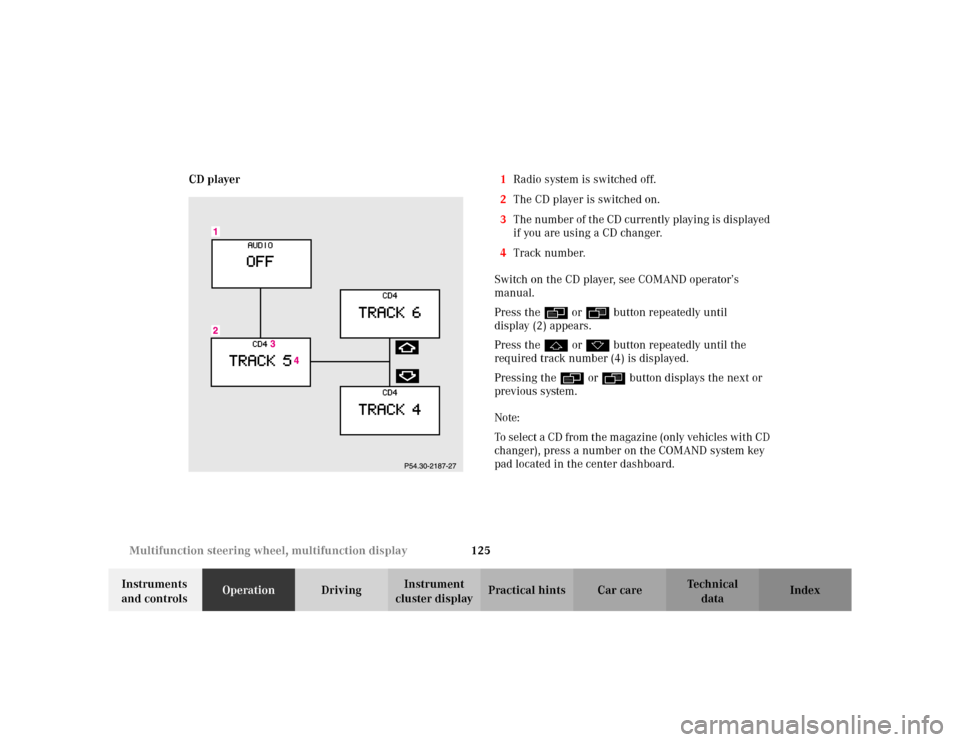
cluster displayPractical hints Car care Index CD player1Radio system is switched off.
2The CD player is switched on.
3The number of the CD currently playing is displayed
if you are using a CD changer.
4Track number.
Switch on the CD player, see COMAND operator’s
manual.
Press the è or ÿ button repeatedly until
display (2) appears.
Press the j or k button repeatedly until the
required track number (4) is displayed.
Pressing the è or ÿ button displays the next or
previous system.
Note:
To select a CD from the magazine (only vehicles with CD
changer), press a number on the COMAND system key
pad located in the center dashboard.
Page 129 of 430
126 Multifunction steering wheel, multifunction display
Te ch n i c a l
data Instruments
and controlsOperationDrivingInstrument
cluster displayPractical hints Car care Index
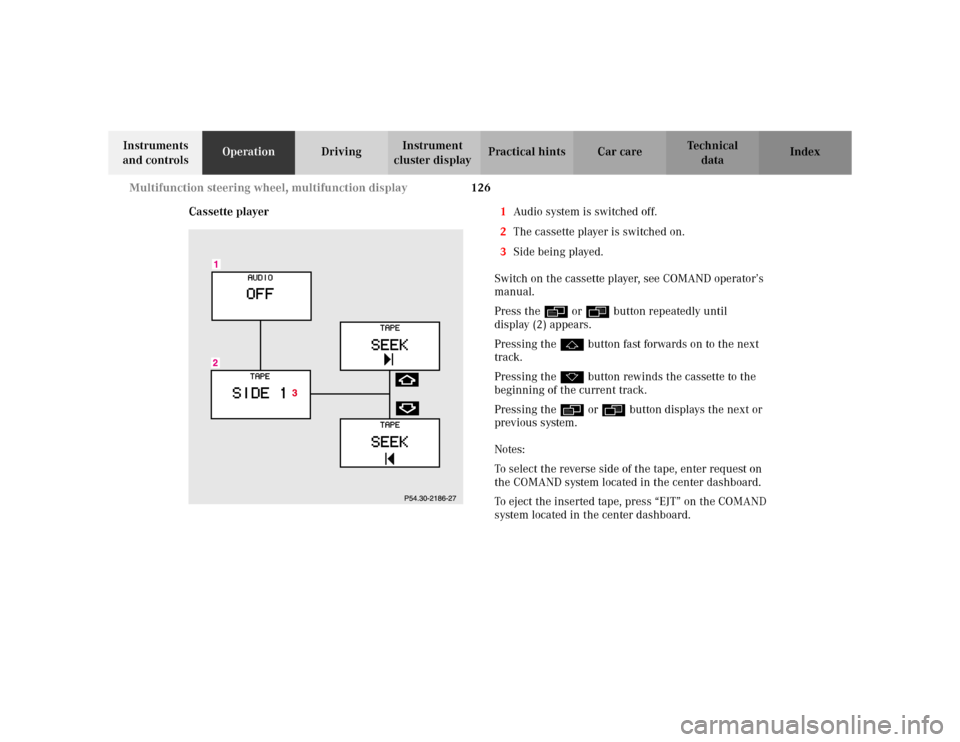
Cassette player1Audio system is switched off.
2The cassette player is switched on.
3Side being played.
Switch on the cassette player, see COMAND operator’s
manual.
Press the è or ÿ button repeatedly until
display (2) appears.
Pressing the j button fast forwards on to the next
track.
Pressing the k button rewinds the cassette to the
beginning of the current track.
Pressing the è or ÿ button displays the next or
previous system.
Notes:
To select the reverse side of the tape, enter request on
the COMAND system located in the center dashboard.
To eject the inserted tape, press “EJT” on the COMAND
system located in the center dashboard.
Page 130 of 430
127 Multifunction steering wheel, multifunction display
Te ch n i c a l
data Instruments
and controlsOperationDrivingInstrument
cluster displayPractical hints Car care Index Te l e p h o n e
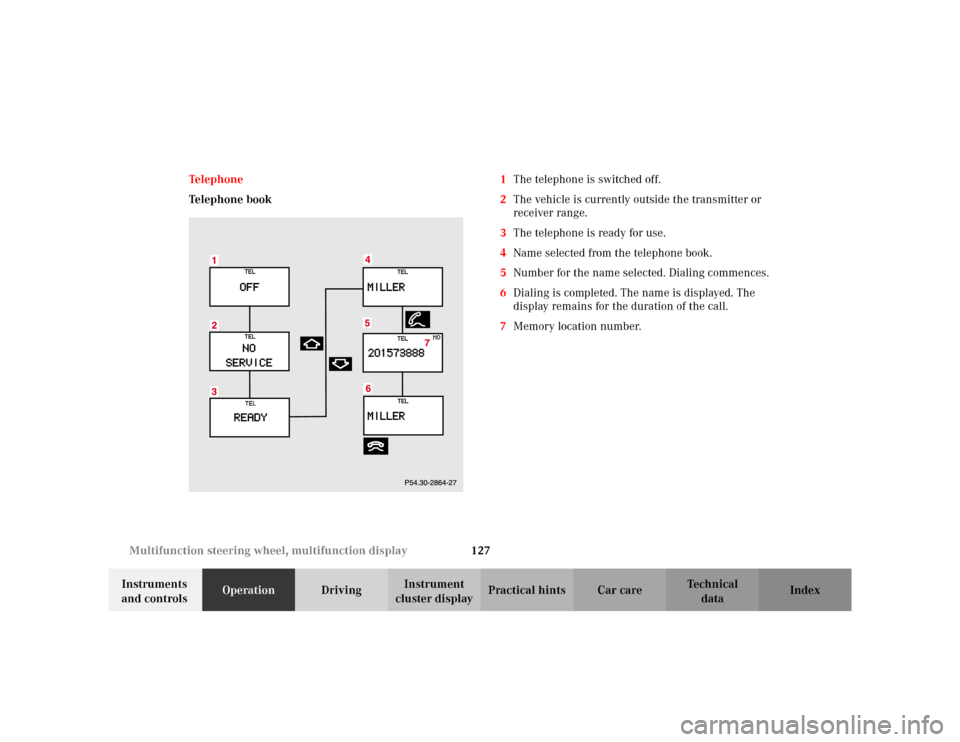
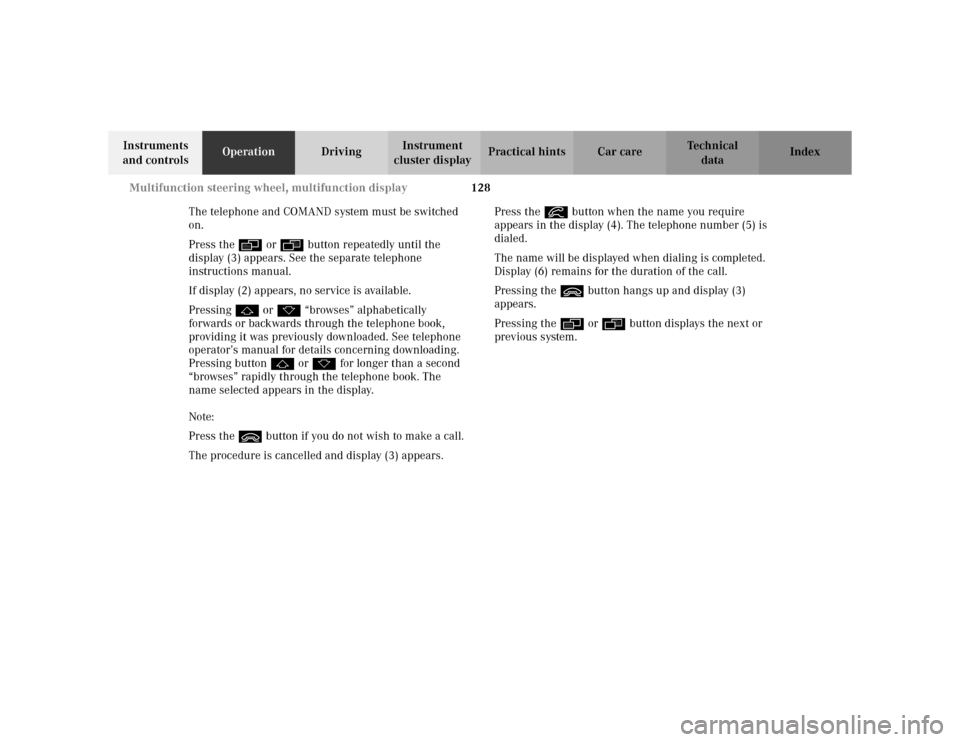
Telephone book1The telephone is switched off.
2The vehicle is currently outside the transmitter or
receiver range.
3The telephone is ready for use.
4Name selected from the telephone book.
5Number for the name selected. Dialing commences.
6Dialing is completed. The name is displayed. The
display remains for the duration of the call.
7Memory location number.
Page 131 of 430
128 Multifunction steering wheel, multifunction display
Te ch n i c a l
data Instruments
and controlsOperationDrivingInstrument
cluster displayPractical hints Car care Index
The telephone and COMAND system must be switched
on.
Press the è or ÿ button repeatedly until the
display (3) appears. See the separate telephone
instructions manual.
If display (2) appears, no service is available.
Pressing j or k “browses” alphabetically
forwards or backwards through the telephone book,
providing it was previously downloaded. See telephone
operator’s manual for details concerning downloading.
Pressing button j or k for longer than a second
“browses” rapidly through the telephone book. The
name selected appears in the display.
Note:
Press the ì button if you do not wish to make a call.
The procedure is cancelled and display (3) appears.Press the í button when the name you require
appears in the display (4). The telephone number (5) is
dialed.
The name will be displayed when dialing is completed.
Display (6) remains for the duration of the call.
Pressing the ì button hangs up and display (3)
appears.
Pressing the è or ÿ button displays the next or
previous system.
Page 132 of 430
129 Multifunction steering wheel, multifunction display
Te ch n i c a l
data Instruments
and controlsOperationDrivingInstrument
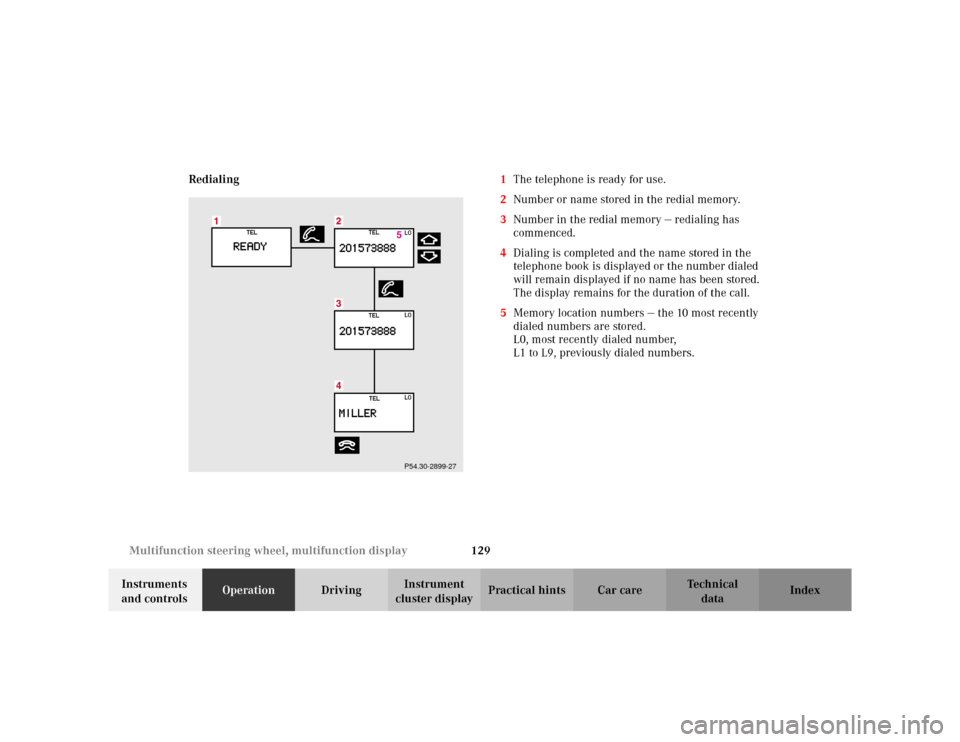
cluster displayPractical hints Car care Index Redialing1The telephone is ready for use.
2Number or name stored in the redial memory.
3Number in the redial memory — redialing has
commenced.
4Dialing is completed and the name stored in the
telephone book is displayed or the number dialed
will remain displayed if no name has been stored.
The display remains for the duration of the call.
5Memory location numbers — the 10 most recently
dialed numbers are stored.
L0, most recently dialed number,
L1 to L9, previously dialed numbers.
P54.30-2899-27