settings MERCEDES-BENZ S500 2000 W220 Owner's Manual
[x] Cancel search | Manufacturer: MERCEDES-BENZ, Model Year: 2000, Model line: S500, Model: MERCEDES-BENZ S500 2000 W220Pages: 421, PDF Size: 20.52 MB
Page 5 of 421

2 Contents
Infant and child restraint
systems ....................................... 102
Steering wheel adjustment .......... 105
Rear view mirrors .......................... 106
Memory function ............................111
Instrument cluster ..........................114
Multifunction steering wheel,
multifunction display ............... 120
Trip and main odometer,
FSS, tire inflation pressure
monitor and engine oil level
indicator ..................................... 124
Audio systems ............................. 125
Radio ............................................ 125
CD player ..................................... 126
Cassette player ........................... 127
Telephone ........................................ 128
Telephone book .......................... 128
Redialing ..................................... 130
Incoming call .............................. 132
Navigation system .......................... 133
Distronic (DTR) ............................... 134
Trip computer ................................. 135Malfunction / warning
message memory ......................136
Individual settings .........................138
Setting the audio volume ............. 146
Flexible service system
(FSS) ........................................... 147
Tire inflation
pressure monitor .......................150
Engine oil level indicator ..............154
Engine oil consumption ................155
Exterior lamp switch ......................156
Night security illumination ..........158
Headlamp cleaning system ...........159
Combination switch .......................160
Hazard warning flasher
switch ..........................................163
Automatic climate control .............164
Display and controls ..................166
Basic setting ................................168
Special Settings ..........................169
Activated charcoal filter ........... 172
Economy mode ........................... 173
Residual engine heat
utilization .....................................174Switching the automatic
climate control on and off ......... 175
Front center console storage
compartment ventilation .......... 175
Front center console storage
compartment ventilation .......... 175
Rear passenger compartment
climate control .......................... 177
Power windows ............................... 181
Sliding/pop-up roof ....................... 184
Interior lighting ............................. 187
Rear window sunshade ................. 190
Rear door window sunshade ........ 191
Sun visors ....................................... 191
Vanity mirrors ................................ 192
Interior ............................................ 193
Storage compartments and
armrests ..................................... 193
Glove box ..................................... 194
Cup holder ...................................... 199
Ashtrays .......................................... 201
Lighter .............................................203
Parcel net in front
passenger footwell ....................204
Page 23 of 421
20 Instruments and controls
Te ch n ica l
data Instruments
and controlsOperation DrivingInstrument
cluster displayPractical hints Car care Index
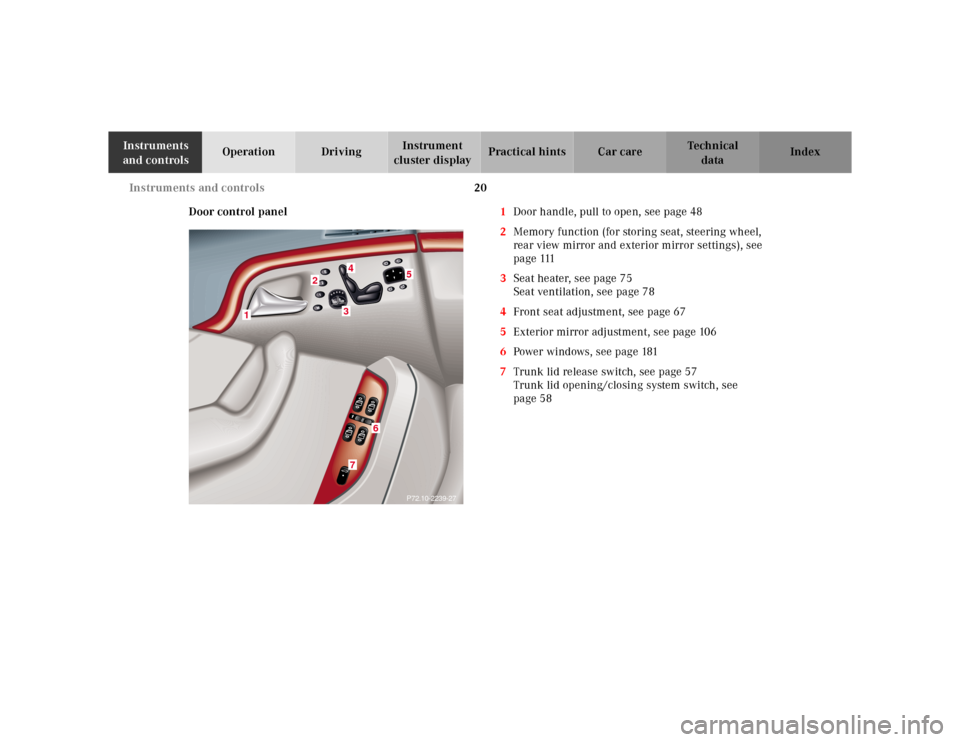
Door control panel1Door handle, pull to open, see page 48
2Memory function (for storing seat, steering wheel,
rear view mirror and exterior mirror settings), see
page 111
3Seat heater, see page 75
Seat ventilation, see page 78
4Front seat adjustment, see page 67
5Exterior mirror adjustment, see page 106
6Power windows, see page 181
7Trunk lid release switch, see page 57
Trunk lid opening/closing system switch, see
page 58
34
5
2
1
P72.10-2239-27
3
3
3
3
37
6
Page 30 of 421
27 Contents - Operation
Te ch n ica l
data Instruments
and controlsOperationDrivingInstrument
cluster displayPractical hints Car care Index Radio ............................................ 125
CD player ..................................... 126
Cassette player ........................... 127
Telephone ........................................ 128
Telephone book .......................... 128
Redialing ..................................... 130
Incoming call .............................. 132
Navigation system .......................... 133
Distronic (DTR) ............................... 134
Trip computer ................................. 135
Malfunction / warning
message memory ...................... 136
Individual settings ......................... 138
Setting the audio volume .............. 146
Flexible service system
(FSS) ............................................ 147
Tire inflation
pressure monitor ...................... 150
Engine oil level indicator .............. 154
Engine oil consumption ................ 155
Exterior lamp switch ..................... 156Night security illumination ..........158
Headlamp cleaning system ...........159
Combination switch .......................160
Hazard warning flasher
switch ..........................................163
Automatic climate control .............164
Display and controls ..................166
Basic setting ................................168
Special Settings ..........................169
Activated charcoal filter ........... 172
Economy mode ........................... 173
Residual engine heat
utilization .....................................174
Switching the automatic
climate control on and off ........ 175
Front center console storage
compartment ventilation .......... 175
Front center console storage
compartment ventilation .......... 175
Rear passenger compartment
climate control .......................... 177Power windows ............................... 181
Sliding/pop-up roof ....................... 184
Interior lighting ............................. 187
Rear window sunshade ................. 190
Rear door window sunshade ........ 191
Sun visors ....................................... 191
Vanity mirrors ................................ 192
Interior ............................................ 193
Storage compartments and
armrests ..................................... 193
Glove box ..................................... 194
Cup holder ...................................... 199
Ashtrays .......................................... 201
Lighter .............................................203
Parcel net in front
passenger footwell ....................204
Parcel net in trunk ........................204
Telephone, general ........................205
Garage door opener .......................206
Infrared reflecting
windshield ................................. 210
Page 55 of 421
52 Central locking system
Te ch n ica l
data Instruments
and controlsOperationDrivingInstrument
cluster displayPractical hints Car care Index
Automatic central locking
With the automatic central locking system activated, the
doors and trunk are locked at vehicle speeds of
approximately 9 mph (15 km / h) or more. The fuel filler
flap remains unlocked.
The automatic central locking function can be switched
on or off. See page 138 for “Individual settings”.
Notes:
If doors are unlocked with the central locking switch
after activating the automatic central locking, and
neither door is opened, then the doors remain unlocked
even at vehicle speeds of approximately 9 mph (15 km /
h) or more.
If a door is opened from the inside at speeds of
approximately 9mph (15km/h) or less with the
automatic central locking activated, the door will again
be automatically locked at speeds of approximately
9 mph (15 km / h) or more.Important!
When towing the vehicle, or with the vehicle on a
dynamometer test stand, please, note the following:
With the automatic central locking activated and the
electronic key in starter switch position 2 (vehicles with
KEYLESS-GO: operation position, see page 228), the
vehicle doors will lock if the left front wheel as well as
the right rear wheel spin at vehicle speeds of
approximately 9 mph (15 km / h) or more.
To prevent the vehicle door locks from locking,
deactivate the automatic central locking. See page 138
for “Individual settings”.
Emergency unlocking in case of accident
The doors unlock automatically a short time after an
accident in which an airbag or emergency tensioning
retractor deploys (this is intended to aid rescue and
exit).
Page 77 of 421
74 Seats
Te ch n ica l
data Instruments
and controlsOperationDrivingInstrument
cluster displayPractical hints Car care Index
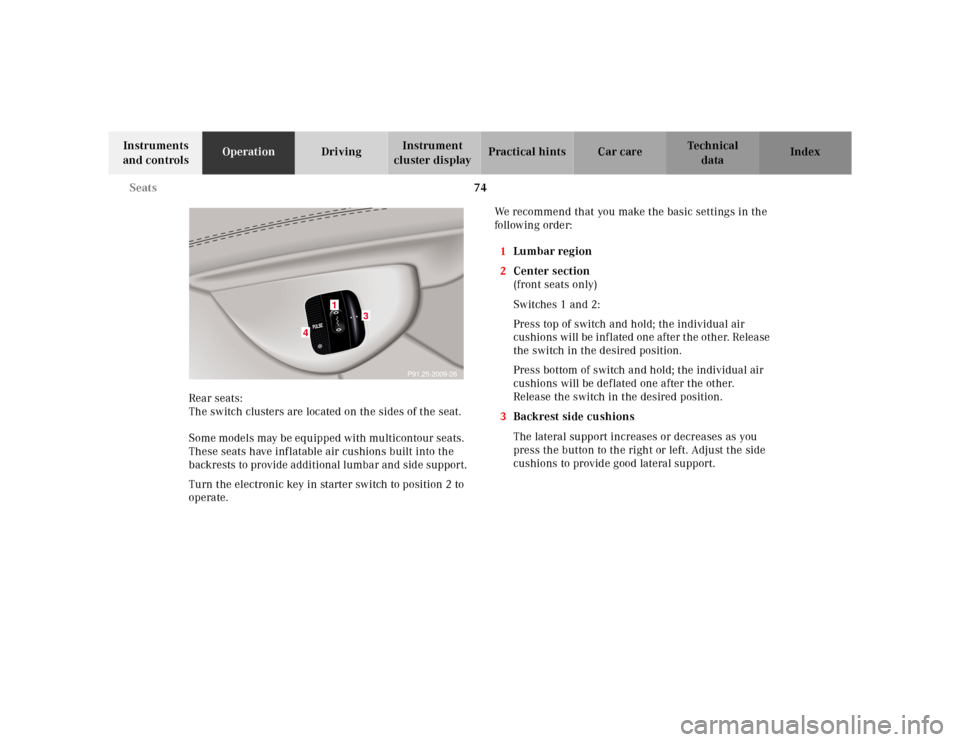
Rear seats:
The switch clusters are located on the sides of the seat.
Some models may be equipped with multicontour seats.
These seats have inflatable air cushions built into the
backrests to provide additional lumbar and side support.
Turn the electronic key in starter switch to position 2 to
operate.We recommend that you make the basic settings in the
follow ing orde r:
1Lu mb a r region
2Center section
(front seats only)
Switches 1 and 2:
Press top of switch and hold; the individual air
cushions will be inflated one after the other. Release
the switch in the desired position.
Press bottom of switch and hold; the individual air
cushions will be deflated one after the other.
Release the switch in the desired position.
3Backrest side cushions
The lateral support increases or decreases as you
press the button to the right or left. Adjust the side
cushions to provide good lateral support.
P91.25-2009-26
31
4
3
Page 119 of 421
116 Instrument cluster
Te ch n ica l
data Instruments
and controlsOperationDrivingInstrument
cluster displayPractical hints Car care Index
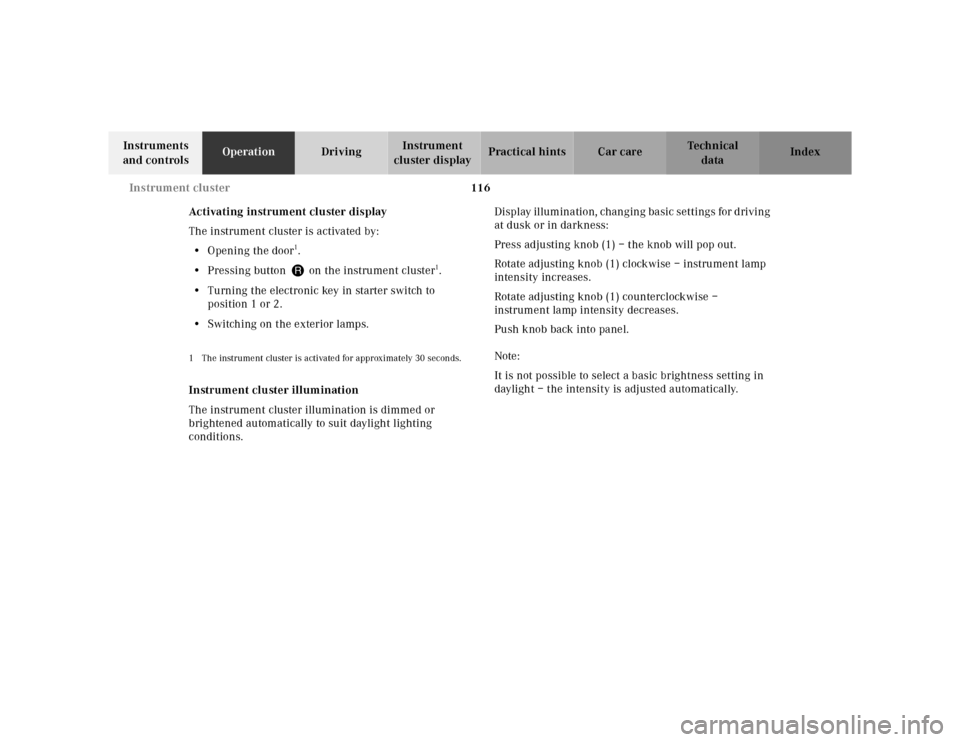
Activating instrument cluster display
The instrument cluster is activated by:
•Opening the door
1.
•Pressing button Jon the instrument cluster
1.
•Turning the electronic key in starter switch to
position 1 or 2.
•Switching on the exterior lamps.
1 The instrument cluster is activated for approximately 30 seconds.Instrument cluster illumination
The instrument cluster illumination is dimmed or
brightened automatically to suit daylight lighting
conditions.Display illumination, changing basic settings for driving
at dusk or in darkness:
Press adjusting knob (1) – the knob will pop out.
Rotate adjusting knob (1) clockwise – instrument lamp
intensity increases.
Rotate adjusting knob (1) counterclockwise –
instrument lamp intensity decreases.
Push knob back into panel.
Note:
It is not possible to select a basic brightness setting in
daylight – the intensity is adjusted automatically.
Page 124 of 421
121 Multifunction steering wheel, multifunction display
Te ch n ica l
data Instruments
and controlsOperationDrivingInstrument
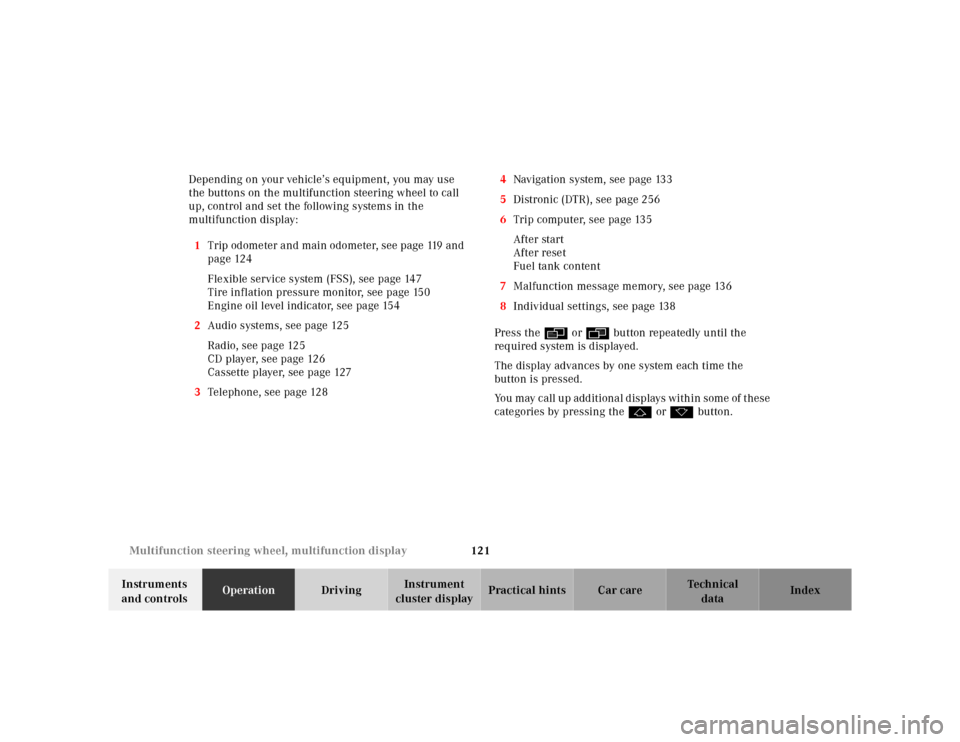
cluster displayPractical hints Car care Index Depending on your vehicle’s equipment, you may use
the buttons on the multifunction steering wheel to call
up, control and set the following systems in the
multifunction display:
1Trip odometer and main odometer, see page 119 and
page 124
Flexible service system (FSS), see page 147
Tire inflation pressure monitor, see page 150
Engine oil level indicator, see page 154
2Audio systems, see page 125
Radio, see page 125
CD player, see page 126
Cassette player, see page 127
3Telephone, see page 1284Navigation system, see page 133
5Distronic (DTR), see page 256
6Trip computer, see page 135
After start
After reset
Fuel tank content
7Malfunction message memory, see page 136
8Individual settings, see page 138
Press the è or ÿ button repeatedly until the
required system is displayed.
The display advances by one system each time the
button is pressed.
You may call up additional displays within some of these
categories by pressing the j or k button.
Page 125 of 421
122 Multifunction steering wheel, multifunction display
Te ch n ica l
data Instruments
and controlsOperationDrivingInstrument
cluster displayPractical hints Car care Index
Note:
The displays in the multifunction display can be set to
German, English, French, Italian or Spanish language.
See the “TEXT” individual setting on page 138 for
instructions on changing the language setting.
The displays for the audio systems (radio, CD player,
cassette player) will appear in English, regardless of the
language selected.
Wa r n i n g !
A driver’s attention to the road must always be his /
her primary focus when driving. For your safety and the safety of others, selecting
features through the multifunction steering wheel
should only be done by the driver when traffic and
road conditions permit it to be done safely.
Programming individual settings in the system can
only be made while the vehicle is at standstill.
Page 128 of 421
125 Multifunction steering wheel, multifunction display
Te ch n ica l
data Instruments
and controlsOperationDrivingInstrument
cluster displayPractical hints Car care Index Audio systems
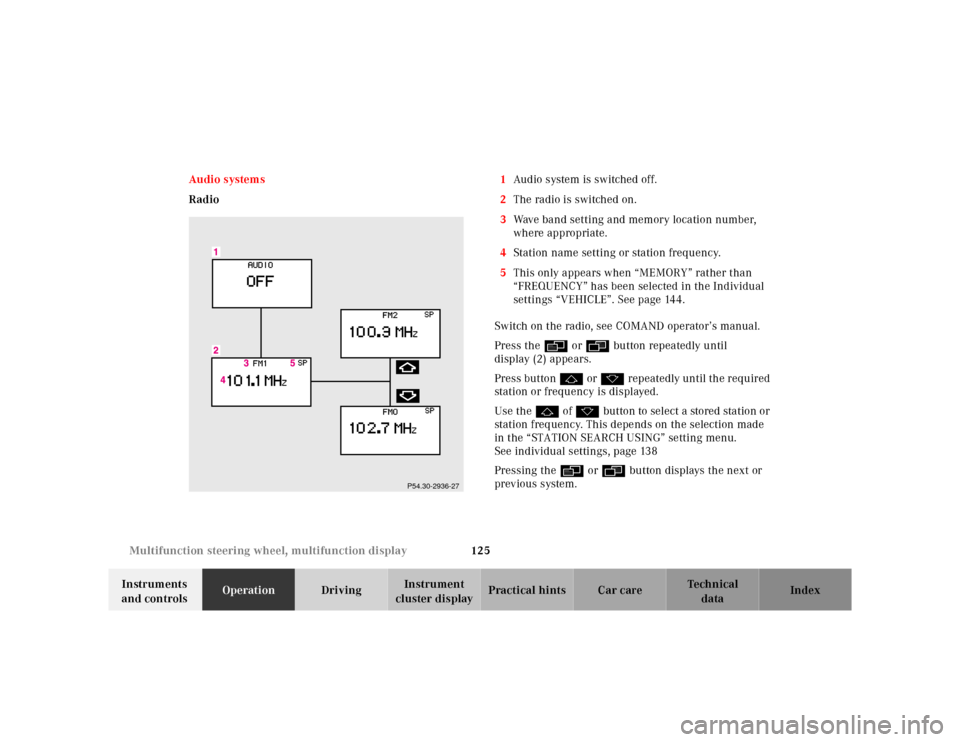
Radio1Audio system is switched off.
2The radio is switched on.
3Wave band setting and memory location number,
where appropriate.
4Station name setting or station frequency.
5This only appears when “MEMORY” rather than
“FREQUENCY” has been selected in the Individual
settings “VEHICLE”. See page 144.
Switch on the radio, see COMAND operator’s manual.
Press the è or ÿ button repeatedly until
display (2) appears.
Press button j or k repeatedly until the required
station or frequency is displayed.
Use the j of k button to select a stored station or
station frequency. This depends on the selection made
in the “STATION SEARCH USING” setting menu.
See individual settings, page 138
Pressing the è or ÿ button displays the next or
previous system.
P54.30-2936-27
Page 141 of 421
138 Multifunction steering wheel, multifunction display
Te ch n ica l
data Instruments
and controlsOperationDrivingInstrument
cluster displayPractical hints Car care Index
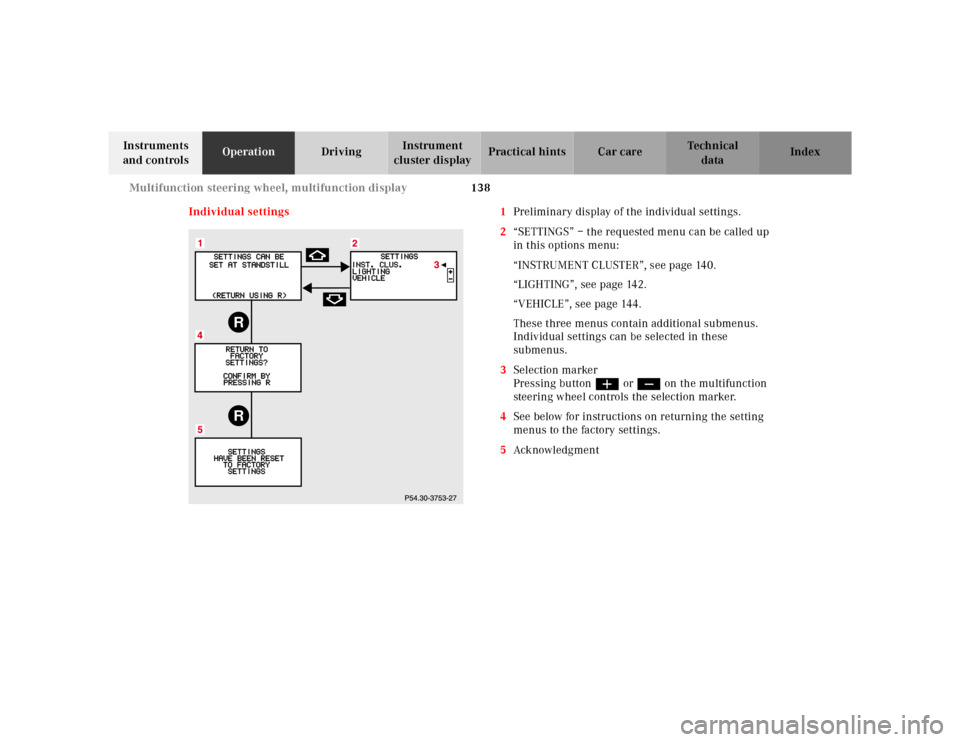
Individual settings 1Preliminary display of the individual settings.
2“SETTINGS” – the requested menu can be called up
in this options menu:
“INSTRUMENT CLUSTER”, see page 140.
“LIGHTING”, see page 142.
“VEHICLE”, see page 144.
These three menus contain additional submenus.
Individual settings can be selected in these
submenus.
3Selection marker
Pressing buttonæ orç on the multifunction
steering wheel controls the selection marker.
4See below for instructions on returning the setting
menus to the factory settings.
5Ack nowl edg ment
RR