radio MERCEDES-BENZ S63AMG 2010 W221 Workshop Manual
[x] Cancel search | Manufacturer: MERCEDES-BENZ, Model Year: 2010, Model line: S63AMG, Model: MERCEDES-BENZ S63AMG 2010 W221Pages: 548, PDF Size: 12.48 MB
Page 461 of 548
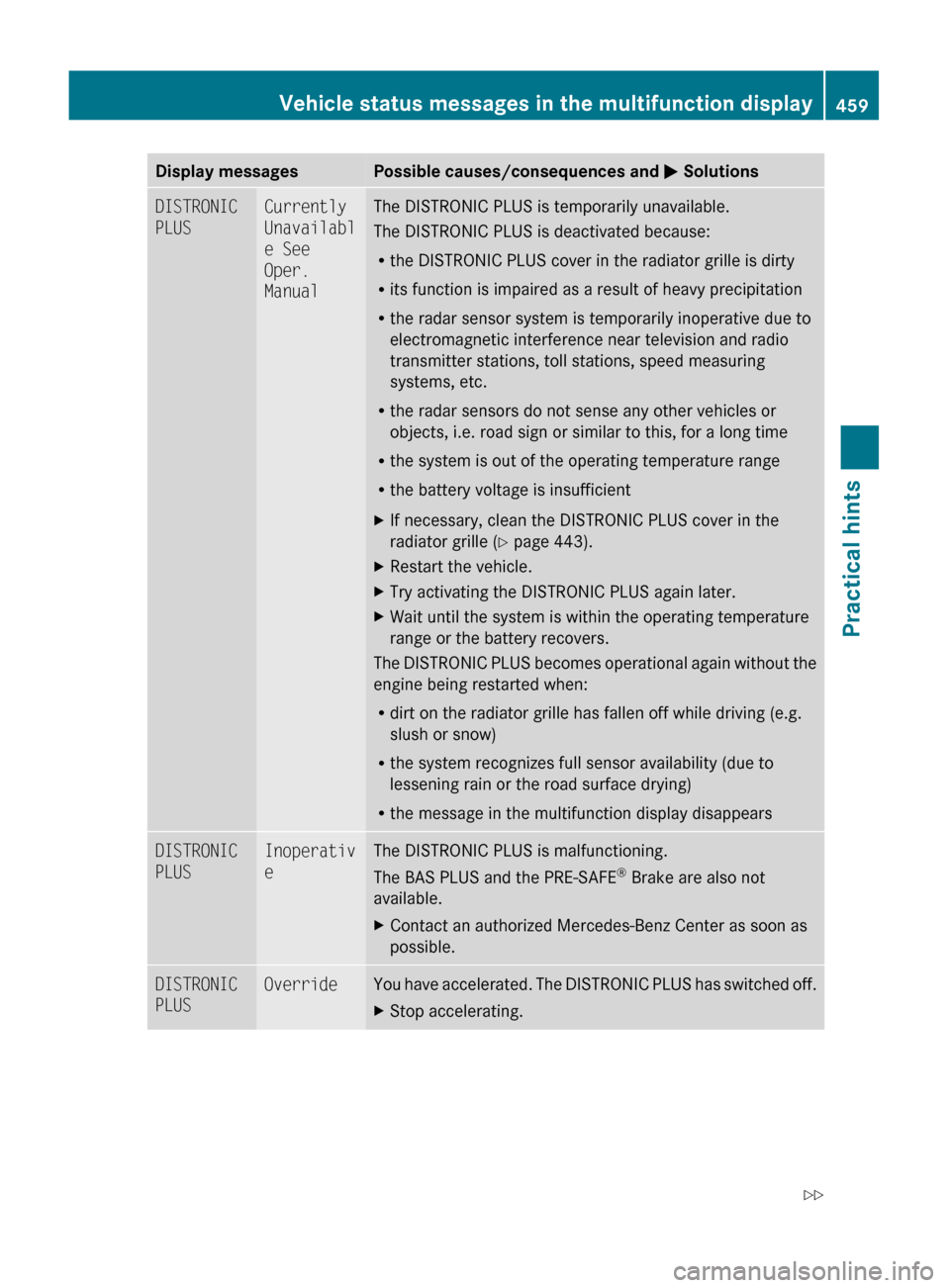
Display messagesPossible causes/consequences and M SolutionsDISTRONIC
PLUSCurrently
Unavailabl
e See
Oper.
ManualThe DISTRONIC PLUS is temporarily unavailable.
The DISTRONIC PLUS is deactivated because:
R the DISTRONIC PLUS cover in the radiator grille is dirty
R its function is impaired as a result of heavy precipitation
R the radar sensor system is temporarily inoperative due to
electromagnetic interference near television and radio
transmitter stations, toll stations, speed measuring
systems, etc.
R the radar sensors do not sense any other vehicles or
objects, i.e. road sign or similar to this, for a long time
R the system is out of the operating temperature range
R the battery voltage is insufficientXIf necessary, clean the DISTRONIC PLUS cover in the
radiator grille ( Y page 443).XRestart the vehicle.XTry activating the DISTRONIC PLUS again later.XWait until the system is within the operating temperature
range or the battery recovers.
The DISTRONIC PLUS becomes operational again without the
engine being restarted when:
R dirt on the radiator grille has fallen off while driving (e.g.
slush or snow)
R the system recognizes full sensor availability (due to
lessening rain or the road surface drying)
R the message in the multifunction display disappears
DISTRONIC
PLUSInoperativ
eThe DISTRONIC PLUS is malfunctioning.
The BAS PLUS and the PRE-SAFE ®
Brake are also not
available.XContact an authorized Mercedes-Benz Center as soon as
possible.DISTRONIC
PLUSOverrideYou have accelerated. The DISTRONIC PLUS has switched off.XStop accelerating.Vehicle status messages in the multifunction display459Practical hints221_AKB; 6; 20, en-USd2ugruen,Version: 2.11.8.12009-09-24T13:28:17+02:00 - Seite 459Z
Page 462 of 548
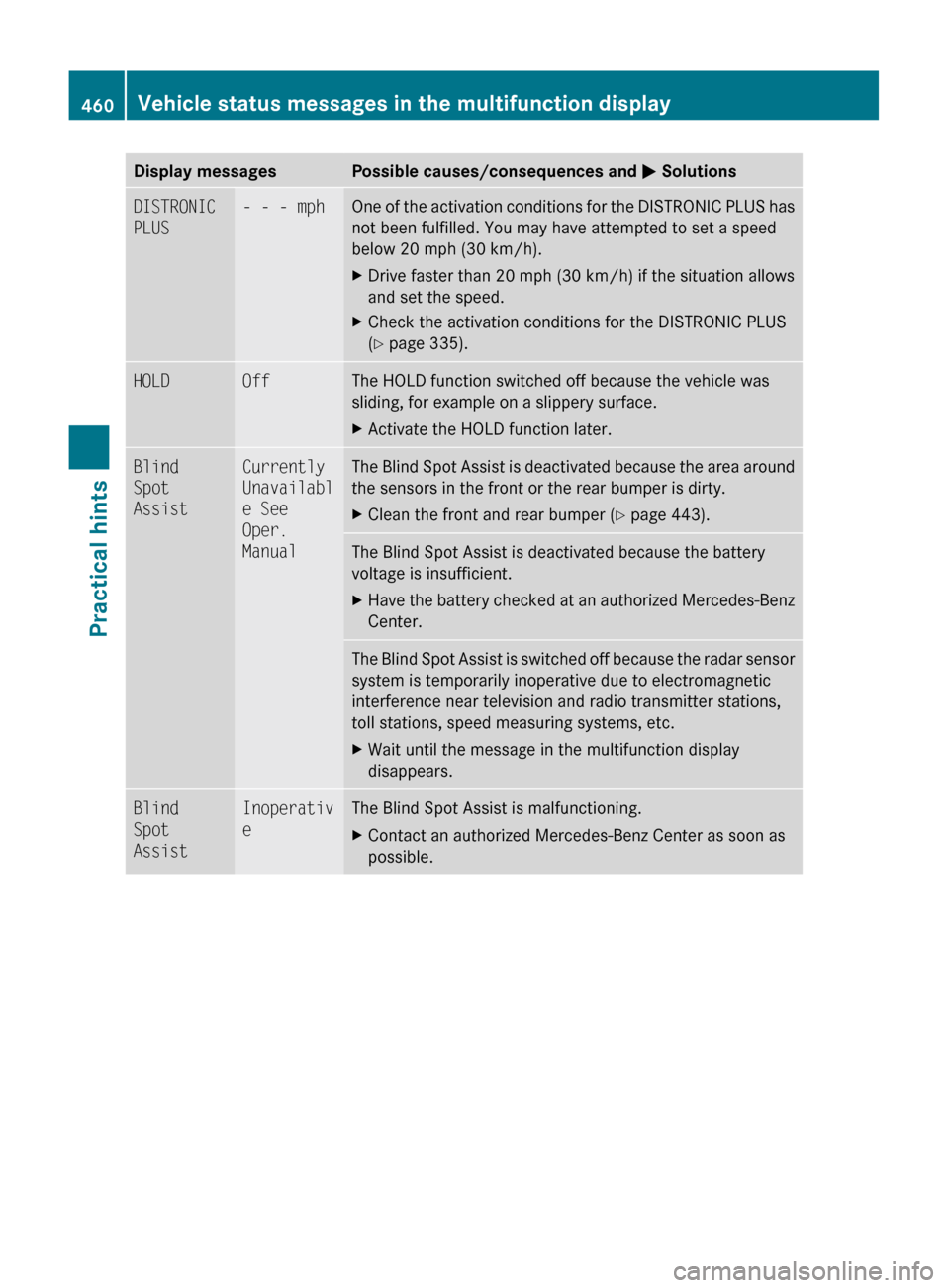
Display messagesPossible causes/consequences and M SolutionsDISTRONIC
PLUS- - - mphOne of the activation conditions for the DISTRONIC PLUS has
not been fulfilled. You may have attempted to set a speed
below 20 mph (30 km/h).XDrive faster than 20 mph (30 km/h) if the situation allows
and set the speed.XCheck the activation conditions for the DISTRONIC PLUS
( Y page 335).HOLDOffThe HOLD function switched off because the vehicle was
sliding, for example on a slippery surface.XActivate the HOLD function later.Blind
Spot
AssistCurrently
Unavailabl
e See
Oper.
ManualThe Blind Spot Assist is deactivated because the area around
the sensors in the front or the rear bumper is dirty.XClean the front and rear bumper ( Y page 443).The Blind Spot Assist is deactivated because the battery
voltage is insufficient.XHave the battery checked at an authorized Mercedes-Benz
Center.The Blind Spot Assist is switched off because the radar sensor
system is temporarily inoperative due to electromagnetic
interference near television and radio transmitter stations,
toll stations, speed measuring systems, etc.XWait until the message in the multifunction display
disappears.Blind
Spot
AssistInoperativ
eThe Blind Spot Assist is malfunctioning.XContact an authorized Mercedes-Benz Center as soon as
possible.460Vehicle status messages in the multifunction displayPractical hints
221_AKB; 6; 20, en-USd2ugruen,Version: 2.11.8.12009-09-24T13:28:17+02:00 - Seite 460
Page 463 of 548
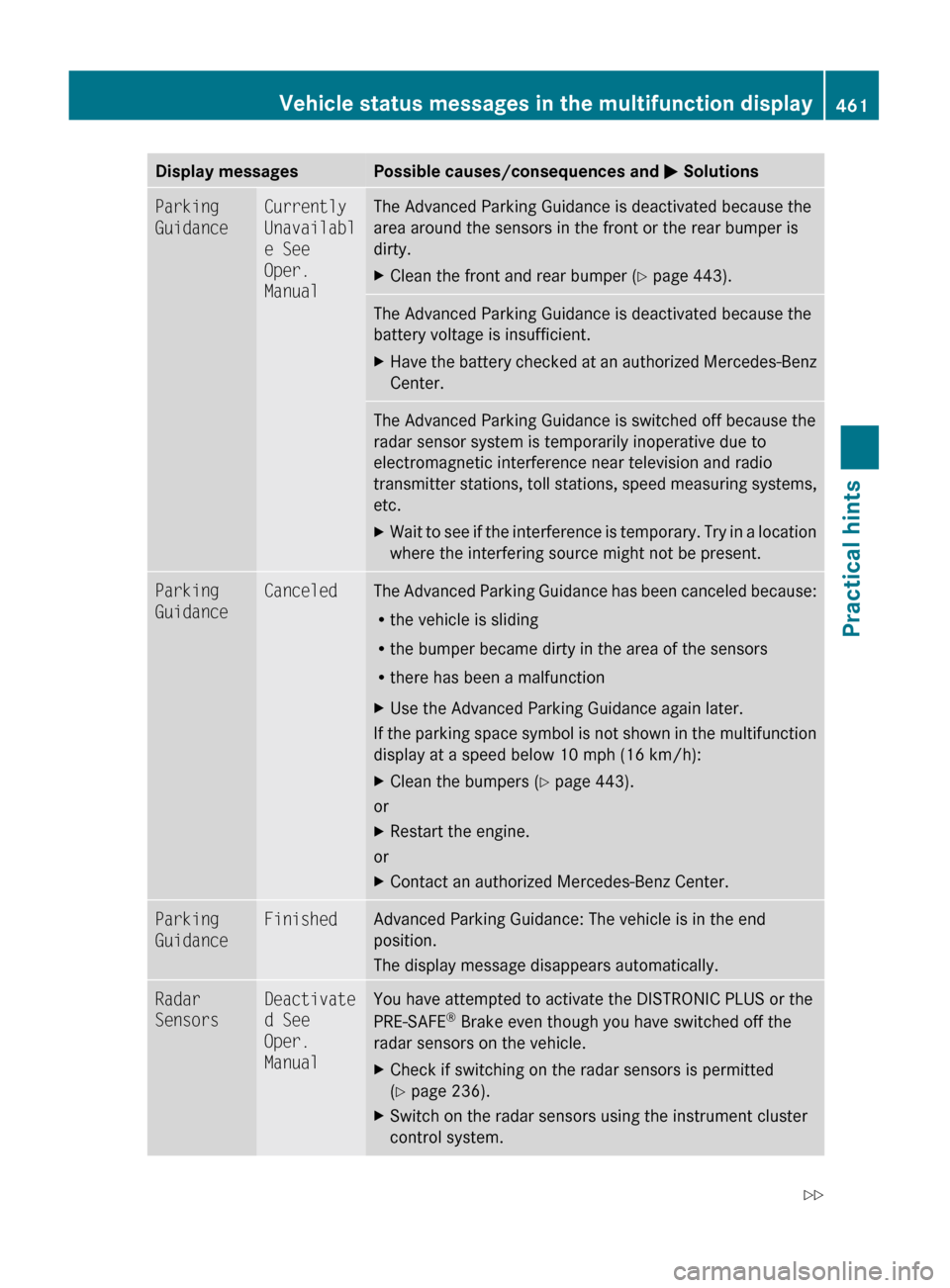
Display messagesPossible causes/consequences and M SolutionsParking
GuidanceCurrently
Unavailabl
e See
Oper.
ManualThe Advanced Parking Guidance is deactivated because the
area around the sensors in the front or the rear bumper is
dirty.XClean the front and rear bumper ( Y page 443).The Advanced Parking Guidance is deactivated because the
battery voltage is insufficient.XHave the battery checked at an authorized Mercedes-Benz
Center.The Advanced Parking Guidance is switched off because the
radar sensor system is temporarily inoperative due to
electromagnetic interference near television and radio
transmitter stations, toll stations, speed measuring systems,
etc.XWait to see if the interference is temporary. Try in a location
where the interfering source might not be present.Parking
GuidanceCanceledThe Advanced Parking Guidance has been canceled because:
R the vehicle is sliding
R the bumper became dirty in the area of the sensors
R there has been a malfunctionXUse the Advanced Parking Guidance again later.
If the parking space symbol is not shown in the multifunction
display at a speed below 10 mph (16 km/h):
XClean the bumpers ( Y page 443).
or
XRestart the engine.
or
XContact an authorized Mercedes-Benz Center.Parking
GuidanceFinishedAdvanced Parking Guidance: The vehicle is in the end
position.
The display message disappears automatically.Radar
SensorsDeactivate
d See
Oper.
ManualYou have attempted to activate the DISTRONIC PLUS or the
PRE-SAFE ®
Brake even though you have switched off the
radar sensors on the vehicle.XCheck if switching on the radar sensors is permitted
( Y page 236).XSwitch on the radar sensors using the instrument cluster
control system.Vehicle status messages in the multifunction display461Practical hints221_AKB; 6; 20, en-USd2ugruen,Version: 2.11.8.12009-09-24T13:28:17+02:00 - Seite 461Z
Page 467 of 548
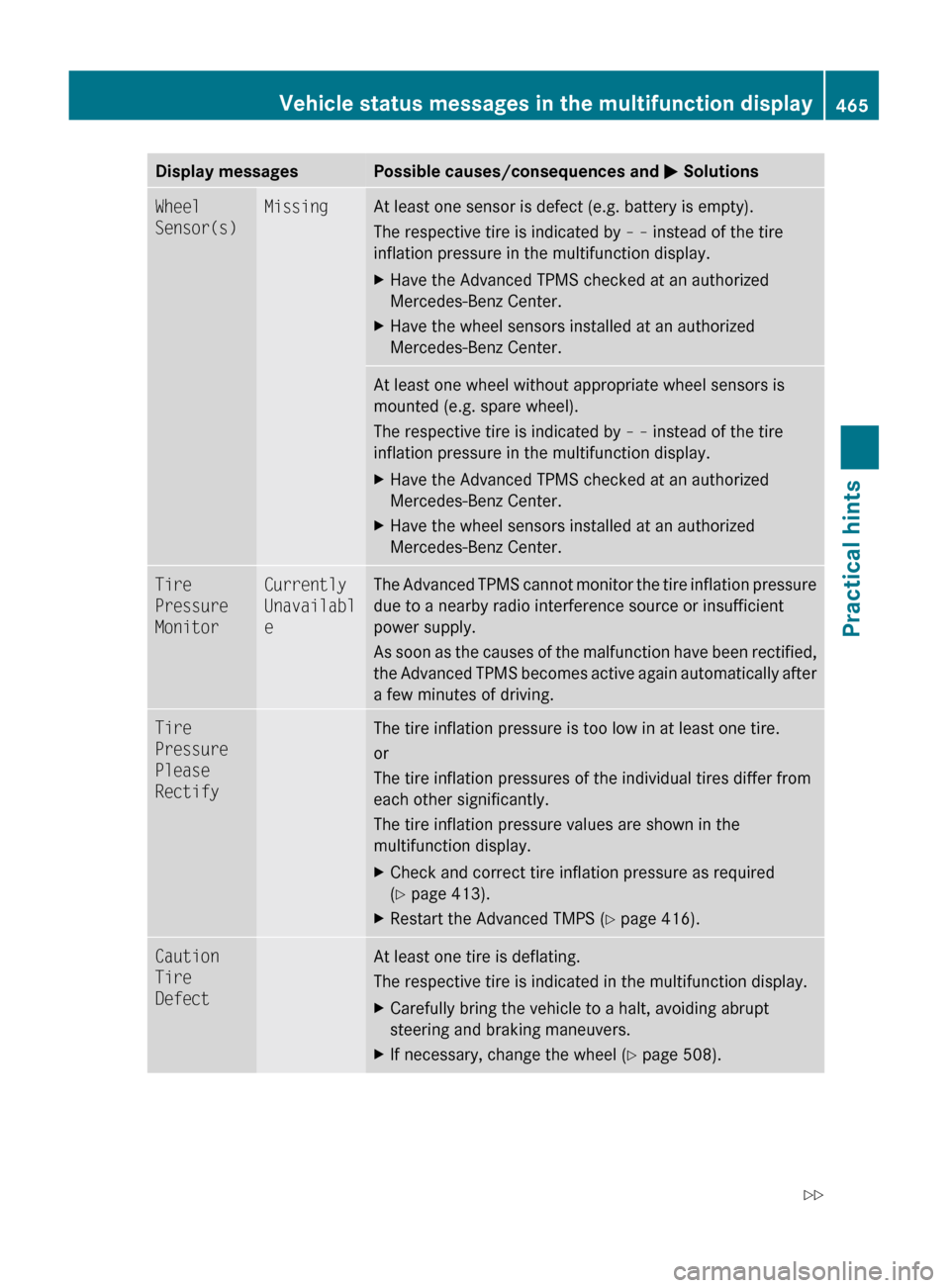
Display messagesPossible causes/consequences and M SolutionsWheel
Sensor(s)MissingAt least one sensor is defect (e.g. battery is empty).
The respective tire is indicated by – – instead of the tire
inflation pressure in the multifunction display.XHave the Advanced TPMS checked at an authorized
Mercedes-Benz Center.XHave the wheel sensors installed at an authorized
Mercedes-Benz Center.At least one wheel without appropriate wheel sensors is
mounted (e.g. spare wheel).
The respective tire is indicated by – – instead of the tire
inflation pressure in the multifunction display.XHave the Advanced TPMS checked at an authorized
Mercedes-Benz Center.XHave the wheel sensors installed at an authorized
Mercedes-Benz Center.Tire
Pressure
MonitorCurrently
Unavailabl
eThe Advanced TPMS cannot monitor the tire inflation pressure
due to a nearby radio interference source or insufficient
power supply.
As soon as the causes of the malfunction have been rectified,
the Advanced TPMS becomes active again automatically after
a few minutes of driving.Tire
Pressure
Please
RectifyThe tire inflation pressure is too low in at least one tire.
or
The tire inflation pressures of the individual tires differ from
each other significantly.
The tire inflation pressure values are shown in the
multifunction display.XCheck and correct tire inflation pressure as required
( Y page 413).XRestart the Advanced TMPS ( Y page 416).Caution
Tire
DefectAt least one tire is deflating.
The respective tire is indicated in the multifunction display.XCarefully bring the vehicle to a halt, avoiding abrupt
steering and braking maneuvers.XIf necessary, change the wheel ( Y page 508).Vehicle status messages in the multifunction display465Practical hints221_AKB; 6; 20, en-USd2ugruen,Version: 2.11.8.12009-09-24T13:28:17+02:00 - Seite 465Z
Page 481 of 548
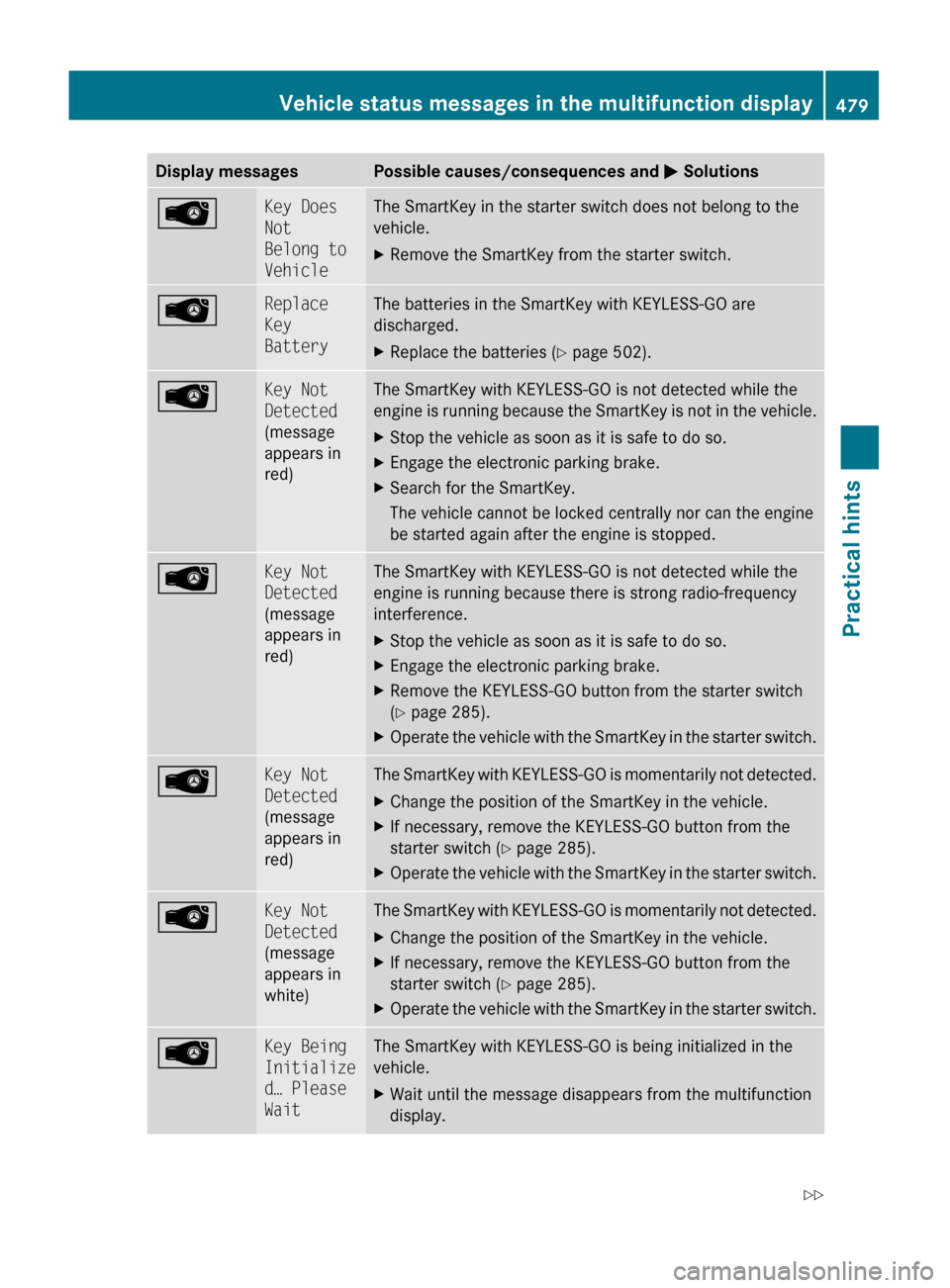
Display messagesPossible causes/consequences and M SolutionsÂKey Does
Not
Belong to
VehicleThe SmartKey in the starter switch does not belong to the
vehicle.XRemove the SmartKey from the starter switch.ÂReplace
Key
BatteryThe batteries in the SmartKey with KEYLESS-GO are
discharged.XReplace the batteries ( Y page 502).ÂKey Not
Detected
(message
appears in
red)The SmartKey with KEYLESS-GO is not detected while the
engine is running because the SmartKey is not in the vehicle.XStop the vehicle as soon as it is safe to do so.XEngage the electronic parking brake.XSearch for the SmartKey.
The vehicle cannot be locked centrally nor can the engine
be started again after the engine is stopped.ÂKey Not
Detected
(message
appears in
red)The SmartKey with KEYLESS-GO is not detected while the
engine is running because there is strong radio-frequency
interference.XStop the vehicle as soon as it is safe to do so.XEngage the electronic parking brake.XRemove the KEYLESS-GO button from the starter switch
( Y page 285).XOperate the vehicle with the SmartKey in the starter switch.ÂKey Not
Detected
(message
appears in
red)The SmartKey with KEYLESS-GO is momentarily not detected.XChange the position of the SmartKey in the vehicle.XIf necessary, remove the KEYLESS-GO button from the
starter switch ( Y page 285).XOperate the vehicle with the SmartKey in the starter switch.ÂKey Not
Detected
(message
appears in
white)The SmartKey with KEYLESS-GO is momentarily not detected.XChange the position of the SmartKey in the vehicle.XIf necessary, remove the KEYLESS-GO button from the
starter switch ( Y page 285).XOperate the vehicle with the SmartKey in the starter switch.ÂKey Being
Initialize
d… Please
WaitThe SmartKey with KEYLESS-GO is being initialized in the
vehicle.XWait until the message disappears from the multifunction
display.Vehicle status messages in the multifunction display479Practical hints221_AKB; 6; 20, en-USd2ugruen,Version: 2.11.8.12009-09-24T13:28:17+02:00 - Seite 479Z