key MERCEDES-BENZ SL CLASS 2000 Repair Manual
[x] Cancel search | Manufacturer: MERCEDES-BENZ, Model Year: 2000, Model line: SL CLASS, Model: MERCEDES-BENZ SL CLASS 2000Pages: 297, PDF Size: 7.11 MB
Page 122 of 297

118 Interior equipment
Technical
data Instruments
and controlsOperationDrivingInstrument
cluster displayPractical hints Car care Index
Roll bar
The switch is located in the center console.
Turn key in steering lock to position 2.
Press switch
Upper half = to raise
Lower half = to lower
The lowering or raising procedure is immediately
interrupted by releasing the roll bar switch.If the roll bar was raised using the switch, it will be
automatically lowered when activating the soft top
switch.
The roll bar will be automatically raised in an accident
or in a potentially dangerous driving situation. A ratchet
noise can be heard when the roll bar is automatically
raised.
The roll bar can be lowered again after an automatic
deployment by pressing the upper half of the roll bar
switch (for at least 5 seconds) until the roll bar drive
mechanism audibly engages. Then press the lower half
of the switch to lower the roll bar.
P91.59-0202-26
Page 124 of 297

120 Interior equipment
Technical
data Instruments
and controlsOperationDrivingInstrument
cluster displayPractical hints Car care Index
Interior lighting
Interior lamps
The switches are located above the inside rear view
mirror.
1Interior lamps are switched on, and off (soft fade)
delayed, when unlocking or locking the vehicle, or
when opening or closing either door. However, there
will be no (soft fade) delay when the key is in
steering lock position 2.2Interior lamps switched off
3Interior lamps switched on continuously
Reading lamps
4Left reading lamp switched on
5Reading lamps switched off
6Right reading lamp switched on
Entrance lamps in footwells, exit lamps in doors
These lamps are switched on and off by the door contact
switches.
Note:
To prevent t he veh icl e battery from being discha rged, do
not leave doors open for a long period of time.
1
2
3
4
5
6P68.00-0508-26
Page 126 of 297

122 Interior equipment
Technical
data Instruments
and controlsOperationDrivingInstrument
cluster displayPractical hints Car care Index
Power sunshade
The switch is located above the inside rear view mirror.
Turn key in steering lock to position 2.
1Press and hold to close.
2Press and hold to open.
Wa r n i n g
Do not operate the sunshade while driving.
Adjusting the sunshade while driving could cause
the driver to lose control of the vehicle.In case the procedure causes potential danger, the
procedure can be immediately halted by releasing
the sunshade switch.
Page 129 of 297

125 Interior equipment
Technical
data Instruments
and controlsOperationDrivingInstrument
cluster displayPractical hints Car care Index Opening compartment (1):
Press button (2).
Locking:
Turn master key in lock (3) to the right and remove.
Unlocking:
Turn master key back to vertical position.
Caution!
Keep compartment lids closed. This will prevent stored
objects from being thrown about and injuring vehicle
occupants during an accident or sudden maneuver.
Note:
The storage compartments may be locked and unlocked
by using the master key in lock (3).Interior central locking system
1Initial position (integrated with vehicle central
locking system)
2Separate locking of storage compartments
3Emergency operation
Page 130 of 297

126 Interior equipment
Technical
data Instruments
and controlsOperationDrivingInstrument
cluster displayPractical hints Car care Index
The following storage compartments are part of the
interior central locking system:
• eyeglasses compartment in the dashboard
• console storage compartments,
• rear storage compartments.
Integration with vehicle central locking system
When locking or unlocking the vehicle from the outside
by using the master key, the interior storage
compartments are also locked or unlocked (with lock in
position 1).Separate locking of storage compartments
Locking:
Turn master key to position 2 and remove from lock. The
storage compartments remain locked- even if the vehicle
is unlocked from the outside.
Unlocking :
Turn master key to position 1 and remove from lock.
If the vehicle was locked from the outside, the storage
compartments remain in the locked mode until the
vehicle is unlocked again from the outside.
Note:
If the interior storage compartments are to remain
locked (for example while in a repair shop), leave only
the valet key with the vehicle.
When unlocking a door from the inside, on a vehicle
previously locked from the outside, the storage
compartments still remain locked.
In case of a malfunction the eyeglasses compartment
can still be opened. To do so, turn the master key to
position 3, return it to position 1, remove it from the
lock and press button p.
Page 135 of 297
131 Interior equipment
Technical
data Instruments
and controlsOperationDrivingInstrument
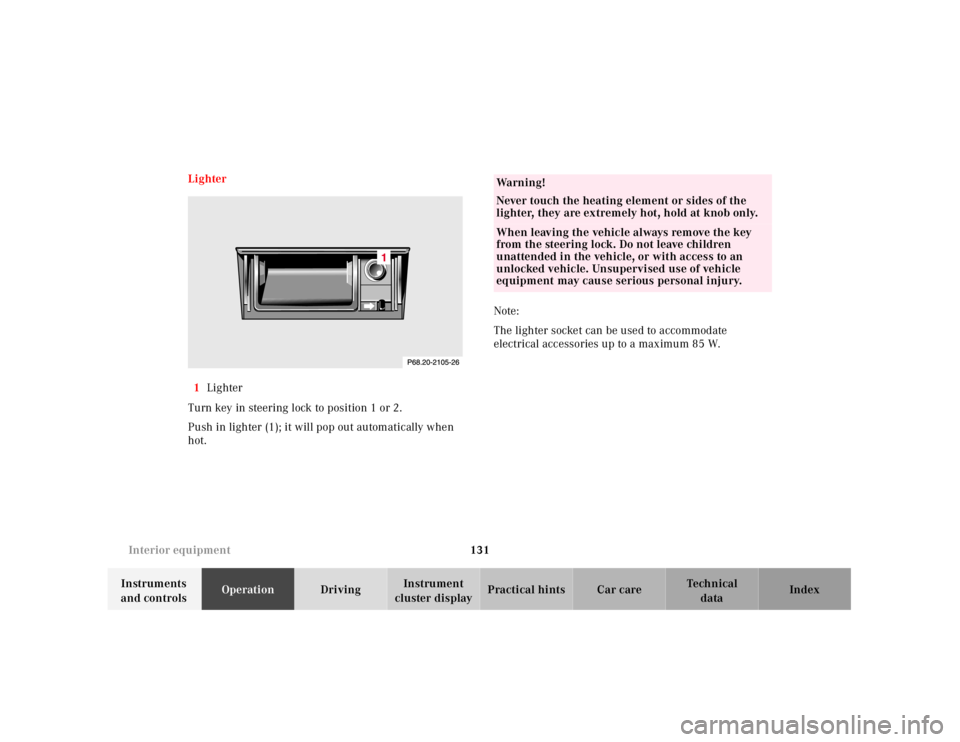
cluster displayPractical hints Car care Index Lighter
1Lighter
Turn key in steering lock to position 1 or 2.
Push in lighter (1); it will pop out automatically when
hot.Note:
The lighter socket can be used to accommodate
electrical accessories up to a maximum 85 W.
Wa r n i n g !
Never touch the heating element or sides of the
lighter, they are extremely hot, hold at knob only.When leaving the vehicle always remove the key
from the steering lock. Do not leave children
unattended in the vehicle, or with access to an
unlocked vehicle. Unsupervised use of vehicle
equipment may cause serious personal injury.
Page 137 of 297

133 Garage door opener
Technical
data Instruments
and controlsOperationDrivingInstrument
cluster displayPractical hints Car care Index Garage door opener
1Signal transmitter keys
2Indicator lamp
3Portable remote control transmitterThe built-in remote control is capable of operating up to
three separately controlled objects.
Notes:
Certain types of garage door openers are incompatible
with the integrated opener. If you should experience
difficulties with programming the transmitter, contact
your authorized Mercedes-Benz Center, or call
Mercedes-Benz Client Assistance Center (in the USA
only) at 1-800-FOR-MERCedes, or Customer Service (in
Canada) at 1-800-387-0100.
1
2
3
Wa r n i n g !When programming a garage door opener, the door
moves up or down.When programming or operating the remote
control make sure there is no possibility of anyone
being harmed by the moving door.
Page 138 of 297
134 Garage door opener
Technical
data Instruments
and controlsOperationDrivingInstrument
cluster displayPractical hints Car care Index
For operation in the USA only: This device complies
with Part 15 of the FCC Rules. Operation is subject to
the following two conditions:
(1) This device may not cause harmful interference, and
(2) this device must accept any interference received,
including interference that may cause undesired
operation.
Any unauthorized modification to this device could void
the user’s authority to operate the equipment.
Programming or reprogramming the integrated
remote control:
1. Turn electronic key in steering lock to position 1
or 2.
2. Hold the end of the hand-held transmitter of the
d evice you w ish to train approxim ately 2 to 5 inch es
(5 cm to 12 cm) away from the surface of the
integrated remote control located on the inside rear
view mirror, keeping the indicator lamp in view.3. Using both hands, simultaneously push the hand-
held transmitter button and the desired integrated
remote control button. Do not release the buttons
until completing step 4.
4. The indicator lamp on the integrated remote control
will flash, first slowly and then rapidly. When the
indicator lamp f lashes rapidly, both buttons may be
released (the rapid flashing lamp indicates
successful programming of the new frequency
signal). To program the remaining two buttons,
follow ste ps 1 through 4.
Note:
If, after repeated attempts, you do not successfully
program the integrated remote control device to learn
the signal of the hand-held transmitter, the garage door
opener could be equipped with the “rolling code
feature”.
Page 140 of 297
136 Garage door opener
Technical
data Instruments
and controlsOperationDrivingInstrument
cluster displayPractical hints Car care Index
Operation of remote control:
1. Turn electronic key in steering lock to position 1
or 2.
2. Select and press the appropriate button to activate
the remote controlled device. The integrated remote
control transmitter continues to send the signal as
long as the button is pressed – up to 20 seconds.Erasing the remote control memory:
1. Turn electronic key in steering lock to position 1
or 2.
2. Simultaneously holding down the left and right side
buttons for approximately 20 seconds, or until the
control la mp blink ra pidly, will erase th e codes of all
three channels.
Page 142 of 297
138 Hardtop
Technical
data Instruments
and controlsOperationDrivingInstrument
cluster displayPractical hints Car care Index
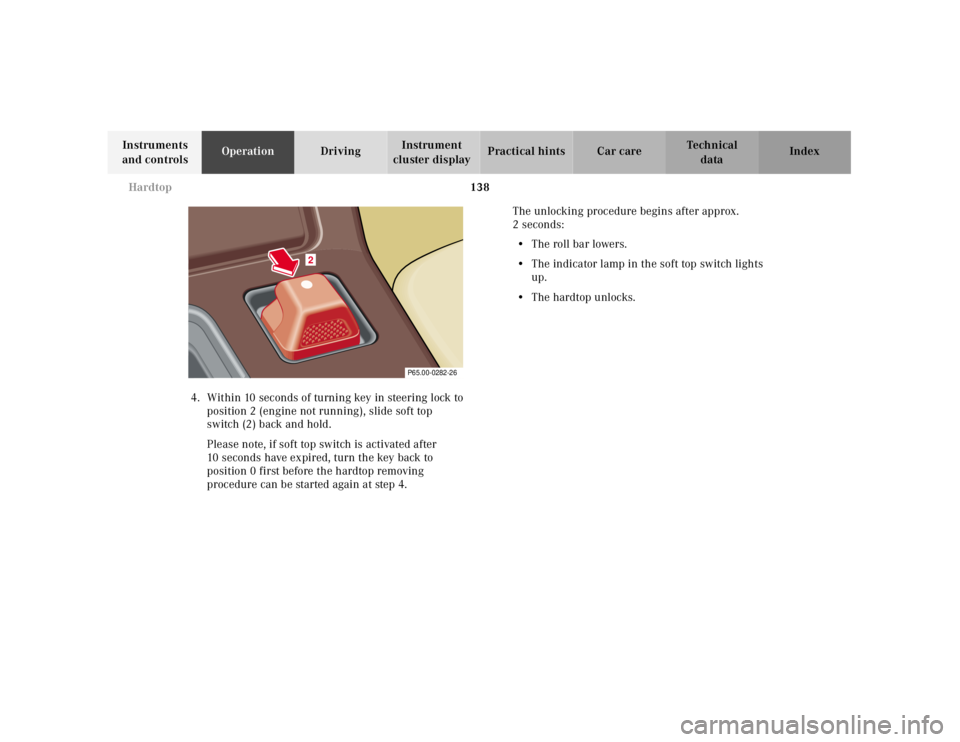
4. Within 10 seconds of turning key in steering lock to
position 2 (engine not running), slide soft top
switch (2) back and hold.
Please note, if soft top switch is activated after
10 seconds have expired, turn the key back to
position 0 first before the hardtop removing
procedure can be started again at step 4.The unlocking procedure begins after approx.
2seconds:
•The roll bar lowers.
• The indicator lamp in the soft top switch lights
up.
• The hardtop unlocks.
P65.00-0282-26
2