battery MERCEDES-BENZ SL CLASS 2000 Owners Manual
[x] Cancel search | Manufacturer: MERCEDES-BENZ, Model Year: 2000, Model line: SL CLASS, Model: MERCEDES-BENZ SL CLASS 2000Pages: 297, PDF Size: 7.11 MB
Page 8 of 297

5 ContentsPassenger airbag
indicator lamp ............................. 213
Practical hintsFirst aid kit ..................................... 215
Stowing things in the vehicle ...... 215
Vehicle tools .................................... 216
Vehicle jack ..................................... 217
Fuses ................................................ 218
Hood ................................................. 219
Automatic transmission
fluid level ...................................221
Checking engine oil level .............221
Coolant level ...................................223
Adding coolant ...............................224
Windshield and headlamp
washer fluid mixing ratio ........225
Wheels .............................................226
Tire replacement ............................226
Rotating wheels ..............................227
Spare wheel ....................................228
Changing wheels ...........................230
Tire inflation pressure ..................234
Battery .............................................236Battery Recycling ....................... 237
Jump starting ................................. 238
Towing the vehicle ........................ 240
Exterior lamps ............................... 242
Headlamp assembly
(Halogen) .................................... 243
Taillamp assemblies .................. 249
Changing batteries in
the remote control .................... 251
Synchronizing ............................ 252
Raising soft top manually ............ 253
Replacing wiper blade insert ...... 257
Manual release of
fuel filler flap ............................ 259
Trunk lamp ..................................... 259
Vehicle careCleaning and care
of the vehicle ............................. 261
Power washer ............................. 262
Tar stains .................................... 262
Paintwork, Painted Body
Components ................................ 262
Engine cleaning ......................... 263Vehicle washing .........................263
Ornamental moldings ................263
Headlamps, taillamps,
turn signal lenses ......................263
Window cleaning .......................264
Light alloy wheels ......................264
Instrument cluster .....................264
Steering wheel and
gear selector lever ......................264
Cup holder ...................................264
Seat belts .....................................265
Headliner, shelf behind
roll bars, and other hard
plastic trim items .......................265
Soft top .........................................265
Headliner .....................................266
Wind screen ................................266
Automatic antenna .....................266
Wiper blade .................................266
Headlamp cleaning system .......266
Leather upholstery .....................267
Plastic and rubber parts ............267
Illuminated door sill panels .....267
Page 34 of 297
30 Central locking system
Technical
data Instruments
and controlsOperationDrivingInstrument
cluster displayPractical hints Car care Index
Central locking system
Remote control
Due to the extended operational range of the remote
control, it could be possible to unintentionally lock or
unlock the vehicle by pressing the transmit button.
The vehicle doors, trunk, storage compartment in
armrest, and fuel filler flap can be centrally locked and
unlocked via remote control.
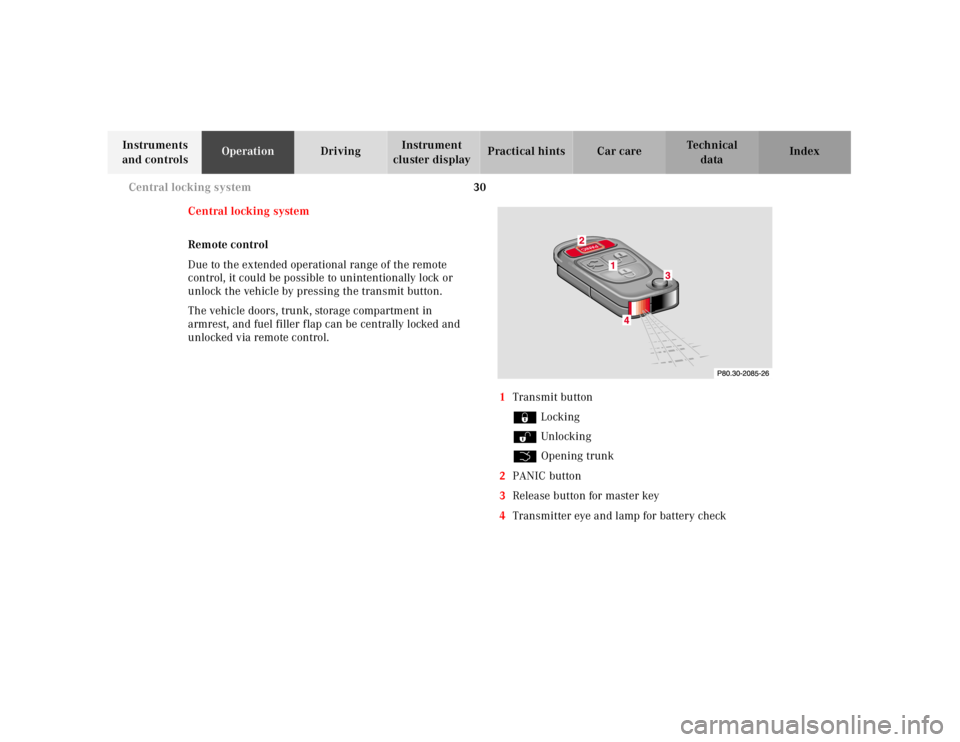
1Transmit button
‹ Locking
ΠUnlocking
Š Opening trunk
2PANIC button
3Release button for master key
4Transmitter eye and lamp for battery check
Page 35 of 297
31 Central locking system
Technical
data Instruments
and controlsOperationDrivingInstrument
cluster displayPractical hints Car care Index Locking and unlocking with remote control
Unlocking:
Press transmit button Œ. All turn signal lamps blink
once to indicate that the vehicle is unlocked.
The remote control can be programmed for two kinds of
unlocking modes (see below):
Selective unlocking mode –
Press transmit button Œ once to unlock driver’s door,
storage compartment in armrest, and fuel filler flap.
Press transmit button Πtwice to unlock both doors,
storage compartment in armrest, fuel filler flap, and
trunk.
Global unlocking mode –
Press transmit button Πonce to unlock both doors,
storage compartment in armrest, fuel filler flap, and
trunk.
Notes:
If the trunk was previously locked separately, it will
remain locked, see page 39.
The presently active unlocking mode (selective or
global) can only be determined by unlocking the vehicle
with the remote control (see below for changing mode).If within 40 seconds of unlocking with the remote
control, neither door is opened, the key is not inserted
in the steering lock, or the central locking switch is not
activated, the vehicle will automatically lock.
Locking:
Press transmit button ‹ once. All turn signal lamps
blink three times to indicate that the vehicle is locked.
Note:
If the vehicle cannot be locked or unlocked by pressing
the transmit button, then it may be necessary to change
the batteries in the remote control (if ok, battery check
lamp in transmitter will light briefly when transmitting)
or to synchronize the remote control, see page 251 and
page 252.
Page 36 of 297

32 Central locking system
Technical
data Instruments
and controlsOperationDrivingInstrument
cluster displayPractical hints Car care Index
Choosing global or selective mode on remote control
Press and hold transmit buttons ‹ and Œ
simultaneously for five seconds to reprogram the
remote control. Battery check lamp will blink two times
indicating the completed mode change.Opening the trunk
Press the transmit button Š until the trunk lid is
open.
Important!
Do not place remote control in trunk since trunk is
locked when the lid is closed if the vehicle is centrally
locked.
Note:
If the trunk was previously locked separately, it will
remain locked. See page 39.
Page 38 of 297
34 Central locking system
Technical
data Instruments
and controlsOperationDrivingInstrument
cluster displayPractical hints Car care Index
Start lock-out
Important!
Removing the key from the steering lock activates the
start lock-out. The engine cannot be started.
Turning the key in the steering lock to position 2
deactivates the start lock-out.
Note:
In case the engine cannot be started (vehicle’s battery is
in order), and Á and î are shown in the
odometer display field, the system is not operational.
Contact an authorized Mercedes-Benz Center or call 1-
800-FOR-MERCedes (in the USA), or 1-800-387-0100 (in
Canada).General notes on the central locking system
• If the key in the steering lock is in position 2, the
vehicle cannot be locked or unlocked with the
remote control.
If the vehicle cannot be locked or unlocked:
• Aim transmitter eye at a receiver of either door
handle and press button‹ orŒ.
• Check the batteries of the remote control,
see page 251.
• Synchronize the central locking system,
see page 252.
Page 55 of 297
51 Seats
Technical
data Instruments
and controlsOperationDrivingInstrument
cluster displayPractical hints Car care Index Note:
When in operation, the seat heater consumes a large
amount of electrical power. It is not advisable to use the
seat heater longer than necessary.
The seat heaters may automatically switch off if too
many power consumers are switched on at the same
time, or if the battery charge is low. When this occurs,
the indicator lamp in the switch will blink (both
indicator lamps blink during rapid seat heating mode).
The seat heaters will switch on again automatically as
soon as sufficient voltage is available.
If the blinking of the indicator lamps is distracting to
you, the seat heaters can be switched off.
Page 80 of 297
76 Instrument cluster
Technical
data Instruments
and controlsOperationDrivingInstrument
cluster displayPractical hints Car care Index
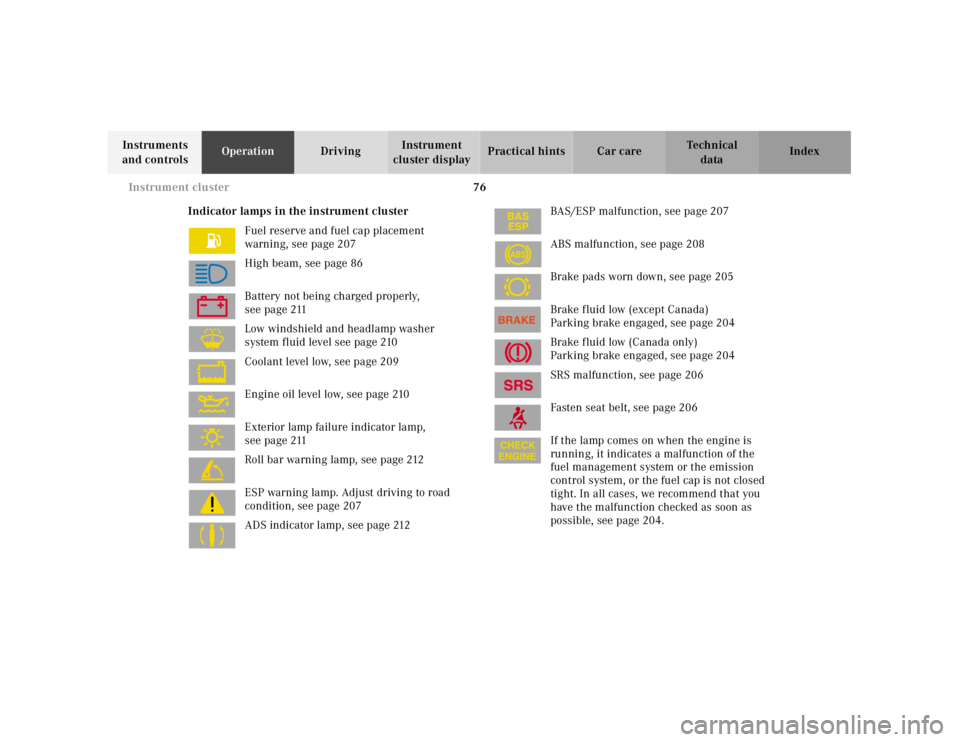
Indicator lamps in the instrument cluster
Fuel reserve and fuel cap placement
warning, see page 207
High beam, see page 86
Battery not being charged properly,
see page 211
Low windshield and headlamp washer
system fluid level see page 210
Coolant level low, see page 209
Engine oil level low, see page 210
Exterior lamp failure indicator lamp,
see page 211
Roll bar warning lamp, see page 212
ESP warning lamp. Adjust driving to road
condition, see page 207
ADS indicator lamp, see page 212BAS/ESP malfunction, see page 207
ABS malfunction, see page 208
Brake pads worn down, see page 205
Brake fluid low (except Canada)
Parking brake engaged, see page 204
Brake fluid low (Canada only)
Parking brake engaged, see page 204
SRS malfunction, see page 206
Fasten seat belt, see page 206
If the lamp comes on when the engine is
running, it indicates a malfunction of the
fuel management system or the emission
control system, or the fuel cap is not closed
tight. In all cases, we recommend that you
have the malfunction checked as soon as
possible, see page 204.
ABS
Page 85 of 297

81 Flexible service system
Technical
data Instruments
and controlsOperationDrivingInstrument
cluster displayPractical hints Car care Index The counter can also be set by any individual. To do so:
1. Turn key in steering lock to position 2.
2. Within 4 seconds press button (1) twice.
3. The present status for days or distance is displayed.
Within 10 seconds turn key in steering lock to
position 0.
4. Press and hold button (1), while turning key in
steering lock to position 2 again. The present status
for days or distance is displayed once more.
Continue to hold button (1).
After approx. 10 seconds a signal sounds, and the
display shows 10 000 miles (Canada: 15 000 km) for
approx. 10 seconds.
5. Release button (1).
If the FSS counter was inadvertently reset, have a
Mercedes-Benz Center correct it.Note:
When disconnecting vehicle battery for one or more
days at a time, such days will not be counted. Any such
days not counted by FSS can be added by your
Mercedes-Benz Center.
The interval between services is determined by the kind
of vehicle operation. For example driving at extreme
speeds, and cold starts combined with short distance
driving in which the engine does not reach normal
operating temperature, reduce the interval between
services.
Model SL 500
The FSS allows for distances between 10 000 miles
(Canada: 15 000 km) and 20 000 miles (Canada:
30 000 km), or from 365 to 730 days between services.
Model SL 600
The FSS allows for distances between 10 000 miles
(Canada: 15 000 km) and 16 000 miles (Canada:
25 000 km), or from 365 to 730 days between services.
However you choose to set your reference numbers, the
scheduled services as posted in the Service Booklet
must be followed to properly care for your vehicle.
Page 99 of 297

95 Automatic climate control
Technical
data Instruments
and controlsOperationDrivingInstrument
cluster displayPractical hints Car care Index Rear window defroster
(only functions with hardtop installed)
Turn electronic key in steering lock to position 2.
To select, press F button.
To cancel, press F button again.
Note:
H eavy accu mul ation of snow and ic e shoul d be removed
before activating the defroster.
Th e rea r window defroster u ses a large am ou nt of power.
To keep the battery drain to a minimum, turn off the
defroster as soon as the window is clear.
The defroster is automatically turned off after a
maximum of 12 minutes of operation.
If several power consumers are turned on
simultaneously, or the battery is only partially charged,
it is possible that the defroster will automatically turn
itself off. When this happens, the indicator lamp inside
the switch starts blinking.
As soon as the battery has sufficient voltage, the
defroster automatically turns itself back on.Air distribution
Press b button repeatedly until the requested
symbol is displayed.
Air volume
Press “-” or “+” side of rocker switch ï until the
requested blower speed is attained. A choice of 7 blower
speeds is available.
To switch the automatic climate control off, press “-”
side of rocker switch ï until symbol OFF is
displayed.
The fresh air supply to the car interior is shut off.
While driving, use this setting only temporarily,
otherwise the windshield could fog up.
To switch the automatic climate control on again,
pressU, P, or “+” side ofï.
Page 100 of 297

96 Automatic climate control
Technical
data Instruments
and controlsOperationDrivingInstrument
cluster displayPractical hints Car care Index
Air recirculation
This mode can be selected to temporarily reduce the
entry of annoying odors or dust into the vehicle’s
interior.
Outside air is not supplied to the car’s interior.
To select, press O button.
To cancel, press O button again.
The system will automatically switch from recirculated
air to fresh air
• after approx. 5 minutes at outside temperatures
below approx. 40°F (5°C),
• after approx. 30 minutes, at outside temperatures
above approx. 40°F (5°C),
• after approx. 5 minutes, if button S is pressed.
Notes:
If the windows should fog up from the inside, switch
from recirculated air back to fresh air.
At high outside temperatures, the system automatically
engages the recirculated air mode thereby increasing
the cooling capacity performance, switching to partially
fresh air within 20 minutes.Residual engine heat utilization
With the engine switched off, it is possible to continue
heating the interior for a short while.
Air volume and distribution are controlled
automatically.
To select:
Turn electronic key in steering lock to position 1 or 0 or
remove electronic key.
Press T button.
This function selection will not activate if the battery
charge level is insufficient.
To c a n c e l :
Press T button.
The system will automatically shut off
• If you turn electronic key in steering lock to
position 2,
• after approx. 30 minutes,
• if the battery voltage drops.