service MERCEDES-BENZ SL CLASS 2011 User Guide
[x] Cancel search | Manufacturer: MERCEDES-BENZ, Model Year: 2011, Model line: SL CLASS, Model: MERCEDES-BENZ SL CLASS 2011Pages: 316, PDF Size: 6.55 MB
Page 25 of 316

This information helps, for example, to
diagnose vehicle systems after a collision and
to continuously improve vehicle safety.
Daimler may access the information and
share it with others
R for safety research or vehicle diagnosis
purposes
R with the consent of the vehicle owner or
lessee
R in response to an official request by law
enforcement or other government agency
R for use in dispute resolution involving
Daimler, its affiliates or sales/service
organization and/or
R as otherwise required or permitted by law
Please check the Tele Aid subscription
service agreement for details regarding the
information that may be recorded or
transmitted via that system.Introduction23230_AKB; 6; 22, en-USd2ureepe,Version: 2.11.8.12009-07-28T18:49:58+02:00 - Seite 23Z
Page 42 of 316

thorax air bag be deployed. Always sit as
upright as possible, wear the seat belt
properly and use an appropriately sized
infant restraint, toddler restraint, or
booster seat recommended for the size and
weight of the child.
Failure to follow these instructions can result
in severe injuries to you or other occupants.
If you sell your vehicle, it is important that you
make the buyer aware of this safety
information. Be sure to give the buyer this
Operator’s Manual.GWarning!
There is a possibility of a head-thorax air bag-
related injury if occupants, especially
children, are not properly seated or restrained
when next to a head-thorax air bag which
needs to deploy rapidly in a side impact in
order to do its job.
To help avoid the possibility of injury, please
follow these guidelines:
(1)Occupants, especially children,
should never place their bodies or
lean their heads in the area of the
door where the head-thorax air
bag inflates. This could result in
serious injuries or death should
the head-thorax air bag be
deployed.(2)Always sit as upright as possible,
wear the seat belt properly, and for
children 12 years old and under,
use an appropriately sized infant
restraint, toddler restraint, or
booster seat recommended for the
size and weight of the child.(3)Always wear seat belts properly.
If you believe that, even with the use of these
guidelines, it would be safer for your
passenger seat occupants to have the
passenger side head-thorax air bag
deactivated, then deactivation can be carried
out upon your written request at an
authorized Mercedes-Benz Center at an
additional cost.
Please contact an authorized Mercedes-Benz
Center or call the Customer Assistance
Center (in the USA) at 1-800-FOR-MERCedes
(1-800-367-6372), or Customer Service (in
Canada) at 1-800-387-0100 for details.
Air bags are designed to deploy only in certain
frontal impacts (front air bags and driver’s
side knee bag) and in side impacts (head-
thorax air bags) if the system determines the
need for air bag deployment. Only in the event
of such a situation will they provide their
supplemental protection.
The driver and passenger should always wear
their seat belts. Otherwise it is not possible
for the air bags to provide their supplemental
protection.
In case of other types of impacts and impacts
below air bag deployment thresholds, air
bags will not deploy. The driver and passenger
will then be protected to the extent possible
by a properly fastened seat belt. A properly
fastened seat belt is also needed to provide
the best possible protection in a rollover.
Air bags are not a substitute for seat belts.
Always wear your seat belt, regardless of
whether or not your vehicle is equipped with
air bags.
It is important to your safety and that of your
passenger to have deployed air bags replaced
and to have any malfunctioning air bags
repaired. This will help to make sure the air
bags will continue to provide supplemental
crash protection for occupants.
Safety guidelines for the seat belt,
Emergency Tensioning Device (ETD)
and air bag GWarning!
R Damaged seat belts or seat belts that have
been subjected to stress in an accident
must be replaced. Their anchoring points
must also be checked. Only use seat belts
40Occupant safetySafety and security
230_AKB; 6; 22, en-USd2ureepe,Version: 2.11.8.12009-07-28T18:49:58+02:00 - Seite 40
Page 45 of 316

passenger seat is occupied and the impact
exceeds a preset deployment threshold.
Head-thorax air bags 0046 are not deployed in
side impacts which do not exceed the
system’s deployment threshold.
Occupant Classification System
The Occupant Classification System (OCS)
activates or deactivates the passenger front
air bag automatically. The respective status
is based on the classified occupant weight
category determined by weight sensor
readings from the passenger seat.
The system does not deactivate the
passenger head-thorax air bag and the
Emergency Tensioning Devices (ETDs).
To be classified correctly, the passenger must
sit
R with the seat belt properly fastened
R in a position that is as upright as possible
with the back against the seat backrest
R with the feet on the floor
If the occupant’s weight is transferred to
another object in the vehicle (e.g. by leaning
on armrests), the OCS may not be able to
properly approximate the occupant’s weight
category.
If your seat, including the trim cover and
cushion, needs to be serviced in any way, take
the vehicle to an authorized Mercedes-Benz
Center.
Only seat accessories approved by
Mercedes-Benz may be used.
Both the driver and the passenger should
always use the 007F0080 indicator lamp as
an indication of whether or not the passenger
is properly positioned.
GWarning!
If the 007F0080 indicator lamp illuminates
when an adult or someone larger than a small
individual is in the passenger seat, have the
passenger reposition himself or herself in the
seat until the 007F0080 indicator lamp goes
out.
In the event of a collision, the air bag control
unit will not allow passenger front air bag
deployment when the OCS has classified the
passenger seat occupant as weighting as
much as or less than a typical 12-month-old
child in a standard child restraint or if the
passenger seat is classified as being empty.
When the OCS senses that the passenger seat
occupant is classified as being up to or less
than the weight of a typical 12-month-old
child in a standard child restraint, the
007F0080 indicator lamp will illuminate when
the engine is started and remain illuminated,
indicating that the passenger front air bag is
deactivated.
When the OCS senses that the passenger seat
is classified as being empty, the 007F0080
indicator lamp will illuminate when the engine
is started and remain illuminated, indicating
that the passenger front air bag is
deactivated.
When the OCS senses that the passenger seat
occupant is classified as being heavier than
the weight of a typical 12-month-old child
seated in a standard child restraint or as being
a small individual (such as a young teenager
or a small adult), the 007F0080 indicator lamp
will illuminate for approximately 6 seconds
when the engine is started and then,
depending on occupant weight sensor
readings from the seat, remain illuminated or
go out. With the 007F0080 indicator lamp
illuminated, the passenger front air bag is
deactivated. With the 007F0080 indicator
lamp out, the passenger front air bag is
activated.
When the OCS senses that the passenger seat
occupant is classified as an adult or someone
larger than a small individual, the 007F0080
indicator lamp will illuminate for
approximately 6 seconds when the engine is
started and then goes out, indicating that the
passenger front air bag is activated.Occupant safety43Safety and security230_AKB; 6; 22, en-USd2ureepe,Version: 2.11.8.12009-07-28T18:49:58+02:00 - Seite 43Z
Page 66 of 316

Ra door is opened from the inside
Rthe trunk is opened with the emergency
release button
To cancel the alarm after it has been
triggered, see “Canceling the alarm”
(Y page 65).
iIf the alarm stays on for more than
30 seconds, the Tele Aid system initiates a
call to the Customer Assistance Center
automatically. The Tele Aid system will
initiate the call provided that
Ryou have subscribed to the Tele Aid
service
Rthe Tele Aid service has been activated
properly
Rthe necessary mobile phone, power
supply and GPS coverage are available
XArming: Lock the vehicle with the
SmartKey or with KEYLESS-GO.
The turn signal lamps flash three times and
an acoustic warning sounds three times to
indicate that the vehicle is locked. Indicator
lamp \000F flashes to indicate that the alarm
system is armed.
iIf the turn signal lamps do not flash three
times and the acoustic warning does not
sound three times, a door or the trunk may
not be properly closed.
Close the respective element.XDisarming: Unlock the vehicle with the
SmartKey or with KEYLESS-GO.
The turn signal lamps flash once and an
acoustic warning sounds once to indicate
that the alarm system is disarmed.
iUnless you open a door or the trunk within
approximately 40 seconds after unlocking
the vehicle:
RThe vehicle will be locked again.
RThe anti-theft alarm system will be
rearmed.
Tow-away alarm
Once the tow-away alarm is armed, a visual
and audible alarm will be triggered when
someone attempts to raise the vehicle.
To cancel the alarm after it has been
triggered, see “Canceling the alarm”
(Y page 65).
iIf the alarm stays on for more than
30 seconds, a call to the Customer
Assistance Center is initiated automatically
by the Tele Aid system provided that you
have subscribed to the Tele Aid service and
that it has been activated properly, and that
the necessary mobile phone, power supply
and GPS coverage are available.
XArming: Lock the vehicle with the
SmartKey or with KEYLESS-GO.
The tow-away alarm is armed after about
30 seconds automatically.
XDisarming: Unlock the vehicle with the
SmartKey or with KEYLESS-GO.
The tow-away alarm remains disarmed until
you lock the vehicle again.
Disabling tow-away alarm
To prevent triggering the tow-away alarm,
disable the tow-away alarm feature before
towing the vehicle, or when parking on a
64Anti-theft systemsSafety and security
230_AKB; 6; 22, en-USd2ureepe,Version: 2.11.8.12009-07-28T18:49:58+02:00 - Seite 64
Page 102 of 316
switch to position 0 and repeat the starting
procedure.XIf you are starting the engine with KEYLESS-
GO: Close any doors that may be open to
allow for better detection of the SmartKey.
or
XStart the engine with the SmartKey as radio
signals from another source may be
interfering with the KEYLESS-GO function.XRepeat the starting procedure.
If the engine does not start after several
starting attempts:
XContact an authorized Mercedes-Benz
Center or call Roadside Assistance.
The engine does not start. You cannot
hear the starter.
The battery may not be charged sufficiently.
XGet a jump start ( Y page 285).
If the engine will not start despite a jump
start:
XContact an authorized Mercedes-Benz
Center or call Roadside Assistance.
The starter has been exposed to excessive
temperatures.
XLet the starter cool for about 2 minutes.XRepeat the starting procedure.
If the engine does not start after several
starting attempts:
XContact an authorized Mercedes-Benz
Center or call Roadside Assistance.
Driving off
GWarning!
On slippery road surfaces, never downshift in
order to obtain braking action. This could
result in drive wheel slip and reduced vehicle
control. Your vehicle’s ABS will not prevent
this type of loss of control.
! Do not run a cold engine at high engine
speeds. Running a cold engine at high
engine speeds may shorten the service life
of the engine. This is not covered by the
Mercedes-Benz Limited Warranty.
SL 63 AMG: At engine temperatures below
68‡ (20†), the engine’s maximum speed
is restricted in order to protect it from
damage. Avoid driving your vehicle at full
speed when the engine is cold to prevent
premature engine wear and/or diminished
comfort.
! If an acoustic warning sounds and the
message Release Parking Brake
appears in the multifunction display when
driving off, you have forgotten to release
the parking brake.
Release the parking brake.
! Avoid spinning of a drive wheel. This may
cause serious damage to the drivetrain
which is not covered by the Mercedes-Benz
Limited Warranty.
! Simultaneously depressing the
accelerator pedal and applying the brakes
reduces engine performance and causes
premature brake and drivetrain wear which
is not covered by the Mercedes-Benz
Limited Warranty.
i Once the vehicle is in motion, the
automatic central locking function engages
and the locking knobs in the doors move
down.
The automatic central locking function can
be switched off ( Y page 126).
Automatic transmissionGWarning!
It is dangerous to shift the automatic
transmission out of park position P or neutral
position N if the engine speed is higher than
idle speed. If your foot is not firmly on the
brake pedal, the vehicle could accelerate
100Driving and parkingControls in detail
230_AKB; 6; 22, en-USd2ureepe,Version: 2.11.8.12009-07-28T18:49:58+02:00 - Seite 100
Page 115 of 316
Doing so may cause serious engine damage
which is not covered by the Mercedes-Benz
Limited Warranty.
Resetting trip odometer
XMake sure you are viewing the standard
display (Y page 116) in the multifunction
display.
XPress and hold the reset button in the
instrument cluster (Y page 111) until the
trip odometer is reset.
Tachometer
The red marking on the tachometer
(Y page 30) denotes excessive engine speed.
! Avoid driving at excessive engine speeds,
as it may result in serious engine damage
that is not covered by the Mercedes-Benz
Limited Warranty.
To help protect the engine, the fuel supply is
interrupted if the engine is operated within
the red marking.
Control system
Introduction
The control system is activated as soon as the
starter switch is in position 1.
The control system enables you to call up
information about your vehicle and to change
vehicle settings.
For example, you can use the control system
to find out when your vehicle is next due for
maintenance service, to set the language for
messages in the instrument cluster display,
and much more.
GWarning!
A driver’s attention to the road and traffic
conditions must always be his/her primary
focus when driving.
For your safety and the safety of others,
selecting features through the multifunction
steering wheel should only be done by the
driver when traffic and road conditions permit
it to be done safely.
Bear in mind that at a speed of just 30 mph
(approximately 50 km/h), your vehicle is
covering a distance of 44 feet (approximately
14 m) every second.
The control system relays information to the
multifunction display.
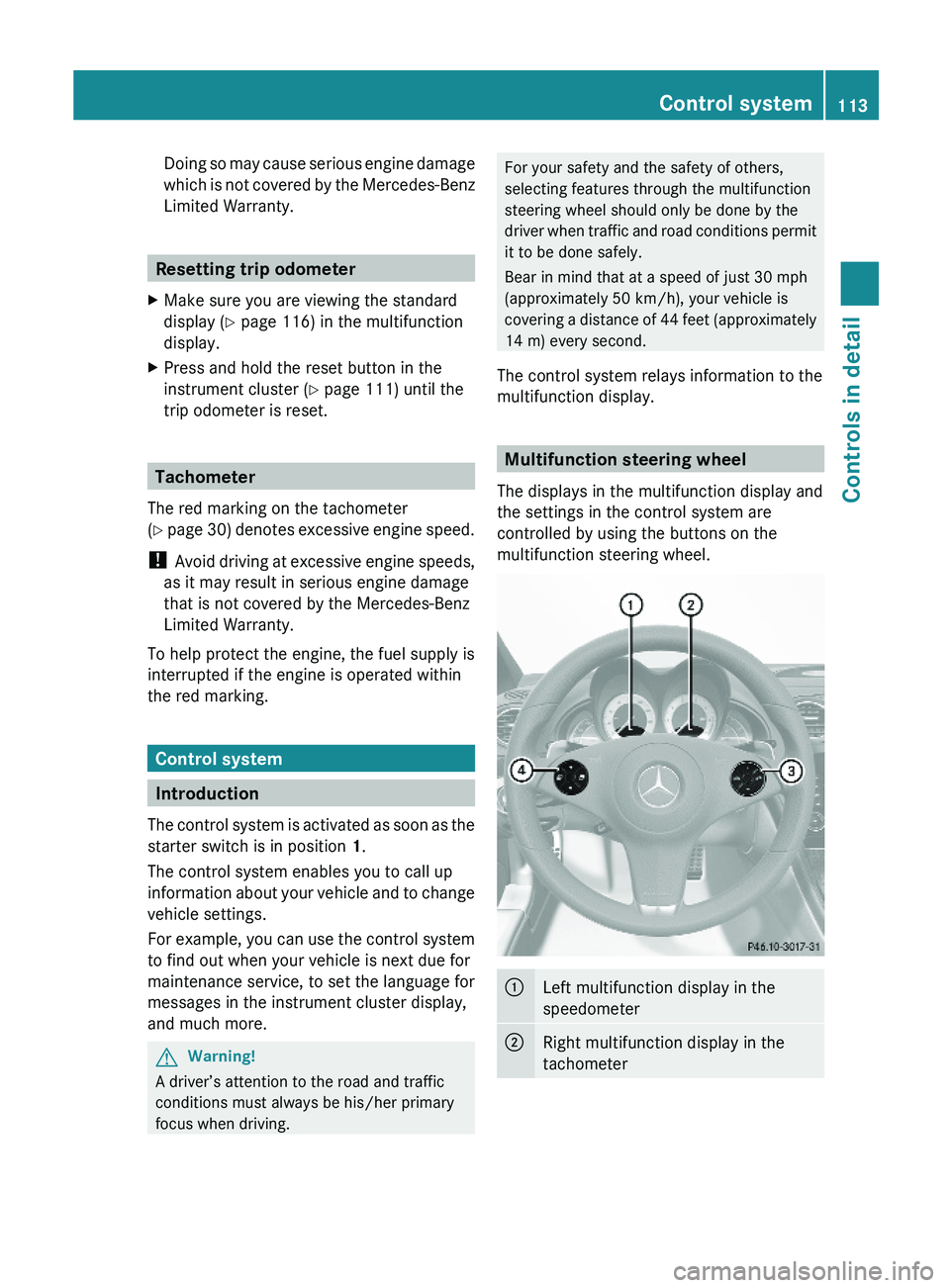
Multifunction steering wheel
The displays in the multifunction display and
the settings in the control system are
controlled by using the buttons on the
multifunction steering wheel.
\000FLeft multifunction display in the
speedometer
\000GRight multifunction display in the
tachometer
Control system113Controls in detail230_AKB; 6; 22, en-USd2ureepe,Version: 2.11.8.12009-07-28T18:49:58+02:00 - Seite 113Z
Page 164 of 316
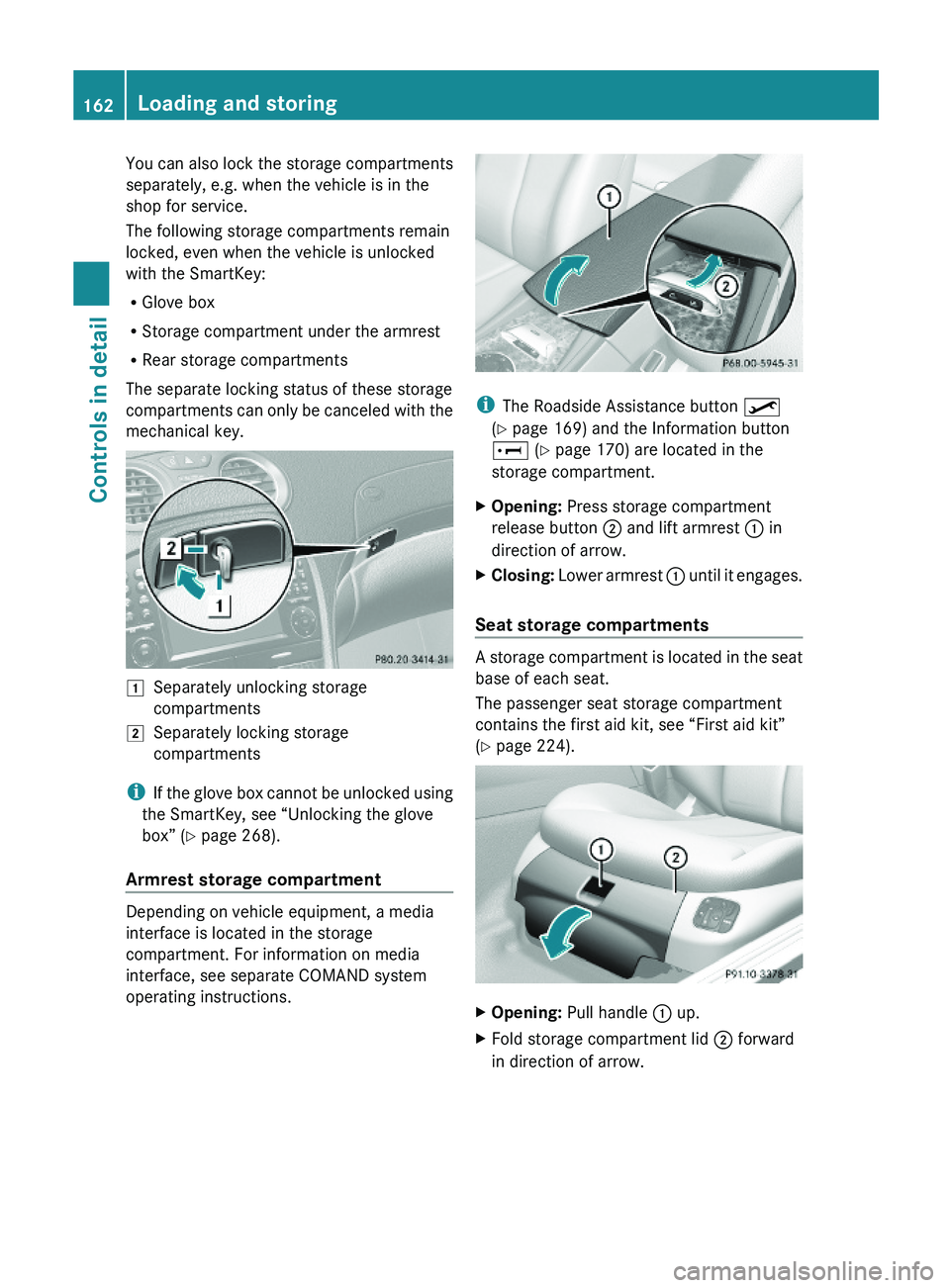
You can also lock the storage compartments
separately, e.g. when the vehicle is in the
shop for service.
The following storage compartments remain
locked, even when the vehicle is unlocked
with the SmartKey:
RGlove box
RStorage compartment under the armrest
RRear storage compartments
The separate locking status of these storage
compartments can only be canceled with the
mechanical key.
\000JSeparately unlocking storage
compartments
\000KSeparately locking storage
compartments
iIf the glove box cannot be unlocked using
the SmartKey, see “Unlocking the glove
box” (Y page 268).
Armrest storage compartment
Depending on vehicle equipment, a media
interface is located in the storage
compartment. For information on media
interface, see separate COMAND system
operating instructions.
iThe Roadside Assistance button \000
Page 169 of 316

Tele Aid
! In order to activate the Tele Aid system, a
subscriber agreement must be completed.
To ensure your system is activated and
operational, please press Information
button 005D to perform the acquaintance
call. Failure to complete either of these
steps may result in a system that is not
activated.
If you have any questions regarding
activation, please call the Customer
Assistance Center at
1-800-FOR-MERCedes (1-800-367-6372)
(USA only) or 1-888-923-8367 (Canada
only).
Shortly after the completion of your Tele Aid
acquaintance call, you will receive a user ID
and password in the mail. You may use this
password to access the Tele Aid section in
“Owner’s Online” at www.mbusa.com (USA
only). The “My Tele Aid” section will give you
access to account information, remote door
unlock and more.
The Tele Aid system is available if
R it has been activated and is operational.
Activation requires a subscription for
monitoring services, connection and
cellular air time
R vehicle battery power is available
R the relevant cellular phone network and
GPS signals are available and pass the
information on to the Customer Assistance
Center
i Location of the vehicle on a map is only
possible if the vehicle is able to receive
signals from the GPS satellite network and
pass the information on to the Customer
Assistance Center.
The Tele Aid system
(Telematic Alarm Identification on Demand)
The Tele Aid system consists of three types
of response:
R Automatic and manual emergency
R Roadside Assistance
R Information
To adjust the speaker volume during a Tele
Aid call do the following:XPress button 005A or 005B on the
multifunction steering wheel.
or
XUse the adjustment button on your
COMAND system.
Be sure to check “Owner’s Online” at
www.mbusa.com (USA only) for more
information and a description of all available
features.
System self-test
The system performs a self-test after you
have switched on the ignition.
GWarning!
A malfunction in the system has been
detected if any or all of the following
conditions occur:
R The indicator lamp in the SOS button does
not come on during the system self-test.
R The indicator lamp in Roadside Assistance
button 00A1 does not come on during the
system self-test.
R The indicator lamp in Information button
005D does not come on during the system
self-test.
R The indicator lamp in the SOS button,
Roadside Assistance button 00A1, or
Information button 005D remains
illuminated constantly in red after the
system self-test.
R The message Tele Aid Inoperative
appears in the multifunction display after
the system self-test.
Useful features167Controls in detail230_AKB; 6; 22, en-USd2ureepe,Version: 2.11.8.12009-07-28T18:49:58+02:00 - Seite 167Z
Page 170 of 316
If a malfunction is indicated as outlined above,
the system may not operate as expected. In
case of an emergency, help will have to be
summoned by other means.
Have the system checked at the nearest
Mercedes-Benz Center or contact the
Customer Assistance Center at
1-800-FOR-MERCedes (1-800-367-6372)
(USA only) or 1-888-923-8367 (Canada only)
as soon as possible.
Emergency calls
! In order to activate the Tele Aid system, a
subscriber agreement must be completed.
To ensure your system is activated and
operational, please press Information
button \000] to perform the acquaintance
call. Failure to complete either of these
steps may result in a system that is not
activated.
If you have any questions regarding
activation, please call the Customer
Assistance Center at
1-800-FOR-MERCedes (1-800-367-6372)
(USA only) or 1-888-923-8367 (Canada
only).
An emergency call is initiated automatically
following an accident in which the Emergency
Tensioning Devices (ETDs) or air bags have
deployed.
i An automatically initiated Tele Aid
emergency call cannot be canceled.
An emergency call can also be initiated
manually (Y page 168).
Once the emergency call is in progress, the
indicator lamp in the SOS button will begin to
flash. The message Connecting Call
appears in the multifunction display and the
COMAND system is muted. When the
connection is established, the message
Call Connected appears in the
multifunction display.
All information relevant to the emergency,
such as the location of the vehicle
(determined by the GPS satellite location
system), vehicle model, identification number
and color are generated.
A voice connection between the Customer
Assistance Center and the occupants of the
vehicle will be established automatically soon
after the emergency call has been initiated.
The Customer Assistance Center will attempt
to determine the nature of the emergency
more precisely, provided they can speak to
an occupant of the vehicle.
iIf no vehicle occupant responds, an
ambulance will be sent to the vehicle
immediately.
GWarning!
If the indicator lamp in the SOS button is
flashing continuously and there was no voice
connection to the Customer Assistance
Center established, then the Tele Aid system
could not initiate an emergency call (e.g. the
relevant cellular phone network is not
available).
The message Call Failed appears in the
multifunction display for approximately
10 seconds.
Should this occur, assistance must be
summoned by other means.
iThe “911” emergency call system is a
public service. Using it without due cause
is a criminal offense.
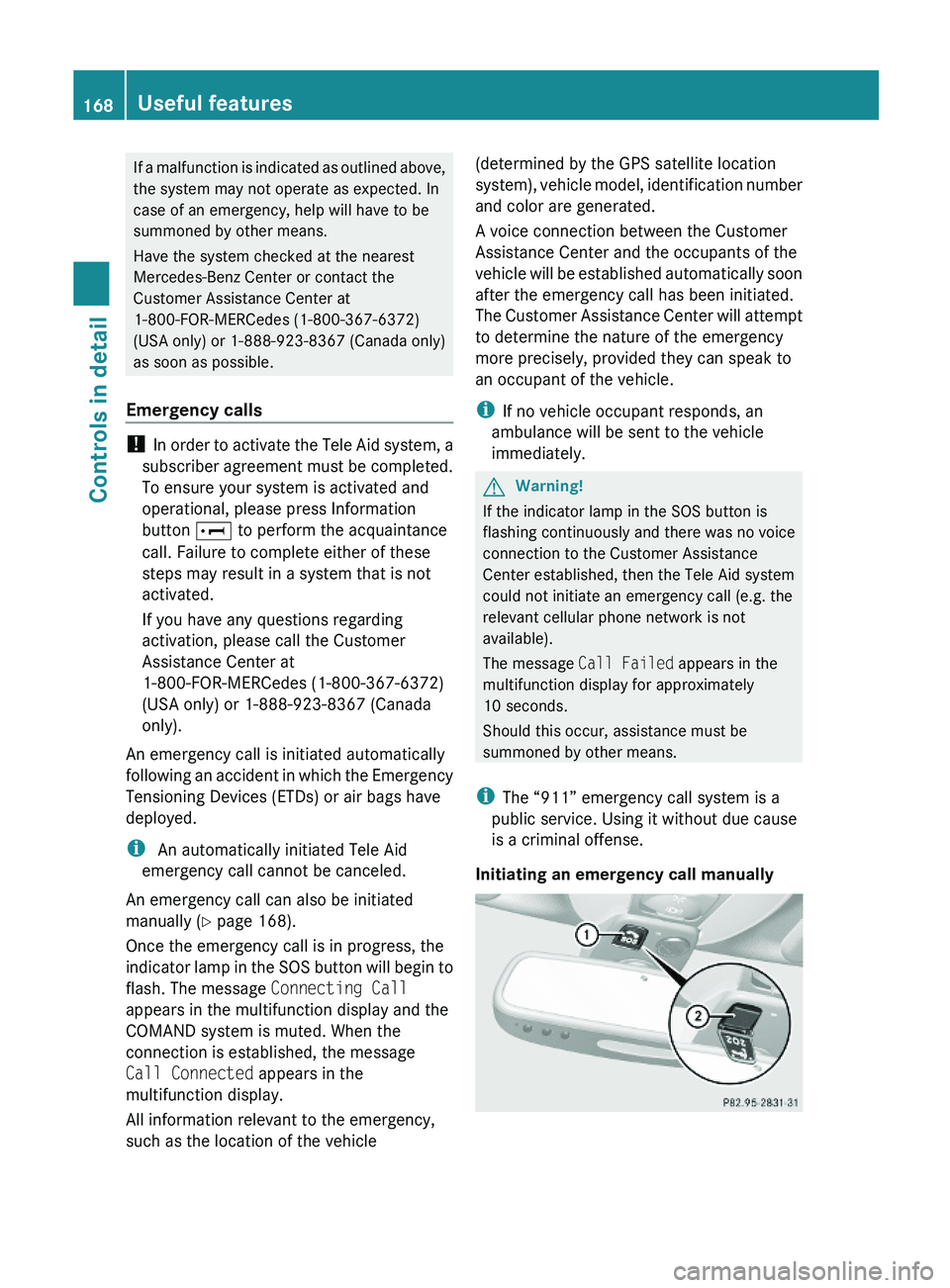
Initiating an emergency call manually
168Useful featuresControls in detail
230_AKB; 6; 22, en-USd2ureepe,Version: 2.11.8.12009-07-28T18:49:58+02:00 - Seite 168
Page 171 of 316
XBriefly press on cover \000F to open.XPress SOS button \000G briefly.
The indicator lamp in SOS button \000G will
flash until the emergency call is concluded.
XWait for a voice connection to the
Customer Assistance Center.
XClose cover \000F after the emergency call is
concluded.
GWarning!
If you feel at any way in jeopardy when in the
vehicle (e.g. smoke or fire in the vehicle,
vehicle in a dangerous road location), please
do not wait for voice contact after you have
pressed the emergency button. Carefully
leave the vehicle and move to a safe location.
The Customer Assistance Center will
automatically contact local emergency
officials with the vehicle’s approximate
location if they receive an automatic SOS
signal and cannot make voice contact with the
vehicle occupants.
XTerminating calls: Press button \000 on
the multifunction steering wheel.
or
XPress the respective button for ending a
telephone call on the COMAND system.
Roadside Assistance button
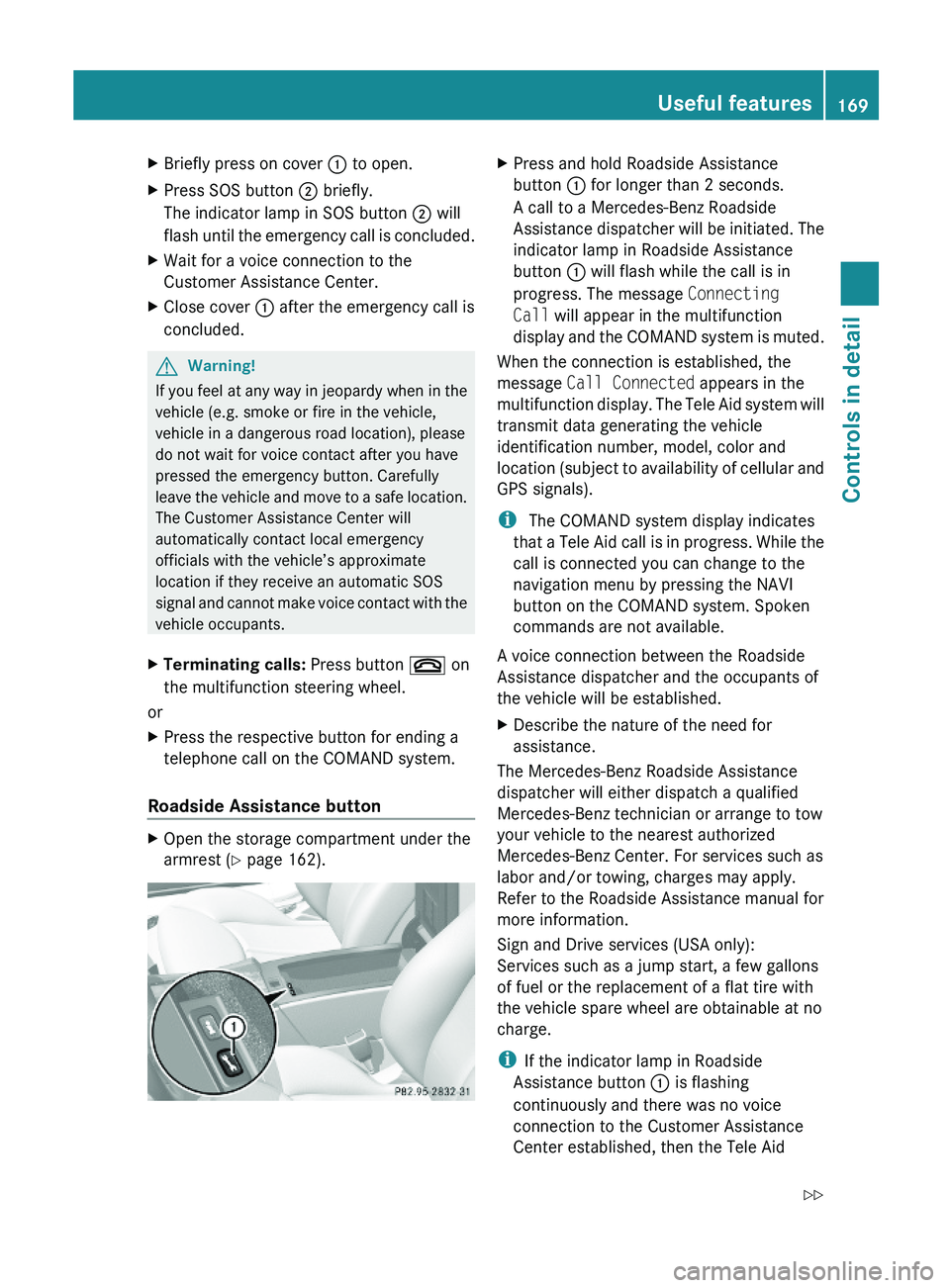
XOpen the storage compartment under the
armrest (Y page 162).
XPress and hold Roadside Assistance
button \000F for longer than 2 seconds.
A call to a Mercedes-Benz Roadside
Assistance dispatcher will be initiated. The
indicator lamp in Roadside Assistance
button \000F will flash while the call is in
progress. The message Connecting
Call will appear in the multifunction
display and the COMAND system is muted.
When the connection is established, the
message Call Connected appears in the
multifunction display. The Tele Aid system will
transmit data generating the vehicle
identification number, model, color and
location (subject to availability of cellular and
GPS signals).
i The COMAND system display indicates
that a Tele Aid call is in progress. While the
call is connected you can change to the
navigation menu by pressing the NAVI
button on the COMAND system. Spoken
commands are not available.
A voice connection between the Roadside
Assistance dispatcher and the occupants of
the vehicle will be established.
XDescribe the nature of the need for
assistance.
The Mercedes-Benz Roadside Assistance
dispatcher will either dispatch a qualified
Mercedes-Benz technician or arrange to tow
your vehicle to the nearest authorized
Mercedes-Benz Center. For services such as
labor and/or towing, charges may apply.
Refer to the Roadside Assistance manual for
more information.
Sign and Drive services (USA only):
Services such as a jump start, a few gallons
of fuel or the replacement of a flat tire with
the vehicle spare wheel are obtainable at no
charge.
iIf the indicator lamp in Roadside
Assistance button \000F is flashing
continuously and there was no voice
connection to the Customer Assistance
Center established, then the Tele Aid
Useful features169Controls in detail230_AKB; 6; 22, en-USd2ureepe,Version: 2.11.8.12009-07-28T18:49:58+02:00 - Seite 169Z