fog light MERCEDES-BENZ SL-Class 2015 R131 Owner's Manual
[x] Cancel search | Manufacturer: MERCEDES-BENZ, Model Year: 2015, Model line: SL-Class, Model: MERCEDES-BENZ SL-Class 2015 R131Pages: 610, PDF Size: 12.21 MB
Page 17 of 610
L
Lamps see Warning and indicator lamps
Lane Keeping Assist
see Active Lane Keeping Assist
Lane recommendations
Explanation .................................... 346
Presentation .................................. 346
Lap time (RACETIMER) ...................... 237
License plate lamp (display mes-
sage) .................................................. .252
Light function, active Display message ............................ 253
Lights
Activating/deactivating the inte-
rior lighting delayed switch-off ....... 234
Active light function ....................... 127
Automatic headlamp mode ............ 122
Cornering light function ................. 126
Driving abroad ............................... 122
Fogged up headlamps .................... 128
Hazard warning lamps ................... 126
High beam flasher .......................... 126
High-beam headlamps ................... 125
Light switch ................................... 122
Low-beam headlamps .................... 123
Parking lamps ................................ 124
Setting the brightness of the
ambient lighting (on-board com-
puter) ............................................. 233
Setting the color of the ambient
lighting (on-board computer) ......... 233
Standing lamps .............................. 124
Switching the daytime running
lamps on/off (on-board com-
puter) ............................................. 232
Switching the exterior lighting
delayed switch-off on/off (on-
board computer) ............................ 233
Switching the spotlight on/off ....... 233
Switching the surround lighting
on/off (on-board computer) .......... 233
Turn signals ................................... 125
see Interior lighting
see Replacing bulbs
Light sensor (display message) ....... 253List of access data
New provider ................................. 413
List of mobile phone network pro-
viders
Calling up ....................................... 411
Empty ............................................ 411
With the selected provider ............. 412
Loading aid (trunk)
Raising/lowering the roof .............. 514
Locking
see Central locking
Locking (doors)
Automatic ........................................ 89
Emergency locking ........................... 90
From inside (central locking but-
ton) ................................................. .89
Locking centrally
see Central locking
Locking verification signal (on-
board computer) .............................. .234
Low-beam headlamps Display message ............................ 251
Setting for driving abroad (sym-
metrical) ........................................ 122
Switching on/off ........................... 123
Luggage cover
see Trunk partition
Lumbar support
Adjusting (COMAND) ..................... 315 M
M+S tires ............................................ 570
MAGIC SKY CONTROL ....................... 105
Malfunction message see Display messages
Map (navigation)
Adjusting the scal e........................ 365
Arrival time/distance to the des-
tination .......................................... 368
City model ..................................... 369
Geo-coordinate display .................. 368
Heading ......................................... 366
Information in the display .............. 368
Map settings .................................. 366
Moving ........................................... 365
North orientation ........................... 366 Index
15
Page 22 of 610
Pulling away (automatic transmis-
sion)
....................................................1 54Q
Qualified specialist workshop ........... 35R
RACE START Important safety notes .................. 192
RACETIMER (on-board computer) .... 237
Radar sensor system Activating/deactivating ................. 235
Display message ............................ 258
Radio
Overview ........................................ 435
Selecting a station ......................... 228
Setting a statio n............................ 436
Sound settings (balance, bass,
treble) ............................................ 296
Storing stations ............................. 437
Switching HD Radio on/of f............ 435
Switching on .................................. 435
Switching wavebands .................... 436
Radio-wave reception/transmis-
sion in the vehicle
Declaration of conformity ................ 34
Read-aloud function .......................... 359
Reading lamp ..................................... 128
Real-time traffic reports ................... 355
Rear-compartment screens .............. 482
Rear fog lamp Display message ............................ 252
Rear lamps
see Lights
Rear Seat Entertainment System
Active COMAND source ................. 496
Adjusting sound settings ............... 487
Adjusting the brightness ................ 487
Adjusting the color ........................ 487
Adjusting the contrast ................... 487
AUX mod e...................................... 498
CD/DVD audio and MP3 mode ...... 489
Changing the batteries .................. 485
Changing the picture format .......... 488
Cordless headphones .................... 484
Multiple users ................................ 487 Operating with the headphones ..... 486
Picture settings .............................. 487
System settings ............................. 488
Using the main loudspeaker .......... 486
Video DVD mode ........................... 492
Rear view camera
Cleaning instructions ..................... 543
Displaying the image ..................... 317
Function/note s............................. 206
Switching on/of f........................... 207
Rear-view mirror
Dipping (automatic) ....................... 117
Rear window defroster
Problem (malfunction) ................... 146
Switching on/of f........................... 145
Receiving vCards ............................... 407
Redialing (telephone) ........................ 388
Refrigerant (air-conditioning sys-
tem) Important safety notes .................. 606
Refueling
Fuel gauge ....................................... 41
Important safety notes .................. 168
Refueling process .......................... 169
see Fuel
Remote control
Button lighting ............................... 483
Programming (garage door
opener) .......................................... 528
Rear Seat Entertainment System ... 482
Replacing bulbs
General notes ................................ 129
Reporting safety defects .................... 35
Reserve (fuel tank) see Fuel
Reserve fuel
Display message ............................ 256
Warning lamp ................................. 277
see Fuel
Reset function ................................... 311
Resetting (factory settings) ............. 311
Residual heat (climate control) ........ 146
Restraint system Display message ............................ 248
Introduction ..................................... 50
Warning lamp ................................. 276
Warning lamp (function) ................... 51 20
Index
Page 124 of 610
Useful information
i This Operator's manual describes all
models and all standard and optional equip- ment of your vehicle available at the time of
publication of the Operator's manual.
Country-specific differences are possible.
Please note that your vehicle may not be
equipped with all features described. This
also applies to safety-related systems and
functions.
i Read the information on qualified special-
ist workshops (Y page 35). Exterior lighting
General notes
For reasons of safety, Mercedes-Benz recom- mends that you drive with the lights switchedon even during the daytime. In some coun-
tries, operation of the headlamps varies due
to legal requirements and self-imposed obli-
gations. Driving abroad
Symmetrical low-beam headlamps Switch the headlamps to symmetrical low
beam in countries in which traffic drives on
the opposite side of the road from the country where the vehicle is registered. This prevents
glare to oncoming traffic. When using sym-
metrical lights, the edge of the road is not lit
as widely and as far ahead as normal.
Have the headlamps converted at a qualified
specialist workshop as close to the border as
possible before driving in these countries.
Asymmetrical low beam Have the headlamps converted back to asym-
metrical low-beam headlamps at a qualified
specialist workshop as soon as possible after
crossing the border again. Setting the exterior lighting
Setting options Exterior lighting can be set using:
R the light switch
R the combination switch (Y page 125)
R the on-board computer (Y page 232)
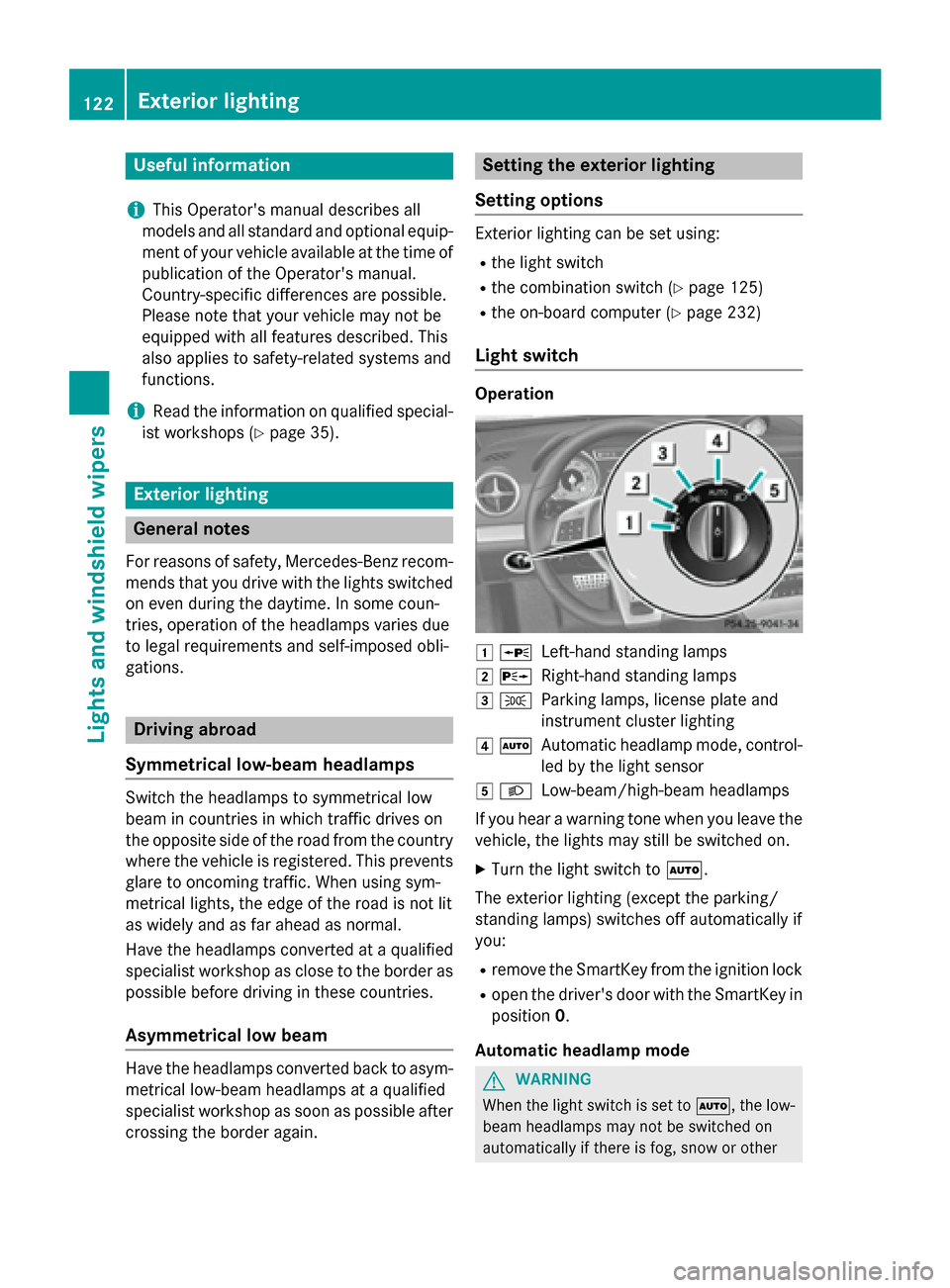
Light switch Operation
0047
0063
Left-hand standing lamps
0048 0064
Right-hand standing lamps
0049 0060
Parking lamps, license plate and
instrument cluster lighting
004A 0058
Automatic headlamp mode, control-
led by the light sensor
004B 0058
Low-beam/high-beam headlamps
If you hear a warning tone when you leave the
vehicle, the lights may still be switched on.
X Turn the light switch to 0058.
The exterior lighting (except the parking/
standing lamps) switches off automatically if
you: R remove the SmartKey from the ignition lock
R open the driver's door with the SmartKey in
position 0.
Automatic headlamp mode G
WARNING
When the light switch is set to 0058, the low-
beam headlamps may not be switched on
automatically if there is fog, snow or other 122
Exterior lightingLights and windshield wipers
Page 125 of 610
causes of poor visibility due to the weather
conditions such as spray. There is a risk of an
accident.
In such situations, turn the light switch to
0058.
The automatic headlamp feature is only an
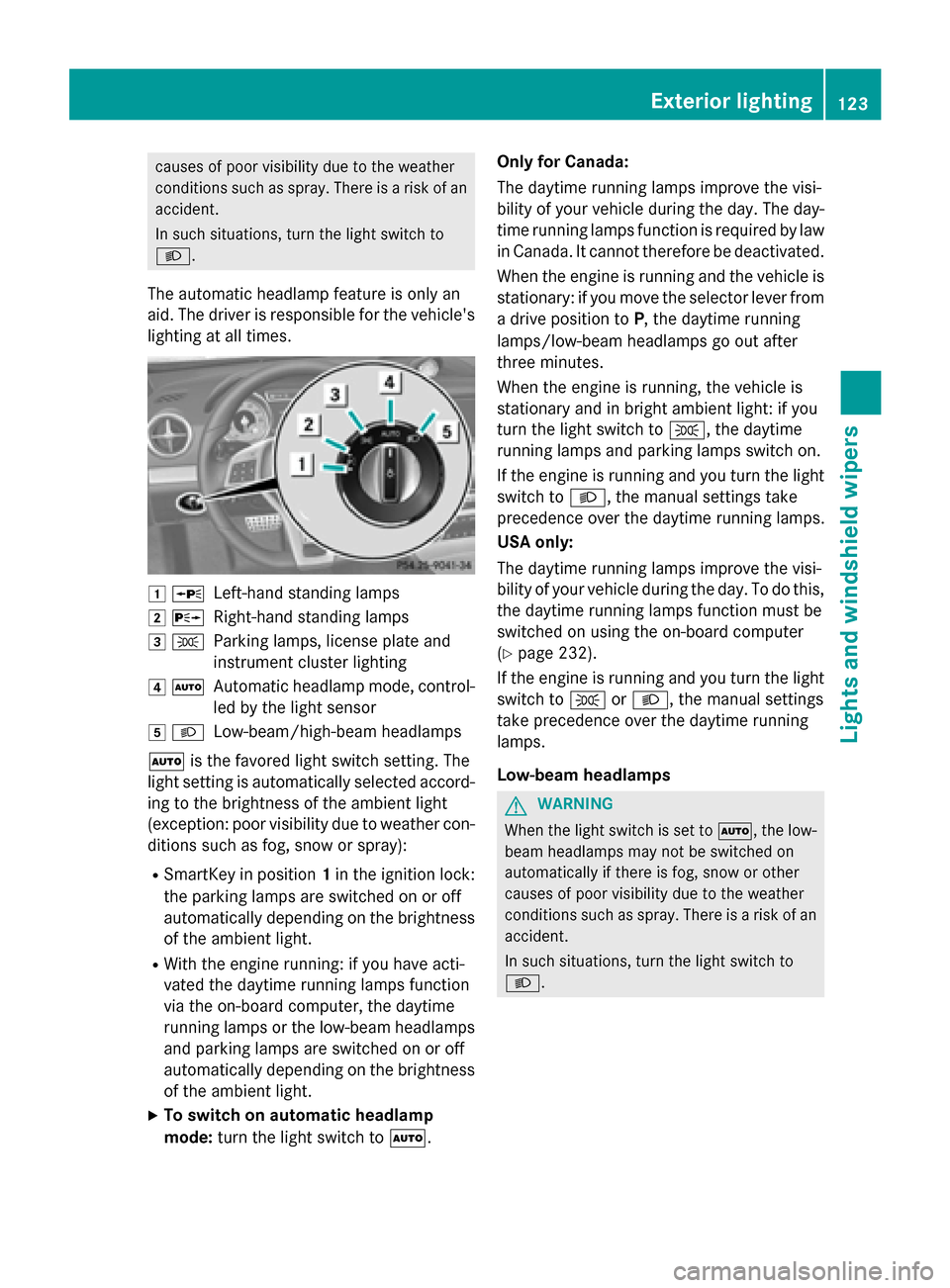
aid. The driver is responsible for the vehicle's lighting at all times. 0047
0063
Left-hand standing lamps
0048 0064
Right-hand standing lamps
0049 0060
Parking lamps, license plate and
instrument cluster lighting
004A 0058
Automatic headlamp mode, control-
led by the light sensor
004B 0058
Low-beam/high-beam headlamps
0058 is the favored light switch setting. The
light setting is automatically selected accord- ing to the brightness of the ambient light
(exception: poor visibility due to weather con-
ditions such as fog, snow or spray):
R SmartKey in position 1in the ignition lock:
the parking lamps are switched on or off
automatically depending on the brightness of the ambient light.
R With the engine running: if you have acti-
vated the daytime running lamps function
via the on-board computer, the daytime
running lamps or the low-beam headlamps
and parking lamps are switched on or off
automatically depending on the brightness of the ambient light.
X To switch on automatic headlamp
mode: turn the light switch to 0058.Only for Canada:
The daytime running lamps improve the visi-
bility of your vehicle during the day. The day-
time running lamps function is required by law in Canada. It cannot therefore be deactivated.
When the engine is running and the vehicle is
stationary: if you move the selector lever from
a drive position to P, the daytime running
lamps/low-beam headlamps go out after
three minutes.
When the engine is running, the vehicle is
stationary and in bright ambient light: if you
turn the light switch to 0060, the daytime
running lamps and parking lamps switch on.
If the engine is running and you turn the light switch to 0058, the manual settings take
precedence over the daytime running lamps.
USA only:
The daytime running lamps improve the visi-
bility of your vehicle during the day. To do this,
the daytime running lamps function must be
switched on using the on-board computer
(Y page 232).
If the engine is running and you turn the light
switch to 0060or0058, the manual settings
take precedence over the daytime running
lamps.
Low-beam headlamps G
WARNING
When the light switch is set to 0058, the low-
beam headlamps may not be switched on
automatically if there is fog, snow or other
causes of poor visibility due to the weather
conditions such as spray. There is a risk of an
accident.
In such situations, turn the light switch to
0058. Exterior lighting
123Lights and windshield wipers Z
Page 126 of 610
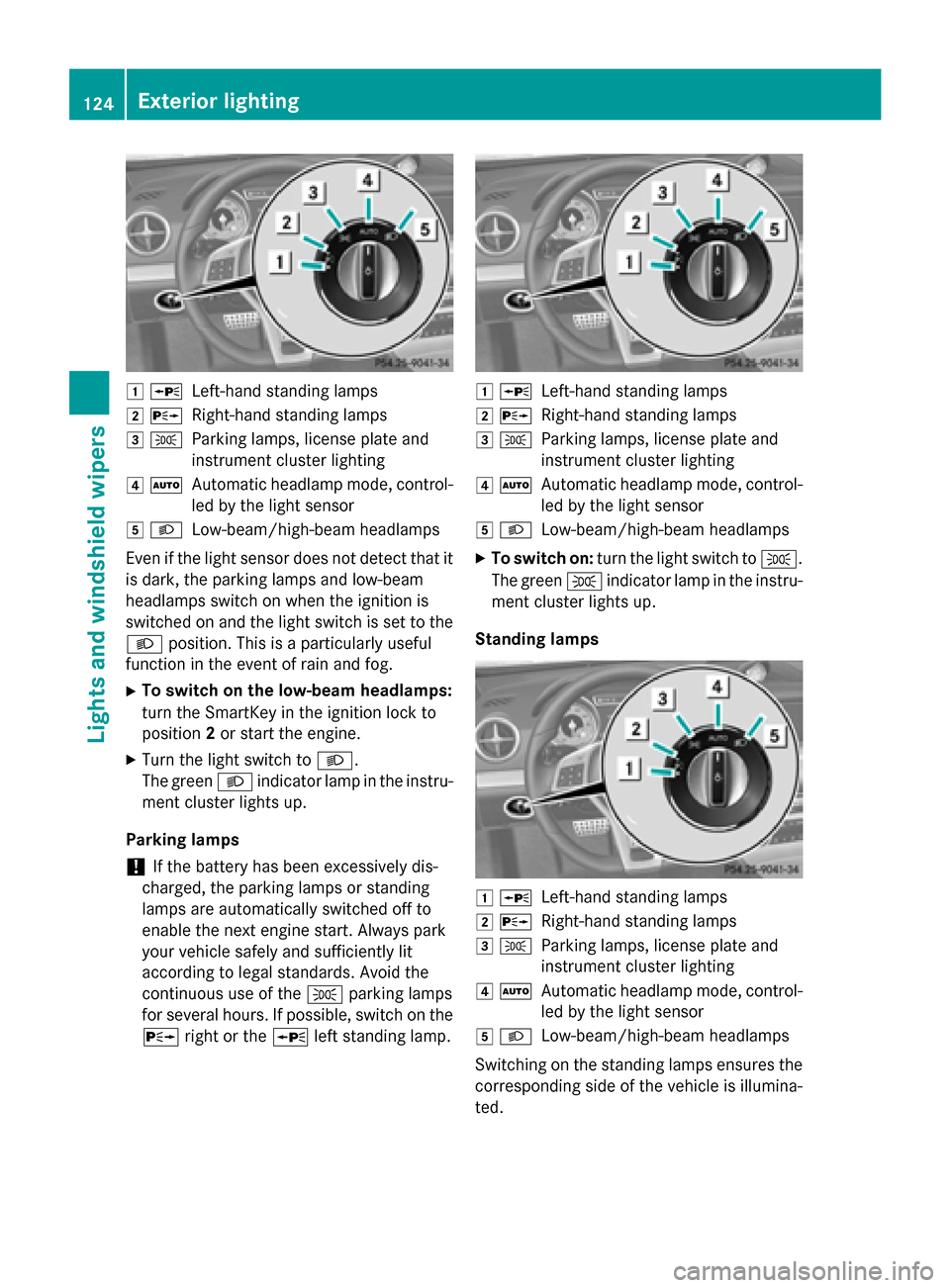
0047
0063
Left-hand standing lamps
0048 0064
Right-hand standing lamps
0049 0060
Parking lamps, license plate and
instrument cluster lighting
004A 0058
Automatic headlamp mode, control-
led by the light sensor
004B 0058
Low-beam/high-beam headlamps
Even if the light sensor does not detect that it is dark, the parking lamps and low-beam
headlamps switch on when the ignition is
switched on and the light switch is set to the
0058 position. This is a particularly useful
function in the event of rain and fog.
X To switch on the low-beam headlamps:
turn the SmartKey in the ignition lock to
position 2or start the engine.
X Turn the light switch to 0058.
The green 0058indicator lamp in the instru-
ment cluster lights up.
Parking lamps ! If the battery has been excessively dis-
charged, the parking lamps or standing
lamps are automatically switched off to
enable the next engine start. Always park
your vehicle safely and sufficiently lit
according to legal standards. Avoid the
continuous use of the 0060parking lamps
for several hours. If possible, switch on the
0064 right or the 0063left standing lamp. 0047
0063
Left-hand standing lamps
0048 0064
Right-hand standing lamps
0049 0060
Parking lamps, license plate and
instrument cluster lighting
004A 0058
Automatic headlamp mode, control-
led by the light sensor
004B 0058
Low-beam/high-beam headlamps
X To switch on: turn the light switch to 0060.
The green 0060indicator lamp in the instru-
ment cluster lights up.
Standing lamps 0047
0063
Left-hand standing lamps
0048 0064
Right-hand standing lamps
0049 0060
Parking lamps, license plate and
instrument cluster lighting
004A 0058
Automatic headlamp mode, control-
led by the light sensor
004B 0058
Low-beam/high-beam headlamps
Switching on the standing lamps ensures the corresponding side of the vehicle is illumina-
ted. 124
Exterior lightingLights and windshield wipers
Page 129 of 610
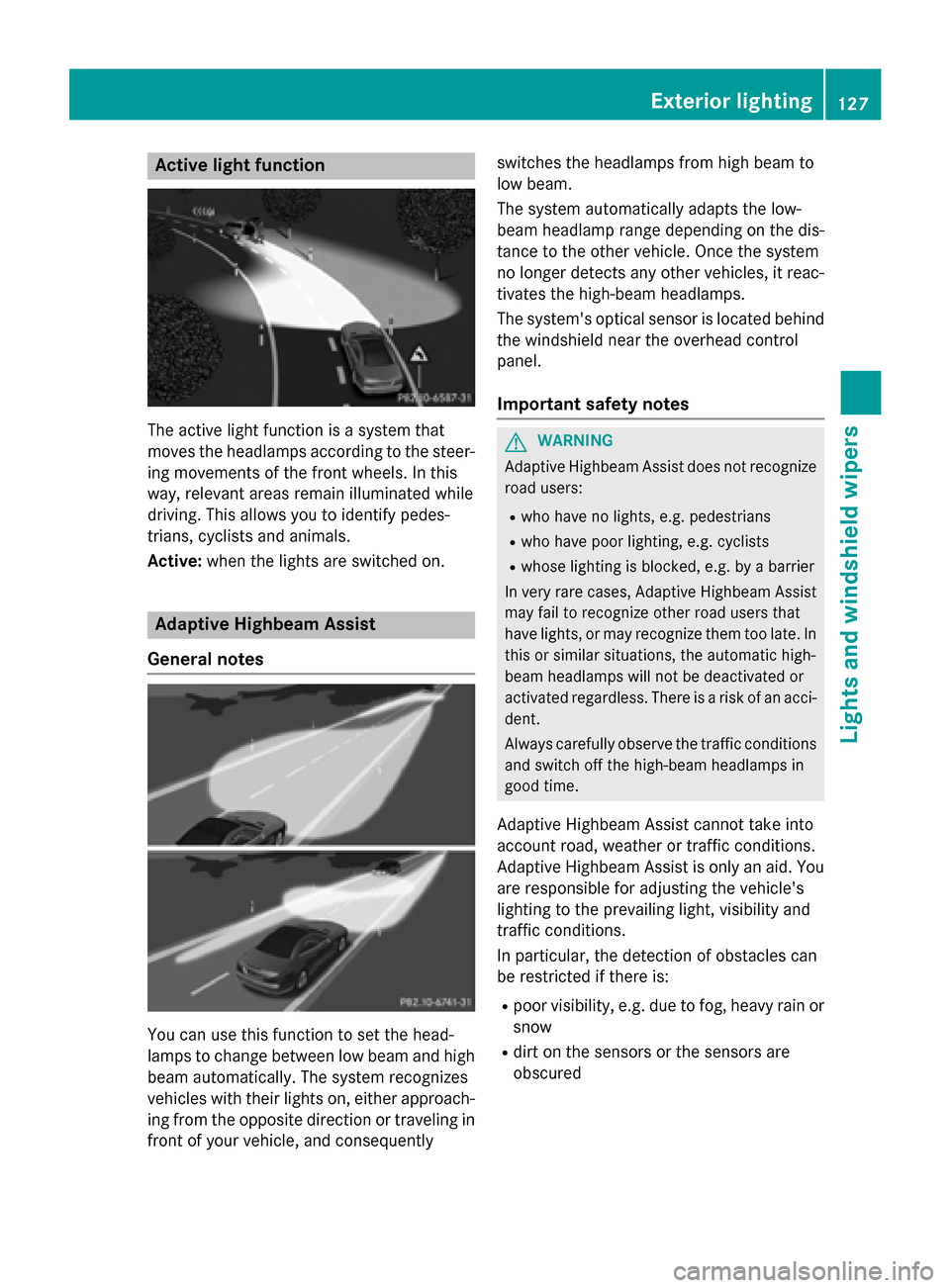
Active light function
The active light function is a system that
moves the headlamps according to the steer-
ing movements of the front wheels. In this
way, relevant areas remain illuminated while
driving. This allows you to identify pedes-
trians, cyclists and animals.
Active: when the lights are switched on. Adaptive Highbeam Assist
General notes You can use this function to set the head-
lamps to change between low beam and high beam automatically. The system recognizes
vehicles with their lights on, either approach-
ing from the opposite direction or traveling in front of your vehicle, and consequently switches the headlamps from high beam to
low beam.
The system automatically adapts the low-
beam headlamp range depending on the dis-
tance to the other vehicle. Once the system
no longer detects any other vehicles, it reac-
tivates the high-beam headlamps.
The system's optical sensor is located behind
the windshield near the overhead control
panel.
Important safety notes G
WARNING
Adaptive Highbeam Assist does not recognize road users:
R who have no lights, e.g. pedestrians
R who have poor lighting, e.g. cyclists
R whose lighting is blocked, e.g. by a barrier
In very rare cases, Adaptive Highbeam Assist
may fail to recognize other road users that
have lights, or may recognize them too late. In this or similar situations, the automatic high-
beam headlamps will not be deactivated or
activated regardless. There is a risk of an acci-
dent.
Always carefully observe the traffic conditions and switch off the high-beam headlamps in
good time.
Adaptive Highbeam Assist cannot take into
account road, weather or traffic conditions.
Adaptive Highbeam Assist is only an aid. You are responsible for adjusting the vehicle's
lighting to the prevailing light, visibility and
traffic conditions.
In particular, the detection of obstacles can
be restricted if there is:
R poor visibility, e.g. due to fog, heavy rain or
snow
R dirt on the sensors or the sensors are
obscured Exterior lighting
127Lights and windshield wipers Z
Page 130 of 610
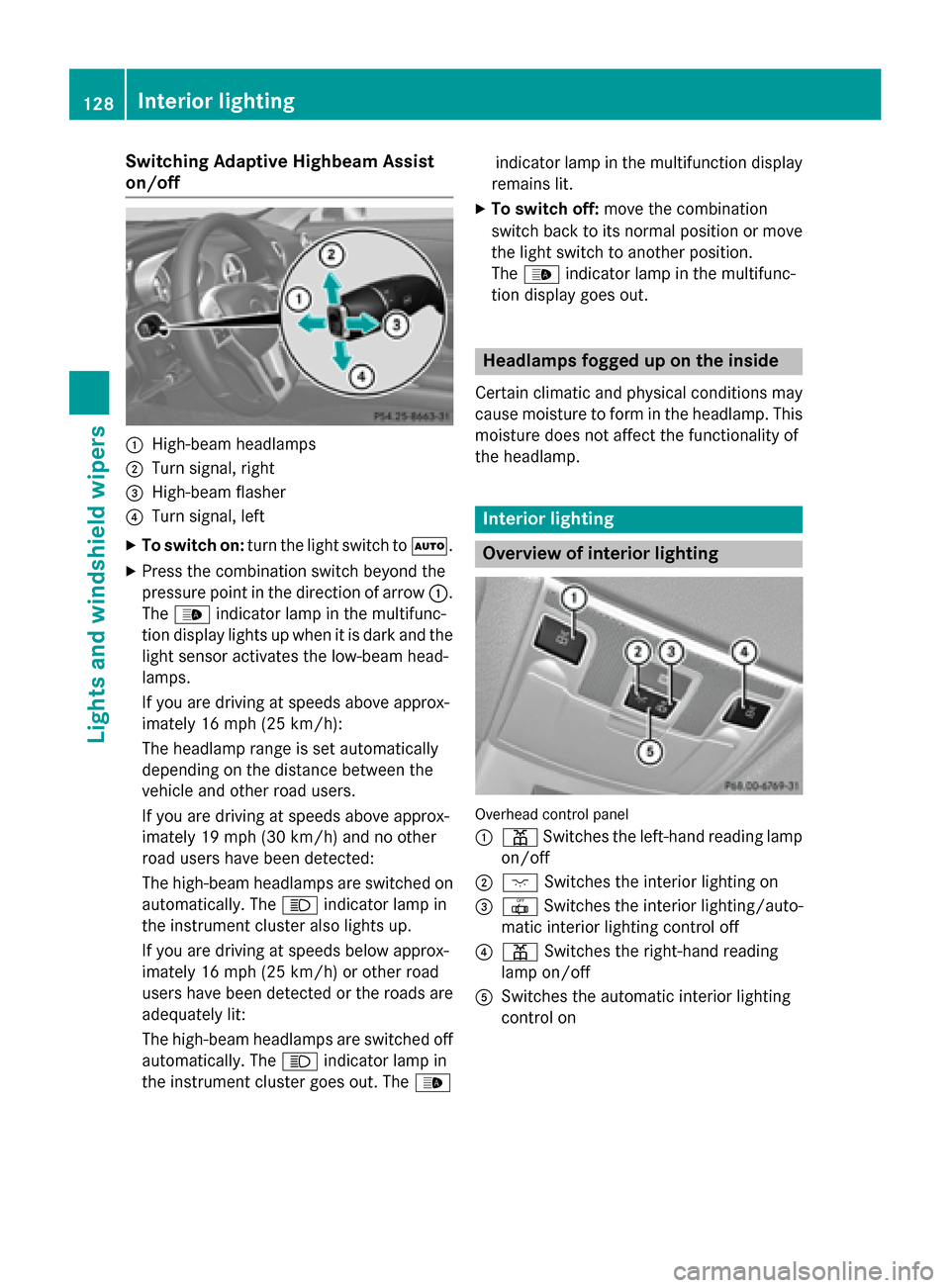
Switching Adaptive Highbeam Assist
on/off 0043
High-beam headlamps
0044 Turn signal, right
0087 High-beam flasher
0085 Turn signal, left
X To switch on: turn the light switch to 0058.
X Press the combination switch beyond the
pressure point in the direction of arrow 0043.
The 00CE indicator lamp in the multifunc-
tion display lights up when it is dark and the light sensor activates the low-beam head-
lamps.
If you are driving at speeds above approx-
imately 16 mph (25 km/h):
The headlamp range is set automatically
depending on the distance between the
vehicle and other road users.
If you are driving at speeds above approx-
imately 19 mph (30 km/h) and no other
road users have been detected:
The high-beam headlamps are switched on
automatically. The 0057indicator lamp in
the instrument cluster also lights up.
If you are driving at speeds below approx-
imately 16 mph (25 km/h) or other road
users have been detected or the roads are adequately lit:
The high-beam headlamps are switched off
automatically. The 0057indicator lamp in
the instrument cluster goes out. The 00CEindicator lamp in the multifunction display
remains lit.
X To switch off: move the combination
switch back to its normal position or move the light switch to another position.
The 00CE indicator lamp in the multifunc-
tion display goes out. Headlamps fogged up on the inside
Certain climatic and physical conditions may
cause moisture to form in the headlamp. This moisture does not affect the functionality of
the headlamp. Interior lighting
Overview of interior lighting
Overhead control panel
0043
003D Switches the left-hand reading lamp
on/off
0044 004A Switches the interior lighting on
0087 0033 Switches the interior lighting/auto-
matic interior lighting control off
0085 003D Switches the right-hand reading
lamp on/off
0083 Switches the automatic interior lighting
control on 128
Interior lightingLights and windshield wipers
Page 140 of 610
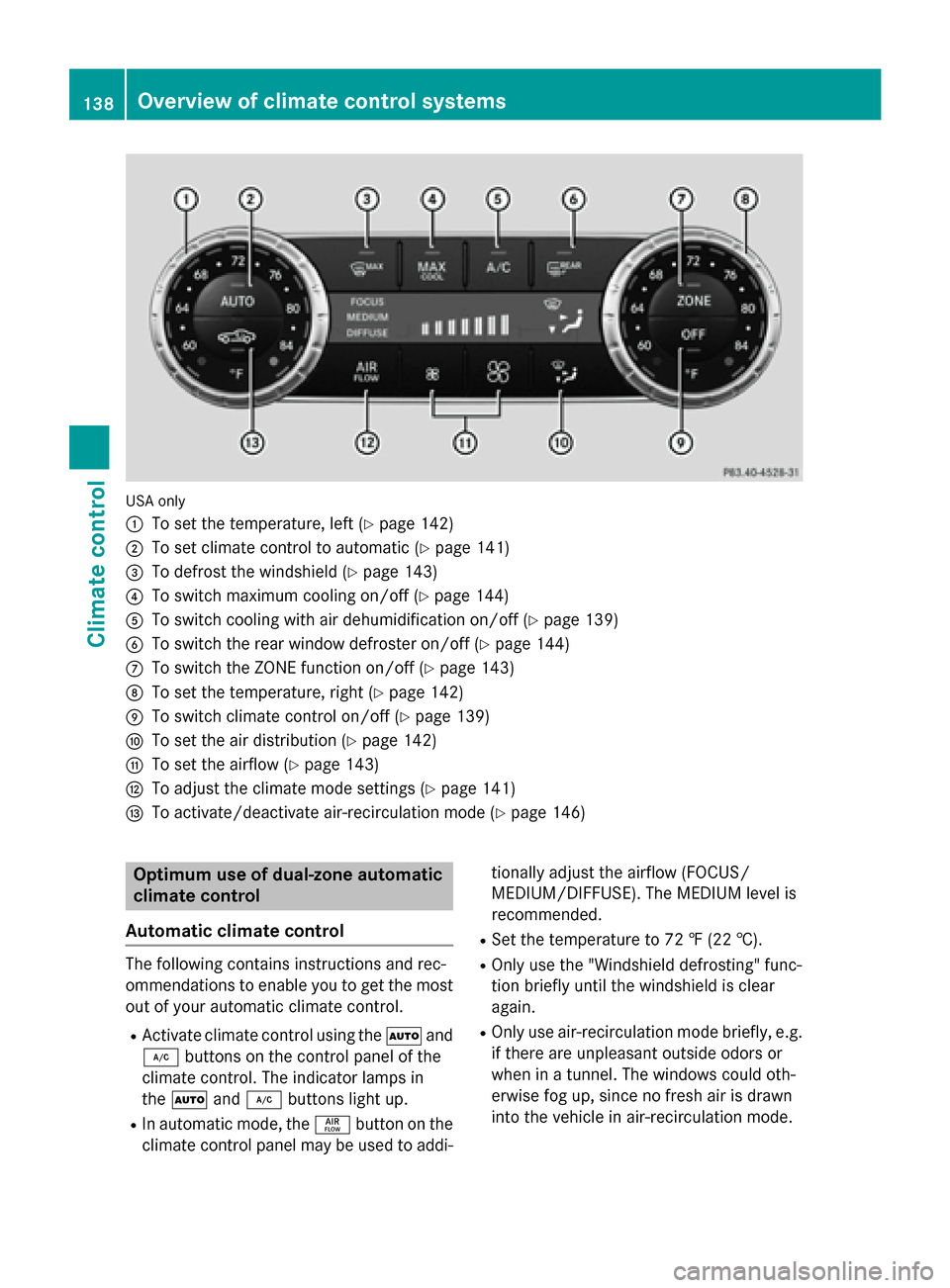
USA only
0043
To set the temperature, left (Y page 142)
0044 To set climate control to automatic (Y page 141)
0087 To defrost the windshield (Y page 143)
0085 To switch maximum cooling on/off (Y page 144)
0083 To switch cooling with air dehumidification on/off (Y page 139)
0084 To switch the rear window defroster on/off (Y page 144)
006B To switch the ZONE function on/off (Y page 143)
006C To set the temperature, right (Y page 142)
006D To switch climate control on/off (Y page 139)
006E To set the air distribution (Y page 142)
006F To set the airflow (Y page 143)
0070 To adjust the climate mode settings (Y page 141)
0071 To activate/deactivate air-recirculation mode (Y page 146)Optimum use of dual-zone automatic
climate control
Automatic climate control The following contains instructions and rec-
ommendations to enable you to get the most
out of your automatic climate control.
R Activate climate control using the 0058and
005A buttons on the control panel of the
climate control. The indicator lamps in
the 0058 and005A buttons light up.
R In automatic mode, the 00F0button on the
climate control panel may be used to addi- tionally adjust the airflow (FOCUS/
MEDIUM/DIFFUSE). The MEDIUM level is
recommended.
R Set the temperature to 72 ‡ (22 †).
R Only use the "Windshield defrosting" func-
tion briefly until the windshield is clear
again.
R Only use air-recirculation mode briefly, e.g.
if there are unpleasant outside odors or
when in a tunnel. The windows could oth-
erwise fog up, since no fresh air is drawn
into the vehicle in air-recirculation mode. 138
Overview of climate control systemsClimate control
Page 141 of 610
R
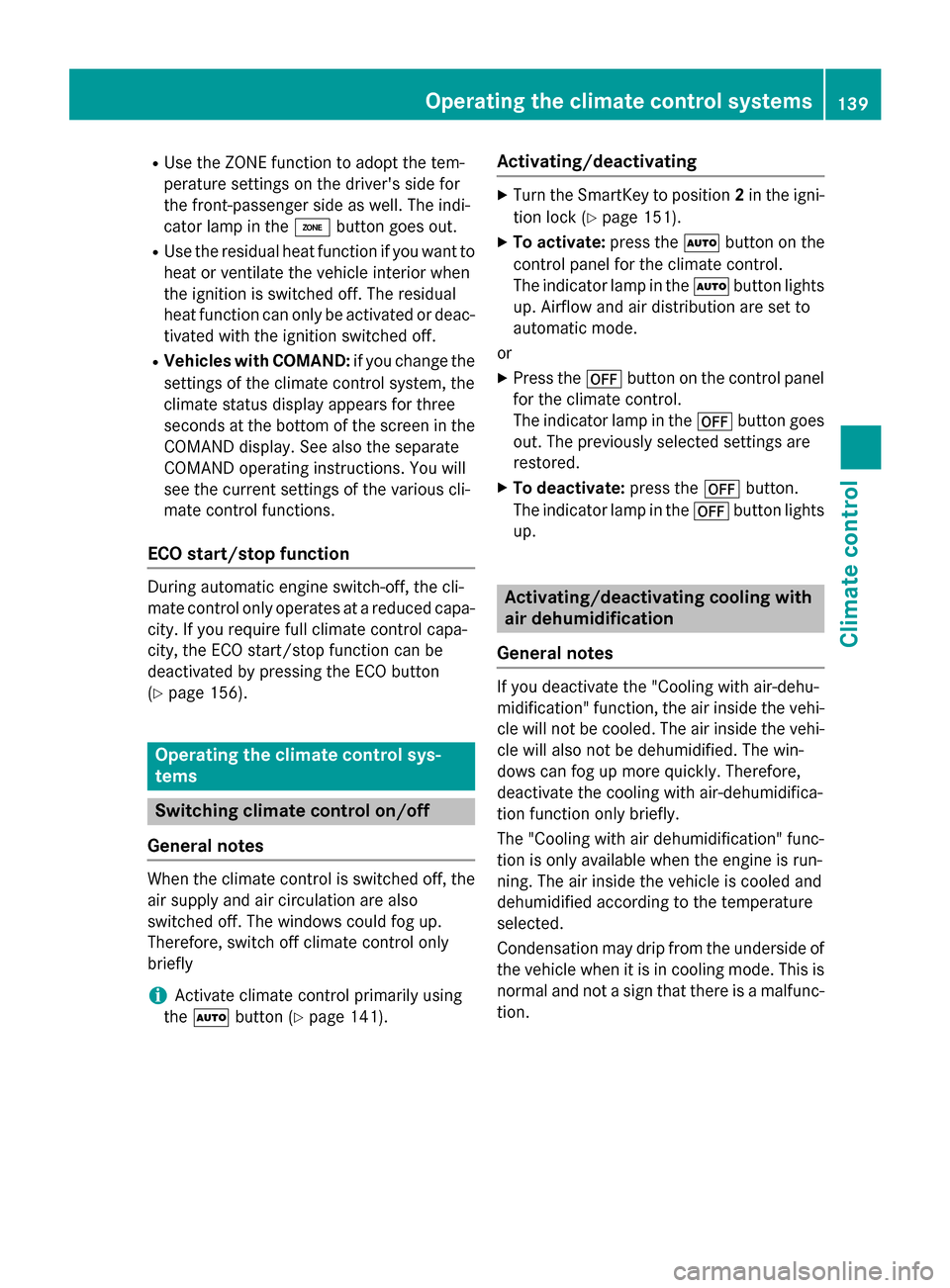
Use the ZONE function to adopt the tem-
perature settings on the driver's side for
the front-passenger side as well. The indi-
cator lamp in the 00D6button goes out.
R Use the residual heat function if you want to
heat or ventilate the vehicle interior when
the ignition is switched off. The residual
heat function can only be activated or deac- tivated with the ignition switched off.
R Vehicles with COMAND: if you change the
settings of the climate control system, the
climate status display appears for three
seconds at the bottom of the screen in the COMAND display. See also the separate
COMAND operating instructions. You will
see the current settings of the various cli-
mate control functions.
ECO start/stop function During automatic engine switch-off, the cli-
mate control only operates at a reduced capa- city. If you require full climate control capa-
city, the ECO start/stop function can be
deactivated by pressing the ECO button
(Y page 156). Operating the climate control sys-
tems Switching climate control on/off
General notes When the climate control is switched off, the
air supply and air circulation are also
switched off. The windows could fog up.
Therefore, switch off climate control only
briefly
i Activate climate control primarily using
the 0058 button (Y page 141). Activating/deactivating X
Turn the SmartKey to position 2in the igni-
tion lock (Y page 151).
X To activate: press the0058button on the
control panel for the climate control.
The indicator lamp in the 0058button lights
up. Airflow and air distribution are set to
automatic mode.
or
X Press the 0078button on the control panel
for the climate control.
The indicator lamp in the 0078button goes
out. The previously selected settings are
restored.
X To deactivate: press the0078button.
The indicator lamp in the 0078button lights
up. Activating/deactivating cooling with
air dehumidification
General notes If you deactivate the "Cooling with air-dehu-
midification" function, the air inside the vehi-
cle will not be cooled. The air inside the vehi-
cle will also not be dehumidified. The win-
dows can fog up more quickly. Therefore,
deactivate the cooling with air-dehumidifica-
tion function only briefly.
The "Cooling with air dehumidification" func-
tion is only available when the engine is run-
ning. The air inside the vehicle is cooled and
dehumidified according to the temperature
selected.
Condensation may drip from the underside of the vehicle when it is in cooling mode. This isnormal and not a sign that there is a malfunc-
tion. Operating the climate control systems
139Climate control
Page 143 of 610
Problems with the "Cooling with air dehumidification" function
Problem
Possible causes/consequences and
0050
0050Solutions The indicator lamp in
the
005A button
flashes three times or
remains off. The "Cool-
ing with air dehumidifi-
cation" function cannot
be switched on. Cooling with air dehumidification has been deactivated due to a
malfunction.
X Visit a qualified specialist workshop. Setting climate control to automatic
General notes In automatic mode, the set temperature is
maintained automatically at a constant level. The system automatically regulates the tem-
perature of the dispensed air, the airflow and
the air distribution.
The automatic mode functions optimally
when the "Cooling with air dehumidification"
function is activated. If necessary, cooling
with air dehumidification can be deactivated.
If you deactivate the "Cooling with air-dehu-
midification" function, the air inside the vehi-
cle will not be cooled. The air inside the vehi- cle will also not be dehumidified. The win-
dows can fog up more quickly. Therefore,
deactivate the cooling with air-dehumidifica-
tion function only briefly.
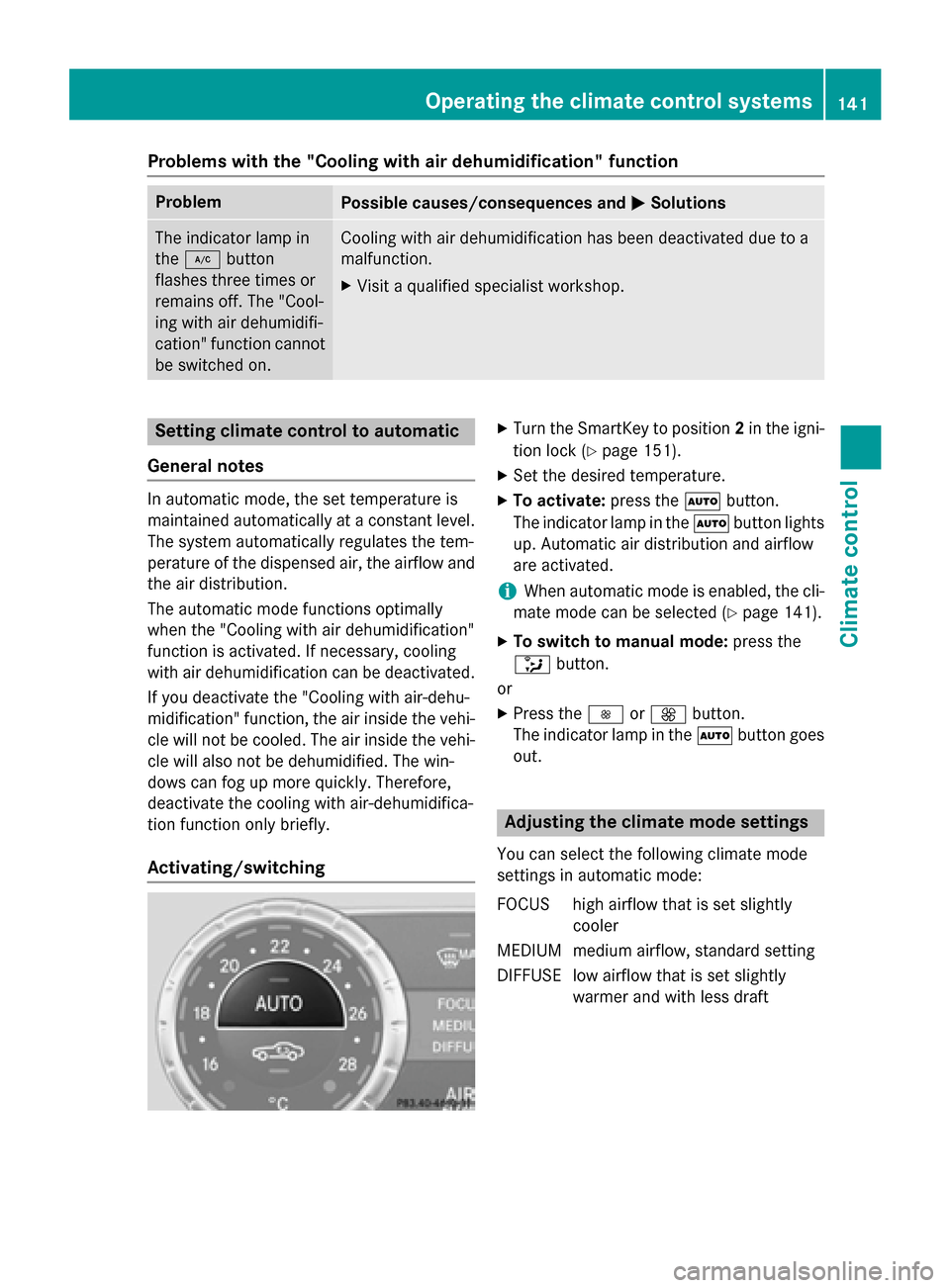
Activating/switching X
Turn the SmartKey to position 2in the igni-
tion lock (Y page 151).
X Set the desired temperature.
X To activate: press the0058button.
The indicator lamp in the 0058button lights
up. Automatic air distribution and airflow
are activated.
i When automatic mode is enabled, the cli-
mate mode can be selected (Y page 141).
X To switch to manual mode: press the
008F button.
or
X Press the 0095or0097 button.
The indicator lamp in the 0058button goes
out. Adjusting the climate mode settings
You can select the following climate mode
settings in automatic mode:
FOCUS high airflow that is set slightly cooler
MEDIUM medium airflow, standard setting
DIFFUSE low airflow that is set slightly warmer and with less draft Operating the climate control systems
141Climate control