fog light MERCEDES-BENZ SL-Class 2015 R131 User Guide
[x] Cancel search | Manufacturer: MERCEDES-BENZ, Model Year: 2015, Model line: SL-Class, Model: MERCEDES-BENZ SL-Class 2015 R131Pages: 610, PDF Size: 12.21 MB
Page 146 of 610
restored. Air-recirculation mode remains
deactivated.
or
X Press the 0058button.
The indicator lamp in the 0064button goes
out. Airflow and air distribution are set to
automatic mode.
or X Turn the temperature controls to the left or
to the right on the control panel for the cli- mate control or clockwise or counter-
clockwise.
Turn temperature controls 0043or006C clock-
wise or counter-clockwise (Y page 137).
or X Press the 0097or0095 button. MAX COOL maximum cooling
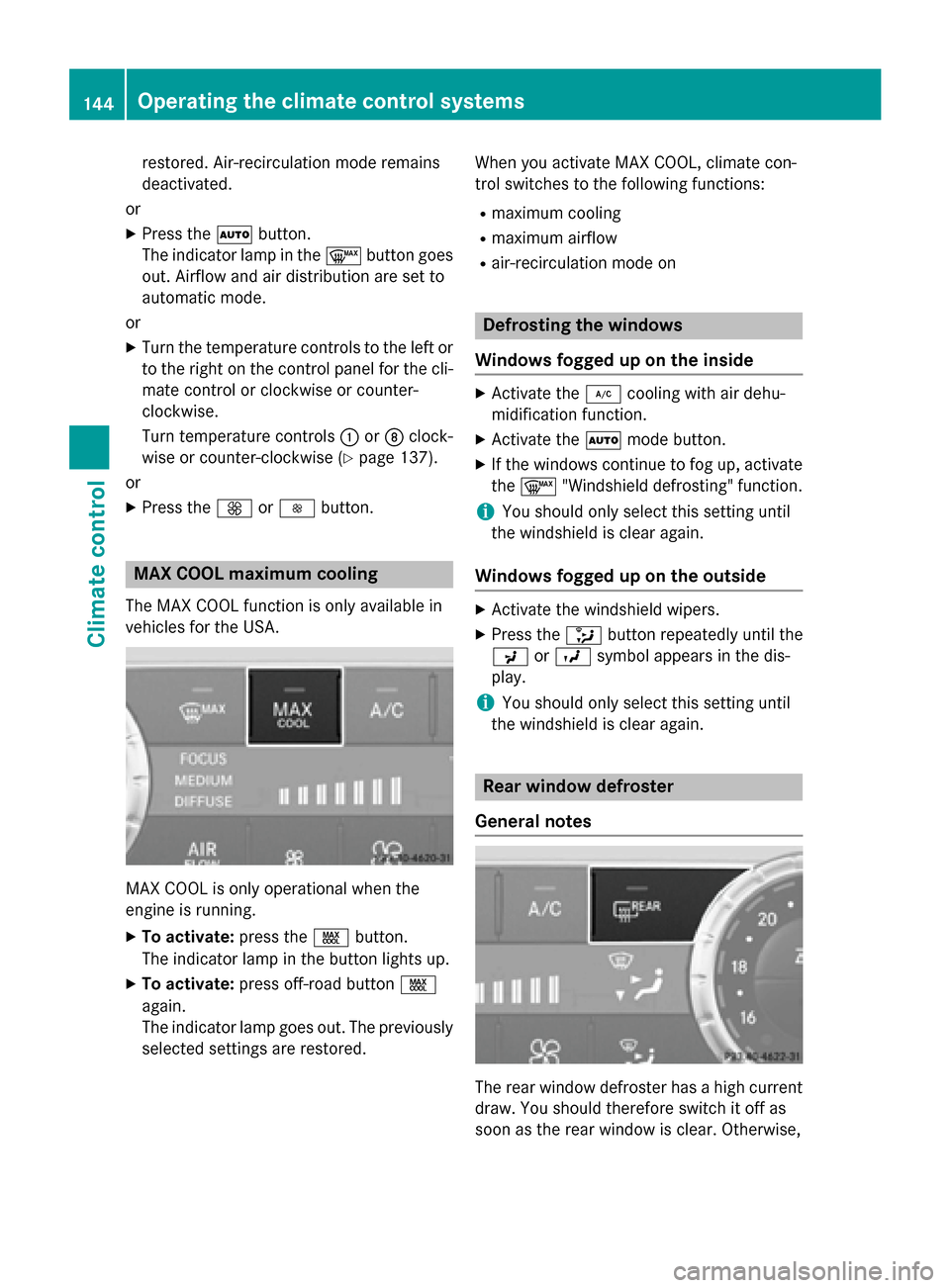
The MAX COOL function is only available in
vehicles for the USA. MAX COOL is only operational when the
engine is running.
X To activate: press the00C9button.
The indicator lamp in the button lights up.
X To activate: press off-road button 00C9
again.
The indicator lamp goes out. The previously
selected settings are restored. When you activate MAX COOL, climate con-
trol switches to the following functions:
R maximum cooling
R maximum airflow
R air-recirculation mode on Defrosting the windows
Windows fogged up on the inside X
Activate the 005Acooling with air dehu-
midification function.
X Activate the 0058mode button.
X If the windows continue to fog up, activate
the 0064 "Windshield defrosting" function.
i You should only select this setting until
the windshield is clear again.
Windows fogged up on the outside X
Activate the windshield wipers.
X Press the 008Fbutton repeatedly until the
009C or009B symbol appears in the dis-
play.
i You should only select this setting until
the windshield is clear again. Rear window defroster
General notes The rear window defroster has a high current
draw. You should therefore switch it off as
soon as the rear window is clear. Otherwise, 144
Operating the climate control systemsClimate control
Page 148 of 610
Problems with the rear window defroster
Problem
Possible causes/consequences and
0050
0050Solutions The rear window
defroster has deactiva-
ted prematurely or can-
not be activated. The on-board voltage is too low because too many electrical con-
sumers are switched on.
X Switch off any consumers that are not required, e.g. reading
lamps, interior lighting or the seat heating.
When the battery is sufficiently charged, the rear window
defroster can be activated again. Activating/deactivating air-recircula-
tion mode
General notes If you switch on air-recirculation mode, the
windows can fog up more quickly, in particu-
lar at low temperatures. Only use air-recircu-
lation mode briefly to prevent the windows
from fogging up.
Activating/deactivating X
Turn the SmartKey to position 2in the igni-
tion lock (Y page 151).
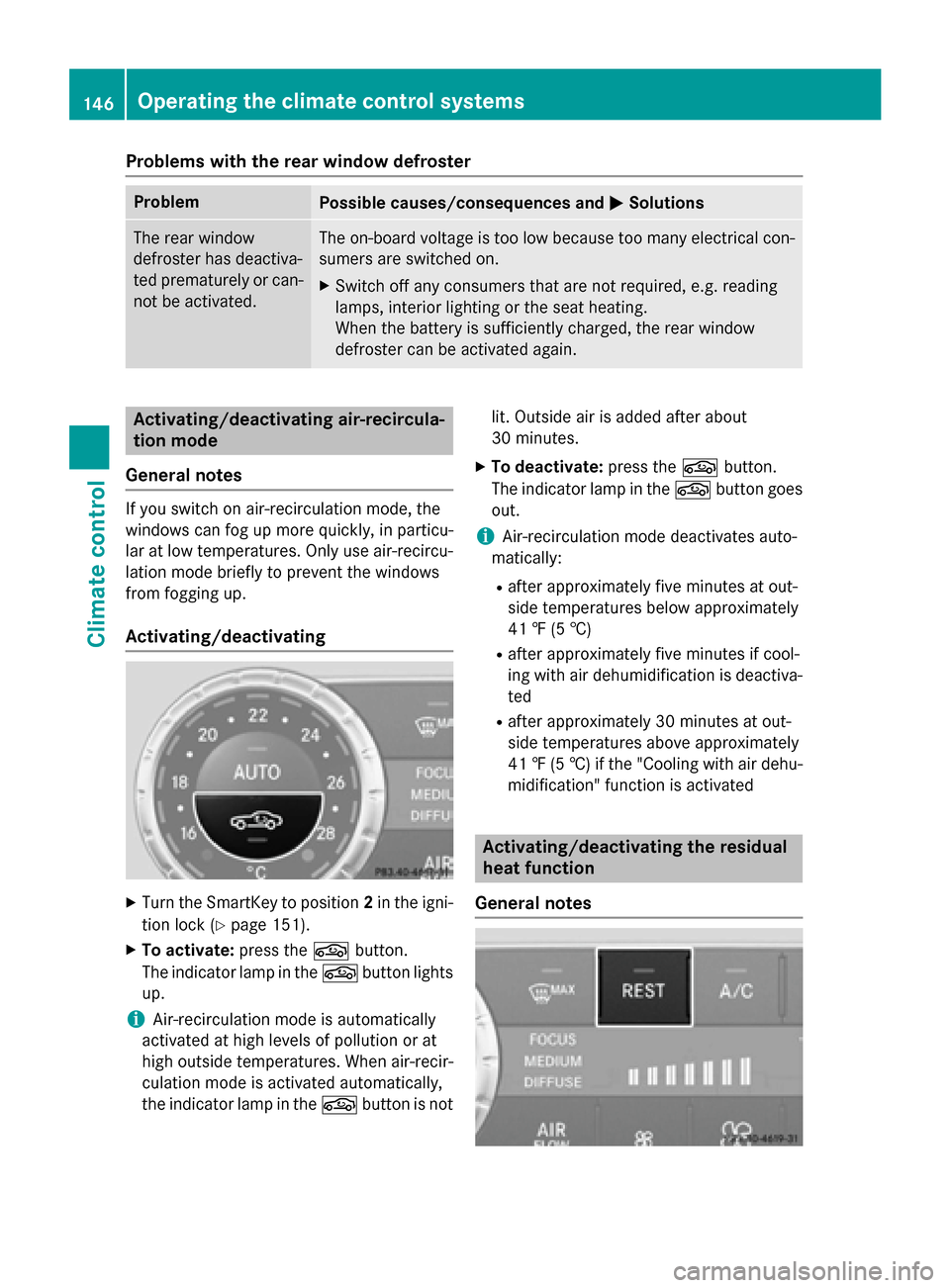
X To activate: press the0072button.
The indicator lamp in the 0072button lights
up.
i Air-recirculation mode is automatically
activated at high levels of pollution or at
high outside temperatures. When air-recir-
culation mode is activated automatically,
the indicator lamp in the 0072button is not lit. Outside air is added after about
30 minutes.
X To deactivate: press the0072button.
The indicator lamp in the 0072button goes
out.
i Air-recirculation mode deactivates auto-
matically:
R after approximately five minutes at out-
side temperatures below approximately
41 ‡ (5 †)
R after approximately five minutes if cool-
ing with air dehumidification is deactiva-
ted
R after approximately 30 minutes at out-
side temperatures above approximately
41 ‡ (5 †) if the "Cooling with air dehu-
midification" function is activated Activating/deactivating the residual
heat function
General notes 146
Operating the climate control systemsClimate control
Page 208 of 610
X
Stop the movement of the multifunction
steering wheel or steer yourself.
Active Parking Assist will be canceled at
once. The Park Assist Canceled
Park Assist Canceled mes-
sage appears in the multifunction display.
or X Press the PARKTRONIC button on the cen-
ter console (Y page 201).
PARKTRONIC is switched off and Active
Parking Assist is immediately canceled.
The Park Assist Canceled
Park Assist Canceled message
appears in the multifunction display.
Active Parking Assist is canceled automati-
cally if: R parking using Active Parking Assist is no
longer possible
R you are driving faster than 6 mph (10 km/h)
R a wheel spins, ESP ®
intervenes or fails. The
00E5 ESP warning lamp lights up in the
instrument cluster
A warning tone sounds. The parking symbol
goes out and the Park Assist Canceled
Park Assist Canceled
message appears in the multifunction dis-
play.
If Active Parking Assist is canceled, you must
steer again yourself. Rear view camera
General notes Rear view camera
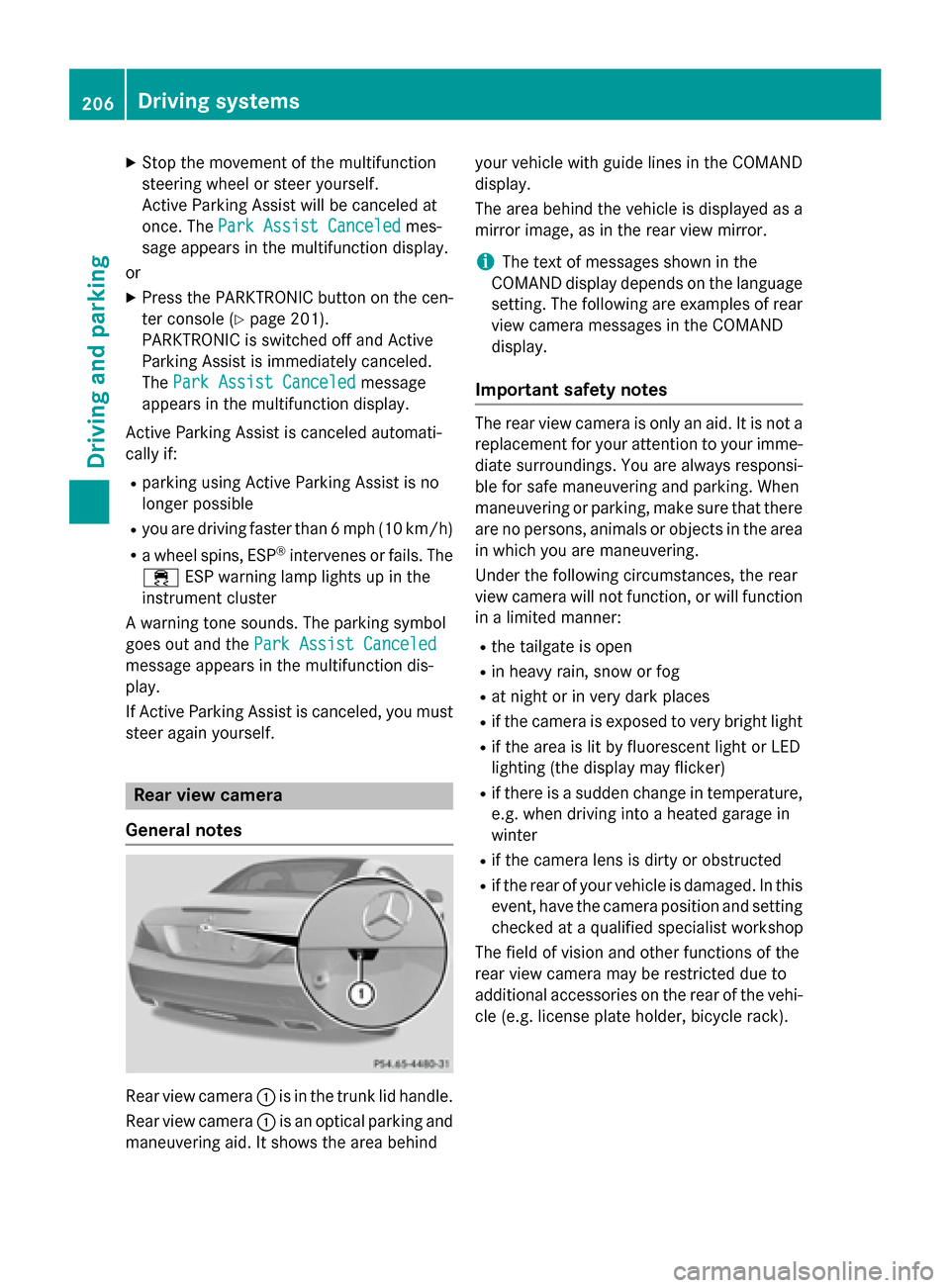
0043is in the trunk lid handle.
Rear view camera 0043is an optical parking and
maneuvering aid. It shows the area behind your vehicle with guide lines in the COMAND
display.
The area behind the vehicle is displayed as a
mirror image, as in the rear view mirror.
i The text of messages shown in the
COMAND display depends on the language
setting. The following are examples of rear view camera messages in the COMAND
display.
Important safety notes The rear view camera is only an aid. It is not a
replacement for your attention to your imme-
diate surroundings. You are always responsi-
ble for safe maneuvering and parking. When
maneuvering or parking, make sure that there are no persons, animals or objects in the area
in which you are maneuvering.
Under the following circumstances, the rear
view camera will not function, or will function in a limited manner:
R the tailgate is open
R in heavy rain, snow or fog
R at night or in very dark places
R if the camera is exposed to very bright light
R if the area is lit by fluorescent light or LED
lighting (the display may flicker)
R if there is a sudden change in temperature,
e.g. when driving into a heated garage in
winter
R if the camera lens is dirty or obstructed
R if the rear of your vehicle is damaged. In this
event, have the camera position and setting checked at a qualified specialist workshop
The field of vision and other functions of the
rear view camera may be restricted due to
additional accessories on the rear of the vehi-
cle (e.g. license plate holder, bicycle rack). 206
Driving systemsDriving and parking
Page 213 of 610
In addition, thermal imaging camera
0043is
integrated in the radiator grill. The camera
helps detect pedestrians and animals.
Observe the notes on cleaning the thermal
imaging camera and cleaning the windshield
(Y page 544).
Important safety notes Night View Assist Plus is only an aid and is not
a substitute for attentive driving. Do not rely
on the Night View Assist Plus display. You are responsible for the distance to the vehicle in
front, for vehicle speed and for braking in
good time. Drive carefully and always adapt
your driving style to suit the prevailing road
and traffic conditions.
The system may be impaired or may not func-
tion if:
R if there is poor visibility, e.g. due to snow,
rain, fog or spray
R if the windshield is dirty, fogged up or cov-
ered, for instance by a sticker, in the vicinity
of the camera
R if the thermal imaging camera in the radia-
tor grill is dirty, fogged up or covered
R on bends, hilltops or downhill gradients
R at high outside temperatures
Night View Assist Plus cannot display objects
directly in front of or beside the vehicle. The
actual distance to objects and pedestrians
cannot be gaged accurately by looking at a
screen.
It may be the case that other objects are
marked or highlighted as well as pedestrians
and animals. Pedestrian and animal recognition General notes
Pedestrian or animal recognition may be
impaired or inoperative if:
R pedestrians or animals are partially or
entirely obscured by other objects, e.g.
parked vehicles
R the silhouette of the pedestrian or of the
animal in the Night View Assist Plus display
is incomplete or interrupted, e.g. by pow-
erful light reflections
R pedestrians or animals do not contrast with
the surroundings
R the camera system no longer recognizes
pedestrians as persons due to special
clothing or other objects
R pedestrians are not in an upright position,
e.g. sitting, squatting or lying
R animals are not recognized by the system,
e.g. because of their size or shape
Pedestrian and animal recognition is deacti-
vated at temperatures above 90 ‡ (32 †). The spotlight function and automatic delayed
switch-off are then no longer active.
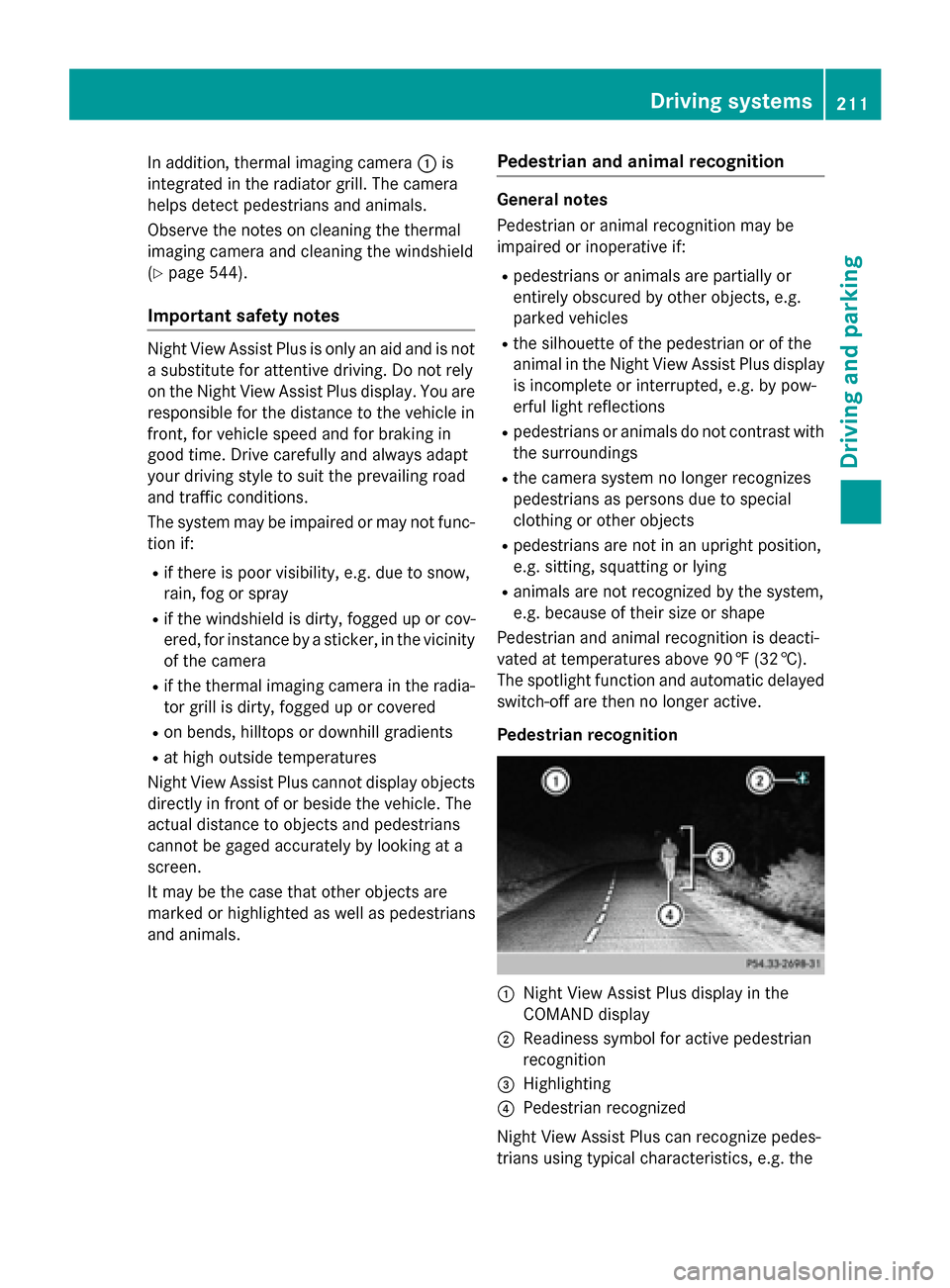
Pedestrian recognition 0043
Night View Assist Plus display in the
COMAND display
0044 Readiness symbol for active pedestrian
recognition
0087 Highlighting
0085 Pedestrian recognized
Night View Assist Plus can recognize pedes-
trians using typical characteristics, e.g. the Driving systems
211Driving and parking Z
Page 254 of 610
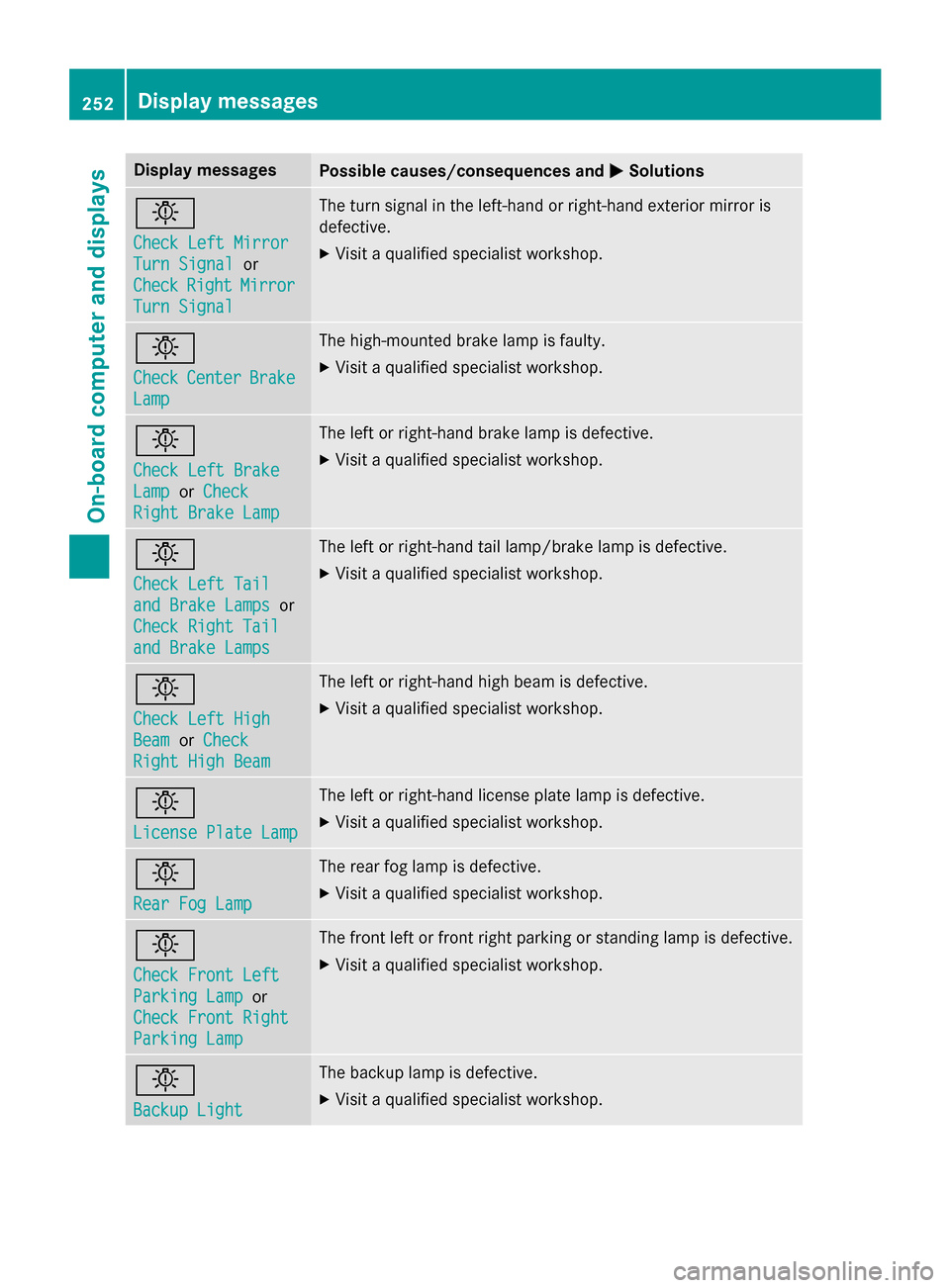
Display messages
Possible causes/consequences and
0050
0050Solutions 0049
Check Left Mirror Check Left Mirror
Turn Signal Turn Signal
or
Check
Check Right
RightMirror
Mirror
Turn Signal
Turn Signal The turn signal in the left-hand or right-hand exterior mirror is
defective.
X Visit a qualified specialist workshop. 0049
Check Check
Center
Center Brake
Brake
Lamp
Lamp The high-mounted brake lamp is faulty.
X
Visit a qualified specialist workshop. 0049
Check Left Brake Check Left Brake
Lamp Lamp
orCheck
Check
Right Brake Lamp
Right Brake Lamp The left or right-hand brake lamp is defective.
X Visit a qualified specialist workshop. 0049
Check Left Tail Check Left Tail
and Brake Lamps and Brake Lamps
or
Check Right Tail
Check Right Tail
and Brake Lamps and Brake Lamps The left or right-hand tail lamp/brake lamp is defective.
X Visit a qualified specialist workshop. 0049
Check Left High Check Left High
Beam Beam
orCheck
Check
Right High Beam
Right High Beam The left or right-hand high beam is defective.
X Visit a qualified specialist workshop. 0049
License Plate Lamp License Plate Lamp The left or right-hand license plate lamp is defective.
X Visit a qualified specialist workshop. 0049
Rear Fog Lamp Rear Fog Lamp The rear fog lamp is defective.
X
Visit a qualified specialist workshop. 0049
Check Front Left Check Front Left
Parking Lamp Parking Lamp
or
Check Front Right
Check Front Right
Parking Lamp Parking Lamp The front left or front right parking or standing lamp is defective.
X Visit a qualified specialist workshop. 0049
Backup Light Backup Light The backup lamp is defective.
X Visit a qualified specialist workshop. 252
Display
messagesOn-board computer and displays
Page 255 of 610
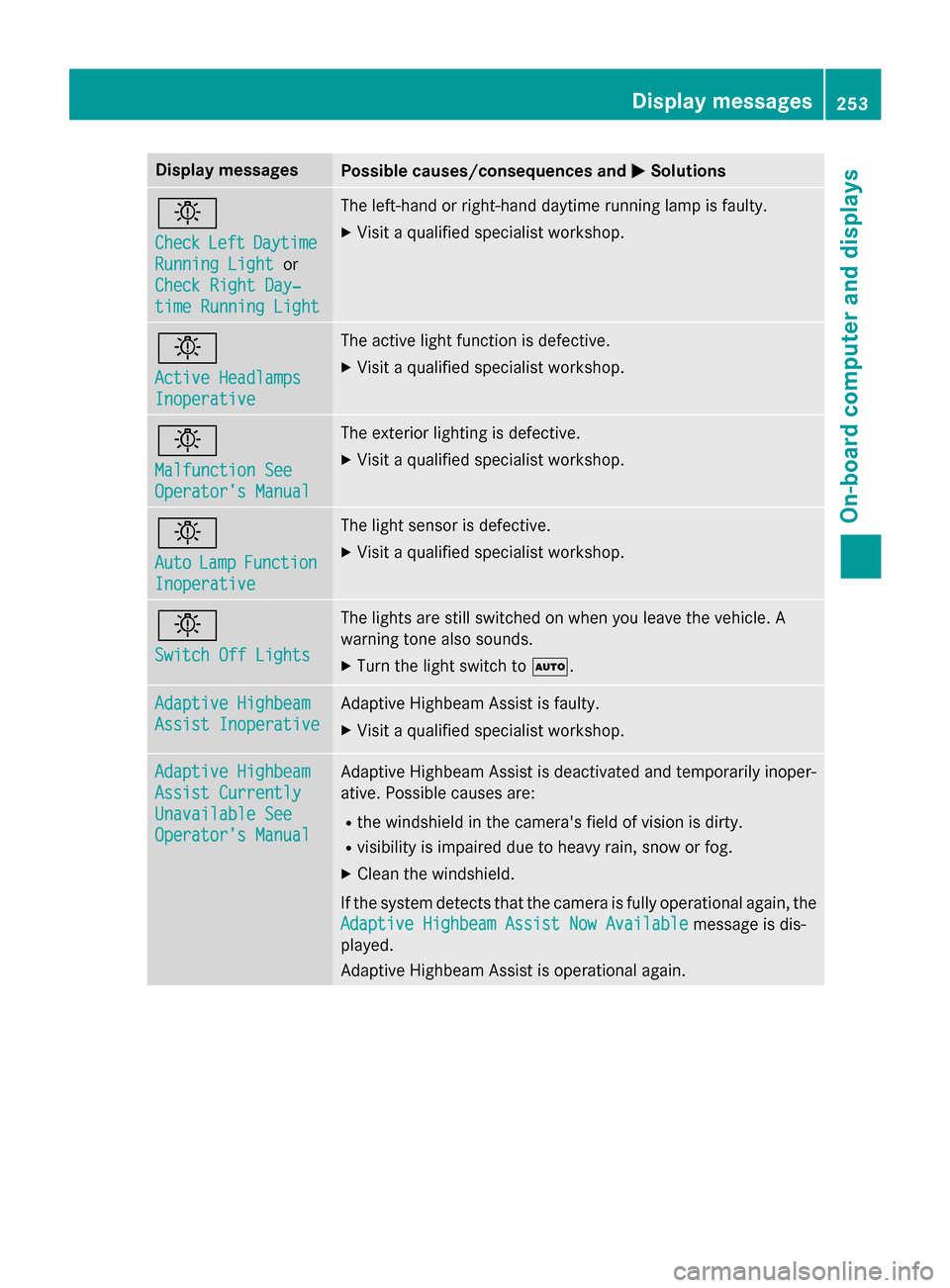
Display messages
Possible causes/consequences and
0050
0050Solutions 0049
Check Check
Left
LeftDaytime
Daytime
Running Light
Running Light or
Check Right Day‐
Check Right Day‐
time Running Light time Running Light The left-hand or right-hand daytime running lamp is faulty.
X Visit a qualified specialist workshop. 0049
Active Headlamps Active Headlamps
Inoperative Inoperative The active light function is defective.
X Visit a qualified specialist workshop. 0049
Malfunction See Malfunction See
Operator's Manual Operator's Manual The exterior lighting is defective.
X Visit a qualified specialist workshop. 0049
Auto Auto
Lamp
LampFunction
Function
Inoperative
Inoperative The light sensor is defective.
X Visit a qualified specialist workshop. 0049
Switch Off Lights Switch Off Lights The lights are still switched on when you leave the vehicle. A
warning tone also sounds.
X Turn the light switch to 0058.Adaptive Highbeam Adaptive Highbeam
Assist Inoperative Assist Inoperative Adaptive Highbeam Assist is faulty.
X
Visit a qualified specialist workshop. Adaptive Highbeam Adaptive Highbeam
Assist Currently Assist Currently
Unavailable See Unavailable See
Operator's Manual Operator's Manual Adaptive Highbeam Assist is deactivated and temporarily inoper-
ative. Possible causes are:
R the windshield in the camera's field of vision is dirty.
R visibility is impaired due to heavy rain, snow or fog.
X Clean the windshield.
If the system detects that the camera is fully operational again, the
Adaptive Highbeam Assist Now Available
Adaptive Highbeam Assist Now Available message is dis-
played.
Adaptive Highbeam Assist is operational again. Display
messages
253On-board computer and displays Z
Page 260 of 610
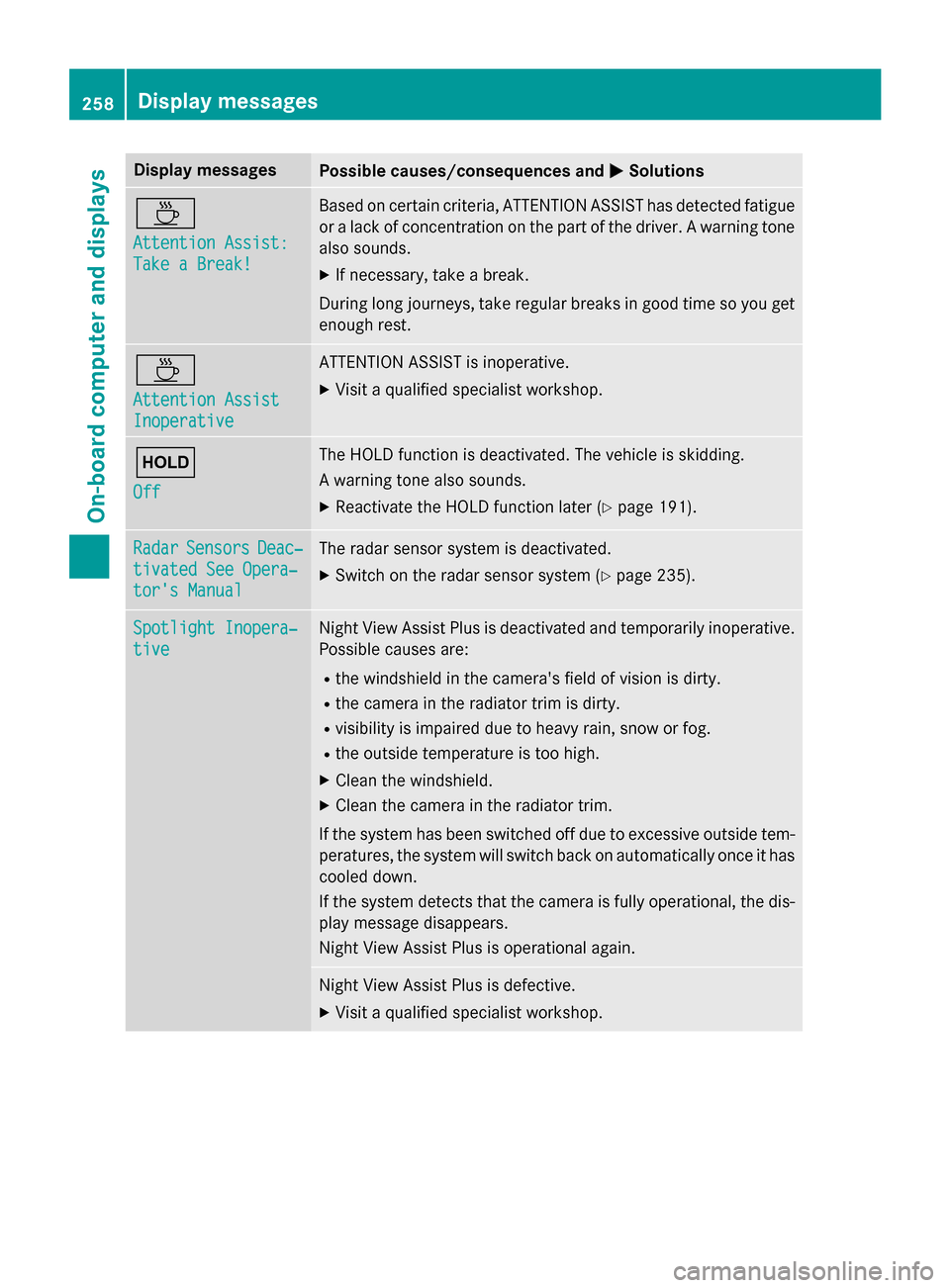
Display messages
Possible causes/consequences and
0050
0050Solutions 00AD
Attention Assist: Attention Assist:
Take a Break! Take a Break! Based on certain criteria, ATTENTION ASSIST has detected fatigue
or a lack of concentration on the part of the driver. A warning tone also sounds.
X If necessary, take a break.
During long journeys, take regular breaks in good time so you get enough rest. 00AD
Attention Assist Attention Assist
Inoperative Inoperative ATTENTION ASSIST is inoperative.
X Visit a qualified specialist workshop. 00D9
Off Off The HOLD function is deactivated. The vehicle is skidding.
A warning tone also sounds.
X Reactivate the HOLD function later (Y page 191).Radar Radar
Sensors
Sensors Deac‐
Deac‐
tivated See Opera‐
tivated See Opera‐
tor's Manual tor's Manual The radar sensor system is deactivated.
X Switch on the radar sensor system (Y page 235).Spotlight Inopera‐
Spotlight Inopera‐
tive tive Night View Assist Plus is deactivated and temporarily inoperative.
Possible causes are:
R the windshield in the camera's field of vision is dirty.
R the camera in the radiator trim is dirty.
R visibility is impaired due to heavy rain, snow or fog.
R the outside temperature is too high.
X Clean the windshield.
X Clean the camera in the radiator trim.
If the system has been switched off due to excessive outside tem-
peratures, the system will switch back on automatically once it has cooled down.
If the system detects that the camera is fully operational, the dis- play message disappears.
Night View Assist Plus is operational again. Night View Assist Plus is defective.
X Visit a qualified specialist workshop. 258
Display
messagesOn-board computer and displays
Page 261 of 610
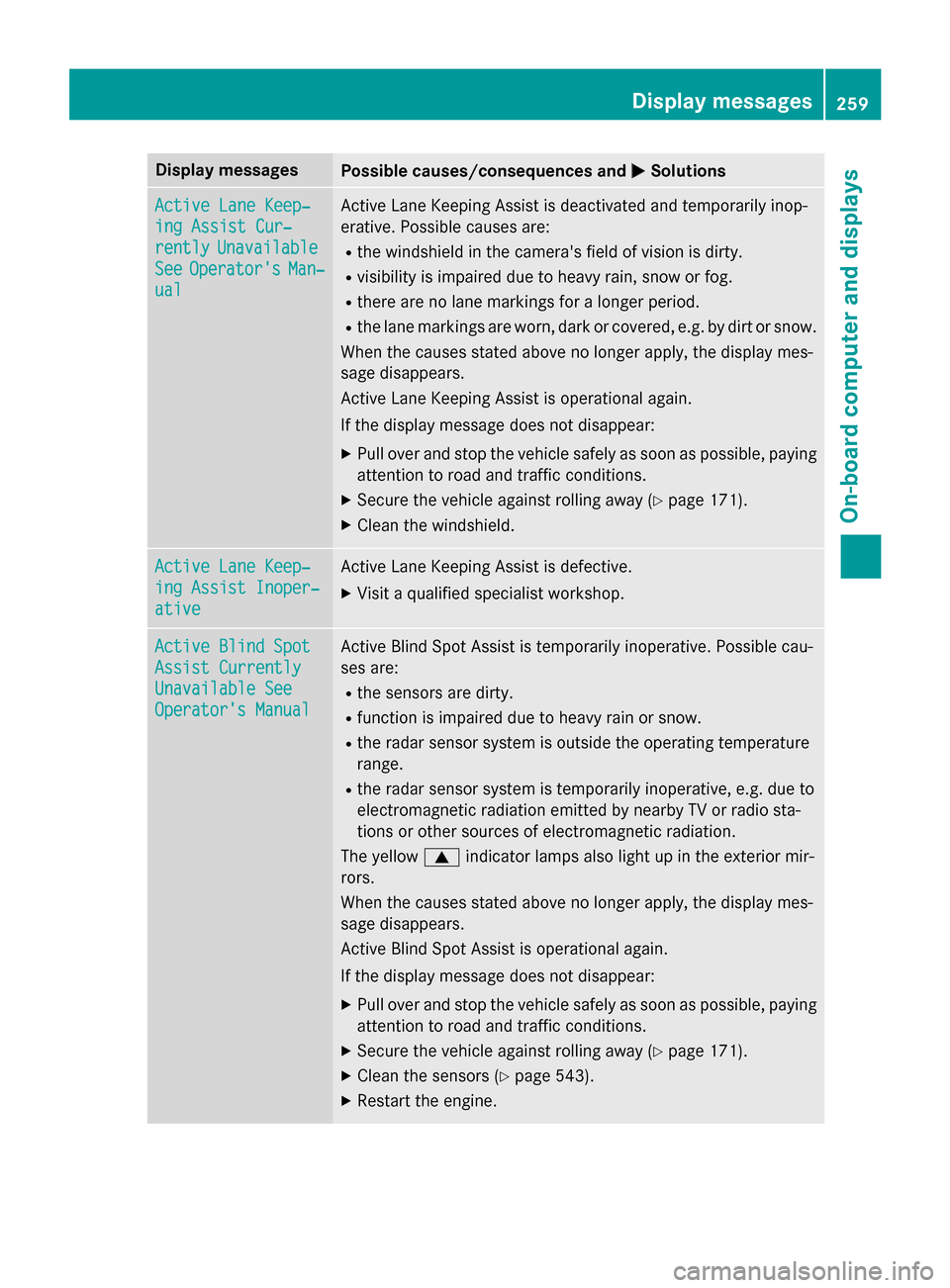
Display messages
Possible causes/consequences and
0050
0050Solutions Active Lane Keep‐
Active Lane Keep‐
ing Assist Cur‐ ing Assist Cur‐
rently rently
Unavailable
Unavailable
See
See Operator's
Operator's Man‐
Man‐
ual
ual Active Lane Keeping Assist is deactivated and temporarily inop-
erative. Possible causes are:
R the windshield in the camera's field of vision is dirty.
R visibility is impaired due to heavy rain, snow or fog.
R there are no lane markings for a longer period.
R the lane markings are worn, dark or covered, e.g. by dirt or snow.
When the causes stated above no longer apply, the display mes-
sage disappears.
Active Lane Keeping Assist is operational again.
If the display message does not disappear:
X Pull over and stop the vehicle safely as soon as possible, paying
attention to road and traffic conditions.
X Secure the vehicle against rolling away (Y page 171).
X Clean the windshield. Active Lane Keep‐ Active Lane Keep‐
ing Assist Inoper‐ ing Assist Inoper‐
ative ative Active Lane Keeping Assist is defective.
X Visit a qualified specialist workshop. Active Blind Spot
Active Blind Spot
Assist Currently Assist Currently
Unavailable See Unavailable See
Operator's Manual Operator's Manual Active Blind Spot Assist is temporarily inoperative. Possible cau-
ses are:
R the sensors are dirty.
R function is impaired due to heavy rain or snow.
R the radar sensor system is outside the operating temperature
range.
R the radar sensor system is temporarily inoperative, e.g. due to
electromagnetic radiation emitted by nearby TV or radio sta-
tions or other sources of electromagnetic radiation.
The yellow 0063indicator lamps also light up in the exterior mir-
rors.
When the causes stated above no longer apply, the display mes-
sage disappears.
Active Blind Spot Assist is operational again.
If the display message does not disappear:
X Pull over and stop the vehicle safely as soon as possible, paying
attention to road and traffic conditions.
X Secure the vehicle against rolling away (Y page 171).
X Clean the sensors (Y page 543).
X Restart the engine. Display
messages
259On-board computer and displays Z