fuel reserve MERCEDES-BENZ SL-Class 2015 R131 Owner's Manual
[x] Cancel search | Manufacturer: MERCEDES-BENZ, Model Year: 2015, Model line: SL-Class, Model: MERCEDES-BENZ SL-Class 2015 R131Pages: 610, PDF Size: 12.21 MB
Page 15 of 610
Front-passenger seat
Adjusting from the driver's seat .... .110
Fuel
Additives ........................................ 603
Consumption statistics .................. 225
Displaying consumption ................. 313
Displaying the current consump-
tion ................................................ 226
Displaying the range ..................... .226
Driving tips ................................... .174
E10 ................................................ 602
Fuel gauge ....................................... 41
Grade (gasoline) ............................ 602
Important safety notes .................. 602
Problem (malfunction) ................... 171
Refueling ........................................ 168
Tank content/reserve fuel ............. 602
Fuel filler flap
Opening ......................................... 169
Fuel level
Calling up the range (on-board
computer) ...................................... 226
Fuel tank
Capacity ........................................ 602
Problem (malfunction) ................... 171
Fuse allocation chart (vehicle tool
kit) ...................................................... 548
Fuses Allocation chart ............................ .562
Before changing ............................ .562
Dashboard fuse box ....................... 563
Fuse box in the engine compart-
ment .............................................. 563
Fuse box in the rear compartment .. 564
Important safety notes .................. 562 G
Garage door opener Clearing the memory ..................... 530
General notes ................................ 527
Important safety notes .................. 528
Opening/closing the garage door .. 530
Programming (button in the rear-
view mirror) ................................... 528
Gasoline ............................................. 602
Gear indicator (on-board com-
puter) ................................................. .236 Genuine parts
...................................... 30
Glass roof (sunblind) ......................... 104
Glove box .......................................... .512
Google™ Local Search Importing a destination/route ....... 419
Popular Searches ........................... 420
Search .......................................... .418
Search history ............................... 420
Selecting a search position ............ 419
Using as the destination ................ 419
GPS reception ................................... .319
Gracenote ®
Media Database ............ 448 H
Handbrake see Parking brake
HANDS-FREE ACCESS .......................... 93
Harman/kardon ®
Logic 7 ®
sur-
round sound system see Surround sound (harman/
kardon ®
surround sound system)
Hazard warning lamps
Display message ............................ 267
Switching on/off ........................... 126
Head bags
Display message ............................ 248
Operation ......................................... 58
Heading up (navigation) ................... 366
Headlamps Cleaning system (notes) ................ 606
Fogging up ..................................... 128
see Automatic headlamp mode
Head level heating (AIRSCARF) ........113
Headphones Changing batteries ........................ 485
Head restraints
Adjusting ....................................... 111
see NECK-PRO head restraints
Heating
see Climate control
High-beam headlamps
Display message ............................ 252
Switching on/off ........................... 125
Highway information ........................ 369
Hill start assist .................................. 154 Index
13
Page 22 of 610
Pulling away (automatic transmis-
sion)
....................................................1 54Q
Qualified specialist workshop ........... 35R
RACE START Important safety notes .................. 192
RACETIMER (on-board computer) .... 237
Radar sensor system Activating/deactivating ................. 235
Display message ............................ 258
Radio
Overview ........................................ 435
Selecting a station ......................... 228
Setting a statio n............................ 436
Sound settings (balance, bass,
treble) ............................................ 296
Storing stations ............................. 437
Switching HD Radio on/of f............ 435
Switching on .................................. 435
Switching wavebands .................... 436
Radio-wave reception/transmis-
sion in the vehicle
Declaration of conformity ................ 34
Read-aloud function .......................... 359
Reading lamp ..................................... 128
Real-time traffic reports ................... 355
Rear-compartment screens .............. 482
Rear fog lamp Display message ............................ 252
Rear lamps
see Lights
Rear Seat Entertainment System
Active COMAND source ................. 496
Adjusting sound settings ............... 487
Adjusting the brightness ................ 487
Adjusting the color ........................ 487
Adjusting the contrast ................... 487
AUX mod e...................................... 498
CD/DVD audio and MP3 mode ...... 489
Changing the batteries .................. 485
Changing the picture format .......... 488
Cordless headphones .................... 484
Multiple users ................................ 487 Operating with the headphones ..... 486
Picture settings .............................. 487
System settings ............................. 488
Using the main loudspeaker .......... 486
Video DVD mode ........................... 492
Rear view camera
Cleaning instructions ..................... 543
Displaying the image ..................... 317
Function/note s............................. 206
Switching on/of f........................... 207
Rear-view mirror
Dipping (automatic) ....................... 117
Rear window defroster
Problem (malfunction) ................... 146
Switching on/of f........................... 145
Receiving vCards ............................... 407
Redialing (telephone) ........................ 388
Refrigerant (air-conditioning sys-
tem) Important safety notes .................. 606
Refueling
Fuel gauge ....................................... 41
Important safety notes .................. 168
Refueling process .......................... 169
see Fuel
Remote control
Button lighting ............................... 483
Programming (garage door
opener) .......................................... 528
Rear Seat Entertainment System ... 482
Replacing bulbs
General notes ................................ 129
Reporting safety defects .................... 35
Reserve (fuel tank) see Fuel
Reserve fuel
Display message ............................ 256
Warning lamp ................................. 277
see Fuel
Reset function ................................... 311
Resetting (factory settings) ............. 311
Residual heat (climate control) ........ 146
Restraint system Display message ............................ 248
Introduction ..................................... 50
Warning lamp ................................. 276
Warning lamp (function) ................... 51 20
Index
Page 30 of 610
Setting the picture ......................... 473
Showing/hiding the control
menu ............................................. 474
Showing/hiding the menu ............. 475
Stop function ................................. 475
Subtitles ........................................ 478
Switching to ................................... 474
VIN ...................................................... 600
Voice Control System Setting s......................................... 308
Volume, adjusting
COMAND ....................................... 295
Navigation messages ..................... 295 W
Warning and indicator lamps ABS ................................................ 271
Brakes ........................................... 271
Check Engine ................................. 277
Coolant .......................................... 277
Distance warning ........................... 279
DISTRONIC PLUS ........................... 279
ESP ®
.............................................. 273
ESP ®
OFF ....................................... 274
Overview .......................................... 42
PASSENGER AIR BAG OFF ............... 51
Reserve fue l................................... 277
Restraint system ............................ 276
Seat belt ........................................ 269
SPORT handling mod e................... 274
Tire pressure monitor .................... 280
Warranty .............................................. 31
Washer fluid Display message ............................ 267
Waypoints
Accepting waypoints for the
route .............................................. 334
Creating ......................................... 331
Editing ........................................... 333
Entering ......................................... 331
Searching for a gas station when
the fuel level is lo w........................ 334
Weather Band
Searching for a channel ................. 438
Switching on .................................. 438 Weather map (SIRIUS)
Calling up ....................................... 503
Legend ........................................... 508
Moving ........................................... 504
Showing/hiding layers ................... 504
Showing/hiding the menu ............. 504
Time stamp .................................... 508
Weather memory (SIRIUS)
Selecting an area ........................... 503
Storing an area .............................. 503
Website
Add to favorites ............................. 431
Wheel and tire combination
see Tires
Wheel bolt tightening torque ........... 593
Wheel chock ...................................... 590
Wheels Changing a whee l.......................... 588
Checking ........................................ 569
Cleaning ......................................... 542
Cleaning (warning) ......................... 589
Important safety notes .................. 568
Interchanging/changing ................ 588
Mounting a new whee l................... 592
Mounting a whee l.......................... 589
Overview ........................................ 568
Removing a whee l.......................... 592
Storing ........................................... 589
Tightening torque ........................... 593
Wheel size/tire size ....................... 593
Windows
see Side windows
Wind screen
Electrical wind screen .................... 104
Windshield
Defrosting ...................................... 143
Windshield washer fluid
see Windshield washer system
Windshield washer system
Adding washer fluid ....................... 537
Notes ............................................. 606
Windshield wipers
Display message ............................ 267
Problem (malfunction) ................... 133
Replacing the wiper blades ............ 131
Switching on/of f........................... 130 28
Index
Page 44 of 610
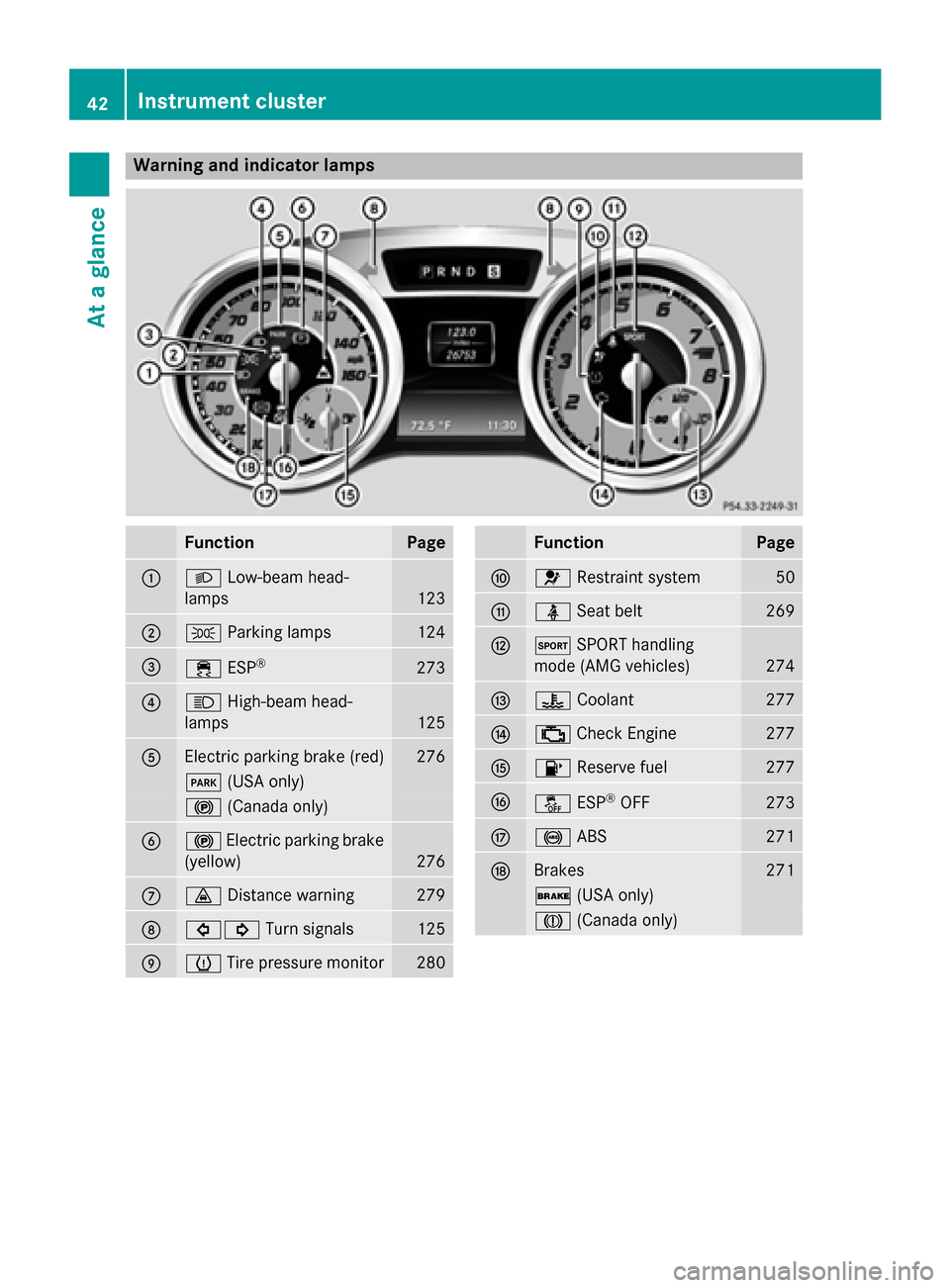
Warning and indicator lamps
Function Page
0043
0058
Low-beam head-
lamps 123
0044
0060
Parking lamps 124
0087
00E5
ESP® 273
0085
0057
High-beam head-
lamps 125
0083
Electric parking brake (red) 276
0049
(USA only) 0024
(Canada only) 0084
0024
Electric parking brake
(yellow) 276
006B
00BA
Distance warning 279
006C
003E003D
Turn signals 125
006D
0077
Tire pressure monitor 280 Function Page
006E
0075
Restraint system 50
006F
00E9
Seat belt 269
0070
0074
SPORT handling
mode (AMG vehicles) 274
0071
00AC
Coolant 277
0072
00B9
Check Engine 277
0073
00B6
Reserve fuel 277
0074
00BB
ESP®
OFF 273
0075
0025
ABS 271
0076
Brakes 271
0027
(USA only) 004D
(Canada only) 42
Instrument clusterAt a glance
Page 171 of 610
!
Do not use diesel to refuel vehicles with a
gasoline engine. Do not switch on the igni- tion if you accidentally refuel with the
wrong fuel. Otherwise, the fuel will enter
the fuel system. Even small amounts of the
wrong fuel could result in damage to the
fuel system and the engine. Notify a quali-
fied specialist workshop and have the fuel
tank and fuel lines drained completely.
! Overfilling the fuel tank could damage the
fuel system.
! Take care not to spill any fuel on painted
surfaces. You could otherwise damage the paintwork.
! Use a filter when refueling from a fuel can.
Otherwise, the fuel lines and/or injection
system could be blocked by particles from
the fuel can.
Do not get into the vehicle again during the
refueling process. Otherwise, electrostatic
charge could build up again.
If you overfill the fuel tank, fuel could spray
out when the fuel pump nozzle is removed.
For further information on fuel and fuel quality
(Y page 602). Refueling
General information The fuel filler flap is unlocked or locked auto-
matically when you open or close the vehicle with the SmartKey or with KEYLESS-GO.
The position of the fuel filler cap is displayed
00B6 in the instrument cluster. The arrow
next to the filling pump indicates the side of
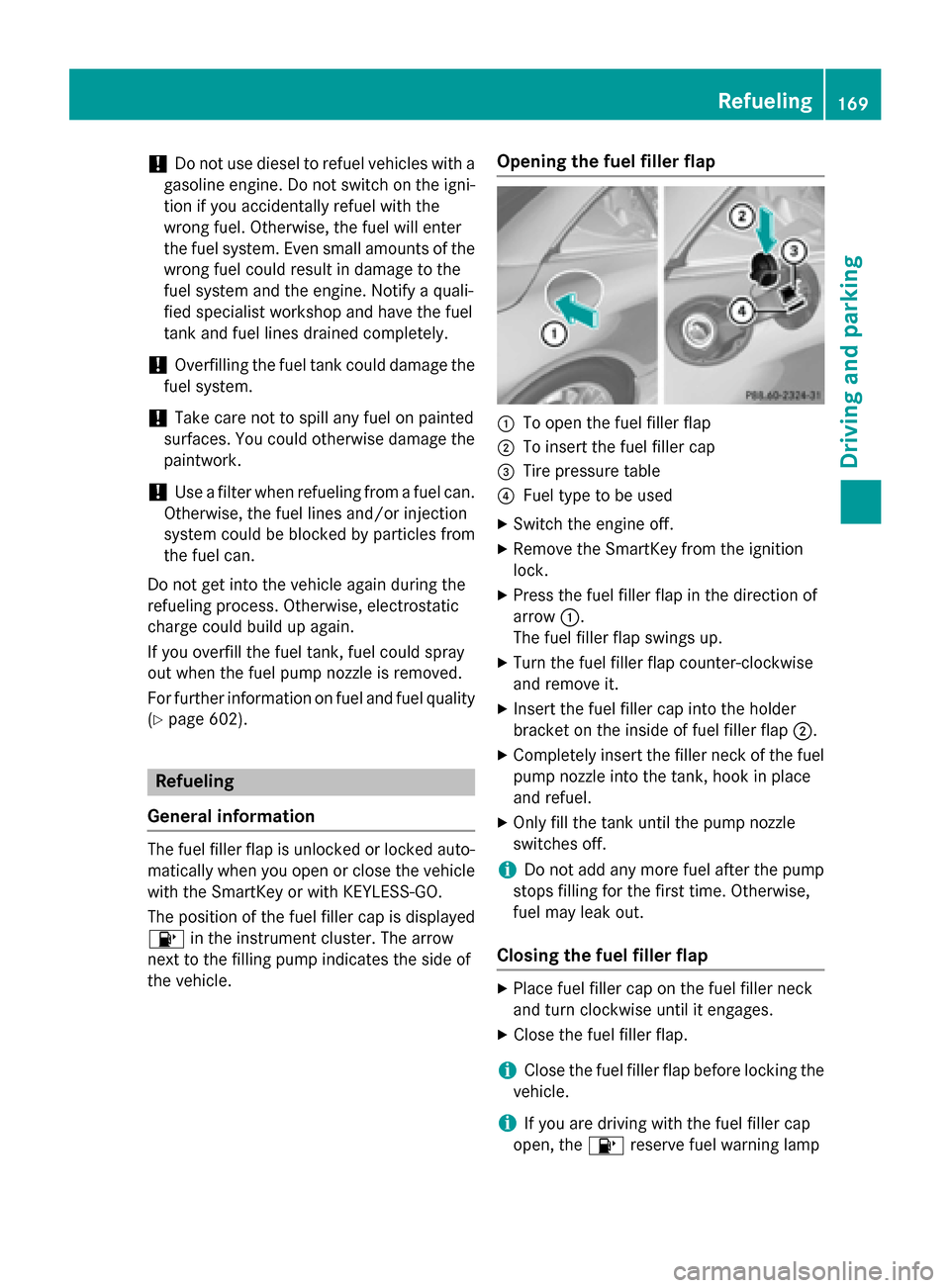
the vehicle. Opening the fuel filler flap 0043
To open the fuel filler flap
0044 To insert the fuel filler cap
0087 Tire pressure table
0085 Fuel type to be used
X Switch the engine off.
X Remove the SmartKey from the ignition
lock.
X Press the fuel filler flap in the direction of
arrow 0043.
The fuel filler flap swings up.
X Turn the fuel filler flap counter-clockwise
and remove it.
X Insert the fuel filler cap into the holder
bracket on the inside of fuel filler flap 0044.
X Completely insert the filler neck of the fuel
pump nozzle into the tank, hook in place
and refuel.
X Only fill the tank until the pump nozzle
switches off.
i Do not add any more fuel after the pump
stops filling for the first time. Otherwise,
fuel may leak out.
Closing the fuel filler flap X
Place fuel filler cap on the fuel filler neck
and turn clockwise until it engages.
X Close the fuel filler flap.
i Close the fuel filler flap before locking the
vehicle.
i If you are driving with the fuel filler cap
open, the 00B6reserve fuel warning lamp Refueling
169Driving and parking Z
Page 258 of 610
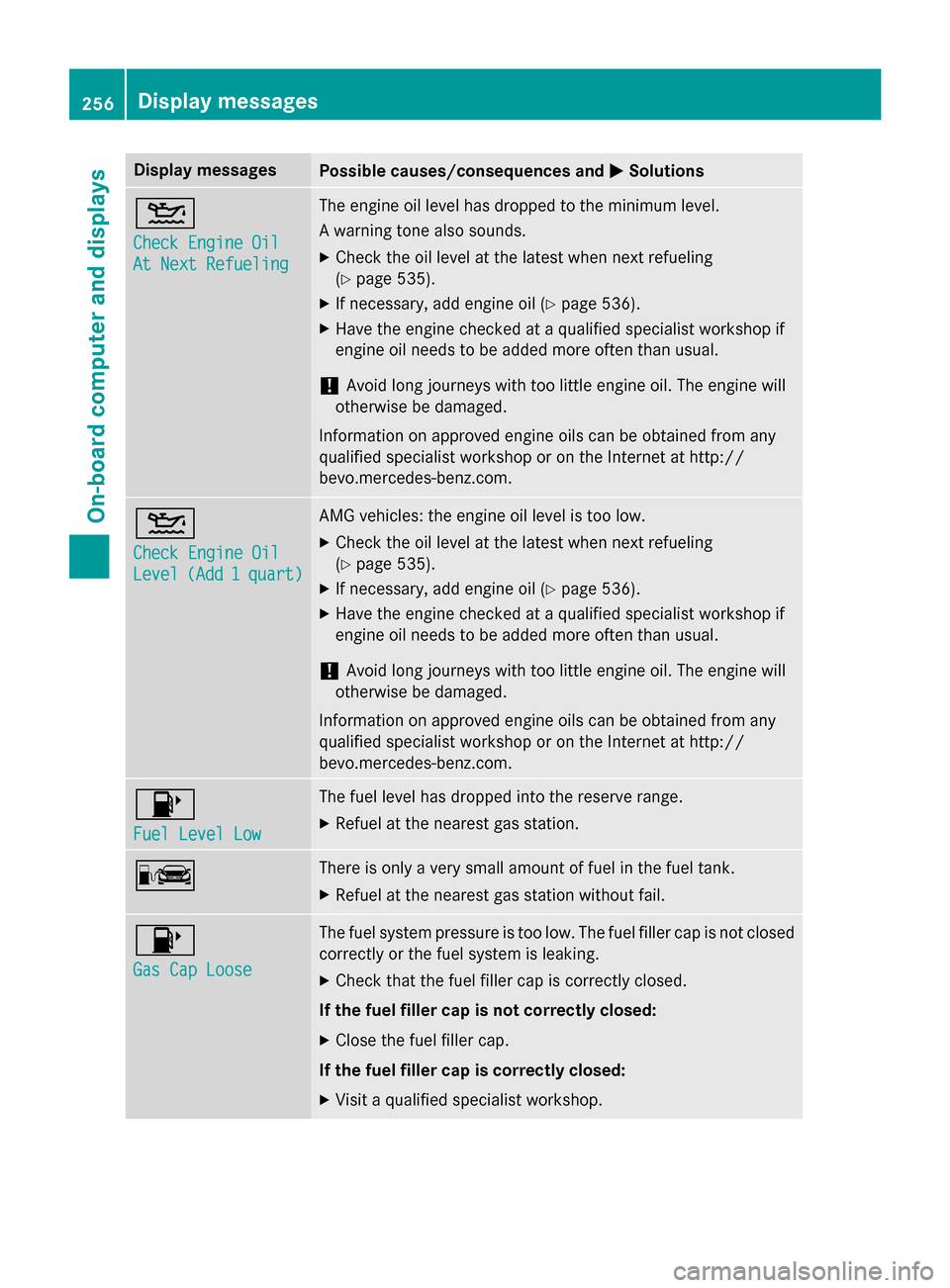
Display messages
Possible causes/consequences and
0050
0050Solutions 00B2
Check Engine Oil Check Engine Oil
At Next Refueling At Next Refueling The engine oil level has dropped to the minimum level.
A warning tone also sounds.
X Check the oil level at the latest when next refueling
(Y page 535).
X If necessary, add engine oil (Y page 536).
X Have the engine checked at a qualified specialist workshop if
engine oil needs to be added more often than usual.
! Avoid long journeys with too little engine oil. The engine will
otherwise be damaged.
Information on approved engine oils can be obtained from any
qualified specialist workshop or on the Internet at http://
bevo.mercedes-benz.co m.00B2
Check Engine Oil Check Engine Oil
Level Level
(Add
(Add1
1quart)
quart) AMG vehicles: the engine oil level is too low.
X Check the oil level at the latest when next refueling
(Y page 535).
X If necessary, add engine oil (Y page 536).
X Have the engine checked at a qualified specialist workshop if
engine oil needs to be added more often than usual.
! Avoid long journeys with too little engine oil. The engine will
otherwise be damaged.
Information on approved engine oils can be obtained from any
qualified specialist workshop or on the Internet at http://
bevo.mercedes-benz.com. 00B6
Fuel Level Low Fuel Level Low The fuel level has dropped into the reserve range.
X Refuel at the nearest gas station. 00A8 There is only a very small amount of fuel in the fuel tank.
X Refuel at the nearest gas station without fail. 00B6
Gas Cap Loose Gas Cap Loose The fuel system pressure is too low. The fuel filler cap is not closed
correctly or the fuel system is leaking.
X Check that the fuel filler cap is correctly closed.
If the fuel filler cap is not correctly closed: X Close the fuel filler cap.
If the fuel filler cap is correctly closed: X Visit a qualified specialist workshop. 256
Display messagesOn-board computer and displays
Page 279 of 610
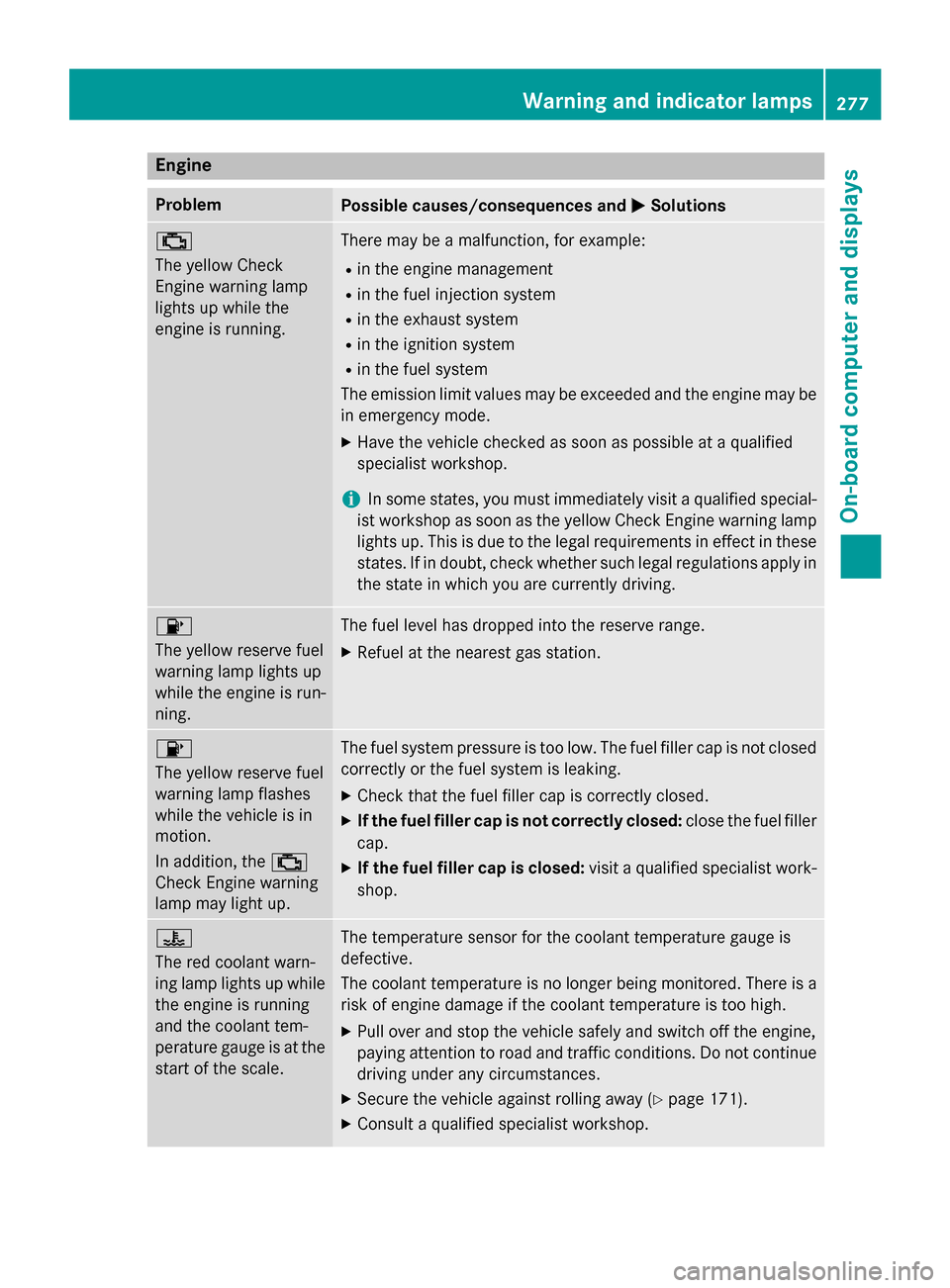
Engine
Problem
Possible causes/consequences and
0050
0050Solutions 00B9
The yellow Check
Engine warning lamp
lights up while the
engine is running.
There may be a malfunction, for example:
R in the engine management
R in the fuel injection system
R in the exhaust system
R in the ignition system
R in the fuel system
The emission limit values may be exceeded and the engine may be
in emergency mode.
X Have the vehicle checked as soon as possible at a qualified
specialist workshop.
i In some states, you must immediately visit a qualified special-
ist workshop as soon as the yellow Check Engine warning lamp
lights up. This is due to the legal requirements in effect in these
states. If in doubt, check whether such legal regulations apply in the state in which you are currently driving. 00B6
The yellow reserve fuel
warning lamp lights up
while the engine is run-
ning.
The fuel level has dropped into the reserve range.
X Refuel at the nearest gas station. 00B6
The yellow reserve fuel
warning lamp flashes
while the vehicle is in
motion.
In addition, the
00B9
Check Engine warning
lamp may light up. The fuel system pressure is too low. The fuel filler cap is not closed
correctly or the fuel system is leaking.
X Check that the fuel filler cap is correctly closed.
X If the fuel filler cap is not correctly closed: close the fuel filler
cap.
X If the fuel filler cap is closed: visit a qualified specialist work-
shop. 00AC
The red coolant warn-
ing lamp lights up while
the engine is running
and the coolant tem-
perature gauge is at the start of the scale. The temperature sensor for the coolant temperature gauge is
defective.
The coolant temperature is no longer being monitored. There is a risk of engine damage if the coolant temperature is too high.
X Pull over and stop the vehicle safely and switch off the engine,
paying attention to road and traffic conditions. Do not continue
driving under any circumstances.
X Secure the vehicle against rolling away (Y page 171).
X Consult a qualified specialist workshop. Warning and indicator lamps
277On-board computer and displays Z
Page 290 of 610
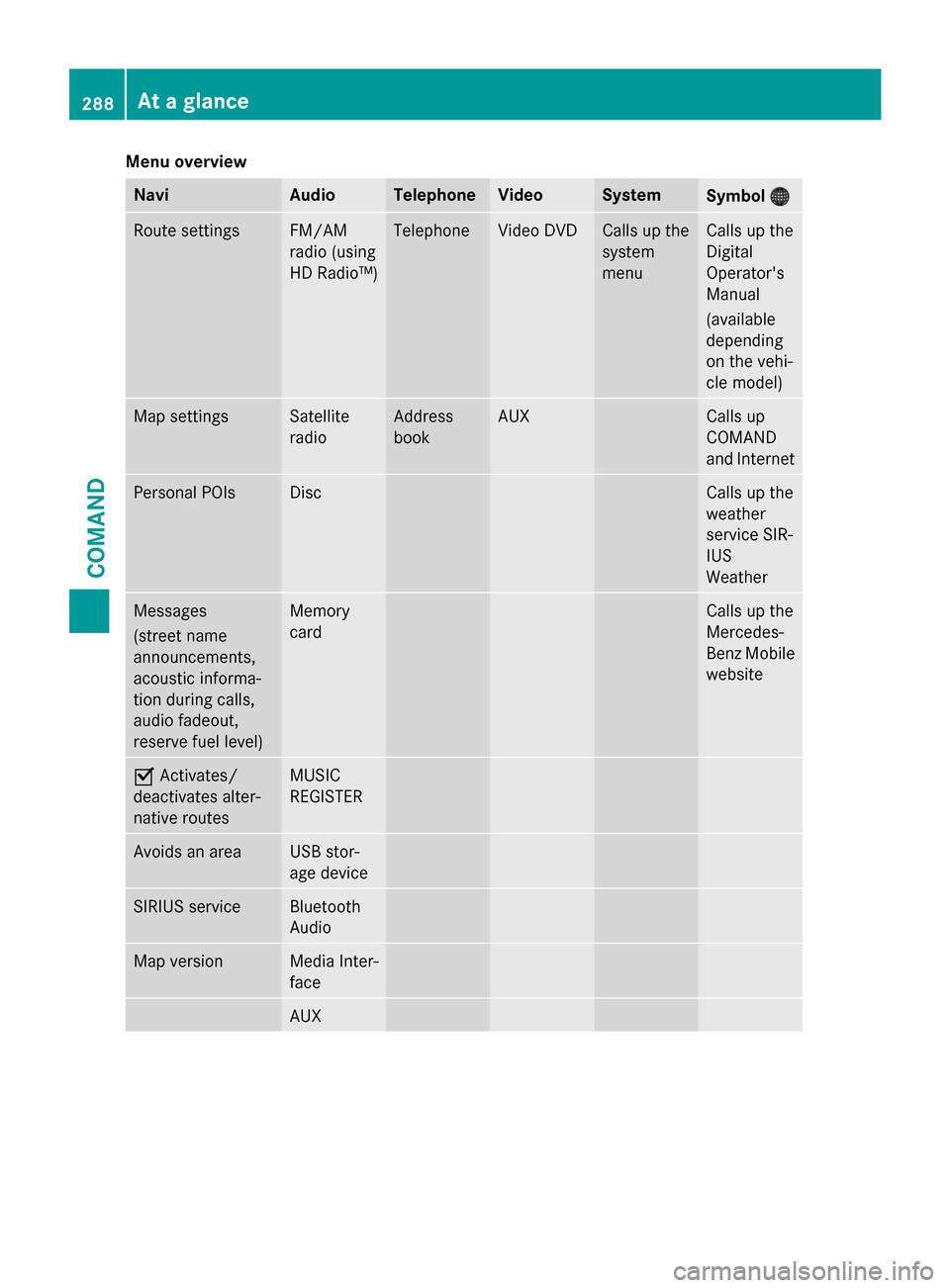
Menu overview
Navi Audio Telephone Video System
Symbol
00A7
00A7 Route settings FM/AM
radio (using
HD Radio™) Telephone Video DVD Calls up the
system
menu Calls up the
Digital
Operator's
Manual
(available
depending
on the vehi-
cle model)
Map settings Satellite
radio Address
book AUX Calls up
COMAND
and Internet
Personal POIs Disc Calls up the
weather
service SIR-
IUS
Weather
Messages
(street name
announcements,
acoustic informa-
tion during calls,
audio fadeout,
reserve fuel level) Memory
card Calls up the
Mercedes-
Benz Mobile
website 0073
Activates/
deactivates alter-
native routes MUSIC
REGISTER
Avoids an area USB stor-
age device
SIRIUS service Bluetooth
Audio
Map version Media Inter-
face
AUX288
At a glanceCOMAND
Page 323 of 610
You can select the following route types:
R Fast Route
Fast Route: COMAND calculates a route
with the shortest (minimized) journey time.
R Dynamic Traffic Route Dynamic Traffic Route: is the same
route type as Fast Route Fast Route. In addition,
COMAND takes into account any relevant
traffic reports received during route guid-
ance. The navigation system can help you
avoid a traffic jam, for example, by recal-
culating the route.
R Dynamic TRF. Route Only After
Dynamic TRF. Route Only After
Request Request: is the same route type as
Dynamic Traffic Route Dynamic Traffic Route. After recalcu-
lating the route, COMAND asks you
whether you want to adopt the new route or
whether you want to continue along the
original route.
R Eco Route
Eco Route: the Eco Route Eco Route(economical
route) is a variant of the Fast Route
Fast Routetype.
COMAND will attempt to minimize the jour-
ney distance at the expense of a slightly
increased journey time.
R Short
Short Route
Route: COMAND calculates a route
with the shortest possible (minimized)
route distance.
i The route calculated may, for example,
include ferry connections, even if the
Avoid Ferries Avoid Ferries route option is switched
on.
In some cases, COMAND may not be able
to take all the selected route options into
account, e.g. when calculating particularly
long routes.
X To exit the menu: slide009500520096 the COMAND
controller.
Setting the number of persons in the
vehicle for the use of carpool lanes For route calculation, you can take HOV or
carpool lanes into account.
If you use HOV or carpool lanes, please
observe the applicable laws as well as the
local and time limitation conditions. Carpool lanes may only be used under certain
conditions. They can normally be used when
there are two people in the vehicle. However, there are also carpool lanes which can only be
used when there are three or more people in
the vehicle. In California, lone drivers can use
a carpool lane if their vehicle's emission level or fuel consumption is below a fixed thresh-
old.
Carpool lanes may be reserved for specific
times (e.g. during the peak period).
Carpool lanes are identified by HOV symbols
on special road signs and by markings on the road. The road signs may also include the
designation CARPOOL CARPOOL. The lanes are arranged
as a separate lane next to the others or are
built as a physically separate lane.
Depending on the setting under Number of Number of
Occupants
Occupants in
inVehicle
Vehicle, COMAND uses car-
pool lanes when calculating the route.
COMAND then guides you in and out of car-
pool lanes using visual and acoustic driving
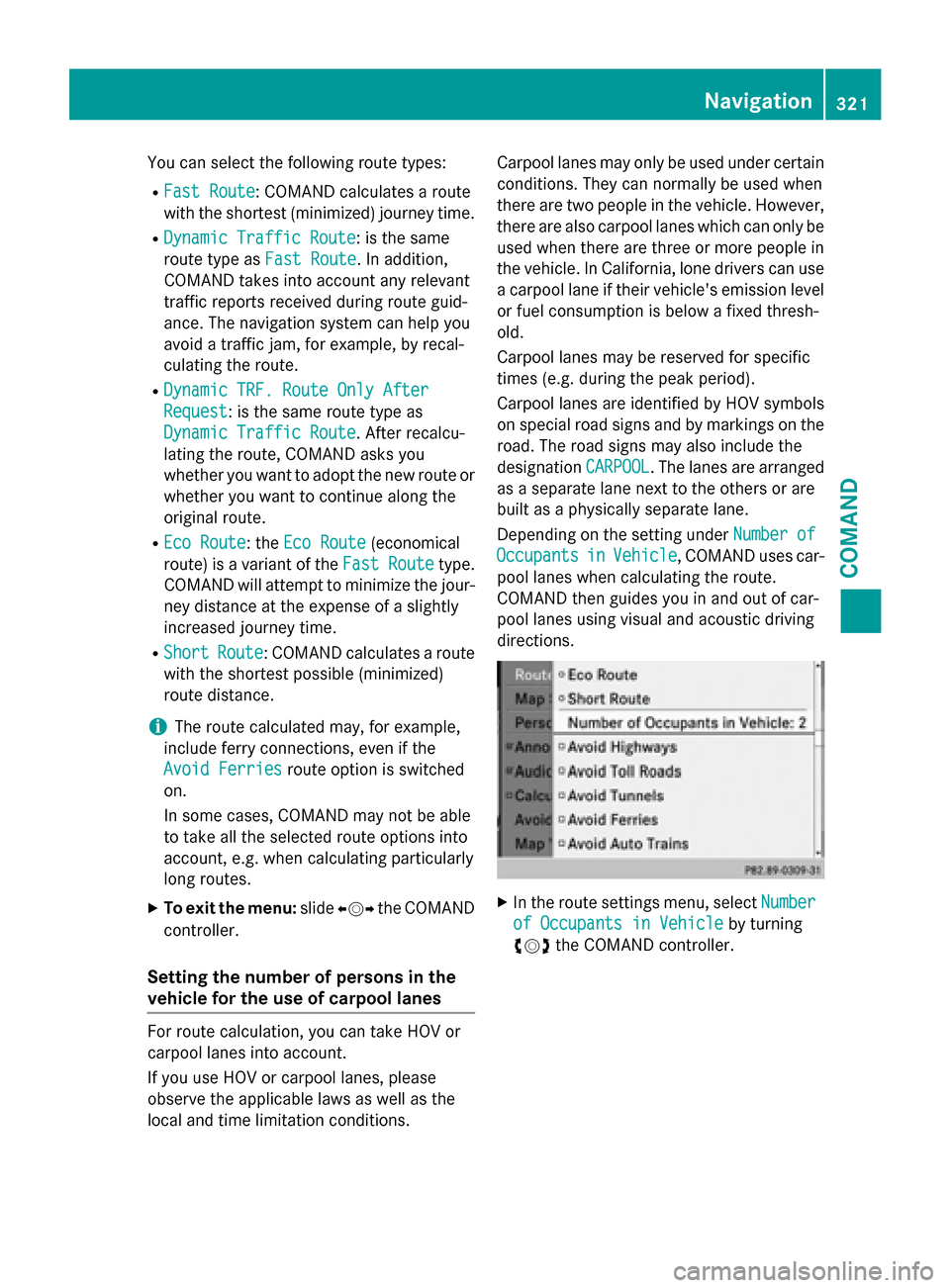
directions. X
In the route settings menu, select Number Number
of Occupants in Vehicle
of Occupants in Vehicle by turning
00790052007A the COMAND controller. Navigation
321COMAND Z
Page 336 of 610
X
To change the sequence: from the menu,
select Move
Move by turning 00790052007Athe COMAND
controller and press 0098to confirm.
X Turn 00790052007A the COMAND controller and
move the way point or destination to the
desired position, then press 0098to confirm.
X To delete way points: from the menu,
select Delete
Delete and press 0098to confirm.
Accepting way points for the route X Select Start
Startin the way point menu by
turning 00790052007Athe COMAND controller and
press 0098to confirm.
The route is calculated with the entered
way points.
i Continue Continue
is displayed instead of Start
Start
when Calculate Alternative Routes
Calculate Alternative Routes
is activated in the navigation menu
(Y page 349).
i If a way point has been passed during
route guidance, the way point will be dis-
played in the way point menu with a green
arrow. Once the route has been recalcula-
ted, the way point is deleted from the way
point menu.
Searching for a gas station when the fuel
level is low
If the reserve fuel warning is displayed, you
will see the message: Reserve Fuel
Reserve Fuel
Level//Do you want to start the Level//Do you want to start the
search//for surrounding gas sta‐ search//for surrounding gas sta‐
tions? tions? .
X Select Yes
YesorNo
No.
If you select Yes
Yes , the gas station search
starts. When the search is complete, a list
of the gas stations available along the route or in the vicinity is displayed.
If you select No No, the search is canceled.
X Select a gas station and press 0098to con-
firm.
The address of the gas station is displayed.
X Confirm Start
Start by pressing 0098.
The selected gas station is entered into
position 1 of the way points menu. Route
guidance begins. If the way points menu already contains
four way points, a prompt will be displayed,
asking you whether you wish to enter the
gas station into position 1. If you select
Yes Yes , the gas station is transferred into the
list and way point 4 is deleted. Entering a POI
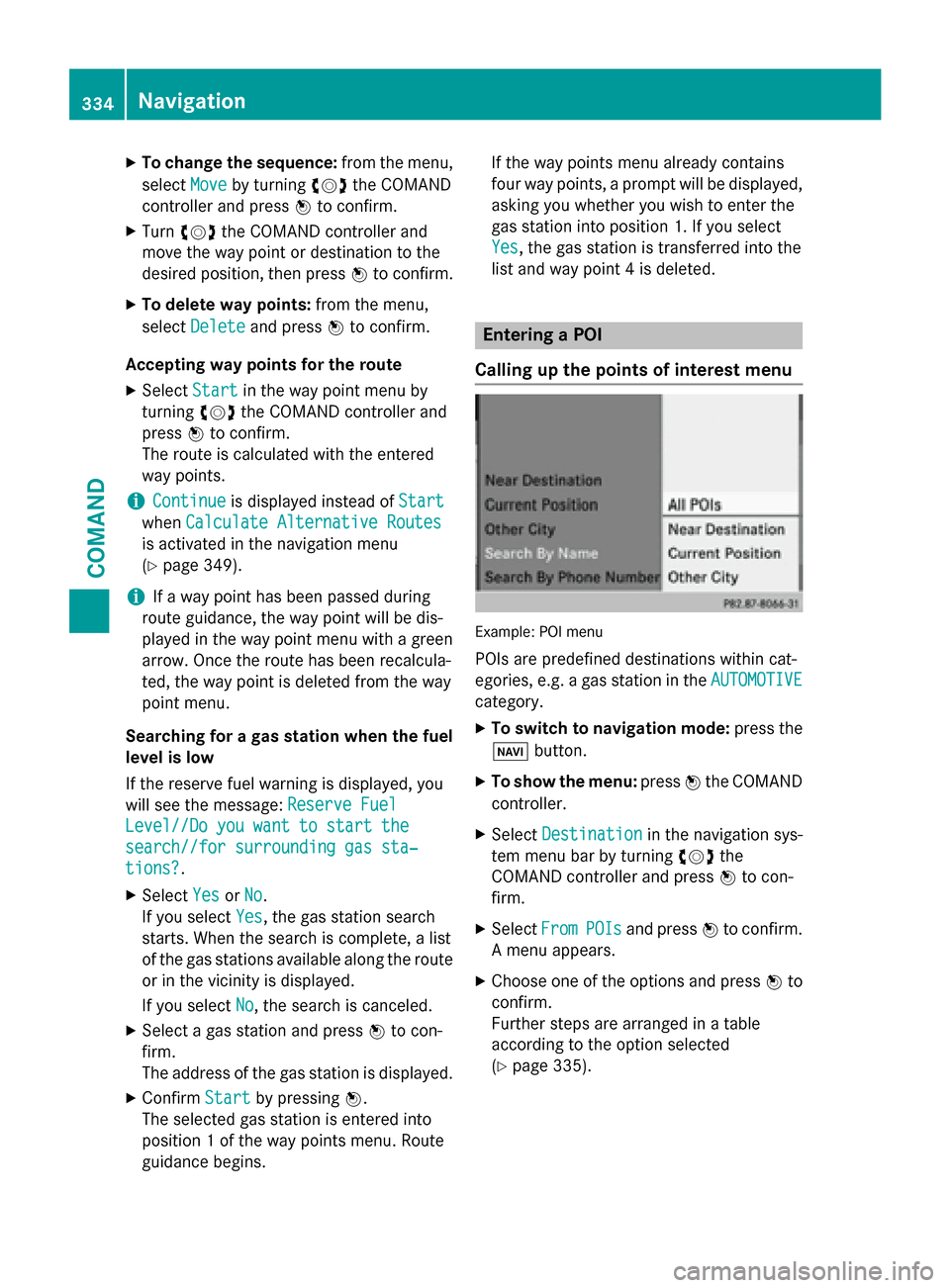
Calling up the points of interest menu Example: POI menu
POIs are predefined destinations within cat-
egories, e.g. a gas station in the AUTOMOTIVE AUTOMOTIVE
category.
X To switch to navigation mode: press the
00BE button.
X To show the menu: press0098the COMAND
controller.
X Select Destination Destination in the navigation sys-
tem menu bar by turning 00790052007Athe
COMAND controller and press 0098to con-
firm.
X Select From FromPOIs
POIsand press 0098to confirm.
A menu appears.
X Choose one of the options and press 0098to
confirm.
Further steps are arranged in a table
according to the option selected
(Y page 335). 334
NavigationCOMAND