tires MERCEDES-BENZ SL-Class 2016 R231 Owner's Guide
[x] Cancel search | Manufacturer: MERCEDES-BENZ, Model Year: 2016, Model line: SL-Class, Model: MERCEDES-BENZ SL-Class 2016 R231Pages: 614, PDF Size: 15.67 MB
Page 261 of 614
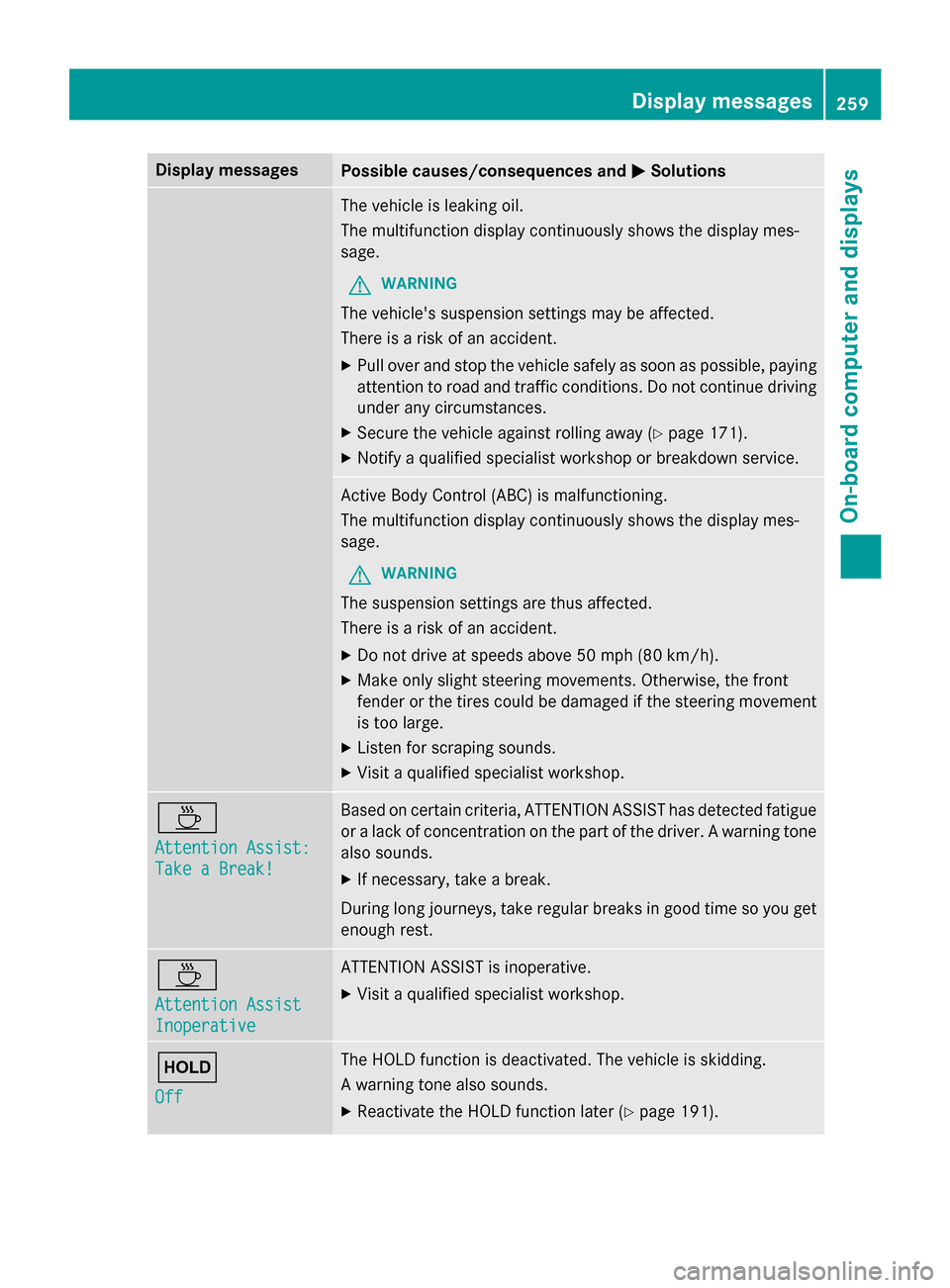
Display messagesPossible causes/consequences andMSolutions
The vehicleis leakin goil.
The multifunction display continuousl yshows th edisplay mes -
sage .
GWARNIN G
The vehicle's suspensio nsetting smay be affected.
There is aris kof an accident.
XPull ove rand stop th evehicl esafely as soo nas possible, payin g
attention to roa dand traffic conditions. Do no tcontinue drivin g
under any circumstances.
XSecur eth evehicl eagainst rollin gaway (Ypage 171).
XNotify aqualified specialist workshop or breakdown service.
Active Body Control (ABC) is malfunctioning.
The multifunction display continuousl yshows th edisplay mes -
sage .
GWARNIN G
The suspensio nsetting sare thus affected.
There is aris kof an accident.
XDo no tdrive at speeds abov e50 mph (80 km/h).
XMak eonly slight steerin gmovements. Otherwise ,th efron t
fender or th etires could be damaged if th esteerin gmovement
is to olarge.
XListe nfo rscraping sounds.
XVisit aqualified specialist workshop .
À
Attention Assist:
Take a Break!
Based on certain criteria, ATTENTION ASSIST has detecte dfatigue
or alac kof concentration on th epart of th edriver . Awarnin gtone
also sounds.
XIf necessary, tak e abreak.
Durin glon gjourneys, tak eregular breaks in goo dtime so you get
enough rest.
À
Attention Assist
Inoperative
ATTENTION ASSIST is inoperative.
XVisit aqualified specialist workshop .
ë
Off
The HOLD function is deactivated. The vehicl eis skidding.
A warnin gtone also sounds.
XReactivat eth eHOLD function later (Ypage 191).
Display messages259
On-board computer and displays
Z
Page 266 of 614
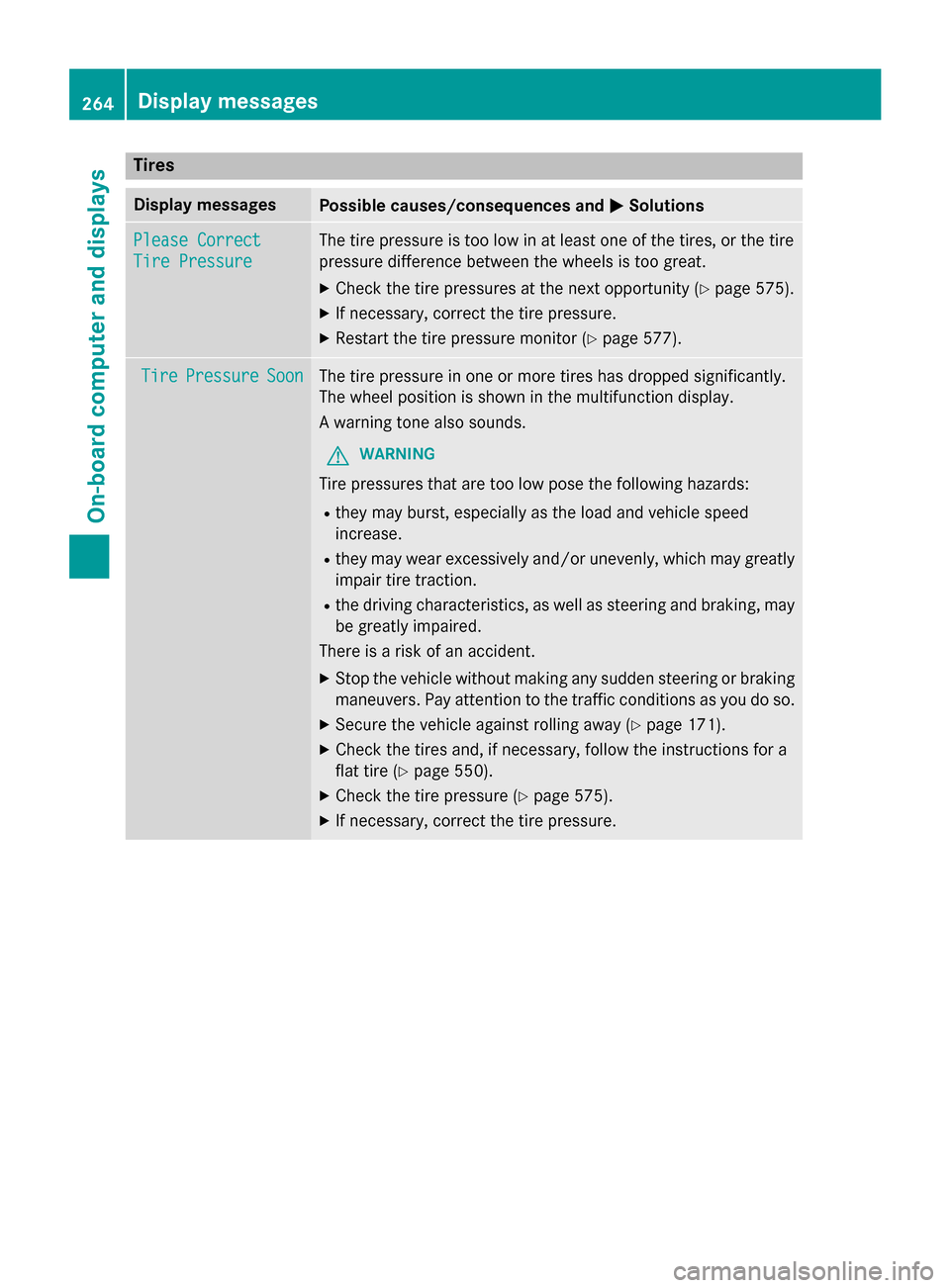
Tires
Display messagesPossible causes/consequences andMSolutions
Please Correct
Tire Pressure
The tire pressure is too low in at least one of the tires, or the tire
pressure difference between the wheels is too great.
XCheck the tire pressures at the next opportunity (Ypage 575).
XIf necessary, correct the tire pressure.
XRestart the tire pressure monitor (Ypage 577).
TirePressureSoonThe tire pressure in one or more tires has dropped significantly.
The wheel position is shown in the multifunction display.
A warning tone also sounds.
GWARNING
Tire pressures that are too low pose the following hazards:
Rthey may burst, especially as the load and vehicle speed
increase.
Rthey may wear excessively and/or unevenly, which may greatly
impair tire traction.
Rthe driving characteristics, as well as steering and braking, may
be greatly impaired.
There is a risk of an accident.
XStop the vehicle without making any sudden steering or braking
maneuvers. Pay attention to the traffic conditions as you do so.
XSecure the vehicle against rolling away (Ypage 171).
XCheck the tires and, if necessary, follow the instructions for a
flat tire (
Ypage 550).
XCheck the tire pressure (Ypage 575).
XIf necessary, correct the tire pressure.
264Displa y messages
On-board computer and displays
Page 267 of 614
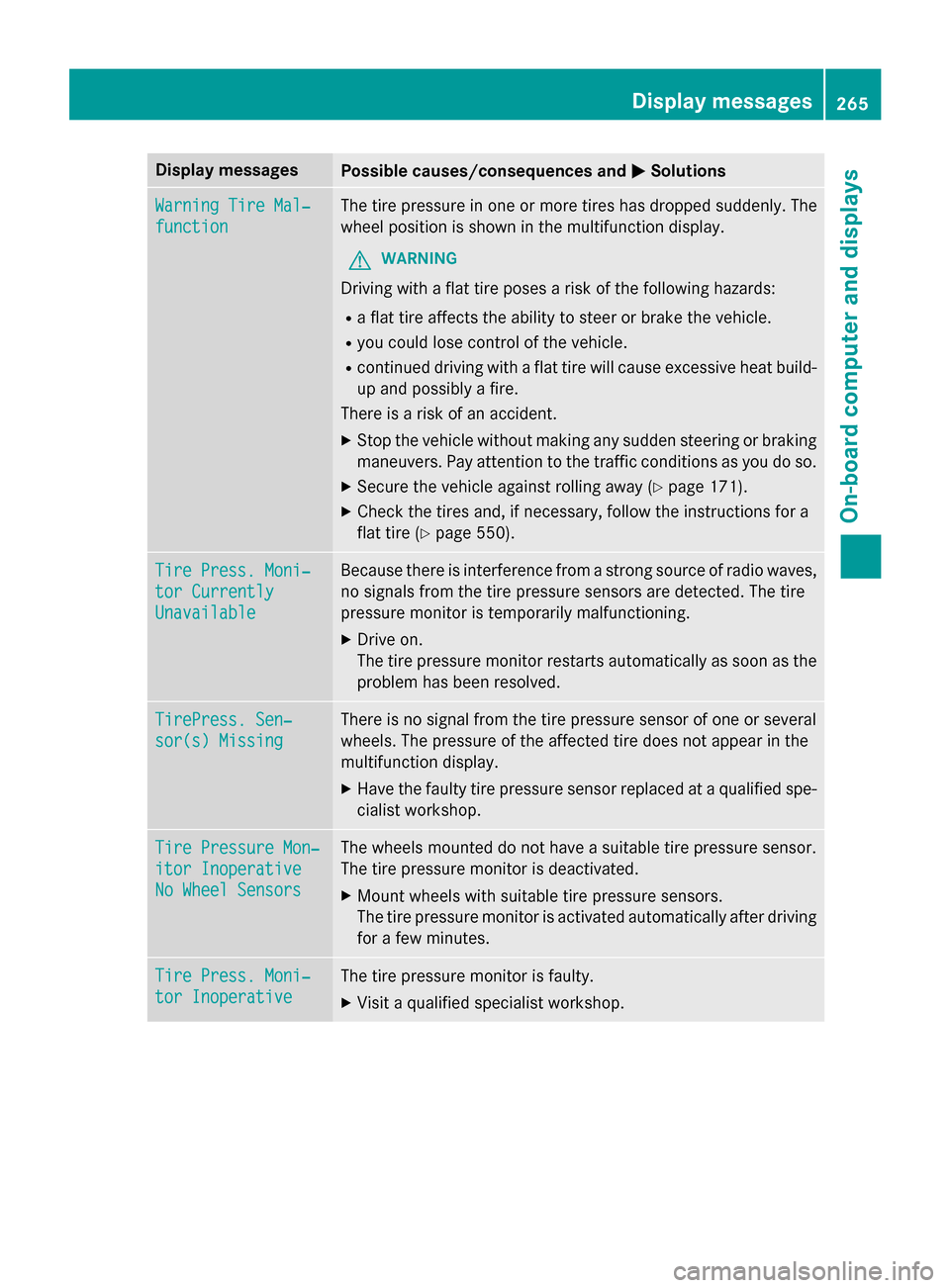
Display messagesPossible causes/consequences andMSolutions
WarningTir eMal ‐
function
The tire pressur ein on eor mor etires has dropped suddenly. The
whee lposition is shown in th emultifunction display.
GWARNIN G
Drivingwit h a flat tire poses aris kof th efollowing hazards :
Raflat tire affects th eabilit yto steer or brak eth evehicle.
Ryou could los econtrol of th evehicle.
Rcontinued drivin gwit h a flat tire will caus eexcessive heat build-
up and possibl y afire.
There is aris kof an accident.
XStop th evehicl ewithout makin gany sudden steerin gor brakin g
maneuvers .Pay attention to th etraffic condition sas you do so.
XSecur eth evehicl eagainst rollin gaway (Ypage 171).
XCheckth etires and ,if necessary, follow th einstruction sfo r a
flat tire (
Ypage 550).
TirePress. Moni‐
tor Currently
Unavailable
Becaus ethere is interferenc efrom astron gsource of radi owaves,
no signal sfrom th etire pressur esensor sare detected. The tire
pressur emonitor is temporarily malfunctioning.
XDrive on .
The tire pressur emonitor restarts automatically as soo nas th e
problem has been resolved.
TirePress .Sen ‐
sor(s) Missin g
There is no signal from th etire pressur esensor of on eor several
wheels. The pressur eof th eaffecte dtire does no tappea rin th e
multifunction display.
XHav eth efault ytire pressur esensor replaced at aqualified spe -
cialist workshop .
TirePressure Mon ‐
itorInoperative
No Wheel Sensor s
The wheels mounted do no thav e a suitable tire pressur esensor .
The tire pressur emonitor is deactivated.
XMoun twheels wit hsuitable tire pressur esensors.
The tire pressur emonitor is activated automatically after drivin g
fo r a few minutes.
Tir ePress. Moni‐
tor Inoperative
The tire pressur emonitor is faulty.
XVisit aqualified specialist workshop .
Display messages265
On-board computer and displays
Z
Page 283 of 614
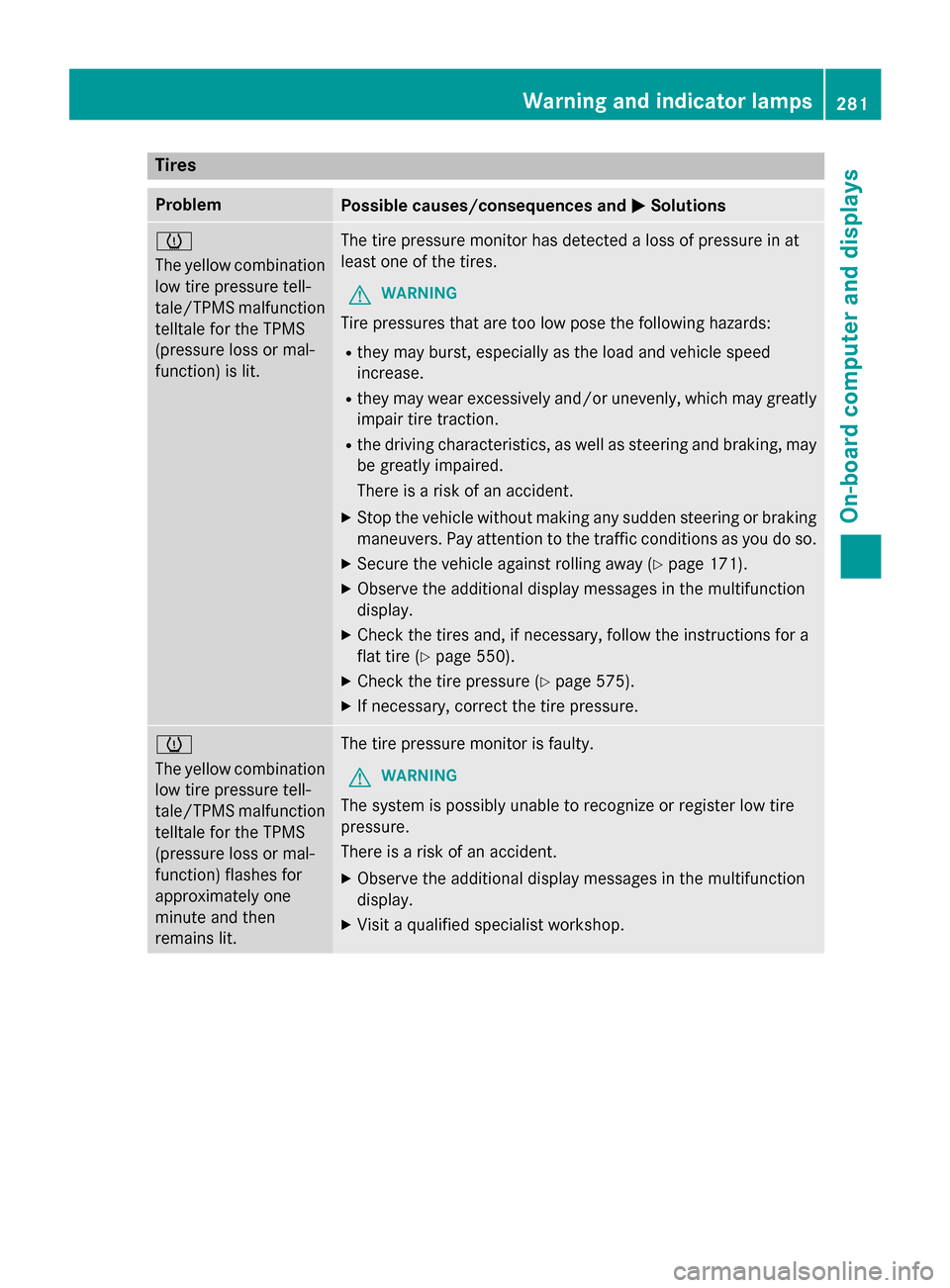
Tires
ProblemPossible causes/consequences andMSolutions
h
The yellow combination
low tire pressure tell-
tale/TPMS malfunction
telltale for the TPMS
(pressure loss or mal-
function) is lit.The tire pressure monitor has detected a loss of pressure in at
least one of the tires.
GWARNING
Tire pressures that are too low pose the following hazards:
Rthey may burst, especially as the load and vehicle speed
increase.
Rthey may wear excessively and/or unevenly, which may greatly
impair tire traction.
Rthe driving characteristics, as well as steering and braking, may
be greatly impaired.
There is a risk of an accident.
XStop the vehicle without making any sudden steering or braking
maneuvers. Pay attention to the traffic conditions as you do so.
XSecure the vehicle against rolling away (Ypage 171).
XObserve the additional display messages in the multifunction
display.
XCheck the tires and, if necessary, follow the instructions for a
flat tire (
Ypage 550).
XCheck the tire pressure (Ypage 575).
XIf necessary, correct the tire pressure.
h
The yellow combination
low tire pressure tell-
tale/TPMS malfunctiontelltale for the TPMS
(pressure loss or mal-
function) flashes for
approximately one
minute and then
remains lit.The tire pressure monitor is faulty.
GWARNING
The system is possibly unable to recognize or register low tire
pressure.
There is a risk of an accident.
XObserve the additional display messages in the multifunction
display.
XVisit a qualified specialist workshop.
Warning and indicator lamps281
On-board computer and displays
Z
Page 358 of 614
XTo delete a route:selectDeletein the
menu by turning cVdthe COMAND con-
troller and press Wto confirm.
A prompt appears asking whether the route
should be deleted.
XSelect YesorNoand press Wto confirm.
If you select Yes
, the route will be deleted.
If you select No
, the process will be can-
celed.
Scanning the memory
The SD memory card is inserted.
XCall up the Routes menu (Ypage 354).
XSelect MemoryInfoin the Routes menu by
turning cVdthe COMAND controller and
press Wto confirm.
A message such as Off-road
RouteMem‐
ory 90% Full.is displayed.
Off-road and off-map
Notes
The navigation system may guide you to off-
road routes that your vehicle cannot drive on
without causing damage to the tires or wheels
or the vehicle itself. It is the driver’s sole
responsibility to determine the suitability of
the route. The condition of the off-road routes may vary, and their drivability may be affected
by different factors such as time of day, sea-
son and current weather conditions, which
the navigation system cannot judge or take
into account. Route guidance to a destination that is not
on a digitized road
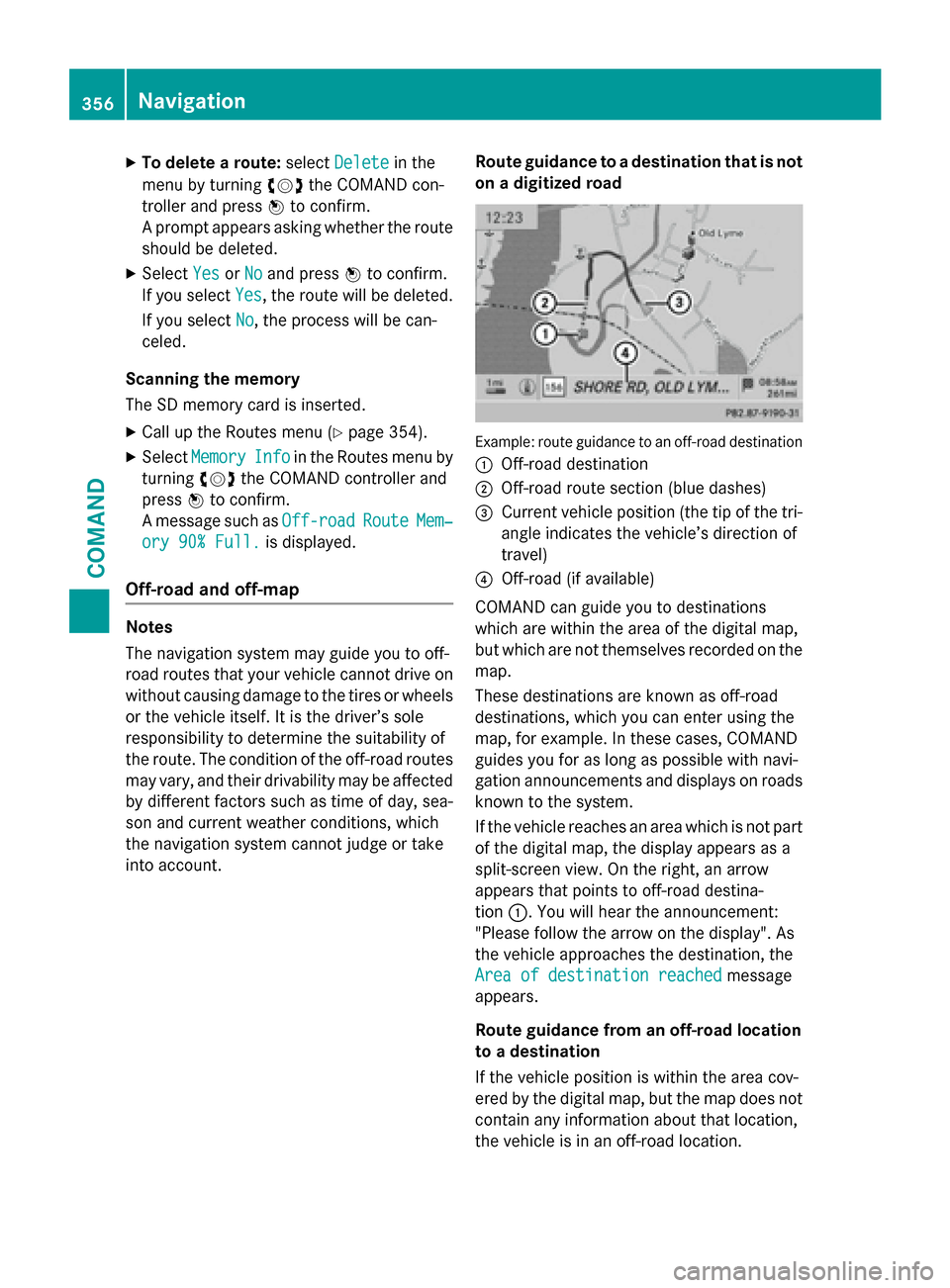
Example: route guidance to an off-road destination
:
Off-road destination
;Off-road route section (blue dashes)
=Current vehicle position (the tip of the tri-
angle indicates the vehicle’s direction of
travel)
?Off-road (if available)
COMAND can guide you to destinations
which are within the area of the digital map,
but which are not themselves recorded on the
map.
These destinations are known as off-road
destinations, which you can enter using the
map, for example. In these cases, COMAND
guides you for as long as possible with navi-
gation announcements and displays on roads
known to the system.
If the vehicle reaches an area which is not part
of the digital map, the display appears as a
split-screen view. On the right, an arrow
appears that points to off-road destina-
tion :. You will hear the announcement:
"Please follow the arrow on the display". As
the vehicle approaches the destination, the
Area of destination reached
message
appears.
Route guidance from an off-road location
to a destination
If the vehicle position is within the area cov-
ered by the digital map, but the map does not
contain any information about that location,
the vehicle is in an off-road location.
356Navigation
COMAND
Page 543 of 614
Displaying service messages
XSwitchon th eignition .
XPress th e= or; buttonon th esteer -
in g whee lto selec tth eServ.
menu.
XPress th e9 or: buttonto selec tth e
ASSYST PLU S
submenuand confirm by
pressing th ea button.
The servic edue dat eappears in th emulti-
function display.
Information about Service
Resetting th eASSYS TPLUS service
interva ldisplay
!If th eASSYST PLU Sservic einterval dis -
play has been inadvertentl yreset ,this set -
ting can be correcte dat aqualified special-
ist workshop .
Hav eservic ewor kcarrie dout as described
in th eMaintenance Booklet .Thi smay oth-
erwise lead to increase dwear and damage
to th emajor assemblies or th evehicle.
A qualified specialis tworkshop ,e.g. an
authorized Mercedes-Ben zCenter, will reset
th eASSYST PLU Sservic einterval display
after th eservic ewor khas been carrie dout .
You can also obtain further information on
maintenance work, fo rexample.
Specia lservice requirement s
The specifiedmaintenance interval take sonly
th enormal operation of th evehicle into
account. Under arduous operatin gcondition s
or increase dload on th evehicle, mainte -
nance wor kmus tbe carrie dout more fre-
quently, fo rexample:
Rregular city drivin gwit hfrequent intermedi-
at estops
Rif th evehicle is primarily used to trave l
short distances
Ruse in mountainous terrain or on poo rroad
surfaces
Rif th eengin eis ofte nlef tidlin gfo rlon gperi-
ods
Under these or similar conditions, have, fo r
example, th eair filter, engin eoil and oil filte r
replaced or changed more frequently. Under
arduous operatin gconditions, th etires mus t
be checke dmore often. Further information
can be obtained at aqualified specialist work-
shop, e.g. an authorized Mercedes-Ben zCen -
ter.
Drivin gabroad
An extensive Mercedes-Ben zServic enetwor k
is also available in other countries. You can
obtain further information from any author -
ized Mercedes-Ben zCenter.
Car e
Note son car e
HEnvironmental not e
Dispose of empty packagin gand cleanin g
cloths in an environmentally responsible man -
ner.
!Fo rcleanin gyour vehicle, do no tuse any
of th efollowing :
Rdry, rough or har dcloths
Rabrasiv ecleanin gagents
Rsolvents
Rcleanin gagents containin gsolvents
Do no tscrub .
Do no ttouch th esurfaces or protective
films wit hhar dobjects ,e.g. arin gor ic e
scraper. You could otherwise scratch or
damage th esurfaces and protective film.
!Do no tpar kth evehicle fo ran extended
period straight after cleanin git,particularly
after havin gcleaned th ewheels wit hwhee l
cleaner. Wheel cleaners could caus e
increase dcorrosion of th ebrake discs and
brake pads/linings. Fo rthis reason ,you
Care541
Maintenance and care
Z
Page 545 of 614
Observe the legal requirements in all coun-
tries concerned.
XDo not use hot water and do not wash the
vehicle in direct sunlight.
XUse a soft sponge to clean.
XUse a mild cleaning agent, such as a car
shampoo approved by Mercedes-Benz.
XThoroughly hose down the vehicle with a
gentle jet of water.
XDo not point the water jet directly towardsthe air inlet.
XUse plenty of water and rinse out the
sponge frequently.
XRinse the vehicle with clean water and dry
thoroughly with a chamois.
XDo not let the cleaning agent dry on the
paintwork.
When using the vehicle in winter, remove all
traces of road salt deposits carefully and as
soon as possible.
Power washers
GWARNING
The water jet from a circular jet nozzle (dirt
blasters) can cause invisible exterior damage
to the tires or chassis components. Compo-
nents damaged in this way may fail unexpect-
edly. There is a risk of an accident.
Do not use power washers with circular jet
nozzles to clean the vehicle. Have damaged
tires or chassis components replaced imme-
diately.
!Always maintain a distance of at least
11.8 in (30 cm) between the vehicle and the
power washer nozzle. Information about
the correct distance is available from the
equipment manufacturer.
Move the power washer nozzle around
when cleaning your vehicle.
Do not aim directly at any of the following:
Rtires
Rdoor gaps, roof gaps, joints, etc.
Relectrical components
Rbattery
Rconnectors
Rlights
Rseals
Rtrim
Rventilation slots
Damaged seals or electrical components
can lead to leaks or failures.
!Vehicles with HANDS-FREE ACCESS: if a
SmartKey with KEYLESS-GO is within the
detection range of the KEYLESS-GO
antenna, the following situations could lead
to the unintentional opening of the trunk
lid:
Rusing a car wash
Rusing a power washer
Make sure that the SmartKey is at least
6.5 ft (2 m) away from the vehicle.
!Mille Miglia special model: parts of your
vehicle are covered with a decorative foil.
Maintain a distance of at least 70 cm
between the foil-wrapped parts of the vehi-
cle and the nozzle of the power washer.
Information about the correct distance is
available from the equipment manufac-
turer.
Move the power washer nozzle around
when cleaning your vehicle.
Cleaning the paintwork
!Do not affix:
Rstickers
Rfilms
Rmagnetic plates or similar items
to painted surfaces. You could otherwise
damage the paintwork.
Scratches, corrosive deposits, areas affected
by corrosion and damage caused by inade-
quate care cannot always be completely
repaired. In such cases, visit a qualified spe-
cialist workshop.
Care543
Maintenance and care
Z
Page 546 of 614
XRemove dirtimmediately, wher epossible,
while avoidin grubbin gto ohard.
XSoak insec tremain swit hinsec tremove r
and rinse off th etreated area safterwards .
XSoak birddroppings wit hwater and rinse
off th etreated area safterwards .
XRemove coolant, brak efluid ,tree resin ,
oils ,fuel sand greases by rubbin ggentl y
wit h a cloth soaked in petroleum ether or
lighte rfluid .
XUse tar remove rto remove tar stains.
XUse silicon eremove rto remove wax .
If water no longer forms "beads "on th epain t
surface, use th epain tcar eproducts recom-
mended and approve dby Mercedes-Benz.
This is th ecas eapproximately every three to
fiv emonths, dependin gon th eclimat econ-
dition sand th ecar eproduc tused .
If dir thas penetrated th epain tsurfac eor if
th epain thas become dull, th epain tcleane r
recommended and approve dby Mercedes -
Benz should be used .
Do no tuse these car eproducts in th esun or
on th ehoo dwhile th ehoo dis hot .
XUseasuitable touch-up stick ,e.g. MB
Touch-Up Stick ,to repair slight damag eto
th epaintwork quickl yand provisionally.
Matt e finish car e
!Never polis hth evehicl eor th eligh talloy
wheels. Polishing causes th efinish to
shine .
!The followin gmay caus eth epain tto
become shiny and thus reduce th ematte
effect:
Rstron grubbin gof th epaintwork wit h
unsuitable materials
Rfrequen tuse of automatic car washes
Rwashin gth evehicl ein direc tsunligh t
!Never use pain tcleaner, buffin gor pol-
ishin gproducts ,or glos spreserver ,e.g.
wax .These products are only suitable for
high-gloss surfaces. Their use on vehicles wit
hmatte finish leads to considerable sur -
fac edamag e(shiny, spotted areas).
Always hav epaintwork repairs carrie dout
at aqualified specialist workshop .
!Do notuse wash programs wit h ahot wax
treatmen tunder any circumstances.
Observ ethese note sif your vehicl ehas a
clear matte finish .This will help you to avoid
damag eto th epaintwork due to incorrec t
treatment.
These note salso apply to ligh talloy wheels
wit h a clear matte finish .
iThe vehicleshould preferably be washed
by han dusin g asoftsponge, car shampoo
and plenty of water.
iUse only insec tremove rand car shampoo
from th erange of recommended and
approve dMercedes-Ben zcar eproducts .
Cleaning th e vehicle part s
Cleaning th ewheels
GWARNIN G
The water je tfrom acircula rje tnozzle (dir t
blasters )can caus einvisible exterio rdamage
to th etires or chassi scomponents. Compo-
nent sdamaged in this way may fail unexpect-
edly. There is aris kof an accident.
Do no tuse powe rwashers wit hcircula rje t
nozzles to clean th evehicle. Hav edamaged
tires or chassi scomponent sreplaced imme-
diately.
!Do no tuse acidic whee lcleaning products
to remove brak edust .This could damag e
whee lbolt sand brak ecomponents.
!Do no tpark th evehicl efor an extended
period straight after cleaning it ,particularly
after havin gcleane dth ewheels wit hwhee l
cleaner. Wheel cleaners could caus e
increase dcorrosio nof th ebrak edisc sand
brak epads/linings. Fo rthis reason ,you
should drive for afew minute safter clean-
544Care
Maintenance and care
Page 552 of 614
Useful information
i
This Operator's Manual describes all
models and all standard and optional equip-
ment of your vehicle available at the time of
publication of the Operator's Manual.
Country-specific differences are possible.
Please note that your vehicle may not be
equipped with all features described. This
also applies to safety-related systems and
functions.
iRead the information on qualified special-
ist workshops (
Ypage 34).
Where will I find...?
Vehicle tool kit
General notes
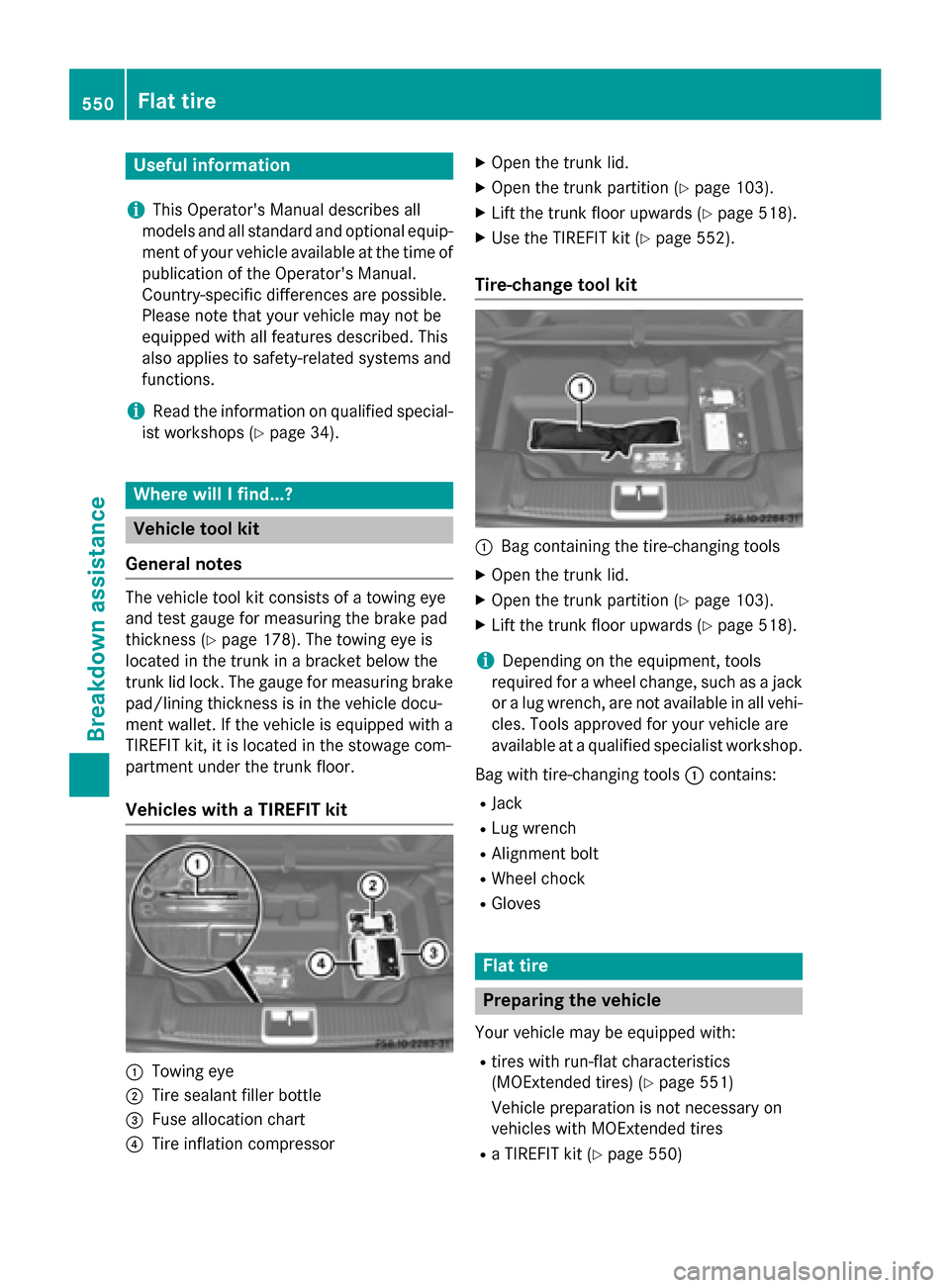
The vehicle tool kit consists of a towing eye
and test gauge for measuring the brake pad
thickness (
Ypage 178). The towing eye is
located in the trunk in a bracket below the
trunk lid lock. The gauge for measuring brake
pad/lining thickness is in the vehicle docu-
ment wallet. If the vehicle is equipped with a
TIREFIT kit, it is located in the stowage com-
partment under the trunk floor.
Vehicles with a TIREFIT kit
:Towing eye
;Tire sealant filler bottle
=Fuse allocation chart
?Tire inflation compressor
XOpen the trunk lid.
XOpen the trunk partition (Ypage 103).
XLift the trunk floor upwards (Ypage 518).
XUse the TIREFIT kit (Ypage 552).
Tire-change tool kit
:Bag containing the tire-changing tools
XOpen the trunk lid.
XOpen the trunk partition (Ypage 103).
XLift the trunk floor upwards (Ypage 518).
iDepending on the equipment, tools
required for a wheel change, such as a jack or a lug wrench, are not available in all vehi-
cles. Tools approved for your vehicle are
available at a qualified specialist workshop.
Bag with tire-changing tools :contains:
RJack
RLug wrench
RAlignment bolt
RWheel chock
RGloves
Flat tire
Preparing the vehicle
Your vehicle may be equipped with:
Rtires with run-flat characteristics
(MOExtended tires) (
Ypage 551)
Vehicle preparation is not necessary on
vehicles with MOExtended tires
Ra TIREFIT kit (Ypage 550)
550Flat tire
Breakdown assistance
Page 553 of 614
Vehicles equipped with MOExtended tires are
not equipped with a TIREFIT kit at the factory.
It is therefore recommended that you addi-
tionally equip your vehicle with a TIREFIT kit ifyou mount tires that do not feature run-flat
properties, e.g. winter tires. A TIREFIT kit may
be obtained from a qualified specialist work-
shop.
Information on changing/mounting a wheel
(
Ypage 588).
XStop the vehicle on solid, non-slippery and
level ground, as far away as possible from
traffic.
XSwitch on the hazard warning lamps.
XSecure the vehicle against rolling away
(
Ypage 171).
XIf possible, bring the front wheels into the
straight-ahead position.
XSwitch off the engine.
XVehicles without KEYLESS-GO: remove
the SmartKey from the ignition lock.
XVehicles with KEYLESS-GO: open the
driver's door.
The on-board electronics now have status
0. This is the same as the SmartKey having
been removed.
XVehicles with KEYLESS-GO: remove the
Start/Stop button from the ignition lock
(
Ypage 152).
XMake sure that the passengers are not
endangered as they do so. Make sure that
no one is near the danger area while a
wheel is being changed. Anyone who is not
directly assisting in the wheel change
should, for example, stand behind the bar-
rier.
XGet out of the vehicle. Pay attention to traf-
fic conditions when doing so.
XClose the driver's door.
MOExtended tires (tires with run-flat
properties)
General notes
With MOExtended tires (tires with run flat
characteristics), you can continue to drive
your vehicle even if there is a total loss of
pressure in one or more tires. The affected
tire must not show any clearly visible damage.
You can recognize MOExtended tires by the
MOExtended marking which appears on the
sidewall of the tire. You will find this marking next to the tire size designation, the load-
bearing capacity and the speed index
(
Ypage 582).
MOExtended tires may only be used in con-
junction with an active tire pressure monitor.
If a pressure loss warning message
appears in the multifunction display:
Robserve the instructions in the display mes-
sages (
Ypage 264).
Rcheck the tire for damage.
Rif driving on, observe the following notes.
The driving distance possible in run-flat mode
is approximately 50 miles (80 km) when the
vehicle is partially laden and approximately
18 miles (30 km) when the vehicle is fully
laden.
In addition to the vehicle load, the driving dis-
tance possible depends upon:
Rvehicle speed
Rroad condition
Routside temperature
The driving distance possible in run-flat mode
may be reduced by extreme driving condi-
tions or maneuvers, or it can be increased
through a moderate style of driving.
The driving distance possible in run-flat mode
is counted from the moment the tire pressure
loss warning appears in the multifunction dis-
play.
You must not exceed a maximum speed of
50 mph (80 km/h).
Flat tire551
Breakdown assistance