ad blue MERCEDES-BENZ SL-Class 2016 R231 Owner's Guide
[x] Cancel search | Manufacturer: MERCEDES-BENZ, Model Year: 2016, Model line: SL-Class, Model: MERCEDES-BENZ SL-Class 2016 R231Pages: 614, PDF Size: 15.67 MB
Page 392 of 614
Redialing
XCall up the telephone basic menu
(
Ypage 387).
XSelect°in the character bar and press W
to confirm.
or
XIf the telephone basic menu is displayed,
press the 6button on COMAND.
In both cases, the calls dialed list appears. The most recently dialed number is at the
top.
XTo select a call: turncVd the COMAND
controller.
XTo connect the call: pressWthe
COMAND controller.
Using the call list or COMAND phone book
XOpen a call list and select an entry
(
Ypage 397).
or
XCall up the COMAND phone book and
select an entry (
Ypage 394).
XTo make a call: pressWthe COMAND
controller or the 6button.
Making a call via speed dial
The speed dial list contains stored entries
from the phone book (
Ypage 399).
Option 1:
XHold down one of the number keys for lon-
ger than two seconds.
The telephone basic menu displays the
selected entry. This initiates dialing.
Option 2:
XCall up the telephone basic menu
(
Ypage 387).
XSelect CallListsby sliding VÆand turn-
ing cVd the COMAND controller and press
W to confirm.
A menu appears.
XSelect SpeedDialPresetListby turn-
ing cVd the COMAND controller and press
W to confirm.
The speed dial list appears.
XSelect preset and press Wto confirm.
The telephone basic menu displays the
selected entry. This initiates dialing.
Functions available during a call
Overview
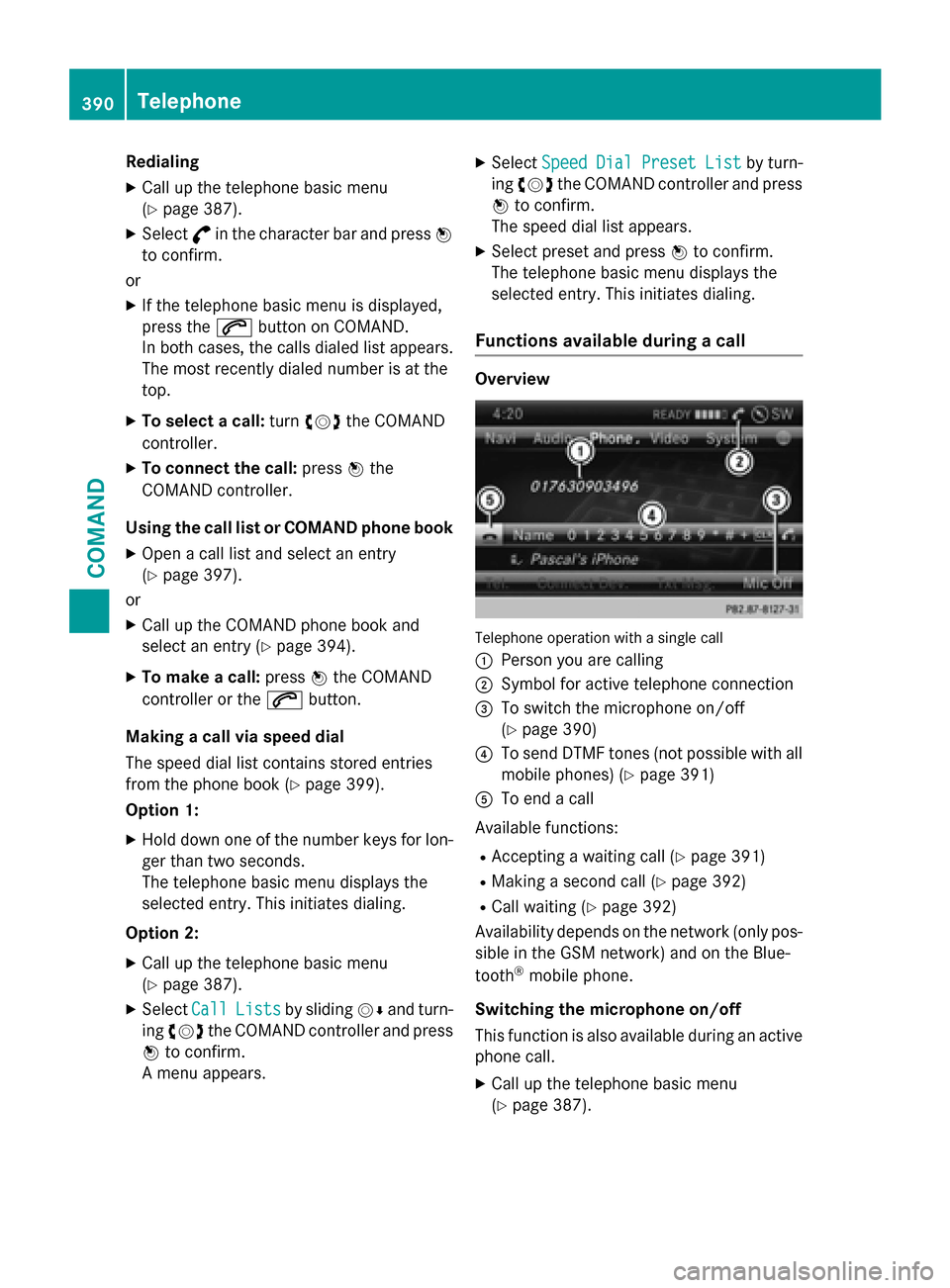
Telephone operation with a single call
:
Person you are calling
;Symbol for active telephone connection
=To switch the microphone on/off
(
Ypage 390)
?To send DTMF tones (not possible with all
mobile phones) (
Ypage 391)
ATo end a call
Available functions:
RAccepting a waiting call (Ypage 391)
RMaking a second call (Ypage 392)
RCall waiting (Ypage 392)
Availability depends on the network (only pos- sible in the GSM network) and on the Blue-
tooth
®mobile phone.
Switching the microphone on/off
This function is also available during an active
phone call.
XCall up the telephone basic menu
(
Ypage 387).
390Telephone
COMAND
Page 393 of 614
XTo switch off:selectMicOffand press W
to confirm.
If the microphone is switched off, the dis-
play shows the Qicon, and the The
microphoneisoffmessage appears for
a short period.
XTo switch on: selectMic onand press W
to confirm.
The Qsymbol disappears. You will briefly
see the The
microphoneisonmessage.
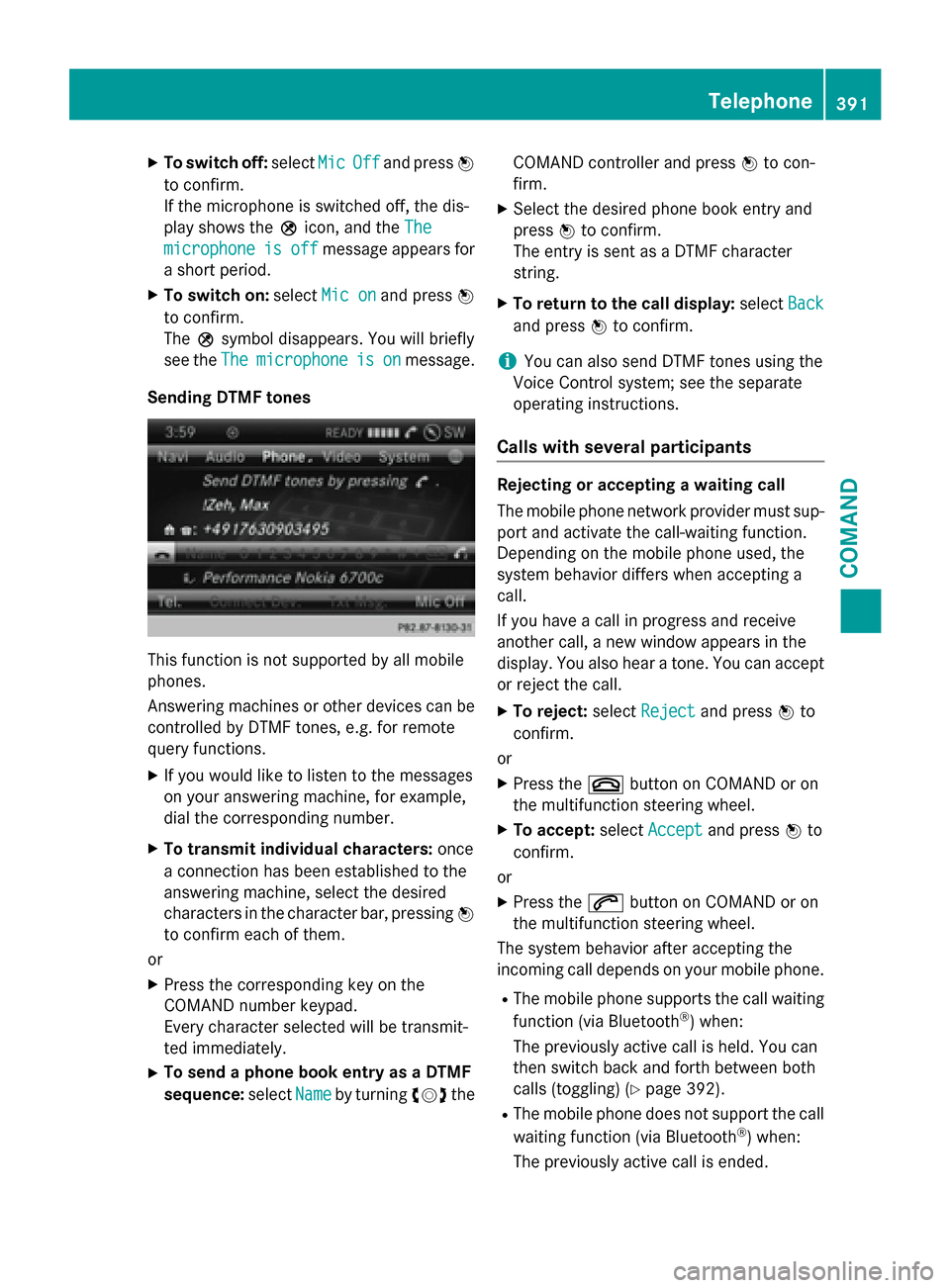
Sending DTMF tones
This function is not supported by all mobile
phones.
Answering machines or other devices can be
controlled by DTMF tones, e.g. for remote
query functions.
XIf you would like to listen to the messages
on your answering machine, for example,
dial the corresponding number.
XTo transmit individual characters: once
a connection has been established to the
answering machine, select the desired
characters in the character bar, pressing W
to confirm each of them.
or
XPress the corresponding key on the
COMAND number keypad.
Every character selected will be transmit-
ted immediately.
XTo send a phone book entry as a DTMF
sequence: selectName
by turning cVdthe COMAND controller and press
Wto con-
firm.
XSelect the desired phone book entry and
press Wto confirm.
The entry is sent as a DTMF character
string.
XTo return to the call display: selectBack
and press Wto confirm.
iYou can also send DTMF tones using the
Voice Control system; see the separate
operating instructions.
Calls with several participants
Rejecting or accepting a waiting call
The mobile phone network provider must sup-
port and activate the call-waiting function.
Depending on the mobile phone used, the
system behavior differs when accepting a
call.
If you have a call in progress and receive
another call, a new window appears in the
display. You also hear a tone. You can accept
or reject the call.
XTo reject: selectRejectand press Wto
confirm.
or
XPress the ~button on COMAND or on
the multifunction steering wheel.
XTo accept: selectAcceptand press Wto
confirm.
or
XPress the 6button on COMAND or on
the multifunction steering wheel.
The system behavior after accepting the
incoming call depends on your mobile phone.
RThe mobile phone supports the call waiting
function (via Bluetooth®) when:
The previously active call is held. You can
then switch back and forth between both
calls (toggling) (
Ypage 392).
RThe mobile phone does not support the call waiting function (via Bluetooth®) when:
The previously active call is ended.
Telephone391
COMAND
Z
Page 394 of 614
This is also the case if you accept the wait-
ing call using the Voice Control System (see
the separate operating instructions).
The COMAND display changes. If you con-
tinue to operate functions on the mobile
phone, the COMAND display may differ from
that of the mobile phone.
Making a second call
If the following requirements are met, you can
make another call while on the phone with
someone else:
RThe function has to be supported by the
mobile phone network.
RThe mobile phone has to support the con-
nection of a further call via Bluetooth®. This
action puts the previous call on hold if the
mobile phone supports this function.
RThe appropriate setting has to be activated
on the mobile phone.
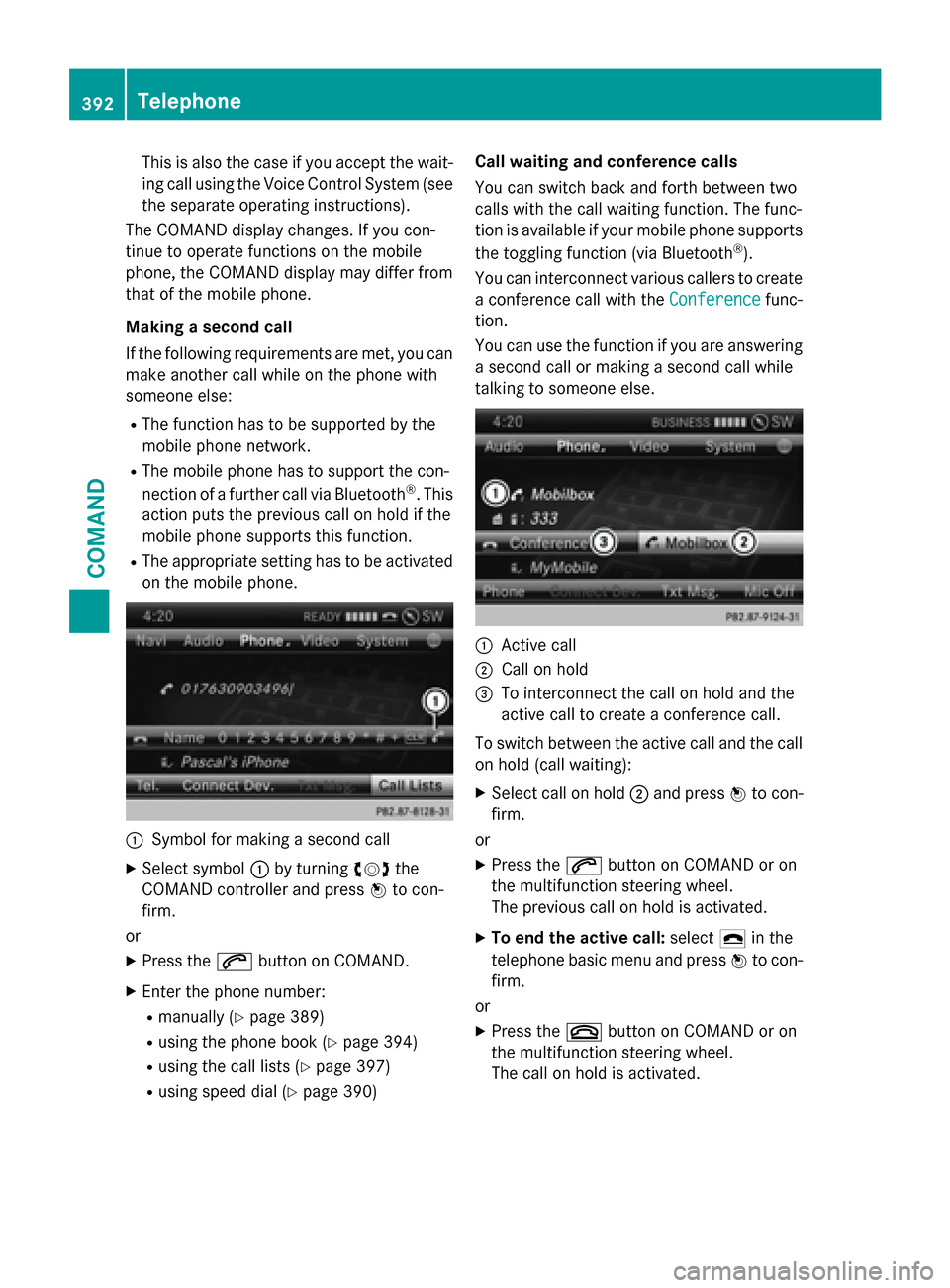
:Symbol for making a second call
XSelect symbol :by turning cVdthe
COMAND controller and press Wto con-
firm.
or
XPress the 6button on COMAND.
XEnter the phone number:
Rmanually (Ypage 389)
Rusing the phone book (Ypage 394)
Rusing the call lists (Ypage 397)
Rusing speed dial (Ypage 390) Call waiting and conference calls
You can switch back and forth between two
calls with the call waiting function. The func-
tion is available if your mobile phone supports
the toggling function (via Bluetooth
®).
You can interconnect various callers to create
a conference call with the Conference
func-
tion.
You can use the function if you are answering
a second call or making a second call while
talking to someone else.
:Active call
;Call on hold
=To interconnect the call on hold and the
active call to create a conference call.
To switch between the active call and the call
on hold (call waiting):
XSelect call on hold ;and press Wto con-
firm.
or
XPress the 6button on COMAND or on
the multifunction steering wheel.
The previous call on hold is activated.
XTo end the active call: select¢in the
telephone basic menu and press Wto con-
firm.
or
XPress the ~button on COMAND or on
the multifunction steering wheel.
The call on hold is activated.
392Telephone
COMAND
Page 396 of 614
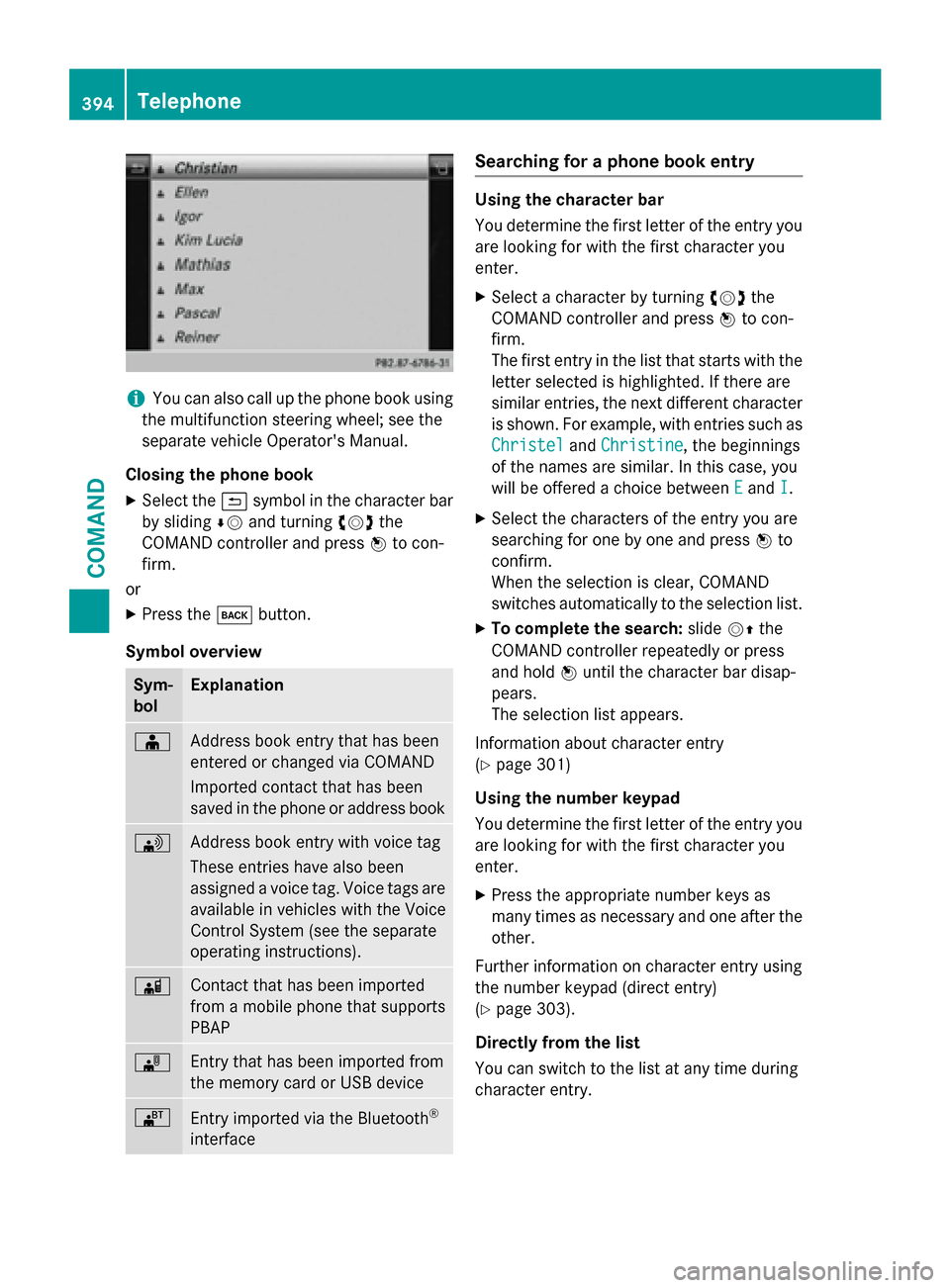
iYou can also call up the phone book using
the multifunction steering wheel; see the
separate vehicle Operator's Manual.
Closing the phone book
XSelect the &symbol in the character bar
by sliding ÆVand turning cVdthe
COMAND controller and press Wto con-
firm.
or
XPress the kbutton.
Symbol overview
Sym-
bolExplanation
ÆAddress book entry that has been
entered or changed via COMAND
Imported contact that has been
saved in the phone or address book
\Address book entry with voice tag
These entries have also been
assigned a voice tag. Voice tags are
available in vehicles with the Voice
Control System (see the separate
operating instructions).
ÃContact that has been imported
from a mobile phone that supports
PBAP
¯Entry that has been imported from
the memory card or USB device
®Entry imported via the Bluetooth®
interface
Searching for a phone book entry
Using the character bar
You determine the first letter of the entry you
are looking for with the first character you
enter.
XSelect a character by turning cVdthe
COMAND controller and press Wto con-
firm.
The first entry in the list that starts with the letter selected is highlighted. If there are
similar entries, the next different character
is shown. For example, with entries such as
Christel
and Christine, the beginnings
of the names are similar. In this case, you
will be offered a choice between E
andI.
XSelect the characters of the entry you are
searching for one by one and press Wto
confirm.
When the selection is clear, COMAND
switches automatically to the selection list.
XTo complete the search: slideVZthe
COMAND controller repeatedly or press
and hold Wuntil the character bar disap-
pears.
The selection list appears.
Information about character entry
(
Ypage 301)
Using the number keypad
You determine the first letter of the entry you
are looking for with the first character you
enter.
XPress the appropriate number keys as
many times as necessary and one after the
other.
Further information on character entry using
the number keypad (direct entry)
(
Ypage 303).
Directly from the list
You can switch to the list at any time during
character entry.
394Telephone
COMAND
Page 398 of 614
XSlideZVthe COMAND controller repeat-
edly in the phone book until the selection
list appears.
XSelect the list symbol on the right in the
selection list by sliding VYthe COMAND
controller and press Wto confirm.
XSelect NewEntryand press Wto confirm.
XSelect a category for the number, e.g. Home,
and press Wto confirm.
XSelect a category for the phone, e.g.
Mobile
, and press Wto confirm.
XSelect Continueand press Wto confirm.
The input menu with data fields appears.
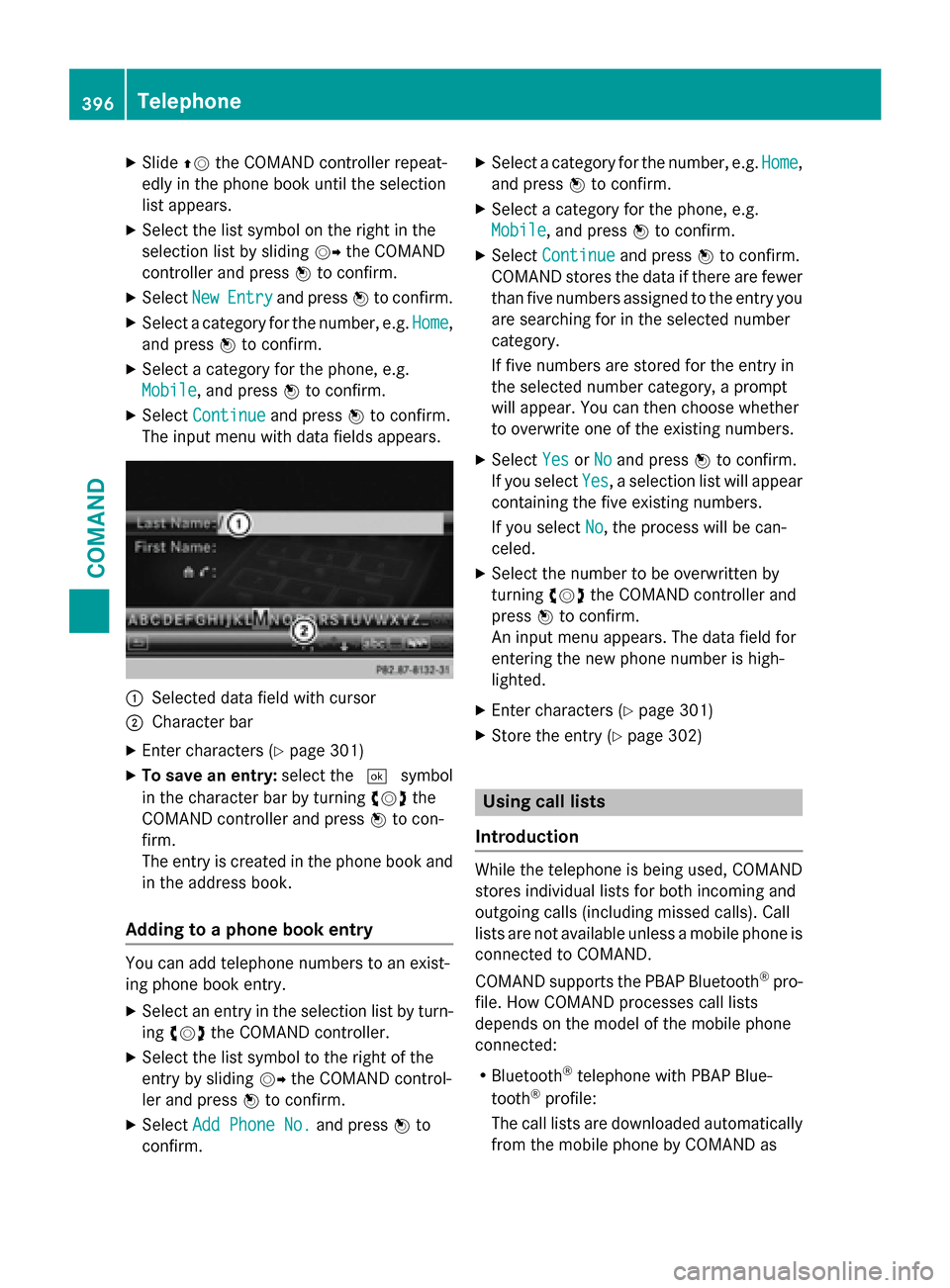
:Selected data field with cursor
;Character bar
XEnter characters (Ypage 301)
XTo save an entry: select the¬symbol
in the character bar by turning cVdthe
COMAND controller and press Wto con-
firm.
The entry is created in the phone book and
in the address book.
Adding to a phone book entry
You can add telephone numbers to an exist-
ing phone book entry.
XSelect an entry in the selection list by turn-
ing cVd the COMAND controller.
XSelect the list symbol to the right of the
entry by sliding VYthe COMAND control-
ler and press Wto confirm.
XSelect Add Phone No.and press Wto
confirm.
XSelect a category for the number, e.g. Home,
and press Wto confirm.
XSelect a category for the phone, e.g.
Mobile
, and press Wto confirm.
XSelect Continueand press Wto confirm.
COMAND stores the data if there are fewer
than five numbers assigned to the entry you
are searching for in the selected number
category.
If five numbers are stored for the entry in
the selected number category, a prompt
will appear. You can then choose whether
to overwrite one of the existing numbers.
XSelect YesorNoand press Wto confirm.
If you select Yes
, a selection list will appear
containing the five existing numbers.
If you select No
, the process will be can-
celed.
XSelect the number to be overwritten by
turning cVdthe COMAND controller and
press Wto confirm.
An input menu appears. The data field for
entering the new phone number is high-
lighted.
XEnter characters (Ypage 301)
XStore the entry (Ypage 302)
Using call lists
Introduction
While the telephone is being used, COMAND
stores individual lists for both incoming and
outgoing calls (including missed calls). Call
lists are not available unless a mobile phone is
connected to COMAND.
COMAND supports the PBAP Bluetooth
®pro-
file. How COMAND processes call lists
depends on the model of the mobile phone
connected:
RBluetooth®telephone with PBAP Blue-
tooth®profile:
The call lists are downloaded automatically from the mobile phone by COMAND as
396Telephone
COMAND
Page 399 of 614
soon as the mobile phone is connected to
COMAND.
RBluetooth®telephone without PBAP Blue-
tooth®profile:
COMAND creates the call lists from both
incoming and outgoing calls (including
missed calls) as soon as the mobile phone
is connected to COMAND.
iFor Bluetooth®telephones without the
PBAP Bluetooth®profile, the call lists in
COMAND are not synchronized with those
on your mobile phone. These calls may or
may not be listed on your mobile phone,
depending on the model.
iIf no mobile phone is connected, then the
Call Lists
menu item is grayed out and
cannot be selected. If you connect a mobile
phone other than the previous one to
COMAND, the previously available call lists
and their entries will be deleted automati-
cally. They are still available on the mobile
phone itself.
iYou will only be able to select the respec-
tive menu items once calls have been
received or dialed from COMAND.
Displaying missed calls in the COMAND
display is not supported by all mobile
phones.
Opening the call list and selecting an
entry
XPress the %function button.
XSelect Call Listsin the telephone basic
menu by sliding VÆand turning cVdthe
COMAND controller and press Wto con-
firm.
A menu appears.
XSelect Calls ReceivedorCalls Dialed
by turning cVdand press Wto confirm.
The corresponding list appears.
iYou can also call up the list of dialed calls
by pressing the 6button when the tele- phone basic menu is shown. In this case,
the list will only show phone numbers.
XSelect an entry by turning
cVdthe
COMAND controller.
XTo dial a phone number: pressW.
XTo close the list: select the&symbol
and press Wto confirm.
or
XPress the kback button.
Displaying details from a list entry
COMAND can also show a shortened list entry
in full.
XSelect a list entry by turning cVdthe
COMAND controller.
XSelect the list symbol to the right of the
entry by sliding VYthe controller and
press Wto confirm.
XSelect Detailsand press Wto confirm.
The detailed view appears.
XTo go back to the list: slideXVY repeat-
edly until the list is highlighted.
Storing a phone number
New address book entry
For incoming calls from a person who is not in
the address book, COMAND displays the
phone number in the call list. You can save
this entry.
XOpen a call list and select an entry
(
Ypage 397).
XSelect the list symbol to the right of the
entry by sliding VYthe COMAND control-
ler and press Wto confirm.
XSelect Saveand press Wto confirm.
XSelect NewEntryand press Wto confirm.
XSelect a category for the number, e.g. Home,
and press Wto confirm.
XSelect a category for the phone, e.g.
Mobile
, and press Wto confirm.
Telephone397
COMAND
Z
Page 400 of 614
Number categoryDisplay (phone
book and address
book)
Not ClassifiedNo symbol
Home¸
Work·
Telephone cate-
goryDisplay (phone
book and address
book)
Not Classified;
MobileÏ
Car´
Pager¨
XSelectSaveand press Wto confirm.
An input menu with data fields is shown.
The data field for the telephone number is
filled in automatically.
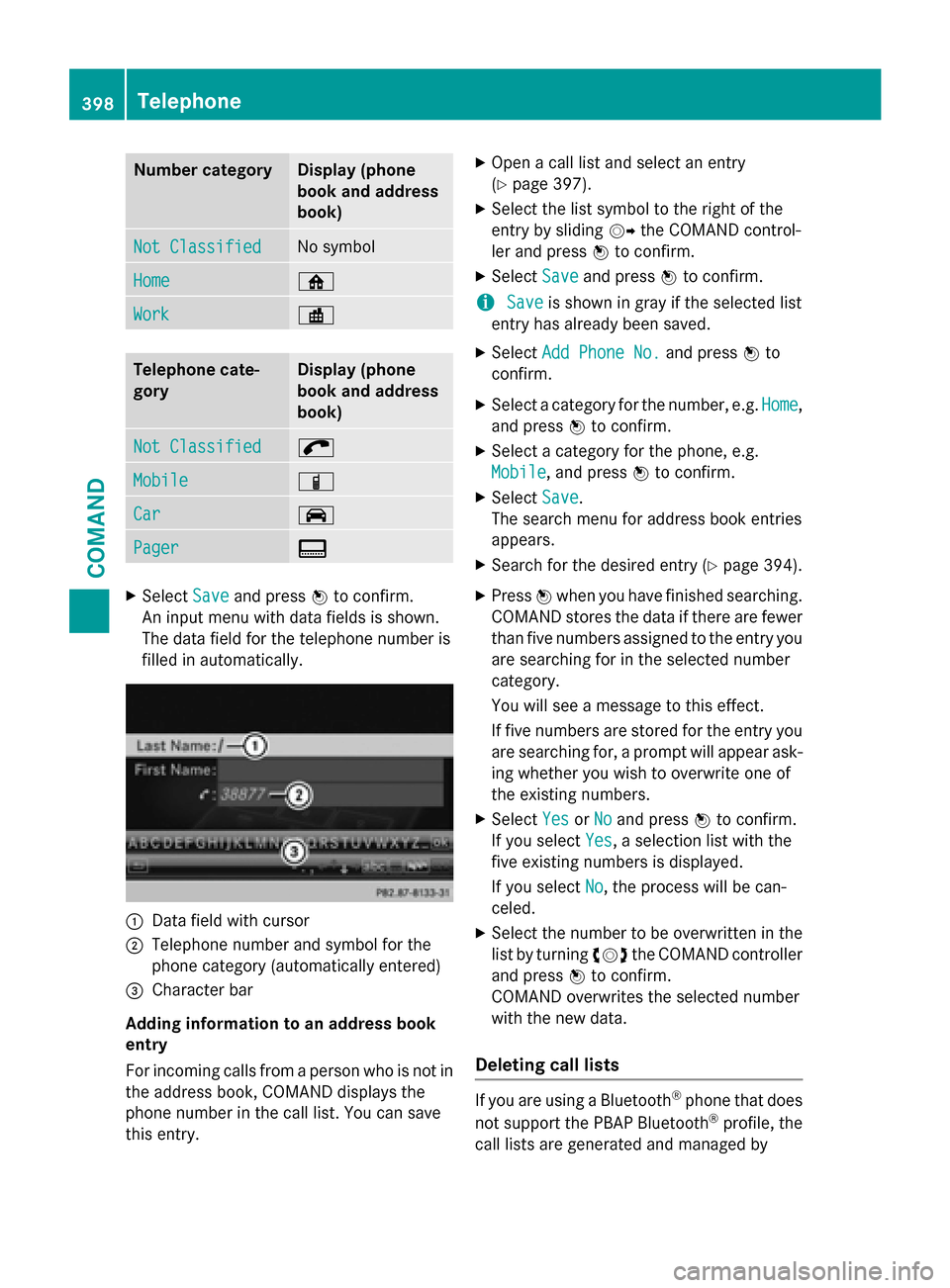
:Data field with cursor
;Telephone number and symbol for the
phone category (automatically entered)
=Character bar
Adding information to an address book
entry
For incoming calls from a person who is not in the address book, COMAND displays the
phone number in the call list. You can save
this entry.
XOpen a call list and select an entry
(
Ypage 397).
XSelect the list symbol to the right of the
entry by sliding VYthe COMAND control-
ler and press Wto confirm.
XSelect Saveand press Wto confirm.
iSaveis shown in gray if the selected list
entry has already been saved.
XSelect Add Phone No.and press Wto
confirm.
XSelect a category for the number, e.g. Home,
and press Wto confirm.
XSelect a category for the phone, e.g.
Mobile
, and press Wto confirm.
XSelect Save.
The search menu for address book entries
appears.
XSearch for the desired entry (Ypage 394).
XPress Wwhen you have finished searching.
COMAND stores the data if there are fewer
than five numbers assigned to the entry you
are searching for in the selected number
category.
You will see a message to this effect.
If five numbers are stored for the entry you
are searching for, a prompt will appear ask- ing whether you wish to overwrite one of
the existing numbers.
XSelect YesorNoand press Wto confirm.
If you select Yes
, a selection list with the
five existing numbers is displayed.
If you select No
, the process will be can-
celed.
XSelect the number to be overwritten in the
list by turning cVdthe COMAND controller
and press Wto confirm.
COMAND overwrites the selected number
with the new data.
Deleting call lists
If you are using a Bluetooth®phone that does
not support the PBAP Bluetooth®profile, the
call lists are generated and managed by
398Telephone
COMAND
Page 401 of 614
COMAND. You can delete these call listsin
COMAND.
If you down load call lists from a Bluetooth
®
phone that supports the PBAP Bluetooth®
profile , you cannot delete them from
COMAND.
XSe lect Call Listsinthe telephone basic
menu byturning cVdthe COMAND con-
troller and press Wto confirm.
XSelect Delete Call Listsand press W
to confirm.
A prompt appears asking whether you wish
to delete all call lists.
XSe lect YesorNoand press Wto confirm.
If you select Yes
, the call lists are deleted.
If you select No
, the process will becan-
celed.
iIf you delete these call lists from the
mob ilephone (see the separate mobile
phone operating instructions), COMAND
updates the call list display the next time it
connects.
Using the speed dial list
Storing an entry
You can assign ten speed dial presets (0– 9)
to the speed dial list. There are two options
availab lefor th ispurpose.
Option 1:
XSearch for a phone book entry inthe phone
book (
Ypage 394).
XIf an entry has several phone numbers,
select the desired number byturning cVd
the COMAND controller.
XSe lect the list symbol to the right of the
entry by slidi ngVY the COMAND control-
ler and press Wto confirm.
A menu appears.
XSe lect Speed Dialbyturning cVdthe
COMAND controller and press Wto con-
firm.
A menu appears.
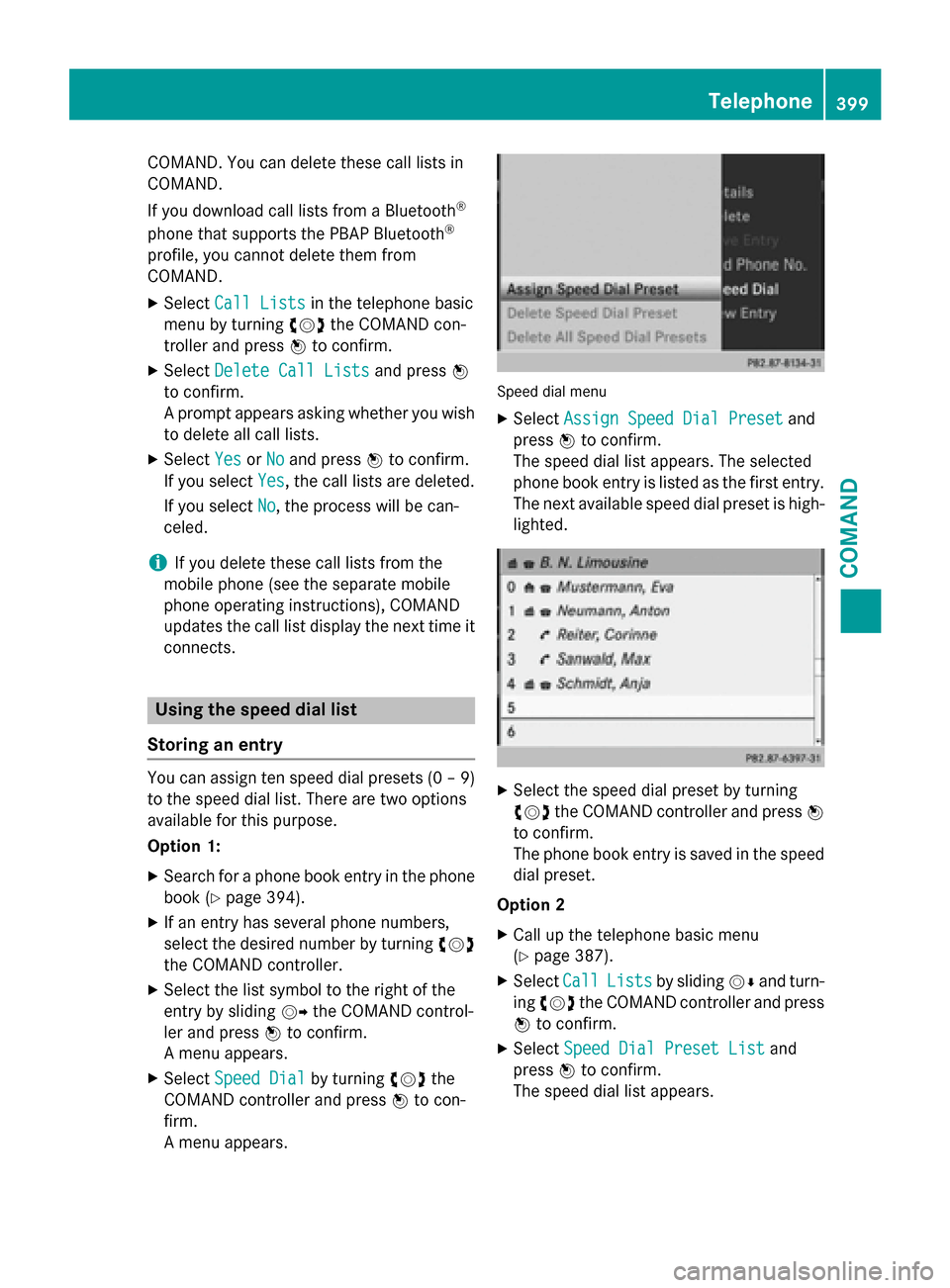
Speed dial men u
XSelect Assign Speed Dial Presetand
press Wto confirm.
The speed diallist appears. The selected
phone book entry is listed as the first entry.
The next availab lespeed dialpreset ishigh-
lighted.
XSe lect the speed dial preset byturning
cVd the COMAND controller and press W
to confirm.
The phone book entry issaved inthe speed
dial preset.
Option 2
XCall up the te lephone basic menu
(
Ypage 387).
XSe lect CallListsbysliding VÆand turn-
ing cVd the COMAND controller and press
W to confirm.
XSelect Speed Dial Preset Listand
press Wto confirm.
The speed diallist appears.
Telephone399
COMAND
Z
Page 402 of 614
XSelect the list symbol to the right of the
entry by slidingVYthe COMAND control-
ler and press Wto confirm.
XSelect Assign Speed Dial Presetand
press Wto confirm.
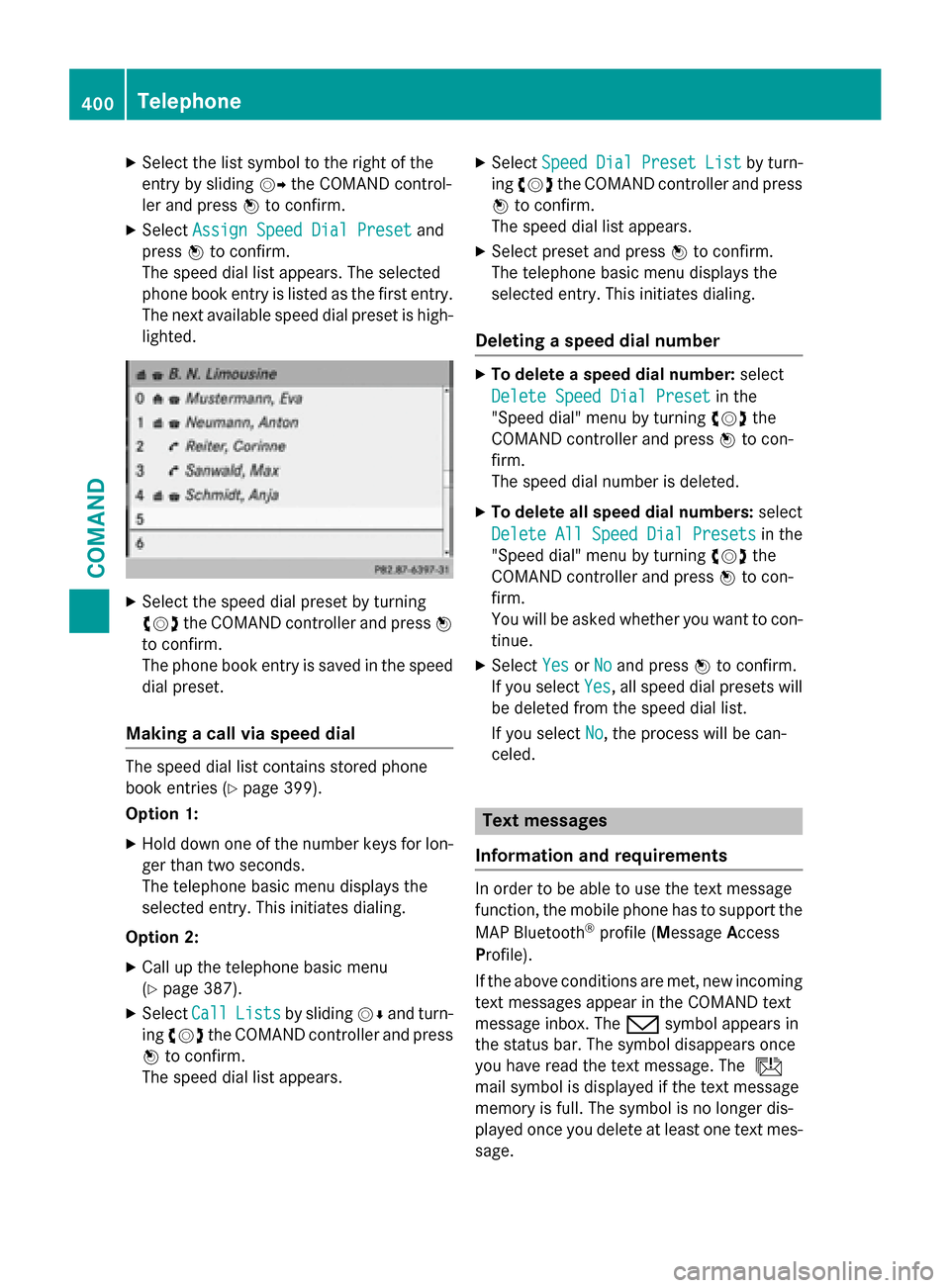
The speed dial list appears. The selected
phone book entry is listed as the first entry.
The next available speed dial preset is high-
lighted.
XSelect the speed dial preset by turning
cVd the COMAND controller and press W
to confirm.
The phone book entry is saved in the speed
dial preset.
Making a call via speed dial
The speed dial list contains stored phone
book entries (
Ypage 399).
Option 1:
XHold down one of the number keys for lon-
ger than two seconds.
The telephone basic menu displays the
selected entry. This initiates dialing.
Option 2:
XCall up the telephone basic menu
(
Ypage 387).
XSelect CallListsby sliding VÆand turn-
ing cVd the COMAND controller and press
W to confirm.
The speed dial list appears.
XSelect SpeedDialPresetListby turn-
ing cVd the COMAND controller and press
W to confirm.
The speed dial list appears.
XSelect preset and press Wto confirm.
The telephone basic menu displays the
selected entry. This initiates dialing.
Deleting a speed dial number
XTo delete a speed dial number: select
Delete Speed Dial Preset
in the
"Speed dial" menu by turning cVdthe
COMAND controller and press Wto con-
firm.
The speed dial number is deleted.
XTo delete all speed dial numbers: select
Delete All Speed Dial Presets
in the
"Speed dial" menu by turning cVdthe
COMAND controller and press Wto con-
firm.
You will be asked whether you want to con-
tinue.
XSelect YesorNoand press Wto confirm.
If you select Yes
, all speed dial presets will
be deleted from the speed dial list.
If you select No
, the process will be can-
celed.
Text messages
Information and requirements
In order to be able to use the text message
function, the mobile phone has to support the
MAP Bluetooth
®profile ( Message Access
Profile).
If the above conditions are met, new incoming
text messages appear in the COMAND text
message inbox. The /symbol appears in
the status bar. The symbol disappears once
you have read the text message. The ú
mail symbol is displayed if the text message
memory is full. The symbol is no longer dis-
played once you delete at least one text mes-
sage.
400Telephone
COMAND
Page 408 of 614
Changing the category of a telephone
number data field
XDisplay details for an address book entry
(
Ypage 405).
XSelect the telephone number data field.
XSelect the list symbol to the right of the
entry by slidingVYthe COMAND control-
ler and press Wto confirm.
XSelect Change Categoryand press Wto
confirm.
XSelect a number category, e.g. Home.
XSelect a telephone category, e.g. Mobile.
XIf desired, selectPreferredand pressW
to confirm.
Depending on the previous status, switch
the option on Oor off ª. The phone num-
ber is displayed as the first number in the
phone book and can be dialed immediately.
XSelect Saveand press Wto confirm.
The new category is stored.
Calling a number stored in an entry
Prerequisites
The mobile phone must be connected via the
Bluetooth
®Interface (Ypage 383).
Dialing a number
XDisplay details for an address book entry
(
Ypage 405).
XSelect the phone number data field by turn-
ing cVd the COMAND controller.
XPress Wthe COMAND controller to con-
firm.
or
XSelect the list symbol to the right of the
data field by sliding VYthe COMAND con-
troller.
XPress Wthe COMAND controller to con-
firm.
XSelect Calland press Wto confirm.
The phone makes the call. The display
switches to telephone mode.
Storing the phone number as a speed
dial number
XDisplay details for an address book entry
(
Ypage 405).
XSelect the phone number data field by turn-
ing cVd the COMAND controller.
XSelect the list symbol to the right of the
data field by sliding VYthe COMAND con-
troller and press Wto confirm.
XSelect Speed Dialand press Wto con-
firm.
You can now store the number in one of the
ten speed dial presets (
Ypage 399).
Starting route guidance to an entry
Address book entry with navigable data
This function is available as soon as you have
stored a destination in the destination mem-
ory (
Ypage 363).
XSearch for an address book entry with the
L symbol and select it from the list
(
Ypage 404).
XDisplay details for an address book entry
(
Ypage 405).
XSelect the address data field by turning
cVd the COMAND controller and press W
to confirm.
Route guidance begins.
or
XSelect the list symbol to the right of the
entry by sliding VYthe COMAND control-
ler and press Wto confirm.
XSelect Navigateand press Wto confirm.
Route guidance begins.
Address book entry without navigable
data
Route guidance can also be started for an
address book entry without the Lsymbol. If
the address data or designations do not
match the digital map, COMAND prompts you
to re-enter the address.
406Telephone
COMAND