engine MERCEDES-BENZ SL-Class 2016 R231 Manual Online
[x] Cancel search | Manufacturer: MERCEDES-BENZ, Model Year: 2016, Model line: SL-Class, Model: MERCEDES-BENZ SL-Class 2016 R231Pages: 614, PDF Size: 15.67 MB
Page 195 of 614
RSPORT handling mode is activated.
(
Ypage 76)
Rthe steering wheel is in the straight-ahead
position.
Rthe vehicle is stationary and the brake
pedal is depressed (left foot).
Rthe transmission is in positionD.
Activating RACE START
XDepress the brake pedal with your left foot
and keep it depressed.
XTurn the drive program selector clockwise
(
Ypage 163) until the RSlamp lights up.
The RACE START Confirm: Paddle UP
Cancel: Paddle DOWNmessage appears
in the multifunction display.
iIf the activation conditions are no longer
fulfilled, RACE START is canceled. The mul-
tifunction display shows the RACE START
Canceledmessage.
XTo cancel: pull the left steering wheel pad-
dle shifter (
Ypage 164).
or
XTo confirm: pull the right steering wheel
paddle shifter (
Ypage 164).
The RACE START Available Depress
gas pedal.message appears in the mul-
tifunction display.
iIf you do not depress the accelerator
pedal fully within two seconds, RACE
START is canceled. The RACE START Not
PossibleSeeOperator'sManualmes-
sage appears in the multifunction display.
XFully depress the accelerator pedal.
The engine speed increases to at least
3,500 rpm.
The RACE START Release brake to
startmessage appears in the multifunc-
tion display.
iIf you do not release the brake pedal
within five seconds, RACE START is can- celed. The multifunction display shows the
RACE START Canceled
message.
XTake your foot off the brake, but keep the
accelerator pedal depressed.
The vehicle pulls away at maximum accel-
eration.
The
RACE
STARTActivemessage appears
in the multifunction display.
RACE START is deactivated when the vehicle
reaches a speed of approximately 30 mph
(Canada: 50 km/h). Drive program S+is acti-
vated. SPORT handling mode remains activa-
ted.
RACE START is deactivated immediately if
you release the accelerator pedal during
RACE START or if any of the activation condi-
tions are no longer fulfilled. The RACE
START
Not Possible See Operator's Manual
message appears in the multifunction dis-
play.
iIf RACE START is used repeatedly within a
short period of time, it is only available
again after the vehicle has been driven a
certain distance.
Adaptive Damping System
General notes
The adjustable damping system adapts to the
current driving conditions. The adjustment
depends on whether you have selected Sport
or Comfort mode. Your selection remains
stored even if you remove the SmartKey from
the ignition lock.
Driving systems193
Driving and parking
Z
Page 196 of 614
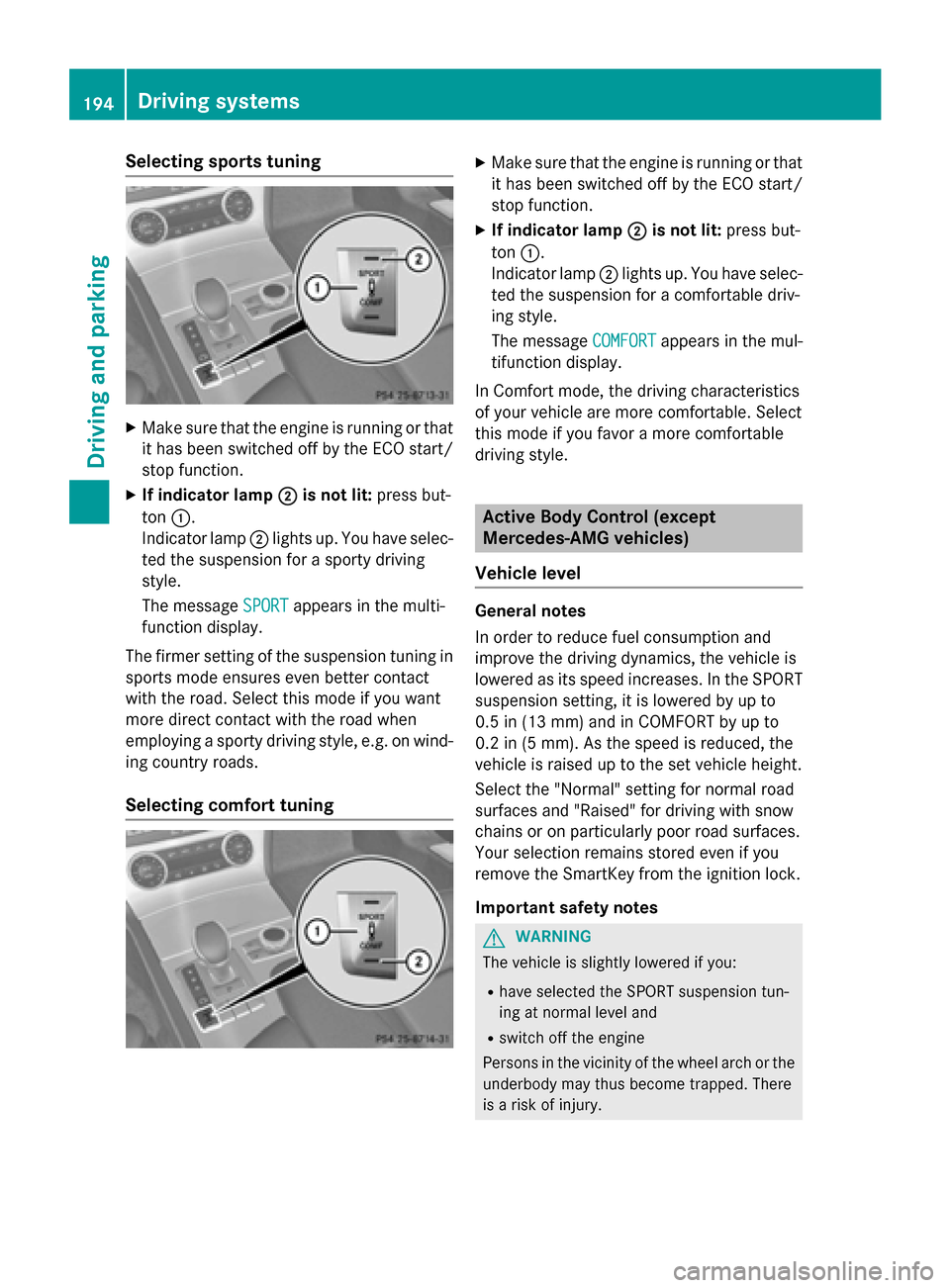
Selecting sports tuning
XMake sure that the engine is running or that
it has been switched off by the ECO start/
stop function.
XIf indicator lamp;is not lit:press but-
ton :.
Indicator lamp ;lights up. You have selec-
ted the suspension for a sporty driving
style.
The message SPORT
appears in the multi-
function display.
The firmer setting of the suspension tuning in sports mode ensures even better contact
with the road. Select this mode if you want
more direct contact with the road when
employing a sporty driving style, e.g. on wind-
ing country roads.
Selecting comfort tuning
XMake sure that the engine is running or that
it has been switched off by the ECO start/
stop function.
XIf indicator lamp ;is not lit:press but-
ton :.
Indicator lamp ;lights up. You have selec-
ted the suspension for a comfortable driv-
ing style.
The message COMFORT
appears in the mul-
tifunction display.
In Comfort mode, the driving characteristics
of your vehicle are more comfortable. Select
this mode if you favor a more comfortable
driving style.
Active Body Control (except
Mercedes-AMG vehicles)
Vehicle level
General notes
In order to reduce fuel consumption and
improve the driving dynamics, the vehicle is
lowered as its speed increases. In the SPORT
suspension setting, it is lowered by up to
0.5 in (13 mm) and in COMFORT by up to
0.2 in (5 mm). As the speed is reduced, the
vehicle is raised up to the set vehicle height.
Select the "Normal" setting for normal road
surfaces and "Raised" for driving with snow
chains or on particularly poor road surfaces.
Your selection remains stored even if you
remove the SmartKey from the ignition lock.
Important safety notes
GWARNING
The vehicle is slightly lowered if you:
Rhave selected the SPORT suspension tun-
ing at normal level and
Rswitch off the engine
Persons in the vicinity of the wheel arch or the underbody may thus become trapped. There
is a risk of injury.
194Driving systems
Driving and parking
Page 197 of 614
Make sure that nobody is in the vicinity of the
wheel arch or the underbody when you switchoff the engine.
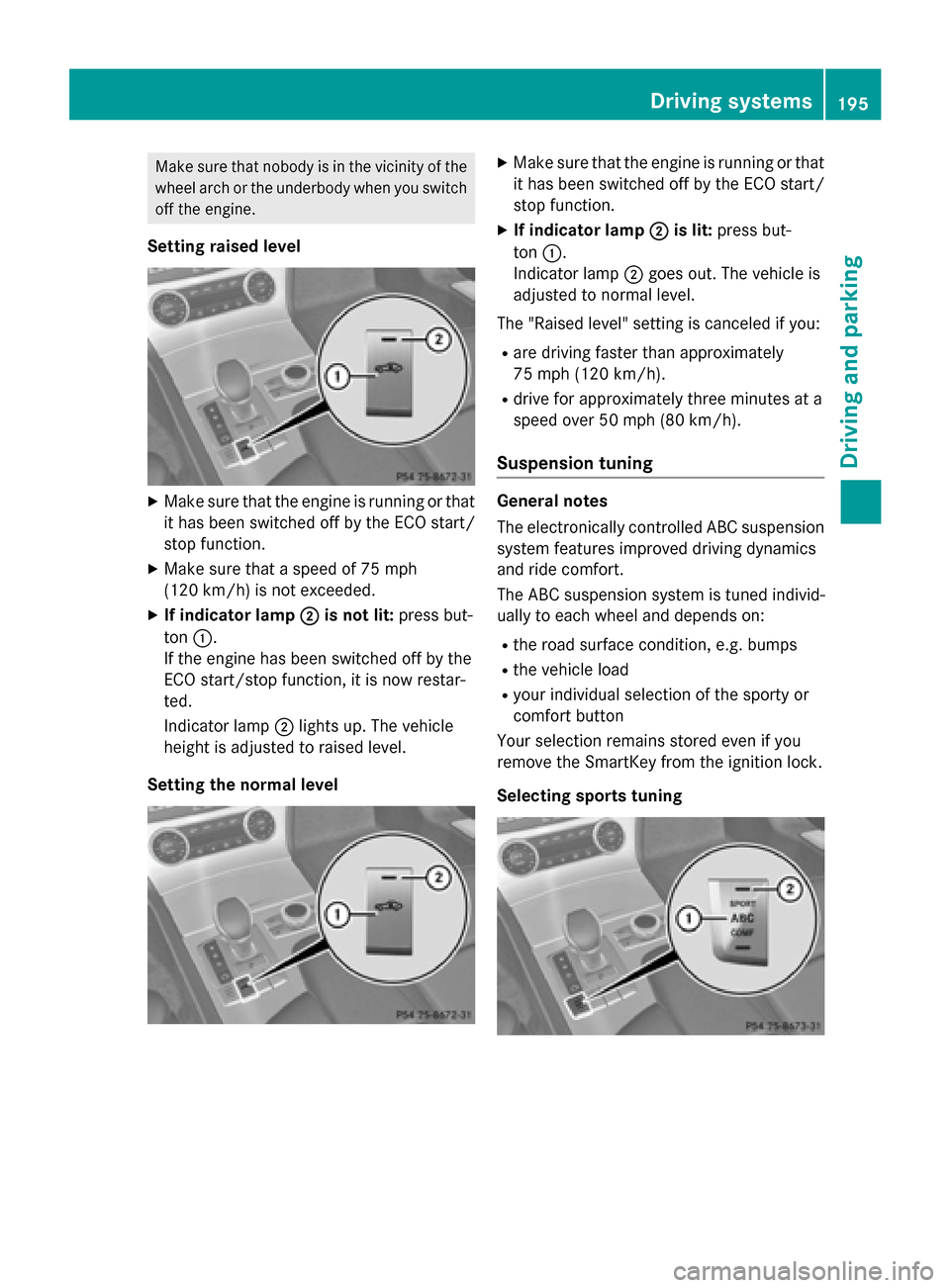
Setting raised level
XMake sure that the engine is running or thatit has been switched off by the ECO start/
stop function.
XMake sure that a speed of 75 mph
(120 km/h) is not exceeded.
XIf indicator lamp ;is not lit:press but-
ton :.
If the engine has been switched off by the
ECO start/stop function, it is now restar-
ted.
Indicator lamp ;lights up. The vehicle
height is adjusted to raised level.
Setting the normal level
XMake sure that the engine is running or that it has been switched off by the ECO start/
stop function.
XIf indicator lamp ;is lit:press but-
ton :.
Indicator lamp ;goes out. The vehicle is
adjusted to normal level.
The "Raised level" setting is canceled if you:
Rare driving faster than approximately
75 mph (120 km/h).
Rdrive for approximately three minutes at a
speed over 50 mph (80 km/h).
Suspension tuning
General notes
The electronically controlled ABC suspension system features improved driving dynamics
and ride comfort.
The ABC suspension system is tuned individ-
ually to each wheel and depends on:
Rthe road surface condition, e.g. bumps
Rthe vehicle load
Ryour individual selection of the sporty or
comfort button
Your selection remains stored even if you
remove the SmartKey from the ignition lock.
Selecting sports tuning
Driving systems195
Driving and parking
Z
Page 198 of 614
XMake sure that the engine is running or thatit has been switched off by the ECO start/
stop function.
XIf indicator lamp ;is not lit:press but-
ton :.
Indicator lamp ;lights up. Sports suspen-
sion tuning is selected.
The ABC Active Body Control SPORT
message appears in the multifunction dis-
play.
The firmer setting of the suspension tuning in
sports mode ensures even better contact
with the road. Select this mode if you prefer a
firmer suspension setting.
Selecting comfort tuning
XMake sure that the engine is running or that it has been switched off by the ECO start/
stop function.
XIf indicator lamp ;is not lit:press but-
ton :.
Indicator lamp ;lights up. Comfortable
suspension tuning is selected.
The ABC
ActiveBodyControlCOMFORT
message appears in the multifunction dis-
play.
In comfort mode, the driving characteristics
of your vehicle are more comfortable. Select
this mode if you favor a more comfortable
driving style.
Driving conditions menu in the
COMAND display
You can display some driving systems and
additional information in the COMAND dis-
play.
XMake sure that the SmartKey is in position
2 in the ignition lock.
XMake sure COMAND is switched on
(
Ypage 297).
XPress button :.
The corresponding displays appear in the
COMAND display.
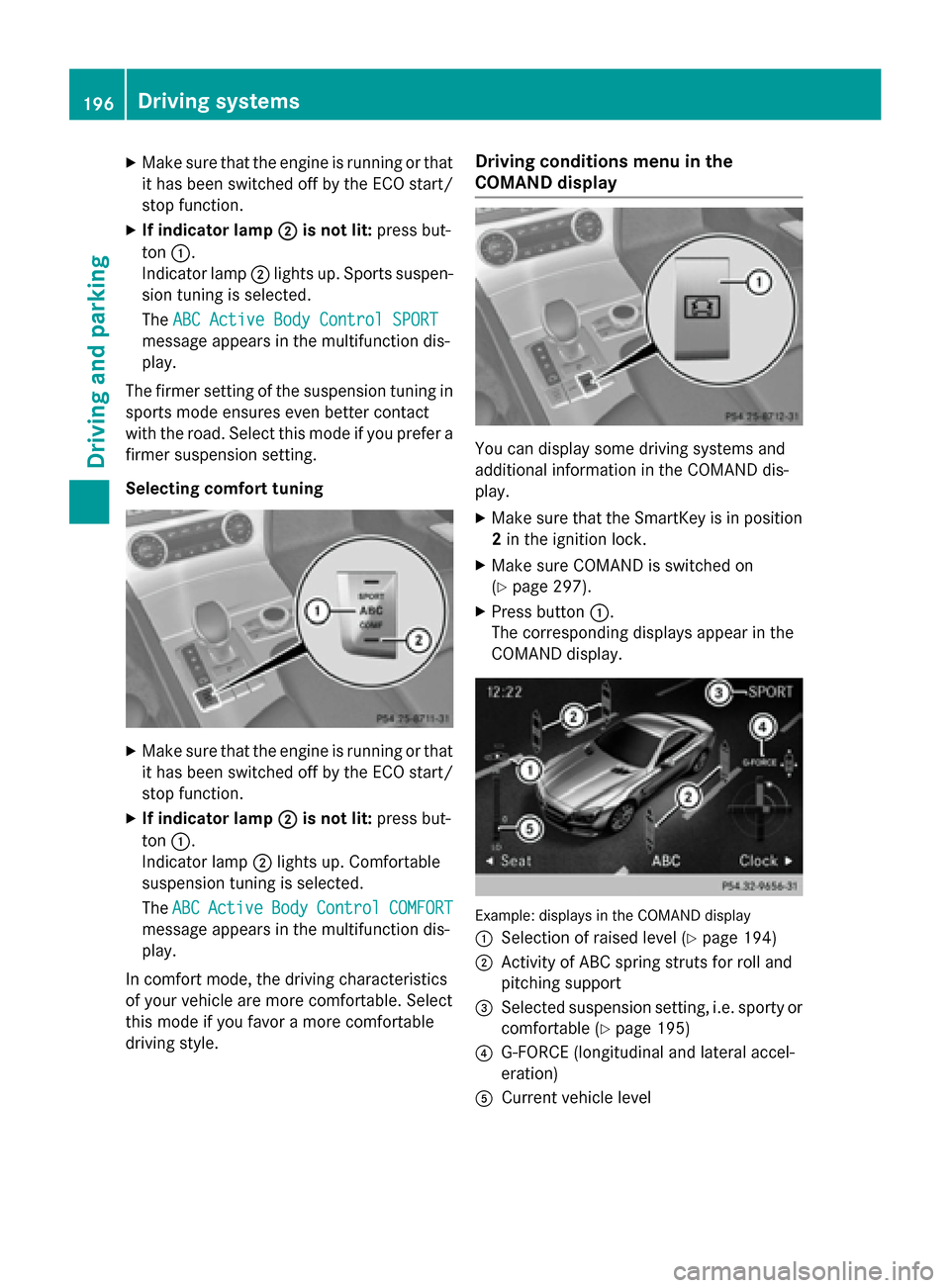
Example: displays in the COMAND display
:
Selection of raised level (Ypage 194)
;Activity of ABC spring struts for roll and
pitching support
=Selected suspension setting, i.e. sporty or
comfortable (
Ypage 195)
?G-FORCE (longitudinal and lateral accel-
eration)
ACurrent vehicle level
196Driving systems
Driving and parking
Page 199 of 614
Active Body Control(Mercedes-AMG
vehicles)
Vehicle level
Genera lnotes
In order to reduce fuel consumption and
improve th edriving dynamics, th evehicl eis
lowered as it sspee dincreases. In th eSP ORT
suspension setting ,it is lowered by up to
0. 5in (13 mm) and in COMF ORTby up to
0. 2in (5 mm). As th espee dis reduced, th e
vehicl eis raised up to th eset vehicl eheight .
Selec tth e"Normal" setting for normal road
surfaces and "Raised "for driving wit hsnow
chain sor on particularly poor road surfaces.
Important safety notes
The vehicl eis slightly lowered when th e
engin eis switched off .
GWARNING
When th evehicl eis bein glowered, people
could become trapped if their limb sare
between th evehicl ebody and th ewheels or
underneat hth evehicle. There is aris kof
injury.
Mak esur eno on eis underneat hth evehicl eor
in th eimmediat evicinity of th ewhee larches
when th evehicl eis bein glowered.
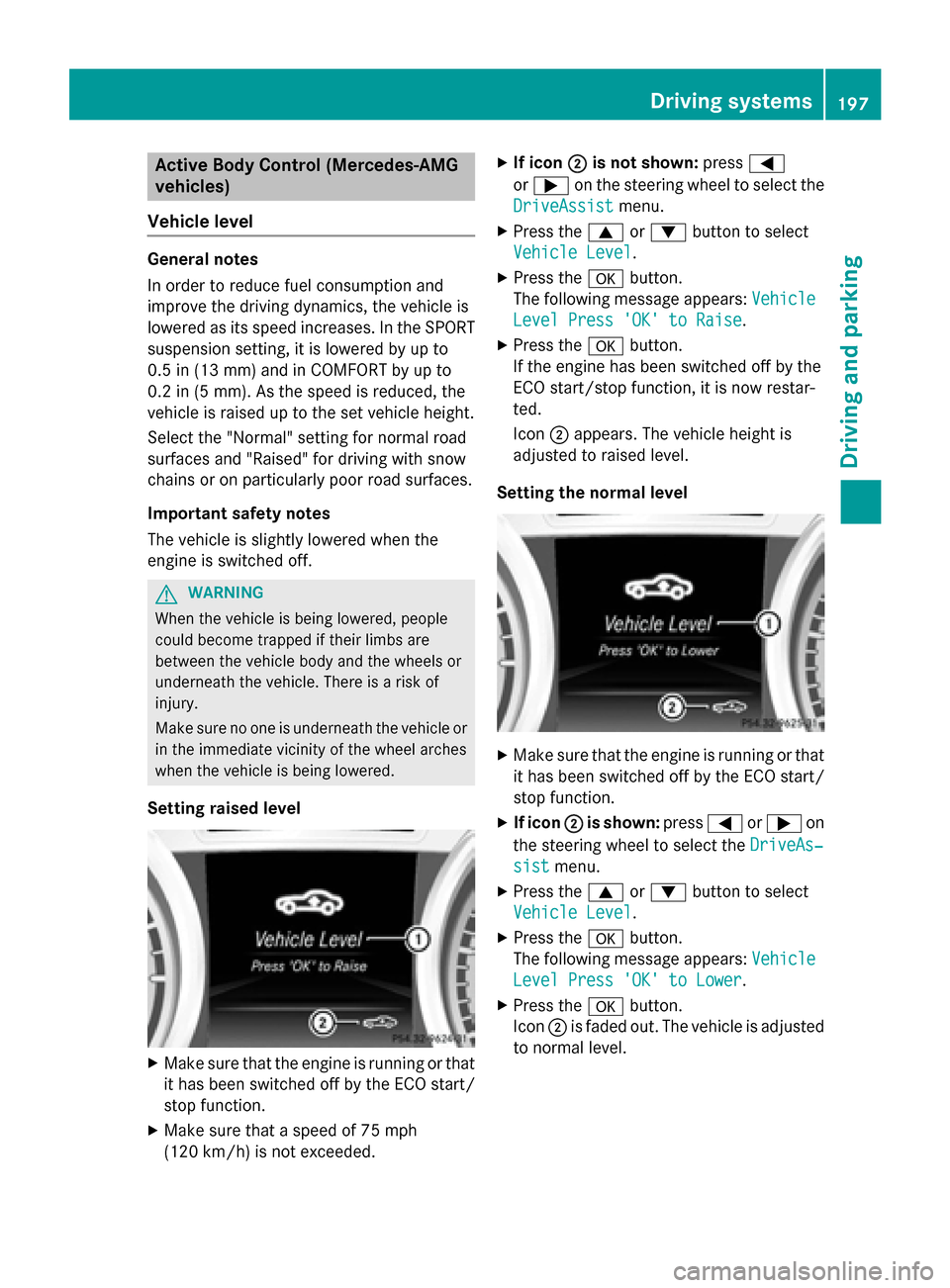
Setting raised level
XMak esur ethat th eengin eis runnin gor that
it has been switched off by th eECO start /
stop function .
XMakesur ethat aspee dof 75 mph
(12 0km/ h)is not exceeded.
XIf icon ;is not shown: press=
or ; on the steering wheel to select the
DriveAssist
menu.
XPress the 9or: button to select
Vehicle Level
.
XPress the abutton.
The following message appears: Vehicle
Level Press 'OK' to Raise.
XPress theabutton.
If the engine has been switched off by the
ECO start/stop function, it is now restar-
ted.
Icon ;appears. The vehicle height is
adjusted to raised level.
Setting the normal level
XMake sure that the engine is running or that it has been switched off by the ECO start/
stop function.
XIf icon ;is shown: press=or; on
the steering wheel to select the DriveAs‐
sistmenu.
XPress the9or: button to select
Vehicle Level
.
XPress the abutton.
The following message appears: Vehicle
Level Press 'OK' to Lower.
XPress theabutton.
Icon ;is faded out. The vehicle is adjusted
to normal level.
Driving systems197
Driving and parking
Z
Page 200 of 614
The "Raised level" setting is canceled if you:
Rare driving faster than approximately
75 mph (120 km/h).
Rdrive for approximately three minutes at a
speed over 50 mph (80 km/h).
Suspension tuning
General notes
The electronically controlled ABC suspension
system features improved driving dynamics
and ride comfort.
The ABC suspension system is tuned individ-
ually to each wheel and depends on:
Rthe road surface condition, e.g. bumps
Rthe vehicle load
Ryour individual selection of the sporty or
comfort button
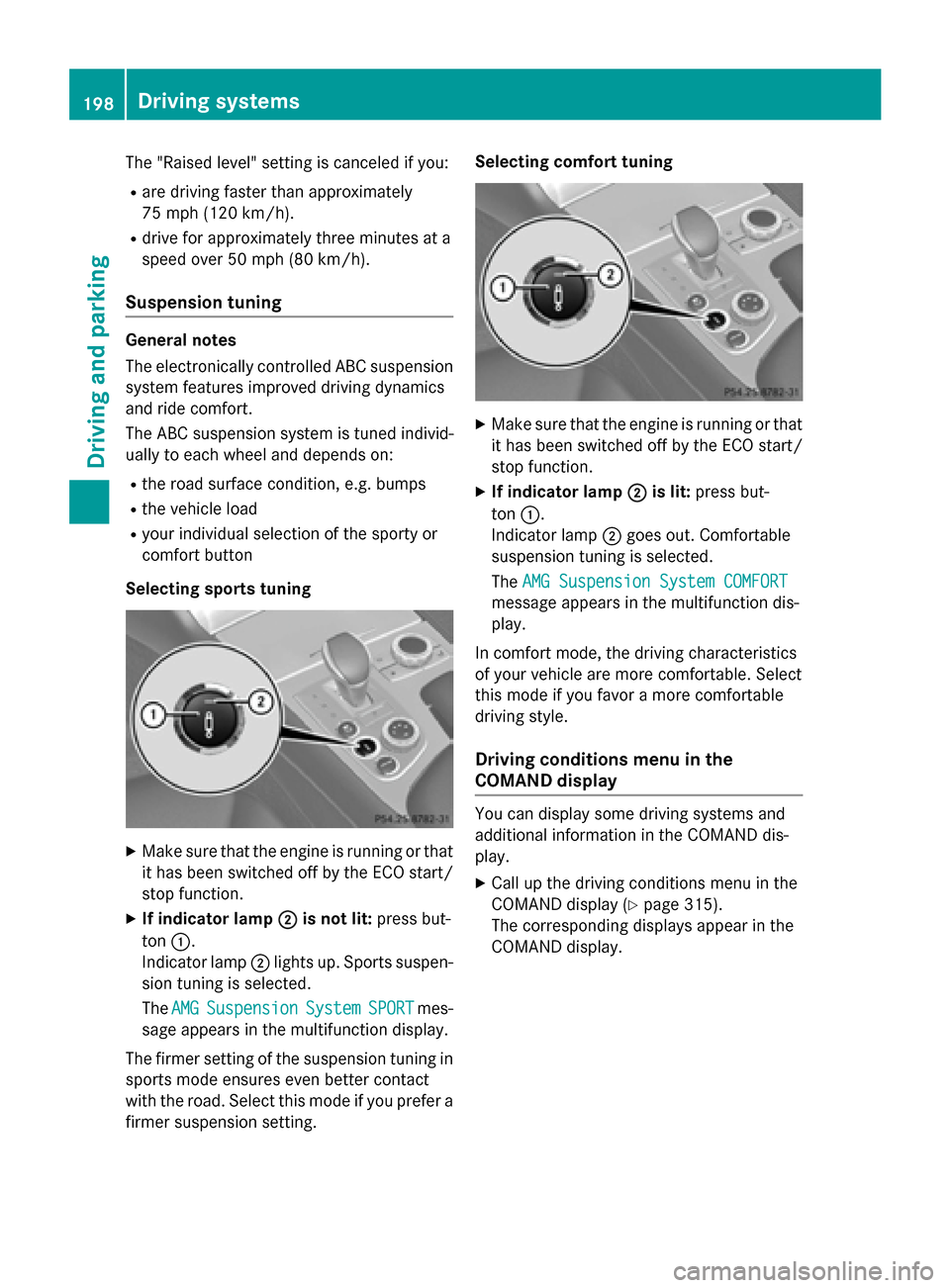
Selecting sports tuning
XMake sure that the engine is running or that it has been switched off by the ECO start/
stop function.
XIf indicator lamp ;is not lit:press but-
ton :.
Indicator lamp ;lights up. Sports suspen-
sion tuning is selected.
The AMG
SuspensionSystemSPORTmes-
sage appears in the multifunction display.
The firmer setting of the suspension tuning in
sports mode ensures even better contact
with the road. Select this mode if you prefer a
firmer suspension setting. Selecting comfort tuning
XMake sure that the engine is running or that
it has been switched off by the ECO start/
stop function.
XIf indicator lamp ;is lit:press but-
ton :.
Indicator lamp ;goes out. Comfortable
suspension tuning is selected.
The AMG Suspension System COMFORT
message appears in the multifunction dis-
play.
In comfort mode, the driving characteristics
of your vehicle are more comfortable. Select
this mode if you favor a more comfortable
driving style.
Driving conditions menu in the
COMAND display
You can display some driving systems and
additional information in the COMAND dis-
play.
XCall up the driving conditions menu in the
COMAND display (
Ypage 315).
The corresponding displays appear in the
COMAND display.
198Driving systems
Driving and parking
Page 203 of 614
mine which warning display is active when the
engine is running.
Transmission
positionWarning display
DFront area activated
R,Nor the vehicle
is rolling back-
wardsRear and front areas
activated
PNo areas activated
One or more segments light up as the vehicle
approaches an obstacle, depending on the
vehicle's distance from the obstacle.
From the:
Rsixth segment onwards, you will hear an
intermittent warning tone for approx-
imately two seconds.
Rseventh segment onwards, you will hear a
warning tone for approximately two sec-
onds. This indicates that you have now
reached the minimum distance.
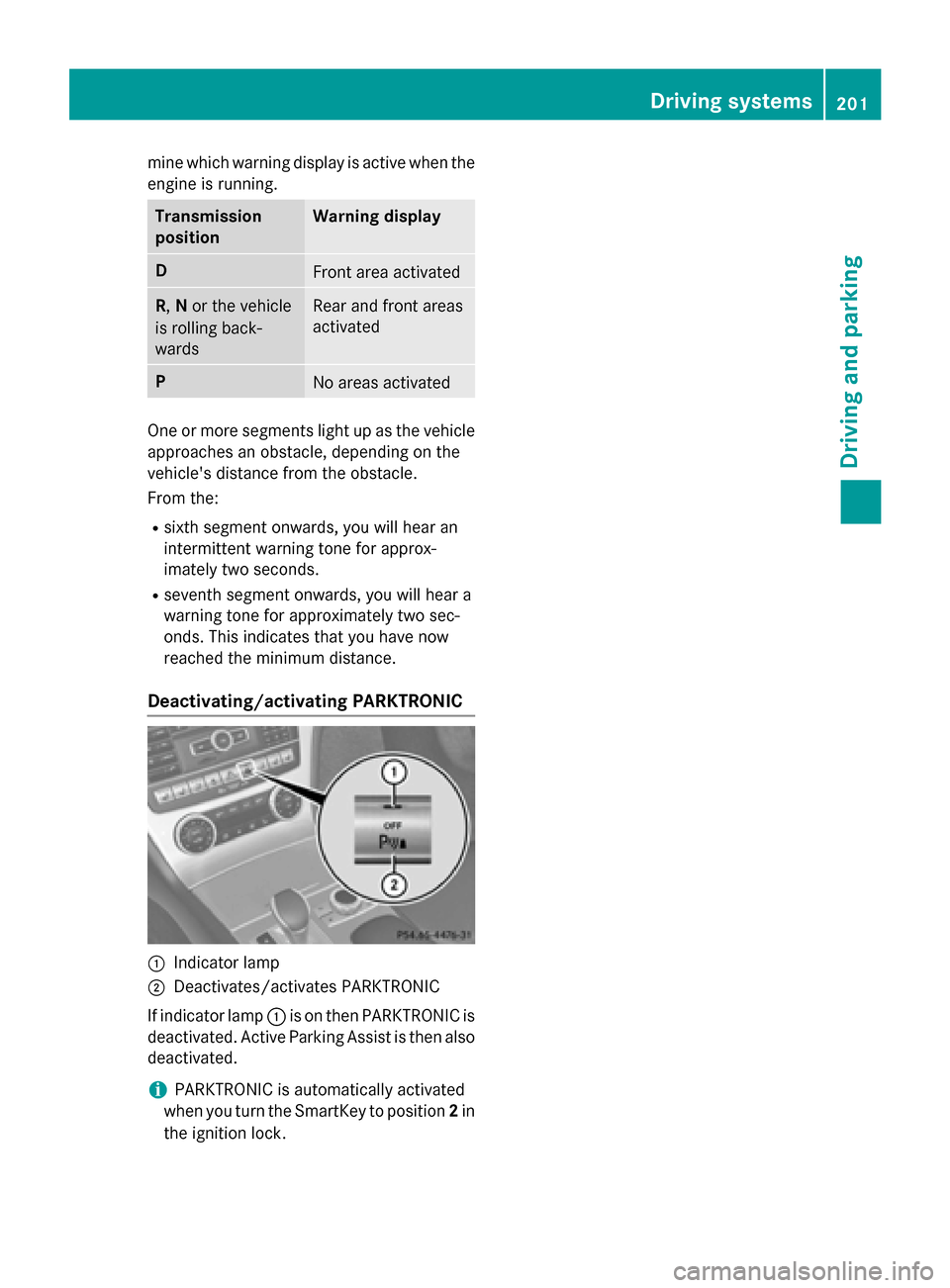
Deactivating/activating PARKTRONIC
:Indicator lamp
;Deactivates/activates PARKTRONIC
If indicator lamp :is on then PARKTRONIC is
deactivated. Active Parking Assist is then also
deactivated.
iPARKTRONIC is automatically activated
when you turn the SmartKey to position 2in
the ignition lock.
Driving systems201
Driving and parking
Z
Page 207 of 614
RSnowfall or heavy rain may lead to a parking
space being measured inaccurately.
RThe way your vehicle is positioned in the
parking space after parking is dependent
on various factors. These include the posi-
tion and shape of the vehicles parked in
front and behind it and the conditions of the
location. In some cases, Active Parking
Assist may guide you too far into a parking
space, or not far enough into it. In some
cases, it may also lead you across or onto
the curb. If necessary, you should cancel
the parking procedure with Active Parking
Assist.
RYou can also engage forward gear prema-
turely. The vehicle redirects and does not
drive as far into the parking space. Should a
gear be changed too early, the parking pro-
cedure will be canceled. A sensible parking
position can no longer be achieved from
this position.
Exiting a parking space
Active Parking Assist can only assist you with
exiting a parking space if you have parked the
vehicle using Active Parking Assist.
XStart the engine.
XSwitch on the turn signal on the side facing
the street.
XShift the transmission to position Dor R.
The Start Park Assist? Yes: OK No:
% message appears in the multifunction
display.
XTo cancel the procedure: press the%
button on the multifunction steering wheel or pull away.
or
XTo exit a parking space using Active
Parking Assist: press theabutton on
the multifunction steering wheel.
The Park Assist Active Accelerate
andBrakeObserveSurroundingsmes-
sage appears in the multifunction display.
XLet go of the multifunction steering wheel.
XReverse the vehicle or drive forwards, being
ready to brake at all times. Do not exceed a
maximum speed of approximately 6 mph
(10 km/h) when exiting a parking space.
Otherwise Active Parking Assist will be can-
celed.
XStop as soon as PARKTRONIC sounds the
continuous warning tone, if not before.
XShift the transmission to position Dor Ras
required while the vehicle is stationary.
Active Parking Assist immediately steers in
the other direction.
iYou will achieve the best results by wait-
ing for the steering procedure to complete
before pulling away.
If you back up after activation, the steering
wheel is moved to the straight-ahead posi-
tion.
XDrive forwards or back up the vehicle, being
ready to brake at all times.
XStop as soon as PARKTRONIC sounds the
continuous warning tone, if not before.
XDrive forwards and back up as instructed
by the PARKTRONIC warning displays.
Once you have exited the parking space com-
pletely, the steering wheel is moved to the
straight-ahead position. You hear a tone and
the Park Assist Finished
message
appears in the multifunction display. You will
then have to steer and merge into traffic on
your own. PARKTRONIC is still available.
Canceling Active Parking Assist
You can cancel Active Parking Assist at any
time.
Driving systems205
Driving and parking
Z
Page 212 of 614
The functionality of ATTENTION ASSIST is
restricted and warnings may be delayed or
not occur at all:
Rif the road condition is poor, e.g. if the sur-face is uneven or if there are potholes
Rif there is a strong side wind
Rif you have adopted a sporty driving style
with high cornering speeds or high rates of
acceleration
Rif you are predominantly driving slower
than 50 mph (80 km/h) or faster than
112 mph (180 km/h)
Rif you are currently using COMAND or mak-
ing a telephone call with it
Rif the time has been set incorrectly
Rin active driving situations, such as when
you change lanes or change your speed
ATTENTION ASSIST is only an aid to the
driver. It might not always recognize fatigue
or increasing inattentiveness in time or fail to
recognize them at all. The system is not a
substitute for a well-rested and attentive
driver.
Warning and display messages in the
multifunction display
XActivate ATTENTION ASSIST using the on-
board computer (
Ypage 231).
If ATTENTION ASSIST is active, you will be
warned no sooner than 20 minutes after
your journey has begun. You then hear an
intermittent warning tone twice and the
Attention Assist: Take a Break!
message appears in the multifunction dis-
play.
XIf necessary, take a break.
XPress the aor% button to confirm
the message.
On long journeys, take regular breaks in good
time to allow yourself to rest properly. If you
do not take a break and ATTENTION ASSIST
still detects increasing lapses in concentra-
tion, you will be warned again after
15 minutes at the earliest. ATTENTION ASSIST is reset when you con-
tinue your journey and starts assessing your
tiredness again if:
Ryou switch off the engine.
Ryou take off your seat belt and open the
driver's door, e.g. for a change of drivers or
to take a break.
When ATTENTION ASSIST is deactivated, the
é symbol appears in the multifunction
display in the assistance graphics display.
Night View Assist Plus
General notes
In addition to the illumination provided by the
normal headlamps, Night View Assist Plus
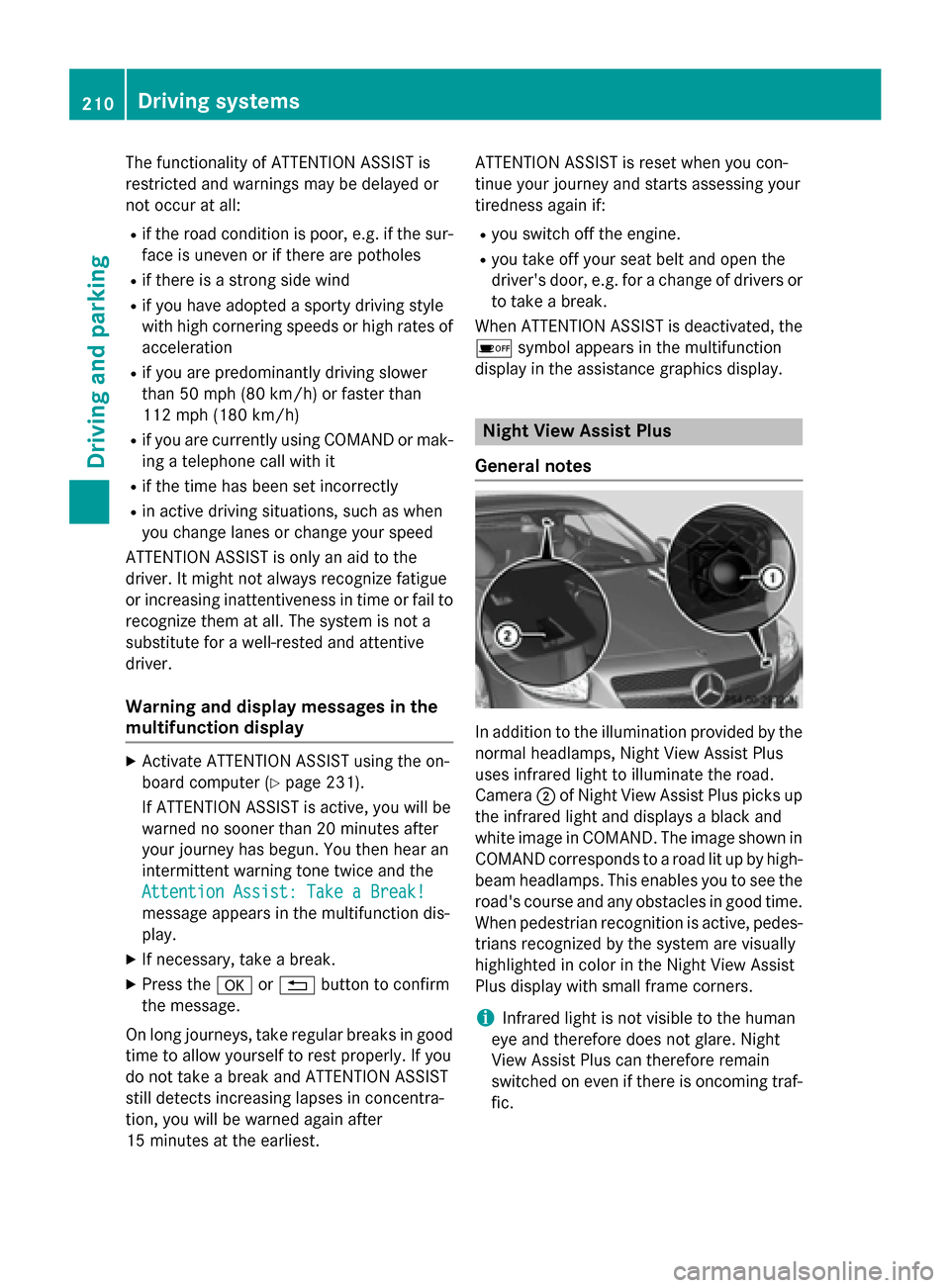
uses infrared light to illuminate the road.
Camera ;of Night View Assist Plus picks up
the infrared light and displays a black and
white image in COMAND. The image shown in
COMAND corresponds to a road lit up by high-
beam headlamps. This enables you to see the
road's course and any obstacles in good time. When pedestrian recognition is active, pedes-
trians recognized by the system are visually
highlighted in color in the Night View Assist
Plus display with small frame corners.
iInfrared light is not visible to the human
eye and therefore does not glare. Night
View Assist Plus can therefore remain
switched on even if there is oncoming traf-
fic.
210Driving systems
Driving and parking
Page 214 of 614
body contours and posture of a person stand-
ing upright.
Pedestrian recognition is then switched on
automatically if:
RNight View Assist Plus is activated.
Ryou are driving faster than approximately
6 mph (10 km/h).
Rit is dark.
If pedestrian recognition is active, symbol ;
appears. Persons who are detected are high-
lighted by framing =. If the pedestrian rec-
ognition system has brought a pedestrian to
your attention, look through the windshield to evaluate the situation.
Animal recognition
Animals can be recognized in the following
situations:
Rdarkness
Routside built-up areas
Rbelow an outside temperature of 90 ‡
(32 †)
Nigh tView Assist Pl us can recognize larger
animals such as deer, co wsor horses using
typical characteristics.
The system does not detect:
Rsmaller animals, e.g. dogs and cats
Ranimals whose silhouette is not clearly rec-
ogniza ble
When detecte d,animals are marked with
small color frame corners. Incontrast to
pede strian recognit ion, thereisno separate
stand bysymbol inthe multifunction display.
Activating/deactivating Night View
Assist Plus
Activation conditions
You can only activate Night View Assist Plus if
all of the following cond itions are met:
Rthe ignit ionisswitched on (Ypage 151) or
the engine has been started.
Rthe light switch is intheà orL posi-
tion.
Rreverse gear has not been engaged.
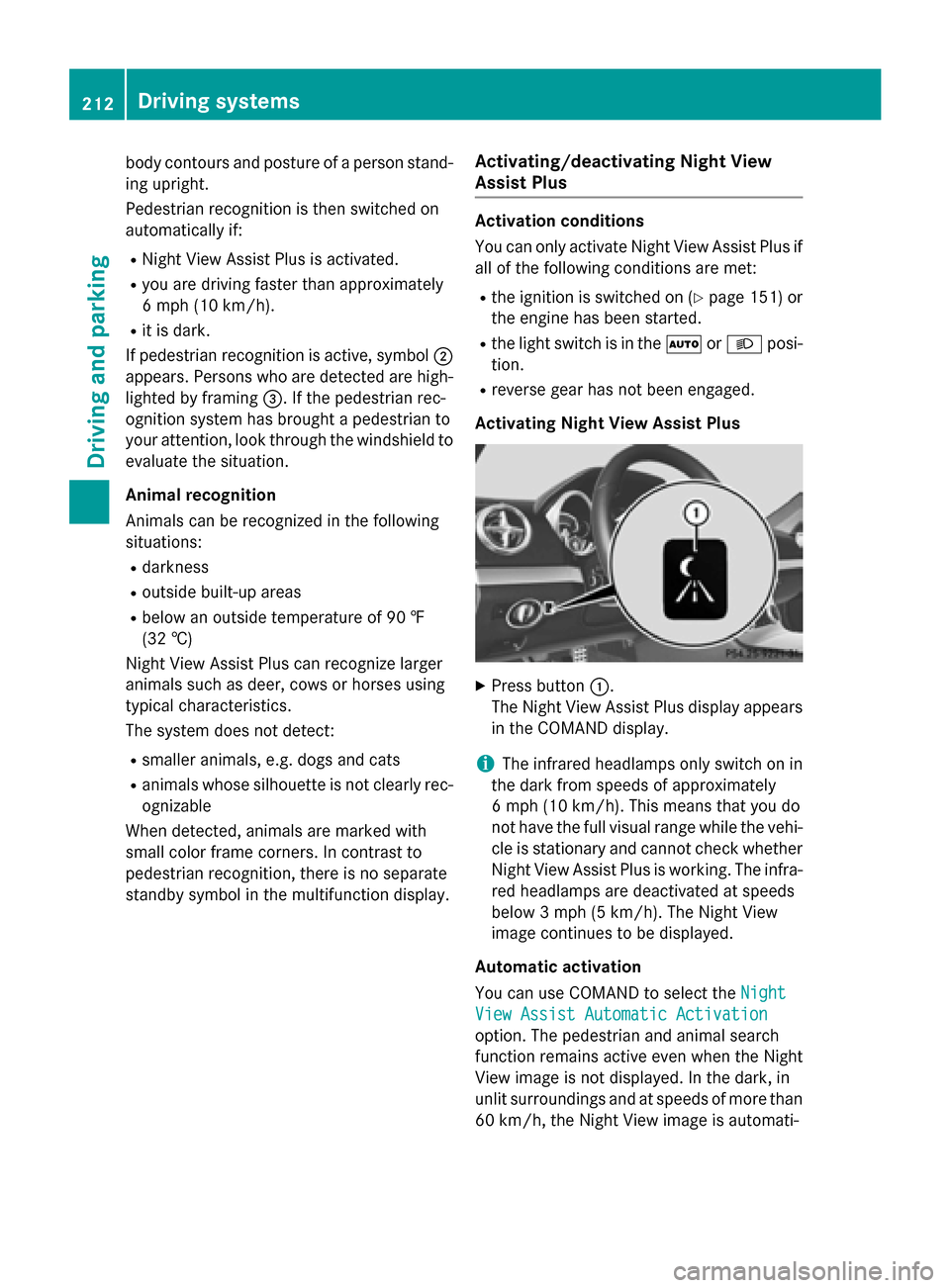
Activating Night View Assist Plus
XPress button :.
The Night View Assist Plus display appears
in the COMAND display.
iThe infrared headlamps only switch onin
the dark from speeds of approximately
6 mph (10 km/h). This means that you do
not have the full visual range whilethe veh i-
cle isstationary and cannot check whether
Night View Assist Plus isworking. The infra-
red headlamps are deactivated at speeds
below 3 mph (5 km/h). The Night View
image continues to be displayed.
Automatic activation
You can use COMAND to select the Night
View Assist Automatic Activation
option. The pedestrian and animal search
function remains active even when the Night
View image is not displayed. In the dark, in
unlit surroundings and at speeds of more than
60 km/h, the Night View image is automati-
212Driving systems
Driving and parking