engine MERCEDES-BENZ SL-Class 2016 R231 Owners Manual
[x] Cancel search | Manufacturer: MERCEDES-BENZ, Model Year: 2016, Model line: SL-Class, Model: MERCEDES-BENZ SL-Class 2016 R231Pages: 614, PDF Size: 15.67 MB
Page 225 of 614
The segments between the speed of the
vehicle in front and the stored speed light
up.
Tachometer
!
Do not drive in the overrevving range, as
this could damage the engine.
The red band in the tachometer indicates the
engine's overrevving range.
The fuel supply is interrupted to protect the
engine when the red band is reached.
Outside temperature display
You should pay special attention to road con-
ditions when temperatures are around freez-
ing point.
Bear in mind that the outside temperature
display indicates the temperature measured
and does not record the road temperature.
The outside temperature display is in the mul-
tifunction display (
Ypage 224).
A change in the outside temperature is shown
in the multifunction display after a delay.
Coolant temperature display
GWARNING
Opening the hood when the engine is over-
heated or when there is a fire in the engine
compartment could expose you to hot gases
or other service products. There is a risk of
injury.
Let an overheated engine cool down before
opening the hood. If there is a fire in the
engine compartment, keep the hood closed
and contact the fire department.
!A display message is shown if the coolant
temperature is too high.
If the coolant temperature is over 248 ‡
(120 †), do not continue driving. The
engine will otherwise be damaged. The coolant temperature gauge is in the
instrument cluster on the right-hand side
(
Ypage 41).
Under normal operating conditions and with
the specified coolant level, the coolant tem-
perature may rise to 248 ‡ (120 †).
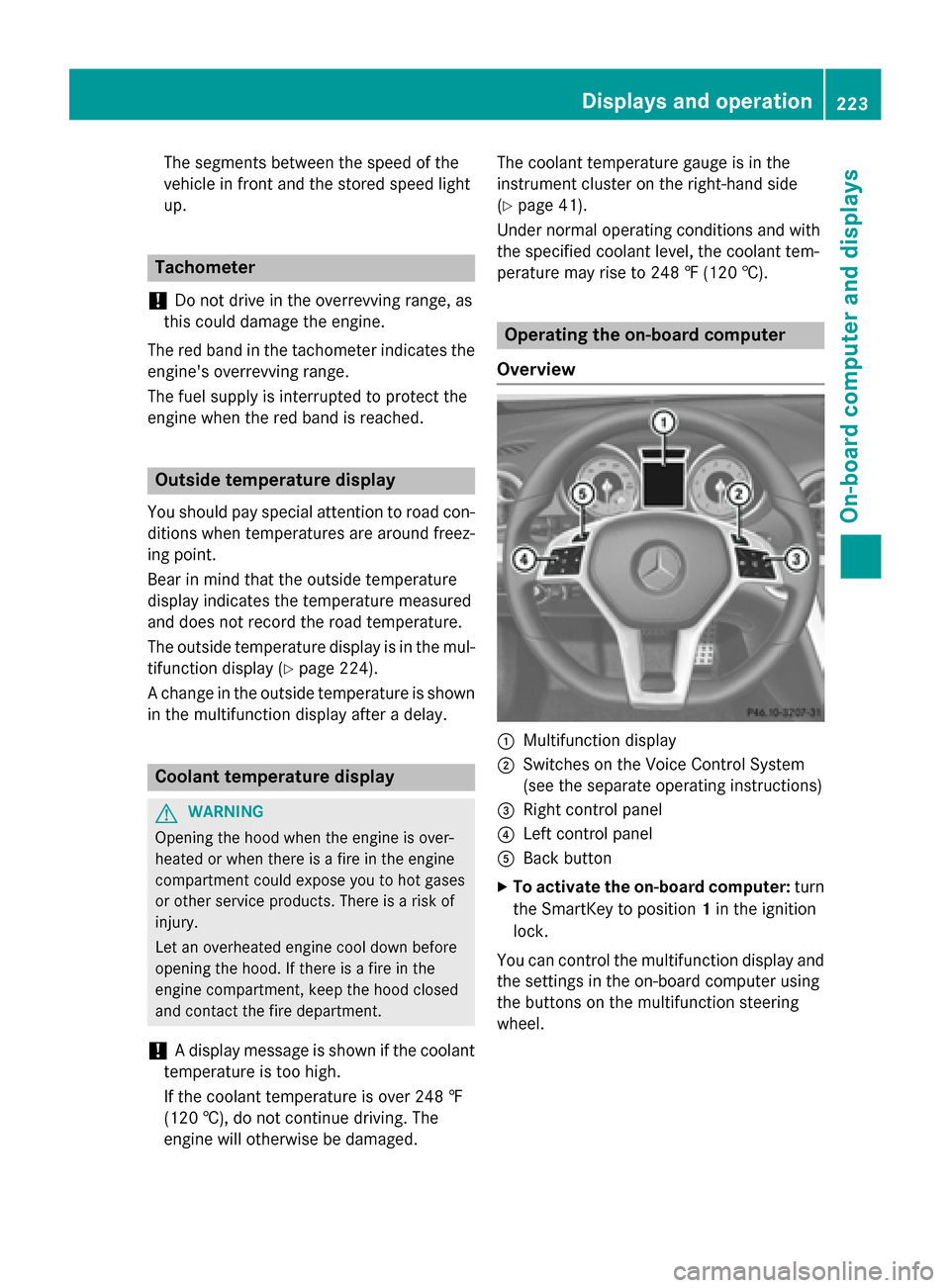
Operating the on-board computer
Overview
:Multifunction display
;Switches on the Voice Control System
(see the separate operating instructions)
=Right control panel
?Left control panel
ABack button
XTo activate the on-board computer: turn
the SmartKey to position 1in the ignition
lock.
You can control the multifunction display and
the settings in the on-board computer using
the buttons on the multifunction steering
wheel.
Displays and operation223
On-board computer and displays
Z
Page 228 of 614
Rthe ignition has been switched off for morethan four hours.
R999 hours have been exceeded.
R9,999 miles have been exceeded.
When 9,999 hours or 99,999 miles have been
exceeded, the trip computer is automatically
reset From Reset
.
ECO display
The ECO display is not available in Mercedes-
AMG vehicles.
XPress the =or; button on the steer-
ing wheel to select the Trip
menu.
XPress the9or: button to select
ECO DISPLAY
.
If the ignition remains switched off for longer
than four hours, the ECO display will be auto-
matically reset.
For further information on the ECO display,
see (
Ypage 175).
Displaying the range and current fuel
consumption
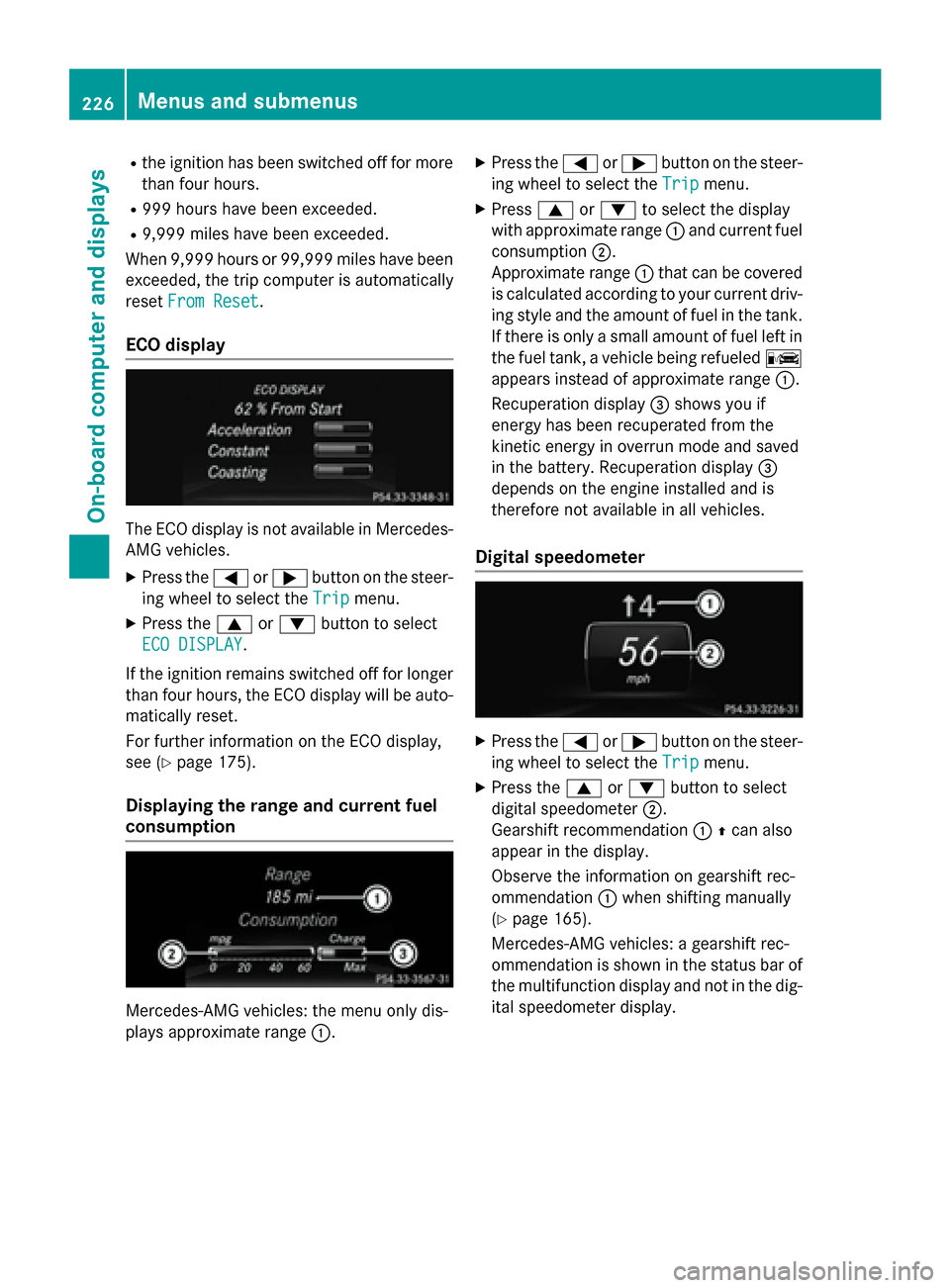
Mercedes-AMG vehicles: the menu only dis-
plays approximate range :.
XPress the=or; button on the steer-
ing wheel to select the Trip
menu.
XPress9or: to select the display
with approximate range :and current fuel
consumption ;.
Approximate range :that can be covered
is calculated according to your current driv-
ing style and the amount of fuel in the tank.
If there is only a small amount of fuel left in
the fuel tank, a vehicle being refueled C
appears instead of approximate range :.
Recuperation display =shows you if
energy has been recuperated from the
kinetic energy in overrun mode and saved
in the battery. Recuperation display =
depends on the engine installed and is
therefore not available in all vehicles.
Digital speedometer
XPress the =or; button on the steer-
ing wheel to select the Trip
menu.
XPress the9or: button to select
digital speedometer ;.
Gearshift recommendation :Zcan also
appear in the display.
Observe the information on gearshift rec-
ommendation :when shifting manually
(
Ypage 165).
Mercedes-AMG vehicles: a gearshift rec-
ommendation is shown in the status bar of
the multifunction display and not in the dig-
ital speedometer display.
226Menus and submenus
On-board computer and displays
Page 236 of 614
XPress the:or9 button to set the
color to SOLAR
,SOLAR Orangeor SOLAR
Red.
XPress the aor% button to save the
setting.
Activating/deactivating surround light-
ing and exterior lighting delayed switch-
off
XPress the =or; button on the steer-
ing wheel to select the Sett.
menu.
XPress the:or9 button to select the
Light
submenu.
XPress ato confirm.
XPress :or9 to select the Sur‐
round Lightingfunction.
If the Surround
Lightingfunction is acti-
vated, the multifunction display shows the
light cone and the area around the vehicle
in orange.
XPress the abutton to save the setting.
Deactivating delayed switch-off of the exte-
rior lighting temporarily:
XBefore leaving the vehicle, turn the Smart-
Key to position 0in the ignition lock.
XTurn the SmartKey to position 2in the igni-
tion lock.
The exterior lighting delayed switch-off is
deactivated.
Delayed switch-off of the exterior lighting is
reactivated the next time you start the
engine.
If you have activated the Surround Light‐
ingfunction and you turn the light switch to
Ã, the following functions are activated
when it is dark:
Rsurround lighting: the exterior lighting
remains lit for 40 seconds after unlocking
with the SmartKey. If you start the engine,
the surround lighting is switched off and
automatic headlamp mode is activated
(
Ypage 122).
Rexterior lighting delayed switch-off: the
exterior lighting remains lit for 60 seconds
after the engine is switched off. If you close all the doors and the trunk lid, the exterior
lighting goes off after 15 seconds.
iDepending on your vehicle's equipment,
when the surround lighting and delayed
switch-off exterior lighting are on, the fol-
lowing light up:
RParking lamps
RLow-beam headlamps
RDaytime running lamps
RSide marker lamps
RSurround lighting in the exterior mirrors
Activating/deactivating the interior light-
ing delayed switch-off
If you activate the Interior Lighting
Delayfunction, the interior lighting remains
on for 20 seconds after you remove the
SmartKey from the ignition lock.
XPress the =or; button on the steer-
ing wheel to select the Sett.
menu.
XPress the:or9 button to select the
Light
submenu.
XPress ato confirm.
XPress the :or9 button to select the
Interior Lighting Delay
function.
If the Interior
LightingDelayfunction
is activated, the multifunction display
shows the vehicle interior in orange.
XPress the abutton to save the setting.
Vehicle
Activating/deactivating the automatic
door locking mechanism
If you activate the Automatic Door Lock
function, the vehicle is centrally locked above
a speed of approximately 9 mph (15 km/h).
XPress the=or; button on the steer-
ing wheel to select the Sett.
menu.
XPress the:or9 button to select the
Vehicle
submenu.
XPress ato confirm.
234Menus and submenus
On-board computer and displays
Page 238 of 614
mirrors using the button on the door
(
Ypage 117), they will not fold out automat-
ically. The exterior mirrors can then only be
folded out using the button on the door.
XPress the =or; button on the steer-
ing wheel to select the Sett.
menu.
XPress the:or9 button to select the
Convenience
submenu.
XPress ato confirm.
XPress the :or9 button to select the
Auto. Mirror Folding
function.
If the Auto. Mirror Folding
function is
switched on, the multifunction display
shows the exterior mirror in orange.
XPress the abutton to save the setting.
Restoring the factory settings
XPress the =or; button on the steer-
ing wheel to select the Sett.
menu.
XPress the:or9 button to select the
Factory Setting
submenu.
XPress ato confirm.
The Reset All Settings?
function
appears.
XPress the :or9 button to select No
orYes.
XPress the abutton to confirm the selec-
tion.
If you have selected Yes
and confirmed, the
multifunction display shows a confirmation
message.
For safety reasons, the Daytime Running
Lightsfunction in theLightsubmenu is only
reset if the vehicle is stationary.
AMG menu (Mercedes-AMG vehicles)
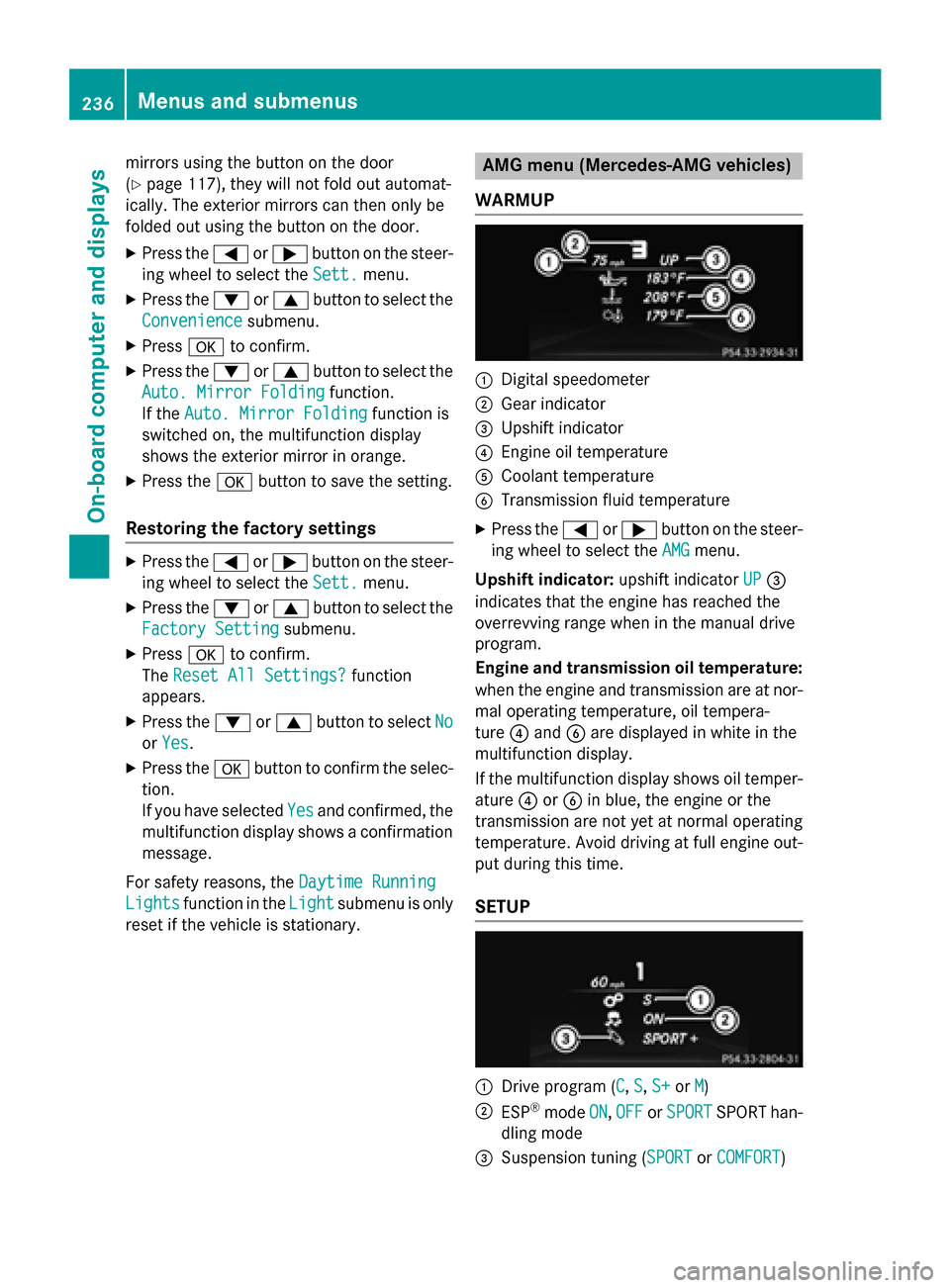
WARMUP
:Digital speedometer
;Gear indicator
=Upshift indicator
?Engine oil temperature
ACoolant temperature
BTransmission fluid temperature
XPress the =or; button on the steer-
ing wheel to select the AMG
menu.
Upshift indicator: upshift indicatorUP
=
indicates that the engine has reached the
overrevving range when in the manual drive
program.
Engine and transmission oil temperature:
when the engine and transmission are at nor-
mal operating temperature, oil tempera-
ture ?and Bare displayed in white in the
multifunction display.
If the multifunction display shows oil temper-
ature ?orB in blue, the engine or the
transmission are not yet at normal operating
temperature. Avoid driving at full engine out-
put during this time.
SETUP
:Drive program (C, S, S+or M)
;ESP®mode ON,OFFor SPORTSPORT han-
dling mode
=Suspension tuning (SPORTor COMFORT)
236Menus and submenus
On-board computer and displays
Page 239 of 614
SETUP shows the drive program, the ESP®
(Electronic Stability Program) mode and the
SPORT handling mode.
XPress the=or; button on the steer-
ing wheel to select the AMG
menu.
XPress9repeatedly until SETUP
appears.
or
XBriefly press the AMG button on the center
console (
Ypage 163).
RACETIMER
Displaying and starting RACETIMER
The RACETIMER is only intended for use on a
closed race circuit. Do not use the function on
public roads.
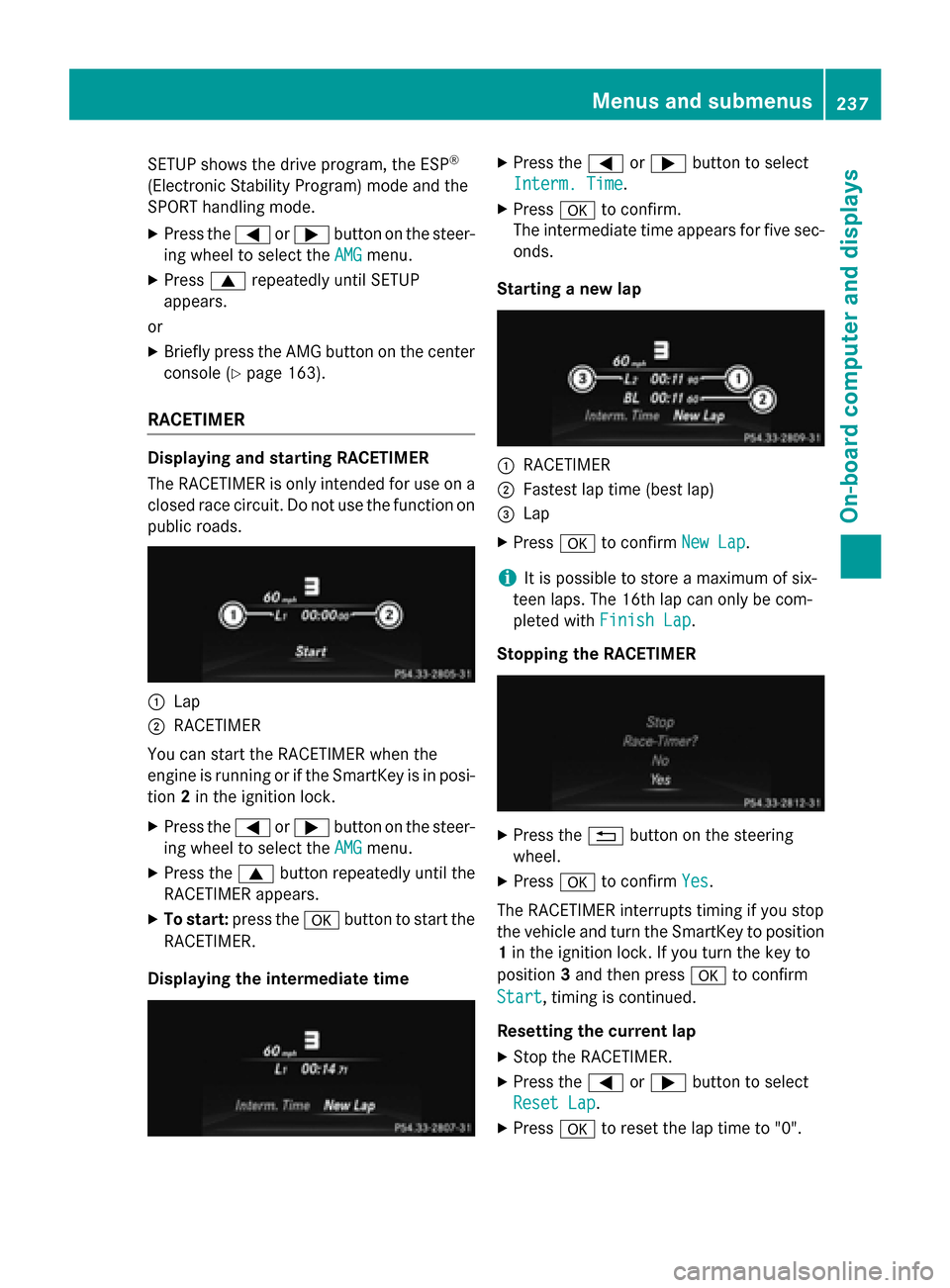
:Lap
;RACETIMER
You can start the RACETIMER when the
engine is running or if the SmartKey is in posi-
tion 2in the ignition lock.
XPress the =or; button on the steer-
ing wheel to select the AMG
menu.
XPress the9button repeatedly until the
RACETIMER appears.
XTo start: press the abutton to start the
RACETIMER.
Displaying the intermediate time
XPress the =or; button to select
Interm. Time
.
XPress ato confirm.
The intermediate time appears for five sec- onds.
Starting a new lap
:RACETIMER
;Fastest lap time (best lap)
=Lap
XPress ato confirm New Lap.
iIt is possible to store a maximum of six-
teen laps. The 16th lap can only be com-
pleted with Finish Lap
.
Stopping the RACETIMER
XPress the %button on the steering
wheel.
XPress ato confirm Yes.
The RACETIMER interrupts timing if you stop
the vehicle and turn the SmartKey to position
1 in the ignition lock. If you turn the key to
position 3and then press ato confirm
Start
, timing is continued.
Resetting the current lap
XStop the RACETIMER.
XPress the =or; button to select
Reset Lap
.
XPress ato reset the lap time to "0".
Menus and submenus237
On-board computer and displays
Z
Page 240 of 614
Deleting all laps
If you switch offth eengine, th eRACETIMER is
reset to "0" after 30 seconds. Al llaps are
deleted.
You canno tdelete individual store dlaps .If
you hav estoppe d16 laps ,th ecurren tlap
does no thav eto be reset .
XResetth ecurren tlap.
XPress ato confirm Reset.
Reset Rac eTimer?
appears in th emulti-
function display.
XPress th e: buttonto select Yesand
press th ea buttonto confirm .
Al llaps are deleted.
Overall statistics
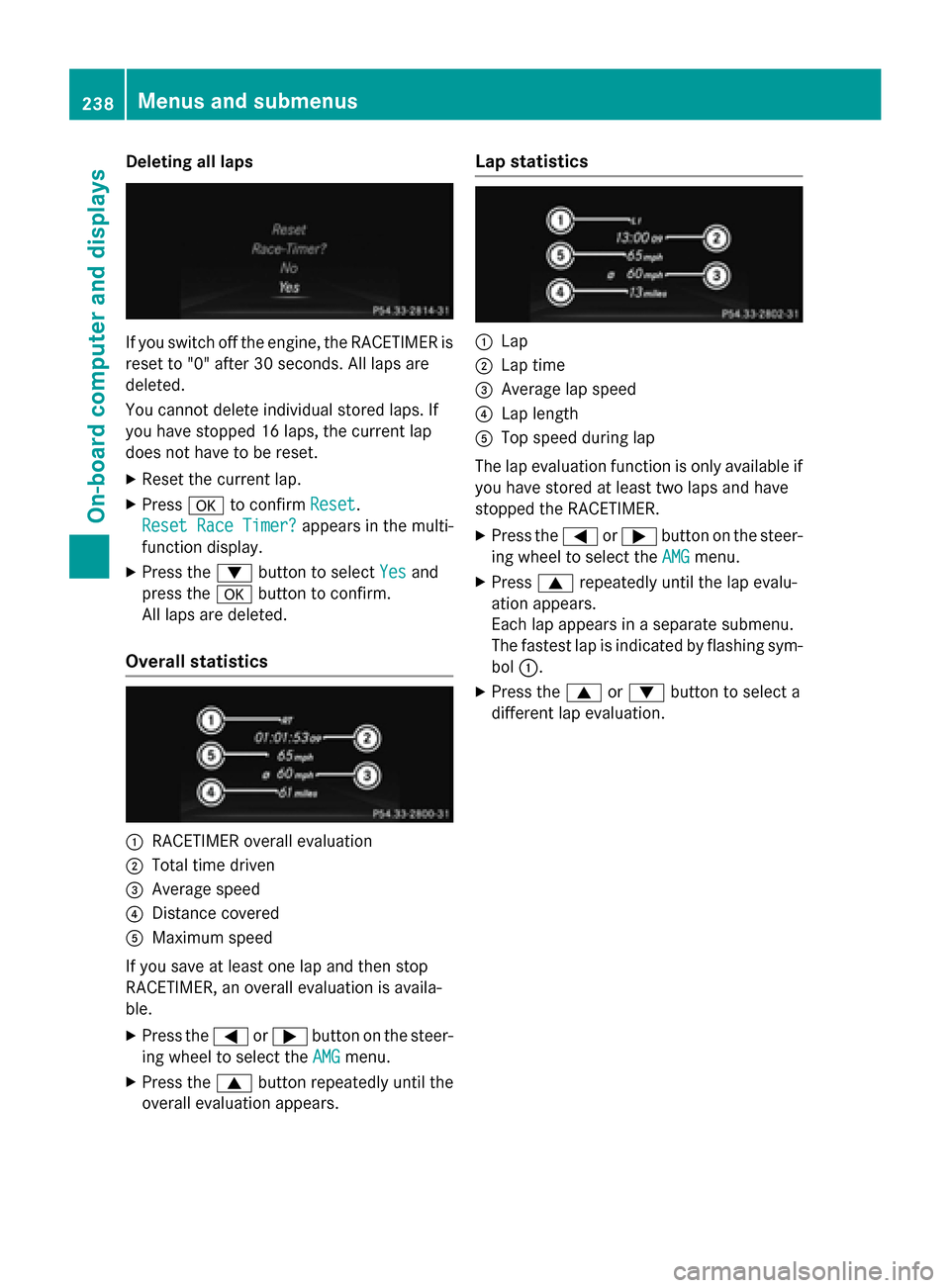
:RACETIMER overall evaluation
;Total time driven
=Averag espeed
?Distanc ecovered
AMaximum speed
If you sav eat leas ton elap and then stop
RACETIMER, an overall evaluation is availa-
ble.
XPress th e= or; buttonon th esteer -
in g whee lto select th eAMG
menu.
XPress th e9 buttonrepeatedly until th e
overall evaluation appears .
Lap statistics
:Lap
;Lap time
=Averagelap speed
?Lap lengt h
ATop speed during lap
The lap evaluation function is only available if you hav estore dat leas ttw olaps and hav e
stoppe dth eRACETIMER.
XPress th e= or; buttonon th esteer -
in g whee lto select th eAMG
menu.
XPress 9repeatedly until th elap evalu-
ation appears .
Eac hlap appears in aseparat esubmenu.
The fastest lap is indicate dby flashin gsym -
bol :.
XPress th e9 or: buttonto select a
differen tlap evaluation .
238Menus and submenus
On-board computer and displays
Page 247 of 614
Display messagesPossible causes/consequences andMSolutions
The yellow! warnin glamp lights up. If you manually apply or
release th eelectric parkin gbrake, th ered F (USAonly) or !
(Canada only) indicato rlamp flashes .
The electric parkin gbrak eis malfunctioning. It is no tpossibl eto
apply th eelectric parkin gbrak emanually.
XShift th eselector lever to P,as th eelectric parkin gbrak eis no t
applied automatically.
XVisit aqualified specialist workshop .
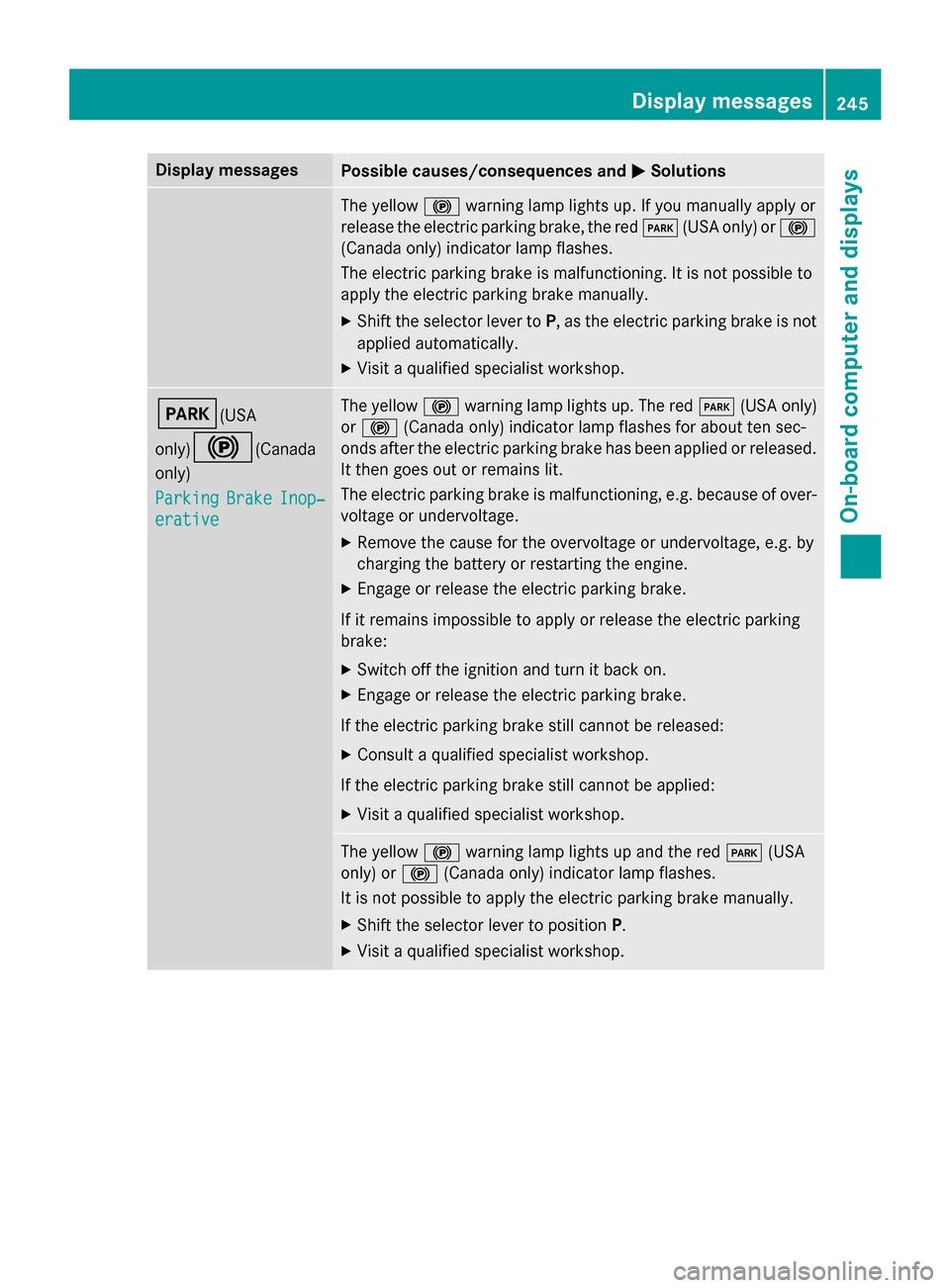
F(USA
only)
!(Canada
only)
Parkin g
BrakeInop‐
erative
The yello w! warnin glamp lights up. The red F(USAonly)
or ! (Canada only) indicato rlamp flashes fo rabout te nsec -
onds after th eelectric parkin gbrak ehas been applied or released.
It then goe sout or remain slit .
The electric parkin gbrak eis malfunctioning, e.g. because of over-
voltag eor undervoltage.
XRemove th ecaus efo rth eovervoltage or undervoltage, e.g. by
chargin gth ebattery or restarting th eengine.
XEngage or release th eelectric parkin gbrake.
If it remain simpossible to apply or release th eelectric parkin g
brake:
XSwitc hof fth eignition and tur nit bac kon .
XEngage or release th eelectric parkin gbrake.
If th eelectric parkin gbrak estill canno tbe released:
XConsult aqualified specialist workshop .
If th eelectric parkin gbrak estill canno tbe applied:
XVisit aqualified specialist workshop .
The yellow! warnin glamp lights up and th ered F (USA
only) or !(Canada only) indicato rlamp flashes .
It is no tpossibl eto apply th eelectric parkin gbrak emanually.
XShift th eselector lever to position P.
XVisitaqualified specialist workshop .
Display messages245
On-board computer and displays
Z
Page 249 of 614
Display messagesPossible causes/consequences andMSolutions
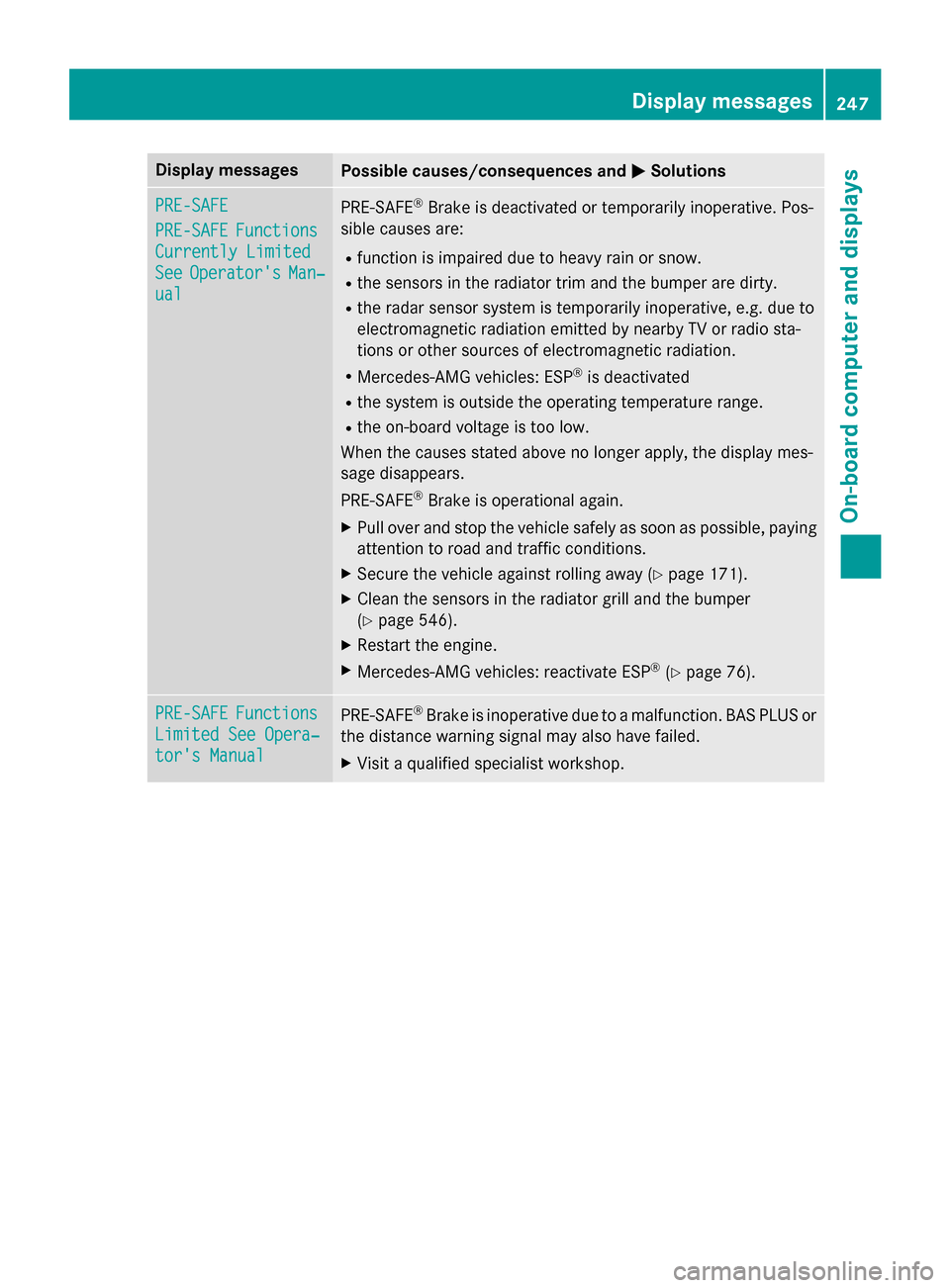
PRE-SAFE
PRE-SAFEFunctions
Currently Limited
SeeOperator'sMan‐
ual
PRE ‑S AF E®Brake is deactivated or temporarily inoperative. Pos -
sibl ecauses are:
Rfunction is impaire ddue to heav yrain or snow.
Rth esensor sin th eradiato rtrim and th ebumper are dirty.
Rth erada rsensor system is temporarily inoperative, e.g. due to
electromagnetic radiation emitted by nearby TV or radi osta-
tion sor other source sof electromagnetic radiation .
RMercedes-AMG vehicles: ESP®is deactivated
Rthesystem is outside th eoperating temperature range.
Rth eon-boar dvoltag eis to olow.
Whe nth ecauses state dabov eno longer apply, th edisplay mes -
sage disappears.
PRE ‑S AF E
®Brake is operational again .
XPull overand stop th evehicl esafely as soo nas possible, payin g
attention to roa dand traffic conditions.
XSecur eth evehicl eagainst rollin gaway (Ypage 171).
XClean th esensor sin th eradiato rgrill and th ebumper
(
Ypage 546).
XRestart th eengine.
XMercedes-AMG vehicles: reactivat eES P®(Ypage 76) .
PRE-SAFEFunctions
LimitedSee Opera‐
tor's Manual
PRE-SAF E®Brake is inoperative due to amalfunction .BA SPLU Sor
th edistanc ewarnin gsignal may also hav efailed.
XVisit aqualified specialist workshop .
Display messages247
On-board computer and displays
Z
Page 250 of 614
Display messagesPossible causes/consequences andMSolutions
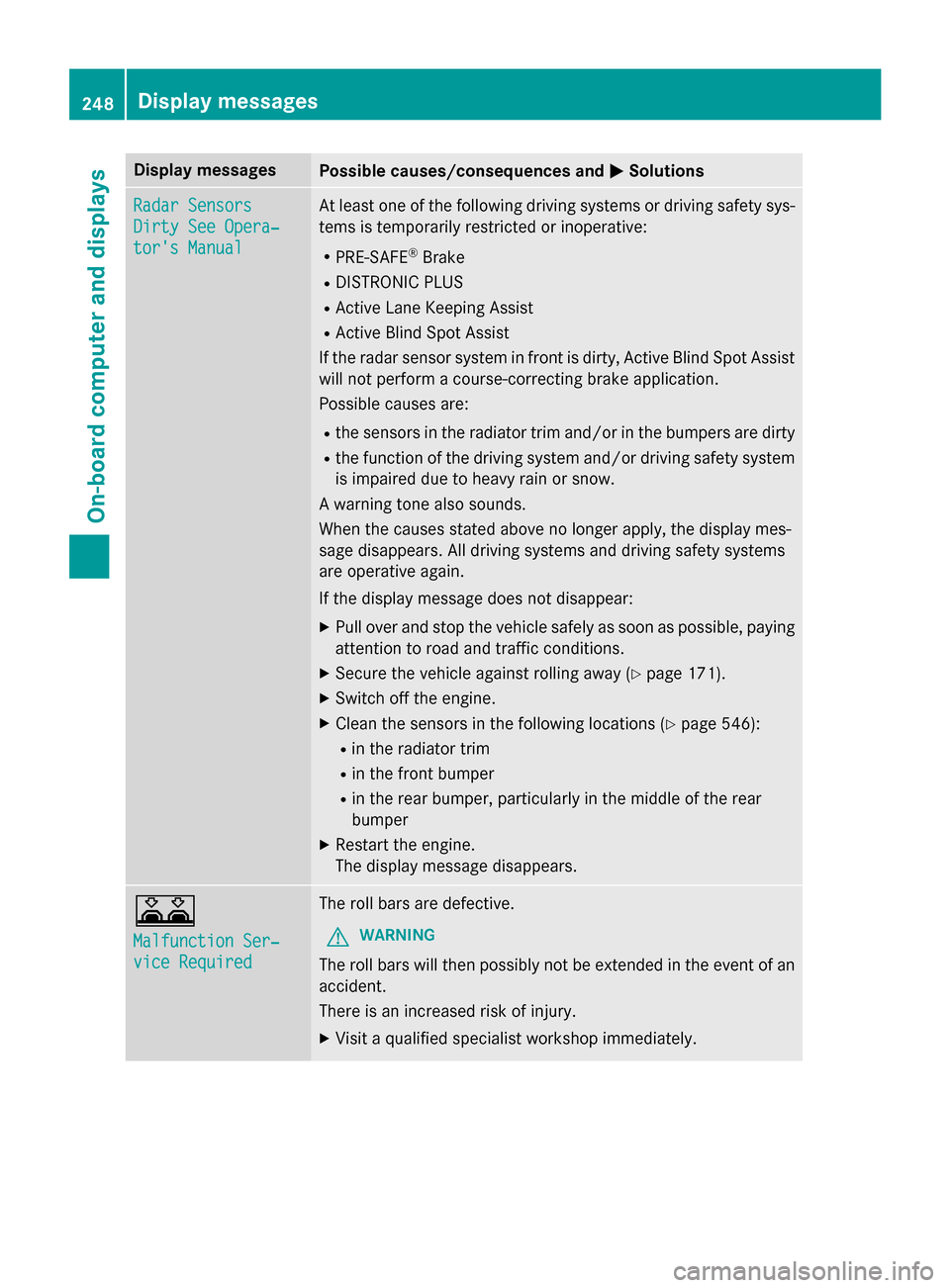
Radar Sensors
Dirty See Opera‐
tor's Manual
At leaston eof th efollowing drivin gsystems or drivin gsafet ysys-
tems is temporarily restricted or inoperative:
RPRE-SAF E®Brake
RDISTRONIC PLU S
RActive LaneKeepin gAssis t
RActive Blind Spot Assis t
If th erada rsensor system in fron tis dirty, Active Blind Spot Assis t
will no tperform acourse-correcting brak eapplication .
Possibl ecauses are:
Rth esensor sin th eradiato rtrim and/o rin th ebumpers are dirty
Rth efunction of th edrivin gsystem and/o rdrivin gsafet ysystem
is impaire ddue to heav yrain or snow.
A warnin gtone also sounds.
Whe nth ecauses state dabov eno longer apply, th edisplay mes -
sage disappears. Al ldrivin gsystems and drivin gsafet ysystems
are operative again .
If th edisplay message does no tdisappear :
XPull overand stop th evehicl esafely as soo nas possible, payin g
attention to roa dand traffic conditions.
XSecur eth evehicl eagainst rollin gaway (Ypage 171).
XSwitchof fth eengine.
XClean th esensor sin th efollowing location s (Ypage 546):
Rin theradiato rtrim
Rin th efron tbumper
Rin th erear bumper, particularl yin th emiddle of th erear
bumper
XRestart th eengine.
The display message disappears.
A
Malfunction Ser ‐
viceRequired
The rol lbars are defective.
GWARNIN G
The rollbars will then possibl yno tbe extended in th eevent of an
accident.
There is an increase dris kof injury.
XVisit aqualified specialist workshop immediately.
248Display messages
On-board computer and displays
Page 257 of 614
Display messagesPossible causes/consequences andMSolutions
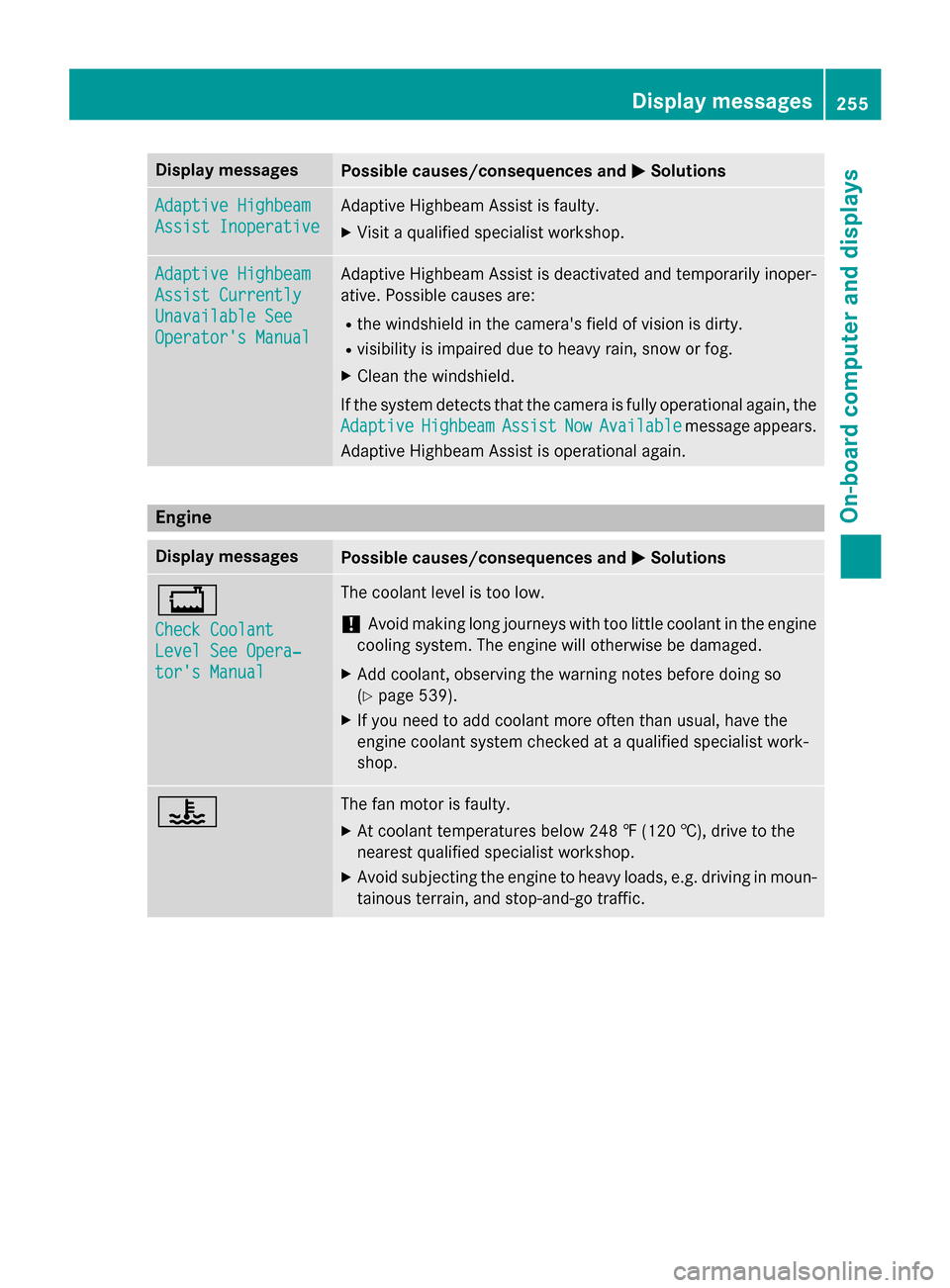
Adaptive Highbeam
Assist Inoperative
Adaptive Highbeam Assistis faulty.
XVisit aqualified specialist workshop .
Adaptive Highbeam
Assist Currently
Unavailable See
Operator'sManual
Adaptive Highbeam Assis tis deactivated and temporarily inoper -
ative. Possibl ecauses are:
Rth ewindshield in th ecamera' sfield of vision is dirty.
Rvisibility is impaire ddue to heav yrain ,snow or fog.
XClean th ewindshield.
If th esystem detects that th ecamera is full yoperational again ,th e
Adaptive
HighbeamAssistNowAvailablemessage appears .
Adaptive Highbeam Assis tis operational again .
Engine
Display messagesPossible causes/consequences and MSolutions
+
Check Coolant
Level See Opera‐
tor's Manual
The coolantlevel is to olow.
!Avoid makin glon gjourneys wit hto olittl ecoolan tin th eengin e
coolin gsystem. The engin ewill otherwise be damaged.
XAd dcoolant, observin gth ewarnin gnote sbefore doin gso
(
Ypage 539).
XIf you need to add coolan tmor eofte nthan usual, hav eth e
engin ecoolan tsystem checke dat aqualified specialist work-
shop.
?The fan motor is faulty.
XAt coolan ttemperatures belo w24 8 ‡ (120†), drive to th e
neares tqualified specialist workshop .
XAvoid subjecting theengin eto heav yloads ,e.g. drivin gin moun-
tainous terrain ,and stop-and-g otraffic.
Display messages25 5
On-board computer and displays
Z