child restraint MERCEDES-BENZ SL-Class 2016 R231 Owner's Manual
[x] Cancel search | Manufacturer: MERCEDES-BENZ, Model Year: 2016, Model line: SL-Class, Model: MERCEDES-BENZ SL-Class 2016 R231Pages: 614, PDF Size: 15.67 MB
Page 10 of 614
Changing the language .................. 302
Deleting .........................................303
Entering ......................................... 303
Entering (address book, phone
book) ............................................. 301
Entering (navigation) ......................3 03
Moving the cursor .......................... 303
Switching to letters ........................ 302
Child
Restraint system .............................. 69
Child seat
Forward-facing restraint system ...... 70
On the front-passenger seat ............ 70
Rearward-facing restraint system .... 70
Children
Special seat belt retractor ............... 69
Cigarette lighter ................................ 520
Cleaning
Mirror turn signal ........................... 545
Clear button ....................................... 295
Climate control
Automatic climate control (dual-
zone) .............................................. 137
Controlling automatically ............... 141
Cooling with air dehumidification .. 139
Defrosting the windows ................. 144
Defrosting the windshield .............. 143
General notes ................................ 136
Indicator lamp ................................ 141
Information about using auto-
matic climate control ..................... 138
Maximum cooling .......................... 144
Overview of systems ...................... 136
Problem with the rear window
defroster ........................................ 146
Problems with cooling with air
dehumidification ............................ 141
Refrigerant ..................................... 608
Refrigerant filling capacity ............. 608
Setting the air distribution ............. 142
Setting the air vents ...................... 147
Setting the airflow ......................... 143
Setting the climate mode (AIR
FLOW) ............................................ 141
Setting the temperature ................ 142
Switching air-recirculation mode
on/off ............................................ 146
Switching on/off ........................... 139 Switching residua
l heat on/off ...... 146
Switching the rear window
defroster on/off ............................ 144
Switching the ZONE function on/
off .................................................. 143
Cockpit
Overview .......................................... 40
see Instrument cluster
Color, setting (TV, video) .................. 475
COMAND
Active multicontour seat ................ 316
Basic functions .............................. 297
Calling up drive status regulator
(ABC) ............................................. 315
Display ........................................... 288
Examples of operation ................... 295
Importing POIs ............................... 424
Menu overview .............................. 290
Multicontour seat .......................... 316
Seat functions ............................... 316
Settings ......................................... 435
Switching on/off ........................... 297
COMAND and Internet
see Online and Internet functions
COMAND control panel ..................... 293
COMAND controller ........................... 294
COMAND display
Cleaning ......................................... 546
Cleaning instructions ..................... 292
Driving conditions menu (except
Mercedes-AMG vehicles) ............... 196
Driving conditions menu
(Mercedes-AMG vehicles) .............. 198
Setting ........................................... 308
Switching on/off ........................... 292
Combination switch .......................... 125
Compass function ............................. 375
Connecting a USB device ................. 447
Consumption statistics (on-board
computer) .......................................... 225
Contacts
Deleting ......................................... 409
Importing ....................................... 408
Contrast, setting (TV, video) ............ 475
Convenience closing feature .............. 99
Convenience opening feature
see Side windows
8Index
Page 19 of 614
Playback options ........................... 460
Switching to ................................... 457
Music search .....................................4 54
N
Navigation
Adjusting the volume of the navi-
gation announcements .................. 297
Alternative route ............................ 351
Avoiding an area ............................ 373
Basic settings ................................ 322
Blocking a route section affected
by a traffic jam ............................... 351
Compass function .......................... 375
Destination memory ......................3 62
Destination/route download ......... 423
Displaying destination informa-
tion (arrival time, distance to des-
tination) ......................................... 352
Entering a destination .................... 324
Entering a destination by address .. 324 Entering a destination using the
map ............................................... 331
Entering a point of interest ............ 336
Entering characters (character
bar) ................................................ 303
Entering/saving your home
address .......................................... 329
Freeway information ......................3 71
General notes ................................ 321
GPS reception ................................ 321
Important safety notes .................. 320
Lane recommendation ................... 348
List of areas ................................... 374
Map settings .................................. 367
Menu (on-board computer) ............ 227
Off-road/off-map (off-road desti-
nation) ...........................................3 56
Previous destinations .................... 366
Reading out traffic reports ............. 361
Repeating announcements ............ 349
Route guidance .............................. 346
Search & Send ............................... 345
Selecting a destination from the
destination memory ....................... 330
Selecting a destination from the
list of last destinations ................... 330 Selecting your home address ........3
30
Setting options for destination/
route download .............................. 426
Setting route options (avoiding:
highways, toll roads, tunnels, fer-
ries) ............................................... 322
Setting the route type (short
route, fast rou
te, dynamic route or
economic route) ............................ 322
Showing/hiding the menu ............. 322
Starting route calculation .............. 329
Switching announcements on/
off .................................................. 350
Switching to ................................... 321
Navigation announcements
Switching off .................................. 297
NECK-PRO head restraints
Important safety notes .................... 66
Operation ......................................... 66
Resetting triggered .......................... 67
Night View Assist Plus
Activating/deactivating ................. 212
Cleaning ......................................... 547
Display message ............................ 261
Function/notes ............................. 210
Problem (malfunction) ................... 214
Showing the image on the
COMAND display ........................... 320
Switching automatic activation
on/off ............................................ 320
North orientation (navigation) ......... 368
Notes on breaking-in a new vehi-
cle ....................................................... 150
O
Occupant Classification System
(OCS)
Conditions ....................................... 59
Faults ............................................... 63
Operation ......................................... 59
System self-test ............................... 61
Occupant safety
Automatic measures after an acci-
dent ................................................. 68
Children in the vehicle ..................... 68
Important safety notes .................... 51
Index17
Page 23 of 614
Roll barDisplay message ............................ 248
Operation ......................................... 64
Roller sunblind .................................. 104
Roof
Display message ............................ 268
Important safety notes .................. 100
Opening/closing (with roof
switch) ........................................... 101
Opening/closing (with Smart-
Key) ............................................... 102
Overview ........................................ 100
Problem (malfunction) ................... 106
Relocking ....................................... 102
Roof lining and carpets (cleaning
guidelines) ......................................... 548
Roof switch ........................................ 101
Route
Estimated time of arrival ................ 352
Route (navigation)
Calling up the "Routes" menu ........ 354
Displaying the distance to the des-
tination .......................................... 352
Recording ...................................... 354
Route overview .............................. 353
Selecting an alternative route ........ 351
Setting route options (avoiding:
highways, toll roads, tunnels, fer-
ries) ............................................... 322
Setting the route type (short
route, fast route, dynamic route or
economic route) ............................ 322
Starting calculation ........................ 329
Route demonstration ........................ 353
Route guidance
Canceling ....................................... 351
Continuing ..................................... 351
Destination reached ...................... 351
General notes ................................ 346
Lane recommendations ................. 348
Off-road ......................................... 356
Traffic reports ................................ 357
S
SafetyChildren in the vehicle ..................... 68 Safety notes
Audio CD and MP3 mode ............... 446
Using the telephone ....................... 381
Video DVD mode ........................... 475
Safety system
see Driving safety systems
Satellite radio
Displaying information ................... 445
Registering .................................... 442
Switching to ................................... 442
SatRadio
Notes ............................................. 441
Selecting a category ...................... 443
Saving the crosshair position .......... 367
Screen
Selecting for the remote control .... 484
SD memory card
Ejecting .......................................... 447
Inserting ........................................ 447
Search & Send ................................... 345
Seat belts
Adjusting the driver's and front-
passenger seat belt ......................... 55
Cleaning ......................................... 548
Correct usage .................................. 53
Fastening ......................................... 54
Important safety guidelines ............. 52
Introduction ..................................... 52
Releasing ......................................... 55
Seat belt guide ............................... 111
Switching belt adjustment on/off
(on-board computer) ...................... 235
Warning lamp ................................. 271
Warning lamp (function) ................... 55
Seats
Active multicontour seat ................ 316
Adjusting (electrically) ................... 110
Adjusting the head restraint .......... 111
Adjusting the lumbar support
(COMAND) ..................................... 317
Balance (seat heating) ................... 318
Belt guide ...................................... 111
Cleaning the cover ......................... 548
Correct driver's seat position ........ 108
Important safety notes .................. 109
Multicontour seat .......................... 316
Overview ........................................ 109
Resetting settings .......................... 319
Index21
Page 52 of 614
Useful information
i
This Operator's Manual describes all
models and all standard and optional equip-
ment of your vehicle available at the time of
publication of the Operator's Manual.
Country-specific differences are possible.
Please note that your vehicle may not be
equipped with all features described. This
also applies to safety-related systems and
functions.
iRead the information on qualified special-
ist workshops (
Ypage 34).
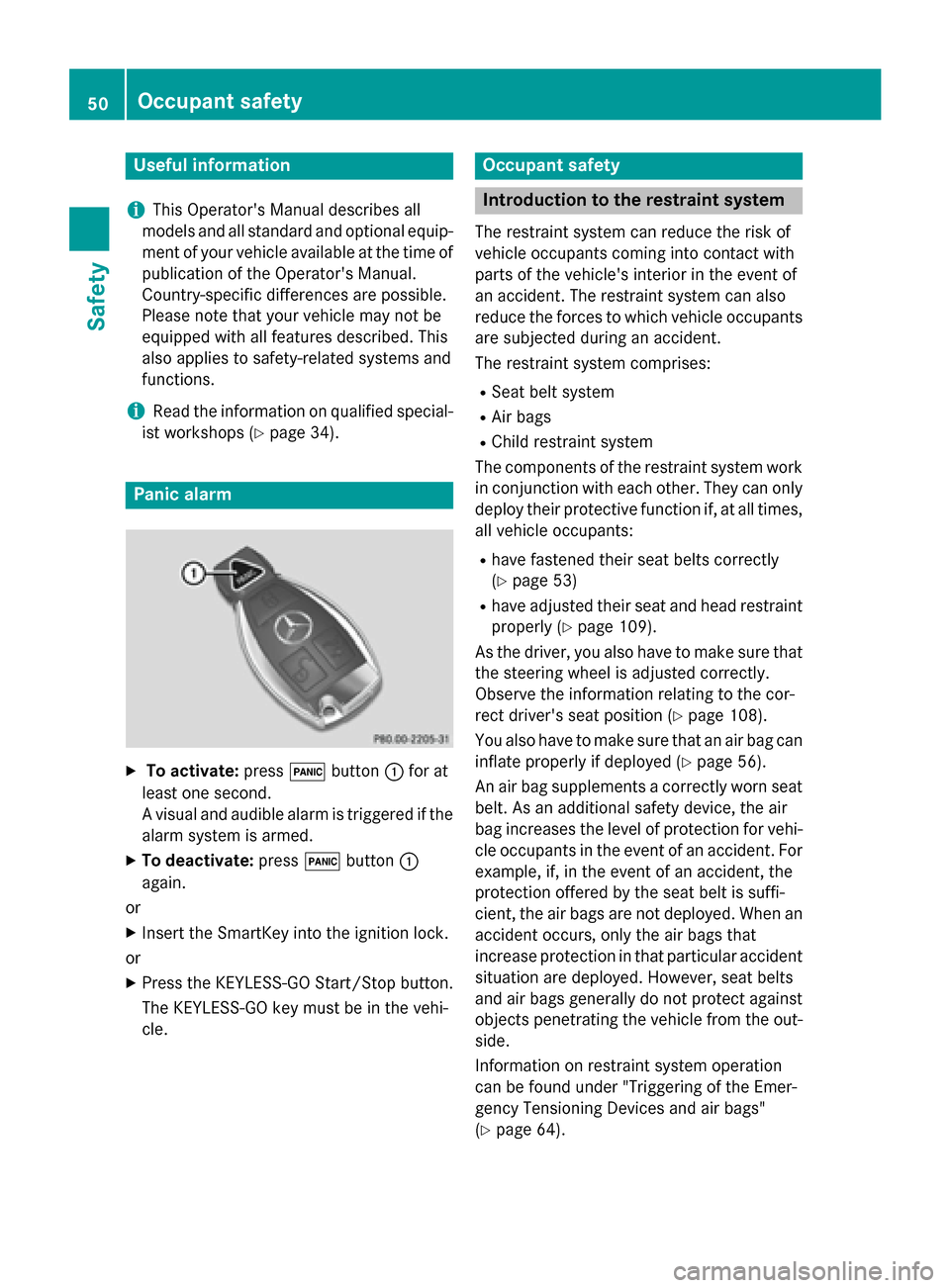
Panic alarm
XTo activate: press!button :for at
least one second.
A visual and audible alarm is triggered if the
alarm system is armed.
XTo deactivate: press!button :
again.
or
XInsert the SmartKey into the ignition lock.
or
XPress the KEYLESS-GO Start/Stop button.
The KEYLESS-GO key must be in the vehi-
cle.
Occupant safety
Introduction to the restraint system
The restraint system can reduce the risk of
vehicle occupants coming into contact with
parts of the vehicle's interior in the event of
an accident. The restraint system can also
reduce the forces to which vehicle occupants
are subjected during an accident.
The restraint system comprises:
RSeat belt system
RAir bags
RChild restraint system
The components of the restraint system work
in conjunction with each other. They can only
deploy their protective function if, at all times,
all vehicle occupants:
Rhave fastened their seat belts correctly
(
Ypage 53)
Rhave adjusted their seat and head restraint
properly (
Ypage 109).
As the driver, you also have to make sure that
the steering wheel is adjusted correctly.
Observe the information relating to the cor-
rect driver's seat position (
Ypage 108).
You also have to make sure that an air bag can inflate properly if deployed (
Ypage 56).
An air bag supplements a correctly worn seat
belt. As an additional safety device, the air
bag increases the level of protection for vehi-
cle occupants in the event of an accident. For
example, if, in the event of an accident, the
protection offered by the seat belt is suffi-
cient, the air bags are not deployed. When an
accident occurs, only the air bags that
increase protection in that particular accident
situation are deployed. However, seat belts
and air bags generally do not protect against objects penetrating the vehicle from the out-
side.
Information on restraint system operation
can be found under "Triggering of the Emer-
gency Tensioning Devices and air bags"
(
Ypage 64).
50Occupant safety
Safety
Page 53 of 614
For more information about children traveling
with you in the vehicle and on child restraint
systems, see "Children in the vehicle"
(
Ypage 68).
Important safety notes
GWARNING
Modifications to the restraint system may
cause it to no longer work as intended. The
restraint system may then not perform its
intended protective function and may fail in an
accident or trigger unexpectedly, for example.
This poses an increased risk of injury or even fatal injury.
Never modify parts of the restraint system.
Never tamper with the wiring, the electronic
components or their software.
If it is necessary to modify an air bag system to
accommodate a person with disabilities, con-
tact an authorized Mercedes-Benz Center for
details. USA only: for further information con-
tact our Customer Assistance Center at
1-800-FOR-MERCedes (1‑800‑367 ‑6372).
Restraint system warning lamp
The functions of the restraint system are
checked after the ignition is switched on and
at regular intervals while the engine is run-
ning. Therefore, malfunctions can be detec-
ted in good time.
The 6 restraint system warning lamp in
the instrument cluster lights up when the igni-
tion is switched on. It goes out no later than a
few seconds after the vehicle is started. The
components of the restraint system are in
operational readiness.
A malfunction has occurred if the 6
restraint system warning lamp:
Rdoes not light up after the ignition is
switched on
Rdoes not go out after a few seconds with
the engine running
Rlights up again while the engine is running
GWARNING
If restraint system is malfunctioning, restraint
system components may be triggered unin-
tentionally or might not be triggered at all in
the event of an accident with a high rate of
vehicle deceleration. This can affect the Emer- gency Tensioning Device or air bag, for exam-
ple. This poses an increased risk of injury or
even fatal injury.
Have the restraint system checked and
repaired in a qualified specialist workshop as
soon as possible.
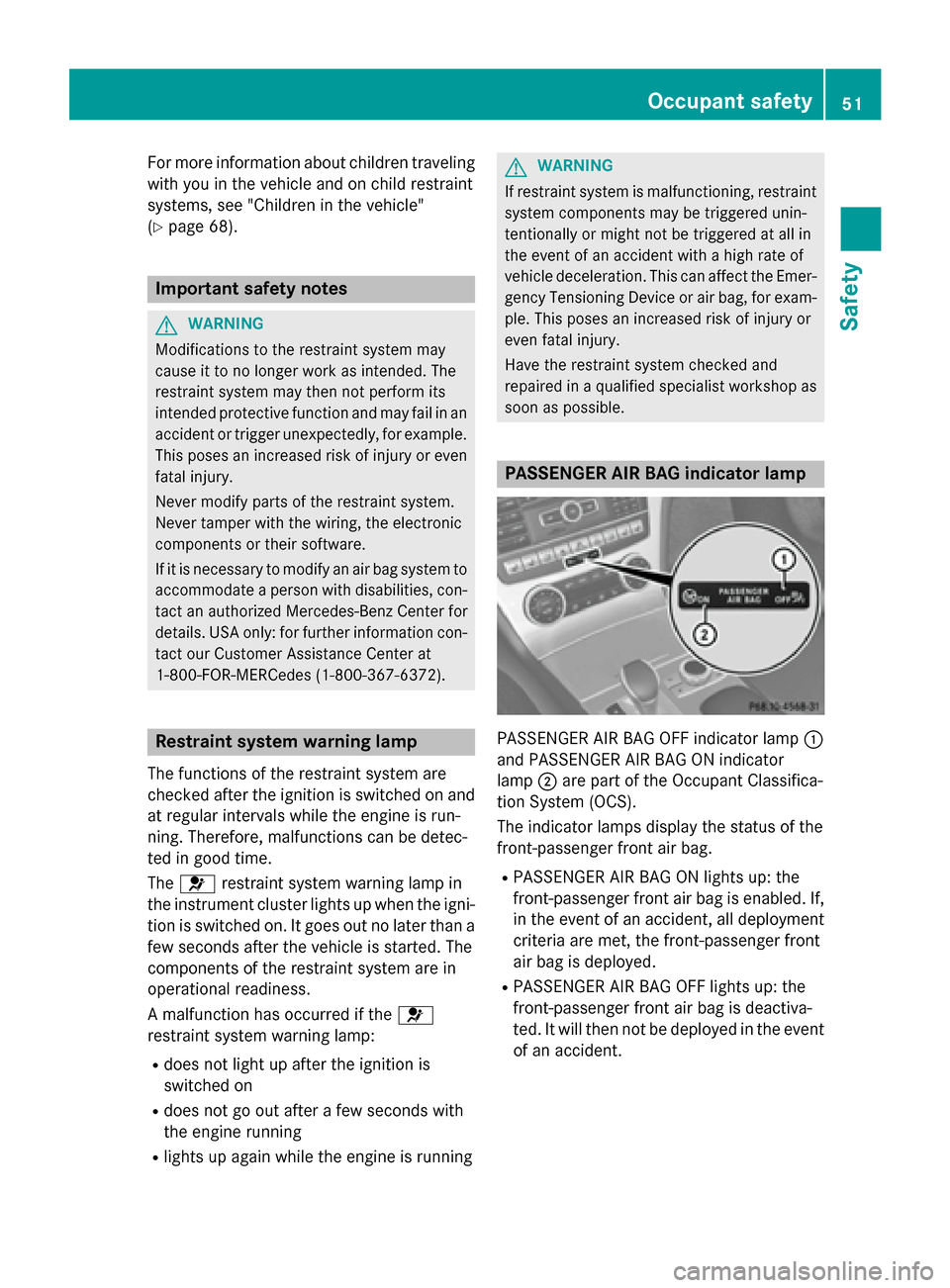
PASSENGER AIR BAG indicator lamp
PASSENGER AIR BAG OFF indicator lamp :
and PASSENGER AIR BAG ON indicator
lamp ;are part of the Occupant Classifica-
tion System (OCS).
The indicator lamps display the status of the
front-passenger front air bag.
RPASSENGER AIR BAG ON lights up: the
front-passenger front air bag is enabled. If,
in the event of an accident, all deployment
criteria are met, the front-passenger front
air bag is deployed.
RPASSENGER AIR BAG OFF lights up: the
front-passenger front air bag is deactiva-
ted. It will then not be deployed in the event of an accident.
Occupant safety51
Safety
Z
Page 54 of 614
Depending on the person in the front-
passenger seat, the front-passenger front air
bag must either be deactivated or enabled;
see the following points. You must make sure
of this both before and during a journey.
RChildren in a child restraint system:
whether the front-passenger front air bag is
enabled or deactivated depends on the
installed child restraint system, and the age
and size of the child. Therefore, be sure to
observe the notes on the "Occupant Clas-
sification System (OCS)" (
Ypage 59) and
on "Children in the vehicle" (
Ypage 68).
There you will also find instructions on rear-
ward and forward-facing child restraint sys- tems on the front-passenger seat.
RAll other persons: depending on the clas-
sification of the person in the front-
passenger seat, the front-passenger front
air bag is enabled or deactivated
(
Ypage 59). Be sure to observe the notes
on "Seat belts“ (
Ypage 52) and "Air bags"
(
Ypage 56). There you can also find infor-
mation on the correct seat position.
Seat belts
Introduction
Seat belts are the most effective means of
restricting the movement of vehicle occu-
pants in the event of an accident or the vehi-
cle rolling over. This reduces the risk of vehi-
cle occupants coming into contact with parts
of the vehicle interior or being ejected from
the vehicle. Furthermore, the seat belt helps
to keep the vehicle occupant in the best posi-
tion in relation to the air bag.
The seat belt system comprises:
RSeat belts
REmergency Tensioning Devices and seat
belt force limiters
If the seat belt is pulled by the seat belt guide
quickly or with a jerky movement, the belt
retractor locks. The belt strap cannot be
extracted any further. The Emergency Tensioning Device tightens
the seat belt in an accident, pulling the belt
close against the body. However it does not
pull the vehicle occupant back in the direction
of the backrest.
The Emergency Tensioning Device does not
correct an incorrect seat position or the rout-
ing of an incorrectly fastened seat belt.
When triggered, a seat belt force limiter helps
to reduce the force exerted by the seat belt on
the vehicle occupant.
The seat belt force limiters are synchronized
with the front air bag
s which absorb part of
the deceleration force. This can reduce the
force exerted on the vehicle occupants during
an accident.
!If the front-passenger seat is not occu-
pied, do not engage the seat belt tongue in
the buckle on the front-passenger seat.
Otherwise, in the event of an accident, the Emergency Tensioning Device and front-
passenger front air bag may be triggered
and would need to be replaced.
Important safety notes
The use of seat belts and child restraint sys-
tems is required by law in:
Rall 50 states
Rthe U.S. territories
Rthe District of Columbia
Rall Canadian provinces
Even where this is not required by law, all
vehicle occupants should correctly fasten
their seat belts before starting the journey.
GWARNING
If the seat belt is incorrectly fastened, it can-
not protect as intended. Furthermore, an
incorrectly fastened seat belt can cause addi-
tional injury, for example, in an accident, dur-
ing braking or when abruptly changing direc-
tion. This poses an increased risk of injury or
even fatal injury.
52Occupant safety
Safety
Page 55 of 614
Make sure that all vehicle occupants are
seated properly with a correctly fastened seatbelt.
GWARNING
The seat belt does not offer the intended level of protection if you have not moved the back-
rest to an almost vertical position. When brak-
ing or in the event of an accident, you could
slide underneath the seat belt and sustain
abdomen or neck injuries, for example. This
poses an increased risk of injury or even fatal injury.
Adjust the seat properly before beginning
your journey. Always ensure that the backrest
is in an almost vertical position and that the
shoulder section of your seat belt is routed
across the center of your shoulder.
GWARNING
Persons under 5 ft (1.50 m) in height cannot
fasten the seat belt correctly without an addi- tional suitable restraint system. If the seat
belt is incorrectly fastened, it cannot protect
as intended. Furthermore, an incorrectly fas-
tened seat belt can cause additional injury, for
example, in an accident, during braking or an
abrupt change of direction. This poses an
increased risk of injury or even fatal injury.
For this reason, always secure persons under
5 ft (1.50 m) in height in suitable restraint
systems.
If a child younger than twelve years old and
under 5 ft (1.50 m) in height is traveling in thevehicle:
Ralways secure the child in a child restraint
system suitable for this Mercedes-Benz
vehicle. The child restraint system must be
appropriate to the age, weight and size of
the child
Ralways observe the instructions and safety
notes in the "Children in the vehicle" sec-
tion of this Operator's Manual
(
Ypage 68) in addition to the child restraint system manufacturer's installa-
tion instructions
Rbe sure to observe the instructions and
safety notes on the "Occupant classifica-
tion system (OCS)" (
Ypage 59)
GWARNING
The seat belts may not perform their intended protective function if:
Rthey are damaged, modified, extremely
dirty, bleach or dyed
Rthe seat belt buckle is damaged or
extremely dirty
Rthe Emergency Tensioning Devices, belt
anchorages or inertia reels have been modi-
fied
Seat belts may sustain non-visible damage in an accident, e.g. due to glass splinters. Modi-
fied or damaged seat belts may tear or fail,
e.g. in an accident. Modified Emergency Ten-
sioning Devices could accidentally trigger or
fail to deploy when necessary. This poses an
increased risk of injury or even fatal injury.
Never modify the seat belts, Emergency Ten-
sioning Devices, belt anchorages or inertia
reels. Make sure that the seat belts are
undamaged, not worn out and clean. Follow-
ing an accident, have the seat belts checked
immediately at a qualified specialist work-
shop.
Only use seat belts that have been approved
for your vehicle by Mercedes-Benz.
Proper use of the seat belts
Observe the safety notes on the seat belt
(
Ypage 52).
All vehicle occupants must be wearing the
seat belt correctly before beginning the jour-
ney. Also make sure that all vehicle occu-
pants are always wearing the seat belt cor-
rectly while the vehicle is in motion.
Occupant safety53
Safety
Z
Page 56 of 614
When fastening the seat belt, always make
sure that:
Rthe seat belt tongue is only inserted to thebelt buckle belonging to that seat.
Rthe seat belt is tight across your body.
Avoid wearing bulky clothing, e.g. a winter
coat.
Rthe seat belt is not twisted.
Only then can the forces which occur be
distributed over the area of the belt.
Rthe shoulder section of the belt is always
routed across the center of your shoulder.
The shoulder section of the belt must not
come into contact with your neck or be
routed under your arm.
Rthe lap belt passes tightly and as low down
as possible across your lap.
The lap belt must always be routed across
your hip joints and not across your abdo-
men. This applies particularly to pregnant
women. If necessary, push the lap belt
down to your hip joint and pull it tight using
the shoulder section of the belt.
Rthe seat belt is not routed across sharp,
pointed or fragile objects.
If you have such items located on or in your
clothing, e.g. pens, keys or eyeglasses,
store these in a suitable place.
Ronly one person is using a seat belt at a
time.
Infants and children must never travel sit-
ting on the lap of a vehicle occupant. In the
event of an accident, they could be crushed
between the vehicle occupant and seat
belt.
Robjects are never secured with a seat belt ifthe seat belt is also being used by one of the
vehicle's occupants.
Also ensure that there are never objects
between a person and the seat, e.g. cush-
ions.
Seat belts are only intended to secure and
restrain vehicle occupants. Always observe
the notes in the "Stowage options/compart- ments" section for securing objects, luggage
or loads (
Ypage 514).
Fastening seat belts
Observe the safety notes on the seat belt
(
Ypage 52) and the notes on correct use of
seat belts (
Ypage 53).
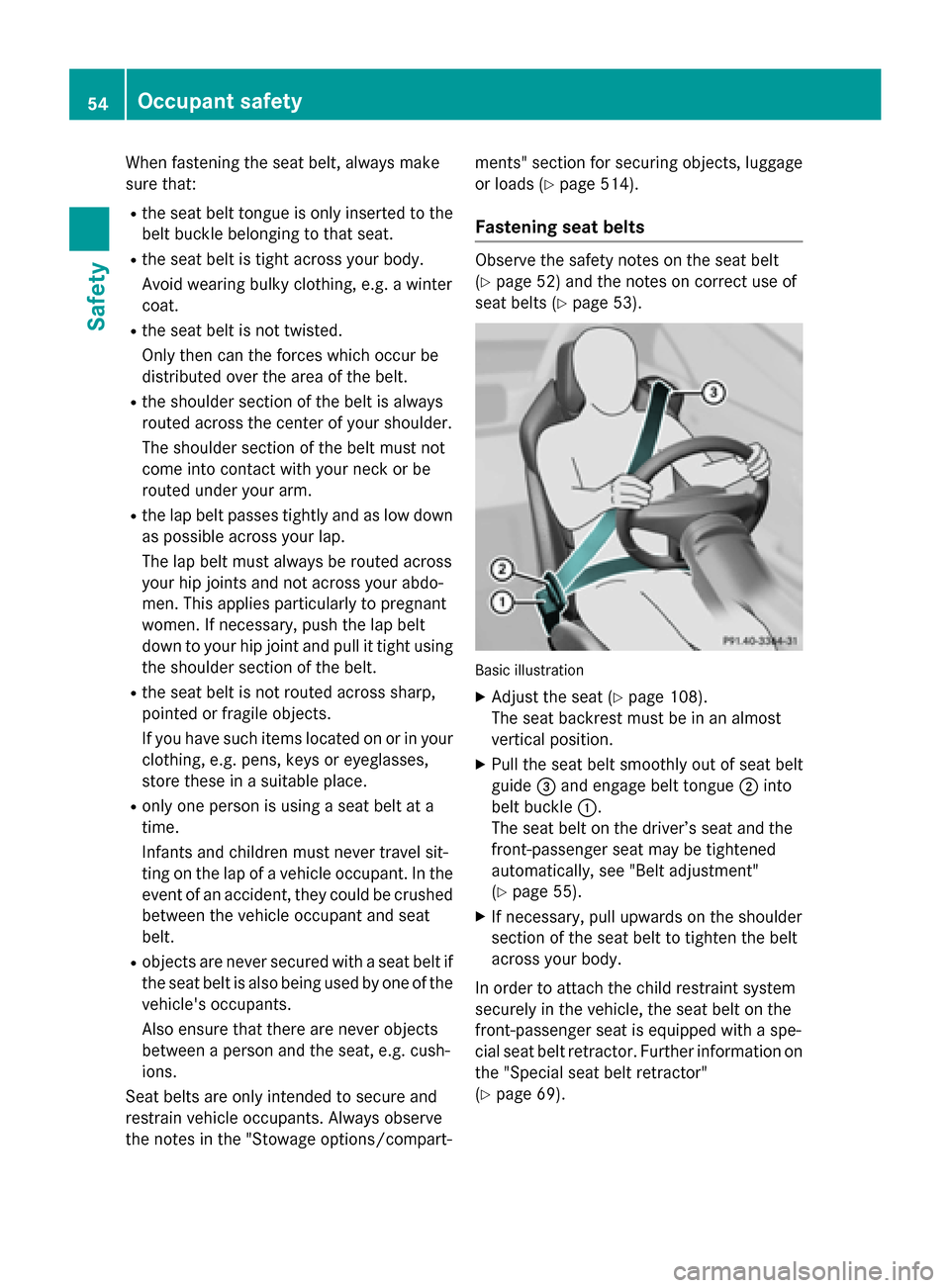
Basic illustration
XAdjust the seat (Ypage 108).
The seat backrest must be in an almost
vertical position.
XPull the seat belt smoothly out of seat belt
guide =and engage belt tongue ;into
belt buckle :.
The seat belt on the driver’s seat and the
front-passenger seat may be tightened
automatically, see "Belt adjustment"
(
Ypage 55).
XIf necessary, pull upwards on the shoulder
section of the seat belt to tighten the belt
across your body.
In order to attach the child restraint system
securely in the vehicle, the seat belt on the
front-passenger seat is equipped with a spe-
cial seat belt retractor. Further information on
the "Special seat belt retractor"
(
Ypage 69).
54Occupant safety
Safety
Page 58 of 614
Air bags
Introd uction
The installation poin tof an air bag can be rec -
ognized by th eAI R BA Gsymbol.
An air bag complements th ecorrectl yfas -
tene dseat belt .It is no substitut efor th eseat
belt .The air bag provide sadditional protec-
tion in applicable acciden tsituations.
Not all air bags are deployed in an accident.
The differen tair bag systems function inde-
pendentl yfrom on eanother (
Ypage 64) .
However, no system available today can com-
pletely eliminate injurie sand fatalities.
It is also no tpossible to rule out aris kof injury
caused by an air bag due to th ehigh spee dat
whic hth eair bag mus tbe deployed.
Import ant safety notes
GWARNIN G
If you do no tsit in th ecorrec tseat position ,
th eair bag canno tprotect as intended and
could eve ncaus eadditional injury when
deployed. This poses an increased ris kof
injury or eve nfatal injury.
To avoi dhazardous situations, always mak e
sur ethat all of th evehicle's occupants:
Rhav efastene dtheir seat belt scorrectly,
includin gpregnant women
Rare sitting correctl yand maintai nth egreat-
est possibl edistanc eto th eair bags
Rfollow th efollowin ginstruction s
Always mak esur ethat there are no objects
between th eair bag and th evehicle's occu-
pants .
RAdjus tth eseat sproperly before beginning
your journey. Always mak esur ethat th e
seat is in an almost upright position .The
center of th ehead restrain tmus tsupport
th ehead at about eye level.
RMov eth edriver' sand front-passenger
seat sas far bac kas possible .The driver' s
seat position mus tallow th evehicl eto be
driven safely.
ROnly hold th esteering whee lon th eout -
side .This allows th eair bag to be fully
deployed.
RAlways lean again stthebackrest while driv -
ing .Do no tlean forwards or lean against
th edoor or side window. You may other -
wise be in th edeploymen tarea of th eair
bags .
RAlways keep your fee tin th efootwell in
fron tof th eseat .Do no tput your fee ton th e
dashboard, for example. Your fee tmay oth-
erwi sebe in th edeploymen tarea of th eair
bag.
RFo rthis reason ,always secure person sless
than 5ft (1.5 0m) tall in suitable restraint
systems. Up to this height, the seat belt
cannot be worn correctly.
If a child is traveling in your vehicle, also
observe the following notes:
RAlways secure children under twelve years
of age and less than 5 ft (1.50 m)tall in
suitable child restraint systems.
ROnly secure a child in a rearward-facing
child restraint system on the front-
passenger seat when the front-passenger
front air bag is deactivated. If the
PASSENGER AIR BAG OFF indicator lamp is permanently lit, the front-passenger front
air bag is deactivated (
Ypage 51).
RAlways observe the instructions and safetynotes on the "Occupant Classification Sys-
tem (OCS)" (
Ypage 59) and on "Children
in the vehicle" (
Ypage 68) in addition to
the child restraint system manufacturer's
installation instructions.
Objects in the vehicle interior may pre-
vent an air bag from functioning correctly.
Before starting yo ur jo
urney and to avoid risks
resulting from the speed of the air bag as it
deploys, make sure that:
Rthere are no people, animals or objects
between the vehicle occupants and an air
bag.
Rthere are no objects between the seat, door
and B-pillar.
56Occupant safety
Safety
Page 61 of 614
Occupant Classification System
(OCS)
Introduction
The Occupant Classification System (OCS)
categorizes the person in the front-passenger
seat. Depending on that result, the front-
passenger front air bag and front-passenger
knee bag are either enabled or deactivated.
The system does not deactivate:
Rthe side impact air bag
Rthe front-passenger head bag
Rthe Emergency Tensioning Devices
Prerequisites
To be classified correctly, the front passenger
must sit:
Rwith the seat belt fastened correctly
Rin an almost upright position with their
back against the seat backrest
Rwith their feet resting on the floor, if possi-
ble
If the front passenger does not observe these
conditions, OCS may produce a false classi-
fication, e.g. because the front passenger:
Rtransfers their weight by supporting them-
selves on a vehicle armrest
Rsits in such a way that their weight is raised from the seat cushion
If you install a child restraint system on the
front-passenger seat, be sure to observe the
correct positioning of the child restraint sys-
tem. Never place objects under or behind the
child restraint system, e.g. cushions. Fully
retract the seat cushion length. The entire
base of the child restraint system must
always rest on the seat cushion of the front-
passenger seat. The backrest of the forward- facing child restraint system must lie as flat as
possible against the backrest of the front-
passenger seat.
The child restraint system must not touch the roof or be subjected to a load by the head
restraint. Adjust the angle of the seat back- rest and the head restraint position accord-
ingly.
Only then can OCS be guaranteed to function
correctly. Always observe the child restraint
system manufacturer's installation instruc-
tions.
Occupant Classification System opera-
tion (OCS)
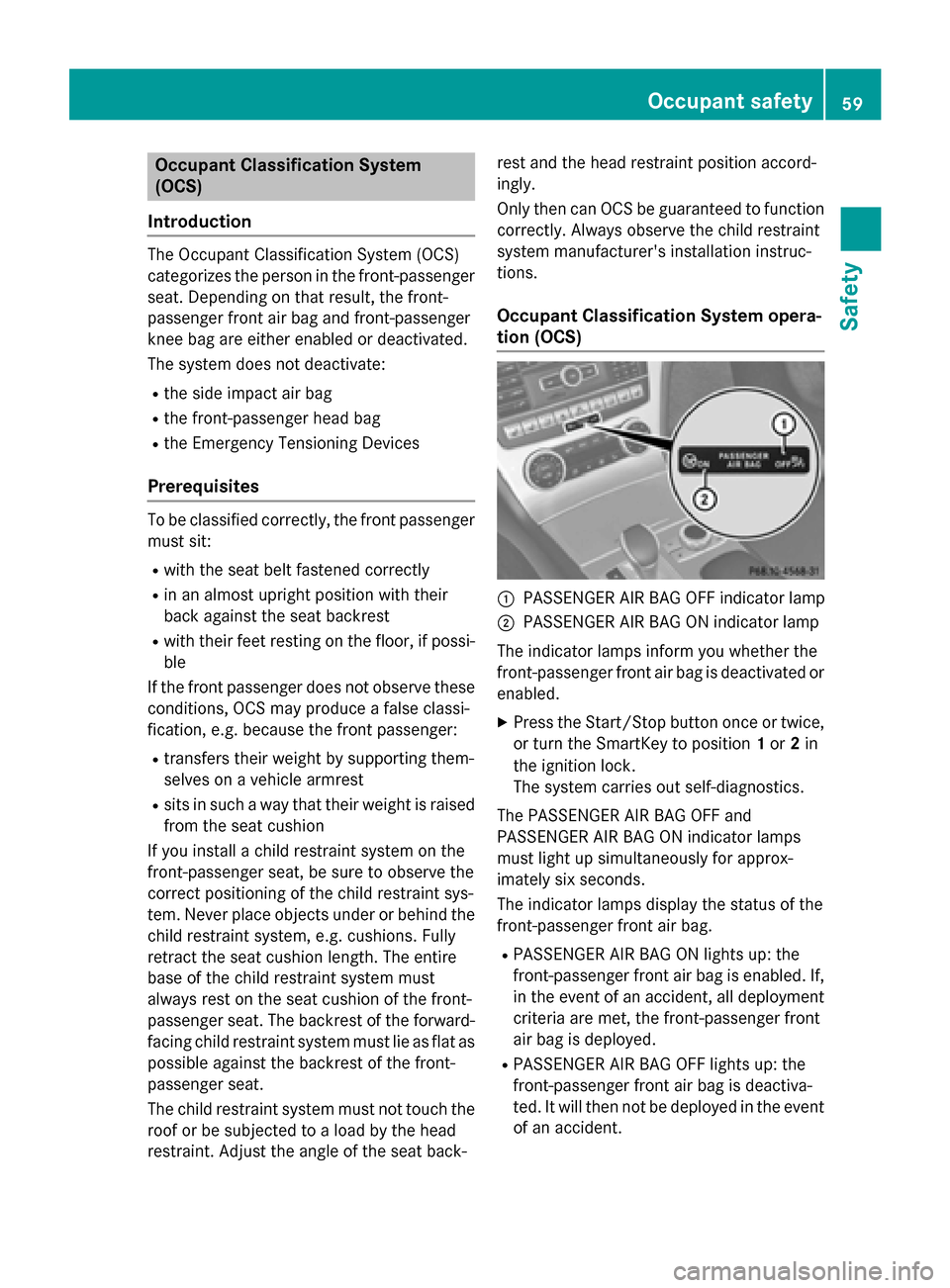
:PASSENGER AIR BAG OFF indicator lamp
;PASSENGER AIR BAG ON indicator lamp
The indicator lamps inform you whether the
front-passenger front air bag is deactivated or
enabled.
XPress the Start/Stop button once or twice,
or turn the SmartKey to position 1or 2in
the ignition lock.
The system carries out self-diagnostics.
The PASSENGER AIR BAG OFF and
PASSENGER AIR BAG ON indicator lamps
must light up simultaneously for approx-
imately six seconds.
The indicator lamps display the status of the
front-passenger front air bag.
RPASSENGER AIR BAG ON lights up: the
front-passenger front air bag is enabled. If,
in the event of an accident, all deployment
criteria are met, the front-passenger front
air bag is deployed.
RPASSENGER AIR BAG OFF lights up: the
front-passenger front air bag is deactiva-
ted. It will then not be deployed in the event of an accident.
Occupant safety59
Safety
Z