brake MERCEDES-BENZ SL CLASS 2018 User Guide
[x] Cancel search | Manufacturer: MERCEDES-BENZ, Model Year: 2018, Model line: SL CLASS, Model: MERCEDES-BENZ SL CLASS 2018Pages: 298, PDF Size: 4.54 MB
Page 30 of 298
The following text is published as required of
manufacturers under Title 49, Code of U.S. Fed-
eral Regulations, Part 575 pursuant to the
"National Traffic and Motor Vehicle Safety Act of
1966".
If you believe that your vehicle has ad efect
which could cause ac rash or could cause injury
or death, you should immediately inform the
National Highway Traffic Safety Administration
(NHTSA )ina ddition to notifying Mercedes-Benz
USA ,L LC.
If NHTSA receives similar complaints ,itm ay
open an investigation, and if it finds that as afety
defect exists in ag roup of vehicles, it may order
ar ecall and remedy campaign. However, NHTSA
cannot become involved in individual problems
between you, your dealer, or Mercedes-Benz
USA ,L LC.
To contact NHTSA ,y ou may call the Vehicle
Safety Hotlin et oll-free at
1-888-327-4236(TTY: 1-800-424-9153 ); go to
http://www.safercar.gov ;orw rite to: Admin-
istrator ,N HTSA ,4 00 Sevent hS treet, SW.,
Washington ,DC2 0590.
You can also obtain other information about
motor vehicle safety from
http://www.safercar.gov
Limited Warranty
! Observe the notes in this Operator's Manual
regarding the correc to peration of your vehi-
cle and possible damage to the vehicle. Dam-
age to the vehicle which is caused by violation
of these notes is not covered by the
Mercedes-Benz implied warranty or the new
or used-vehicle warranty.
QR codes for the rescue card
The QR codes are secured in the fuel filler flap
and on the opposite side on the B-pillar. In the
event of an accident ,r escue services can use
the QR code to quickly find the appropriate res-
cue card for your vehicle. The current rescue
card contains the most important information
about your vehicle in ac ompact form, e.g. the
routing of the electric cables.
You can find more information under http://
portal.aftersales.i.daimler.com/public/ content/asportal/en/communication/
informationen_fuer/QRCode.html.
Data stored in the vehicle
Data storage Aw ide range of electronic components in your
vehicle contain data memories.
These data memories temporarily or perma-
nently store technical information about: R
vehicle's operating state R
incidents R
malfunctions
In general, this technical information docu-
ment st he state of ac omponent, am odule, a
system or the surroundings.
These include, for example: R
operating conditions of system components,
e.g. fluid levels R
the vehicle's status messages and those of its
individual components, e.g. number of wheel
revolutions/speed, deceleration in move-
ment ,l ateral acceleration, accelerator pedal
position R
malfunction sa nd defects in important system
components, e.g. lights, brakes R
vehicle reaction sa nd operating conditions in
special driving situations, e.g. air bag deploy-
ment ,i ntervention of stability control sys-
tems R
ambient conditions, e.g. outside temperature
This data is of an exclusively technical nature
and can be used to: R
assist in recognizing and rectifying malfunc-
tions and defects R
analyze vehicle functions, e.g. after an acci-
dent R
optimize vehicle function
The data cannot be used to trace the vehicle's
movements.
When your vehicle is serviced, technical infor-
mation can be read from the event data memory
and malfunction data memory.
Services include, for example: R
repair services R
service processes R
warranties R
quality assurance28
Data stored in the vehicle
Introduction
Page 31 of 298
The vehicle is read out by employees of the ser-
vice network (including the manufacturer) using
special diagnostic testers. More detailed infor-
mation is obtained from it, if required.
After am alfunction has been rectified, the infor-
mation is deleted from the malfunction memory
or is continually overwritten.
When operating the vehicle, situations are con-
ceivable in which this technical data, in connec-
tion with other information (if necessary, under
consultation with an authorized expert), could
be traced to ap erson.
Examples include: R
accident reports R
damage to the vehicle R
witness statements
Further additional functions that have been con-
tractually agreed upon with the customer allow
certain vehicle data to be conveyed by the vehi-
cle as well. The additional functions include, for
example, vehicle location in case of an emer-
gency.
COMAND/mbrace (Canada: TELEAID) If the vehicle is equipped with COMAND or
mbrace, additional data about the vehicle's
operation, the use of the vehicle in certain sit-
uations, and the location of the vehicle may be
compiled through COMAND or the mbrace sys-
tem.
For additional information please refer to the
COMAND User Manual or the Digital Operator's
Manual and/or the mbrace Terms and Condi-
tions.
Event dat ar ecordersThis vehicle is equipped with an event data
recorder (EDR). This vehicle is equipped with an
event data recorder (EDR). The main purpose of
an ED Ristor ecord, in certain crash or near
crash-lik es ituations, such as an air bag deploy-
ment or hittin gar oad obstacle, data that will
assist in understanding how av ehicle's systems
performed. The ED Risd esigned to record data
related to vehicle dynamics and safety systems
for as hort period of time, typically 30 seconds
or less. The ED Rint his vehicle is designed to record
such data as: R
How various systems in your vehicle were
operating R
Whether or not the driver and passenger
safety belts were buckled/fastened R
How far (if at all) the driver was depressing the
accelerator and/or brake pedal and R
How fast the vehicle was traveling.
These data can help provide ab etter under-
standin goft he circumstances in which acci-
dents and injuries occur. NOTE: ED Rd ata are
recorded by your vehicle only if an on-trivial
crash situation occurs; no data is recorded by
the ED Ru nder normal driving conditions and no
personal data (e.g. name, gender, age and acci-
dent location) are recorded. However, other par-
ties, such as law enforcement could combine
ED Rd ata with the type of personally identifying
data routinely acquired during ac rash investi-
gation.
Access to the vehicle and/or the ED Risn eeded
to read data that is recorded by the EDR, and
special equipment is required. In addition to the
vehicle manufacturer, other parties that have
the special equipment, such as law enforce-
ment ,c an read the information by accessing the
vehicle or the EDR.
ED Rd ata may be used in civil and criminal mat-
ters as at ool in accident reconstruction, acci-
dent claims and vehicle safety. Sinc et he Crash
Data Retrieval CDR tool that is used to extract
data from the ED Risc ommercially available,
Mercedes-Benz USA ,L LC ("MBUSA") expressly
disclaims any and all liability arising from the
extraction of this information by unauthorized
Mercedes-Benz personnel.
MBUSA will not share ED Rd ata with others
without the consen toft he vehicle owners or, if
t he vehicle is leased, without the consen toft he
lessee. Exceptions to this representation
include responses to subpoenas by law enforce-
ment ;byf ederal, state or local government; in
connection with or arising out of litigation involv-
ing MBUSA or its subsidiaries and affiliates; or,
as required by law.
Warning: The ED Risac omponent of the
Restraint System Module. Tampering with, alter-
ing, modifying or removing the ED Rc omponent
may result in am alfunction of the Restraint Sys-
tem Module and other systems.
Stat el aws or regulations regarding EDRs that
conflict with federal regulation are pre-empted.Data stored in the vehicle 29
Introduction Z
Page 56 of 298
G WARNING
If you leave children unsupervised in the vehi-
cle, they coul ds et it in motion by, for example:R
release the parking brake. R
shift the automatic transmission out of the
parking position P .R
start the engine.
In addition, they may operate vehicl ee quip-
ment and become trapped. There is ar isk of
an accident and injury.
When leaving the vehicle, alway st ake the
SmartKey with you and lock the vehicle. Never
leave children unsupervised in the vehicle.
G WARNING
If persons, particularl yc hildren are subjected
to prolonged exposure to extreme hea to r
cold, there is ar isk of injury ,p ossibly even
fatal .N ever leave children unattended in the
vehicle.
G WARNING
If the child restraint system is subjected to
direct sunlight, parts may get very hot. Chil-
dren may burn themselves on these parts,
particularl yont he metal parts of the child
restraint system. There is ar isk of injury.
If you leave the vehicle, taking the child with
you ,a lway se nsure that the child restraint
system is not expose dtod irect sunlight. Pro-
tect it with ab lanket, for example. If the child
restraint system has been expose dtod irect
sunlight, let it cool dow nb efore securing the
child in it. Never leave children unattended in
the vehicle.
Always ensure that all vehicl eo ccupants have
their seat belts fastened correctly and are sitting
properly .P articular attention must be pai dt o
children.
Observe the safety notes on the seat belt
( Y
pag e4 0) and the notes on correct use of seat
belts ( Y
pag e4 1).
Ab ooster seat may be necessary to achieve
prope rs eat bel tp ositioning for children over
40 lbs (18 kg )u ntil they reach ah eight where a three-point seat bel tc an be properly fastened
without ab ooster seat.
Special seatbelt retractor
G WARNING
If the seat bel tisr eleased while driving, the
child restraint system wil lnol onger be
secure dp roperly .T he special seat bel tr etrac-
tor is disable da nd the inertia real draw sina
portion of the seat belt. The seat bel tc annot
be immediatel yr efastened. There is an
increased risk of injury ,p ossibly even fatal.
Stop the vehicl ei mmediately, paying atten-
tion to road and traffic conditions. Reactivate
the special seat bel tr etractor and secure the
child restraint system properly.
The seat bel tont he front-passenger's side is
equipped with as pecial seat bel tr etractor.
When activated, the special seat bel tr etractor
ensure st hat the seat bel tc annot slacken once
the child seat is secured.
Installing ac hild restraint system: X
Make sure you observe the child restraint
system manufacturer's installation instruc-
tions. X
Pul lt he seat bel ts moothly out of the belt
loop. X
Engage seat bel tt ongue in bel tb uckle.
Activating the special seat bel tr etractor:X
Pul lt he seat bel to ut full ya nd let the inertia
reel retract it again.
Whil et he seat bel tisr etracting, you should
hear ar atcheting sound .T he special seat belt
retractor is enabled. X
Push the child restraint system dow nsot hat
the seat bel tist ight and does not loosen.
Removing the child restraint system and deac-
tivating the special seat bel tr etractor:X
Make sure you observe the child restraint
system manufacturer's installation instruc-
tions. X
Press the release button of the seat belt
buckle ,h old the bel tt ongue and guide it back
toward st he bel tl oop.
The special seat bel tr etractor is deactivated.54
Children in the vehicle
Safety
Page 58 of 298
instructions and safet yn otes on the "Occupant
Classification System (OCS)" ( Y
page 45).
You can thus avoid the risk st hat could arise as
ar esult of: R
an incorrectly categorized perso nint he front-
passenger seat R
the unintentional deactivatio noft he front-
passenger front air bag R
the unsuitable positionin goft he child
restraint system, e.g. too clos etot he dash-
board
Rearward-facing child restraint system If it is absolutely necessary to install ar earward-
facin gc hild restraint system on the front-
passenger seat, always make sure that the
front-passenge rf ront air bag is deactivated.
Only if the PASSENGER AI RB AG OFF indicator
lamp is permanently lit ( Y
page 39) is the front-
passenger front air bag deactivated.
Always observe the child restraint system man-
ufacturer' si nstallation and operating instruc-
tions.
Forward-facing child restraint system If you secur eac hild in af orward-facin gc hild
restraint system on the front-passenge rs eat,
always move the front-passenge rs eat as far
back as possible .T he entire base of the child
restraint system must always rest on the seat
cushio noft he front-passenge rs eat. The back-
rest of the child restraint system must lie as flat
as possible against the backrest of the front-
passenger seat. The child restraint system must
not touc ht he roof or be subjected to al oad by
the head restraint .A djust the angle of the seat
backrest and the head restraint position accord-
ingly. Always make sure that the shoulder belt
strap is correctly routed fro mt he front-
passenger seat belt guide to the shoulder belt
guide on the child restraint system. The shoul-
der belt strap must be routed forward and down
fro mt he front-passenge rs eat belt guide.
Always observe the child restraint system man-
ufacturer' si nstallation and operating instruc-
tions. Pets in th ev ehicle
G WARNING
If you leave animals unattended or unsecured
in the vehicle, the yc ould press buttons or
switches, for example.
As ar esult ,t he yc ould: R
activat ev ehicle equipmen ta nd become
trapped, for example R
activat eord eactivat es ystems, thereby
endangerin go ther road users
Unsecure da nimals could also be flung around
the vehicle in the even tofana ccident or sud-
den steerin gorb raking, thereby injuring vehi-
cle occupants. There is ar isk of an accident
and injury.
Never leave animals unattended in the vehi-
cle. Always secur ea nimals properly during
the journey, e.g. use as uitable animal trans-
port box.
Driving safety systems
Overview of driving safety systems In this section, you will fin di nformation about
the followin gd rivin gs afet ys ystems:R
AB S( A nti-lock B raking S ystem)
( Y
page 57) R
BA S( B rake A ssist S ystem) ( Y
page 57)R
Activ eB rak eA ssist ( Y
page 58)R
Adaptive brak el ight s( Y
page 60)R
ESP ®
( E lectronic S tability P rogram)
( Y
page 60) R
EB D( E lectronic B ra ke force D istribution)
( Y
page 63) R
ADAPTIVE BRAKE ( Y
page 63)
Important safety notes
If you fail to adapt your drivin gs tyle or if you are
inattentive, the drivin gs afet ys ystems can nei-
the rr educ et he risk of an accident nor override
the laws of physics .D ri vin gs afet ys ystems are
merely aids designed to assist driving.56
Driving safety systems
Safety
Page 59 of 298
You are responsible for maintainin gt he distance
to the vehicle in front, for vehicle speed, for
braking in good time, and for stayin ginl ane.
Always adapt your drivin gs tyle to suit the pre-
vailing road and weather condition sa nd main-
tain as afe distance from the vehicle in front.
Drive carefully.
The drivin gs afet ys ystems described only work
as effectively as possible when there is ade-
quate contac tb etwee nt he tires and the road
surface. Pay particular attention to the informa-
tion regarding tires, recommended minimum
tir et re ad depth se tc .int he "Wheels and tires"
section ( Y
page 260).
In wintry drivin gc onditions, always use winter
tires (M+S tires) and if necessary, sno wc hains.
Only in this way will the drivin gs afet ys ystems
described in this section work as effectively as
possible.
ABS (Anti-lock Braking System)
Genera li nformationAB Sr egulates brak ep ressure in such aw ay that
the wheels do not lock when you brake. This
allows you to continue steerin gt he vehicle when
braking.
The % AB Sw arnin gl amp in the instrument
cluster light supw hen the ignition is switched
on. It goes out when the engin eisr unning.
AB Sw ork sf rom as peed of about 5m ph
(8 km/h), regardless of road-surfac ec onditions.
AB Sw ork sons lippery surfaces, even when you
only brak eg ently.
Important safet yn otes
i Observe the "Importan ts afet yn otes" sec-
tion ( Y
page 56).
G WARNING
If AB Sism alfunctioning, the wheels could
lock when braking. The steerabilit ya nd brak-
ing characteristics would be severely affec-
ted. There is an increased danger of skidding
and accidents.
Drive on carefully. Have AB Sc hecked imme-
diately at aq ualified specialis tw orkshop.
When AB Sism alfunctioning, other systems,
including drivin gs afet ys ystems, will also becom ei noperative .O bserve the information
on the AB Sw arnin gl amp ( Y
page 204) and dis-
play messages which may be shown in the
instrumen tc luster ( Y
page 179).
Brakes X
If ABS intervenes: continue to depres st he
brak ep edal vigorously until the braking sit-
uation is over. X
To make af ull brake application: depress
the brak ep edal with full force.
If AB Si ntervenes when braking, you will feel a
pulsing in the brak ep edal.
The pulsatin gb rak ep edal can be an indication
of hazardous road conditions, and function sasa
reminder to tak ee xtra care while driving.
BAS (Brake Assist System)
Genera li nformationBA So perates in emergenc yb raking situations.
If you depres st he brak ep edal quickly, BAS
automatically boost st he braking force, thus
shortening the stopping distance.
Important safet yn otes
i Observe the "Importan ts afet yn otes" sec-
tion ( Y
page 56).
G WARNING
If BA Sism alfunctioning, the braking distance
in an emergenc yb raking situation is
increased. There is ar isk of an accident.
In an emergenc yb raking situation, depress
the brak ep edal with full force. AB Sp revents
the wheels from locking.
Braking X
Keep the brak ep edal firmly depressed until
the emergenc yb raking situation is over.
AB Sp revent st he wheels from locking.
The brakes will function as usual onc ey ou
release the brak ep edal. BA Sisd eactivated.Driving safet ys ystems 57
Safety Z
Page 60 of 298
Active Brak eA ssist
Gene ra li nf orm ation
i Observ et he "Importan ts afet yn otes "s ec -
tion ( Y
page 56).
Active Brake Assis tc onsists of ad istanc ew arn -
ing function wit hana utonomous braking func-
tion and Adaptive Brake Assist.
Active Brake Assis tc an help you to minimiz et he
ris kofac ol lision wit ht he vehicl einf ront or
reduce th ee ffects of suc hac ol lision .
If Active Brake Assis td etects that there is ar is k
of collision ,y ou will be warned visually and
acoustically. If you do no tr eac ttot he visual and
audible collision warning ,a utonomous braking
can be initiate dinc riti cal situations. If you apply
th eb rak ey ourself in ac riti cal situation ,A da p-
tive Brake Assis toft he Active Brake Assis ts ys-
te ms upport sy ou.
Import ant safety notesIn particular, th ed etection of obstacles can be
impaire di f:R
there is dir tont he sensor sora nythin ge lse
covering th es ensor sR
there is snow or heav yr ainR
there is interferenc ebyo th er radar source sR
there are stron gr adar reflections, for exam-
ple in parking garages R
an arrow vehicl eist ra veling in front, e.g. a
motorbik eR
av ehicl eist ra veling in fron tonad ifferen tl in eR
you are drivin gan ew vehicl eors ervicing on
th eA ctiv eB ra ke Assis ts ystem has jus tb een
carrie do ut
Observ et he important safet yn otes in th e
"Breaking-in notes" section ( Y
page 115).
Followin gd amag etot he fron te nd of th ev ehicle,
hav et he configuration and operation of th e
radar sensor checke dataq ualified specialis t
workshop .T his also applie stoc ol lision sats low
speeds wher et he re is no visible damag etot he
fron toft he vehicle.
Activating/deactivating
Active Brake Assis tisa utomatically active after
switching on th ei gnition .
You can activat eord eactivat eA ctiv eB ra ke
Assis tu sin gt he on-board computer ( Y
page 171). When deactivated, th ed istanc e
warning function and th ea utonomous braking
function are also deactivated.
If Active Brake Assis tisd eactivated, th e
Page 62 of 298
Important safety notes
G WAR NING
Adaptive Brake Assist canno ta lways clearly
iden tif yo bj ect sa nd co mple xt ra ff ic situa-
tions.
In suc hc ases, Adaptive Brake Assist can:R
interven eu nnecessar ilyR
no ti ntervene
Ther eisar is kofana cc iden t.
Always pay careful attentio ntot he traff ic sit-
uation and be read yt ob rake. Terminate the
interventio ninan on-cri tical driv ing situation.
G WAR NING
Adaptive Brake Assist does no tr eact:R
to peop le or animalsR
to oncomin gv eh icle sR
to crossing traff icR
when cornering
As ar esult, th eA da pt ive Brake Assist may not
interven eina ll critical conditions. Ther eisa
ris kofana cc iden t.
Always pay careful attentio ntot he traff ic sit-
uation and be read yt ob rake.
Always adapt your spee dtos uit th ep re vailin g
road and traff ic conditions.
Due to th en ature of th es ystem, particularly
co mpli cated but non-critical driv ing conditions
may also caus eB ra ke Assist to intervene.
If adaptive Brake Assist is no ta vailab le due to a
malfunctio nint he radar sensor system, the
brak es ystem remains availab le wit hf ull brake
boostin ge ffect and BA S.
Adaptive brak el ights
i Observ et he "Im portan ts afety notes" sec-
tio n( Y
page 56).
If you brak es harply from as pee dofm or et ha n
50 km /h or if braking is assiste dbyB AS or
Brake Assist wit hC ross-Traffic Assist ,t he brake
lamps flas hr apid ly. In th is way, traff ic traveling
behin dy ou is warned in an eve nm or en ot ic eable
manner. If you brak es harply from as pee dofm or et ha n
70 km /h to as ta ndstill, th eh azard warning
lamps are activated automatically. If th eb rakes
are applie da gain ,t he brak el amps light up con-
tinuously. The hazard warning lamps switch off
automatical ly if you travel faster than 10 km/h.
You can also switch off th eh azard warning
lamps usin gt he hazard warning button
( Y
page 97).
ESP ®
(Electronic Stability Program)
General notes
i Observ et he "Importan ts afety notes" sec-
tio n( Y
page 56).
ESP ®
monitors driving stabilit ya nd traction ,i .e .
power transmission between th et ires and the
road surface.
If ESP ®
detect st ha tt he vehicle is deviating from
th ed irection desired by th ed river, on eorm ore
wheel sa re braked to stabiliz et he vehicle .T he
engin eo utput is also modifie dtok ee pt he vehi-
cle on th ed esired course wit hin physical limits.
ESP ®
assists th ed river when pullin ga way on
wet or slippery roads. ESP ®
can also stabilize
th ev ehicle durin gb raking.
ETS (Electronic Traction System)
i Observ et he "Importan ts afety notes" sec-
tio n( Y
page 56).
ET St ra ction control is part of ESP ®
.
ET Sb rakes th ed riv ew heel si nd ivid ually if they
spin .T his enables you to pull away and acceler-
ate on slippery surfaces, for example if th er oad
surface is slippery on on es ide .Ina ddit ion ,m ore
driv et or que is transferred to th ew heel or
wheel sw it ht ra ction.
ET Sr emains active when you deactivate ESP ®
.
Important safety notes
G WARNING
If ESP ®
is malfunctionin gitw ill no tp rovide
any vehicle stabilization .T her eisani ncreased
ris kofs ki ddin gorofana ccident.
Exercise caution when continuing to drive.
Hav eE SP ®
checked at aq ualified specialist
worksho p.60
Driving safety systems
Safety
Page 67 of 298
SmartKey
Important safety notes
G WARNING
If children are left unsupervised in the vehicle,
they could: R
operate the vehicle's equipment.
Additionally, children could set the vehicle in
motion if, for example, they: R
release the parking brake R
shift the automatic transmission out of park
position PR
start the engine
There is ar isk of an accident and injury.
Never leave children or animals unattended in
the vehicle.
When leaving the vehicle, always take the
SmartKey with you and lock the vehicle. This
also applie stom obile phones if the "Digital
Car Key in smartphone" function is activated
via the Mercedes me connect web app.
G WARNING
If you attach heavy or large object stot he
SmartKey, the SmartKey could be uninten-
tionally turned in the ignition lock. This could
cause the engine to be switched off. There is a
risk of an accident.
Do not attach any heavy or large object stot he
SmartKey. Remove any bulky key rings before
insertin gt he SmartKey into the ignition lock.
! Keep the SmartKey away from stron gm ag-
netic fields. Otherwise, the remote control
function could be affected.
Strong magnetic fields can occur in the vicin-
ity of powerful electrical installations.
Do not keep the SmartKey: R
with electronic devices, e.g. am obile phone
or another SmartKey R
with metallic objects, e.g. coins or metal foil R
inside metallic objects, e.g. am etal case
This can affect the functionality of the Smart-
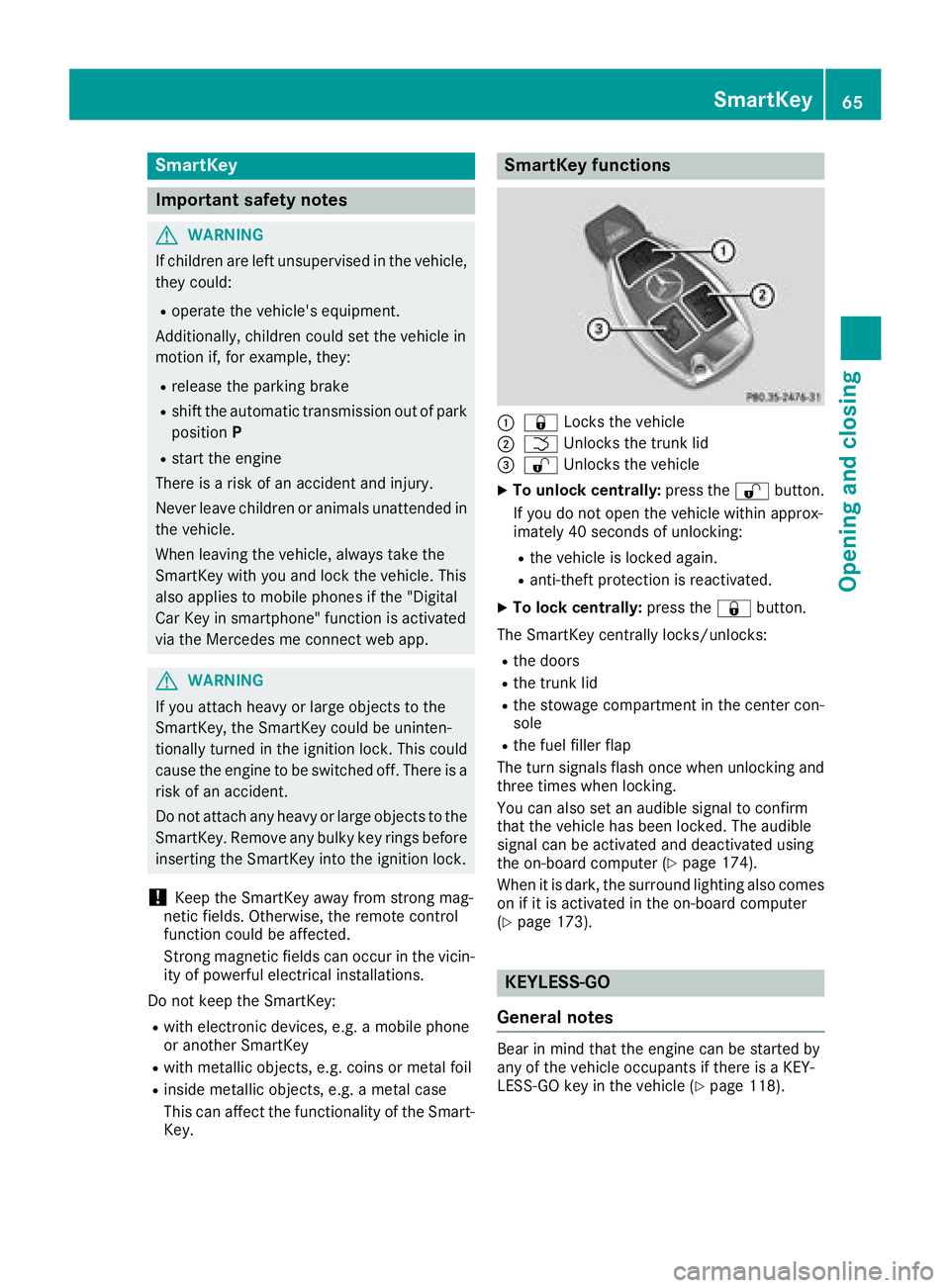
Key. SmartKey functions
C
7 Locks the vehicleD
T Unlock st he trunk lid
Page 72 of 298
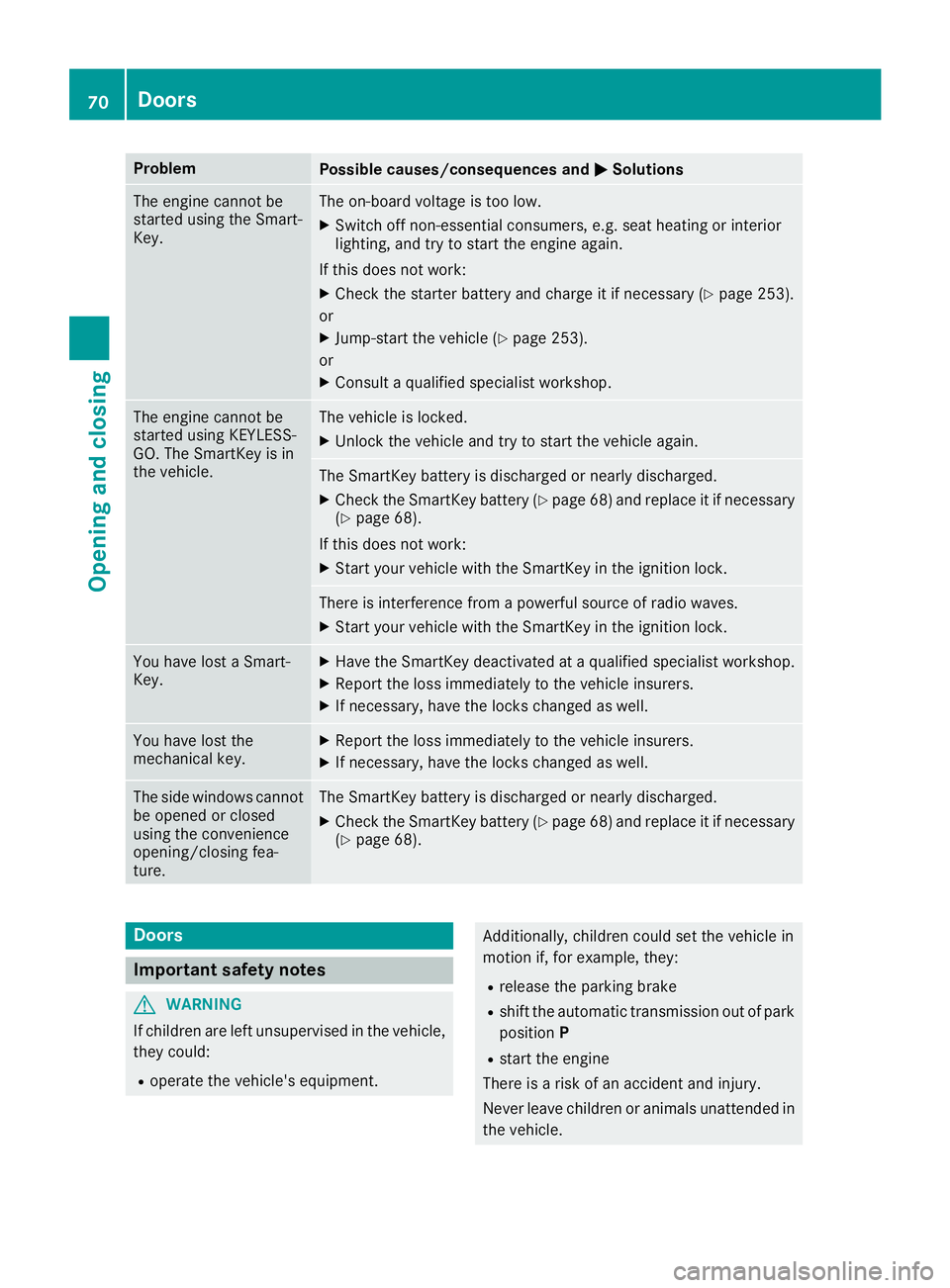
Problem
Possible causes/consequences and P Solutions
The engine cannot be
started using the Smart-
Key. The on-board voltage is too low. X
Switch off non-essential consumers, e.g. seat heating or interior
lighting, and try to start the engine again.
If this does not work: X
Check the starter battery and charge it if necessary ( Y
page 253).
or X
Jump-start the vehicle ( Y
page 253).
or X
Consult aq ualified specialist workshop.
The engine cannot be
started using KEYLESS-
GO. The SmartKey is in
the vehicle. The vehicle is locked. X
Unlock the vehicle and try to start the vehicle again.
The SmartKey battery is discharged or nearly discharged. X
Check the SmartKey battery ( Y
page 68) and replace it if necessary
( Y
page 68).
If this does not work: X
Start your vehicle with the SmartKey in the ignition lock.
There is interference from ap owerful source of radio waves.X
Start your vehicle with the SmartKey in the ignition lock.
You have lost aS mart-
Key. X
Have the SmartKey deactivated at aq ualified specialist workshop.X
Report the loss immediately to the vehicle insurers. X
If necessary, have the locks changed as well.
You have lost the
mechanical key. X
Report the loss immediately to the vehicle insurers. X
If necessary, have the locks changed as well.
The side windows cannot
be opened or closed
using the convenience
opening/closing fea-
ture. The SmartKey battery is discharged or nearly discharged. X
Check the SmartKey battery ( Y
page 68) and replace it if necessary
( Y
page 68).
Doors
Important safety notes
G WARNING
If children are left unsupervised in the vehicle,
they could: R
operate the vehicle's equipment. Additionally, children could set the vehicle in
motion if, for example, they: R
release the parking brake R
shift the automatic transmission out of park
position P R
start the engine
There is ar isk of an accident and injury.
Never leave children or animals unattended in
the vehicle.70
Doors
Opening and closing
Page 117 of 298
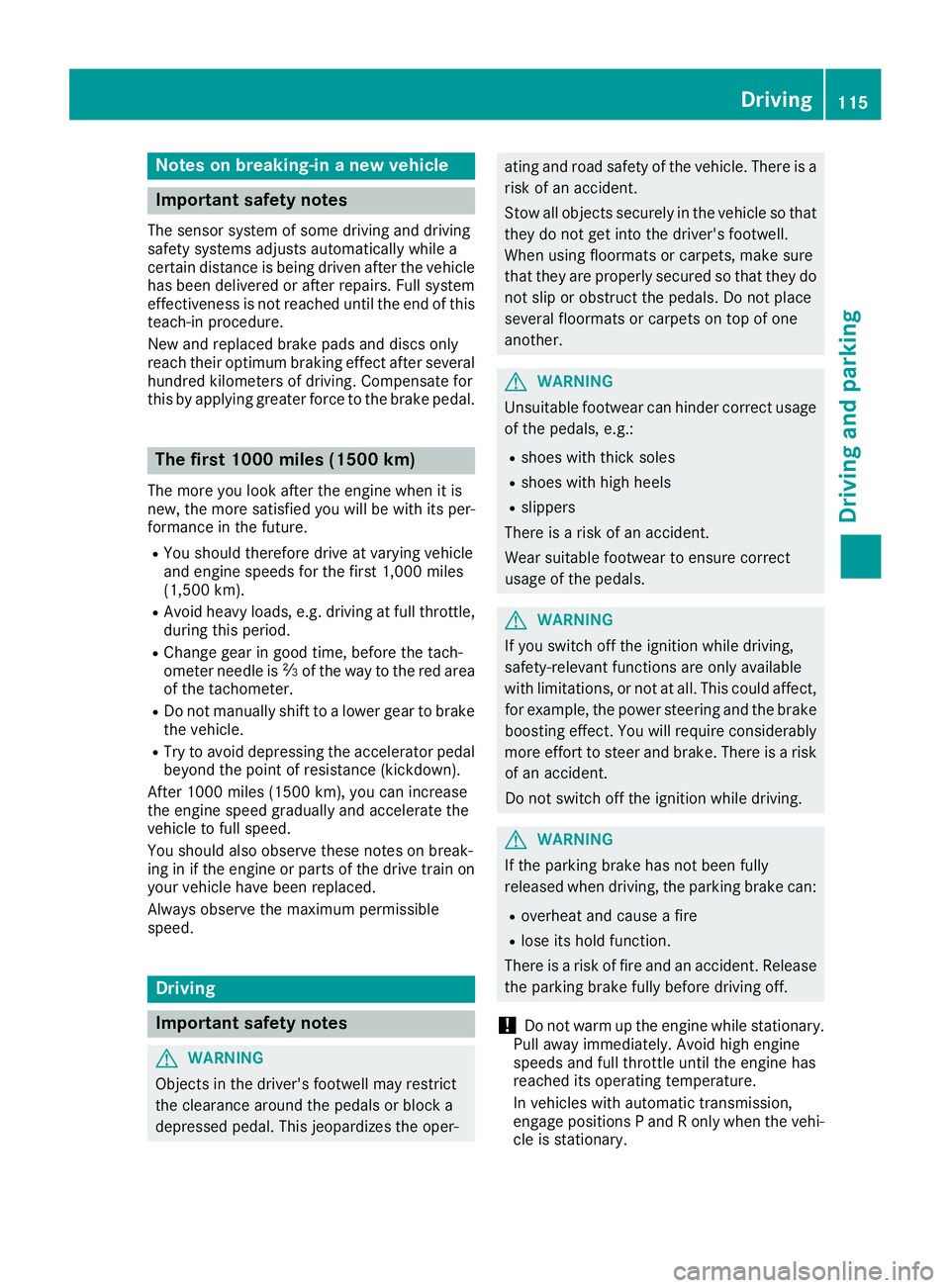
Note sonb reaking-in an ew vehicle
Important safety notes Th es en so rs ys te mofs om ed riving and driving
safety systems adjusts automaticall yw hile a
certai nd is tance is being driven after the vehicle
ha sb ee nd elivere dora ft er repairs. Full system
effectiveness is not reache du nti lt he end of this
teach-i np rocedure.
New and replaced brake pads and discs only
reach their optimum braking effect after several
hundred kilometers of driving. Compensate for
thi sb ya pplyin gg reate rf orce to the brake pedal.
The first 1000 miles (150 0k m)Th em or ey ou look after the engine when it is
new ,t he mor es at isfied yo uw il lbew it hi ts per-
formance in the future. R
Yo us houl dt herefore drive at varying vehicle
and engine speeds for the first 1,000 miles
(1,500 km). R
Avoi dh eavy loads, e.g .d riving at full throttle,
during thi sp eriod.R
Chang eg ea ring oo dt ime, befor et he tach-
ometer needl ei s