tow MERCEDES-BENZ SL CLASS 2019 Owner's Guide
[x] Cancel search | Manufacturer: MERCEDES-BENZ, Model Year: 2019, Model line: SL CLASS, Model: MERCEDES-BENZ SL CLASS 2019Pages: 330, PDF Size: 16.53 MB
Page 167 of 330
HOLD function
General notes
The HOLD function can assist the driver in thefollowing situations:
RWhen pulling away, especially on steepslopes
RWhen maneuvering on steep slopes
RWhen waiting in traffic
The vehicle is kept stationary without thedriver having to depress the brake pedal.
The braking effect is canceled and the HOLDfunction deactivated when you depress theaccelerator pedal to pull away.
Important safety notes
GWARNING
If the vehicle is only braked using the HOLD
function, the vehicle may roll away in the fol-
lowing situations when you leave the vehi-
cle:
Rif there is a malfunction in the system or
in the voltage supply
Rif the HOLD function is deactivated by
depressing the accelerator pedal or brake
pedal, e.g. by a vehicle occupant
There is a risk of an accident.
Always deactivate the HOLD function and
secure the vehicle against rolling away
before you leave it.
!When Active Distance Assist DISTRONICor the HOLD function is activated, the vehi-cle brakes automatically in certain situa-tions.
To avoid damage to the vehicle, deactivateActive Distance Assist DISTRONIC and theHOLD function in the following or similar sit-uations:
Rwhen towing the vehicle
Rin the car wash
Deactivating the HOLD function (Ypage 165).
Activation conditions
You can activate the HOLD function if all of thefollowing conditions are fulfilled:
Rthe vehicle is stationary.
Rthe engine is running or if it has been auto-matically switched off by the ECO start/stop function.
Rthe driver's door is closed or your seat beltis fastened.
Rthe electric parking brake is released.
Rthe transmission is in position[,^or\\.
RActive Distance Assist DISTRONIC is deacti-vated
Activating the HOLD function
XMake sure that the activation conditions aremet.
XDepress the brake pedal.
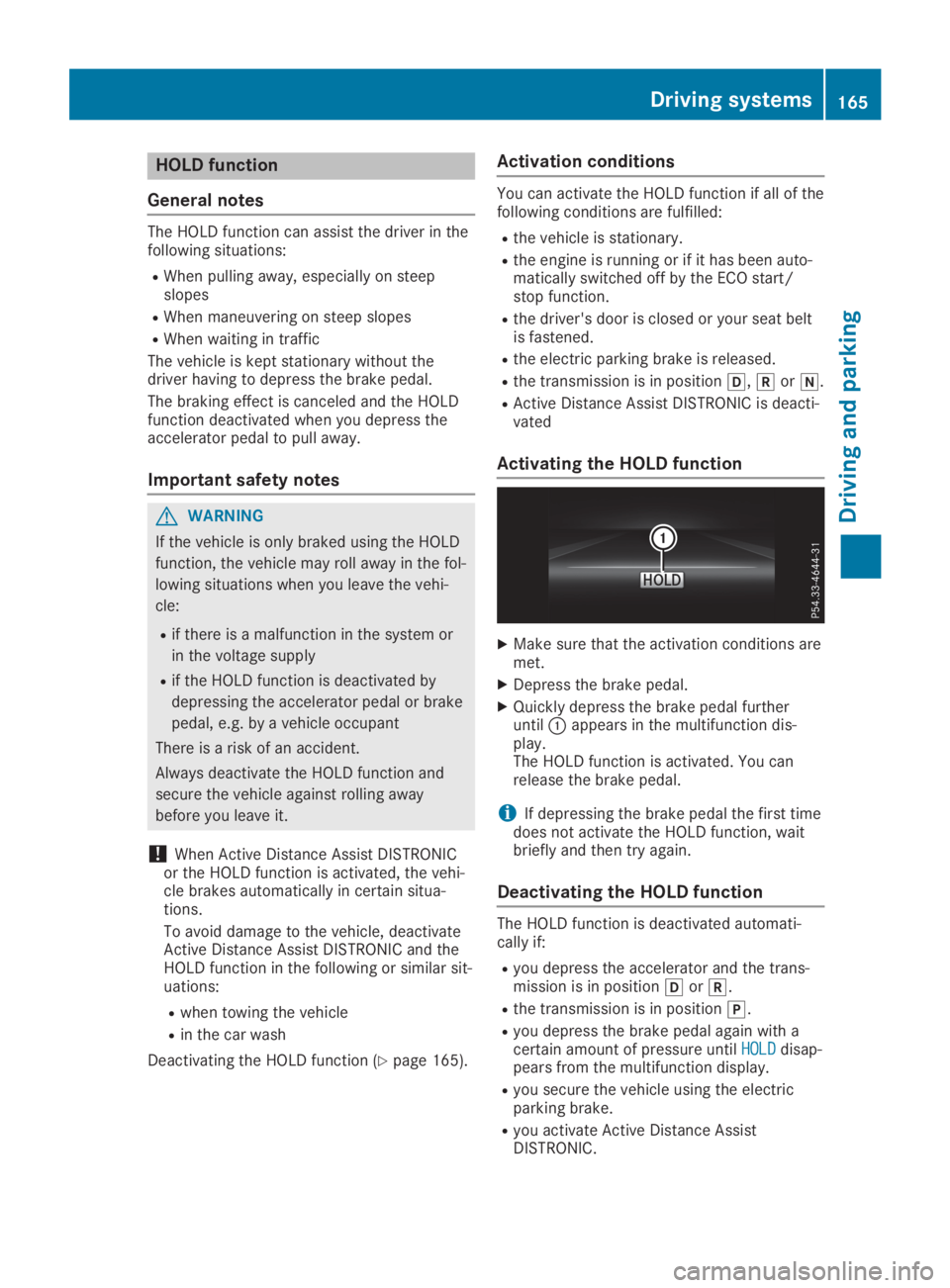
XQuickly depress the brake pedal furtheruntilCappears in the multifunction dis-play.The HOLD function is activated. You canrelease the brake pedal.
iIf depressing the brake pedal the first timedoes not activate the HOLD function, waitbriefly and then try again.
Deactivating the HOLD function
The HOLD function is deactivated automati-cally if:
Ryou depress the accelerator and the trans-mission is in position[or^.
Rthe transmission is in position].
Ryou depress the brake pedal again with acertain amount of pressure untilHOLDHOLDdisap-pears from the multifunction display.
Ryou secure the vehicle using the electricparking brake.
Ryou activate Active Distance AssistDISTRONIC.
Driving systems165
Driving and parking
Z
Page 182 of 330
Under the following circumstances, the rearview camera will not function, or will functionin a limited manner:
Rif the trunk lid is open
Rin heavy rain, snow or fog
Rat night or in very dark places
Rif the camera is exposed to very bright light
Rif the area is lit by fluorescent bulbs or LEDlighting (the display may flicker)
Rif there is a sudden change in temperature,e.g. when driving into a heated garage inwinter
Rif the camera lens is dirty or obstructed.Observe the notes on cleaning(Ypage 275)
Rif the rear of your vehicle is damaged. In thiscase, have the camera position and settingchecked at a qualified specialist workshop.
The field of vision and other functions of therear view camera may be restricted due toadditional accessories on the rear of the vehi-cle (e.g. license plate holder, bicycle rack).
On vehicles with height-adjustable chassis,leaving the standard height can result in inac-curacies in the guide lines, depending on tech-nical conditions.
iThe contrast of the display may be affec-ted by the sudden presence of sunlight orother light sources, e.g. when exiting agarage. Pay particular attention in this situa-tion.
iIf usability is severely restricted, e.g. dueto pixel errors, have the display repaired orreplaced.
Activating/deactivating the rear view
camera
XTo activate:make sure that the SmartKeyis in positionHin the ignition lock.
XMake sure that theActivation by R gearActivation by R gearfunction is selected in the multimedia sys-tem; see the Digital Operator's Manual.
XEngage reverse gear.The multimedia system shows the areabehind the vehicle with guide lines.
The image from the rear view camera isavailable throughout the maneuvering proc-ess.
To deactivate:the rear view camera deacti-vates if you shift the transmission to position], or after driving forwards a short distance.
The inner segments of the warning indicatorare displayed in red if there is a complete sys-tem failure. The indicator lamp in thePARKTRONIC button lights up.
If the system fails at the rear of the vehicle:
Rthe rear segments are shown in red whenbacking up.
Rthe rear segments are hidden when drivingforwards.
Displays in the multimedia system
The rear view camera may show a distortedview of obstacles, show them incorrectly ornot at all. The rear view camera does not showobjects in the following positions:
Rvery close to the rear bumper
Runder the rear bumper
Rin close range above the handle on the trunklid
!Objects not at ground level may appear tobe further away than they actually are, e.g.:
Rthe bumper of a parked vehicle
Rthe drawbar of a trailer
Rthe ball coupling of a trailer tow hitch
Rthe rear section of an HGV
Ra slanted post
Use the guidelines only for orientation.Approach objects no further than the bot-tom-most guideline.
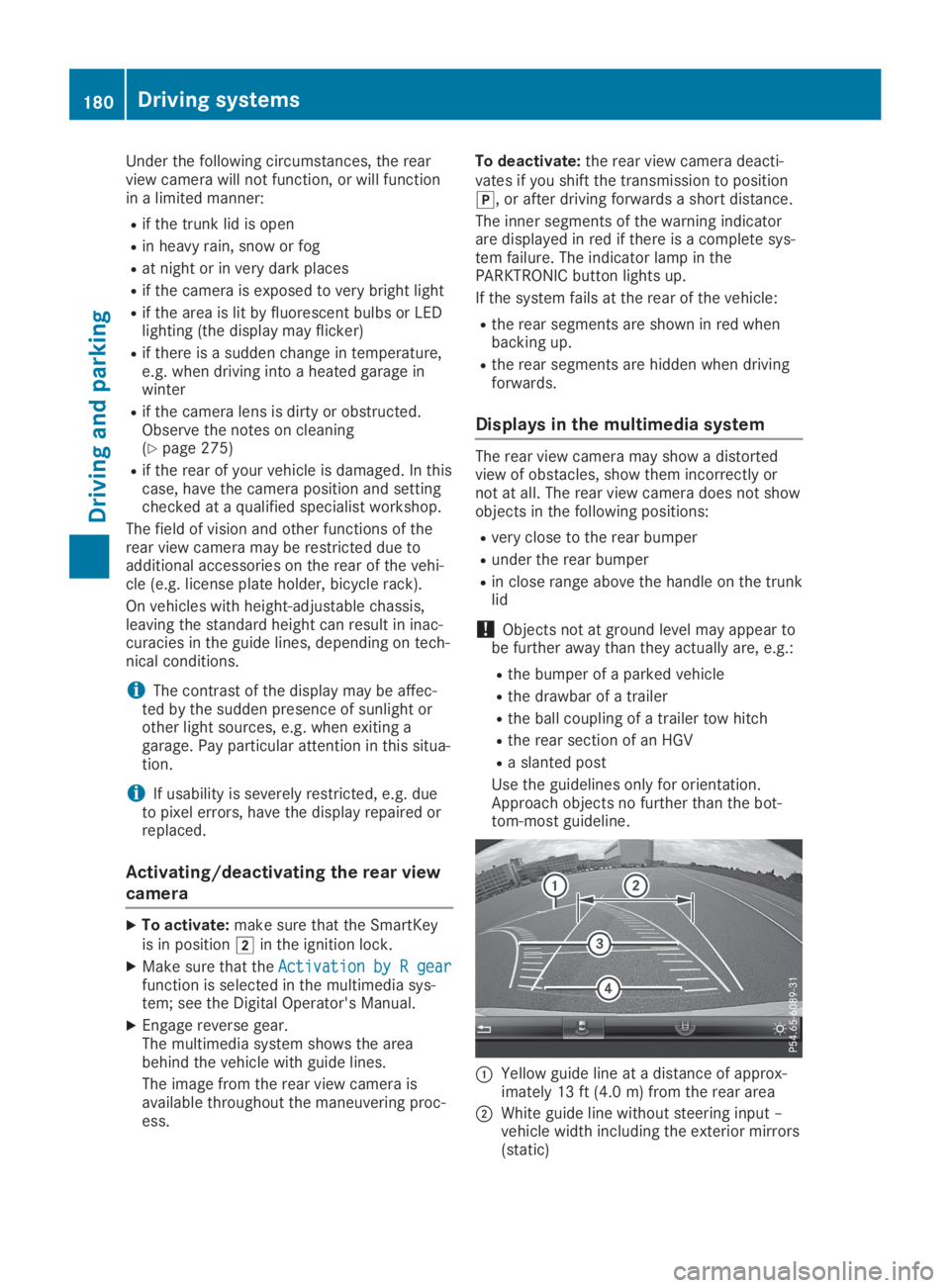
CYellow guide line at a distance of approx-imately 13 ft (4.0 m) from the rear area
DWhite guide line without steering input –vehicle width including the exterior mirrors(static)
180Driving systems
Driving and parking
Page 211 of 330
Display messagesPossible causes/consequences andPPSolutions
The yellow$warning lamp and the redI(USA only) or$(Canada only) indicator lamp light up.
The electric parking brake is malfunctioning.
To release:
XSwitch off the ignition and turn it back on.
XRelease the electric parking brake manually.
or
XRelease the electric parking brake automatically (Ypage 147).
If the electric parking brake still cannot be released:
XDo not drive on.
XConsult a qualified specialist workshop.
The redI(USA only) or$(Canada only) indicator lampflashes and the yellow$warning lamp lights up.
The electric parking brake is malfunctioning.
To release:
XSwitch off the ignition and turn it back on.
XRelease the electric parking brake manually.
To apply:
XSwitch off the ignition and turn it back on.
XApply the electric parking brake manually.
If the redI(USA only) or$(Canada only) indicator lampcontinues to flash:
XDo not drive on.
XSecure the vehicle against rolling away (Ypage 314).
XShift the transmission to position].
XTurn the front wheels towards the curb.
XConsult a qualified specialist workshop.
Displaymessages209
On-b oard computer and displays
Z
Page 250 of 330
displayed (see the manufacturer's operatinginstructions).
Media mode
General notes
If you wish to play external media sources, theappropriate media mode must already beturned on. Further information on media mode(see the Digital Operator's Manual).
The following external media sources can beused:
RApple®devices (e.g. iPhone®)
RUSB devices (e.g. USB stick, MP3 player)(Ypage 248)
RCD
RDVD (COMAND)
RSD cards
RVia devices connected by Bluetooth®
iInformation on single CD/DVD drive orDVD changer (see the Digital Operator'sManual).
Selecting using the device list
Multimedia system:
XSelectMediaMedia{DevicesDevices.The available media sources will be shown.The;dot indicates the current setting.
XSelect the media source.Playable files are played.
Inserting/removing an SD card
Important safety notes
GWARNING
SD cards are small parts. They can be swal-
lowed and cause choking. This poses an
increased risk of injury or even fatal injury.
Keep the SD card out of the reach of chil-
dren. If a SD card is swallowed, seek medi-
cal attention immediately.
!If the SD card is no longer in use, youshould take it out and remove it from thevehicle. High temperatures can damage thecard.
Inserting an SD card
The SD card slot is located on the controlpanel.
XInsert the SD card into the SD card slot untilthe SD card engages. The side with the con-tacts must face down.
Removing an SD card
XPress the SD card.The SD card is ejected.
XRemove the SD card.
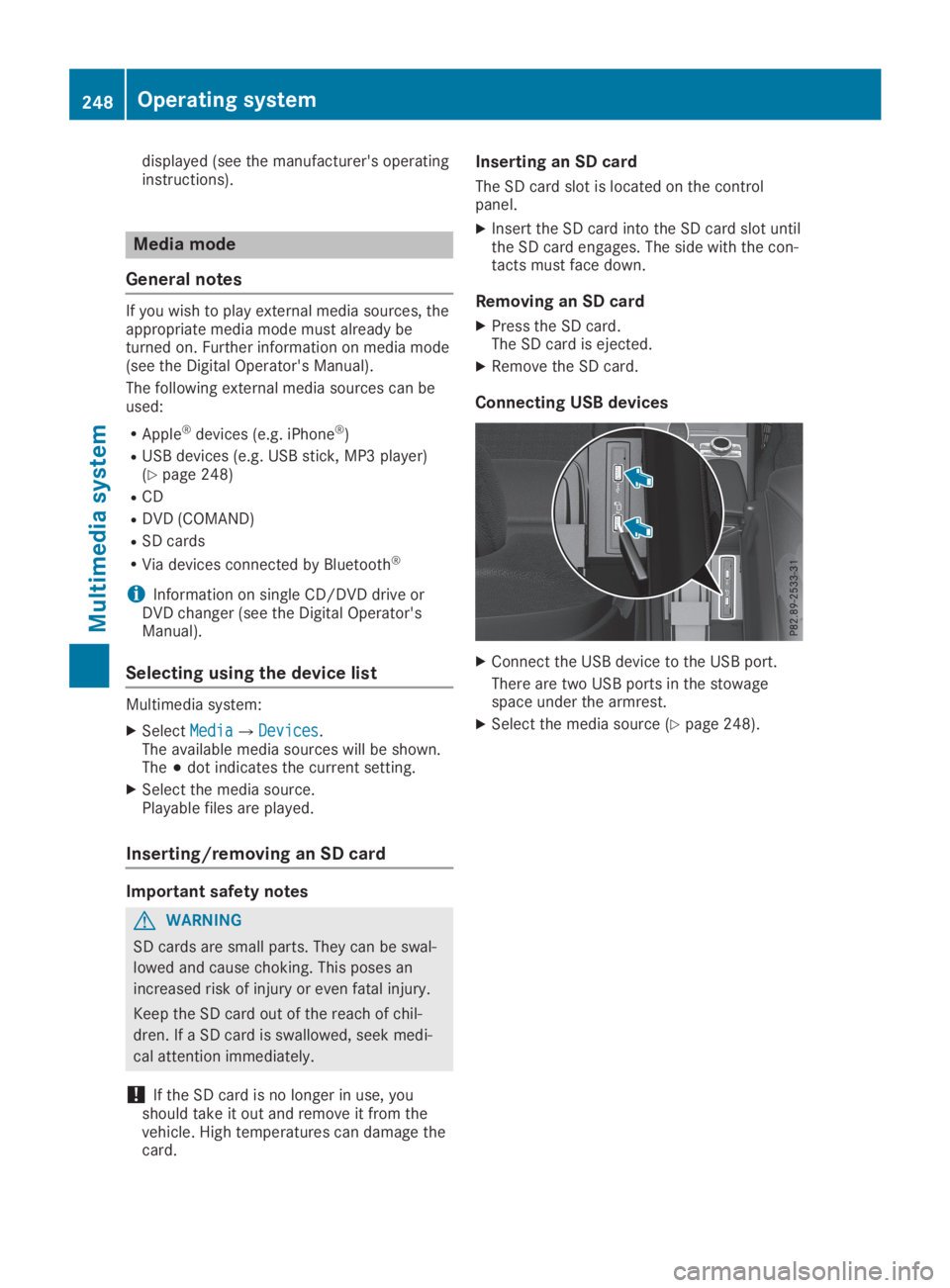
Connecting USB devices
XConnect the USB device to the USB port.
There are two USB ports in the stowagespace under the armrest.
XSelect the media source (Ypage 248).
248Operating system
Multimedia system
Page 251 of 330
Stowage areas
Stowage spaces
Important safety notes
GWARNING
If objects in the passenger compartment are
stowed incorrectly, they can slide or be
thrown around and hit vehicle occupants. In
addition, cup holders, open stowage spaces
and mobile phone brackets cannot always
retain all objects they contain. There is a
risk of injury, particularly in the event of sud-
den braking or a sudden change in direction.
RAlways stow objects so that they cannot
be thrown around in such situations.
RAlways make sure that objects do not pro-
trude from stowage spaces, parcel nets or
stowage nets.
RClose the lockable stowage spaces before
starting a journey.
RAlways stow and secure heavy, hard, poin-
ted, sharp-edged, fragile or bulky objects
in the trunk.
Glove compartment
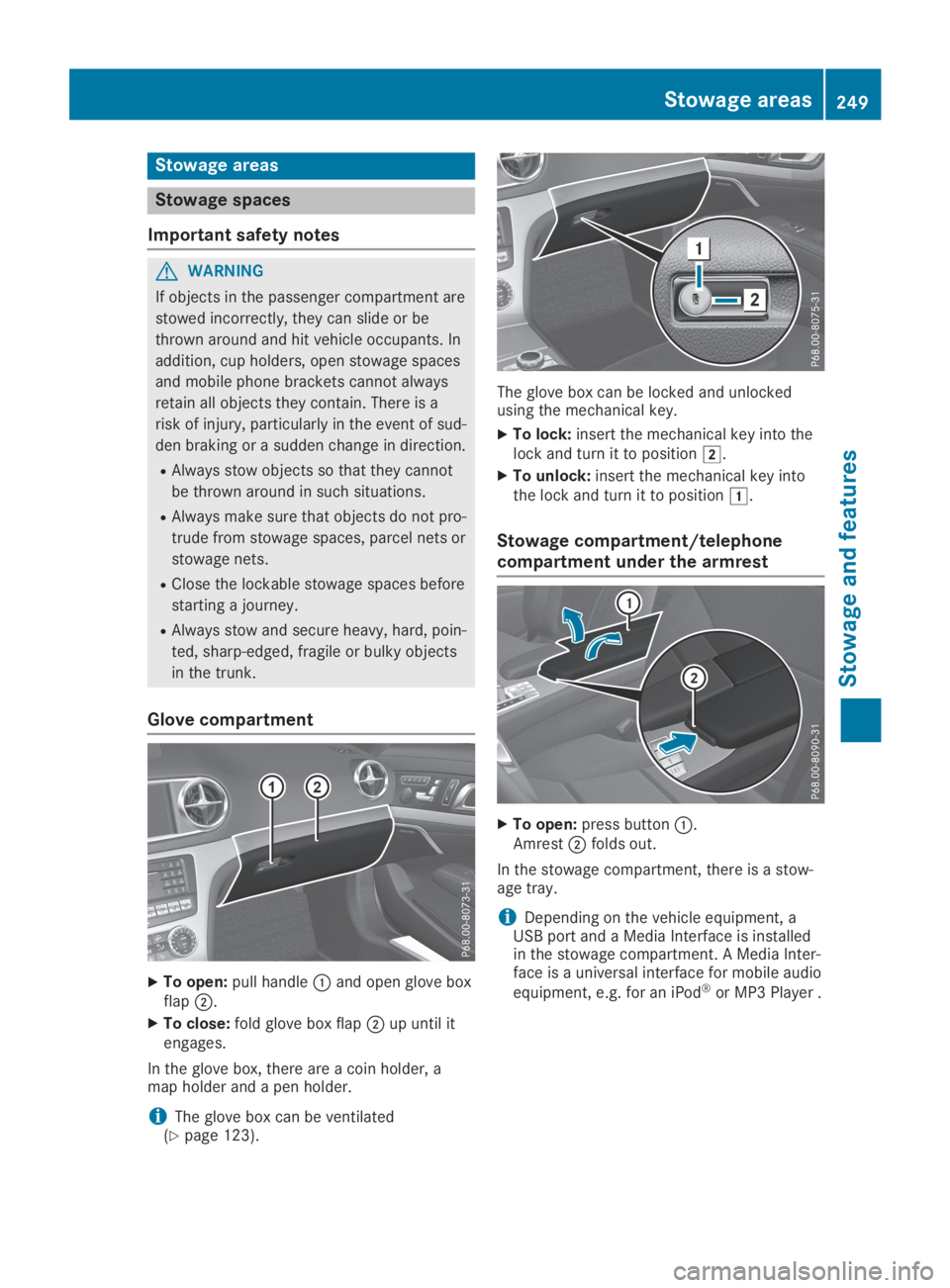
XTo open:pull handleCand open glove boxflapD.
XTo close:fold glove box flapDup until itengages.
In the glove box, there are a coin holder, amap holder and a pen holder.
iThe glove box can be ventilated(Ypage 123).
The glove box can be locked and unlockedusing the mechanical key.
XTo lock:insert the mechanical key into thelock and turn it to positionH.
XTo unlock:insert the mechanical key intothe lock and turn it to positionG.
Stowage compartment/telephone
compartment under the armrest
XTo open:press buttonC.AmrestDfolds out.
In the stowage compartment, there is a stow-age tray.
iDepending on the vehicle equipment, aUSB port and a Media Interface is installedin the stowage compartment. A Media Inter-face is a universal interface for mobile audio
equipment, e.g. for an iPod®or MP3 Player .
Stowage areas249
Stowage and features
Z
Page 252 of 330
Eyeglasses compartment
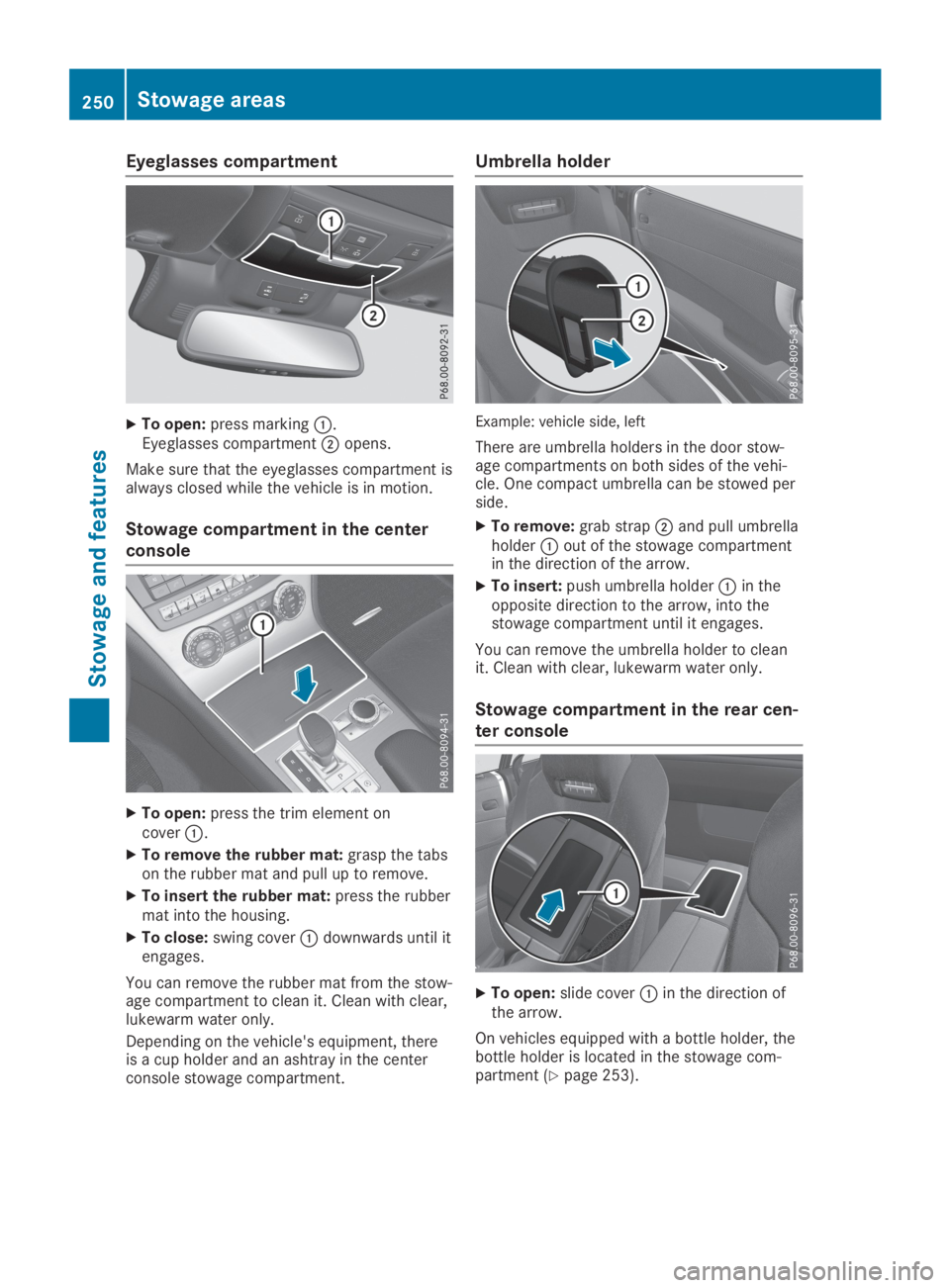
XTo open:press markingC.Eyeglasses compartmentDopens.
Make sure that the eyeglasses compartment isalways closed while the vehicle is in motion.
Stowage compartment in the center
console
XTo open:press the trim element oncoverC.
XTo remove the rubber mat:grasp the tabson the rubber mat and pull up to remove.
XTo insert the rubber mat:press the rubbermat into the housing.
XTo close:swing coverCdownwards until itengages.
You can remove the rubber mat from the stow-age compartment to clean it. Clean with clear,lukewarm water only.
Depending on the vehicle's equipment, thereis a cup holder and an ashtray in the centerconsole stowage compartment.
Umbrella holder
Example: vehicle side, left
There are umbrella holders in the door stow-age compartments on both sides of the vehi-cle. One compact umbrella can be stowed perside.
XTo remove:grab strapDand pull umbrellaholderCout of the stowage compartmentin the direction of the arrow.
XTo insert:push umbrella holderCin theopposite direction to the arrow, into thestowage compartment until it engages.
You can remove the umbrella holder to cleanit. Clean with clear, lukewarm water only.
Stowage compartment in the rear cen-
ter console
XTo open:slide coverCin the direction ofthe arrow.
On vehicles equipped with a bottle holder, thebottle holder is located in the stowage com-partment (Ypage 253).
250Stowage areas
Stowage and features
Page 253 of 330
Stowage compartment in the rear
passenger compartment
Only the left side of the vehicle features a rearstowage compartment.
XOpen the seat belt guide and remove theseat belt (Ypage 99).
XMove the left-hand front seat forward(Ypage 100) and fold the seat backrestforward.
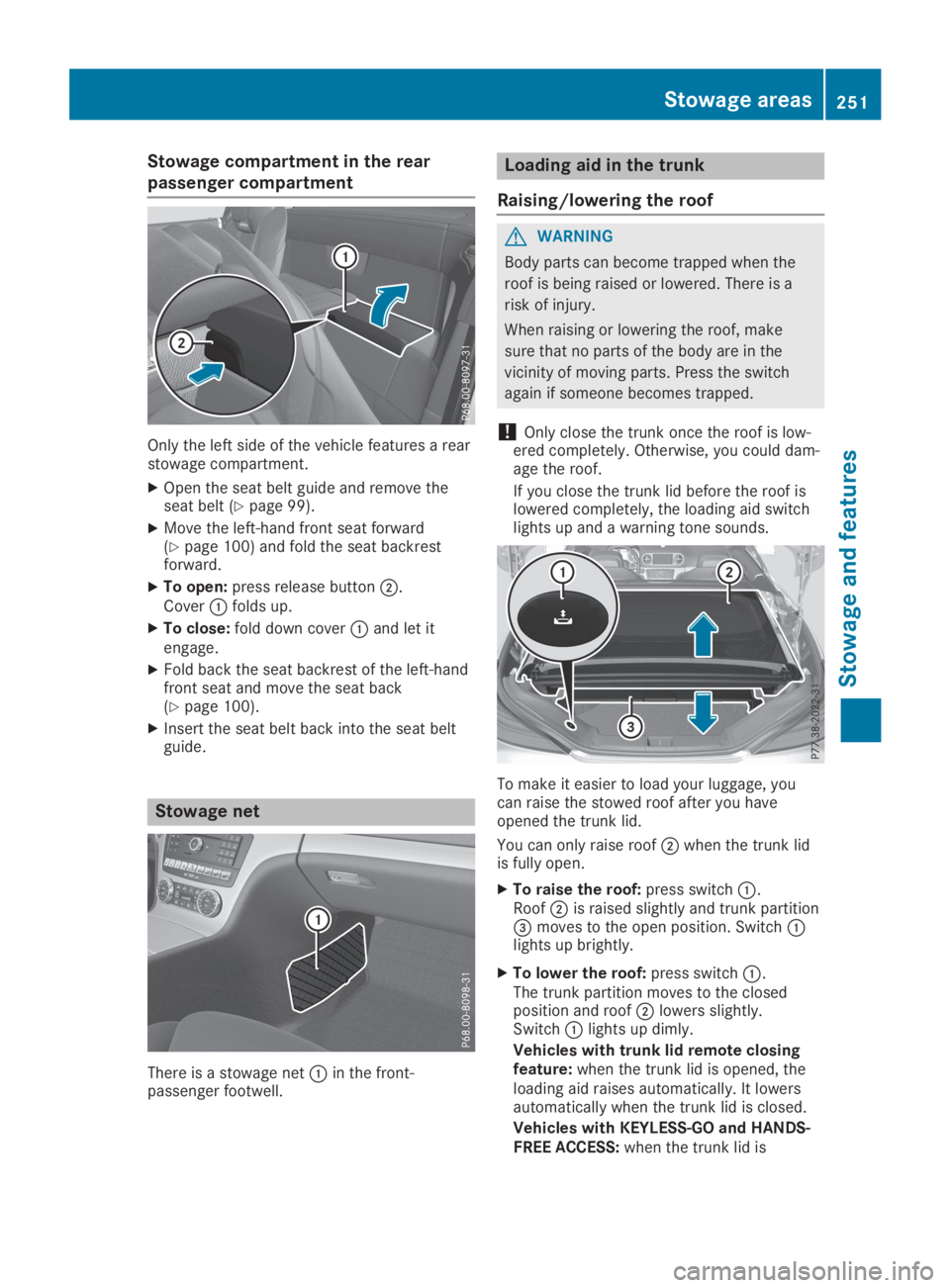
XTo open:press release buttonD.CoverCfolds up.
XTo close:fold down coverCand let itengage.
XFold back the seat backrest of the left-handfront seat and move the seat back(Ypage 100).
XInsert the seat belt back into the seat beltguide.
Stowage net
There is a stowage netCin the front-passenger footwell.
Loading aid in the trunk
Raising/lowering the roof
GWARNING
Body parts can become trapped when the
roof is being raised or lowered. There is a
risk of injury.
When raising or lowering the roof, make
sure that no parts of the body are in the
vicinity of moving parts. Press the switch
again if someone becomes trapped.
!Only close the trunk once the roof is low-ered completely. Otherwise, you could dam-age the roof.
If you close the trunk lid before the roof islowered completely, the loading aid switchlights up and a warning tone sounds.
To make it easier to load your luggage, youcan raise the stowed roof after you haveopened the trunk lid.
You can only raise roofDwhen the trunk lidis fully open.
XTo raise the roof:press switchC.RoofDis raised slightly and trunk partition
Page 254 of 330
opened, the loading aid rises automatically.When the roof is closed, the trunk partitionremains in the open position. The trunk par-
tition moves to the closed position automat-ically when the roof is lowered.
Problems with the loading aid
ProblemPossible causes/consequences andPPSolutions
It is no longer possibleto lower the stowedroof in the trunk usingthe loading aid.
You cannot close the trunk any more.
XCall a qualified specialist workshop.
Stowage well under the trunk floor
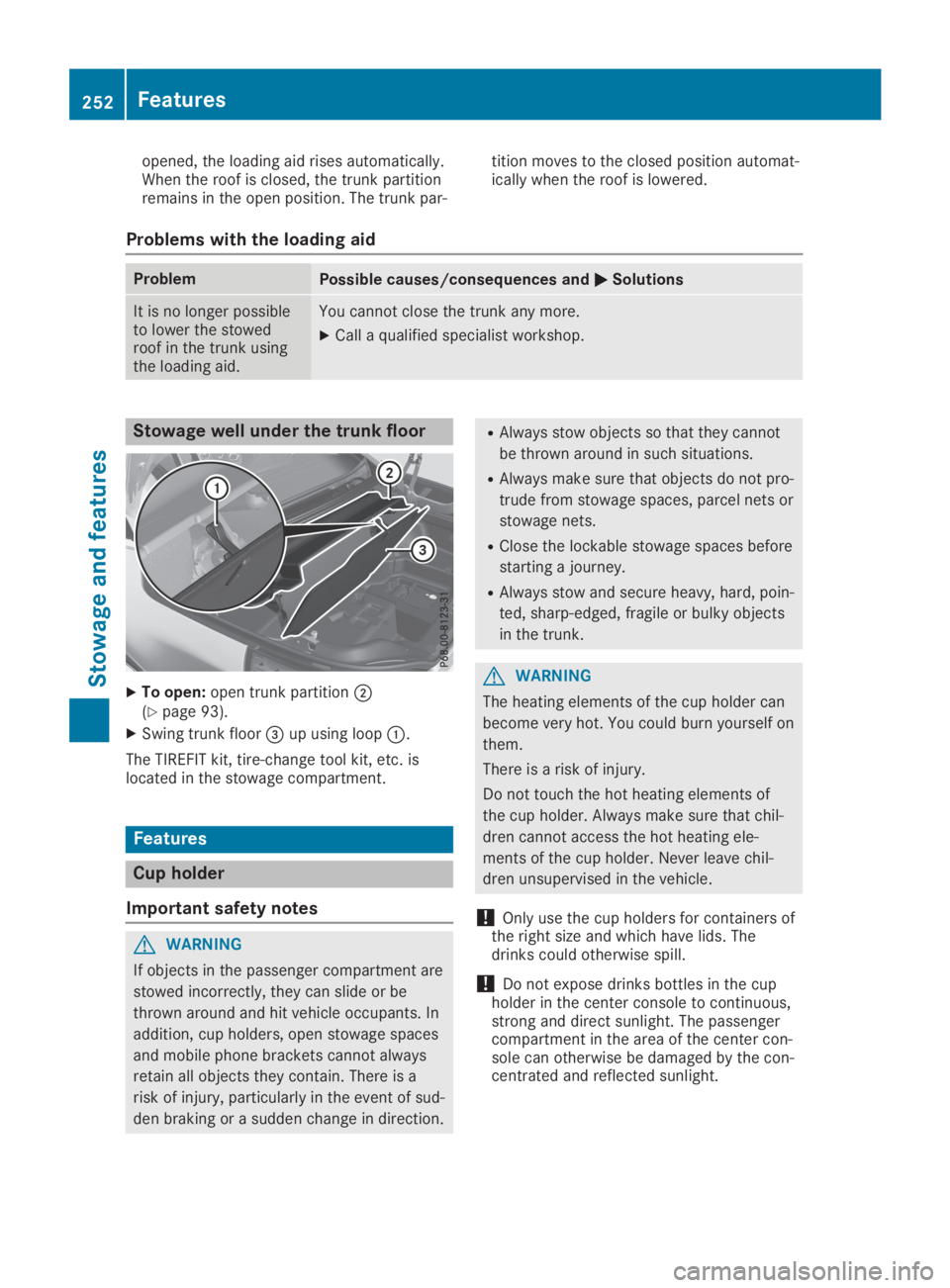
XTo open:open trunk partitionD(Ypage 93).
XSwing trunk floor
Page 255 of 330
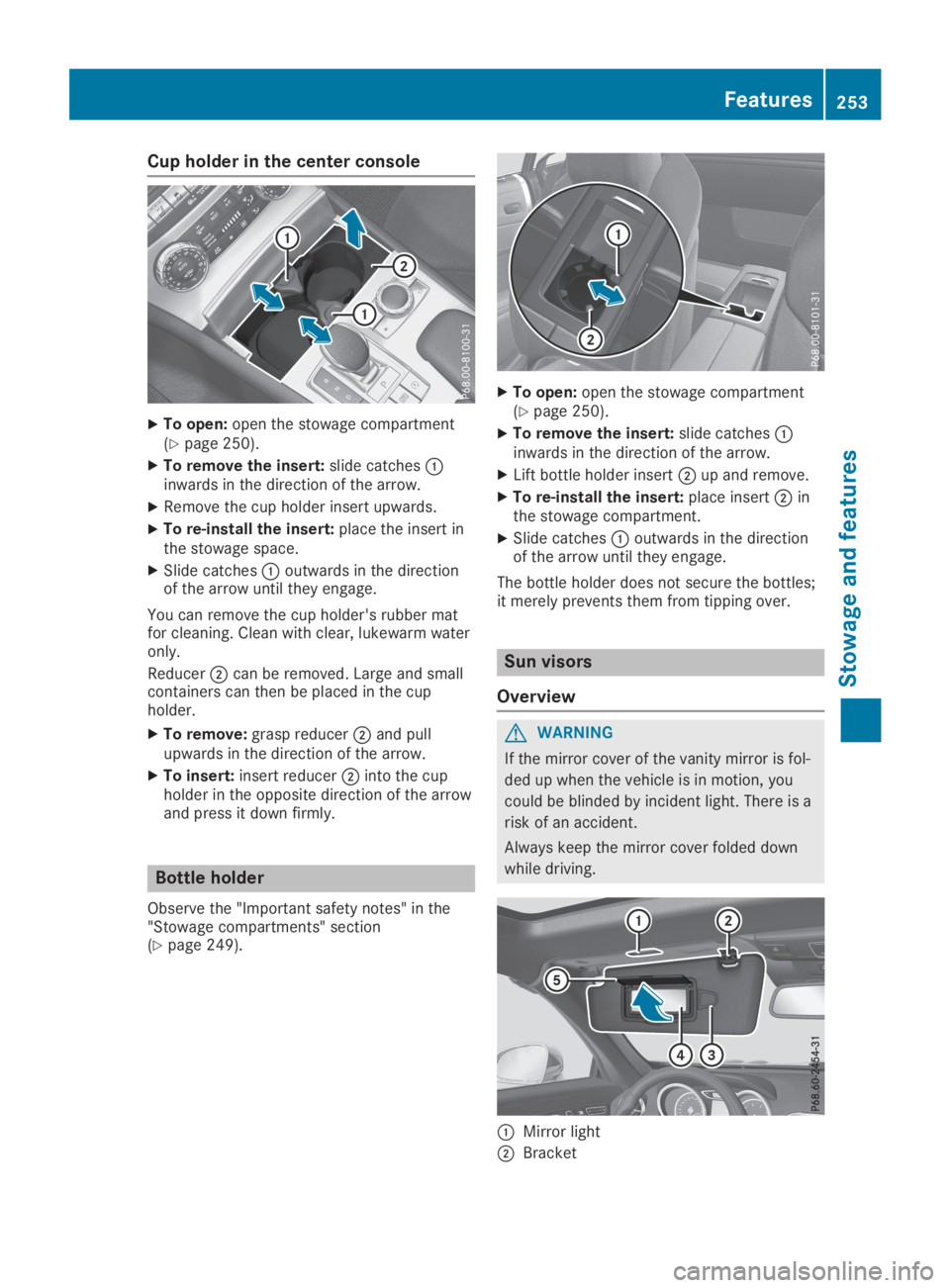
Cup holder in the center console
XTo open:open the stowage compartment(Ypage 250).
XTo remove the insert:slide catchesCinwards in the direction of the arrow.
XRemove the cup holder insert upwards.
XTo re-install the insert:place the insert inthe stowage space.
XSlide catchesCoutwards in the directionof the arrow until they engage.
You can remove the cup holder's rubber matfor cleaning. Clean with clear, lukewarm wateronly.
ReducerDcan be removed. Large and smallcontainers can then be placed in the cupholder.
XTo remove:grasp reducerDand pullupwards in the direction of the arrow.
XTo insert:insert reducerDinto the cupholder in the opposite direction of the arrowand press it down firmly.
Bottle holder
Observe the "Important safety notes" in the"Stowage compartments" section(Ypage 249).
XTo open:open the stowage compartment(Ypage 250).
XTo remove the insert:slide catchesCinwards in the direction of the arrow.
XLift bottle holder insertDup and remove.
XTo re-install the insert:place insertDinthe stowage compartment.
XSlide catchesCoutwards in the directionof the arrow until they engage.
The bottle holder does not secure the bottles;it merely prevents them from tipping over.
Sun visors
Overview
GWARNING
If the mirror cover of the vanity mirror is fol-
ded up when the vehicle is in motion, you
could be blinded by incident light. There is a
risk of an accident.
Always keep the mirror cover folded down
while driving.
CMirror light
DBracket
Features253
Stowage and features
Z
Page 259 of 330
This can occur, for example, if the relevantmobile phone network is not available. Theindicator lamp in the SOS button flashes con-tinuously.
TheCall FailedCall Failedmessage appears in themultifunction display and must be confirmed.
In this case, summon assistance by othermeans.
Making an emergency call
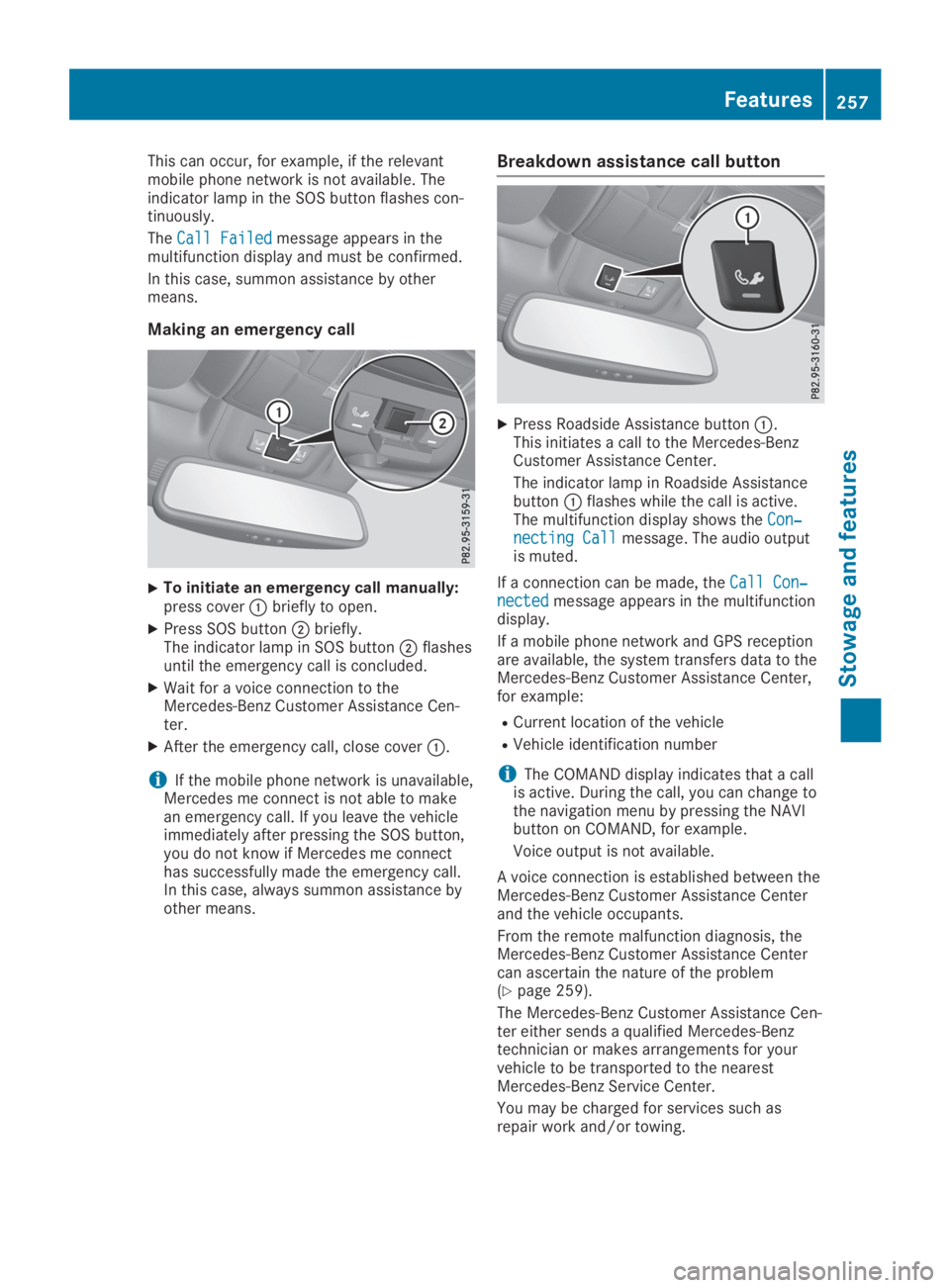
XTo initiate an emergency call manually:press coverCbriefly to open.
XPress SOS buttonDbriefly.The indicator lamp in SOS buttonDflashesuntil the emergency call is concluded.
XWait for a voice connection to theMercedes-Benz Customer Assistance Cen-ter.
XAfter the emergency call, close coverC.
iIf the mobile phone network is unavailable,Mercedes me connect is not able to makean emergency call. If you leave the vehicleimmediately after pressing the SOS button,you do not know if Mercedes me connecthas successfully made the emergency call.In this case, always summon assistance byother means.
Breakdown assistance call button
XPress Roadside Assistance buttonC.This initiates a call to the Mercedes-BenzCustomer Assistance Center.
The indicator lamp in Roadside AssistancebuttonCflashes while the call is active.The multifunction display shows theCon‐Con‐necting Callnecting Callmessage. The audio outputis muted.
If a connection can be made, theCall Con‐Call Con‐nectednectedmessage appears in the multifunctiondisplay.
If a mobile phone network and GPS receptionare available, the system transfers data to theMercedes-Benz Customer Assistance Center,for example:
RCurrent location of the vehicle
RVehicle identification number
iThe COMAND display indicates that a callis active. During the call, you can change tothe navigation menu by pressing the NAVIbutton on COMAND, for example.
Voice output is not available.
A voice connection is established between theMercedes-Benz Customer Assistance Centerand the vehicle occupants.
From the remote malfunction diagnosis, theMercedes-Benz Customer Assistance Centercan ascertain the nature of the problem(Ypage 259).
The Mercedes-Benz Customer Assistance Cen-ter either sends a qualified Mercedes-Benztechnician or makes arrangements for yourvehicle to be transported to the nearestMercedes-Benz Service Center.
You may be charged for services such asrepair work and/or towing.
Features257
Stowage and features
Z