ECU MERCEDES-BENZ SL CLASS 2019 Service Manual
[x] Cancel search | Manufacturer: MERCEDES-BENZ, Model Year: 2019, Model line: SL CLASS, Model: MERCEDES-BENZ SL CLASS 2019Pages: 330, PDF Size: 16.53 MB
Page 249 of 330
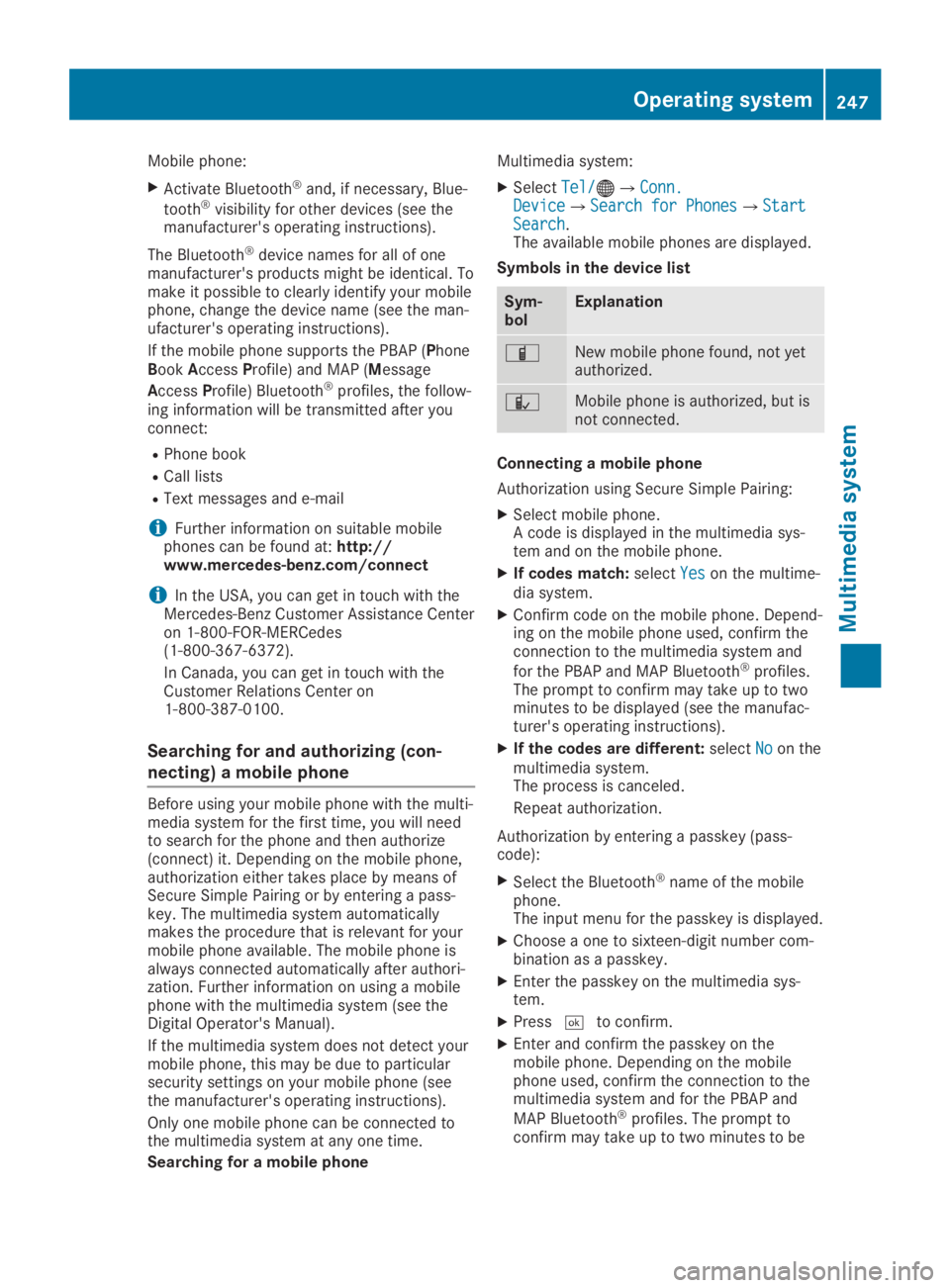
Mobile phone:
XActivate Bluetooth®and, if necessary, Blue-
tooth®visibility for other devices (see themanufacturer's operating instructions).
The Bluetooth®device names for all of onemanufacturer's products might be identical. Tomake it possible to clearly identify your mobilephone, change the device name (see the man-ufacturer's operating instructions).
If the mobile phone supports the PBAP (PhoneBookAccessProfile) and MAP (Message
AccessProfile) Bluetooth®profiles, the follow-ing information will be transmitted after youconnect:
RPhone book
RCall lists
RText messages and e-mail
iFurther information on suitable mobilephones can be found at:http://www.mercedes-benz.com/connect
iIn the USA, you can get in touch with theMercedes-Benz Customer Assistance Centeron 1-800-FOR-MERCedes(1-800-367-6372).
In Canada, you can get in touch with theCustomer Relations Center on1-800-387-0100.
Searching for and authorizing (con-
necting) a mobile phone
Before using your mobile phone with the multi-media system for the first time, you will needto search for the phone and then authorize(connect) it. Depending on the mobile phone,authorization either takes place by means ofSecure Simple Pairing or by entering a pass-key. The multimedia system automaticallymakes the procedure that is relevant for yourmobile phone available. The mobile phone isalways connected automatically after authori-zation. Further information on using a mobilephone with the multimedia system (see theDigital Operator's Manual).
If the multimedia system does not detect yourmobile phone, this may be due to particularsecurity settings on your mobile phone (seethe manufacturer's operating instructions).
Only one mobile phone can be connected tothe multimedia system at any one time.
Searching for a mobile phone
Multimedia system:
XSelectTel/Tel/
Page 251 of 330
Stowage areas
Stowage spaces
Important safety notes
GWARNING
If objects in the passenger compartment are
stowed incorrectly, they can slide or be
thrown around and hit vehicle occupants. In
addition, cup holders, open stowage spaces
and mobile phone brackets cannot always
retain all objects they contain. There is a
risk of injury, particularly in the event of sud-
den braking or a sudden change in direction.
RAlways stow objects so that they cannot
be thrown around in such situations.
RAlways make sure that objects do not pro-
trude from stowage spaces, parcel nets or
stowage nets.
RClose the lockable stowage spaces before
starting a journey.
RAlways stow and secure heavy, hard, poin-
ted, sharp-edged, fragile or bulky objects
in the trunk.
Glove compartment
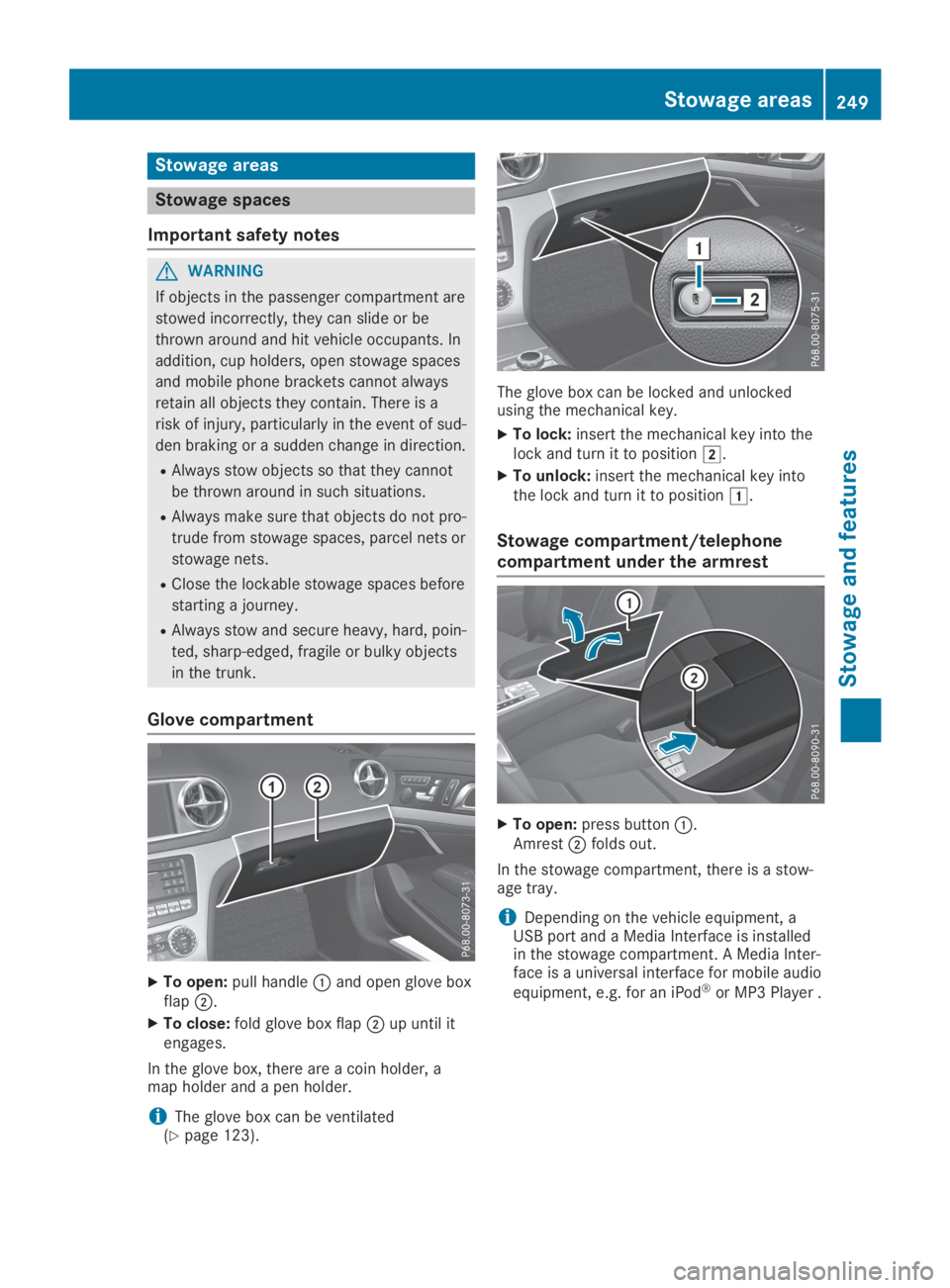
XTo open:pull handleCand open glove boxflapD.
XTo close:fold glove box flapDup until itengages.
In the glove box, there are a coin holder, amap holder and a pen holder.
iThe glove box can be ventilated(Ypage 123).
The glove box can be locked and unlockedusing the mechanical key.
XTo lock:insert the mechanical key into thelock and turn it to positionH.
XTo unlock:insert the mechanical key intothe lock and turn it to positionG.
Stowage compartment/telephone
compartment under the armrest
XTo open:press buttonC.AmrestDfolds out.
In the stowage compartment, there is a stow-age tray.
iDepending on the vehicle equipment, aUSB port and a Media Interface is installedin the stowage compartment. A Media Inter-face is a universal interface for mobile audio
equipment, e.g. for an iPod®or MP3 Player .
Stowage areas249
Stowage and features
Z
Page 255 of 330
Cup holder in the center console
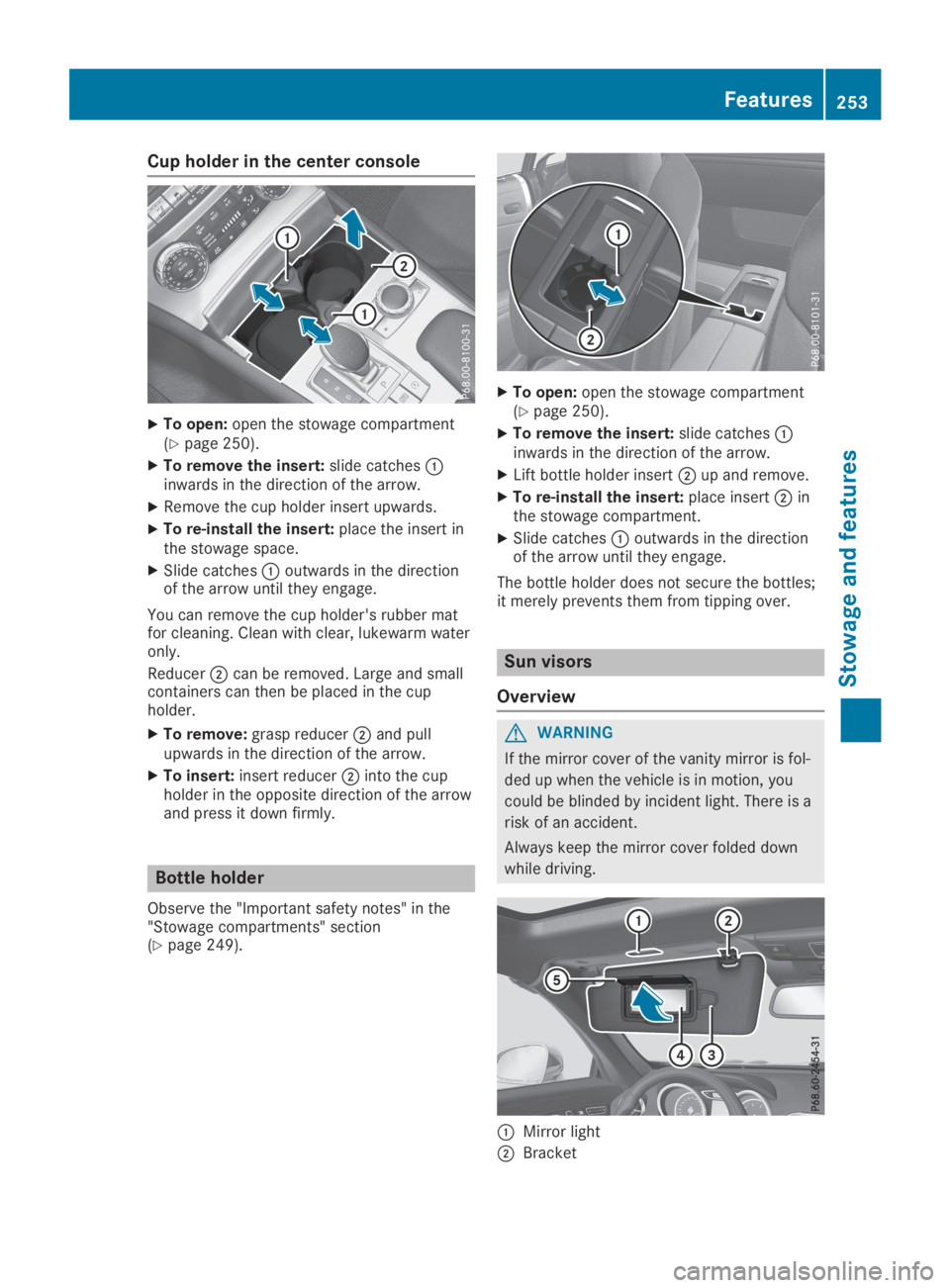
XTo open:open the stowage compartment(Ypage 250).
XTo remove the insert:slide catchesCinwards in the direction of the arrow.
XRemove the cup holder insert upwards.
XTo re-install the insert:place the insert inthe stowage space.
XSlide catchesCoutwards in the directionof the arrow until they engage.
You can remove the cup holder's rubber matfor cleaning. Clean with clear, lukewarm wateronly.
ReducerDcan be removed. Large and smallcontainers can then be placed in the cupholder.
XTo remove:grasp reducerDand pullupwards in the direction of the arrow.
XTo insert:insert reducerDinto the cupholder in the opposite direction of the arrowand press it down firmly.
Bottle holder
Observe the "Important safety notes" in the"Stowage compartments" section(Ypage 249).
XTo open:open the stowage compartment(Ypage 250).
XTo remove the insert:slide catchesCinwards in the direction of the arrow.
XLift bottle holder insertDup and remove.
XTo re-install the insert:place insertDinthe stowage compartment.
XSlide catchesCoutwards in the directionof the arrow until they engage.
The bottle holder does not secure the bottles;it merely prevents them from tipping over.
Sun visors
Overview
GWARNING
If the mirror cover of the vanity mirror is fol-
ded up when the vehicle is in motion, you
could be blinded by incident light. There is a
risk of an accident.
Always keep the mirror cover folded down
while driving.
CMirror light
DBracket
Features253
Stowage and features
Z
Page 261 of 330
All other calls can be ended by pressing:
Rthevbutton on the multifunction steer-ing wheel
Ror the corresponding COMAND button forending a telephone call
iWhen a call is initiated, the audio systemis muted. The mobile phone is no longerconnected to COMAND. However, if youwant to use your mobile phone, do so onlywhen the vehicle is stationary and in a safelocation.
Vehicle Health Check
With the Vehicle Health Check, the CustomerAssistance Center can provide improved sup-port for problems with your vehicle. During anexisting call, vehicle data is transferred to theCustomer Assistance Center. The customerservice representative can use the receiveddata to decide what kind of assistance isrequired. You are then, for example, guided tothe nearest Mercedes-Benz Service Center ora recovery vehicle is called.
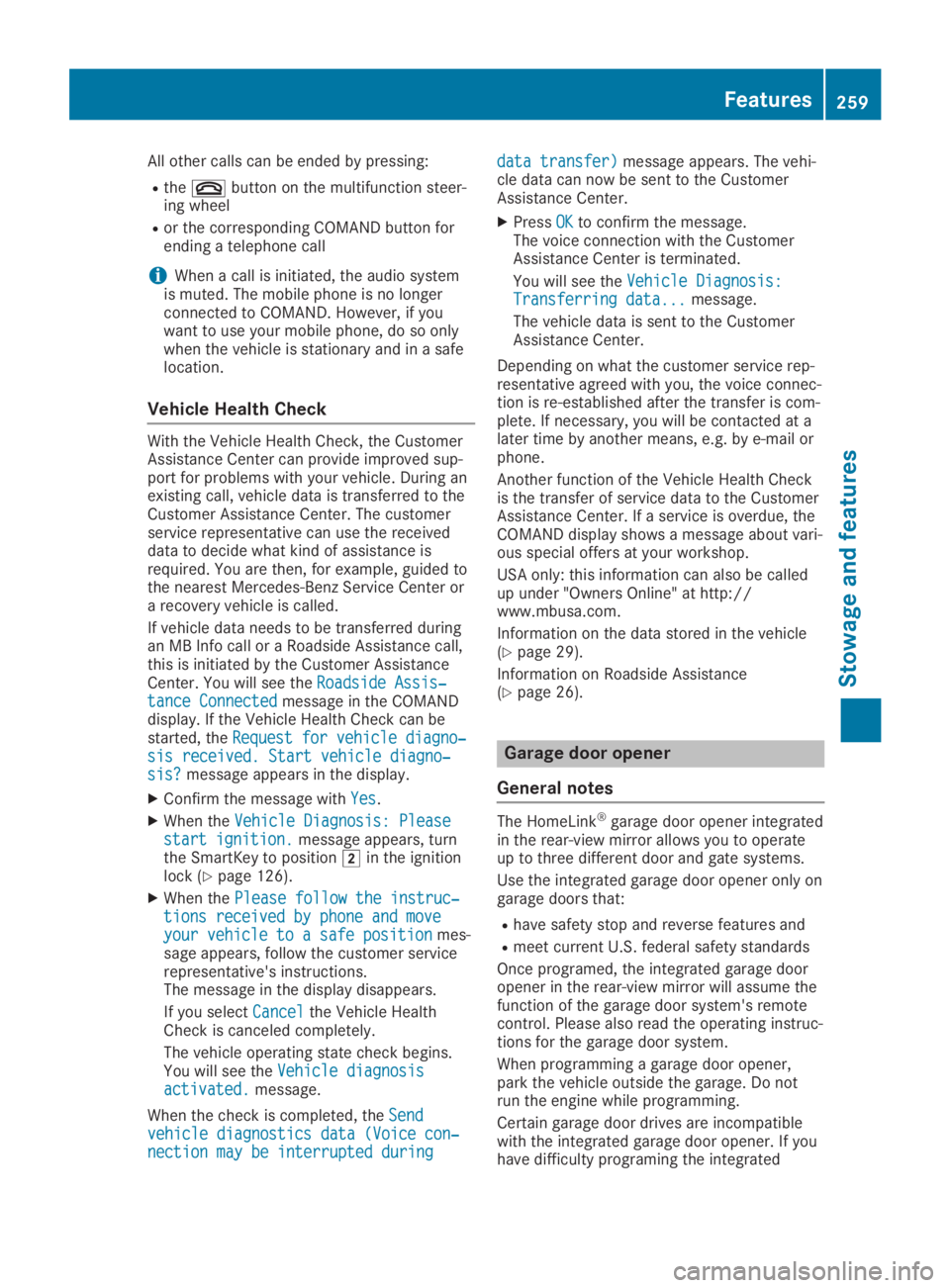
If vehicle data needs to be transferred duringan MB Info call or a Roadside Assistance call,this is initiated by the Customer AssistanceCenter. You will see theRoadside Assis‐Roadside Assis‐tance Connectedtance Connectedmessage in the COMANDdisplay. If the Vehicle Health Check can bestarted, theRequest for vehicle diagno‐Request for vehicle diagno‐sis received. Start vehicle diagno‐sis received. Start vehicle diagno‐sis?sis?message appears in the display.
XConfirm the message withYesYes.
XWhen theVehicle Diagnosis: PleaseVehicle Diagnosis: Pleasestart ignition.start ignition.message appears, turnthe SmartKey to positionHin the ignitionlock (Ypage 126).
XWhen thePlease follow the instruc‐Please follow the instruc‐tions received by phone and movetions received by phone and moveyour vehicle to a safe positionyour vehicle to a safe positionmes-sage appears, follow the customer servicerepresentative's instructions.The message in the display disappears.
If you selectCancelCancelthe Vehicle HealthCheck is canceled completely.
The vehicle operating state check begins.You will see theVehicle diagnosisVehicle diagnosisactivated.activated.message.
When the check is completed, theSendSendvehicle diagnostics data (Voice con‐vehicle diagnostics data (Voice con‐nection may be interrupted duringnection may be interrupted during
data transfer)data transfer)message appears. The vehi-cle data can now be sent to the CustomerAssistance Center.
XPressOKOKto confirm the message.The voice connection with the CustomerAssistance Center is terminated.
You will see theVehicle Diagnosis:Vehicle Diagnosis:Transferring data...Transferring data...message.
The vehicle data is sent to the CustomerAssistance Center.
Depending on what the customer service rep-resentative agreed with you, the voice connec-tion is re-established after the transfer is com-plete. If necessary, you will be contacted at alater time by another means, e.g. by e-mail orphone.
Another function of the Vehicle Health Checkis the transfer of service data to the CustomerAssistance Center. If a service is overdue, theCOMAND display shows a message about vari-ous special offers at your workshop.
USA only: this information can also be calledup under "Owners Online" at http://www.mbusa.com.
Information on the data stored in the vehicle(Ypage 29).
Information on Roadside Assistance(Ypage 26).
Garage door opener
General notes
The HomeLink®garage door opener integratedin the rear-view mirror allows you to operateup to three different door and gate systems.
Use the integrated garage door opener only ongarage doors that:
Rhave safety stop and reverse features and
Rmeet current U.S. federal safety standards
Once programed, the integrated garage dooropener in the rear-view mirror will assume thefunction of the garage door system's remotecontrol. Please also read the operating instruc-tions for the garage door system.
When programming a garage door opener,park the vehicle outside the garage. Do notrun the engine while programming.
Certain garage door drives are incompatiblewith the integrated garage door opener. If youhave difficulty programing the integrated
Features259
Sto wage an d features
Z
Page 268 of 330
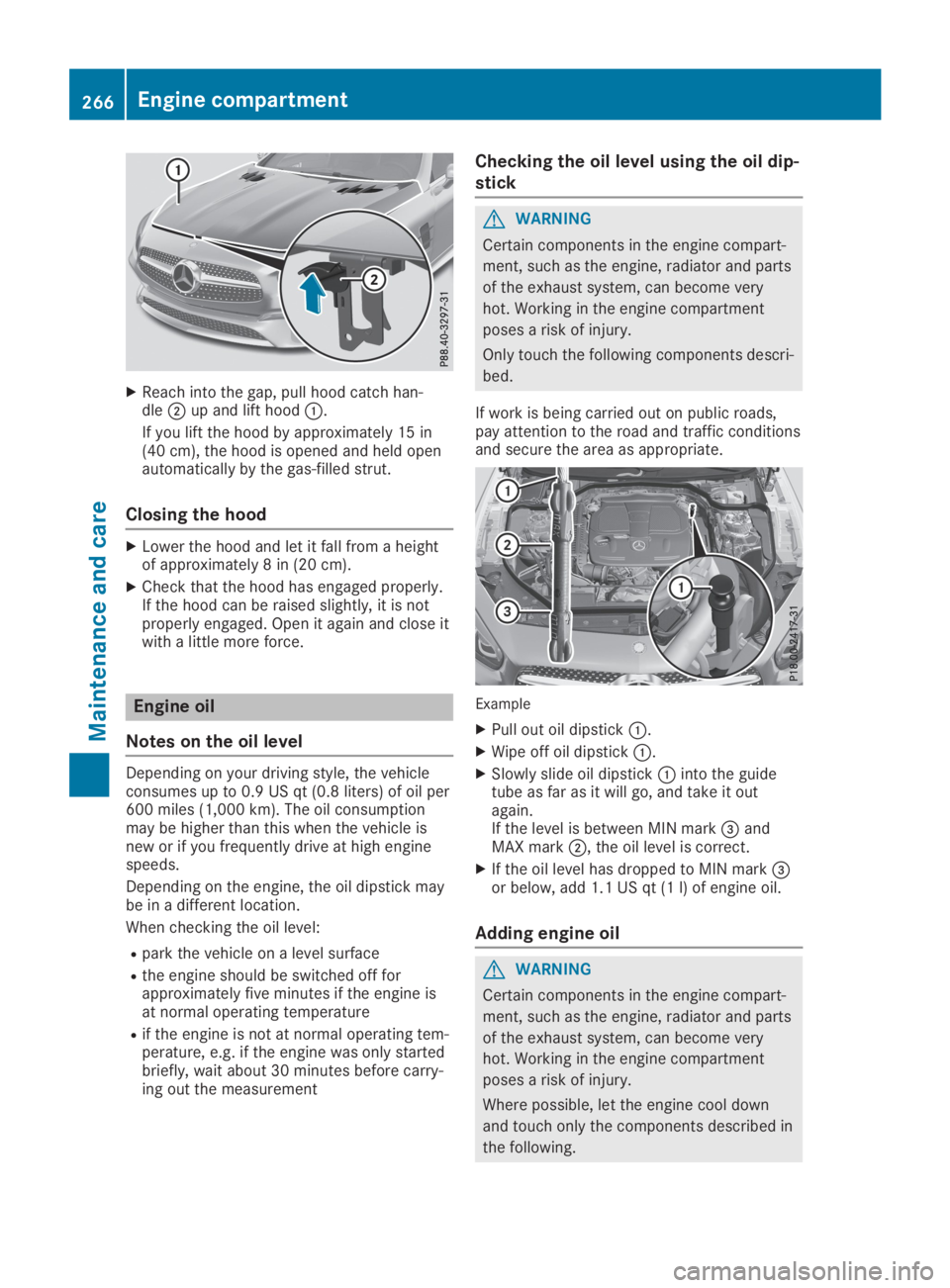
XReach into the gap, pull hood catch han-dleDup and lift hoodC.
If you lift the hood by approximately 15 in(40 cm), the hood is opened and held openautomatically by the gas-filled strut.
Closing the hood
XLower the hood and let it fall from a heightof approximately 8 in (20 cm).
XCheck that the hood has engaged properly.If the hood can be raised slightly, it is notproperly engaged. Open it again and close itwith a little more force.
Engine oil
Notes on the oil level
Depending on your driving style, the vehicleconsumes up to 0.9 US qt(0.8 liters) of oil per600 miles (1,000 km). The oil consumptionmay be higher than this when the vehicle isnew or if you frequently drive at high enginespeeds.
Depending on the engine, the oil dipstick maybe in a different location.
When checking the oil level:
Rpark the vehicle on a level surface
Rthe engine should be switched off forapproximately five minutes if the engine isat normal operating temperature
Rif the engine is not at normal operating tem-perature, e.g. if the engine was only startedbriefly, wait about 30 minutes before carry-ing out the measurement
Checking the oil level using the oil dip-
stick
GWARNING
Certain components in the engine compart-
ment, such as the engine, radiator and parts
of the exhaust system, can become very
hot. Working in the engine compartment
poses a risk of injury.
Only touch the following components descri-
bed.
If work is being carried out on public roads,pay attention to the road and traffic conditionsand secure the area as appropriate.
Example
XPull out oil dipstickC.
XWipe off oil dipstickC.
XSlowly slide oil dipstickCinto the guidetube as far as it will go, and take it outagain.If the level is between MIN mark
Page 269 of 330
GWARNING
If engine oil comes into contact with hot
components in the engine compartment, it
may ignite. There is a risk of fire and injury.
Make sure that engine oil is not spilled next
to the filler neck. Let the engine cool down
and thoroughly clean the engine oil off the
components before starting the engine.
HEnvironmental note
When adding oil, take care not to spill any. If
oil enters the soil or waterways, it is harmful
to the environment.
!Use only engine oils and oil filters that areapproved for vehicles with a service system.A list of the engine oils and oil filters thathave been tested and approved in accord-ance with Mercedes-Benz Specifications forService Products is available at any author-ized Mercedes-Benz Center.
The following cause engine failure or dam-age to the exhaust system:
RUse of engine oils and oil filters that havenot been expressly approved for the ser-vice system
RReplacement of engine oil and oil filterafter the replacement interval specifiedby the service system has expired
RUse of engine oil additives
!Do not add too much oil. If the oil level isabove the "max" mark on the dipstick, toomuch oil has been added. This can lead todamage to the engine or the catalytic con-verter. Have excess oil siphoned off.
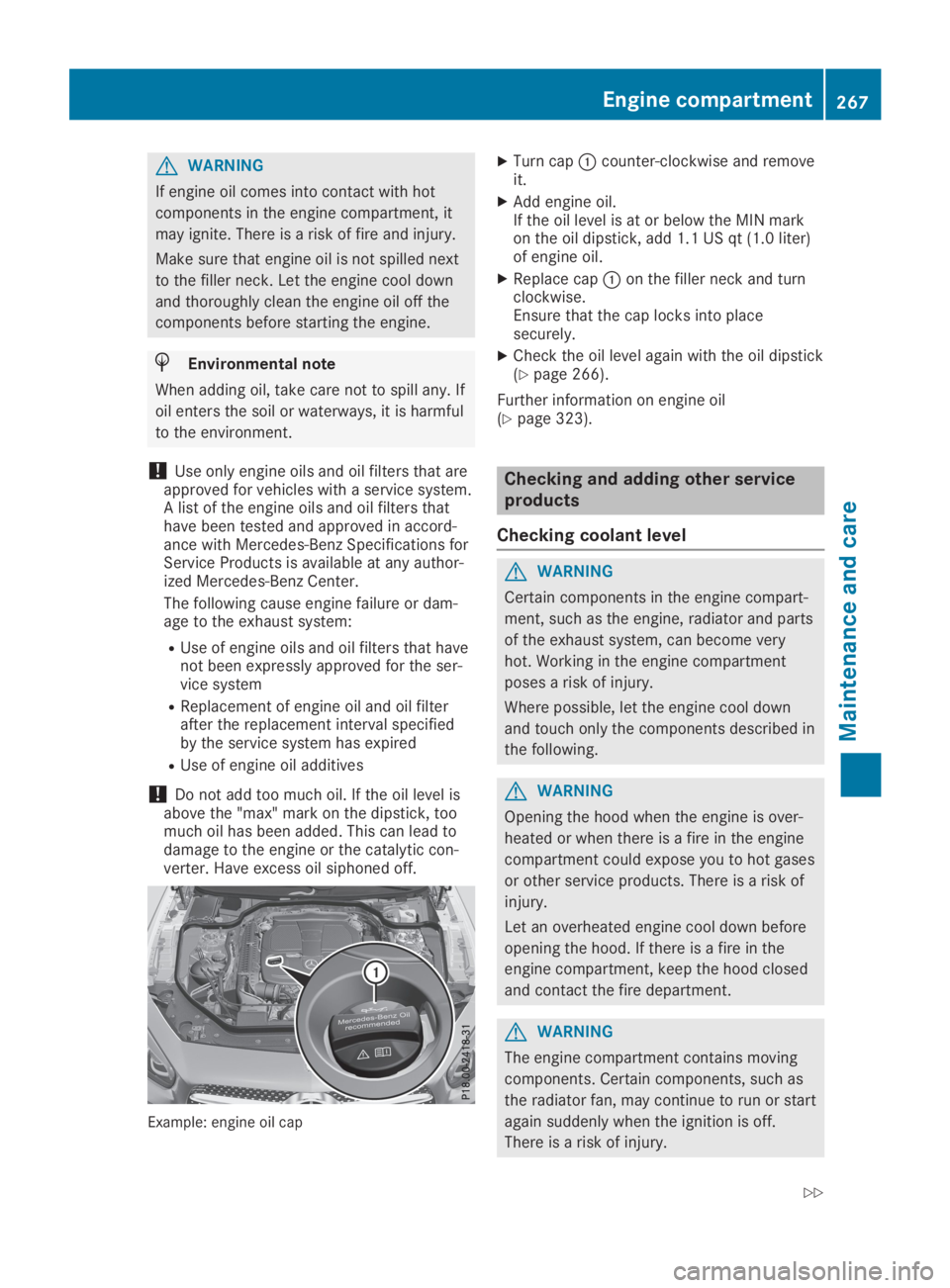
Example: engine oil cap
XTurn capCcounter-clockwise and removeit.
XAdd engine oil.If the oil level is at or below the MIN markon the oil dipstick, add 1.1 US qt (1.0 liter)of engine oil.
XReplace capCon the filler neck and turnclockwise.Ensure that the cap locks into placesecurely.
XCheck the oil level again with the oil dipstick(Ypage 266).
Further information on engine oil(Ypage 323).
Checking and adding other service
products
Checking coolant level
GWARNING
Certain components in the engine compart-
ment, such as the engine, radiator and parts
of the exhaust system, can become very
hot. Working in the engine compartment
poses a risk of injury.
Where possible, let the engine cool down
and touch only the components described in
the following.
GWARNING
Opening the hood when the engine is over-
heated or when there is a fire in the engine
compartment could expose you to hot gases
or other service products. There is a risk of
injury.
Let an overheated engine cool down before
opening the hood. If there is a fire in the
engine compartment, keep the hood closed
and contact the fire department.
GWARNING
The engine compartment contains moving
components. Certain components, such as
the radiator fan, may continue to run or start
again suddenly when the ignition is off.
There is a risk of injury.
Engine compartment267
Maintenance and care
Z
Page 276 of 330
a decorative film when the decorative film isremoved.
iHave work or repairs on decorative filmcarried out at a qualified specialist work-shop. Mercedes-Benz recommends that youuse an authorized Mercedes-Benz Center forthis purpose.
Cleaning the vehicle parts
Cleaning the wheels
GWARNING
The water jet from a circular jet nozzle (dirt
blasters) can cause invisible exterior dam-
age to the tires or chassis components.
Components damaged in this way may fail
unexpectedly. There is a risk of an accident.
Do not use power washers with circular jet
nozzles to clean the vehicle. Have damaged
tires or chassis components replaced imme-
diately.
!Do not use acidic wheel cleaning productsto remove brake dust. This could damagewheel bolts and brake components.
!Do not park your vehicle for a long periodof time directly after cleaning, particularlyafter cleaning the wheel rim with wheelcleaner. Wheel cleaner can lead to theincreased corrosion of the brake discs andpads. Therefore, drive for a few minutesafter cleaning. By heating up the brakes, thebrake discs and pads dry. The vehicle canthen be parked for a long period of time.
Cleaning the windows
GWARNING
You could become trapped by the wind-
shield wipers if they start moving while
cleaning the windshield or wiper blades.
There is a risk of injury.
Always switch off the windshield wipers and
the ignition before cleaning the windshield
or wiper blades.
!Only fold the windshield wipers away fromthe windshield when vertical. Otherwise, youwill damage the hood.
!Do not use dry cloths, abrasive products,solvents or cleaning agents containing sol-vents to clean the inside of the windows. Donot touch the insides of the windows withhard objects, e.g. an ice scraper or ring.There is otherwise a risk of damaging thewindows.
!Clean the water drainage channels of thewindshield and the rear window at regularintervals. Deposits such as leaves, petalsand pollen may under certain circumstancesprevent water from draining away. This canlead to corrosion damage and damage toelectronic components.
XClean the inside and outside of the windowswith a damp cloth and a cleaning productthat is recommended and approved byMercedes-Benz.
Cleaning wiper blades
GWARNING
If the windshield wipers are set in motion
while you are cleaning the windshield, you
can be trapped by the wiper arm. There is a
risk of injury.
Always switch off the windshield wipers and
the ignition before cleaning the windshield.
!Do not pull the wiper blade. Otherwise, thewiper blade could be damaged.
!Do not clean wiper blades too often anddo not rub them too hard. Otherwise, thegraphite coating could be damaged. Thiscould cause wiper noise.
!Hold the wiper arm securely when foldingback. The windshield could be damaged ifthe wiper arm smacks against it suddenly.
XFold the windshield wiper arms away fromthe windshield.
XCarefully clean the wiper blades with adamp cloth.
XFold the windshield wiper arms back againbefore switching on the ignition.
274Care
Maintenance and care
Page 280 of 330
Tire-change tool kit
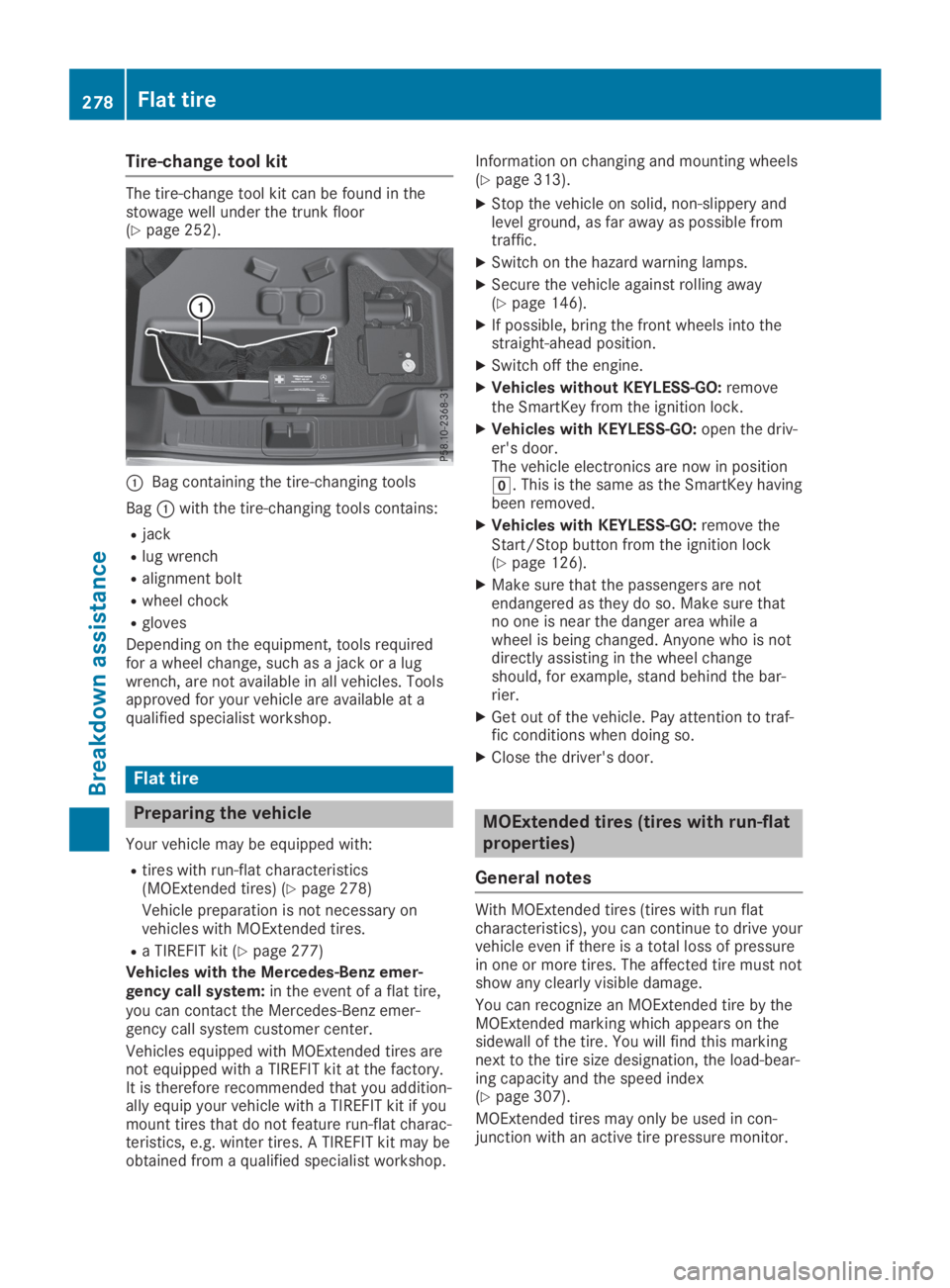
The tire-change tool kit can be found in thestowage well under the trunk floor(Ypage 252).
CBag containing the tire-changing tools
BagCwith the tire-changing tools contains:
Rjack
Rlug wrench
Ralignment bolt
Rwheel chock
Rgloves
Depending on the equipment, tools requiredfor a wheel change, such as a jack or a lugwrench, are not available in all vehicles. Toolsapproved for your vehicle are available at aqualified specialist workshop.
Flat tire
Preparing the vehicle
Your vehicle may be equipped with:
Rtires with run-flat characteristics(MOExtended tires) (Ypage 278)
Vehicle preparation is not necessary onvehicles with MOExtended tires.
Ra TIREFIT kit (Ypage 277)
Vehicles with the Mercedes-Benz emer-gency call system:in the event of a flat tire,you can contact the Mercedes-Benz emer-gency call system customer center.
Vehicles equipped with MOExtended tires arenot equipped with a TIREFIT kit at the factory.It is therefore recommended that you addition-ally equip your vehicle with a TIREFIT kit if youmount tires that do not feature run-flat charac-teristics, e.g. winter tires. A TIREFIT kit may beobtained from a qualified specialist workshop.
Information on changing and mounting wheels(Ypage 313).
XStop the vehicle on solid, non-slippery andlevel ground, as far away as possible fromtraffic.
XSwitch on the hazard warning lamps.
XSecure the vehicle against rolling away(Ypage 146).
XIf possible, bring the front wheels into thestraight-ahead position.
XSwitch off the engine.
XVehicles without KEYLESS-GO:removethe SmartKey from the ignition lock.
XVehicles with KEYLESS-GO:open the driv-er's door.The vehicle electronics are now in positionZ. This is the same as the SmartKey havingbeen removed.
XVehicles with KEYLESS-GO:remove theStart/Stop button from the ignition lock(Ypage 126).
XMake sure that the passengers are notendangered as they do so. Make sure thatno one is near the danger area while awheel is being changed. Anyone who is notdirectly assisting in the wheel changeshould, for example, stand behind the bar-rier.
XGet out of the vehicle. Pay attention to traf-fic conditions when doing so.
XClose the driver's door.
MOExtended tires (tires with run-flat
properties)
General notes
With MOExtended tires (tires with run flatcharacteristics), you can continue to drive yourvehicle even if there is a total loss of pressurein one or more tires. The affected tire must notshow any clearly visible damage.
You can recognize an MOExtended tire by theMOExtended marking which appears on thesidewall of the tire. You will find this markingnext to the tire size designation, the load-bear-ing capacity and the speed index(Ypage 307).
MOExtended tires may only be used in con-junction with an active tire pressure monitor.
278Flat tire
Breakdown assistance
Page 286 of 330
!Have the battery regularly checked at aqualified specialist workshop.
Comply with the service intervals in theMaintenance Booklet, or contact a qualifiedspecialist workshop for more information.
!Always have work on batteries carried outat a qualified specialist workshop.
Should it, in exceptional circumstances, beabsolutely necessary to disconnect the 12-volt battery yourself, please observe the fol-lowing:
RSecure the vehicle to prevent it from roll-ing away.
RSwitch off the ignition.
RDisconnect the negative terminal first andthen the positive terminal.
After the work has been done, install thebattery and replace the cover of the positiveterminal clamp firmly.
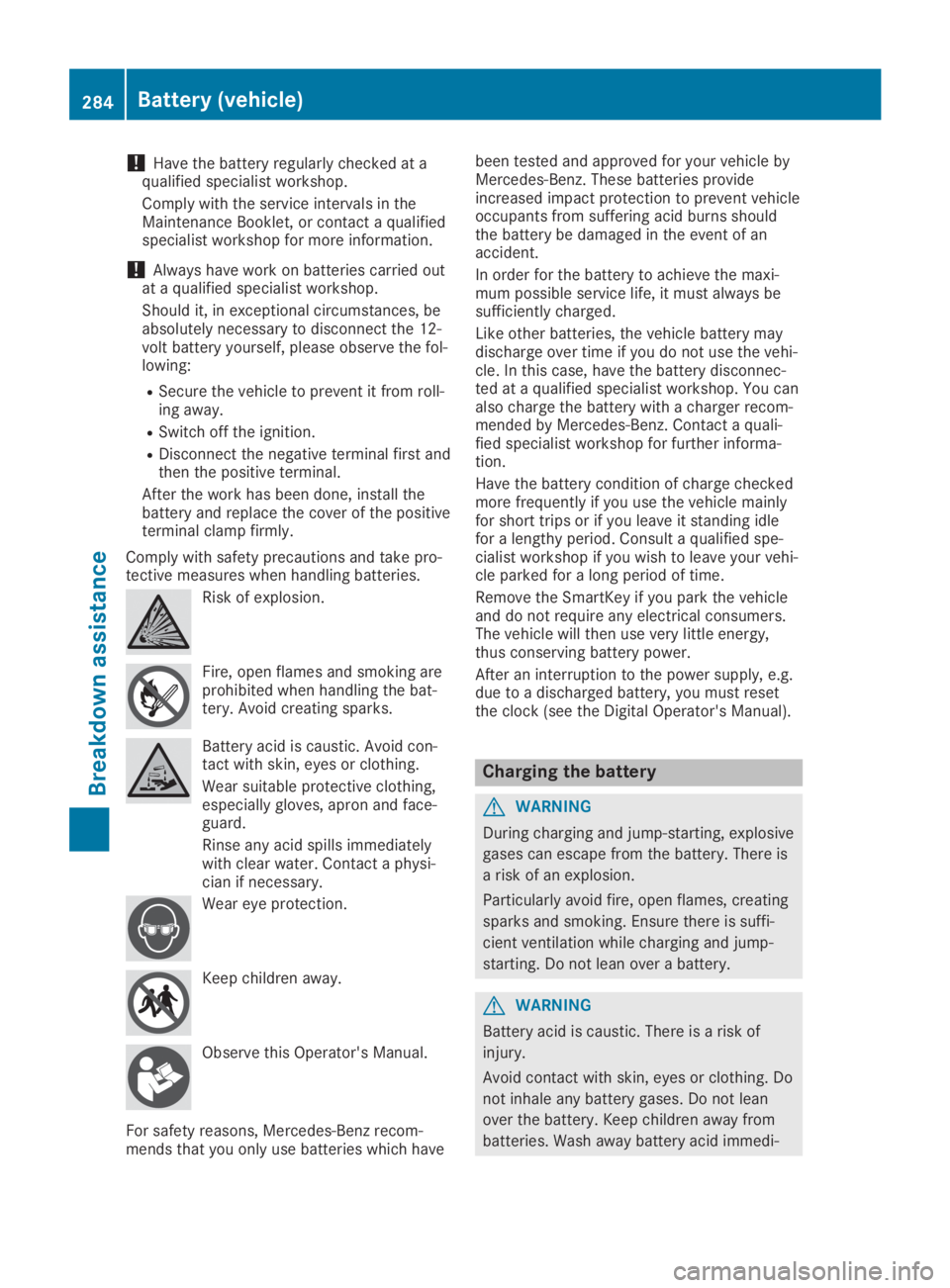
Comply with safety precautions and take pro-tective measures when handling batteries.
Risk of explosion.
Fire, open flames and smoking areprohibited when handling the bat-tery. Avoid creating sparks.
Battery acid is caustic. Avoid con-tact with skin, eyes or clothing.
Wear suitable protective clothing,especially gloves, apron and face-guard.
Rinse any acid spills immediatelywith clear water. Contact a physi-cian if necessary.
Wear eye protection.
Keep children away.
Observe this Operator's Manual.
For safety reasons, Mercedes-Benz recom-mends that you only use batteries which have
been tested and approved for your vehicle byMercedes-Benz. These batteries provideincreased impact protection to prevent vehicleoccupants from suffering acid burns shouldthe battery be damaged in the event of anaccident.
In order for the battery to achieve the maxi-mum possible service life, it must always besufficiently charged.
Like other batteries, the vehicle battery maydischarge over time if you do not use the vehi-cle. In this case, have the battery disconnec-ted at a qualified specialist workshop. You canalso charge the battery with a charger recom-mended by Mercedes-Benz. Contact a quali-fied specialist workshop for further informa-tion.
Have the battery condition of charge checkedmore frequently if you use the vehicle mainlyfor short trips or if you leave it standing idlefor a lengthy period. Consult a qualified spe-cialist workshop if you wish to leave your vehi-cle parked for a long period of time.
Remove the SmartKey if you park the vehicleand do not require any electrical consumers.The vehicle will then use very little energy,thus conserving battery power.
After an interruption to the power supply, e.g.due to a discharged battery, you must resetthe clock (see the Digital Operator's Manual).
Charging the battery
GWARNING
During charging and jump-starting, explosive
gases can escape from the battery. There is
a risk of an explosion.
Particularly avoid fire, open flames, creating
sparks and smoking. Ensure there is suffi-
cient ventilation while charging and jump-
starting. Do not lean over a battery.
GWARNING
Battery acid is caustic. There is a risk of
injury.
Avoid contact with skin, eyes or clothing. Do
not inhale any battery gases. Do not lean
over the battery. Keep children away from
batteries. Wash away battery acid immedi-
284Battery (vehicle)
Breakdown assistance
Page 289 of 330
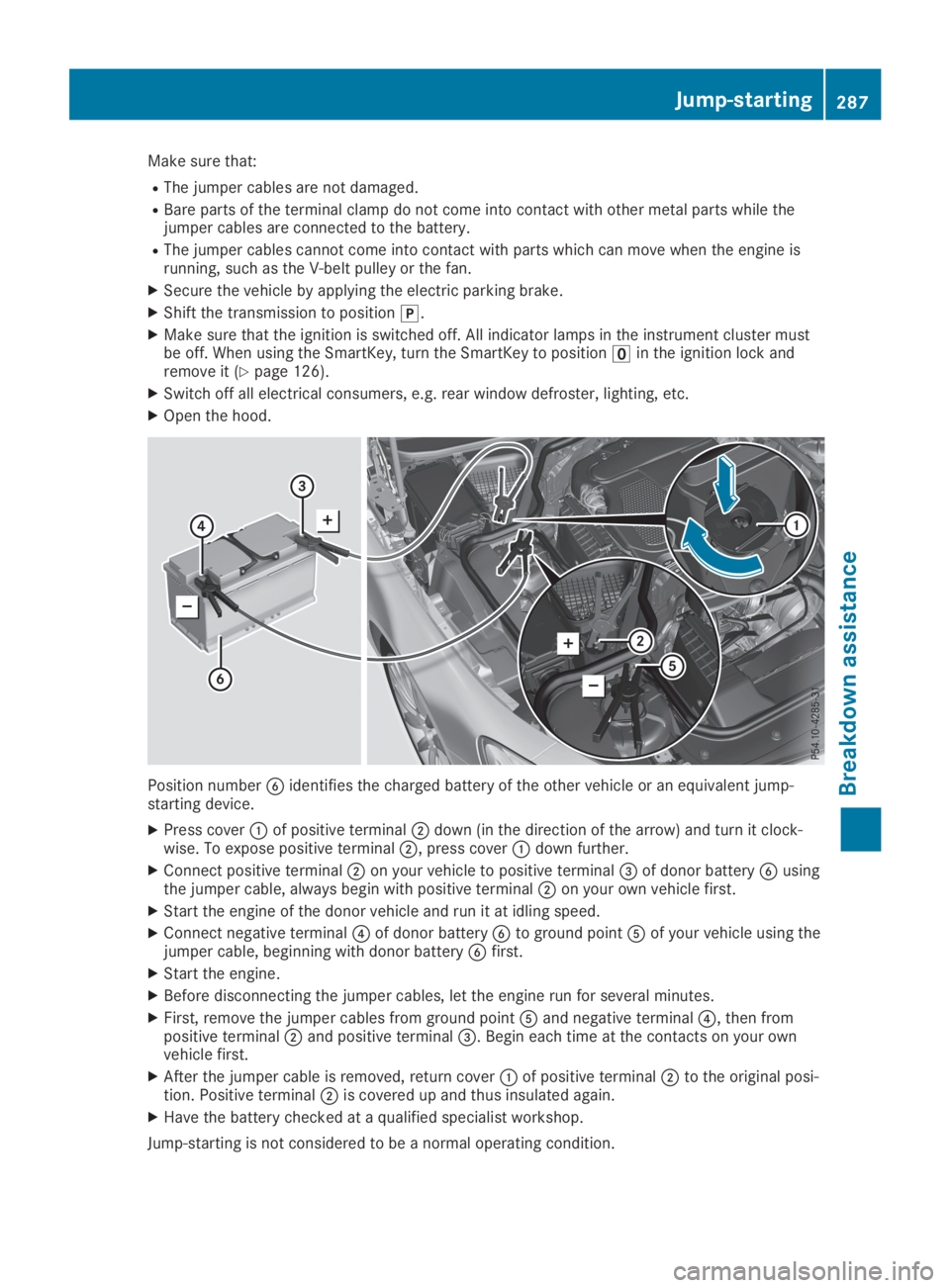
Make sure that:
RThe jumper cables are not damaged.
RBare parts of the terminal clamp do not come into contact with other metal parts while thejumper cables are connected to the battery.
RThe jumper cables cannot come into contact with parts which can move when the engine isrunning, such as the V-belt pulley or the fan.
XSecure the vehicle by applying the electric parking brake.
XShift the transmission to position].
XMake sure that the ignition is switched off. All indicator lamps in the instrument cluster mustbe off. When using the SmartKey, turn the SmartKey to position