lights MERCEDES-BENZ SL CLASS 2019 Service Manual
[x] Cancel search | Manufacturer: MERCEDES-BENZ, Model Year: 2019, Model line: SL CLASS, Model: MERCEDES-BENZ SL CLASS 2019Pages: 330, PDF Size: 16.53 MB
Page 171 of 330
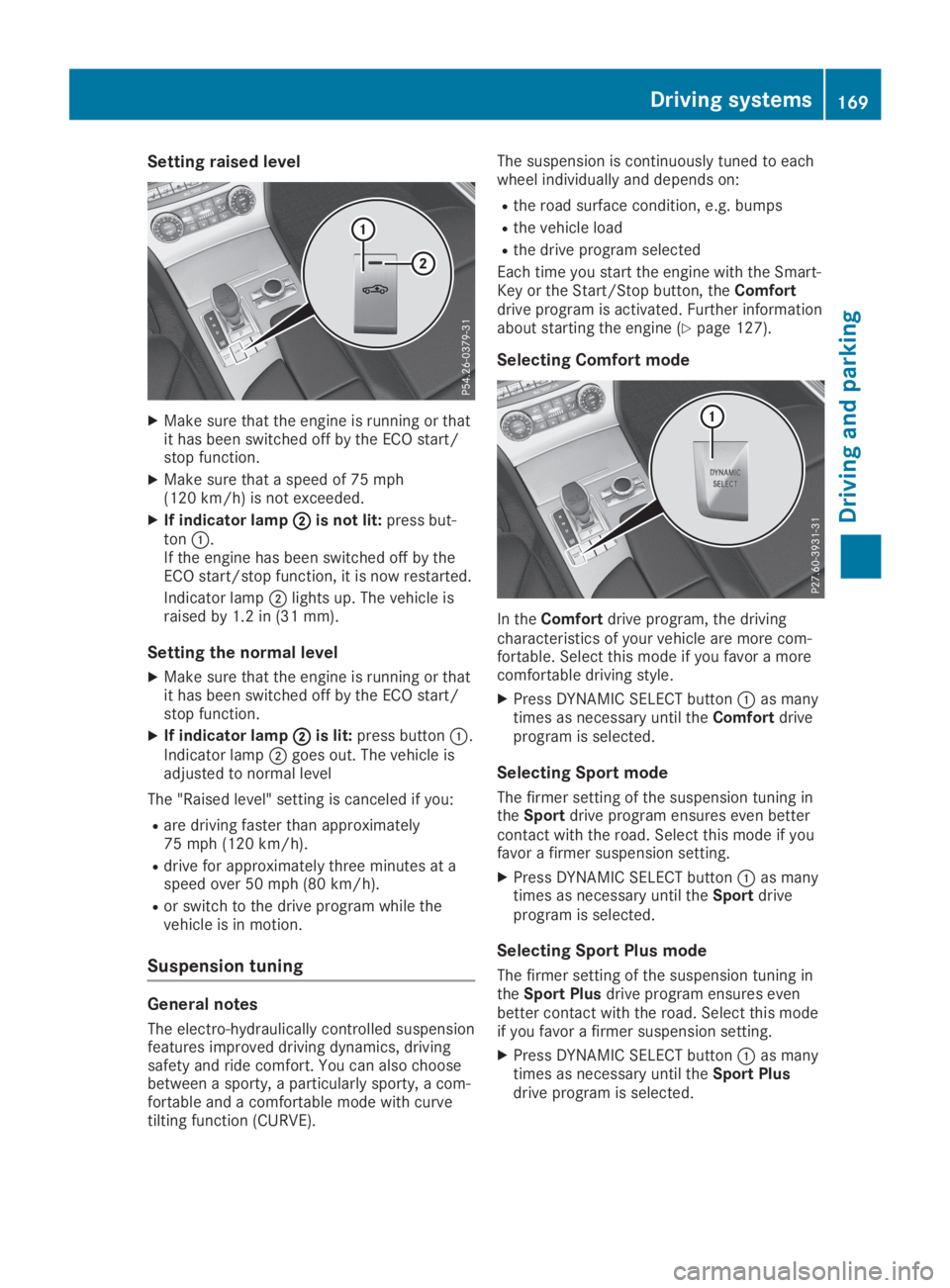
Setting raised level
XMake sure that the engine is running or thatit has been switched off by the ECO start/stop function.
XMake sure that a speed of 75 mph(120 km/h) is not exceeded.
XIf indicator lampDDis not lit:press but-tonC.If the engine has been switched off by theECO start/stop function, it is now restarted.
Indicator lampDlights up. The vehicle israised by 1.2 in (31 mm).
Setting the normal level
XMake sure that the engine is running or thatit has been switched off by the ECO start/stop function.
XIf indicator lampDDis lit:press buttonC.Indicator lampDgoes out. The vehicle isadjusted to normal level
The "Raised level" setting is canceled if you:
Rare driving faster than approximately75 mph (120 km/h).
Rdrive for approximately three minutes at aspeed over 50 mph (80 km/h).
Ror switch to the drive program while thevehicle is in motion.
Suspension tuning
General notes
The electro-hydraulically controlled suspensionfeatures improved driving dynamics, drivingsafety and ride comfort. You can also choosebetween a sporty, a particularly sporty, a com-fortable and a comfortable mode with curvetilting function (CURVE).
The suspension is continuously tuned to eachwheel individually and depends on:
Rthe road surface condition, e.g. bumps
Rthe vehicle load
Rthe drive program selected
Each time you start the engine with the Smart-Key or the Start/Stop button, theComfortdrive program is activated. Further informationabout starting the engine (Ypage 127).
Selecting Comfort mode
In theComfortdrive program, the drivingcharacteristics of your vehicle are more com-fortable. Select this mode if you favor a morecomfortable driving style.
XPress DYNAMIC SELECT buttonCas manytimes as necessary until theComfortdriveprogram is selected.
Selecting Sport mode
The firmer setting of the suspension tuning intheSportdrive program ensures even bettercontact with the road. Select this mode if youfavor a firmer suspension setting.
XPress DYNAMIC SELECT buttonCas manytimes as necessary until theSportdriveprogram is selected.
Selecting Sport Plus mode
The firmer setting of the suspension tuning intheSport Plusdrive program ensures evenbetter contact with the road. Select this modeif you favor a firmer suspension setting.
XPress DYNAMIC SELECT buttonCas manytimes as necessary until theSport Plusdrive program is selected.
Driving systems169
Driving and parking
Z
Page 174 of 330
Each time you start the engine with the Smart-Key or the Start/Stop button, the comfortablesetting is activated. For further informationabout starting the engine, see (Ypage 127).
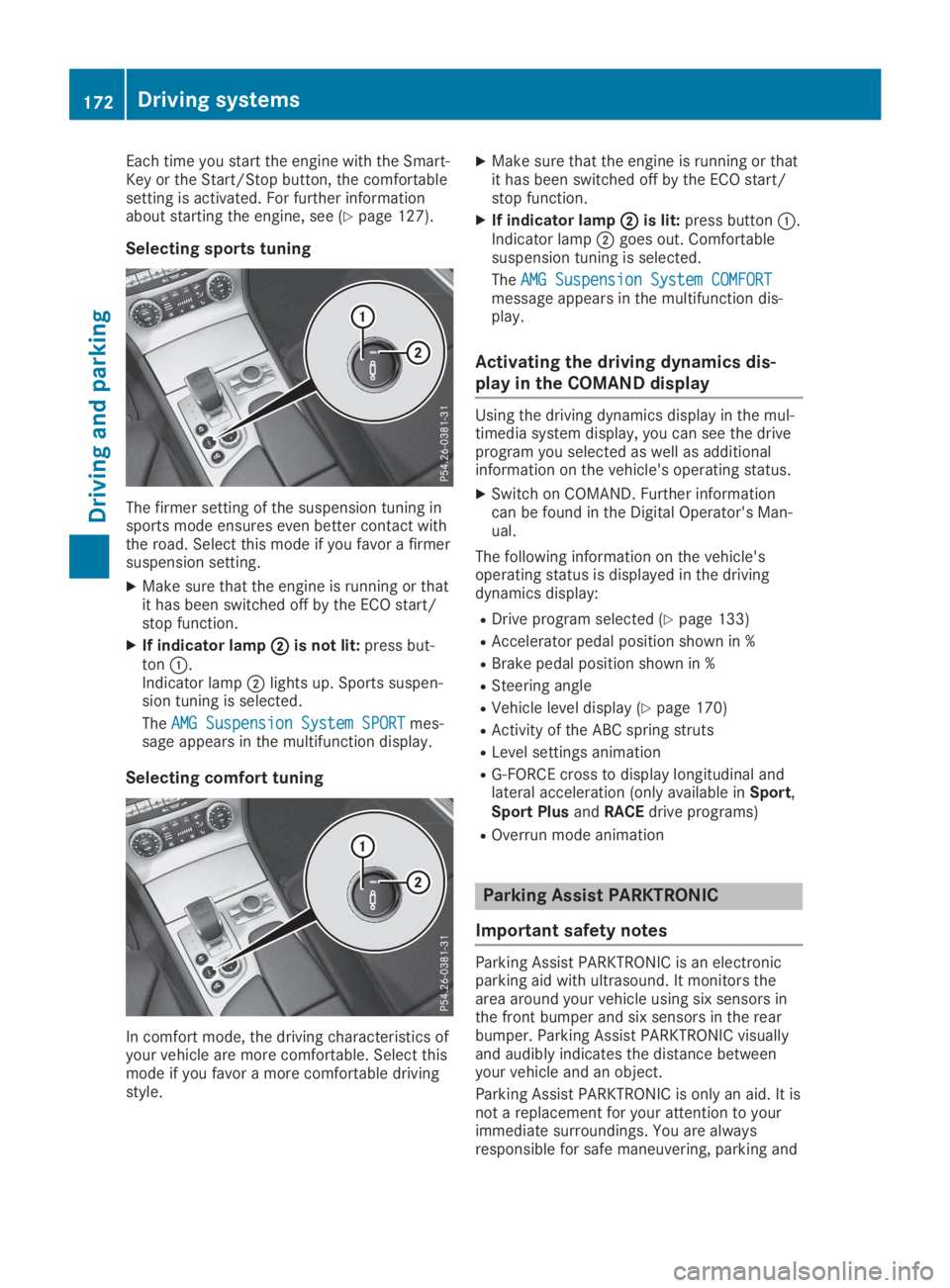
Selecting sports tuning
The firmer setting of the suspension tuning insports mode ensures even better contact withthe road. Select this mode if you favor a firmersuspension setting.
XMake sure that the engine is running or thatit has been switched off by the ECO start/stop function.
XIf indicator lampDDis not lit:press but-tonC.Indicator lampDlights up. Sports suspen-sion tuning is selected.
TheAMG Suspension System SPORTAMG Suspension System SPORTmes-sage appears in the multifunction display.
Selecting comfort tuning
In comfort mode, the driving characteristics ofyour vehicle are more comfortable. Select thismode if you favor a more comfortable drivingstyle.
XMake sure that the engine is running or thatit has been switched off by the ECO start/stop function.
XIf indicator lampDDis lit:press buttonC.Indicator lampDgoes out. Comfortablesuspension tuning is selected.
TheAMG Suspension System COMFORTAMG Suspension System COMFORTmessage appears in the multifunction dis-play.
Activating the driving dynamics dis-
play in the COMAND display
Using the driving dynamics display in the mul-timedia system display, you can see the driveprogram you selected as well as additionalinformation on the vehicle's operating status.
XSwitch on COMAND. Further informationcan be found in the Digital Operator's Man-ual.
The following information on the vehicle'soperating status is displayed in the drivingdynamics display:
RDrive program selected (Ypage 133)
RAccelerator pedal position shown in %
RBrake pedal position shown in %
RSteering angle
RVehicle level display (Ypage 170)
RActivity of the ABC spring struts
RLevel settings animation
RG-FORCE cross to display longitudinal andlateral acceleration (only available inSport,Sport PlusandRACEdrive programs)
ROverrun mode animation
Parking Assist PARKTRONIC
Important safety notes
Parking Assist PARKTRONIC is an electronicparking aid with ultrasound. It monitors thearea around your vehicle using six sensors inthe front bumper and six sensors in the rearbumper. Parking Assist PARKTRONIC visuallyand audibly indicates the distance betweenyour vehicle and an object.
Parking Assist PARKTRONIC is only an aid. It isnot a replacement for your attention to yourimmediate surroundings. You are alwaysresponsible for safe maneuvering, parking and
172Driving systems
Driving an d parking
Page 177 of 330
Problems with Parking Assist PARKTRONIC
ProblemPossible causes/consequences andPPSolutions
Only the red segmentsin the Parking AssistPARKTRONIC warningdisplays are lit. You alsohear a warning tone forapproximately two sec-onds.
Parking AssistPARKTRONIC is deacti-vated after approx-imately five secondsand the indicator lampin the Parking AssistPARKTRONIC buttonlights up.
Parking Assist PARKTRONIC has malfunctioned and has been deac-tivated.
XIf problems persist, have Parking Assist PARKTRONIC checked ata qualified specialist workshop.
Only the red segmentsin the Parking AssistPARKTRONIC warningdisplays are lit. ParkingAssist PARKTRONIC isdeactivated afterapproximately five sec-onds.
The Parking Assist PARKTRONIC sensors are dirty or there is inter-ference.
XClean the Parking Assist PARKTRONIC sensors (Ypage 275).
XSwitch the ignition back on.
The problem may be caused by an external source of radio or ultra-sound waves.
XCheck to see if Parking Assist PARKTRONIC works at a differentlocation.
Active Parking Assist
General notes
Active Parking Assist is an electronic parkingaid with ultrasound. It measures the road onboth sides of the vehicle. A parking symbolindicates a suitable parking space. Activesteering intervention can assist you duringparking and when exiting a parking space. Youcan also still use Parking Assist PARKTRONIC(Ypage 172).
Important safety notes
Active Parking Assist is merely an aid. It is nota replacement for your attention to your imme-diate surroundings. You are always responsi-ble for safe maneuvering, parking and exiting aparking space. Make sure that no persons, ani-mals or objects are in the path of your vehicle.
When Parking Assist PARKTRONIC is deactiva-ted, Active Parking Assist is also unavailable.
GWARNING
While parking or pulling out of a parking
space, the vehicle swings out and can drive
onto areas of the oncoming lane. This could
cause you to collide with other road users or
objects. There is a risk of an accident.
Pay attention to other road users or objects.
Stop the vehicle if necessary or cancel the
Active Parking Assist parking procedure.
GWARNING
While parking or pulling out of a parking
space, the vehicle swings out and can drive
onto areas of the oncoming lane. This could
cause you to collide with other road users or
objects. There is a risk of an accident.
Pay attention to other road users or objects.
Stop the vehicle if necessary or cancel the
Driving systems175
Driving and parking
Z
Page 182 of 330
Under the following circumstances, the rearview camera will not function, or will functionin a limited manner:
Rif the trunk lid is open
Rin heavy rain, snow or fog
Rat night or in very dark places
Rif the camera is exposed to very bright light
Rif the area is lit by fluorescent bulbs or LEDlighting (the display may flicker)
Rif there is a sudden change in temperature,e.g. when driving into a heated garage inwinter
Rif the camera lens is dirty or obstructed.Observe the notes on cleaning(Ypage 275)
Rif the rear of your vehicle is damaged. In thiscase, have the camera position and settingchecked at a qualified specialist workshop.
The field of vision and other functions of therear view camera may be restricted due toadditional accessories on the rear of the vehi-cle (e.g. license plate holder, bicycle rack).
On vehicles with height-adjustable chassis,leaving the standard height can result in inac-curacies in the guide lines, depending on tech-nical conditions.
iThe contrast of the display may be affec-ted by the sudden presence of sunlight orother light sources, e.g. when exiting agarage. Pay particular attention in this situa-tion.
iIf usability is severely restricted, e.g. dueto pixel errors, have the display repaired orreplaced.
Activating/deactivating the rear view
camera
XTo activate:make sure that the SmartKeyis in positionHin the ignition lock.
XMake sure that theActivation by R gearActivation by R gearfunction is selected in the multimedia sys-tem; see the Digital Operator's Manual.
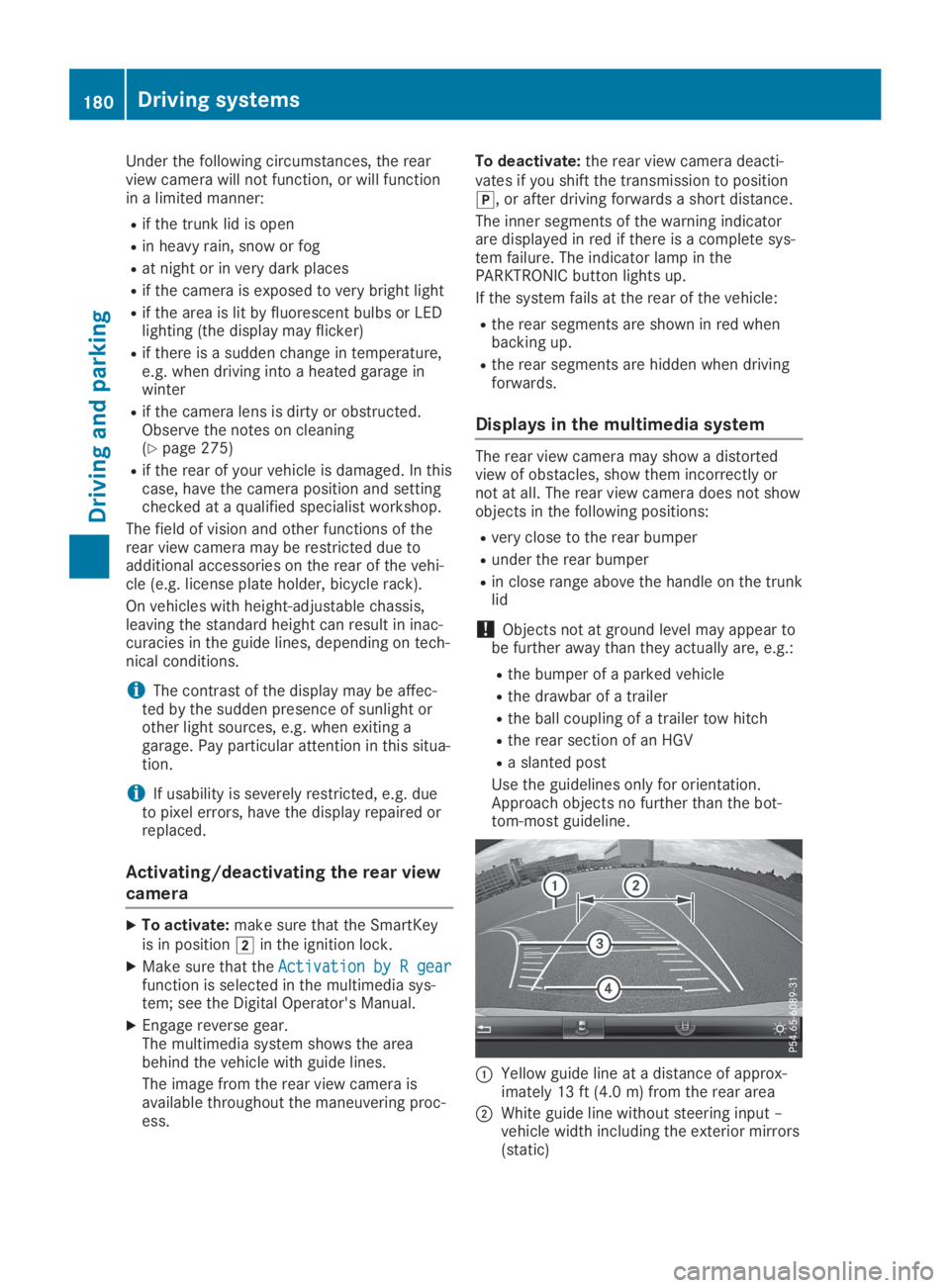
XEngage reverse gear.The multimedia system shows the areabehind the vehicle with guide lines.
The image from the rear view camera isavailable throughout the maneuvering proc-ess.
To deactivate:the rear view camera deacti-vates if you shift the transmission to position], or after driving forwards a short distance.
The inner segments of the warning indicatorare displayed in red if there is a complete sys-tem failure. The indicator lamp in thePARKTRONIC button lights up.
If the system fails at the rear of the vehicle:
Rthe rear segments are shown in red whenbacking up.
Rthe rear segments are hidden when drivingforwards.
Displays in the multimedia system
The rear view camera may show a distortedview of obstacles, show them incorrectly ornot at all. The rear view camera does not showobjects in the following positions:
Rvery close to the rear bumper
Runder the rear bumper
Rin close range above the handle on the trunklid
!Objects not at ground level may appear tobe further away than they actually are, e.g.:
Rthe bumper of a parked vehicle
Rthe drawbar of a trailer
Rthe ball coupling of a trailer tow hitch
Rthe rear section of an HGV
Ra slanted post
Use the guidelines only for orientation.Approach objects no further than the bot-tom-most guideline.
CYellow guide line at a distance of approx-imately 13 ft (4.0 m) from the rear area
DWhite guide line without steering input –vehicle width including the exterior mirrors(static)
180Driving systems
Driving and parking
Page 188 of 330
Due to the nature of the system:
Rwarnings may be issued in error when driv-ing close to crash barriers or similar solidlane borders.
Rwarnings may be interrupted when drivingalongside particularly long vehicles, e.g.trucks, for a prolonged time.
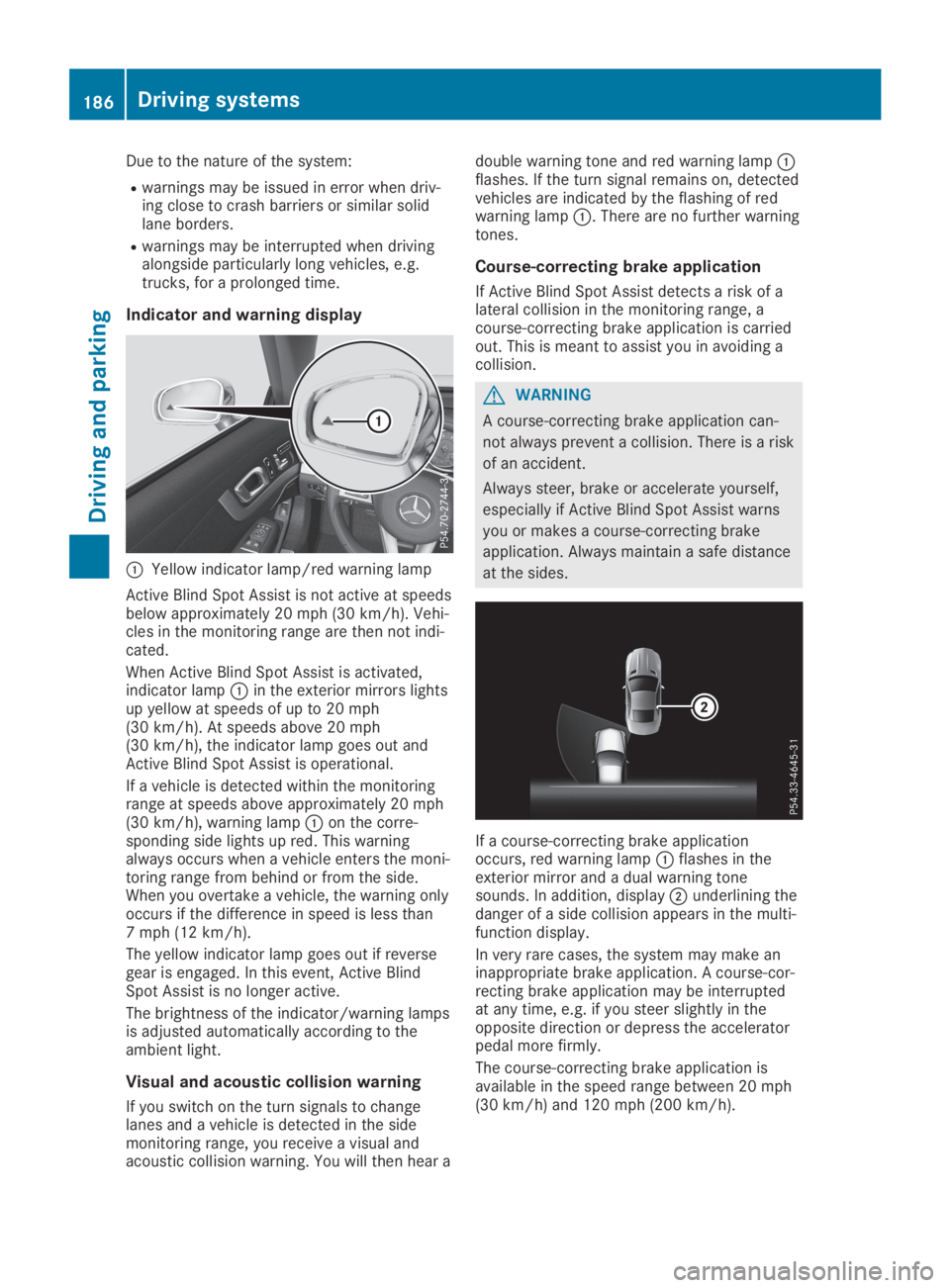
Indicator and warning display
CYellow indicator lamp/red warning lamp
Active Blind Spot Assist is not active at speedsbelow approximately 20 mph (30 km/h). Vehi-cles in the monitoring range are then not indi-cated.
When Active Blind Spot Assist is activated,indicator lampCin the exterior mirrors lightsup yellow at speeds of up to 20 mph(30 km/h). At speeds above 20 mph(30 km/h), the indicator lamp goes out andActive Blind Spot Assist is operational.
If a vehicle is detected within the monitoringrange at speeds above approximately 20 mph(30 km/h), warning lampCon the corre-sponding side lights up red. This warningalways occurs when a vehicle enters the moni-toring range from behind or from the side.When you overtake a vehicle, the warning onlyoccurs if the difference in speed is less than7 mph (12 km/h).
The yellow indicator lamp goes out if reversegear is engaged. In this event, Active BlindSpot Assist is no longer active.
The brightness of the indicator/warning lampsis adjusted automatically according to theambient light.
Visual and acoustic collision warning
If you switch on the turn signals to changelanes and a vehicle is detected in the sidemonitoring range, you receive a visual andacoustic collision warning. You will then hear a
double warning tone and red warning lampCflashes. If the turn signal remains on, detectedvehicles are indicated by the flashing of redwarning lampC. There are no further warningtones.
Course-correcting brake application
If Active Blind Spot Assist detects a risk of alateral collision in the monitoring range, acourse-correcting brake application is carriedout. This is meant to assist you in avoiding acollision.
GWARNING
A course-correcting brake application can-
not always prevent a collision. There is a risk
of an accident.
Always steer, brake or accelerate yourself,
especially if Active Blind Spot Assist warns
you or makes a course-correcting brake
application. Always maintain a safe distance
at the sides.
If a course-correcting brake applicationoccurs, red warning lampCflashes in theexterior mirror and a dual warning tonesounds. In addition, displayDunderlining thedanger of a side collision appears in the multi-function display.
In very rare cases, the system may make aninappropriate brake application. A course-cor-recting brake application may be interruptedat any time, e.g. if you steer slightly in theopposite direction or depress the acceleratorpedal more firmly.
The course-correcting brake application isavailable in the speed range between 20 mph(30 km/h) and 120 mph (200 km/h).
186Driving systems
Driving an d parking
Page 202 of 330
XPress theYorebutton on the steer-ing wheel to select theSett.Sett.menu.
XPress thedorcbutton to select theInstrument ClusterInstrument Clustersubmenu.
XPressvto confirm.
XPress thedorcbutton to select thePermanent Display:Permanent Display:function.The current setting,Outside TemperatureOutside TemperatureorSpeedometer [km/h]Speedometer [km/h]orSpeedometerSpeedometer[mph][mph], appears.
XTo change the setting:pressvagain.
Lights
Setting the daytime running lamps
This function is not available in Canada.
XPress theYorebutton on the steer-ing wheel to select theSett.Sett.menu.
XPress thedorcbutton to select theLightLightsubmenu.
XPressvto confirm.
XPress thedorcbutton to select theDaytime Running LightsDaytime Running Lightsfunction.If theDaytime Running LightsDaytime Running Lightsfunctionhas been switched on, the cone of light andthe
Page 203 of 330
automatic headlamp mode is activated(Ypage 109).
Rexterior lighting delayed switch-off:theexterior lighting remains lit for 60 secondsafter the engine is switched off. If you closeall the doors and the trunk lid, the exteriorlighting goes off after 15 seconds.
Depending on your vehicle's equipment, whenthe surround lighting and delayed switch-offexterior lighting are on, the following light up:
Rparking lamps
Rlow-beam headlamps
Rdaytime running lamps
Rside marker lamps
Rsurround lighting in the exterior mirrors
Activating/deactivating the interior
lighting delayed switch-off
If you activate theInterior LightingInterior LightingDelayDelayfunction, the interior lighting remainson for 20 seconds after you remove the Smart-Key from the ignition lock.
XPress theYorebutton on the steer-ing wheel to select theSett.Sett.menu.
XPress thedorcbutton to select theLightLightsubmenu.
XPressvto confirm.
XPress thedorcbutton to select theInterior Lighting DelayInterior Lighting Delayfunction.When theInterior Lighting DelayInterior Lighting Delayfunc-tion is activated, the vehicle interior is dis-played in orange in the multifunction dis-play.
XPress thevbutton to save the setting.
Vehicle
Activating/deactivating the automatic
door locking mechanism
If you activate theAutomatic Door LockAutomatic Door Lockfunction, the vehicle is centrally locked abovea speed of approximately 9 mph (15 km/h).
XPress theYorebutton on the steer-ing wheel to select theSett.Sett.menu.
XPress thedorcbutton to select theVehicleVehiclesubmenu.
XPressvto confirm.
XPress thedorcbutton to select theAutomatic Door LockAutomatic Door Lockfunction.When theAutomatic Door LockAutomatic Door Lockfunctionis activated, the multifunction display showsthe left-hand vehicle door in orange.
XPress thevbutton to save the setting.
For further information on the automatic lock-ing feature, see (Ypage 81).
Activating/deactivating the acoustic
locking verification signal
If you switch on theAcoustic LockAcoustic Lockfunction,an acoustic signal sounds when you lock thevehicle.
XPress theYorebutton on the steer-ing wheel to select theSett.Sett.menu.
XPress thedorcbutton to select theVehicleVehiclesubmenu.
XPressvto confirm.
XPress thedorcbutton to select theAcoustic LockAcoustic Lockfunction.If theAcoustic LockAcoustic Lockfunction is activated,the7symbol in the multifunction displaylights up orange.
XPress thevbutton to save the setting.
Comfort
Activating/deactivating the EASY-
ENTRY/EXIT feature
GWARNING
When the EASY-ENTRY/EXIT feature adjusts
the steering wheel, you and other vehicle
occupants – particularly children – could
become trapped. There is a risk of injury.
While the EASY-ENTRY/EXIT feature is mak-
ing adjustments, make sure that no one has
any body parts in the sweep of the steering
wheel.
If somebody becomes trapped:
Rpress one of the memory function posi-
tion buttons, or
Rmove the switch for steering wheel
adjustment in the opposite direction to
that in which the steering wheel is mov-
ing.
The adjustment process is stopped.
Menus and submenus201
On-board computer and displays
Z
Page 204 of 330
XPress theYorebutton on the steer-ing wheel to select theSett.Sett.menu.
XPress thedorcbutton to select theConvenienceConveniencesubmenu.
XPressvto confirm.
XUsingdorc, select theEasyEasyEntry/ExitEntry/Exitfunction.If theEasy Entry/ExitEasy Entry/Exitfunction is activa-ted, the multifunction display shows thesteering wheel in orange.
XPress thevbutton to save the setting.
Further information on the EASY-ENTRY/EXITfeature (Ypage 103).
Switching the seat belt adjustment
on/off
XPress theYorebutton on the steer-ing wheel to select theSett.Sett.menu.
XPress thedorcbutton to select theConvenienceConveniencesubmenu.
XPressvto confirm.
XPress thedorcbutton to select theBelt AdjustmentBelt Adjustmentfunction.When theBelt AdjustmentBelt Adjustmentfunction isactivated, the seat belt is displayed inorange in the multifunction display.
XPress thevbutton to save the setting.
For further information on belt adjustment,see (Ypage 44).
Switching the fold-in mirrors when lock-
ing feature on/off
This function is only available when the vehicleis equipped with the electrical fold-in function.
This function is only available in Canada.
When you activate theAuto. Mirror Fold‐Auto. Mirror Fold‐ingingfunction, the exterior mirrors are folded inwhen the vehicle is locked.
If you have switched on theAuto. MirrorAuto. MirrorFoldingFoldingfunction and you fold in the exteriormirrors using the button on the door(Ypage 105), they will not fold out automati-cally. The exterior mirrors can then only be fol-ded out using the button on the door.
XPress theYorebutton on the steer-ing wheel to select theSett.Sett.menu.
XPress thedorcbutton to select theConvenienceConveniencesubmenu.
XPressvto confirm.
XPress thedorcbutton to select theAuto. Mirror FoldingAuto. Mirror Foldingfunction.If theAuto. Mirror FoldingAuto. Mirror Foldingfunction isswitched on, the multifunction displayshows the exterior mirror in orange.
XPress thevbutton to save the setting.
Restoring the factory settings
XPress theYorebutton on the steer-ing wheel to select theSett.Sett.menu.
XPress thedorcbutton to select theFactory SettingFactory Settingsubmenu.
XPressvto confirm.TheReset All Settings?Reset All Settings?functionappears.
XPress thedorcbutton to selectNoNoorYesYes.
XPress thevbutton to confirm the selec-tion.If you have selectedYesYesand confirmed, themultifunction display shows a confirmationmessage.
For safety reasons, theDaytime RunningDaytime RunningLightsLightsfunction in theLightsLightssubmenu isonly reset if the vehicle is stationary.
AMG menu (Mercedes-AMG vehicles)
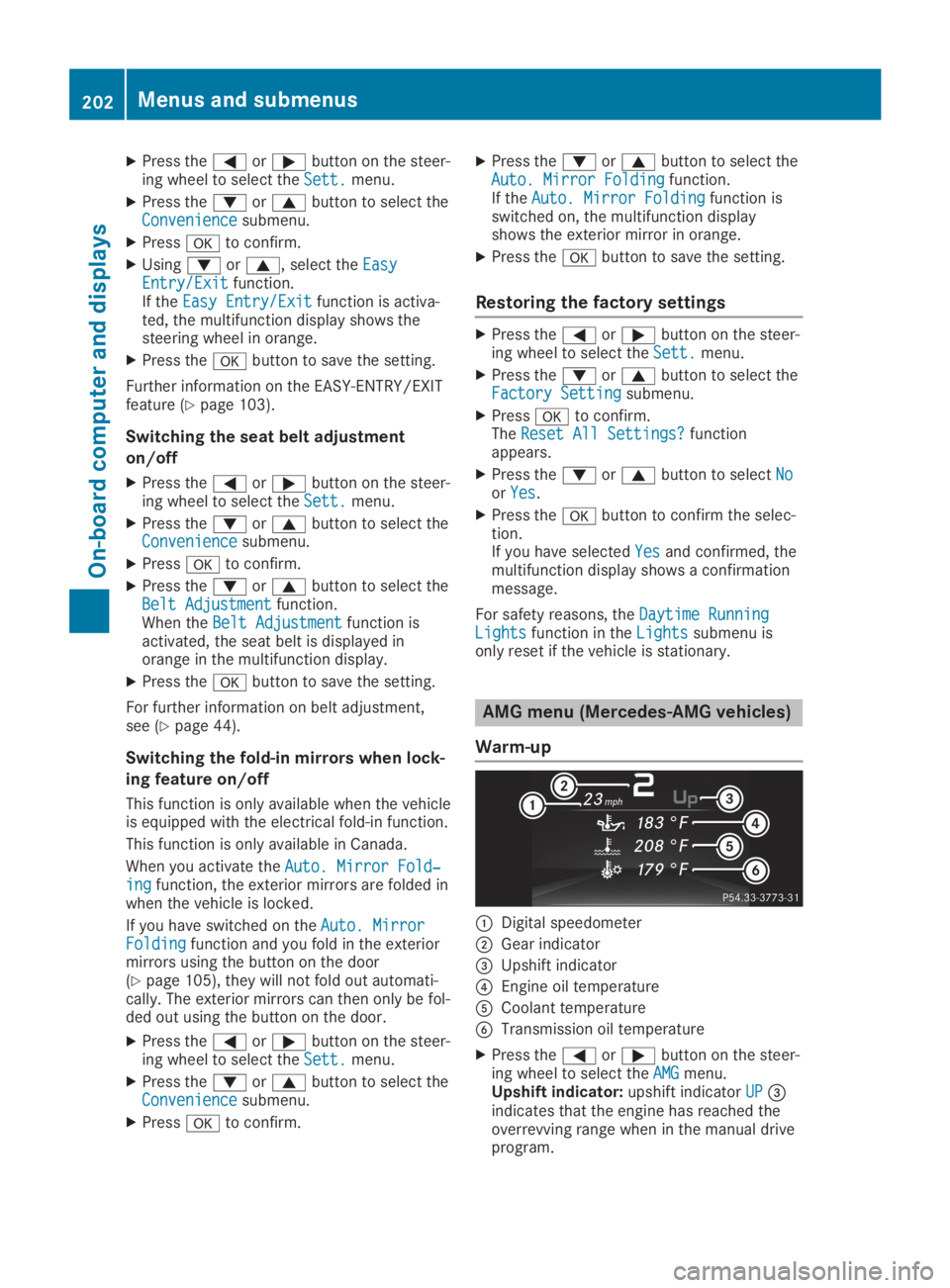
Warm-up
CDigital speedometer
DGear indicator
Page 211 of 330
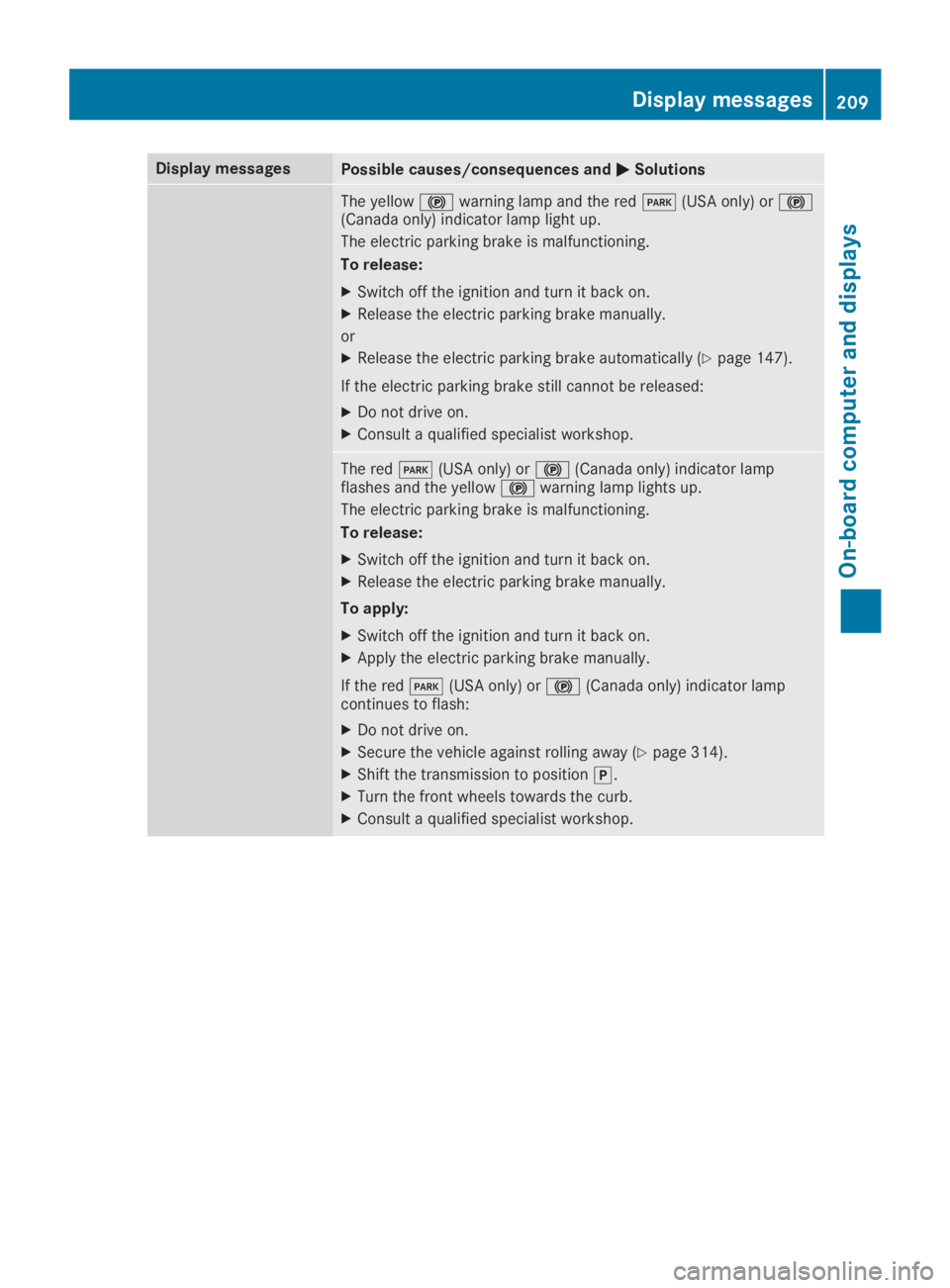
Display messagesPossible causes/consequences andPPSolutions
The yellow$warning lamp and the redI(USA only) or$(Canada only) indicator lamp light up.
The electric parking brake is malfunctioning.
To release:
XSwitch off the ignition and turn it back on.
XRelease the electric parking brake manually.
or
XRelease the electric parking brake automatically (Ypage 147).
If the electric parking brake still cannot be released:
XDo not drive on.
XConsult a qualified specialist workshop.
The redI(USA only) or$(Canada only) indicator lampflashes and the yellow$warning lamp lights up.
The electric parking brake is malfunctioning.
To release:
XSwitch off the ignition and turn it back on.
XRelease the electric parking brake manually.
To apply:
XSwitch off the ignition and turn it back on.
XApply the electric parking brake manually.
If the redI(USA only) or$(Canada only) indicator lampcontinues to flash:
XDo not drive on.
XSecure the vehicle against rolling away (Ypage 314).
XShift the transmission to position].
XTurn the front wheels towards the curb.
XConsult a qualified specialist workshop.
Displaymessages209
On-b oard computer and displays
Z
Page 212 of 330
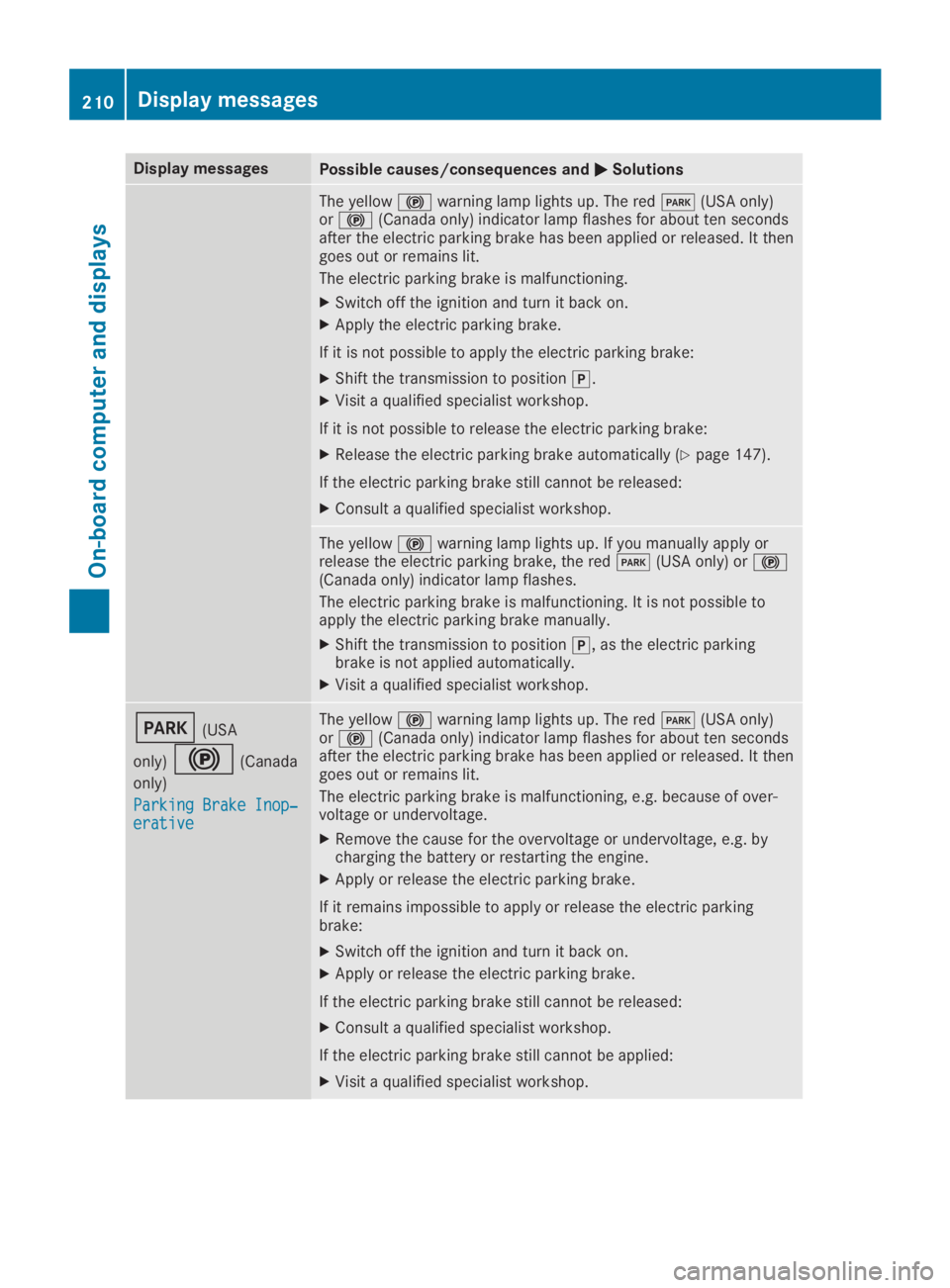
Display messagesPossible causes/consequences andPPSolutions
The yellow$warning lamp lights up. The redI(USA only)or$(Canada only) indicator lamp flashes for about ten secondsafter the electric parking brake has been applied or released. It thengoes out or remains lit.
The electric parking brake is malfunctioning.
XSwitch off the ignition and turn it back on.
XApply the electric parking brake.
If it is not possible to apply the electric parking brake:
XShift the transmission to position].
XVisit a qualified specialist workshop.
If it is not possible to release the electric parking brake:
XRelease the electric parking brake automatically (Ypage 147).
If the electric parking brake still cannot be released:
XConsult a qualified specialist workshop.
The yellow$warning lamp lights up. If you manually apply orrelease the electric parking brake, the redI(USA only) or$(Canada only) indicator lamp flashes.
The electric parking brake is malfunctioning. It is not possible toapply the electric parking brake manually.
XShift the transmission to position], as the electric parkingbrake is not applied automatically.
XVisit a qualified specialist workshop.
I(USA
only)$(Canada
only)
Parking Brake Inop‐Parking Brake Inop‐erativeerative
The yellow$warning lamp lights up. The redI(USA only)or$(Canada only) indicator lamp flashes for about ten secondsafter the electric parking brake has been applied or released. It thengoes out or remains lit.
The electric parking brake is malfunctioning, e.g. because of over-voltage or undervoltage.
XRemove the cause for the overvoltage or undervoltage, e.g. bycharging the battery or restarting the engine.
XApply or release the electric parking brake.
If it remains impossible to apply or release the electric parkingbrake:
XSwitch off the ignition and turn it back on.
XApply or release the electric parking brake.
If the electric parking brake still cannot be released:
XConsult a qualified specialist workshop.
If the electric parking brake still cannot be applied:
XVisit a qualified specialist workshop.
210Displaymessages
On-b oard computer and displays