warning light MERCEDES-BENZ SL CLASS 2019 Repair Manual
[x] Cancel search | Manufacturer: MERCEDES-BENZ, Model Year: 2019, Model line: SL CLASS, Model: MERCEDES-BENZ SL CLASS 2019Pages: 330, PDF Size: 16.53 MB
Page 235 of 330
Warning and indicator lamps
General notes
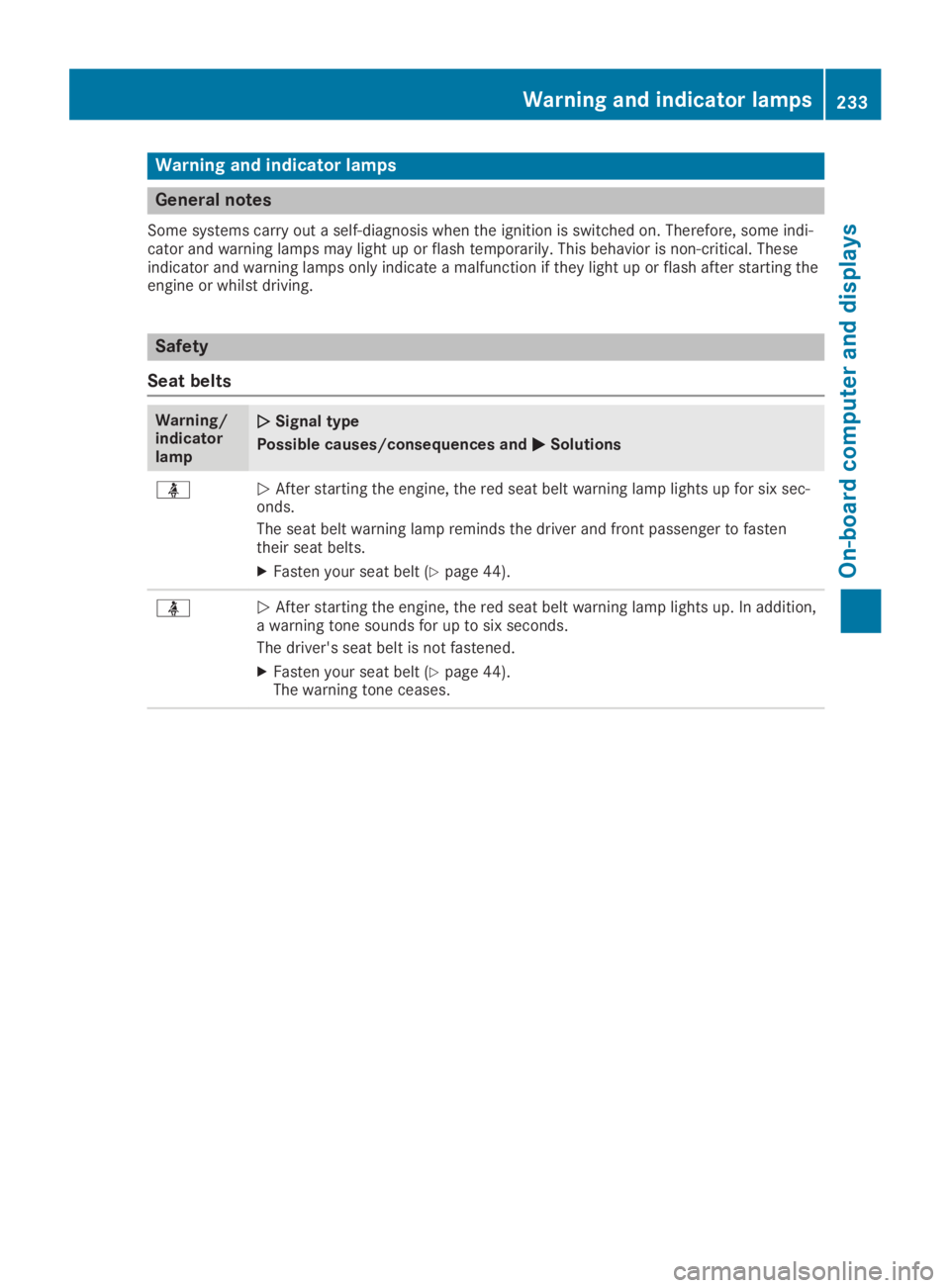
Some systems carry out a self-diagnosis when the ignition is switched on. Therefore, some indi-cator and warning lamps may light up or flash temporarily. This behavior is non-critical. Theseindicator and warning lamps only indicate a malfunction if they light up or flash after starting theengine or whilst driving.
Safety
Seat belts
Warning/indicatorlamp
QQSignal type
Possible causes/consequences andPPSolutions
Page 245 of 330
General notes
The multimedia system section in this Opera-tor's Manual describes the basic principles foroperation. More information can be found inthe Digital Operator's Manual.
Important safety notes
GWARNING
If you operate information systems and com-
munication equipment integrated in the
vehicle when driving, you may be distracted
from the traffic situation. You could also
lose control of the vehicle. There is a risk of
an accident.
Only operate this equipment when the traffic
situation permits. If you are not sure that
this is possible, park the vehicle paying
attention to traffic conditions and operate
the equipment when the vehicle is station-
ary.
You must observe the legal requirements forthe country in which you are currently drivingwhen operating the multimedia system.
The multimedia system calculates the route tothe destination without taking the followinginto account, for example:
Rtraffic lights
Rstop and yield signs
Rparking or stopping restrictions
Rroad narrowing
Rother road and traffic rules and regulations
The multimedia system may give incorrect nav-igation recommendations if the actual street/traffic situation does not correspond with thedigital map's data.
For example:
Ra diverted route
Rthe road layout or the direction of a one-waystreet has been changed
For this reason, you must always observe roadand traffic rules and regulations during yourjourney. Road and traffic rules and regulationsalways have priority over multimedia systemdriving recommendations.
Navigation announcements are intended todirect you while driving without diverting yourattention from the road and driving.
Please always use this feature instead of con-sulting the map display for directions. Lookingat the icons or map display can distract youfrom traffic conditions and driving, andincrease the risk of an accident.
This equipment complies with FCC radiationexposure limits set forth for uncontrolledequipment and meets the FCC radio frequency(RF) Exposure Guidelines in Supplement C toOET65.
This equipment has very low levels of RFenergy that is deemed to comply without maxi-mum permissive exposure evaluation (MPE).However, it is recommended to install it at adistance of at least 8 inches (approx. 20 cm)between the radiation source and a person'sbody (not including limbs such as hands,wrists, feet and legs).
GWARNING
Modifications to electronic components,
their software as well as wiring can impair
their function and/or the function of other
networked components. In particular, sys-
tems relevant to safety could also be affec-
ted. As a result, these may no longer func-
tion as intended and/or jeopardize the oper-
ating safety of the vehicle. There is an
increased risk of an accident and injury.
Never tamper with the wiring as well as elec-
tronic components or their software. You
should have all work to electrical and elec-
tronic equipment carried out at a qualified
specialist workshop.
Function restrictions
For safety reasons, some functions are restric-ted or unavailable while the vehicle is inmotion. You will notice this, for example,because either you will not be able to selectcertain menu items or a message will appearto this effect.
Function restrictions243
Multimedia system
Z
Page 253 of 330
Stowage compartment in the rear
passenger compartment
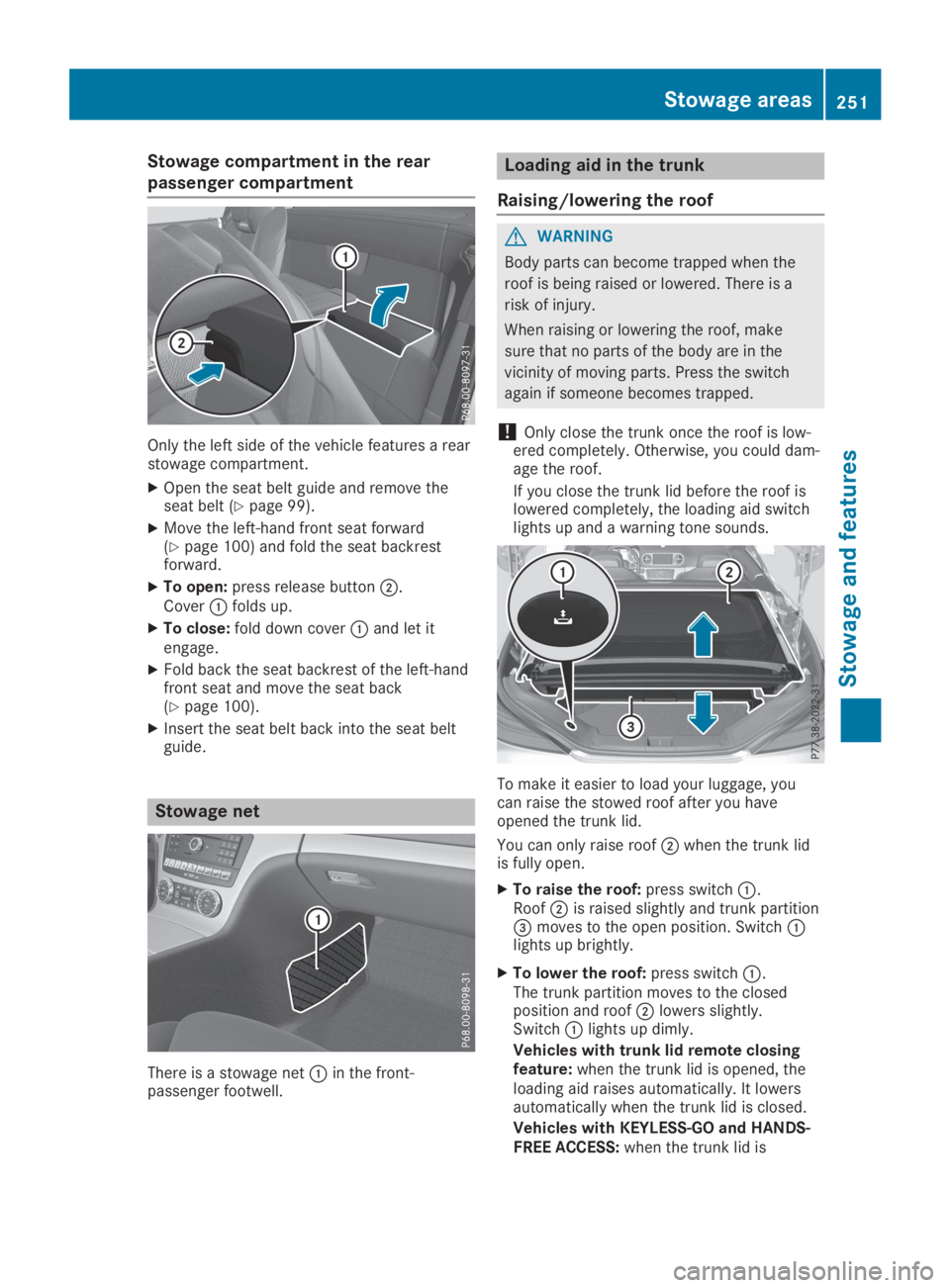
Only the left side of the vehicle features a rearstowage compartment.
XOpen the seat belt guide and remove theseat belt (Ypage 99).
XMove the left-hand front seat forward(Ypage 100) and fold the seat backrestforward.
XTo open:press release buttonD.CoverCfolds up.
XTo close:fold down coverCand let itengage.
XFold back the seat backrest of the left-handfront seat and move the seat back(Ypage 100).
XInsert the seat belt back into the seat beltguide.
Stowage net
There is a stowage netCin the front-passenger footwell.
Loading aid in the trunk
Raising/lowering the roof
GWARNING
Body parts can become trapped when the
roof is being raised or lowered. There is a
risk of injury.
When raising or lowering the roof, make
sure that no parts of the body are in the
vicinity of moving parts. Press the switch
again if someone becomes trapped.
!Only close the trunk once the roof is low-ered completely. Otherwise, you could dam-age the roof.
If you close the trunk lid before the roof islowered completely, the loading aid switchlights up and a warning tone sounds.
To make it easier to load your luggage, youcan raise the stowed roof after you haveopened the trunk lid.
You can only raise roofDwhen the trunk lidis fully open.
XTo raise the roof:press switchC.RoofDis raised slightly and trunk partition
Page 255 of 330
Cup holder in the center console
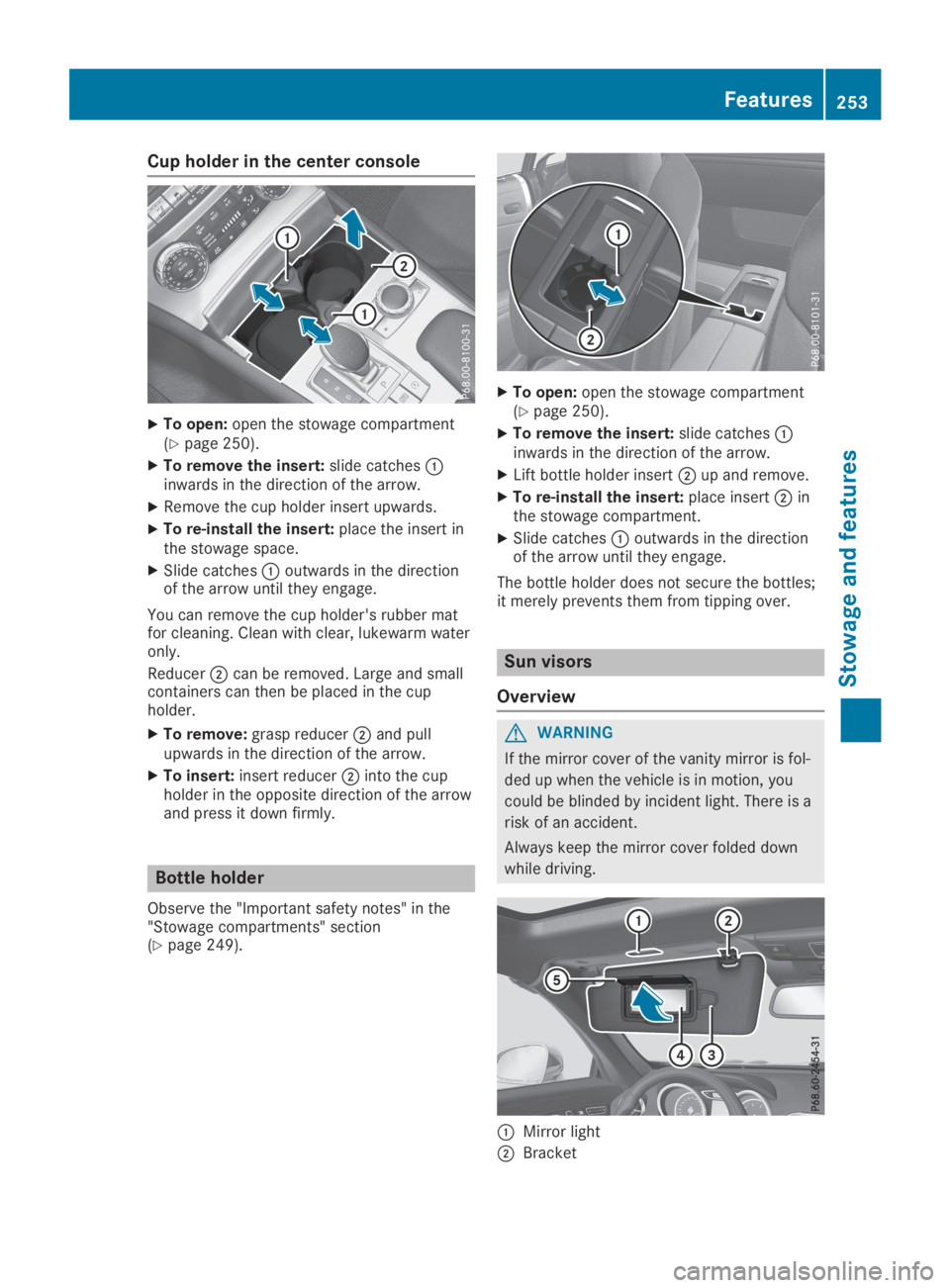
XTo open:open the stowage compartment(Ypage 250).
XTo remove the insert:slide catchesCinwards in the direction of the arrow.
XRemove the cup holder insert upwards.
XTo re-install the insert:place the insert inthe stowage space.
XSlide catchesCoutwards in the directionof the arrow until they engage.
You can remove the cup holder's rubber matfor cleaning. Clean with clear, lukewarm wateronly.
ReducerDcan be removed. Large and smallcontainers can then be placed in the cupholder.
XTo remove:grasp reducerDand pullupwards in the direction of the arrow.
XTo insert:insert reducerDinto the cupholder in the opposite direction of the arrowand press it down firmly.
Bottle holder
Observe the "Important safety notes" in the"Stowage compartments" section(Ypage 249).
XTo open:open the stowage compartment(Ypage 250).
XTo remove the insert:slide catchesCinwards in the direction of the arrow.
XLift bottle holder insertDup and remove.
XTo re-install the insert:place insertDinthe stowage compartment.
XSlide catchesCoutwards in the directionof the arrow until they engage.
The bottle holder does not secure the bottles;it merely prevents them from tipping over.
Sun visors
Overview
GWARNING
If the mirror cover of the vanity mirror is fol-
ded up when the vehicle is in motion, you
could be blinded by incident light. There is a
risk of an accident.
Always keep the mirror cover folded down
while driving.
CMirror light
DBracket
Features253
Stowage and features
Z
Page 268 of 330
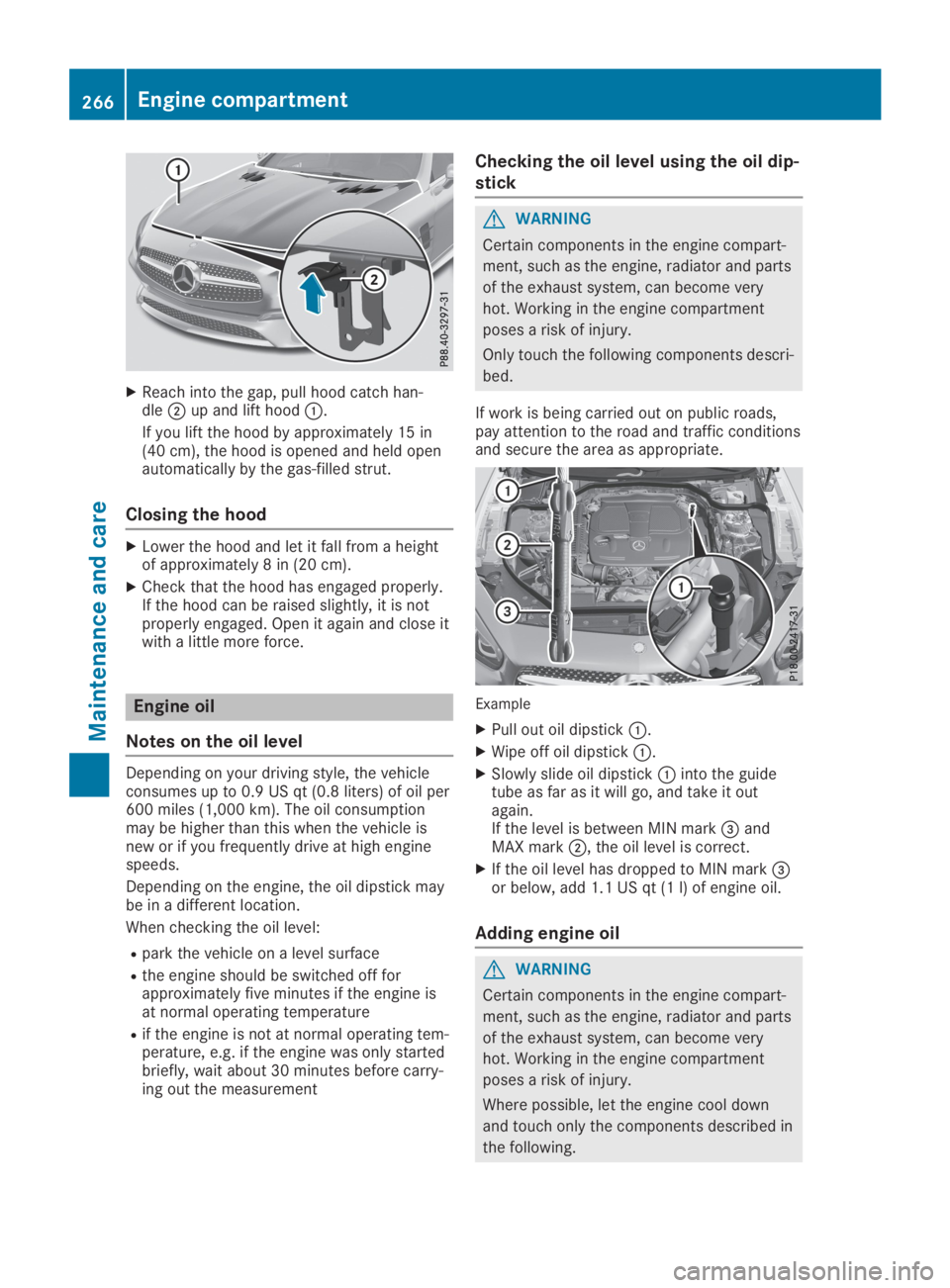
XReach into the gap, pull hood catch han-dleDup and lift hoodC.
If you lift the hood by approximately 15 in(40 cm), the hood is opened and held openautomatically by the gas-filled strut.
Closing the hood
XLower the hood and let it fall from a heightof approximately 8 in (20 cm).
XCheck that the hood has engaged properly.If the hood can be raised slightly, it is notproperly engaged. Open it again and close itwith a little more force.
Engine oil
Notes on the oil level
Depending on your driving style, the vehicleconsumes up to 0.9 US qt(0.8 liters) of oil per600 miles (1,000 km). The oil consumptionmay be higher than this when the vehicle isnew or if you frequently drive at high enginespeeds.
Depending on the engine, the oil dipstick maybe in a different location.
When checking the oil level:
Rpark the vehicle on a level surface
Rthe engine should be switched off forapproximately five minutes if the engine isat normal operating temperature
Rif the engine is not at normal operating tem-perature, e.g. if the engine was only startedbriefly, wait about 30 minutes before carry-ing out the measurement
Checking the oil level using the oil dip-
stick
GWARNING
Certain components in the engine compart-
ment, such as the engine, radiator and parts
of the exhaust system, can become very
hot. Working in the engine compartment
poses a risk of injury.
Only touch the following components descri-
bed.
If work is being carried out on public roads,pay attention to the road and traffic conditionsand secure the area as appropriate.
Example
XPull out oil dipstickC.
XWipe off oil dipstickC.
XSlowly slide oil dipstickCinto the guidetube as far as it will go, and take it outagain.If the level is between MIN mark
Page 274 of 330
Observe the legal requirements in each coun-try.
XDo not use hot water and do not wash thevehicle in direct sunlight.
XUse a soft sponge to clean.
XUse a mild cleaning agent, such as a carshampoo approved by Mercedes-Benz.
XThoroughly hose down the vehicle with agentle jet of water.
XDo not point the water jet directly towardsthe air inlet or the edges of decorative foils.
XUse plenty of water and rinse out thesponge frequently.
XRinse the vehicle with clean water and drythoroughly with a chamois.
XDo not let the cleaning agent dry on thepaintwork or the decorative foils.
Carefully remove all deposits of road salt assoon as possible when driving in winter.
Power washers
GWARNING
The water jet from a circular jet nozzle (dirt
blasters) can cause invisible exterior dam-
age to the tires or chassis components.
Components damaged in this way may fail
unexpectedly. There is a risk of an accident.
Do not use power washers with circular jet
nozzles to clean the vehicle. Have damaged
tires or chassis components replaced imme-
diately.
!Vehicles with decorative film: parts of yourvehicle are covered with decorative film.Maintain a distance of at least 27.5 in(70 cm) between the film-covered parts ofthe vehicle and the nozzle of the powerwasher.
Information about the correct distance isavailable from the equipment manufacturer.
Move the power washer nozzle around whencleaning your vehicle.
The water temperature of the power washermust not exceed 140 ‡ (60 †).
!Always maintain a distance of at least12 in (30 cm) between the vehicle and thepower washer nozzle. Information about thecorrect distance is available from the equip-ment manufacturer.
Move the power washer nozzle around whencleaning your vehicle.
Do not aim directly at any of the following:
RTires
RDoor gaps, roof gaps, joints, etc.
RElectrical components
RBattery
RPlug-type couplings
RLight bulbs
RSeals
RTrim elements
RVentilation slots
Damaged seals or electrical componentscan lead to leaks or failures.
!Vehicles with HANDS-FREE ACCESS: if aSmartKey with KEYLESS-GO is within thedetection range of the KEYLESS-GOantenna, the following situations could leadto the unintentional opening of the trunk lid:
Rusing a car wash
Rusing a power washer
Make sure that the SmartKey is at least6.5 ft (2 m) away from the vehicle.
Cleaning the paintwork
!Do not affix:
Rstickers
Rfilms
Rmagnetic plates or similar items
to painted surfaces. You could otherwisedamage the paintwork.
Scratches, corrosive deposits, areas affectedby corrosion and damage caused by inade-quate care cannot always be completelyrepaired. In such cases, visit a qualified spe-cialist workshop.
XRemove dirt immediately, where possible,while avoiding rubbing too hard.
XSoak insect remains with insect removerand rinse off the treated areas afterwards.
XSoak bird droppings with water and rinse offthe treated areas afterwards.
XRemove tree resin, oils, fuels and greases byrubbing gently with a cloth soaked in petro-leum ether or lighter fluid
XRemove coolant and brake fluid with a moistcloth and clear water.
272Care
Maintenance and care
Page 277 of 330

Cleaning the exterior lighting
!Only use cleaning agents or cleaningcloths that are suitable for plastic lenses.Caustic, irritant or otherwise unsuitablecleaning agents or cleaning cloths couldscratch or damage the exterior lighting plas-tic lenses.
XClean the plastic lenses of the exterior lightswith a wet sponge and a mild cleaningagent, e.g. Mercedes-Benz car shampoo orcleaning cloths.
Cleaning the mirror turn signals
!Only use cleaning agents or cleaningcloths that are suitable for plastic lenses.Unsuitable cleaning agents or cleaningcloths could scratch or damage the plasticlenses of the mirror turn signals.
XClean the plastic lenses of the mirror turnsignals in the exterior mirror housing using awet sponge and mild cleaning agent, e.g.Mercedes-Benz car shampoo or with clean-ing cloths.
Cleaning the sensors
!If you clean the sensors with a powerwasher, make sure that you keep a distanceof at least 11.8 in(30 cm) between the vehi-cleand the power washer nozzle. Informa-tion about the correct distance is availablefrom the equipment manufacturer.
XClean sensorsCof the driving systemswith water, car shampoo and a soft cloth.
Cleaning the reversing camera
!Do not clean the camera lens and the areaaround the rear view camera with a powerwasher.
XUse clean water and a soft cloth to cleancamera lensC.
Cleaning the exhaust pipe
GWARNING
The exhaust tail pipe and tail pipe trim can
become very hot. If you come into contact
with these parts of the vehicle, you could
burn yourself. There is a risk of burns.
Always be particularly careful and supervise
children closely around the exhaust pipe and
the exhaust pipe trims. Allow these compo-
nents to cool down before touching them.
!Do not clean the exhaust pipe with acid-based cleaning agents, such as bathroomcleaner or wheel cleaner.
XClean the exhaust pipe with a chrome careproduct tested and approved by Mercedes-Benz.
Impurities combined with the effects of roadgrit and corrosive environmental factors maycause flash rust to form on the surface. Youcan restore the original shine of the exhaustpipe by cleaning it regularly, especially in win-ter and after washing.
Care275
Maintenance and care
Z
Page 284 of 330
HEnvironmental note
Have the used tire sealant bottle disposed
of professionally, e.g. at a qualified special-
ist workshop.
If a tire pressure of 180 kPa(1.8 bar/26 psi)has been achieved after a maximum period often minutes:
XSwitch off the tire inflation compressor.
XUnscrew the filler hose from the valve of thefaulty tire.
XStow the tire sealant bottle and the tireinflation compressor.
XPull away immediately.
XStop after driving for approximately tenminutes and check the tire pressure withthe tire inflation compressor.The tire pressure must now be at least130 kPa (1.3 bar/19 psi).
GWARNING
If the required tire pressure is not reached
after driving for a short period, the tire is too
badly damaged. The tire sealant cannot
repair the tire in this instance. Damaged
tires and a tire pressure that is too low can
significantly impair the vehicle's braking and
driving characteristics. There is a risk of
accident.
Do not continue driving. Contact a qualified
specialist workshop.
iIn cases such as the one mentionedabove, contact an authorized Mercedes-Benz Center. Or call 1-800-FOR-MERCedes(in the USA) or 1-800-387-0100 (in Canada).
XCorrect the tire pressure if it is still at least130 kPa (1.3 bar/19 psi). See the Tire andLoading Information placard on the driver'sside B-pillar or the tire pressure table in thefuel filler flap for values.
XTo increase the tire pressure:switch onthe tire inflation compressor.
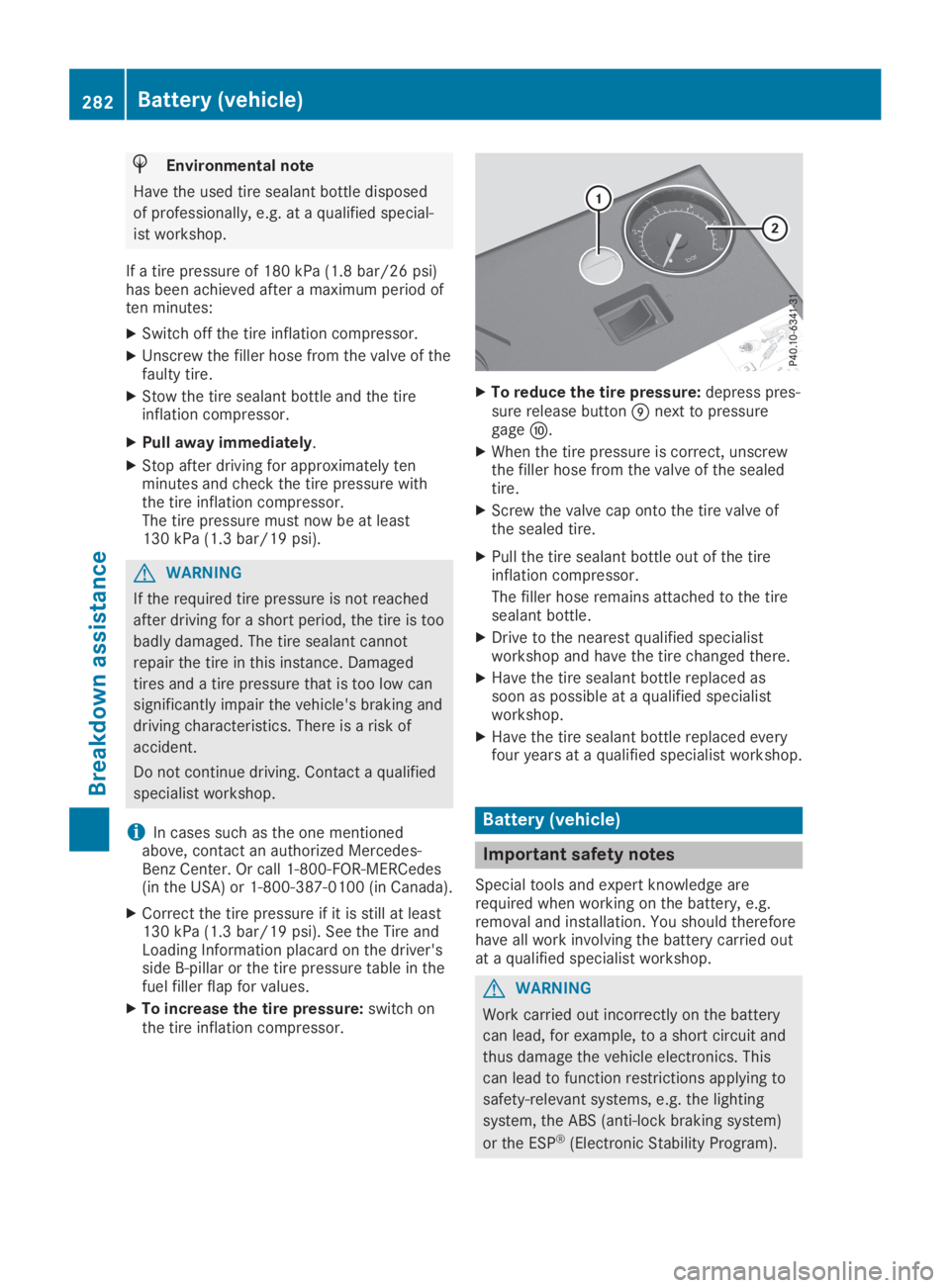
XTo reduce the tire pressure:depress pres-sure release buttonmnext to pressuregagen.
XWhen the tire pressure is correct, unscrewthe filler hose from the valve of the sealedtire.
XScrew the valve cap onto the tire valve ofthe sealed tire.
XPull the tire sealant bottle out of the tireinflation compressor.
The filler hose remains attached to the tiresealant bottle.
XDrive to the nearest qualified specialistworkshop and have the tire changed there.
XHave the tire sealant bottle replaced assoon as possible at a qualified specialistworkshop.
XHave the tire sealant bottle replaced everyfour years at a qualified specialist workshop.
Battery (vehicle)
Important safety notes
Special tools and expert knowledge arerequired when working on the battery, e.g.removal and installation. You should thereforehave all work involving the battery carried outat a qualified specialist workshop.
GWARNING
Work carried out incorrectly on the battery
can lead, for example, to a short circuit and
thus damage the vehicle electronics. This
can lead to function restrictions applying to
safety-relevant systems, e.g. the lighting
system, the ABS (anti-lock braking system)
or the ESP®(Electronic Stability Program).
282Battery (vehicle)
Breakdown assistance
Page 287 of 330
ately with plenty of clean water and seek
medical attention.
GWARNING
A discharged battery can freeze at tempera-
tures below freezing point. When jump-start-
ing the vehicle or charging the battery,
gases can escape from the battery. There is
a risk of an explosion.
Allow the frozen battery to thaw out before
charging it or jump-starting.
!Only use battery chargers with a maximumcharging voltage of 14.8 V.
!Only charge the battery using the jump-starting connection point.
The jump-starting connection point is in theengine compartment.
If the indicator/warning lamps do not light upat low temperatures, it is very likely that thedischarged battery has frozen. In this case,you may neither charge the battery nor jump-start the vehicle. The service life of a thawed-out battery may be shorter. The starting char-acteristics can be impaired, particularly at lowtemperatures. Have the thawed-out batterychecked at a qualified specialist workshop.
Read the battery charger's operating instruc-tions before charging the battery.
XOpen the hood.
XConnect the battery charger to the positiveterminal and ground point in the same order
as when connecting the donor battery in thejump-starting procedure (Ypage 285).
Replacing the 12 V battery
Observe the notes on the 12 V battery(Ypage 282).
Mercedes-Benz recommends that you havethe 12 V battery replaced at a qualified spe-cialist workshop, e.g. at an authorizedMercedes-Benz Center.
If you want to replace the battery yourself,observe the following notes:
RAlways replace a defective battery with abattery which meets the specific require-ments of the vehicle.
The vehicle is equipped with an AGM(Absorbent Glass Mat) technology battery.Full vehicle functionality is only guaranteedwith an AGM battery. For safety reasons,Mercedes-Benz recommends that you onlyuse batteries which have been tested andapproved for your vehicle by Mercedes-Benz.
RUse detachable parts such as breatherhoses, angled connecting pieces or terminalcovers from the battery which is to bereplaced.
RMake sure that the vent hose is always con-nected to the original opening on the bat-tery side.
RInstall existing or supplied cell caps to pre-vent gases or battery acid from escaping.
RMake sure that the detachable parts areconnected again in the same way.
Jump-starting
For the jump-starting procedure, use only the jump-starting connection point in the engine com-partment, consisting of a positive terminal and a ground point.
GWARNING
Battery acid is caustic. There is a risk of injury.
Avoid contact with skin, eyes or clothing. Do not inhale any battery gases. Do not lean over the
battery. Keep children away from batteries. Wash away battery acid immediately with plenty of
clean water and seek medical attention.
Jump-starting285
Breakdown assistance
Z
Page 288 of 330
GWARNING
During charging and jump-starting, explosive gases can escape from the battery. There is a
risk of an explosion.
Particularly avoid fire, open flames, creating sparks and smoking. Ensure there is sufficient
ventilation while charging and jump-starting. Do not lean over a battery.
GWARNING
During the charging process, a battery produces hydrogen gas. If a short circuit occurs or
sparks are created, the hydrogen gas can ignite. There is a risk of an explosion.
RMake sure that the positive terminal of a connected battery does not come into contact with
vehicle parts.
RNever place metal objects or tools on a battery.
RIt is important that you observe the described order of the battery terminals when connect-
ing and disconnecting a battery.
RWhen jump-starting, make sure that the battery poles with identical polarity are connected.
RIt is particularly important to observe the described order when connecting and disconnect-
ing the jumper cables.
RNever connect or disconnect the battery terminals while the engine is running.
GWARNING
A discharged battery can freeze at temperatures below freezing point. When jump-starting the
vehicle or charging the battery, gases can escape from the battery. There is a risk of an explo-
sion.
Allow the frozen battery to thaw out before charging it or jump-starting.
!Avoid repeated and lengthy starting attempts. Otherwise, the catalytic converter could bedamaged by the non-combusted fuel.
If the indicator/warning lamps do not light up at low temperatures, it is very likely that the dis-charged battery has frozen. In this case, you may neither charge the battery nor jump-start thevehicle. The service life of a thawed-out battery may be shorter. The starting characteristics canbe impaired, particularly at low temperatures. Have the thawed-out battery checked at a quali-fied specialist workshop.
Do not start the vehicle using a rapid charging device. If your vehicle's battery is discharged, theengine can be jump-started from another vehicle or from a donor battery using jumper cables.Observe the following points:
RThe battery is not accessible in all vehicles. If the other vehicle's battery is not accessible,jump-start the vehicle using a donor battery or a jump-starting device.
RYou may only jump-start the vehicle when the engine and exhaust system are cold.
RDo not start the engine if the battery is frozen. Let the battery thaw first.
ROnly jump-start from batteries with a 12 V voltage rating.
ROnly use jumper cables which have a sufficient cross-section and insulated terminal clamps.
RIf the battery is fully discharged, leave the battery that is being used to jump-start connectedfor a few minutes before attempting to start. This charges the battery slightly.
RMake sure that the two vehicles do not touch.
286Jump-starting
Breakdown assistance