warning light MERCEDES-BENZ SL CLASS 2019 Workshop Manual
[x] Cancel search | Manufacturer: MERCEDES-BENZ, Model Year: 2019, Model line: SL CLASS, Model: MERCEDES-BENZ SL CLASS 2019Pages: 330, PDF Size: 16.53 MB
Page 191 of 330
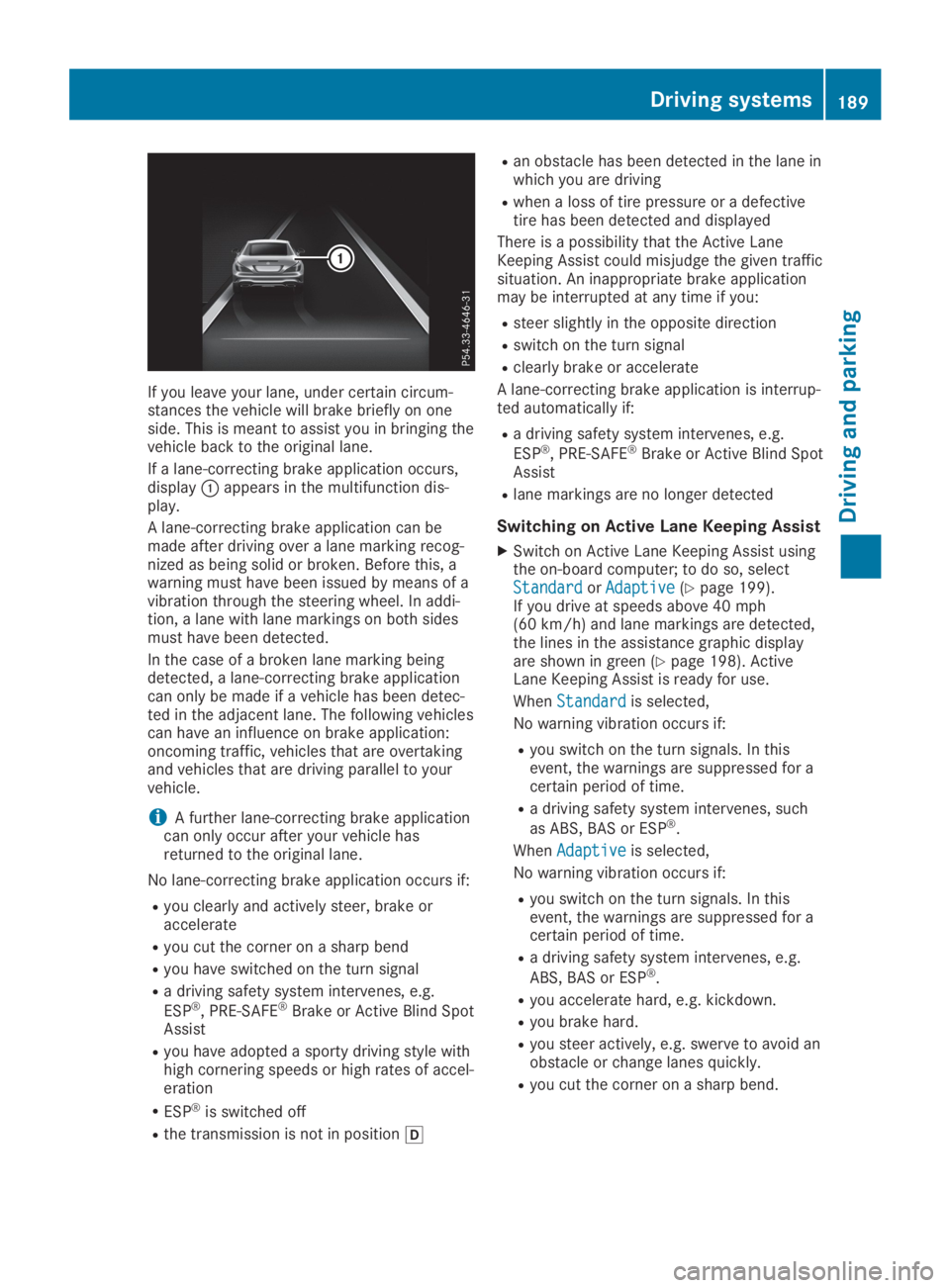
If you leave your lane, under certain circum-stances the vehicle will brake briefly on oneside. This is meant to assist you in bringing thevehicle back to the original lane.
If a lane-correcting brake application occurs,displayCappears in the multifunction dis-play.
A lane-correcting brake application can bemade after driving over a lane marking recog-nized as being solid or broken. Before this, awarning must have been issued by means of avibration through the steering wheel. In addi-tion, a lane with lane markings on both sidesmust have been detected.
In the case of a broken lane marking beingdetected, a lane-correcting brake applicationcan only be made if a vehicle has been detec-ted in the adjacent lane. The following vehiclescan have an influence on brake application:oncoming traffic, vehicles that are overtakingand vehicles that are driving parallel to yourvehicle.
iA further lane-correcting brake applicationcan only occur after your vehicle hasreturned to the original lane.
No lane-correcting brake application occurs if:
Ryou clearly and actively steer, brake oraccelerate
Ryou cut the corner on a sharp bend
Ryou have switched on the turn signal
Ra driving safety system intervenes, e.g.
ESP®, PRE-SAFE®Brake or Active Blind SpotAssist
Ryou have adopted a sporty driving style withhigh cornering speeds or high rates of accel-eration
RESP®is switched off
Rthe transmission is not in position[
Ran obstacle has been detected in the lane inwhich you are driving
Rwhen a loss of tire pressure or a defectivetire has been detected and displayed
There is a possibility that the Active LaneKeeping Assist could misjudge the given trafficsituation. An inappropriate brake applicationmay be interrupted at any time if you:
Rsteer slightly in the opposite direction
Rswitch on the turn signal
Rclearly brake or accelerate
A lane-correcting brake application is interrup-ted automatically if:
Ra driving safety system intervenes, e.g.
ESP®, PRE-SAFE®Brake or Active Blind SpotAssist
Rlane markings are no longer detected
Switching on Active Lane Keeping Assist
XSwitch on Active Lane Keeping Assist usingthe on-board computer; to do so, selectStandardStandardorAdaptiveAdaptive(Ypage 199).If you drive at speeds above 40 mph(60 km/h) and lane markings are detected,the lines in the assistance graphic displayare shown in green (Ypage 198). ActiveLane Keeping Assist is ready for use.
WhenStandardStandardis selected,
No warning vibration occurs if:
Ryou switch on the turn signals. In thisevent, the warnings are suppressed for acertain period of time.
Ra driving safety system intervenes, such
as ABS, BAS or ESP®.
WhenAdaptiveAdaptiveis selected,
No warning vibration occurs if:
Ryou switch on the turn signals. In thisevent, the warnings are suppressed for acertain period of time.
Ra driving safety system intervenes, e.g.
ABS, BAS or ESP®.
Ryou accelerate hard, e.g. kickdown.
Ryou brake hard.
Ryou steer actively, e.g. swerve to avoid anobstacle or change lanes quickly.
Ryou cut the corner on a sharp bend.
Driving systems189
Driving and parking
Z
Page 192 of 330

Important safety notes
GWARNING
If you operate information systems and com-
munication equipment integrated in the
vehicle when driving, you may be distracted
from the traffic situation. You could also
lose control of the vehicle. There is a risk of
an accident.
Only operate this equipment when the traffic
situation permits. If you are not sure that
this is possible, park the vehicle paying
attention to traffic conditions and operate
the equipment when the vehicle is station-
ary.
You must observe the legal requirements forthe country in which you are currently drivingwhen operating the on-board computer.
GWARNING
If the instrument cluster has failed or mal-
functioned, you may not recognize function
restrictions in systems relevant to safety.
The operating safety of your vehicle may be
impaired. There is a risk of an accident.
Drive on carefully. Have the vehicle checked
at a qualified specialist workshop immedi-
ately.
The on-board computer only shows messagesor warnings from certain systems in the multi-function display. You should therefore makesure your vehicle is operating safely at alltimes.
If the operating safety of your vehicle isimpaired, pull over as soon as it is safe to doso. Contact a qualified specialist workshop.
For an overview, see the instrument panelillustration (Ypage 33).
Displays and operation
Instrument cluster lighting
The lighting in the instrument cluster, in thedisplays and the controls in the vehicle interiorcan be adjusted using the brightness controlknob.
The brightness control knob is located on thebottom left of the instrument cluster(Ypage 33).
XTurn the brightness control knob clockwiseor counter-clockwise.If you turn the light switch (Ypage 109) totheX,`orXposition, the bright-ness will depend upon the brightness of theambient light.
The light sensor in the instrument clusterautomatically controls the brightness of themultifunction display. In daylight, the dis-plays in the instrument cluster are not illu-minated.
Speedometer with segments
The segments in the speedometer indicatewhich speed range is available.
RCruise control activated (Ypage 154):
The segments light up from the storedspeed to the maximum speed.
RActive Distance Assist DISTRONIC activated(Ypage 156):
One or two segments in the set speed rangelight up.
RActive Distance Assist DISTRONIC detects avehicle in front moving more slowly than thestored speed:
The segments between the speed of thevehicle in front and the stored speed lightup.
Tachometer
!Do not drive in the overrevving range, asthis could damage the engine.
The red band in the tachometer indicates theengine's overrevving range.
The fuel supply is interrupted to protect theengine when the red band is reached.
Outside temperature display
You should pay special attention to road con-ditions when temperatures are around freezingpoint.
190Displays and operation
On-board computer and displays
Page 203 of 330
automatic headlamp mode is activated(Ypage 109).
Rexterior lighting delayed switch-off:theexterior lighting remains lit for 60 secondsafter the engine is switched off. If you closeall the doors and the trunk lid, the exteriorlighting goes off after 15 seconds.
Depending on your vehicle's equipment, whenthe surround lighting and delayed switch-offexterior lighting are on, the following light up:
Rparking lamps
Rlow-beam headlamps
Rdaytime running lamps
Rside marker lamps
Rsurround lighting in the exterior mirrors
Activating/deactivating the interior
lighting delayed switch-off
If you activate theInterior LightingInterior LightingDelayDelayfunction, the interior lighting remainson for 20 seconds after you remove the Smart-Key from the ignition lock.
XPress theYorebutton on the steer-ing wheel to select theSett.Sett.menu.
XPress thedorcbutton to select theLightLightsubmenu.
XPressvto confirm.
XPress thedorcbutton to select theInterior Lighting DelayInterior Lighting Delayfunction.When theInterior Lighting DelayInterior Lighting Delayfunc-tion is activated, the vehicle interior is dis-played in orange in the multifunction dis-play.
XPress thevbutton to save the setting.
Vehicle
Activating/deactivating the automatic
door locking mechanism
If you activate theAutomatic Door LockAutomatic Door Lockfunction, the vehicle is centrally locked abovea speed of approximately 9 mph (15 km/h).
XPress theYorebutton on the steer-ing wheel to select theSett.Sett.menu.
XPress thedorcbutton to select theVehicleVehiclesubmenu.
XPressvto confirm.
XPress thedorcbutton to select theAutomatic Door LockAutomatic Door Lockfunction.When theAutomatic Door LockAutomatic Door Lockfunctionis activated, the multifunction display showsthe left-hand vehicle door in orange.
XPress thevbutton to save the setting.
For further information on the automatic lock-ing feature, see (Ypage 81).
Activating/deactivating the acoustic
locking verification signal
If you switch on theAcoustic LockAcoustic Lockfunction,an acoustic signal sounds when you lock thevehicle.
XPress theYorebutton on the steer-ing wheel to select theSett.Sett.menu.
XPress thedorcbutton to select theVehicleVehiclesubmenu.
XPressvto confirm.
XPress thedorcbutton to select theAcoustic LockAcoustic Lockfunction.If theAcoustic LockAcoustic Lockfunction is activated,the7symbol in the multifunction displaylights up orange.
XPress thevbutton to save the setting.
Comfort
Activating/deactivating the EASY-
ENTRY/EXIT feature
GWARNING
When the EASY-ENTRY/EXIT feature adjusts
the steering wheel, you and other vehicle
occupants – particularly children – could
become trapped. There is a risk of injury.
While the EASY-ENTRY/EXIT feature is mak-
ing adjustments, make sure that no one has
any body parts in the sweep of the steering
wheel.
If somebody becomes trapped:
Rpress one of the memory function posi-
tion buttons, or
Rmove the switch for steering wheel
adjustment in the opposite direction to
that in which the steering wheel is mov-
ing.
The adjustment process is stopped.
Menus and submenus201
On-board computer and displays
Z
Page 211 of 330
Display messagesPossible causes/consequences andPPSolutions
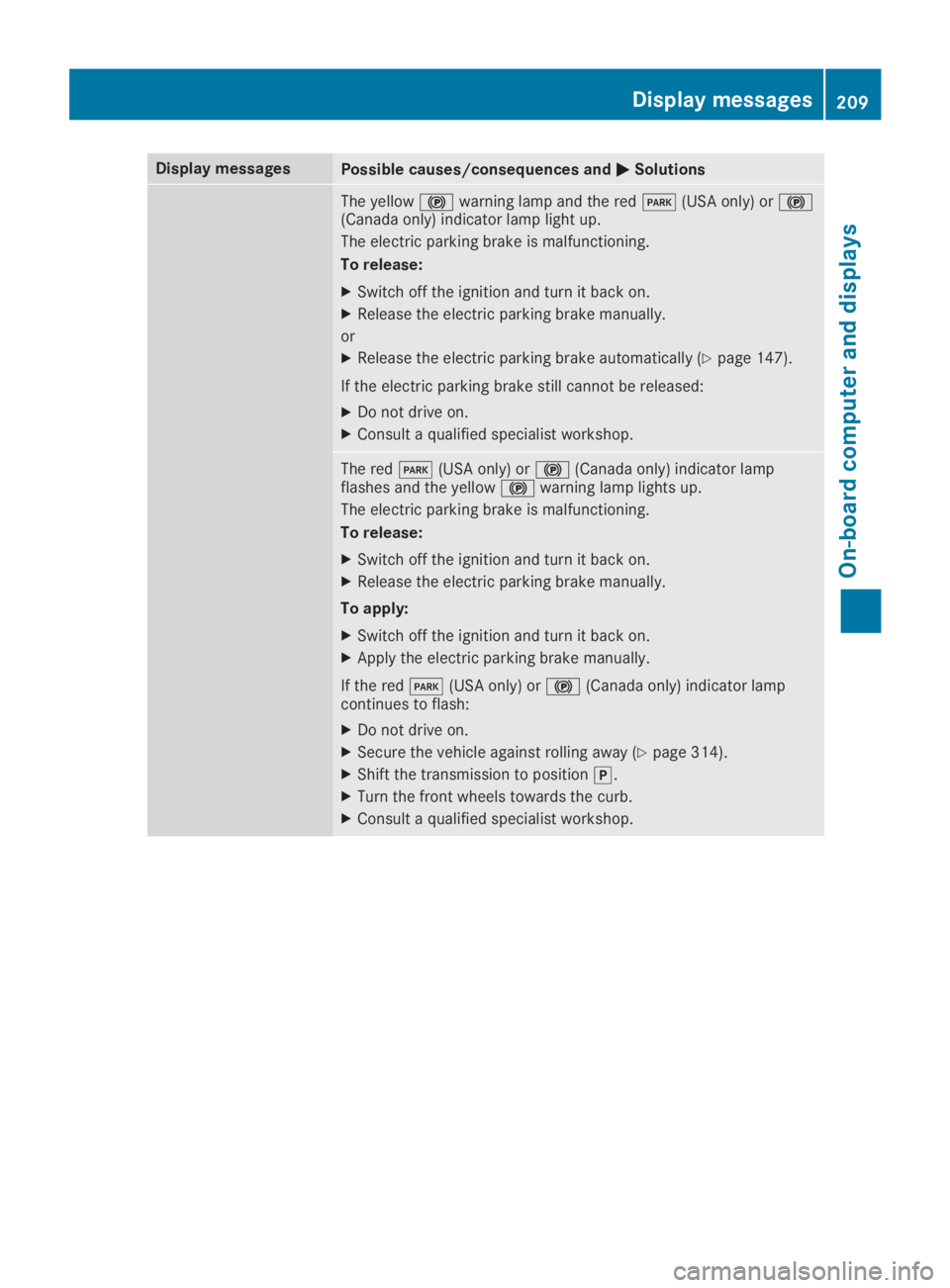
The yellow$warning lamp and the redI(USA only) or$(Canada only) indicator lamp light up.
The electric parking brake is malfunctioning.
To release:
XSwitch off the ignition and turn it back on.
XRelease the electric parking brake manually.
or
XRelease the electric parking brake automatically (Ypage 147).
If the electric parking brake still cannot be released:
XDo not drive on.
XConsult a qualified specialist workshop.
The redI(USA only) or$(Canada only) indicator lampflashes and the yellow$warning lamp lights up.
The electric parking brake is malfunctioning.
To release:
XSwitch off the ignition and turn it back on.
XRelease the electric parking brake manually.
To apply:
XSwitch off the ignition and turn it back on.
XApply the electric parking brake manually.
If the redI(USA only) or$(Canada only) indicator lampcontinues to flash:
XDo not drive on.
XSecure the vehicle against rolling away (Ypage 314).
XShift the transmission to position].
XTurn the front wheels towards the curb.
XConsult a qualified specialist workshop.
Displaymessages209
On-b oard computer and displays
Z
Page 212 of 330
Display messagesPossible causes/consequences andPPSolutions
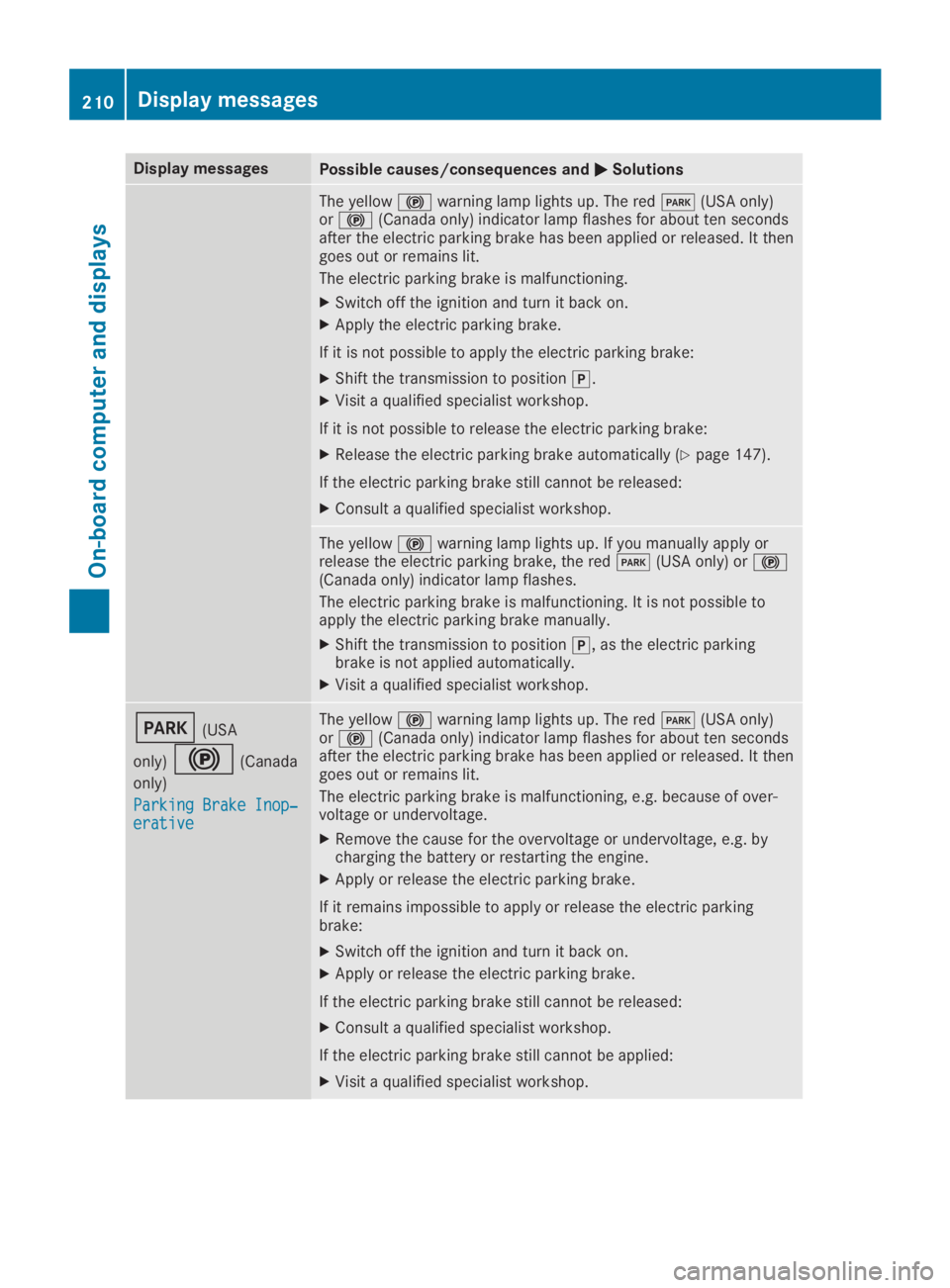
The yellow$warning lamp lights up. The redI(USA only)or$(Canada only) indicator lamp flashes for about ten secondsafter the electric parking brake has been applied or released. It thengoes out or remains lit.
The electric parking brake is malfunctioning.
XSwitch off the ignition and turn it back on.
XApply the electric parking brake.
If it is not possible to apply the electric parking brake:
XShift the transmission to position].
XVisit a qualified specialist workshop.
If it is not possible to release the electric parking brake:
XRelease the electric parking brake automatically (Ypage 147).
If the electric parking brake still cannot be released:
XConsult a qualified specialist workshop.
The yellow$warning lamp lights up. If you manually apply orrelease the electric parking brake, the redI(USA only) or$(Canada only) indicator lamp flashes.
The electric parking brake is malfunctioning. It is not possible toapply the electric parking brake manually.
XShift the transmission to position], as the electric parkingbrake is not applied automatically.
XVisit a qualified specialist workshop.
I(USA
only)$(Canada
only)
Parking Brake Inop‐Parking Brake Inop‐erativeerative
The yellow$warning lamp lights up. The redI(USA only)or$(Canada only) indicator lamp flashes for about ten secondsafter the electric parking brake has been applied or released. It thengoes out or remains lit.
The electric parking brake is malfunctioning, e.g. because of over-voltage or undervoltage.
XRemove the cause for the overvoltage or undervoltage, e.g. bycharging the battery or restarting the engine.
XApply or release the electric parking brake.
If it remains impossible to apply or release the electric parkingbrake:
XSwitch off the ignition and turn it back on.
XApply or release the electric parking brake.
If the electric parking brake still cannot be released:
XConsult a qualified specialist workshop.
If the electric parking brake still cannot be applied:
XVisit a qualified specialist workshop.
210Displaymessages
On-b oard computer and displays
Page 213 of 330
Display messagesPossible causes/consequences andPPSolutions
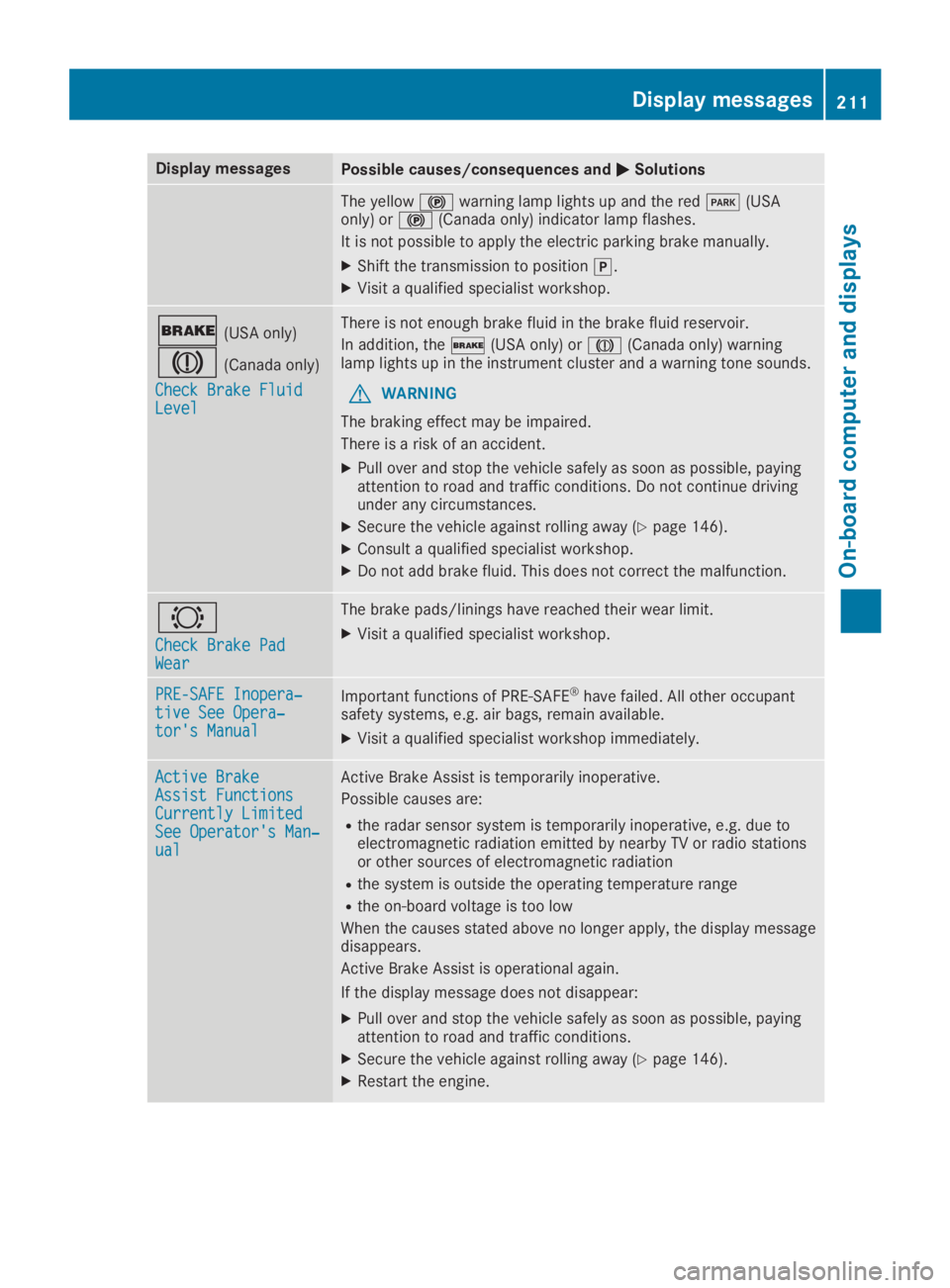
The yellow$warning lamp lights up and the redI(USAonly) or$(Canada only) indicator lamp flashes.
It is not possible to apply the electric parking brake manually.
XShift the transmission to position].
XVisit a qualified specialist workshop.
'(USA only)
M(Canada only)
Check Brake FluidCheck Brake FluidLevelLevel
There is not enough brake fluid in the brake fluid reservoir.
In addition, the'(USA only) orM(Canada only) warninglamp lights up in the instrument cluster and a warning tone sounds.
GWARNING
The braking effect may be impaired.
There is a risk of an accident.
XPull over and stop the vehicle safely as soon as possible, payingattention to road and traffic conditions. Do not continue drivingunder any circumstances.
XSecure the vehicle against rolling away (Ypage 146).
XConsult a qualified specialist workshop.
XDo not add brake fluid. This does not correct the malfunction.
&
Check Brake PadCheck Brake PadWearWear
The brake pads/linings have reached their wear limit.
XVisit a qualified specialist workshop.
PRE-SAFE Inopera‐PRE-SAFE Inopera‐tive See Opera‐tive See Opera‐tor's Manualtor's Manual
Important functions of PRE-SAFE®have failed. All other occupantsafety systems, e.g. air bags, remain available.
XVisit a qualified specialist workshop immediately.
Active BrakeActive BrakeAssist FunctionsAssist FunctionsCurrently LimitedCurrently LimitedSee Operator's Man‐See Operator's Man‐ualual
Active Brake Assist is temporarily inoperative.
Possible causes are:
Rthe radar sensor system is temporarily inoperative, e.g. due toelectromagnetic radiation emitted by nearby TV or radio stationsor other sources of electromagnetic radiation
Rthe system is outside the operating temperature range
Rthe on-board voltage is too low
When the causes stated above no longer apply, the display messagedisappears.
Active Brake Assist is operational again.
If the display message does not disappear:
XPull over and stop the vehicle safely as soon as possible, payingattention to road and traffic conditions.
XSecure the vehicle against rolling away (Ypage 146).
XRestart the engine.
Displaymessages211
On-b oard computer and displays
Z
Page 216 of 330
Display messagesPossible causes/consequences andPPSolutions
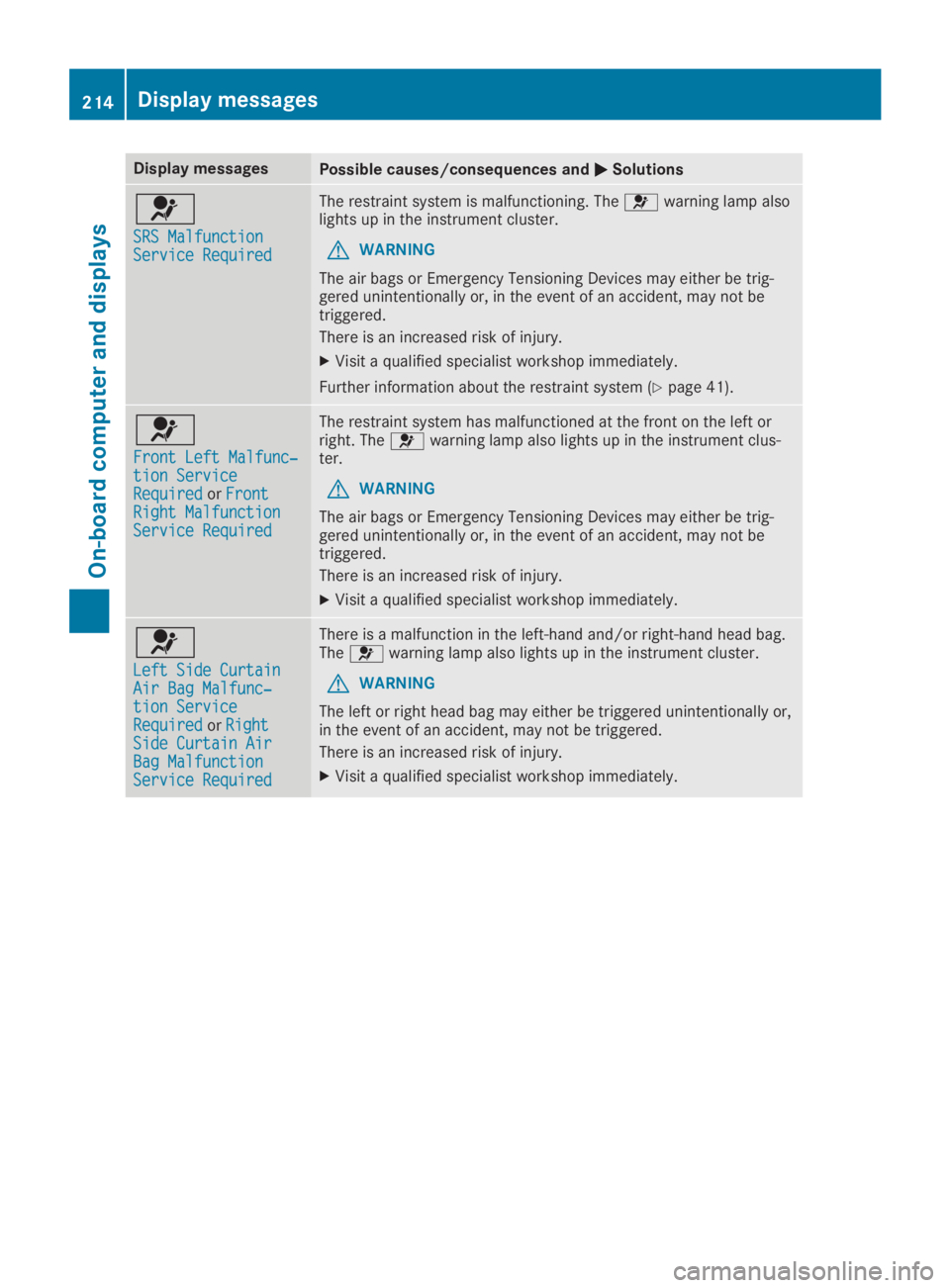
u
SRS MalfunctionSRS MalfunctionService RequiredService Required
The restraint system is malfunctioning. Theuwarning lamp alsolights up in the instrument cluster.
GWARNING
The air bags or Emergency Tensioning Devices may either be trig-gered unintentionally or, in the event of an accident, may not betriggered.
There is an increased risk of injury.
XVisit a qualified specialist workshop immediately.
Further information about the restraint system (Ypage 41).
u
Front Left Malfunc‐Front Left Malfunc‐tion Servicetion ServiceRequiredRequiredorFrontFrontRight MalfunctionRight MalfunctionService RequiredService Required
The restraint system has malfunctioned at the front on the left orright. Theuwarning lamp also lights up in the instrument clus-ter.
GWARNING
The air bags or Emergency Tensioning Devices may either be trig-gered unintentionally or, in the event of an accident, may not betriggered.
There is an increased risk of injury.
XVisit a qualified specialist workshop immediately.
u
Left Side CurtainLeft Side CurtainAir Bag Malfunc‐Air Bag Malfunc‐tion Servicetion ServiceRequiredRequiredorRightRightSide Curtain AirSide Curtain AirBag MalfunctionBag MalfunctionService RequiredService Required
There is a malfunction in the left-hand and/or right-hand head bag.Theuwarning lamp also lights up in the instrument cluster.
GWARNING
The left or right head bag may either be triggered unintentionally or,in the event of an accident, may not be triggered.
There is an increased risk of injury.
XVisit a qualified specialist workshop immediately.
214Displaymessages
On-b oard computer and displays
Page 217 of 330
Display messagesPossible causes/consequences andPPSolutions
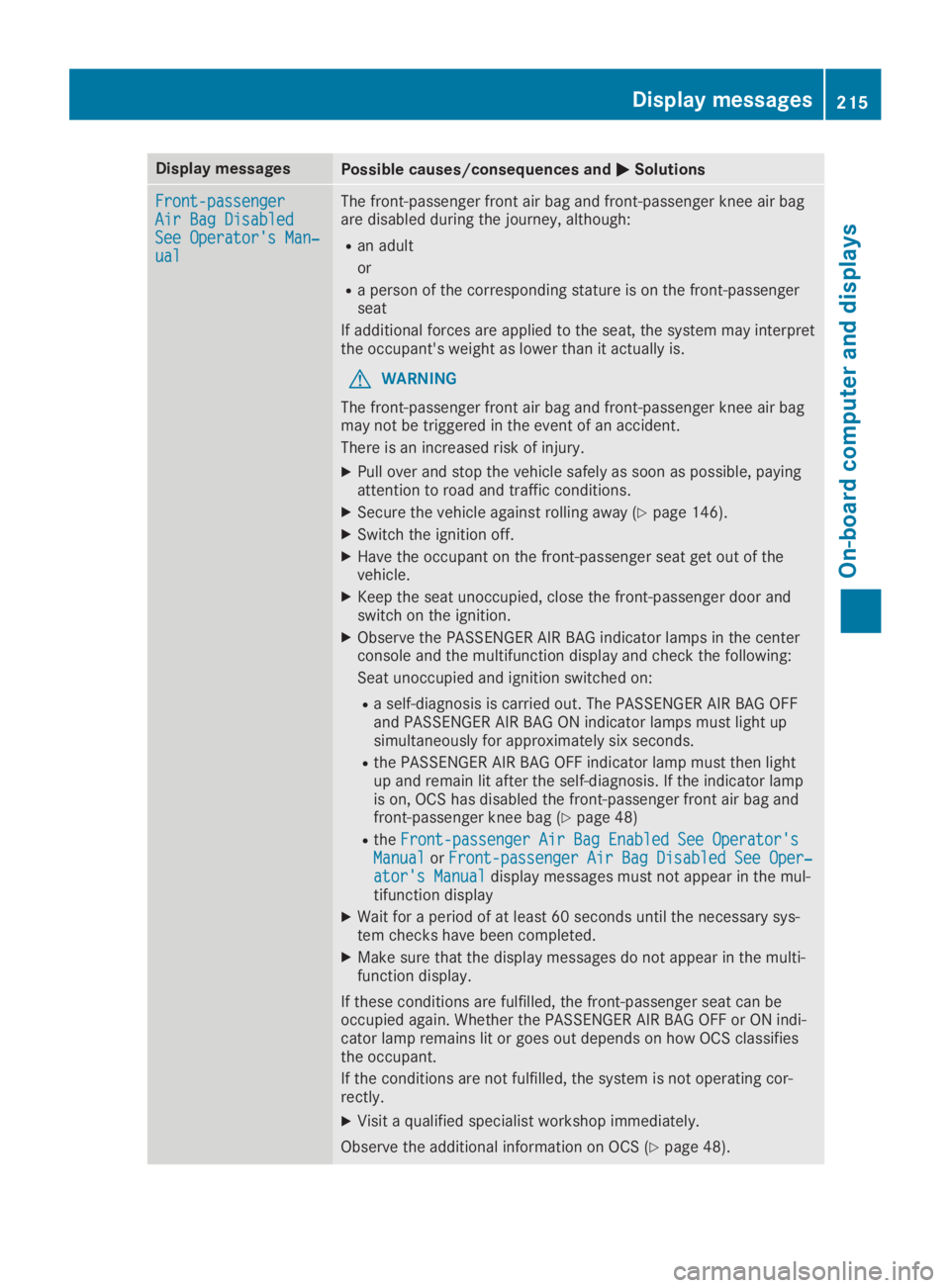
Front-passengerFront-passengerAir Bag DisabledAir Bag DisabledSee Operator's Man‐See Operator's Man‐ualual
The front-passenger front air bag and front-passenger knee air bagare disabled during the journey, although:
Ran adult
or
Ra person of the corresponding stature is on the front-passengerseat
If additional forces are applied to the seat, the system may interpretthe occupant's weight as lower than it actually is.
GWARNING
The front-passenger front air bag and front-passenger knee air bagmay not be triggered in the event of an accident.
There is an increased risk of injury.
XPull over and stop the vehicle safely as soon as possible, payingattention to road and traffic conditions.
XSecure the vehicle against rolling away (Ypage 146).
XSwitch the ignition off.
XHave the occupant on the front-passenger seat get out of thevehicle.
XKeep the seat unoccupied, close the front-passenger door andswitch on the ignition.
XObserve the PASSENGER AIR BAG indicator lamps in the centerconsole and the multifunction display and check the following:
Seat unoccupied and ignition switched on:
Ra self-diagnosis is carried out. The PASSENGER AIR BAG OFFand PASSENGER AIR BAG ON indicator lamps must light upsimultaneously for approximately six seconds.
Rthe PASSENGER AIR BAG OFF indicator lamp must then lightup and remain lit after the self-diagnosis. If the indicator lampis on, OCS has disabled the front-passenger front air bag andfront-passenger knee bag (Ypage 48)
RtheFront-passenger Air Bag Enabled See Operator'sFront-passenger Air Bag Enabled See Operator'sManualManualorFront-passenger Air Bag Disabled See Oper‐Front-passenger Air Bag Disabled See Oper‐ator's Manualator's Manualdisplay messages must not appear in the mul-tifunction display
XWait for a period of at least 60 seconds until the necessary sys-tem checks have been completed.
XMake sure that the display messages do not appear in the multi-function display.
If these conditions are fulfilled, the front-passenger seat can beoccupied again. Whether the PASSENGER AIR BAG OFF or ON indi-cator lamp remains lit or goes out depends on how OCS classifiesthe occupant.
If the conditions are not fulfilled, the system is not operating cor-rectly.
XVisit a qualified specialist workshop immediately.
Observe the additional information on OCS (Ypage 48).
Displaymessages215
On-b oard computer and displays
Z
Page 218 of 330
Display messagesPossible causes/consequences andPPSolutions
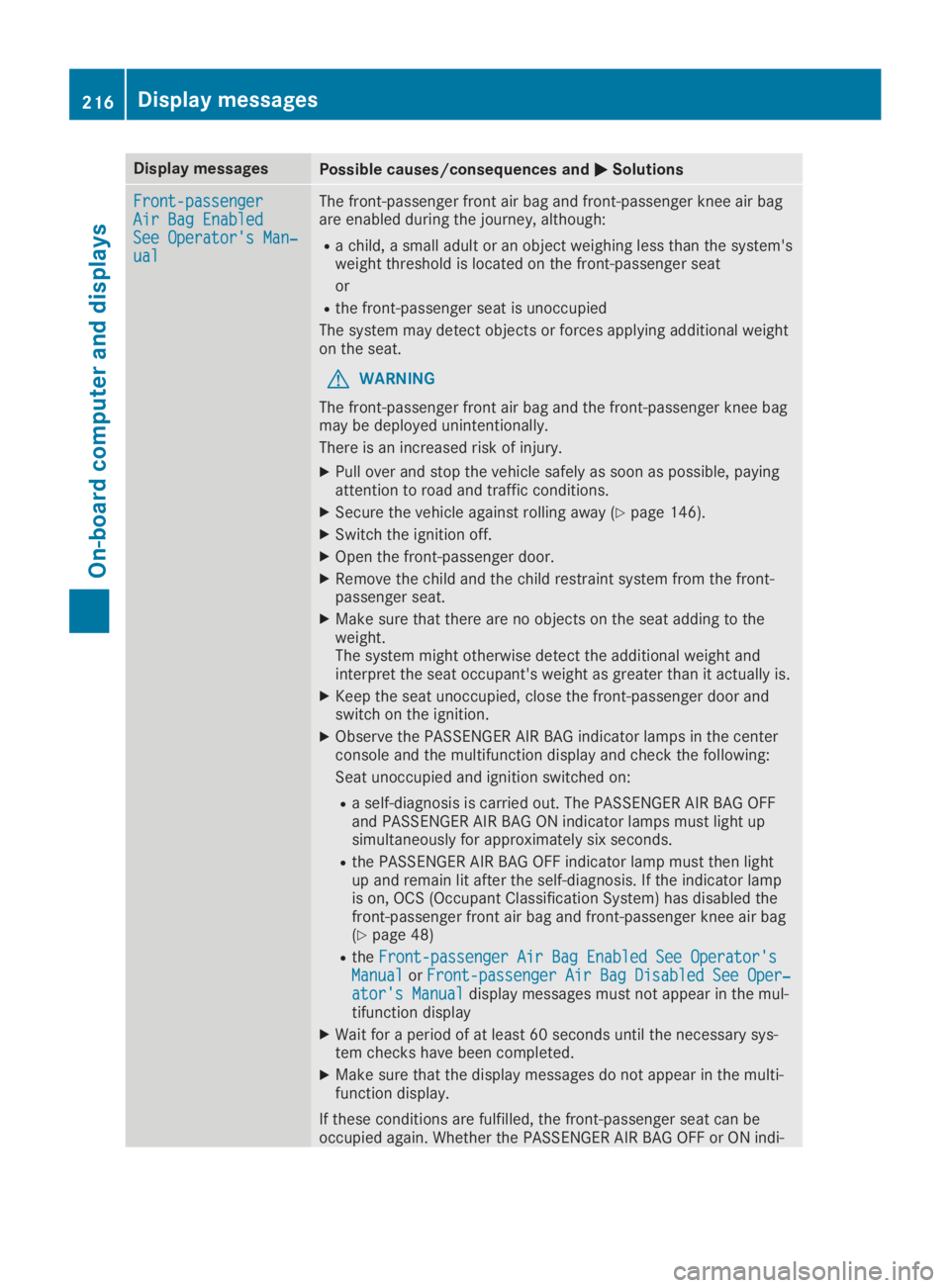
Front-passengerFront-passengerAir Bag EnabledAir Bag EnabledSee Operator's Man‐See Operator's Man‐ualual
The front-passenger front air bag and front-passenger knee air bagare enabled during the journey, although:
Ra child, a small adult or an object weighing less than the system'sweight threshold is located on the front-passenger seat
or
Rthe front-passenger seat is unoccupied
The system may detect objects or forces applying additional weighton the seat.
GWARNING
The front-passenger front air bag and the front-passenger knee bagmay be deployed unintentionally.
There is an increased risk of injury.
XPull over and stop the vehicle safely as soon as possible, payingattention to road and traffic conditions.
XSecure the vehicle against rolling away (Ypage 146).
XSwitch the ignition off.
XOpen the front-passenger door.
XRemove the child and the child restraint system from the front-passenger seat.
XMake sure that there are no objects on the seat adding to theweight.The system might otherwise detect the additional weight andinterpret the seat occupant's weight as greater than it actually is.
XKeep the seat unoccupied, close the front-passenger door andswitch on the ignition.
XObserve the PASSENGER AIR BAG indicator lamps in the centerconsole and the multifunction display and check the following:
Seat unoccupied and ignition switched on:
Ra self-diagnosis is carried out. The PASSENGER AIR BAG OFFand PASSENGER AIR BAG ON indicator lamps must light upsimultaneously for approximately six seconds.
Rthe PASSENGER AIR BAG OFF indicator lamp must then lightup and remain lit after the self-diagnosis. If the indicator lampis on, OCS (Occupant Classification System) has disabled thefront-passenger front air bag and front-passenger knee air bag(Ypage 48)
RtheFront-passenger Air Bag Enabled See Operator'sFront-passenger Air Bag Enabled See Operator'sManualManualorFront-passenger Air Bag Disabled See Oper‐Front-passenger Air Bag Disabled See Oper‐ator's Manualator's Manualdisplay messages must not appear in the mul-tifunction display
XWait for a period of at least 60 seconds until the necessary sys-tem checks have been completed.
XMake sure that the display messages do not appear in the multi-function display.
If these conditions are fulfilled, the front-passenger seat can beoccupied again. Whether the PASSENGER AIR BAG OFF or ON indi-
216Displaymessages
On-b oard computer and displays
Page 224 of 330
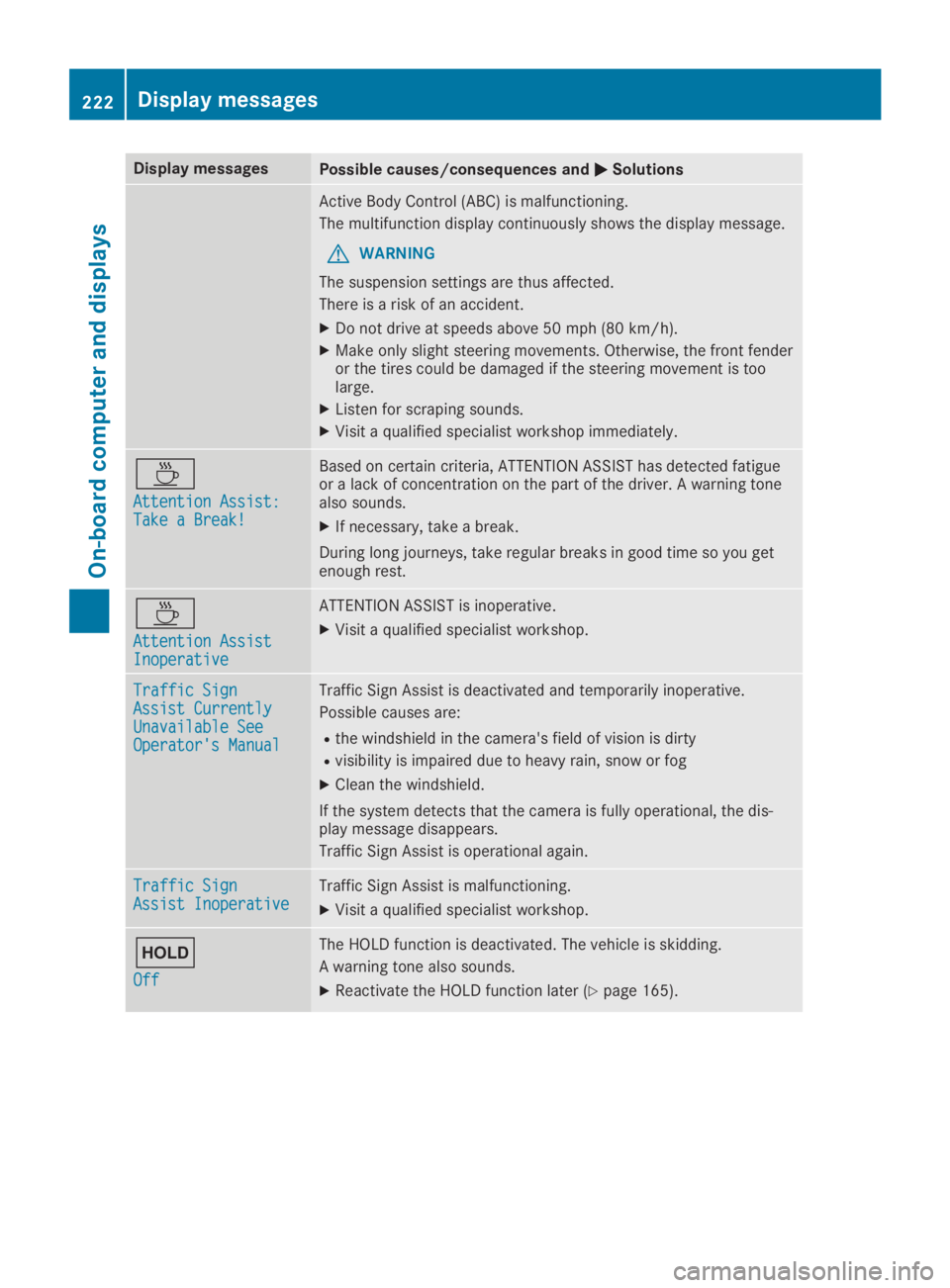
Display messagesPossible causes/consequences andPPSolutions
Active Body Control (ABC) is malfunctioning.
The multifunction display continuously shows the display message.
GWARNING
The suspension settings are thus affected.
There is a risk of an accident.
XDo not drive at speeds above 50 mph (80 km/h).
XMake only slight steering movements. Otherwise, the front fenderor the tires could be damaged if the steering movement is toolarge.
XListen for scraping sounds.
XVisit a qualified specialist workshop immediately.