lock MERCEDES-BENZ SL CLASS 2019 Manual PDF
[x] Cancel search | Manufacturer: MERCEDES-BENZ, Model Year: 2019, Model line: SL CLASS, Model: MERCEDES-BENZ SL CLASS 2019Pages: 330, PDF Size: 16.53 MB
Page 173 of 330
Important safety notes
The vehicle is slightly lowered when the engineis switched off.
GWARNING
When the vehicle is being lowered, people
could become trapped if their limbs are
between the vehicle body and the wheels or
underneath the vehicle. There is a risk of
injury.
Make sure no one is underneath the vehicle
or in the immediate vicinity of the wheel
arches when the vehicle is being lowered.
Setting raised level
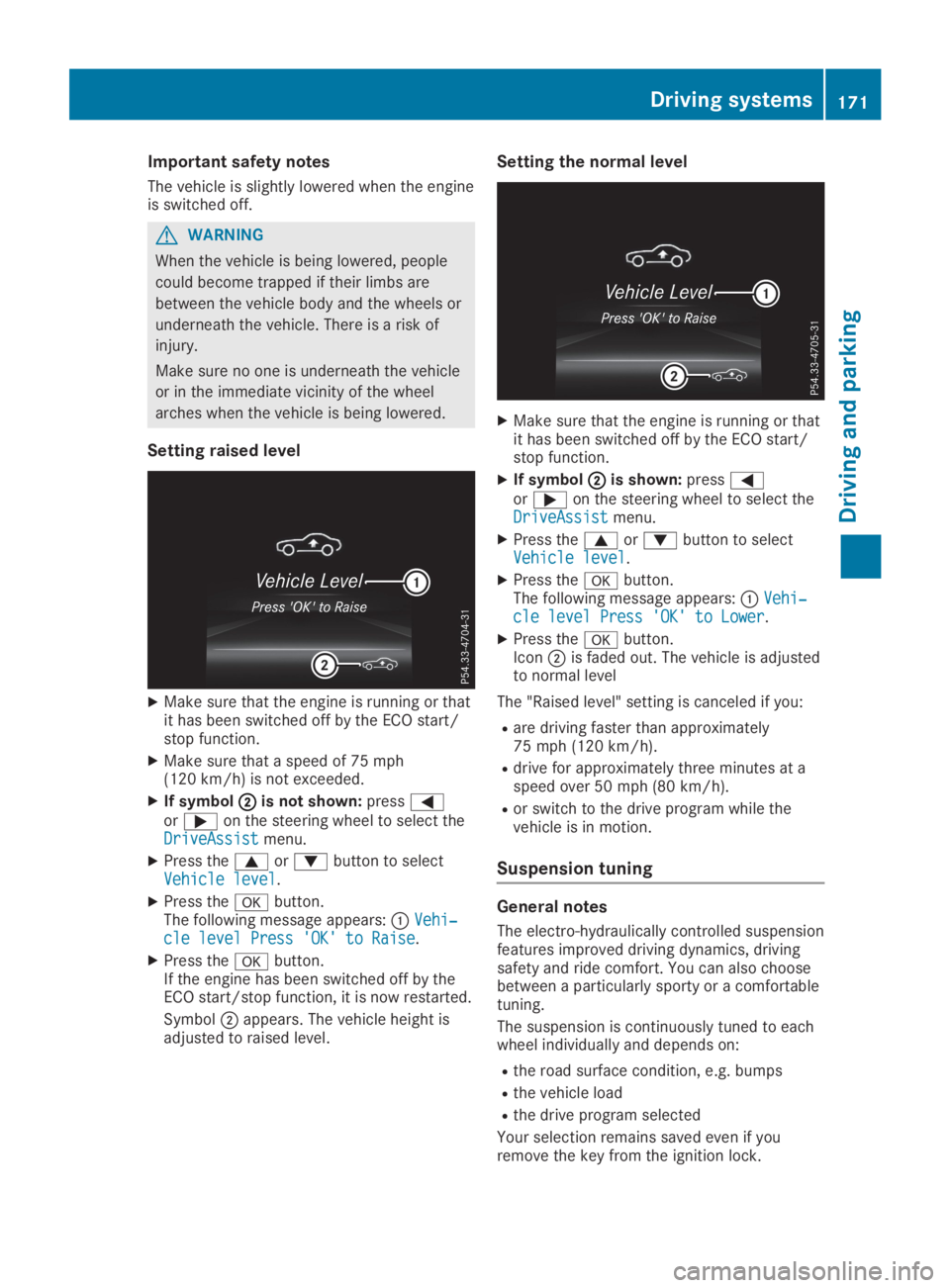
XMake sure that the engine is running or thatit has been switched off by the ECO start/stop function.
XMake sure that a speed of 75 mph(120 km/h) is not exceeded.
XIf symbolDDis not shown:pressYoreon the steering wheel to select theDriveAssistDriveAssistmenu.
XPress thecordbutton to selectVehicle levelVehicle level.
XPress thevbutton.The following message appears:CVehi‐Vehi‐cle level Press 'OK' to Raisecle level Press 'OK' to Raise.
XPress thevbutton.If the engine has been switched off by theECO start/stop function, it is now restarted.
SymbolDappears. The vehicle height isadjusted to raised level.
Setting the normal level
XMake sure that the engine is running or thatit has been switched off by the ECO start/stop function.
XIf symbolDDis shown:pressYoreon the steering wheel to select theDriveAssistDriveAssistmenu.
XPress thecordbutton to selectVehicle levelVehicle level.
XPress thevbutton.The following message appears:CVehi‐Vehi‐cle level Press 'OK' to Lowercle level Press 'OK' to Lower.
XPress thevbutton.IconDis faded out. The vehicle is adjustedto normal level
The "Raised level" setting is canceled if you:
Rare driving faster than approximately75 mph (120 km/h).
Rdrive for approximately three minutes at aspeed over 50 mph (80 km/h).
Ror switch to the drive program while thevehicle is in motion.
Suspension tuning
General notes
The electro-hydraulically controlled suspensionfeatures improved driving dynamics, drivingsafety and ride comfort. You can also choosebetween a particularly sporty or a comfortabletuning.
The suspension is continuously tuned to eachwheel individually and depends on:
Rthe road surface condition, e.g. bumps
Rthe vehicle load
Rthe drive program selected
Your selection remains saved even if youremove the key from the ignition lock.
Driving systems171
Driving and pa rking
Z
Page 178 of 330
parking procedure with the Parking Package
with rear view camera.
!If they cannot be avoided, drive overobstacles such as curbs slowly and at anobtuse angle. Otherwise, you may damagethe wheels or tires.
Active Parking Assist may also show parkingspaces which are not suitable for parking, forexample:
Rwhere parking or stopping is prohibited
Rin front of driveways or entrances and exits
Ron unsuitable surfaces
Parking tips:
Ron narrow roads, drive as close to the park-ing space as possible
Rparking spaces that are littered or over-grown might be identified or measuredincorrectly
Rparking spaces that are partially occupiedby trailer drawbars might not be identifiedas such or be measured incorrectly
Rsnowfall or heavy rain may lead to a parkingspace being measured inaccurately
Rpay attention to the warning messages ofParking Assist PARKTRONIC during theparking procedure (Ypage 174)
Ryou can intervene in the steering procedureto correct it at any time. Active ParkingAssist will then be canceled
Rwhen transporting a load which protrudesfrom your vehicle, you should not use ActiveParking Assist
Rnever use Active Parking Assist when snowchains are installed
Rmake sure that the tire pressures are alwayscorrect. This has a direct influence on theparking characteristics of the vehicle
Use Active Parking Assist for parking spaces:
Rparallel or at right angles to the direction oftravel
Ron straight roads, not bends
Ron the same level as the road, e.g. not onthe pavement
Detecting parking spaces
Objects located above the detection range ofActive Parking Assist will not be detectedwhen the parking space is measured. These
are not taken into account when the parkingprocedure is calculated, e.g. overhangingloads, tail sections or loading ramps of trucks.Active Parking Assist may therefore guide youinto the parking space too early.
GWARNING
If there are objects above the detection
range:
Rthe Parking Package with rear view cam-
era may steer too early
Rthe vehicle may not stop in front of these
objects
This could cause a collision. There is a risk
of an accident.
If objects are located above the detection
range, stop and deactivate the Parking Pack-
age with rear view camera.
Further information about the detection range(Ypage 173).
Active Parking Assist does not assist you park-ing in spaces at right angles to the direction oftravel if:
Xtwo parking spaces are located directly nextto one another
Xthe parking space is directly next to a lowobstacle such as a low curb
Xyou park forwards
Active Parking Assist does not assist you park-ing in spaces that are parallel or at right anglesto the direction of travel if:
Rthe parking space is on a curb
Rthe system reads the parking space as beingblocked, for example by foliage or grasspaving blocks
Rthe area is too small for the vehicle tomaneuver into
Rthe parking space is bordered by an obsta-cle, e.g. a tree, a post or a trailer
GWARNING
If there are objects above the detection
range:
RActive Parking Assist may steer too early
Rthe vehicle may not stop in front of these
objects
176Driving systems
Driving and parking
Page 182 of 330
Under the following circumstances, the rearview camera will not function, or will functionin a limited manner:
Rif the trunk lid is open
Rin heavy rain, snow or fog
Rat night or in very dark places
Rif the camera is exposed to very bright light
Rif the area is lit by fluorescent bulbs or LEDlighting (the display may flicker)
Rif there is a sudden change in temperature,e.g. when driving into a heated garage inwinter
Rif the camera lens is dirty or obstructed.Observe the notes on cleaning(Ypage 275)
Rif the rear of your vehicle is damaged. In thiscase, have the camera position and settingchecked at a qualified specialist workshop.
The field of vision and other functions of therear view camera may be restricted due toadditional accessories on the rear of the vehi-cle (e.g. license plate holder, bicycle rack).
On vehicles with height-adjustable chassis,leaving the standard height can result in inac-curacies in the guide lines, depending on tech-nical conditions.
iThe contrast of the display may be affec-ted by the sudden presence of sunlight orother light sources, e.g. when exiting agarage. Pay particular attention in this situa-tion.
iIf usability is severely restricted, e.g. dueto pixel errors, have the display repaired orreplaced.
Activating/deactivating the rear view
camera
XTo activate:make sure that the SmartKeyis in positionHin the ignition lock.
XMake sure that theActivation by R gearActivation by R gearfunction is selected in the multimedia sys-tem; see the Digital Operator's Manual.
XEngage reverse gear.The multimedia system shows the areabehind the vehicle with guide lines.
The image from the rear view camera isavailable throughout the maneuvering proc-ess.
To deactivate:the rear view camera deacti-vates if you shift the transmission to position], or after driving forwards a short distance.
The inner segments of the warning indicatorare displayed in red if there is a complete sys-tem failure. The indicator lamp in thePARKTRONIC button lights up.
If the system fails at the rear of the vehicle:
Rthe rear segments are shown in red whenbacking up.
Rthe rear segments are hidden when drivingforwards.
Displays in the multimedia system
The rear view camera may show a distortedview of obstacles, show them incorrectly ornot at all. The rear view camera does not showobjects in the following positions:
Rvery close to the rear bumper
Runder the rear bumper
Rin close range above the handle on the trunklid
!Objects not at ground level may appear tobe further away than they actually are, e.g.:
Rthe bumper of a parked vehicle
Rthe drawbar of a trailer
Rthe ball coupling of a trailer tow hitch
Rthe rear section of an HGV
Ra slanted post
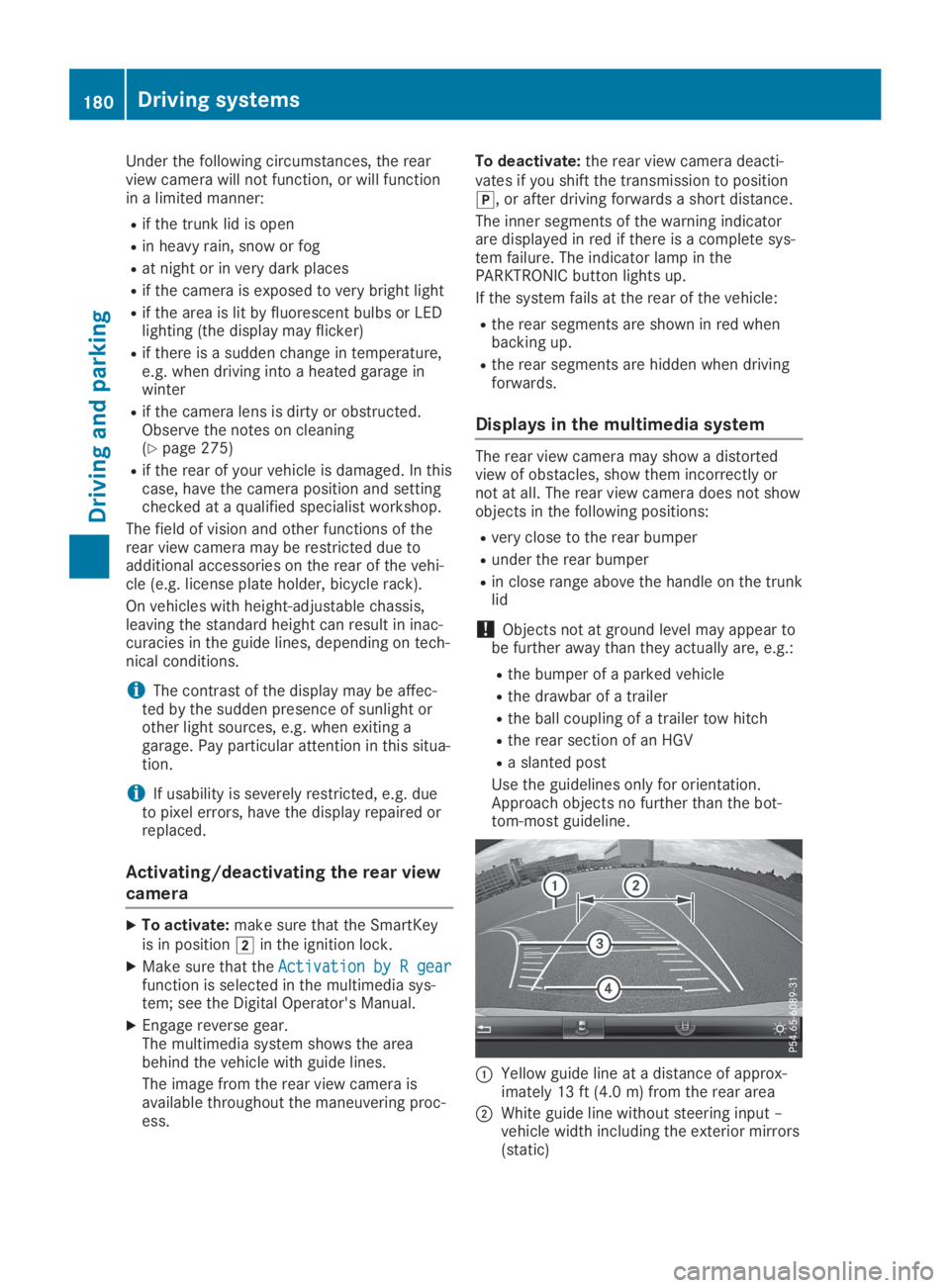
Use the guidelines only for orientation.Approach objects no further than the bot-tom-most guideline.
CYellow guide line at a distance of approx-imately 13 ft (4.0 m) from the rear area
DWhite guide line without steering input –vehicle width including the exterior mirrors(static)
180Driving systems
Driving and parking
Page 189 of 330

Either no braking application, or a course-cor-recting brake application adapted to the driv-ing situation occurs if:
Rthere are vehicles or obstacles, e.g. crashbarriers, located on both sides of your vehi-cle.
Ra vehicle approaches you too closely at theside.
Ryou have adopted a sporty driving style withhigh cornering speeds.
Ryou clearly brake or accelerate.
Ra driving safety system intervenes, e.g.
ESP®or PRE-SAFE®Brake.
RESP®is switched off.
Ra loss of tire pressure or a defective tire isdetected.
Switching on Active Blind Spot Assist
XMake sure that Active Blind Spot Assist isactivated (Ypage 199).
XTurn the SmartKey to positionHin the igni-tion lock.Warning lampsCin the exterior mirrorslight up red for approximately 1.5 secondsand then turn yellow.
Active Lane Keeping Assist
General notes
Active Lane Keeping Assist monitors the areain front of your vehicle by means of multifunc-tion cameraCat the top of the windshield.Various areas to the front, rear and side ofyour vehicle are also monitored with the aid ofthe radar sensor system. Active Lane KeepingAssist detects lane markings on the road andcan warn you before you leave your lane unin-tentionally. If you do not react to the warning,a lane-correcting application of the brakes canbring the vehicle back into the original lane.
This function is available in a speed rangebetween 40 mph and 120 mph (60 km/h and200 km/h).
For Active Lane Keeping Assist to assist youwhen driving, the radar sensor system must beoperational.
Important safety notes
If you fail to adapt your driving style, ActiveLane Keeping Assist can neither reduce therisk of accident nor override the laws of phys-ics. Active Lane Keeping Assist cannot takeinto account road, weather or traffic condi-tions. Active Lane Keeping Assist is only anaid. You are responsible for the distance to thevehicle in front, for vehicle speed, for brakingin good time and for staying in your lane.
Active Lane Keeping Assist cannot continu-ously keep your vehicle in its lane.
GWARNING
Active Lane Keeping Assist cannot always
clearly detect lane markings.
Driving systems187
Driving an d parking
Z
Page 192 of 330

Important safety notes
GWARNING
If you operate information systems and com-
munication equipment integrated in the
vehicle when driving, you may be distracted
from the traffic situation. You could also
lose control of the vehicle. There is a risk of
an accident.
Only operate this equipment when the traffic
situation permits. If you are not sure that
this is possible, park the vehicle paying
attention to traffic conditions and operate
the equipment when the vehicle is station-
ary.
You must observe the legal requirements forthe country in which you are currently drivingwhen operating the on-board computer.
GWARNING
If the instrument cluster has failed or mal-
functioned, you may not recognize function
restrictions in systems relevant to safety.
The operating safety of your vehicle may be
impaired. There is a risk of an accident.
Drive on carefully. Have the vehicle checked
at a qualified specialist workshop immedi-
ately.
The on-board computer only shows messagesor warnings from certain systems in the multi-function display. You should therefore makesure your vehicle is operating safely at alltimes.
If the operating safety of your vehicle isimpaired, pull over as soon as it is safe to doso. Contact a qualified specialist workshop.
For an overview, see the instrument panelillustration (Ypage 33).
Displays and operation
Instrument cluster lighting
The lighting in the instrument cluster, in thedisplays and the controls in the vehicle interiorcan be adjusted using the brightness controlknob.
The brightness control knob is located on thebottom left of the instrument cluster(Ypage 33).
XTurn the brightness control knob clockwiseor counter-clockwise.If you turn the light switch (Ypage 109) totheX,`orXposition, the bright-ness will depend upon the brightness of theambient light.
The light sensor in the instrument clusterautomatically controls the brightness of themultifunction display. In daylight, the dis-plays in the instrument cluster are not illu-minated.
Speedometer with segments
The segments in the speedometer indicatewhich speed range is available.
RCruise control activated (Ypage 154):
The segments light up from the storedspeed to the maximum speed.
RActive Distance Assist DISTRONIC activated(Ypage 156):
One or two segments in the set speed rangelight up.
RActive Distance Assist DISTRONIC detects avehicle in front moving more slowly than thestored speed:
The segments between the speed of thevehicle in front and the stored speed lightup.
Tachometer
!Do not drive in the overrevving range, asthis could damage the engine.
The red band in the tachometer indicates theengine's overrevving range.
The fuel supply is interrupted to protect theengine when the red band is reached.
Outside temperature display
You should pay special attention to road con-ditions when temperatures are around freezingpoint.
190Displays and operation
On-board computer and displays
Page 203 of 330
automatic headlamp mode is activated(Ypage 109).
Rexterior lighting delayed switch-off:theexterior lighting remains lit for 60 secondsafter the engine is switched off. If you closeall the doors and the trunk lid, the exteriorlighting goes off after 15 seconds.
Depending on your vehicle's equipment, whenthe surround lighting and delayed switch-offexterior lighting are on, the following light up:
Rparking lamps
Rlow-beam headlamps
Rdaytime running lamps
Rside marker lamps
Rsurround lighting in the exterior mirrors
Activating/deactivating the interior
lighting delayed switch-off
If you activate theInterior LightingInterior LightingDelayDelayfunction, the interior lighting remainson for 20 seconds after you remove the Smart-Key from the ignition lock.
XPress theYorebutton on the steer-ing wheel to select theSett.Sett.menu.
XPress thedorcbutton to select theLightLightsubmenu.
XPressvto confirm.
XPress thedorcbutton to select theInterior Lighting DelayInterior Lighting Delayfunction.When theInterior Lighting DelayInterior Lighting Delayfunc-tion is activated, the vehicle interior is dis-played in orange in the multifunction dis-play.
XPress thevbutton to save the setting.
Vehicle
Activating/deactivating the automatic
door locking mechanism
If you activate theAutomatic Door LockAutomatic Door Lockfunction, the vehicle is centrally locked abovea speed of approximately 9 mph (15 km/h).
XPress theYorebutton on the steer-ing wheel to select theSett.Sett.menu.
XPress thedorcbutton to select theVehicleVehiclesubmenu.
XPressvto confirm.
XPress thedorcbutton to select theAutomatic Door LockAutomatic Door Lockfunction.When theAutomatic Door LockAutomatic Door Lockfunctionis activated, the multifunction display showsthe left-hand vehicle door in orange.
XPress thevbutton to save the setting.
For further information on the automatic lock-ing feature, see (Ypage 81).
Activating/deactivating the acoustic
locking verification signal
If you switch on theAcoustic LockAcoustic Lockfunction,an acoustic signal sounds when you lock thevehicle.
XPress theYorebutton on the steer-ing wheel to select theSett.Sett.menu.
XPress thedorcbutton to select theVehicleVehiclesubmenu.
XPressvto confirm.
XPress thedorcbutton to select theAcoustic LockAcoustic Lockfunction.If theAcoustic LockAcoustic Lockfunction is activated,the7symbol in the multifunction displaylights up orange.
XPress thevbutton to save the setting.
Comfort
Activating/deactivating the EASY-
ENTRY/EXIT feature
GWARNING
When the EASY-ENTRY/EXIT feature adjusts
the steering wheel, you and other vehicle
occupants – particularly children – could
become trapped. There is a risk of injury.
While the EASY-ENTRY/EXIT feature is mak-
ing adjustments, make sure that no one has
any body parts in the sweep of the steering
wheel.
If somebody becomes trapped:
Rpress one of the memory function posi-
tion buttons, or
Rmove the switch for steering wheel
adjustment in the opposite direction to
that in which the steering wheel is mov-
ing.
The adjustment process is stopped.
Menus and submenus201
On-board computer and displays
Z
Page 204 of 330
XPress theYorebutton on the steer-ing wheel to select theSett.Sett.menu.
XPress thedorcbutton to select theConvenienceConveniencesubmenu.
XPressvto confirm.
XUsingdorc, select theEasyEasyEntry/ExitEntry/Exitfunction.If theEasy Entry/ExitEasy Entry/Exitfunction is activa-ted, the multifunction display shows thesteering wheel in orange.
XPress thevbutton to save the setting.
Further information on the EASY-ENTRY/EXITfeature (Ypage 103).
Switching the seat belt adjustment
on/off
XPress theYorebutton on the steer-ing wheel to select theSett.Sett.menu.
XPress thedorcbutton to select theConvenienceConveniencesubmenu.
XPressvto confirm.
XPress thedorcbutton to select theBelt AdjustmentBelt Adjustmentfunction.When theBelt AdjustmentBelt Adjustmentfunction isactivated, the seat belt is displayed inorange in the multifunction display.
XPress thevbutton to save the setting.
For further information on belt adjustment,see (Ypage 44).
Switching the fold-in mirrors when lock-
ing feature on/off
This function is only available when the vehicleis equipped with the electrical fold-in function.
This function is only available in Canada.
When you activate theAuto. Mirror Fold‐Auto. Mirror Fold‐ingingfunction, the exterior mirrors are folded inwhen the vehicle is locked.
If you have switched on theAuto. MirrorAuto. MirrorFoldingFoldingfunction and you fold in the exteriormirrors using the button on the door(Ypage 105), they will not fold out automati-cally. The exterior mirrors can then only be fol-ded out using the button on the door.
XPress theYorebutton on the steer-ing wheel to select theSett.Sett.menu.
XPress thedorcbutton to select theConvenienceConveniencesubmenu.
XPressvto confirm.
XPress thedorcbutton to select theAuto. Mirror FoldingAuto. Mirror Foldingfunction.If theAuto. Mirror FoldingAuto. Mirror Foldingfunction isswitched on, the multifunction displayshows the exterior mirror in orange.
XPress thevbutton to save the setting.
Restoring the factory settings
XPress theYorebutton on the steer-ing wheel to select theSett.Sett.menu.
XPress thedorcbutton to select theFactory SettingFactory Settingsubmenu.
XPressvto confirm.TheReset All Settings?Reset All Settings?functionappears.
XPress thedorcbutton to selectNoNoorYesYes.
XPress thevbutton to confirm the selec-tion.If you have selectedYesYesand confirmed, themultifunction display shows a confirmationmessage.
For safety reasons, theDaytime RunningDaytime RunningLightsLightsfunction in theLightsLightssubmenu isonly reset if the vehicle is stationary.
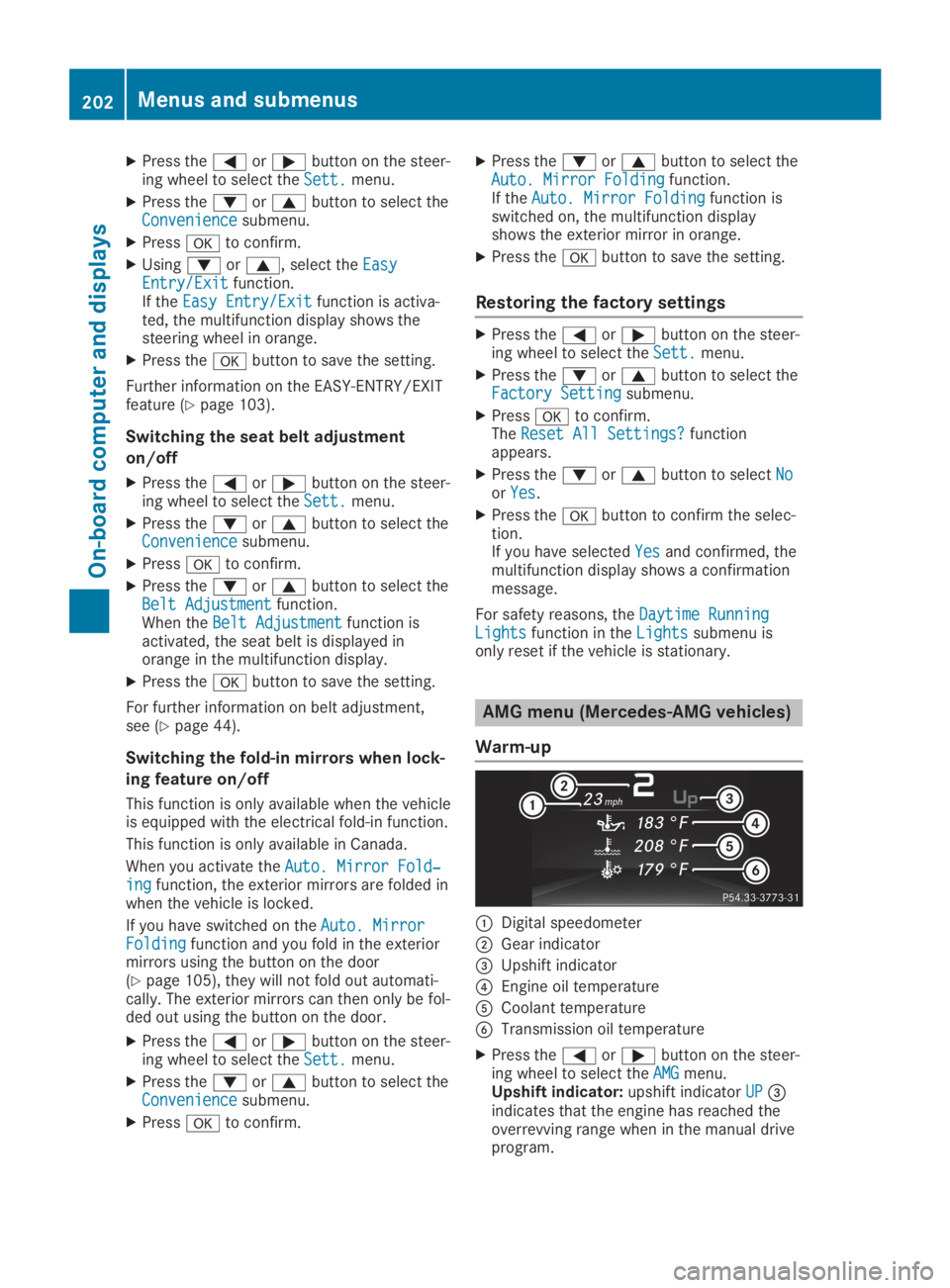
AMG menu (Mercedes-AMG vehicles)
Warm-up
CDigital speedometer
DGear indicator
Page 206 of 330
Stopping the RACE TIMER
XPress the8button on the steeringwheel.
XConfirmYesYeswithv.
The RACE TIMER interrupts timing if you stopthe vehicle and turn the SmartKey to positionGin the ignition lock. If you turn the Smart-Key to position3and then pressvto con-
firmStartStart, timing is continued.
Resetting the current lap
XStop the RACE TIMER.
XPress theYorebutton to selectReset LapReset Lap.
XPressvto reset the lap time to "0".
Deleting all laps
If you switch off the engine, the RACE TIMER isreset to "0" after 30 seconds. All laps aredeleted.
You cannot delete individual stored laps. If youhave stopped 16 laps, the current lap does nothave to be reset.
XReset the current lap.
XPressvto confirmResetReset.Reset Race-Timer?Reset Race-Timer?appears in the multi-function display.
XPress thedbutton to selectYesYesandpress thevbutton to confirm.All laps are deleted.
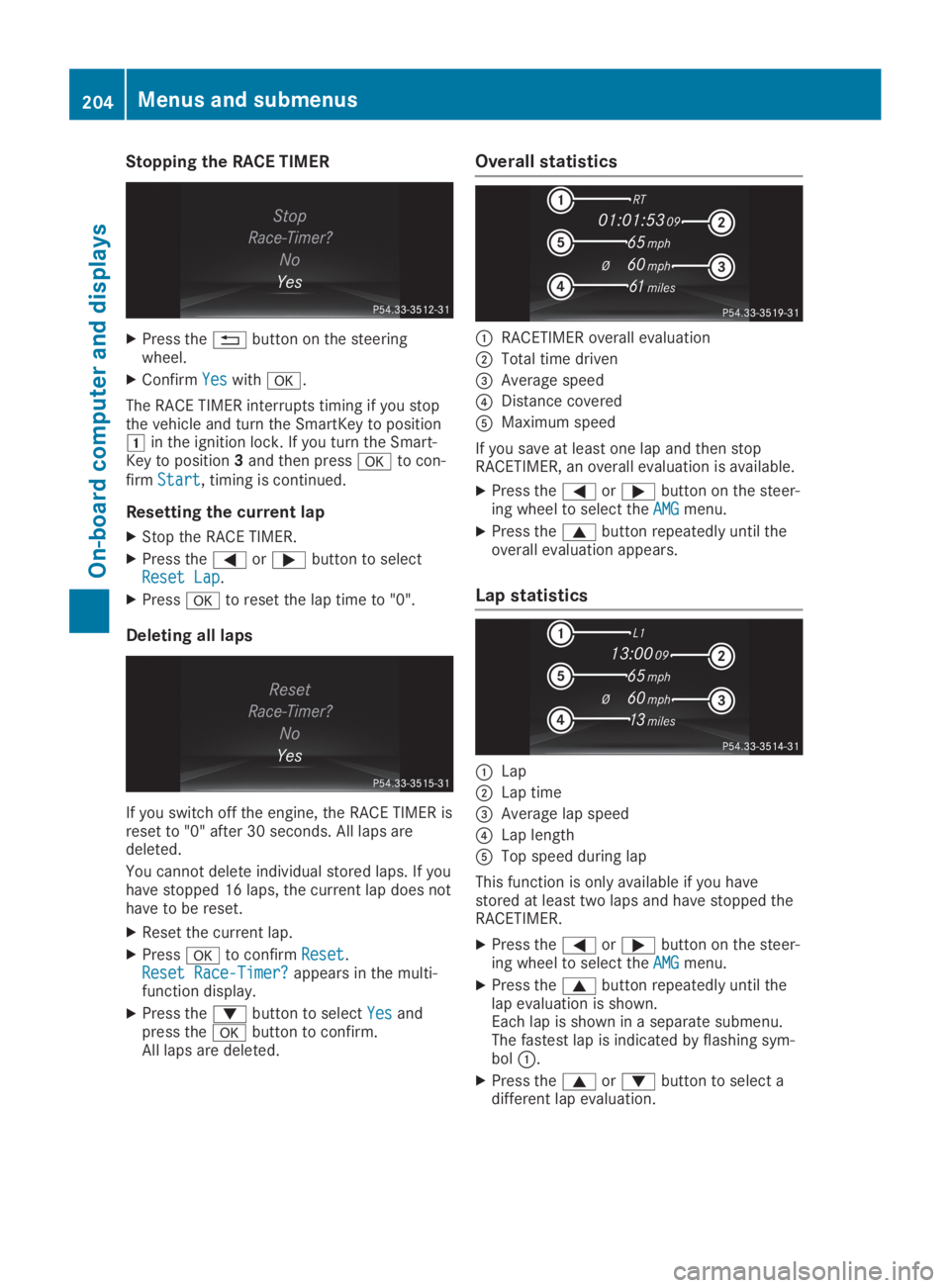
Overall statistics
CRACETIMER overall evaluation
DTotal time driven
Page 233 of 330
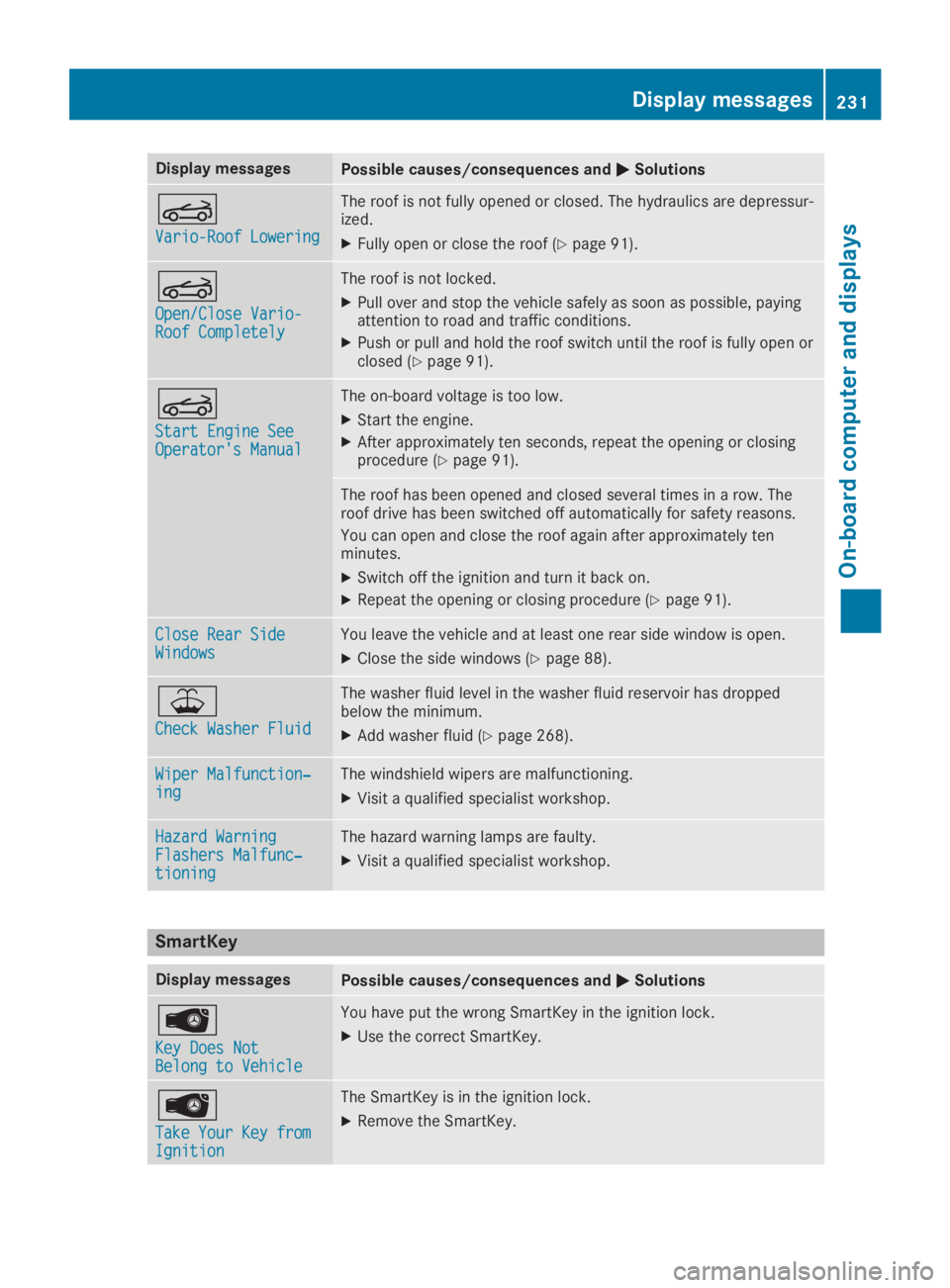
Display messagesPossible causes/consequences andPPSolutions
Y
Vario-Roof LoweringVario-Roof Lowering
The roof is not fully opened or closed. The hydraulics are depressur-ized.
XFully open or close the roof (Ypage 91).
Y
Open/Close Vario-Open/Close Vario-Roof CompletelyRoof Completely
The roof is not locked.
XPull over and stop the vehicle safely as soon as possible, payingattention to road and traffic conditions.
XPush or pull and hold the roof switch until the roof is fully open orclosed (Ypage 91).
Y
Start Engine SeeStart Engine SeeOperator's ManualOperator's Manual
The on-board voltage is too low.
XStart the engine.
XAfter approximately ten seconds, repeat the opening or closingprocedure (Ypage 91).
The roof has been opened and closed several times in a row. Theroof drive has been switched off automatically for safety reasons.
You can open and close the roof again after approximately tenminutes.
XSwitch off the ignition and turn it back on.
XRepeat the opening or closing procedure (Ypage 91).
Close Rear SideClose Rear SideWindowsWindowsYou leave the vehicle and at least one rear side window is open.
XClose the side windows (Ypage 88).
Page 238 of 330
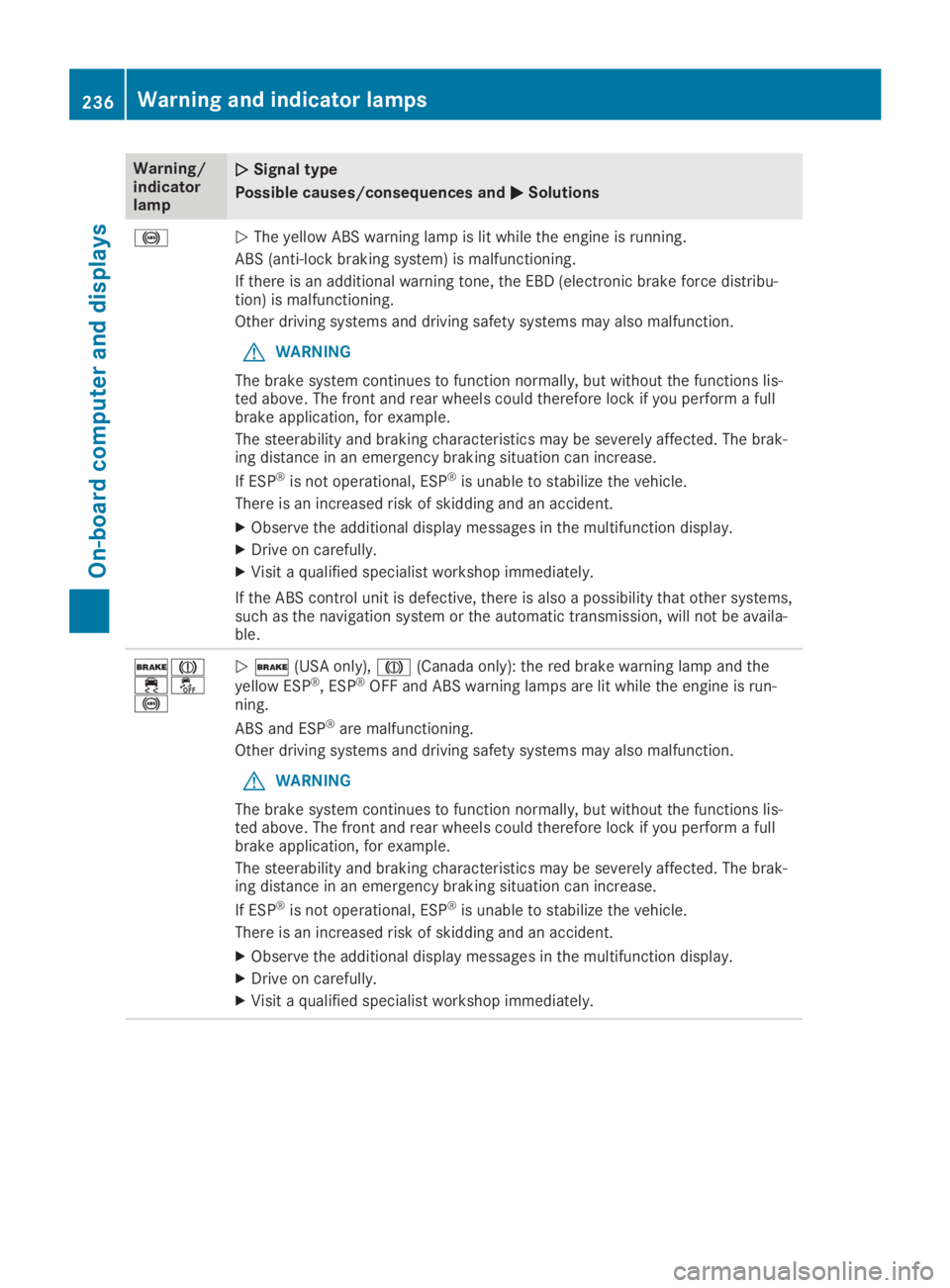
Warning/indicatorlamp
QQSignal type
Possible causes/consequences andPPSolutions
%QThe yellow ABS warning lamp is lit while the engine is running.
ABS (anti-lock braking system) is malfunctioning.
If there is an additional warning tone, the EBD (electronic brake force distribu-tion) is malfunctioning.
Other driving systems and driving safety systems may also malfunction.
GWARNING
The brake system continues to function normally, but without the functions lis-ted above. The front and rear wheels could therefore lock if you perform a fullbrake application, for example.
The steerability and braking characteristics may be severely affected. The brak-ing distance in an emergency braking situation can increase.
If ESP®is not operational, ESP®is unable to stabilize the vehicle.
There is an increased risk of skidding and an accident.
XObserve the additional display messages in the multifunction display.
XDrive on carefully.
XVisit a qualified specialist workshop immediately.
If the ABS control unit is defective, there is also a possibility that other systems,such as the navigation system or the automatic transmission, will not be availa-ble.
'M