reset MERCEDES-BENZ SL CLASS 2019 Owners Manual
[x] Cancel search | Manufacturer: MERCEDES-BENZ, Model Year: 2019, Model line: SL CLASS, Model: MERCEDES-BENZ SL CLASS 2019Pages: 330, PDF Size: 16.53 MB
Page 7 of 330

Important safety notes .................. 175
Parking .......................................... 177
Active Steering Assist
Activating/deactivating .................198
Display message ............................ 226
Adaptive adjustable damping
Driving dynamics display............... 168
ADAPTIVE BRAKE................................. 70
Adaptive Brake Assist
Function/notes................................ 64
Adaptive brake lights.......................... 65
Adaptive Damping System
Function/notes............................. 167
Adaptive Highbeam Assist
Display message ............................ 218
Function/notes............................. 111
Switching on/off........................... 112
Additives (engine oil)........................ 324
Address book
see also Digital Operator's Man-
ual .................................................. 243
Adjusting the volume
Multimedia system ........................ 244
Air bags
Deployment ..................................... 53
Display message ............................ 215
Front air bag (driver, front
passenger) ....................................... 46
Head bag ......................................... 47
Important safety notes .................... 45
Introduction ..................................... 45
Knee bag .......................................... 46
Occupant Classification System
(OCS) ............................................... 48
PASSENGER AIR BAG indicator
lamps ............................................... 41
Side impact air bag.......................... 47
AIR FLOW........................................... 119
Air vents
Glove box ....................................... 123
Important safety notes .................. 122
Setting ........................................... 122
Setting the blower output of the
AIRSCARF vents ............................. 124
Setting the center air vents ........... 123
Setting the side air vents ............... 123
Switching AIRSCARF on/off.......... 102
Air-conditioning system
see Climate control
AIRSCARF
Switching on/off........................... 102
AIRSCARF vents
Setting the blower output .............. 124
Alarm
ATA (Anti-Theft Alarm system)......... 72
Switching off (ATA) .......................... 72
Switching the function on/off
(ATA) ................................................ 72
Alarm system
see ATA (Anti-Theft Alarm system)
Ambient lighting
Setting the brightness (on-board
computer) ...................................... 200
Setting the color (on-board com-
puter) ............................................. 200
AMG menu (on-board computer)..... 202
Anti-lock braking system
see ABS (Anti-lock Braking System)
Anti-skid chains
see Snow chains
Anti-theft alarm system
see ATA (Anti-Theft Alarm system)
Ashtray............................................... 254
Assistance display (on-board
computer).......................................... 198
Assistance menu (on-board com-
puter).................................................. 197
ASSYST PLUS
Displaying a service message ........ 270
Hiding a service message .............. 270
Resetting the service interval dis-
play ................................................ 270
Service message ............................ 269
Special service requirements ......... 270
ATA (Anti-Theft Alarm system)
Activating/deactivating ................... 72
Function ........................................... 72
Switching off the alarm .................... 72
ATTENTION ASSIST
Activating/deactivating ................. 198
Display message ............................ 222
Function/notes............................. 183
Audio menu (on-board computer).... 195
Index5
Page 16 of 330
Modifying the programming
(SmartKey)........................................... 75
MOExtended tires.............................. 278
Mounting wheels
Lowering the vehicle ...................... 317
Mounting a new wheel ................... 316
Preparing the vehicle .....................313
Raising the vehicle ......................... 314
Removing a wheel .......................... 316
Securing the vehicle against roll-
ing away ........................................ 314
MP3
Operation ....................................... 196
see also Digital Operator's Man-
ual ..................................................243
Multifunction display
Function/notes .............................192
Permanent display ......................... 199
Multifunction steering wheel
Operating the on-board com-
puter .............................................. 191
Overview .......................................... 34
Multimedia system
Switching on and off ......................244
Music files
see also Digital Operator's Man-
ual ..................................................243
N
Navigation
Entering a destination .................... 245
Menu (on-board computer) ............ 194
see also Digital Operator's Man-
ual ..................................................243
Navigation menu
Important safety notes .................. 194
NECK-PRO head restraints
Important safety notes .................... 55
Operation ......................................... 55
Resetting triggered .......................... 55
Notes on breaking-in a new vehi-
cle....................................................... 125
O
Occupant Classification System
(OCS)
Conditions ....................................... 48
Faults ............................................... 51
Operation ......................................... 48
Self-test ...........................................50
Occupant safety
Air bags ...........................................45
Automatic measures after an
accident ........................................... 56
Belt warning ..................................... 44
Children in the vehicle ..................... 57
Important safety notes.................... 40
Introduction to the restraint sys-
tem .................................................. 40
Occupant Classification System
(OCS) ............................................... 48
PASSENGER AIR BAG indicator
lamps ............................................... 41
Pets in the vehicle........................... 59
PRE-SAFE®(anticipatory occu-
pant protection) ............................... 55
PRE-SAFE®PLUS (anticipatory
occupant protection PLUS) .............. 56
Restraint system warning lamp ........ 41
Seat belt .......................................... 41
OCS
Faults ............................................... 51
Operation ......................................... 48
Self-test ........................................... 50
Odometer........................................... 193
Oil
see Engine oil
On-board computer
AMG menu ..................................... 202
Assistance menu ........................... 197
Audio menu ................................... 195
Convenience submenu .................. 201
Display messages .......................... 205
Displaying a service message ........ 270
Factory settings submenu ............. 202
Important safety notes .................. 190
Instrument cluster submenu .......... 199
Lighting submenu .......................... 200
Menu overview .............................. 193
Message memory .......................... 205
14Index
Page 19 of 330

SD card
Inserting ........................................248
Inserting/removing ........................ 248
Removing ....................................... 248
SD memory card
see also Digital Operator's Man-
ual ..................................................243
Selecting ........................................ 196
Search & Send
see also Digital Operator's Man-
ual ..................................................243
Seat
Correct driver's seat position ........... 97
Seat belts
Adjusting the driver's and front-
passenger seat belt......................... 44
Correct usage .................................. 43
Fastening ......................................... 44
Important safety guidelines ............. 42
Introduction ..................................... 41
Releasing ......................................... 44
Seat belt guide ................................. 99
Switching belt adjustment on/off
(on-board computer) ...................... 202
Warning lamp ................................. 233
Warning lamp (function) ................... 44
Seats
Adjusting (electrically) ..................... 99
Adjusting the head restraint .......... 100
Belt guide ......................................... 99
Important safety notes .................... 97
Overview .......................................... 97
Seat heating problem .................... 101
Seat ventilation problem ................ 102
Sliding forward/back ..................... 100
Storing settings (memory func-
tion) ............................................... 107
Switching AIRSCARF on/off.......... 102
Switching seat heating on/off....... 101
Switching seat ventilation on/off.. 102
Selector lever
Positions ........................................ 134
Sensors (cleaning instructions)....... 275
Service menu (on-board com-
puter).................................................. 199
Service message
see ASSYST PLUS
Service products
Brake fluid ..................................... 324
Coolant (engine) ............................ 324
Engine oil ....................................... 323
Fuel ................................................ 322
Important safety notes .................. 321
Refrigerant (air-conditioning sys-
tem) ............................................... 326
Washer fluid ................................... 325
Setting the air distribution............... 120
Setting the airflow............................ 120
Setting the date/time format
see also Digital Operator's Man-
ual .................................................. 243
Setting the language
see also Digital Operator's Man-
ual .................................................. 243
Setting the time
see also Digital Operator's Man-
ual .................................................. 243
Settings
Factory (on-board computer) ......... 202
On-board computer ....................... 199
SETUP (on-board computer,
Mercedes-AMG vehicles).................. 203
Side impact air bag............................. 47
Side marker lamp (display mes-
sage)................................................... 217
Side windows
Cleaning ......................................... 274
Convenience closing feature ............ 89
Important safety information ........... 87
Opening/closing (all) ....................... 88
Opening/closing (front) ................... 88
Opening/closing (rear) .................... 88
Overview .......................................... 87
Problem (malfunction) ..................... 90
Resetting ......................................... 89
Reversing feature ............................. 87
SIRIUS services
see also Digital Operator's Man-
ual .................................................. 243
SmartKey
Changing the battery ....................... 77
Changing the programming ............. 75
Checking the battery ....................... 77
Display message ............................ 231
Index17
Page 22 of 330

Labeling (overview) ........................ 307
Load bearing index (definition) ...... 312
Load index .....................................309
Load index (definition) ................... 312
M+S tires ....................................... 295
Maximum load on a tire (defini-
tion) ............................................... 312
Maximum loaded vehicle weight
(definition) ..................................... 312
Maximum permissible tire pres-
sure (definition) .............................312
Maximum tire load ......................... 310
Maximum tire load (definition) ....... 312
MOExtended tires .......................... 295
Optional equipment weight (defi-
nition) ............................................ 312
Overview ........................................ 293
PSI (pounds per square inch)
(definition) ..................................... 312
Replacing ....................................... 313
Service life ..................................... 294
Sidewall (definition) ....................... 312
Speed rating (definition) ................ 311
Storing ...........................................313
Structure and characteristics
(definition) ..................................... 311
Summer tires ................................. 295
Temperature .................................. 307
TIN (Tire Identification Number)
(definition) ..................................... 312
Tire bead (definition) ......................312
Tire pressure (definition) ................ 312
Tire pressures (recommended) ...... 311
Tire size (data) ............................... 318
Tire size designation, load-bear-
ing capacity, speed rating .............. 307
Tire tread ....................................... 294
Tire tread (definition) ..................... 312
Total load limit (definition) ............. 313
Traction ......................................... 306
Traction (definition) ....................... 312
Tread wear..................................... 306
Uniform Tire Quality Grading
Standards ...................................... 306
Uniform Tire Quality Grading
Standards (definition) .................... 311
Wear indicator (definition) ............. 313
Wheel and tire combination ........... 318
Wheel rim (definition) .................... 311
see Flat tire
Tow-starting
Emergency engine starting ............ 290
Important safety notes .................. 288
Towing
Permitted towing methods ............ 289
Towing away
Important safety guidelines ........... 288
Installing the towing eye ................ 288
Removing the towing eye ............... 289
Transporting the vehicle ................ 290
With both axles on the ground ....... 289
With the rear axle raised ................ 290
Traffic reports
see also Digital Operator's Man-
ual .................................................. 243
Traffic Sign Assist
Display message ............................ 222
Transmission
Overview of transmission posi-
tions .............................................. 134
Selector lever ................................ 134
see Automatic transmission
Transmission position display......... 135
Transporting the vehicle.................. 290
Trip computer (on-board com-
puter).................................................. 193
Trip odometer
Calling up ....................................... 193
Resetting (on-board computer) ...... 194
Trunk
Emergency release .......................... 86
Important safety notes .................... 81
Locking separately ........................... 86
Opening/closing (automatically
from inside) ...................................... 85
Opening/closing (automatically
from outside) ................................... 83
Opening/closing (from outside,
HANDS-FREE ACCESS) .................... 84
Opening/closing (manually from
outside) ............................................ 82
Overview .......................................... 81
Power closing .................................. 81
Trunk lid
Display message ............................ 230
Opening dimensions ...................... 326
20Index
Page 30 of 330

ing interference that may cause undesiredoperation of the device."
Diagnostics connection
The diagnostics connection is used for con-necting diagnostic equipment at a qualifiedspecialist workshop.
GWARNING
If you connect equipment to a diagnostics
connection in the vehicle, it may affect the
operation of vehicle systems. As a result,
the operating safety of the vehicle could be
affected. There is a risk of an accident.
Only connect equipment to a diagnostics
connection in the vehicle, which is approved
for your vehicle by Mercedes-Benz.
GWARNING
Objects in the driver's footwell may restrict
the clearance around the pedals or block a
depressed pedal. This jeopardizes the oper-
ating and road safety of the vehicle. There is
a risk of an accident.
Stow all objects securely in the vehicle so
that they do not get into the driver's foot-
well. When using floormats or carpets, make
sure that they are properly secured so that
they do not slip or obstruct the pedals. Do
not place several floormats or carpets on
top of one another.
!If the engine is switched off and equip-ment on the diagnostics connection is used,the starter battery may discharge.
Connecting equipment to the diagnostics con-nection can lead to emissions monitoringinformation being reset, for example. This maylead to the vehicle failing to meet the require-ments of the next emissions test during themain inspection.
Qualified specialist workshop
An authorized Mercedes-Benz Center is aqualified specialist workshop. It has the neces-sary specialist knowledge, tools and qualifica-tions to correctly carry out the work required
on your vehicle. This is especially the case forwork relevant to safety.
Observe the notes in the Maintenance Book-let.
Always have the following work carried out atan authorized Mercedes-Benz Center:
Rwork relevant to safety
Rservice and maintenance work
Rrepair work
Ralterations, installation work and modifica-tions
Rwork on electronic components
Correct use
If you remove any warning stickers, you or oth-ers could fail to recognize certain dangers.Leave warning stickers in position.
Observe the following information when driv-ing your vehicle:
Rthe safety notes in this manual
Rtechnical data for the vehicle
Rtraffic rules and regulations
Rlaws and safety standards pertaining tomotor vehicles
Information about the REACH decree
The REACH regulation (Regulation (EC) no.1907/2006, Article 33) lays down an informa-tion obligation for substances of very high con-cern (SVHC).
Daimler AG acts in good faith to avoid usingthese SVHCs and to allow the customer tohandle these substances safely. In accordancewith supplier information and internal productinformation from Daimler AG, SVHCs thataccount for more than 0.1 percent by weightof individual products in this vehicle areknown.
More detailed information can be found at thefollowing addresses:
Rhttp://www.daimler.com/reach(Germanversion)
Rhttp://www.daimler.com/reach/en(English version)
28Operating safety
Introduction
Page 57 of 330

NECK-PRO head restraints
Important safety notes
GWARNING
The function of the head restraint may be
impaired if you:
Rattach objects such as coat hangers to
the head restraints, for example
Ruse head restraint covers
If you do so, the head restraints cannot fulfill
their intended protective function in the
event of an accident. In addition, objects
attached to the head restraints could endan-
ger other vehicle occupants. There is an
increased risk of injury.
Do not attach any objects to the head
restraints and do not use head restraint cov-
ers.
Method of operation
NECK-PRO head restraints reduce the likeli-hood of head and chest injuries. The NECK-PRO head restraints on the driver's and front-passenger seats are moved forwards andupwards in the event of a rear-end collision ofa certain severity. This provides better headsupport.
If the NECK-PRO head restraints have beentriggered in an accident, you must reset theNECK-PRO head restraints on the driver’s andfront-passenger seat (Ypage 55). Other-wise, the additional protection will not beavailable in the event of another rear-end colli-sion. You can recognize when NECK-PRO headrestraints have been triggered by the fact thatthey have moved forwards and can no longerbe adjusted.
Mercedes-Benz recommends that you havethe NECK-PRO head restraints checked forfunctionality at a qualified specialist workshopafter a rear-end collision.
Resetting triggered NECK-PRO head
restraints
Do not insert your finger between the uphols-tery of the head restraint and the seat. Payparticular attention while resetting the NECK-PRO head restraints.
XTilt the top of the NECK-PRO head restraintcushion forwards in the direction ofarrowC.
XPush the NECK-PRO head restraint cushiondown as far as it will go in the direction ofarrowD.
XFirmly push the NECK-PRO head restraintcushion back in the direction of arrow
Page 91 of 330

XTo open all side windows:press buttonCto the point of resistance.
XTo open all side windows fully:pressswitchCbeyond the point of resistance.
XTo close all side windows:pull switchC.All side windows begin the closing proce-dure simultaneously. The rear side windowsclose after the front side windows.
If, after opening the windows, you close oneside window using the switch in the door con-trol panel:
Rthe front side window closes first and
Rthen the corresponding rear side windowcloses.
Convenience closing with KEYLESS-GO
GWARNING
When using the convenience closing feature,
parts of the body could be trapped in the
closing area when a side window is being
closed. There is a risk of injury.
Observe the complete closing procedure
when the convenience closing feature is
operating. Make sure that no body parts are
in close proximity during the closing proce-
dure.
Proceed as follows if someone is trapped:
XRelease the recessed sensor surface on thedoor handle.
XImmediately pull and hold the door handleand keep the door handle pulled.The side windows open.
With KEYLESS-GO you can close all side win-dows simultaneously. The KEYLESS-GO keymust be outside the vehicle. All the doorsmust be closed.
XTouch recessed sensor surfaceCon thedoor handle until the side windows are fullyclosed.
iMake sure you only touch recessed sensorsurfaceC.
XTo interrupt convenience closing:releaserecessed sensor surfaceCon the doorhandle.
Resetting the side windows
If a side window can no longer be closed fully,you must reset it.
XClose all the doors.
XTurn the SmartKey to positionGorHinthe ignition lock.
XPull the corresponding switch on the doorcontrol panel until the side window is com-pletely closed (Ypage 88).
XHold the switch for an additional second.
If the side window opens again slightly:
XImmediately pull the corresponding switchon the door control panel until the side win-dow is completely closed (Ypage 88).
XHold the switch for an additional second.If the respective side window remainsclosed after the button is released, then ithas been set correctly. If this is not thecase, repeat the steps above.
Side windows89
Opening and closing
Z
Page 92 of 330
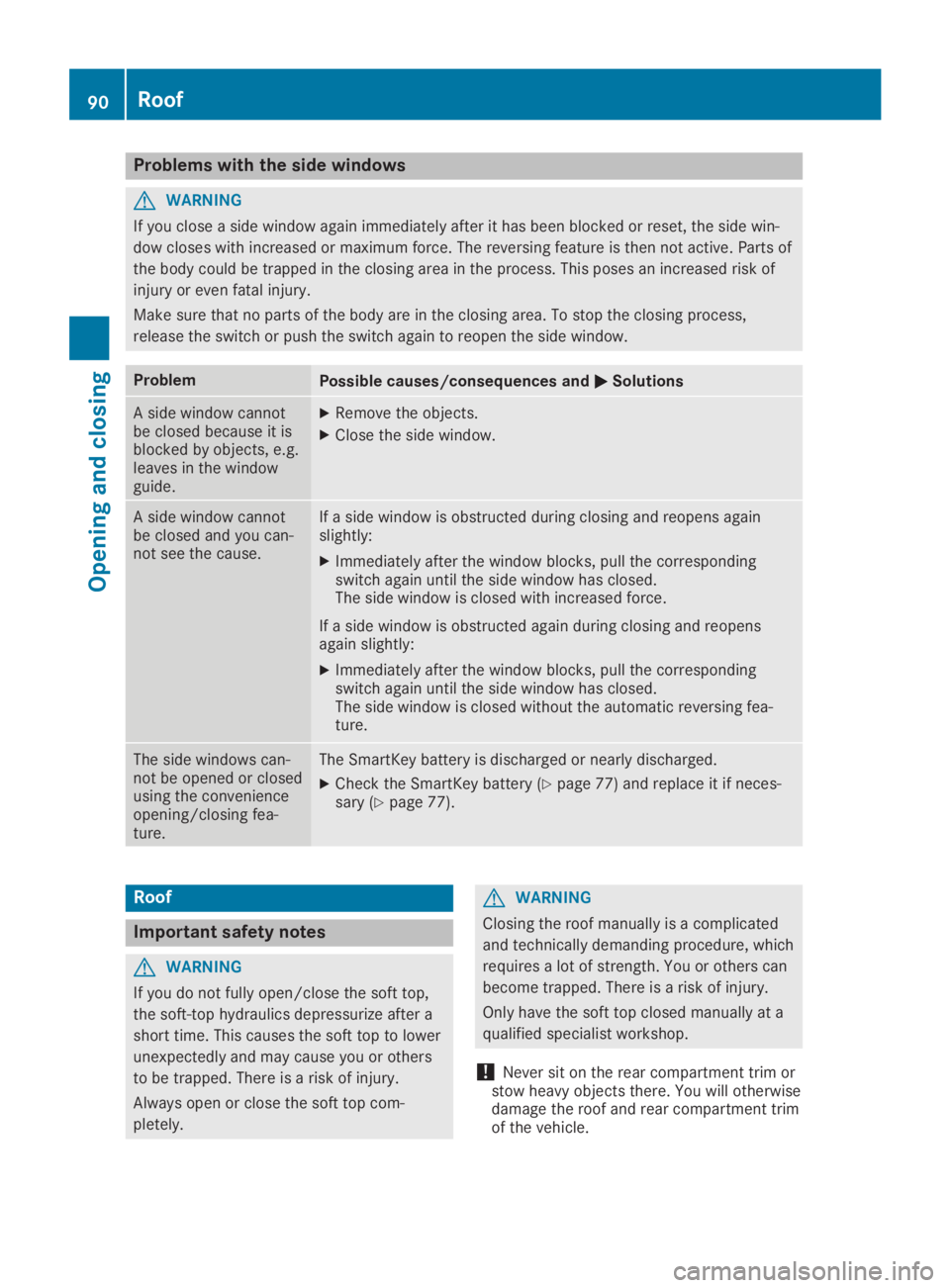
Problems with the side windows
GWARNING
If you close a side window again immediately after it has been blocked or reset, the side win-
dow closes with increased or maximum force. The reversing feature is then not active. Parts of
the body could be trapped in the closing area in the process. This poses an increased risk of
injury or even fatal injury.
Make sure that no parts of the body are in the closing area. To stop the closing process,
release the switch or push the switch again to reopen the side window.
ProblemPossible causes/consequences andPPSolutions
A side window cannotbe closed because it isblocked by objects, e.g.leaves in the windowguide.
XRemove the objects.
XClose the side window.
A side window cannotbe closed and you can-not see the cause.
If a side window is obstructed during closing and reopens againslightly:
XImmediately after the window blocks, pull the correspondingswitch again until the side window has closed.The side window is closed with increased force.
If a side window is obstructed again during closing and reopensagain slightly:
XImmediately after the window blocks, pull the correspondingswitch again until the side window has closed.The side window is closed without the automatic reversing fea-ture.
The side windows can-not be opened or closedusing the convenienceopening/closing fea-ture.
The SmartKey battery is discharged or nearly discharged.
XCheck the SmartKey battery (Ypage 77) and replace it if neces-sary (Ypage 77).
Roof
Important safety notes
GWARNING
If you do not fully open/close the soft top,
the soft-top hydraulics depressurize after a
short time. This causes the soft top to lower
unexpectedly and may cause you or others
to be trapped. There is a risk of injury.
Always open or close the soft top com-
pletely.
GWARNING
Closing the roof manually is a complicated
and technically demanding procedure, which
requires a lot of strength. You or others can
become trapped. There is a risk of injury.
Only have the soft top closed manually at a
qualified specialist workshop.
!Never sit on the rear compartment trim orstow heavy objects there. You will otherwisedamage the roof and rear compartment trimof the vehicle.
90Roof
Opening and closing
Page 110 of 330
When leaving the vehicle, always take the
SmartKey with you and lock the vehicle. This
also applies for the Digital Vehicle Key if the
"Digital Vehicle Key" function is activated via
Mercedes me connect.
The memory function can be activated at anytime, e.g. even when the SmartKey is not inthe ignition lock.
With the memory function, you can store up tothree different settings, e.g. for three differentpeople.
The following settings are stored as a singlememory preset:
RPosition of the seat, backrest and headrestraint
RDriver's side: steering wheel position
RDriver's side: position of the exterior mirrorson the driver's and front-passenger sides
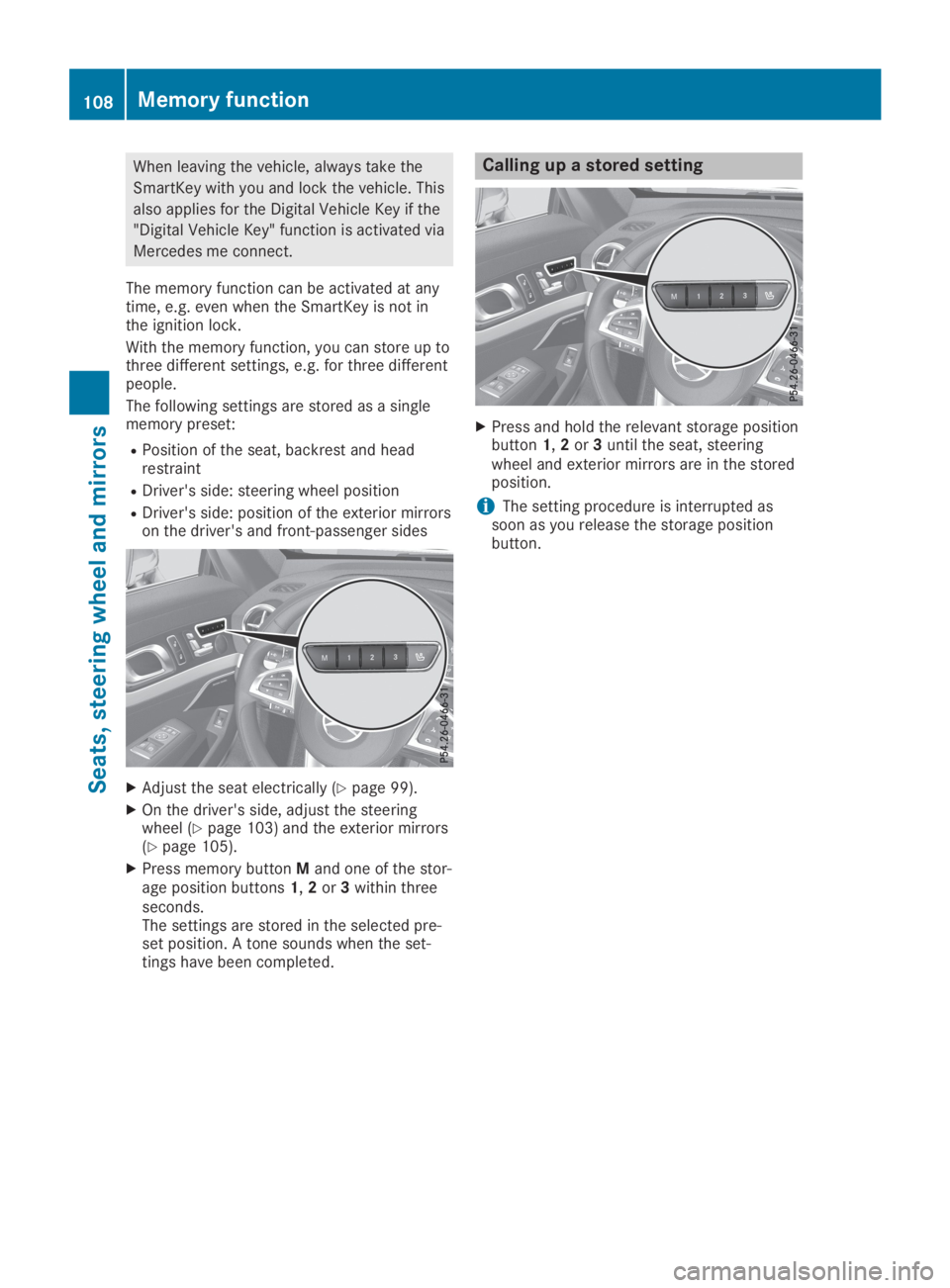
XAdjust the seat electrically (Ypage 99).
XOn the driver's side, adjust the steeringwheel (Ypage 103) and the exterior mirrors(Ypage 105).
XPress memory buttonMand one of the stor-age position buttons1,2or3within threeseconds.The settings are stored in the selected pre-set position. A tone sounds when the set-tings have been completed.
Calling up a stored setting
XPress and hold the relevant storage positionbutton1,2or3until the seat, steeringwheel and exterior mirrors are in the storedposition.
iThe setting procedure is interrupted assoon as you release the storage positionbutton.
108Memory function
Seats, steering wheel and mirrors
Page 195 of 330
Menus and submenus
Menu overview
Using theYorebutton on the steeringwheel, open the menu bar.
Operating the on-board computer(Ypage 191).
Depending on the vehicle equipment, you canselect the following menu:
RTripTripmenu (Ypage 193)
RNaviNavimenu (navigation instructions)(Ypage 194)
RAudioAudiomenu (Ypage 195)
RTelTelmenu (telephone) (Ypage 196)
RDriveAssistDriveAssistmenu (assistance)(Ypage 197)
RServ.Serv.menu (Ypage 199)
RSett.Sett.menu (settings) (Ypage 199)
RAMGAMGmenu (Mercedes-AMG vehicles)(Ypage 202)
Trip menu
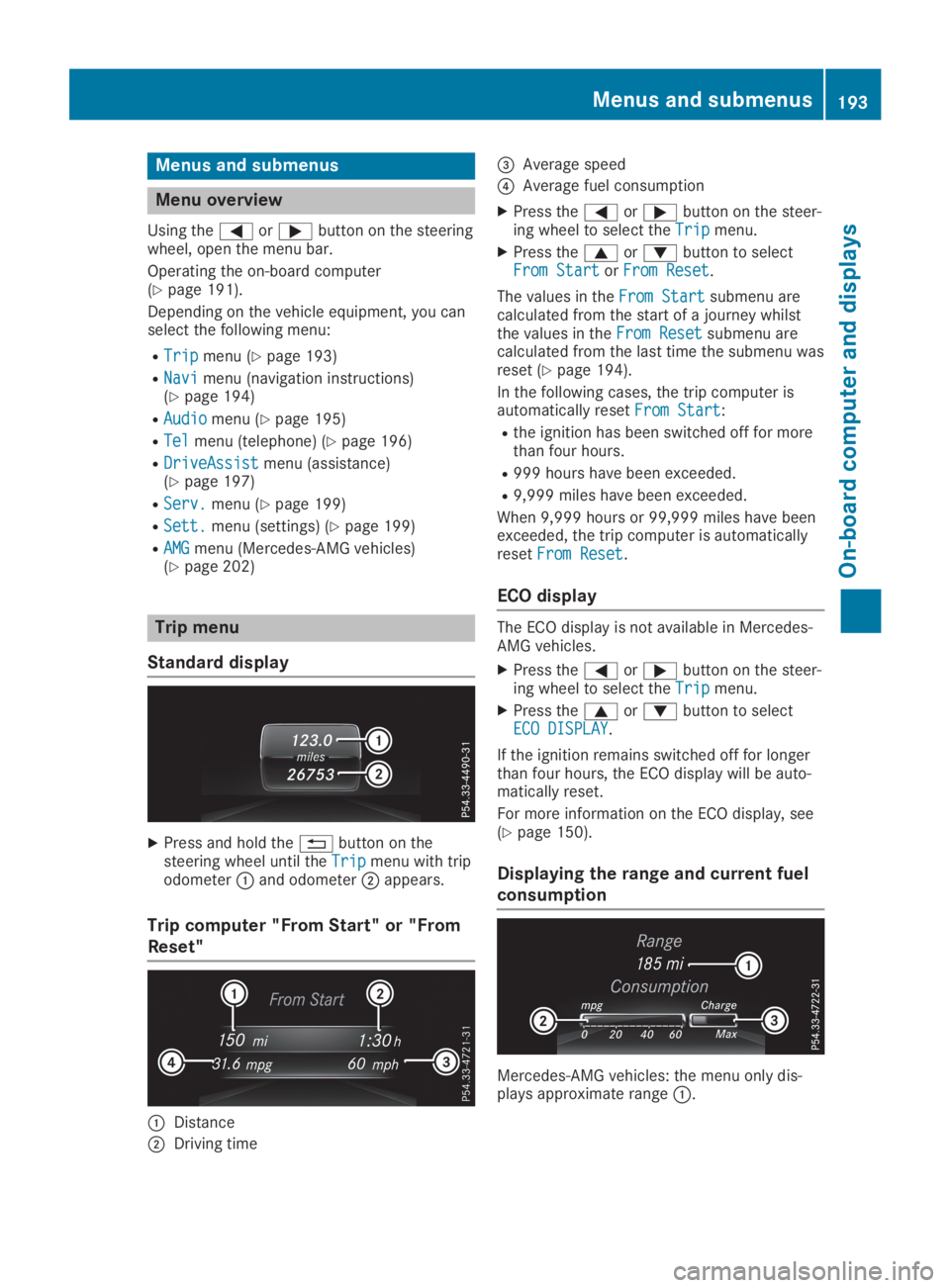
Standard display
XPress and hold the8button on thesteering wheel until theTripTripmenu with tripodometerCand odometerDappears.
Trip computer "From Start" or "From
Reset"
CDistance
DDriving time